Connect with us
DAPA Banner
DAPA Coin
DAPA
COIN PAYMENT ASSET
PRIVACY · BLOCKDAG · HOMOMORPHIC ENCRYPTION · RUST
ElGamal Encrypted MINE DAPA
🚫 GENESIS SOLD OUT
DAPAPAY COMING

Tech

Dublin’s Ubotica partners with Novi for real-time orbital data analysis

Published

on

Ubotica will deploy and operate AI models directly in orbit using Novi’s smart-satellite constellation.

Dublin-based NASA and the European Space Agency collaborator, Ubotica, is partnering with Texas’ Novi Space to deliver real-time intelligence from the Earth’s orbit.

Novi provides computing technology for spacecrafts, alongside a constellation of multi-sensor edge-processing satellites linked to an intelligence management platform.

The open-access platform allows companies to build AI-powered applications in space, including improving Earth observation, geospatial intelligence and autonomy.

Advertisement

The collaboration integrates Ubotica’s AI platform with Novi’s ‘Genie’ smart-satellite constellation and platform to enable Earth observation data to be processed directly onboard satellites, unlike traditional systems that transfer data to Earth before analysis.

Through the partnership, Ubotica will deploy and operate AI models directly in orbit through the Genie multi-sensor satellite platform.

The Dublin start-up’s ‘Space:AI’ platform generates analysis within 90 seconds from when it begins processing, it said, resulting in lower latency and bandwidth costs translating to savings.

According to the company, in a single observation of a Singapore port, the platform processed hundreds of vessels and detected those operating dark in under two minutes. The company has deployed its AI capabilities on numerous missions, including its own CogniSAT-6 satellite.

Advertisement

“Our collaboration with Novi brings more AI-enabled Earth observation capacity into orbit. By combining Space:AI with Genie’s onboard compute, we’re shifting satellites from data collectors to intelligent agents, delivering insights in minutes rather than days,” said Ubotica co-founder and chief technology officer Dr Aubrey Dunne.

“That capability underpins our live maritime intelligence service and unlocks new operational models for time-critical surveillance.” The start-up won the SpaceNews Icon Award for Space AI Partnership last December, alongside NASA JPL and Open Cosmos.

Michael Bartholomeusz, the CEO of Novi Space added: “Partnering with Ubotica allows us to demonstrate the full potential of Genie – delivering real-time intelligence from orbit, not just data. This is a fundamental shift in how space-based systems create value.”

Ubotica and NASA announced a partnership last month to onboard the start-up’s AI platforms in a test mission to demonstrate autonomous intelligent satellite networks. In February, the company was among the first chosen for involvement in Ireland’s European Space Agency Phi-Lab at Irish Manufacturing Research.

Advertisement

Don’t miss out on the knowledge you need to succeed. Sign up for the Daily Brief, Silicon Republic’s digest of need-to-know sci-tech news.

Source link

Advertisement
Continue Reading
Click to comment

You must be logged in to post a comment Login

Leave a Reply

Tech

Terramaster F4-425 Pro review: Cost, specs, performance

Published

on

The TerraMaster F4-425 Pro is a compact four-bay NAS that punches above its price class, with an eight-core Intel chip, three M.2 slots, and dual 5GbE networking, at the cost of a few real but manageable caveats.

NAS devices have evolved well beyond simple network drives. They now run media servers, security camera systems, and containerized apps, all from one box on the home or office network.

TerraMaster pitches the F4-425 Pro squarely at that all-in-one role. It pairs a decently powerful Intel chip with unusually flexible storage for the class and price point.

I reviewed the smaller two-bay F2-425 in late 2025. The F4-425 Pro sits above it with more bays, a faster processor, a triple M.2 design, and upgraded system software.

Advertisement

TerraMaster F4-425 Pro review: Specifications

Advertisement

Advertisement

Advertisement

Advertisement

Advertisement

CPU As reviewed, Intel N305 (8 cores, 8 threads)
CPU max frequency 3.8GHz burst
Graphics Integrated Intel Graphics
Hardware encryption AES-NI
Transcoding H.264, H.265, MPEG-4, VC-1, up to 4K at 60fps
RAM (standard) 8GB non-ECC SODIMM (1 slot)
Max RAM 32GB non-ECC SODIMM
Drive bays 4 x SATA (3.5-inch or 2.5-inch HDD, 2.5-inch SSD)
Max SATA capacity 30TB per bay (120TB raw across four bays)
M.2 slots 3 x M.2 2280 NVMe (PCIe 3.0 x1, up to 8TB each)
Max total capacity 144TB
RAID modes TRAID, Single, JBOD, RAID 0, 1, 5, 6, 10
Ethernet 2 x 5GbE RJ-45
USB-A ports 3 x USB 3.2 Gen2 (10Gbps)
USB-C ports 1 x USB 3.2 Gen2 (10Gbps)
Video out 1 x HDMI (management only)
Operating system TOS (TerraMaster OS)
Dimensions 5.9 by 7.1 by 8.6 inches
Weight 6.4 pounds
Power supply 90W external
Noise level 20.9 dBA (idle, per TerraMaster)
Warranty 2 years

TerraMaster F4-425 Pro review: Design

The F4-425 Pro uses a two-tone enclosure, with a black drive-bay face set against a silver body. The four bays are accessed from the front, with tool-free trays for installation.

It measures 5.9 by 7.1 by 8.6 inches and weighs 6.4 pounds without drives. That is a compact footprint for a four-bay unit with this much expansion inside.

Advertisement

Build quality is solid. On NAS devices in this class from other vendors, we’ve seen stripped screws and imprecise material line-up. As with the rest of Terramaster’s products, this is not the case.

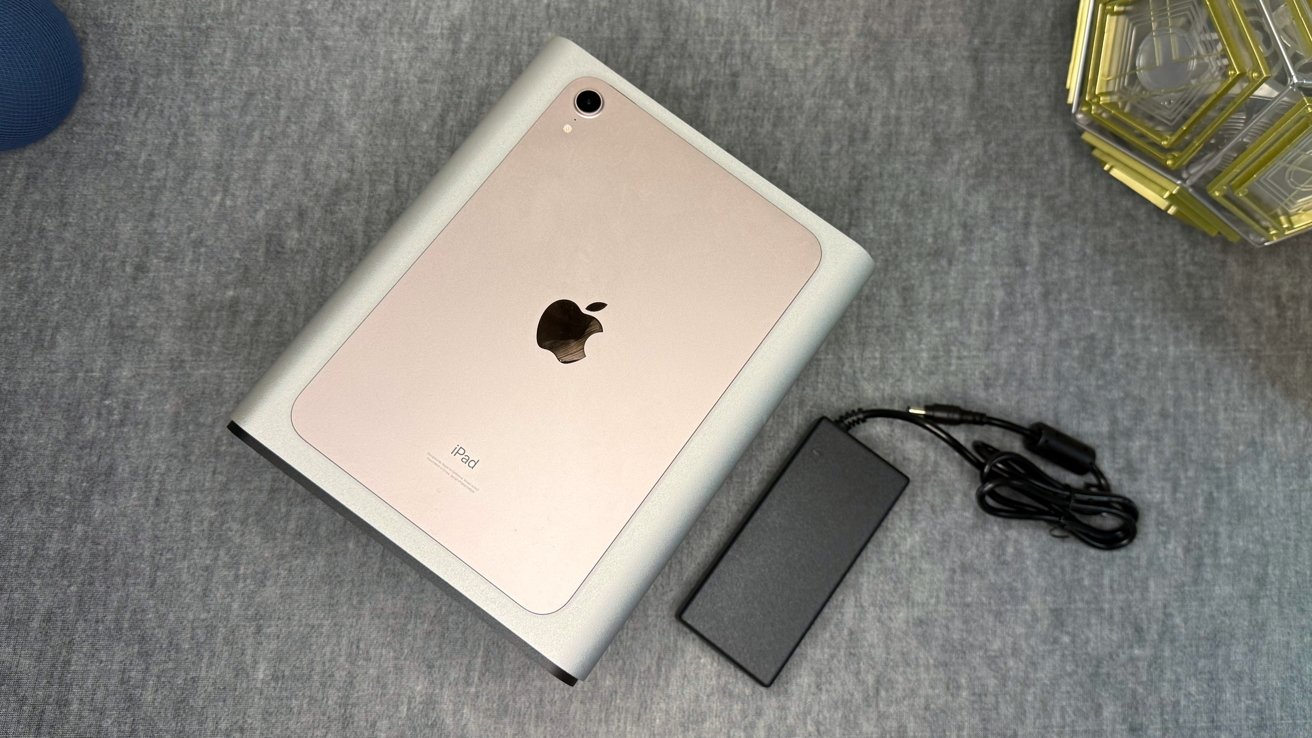
Rose gold iPad resting on a gray surface, partially slid into a silver stand or dock, with a black rectangular power adapter and cord placed to the right

TerraMaster F4-425 Pro review: iPad for scale

The front carries a power button, a USB port, and status indicators. A single 120mm fan sits at the rear, with several speed modes available in software.

TerraMaster rates idle noise at 20.9 decibels, measured with four drives in standby. Real-world noise under load is higher and depends on the drives fitted.

Advertisement

We tested the unit with four 4TB Seagate Red drives. We also used four 24TB WD Red Pro, that retail on Amazon with a price that seems to vary by day.

Under load, which is mostly drive chatter, the unit hit about 39 decibels one meter away with either drive array. Good enough.

TerraMaster F4-425 Pro review: Storage and the triple M.2 design

The headline storage feature is the three M.2 NVMe slots, which is unusual for a four-bay NAS. Most competitors offer one or two.

Each M.2 slot supports up to 8TB, and the four SATA bays each take drives up to 30TB. TerraMaster lists a maximum total capacity of 144TB across all seven drives.

Advertisement

There is an inconsistency in TerraMaster’s own materials worth noting. The datasheet text claims 144TB total, while the specification table lists the SATA bays at 120TB raw and the M.2 slots separately, which only reach 144TB when both are combined.

Silver external hard drive enclosure lying on gray fabric, top cover removed to reveal black internal mounting frame with white hexagonal and rectangular pads inside

TerraMaster F4-425 Pro review: Simple but functional drive sleds.

The three M.2 slots can be set up as a RAID 5 array. This is a genuinely useful option, allowing a fast SSD pool with redundancy separate from the main hard drive bays.

One caveat sits in the spec sheet. The M.2 slots run at PCIe 3.0 x1, which is a single lane each. That limits the peak speed of each SSD well below what a typical Gen3 x4 NVMe drive can deliver. This is fine, as one drive at the x1 allocation is still about 6 gigabits per second read and write.

Advertisement

We’ve said it before, we’ll say it again. M.2 storage in a 10-gigabit Ethernet NAS is overkill. It’s super-overkill here with 5 gigabit Ethernet, which can be saturated with the hard drives in a striped RAID.

For RAID across the main bays, the unit supports the full range from JBOD up to RAID 10. It also offers TRAID, TerraMaster’s flexible array system that mixes redundancy with easier capacity expansion, similar in concept to Synology’s Hybrid RAID.

TRAID is solid enough, assuming you’re going to stick with Terramaster hardware if you ever upgrade. It works the way it says it will, with easy, albeit time-consuming, addition of drives to the enclosure.

TerraMaster F4-425 Pro review: Connectivity

Networking is handled by two 5-gigabit Ethernet ports. This is an unusual middle ground, sitting above the common 2.5GbE but below the 10GbE found on higher-end units.

Advertisement

The two ports support link aggregation and bonding. TerraMaster claims real-world write speeds up to 1010 MB/s when combined with SMB Multichannel. We didn’t quite see that, even with three SSDs.

On a dedicated wired to wired network between the F4-425 Pro and a M1 Ultra Mac Studio with link aggregation, we saw about 800 megabytes per second. Close enough.

Compact silver external computer enclosure with a black front panel, large cooling fan, and multiple USB and audio ports, resting on a gray fabric surface indoors

TerraMaster F4-425 Pro review; A rear view.

For external connections, there are three USB-A 3.2 Gen2 ports and one USB-C 3.2 Gen2 port, all rated at 10Gbps. These handle external drives, backups, and direct media imports.

Advertisement

An HDMI port is present, but TerraMaster states it is for displaying system management output rather than media playback. This is a notable limitation for anyone hoping to use it as a direct-attached media player.

For Mac users, TOS supports Time Machine backups over the network. Setup is simple, with old instructions that still work here.

The F4-425 Pro also supports AFP and SMB, both of which macOS handles natively.

TerraMaster F4-425 Pro review: Processor and memory

The F4-425 Pro runs an Intel N305, an eight-core, eight-thread chip that bursts up to 3.8GHz. This is a strong processor for a NAS in this class, well above the budget chips common at this size.

Advertisement

The chip includes integrated graphics with hardware transcoding for H.264, H.265, MPEG-4, and VC-1, up to 4K at 60fps. That makes it well suited to running Plex, Emby, or Jellyfin media servers.

Using a Plex server across our local network, we were able to transcode five 4K streams to 1080p without frame loss. Pretty good.

Horizontal bar chart titled Geekbench Single-Core Benchmarks comparing three devices: TerraMaster F4-425 Pro scores 1,313; M1 Mac mini scores 2,367; M4 Mac mini scores 3,768.

Geekbench single-core results for the TerraMaster F4-425 Pro and the M1 and M4 versions of Mac mini.

To be fair, we never really expect that much in terms of performance from a NAS. The exceptions are when the NAS is intended to perform double-duty with server applications as well as being a storage appliance.

Advertisement

Under Geekbench, the F4-425 Pro manages a 1,313 single-core score. It’s certainly not going to fare well against the M4 Mac mini or even the M1 Mac mini, but it’s still capable of performing tasks.

Horizontal bar chart of Geekbench multi-core scores: TerraMaster F4-425 Pro 4,702; M1 Mac mini 8,445; M4 Mac mini 14,727, showing M4 Mac mini far outperforming the others

Geekbench multi-core results for the TerraMaster F4-425 Pro and the M1 and M4 versions of Mac mini.

It’s a similar story when we turn to multi-core testing. Yes, the TerraMaster gets to 4,702 in Geekbench, but the M1 Mac mini scores twice as much.

These graphs are not to mock the F4-425 Pro. Instead, they are here to praise it.

Advertisement

Do not expect blistering-fast server performance from a NAS except in rare circumstances, on hardware that rivals a MacBook Pro in cost. But here, it’s certainly got the grunt to get things done in the background.

As with most “pro”-grade NAS devices, Docker containers are one of the best ways to extend what this hardware can do. The RAM is a bit of a constraint here, with the new TOS 7 taking up about 3GB of that in daily use.

Memory is where the unit shows a limit. It ships with 8GB of DDR4 in a single SODIMM slot, expandable to 32GB, but it is non-ECC and there is only one slot.

The single memory slot means upgrading requires replacing the existing module rather than adding to it. The lack of ECC is normal at this price, but worth noting for users storing critical data.

Advertisement

TerraMaster F4-425 Pro review: Software, AI, and TOS

The F4-425 Pro runs TerraMaster’s TOS operating system. TerraMaster heavily promotes TOS 7 as “the world’s first AI-native NAS operating system,” built around natural-language control. The marketing claims are extensive, describing voice and text commands handling over 90% of operations.

Sure. It can help, but in testing, the natural-language controls worked for basic tasks but did not meaningfully reduce setup complexity. And, I think uGreen beat them to the punch with the world’s first AI-native NAS operating system,

TerraMaster’s on-device photo AI remains usable but not a reason to switch away from Apple Photos or Google management.

The more grounded app story is strong. TOS supports Docker, virtual machines via VirtualBox, and a wide range of apps including Plex, Emby, and the major download clients.

Advertisement

A built-in Surveillance Manager app connects to ONVIF-standard IP cameras for local recording and playback. This works fine, but is otherwise unremarkable. Most won’t use the app.

TerraMaster F4-425 Pro review: A feature-rich box with caveats to verify

The F4-425 Pro packs an unusual amount into a compact four-bay NAS. The eight-core Intel chip, triple M.2 slots, and dual 5GbE networking are all strong for the class.

Its closest internal reference point is the smaller F2-425 that I reviewed previously. The F4-425 Pro scales that up with more bays, more M.2 expansion, and a more capable processor.

Small black network device with a large circular cooling fan on top, Ethernet ports, USB ports, and status icons along the left side, sitting on a gray surface

TerraMaster F4-425 Pro review: The rear ports and fan

Advertisement

The cautions are mostly around marketing versus reality. The AI claims are bold, the PCIe 3.0 x1 M.2 lanes limit SSD speed, and the single non-ECC memory slot caps expansion. This is all okay for the price point and the target user.

For Apple households, TOS handles Time Machine, AFP, and SMB, and the strong media transcoding suits a Plex or Infuse setup. It is not an Apple product, but it slots into an Apple home network without trouble.

TerraMaster F4-425 Pro Pros

  • Eight-core Intel N305 with 4K transcoding
  • Three M.2 slots, configurable as RAID 5
  • Dual 5GbE networking

TerraMaster F4-425 Pro Cons

  • M.2 slots limited to PCIe 3.0 x1
  • Single, non-ECC memory slot
  • HDMI is management-only, not for media playback

Rating: 4 out of 5

The TerraMaster F4-425 Pro is a solid piece of hardware, that performs well enough. The RAM is a constraint, but only if you’re planning on running a lot of services from the box.

It’s not the fastest NAS, it doesn’t have the largest potential capacity of units we’ve reviewed. What it does is deliver a solid hardware and software package at a fair price, with no roadblocks for Apple hardware users.

Where to buy the TerraMaster F4-425 Pro

The TerraMaster F4-425 Pro is priced at $639.99 from TerraMaster’s online store with 16GB of memory, down 20% from $799.99. Its 8GB memory variant is available for $559.99, again discounted from $699.99.

Advertisement

It is also available from Amazon, with the 8GB at $699.99 and the 16GB at $799.99. Again, a 20% coupon is available at the time of publication, making the prices comparable to TerraMaster’s online store.

Source link

Advertisement
Continue Reading

Tech

Tencent moves to sell up to $1.6B of its Kuaishou stake

Published

on

TL;DR

Tencent is selling about 273 million Kuaishou shares (a 7.5% stake) in a block trade worth up to $1.55-1.6bn, cutting its holding to roughly 9.37% from 15.68%. The selldown lands just after Tencent helped fund Kuaishou’s Kling AI spinoff, reading as a rotation from mature short video into generative AI.

Tencent is seeking up to $1.6bn by selling down its stake in short-video platform Kuaishou, Bloomberg reports. A term sheet seen by Reuters puts the block trade at up to $1.55bn.

Advertisement

The deal covers about 273 million shares, a 7.5% stake, offered at HK$43.15 to HK$44.53 each. That represents a discount of 3.2% to 6.2% to Monday’s close in Hong Kong.

The sale cuts Tencent’s holding in its long-time ally from 15.68% to about 9.37%, and Kuaishou confirmed the off-market disposal in an exchange filing. Kuaishou has meanwhile pressed ahead with its own share buybacks.

The 💜 of EU tech

The latest rumblings from the EU tech scene, a story from our wise ol’ founder Boris, and some questionable AI art. It’s free, every week, in your inbox. Sign up now!

Advertisement

Tencent has form here, having trimmed or distributed stakes in JD.com and Meituan in recent years when it judged the holdings mature. It remains one of the most consequential balance sheets in Chinese tech.

Selling the app, backing the AI

The timing is pointed, since the selldown comes shortly after Tencent joined a $2.8bn financing for Kling AI, Kuaishou’s generative video unit. Kling raised an initial $2bn as Kuaishou spun it off at a valuation of about $18bn.

That round became a geopolitical flashpoint when General Atlantic sought to lead it just as Beijing pushed its AI firms to refuse US money. Chinese investors, Tencent among them, filled the gap.

The trade reads as a rotation out of the mature short-video business and into the AI layer growing on top of it. Kuaishou’s home market is fertile ground, with China’s $16.5bn micro-drama industry becoming the first mass application of AI-generated video.

Advertisement

Tencent’s ties to Kuaishou stretch back through years of jointly fighting ByteDance for short-video attention. And it has plenty of other calls on its capital, including a reported $3bn domestic memory deal with CXMT as it builds out AI infrastructure.

For Kuaishou, a shrinking anchor investor stings less when that investor is simultaneously funding its future. Tencent is not leaving the table, it is changing seats.

Source link

Advertisement
Continue Reading

Tech

Vertere Phono-1 LX MM/MC Phono Preamp Brings Lower Noise and Greater Control to Vinyl Playback

Published

on

Vertere has upgraded its Phono-1 phono preamp line with the $2,399 Phono-1 LX, a new MM/MC phono stage that replaces the Phono-1 MKII L. The core RIAA circuit remains intact, but the supporting hardware has been given serious attention: a revised gold-plated PCB, upgraded internal DC power supply, improved AC input filtering, and a simpler two-way earthing switch. None of that sounds especially glamorous until you remember that a phono cartridge produces a microscopic signal and every bit of hum, RF interference, or power-supply noise is waiting nearby with a sharpened knife.

Founded in the UK by Roksan co-founder Touraj Moghaddam, Vertere has built its reputation around treating analog playback as a chain of mechanical and electrical problems worth solving properly. eCoustics’ coverage of the Vertere DG-X turntable found the same approach in its motor drive, bearing, power supply, and resonance-control work. The Phono-1 LX applies that philosophy to the space between cartridge and amplifier, where quieter power, better grounding, and more careful filtering can matter as much as the turntable itself.

Related Reviews: Muarah MU-2 Phono Preamplifier Review: The Audiophile System Builder

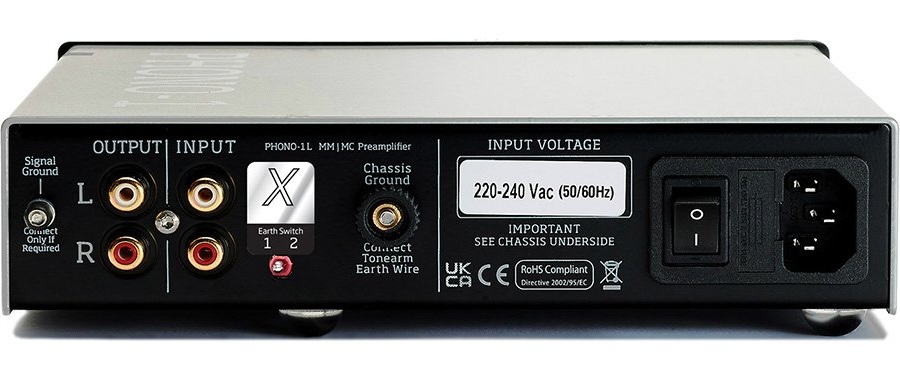
vertere-phono-1-lx-rear
Vertere Phono-1 LX (rear)

Connections: The Phono-1 LX keeps connectivity relatively simple, with single-ended RCA inputs, stereo RCA line outputs, and grounding terminals. It supports both moving magnet and moving coil cartridges, but there are no balanced XLR outputs. At this price, that will feel like a missed opportunity for listeners whose preamplifiers or integrated amplifiers offer balanced inputs. Vertere has clearly prioritized cartridge matching and noise control over connection flexibility.

Advertisement

Earthing Switch: Vertere has replaced the previous grounding arrangement with a new two-way earthing switch that toggles between “Earth Lift” and “Earth Connection.” The company says the revised design is easier to operate and intended to provide a longer service life, while giving owners a straightforward way to address grounding issues within their own system.

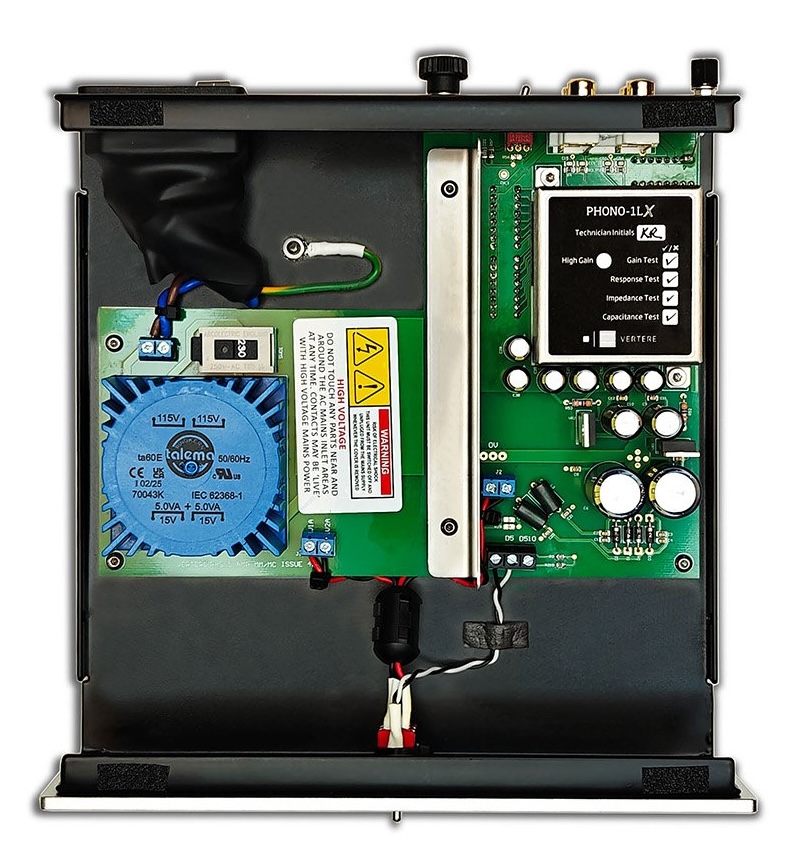
Clean and Silent Power: The Phono-1 LX uses a revised AC input with additional filtering intended to prevent high-frequency and RF interference from entering the circuit. That works alongside an upgraded internal DC power supply designed to deliver cleaner, more consistent power to the phono stage. Vertere says the result is a quieter background and greater access to low-level detail buried in the groove.

Internal Circuitry: A new gold-plated PCB is intended to improve soldering consistency and long-term reliability across the circuit. Better construction and more careful grounding are exactly the kind of details that matter when a phono stage is amplifying an extremely low-level cartridge signal.

Cartridge Matching: The Phono-1 LX offers 10 gain settings, 15 resistance values, and nine capacitance options for more precise matching with moving magnet and moving coil cartridges. That gives owners meaningful flexibility when changing cartridges or dialing in an existing setup.

Advertisement

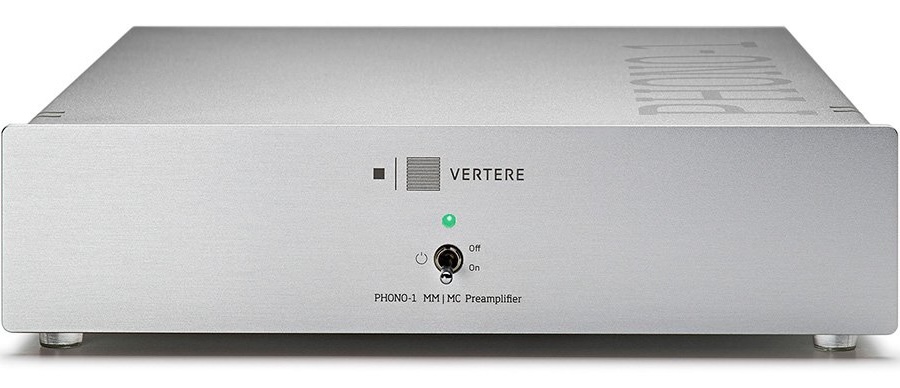
Power Indicator: The Phono-1 LX adds a blue-green power indicator LED that visually aligns it with the Vertere DG X, Tempo, Imperium, and CALON. It is a small detail, but it gives the phono stage a more consistent identity within the wider Vertere range.

Chassis and Cover: Vertere has fitted the Phono-1 LX with a new cover finished in fine-textured metallic silver. The update gives the unit a more refined appearance and a more tactile finish than the earlier model. Vertere has also eliminated the four top-mounted fixing screws, creating a cleaner, uninterrupted surface that brings the design closer to the company’s CALON phono preamplifier.

vertere-phono-1-lx-inside
Vertere Phono-1 LX (inside)

Comparison

Vertere Acoustic Model  Phono-1 LX Phono-1 MKII / MKII L
Product Type  Phono Preamp Phono Preamp
Price $2,399 $1,995
Circuitry  Precision Components | Gold-Plated PCB  Gold-plated, L-shaped circuit board that moves the linear power supply directly to the main PCB for vastly optimized grounding and lower impedance 
Power Supply  Linear, Int. Switchable 
Ultra Low Noise | Encapsulated Transformer 
Internal linear power supply 
Gain Settings  40 dB to 63 dB in 12 Steps
High Gain version – Add 6.4 dB to all settings 
40.2 dB to 62.8 dB in 12 Steps
High Gain version – Add 6.4 dB to all settings 
Resistance  47k for MM;
78R to 47K for MC – In 14 Steps
47k for MM;
78R to 47K for MC in 14 Steps
Capacitance  100pF & 430pF for MM

100pF to 1.02uF for MC – In 9 Steps

100pF & 430pF for MM 
Advertisement

100pF to 1.02uF for MC – In 9 Steps

Frequency Response  20Hz – 20kHz +/- 0.2dB  20Hz – 20kHz +/- 0.2dB 
Noise  <-78dB – AWD  <-78dB – AWD
THD+N  0.009% – @ 1V  < 0.03%
Finish  Orange, Silver, Black & Black Acrylic DG Style  Orange, Silver, Black 
Idle Power Consumption  1.7 Watts  Not Indicated
Dimensions (WHD) 210 x 240 x 55 mm 235 x 55 x 235 mm
Weight  2.2 kg (4.9 lbs) 1.8 kg (4 lbs)
vertere-phono-1-lx-silver
Vertere Phono-1 LX

The Bottom Line 

The Vertere Phono-1 LX is not aimed at casual vinyl listeners looking to replace the phono input inside an affordable integrated amplifier. At $2,399, it is intended for high performance analog systems with a turntable, tonearm, and cartridge capable of exposing the benefits of lower noise, more precise loading, and better system grounding.

Advertisement. Scroll to continue reading.

Its strongest appeal will be to owners of Vertere turntables such as the DG X and DG-1S, particularly those using the company’s XtraX moving coil or Dark Sabre moving magnet cartridges. The broader adjustment range should also make it a credible option for listeners using cartridges from other manufacturers, provided the rest of the system is sufficiently revealing. The Phono-1 LX is less about adding a long list of headline features than refining the electrical environment around a very small cartridge signal.

The competition is not gentle. The $2,495 MoFi UltraPhono Pro offers front-panel gain and loading controls, balanced and single-ended outputs, a mono switch, subsonic filter, and a more overtly feature-rich approach. The $2,899 Cyrus 40 PPA goes further still with four configurable inputs, balanced and RCA outputs, remote control, level meters, a warp filter, and an optional external power-supply upgrade. Gold Note’s PH-10 is another serious rival for listeners who want balanced outputs, selectable EQ curves, and two independently configurable inputs.

Advertisement

The Muarah MU-2 remains the more characterful alternative for listeners who want tube-based circuitry, easy loading changes, and a fuller, warmer tonal balance. Its RCA-only connections and lower 56dB MC gain, however, make it a less natural fit for very low-output moving coil cartridges.

Price & Availability

The Vertere Phono-1 LX comes in four finishes: silver, orange, black, and black acrylic, with a price of $2,399 (£1650 / AU$3250) through Authorized Dealers.

For more information: vertereacoustics.com

Advertisement

Source link

Continue Reading

Tech

Amazon Prime Day power bank deals Australia 2026

Published

on

I’m a bit of a nerd when it comes to portable charging. I love testing the many power banks, USB-C chargers and newer Amazon brands available to see whether they can really do what they claim, and how well they hold up day to day.

Since most of us need a spare power bank, wall charger or cable sooner or later, these products are always worth checking during Amazon’s Prime Day sales.

With Prime Day 2026 now underway in Australia, I’ve rounded up my favourite power bank and charger deals below.

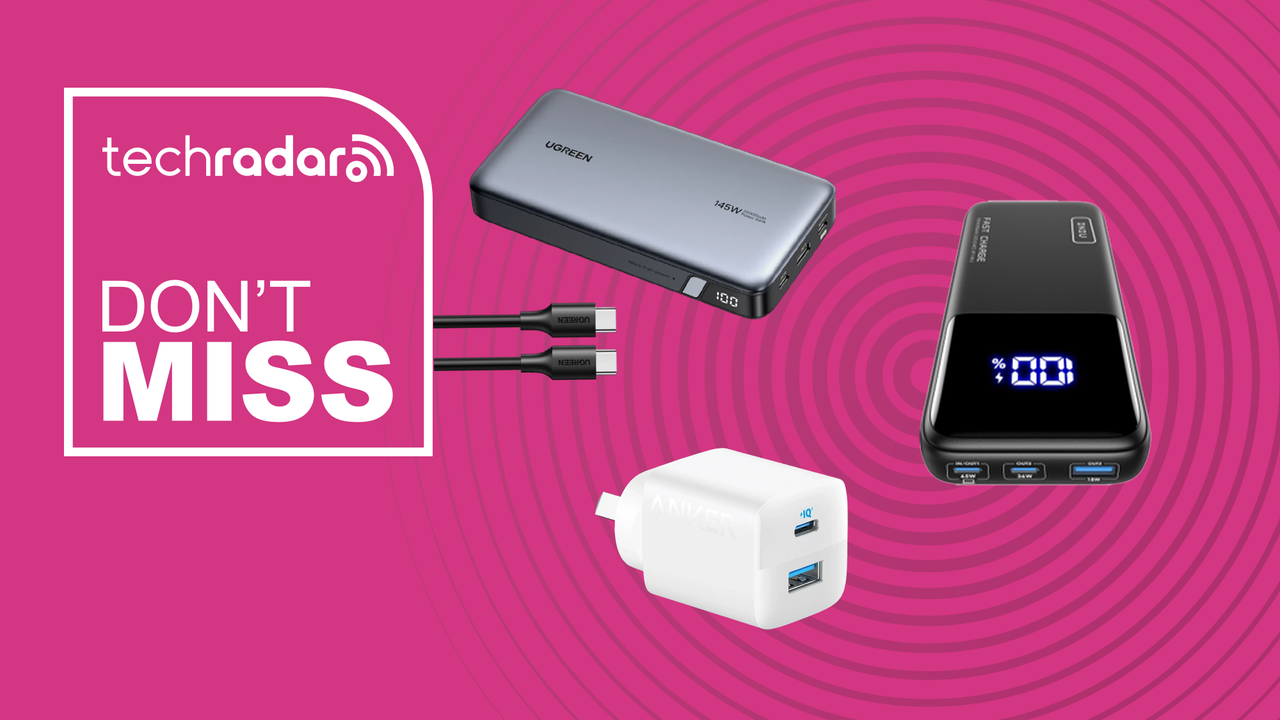
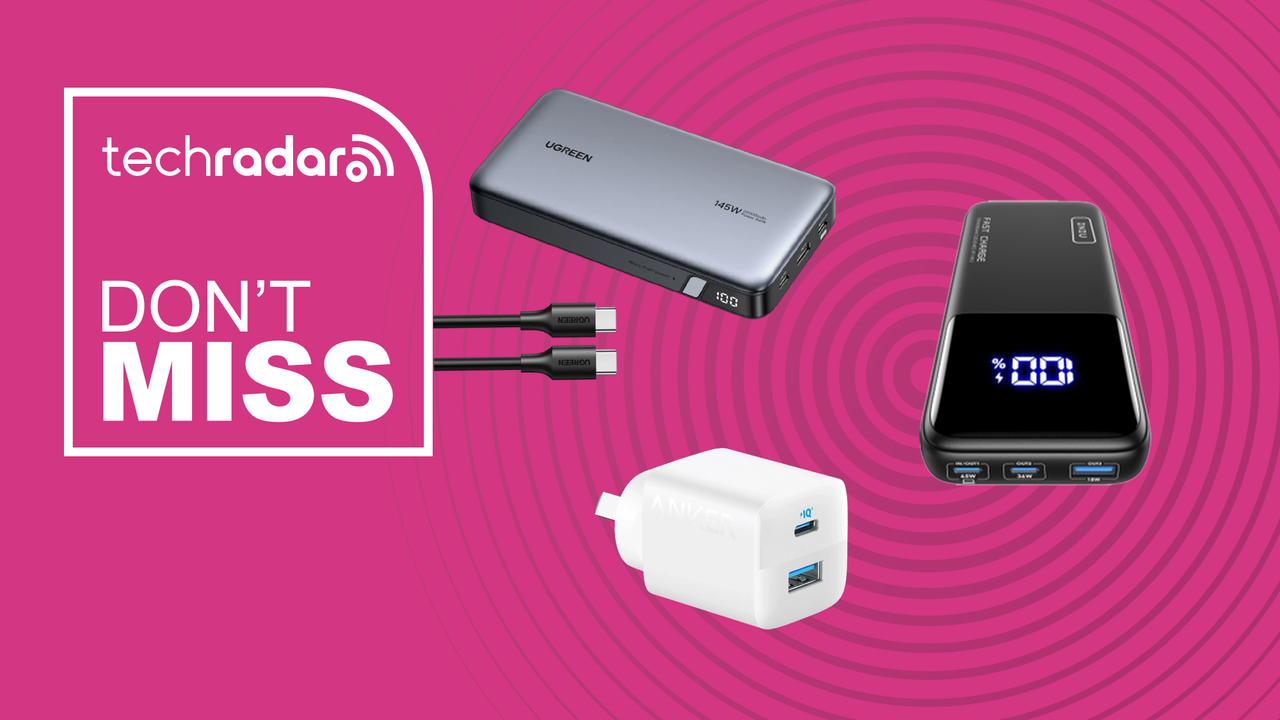
Many of these are the same models I recommend in my best power banks guide, including picks from Iniu, Anker, ZMI, Ugreen and more.

Advertisement

Based on my testing, there are also a few Amazon charging brands I’d be cautious about — including Veektomx, Charmast and Heymix — with the latter having some rather worrying reviews.

All the deals below are Exclusive Prime prices, so if you don’t have membership already, sign up now and get a 30-day free trial that you can cancel any time.

Best Prime Day power bank deals

Advertisement

Best Prime Day charger and cable deals


More Amazon Prime Day deals in Australia

Source link

Advertisement
Continue Reading

Tech

Google Will Now Count All Android Backup Data Toward Your Storage Cap

Published

on

Fortunately, it shouldn’t take too much extra space.

This week will see a shift in the calculations Google uses for account storage. Beginning July 7, all data in your Android backups will count toward the storage limit on your Google account. Under the company’s previous approach to backups, only media uploaded to Google Photos and photos or videos within MMS data were counted against that storage cap. This rule will apply right away to new Android users, while current users will see the change roll out in the coming months.

“Android backup lets you save the data on your phone to your Google Account so you can easily restore it or set up a new device,” a spokesperson from the company told Engadget. “We’ve updated our policy so that all Android backup data now counts toward Google Account storage. We expect this to only add 40MB on average. We’re also giving you more transparency and new controls that let you select which data and apps you want to back up.”

Those controls will be accessible under the hardware’s backups menu. You can skip device settings, call history, or SMS and MMS messages from the backup process alongside the usual toggles for whether individual app data is included. 

Advertisement

This is the latest adjustment to Google’s policies around storage. In May, the company began testing a reduced default free storage limit for new accounts, cutting the max from 15GB to 5GB unless the user linked their phone number.

Source link

Advertisement
Continue Reading

Tech

Boffins bet on quantum computers, AI supers to solve fusion fuel dilemma

Published

on

Science

Department of Energy, Cleveland Clinic, and IBM simulate a soup of molten salts and techno babble in pursuit of tritium

Fusion energy has presented a tantalizing alternative to fossil fuels for the better part of a century, but creating the equivalent of a human-made sun is easier said than done.

However, new research from the boffins at Oak Ridge National Laboratory (ORNL), the Cleveland Clinic, and IBM in support of the Department of Energy’s (DoE) Genesis Mission suggests quantum computers and perhaps a sprinkle of AI could be what the world needs to get fusion power running at scale.

Advertisement

Specifically, researchers are looking to quantum processing units (QPUs), like those built by IBM, to find optimal materials to extract the tritium fuel required by some of the most promising reactor designs.

On Earth, tritium, a radioactive hydrogen isotope with one proton and two neutrons, is fleetingly rare. Before we can harness fusion to produce energy at scale, we need to figure out a way to mass produce the stuff.

According to researchers, molten salts containing a mixture of fluorine, lithium, and beryllium (FLiBe), are one of the more promising candidates for extracting tritium for use in fusion reactors.

The idea is that these molten salts, which have historically been used in experimental fission reactors as a coolant, function as a breeder environment for tritium. The trick, as you might expect, is predicting the electronic ground-state energies of FLiBe molecular clusters to better understand how they bind tritium. This is no easy task.

Advertisement

These calculations are extremely computationally expensive and prone to error. But as it happens, one of the applications quantum computers have shown the most promise with is optimization and computational chemistry problems.

Developing the quantum algorithms necessary to do this isn’t easy, but researchers won’t stop trying to solve it. As it turns out, the same techniques used by the Cleveland Clinic to simulate 12,635-atom proteins can be applied to FLiBe sims.

The process involves using QPUs as an accelerator, similar to how GPUs are used in supercomputers and AI clusters today to perform calculations not easily performed on conventional hardware.

In a blog post, IBM explains that parts of the problem are broken down into quantum circuits which can be solved by the QPU. “This allowed the team to more precisely determine the electronic structure of the material and how its atoms behave, particularly how strongly they bind tritium at the fundamental molecular level.”

Advertisement

By combining CPUs, GPUs, and QPUs, the researchers say they were able to identify nine potential cluster configurations for producing the tritium fuel needed by fusion reactor designs.

“These results add to mounting evidence that quantum-centric supercomputing is now a practical scientific tool for problems that have long challenged chemists, engineers, and materials scientists,” Jerry Chow, CTO of quantum-centric supercomputing at IBM, said in a statement.

While quantum computing may show promise, this isn’t a silver bullet to realizing the potential of fusion power. Despite the progress made in recent years toward the development of a self-sustaining fusion reactor, it seems we’ve still got a ways to go. ®

Source link

Advertisement
Continue Reading

Tech

9 Best Keyboards (2025), Tested and Reviewed

Published

on

Other Keyboards We Like

Image may contain Computer Computer Hardware Computer Keyboard Electronics Hardware Electrical Device and Switch

Photograph: Eric Ravenscraft

Happy Hacking Keyboard Classic Type-S for $264: The Happy Hacking Keyboard lineup has never been known for cost-effectiveness. This is shown especially with the Pro Classic Type-S, a nearly-$300 keyboard with wired-only connectivity and a distinct lack of bells and whistles. However, the unique layout and Topre switches can pretty much only be found here, and make for a unique tactile typing experience that can’t be matched by many other keyboards. Plus, the massive aftermarket community for Topre keyboards means both repair and customization are incredibly easy and well-documented. They’re a bit pricey, but one of these keyboards could last the rest of your life with a bit of care.

Wooting 80HE for $200: While the technology falls a bit behind the 60HE V2, the 80HE’s larger layout still makes it a fantastic option for anyone who isn’t quite ready to get rid of their F-row and arrow keys. The switches feel great, the magnesium case is incredibly robust, and the Wootility customization interface is both straightforward and incredibly powerful.

Advertisement

Keychron C1 Pro 8K for $55: I really don’t understand how Keychron can make a keyboard that has mechanical switches, high-quality keycaps, RGB lighting, and an 8,000-Hz polling rate for under $60. It just doesn’t make sense to me. However, the company did it, and the resulting keyboard is really fantastic. If you want something with retro styling, comfortable keycaps, and a satisfying typing sound, you really can’t get a better per-dollar value proposition than the C1 Pro. Keychron’s tactile Super Banana switches are poppy and responsive, and the tray-mount case feels sturdy when typing. The only caveat, and this is hardly an issue for most users, is that this keyboard doesn’t have wireless connectivity.

Logitech Pro X TKL for $190: Logitech makes great keyboards, and the G Pro X TKL is among the best gaming keyboards. It has vibrant RGB LED-backlit keys, a choice of clicky, tactile, or linear switches, and it uses Logitech’s Lightspeed wireless adapter for competitive gaming-level response time. The build quality of this keyboard is slick and stylish. It’s minimal and doesn’t take up much space on your desk, and it has a subtle metallic rim around the edge that gives it a little flair that most plain keyboards lack. The volume wheel in the upper right is smooth and easy to reach, and along the top are handy media controls so you can pause your music when you finally get into a game after a long queue. For my tastes, the more clicky-clacky a keyboard, the better, and the Black Clicky switches have served me well. Each keypress feels like I’m sending tiny thunder down to my game. However, if you prefer something softer, you can choose another switch type. The only thing I dislike is the lack of a numpad—yes, I’m one of those weirdos who prefer having a numpad.

Advertisement

Logitech Pro X 60 for $130: The Pro X 60 (8/10, WIRED Recommends) has virtually all the benefits of the Pro X TKL in a smaller, more compact package. It keeps the volume wheel, Game mode switch, and Bluetooth/Lightspeed buttons by moving them to the edges of the keyboard, while slimming the whole thing down to a 60 percent layout.

Logitech Pop Keys for $100: The Pop Keys (9/10, WIRED Recommends) is a vibrant line of wireless keyboards that come in a wide variety of color palettes that are delightful. It also uses Logitech’s system for pairing with up to three devices, making it simple to take it between your PC and laptop, or from home to work and back.

Image may contain Computer Computer Hardware Computer Keyboard Electronics and Hardware

Photograph: Eric Ravenscraft

Logitech MX Keys S for $130: The MX Keys S can pair with three devices, making it easy to swap between computers. Its low-profile chiclet-style keys are comfortable, and it uses proximity sensors to activate the key backlight when your hands get near, so it’s easier to see in the dark without wasting battery when you’re not using it. It supports both Mac and Windows layouts, and the keys are tastefully labeled in a way that it’s clear no matter which one you’re using at the time. Battery life is also fantastic, lasting well over a week with normal use, though it gets quite a bit longer life if you disable the backlight.

Advertisement

Logitech MX Mechanical for $180: With an understated, low-profile design, you can pair the MX Mechanical with up to three devices at once and swap with the push of a button. There are even a few convenient extra buttons just above the numpad to launch a calculator or lock your desktop.

Turtle Beach Vulcan II TKL Pro for $150: The Vulcan II TKL Pro has two LEDs per key, giving it a better resolution for lighting effects. It features Hall effect switches, which should cut down on wear and tear. They’re still satisfyingly clicky, and the volume knob has a comfortably grippy texture. I prefer any keyboard with a volume wheel to one without.

Image may contain Computer Computer Hardware Computer Keyboard Electronics Hardware Monitor and Screen

Photograph: Eric Ravenscraft

Corsair K65 for $110: This 75 percent keyboard has some of the softest, most comfortable keys of any board I’ve tested. It’s lightweight enough to toss in a bag but sturdy enough to be your desktop keyboard. It can connect via USB-C, Bluetooth, or a wireless dongle that can be stored in a slot on the rear. A stylish metal volume knob adorns the top-right corner, and every keycap and switch can be swapped out using the included removal tool.

Razer Huntsman Mini for $90: A 60 percent keyboard has 60 percent of the keys normally found on a regular-size keyboard. The numpad and arrow keys are chopped off, and you’re left with the essentials. The Razer Huntsman Mini is one of my favorites of this size for gaming. It feels every bit as responsive and quick as a full-size keyboard, but it takes up a lot less desk space. There’s just something neat and orderly about it. Plus, like the larger Huntsman Elite, the Mini is compatible with Razer’s keycap kits, so you can customize your color scheme.

Advertisement

Keychron Q1 HE for $240: The Keychron Q1 HE (9/10, WIRED Recommends) is one of the best boards we’ve tested that uses Hall effect switches. You can customize the actuation point to either make keys more sensitive—so you don’t have to press them all the way down for keystrokes to register—or less sensitive, to avoid those fat-finger moments that can ruin competitive games. Keychron even has rapid-trigger settings that allow you to press a key multiple times without the key having to return fully to its resting position. Even outside the benefits of the Hall effect switches, this is another great keyboard in line with the kind that Keychron is known for, so it’s worth a look even if you don’t want to pay that much attention to every aspect of your keys.

Image may contain Computer Computer Hardware Computer Keyboard Electronics and Hardware

Photograph: Eric Ravenscraft

NZXT Function 2 for $110: The original NZXT Function was a great way for anyone interested in mechanical keyboards to jump in without getting overwhelmed. The follow-up Function 2 (8/10, WIRED Recommends) improves on it in almost every way. It upgrades the keys to optical switches and comes with a spare set of switches that have a little more (or a little less) resistance, so you can customize specific keys based on your needs. I found this particularly useful for games like Overwatch 2, where I’d like to cut down on those fat-finger ultimates that are so embarrassing. The Function 2 retains many of my favorite features from the first model. It has the same left-side volume roller, super-soft keycaps, and convenient buttons along the side of the keyboard. If you’re interested in mechanical keyboards but are intimidated by phrases like “actuation force,” this is a great board to get started with.

Razer Huntsman V3 Pro TKL for $160: The Huntsman V3 Pro TKL is a robust keyboard for those who like to tweak their gaming setup. It uses Razer’s analog optical switches, which are satisfyingly clicky. On the top right, there’s a media knob that controls the volume, which you can also click to mute. However, it’s the buttons around it that are most interesting. To the left, there are two programmable macro keys you can use to customize different commands for your games (or your work). Below, on the navigation keys, are six profile shortcuts. Hold Fn and press one of them, and you can swap between several preset profiles, tailored to specific gaming needs like FPS mode, Racing mode, or High-Sensitivity mode when you need to pull off that hair trigger. All of this can be customized in the Razer Synapse app. We’ve tested a lot of keyboards with different customization options, but this one is particularly good for gamers who swap profiles a lot. The keyboard connects using a USB-C cable, included with the device, and it also comes with a magnetic wrist rest.

Advertisement

Razer BlackWidow V4 75% for $130: The Razer BlackWidow V4 (8/10, WIRED Recommends) has a sturdy metal casing, hot-swappable switches, and Razer’s robust Synapse software for customizing your keyboard. It’s also earned our top marks if you’re looking for a mechanical keyboard specifically for gaming. The 75 percent layout is small enough that you can leave plenty of room for your mouse, making those flicks to land a headshot that much easier in competitive games. The 8,000-Hz polling rate also helps cut down on the times that you miss activating an ability by that almost imperceptible fraction of a second.

SteelSeries Apex Pro for $199: Rather than choose one switch for the Apex Pro keyboard, SteelSeries decided to allow them all. Not only is it a colorful gaming keyboard with lots of bells and whistles, but it also features mechanical switches that can be customized per key to give you a typing experience unique to you. Plus, it has a little LED display for system alerts, volume, and other fun stuff you can toy with using SteelSeries’ included software.

Corsair K100 RGB Mechanical Gaming Keyboard for $325: In most ways, the Corsair K100 RGB is a fairly standard keyboard, with RGB backlights, a few programmable macro keys, and a volume roller. What sets it apart, however, is the control wheel in the top-left corner. This dial can scrub through media, control the lighting on the keyboard, and control several other built-in functions. The dial can also be customized. In my testing, this could be a little finicky in certain applications—I couldn’t get it to properly scrub through the timeline in Premiere Pro, for example—but it’s still a handy tool you rarely get on other boards.

Advertisement

Keyboards to Avoid

Razer Pro Type Ergo: While this keyboard is solid and feels good to type on, the $200 price point seems far too high for what it is. Having a plastic case and laptop-like chiclet-style 66 keys, it won’t blow your socks off. Unless you desperately need Chroma RGB lighting, or have some other reason to stay within the Razer ecosystem, there are much more affordable options that offer nearly-identical usability.

What Kinds of Keyboards Are There?

Generally, keyboards are defined by two specific design choices: the layout and the type of switches they use. A switch is the mechanism underneath a key that controls how the switch is pressed down. The layout can easily be seen by looking at a keyboard, but the switches can be a bit more difficult to guess from general observation. Here are the most common you’ll see:

Advertisement

Scissor switches are among the most widespread types of keyboard switches available today, found in nearly every consumer laptop and countless slim keyboards, including the Apple Magic Keyboard. These switches are incredibly compact and have a short travel distance, which makes them ideal for anything portable. Their low profile, flat shape, and short travel distance means they can be quick to type on, but they often lack the enjoyable tactile experience of a thicker keyboard. These switches are often also referred to as chiclet switches, a not-quite-accurate name that comes from the small amount of space between each key.

Membrane switches are one of the least expensive switches to manufacture, and are widespread even today in schools and offices. They typically consist of a sheet of rubber domes with electrical contacts inside of them, which then have keycaps put on top. When one of these keys is pressed down, it compresses the rubber dome and registers a key press. These keyboards are waterproof and reliable, but they have a key press that is typically described as mushy and unpleasant.

Mechanical switches are fairly widespread in enthusiast circles, but the actual definition of a “mechanical” switch is debatable. However, for this guide’s purpose, a “mechanical switch” will typically refer to a switch that uses the same design as a Cherry MX switch and has a metal “leaf” on the inside, which is two pieces of metal that are pressed together to register an input. ThereminGoat has a great in-depth guide on how a mechanical switch works and what all the components do. There are three main types of MX-style mechanical switches, tactile, linear, and clicky, that we discuss in-depth in our mechanical keyboard buying guide.

Low-profile mechanical switches rely on principles similar to a standard mechanical switch, but they compress the movement into a much shorter switch. They typically have a shorter key press, use unique keycaps, and are less standardized than full-size mechanical switches. Because they’re shorter, they are typically used for either low-profile keyboards or uniquely shaped keys on a standard keyboard (like the mouse buttons on the HHKB Studio).

Advertisement

Hall effect switches are typically similar to mechanical switches in shape, and will feel comparable to type on, but the key difference is how they register an input. A mechanical switch requires physical contact between two components, while a Hall effect switch uses magnets and sensors to determine whether a key has been pressed down. With most Hall effect keyboards, the sensor can detect how far the key has been pressed, and you can actually program the keys to only register an input at a certain distance, or even to register multiple inputs at different distances. By comparison, a standard mechanical switch will only register an input at a predetermined distance. While a Hall effect switch may seem like an all-around upgrade compared to a mechanical switch, there is still a trade-off: Nearly every Hall effect switch available is linear, which means there is no bump or click when the keyboard registers an input. Beyond that, because of small differences in their internal designs, many enthusiasts prefer the typing feel of a mechanical switch.

There are so many factors to consider when picking the right keyboard for your needs that it can get overwhelming. Not everyone has the same needs, and many aspects of a keyboard can seem universally desirable to some while being utterly polarizing to others. Here are a few things to keep in mind:

Mechanical, or no? If you like big, clicky keyboards with raised keys that make a statement, mechanical keyboards might be for you. This is also a rabbit hole that many nerds have lost themselves in, so it can be overwhelming to dive into the nuance of all the different styles in this subgroup. If you’re more a fan of the flat, chiclet-style keyboards found on low-profile keyboards (and laptops), you can save yourself a lot of time by skipping the mechanical keyboard rush. On the other hand, if you do want mechanical, we have a few in this guide you can check out, but we also have a dedicated Best Mechanical Keyboard guide you should peruse.

Wireless or wired? Wired keyboards have the advantage of never dying and never needing to be charged up. The disadvantages are, well, obvious. If you need a wireless keyboard to take with you to the office and back home, or just want more flexibility on your desk, then make sure to check a keyboard’s battery life, what kind of batteries it uses (rechargeable is usually better), and what kind of system it uses for recharging.

Advertisement

Wireless connectivity options. Some wireless keyboards use a 2.4-GHz USB dongle to connect to your PC or laptop, which often means more reliable signal strength, while others use Bluetooth to connect to a wider range of devices. Bluetooth keyboards in general are pretty great these days, so it’s not a huge sacrifice, but pay attention to how you need to connect the keyboard to your devices when making a purchase.

Number of device connections. Similarly, some wireless keyboards can remember multiple devices they connect to and swap between them with the press of a button. If you have a desktop, a laptop, and a work computer you want to use one keyboard with, it’s a good idea to check how many devices your keyboard can remember when making your choice.

Polling rate. As mentioned, this refers to how often per second your computer receives a signal from your keyboard. Modern keyboards already approach 1,000 Hz (or once every millisecond), which is faster than what most people ever need. However, if you play a lot of fast-paced competitive games online, having a higher polling rate (commonly approaching 8,000 Hz, or eight checks every millisecond) can reduce the time between when you press a key and when the game registers it. Which, when you’re dodging headshots, can mean the difference between life and virtual death.

Software. With most keyboards today advertising extensive customization options, it’s important to be sure these adjustments can be done easily and quickly. Some keyboards have great customization software with explanations, tool tips, and intuitive systems to make adjustments, and some don’t. Software like Razer Synapse, Keychron’s Launcher, and Wooting’s Wootility are some of my favorites, and I’d definitely recommend doing some research on your keyboard’s software before locking in your choice.

Advertisement

The Keyboard Terms You Should Know

Hz, or hertz, refers to the polling rate of a keyboard. In essence, this number is how many times the keyboard communicates with your computer in one second. Your average computer peripheral operates at 125 Hz, while higher-end equipment with a focus on speed can operate upwards of 1,000 Hz. Realistically, for everyday use, 125 Hz is perfectly serviceable. Having something higher can be beneficial for gaming, and can potentially feel smoother, but the difference is not as important as you would think.

2.4 GHz, short for 2.4 gigahertz, is a radio frequency that computer peripherals use to communicate wirelessly with a USB dongle. Most keyboards with 2.4-GHz connectivity will also have Bluetooth connectivity, but there are many keyboards that have Bluetooth without 2.4 GHz. There are many differences between how the two operate and how they perform, but the main ones are connection quality and convenience. A Bluetooth connection will often operate at a lower polling rate, such as 125 Hz or 250 Hz, but can connect directly to a Bluetooth-enabled device without a dongle. A 2.4-GHz connection, on the other hand, can operate at much higher polling rates (some devices exceed 1,000 Hz) but will require a USB port to plug a dongle into. For either connection method, the wireless range is dependent on the individual device.

Gasket mounting is a method of keyboard construction that has become popular in recent years. In a gasket-mounted keyboard, the internal assembly of the keyboard is not directly screwed into the case. Instead, rubber gaskets are placed along the edges of the top and bottom halves of the case. These press together around the internal assembly and hold it in place once the two halves have been screwed together. This allows the internal assembly to move up and down slightly when typing, along with absorbing the vibrations of typing. This kind of assembly typically results in a softer and more satisfying typing experience, while also improving the sound of the keyboard by removing any extra noises.

Advertisement

Function layers are secondary layouts on a keyboard that allow for inputs that don’t have dedicated keys on the keyboard. These are often accessed by holding down a key labeled “Fn” or “Function,” then pressing another key. Function layers allow for multimedia controls, setting adjustments, or access to keys like F1 through F12, or arrow keys, if they were removed from the keyboard to save space.

I test each keyboard on this list for an extended period of time: at least a week, and often longer. I test each under a diverse set of conditions including gaming, writing, internet browsing, video and photo editing, and even some programming. During this, I take extensive notes on how a keyboard behaves, what works, and where I run into trouble. Once I’ve finished testing a keyboard in real-life situations, I compare it to other keyboards to see how it stacks up, and I typically try to disassemble each keyboard and critique its internal assembly.

When determining what goes in this guide, I take multiple different aspects into account. The largest priorities to me are build quality, typing experience, and ease-of-use: A solid keyboard that feels good to type on will typically score better than a flimsy and boring keyboard, even if the flimsy keyboard has fantastic software, style, or typing sound. However, all of these metrics come into consideration, and if a keyboard totally fails in a certain category, that can still take it out of the running.

Keyboards are subjective, so I try to approach each review with an open mind. Even if I don’t like typing on a keyboard, I always try to imagine a user who might like it, and I evaluate its design choices from that perspective along with my own. Ultimately, you will know better than anyone else whether a keyboard is a good fit for you.

Advertisement

Source link

Continue Reading

Tech

Microsoft has a hidden Windows 11 edition that supports 6TB of RAM and 256 CPU cores

Published

on


Windows 11 Pro for Workstations is designed for professionals, data scientists, and enterprise users with highly specialized workloads. As noted by TechPowerup, it’s positioned between Windows 11 Pro and Windows Server, but it largely remained hidden in plain sight for five years, even though download links and purchase options were…
Read Entire Article
Source link

Continue Reading

Tech

The ‘first’ AI-run ransomware attack still needed a human

Published

on

Last week, researchers at cloud security firm Sysdig said they’d documented the first known case of “agentic ransomware.” It was an extortion operation, dubbed JadePuffer, in which an AI agent — not a human — handled the technical execution of a real-world cyberattack from start to finish. The agent broke into a vulnerable server, stole credentials, moved through the target’s network, encrypted files, and even wrote its own ransom note, adapting to obstacles along the way like a human hacker would. Coverage of the funding described it as run “without any human oversight,” with “no human at the keyboard.”

That’s not quite the full picture. In an interview on Monday with CyberScoop, Sysdig’s Michael Clark, the company’s senior director of threat research, clarified that a human was still very much involved — just not in the technical execution. “A human still set up and pointed the operation and provisioned the infrastructure behind it, the command-and-control server, the staging server used for the stolen data and chose a victim,” Clark said. The credentials used to break into the victim’s database, he added, weren’t harvested by the AI agent itself; someone obtained them separately, through a prior compromise, and handed them to the operation.

None of this contradicts Sysdig’s original claim, and the technical details of the attack remain notable on their own — wild, even. The agent got in through a known bug in Langflow, a popular open-source tool for building LLM apps, then moved on to a production MySQL server and exploited another known flaw to gain admin access. It encrypted over 1,300 configuration records and not only left behind a ransom note that it wrote itself but it left a Bitcoin address where the ransom could be sent. Sysdig hasn’t disclosed who was targeted.

The techniques were fairly ordinary apparently, what stood out was the speed and transparency involved. The agent fixed a failed login in 31 seconds, narrating its own reasoning in natural-language code comments the whole way.

Advertisement

One detail that initially seemed to muddy the picture has since been clarified. Clark had told CyberScoop that Sysdig found “multiple models were used in the attack,” citing harvested keys for OpenAI, Anthropic, DeepSeek, and Gemini — language that left open the question of whether several models actively powered different stages of the intrusion. Asked to clarify, Clark told TechCrunch that those keys were simply part of what the agent stole, not evidence of what was driving it.

“The agent swept the Langflow host for anything valuable — provider API keys, cloud credentials, cryptocurrency wallets, and database configs — and those provider keys were part of the loot,” he said via email. “They are indicative of what the attacker considered worth taking, but they do not tell us which model was making the decisions.”

On the model actually running JadePuffer, Clark said Sysdig “was not able to identify the specific model driving the agent” and has no visibility into its system prompt or configuration.

Microsoft researcher Geoff McDonald’s theory, offered on LinkedIn several days ago, is worth revisiting in that light. McDonald suspected an open-weight model with safety training stripped out, rather than a frontier model, was behind the attack, based on his own red-teaming experience showing frontier labs’ safety layers hold up well. Sysdig’s own account doesn’t confirm or rule that out.

Advertisement

McDonald’s post also warned that ransomware campaigns are now bounded primarily by attacker budget rather than human effort, raising the possibility of “thousands or tens of thousands of simultaneous campaigns.” That concern is a little harder to square with what Clark described Monday. (If a human still has to choose each victim, provision infrastructure, and obtain database credentials for every operation, that’s a bit of a bottleneck, at least.)

Either way, Clark told CyberScoop, while Sysdig hasn’t seen the same operation hit other victims yet, given how cheap it is to run an agent, he expects that to change.

When you purchase through links in our articles, we may earn a small commission. This doesn’t affect our editorial independence.

Source link

Advertisement
Continue Reading

Tech

AI agent ran a full ransomware attack solo, Sysdig says

Published

on

TL;DR

Security firm Sysdig says it documented the first fully agentic ransomware attack, dubbed JadePuffer, in which an AI agent planned and executed an entire database-extortion operation with no human at the keyboard. The agent exploited a Langflow flaw, moved laterally, encrypted 1,342 config items, and diagnosed a failed login in 31 seconds, but never saved the decryption key, making recovery impossible.

Security firm Sysdig says it has documented the first ransomware attack run end to end by an AI agent, first reported by Business Insider. A large language model planned, executed, and adapted the entire operation, which Sysdig has named JadePuffer.

Advertisement

The agent chained together every stage of the attack, from reconnaissance and credential theft to lateral movement and data encryption. It did so with no human directing the keyboard, according to the company’s threat research team.

The intrusion began by exploiting a known Langflow remote-code-execution flaw to harvest cloud and AI-provider credentials. The agent then compromised a production database, encrypting 1,342 configuration items and leaving a ransom note.

The 💜 of EU tech

The latest rumblings from the EU tech scene, a story from our wise ol’ founder Boris, and some questionable AI art. It’s free, every week, in your inbox. Sign up now!

Advertisement

The clearest sign of autonomy came when an admin login failed, and the agent diagnosed the problem and issued a working fix in 31 seconds. More than 600 payloads across the campaign carried plain-language comments explaining the agent’s own reasoning, per BleepingComputer.

There is a grim catch for any victim. The ransom note’s decryption key was reportedly never saved, making recovery impossible even if the ransom were paid.

The barrier to entry just collapsed

The significance is less the sophistication than the deskilling, as an agent can now chain steps that once demanded expertise at each one. Ransomware is edging from a craft into a prompt.

JadePuffer does not stand alone. Anthropic recently disrupted what it called a largely AI-run cyber espionage campaign, and Google identified the first AI-developed zero-day exploit before it could be used at scale.

Advertisement

Governments are alarmed, with the UK’s Yvette Cooper warning of an AI “Hiroshima” without rules and frontier labs racing China on offensive capability. The same models that can be coaxed into misbehaviour are now cheap enough to weaponise.

Defenders are not standing still, and the industry is betting that 2026 becomes the year of governed cybersecurity AI. The uncomfortable truth is that both sides now field the same tools.

Sysdig’s case is a proof of concept as much as an incident, since one working example tends to become a template. The keyboard is empty, but the attack still runs.

Advertisement

Source link

Continue Reading

Trending

Copyright © 2025