








Connect with us
DAPA Banner
DAPA Coin
DAPA
COIN PAYMENT ASSET
PRIVACY · BLOCKDAG · HOMOMORPHIC ENCRYPTION · RUST
ElGamal Encrypted MINE DAPA
🚫 GENESIS SOLD OUT
DAPAPAY COMING

Tech

Elgato 4K S review: Specs, features, price

Published

on

The Elgato 4K S is a powerful external peripheral that provides an easy way for Mac users to not just capture video, but also stream gameplay to Twitch, or to just about any place that will allow live video streaming.

In this day and age, the odds are very high that you, or someone you know, is livestreaming on one of the major streaming platforms.

From video games to art and crafts, to music and talk shows, streaming is ingrained into modern media. Many use services like Twitch as a way to cultivate communities, bring friends together, and share experiences.

There’s also the small chance of making a few dollars for drinks and pizza in the process.

Advertisement

In the early days of the livestreaming industry, the prohibitive cost of entry held back new streamers and limited the overall quality of their content.

However, in 2025, streaming hardware and software is more affordable and accessible than ever. Multiple companies are clamoring for consumer dollars with high-quality kit.

At the front of the pack is Elgato, one of the original innovators in the streaming hardware market. It has a deep catalog of quality streaming peripherals and accessories, from microphones to green screens, cameras, stream decks, and teleprompters.

In effect, Elgato has positioned itself as the one-stop shop for all things streaming-related.

Advertisement

The Elgato 4K S external capture card is its newest capture card, and one was sent over to put it through its paces in a Mac-specific environment.

Elgato 4K S review: An overview

The Elgato 4K S is an HDMI capture card that Elgato advertises as powerful and easy to use. Its feature list includes 4K60 support, lag-free passthrough, high resolutions, variable refresh rate support, and portability/functionality for mobile workspaces.

While the primary focus of my review is the performance of the Elgato 4KS in a macOS environment, I did conduct a quick Windows test as well.

Mac Requirements:

Advertisement
  • OS: macOS 13 or later, iPadOS 18 with USB-C
  • CPU: Apple M1 or better
  • GPU: Apple M1 or better
  • Port: USB 3.0 Type-C

Windows Requirements:

  • OS: Windows 11 or later
  • CPU: Intel Core i5 (8th gen or later) / AMD Ryzen
  • GPU: NVIDIA GeForce RTX 10xx or equivalent
  • Port: USB 3.0 Type-C

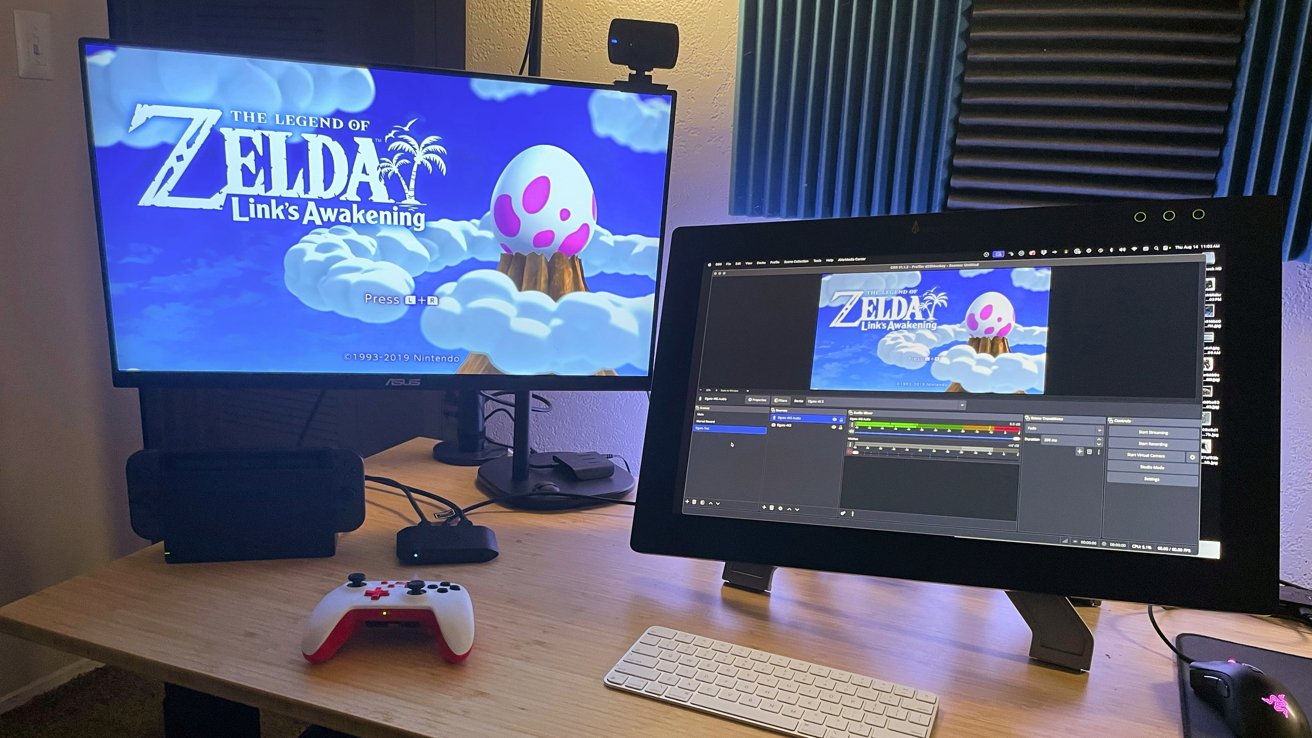
For testing in a macOS environment, I used my current daily workspace setup and equipment. I use an M1 Max Mac Studio with a Xencelabs 24 Pen Display as my primary screen and an ASUS VY279 as my secondary.

For streaming, I use OBS Studio, while the first Nintendo Switch serves as the console to be connected to the unit.

Elgato 4K S review: Specifications

  • Connections: 2 x HDMI 2.0, 1 x USB-C
  • Passthrough Resolutions: Up to 2160p60, 1440p120, 1080p240
  • Capture Resolutions: 2160p60, 1440p60, 1080p120, 1080p60, 720p60, 567p, 480p
  • HDR10 Passthrough: Up to 2160p60
  • HDR10 Capture: Up to 1080p60 (Windows only)
  • Variable refresh rate support
  • Dimensions: 112 x 72 x 18mm (4.4 x 2.8 x 0.7 inches)
  • Weight: 3.2 ounces

Elgato 4K S review: Opening the box

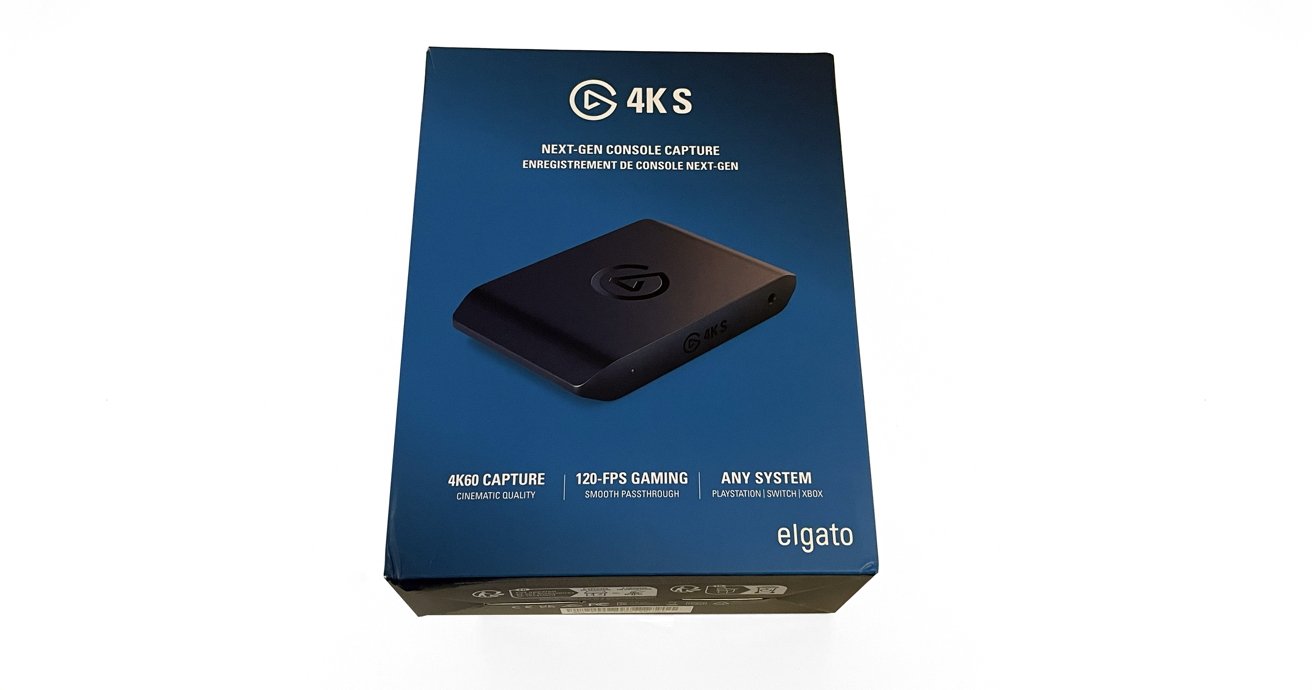
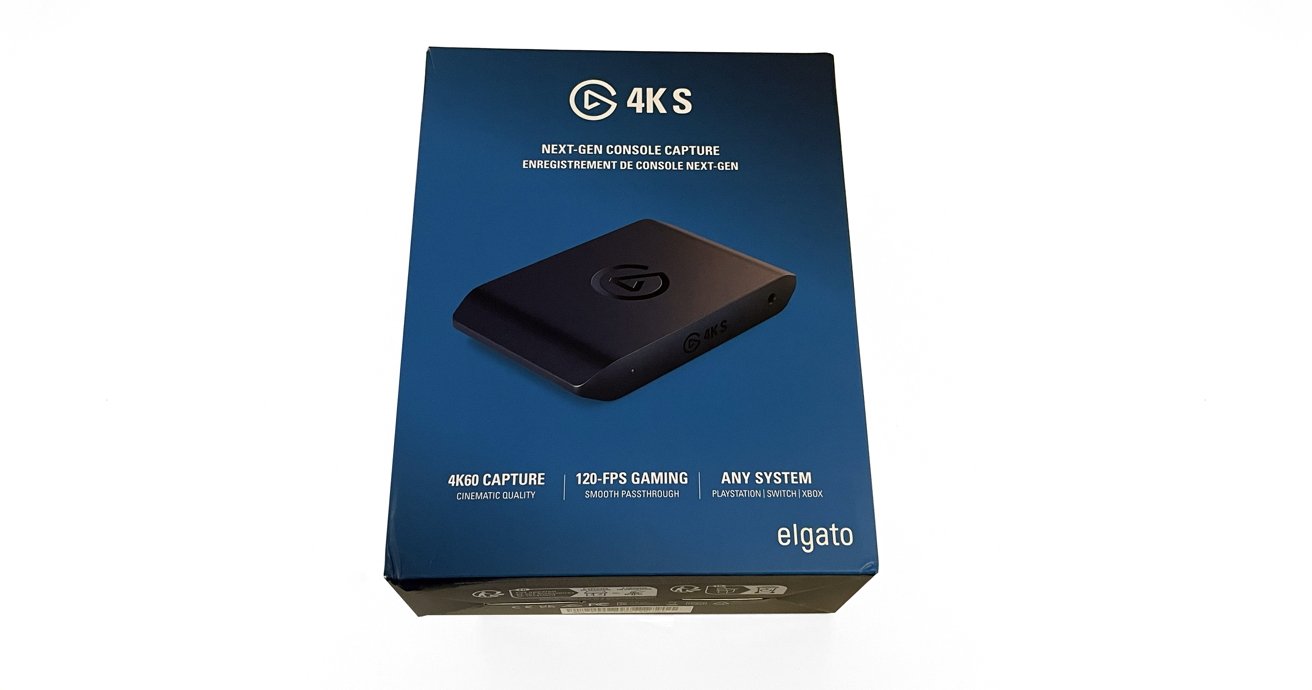
The Elgato 4K S arrived in a single, well-secured Elgato-branded box. Inside was the Elgato 4K S unit, a single HDMI 2.0 cable, a single USB-C to USB-C cable, and a quick start guide.

Blue box featuring a 4K S console capture device, highlighting 4K60 capture, 120-FPS gaming, and compatibility with PlayStation, Xbox, and Switch. Device image shown angled at center.

Elgato 4K S review: The box.

Out of the box, the Elgato 4K S is a compact, rectangular unit. It has a clean, black matte finish and a simple shiny Elgato icon on the center top.

The Elgato 4K S is only sold in black, which I do not mind personally. But with Elgato offering their Stream Decks in white as well as black, I could see some consumers wanting to keep a consistent look across their peripherals.

Advertisement

It would be nice to have white as an option in the future.

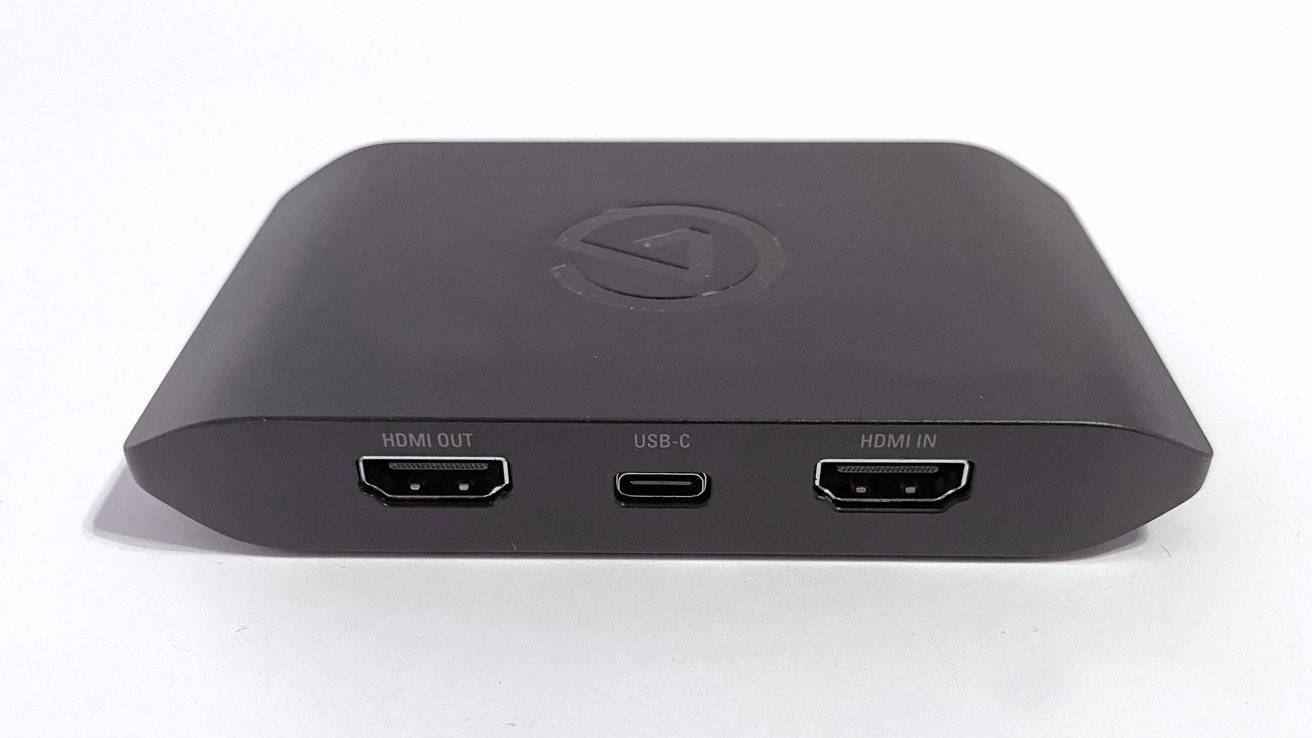
The HDMI input and output ports and the single USB-C port reside on the back side of the Elgato 4K S. A 3.5mm analog line input and power indicator light are on the front side.

There is no external AC port or plug required with the Elgato 4K S, as it is bus-powered over USB-C. This is a nice feature for cable management and clean workspaces in mind.

Elgato 4K S Review: In Use

Setting up out of the box is the smoothest and easiest experience I have ever had with a capture card.

Advertisement

I plugged one HDMI cable into the input and my Nintendo Switch dock. A second HDMI cable was connected to the output and my ASUS monitor.

Lastly, I plugged the USB-C cable into the port on the Elgato 4K S and my Mac Studio.

Powering everything on, the Nintendo Switch feed immediately appeared on the ASUS monitor with no issues.

Dual monitors on a desk; left shows 'Zelda: Link's Awakening' title screen, right displays same screen with streaming software. Controllers, keyboard, and mouse present.

Elgato 4K S review: In use in the test streaming setup.

Advertisement

Elgato recently released its Elgato Studio software. While it is very polished and user-friendly, the app is basic, and users cannot stream directly from it the way Streamlabs, OBS Studio, and others do.

Elgato Studio is designed purely to capture gameplay. It does that task well, but that isn’t the focus of my review and testing.

I opened OBS Studio, created a scene, and added a new video input capture. The Elgato 4K S option appeared immediately, and after selecting it, the Nintendo Switch feed appeared in OBS Studio.

After that, I added a new audio input capture for the Elgato 4K S, then tweaked my sound monitoring and output settings. In less than 10 minutes, I was ready to hit “Go Live” in OBS Studio and stream Link’s Awakening if I wanted to.

Advertisement

To be thorough, I also tested the same setup with Streamlabs, and everything worked perfectly. I could not ask for a more seamless setup experience.

Some capture card manufacturers use proprietary apps to gate-keep the full potential of their hardware. With Elgato, the apps are add-ons that enhance the experience and provide deeper levels of control, but they never hide or restrict functions.

The Elgato 4K S takes advantage of HDMI 2.0 ports for the input and the passthrough. This is an excellent feature that allows you to get the most out of 4K at 60 fps.

Variable refresh rate support is a welcome addition to overall video quality.

Advertisement
Black rectangular electronic device with HDMI out, USB-C, and HDMI in ports on one side, featuring a logo on top.

Elgato 4K S review: The main ports for video.

In the time I spent playing, I did not experience any video or audio lag in the captures. That said, the Nintendo Switch is not a heavy lift for a capture card like the Elgato 4K S.

I did a bit of research outside of my own testing and didn’t discover any issues that would prevent me from recommending the use of the Elgato 4K S with beefier systems. That includes more powerful gaming PCs and consoles like the PS5 or Xbox consoles.

The capture quality of the Elgato 4K S is staggering, considering it is such a small package. This capture card is perfect for permanent residence in a home setup, or as an added component for mobile gaming and streaming.

Advertisement

It’s not hard to imagine seeing the Elgato 4K S making trips to gaming conventions, gatherings, and events for streamers on the go. Both for live streaming purposes and for capturing gameplay to be published later.

The only two drawbacks are the system requirements and the (obvious) inability of the device to capture HDCP-protected video.

Elgato 4K S Review: Small but mighty

At $159, the Elgato 4K S is not inexpensive, but it does not break the bank. For me, the investment is worth the cost for the quality delivered.

For streamers leaning into console play as their driving source of content, the Elgato 4K S works as intended and delivers on the claims made by the company.

Advertisement

This is a very good capture card, and as a part-time streamer myself, the Elgato 4K S now holds a permanent spot on my desk for future Zelda and Mario RPG streams.

Elgato 4K S pros

  • Pure plug-and-play experience with no hassles
  • Small workspace footprint
  • Dual HDMI connections for input and passthrough
  • Reasonable price for amazing quality
  • Excellent for mobile streaming or capture setups

Elgato 4K S cons

  • Older hardware excluded
  • Elgato software is for gameplay capture only

Rating: 4.5 out of 5

Where to buy the Elgato 4K S Review

The Elgato 4KS is available in Elgato online store for $159. It’s also available from Amazon for a discounted $113.95.

Source link

Advertisement
Continue Reading
Click to comment

You must be logged in to post a comment Login

Leave a Reply

Tech

Notion Mail Is Shutting Down

Published

on

Notion announced that it will shut down its email client on September 22. The company says more than half of users already manage email through Notion’s AI agents without opening their inbox, so it is shifting its focus from a traditional email client to agent-run workflows. Engadget reports: It has published an FAQ for users to make sure that they don’t lose any messages or data in the transition. Most emails will still exist in a Gmail inbox, but customers will need to manually export their drafts, scheduled emails, snippets and auto label instructions. Notion first began offering Notion Mail after acquiring startup Skiff in 2024.

Source link

Continue Reading

Tech

Early Bird pricing ends tonight for Founder Summit

Published

on

Tonight is your last chance to save up to $190 on your pass to TechCrunch Founder Summit 2026. Early Bird pricing ends today, at 11:59 p.m. PT, after which rates increase.

Founders rarely scale alone. The fastest path to growth comes from learning from founders who’ve already done it, connecting with peers tackling similar challenges, and building relationships with investors who can help accelerate your next stage of growth.

On November 4 in Boston, more than 1,000 founders and investors will gather for a highly curated day of tactical learning, candid conversations, and meaningful networking designed to help founders make smarter decisions and grow faster.

Don’t wait until prices increase. Register before 11:59 p.m. PT tonight to save up to $190. Bringing your team? Groups of four or more can save up to 30%.

Advertisement
TechCrunch Founder Summit breakout audience
Image Credits:Halo Creative

A founder-first event built for growth

Every session, discussion, and networking opportunity is designed around the real challenges founders face as they build, fund, and scale their companies.

You’ll connect with:

  • Founders navigating similar growth stages
  • Experienced operators who have scaled teams, products, and revenue
  • Investors sharing what they’re funding and what they’re looking for

Whether you’re preparing to raise capital, refining your go-to-market strategy, or planning your next growth milestone, Founder Summit creates opportunities for conversations that can change the trajectory of your business.

Actionable insights for every stage

Founder Summit focuses on the decisions that define a startup’s future. Through breakout sessions and roundtable discussions, you’ll gain practical guidance on topics including:

  • Building pitch decks that resonate with investors
  • Knowing when to raise Series C and beyond
  • How and when to sell your startup
  • Preparing your company to go public

These founder-led conversations deliver practical takeaways you can apply immediately.

Learn from founders and investors who’ve done it

Past speakers have included:

TechCrunch All Stage 2025 roundtable
Image Credits:Halo Creative

Additional speakers have represented Sequoia Capital, NFX, Glasswing Ventures, Wing Venture Capital, Construct Capital, Greylock, Precursor Ventures, and more.

The 2026 agenda is coming soon, with additional founders, operators, and investors to be announced. Check the event page for agenda updates.

Advertisement

Interested in leading a discussion? Submit a roundtable or breakout session topic for a chance to be voted onto the agenda by the TechCrunch audience.

Save up to $190 before tonight, 11:59 p.m. PT

The deadline is in less than 24 hours. Early Bird pricing ends tonight at 11:59 p.m. PT. Join the founders, operators, and investors shaping the next generation of startups. Gain practical insights, build valuable relationships, and leave with strategies you can put into action immediately.

Register before 11:59 p.m. PT tonight to save up to $190 on your pass and up to 30% when registering as a group.

Interested in exhibiting at TechCrunch Founder Summit 2026? Reserve your exhibit table and connect directly with founders, investors, and startup decision-makers.

Advertisement
TechCrunch Founder Summit 2026 November 4, 2026

When you purchase through links in our articles, we may earn a small commission. This doesn’t affect our editorial independence.

Source link

Continue Reading

Tech

Most companies think they’re building a software factory. They’re actually just shipping bugs faster.

Published

on

Industrialized factories changed how the world produced physical goods: more output, lower costs, faster than anything that came before. Now a similar shift is happening with software. 

LLMs have lowered the barrier to writing code, increased individual output, and pushed organizations to think about software development as a production system. The standard software development lifecycle and CI/CD practices that have held for decades won’t hold up under that pressure. That’s where the software factory comes in — and like physical factories, it needs more than speed to actually work.

The idea of a “software factory” started to solidify over the past year. Luca Rossi’s “The Era of the Software Factory” made the case plainly: AI is not just changing how fast people write code — it’s changing the whole production system around software. 

The concept can mean different things: a collection of coding agents and skills files; faster CI/CD; better review systems; or more automation around software delivery. A better frame is to think of it less as a tool category and more as a set of principles. A software factory can’t just be a loose collection of prompts, agents, and plugins. It needs a platform that defines how work moves through the system and how code is generated, reviewed, tested, traced, deployed, and improved when something goes wrong.

Advertisement

Otherwise all you’re doing is putting yet another one-off machine into an empty room and calling it a factory. 

Why is this happening now?

There are a few forces all hitting at the same time.

Companies have always wanted more software than engineers can produce. That’s why tools like Excel exist: They often fill in the gap for a lot of the software that many companies wish they could make.

AI has also lowered the barrier of entry to creating code, and this is the part everyone focuses on. Code creation is now easier, though not always cheaper or better, as evidenced by many high-profile companies fretting over their high AI bills. The barrier to writing functional code has effectively collapsed.

Advertisement

More importantly, a single engineer can generate more code than they could just a few years ago. That changes the bottleneck: it’s no longer “How fast can someone write this?” or even, in some cases, “Can someone understand how to code?” Instead it becomes, “Should this be written?” 

More importantly, can we actually create end products that are durable and reliable and don’t just build tech debt? Or are we just putting out more AI slop faster than ever? That’s where the danger lies. 

The dangers of the modern software factory

All of this sounds great. Factories, after all, made production faster and more consistent. 

They made it possible to build more cars and products, less expensively, which led to more people being able to afford cars and products. Putting environmental impacts aside, you could argue this was positive.

Advertisement

But like many things in engineering, there are always tradeoffs, and in this case, there are new risks.

When you increase the output of one person with machinery, digital or otherwise, you also increase the mistakes that can be made either by the individual or the machinery. The speed at which code can now be put out is on an industrial scale. Even smaller organizations can suddenly have code bases ballooning up to the size of tech company code bases a decade ago. 

The data is already showing problems. Faros AI found that while task throughput per developer is up 33.7% and PR merge rate is up 16.2%, the incidents-to-PR ratio has risen 242.7% and bugs per developer are up 54%. Google’s DORA research found that more AI adoption was actually associated with worse delivery stability

As a fractional head of data, I’ve been brought in to fix these exact issues. In the past year alone, I’ve worked on two projects where AI-generated data infrastructure slowly started to morph over time.

Advertisement

Between multiple engineers trying to move quickly and a lack of standards, these projects became unruly. Code bases tend to go through some level of evolution, but as different styles blend, the LLMs in turn start to create their own mutations. Codebases developed five to six different styles within months — a process that previously took years. Layer by layer, the engineers would slowly stop understanding exactly what was going on.

The pattern echoes what happened a decade ago with self-service tooling: early productivity gains that masked downstream complexity.

And that’s why the software factory can’t just be about speed. 

What makes a software factory work

There are several key principles to consider when building a software factory.

Advertisement

Platform over tools: Many teams are slowly implementing AI into their coding workflows at the edges — adding a PR review agent or a skills file into their repos. But building an actual software factory requires a platform, not a collection of tools at the edges. A platform provides a unified foundation where tools aren’t scattered in separate corners. Instead, they actively share data, talk to each other, and work as a single cohesive system — standards, processes, and the work itself all connected. 

Rerunability and traceability: A real platform requires the ability to go back into any run, identify what went wrong, and rerun it — which is why one-off agents don’t make a factory. The system needs to support taking a serial ID, looking it up, and tracing exactly how it got to the output it produced. This is why state machines make more sense than loops for AI workflows: they make it far easier to rerun a process and understand what happened at each step.

Safety and guardrails: Factories are not safe places. Neither is a software factory. As more people develop on these platforms, better guardrails and safety measures need to be built in. Testing and quality control need to be pushed to the front of the process — catching bugs at the lowest possible stage reduces the cost to fix them and limits the blast radius.

Standardization: At the enterprise level, every codebase has its own flavor. Layering a code assistant on top without standards produces an amalgamation of styles. Standardization has to be built into the process from the start.

Advertisement

Quality control: In older manufacturing models, quality control happened at the end of the line. The product was built, inspected, defects found, and fixed later. Toyota’s approach was different. Quality was pushed into the process itself — workers were expected to stop the line when something was wrong. The goal wasn’t to catch defects at the end; it was to prevent them from flowing downstream in the first place. 

The same is true for the software factory. QC needs to be baked into the entire process, starting with how the spec is written. That means integrating static code analysis that catches obvious errors and providing templates to LLMs so they know the structure the code should follow. Without that, the bottleneck becomes the final review — or teams just push out more AI slop.

Speed without quality isn’t productivity

Improving the speed of your code output is not actual productivity if the downstream issues aren’t managed. A company is not more productive because it produces millions of cars, only to see them all fall apart within 100 miles. It’s also not more productive if all it does is produce an endless stream of proofs-of-concept that never enter production. 

Actual productivity is when the software factory takes ephemeral tokens and turns them into durable outputs. It’s easy to talk about lines of code and how much faster your team is moving.

Advertisement

The software factory that wins isn’t the one that generates the most code. It’s the one that generates the fewest defects downstream.

Source link

Continue Reading

Tech

Prime Day Ends Today. Last Call for the 178+ Deals We’re Tracking Live

Published

on

plaud-ai-pin-cnet-lanxon-3

The NotePin S AI wearable, seen here on the wrist of CNET’s Katie Collins, could be really useful for my job. And it’s on sale for Prime Day.

Andrew Lanxon/CNET

I took over the role of CNET’s editorial leader earlier this year, and while I’ve participated in Prime Day sales as a TV reviewer and general deals editor here for (literally) decades, this is my first Prime Day as EIC. In case you’re wondering what purchases a person like me is considering this time around, here’s a sampling.

iPad 11-inch A16 ($300): My artistic daughter has been asking for an iPad and if my wife approves, I’ll likely get her this basic version, our top pick for most people. I’d also get her the Apple Pencil (on sale for $60). We’d save both of these for Christmas presents.

Advertisement

Belkin Portable Charger Bank ($38): My family and I always need portable chargers. Half our devices call for Lightning and the other half for USB-C. This does both and I like the built-in cables.

Plaud NotePin S AI Notetaker ($152): In my new role I take more meetings than ever, and I also have plenty of valuable face-to-face conversations in the office and beyond. I currently depend on the Otter app on my phone and Gemini+Google Meet recordings at work to take notes (with appropriate permission, of course). This AI wearable could be my “secret weapon” to consolidate everything in one place.

JBL Go 4 Bluetooth Speaker ($38): I actually bought this one a few days ago when it was $40 – still a great deal, but now even better. It’s no longer one of our best Bluetooth speakers but it’s good enough for my (other) daughter, who wants one for the beach. At this price, I won’t be too annoyed if (when?) it gets destroyed by sand and surf. And yes, I got her the pink one which I know she’ll love. We’re saving this for her birthday.

Anker Solix F2000 portable power station ($749): I own a travel trailer and upgraded to solar with an inverter, but at a recent (shady) campsite, I still had to break out my loud, annoying propane generator. Sure, I could just add more standard 12V LiPo4 batteries, but this portable power station is so much more versatile. It includes a 30A RV outlet, and the wheels make it worth the extra $50 over the Bluetti AC200L. No way my wife approves this one, but it stays on the list anyway because I’m camping tech obsessed.

Advertisement

Source link

Continue Reading

Tech

Australia’s Social Media Ban May Not Be That Effective, Study Finds

Published

on

The social media checks implemented in Australia after the country banned their use for teens under 16 have shown little evidence of being effective, according to a study by the University of Newcastle. Published in the British Medical Journal, the study surveyed participants between 12 and 17 years old before and three months after the law was introduced. It specifically looked at the participants’ use of TikTok, X, Facebook, Instagram, YouTube and Snapchat. 

Based on the information they gathered, more than 85 percent of teens under 16 continued using those social media apps, despite two-thirds of them reporting that they had encountered age checks. Approximately 54 to 68 percent of responders under 16 just kept on using their accounts. How, you ask? Well, the most common age check the Australian teens encountered was to self-declare their age, a method criticized by authorities in the country, as well as in other countries considering implementing the same law, due to its limited effectiveness. Among the responders, 24 to 39 percent encountered self-declared age verification, while 13 to 27 percent got through checks by uploading a selfie. 

That said, the study also showed that affected teenagers found other ways to keep using social medial. Around 15 to 19 percent of the responders said they used fake accounts to access the platforms, while 9 to 29 percent reported going on social media using someone else’s account. Approximately 11 percent of the teens said they used private browsers to get around the restrictions. There were very few teens who reported using a VPN. 

Overall, the study found that social media use remained the same among the 12 to 13 year olds after the law took effect. It declined among the 14 to 15 year olds, but it grew among the responders aged over 16. 

Advertisement

While the researchers admit that it’s early days and the sample size was small and relied on self-reporting, an accompanying editorial of the study stresses that the results are early signals worth tracking. 

“What these figures collectively describe is a partially implemented policy, one in which the mechanism intended to restrict access was not reliably activated,” said Dr. Amrit Kaur Purba, an assistant professor in the Faculty of Public Health and Policy at the London School of Hygiene & Tropical Medicine. “Australia’s experience shows that legislating a restriction is not the same as enforcing one: when age assurance relied on self-declared age, most adolescents continued to access restricted platforms. Countries now adopting similar measures – including the UK, which has committed to comparable restrictions and has tasked its regulator with defining effective age assurance before implementation – will need those mechanisms in place from the outset, rather than retrofitted once circumvention is already widespread. As governments across Europe, North America, and elsewhere consider similar approaches, Australia’s experience suggests that implementation may matter as much as legislation, and that lesson may prove as consequential as any headline result.”

Source link

Advertisement
Continue Reading

Tech

Improve your iPhone’s endurance with this discounted magnetic charger for Prime Day

Published

on

Wireless charging on a power bank has always meant accepting a speed penalty, and for most people that trade-off is invisible right up until the moment they actually need to charge in a hurry.

That gap is exactly what the INIU SnapGo Air is built to close, and at $49.49 down from $54.99 this Prime Day, saving you 10%, it is the slimmest Qi2.2-certified magnetic power bank available.

Qi2.2 certification pushes wireless output to 25W, which is how the SnapGo Air gets an iPhone 17 Pro from flat to 50% in 33 minutes compared with 63 minutes on a standard 7.5W wireless pad.

That half-hour gap compounds fast when you are in an airport, a meeting room, or anywhere else where five minutes of charging has to stretch into something that actually moves the needle on your battery percentage.

Advertisement

When wireless is not fast enough, the attached USB-C GoCord delivers 45W wired output and takes an iPhone 17 Pro from 20% to 78% in 25 minutes, without needing a separate cable retrieved from anywhere.

Recharging the SnapGo Air itself through the same GoCord takes 1.8 hours, which means plugging in before bed gives you a full 10,000mAh bank by morning rather than a partial one that runs out by early afternoon.

Advertisement

The 13N magnetic grip holds it locked flush against any iPhone 12 through 17 series device, and at 0.5 inches thick the SnapGo Air adds no meaningful bulk to a phone sitting in a jacket or front pocket.

Advertisement

A side-mounted digital display gives an exact percentage readout of remaining charge, and TempGuard 3.0 monitors temperature 3.2 million times per day to keep output stable as the battery drains toward empty.

For iPhone owners who have settled for slow wireless charging because nothing thinner existed at a sensible price, the INIU SnapGo Air at $49.49 through June 26th on Amazon is the answer that has been missing.

Source link

Advertisement
Continue Reading

Tech

Android 17’s cool new gaming trick is to turn your foldable into a Nintendo DS

Published

on

Foldable phones have really matured in recent years, and my time with the Motorola Razr Fold really cemented that idea. Apart from the novelty of having a flexible screen, brands are baking in unique features that really take advantage of the foldable mechanism and laptop-like orientations.

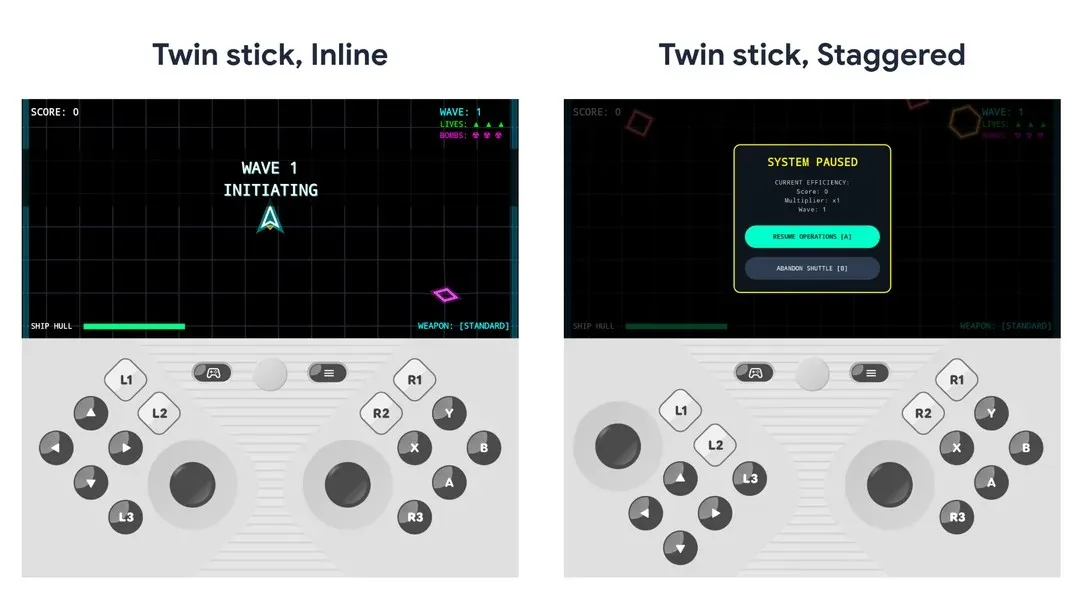
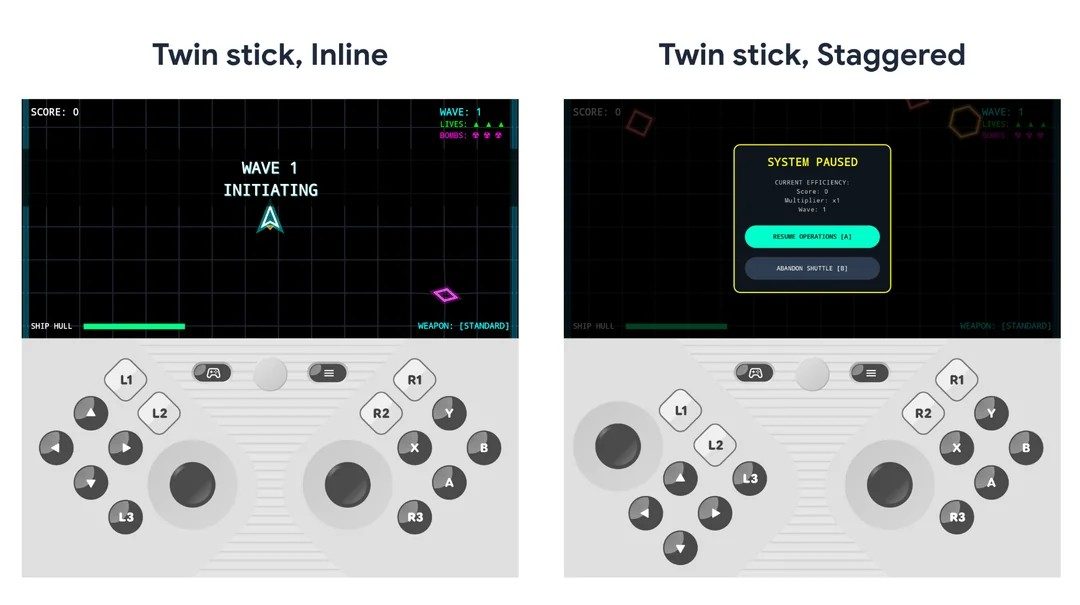
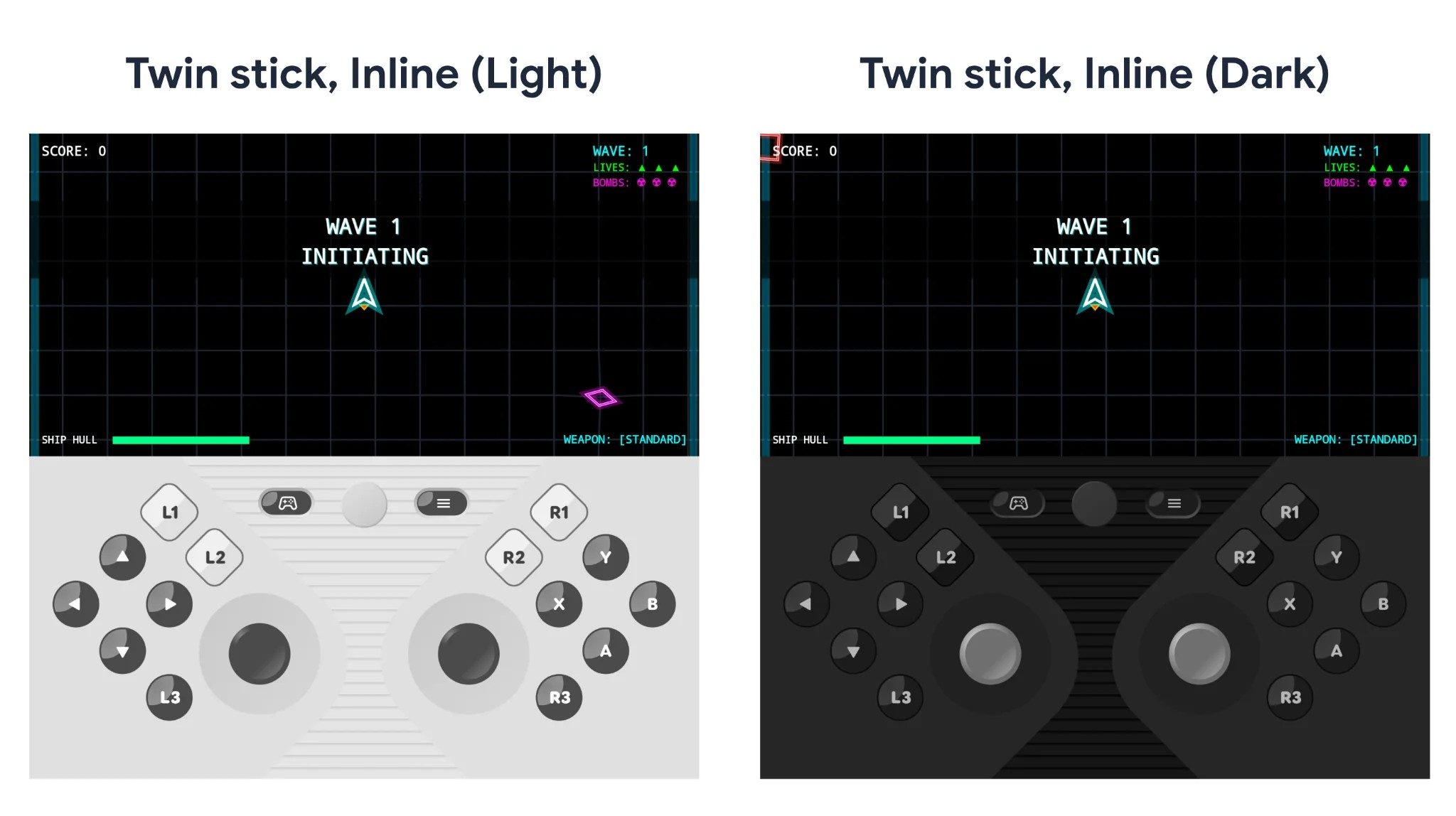
Now, Android 17 might look past just productivity and offer a new way to experience video games. A sneak peek shared on Reddit by Mishaal Rahman shows a new foldable gaming mode. It is a platform feature coming with Android 17. Simply unfold your phone, launch a compatible game, and Android can split the screen into two halves. The top half runs the game itself, while the bottom half turns into a dedicated virtual gamepad. If this reminds you of old handheld gaming devices like the Nintendo DS, you’re spot on!

How does the new controller work?

The virtual gamepad is designed to emulate physical controller inputs at the system level. So it should work with games that already offer controller support, without developers needing to build a custom touch layout from scratch. The current button setup includes a D-pad, left and right thumbsticks, A/B/X/Y buttons, L1/L2/L3, R1/R2/R3, and Start. Android 17 also includes a few customization options, including different twin-stick layouts, small/medium/large sizing, light and dark themes, and a toggle for haptic feedback.

The controller can also hide itself when not needed. If you connect a physical controller over Bluetooth or USB, the virtual gamepad is designed to disable automatically. Touch-only games can also continue using the full unfolded screen without forcing the controller layout.

Foldables are finally getting the gaming tweaks they deserve

The catch is that games still need to be adaptive to properly use the 50/50 layout when the device is unfolded. Also, for now, users cannot adjust the game-to-controller split or make the controls transparent as an overlay, though device makers could add their own changes because the feature is part of AOSP.

In other words, Samsung, Google, OnePlus, Honor, and other foldable makers could potentially tailor the experience to their own hardware. A Galaxy Z Fold, Pixel Fold, or other large-screen foldable could each treat the feature a little differently. This isn’t an immediate replacement to gaming enthusiasts that prefer a physical controller, but for many casual gaming sessions, it does add more convenience–and a hint of nostalgia.

Advertisement

Source link

Continue Reading

Tech

YouTube Shorts is getting 2x speed and a cleaner view, but it’s also ditching the dislike button

Published

on

YouTube just rolled out four updates for Shorts, and they cover everything from long-requested quality-of-life fixes to changes that are going to divide opinion.

Starting with the good stuff, YouTube is adding a Clear Screen mode that strips away every overlay from the Shorts player, letting the video fill the full screen without clutter.

So what exactly is changing on YouTube Shorts?

Shorts are also getting 2x playback speed (by pulling down on the screen), something that long-form content consumers have enabled by default, especially for podcasts. I can see people using 2x speed for Shorts that are closer to the maximum duration: 3 minutes. 

Rounding out the useful additions are an easier mute option (tap to pause, then tap the mute icon) and the ability to set a Shorts timer, including to zero if you want to cut yourself off entirely. 

To me, it looks like YouTube has borrowed several pages from Instagram’s playbook, as three out of these four upgrades are already live for Reels. 

Advertisement

Is removing the dislike button from Shorts actually a good idea?

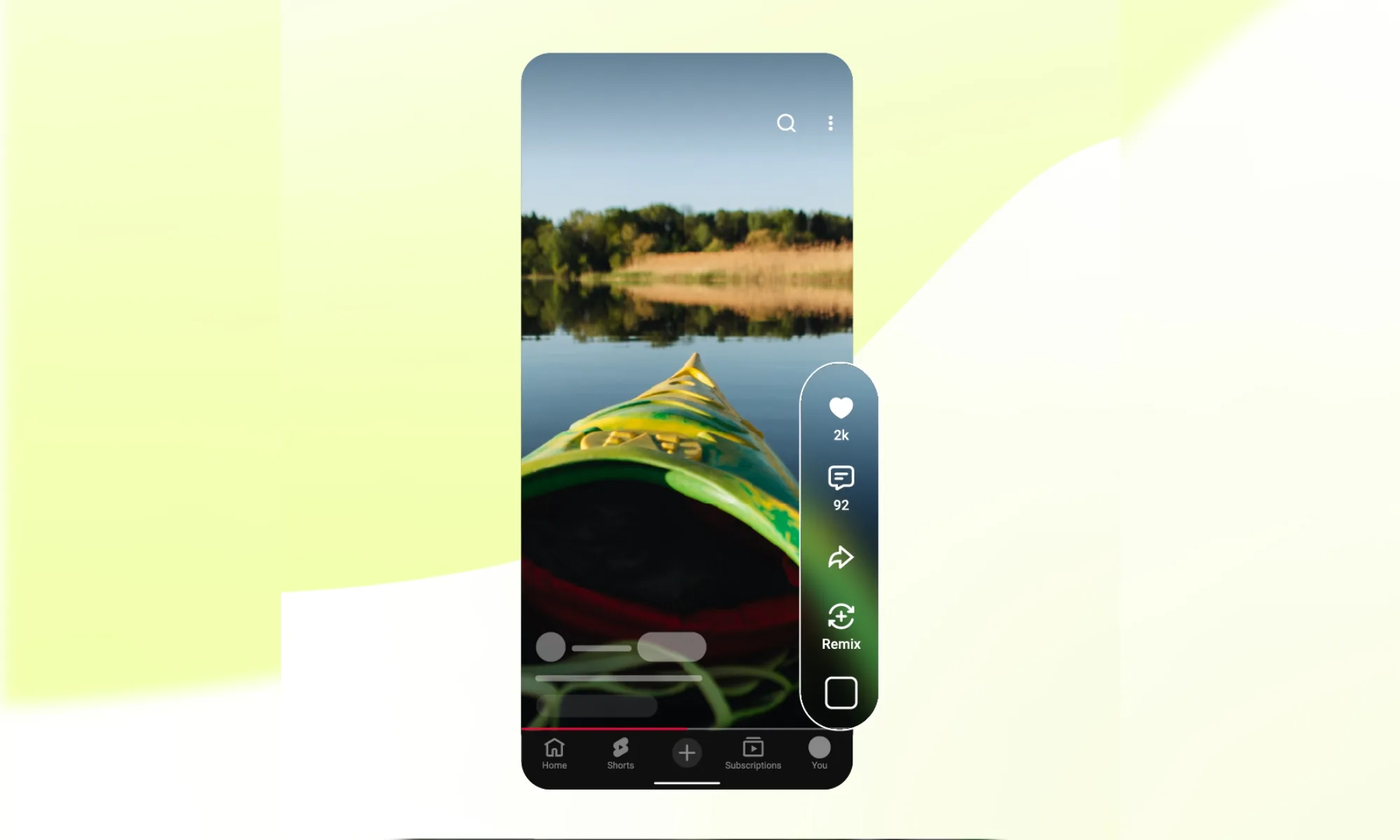
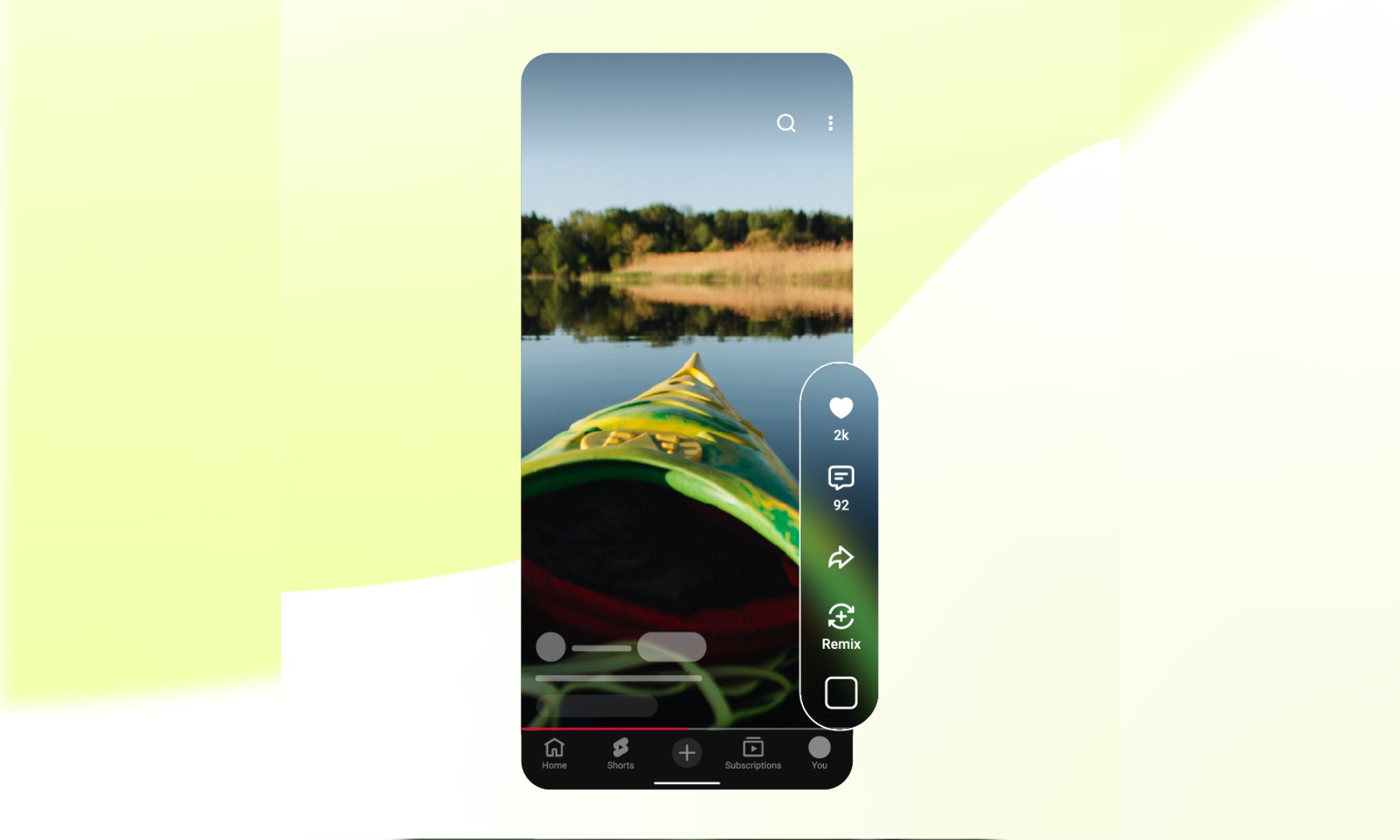
Then there’s the part that might spark a few conversations. YouTube is changing the thumbs-up icon into a heart, which is a cosmetic change that’s perfectly fine. 

However, it’s also removing the dislike button from Shorts entirely (similar to how it hid dislike count in 2021). So, you’ll no longer see the dislike or the thumbs-down button between the thumbs-up and the comment button toward the right side of the screen. 

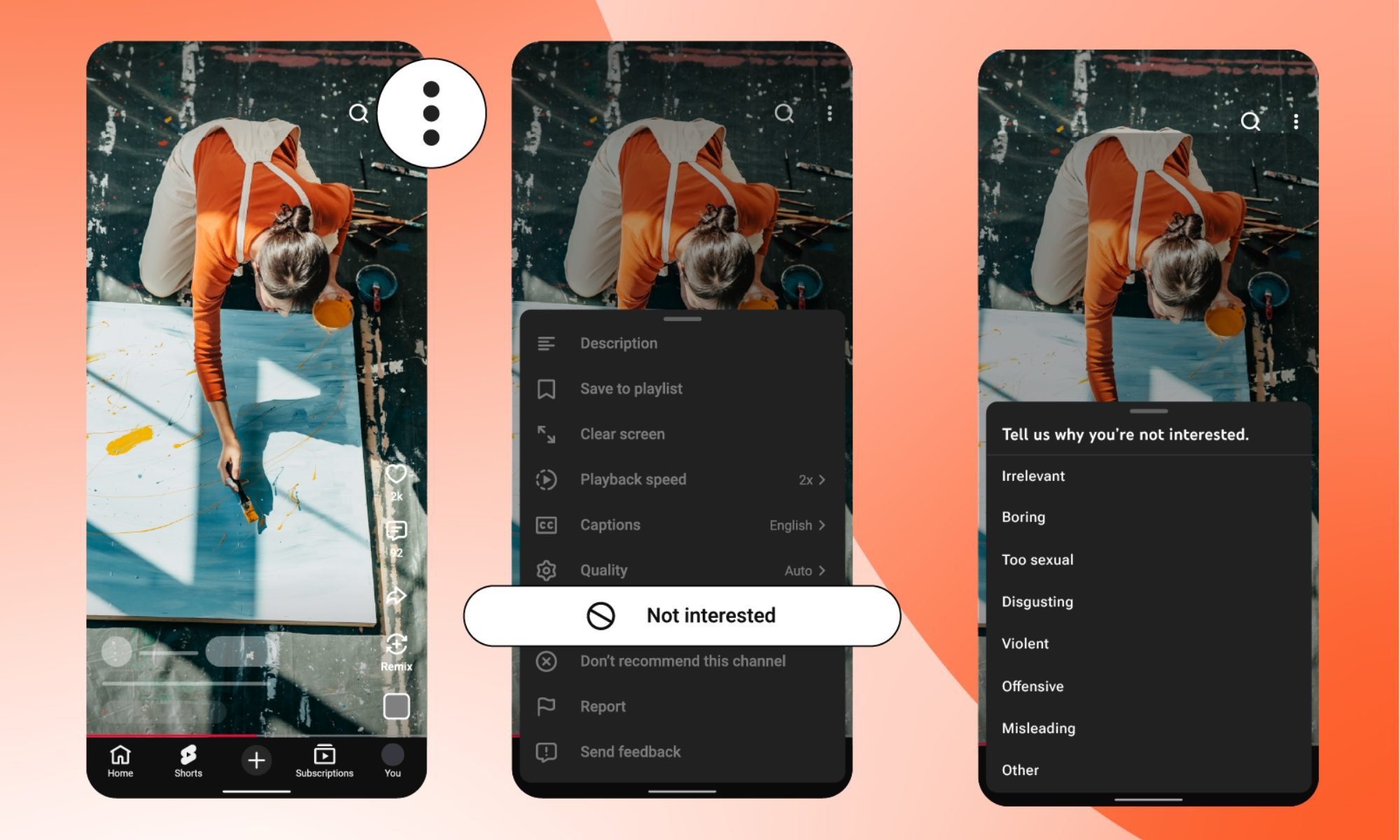
That overlay menu will step down from five to four controls. If you don’t like what you see, you can still tap on the three-dot button at the top right and then select the “Not Interested,” “Don’t Recommend This Channel,” and “Report” buttons. 

The explanation sounds believable at first. YouTube says there could be numerous reasons someone dislikes a Short, from bad audio to it not being their genre, and that the available options give viewers better control over their feed. 

That logic isn’t wrong, but the dislike button has historically been one of the few ways viewers can push back on low-effort content. All updates are rolling out gradually and may take time to reach all users.

Advertisement

Source link

Continue Reading

Tech

Stop Killing Games Pivots To Amending Digital Fairness Act In EU After Loss

Published

on

from the try-try-again dept

Well, perhaps the demise of the Stop Killing Games movement in the EU was overstated. We were just talking about how the attempt to introduce new legislation to support the goals of the movement were defeated, despite a petition with over a million signatures and a parliamentary hearing that reportedly went very well. Given that all the movement is really after is restoring the copyright bargain in the video game industry such that cultural output in the form of games can’t be disappeared into the ether when a company decides to stop supporting it, the EU’s claim that copyright itself prohibits crafting new legislation was very disappointing.

But the movement is not only not done, but appears to have anticipated the decision. They are now moving onto their secondary plan: amending legislation already in process to achieve the same end.

In messages posted to Reddit, Stop Killing Games said there was “nothing surprising to anyone” in the decision, and that “the fight goes on.”

“This movement is defined by action and we will keep acting, we owe Ross [YouTuber Ross Scott, who launched Stop Killing Games in 2024] and the millions of people that have put their trust in us,” Stop Killing Games organizer Moritz Katzner wrote. “MEPs have recognized that, the California state assembly and even the courts have. Let’s keep winning.”

Katzner also laid out Stop Killing Games’ plans for the next few months, which includes continuing work on the Protect Our Games (POG) Act in the US and adapting it for the EU, pushing efforts based on existing legislation in the EU, and building up its new Stop Killing the Internet team.

Advertisement

The legislation in question is the EU’s Digital Fairness Act. The DFA has some lofty goals with some welcome aims, such as prohibitions on certain UI/UX practices online that are designed to push users to make uninformed decisions they wouldn’t otherwise make, or ending region-based restrictions on the use of technology. But there is plenty of concern about the law as well, with opportunities for it to focus on age-checks, deeper surveillance into the usership, and so on. If this thing is going to become law, it very much needs to focus on both consumer protections through freedom and not requiring corporations to take an even heavier hand in monitoring and restricting who can do what with the technology. And, above all else, it cannot curtail innovation.

But if consumer protection is a key goal of the DFA, the Stop Killing Games movement would fit nicely alongside it.

Stop Killing Games organizers, including founder Ross Scott, anticipated the Commission’s refusal and are now focusing on amending the Digital Fairness Act. They claim to have majority support in the European Parliament, with over 40 lawmakers backing the petition’s goals. The DFA, still in development, addresses broader digital rights issues, making it a potential vehicle for game preservation measures.

“We have made serious inroads in parliament. Just recently, we’ve even had an inquiry call on legislative action to the Commission signed by 45 members of European Parliament and collectively we have majority support on this issue. This means we’re in a position to pass legislation on this even without the Commission’s blessing.” – Ross Scott

Despite the recent set back, those heading up the movement believe they’re still in a good place to get something done. Alongside the legislation being proposed in California, it would be nice to see them start to stack up wins.

Filed Under: digital fairness act, eu, ross scott, stop killing games, video games

Advertisement

Source link

Continue Reading

Tech

Irish businesses warned to bolster cybersecurity ahead of EU Presidency

Published

on

PwC’s Will O’Brien talks to SiliconRepublic.com about how Irish businesses can prepare for a heightened threat landscape during the EU Presidency.

PwC has warned businesses in Ireland to improve their cybersecurity defences ahead of Ireland assuming the EU Presidency from the start of next month.

The professional services company said that cyberthreats are expected to escalate once Ireland assumes the Presidency, during which Ireland will host EU government leaders, heads of state and the European political community for a period of six months (from 1 July to 31 December).

“This positions Ireland as the temporary routing hub for sensitive EU political, economic, sanctions and foreign-policy material, and a priority target for state-aligned threat actors, hacktivists and organised cyber criminals,” said Will O’Brien, director of PwC Ireland’s cybersecurity practice.

Advertisement

The heightened cyber risks of the Presidency were also recently highlighted by Ireland’s National Cyber Security Centre (NCSC).

O’Brien advised Irish businesses work on their cyber defences by prioritising two things: preparedness and resilience.

“Organisations that are resilient, and have completed appropriate cyber risk assessments, will be far better placed to defend against attackers.”

He added that AI is a “decisive factor” – not just for threat actors, but for cybersecurity teams as well.

Advertisement

“Threat actors now treat AI as a core platform, automating reconnaissance, crafting convincing phishing lures, accelerating malware development and scaling social engineering. The gap between an AI capability’s public release and its weaponisation is shrinking sharply, with autonomous AI agents a primary concern,” explained O’Brien.

“The encouraging counterpoint: AI is also defenders’ single greatest opportunity to match that pace, enabling faster detection, automated containment and intelligence-led decision-making.”

A man with short dark hair smiles wearing a dark suit jacket, white shirt and red tie.

Will O’Brien. Image: Gerard McCarthy

With the Presidency fast-approaching, O’Brien listed a number of recommendations for Irish businesses consider – including treating the six-month Presidency window as a “high-threat period”, particularly in how businesses score and prioritise cyber risk.

Advertisement

“Rehearse your crisis response. Run scenario exercises tied to major Presidency events, using ENISA’s Cybersecurity Exercise Methodology,” he said.

“Fix known software vulnerabilities faster. Subscribe to NCSC Alerts & Advisories and follow its Cyber Vitals Checklist throughout the period.”

O’Brien recommended that businesses “pressure test” their IT and OT suppliers, checking they meet NIS2 standards and ensuring that remote-access systems (VPNs) require multi-factor authentication.

He also advised that businesses adopt a zero-trust approach for data and devices; train staff for “AI-driven deception” such as deepfakes and phishing emails; and pre-plan for disinformation – “work with communications now so that any incident has a ready to go public response”.

Advertisement

Lastly, he encouraged businesses to engage with the NCSC early to confirm the organisation’s place in national incident coordination arrangements.

‘Act now’

The heightened cyber risks of hosting the EU Presidency are an expected concern in the backdrop of broader geopolitical tension.

The current Cypriot Presidency experienced its share of cyberthreats, with the country previously reporting a rise in cyberattack frequency during the Presidency window.

And if a significant cyberattack or breach were to successfully occur during Ireland’s EU Presidency, what would that look like?

Advertisement

O’Brien said the fallout would be “significant on multiple fronts”.

“As Ireland is considered one of Europe’s largest data hosting clusters, and home to several transatlantic subsea cable landing points, we sit at a position where disruption carries continent-wide consequences – the impact would not be confined to our borders,” he explained.

“The NCSC has noted that incidents during a Presidency are primarily designed to inflict reputational and political damage on the host State and the EU. A serious breach would therefore carry economic cost and business disruption, alongside potential reputational damage for Ireland on the European stage.

“This is why businesses must be on heightened alert and act now.”

Advertisement

Don’t miss out on the knowledge you need to succeed. Sign up for the Daily Brief, Silicon Republic’s digest of need-to-know sci-tech news.

Source link

Advertisement
Continue Reading

Trending

Copyright © 2025