

Tech
EU Orders Google to Open Android to AI Rivals and to Share Search Data

The European Commission on Thursday mandated that Google provide its competitors with greater access to AI capabilities on Android phones and to search data, saying the increased openness is needed to level the playing field in those areas.
The ruling stems from the European Union’s Digital Markets Act, which is designed to ensure that powerful tech companies, such as Google and Apple, can’t unfairly dominate markets through their size and their gatekeeping powers. In this case, the act requires Google to give third-party apps and services the same level of access to its software as it does for its own services.
“With today’s measures, we want to support innovation and diversity in the European Union, enabling fair competition in the markets of AI assistants for Android devices and search engines,” Henna Virkkunen, the Commission’s executive vice president for tech sovereignty, security and democracy, said in a statement. “Thanks to these measures we hope to see emerging alternatives to Google Search and Google’s AI services, such as Gemini, and that users in the EU can enjoy greater choice of services.”
Gemini AI has become inescapable in Google software and on Android devices. But AI assistants from other companies have had restricted access to key Android functions, which limits the kinds of services they can create and offer, putting them at an unfair disadvantage, according to the Commission. The new ruling would mean, for instance, that third-party AIs could be activated with a voice command similar to “Hey, Google” or could be delegated tasks such as booking a taxi, the Commission said.
The Commission noted that 60% of phone users in the EU have an Android device.
Thursday’s decision also requires Google to share its search data with third-party search engines and with AI chatbots that offer search functionality. That includes data Google uses to optimize its search engine. The Commission said this requirement is important for developing and optimizing third-party search engines, including privacy-focused alternatives.
Google will also have to provide the data at a fair price and through a clear process, the Commission said.
Google’s response
In its response to the ruling, Google homed in on what it said are the dangers the DMA-driven changes would pose to users.
“Today’s decisions risk undermining vital privacy and security guardrails for millions of Europeans,” Kent Walker, president of global affairs for Google and parent company Alphabet, wrote in a blog post. “We have repeatedly offered solutions to safeguard users while satisfying the DMA’s goals, but these rulings discount extensive evidence of user harm.”
In an email to CNET, a Google spokesperson reiterated the company’s privacy concerns and noted that the alternatives it suggested would ensure, for instance, that query-related data is passed along to recipients while providing better personal data protection. Google also proposed that anonymization be performed by technical and legal experts, but said the EC rejected the proposal.
Google also said that AI agents already have access to choices, but that ultimately, phone-makers play a big role in protecting users by evaluating apps that could have system-level permissions and access to your data. It said that phone-makers provide that access, not Google.
Apple last month said that because of a DMA ruling, access to its new Siri AI would not be available to users in the EU when iOS 27 and iPadOS 27 roll out later this year.
Under Thursday’s ruling, Google must start sharing data with search providers in January 2027 and make the Android changes effective as of July 2027.

What just happened? In an age where tech workers are losing their jobs to AI at a frightening pace, thousands of Google’s employees are taking action. Over 4,500 company staff have signed a petition calling for layoff protections, including guaranteed severance, buyouts before mandatory layoffs, and the option to take severance as extended paid leave.
Like many other companies invested in the AI boom, Google is enjoying plenty of success right now. Parent company Alphabet’s latest quarter produced $109.9 billion in revenue, up 22%, while operating income rose 30% to $39.7 billion. It’s also the third-largest company in the world by market cap with a $4.3 trillion valuation.
“Make no mistake: this is a company that is enjoying massive, unprecedented success,” Parul Koul, Google software engineer and Alphabet Workers Union president, said outside the company’s California headquarters after delivering the petition to the office of CEO Sundar Pichai.
But it seems that as these tech giants get richer, they lay off more people, often because of AI systems automating employees’ jobs. Alphabet has laid off more than 14,000 people since the start of 2023, most of whom lost their jobs that year. “These layoffs and cuts are not difficult decisions, but simply profit being put over the people that make this company run,” Koul added.
At a press conference on Thursday, employees chanted, “Google, Google, you can’t hide, we can see your greedy side,” and called out the 2023 mass layoffs.
Koul said workers were greeted with closed doors and no response for the most part after the petition was delivered to a staff member in Pichai’s office, though they agreed to pass it on to the CEO. Koul called it “the largest piece of employee feedback that Google has received about job security.”
The union also wants Google to end performance ratings that workers say are based on meeting quotas rather than merit. The company has denied forcing particular rating distributions, insisting that employees are assessed according to their individual performance, roles, levels, and expectations.
The campaign has already secured some benefits for employees. According to the union, voluntary exit packages have been made available to more than 70,000 Google workers since it began. The petition calls for these buyouts to be offered companywide before any mandatory layoffs.
Google Cloud quietly laid off employees in May, and the company eliminated more than one-third of the managers overseeing small teams last summer. More recently, hundreds of employees across its hardware, assistant, and engineering teams were let go in January 2026. Google also dismissed more than 200 contractors working on its AI products without warning in 2025 amid disputes over pay and working conditions.
Google has not confirmed that AI was responsible for its many job cuts. However, several other tech giants have been more open about the connection. Oracle reduced its workforce by 21,000 people over the last year and acknowledged that adopting AI had resulted in cuts. Block CEO Jack Dorsey cited AI efficiency gains when eliminating over 4,000 roles in February, almost half of the company’s workforce.
Google did not immediately respond to a request for comment.
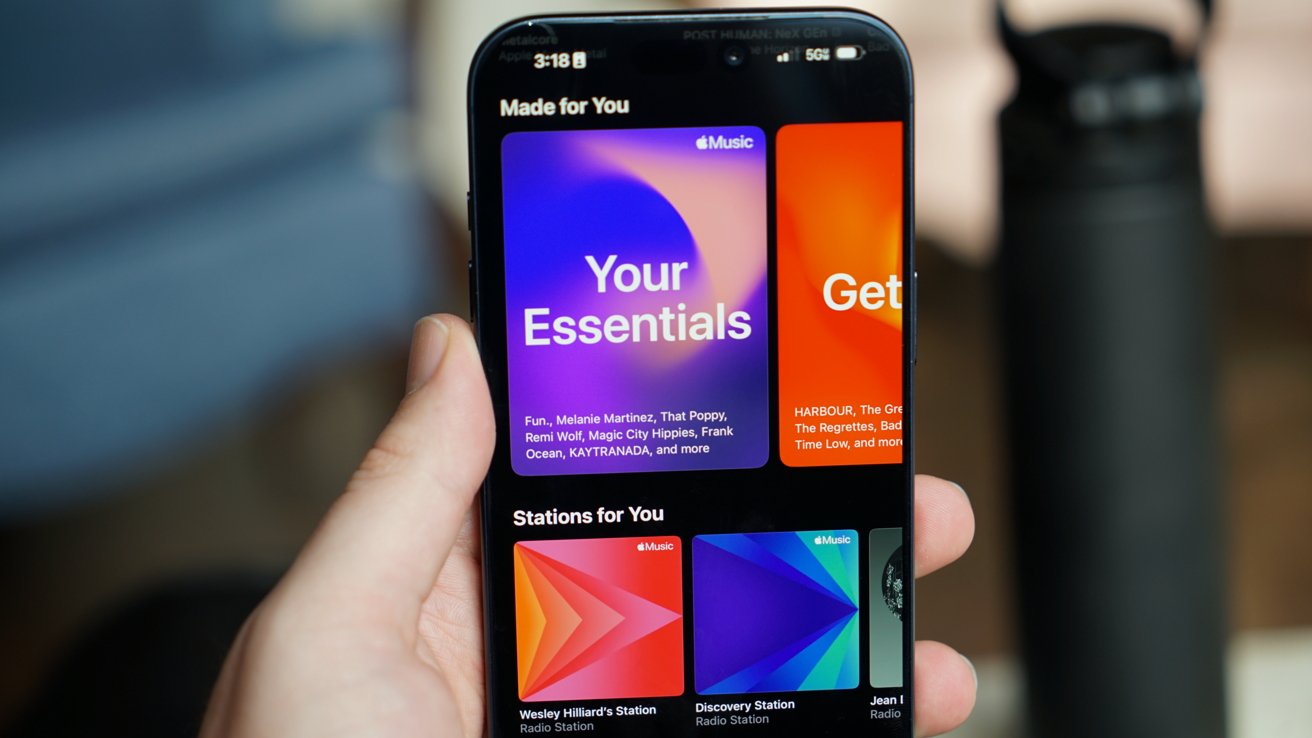
Apple Music is raising U.S. subscription prices for the first time since 2022, increasing every paid tier and hitting family subscribers with the largest jump.
The Apple Music Individual plan now costs $11.99 per month, up from $10.99. The Family plan rose from $16.99 to $19.99 per month and continues to support as many as six people through Family Sharing.
Verified college students will pay $6.99 per month, up from $5.99. The Student plan includes the full Apple Music service and access to Apple TV at no additional cost.
The increases add $12 per year to the Individual and Student plans. A Family subscription will cost $36 more annually, bringing the total to $239.88 per year.
Furthermore, two out of three Apple One subscription plans have increased in cost. The individual plan is unchanged.
But, the family and Premier are more expensive now. Both Family and Premier have increased $2 per month, with the former increasing to $27.95, and Premier going up to $39.95.
The new prices appeared on Apple’s website without an accompanying Apple Newsroom announcement. The company lists a one-month trial for new Individual, Family and Student subscribers.
Family subscribers face the largest Apple Music increase
Apple Music hadn’t raised its broad U.S. subscription prices since October 24, 2022. The previous increase took the Individual plan from $9.99 to $10.99 and the Family plan from $14.99 to $16.99.
Apple attributed the 2022 increase to higher licensing costs and said artists and songwriters would earn more from streamed music. The company hasn’t publicly explained the July 17 increase.
The Individual plan increased by about 9%, while the Family plan rose by nearly 18%. The Family plan received the largest increase in both dollars and percentage terms.
The Family plan remains cheaper than two separate Individual subscriptions, which would cost $23.98 per month. Apple Music gives as many as six family members separate libraries, recommendations and playlists under one subscription.
The Student plan’s included Apple TV access adds value to the $6.99 monthly subscription. Apple limits student pricing to 48 months while the subscriber remains verified, and the Apple TV benefit remains a limited-time offer.

Pros
- Space Frame design increases repairability
- Same great X1 Carbon exterior
- Still incredibly compact and light
- Free OLED upgrade
Cons
- No faster than last year’s model
- Battery life is shorter than last year’s
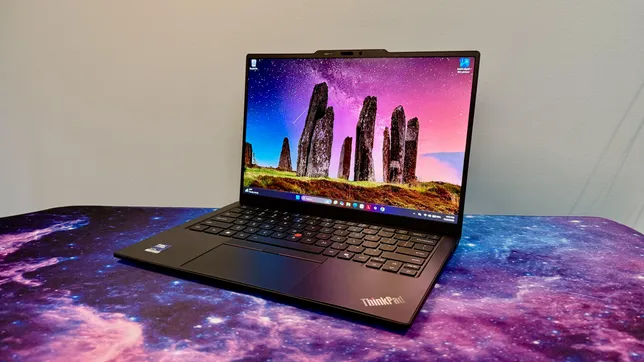
The 14th generation of Lenovo’s flagship business ultraportable, the X1 Carbon, looks no different than the previous iteration. But don’t let its comfortingly familiar design fool you: The interior has been completely reengineered to make the laptop run more coolly and quietly, and — more importantly — it’s easier to repair.
The X1 Carbon Gen 14 introduces Lenovo’s Space Frame chassis that features a smaller motherboard and larger cooling fans, along with a modular design that makes it easier to access and then repair or replace individual components. This is good news for ThinkPad buyers who care about ROI, sustainability or both.
The laptop is based on Intel’s Core Ultra 300 series processors, known as Panther Lake. If you were hoping for a big leap in performance from last year’s Lunar Lake model, you’ll need to keep waiting in the hopes that next year’s Gen 15 delivers the goods. This year’s model isn’t any faster than last year’s ThinkPad X1 Carbon Gen 13, and battery life is actually a few hours shorter.
Performance certainly suffices for basic office tasks, and you should be able to get through even the longest workdays on a single charge, but the reason to pick up the X1 Carbon Gen 14 is the increased repairability rather than anything resembling an increase in performance. Two other reasons for it: the X1 Carbon’s traditional look remains largely unchanged, which will delight longtime ThinkPad fans; and pricing hasn’t gone up (the model Lenovo sent me is actually $100 cheaper than the similar config I tested last year). That will come as a relief to any laptop buyer in this era of RAMageddon and skyrocketing prices for laptops, phones and other electronics.
Lenovo ThinkPad X1 Carbon Gen 14 Aura Edition
Price as reviewed
$2,374
Display size/resolution
14-inch, 2,880×1,800 pixels, 120Hz, OLED
CPU
Intel Core Ultra 7 355
Memory
32GB LPDDR5-7467
Graphics
Intel Graphics
Storage
512GB
Ports
3x USB-C Thunderbolt 4, USB-A 5Gbps, HDMI 2.1, combo audio
Networking
Wi-Fi 7 and Bluetooth 5.4
Operating system
Windows 11 Pro 26H1
Weight
2.16 pounds (0.98 kg)
Lenovo has kept pricing fairly consistent for this year’s ThinkPad X1 Carbon Gen 14, which ought to be applauded as laptop prices keep going up and up. As Lenovo’s flagship ThinkPad, however, the X1 Carbon remains a device more likely to be toted around by C-suite execs than the rank and file. The entry point has risen, but the cost of upgrades has surprisingly dropped a bit. And despite what Lenovo may show on its site, there is a way to get the ThinkPad X1 Carbon Gen 14 for less than $2,000.
Lenovo lists a starting price of $2,139 for a config with an Intel Core Ultra 5 335, 32GB of RAM, a 256GB solid-state drive, a 1,920×1,200-pixel IPS display and Windows 11 Home. But if you choose to upgrade to the Core Ultra 7 355, then you can downgrade the RAM to 16GB for a price of $1,884. I’m not suggesting you move off of the 32GB of RAM offered, but simply highlighting it as a somewhat hidden option.
Less hidden, and new with this year’s Panther Lake-based X1 Carbon, is the option to expand the memory to 64GB. When you choose the top CPU offered, the Core Ultra 7 365, the option for 64GB becomes available. That’s the good news. The bad news is that this memory upgrade is staggeringly expensive. It costs $720 and clearly shows how the global RAM shortage has dramatically increased PC component pricing.
My test system features the Core Ultra 7 355 chip and 32GB of RAM, along with three other upgrades: a 512GB SSD, a 2.8K nontouch OLED display and Windows 11 Pro, which raises the total to $2,374. That’s actually $100 cheaper than the X1 Carbon Gen 13 that I reviewed last year, which had the same component lineup but with the previous-gen Core Ultra 7 258V CPU.
The ThinkPad X1 Carbon Gen 14 starts at £2,366 in the UK and AU$3,779 in Australia.
Space Frame for repairability and sustainability
The Space Frame design completely overhauls the laptop’s interior layout, making it easier to repair or replace individual components rather than replacing the entire laptop if one part fails. It’s not as modular and easy to access as I had hoped, but it’s certainly a step in the right (-to-repair) direction.
You need only to remove four screws to take off the bottom panel. Inside, the battery is held in place by three screws, and you’ll need to remove it to get to the internal frame that houses the double-sided motherboard.
In addition to removing the bottom panel, you can remove the keyboard deck to access each side of the motherboard. Six screws hold the keyboard deck in place. So, that’s a total of 13 screws to gain full access to the interior components. And they are all standard Phillips screws, so you won’t need to hunt around for a Torx or Pentalobe screwdriver. (They’re captive screws, too, so you won’t have a chance to lose any.)
In truth, taking off the two panels is slightly more complicated than removing 13 screws. There are four ribbon cables you also need to disconnect, which might make people in your organization less confident to make their own repairs and more likely to call the IT department. I also found it challenging to get all the cables on the right side of the internal frame as I attempted to line up the keyboard deck and snap it into place when I was reassembling the laptop.
Even if Lenovo’s Space Frame chassis is a bit trickier and not as modular as, say, a Framework laptop, it makes the X1 Carbon Gen 14 much more repairable than any previous ThinkPad. For starters, you can replace the battery, which often is the first component to show signs of age and wear as battery life slowly but ever-so-consistently shortens. Most of today’s laptops have batteries that are soldered to the motherboard and not replaceable, so being able to just swap in a new battery is a boon.
In addition, the laptop’s cooling fans, keyboard, speakers and the USB ports are user-replaceable. The two USB-C ports on the left side can be individually removed and replaced, but the pair on the right is a packaged set.
The USB-C and -A ports on the right side are paired on a small circuit board that’s separate from the mainboard, so you’d need to replace both ports should one fail. Still, it’s nice that this small board can be replaced rather than needing to swap out the mainboard, which usually equates to a full laptop replacement.
The X1 Carbon Gen 14’s SSD is replaceable, but it occupies the lone M.2 slot, so you’ll need to replace the existing drive, and you don’t have the luxury of simply adding a second SSD to increase the storage capacity. The RAM is not user-replaceable, so you have to get what you need upfront.
Same X1 Carbon exterior
The interior has been completely redesigned, but the exterior received only minor tweaks. The latest ThinkPad X1 Carbon retains the classic ThinkPad look. It’s boxy, matte black with the familiar red accents. And it’s still exceptionally light at just under 2.2 pounds.
The keyboard received a couple of cosmetic changes. Lenovo moved the fingerprint reader, integrating it with the power button in the top-right corner. This change restores the right-Ctrl key but also means the End and Insert keys are now double-mapped to a single key. Lenovo also shifted the keyboard icons from their usual spot in the top-left corner of each key to the center, a move that also includes a slight tweak to the font.
The keyboard maintains its ThinkPad standard of excellence. It sits in the sweet spot of offering plush but firm feedback and is still the standard-bearer for laptop keyboards. It’s a pleasure to type on.
You have a choice of touchpads: mechanical or haptic. I received the mechanical one, and it’s fine for what it is. There is some diving-board effect where clicks are harder to perform as you move up the touchpad’s surface. Given that there’s no upcharge for the haptic touchpad, I think most people are better off with it because it offers a consistent click response across its entire surface.
The haptic touchpad also provides a larger surface on which to click and swipe because it integrates the mouse buttons for the pointing stick into a narrow strip at the top. The only reason I see for the mechanical touchpad is if you favor the traditional ThinkPad pointing stick over the touchpad and want the larger mouse buttons for it at the top of the touchpad.
The 2.8K OLED display is excellent and, shockingly, doesn’t cost any more than the baseline IPS panel. That’s the reason why the Gen 14 model I have is $100 less than the nearly identical Gen 13 model I looked at last year. Component prices have gone up, but Lenovo not charging $490 for the OLED upgrade certainly helps keep the price in check.
The OLED looks fantastic, with vivid colors, deep blacks and crisp images and text. Scrolling and other movements on the screen look smooth, thanks to its variable refresh rate of 30Hz to 120Hz. Color coverage is excellent with 100% coverage of the sRGB and P3 gamuts, and it proved to be even a bit brighter than its 500-nit rating, hitting a peak of 510 nits on my tests with a Spyder X Elite colorimeter.
The ThinkPad X1 Carbon Gen 14 offers a Windows Hello webcam along with the aforementioned fingerprint scanner. I like getting both types of biometrics, especially on a business machine.
The port selection has grown by one with this year’s X1 Carbon. It picked up an extra USB-C Thunderbolt 4 to bring the count to three. And, better yet, it’s located on the opposite side of the other two, giving you the ability to charge the laptop from either side.
Quick note on the Aura Edition suffix: It’s the branding for Lenovo and Intel’s partnership that makes it easier to swap files between the X1 Carbon and your phone. Less useful are its smart modes for setting a timer to focus or a wellness mode that reminds you to take a break to rest your eyes. There’s even a mildly unsettling posture warning that uses the webcam to track how you’re doing at sitting up straight and not slouching in front of the laptop.
ThinkPad X1 Carbon Gen 14 performance
This year’s Panther Lake model isn’t any faster than last year’s Lunar Lake system. Multicore performance crept up a smidgeon, but single-core performance slid back. Meanwhile, 3D performance also decreased, which isn’t surprising when you consider that the Core Ultra 7 355’s integrated GPU has only four Xe graphics cores, and last year’s Core Ultra 7 258V’s iGPU had eight Xe cores. Lenovo doesn’t offer a Core Ultra X7 that brings with it Intel’s higher-powered, 12-core Arc B390 integrated GPU, which is unfortunate for creators or other power users eyeing the X1 Carbon Gen 14.
I also wasn’t surprised to see battery life move three hours in the wrong direction. The Core Ultra 7 355 is a higher-wattage CPU than the Core Ultra 7 258V and, therefore, consumes battery resources at a quicker clip. The X1 Carbon Gen 13 lasted nearly 18 hours on our YouTube streaming battery drain test, and the X1 Carbon Gen 14 lasted almost 15 hours on the same test. That’s still enough to get you through most workdays on a single charge, but it doesn’t give you as much leeway as last year.
Should I buy the ThinkPad X1 Carbon Gen 14?
Outweighing the lack of any performance gains with this year’s edition and battery life decreasing by a few hours is the greater repairability that should help extend the useful life of the ThinkPad X1 Carbon Gen 14. The Space Frame design makes it possible to repair or replace the battery when it starts to fade, a cranky cooling fan or a bad port instead of needing to junk the laptop and buy a new one. That’s great for your ROI and the environment.
I also like two things about the X1 Carbon that didn’t change this year. First, I appreciate that in year 14, the X1 Carbon continues to stay true to its roots and keeps its traditional look and feel. It’s just a well-built machine with a rare combination of being very lightweight yet sturdy (and the keyboard is *chef’s kiss*). Secondly, I was pleasantly surprised to see pricing stay steady. Lenovo raised the entry price, but that is more than offset by removing the premium for the OLED upgrade. And since I imagine most people buying the flagship ThinkPad will want the best display offered, you’ll come out ahead on the price compared to last year’s X1 Carbon.
The review process for laptops, desktops, tablets and other computerlike devices consists of two parts: performance testing under controlled conditions in the CNET Labs and extensive hands-on use by our expert reviewers. This includes evaluating a device’s aesthetics, ergonomics and features. A final review verdict is a combination of both objective and subjective judgments.
The list of benchmarking software we use changes over time as the devices we test evolve. The most important core tests we’re currently running on every compatible computer include Primate Labs Geekbench 6, Cinebench R24, PCMark 10 and 3DMark Fire Strike Ultra.
A more detailed description of each benchmark and how we use it can be found on our How We Test Computers page.
Geekbench 6 CPU (multicore)
Microsoft Surface Laptop for Business (8th Edition) 17014Lenovo ThinkPad X1 Carbon Gen 14 Aura Edition 11492Acer Swift Go 14 AI 11490Dell XPS 14 11207Lenovo ThinkPad X1 Carbon Gen 13 Aura Edition 11079HP EliteBook Ultra G1i 11032
Geekbench 6 CPU (single-core)
Microsoft Surface Laptop for Business (8th Edition) 2953HP EliteBook Ultra G1i 2777Lenovo ThinkPad X1 Carbon Gen 13 Aura Edition 2742Lenovo ThinkPad X1 Carbon Gen 14 Aura Edition 2679Dell XPS 14 2599Acer Swift Go 14 AI 2422
Cinebench 2024 CPU (multicore)
Microsoft Surface Laptop for Business (8th Edition) 802Acer Swift Go 14 AI 709Lenovo ThinkPad X1 Carbon Gen 14 Aura Edition 647Lenovo ThinkPad X1 Carbon Gen 13 Aura Edition 557Dell XPS 14 530HP EliteBook Ultra G1i 518
Cinebench 2024 CPU (single-core)
Microsoft Surface Laptop for Business (8th Edition) 125HP EliteBook Ultra G1i 123Lenovo ThinkPad X1 Carbon Gen 13 Aura Edition 121Lenovo ThinkPad X1 Carbon Gen 14 Aura Edition 119Dell XPS 14 117Acer Swift Go 14 AI 107
3DMark Steel Nomad
Microsoft Surface Laptop for Business (8th Edition) 1387HP EliteBook Ultra G1i 820Lenovo ThinkPad X1 Carbon Gen 13 Aura Edition 680Lenovo ThinkPad X1 Carbon Gen 14 Aura Edition 619Dell XPS 14 524Acer Swift Go 14 AI 233
PCMark 10 Pro Edition
Microsoft Surface Laptop for Business (8th Edition) 9432Lenovo ThinkPad X1 Carbon Gen 14 Aura Edition 7734Dell XPS 14 7467Lenovo ThinkPad X1 Carbon Gen 13 Aura Edition 7114HP EliteBook Ultra G1i 6815
Online streaming battery drain test
Acer Swift Go 14 AI 23 hr, 13 minDell XPS 14 21 hr, 7 minLenovo ThinkPad X1 Carbon Gen 13 Aura Edition 17 hr, 54 minLenovo ThinkPad X1 Carbon Gen 14 Aura Edition 14 hr, 49 minMicrosoft Surface Laptop for Business (8th Edition) 14 hr, 42 minHP EliteBook Ultra G1i 13 hr, 39 min
System configurations
| Lenovo ThinkPad X1 Carbon Gen 14 Aura Edition | Microsoft Windows 11 Pro; Intel Core Ultra 7 355; 32GB DDR5 RAM; Intel Arc 140V Graphics; 512GB SSD |
|---|---|
| Lenovo ThinkPad X1 Carbon Gen 13 Aura Edition | Microsoft Windows 11 Pro; Intel Core Ultra 7 258V; 32GB DDR5 RAM; Intel Arc 140V Graphics; 512GB SSD |
| HP EliteBook Ultra G1i | Microsoft Windows 11 Pro; Intel Core Ultra 7 268V; 32GB DDR5 RAM; Intel Arc 140V Graphics; 512GB SSD |
| Microsoft Surface Laptop for Business (8th Edition) | Microsoft Windows 11 Pro; Intel Core Ultra X7 368H; 32GB DDR5 RAM; Intel Arc B390 Graphics; 1TB SSD |
| Dell XPS 14 | Microsoft Windows 11 Home; Intel Core Ultra 7 355; 16GB DDR5 RAM; Intel Graphics; 512GB SSD |
| Acer Swift Go 14 AI | Microsoft Windows 11 Home; Qualcomm Snapdragon X Plus X1P-42-100; 16GB DDR5 RAM; Qualcomm Adreno Graphics; 1TB SSD |


Refrigerators generally aren’t appliances that need to be replaced regularly. A high-quality fridge can have quite a long lifespan, and the best way to maximize that is to take care of it properly. The basics, such as cleaning the interior, being mindful of the temperature dial, and not leaving the door open for long periods, are pretty obvious, but there’s more that you can do. One essential maintenance step is cleaning the condenser coils — the elements responsible for dispensing heat pulled from the fridge — regularly, usually once or twice a year. Those with particularly dusty homes, or who own pets, may even want to clean them more frequently.
Fortunately, cleaning condenser coils is a reasonably easy task. Once you’ve located the coils, unplug the unit and move it so you can reach them. From here, use a screwdriver to remove any coverings. This will give you full access to the coils, and you can use a vacuum to suck away all the accumulated dust and debris. A hand brush can also be handy to loosen any stuck-on debris. Once the coils are as clean as you can get them, put the covers back on, plug the fridge back in, and slide it back into place.
As you can see, there’s really not a lot to cleaning your fridge’s condenser coils. That’s all the more reason to keep up with it, especially since failing to do so could lead to big problems.
The importance of condenser coil cleaning
No matter which of the major refrigerator brands you go with, or the state of your home, there are several good reasons to keep your fridge’s condenser coils clean. Condenser coils are essential for drawing heat from the fridge, keeping the inside nice and cool. Excess debris makes the coils less effective at their job, meaning the condenser has to work harder to draw the warm air out. This may shorten the condenser’s lifespan, leading to costly repairs sooner.
Dirty condenser coils can also lead to higher energy bills over time. Less-efficient cooling means the fridge has to work harder to reach the desired temperature, increasing energy use. This could be particularly noticeable in the summer months, as higher temperatures will already have your fridge working overtime to stay cool. There’s no need to risk failure by forcing a fridge to work harder than it already is during periods of high heat.
A fridge’s condenser coils are often out of sight — and out of mind. But being aware of the coils’ importance and cleaning them consistently is crucial to keeping a fridge operating at its best for as long as possible.
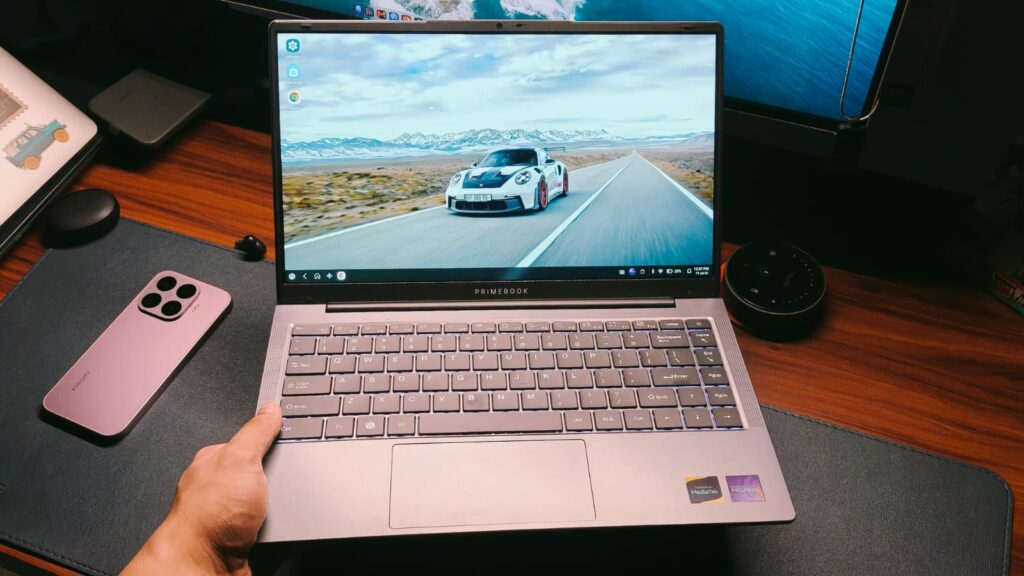
We’re halfway through 2026, and if there’s one thing we’ve all noticed this year, it’s rising tech prices. Everything is more expensive than last year, all thanks to AI, which has scooped up all memory production, driving prices to insane levels. This has almost killed the budget smartphone space, and the same is happening to laptops. Even Apple raised MacBook prices by well over ₹1 lakh in some configurations. Imagine this: you’re a student or a parent, and you need a budget-friendly laptop to complete schoolwork. Maybe it’s completing a project, or studying for the next exam on a bigger screen; you get the point.
That’s exactly the problem PrimeBook aims to solve. For the uninitiated, it’s an Indian startup that focuses on making Android laptops, similar to Chromebooks, that help you write documents, study using online tools like YouTube, and don’t cost a bank. One example is the PrimeBook 2 Pro, which features a 14-inch full HD display and runs on the Helio G99 processor. Since you get all that for ₹26,999, I knew I had to test it. I’ve been using the Primebook 2 Pro for the better part of two weeks, and this review should help you decide whether it’s worth it.
Primebook 2 Pro Review
Summary
The Primebook 2 Pro is a unique machine. The design is way more premium than I expected. The keyboard is great to type on, and even the performance is serviceable. Where Primebook still needs to work on is the optimization. People shouldn’t need to request apps they want to install. Still, it’s a capable studying machine
Design & Hardware

It’s very hard to judge a laptop’s design on such tight budgets because, you know, brands simply don’t have the budget for extensive R&D. While this is what I’ve thought about many of the budget laptops I’ve tested, the PrimeBook 2 Pro is actually designed rather well. Don’t get me wrong, you won’t get the premium metal design, but for the price, the plastic build is excellent. The silver color mimics aluminum, which I quite like, and I observed no flex in the chassis, no matter the pressure. The top has a matte finish that looks sophisticated and doesn’t pick up any fingerprints. I could use the laptop in a trendy cafe without looking out of place.
Open the laptop, and you’re greeted by the same premium feel, except this time the keyboard deck has a MacBook-esque finish. The lid extends slightly below the chassis, making it easier to open. The hinge, however, isn’t much to write home about. It keeps the screen steady, but I found it to be quite stiff. I always had to use two hands to open the laptop, which is a nitpick. Still, the best part about the PrimeBook 2 Pro is the portability. The 14-inch form factor was perfect for slipping into any backpack, and the 1.38 kg weight was light enough to carry the laptop anywhere.
As far as ports are concerned, Primebook hasn’t taken the MacBook route. That’s because you get dual USB-A ports for connecting accessories, a USB-C port for charging, a microSD slot, and a 3.5mm headphone/microphone combo jack. While I couldn’t find the speeds for the mentioned ports, it’s hard to complain much at this price.
Keyboard & Trackpad

When making a budget laptop, the keyboard is usually first on the chopping board to cut costs. While I agree with this sentiment, the keyboard is one of the main ways to interact with the laptop, and I’m glad Primebook 2 Pro doesn’t follow the norm. Its keyboard is perfectly fine. There are no highlight features, but, most importantly, no glaring issues. I got used to the layout pretty quickly. The feedback, while not as tactile as my MacBook, was good enough for long typing sessions. There’s an extra row of shortcuts to get home, end task, and scroll the page, all of which were useful during my testing.
Where things went south was with the trackpad. First up, its sensitivity is way too high. A small flick raced the pointer from one end to the other when all I was trying to do was click the publish button on an article. The second issue is the gestures. Remember the extra row on the keyboard for page-up and page-down. Yeah, you’d be using that quite a lot since scrolling with two fingers moves the page by just an inch. I tried finding settings to adjust both of these things, but I couldn’t. So keep that in mind.
Display & Camera

The PrimeBook 2 Pro features a 14-inch FHD IPS display with a 60Hz refresh rate. For the price, it’s pretty serviceable. The text was easy to read, even the smaller fine print. The colors were decent, making it a good experience to watch YouTube. Even the viewing angles were quite good. There was some color shifting when viewed from an angle, but not as much as with TN panels. The anti-reflective coating also did its job well, keeping background reflection at bay. The only complaint regarding the display would be the brightness. It’s not enough to overcome the light on a sunny day inside a brightly lit cafe.
The best way I can describe the alleged 1440p webcam is that you can use it for video calls. Don’t expect it to represent how your face actually looks or to have any sharpness, and you’d be good to go.
Performance & Battery

Inside the Primebook 2 Pro is the MediaTek Helio G99 processor, which, I agree, isn’t the newest kid on the block. It’s paired with 8GB of LPDDR4X RAM and an unnamed 128GB UFS storage. PrimeOS runs smoothly on the hardware. I could open and close applications reasonably quickly without waiting long. Most of my work happens in Chrome, so I used the laptop for a bit of news writing, along with my usual suite of research tabs. It kept over 10 tabs in memory without stuttering, so I believe studying with the 2 Pro should work out fine.
Where I did notice the 4-year-old processor was when running YouTube. The UI loaded quickly and fine, but when I clicked to play a video, there was a brief hitch before it actually played. This was the case with every video I tried playing. The issue became even more noticeable when I opened WhatsApp Web, which I believe many students would. The laptop took a long while loading my messages, and navigating between the different message tabs was a less-than-ideal experience.
The PrimeBook 2 Pro is powered by a 60Wh battery. When coupled with the non-flagship internals, the laptop’s battery life is excellent. When working on Chrome, it lasted me two full days of use, with the screen on time hovering around the 9-hour mark.
PrimeOS

It’s time to talk about PrimeOS. It’s Primebook’s custom Android-based operating system that takes the big-screen Android experience and adds a few desktop-inspired features. It was my first time using PrimeOS, and it’s a decent take. Apps are neatly tucked away into a Finder-like place. The file manager is inspired by both macOS and Windows and does a very good job of organizing files into easily understandable tabs. App support, though, is a bit complicated. Primebook claims you get access to the “entire Android app ecosystem,” but I couldn’t find all the apps. Sure, most of the important apps like PowerPoint, Docs, and others are included, but it’s not a complete list. If you need more apps, you’ll need to request them specifically, which is a bit counterintuitive in my opinion. It’s worth checking that the apps you need are available before buying.
Beyond that, since not everything can run on Android, Primebook offers Cloud PC functionality. It lets users emulate Windows or Linux on their laptop, albeit with a fee. Subscriptions start at ₹99 for Linux and ₹499 for Windows. Sadly, I did not get the opportunity to test the functionality during my review period. There is also PrimeCoding, the brand’s own beginner-friendly coding platform. The implementation is simple but useful for beginners learning the basics of programming. Do I see PrimeOS becoming big in the next few years? Yes.
Verdict

At ₹26,990, the PrimeBook 2 Pro is a unique machine. It’s neither a traditional Windows laptop nor a Chromebook. It’s something in between, and there are a lot of good things about the laptop. The design is way more premium than I expected. The keyboard is great to type on, and even the performance is serviceable. Where Primebook still needs to work on is the optimization. People shouldn’t need to request apps they want to install. Everything that runs on Android should already be there. Still, the Primebook 2 Pro is a capable machine that, if you’re looking for something to study on, will work just fine and serve you for a few years.


For the first time in several years, there are indications that the worst may be over for the Seattle region’s battered office market — and artificial intelligence companies appear to be playing a leading role.
The regional office market (spanning Seattle, Bellevue and the surrounding Eastside) posted positive net absorption during the second quarter, meaning companies occupied more office space than they vacated, according to a new report from commercial real estate firm JLL. It’s a notable shift after years of downsizing driven by remote work, layoffs and corporate cost-cutting.
Technology companies accounted for 42.5% of all leasing activity during the quarter, easily outpacing every other industry. JLL said AI-related leasing is on track for a strong year as companies establish engineering hubs in the Seattle region to tap its deep talent pool while taking advantage of office costs that remain well below San Francisco and New York.
In fact, leasing by AI companies has accounted for 21.6% of activity in the Seattle and Eastside year to date, and now the entire AI footprint in the region is 855,000 square feet. That’s double the amount in 2024, according to JLL.

The quarter’s largest deals reflected that trend.
- Databricks signed a 142,000-square-foot lease at Four106 in downtown Bellevue, the biggest office transaction of the quarter.
- DocuSign committed to 116,000 square feet at Seattle’s JPMorgan Chase Center.
- Pokémon moved into The Eight office tower in Bellevue, taking 369,800 square feet of space.
The Pokémon deal helped push the region to 372,000 square feet of positive net absorption for the quarter — reversing a run of quarters in which tenants gave back more space than they took.
The numbers offer an encouraging change after years of gloomy office market reports, but they hardly signal a full recovery. Regional vacancy remains elevated at 23.9%, while overall availability sits at 25%.
Companies continue to consolidate space, landlords are still offering concessions, and asking rents remain under pressure as tenants retain significant negotiating leverage, JLL said in the report
Still, there are indications the market’s fundamentals are improving.
@media (max-width: 600px) {
aside.callout { float:none !important; max-width:100% !important; margin-left:0 !important; margin-right:0 !important; }
aside.callout .callout-img { display:none !important; }
}
Availability has now declined for two consecutive quarters and has fallen from a peak of 26.5% a year ago. At the same time, JLL reports there is currently no new speculative office construction under way — buildings started without tenants committed — meaning even modest growth in demand could have a greater impact on occupancy than in previous years.
Rather than signaling a broad-based office comeback, the latest leasing data suggests a more nuanced story: AI companies and other fast-growing technology firms are helping stabilize a market that had spent years moving in the opposite direction.
The report reinforces a trend GeekWire has been tracking over the past year as AI companies expand their presence across the Seattle region. Alongside Microsoft and Amazon, companies including OpenAI, Anthropic, xAI, Armada and Anduril have been building engineering teams in the area, drawn by one of the country’s deepest concentrations of AI and cloud computing talent.
Whether that momentum continues will depend on how quickly AI hiring expands and whether more companies decide they need additional space for a new generation of engineers. But after several years defined by shrinking footprints and empty offices, the second quarter offered the first meaningful indication that Seattle’s office market may finally be finding its footing.
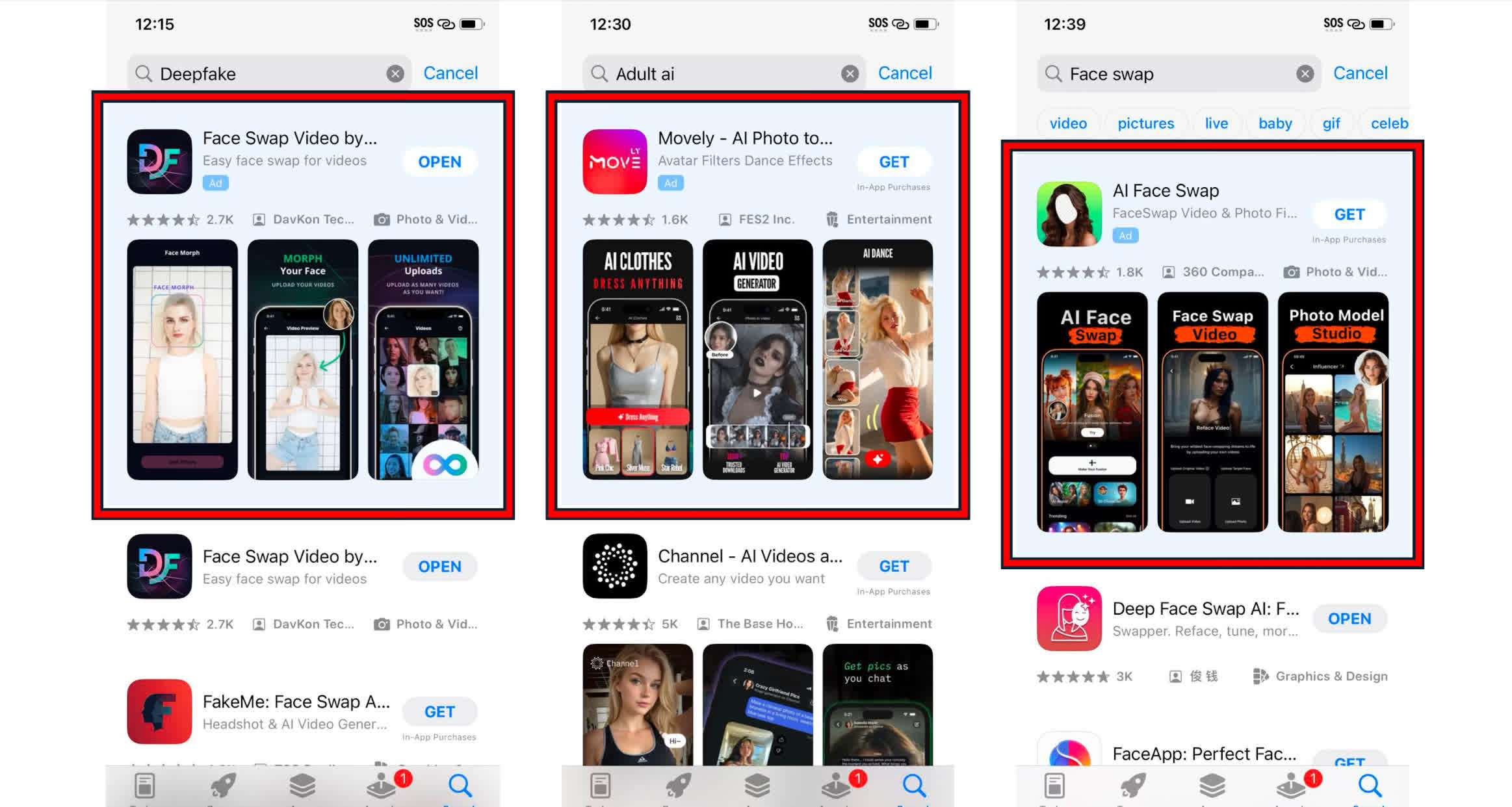
What just happened? San Francisco has demanded that Apple and Google remove 13 AI-powered apps capable of creating nonconsensual nude images. City Attorney David Chiu has accused the companies of profiting from technology overwhelmingly used to target women and girls.
Chiu sent cease-and-desist letters to the two tech giants on Thursday, demanding that they remove eight apps from Apple’s App Store and five from Google Play.
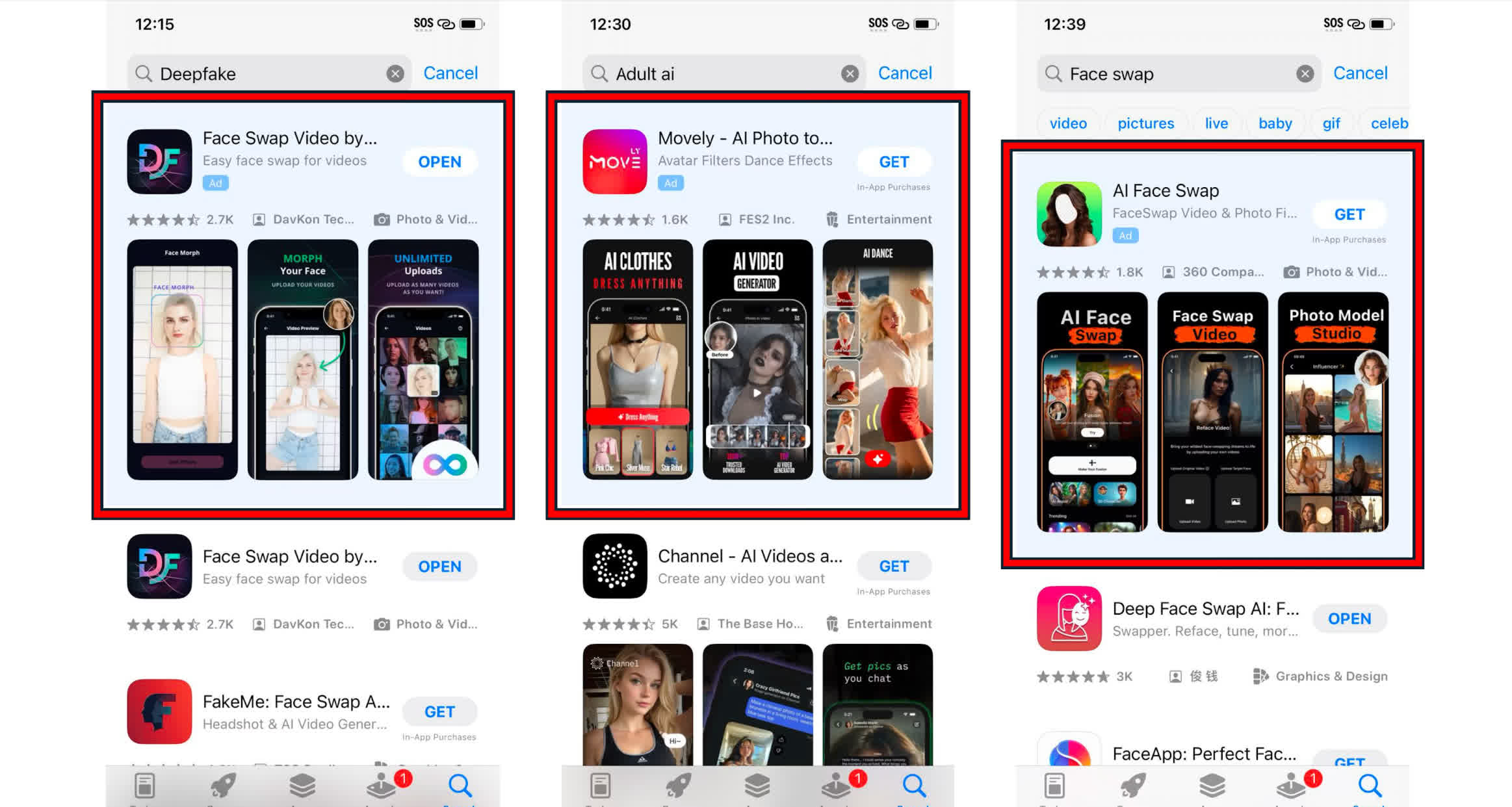
The programs are advertised primarily as face-swapping tools, but investigators found that they could also place people’s faces onto explicit images or generate fake nude content.
The letters accuse Apple and Google of “aiding and abetting” the sale of illegal deepfake pornography by hosting the apps, processing their in-app payments, and taking a cut of the proceeds. Chiu said the companies have likely earned millions of dollars in fees from theit cut of the apps’ sales.
San Francisco has given Apple and Google 28 days to explain how they will comply. The city could otherwise pursue civil enforcement carrying penalties of at least $25,000 per violation.
The demands also call on the companies to cut payment-processing ties with the developers and introduce recurring reviews designed to stop replacement apps from appearing.
Google said it had removed all five Android apps identified by Chiu’s office. The company added that it has suspended hundreds of apps containing nudification features and restricted related search terms such as “nudify.”
Apple said it removed three of the flagged apps and is terminating their developers’ accounts. Four other developers have been told to address policy violations or face removal. Both companies already prohibit pornography and abusive sexual content, which raises questions about how the apps made it through their review processes.
The problem isn’t limited to the named 13 programs. Two Tech Transparency Project investigations this year uncovered around 100 nudify-capable apps across both stores. They were estimated to have generated about $120 million in combined revenue and accumulated roughly 480 million downloads.
A separate Cornell and Georgetown study found 420 face-swap apps on the stores. Researchers tested 155 and discovered that 70% allowed users to place faces onto nude images without technical safeguards. None openly advertised itself as a nudification app, illustrating how seemingly ordinary photo tools can evade moderation.
San Francisco previously sued 16 of the most popular AI undressing websites in 2024, which had attracted 200 million visits during the first half of that year. Meta later sued the developer of Crush AI after more than 8,000 ads for the nudify service appeared on Facebook and Instagram in two weeks.
Last month, the Justice Department also seized two websites accused of publishing hundreds of thousands of deepfake nude images featuring famous women. Chiu warned that Apple and Google must become more proactive, adding that his office will consider further legal action if they fail to respond.


This week on the GeekWire Podcast: Silicon Valley legend Vinod Khosla’s family is leading a group that’s buying the Seattle Seahawks for a record $9.6 billion.
We dug into hours of his talks and interviews to answer the big questions: Who is this guy, why does he want an NFL team, and what does his track record tell us about the kind of owner he’ll be? Plus, the blind spot that could get him into trouble.
Featuring highlights from his 2015 talk at the Stanford Graduate School of Business.
Also: A mystery trove of aerospace artifacts is rescued from a Seattle-area electronics recycler, and we want to hear about your coolest tech history find. Send your comments, voice memos and photos to todd@geekwire.com.
Subscribe to GeekWire in Apple Podcasts, Spotify, or wherever you listen.

Looking for the most recent Strands answer? Click here for our daily Strands hints, as well as our daily answers and hints for The New York Times Mini Crossword, Wordle, Connections and Connections: Sports Edition puzzles.
Today’s NYT Strands puzzle isn’t too tough, and it’s a fun topic. If you need hints and answers, read on.
I go into depth about the rules for Strands in this story.
If you’re looking for today’s Wordle, Connections and Mini Crossword answers, you can visit CNET’s NYT puzzle hints page.
Read more: NYT Connections Turns 1: These Are the 5 Toughest Puzzles So Far
Hint for today’s Strands puzzle
Today’s Strands theme is: Big talk
If that doesn’t help you, here’s a clue: Enormous
Clue words to unlock in-game hints
Your goal is to find hidden words that fit the puzzle’s theme. If you’re stuck, find any words you can. Every time you find three words of four letters or more, Strands will reveal one of the theme words. These are the words I used to get those hints but any words of four or more letters that you find will work:
- SUMP, VAIL, TAIL, SOOT, THAN, SUIT, SUITS, STOLE, MOTH
Answers for today’s Strands puzzle
These are the answers that tie into the theme. The goal of the puzzle is to find them all, including the spangram, a theme word that reaches from one side of the puzzle to the other. When you have all of them (I originally thought there were always eight but learned that the number can vary), every letter on the board will be used. Here are the nonspangram answers:
- GIANT, MAMMOTH, BEHEMOTH, COLOSSUS, LEVIATHAN
Today’s Strands spangram
The completed NYT Strands puzzle for July 19, 2026.
Today’s Strands spangram is SUPERSIZEIT. To find it, start with the S that is the last letter on the far-left vertical row, and wind up and over.

B&H has launched new markdowns on numerous 14-inch and 16-inch MacBook Pro laptops this week, with savings of up to $400 off M5, M5 Pro, and M5 Max models.
The latest sale at B&H includes numerous CTO MacBook Pro models that are up to $400 off. Some of the configurations have additional RAM, extra storage, a nano-texture display, or all three.
You can jump straight to the sale, but we’ve also rounded up top picks below. And if you don’t see your desired model, it’s also worth checking out our MacBook Pro Price Guide, which is broken down by screen size and Apple Silicon chip, to find deals on dozens of configurations.
Save up to $400 on MacBook Pros
What’s great about the deals below is that each model is in stock at B&H at press time, so you don’t have to wait long to begin using your new system.
M5 14-inch MacBook Pro deals
- 14″ M5 (10C CPU, 10C GPU, 16GB, 1TB, Standard Display, 96W Adapter, Space Black): $1,699 ($320 off)
- 14″ M5 (10C CPU, 10C GPU, 24GB, 1TB, Standard Display, 96W Adapter, Space Black): $1,899 ($320 off)
- 14″ M5 (10C CPU, 10C GPU, 32GB, 1TB, Standard Display, 96W Adapter, Space Black): $2,099 ($320 off)
- 14″ M5 (10C CPU, 10C GPU, 32GB, 1TB, Nano-texture, 70W Adapter, Space Black): $2,249 ($300 off)
M5 Pro & M5 Max 14-inch MacBook Pro discounts
- 14″ M5 Pro (15C CPU, 16C GPU, 24GB, 1TB, Standard Display, 96W Adapter, Space Black): $2,199 ($320 off)
- 14″ M5 Pro (15C CPU, 16C GPU, 24GB, 1TB, Nano-texture, 70W Adapter, Space Black): $2,349 ($300 off)
- 14″ M5 Pro (15C CPU, 16C GPU, 48GB, 1TB, Standard Display, 70W Adapter): $2,699 ($400 off)
- 14″ M5 Pro (15C CPU, 16C GPU, 48GB, 2TB, Standard Display, 70W Adapter, Space Black): $3,299 ($300 off)
- 14″ M5 Pro (18C CPU, 20C GPU, 24GB, 1TB, Standard Display, 96W Adapter, Space Black): $2,399 ($300 off)
- 14″ M5 Pro (18C CPU, 20C GPU, 48GB, 1TB, Standard Display, 96W Adapter): $2,999 ($300 off)
- 14″ M5 Pro (18C CPU, 20C GPU, 48GB, 1TB, Nano-texture, 96W Adapter, Space Black): $3,099 ($350 off)
- 14″ M5 Pro (18C CPU, 20C GPU, 48GB, 2TB, Standard Display, 96W Adapter, Space Black): $3,499 ($300 off)
- 14″ M5 Pro (18C CPU, 20C GPU, 48GB, 2TB, Nano-texture, 96W Adapter, Space Black): $3,649 ($300 off)
- 14″ M5 Pro (18C CPU, 20C GPU, 64GB, 1TB, Standard Display, 96W Adapter): $3,299 ($400 off)
- 14″ M5 Pro (18C CPU, 20C GPU, 64GB, 2TB, Standard Display, 96W Adapter, Space Black): $3,899 ($300 off)
- 14″ M5 Max (18C CPU, 32C GPU, 36GB, 4TB, Standard Display, Space Black): $4,799 ($300 off)
- 14″ M5 Max (18C CPU, 40C GPU, 64GB, 2TB, Standard Display, Space Black): $4,699 ($400 off)
- 14″ M5 Max (18C CPU, 40C GPU, 64GB, 2TB, Nano-texture Display, Space Black): $4,899 ($350 off)
- 14″ M5 Max (18C CPU, 40C GPU, 64GB, 4TB, Standard Display, Space Black): $5,799 ($300 off)
M5 Pro & M5 Max 16-inch MacBook Pro sale
- 16″ M5 Pro (18C CPU, 20C GPU, 48GB, 1TB, Nano-texture, Space Black): $3,399 ($350 off)
- 16″ M5 Pro (18C CPU, 20C GPU, 48GB, 2TB, Standard Display, Space Black): $3,699 ($400 off)
- 16″ M5 Pro (18C CPU, 20C GPU, 64GB, 1TB, Standard Display, Space Black): $3,599 ($400 off)
- 16″ M5 Pro (18C CPU, 20C GPU, 64GB, 1TB, Nano-texture, Space Black): $3,849 ($300 off)
- 16″ M5 Max (18C CPU, 40C GPU, 64GB, 2TB, Standard Display, Space Black): $4,999 ($400 off)
- 16″ M5 Max (18C CPU, 40C GPU, 64GB, 2TB, Nano-texture, Space Black): $5,249 ($300 off)
- 16″ M5 Max (18C CPU, 40C GPU, 64GB, 4TB, Standard Display, Silver): $6,099 ($300 off)
- 16″ M5 Max (18C CPU, 40C GPU, 64GB, 4TB, Nano-texture, Space Black): $6,249 ($300 off)
- 16″ M5 Max (18C CPU, 40C GPU, 128GB, 4TB, Standard Display, Space Black): $7,699 ($300 off)
- 16″ M5 Max (18C CPU, 40C GPU, 128GB, 2TB, Standard Display, Space Black): $6,699 ($300 off)
- 16″ M5 Max (18C CPU, 40C GPU, 128GB, 2TB, Nano-texture): $6,849 ($300 off)
- 16″ M5 Max (18C CPU, 40C GPU, 128GB, 4TB, Nano-texture): $7,849 ($300 off)
- 16″ M5 Max (18C CPU, 40C GPU, 128GB, 8TB, Standard Display, Space Black): $9,699 ($300 off)
You can also check out our MacBook Pro deals roundup for month-end sales on Apple’s laptop line.

Kylian Mbappe Leads World Cup Golden Boot Race Heading Into Sunday’s Final

A closer look at whether it is a scam or not

6 Perfect Fantasy Video Games That Nobody Remembers


-
 NewsBeat3 days ago
London Mayor Sadiq Khan handed a peerage by Keir Starmer alongside 15 other Labour figures… just days before the PM leaves No10
-

 Fashion2 days ago
Weekend Open Thread – Corporette.com
-

 Politics23 hours ago
The House | The City of London can help the new chancellor deliver growth in every postcode
-

 Crypto World3 days ago
CFTC blocks Kalshi from unwinding Michigan trades after court order
-

 Politics4 days ago
Young campaigners urge incoming PM to act on outdoor junk food ads
-

 Business3 days ago
Nvidia Stock Slips After Big Tuesday Rally as Huang Confirms Vera Rubin Chip Is Now in Production Today
-

 Crypto World23 hours ago
Ripple Payments Joins MiCA With 14 Firms, Does It Mean Anything For XRP?
-
 Entertainment4 days ago
Disney’s Most Ambitious Failed Star Wars Attraction Is Coming to SDCC
-

 Crypto World2 days ago
Ripple wins EU-wide access as ESMA adds it to MiCA register
-

 Business3 days ago
Palantir Shares Rise After Expanded Nvidia Partnership and Fresh Analyst Upgrades Ahead of Earnings Day
-

 Crypto World3 days ago
Injective Submits SEC Transfer-Agent Registration to Onchain Ownership Records
-

 Tech5 days ago
Get Your ESP32 Sunny Side Up With This Solar Dev Board
-

 News Videos5 days ago
XRP BOMBSHELL… XRP OMBOARDED FOR TRANSACTIONS!!!
-

 NewsBeat2 days ago
Registration is now open for March for Men with Kev 2026
-

 Tech5 days ago
Dark Secrets Emerge When Jailbreaking LLMs
-
 Sports4 days ago
New Cornerback Enters Vikings Trade Rumor Mill
-

 News Videos2 days ago
Money | Class 12 Economics | CBSE Board Exam 2026-27
-
 Crypto World2 days ago
Two July Windows Left: The CLARITY Act’s Senate Fight and What Failure Means
-

 Business2 days ago
Banco Bilbao Vizcaya Argentaria, S.A. (BBVA) Discusses Global Macro Environment and Economic Outlook for Core Markets Transcript
-
 Crypto World2 days ago
Claude Fable 5 Slips to Second in AI Coding Leaderboard
You must be logged in to post a comment Login