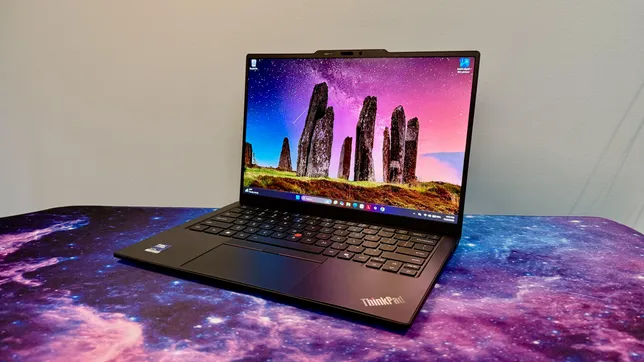
The 14th generation of Lenovo’s flagship business ultraportable, the X1 Carbon, looks no different than the previous iteration. But don’t let its comfortingly familiar design fool you: The interior has been completely reengineered to make the laptop run more coolly and quietly, and — more importantly — it’s easier to repair.
The X1 Carbon Gen 14 introduces Lenovo’s Space Frame chassis that features a smaller motherboard and larger cooling fans, along with a modular design that makes it easier to access and then repair or replace individual components. This is good news for ThinkPad buyers who care about ROI, sustainability or both.
The laptop is based on Intel’s Core Ultra 300 series processors, known as Panther Lake. If you were hoping for a big leap in performance from last year’s Lunar Lake model, you’ll need to keep waiting in the hopes that next year’s Gen 15 delivers the goods. This year’s model isn’t any faster than last year’s ThinkPad X1 Carbon Gen 13, and battery life is actually a few hours shorter.
Advertisement
Performance certainly suffices for basic office tasks, and you should be able to get through even the longest workdays on a single charge, but the reason to pick up the X1 Carbon Gen 14 is the increased repairability rather than anything resembling an increase in performance. Two other reasons for it: the X1 Carbon’s traditional look remains largely unchanged, which will delight longtime ThinkPad fans; and pricing hasn’t gone up (the model Lenovo sent me is actually $100 cheaper than the similar config I tested last year). That will come as a relief to any laptop buyer in this era of RAMageddon and skyrocketing prices for laptops, phones and other electronics.
Lenovo has kept pricing fairly consistent for this year’s ThinkPad X1 Carbon Gen 14, which ought to be applauded as laptop prices keep going up and up. As Lenovo’s flagship ThinkPad, however, the X1 Carbon remains a device more likely to be toted around by C-suite execs than the rank and file. The entry point has risen, but the cost of upgrades has surprisingly dropped a bit. And despite what Lenovo may show on its site, there is a way to get the ThinkPad X1 Carbon Gen 14 for less than $2,000.
Advertisement
Lenovo lists a starting price of $2,139 for a config with an Intel Core Ultra 5 335, 32GB of RAM, a 256GB solid-state drive, a 1,920×1,200-pixel IPS display and Windows 11 Home. But if you choose to upgrade to the Core Ultra 7 355, then you can downgrade the RAM to 16GB for a price of $1,884. I’m not suggesting you move off of the 32GB of RAM offered, but simply highlighting it as a somewhat hidden option.
Matt Elliott/CNET
Less hidden, and new with this year’s Panther Lake-based X1 Carbon, is the option to expand the memory to 64GB. When you choose the top CPU offered, the Core Ultra 7 365, the option for 64GB becomes available. That’s the good news. The bad news is that this memory upgrade is staggeringly expensive. It costs $720 and clearly shows how the global RAM shortage has dramatically increased PC component pricing.
My test system features the Core Ultra 7 355 chip and 32GB of RAM, along with three other upgrades: a 512GB SSD, a 2.8K nontouch OLED display and Windows 11 Pro, which raises the total to $2,374. That’s actually $100 cheaper than the X1 Carbon Gen 13 that I reviewed last year, which had the same component lineup but with the previous-gen Core Ultra 7 258V CPU.
The Space Frame design completely overhauls the laptop’s interior layout, making it easier to repair or replace individual components rather than replacing the entire laptop if one part fails. It’s not as modular and easy to access as I had hoped, but it’s certainly a step in the right (-to-repair) direction.
You need only to remove four screws to take off the bottom panel. Inside, the battery is held in place by three screws, and you’ll need to remove it to get to the internal frame that houses the double-sided motherboard.
Matt Elliott/CNET
In addition to removing the bottom panel, you can remove the keyboard deck to access each side of the motherboard. Six screws hold the keyboard deck in place. So, that’s a total of 13 screws to gain full access to the interior components. And they are all standard Phillips screws, so you won’t need to hunt around for a Torx or Pentalobe screwdriver. (They’re captive screws, too, so you won’t have a chance to lose any.)
In truth, taking off the two panels is slightly more complicated than removing 13 screws. There are four ribbon cables you also need to disconnect, which might make people in your organization less confident to make their own repairs and more likely to call the IT department. I also found it challenging to get all the cables on the right side of the internal frame as I attempted to line up the keyboard deck and snap it into place when I was reassembling the laptop.
Advertisement
Matt Elliott/CNET
Even if Lenovo’s Space Frame chassis is a bit trickier and not as modular as, say, a Framework laptop, it makes the X1 Carbon Gen 14 much more repairable than any previous ThinkPad. For starters, you can replace the battery, which often is the first component to show signs of age and wear as battery life slowly but ever-so-consistently shortens. Most of today’s laptops have batteries that are soldered to the motherboard and not replaceable, so being able to just swap in a new battery is a boon.
In addition, the laptop’s cooling fans, keyboard, speakers and the USB ports are user-replaceable. The two USB-C ports on the left side can be individually removed and replaced, but the pair on the right is a packaged set.
Matt Elliott/CNET
The USB-C and -A ports on the right side are paired on a small circuit board that’s separate from the mainboard, so you’d need to replace both ports should one fail. Still, it’s nice that this small board can be replaced rather than needing to swap out the mainboard, which usually equates to a full laptop replacement.
Advertisement
Matt Elliott/CNET
The X1 Carbon Gen 14’s SSD is replaceable, but it occupies the lone M.2 slot, so you’ll need to replace the existing drive, and you don’t have the luxury of simply adding a second SSD to increase the storage capacity. The RAM is not user-replaceable, so you have to get what you need upfront.
Same X1 Carbon exterior
The interior has been completely redesigned, but the exterior received only minor tweaks. The latest ThinkPad X1 Carbon retains the classic ThinkPad look. It’s boxy, matte black with the familiar red accents. And it’s still exceptionally light at just under 2.2 pounds.
The keyboard received a couple of cosmetic changes. Lenovo moved the fingerprint reader, integrating it with the power button in the top-right corner. This change restores the right-Ctrl key but also means the End and Insert keys are now double-mapped to a single key. Lenovo also shifted the keyboard icons from their usual spot in the top-left corner of each key to the center, a move that also includes a slight tweak to the font.
Matt Elliott/CNET
The keyboard maintains its ThinkPad standard of excellence. It sits in the sweet spot of offering plush but firm feedback and is still the standard-bearer for laptop keyboards. It’s a pleasure to type on.
You have a choice of touchpads: mechanical or haptic. I received the mechanical one, and it’s fine for what it is. There is some diving-board effect where clicks are harder to perform as you move up the touchpad’s surface. Given that there’s no upcharge for the haptic touchpad, I think most people are better off with it because it offers a consistent click response across its entire surface.
Advertisement
Matt Elliott/CNET
The haptic touchpad also provides a larger surface on which to click and swipe because it integrates the mouse buttons for the pointing stick into a narrow strip at the top. The only reason I see for the mechanical touchpad is if you favor the traditional ThinkPad pointing stick over the touchpad and want the larger mouse buttons for it at the top of the touchpad.
The 2.8K OLED display is excellent and, shockingly, doesn’t cost any more than the baseline IPS panel. That’s the reason why the Gen 14 model I have is $100 less than the nearly identical Gen 13 model I looked at last year. Component prices have gone up, but Lenovo not charging $490 for the OLED upgrade certainly helps keep the price in check.
Matt Elliott/CNET
The OLED looks fantastic, with vivid colors, deep blacks and crisp images and text. Scrolling and other movements on the screen look smooth, thanks to its variable refresh rate of 30Hz to 120Hz. Color coverage is excellent with 100% coverage of the sRGB and P3 gamuts, and it proved to be even a bit brighter than its 500-nit rating, hitting a peak of 510 nits on my tests with a Spyder X Elite colorimeter.
The ThinkPad X1 Carbon Gen 14 offers a Windows Hello webcam along with the aforementioned fingerprint scanner. I like getting both types of biometrics, especially on a business machine.
Advertisement
Matt Elliott/CNET
The port selection has grown by one with this year’s X1 Carbon. It picked up an extra USB-C Thunderbolt 4 to bring the count to three. And, better yet, it’s located on the opposite side of the other two, giving you the ability to charge the laptop from either side.
Quick note on the Aura Edition suffix: It’s the branding for Lenovo and Intel’s partnership that makes it easier to swap files between the X1 Carbon and your phone. Less useful are its smart modes for setting a timer to focus or a wellness mode that reminds you to take a break to rest your eyes. There’s even a mildly unsettling posture warning that uses the webcam to track how you’re doing at sitting up straight and not slouching in front of the laptop.
ThinkPad X1 Carbon Gen 14 performance
This year’s Panther Lake model isn’t any faster than last year’s Lunar Lake system. Multicore performance crept up a smidgeon, but single-core performance slid back. Meanwhile, 3D performance also decreased, which isn’t surprising when you consider that the Core Ultra 7 355’s integrated GPU has only four Xe graphics cores, and last year’s Core Ultra 7 258V’s iGPU had eight Xe cores. Lenovo doesn’t offer a Core Ultra X7 that brings with it Intel’s higher-powered, 12-core Arc B390 integrated GPU, which is unfortunate for creators or other power users eyeing the X1 Carbon Gen 14.
I also wasn’t surprised to see battery life move three hours in the wrong direction. The Core Ultra 7 355 is a higher-wattage CPU than the Core Ultra 7 258V and, therefore, consumes battery resources at a quicker clip. The X1 Carbon Gen 13 lasted nearly 18 hours on our YouTube streaming battery drain test, and the X1 Carbon Gen 14 lasted almost 15 hours on the same test. That’s still enough to get you through most workdays on a single charge, but it doesn’t give you as much leeway as last year.
Advertisement
Should I buy the ThinkPad X1 Carbon Gen 14?
Outweighing the lack of any performance gains with this year’s edition and battery life decreasing by a few hours is the greater repairability that should help extend the useful life of the ThinkPad X1 Carbon Gen 14. The Space Frame design makes it possible to repair or replace the battery when it starts to fade, a cranky cooling fan or a bad port instead of needing to junk the laptop and buy a new one. That’s great for your ROI and the environment.
I also like two things about the X1 Carbon that didn’t change this year. First, I appreciate that in year 14, the X1 Carbon continues to stay true to its roots and keeps its traditional look and feel. It’s just a well-built machine with a rare combination of being very lightweight yet sturdy (and the keyboard is *chef’s kiss*). Secondly, I was pleasantly surprised to see pricing stay steady. Lenovo raised the entry price, but that is more than offset by removing the premium for the OLED upgrade. And since I imagine most people buying the flagship ThinkPad will want the best display offered, you’ll come out ahead on the price compared to last year’s X1 Carbon.
Advertisement
The review process for laptops, desktops, tablets and other computerlike devices consists of two parts: performance testing under controlled conditions in the CNET Labs and extensive hands-on use by our expert reviewers. This includes evaluating a device’s aesthetics, ergonomics and features. A final review verdict is a combination of both objective and subjective judgments.
A more detailed description of each benchmark and how we use it can be found on our How We Test Computers page.
Geekbench 6 CPU (multicore)
Advertisement
Microsoft Surface Laptop for Business (8th Edition)17014Lenovo ThinkPad X1 Carbon Gen 14 Aura Edition11492Acer Swift Go 14 AI11490Dell XPS 1411207Lenovo ThinkPad X1 Carbon Gen 13 Aura Edition11079HP EliteBook Ultra G1i11032
Note: Longer bars indicate better performance
Geekbench 6 CPU (single-core)
Microsoft Surface Laptop for Business (8th Edition)2953HP EliteBook Ultra G1i2777Lenovo ThinkPad X1 Carbon Gen 13 Aura Edition2742Lenovo ThinkPad X1 Carbon Gen 14 Aura Edition2679Dell XPS 142599Acer Swift Go 14 AI2422
Note: Longer bars indicate better performance
Cinebench 2024 CPU (multicore)
Advertisement
Microsoft Surface Laptop for Business (8th Edition)802Acer Swift Go 14 AI709Lenovo ThinkPad X1 Carbon Gen 14 Aura Edition647Lenovo ThinkPad X1 Carbon Gen 13 Aura Edition557Dell XPS 14530HP EliteBook Ultra G1i518
Note: Longer bars indicate better performance
Cinebench 2024 CPU (single-core)
Microsoft Surface Laptop for Business (8th Edition)125HP EliteBook Ultra G1i123Lenovo ThinkPad X1 Carbon Gen 13 Aura Edition121Lenovo ThinkPad X1 Carbon Gen 14 Aura Edition119Dell XPS 14117Acer Swift Go 14 AI107
Note: Longer bars indicate better performance
3DMark Steel Nomad
Advertisement
Microsoft Surface Laptop for Business (8th Edition)1387HP EliteBook Ultra G1i820Lenovo ThinkPad X1 Carbon Gen 13 Aura Edition680Lenovo ThinkPad X1 Carbon Gen 14 Aura Edition619Dell XPS 14524Acer Swift Go 14 AI233
Note: Longer bars indicate better performance
PCMark 10 Pro Edition
Microsoft Surface Laptop for Business (8th Edition)9432Lenovo ThinkPad X1 Carbon Gen 14 Aura Edition7734Dell XPS 147467Lenovo ThinkPad X1 Carbon Gen 13 Aura Edition7114HP EliteBook Ultra G1i6815
Note: Longer bars indicate better performance
Online streaming battery drain test
Advertisement
Acer Swift Go 14 AI23 hr, 13 minDell XPS 1421 hr, 7 minLenovo ThinkPad X1 Carbon Gen 13 Aura Edition17 hr, 54 minLenovo ThinkPad X1 Carbon Gen 14 Aura Edition14 hr, 49 minMicrosoft Surface Laptop for Business (8th Edition)14 hr, 42 minHP EliteBook Ultra G1i13 hr, 39 min
Note: Longer bars indicate better performance
System configurations
Lenovo ThinkPad X1 Carbon Gen 14 Aura Edition
Microsoft Windows 11 Pro; Intel Core Ultra 7 355; 32GB DDR5 RAM; Intel Arc 140V Graphics; 512GB SSD
Lenovo ThinkPad X1 Carbon Gen 13 Aura Edition
Microsoft Windows 11 Pro; Intel Core Ultra 7 258V; 32GB DDR5 RAM; Intel Arc 140V Graphics; 512GB SSD
HP EliteBook Ultra G1i
Microsoft Windows 11 Pro; Intel Core Ultra 7 268V; 32GB DDR5 RAM; Intel Arc 140V Graphics; 512GB SSD
Microsoft Surface Laptop for Business (8th Edition)
Microsoft Windows 11 Pro; Intel Core Ultra X7 368H; 32GB DDR5 RAM; Intel Arc B390 Graphics; 1TB SSD
Dell XPS 14
Microsoft Windows 11 Home; Intel Core Ultra 7 355; 16GB DDR5 RAM; Intel Graphics; 512GB SSD
Acer Swift Go 14 AI
Microsoft Windows 11 Home; Qualcomm Snapdragon X Plus X1P-42-100; 16GB DDR5 RAM; Qualcomm Adreno Graphics; 1TB SSD
The 2026 World Cup finalis here as Spain take on Argentina to be crowned champions. It is being billed as Lamine Yamal versus Lionel Messi, but the story runs far deeper than that as two of football’s biggest nations meet on the grandest stage.
Even better is that you can stream the World Cup final 2026 for free.
Here’s the trick: BBC and ITV are streaming the Spain vs Argentina game for free in the U.K..
Advertisement
These are also available in the US, Canada and anywhere else in the world with this VPN.
How to watch World Cup final 2026 for free
The FIFA World Cup 2026 final is free-to-air on BBC iPlayer and ITVX.
You will need an account for these with a UK postcode (e.g. SE1 7PB) and a valid TV license.
Advertisement
But, it isn’t only BBC iPlayer and ITVX showing it for free with SBS in Australia, RTVE Play in Spain and Telefe in Argentina also showing it.
Can’t access your free stream? Use Norton VPN to stream the final from anywhere in the world.
Use a VPN to watch World Cup final free from anywhere
Advertisement
Quick start: Using a VPN to watch 2026 World Cup free
Using a VPN is incredibly simple, just follow these steps.
1. Install the VPN of your choice. As we’ve said, Norton VPN is our favorite for streaming.
2. Choose the location you wish to connect to in the VPN app. For instance if you’re visiting the US. and want to view a UK service, you’d select the “United Kingdom” location from the server list.
3. Sit back and enjoy the action. Head to BBC iPlayer (or any other service depending on where you’re from) and watch World Cup final just like you would at home, FREE.
Advertisement
Which devices can I watch the 2026 World Cup final for free with?
We test and review VPN services in the context of legal recreational uses. For example: 1. Accessing a service from another country (subject to the terms and conditions of that service). 2. Protecting your online security and strengthening your online privacy when abroad. We do not support or condone the illegal or malicious use of VPN services. Consuming pirated content that is paid-for is neither endorsed nor approved by Future Publishing.
Claude will take a moment to generate your report. By default, the chatbot will summarize the last month of your usage, but you can also see the last three, six or 12 months by clicking the toggle at the top.
Once your first report is ready, you’ll see a short summary of your conversations with Claude. As of the writing of this article, you can’t see the exact amount of time you’ve spent using Claude. If you click the Time spent tab, the page just says “coming soon.” Ryn Linthicum, Anthropic’s head of wellbeing policy, told Engadget the reason for that is the company didn’t have an internal system for measuring time spent on Claude when it began working on the Reflect dashboard.
In any case, the dashboard gives you two different ways to manage your time on Claude. First, you can set break reminders, which the chatbot will deliver in the form of a nudge after you use it for a set amount of time. After just how much time Claude prompts you to take a break, is up to you. You can set reminders for every 15, 30 or 45 minutes, or every few hours. Separately, you can set quiet hours, which are designed to prevent you from using Claude during certain hours of the day. You can set different hours for each day of the week independently of each other. So, for example, on Monday you can put up a roadblock from 5PM to 8PM, while on Saturday you can set it from 12PM to 4PM.
Advertisement
As with any screen time tool, it’s ultimately up to you to honor the usage limits you’ve set for yourself since you can freely dismiss all of Claude’s nudges. If you want to tweak your break reminders, you can do so from the Time and focus section of the settings menu.
Anthropic
One more feature of the dashboard I’ll highlight here involves the AI fluency section, which you’ll find toward the bottom of the interface. Under this section, Claude will generate recommendations designed to streamline your usage of the chatbot. For example, if Claude finds you frequently re-establish the same or similar context when you go to write a question or request, it will recommend you use its Projects feature to group your prompts together, so that you don’t need to repeat yourself so often. In my testing, this tool has helped me use Claude smarter. So I recommend giving some of the tips Claude generates a try.
Anthropic’s Claude extension flaws allow fake clicks to launch sensitive AI workflows
Researchers found vulnerable handlers unchanged across eight extension updates
Synthetic clicks bypassed checks designed to confirm real user actions
Security researchers at Manifold Security have claimed Anthropic’s Claude for Chrome browser extension contains two unpatched vulnerabilities in version 1.0.80, released July 7, 2026.
According to Manifold Security, it first reported both vulnerabilities to Anthropic through the company’s bug bounty program on May 21, 2026, and received acknowledgment the following day.
The first flaw lets any browser extension trigger nine predefined Claude workflows by simulating a synthetic user click on claude.ai.
Latest Videos From
Nine workflows and one missing check
Researcher Ax Sharma found that the extension never verified whether a click event carried the Event.isTrusted property before acting on it.
Advertisement
Under default settings, the vulnerability received a CVSS score of 7.7 High, increasing to 9.6 Critical when users enabled automatic execution because Claude could perform actions without approval.
The nine hardcoded tasks include reading Gmail, opening Google Docs, checking Google Calendar, and modifying Salesforce leads without asking.
Because the browser marks synthetic clicks as untrusted, the extension should have rejected them but instead executed the workflow anyway.
Advertisement
Sign up to the TechRadar Pro newsletter to get all the top news, opinion, features and guidance your business needs to succeed!
Manifold Security confirmed on July 7 2026 that both vulnerabilities still work against version 1.0.80, months after first reporting them to Anthropic.
Anthropic released eight separate versions between 1.0.73 and 1.0.80 without altering the specific handlers’ researchers had already flagged as vulnerable.
The company closed the synthetic-click report, saying an existing internal report already tracked the broader trust-boundary issue researchers had described in detail.
Advertisement
However, Sharma believes the fix required only one additional line of code to verify the click event’s isTrusted property before allowing the workflow to continue.
A second, structural weakness
A second flaw involves a side-panel URL parameter called skipPermissions, which can activate a privileged mode without any consent prompt.
Advertisement
When the parameter is set to true, the panel begins skipping permission checks entirely, allowing Claude to act without asking the user first.
Manifold notes that only Anthropic’s own scheduled-task feature is supposed to construct this kind of privileged URL internally right now.
The panel, however, honours that parameter regardless of which script or page actually constructed the originating URL string in practice.
One example task lets Claude read a user’s Gmail inbox, identify promotional messages, and automatically click the unsubscribe links inside them.
Advertisement
Manifold warns that “the bypass is still six lines of JavaScript,” months after researchers first flagged the underlying issue to Anthropic.
Anthropic classified this second finding as informational, arguing that the parameter is only ever constructed by its own internal systems.
Manifold said the content-script and side-panel code linked to both vulnerabilities remained byte-identical across the eight subsequent extension releases examined after the original report.
The flaws were also reproduced across Claude’s Opus, Sonnet, and Fable side-panel model selections, indicating that the issue affected the extension’s security design rather than the underlying artificial intelligence models.
Advertisement
The report also connected the findings with OWASP concerns involving LLM01: Prompt Injection and LLM06: Excessive Agency risks in AI applications.
The researchers noted that abuse involving AI tools may remain difficult to detect because normal browser activity and network connections can appear unchanged while unauthorized AI actions occur.
Christopher Nolan, the Oscar-winning director whose new version of “The Odyssey” is currently conquering the box office, said it’s been “pretty encouraging” to see deep skepticism of AI, especially from young people.
Nolan was responding to a question from interviewer Hugo Travers, who publishes on YouTube under the name HugoDécrypte. Travers brought up the legendary Trojan horse, which plays a key role in Nolan’s film — just as the horse was a gift concealing murderous Greek invaders, he wondered if AI might be something “that you welcome in your daily life” only to see it become “something else and something darker.”
Laughing, Nolan responded, “I think AI is a Trojan horse that everybody knows the Greeks are inside.” He later described the technology as “a transparent horse, it’s made of glass.”
“I’ve never seen a technology advancing so rapidly [that’s been] so completely rejected by the public,” he said. “Everybody’s suspicion of it is so extreme, particularly young people. The reaction to AI videos online and people my children’s age immediately calling it ‘AI slop’ and coining that term and just putting it in a box.”
Advertisement
In Nolan’s view, this is “a very healthy skepticism, because technology is always going to give us great gifts, as you say, but it has to be viewed with skepticism.” Similarly, he said, “The motives of the people giving it to us also have to be viewed with skepticism. That’s when we’ll get the best out of a new technology, rather than just blind faith that everything’s going to be great.” (Meanwhile, SpaceX CEO Elon Musk has been angrily posting about the film’s nonwhite and transgender cast members.)
Nolan didn’t get more specific about what he views as the threat from AI, but the technology has been a growing source of concern in Hollywood and was a major focus during the writers’ and actors’ strikes of 2023. The Directors Guild of America, where Nolan is president, also won some generative AI protections in its most recent contract.
The director has been famously resistant to other technologies, including smartphones; his embrace of film can make him seem simultaneously like a Luddite and a pioneer, with “The Odyssey” becoming the first feature film to be shot entirely on Imax film and cameras.
When The New York Times recently asked Nolan if he thinks of himself as a technophobe, he replied, “I think of myself as a techno-skeptic,” and said his love of film comes from the fact that it’s “better in terms of representing the way the eye sees the world than any digital imaging system I’ve seen.”
Advertisement
“I embrace new technology all the time, but it tends to be sold to people at the expense of systems that might still be valid and viable,” Nolan said. “That’s what I saw in my industry — throwing the baby out with the bath water. We almost lost film!”
When you purchase through links in our articles, we may earn a small commission. This doesn’t affect our editorial independence.
Modern cars are no longer machines that stay the same after they leave the showroom. Increasingly, they’re becoming software-defined vehicles that receive new features, bug fixes, and security patches wirelessly, much like smartphones. But while over-the-air (OTA) updates have made vehicle maintenance easier and cheaper, cybersecurity experts are warning that the same technology could also become one of the automotive industry’s biggest security challenges.
Researchers and policymakers are now calling for stronger oversight as connected vehicles become increasingly dependent on remote software updates. Their concern isn’t just about hackers stealing personal data. It’s about someone potentially interfering with the operation of a moving vehicle.
The convenience of wireless updates comes with new risks
OTA technology allows manufacturers to remotely deliver software updates, firmware upgrades and security patches without requiring owners to visit a dealership. Tesla popularized the concept more than a decade ago when it began rolling out wireless updates for the Model S in 2012. Today, the feature has become commonplace across premium and mainstream vehicles alike.
For consumers, the advantages are obvious. Carmakers can quickly fix software bugs, improve battery management, add new infotainment features or even enhance driving performance without issuing expensive recalls. According to a CNBC report quoting Siraj Ahmed Shaikh, Professor of Systems Security at Swansea University, OTA updates have become an attractive alternative to traditional servicing because they reduce costs and shorten deployment times. Instead of waiting for scheduled maintenance, manufacturers can address issues almost instantly.
Advertisement
Cybersecurity analysts argue that internet-connected vehicles effectively function as rolling computers.Unsplash
However, the same always-connected architecture that enables these updates also creates a larger attack surface. Cybersecurity analysts argue that internet-connected vehicles effectively function as rolling computers. If attackers were to compromise the update infrastructure or gain privileged access to vehicle software, the consequences could extend well beyond data theft.
Gabriel Lim, Senior Analyst at Singapore’s S. Rajaratnam School of International Studies, told CNBC that the issue represents a potential national security concern. Beyond questions surrounding user privacy, governments are increasingly examining whether foreign manufacturers or hostile actors could theoretically interfere with vehicle systems remotely. Those concerns have prompted several countries to reassess how connected vehicles should be regulated.
Governments are beginning to take the threat seriously
The debate intensified after Norwegian public transport operator Ruter conducted security tests on electric buses last year. The company reported that one vehicle’s battery and power management system could be accessed remotely through a mobile network connection. In theory, it concluded, the manufacturer could disable or immobilize the bus remotely.
Although the investigation focused on buses manufactured by Chinese company Yutong, experts caution that the problem isn’t unique to any single automaker or country. Instead, they see it as an industry-wide challenge tied to the growing adoption of connected vehicle platforms. The findings prompted authorities in both the United Kingdom and Denmark to launch their own investigations, with the UK’s Department for Transport working alongside the National Cyber Security Centre to examine potential vulnerabilities.
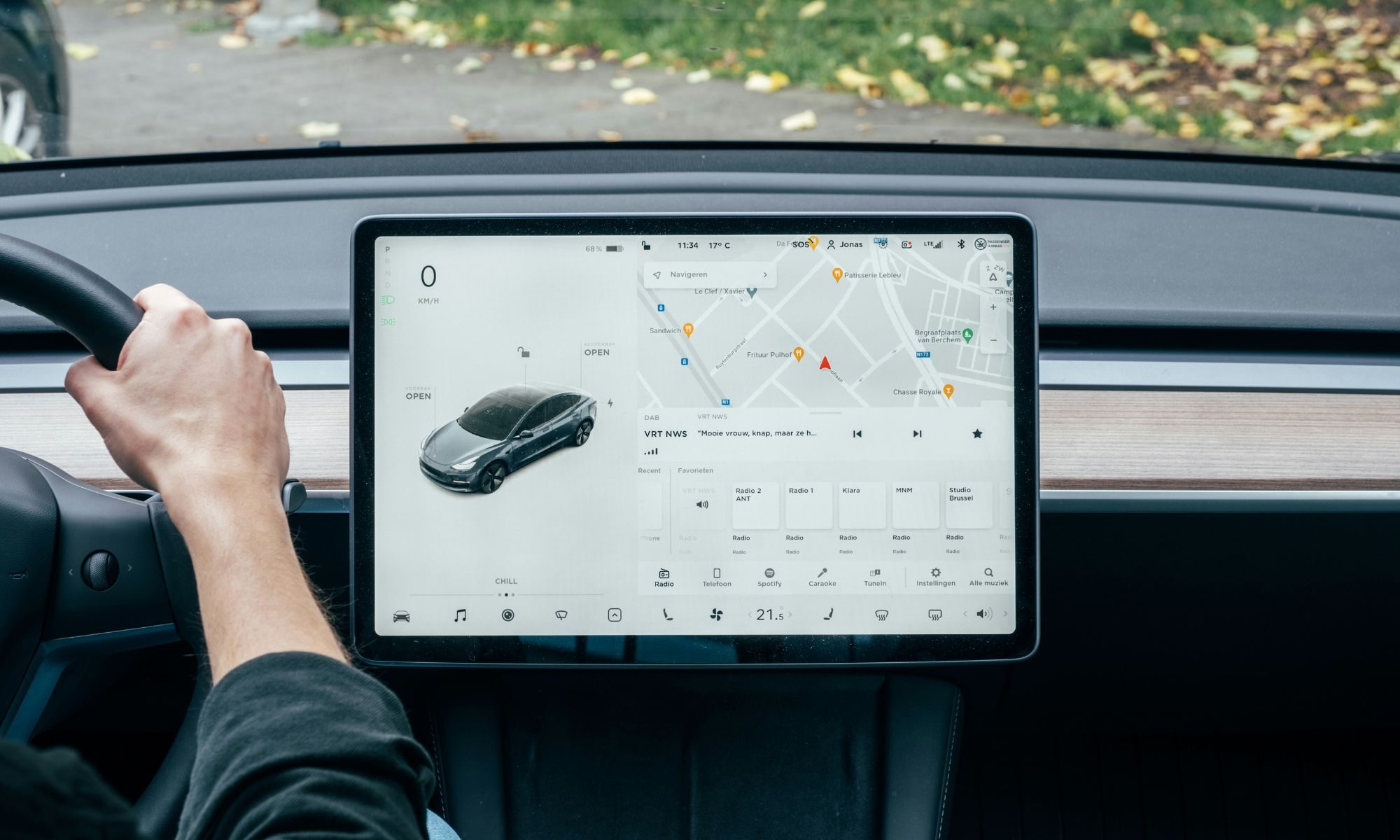
As cars become smarter, hackers may get smarter tooUnsplash
Similar concerns are also beginning to shape policy discussions in the United States. Earlier this year, the American Enterprise Institute argued that protecting connected vehicles from foreign espionage should become a strategic priority. The think tank recommended stronger security reviews, greater transparency around vehicle data collection, and tighter restrictions on certain foreign-made automotive software and hardware.
The implications stretch well beyond passenger cars. OTA technology is increasingly finding its way into buses, commercial fleets, rail systems, ships, industrial robots and drones. As more critical infrastructure becomes remotely updateable, experts say cybersecurity can no longer be treated as an afterthought. Wireless updates are undoubtedly making vehicles smarter and more capable. But they’re also changing the definition of automotive safety. In the software-defined era, protecting a car increasingly means protecting the code running inside it, because the next cyberattack may not target your laptop or smartphone. It could target the vehicle you’re driving.
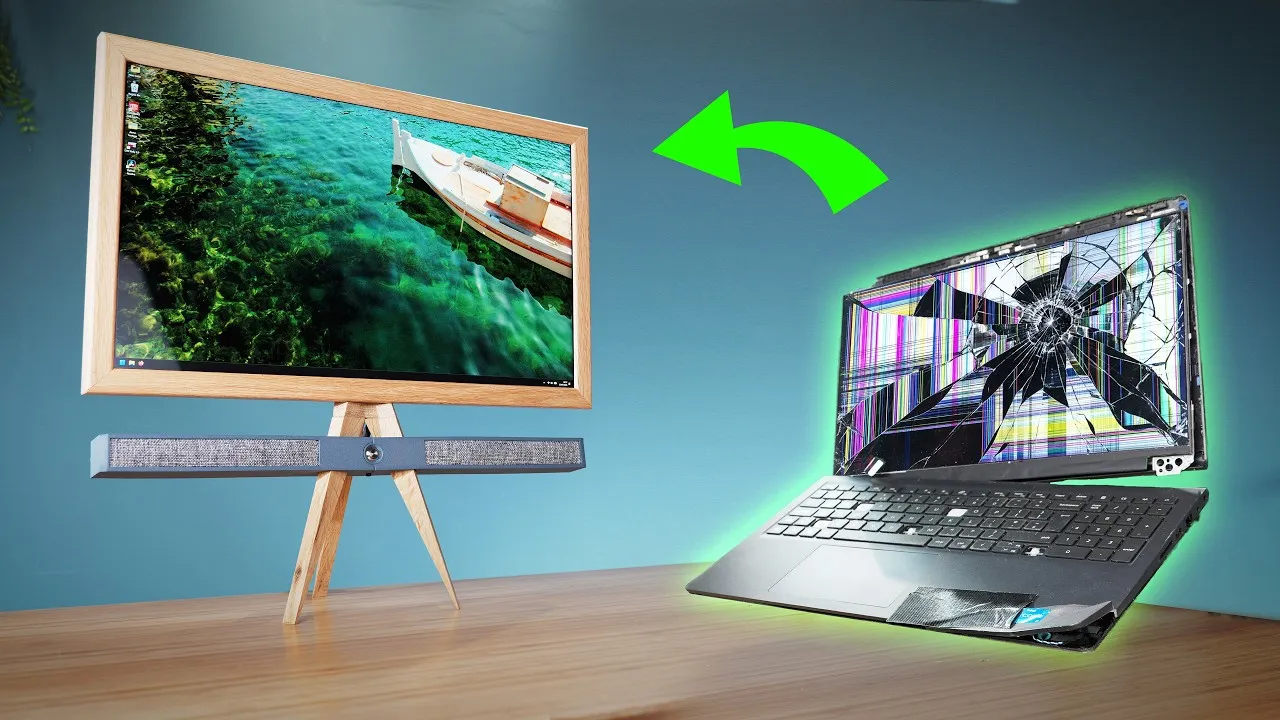
Building a PC used to be a fun adventure — what’s the latest, what’s the greatest, what can I afford? Well, that last question seems to have taken over and sucked all the fun out for a lot of people. [Matt] from [DIY Perks] on YouTube has hit upon a solution that’s brought back the fun, at least for him: recycling! The video is embedded below, and he runs a forum whose thread has more details.
Long story short, though, he’s flagging recycled laptop components as both good value for money and a fun rabbit hole to go down researching parts. The best part, of course, is that you can get a mobo with 32GB of RAM soldered on, and embedded RTX graphics, and a decent processor for about what you’d pay for that RAM on sticks these days. The big hack is getting the dang thing started: he needed to make a single-pin ribbon cable after identifying which pin on the keyboard membrane hit the power button. If you can score a laptop that does not power on from the keyboard, you’ll have an easier time in that regard.
To take recycling further, he shows how to delaminate cracked glass from an old Intel iMac to get a better-than-4K retina screen for nothing but sweat equity. The unit was heading for the bin, and his only cost was the effort it took to extract the LCD panel. Some of us might be able to skip the laptop and just use the iMac; it depends on how much compute is enough for your use case. Maybe a 10-year-old iMac’s guts will do; maybe last year’s gutted laptop isn’t enough.
We have to admit, the oak-and-aluminum all-in-one tripod he makes is very snazzy, though it may have too little brass to be on-brand for [DIY Perks]. The speakers, in case you were wondering, are also e-waste, recovered from an old TV. Perhaps the accent colour should have been green instead of blue!
Welcome back to TechCrunch Mobility, your hub for the future of transportation and now, more than ever, how AI is playing a part. To get this in your inbox, sign up here for free — just click TechCrunch Mobility!
Last week, I wrote aboutUber and Waymo and how their partnership appears to be deteriorating. I predicted the two companies would end up on opposing sides of autonomous vehicle policy. That wasn’t a guess.
For the past several weeks, I’ve been talking to sources and digging through correspondence Uber sent to the D.C. Council, which is evaluating a proposed bill that would allow autonomous vehicles to operate in Washington, D.C.
What I found: Uber and Waymo are already on opposite sides of the proposal, sparring behind the scenes and in public. Uber has made a particularly interesting argument in its effort to shape the rules that govern autonomous vehicles.
Advertisement
Uber, which opposes the D.C. bill, argues it would displace for-hire human drivers and hand Waymo a de facto monopoly. Instead, it has lobbied for a system that would require robotaxis to operate on a ride-hailing network alongside human drivers.
Insiders tell me the “hybrid” approach has little chance of becoming law. But if it did, it would leave AV developers like Waymo with two suboptimal choices: either put their robotaxis on ride-hailing apps like Uber or employ human drivers alongside fleets of robotaxis that took years and hundreds of millions of dollars to develop.
A D.C. Council hearing on Monday drew representatives from Lyft, Tesla, Uber, and Waymo, along with dozens of disability rights and accessibility advocates, local business and industry groups, highway safety organizations, government officials, labor unions, and think tanks.
My takeaway — based on the public testimony and the calls and texts I received afterward — is that Waymo is one of the few companies that generally likes the bill. Much of the rest of the industry does not.
Advertisement
Tesla’s senior policy adviser, India Herdman, echoed concerns I’ve heard from multiple AV developers, including objections to the 180-day, 250,000-mile mandatory testing requirement; the $1 million application fee; the $5 million permit fee; and the $0.15-per-mile tax. Tesla, along with other companies, argued that testing miles accumulated in other jurisdictions should count toward the mileage threshold.
Waymo, which has been testing its AVs with human safety operators in Washington, D.C., has already surpassed the 180-day and 250,000-mile requirements. That means if the bill passed as written today, Waymo would enter the market with at least a six-month head start.
Deals!
Image Credits:Bryce Durbin
Uber is considered a ride-hailing and delivery giant. It is now cementing that status through a $14.8 billion deal to acquire Germany’s Delivery Hero.
If the deal closes — and it will absolutely take time to overcome the regulatory hurdles — Uber will get access to nearly 100 markets across Europe, the Middle East, Latin America, and Asia. The upshot: Uber’s delivery footprint will double.
Delivery Hero also made a separate agreement to sell its business in 14 markets, where Uber Eats is already operating, to New York-based investment firm SSW Partners for $1.6 billion.
Advertisement
Other deals that got my attention …
Self Inspection, a San Diego-based startup trying to disrupt the vehicle inspection process, raised $10 million in a round led by the family office of Sheryl Sandberg. Tire distributor U.S. AutoForce and automotive lender Westlake Financial made strategic investments. Early-stage funds Costanoa Ventures, Rebellion Ventures, and BrightCap Ventures also invested.
Senra, a startup modernizing how wire harnesses are made, raised $65 million in a Series B round co-led by Lowercarbon and Interlagos with participation from General Catalyst, Sequoia Capital, Andreessen Horowitz, and Founders Fund, among others.
Zepto, the Indian fast-delivery company, is seeking a valuation in an initial public offering well below its $7 billion peak, Bloomberg reported, citing anonymous sources.
Advertisement
Notable reads and other tidbits
Image Credits:Bryce Durbin
Chip Motors, a Miami-based startup, revealed a low-speed small EV designed for short errands and families, and with some automated driving capabilities.
The Los Angeles Police Department is reportedly ending its deal with Flock Safety, a surveillance company that helps law enforcement track vehicles using thousands of its license plate cameras placed across the United States.
Lucid Motors is pushing back — and hard — on a report that claimed the EV maker was weighing whether to file for Chapter 11 bankruptcy. The company’s comms team, its CEO, and a filing with the U.S. Securities and Exchange Commission all say the same thing: The rumors are false. The initial report sent the company’s stock down more than 50% on Tuesday, its biggest intra-day drop ever. The stock has since recovered and is now trading about 28% higher than it was prior to the big drop.
Lyft CEO David Risher says it’s the “Good Uber,” per Wired.
Manual, or standard, transmission vehicles are a dying breed, according to preliminary government data that shows just 0.6% of new vehicles made for the U.S. in 2025 had stick shifts, the Washington Post reported. I own two manual vehicles. Does that make me a driving unicorn?
Advertisement
The National Transportation Safety Board said the driver of a Tesla who crashed into a house in June had pressed the accelerator pedal to 100%, overriding the company’s Full Self-Driving (Supervised) software.
San Francisco mayor Daniel Lurie has urged state regulators to toughen rules on autonomous vehicles after Waymo robotaxis became immobile in heavy July 4 traffic, ran out of power, and blocked key streets, further compounding the gridlock. In a letter (parts of which are excerpted here) Lurie outlined four core requirements he would like to see enacted to ensure robotaxi companies can “perform reliably” during extraordinary events.
SpaceXabruptly aborted the second attempted launch of its upgraded Starship rocket system on Thursday, just moments after the booster ignited at the company’s complex in South Texas.
Zoox issued a software recall after one of its robotaxis got confused by smoke emitting from an emergency fire scene in June.
Advertisement
One more thing …
Uber chief product officer Sachin Kansal talks to TechCrunch EIC Connie Loizos about travel, AI agents, and playing both sides of the robotaxi race, in the latest Strictly VC podcast episode. If you’d rather read the interview, check out the Q&A.
When you purchase through links in our articles, we may earn a small commission. This doesn’t affect our editorial independence.
US Federal workers must install an app powered by a Russian-founded software vendor
Security researchers discovered outside code controlling parts of the government application
Elfsight’s Russian operations continued growing despite global geopolitical tensions
The FAA and other federal employees must now install a $1.4 million White House app containing code built by Elfsight, a Russian-founded vendor.
Elfsight was founded in 2016 in the Russian city of Tula by chief executive Andrey Yusupov and chief technology officer Vladimir Fedotov.
The company now markets itself as a European software provider headquartered in Andorra, though its original Russian entity remains active and growing.
Latest Videos From
Business ties that persist
In 2025, the Russian entity reported revenue of about 126.5 million rubles, roughly $1.6 million, marking a 71% increase year on year.
Advertisement
The company’s headcount also grew to 61 employees, and job postings show continued hiring of Russian developers into 2026.
One 2026 job posting sought a Moscow-based support specialist, offering between 60,000 and 100,000 rubles per month for full-time work.
Under Russian law, companies handling user data can be compelled to store that data locally and hand it over to state authorities.
Advertisement
Sign up to the TechRadar Pro newsletter to get all the top news, opinion, features and guidance your business needs to succeed!
However, an Elfsight customer support specialist claims that the company has “never received any request” from Russian authorities for user data or access.
Security review and data practices
A network analysis by the security firm Atomic Computer found that Elfsight’s servers determine which JavaScript files run inside the White House app.
Advertisement
The same session also accepted more than ten cookies from Elfsight, alongside Google DoubleClick advertising domains loaded through the app’s YouTube sections.
Olivia Wales, a White House spokeswoman, said the app “does not request or collect any user locations” and called all its information “safe and secure.”
A White House official later said Elfsight’s only remaining script loads a tax calculator inside a sandboxed webview, disconnected from cookies or files.
Advertisement
The official added that Elfsight passed a full security review and is used widely by brands including UFC, FIFA, the NBA, and Cartier.
That same security clearance sits uneasily alongside records showing Elfsight’s founders retained accounts at sanctioned Russian banks and kept traveling to Russia.
One founder wrote in a private message that Russian tax authorities had summoned him for questioning tied to a separate investment platform.
That legal exposure means a Russian-rooted vendor still effectively controls code running inside a mandatory application on federal government devices.
Advertisement
Since the Russia-Ukraine conflict started in 2022, the United States and its allies have imposed sanctions on numerous Russian companies and individuals.
It remains unclear why an app with such ties to Russia was cleared for use on White House and federal government devices in the first place.
So far, neither Elfsight nor the White House has offered a clear justification for that approval decision.
Avoiding the “lethal trifecta” – access to private data, exposure to untrusted content, and an external communication path – is difficult enough when working with AI agents.
But the use of connectors – integrations with third-party services like Gmail or Slack – expands the scope of concern in a way that makes it exceedingly difficult to reason about defensive due diligence.
Advertisement
PromptArmor, an AI security biz, recently looked at how OpenAI’s ChatGPT and Anthropic’s Claude work with connectors. The results are not reassuring.
Shankar Krishnan, co-founder of PromptArmor, told The Register in an email that enterprise adoption of connectors and the rate of change among connectors helped focus concern on the connector ecosystem.
Connectors share some of the risks of MCP servers, upon which connectors are based. “For connectors, the risks are mostly about the type of tools, what they can do, where the data is going, and what is being done with the data,” said Krishnan.
Introduced about a year ago, connectors (for Claude or ChatGPT) have been going through a lot of changes recently. According to PromptArmor, 931 of 2,517 connectors (37 percent) changed over the six-week period from mid-May to the end of June. So any security assumptions based on declared capabilities may no longer be valid.
Advertisement
PromptArmor found that 1,686 new tools were added to connectors that were already live, creating new ways for AI models to operate on user data and interact with third-party services.
It also found that 1,127 tool descriptions were rewritten, potentially changing how and when an AI model decides to invoke a tool.
And there are a variety of other changes, all of which potentially could raise data security concerns or invalidate governance assumptions.
PromptArmor cited the Dropbox connector as an example, noting that at the start of the study it exposed eight tools and by the end of the study that number had risen to 24. It went from having three write-capable tools to 10, and from zero potentially destructive tools to four. Permission scopes changed and injected instructions for the model were added.
Advertisement
If that weren’t enough to worry about, connectors can behave like intrusive websites that run dozens of tracking scripts: connectors commonly send data to additional AI services.
PromptArmor evaluated all 7,517 tools used by 487 Claude connectors and found that 189 of the connectors, or about 2 in 5, are likely to call additional AI services.
“As an example, if your Claude agent activates Zoom’s connector tool to search meetings with natural language, and passes in a query containing sensitive data, Zoom AI may send that data to any of its ten AI subprocessors in order to generate a response from one of eight different model families it uses,” the security company said.
“The issue is that most teams approving connectors are evaluating and considering the connector – unaware that the vendor is calling more AI services, adding new subprocessors and terms,” explained Krishnan. “So someone concerned about AI risks who has evaluated Claude may not be aware of AI services that the connector is calling externally.”
Advertisement
Anthropic’s connector documentation acknowledges that its security controls don’t necessarily cover third-party data processing.
“Connected services process data on their own infrastructure, under their own terms, which may be located outside the United States,” the AI biz explains. “Settings that control where Claude’s inference runs, like the US-only inference setting on Enterprise plans, don’t change where third-party services operate.”
Krishnan said that connectors vastly expand the risk surface for attacks.
“Bringing agents new sensitive data, new untrusted data, and new sensitive actions to take, the blast radius of an attack explodes,” he said. “We recently highlighted a risk in Codex where even with one connector – email – the combination of sensitive and untrusted data enables exfiltration of legal and financial communications.” ®
Victoria proposes “demasking” powers to force platforms to identify anonymous accounts in vilification cases. It would also make it easier for families to sue platforms for harm to children.
Victoria’s premier Jacinta Allan announced on Sunday that the state would propose laws granting the Victorian civil and administrative tribunal power to order social media and AI platforms to reveal the identities of anonymous account holders accused of online vilification. The “demasking” powers would be the first of their kind for an Australian state. Allan said families needed new ways to protect their children online.
The proposed reforms go beyond identity disclosure. Victoria would also scrap the legal threshold that currently requires families to prove a child has suffered a permanent impairment of at least 10% before suing platforms for negligence causing psychiatric harm. That threshold, assessed by medical practitioners using standardised calculations, has made it effectively impossible for most families to pursue damages. Removing it for suits brought on behalf of minors would open a new litigation channel against platforms in Australian courts.
The timing is tight. Victoria has four sitting weeks before a November state election, and the opposition said the laws were unlikely to pass in time. Shadow attorney general James Newbury said the Coalition supported the effort in principle but that “I don’t think Elon Musk is looking at Jacinta Allan’s announcement today and quaking in his boots.” Australia’s world-leading under-16 social media ban is already struggling with enforcement, with testers finding that age verification systems are easy to bypass. Adding demasking powers to a regime that cannot yet verify who is under 16 raises questions about whether the infrastructure exists to enforce them.
Advertisement
The 💜 of EU tech
The latest rumblings from the EU tech scene, a story from our wise ol’ founder Boris, and some questionable AI art. It’s free, every week, in your inbox. Sign up now!
Marilyn Bromberg, a social media regulation specialist at the University of Western Australia, called the reforms “a brave start” but said they should extend beyond vilification to cover defamation and cyberbullying. The Australian Senate delayed fixes to the social media ban earlier this year, and the federal government is still working on an enforcement framework that would compel platforms to comply. Victoria’s move adds a state-level litigation tool to a federal regulatory structure that remains incomplete. Whether platforms respond to the threat of tribunal orders in a single Australian state depends on whether the political signal outlasts the election cycle.


























































You must be logged in to post a comment Login