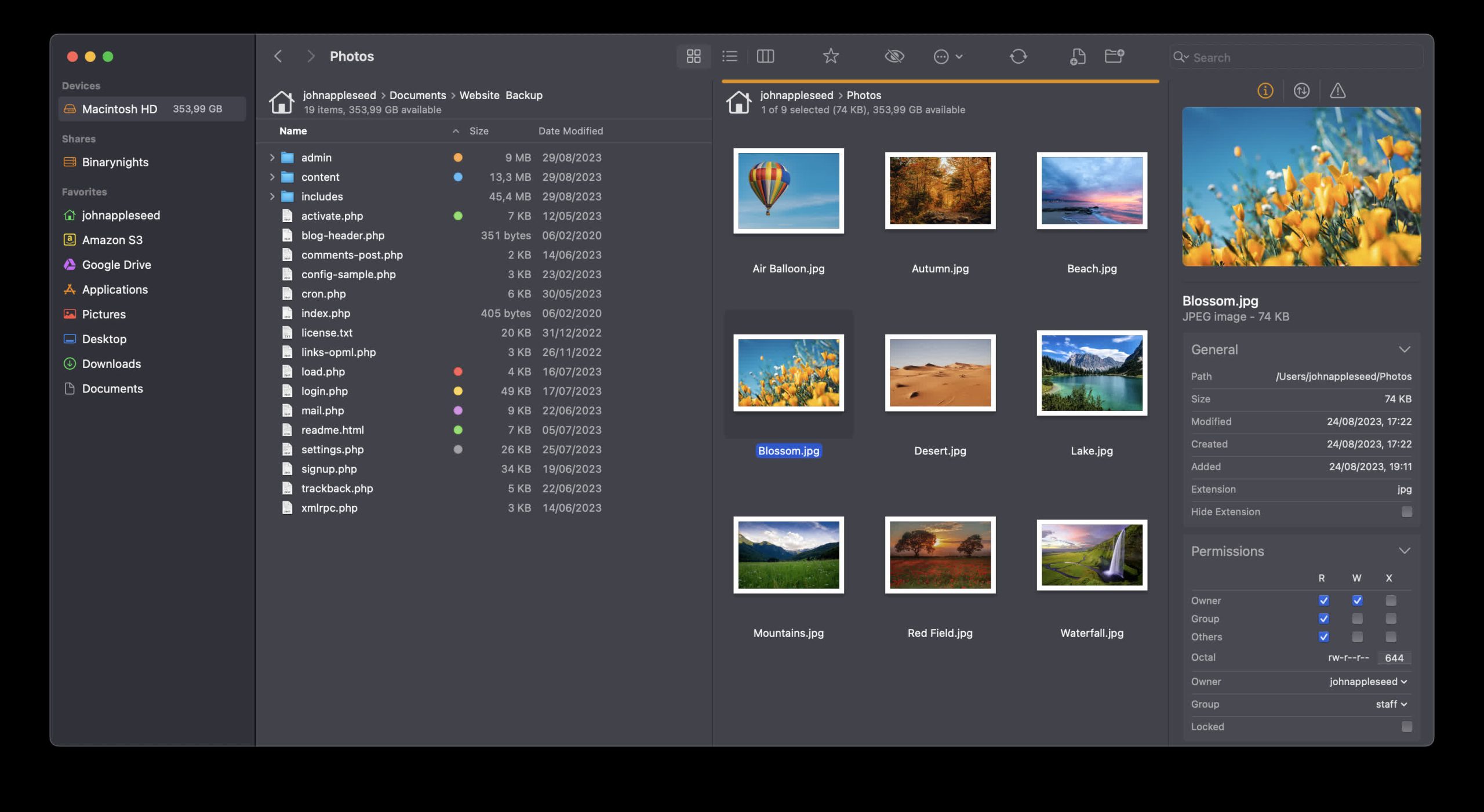
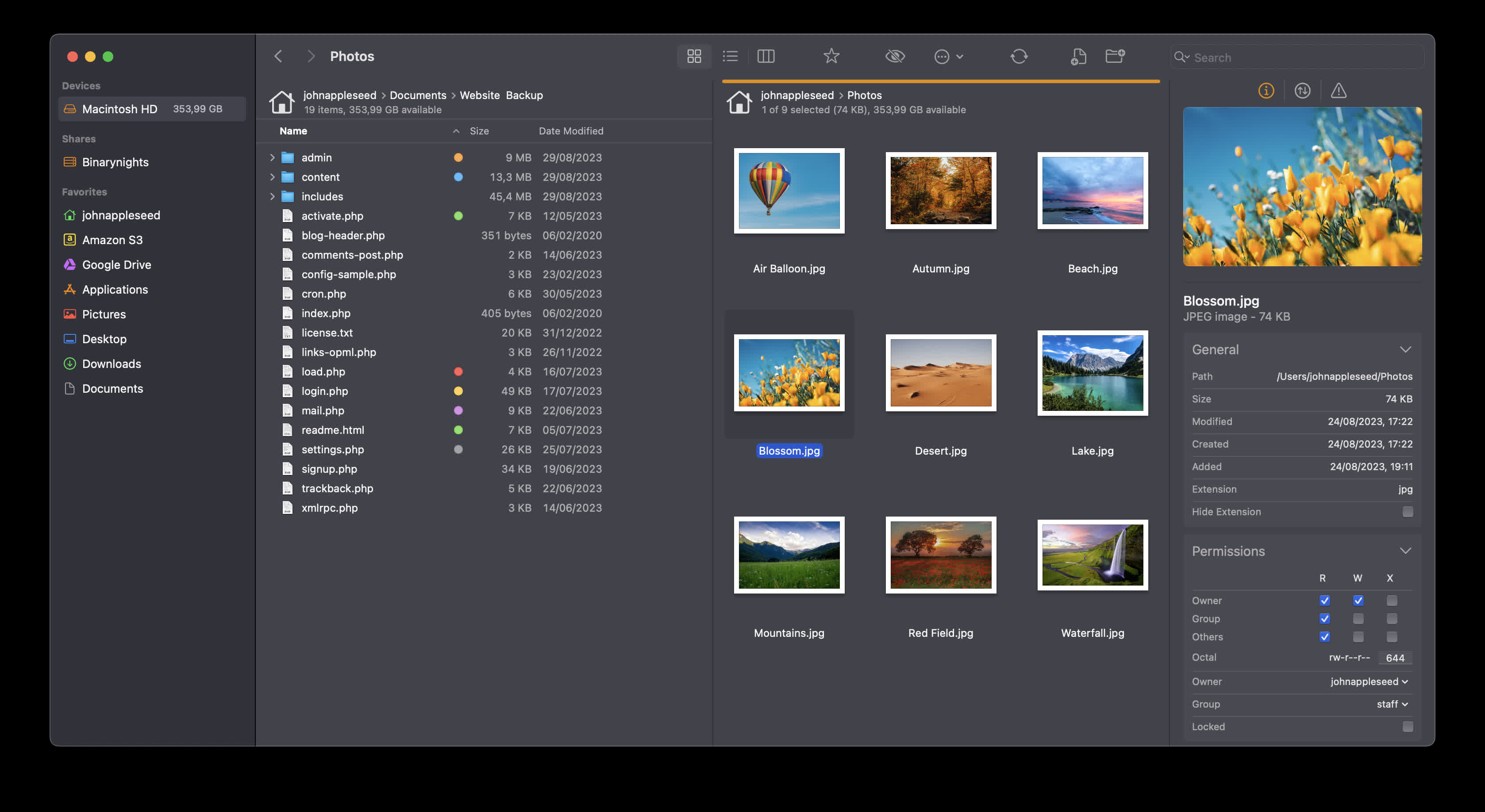
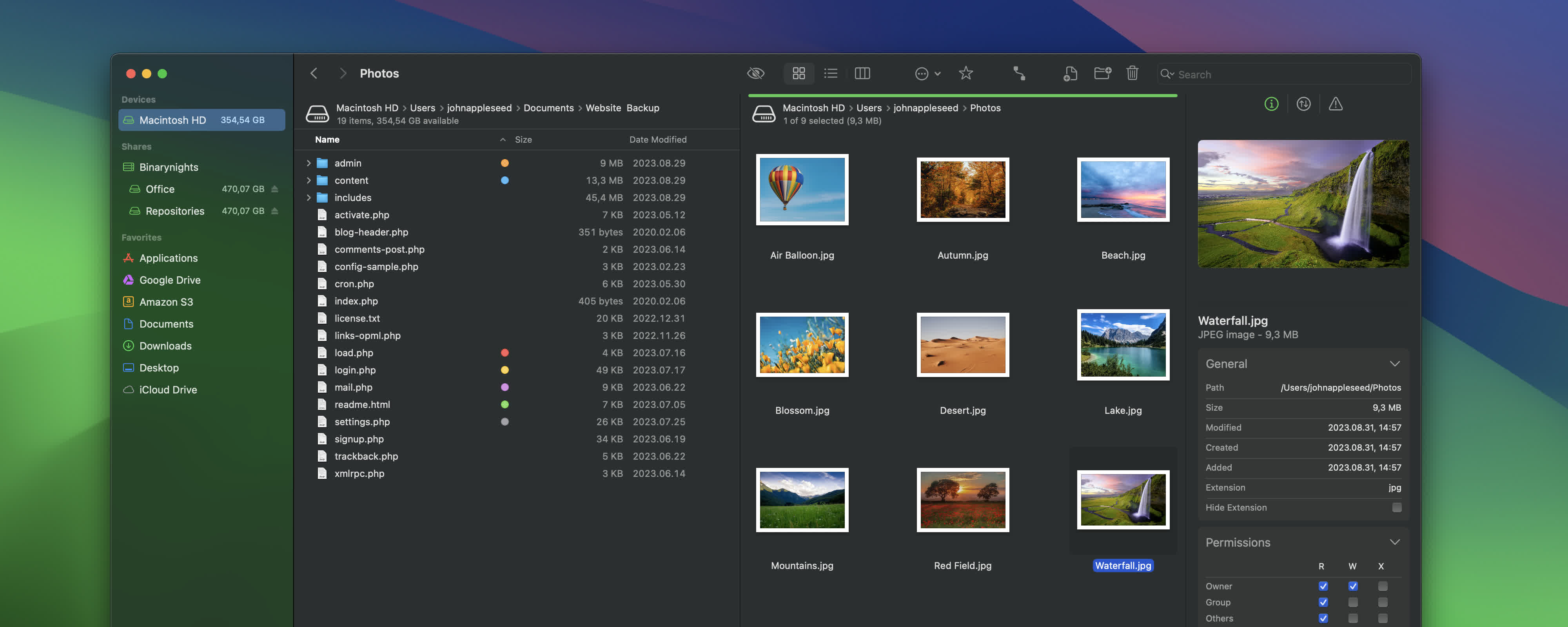
ForkLift combines the power of a robust file manager with versatile file transfer capabilities, seamlessly bridging the gap between your local and remote files. Whether you’re dealing with cloud services or more traditional FTP and SFTP servers, ForkLift streamlines your file management and transfers, making them smoother than ever.
ForkLift 4 is your all-in-one solution for efficient file management and seamless file transfers, across multiple platforms and services.
We understand that accessing, organizing, synchronizing, and sharing your files should be hassle-free, especially as the landscape of file sharing evolves with the increasing importance of cloud service providers such as Dropbox, Amazon S3, Google Drive, and OneDrive.
Is ForkLift worth it compared to alternatives like Finder or Nimble Commander?
Many users appreciate its dual-pane layout, batch operations, archives support, and advanced sync features. Compared to rivals, ForkLift offers better transfer management and preview behavior. Still, some feel the interface isn’t as lightweight or intuitive as others.
Advertisement
Is it easy to switch from Finder to ForkLift as the default file manager?
Yes. By running a simple defaults write -g NSFileViewer -string com.binarynights.ForkLift command in Terminal, you can set ForkLift as the system default for opening folders.
Which protocols can I connect to ForkLift?
ForkLift will connect to any remote server such as SFTP, FTP, WebDav, Amazon S3, Backblaze B2, Google Drive, OneDrive, Dropbox, Rackspace Cloudfiles, SMB, AFP, and NFS remote volumes. You can manage your files and connect to multiple servers at a time and even copy between them with drag and drop.
Is ForkLift free?
You can download a time limited trial of ForkLift, but you will need to buy a license in order to keep using it.
Features
Remote Connections
Advertisement
Connect to SFTP, FTP, WebDav, Amazon S3, Backblaze B2, Google Drive, OneDrive, Dropbox, Rackspace Cloudfiles, SMB, AFP, and NFS remote volumes. Manage your files efficiently across networks: connect to multiple servers simultaneously and even copy between them with drag and drop.
Sync
Compare local or remote source and target folders identifying matching, modified, new and deleted files. Synchronize them one or two-way with a single mouseclick, or save it as a favorite. Up to 20x faster analyzation than ForkLift 3.
Favorite Paths
Advertisement
Experience enhanced efficiency for remote destinations. Think of it like having favorites within favorites – an organized way to keep track of paths you frequently use and want quick access to.
Preview
The preview panel shows you useful information about the selected file. Playback audio and video files, inspect images, PDFs and other popular document types. Quick edit text files in place, both on local drives and remote servers.
Activity View
Advertisement
Whether you’re copying, renaming, deleting, compressing, or handling other tasks, this feature lets you see exactly what’s going on. No more guesswork – watch your tasks progress in real-time and stay in control of your file management action.
Quick Open
Easily access your favorites, devices, menu commands, open a selected file with a preferred application, or apply a previously saved Multi Rename preset on selected files or folders.
Log View
Advertisement
Get valuable insights into your file management activities and their results, all in one easy-to-access place.
Favorite Sync
ForkLift will keep all your favorites synchronized across multiple computers via iCloud.
Dropbox Support
Advertisement
Copying Dropbox links to files located in your Dropbox directory is just a right-click away.
Transfers
Reorder transfers, set conflict management rules, error handling, limit download and upload bandwidth.
Tags
Advertisement
Organize your documents and files with tags: add, edit, remove, search, or filter them within ForkLift.
Sync Browsing
Given two identical folder structures. Browse in one pane and let ForkLift do the job for you in the other pane.
Tabs
Advertisement
Open different folders in the same pane, instead of separate windows.
Search
Search and filter by name, extension, kind, tags or content, even on remote servers.
Quick Select
Advertisement
Select files by typing a filename, an extension, or a tag and add them or exclude them from the selection.
Remote Editing
Set your preferred editor in ForkLift to edit remote files and we take care of uploading your changes as you save.
Command Line Tools
Advertisement
Extend ForkLift’s capabilities to the max by invoking command line tools and apply them by using shortcuts.
Themes
A seamless way to personalize your interface. Choose from predefined themes that suit your taste, or let your creativity shine by crafting your very own themes.
App Deleter
Advertisement
ForkLift comes with an application deleter to remove the last morsels of an application you want to uninstall.
iCloud Support
Seamlessly access and manage your iCloud files through ForkLift.
Archive Management
Advertisement
Browse local and remote archives as if they were ordinary folders. You can even Quick Look, search and filter.
Keyboard Control
Control every operation straight from the keyboard and customize it to your preferences.
Multilingual
Advertisement
ForkLift speaks English, German and Hungarian. More languages are coming soon!
Workspaces
Save different layouts with opened tabs and locations and load what you need at the moment.
Git Support
Advertisement
ForkLift knows git and will show you the status of individual files. You can add, commit, push, and pull.
Open in Terminal
An absolute must for powerusers. Open a Terminal, iTerm, Hyper, Kitty or Warp window at your current local path.
Hidden Files
Advertisement
Make hidden files and folders visible easily by using a shortcut or pressing a button in the toolbar.
Share
Share gives you an easy way to share all kinds of documents and other files instantly.
Default File Viewer
Advertisement
Set ForkLift as the default file viewer and almost every app will point to ForkLift instead of Finder.
File Compare
Compare two text or images files with Xcode’s FileMerge, Kaleiodoscope, Beyond Compare, or Araxis Merge.
What’s New
External Drive Tags, comments, and Checksum Improvements
Advertisement
We recently introduced the ability to calculate checksums for files, making it easier to verify that files have not been altered or corrupted during transfers and that two files are truly identical. Checksums can be calculated for multiple files at the same time, with the file names and checksums displayed in a dedicated window.
In ForkLift 4.6.2, we improved the usability of the Checksum Window by adding support for selecting multiple items at once. You can now easily copy selected items or use Command-A and Command-C to copy all entries. The copied content is exported in CSV format, making it easy to paste into spreadsheet applications such as Microsoft Excel or Apple Numbers.
Changes to the Preview API on macOS Sequoia and Tahoe
In version 4.6.1, we introduced a new Preview API to support the new style of folder icon previews. Unfortunately, this API currently has several limitations that cannot be addressed by us directly. We have reported these issues to Apple and hope they will be resolved in future macOS updates.
Advertisement
The new style folder icons are only available on macOS Tahoe, so in ForkLift 4.6.2 we have disabled the new Preview API for users on macOS Sequoia because it caused multiple issues with icon previews on that version of macOS. As a result, users on macOS Sequoia will no longer experience the negative side effects of the new API.
Users on macOS Tahoe will continue using the new API and will still be able to see colored folders and icons added to folders in Finder. However, the API currently does not correctly handle certain folder icon customizations made in System Settings, which means some custom folder appearances may not be represented accurately in ForkLift. Unfortunately, this limitation is outside of our control.
We have also fixed a possible crash introduced in the previous version, along with several other possible crashes and hangs, and some other fixes and improvements.
Full List of changes:
Advertisement
Improvements
Displays tags on external drives
Comments added in ForkLift now show up in Finder as well
Adds an option to select multiple items in the Checksum Window; the copied list is in CSV format, so it can be easily pasted into spreadsheet applications
Adds “Edit” and “Hide from Sidebar” options to the context menu of Sync favorites in the Sidebar
Fixes
Fixes an issue with the movement of favorites in the sidebar that pointed to the same server
Fixes a possible hang caused by recent items in the sidebar
Fixes a possible crash in List View
Displays a folder icon on remote locations when the folder name contains a dot
Displays the Kind of folders correctly when the folder name contains a dot
Fixes an issue that made it impossible to delete the last remaining digit from the Time Offset Correction field in the Sync Window
Fixes a possible hang after a tab or window was closed during an unfinished search operation
Fixes a possible hang after a tab or window was closed during an unfinished search operation
Removes the new Preview API on macOS Sequoia introduced in version 4.6.1 due to several issues with icon previews
Previous Release Notes:
ForkLift 4.6.1 is available – Tahoe folder colors, improved memory usage, and restored PDF preview
Folder icon support on macOS Tahoe and performance improvements
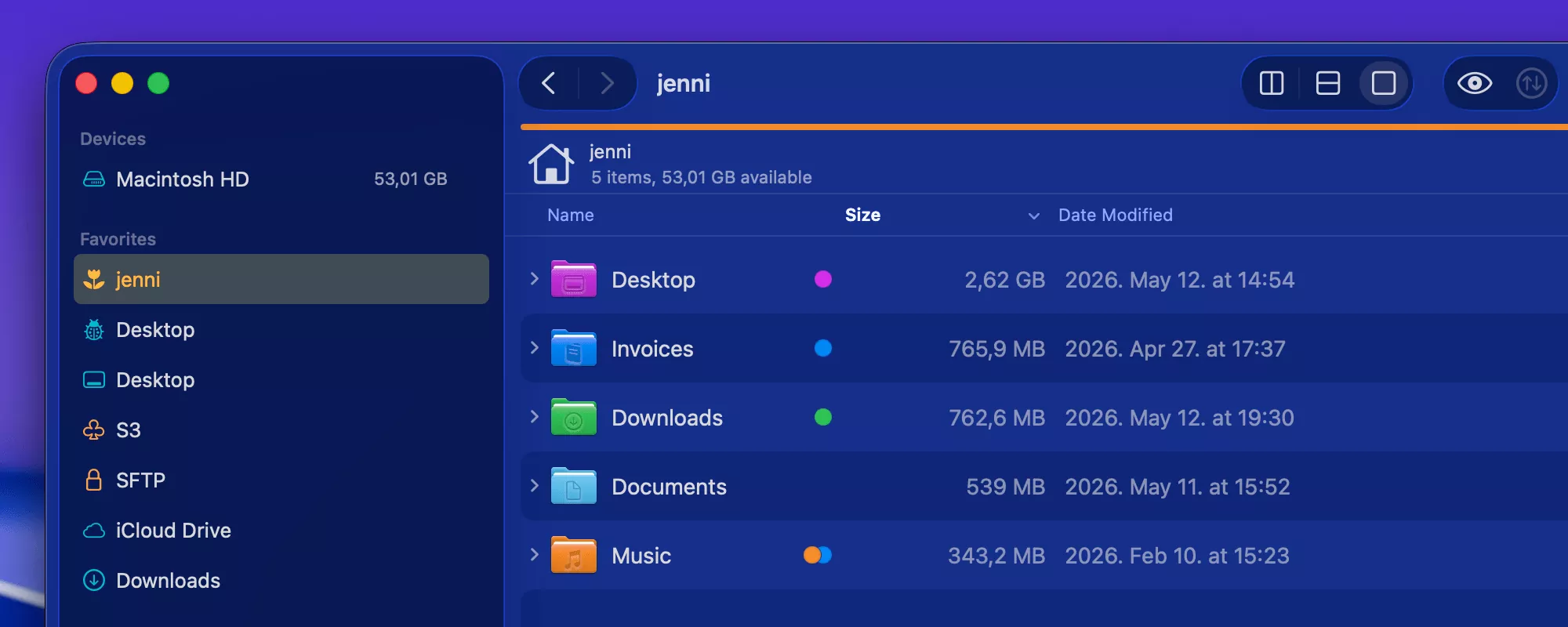
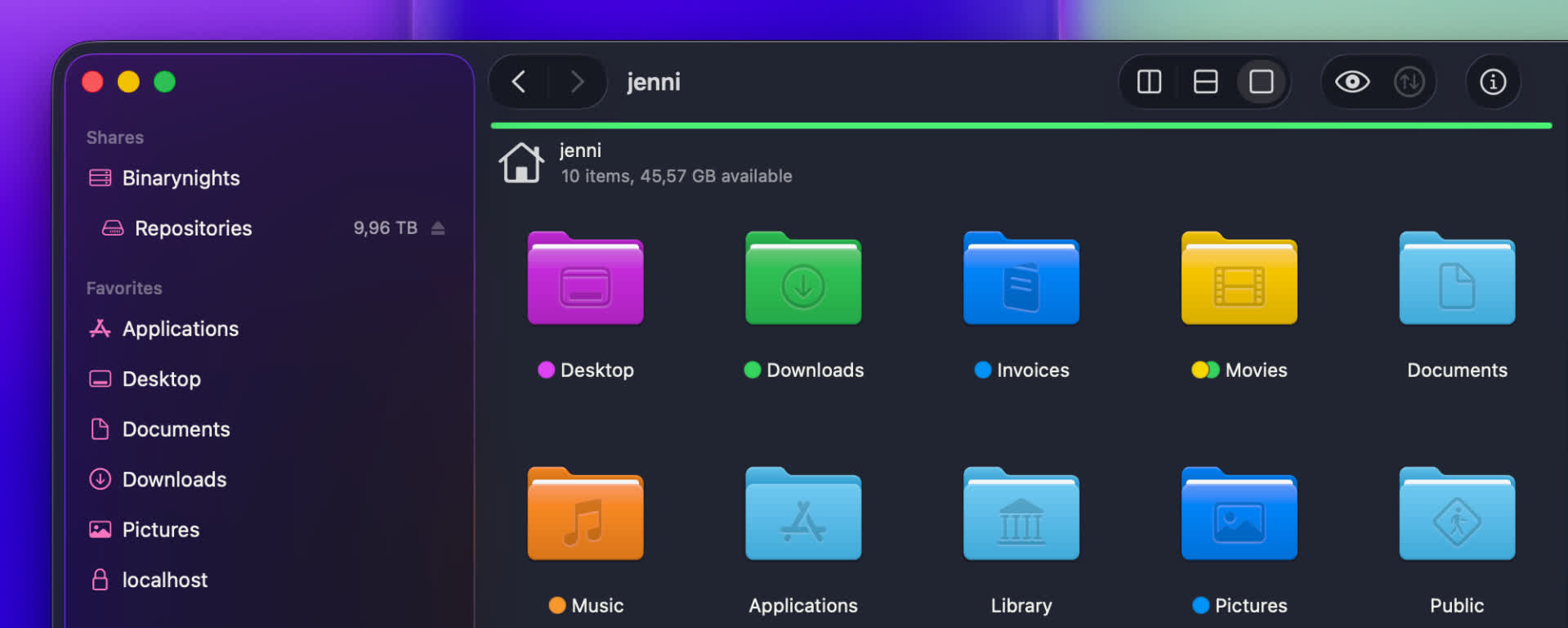
Finder on macOS Tahoe introduced a big change by allowing users to customize folder icons. The last applied color tag now determines the folder color, and it is also possible to add icons to folders to make them stand out.
Advertisement
With ForkLift 4.6.1, we have updated how folder icons are handled. ForkLift now inherits folder colors from Finder, and when you assign a color tag in ForkLift, the folder color updates accordingly. ForkLift also displays custom icons that were added in Finder. However, due to missing system APIs, adding custom folder icons directly in ForkLift is not possible at this time.
We have also fixed multiple possible memory leaks and improved overall memory usage. This results in a more stable and efficient experience.
PDF preview fixes and iCloud tag improvements
In addition, this version includes several smaller improvements. You can now edit file favorites directly from the sidebar, use the Tab key to autocomplete tags more reliably, and benefit from improved information display in the Status bar and in the Preview pane.
Advertisement
We were also able to restore the full functionality of the PDF viewer in the Preview pane. It is now again possible to customize preview options through the right-click context menu, and text selection inside PDF previews has been re-enabled.
It is now also possible to remove the last remaining tag on iCloud Drive, and we have resolved an issue where pressing the Tab key during tag autocompletion could cause the tag to disappear.
New
ForkLift now colorizes folder icons on macOS Tahoe the same way as Finder, inheriting and applying the assigned colors
ForkLift displays customized folder icons set in Finder, however, customizing folder icons directly in ForkLift is not supported
Improvements
Improves the display of aggregated date information in the Preview pane when multiple files are selected
Adds an alert when iCloud Drive is busy and interaction is not possible, to clarify why an action cannot be executed
Adds an option to edit file favorites from the context menu in the Sidebar
Improves memory usage
Fixes
Fixes an issue that made the file view jump in List View after renaming or deleting files when Group by was enabled
Fixes multiple possible memory leaks
Fixes an issue that didn’t show the lock icon on locked folders when icon preview is enabled (the lock icon doesn’t show up on files starting from this version)
Fixes an issue in the Status bar, which didn’t update the displayed info correctly after folders were expanded and collapsed
Fixes an issue of the preview of PDF file in the Preview Pane introduced in version 4.3.5, which made it impossible to select text inside the preview and to use the right-click context menu to customize the preview options. This version restores the previous functionality
Fixes an issue that made it impossible to remove the last tag on iCloud Drive when there was only one tag remaining
Fixes an issue where pressing the Tab key while autocompleting a tag made the tag disappear
Two powerful new features in ForkLift 4.6
Exciting news! ForkLift 4.6 introduces two major features that power users will love, especially those who rely heavily on tags and those who create custom tools.
Advertisement
Smarter tagging and autocompletion
The first major improvement in ForkLift 4.6 focuses on tags.
Working with tags in ForkLift has traditionally not been as seamless as in Finder, mainly due to macOS limitations for third-party developers. Unlike Finder, third-party apps cannot access and edit tag data in the same way, which means features like native tag autocompletion are not directly available.
In earlier versions, we introduced the Tags section in the Settings to allow users to add their own tags to the sidebar, making them easily accessible. With ForkLift 4.6, we are expanding this feature and making it more powerful.
Advertisement
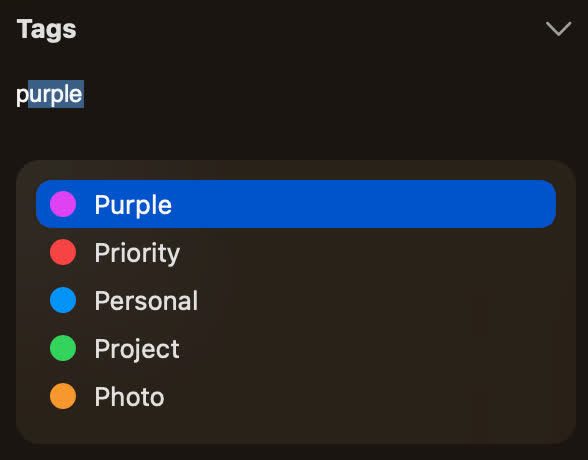
ForkLift now uses the tags listed in the Settings for autocompletion in the Tags section of the Preview Pane or in the info window. As you type, it suggests matching tags from your predefined list.
ForkLift tag autocomplete as you write To take full advantage of this feature, you should add the tags you use most frequently to the Settings. This ensures they are always available for quick and consistent tagging.
Better control over sidebar tags
Since you may not want to display every tag in the sidebar, we have made it easier to manage their visibility. To hide a tag, right-click it in the Settings and select “Hide from Sidebar”. To show it again, right-click and select “Show in Sidebar”
Advertisement
If you want to manage the visibility of multiple tags at once, it is easier to use the Sidebar Editor. Add the tags you want in the Settings, then close the Settings window. From the menu, select View > Show Sidebar Editor. When the Sidebar Editor appears, you can quickly hide tags by unchecking them. Once you are done, you can close the Sidebar Editor again from the View menu.
This gives you full control over which tags are visible without affecting their availability for autocompletion.
Assign tags directly from the sidebar
The sidebar is now more than just a way to filter files. You can still click a tag to view all associated items, but now you can also assign tags directly from the sidebar:
Advertisement
Select one or more files or folders
Drag them onto a tag in the sidebar
Drop them to assign that tag
This makes tagging faster and more intuitive, especially when working with multiple files.
Improved tag input field
We have also improved the tag input field in the sidebar. Not only does it now include a dropdown to suggest matching tags as you type, but it can also expand to display all assigned tags, making them easier to view and manage. Previously, this field had limited space and could not show all tags at once when working with a large number of tags.
Custom tools, now one click away
The second major improvement focuses on tools.
Advertisement
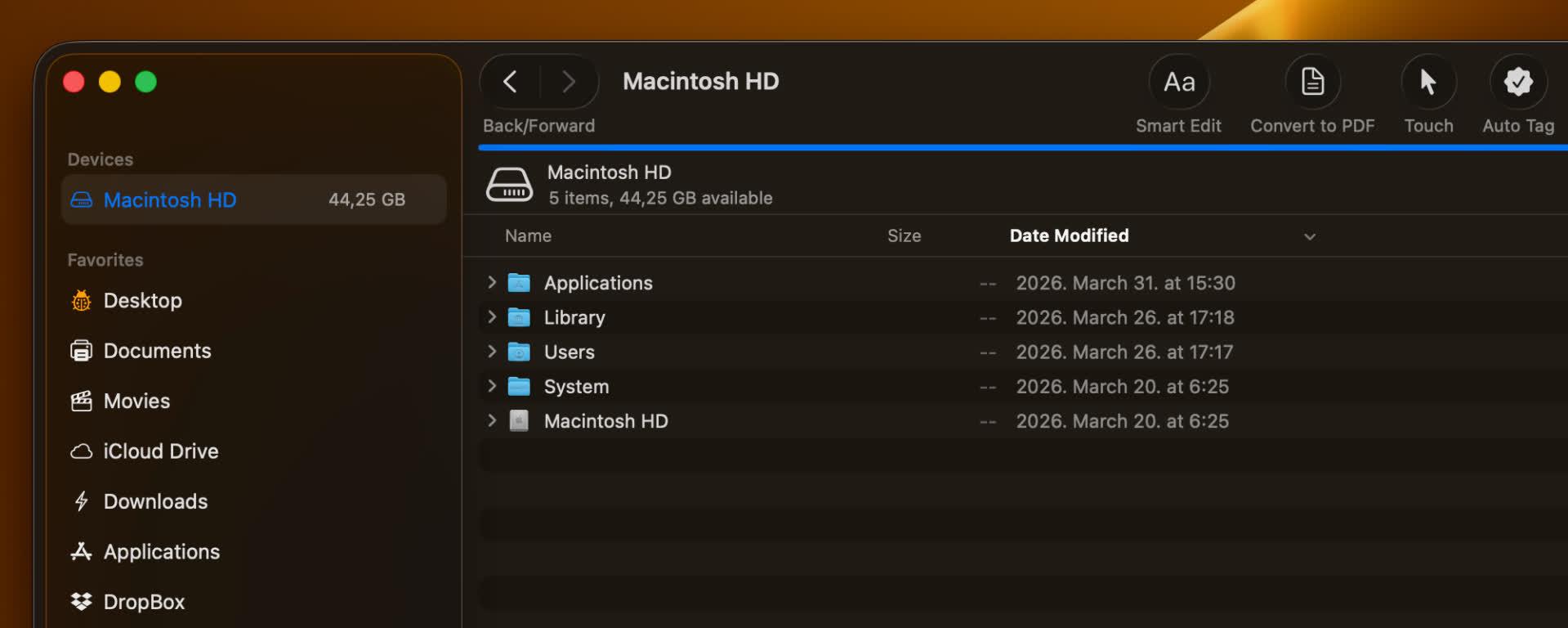
The Tools feature has always been one of the more powerful, yet somewhat hidden, features of ForkLift. It allows you to create your own tools in the settings using zsh scripts, so you can execute complex actions and workflows more easily.
Previously, these tools could only be executed from the Commands menu, and later they became available in the right-click context menu. Now, we are taking this a step further:
You can add your custom tools directly to the toolbar and execute them with a single click.
Customize your tool icons
Advertisement
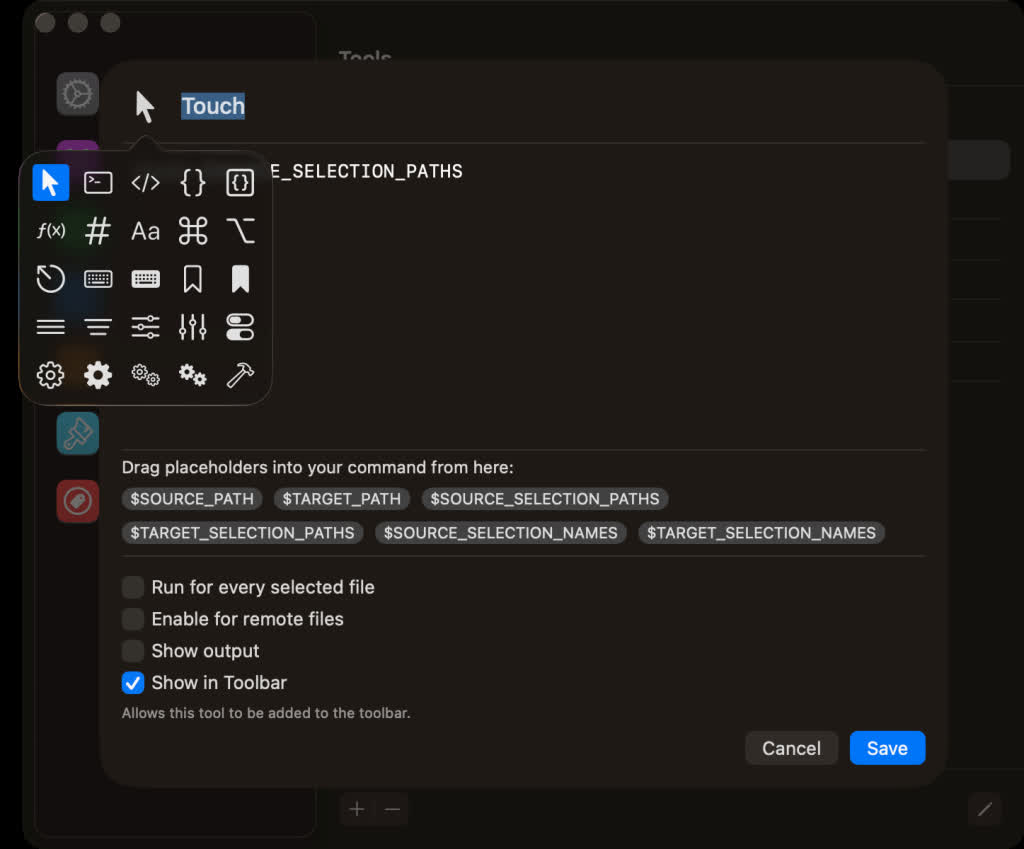
When creating or editing a tool, you can assign an icon to represent it both in the Tools section and in the toolbar. By default, new tools use a gear icon, and existing tools are also assigned this icon automatically.
You can easily change it:
Click the icon in the top-left corner while editing or creating a tool
Choose a new icon from the pop-up window
This makes it much easier to visually distinguish your tools at a glance.
How to add tools to the toolbar
Adding your tools to the toolbar is simple, but it happens in two steps:
Advertisement
1. Enable the option
Go to the Tools tab in the Settings
While creating or editing a tool, enable “Show in Toolbar”
2. Add it manually to the toolbar
Right-click the toolbar
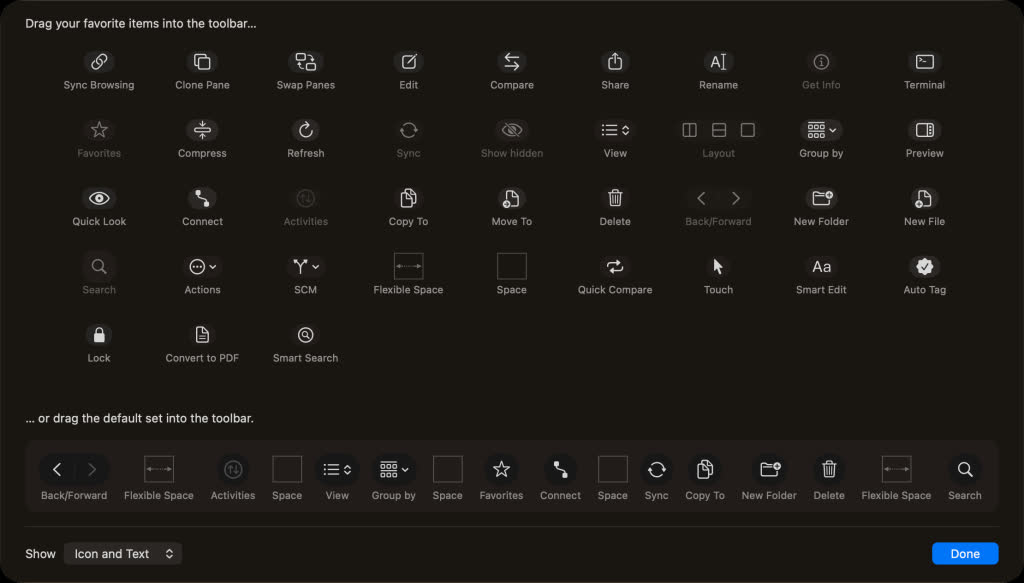
Select “Customize Toolbar…”
Find your enabled tool in the customization tray
Drag it into the toolbar
Note: Enabling “Show in Toolbar” does not automatically add the tool, it only makes it available for selection.
Full List of changes
New
Tags autocompletion feature in the Preview Pane and Info Window based on the list of tags added under ForkLift > Settings > Tags
Option to assign a tag to a file by dropping a file onto a tag in the sidebar
Option to add custom tools created under ForkLift > Settings > Tools to the toolbar
Option to hide and display tags in the sidebar under ForkLift > Settings > Tags through the right-click context menu
Improvements
Improved expandable Tags field in the Preview Pane, now able to display all tags
Option to exit the Tags field using the Esc key
Option to select multiple tools in the Tools section of the Settings
Fixes
Fixes an issue that indicated it was possible to add remote files as favorites to the sidebar by drag and drop
Fixes an issue in Column View where, after disconnecting from a remote location, the location did not change back to the starting directory
Fixes an issue on macOS Tahoe where hitting Esc in the tool editor while adding a new item did not cancel the operation and instead added the new item
BrianFagioli writes: SOLAI has launched the Solode Neo, a $399 Linux-based mini PC designed for always-on AI agents, browser automation, and persistent developer workflows. The compact system ships with an Intel N150 processor, 12GB LPDDR5 memory, 128GB SSD storage, Gigabit Ethernet, WiFi, Bluetooth, and a Linux-based operating system called Solode AI OS. The company says the device supports frameworks and tools including Claude Code, OpenAI Codex, Gemini CLI, and Hermes, while emphasizing local control, automation, and privacy-focused workflows running directly from a home network.
While SOLAI markets the Solode Neo as an “AI computer,” the hardware itself appears aimed more at lightweight automation and cloud-assisted agent tasks than heavy local inference. The low-power Intel N150 should be sufficient for browser automation, scheduling, monitoring, containers, and smaller AI workloads, but the system is unlikely to compete with higher-end local AI hardware designed for running larger models offline. Even so, the idea of a dedicated low-power Linux appliance for persistent AI and automation tasks may appeal to homelab users and self-hosting enthusiasts looking for a simpler alternative to building their own always-on workflow box from scratch.
Disclaimer: Unless otherwise stated, any opinions expressed below belong solely to the author.
Whenever record HDB resale prices hit local news headlines, the response seems to be a mix of disappointment and disbelief.
Why is public housing getting more expensive? And who in their right mind pays S$1.5 million for an old apartment with less than half of its original lease left?
Aren’t they throwing money away?
Advertisement
Certain loss
The beauty of the free market is that willing sellers meet willing buyers, and if we can observe a pattern in their behaviour, it likely doesn’t mean they’re insane, but that they understand something that others don’t.
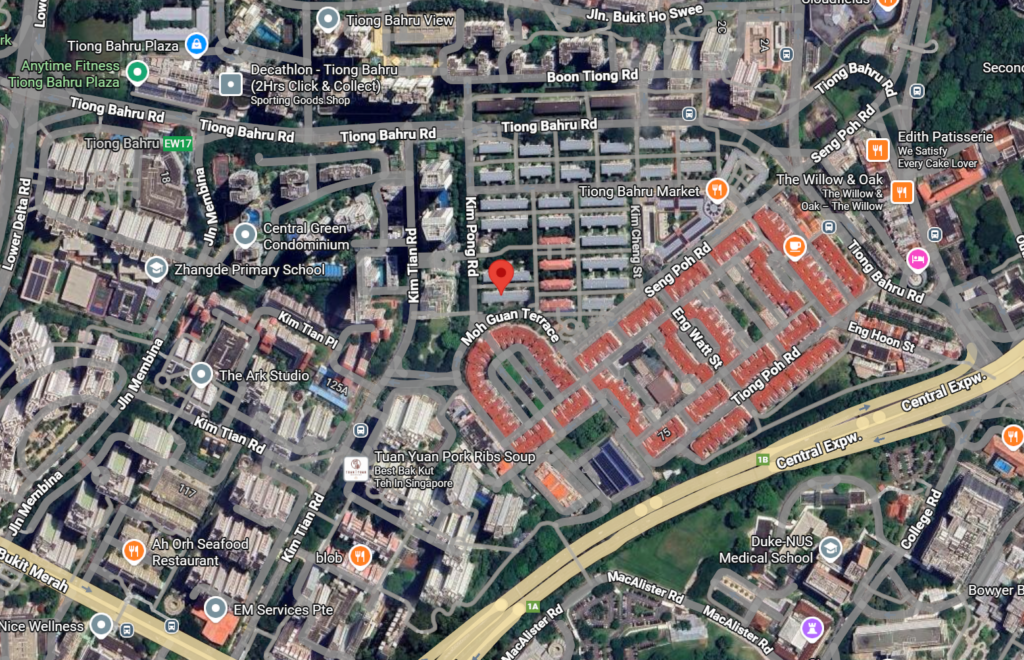
Let’s look at the latest example: the four-room HDB in Bukit Merah, which has just set a record for the most expensive HDB flat of its size. It was sold for a whopping S$1.53 million, despite having just 45 years left on its lease.
Image Credit: Google
Yes, it’s a jumbo flat, spanning 1615 sqft—considerably larger than what you can find among newer public apartments—in a cosy, four-storey building in Tiong Bahru.
But surely, you might think, it’s a certain loss. After all, the lease is about to reach levels so low that few people would be interested in buying it from the new owner, right? Who’s going to pay decent money when it has 30 or 20 years left?
But that’s where the point is hiding—it’s not about resale value anymore.
Advertisement
Still a steal
While newer homes are considered a store of value, old apartments are not fetching high prices because they are a good investment, but because, as the lease runs out, they effectively become a front-loaded rental. And while their price may seem high, it is actually a huge discount compared to regular market rates.
S$1.53 million across 45 years works out to just about S$2,800 per month. Meanwhile, alternative HDB apartments over 1500 sqft in size, available in comparably attractive locations, close to central Singapore, are currently listed for rent at S$4500 to over S$5000.
It means that the record Bukit Merah jumbo flat offers a 40 to 50% discount in comparison. Plus, let’s bear in mind that prices creep up over time, while the buyer is pre-paying the whole thing in today’s money. So, in the long run, it’s an even bigger saving.
In addition, unlike a rental, you actually own the place so you can remodel it in any way you like, bringing it up to modern standards, effectively creating condo-like conditions for half the price (an equivalent private home would likely set you back around S$3 million or more).
Advertisement
Image Credit: PropertyGuru
Buyers accept the few compromises—like having to climb a few floors up without a lift, older construction standards and fewer facilities—for the enormous, comfortable space in a central location in one of the most densely populated cities in the world.
More investment-oriented owners may try to convert the space into rental housing for several people, likely multiplying their ROI over time.
And what’s the worst that can happen? That in nearly half a century, they are going to have to vacate it. But there’s also a good chance that these properties qualify for a redevelopment scheme or receive a chance at a lease extension, especially in Tiong Bahru, given the unique character of these small buildings.
What if you needed to sell?
Of course, it’s hard to be sure if you’re going to want to live in the same place for 45 years. What if you wanted to move somewhere else? Would you be able to sell without having to accept mere pennies for it?
I don’t see why not. Now, obviously, given that Singapore itself is only 60 years old, we have no examples of flats with 10 or 20 years left on their lease. At under 30 years, prospective buyers would struggle to get financing, and below 20, not even HDB would provide a loan. You’re also unable to use CPF to finance such a purchase, so the buyer pool shrinks quickly.
Advertisement
On the other hand, just like right now, the value is going to be linked to the prevailing rental rates, and they tend to go up over time. So, the resale price will remain a multiple of what you could pay if you rented, with a discount. There’s no point at which the resale value falls off a cliff—it just gradually declines to $0.
By then, however, the owner will have already extracted plenty of value from his record purchase.
Read other articles we’ve written on Singapore’s current affairs here.
AI has already moved into some of the most emotionally fragile parts of life, from eulogies to dead-person chatbots that promise one more exchange with someone who’s gone. Now the same technology is being pulled into tarot card readings.
A 2026 study examined how tarot practitioners use AI when reading cards for themselves, and the shift lands far outside the usual productivity script. Tarot card readers are bringing ChatGPT into questions that are personal, symbolic, and often unresolved.
The uneasy part is the handoff. Tarot asks people to sit with uncertainty, but ChatGPT is built to turn messy inputs into a confident answer.
Why would readers ask AI
The study found two broad patterns among practitioners. Some used AI as a shortcut when a spread felt hard to untangle, especially when the cards pointed in more than one direction.
Advertisement
ChatGPTUnsplash
That’s where ChatGPT becomes seductive. Tarot lives in interpretation, and interpretation can be slow. A chatbot can take clashing symbols and return something that sounds clean, complete, and ready to believe.
The problem starts when clean becomes too clean. A reading often works because it leaves room for doubt, self-reflection, and competing meanings. ChatGPT doesn’t know the full emotional history behind the question, even when its answer sounds sure of itself.
How far can this spread
The same instinct already runs through grief tech, faith-adjacent AI, and private decision-making. People aren’t only asking chatbots to organize life anymore. They’re asking them to help make sense of it.
Tarot makes that shift easier to see because the work is openly symbolic. A reader pulls cards, weighs context, and looks for meaning in the tension between possible interpretations.
Unsplash
The study also found a more careful use case. Some readers asked AI to challenge their assumptions, compare readings, and surface blind spots. In those moments, the useful part wasn’t certainty. It was resistance.
Who gets the final say
The line to watch is control. ChatGPT can add another angle, but it shouldn’t become the authority that ends the reading.
Advertisement
A safer approach keeps the reader in the loop. The bot can offer a possible interpretation, but the person still has to weigh it against the cards, the spread, the question, and their lived context.
That distinction reaches beyond tarot. As AI slips deeper into grief, faith, advice, and memory, the practical rule is simple enough. Let it widen the question before you let it close one.
Complaining about automagic enforcement of copyrights on the internet through copyright bots is so old hat at this point so as to be cliché. But there is a very good reason for that. Even in the narrower realm of PC gaming, we have seen examples of how copyright enforcement has ensnared totally innocent games, or fallen victim to clear fraud and abuse, resulting in the delisting of those games from platforms like Steam. This often happens in the all important early release windows for these games and, to be sure, it’s smaller indie studios that are hurt the most by this failed process. It’s incredibly frustrating to watch all of this in the macro and then witness the major platforms do absolutely nothing about it.
This, in fact, despite the absolutely absurd situations all of this produces. Take the demo for Wired Tokyo 2007 that was supposed to be released recently, but wasn’t, all because indie dev Daikichi dared to use intellectual property existing outside of the game. Except, of course, that said IP was the property of Daikichi itself.
As reported by VGC via GameSpark, a post to X from the developer lays out the situation, in which they explain that (via machine translation) “the motif of a board game I personally created in the past, placed within the game Wired Tokyo 2007, is getting caught by Steam’s side as third-party intellectual property.” As a result, Valve has blocked the release of the game’s promised demo which is currently listed as “Coming soon.”
The copyright-violating aspects, as claimed by Valve, include “dinosaur themed card-games shown on the environment within your app in gameplay,” which refers to a board game called Dinostone, created by one Daikichi. In Daikichi’s response, they link to the Board Game Geek page for their table-top game, which lists the same developer name.
“It’s not a third party,” says Daikichi on X. “It’s just me wanting to use my own intellectual property rights myself.” They add, “I have no idea what the meaning of this is at all.”
Advertisement
In an incredible response from Valve, the platform is demanding Daikichi provide some form of documented agreement to license the images used in the game, or else provide a documented letter of authorization from an attorney in order to get the demo approved for release. This is a “papers, please!” moment in video gaming, and it makes no sense.
The situation gets even more Monty-Python-esque from there. Daikichi decided their best course of action was to send a signed letter to itself, signed by itself, authorizing itself to use the assets it had created in the game it also had created.
Then over the weekend, rather wonderfully, the developer says they “created a signed document granting myself permission to use all of my created works, including board games, and resubmitted it for the demo review.”
We’ve crossed the Rubicon, folks. And now Valve is in the uncomfortable situation of having to choose between accepting this “evidence” of IP ownership when the evidence is literally a dev writing himself a letter like a crazy person, or else Valve refuses to accept it and a developer remains unable to release a game demo because they used their own property within it.
It’s a choice that only has two wrong outcomes. Sympathy is in short supply, however, as this is the result of the guilty-first process Valve has come up with for copyright takedowns on its platform.
The US Commerce Department has reportedly given 10 Chinese firms, including Alibaba, Tencent, TikTok parent company ByteDance, retailer JD.com, Lenovo and Foxconn, the permission to purchase NVIDIA’s second-best H200 processors. According to Reuters, however, NVIDIA has yet to make a delivery.
In December 2025, the US government allowed NVIDIA to sell H200 processors to approved customers in China, after blocking its sales due to concerns that it would aid the development of the country’s military technologies. China agreed to import several hundred thousand H200 chips in January, Reuters reported at the time, with the first shipments being meant for three unnamed Chinese internet companies.
The H200 is one of the company’s most powerful AI chips, second only to its high-end B200 processors. While the B200 is faster, the H200 is still a lot more capable than the H20, which was cleared for the Chinese market half a year earlier than the H200. The approved companies for H200 can buy up to 75,000 chips either directly from NVIDIA or from intermediaries, but the firms reportedly pulled back from making a purchase after getting guidance from the Chinese government.
Advertisement
Reuters says China’s guidance was triggered by changes on the US side, but it says those changes remain unclear. It’s also worth noting that local Chinese companies have been developing their own chips after the US blocked exports to their country. China has been encouraging local firms to use them in order to stimulate the homegrown chip industry. The Chinese government is also reportedly worried that the H200 chips sold to its companies have hidden vulnerabilities. That’s because in order for the US government to legally get its 25 percent cut from H200 sales, the chips have to pass through US territory.
NVIDIA CEO Jensen Huang, who previously warned the US government that its export restrictions are making his company lose its hold on China, recently flew to Beijing with President Donald Trump to attend a summit with Chinese President Xi Jinping. It remains to be seen whether the trip would lead to China giving local companies the green light to purchase the H200.
CAD: Cost Anomaly Detection or Create Astounding Debt?
The world of AI is exciting, but there are plenty of expensive pitfalls ready to catch out the unwary, as one Register reader found when taking Anthropic’s Claude Opus for a spin courtesy of Amazon Bedrock.
Our reader managed to run up Bedrock charges totaling $30,141.33 in April 2026, despite using AWS Cost Anomaly Detection (CAD) to avoid any nasty surprises. Thirty-three days before our reader’s first use of Bedrock, the threshold in CAD was set to “Absolute ≥ $100 AND Relative ≥ 40%” so alerts should have fired if things got too spendy.
Advertisement
As for which services to monitor, our reader chose “AWS Services,” which Amazon says “tracks all AWS services automatically.” Except it apparently doesn’t, at least not in the way our reader expected. The problem is that AWS Marketplace isn’t supported by CAD, so costs incurred wouldn’t trigger an alert.
And how are Anthropic Claude models billed? Through the AWS Marketplace.
After burning through our reader’s AWS Activate credits (totaling $8,026.54 in this case), Amazon started charging for model inference on the Bedrock Marketplace, racking up $30,141.33, plus another $675.07 in AWS infrastructure charges, without a peep from the CAD service.
“The credits masking made it worse,” our reader told us. “AWS Activate credits did cover the first ~$8k of charges, which meant the Marketplace billing was silently working for weeks before the credits ran out. There was no notification when credits were exhausted – the charges simply started accumulating as invoiced amounts.”
Advertisement
The first warning that things were mounting up came in the form of a surprisingly large invoice.
Corey Quinn, a cloud economist at the Duckbill Group and occasional contributor to this publication, told The Register: “It’s unintuitive that Bedrock model spend is Marketplace unless you’re entirely too familiar with AWS.”
Quinn told us he does most of his Claude inference directly with Anthropic to take advantage of the company’s real-time billing, alerts, cutoffs, per-key limits, and so on. The approach has avoided some potentially expensive mistakes.
As far as AWS is concerned, the lack of CAD support for AWS Marketplace charges makes it all too easy to run up a big bill without realizing it, particularly when it comes to AI usage.
Advertisement
This could be regarded as a cautionary tale. If one digs deeply enough into the AWS documentation on CAD, there is a line that warns that AWS Marketplace is an unsupported service. However, it isn’t clear that Claude on Bedrock is billed through the AWS Marketplace. The fact that Marketplace billing bypasses the monitoring tools compounds the issue, and could easily leave a customer getting an unpleasant surprise at invoice time.
An AWS spokesperson told The Register: “AWS offers multiple tools to help customers manage spend, including AWS Budgets, which covers Amazon Bedrock spend on AWS Marketplace and other services. As noted in our documentation, AWS Marketplace charges are not currently supported by Cost Anomaly Detection. Customers with questions should reach out to AWS Support.” ®
Campbell Brown has spent her career chasing accurate information, first as a renowned TV journalist, then as Facebook’s first, and only, dedicated news chief. Now, watching AI reshape how people consume information, she sees history threatening to repeat itself. This time, she’s not waiting for someone else to fix it.
Her company, Forum AI — which she discussed recently with TechCrunch’s Tim Fernholz at a StrictlyVC evening in San Francisco — evaluates how foundation models perform on what she calls “high-stakes topics” — geopolitics, mental health, finance, hiring — subjects where “there are no clear yes-or-no answers, where it’s murky and nuanced and complex.”
The idea is to find the world’s foremost experts, have them architect benchmarks, then train AI judges to evaluate models at scale. For Forum AI’s geopolitics work, Brown has recruited Niall Ferguson, Fareed Zakaria, former Secretary of State Tony Blinken, former House Speaker Kevin McCarthy, and Anne Neuberger, who led cybersecurity in the Obama administration. The goal is to get AI judges to roughly 90% consensus with those human experts, a threshold she says Forum AI has been able to reach.
Brown traces the origin of Forum AI, founded 17 months ago in New York, to specific moment. “I was at Meta when ChatGPT was first released publicly,” she recalled, “and I remember really shortly after realizing this is going to be the funnel through which all information flows. And it’s not very good.” The implications for her own children made the moment feel almost existential. “My kids are going to be really dumb if we don’t figure out how to fix this,” she recalled thinking.
Advertisement
What frustrated her most was that accuracy didn’t seem to be anyone’s priority. Foundation model companies, she said, are “extremely focused on coding and math,” whereas news and information are harder. But harder, she argued, doesn’t mean optional.
Indeed, when Forum AI began evaluating the leading models, the findings weren’t exactly encouraging. She cited Gemini pulling from Chinese Communist Party websites “for stories that have nothing to do with China,” and noted a left-leaning political bias across nearly all models. Subtler failures abound too, she said, including missing context, missing perspectives, straw-manning arguments without acknowledgment. “There’s a long way to go,” she said. “But I also think that there are some very easy fixes that would vastly improve the outcomes.”
Brown spent years at Facebook watching what happens when a platform optimizes for the wrong thing. “We failed at a lot of the things we tried,” she told Fernholz. The fact-checking program she built no longer exists. The lesson, even if social media has turned a blind eye to it, is that optimizing for engagement has been lousy for society and left many less informed.
Her hope is that AI can break that cycle. “Right now it could go either way,” she said; companies could give users what they want, or they could “give people what’s real and what’s honest and what’s truthful.” She acknowledged the idealistic version of that — AI optimizing for truth — might sound naive. But she thinks enterprise may be the unlikely ally here. Businesses using AI for credit decisions, lending, insurance, and hiring care about liability, and “they’re going to want you to optimize for getting it right.”
Advertisement
That enterprise demand is also what Forum AI is betting its business on, though turning compliance interest into consistent revenue remains a challenge, particularly given that much of the current market is still satisfied with checkbox audits and standardized benchmarks that Brown considers inadequate.
The compliance landscape, she said, is “a joke.” When New York City passed the first hiring bias law requiring AI audits, the state comptroller found more than half had violations that went undetected. Real evaluation, she said, requires domain expertise to work through not just known scenarios but edge cases that “can get you into trouble that people don’t think about.” And that work takes time. “Smart generalists aren’t going to cut it.”
Brown — whose company last fall raised $3 million led by Lerer Hippeau — is uniquely positioned to describe the disconnect between the AI industry’s self-image and the reality for most users. “You hear from the leaders of the big tech companies, ‘This technology is going to change the world,’ ‘it’s going to put you out of work,’ ‘it’s going to cure cancer,’” she said. “But then to a normal person who’s just using a chatbot to ask basic questions, they’re still getting a lot of slop and wrong answers.”
Trust in AI sits at extraordinarily low levels, and she thinks that skepticism is, in many cases, justified. “The conversation is sort of happening in Silicon Valley around one thing, and a totally different conversation is happening among consumers.”
Advertisement
When you purchase through links in our articles, we may earn a small commission. This doesn’t affect our editorial independence.
AI already listening in to call handlers in real time, conducting live database searches
Police forces across England, Wales and Northern Ireland will add personalization and artificial intelligence (AI) to their jointly run digital contact systems through a £72 million contract to manage and develop these.
Almost all police forces in the three nations use the Digital Public Contact’s Single Online Home web platform for their own websites, with the platform also running Police.uk, a national information site, and Data.police.uk, which provides information on police-recorded crime.
Advertisement
The Metropolitan Police Service (MPS), which hosts Digital Public Contact services on behalf of the National Police Chiefs Council, hopes to find a single supplier for these under a new contract running from July 2027 to December 2029, with a possible three-year extension, according to a market engagement procurement notice published on 12 May.
Existing Digital Public Contact services include the Single Online Home websites, linked services that pass information on crimes and incidents from the public to relevant officers; and the National My Police Portal, a new service using GOV.UK’s One Login to links victims with officers in charge of cases, which South Yorkshire Police started using in January.
The new contract will also cover use of AI. In March West Yorkshire Police and Digital Public Contact started using AI to extract material from old control room calls, which at present are normally recorded but not transcribed.
In the procurement notice, the MPS said that AI could also be used in reporting, analysis, conversational interactions and staff assistance. In a speech on the development of Digital Public Contact last October, Cambridgeshire’s chief constable Simon Megicks said that the work also includes developing a natural language switchboard that can help direct incoming calls and live services to assist operators, which is being piloted by Humberside Police.
Advertisement
“It supports call handlers in real time, and as they converse, the AI listens in and conducts live database searches, surfacing relevant information instantly,” he said of the assistance service at a National Police Chiefs Council innovation event. “Operators are empowered to make better decisions, quicker: reducing risk and improving outcomes for the public.”
In the King’s Speech on 13 May the government confirmed plans to merge forces in England and Wales and establish a National Police Service. The procurement notice says that the new contract will provide “a robust foundation” supporting these structural changes, although they are likely to take place beyond the end of the contract.
Following a market engagement event on 9 June, the MPS plans to publish a tender notice for the work around the end of July. ®
For most of the history of software, planning was sacred. You had to plan before anyone touched a keyboard, because the cost of building the wrong thing could be so punishing, especially for startups, that getting it right upfront was the only rational strategy.
Implementation was expensive, engineering time was scarce, and changing direction once the team had committed to an approach could set you back months.
The entire apparatus of modern software development, the roadmaps, the prioritization frameworks, the quarterly planning rituals, grew up as a response to that single economic fact.
That fact is no longer true, and most engineering organizations haven’t caught up.
AI coding tools have collapsed the cost of turning an idea into working software. What used to take weeks of implementation can now be explored in hours.
Advertisement
You can ask an agent to prototype three competing approaches overnight, and throw away the two that don’t hold up when you wake up in the morning.
You can challenge an assumption with a working demo instead of a slide deck. The economics have inverted: planning and process used to be cheaper than building, and now building is cheaper than the meetings you’d hold to decide what to build or how to build it.
This changes everything about how engineering teams should operate. There is no such thing as a perfect plan anymore, and even if there were, the time it would take to produce one means you’ve already lost to someone who just started building.
At Synthesia, we decided to test this idea in the most direct way we could. Every quarter, our product, engineering, and R&D teams come together in London to plan the next three months of work.
Advertisement
Historically, we’d spend most of that time in rooms analyzing, debating, and prioritizing. The goal was to emerge with a plan that was good enough to justify the cost of implementation.
During our most recent meeting, we flipped the sequence. We replaced the first two days of planning with a hackathon. 200 people from across engineering, product, design, legal, research, and talent formed 70 teams and built for 28 hours straight.
The brief was simple: take an idea, build it, turn the result into a two-minute demo video. No detailed specs, no over-planning – just build.
What happened surprised us.
Advertisement
One of the winning teams, a group of five engineers, completely rebuilt our video editor from scratch. The video editor provides a PowerPoint-like interface where users of our platform create videos with AI avatars.
The engineers delivered a full end-to-end reimagining of the product, focused on interactivity, branching narratives, and multi-avatar storytelling.
This wasn’t an outlier; across all 70 teams, the same pattern emerged: when you give people focus and remove friction, they can move far faster than anyone expected.
The lesson we took from this experiment is that execution is no longer the constraint, judgement is.
Advertisement
This might contradict the operating assumption that most engineering leaders have been working with for their entire careers. We have spent years building organizations optimized for execution throughput: how many features shipped, how many story points completed, how quickly the backlog shrinks.
But when building becomes cheap, the bottleneck moves upstream. The hard part is no longer getting the code written. Instead, it is knowing what code is worth writing in the first place.
When I say judgement, I mean four specific things. First, the ability to help product managers address the right customer problem faster, which requires distinguishing between what’s intellectually interesting and what actually matters to users and to the business.
Secondly, defining what “great” looks like before you start, because if you can’t articulate that standard, you won’t recognize it when you see it.
Advertisement
Thirdly, it’s about knowing when something is good enough to put in front of a user, not perfect, not polished, just sufficient to learn from. And finally, being able to kill ideas quickly.
When you can try many things in parallel, the most valuable skill becomes letting go of the ones that aren’t working, rather than falling in love with your first attempt because it costs so much to produce.
The best engineering teams in the next few years will not win on code output, they’ll win on taste.
This has real implications for how we think about the engineering role itself. We are moving from being builders to being orchestrators. AI agents can now execute large parts of the development process end to end.
Advertisement
The engineer’s job increasingly becomes choosing the right problems, reviewing outputs, and iterating at speed. Less time writing every line and more time directing systems that write lines for you.
Some people find this threatening. I think it’s the opposite. The tedious parts of engineering, the boilerplate, the repetitive wiring, the work that was never actually the interesting part, that’s what gets automated first.
What remains is the work that engineers have always wished they could spend more time on: understanding the problem deeply, designing elegant solutions, making the hard calls about what to build and what to throw away. The craft gets distilled to its essence.
We’re holding ourselves accountable to this shift at Synthesia. We’re tracking week-over-week usage of AI coding tools like Claude Code and Codex, and we’re measuring how quickly teams can move from idea to prototype to user feedback. The metric that matters now is the speed of the learning loop, not the volume of code produced.
Advertisement
The direction we’re headed is what I’d call auto-mode development: tight loops from prototype to user testing to shipping to refinement. Agile is being replaced by something faster still, something where the gap between having an insight and testing it against reality shrinks to nearly nothing.
So the question that matters for every engineering leader reading this is no longer “can we build this?” That question has been answered. You can build almost anything, remarkably fast, with a small team and the right tools.
The question now is: what should you build? And do you have the judgement to know?
Around the world, “sticker shock” is a growing concern for CIOs and IT leaders confronting the rising cost and limited availability of enterprise components, driven by insatiable demands for AI infrastructure.
Organizations are experiencing a structural shift in infrastructure economics, described as a “memory super-cycle,” whereby demand for infrastructure capable of supporting AI workloads is placing pressure on the supply of standard components. And it’s traditional enterprises that are struggling to keep pace.
Krish Prasad
Senior Vice President and General Manager, VCF Division at Broadcom.
While hyperscalers purchased years of capacity in advance, manufacturers are prioritizing high-bandwidth memory for GPUs, the specialist chips used to power AI and data heavy workloads.
Latest Videos From
This is driving up infrastructure costs, constraining availability and extending lead times, creating challenges that not all enterprises are equipped to manage.
Advertisement
Scaling infrastructure used to be simpler – when demand increased, organizations added more hardware. But this is no longer an option. We are at an inflection point where enterprises can’t buy their way out of the problem. The solution to the hardware crisis isn’t producing hardware – there needs to be a focus on smarter software.
The limits of hardware-first thinking
Enterprise IT has long relied on adding capacity to address performance challenges, but the current supply crunch is exposing the limitations of this approach. As demand for AI-ready infrastructure accelerates, memory costs have surged – often accounting for more than 50% of total system spend – while supply remains limited.
Consequently, simply adding capacity is becoming increasingly expensive and, in many cases, unsustainable. Enterprises are being forced to rethink their infrastructure strategy and try and do more with less.
Advertisement
Sign up to the TechRadar Pro newsletter to get all the top news, opinion, features and guidance your business needs to succeed!
This is where optimization comes in; using software to manage resources more intelligently and efficiently. What began as a response to cost pressure now represents a broader transformation in how infrastructure is designed and operated.
In practice, this means rebalancing resource utilization. In many environments, CPU capacity, the processing power provided by central processing units, remains underused, while workloads are constrained by memory availability.
Techniques such as high-speed NVMe memory tiering, which moves less active data from expensive DRAM to cost-effective NVMe storage, allow organizations to significantly reduce memory costs and increase VM density.
Advertisement
At the same time, extending the life and value of existing infrastructure has become a priority. Approaches such as intelligent oversubscription, workload balancing, and memory optimization enable higher workload density without compromising performance.
Storage efficiency also plays a key role, with data reduction techniques increasing effective capacity while unlocking stranded CPU and memory trapped in rigid configurations.
Together, these software-led strategies are reinforcing the role of private cloud platforms as a control layer for modern infrastructure, empowering enterprises with greater visibility over how resources are allocated and optimized in response to industry constraints.
Advertisement
Smarter software is the answer
The structural supply crisis is a wake-up call, signaling a broader reset in how enterprise IT should be operated.
The long-standing model of addressing performance challenges by purchasing more hardware is no longer sustainable. In response to the memory super-cycle, a software-defined approach centred on optimisation and flexibility is taking hold.
By adopting software-driven optimization within private cloud environments, enterprises can increase efficiency, improve agility, and scale more effectively, meeting evolving infrastructure demands without relying on continual hardware investment.
Advertisement
Organizations that embrace this shift will be better positioned to navigate ongoing constraints, control costs, and sustain digital transformation.
This article was produced as part of TechRadar Pro Perspectives, our channel to feature the best and brightest minds in the technology industry today.
The views expressed here are those of the author and are not necessarily those of TechRadarPro or Future plc. If you are interested in contributing find out more here: https://www.techradar.com/pro/perspectives-how-to-submit





























































You must be logged in to post a comment Login