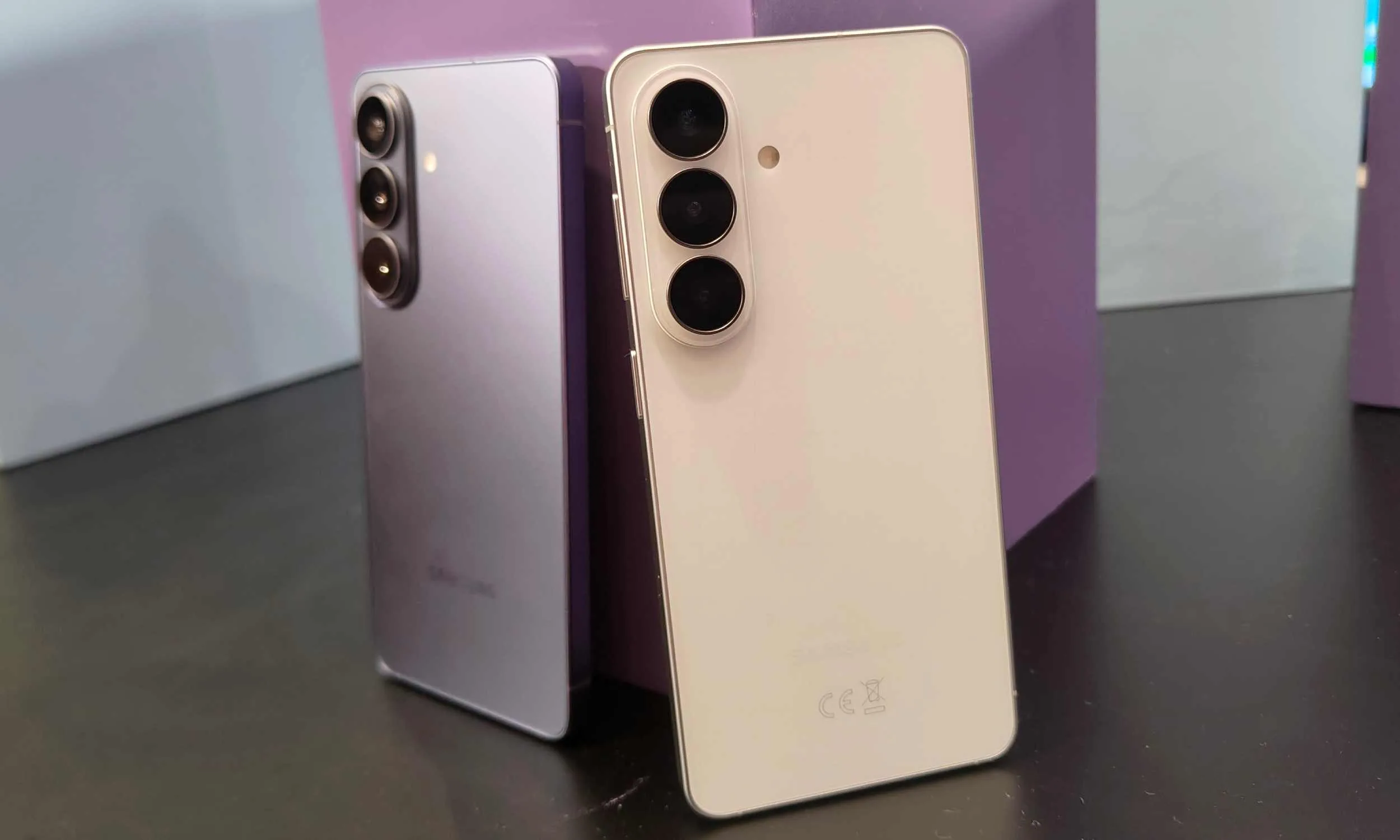




For 2026, the comparison between baseline iPhone and Android flagships comes down to two phones that are closer than they’ve ever been — the Galaxy S26 at $899 and the iPhone 17 at $799. Same form factor, same screen size, very different philosophies.
We’ve broken down everything that actually moves the needle — design, display, performance, cameras, battery, and software — because the right phone isn’t the one with the longer spec sheet. It’s the one that fits how you actually use it.
Price and availability
The iPhone 17 kicks off at $799 with 256GB baked in from the start — no arguing with that. The Galaxy S26 lands at $899 for 256GB. Last year’s S25 was $859, so Samsung snuck in a $40 increase, and the ongoing memory shortage got the blame.
So there’s a $100 gap sitting between these two phones right out the gate. Whether the S26 justifies it over the iPhone 17 — or whether Apple’s just quietly winning on value before the comparison even starts — is what the rest of this piece is for.
Advertisement
Design
Tom Bedford / Digital Trends
Pick up the S26 and the iPhone 17 back-to-back and the first thing you think is: did these two companies share a blueprint? Heights are dead-even at 149.6mm. Width differs by 0.2mm — which doesn’t make a different in real life.
Apple’s phone is thicker at 7.95 mm versus Samsung’s 7.2 mm, and heavier too, tipping the scales at 177 grams against the S26’s 167 grams. What gives away Samsung’s entry-level flagship is its boxy corners, which are immediately recognizable against the rounded corners on the iPhone 17.
Nirave Gondhia / Digital Trends
Both phones use aluminum frames, so nobody’s winning a materials fight there. The glass is where they split — Gorilla Glass Victus 2 front and back on the S26, and Apple’s Ceramic Shield 2 on the iPhone 17’s front, which Apple says scratches three times less easily than regular glass.
Dunking either one is fine either way; IP68 on both. The S26 comes in Black, Cobalt Violet, Sky Blue, and White — pick one and people will notice. The iPhone 17 gives you Black, White (my personal favorite), Mist Blue, Sage, and Lavender — tones quiet enough that your phone practically whispers.
Display
Nadeem Sarwar / Digital Trends
Both screens measure 6.3 inches, so that argument ends before it starts. Where things get interesting is everything underneath that number.
The iPhone 17 sports a 2622 x 1206 pixel OLED panel at 460 ppi, sharper than the Galaxy S26’s panel, which maxes out at FHD+ with 2340 x 1080 pixels (411 ppi). The S26’s display is fine, looks good, and frankly most people won’t lose sleep over it. Side-by-side though, the difference shows (I hope Samsung sees it as well).
The S26 peaks at 2,600 nits outdoors, which handles most sunny days well enough. The iPhone 17 pushes to 3,000 nits — and upon using it side by side with the Galaxy S25 (which shares its peak brightness with the S26), I found the iPhone to be noticeably brighter, especially under direct sunlight.
Advertisement
Nirave Gondhia / Digital Trends
Both do 1-120Hz adaptive refresh rates, so scrolling feels equally fluid on either one. Then there’s always-on display — both phones keep your notifications visible without fully waking the screen, which sounds minor until you’ve used it for a week and then picked up a phone without it.
While I’ve grown accustomed to the Dynamic Island on the iPhone 17, you might not like it in the first glance, especially if you’re upgrading from an Android phone with a punch-hole camera — that’s something to keep in mind as well.
Specs-wise, Samsung shows up with more — Snapdragon 8 Elite Gen 5, 3nm, 12GB RAM. Apple brings the A19 and 8GB. On a spec sheet that reads as a clean Samsung win, but phones aren’t spec sheets.
Benchmarks tell a messier story. The S26 pulls ahead when multiple cores are working together, which is relevant for heavy multitasking. The scores are almost similar in the single-core test, which is what your phone actually leans on for most things — launching apps, typing, switching between tasks. All-in-all, both phones offer similar (read excellent) day-to-day performance.
Apple
The RAM gap is where it gets more practical. Twelve gigabytes means more apps stay open in the background without reloading. If your phone use involves juggling a lot at once, the S26 has more headroom. And yes, both are perfectly capable of handing the most demanding games at high frame rates, it’s just the matter of whether the developer has included support for it or not.
I’ve been using the iPhone 17 for about six months now, and I haven’t, for once, felt that the phone doesn’t offer enough CPU or GPU performance, especially when needed. That’s the thing with top-tier mobile chipsets; they’ve got more horsepower than most people can use upfront, but it helps maintaining the performance in the long-term.
Operating System
Tom Bedford / Digital Trends
The S26 runs One UI 8.5 on Android 16 — the most put-together version of Samsung’s skin yet. Rounder, cleaner, and stuffed with settings you’ll spend a Sunday afternoon exploring.
Galaxy AI actually pulls weight now: Now Nudge suggests replies by reading your screen context, Call Screening stops unknown callers before your phone buzzes, and Audio Eraser finally works inside YouTube and Instagram, not just Samsung’s own apps. Bixby gets Perplexity as backup for the questions it used to fumble.
Advertisement
Nirave Gondhia / Digital Trends
iOS 26 got a full face-lift with Liquid Glass — translucent menus and icons that split opinion pretty cleanly between “stunning” and “bit much.” Apple Intelligence handles real-time translation across calls, Messages, and FaceTime, though it’s not as useful as Galaxy AI. The ecosystem perks, however, are still superior.
The S26 has a 50MP main, 12MP ultrawide, and a dedicated 10MP 3x telephoto. The iPhone 17 runs a 48MP main at f/1.6, a 48MP ultrawide, and a 2x “zoom” that’s just the main sensor being cropped — not a real telephoto lens.
Daylight shots on both look great, full stop. Where they differ is taste. Samsung cranks up the saturation and contrast — your photos come out looking like they’ve already been edited, ready to post. Apple mostly shows you what was there, i.e., the camera reproduces natural, neutral colors.
After dark, the iPhone quietly holds its own. Apple’s Night Mode has been one of the best in the business for years (along with the f/1.6 aperture). Zoom goes the other way. A real 3x optical lens on the S26 versus Apple’s cropped 2x is a clear hardware win for Samsung.
Nirave Gondhia / Digital Trends
The most unique thing about the iPhone 17’s camera system is its selfie shooter — an 18MP (f/1.9) square-shaped camera sensor that can capture super wide selfies in multiple aspect ratios. Apple surely needs to bump up the resolution for the visual area the sensor covers, but even so, Samsung’s 12MP sensor is no match for it.
Video on both is strong at 4K/60fps with good stabilization. Apple’s color science gives it a slight edge in footage quality, plus the sensor-shift stabilization works like a charm, but the S26 shoots 8K if that’s something you need. Most people don’t, but the option exists.
Advertisement
Battery
Apple
The S26 has a bigger tank — 4,300mAh versus the iPhone 17’s 3,692mAh — and Samsung claims 31 hours of video playback to Apple’s 30. One hour in it, with a notably smaller cell on Apple’s side. That gap says more about the A19’s efficiency than it does about the S26’s battery.
Charging is where iPhone pulls ahead. With 40W wired charging, the handset reaches 50% in roughly 25 minutes. The S26 still sits at 25W — same as its last two predecessors. Wireless is where the gap reopens. The iPhone 17 does 25W via MagSafe; the S26 base model caps at 15W standard wireless.
Conclusion
The S26 makes a stronger case on paper. More RAM, a bigger battery, a real telephoto lens, 8K video, and One UI 8.5 giving you enough customization to keep a hobbyist busy for weeks. It’s the better phone for power users, Android loyalists, and anyone who shoots a lot of zoom photos or wants their phone to last the full day.
The iPhone 17 wins on the things that are harder to put in a spec sheet. Faster charging, better low-light photography, smoother sustained performance under load, the refreshing iOS 26 experience, and an ecosystem so tightly integrated it borders on a lifestyle choice. If you own a Mac, iPad, or AirPods, the iPhone 17 doesn’t just work well — it works together in a way the S26 can’t replicate.
TfL introduces radar cameras that monitor five lanes without visible alerts
Half of London’s 2024 fatal collisions involved excessive speed
Cameras will be installed on 20mph and 30mph roads across ten boroughs
Transport for London (TfL) is moving ahead with trials of radar-based speed cameras which differ significantly from existing roadside systems in both design and operation.
The new devices combine 4D radar tracking with 4K imaging, removing the need for embedded road sensors, visible flashes, or painted markings that typically signal enforcement zones to drivers.
The absence of these cues suggests a system which operates continuously without alerting motorists in the traditional ways many have come to expect.
Article continues below
Advertisement
Expanded coverage and enforcement rationale
The new cameras will be installed at up to 10 sites across London, including boroughs such as Haringey, Tower Hamlets, Havering, Croydon, Hammersmith and Fulham, Brent, Hackney, Ealing, and Sutton.
All sites are located on roads with either 20mph or 30mph limits, chosen on the basis of risk and suitability.
Advertisement
Each of these cameras is expected to monitor up to five lanes of traffic simultaneously in both directions.
This is a notable increase compared with older spot cameras that are limited to fewer lanes and rely on physical infrastructure beneath the road surface.
Sign up to the TechRadar Pro newsletter to get all the top news, opinion, features and guidance your business needs to succeed!

TfL states this expanded coverage allows each unit to survey 67% more traffic, which may alter how frequently drivers encounter enforcement across busy routes.
Advertisement
Authorities continue to link excessive speed with severe road incidents across London’s transport network, with official figures indicating speed contributed to roughly half of fatal collisions recorded in London during 2024.
This statistic forms part of the justification for introducing updated enforcement tools, alongside a broader policy framework aimed at reducing casualties over the coming years.
“Speeding continues to be a major cause of the most devastating collisions on our roads,” said Siwan Hayward, TfL’s Director of Security, Policing and Enforcement.
Advertisement
“This trial allows us to test new radar‑based camera technology to ensure it meets London’s future enforcement needs.”
The rollout also aligns with a wider plan involving expanded camera deployment and adjustments to speed limits across sections of the road network.
Authorities indicate that these measures are being implemented alongside efforts to reshape urban streets into environments with lower traffic speeds.
From an enforcement perspective, the improved image quality produced by the new cameras is expected to affect how offences are processed and verified.
Advertisement
According to the Metropolitan Police, clearer imagery supports accountability by providing stronger evidence when pursuing violations.
“This trial will improve reliability and deliver better quality images, helping our officers hold offenders to account,” said Donna Smith, Detective Chief Superintendent of the Met’s Roads and Transport Policing Command.
This points to a system that may reduce ambiguity in enforcement, although it also raises questions about how drivers adapt when traditional warning signals are absent.
The decision to deploy these cameras across multiple boroughs indicates a targeted approach rather than a uniform rollout.
Advertisement
Its long-term impact will depend on whether increased detection translates into sustained behavioural change among drivers.
A legal feud between the co-founders of Lux Optics, the developer behind the Halide camera app, revealed that Apple was close to acquiring the company. As first reported by The Information, Apple held acquisition talks for Lux Optics, which also developed the Kino, Spectre and Orion apps, in the summer of 2025.
According to The Information, the deal eventually fell through in September of that year, but the potential acquisition could’ve provided Apple with the third-party software to improve its own built-in camera app. Apple is already rumored to be introducing variable aperture to its upcoming iPhone 18 Pro models, so it’s not surprising that the iPhone maker was looking for software with advanced features to match its possibly upgraded camera hardware.
Despite Apple’s interest, Lux Optics’ co-founders, Ben Sandofsky and Sebastiaan de With concluded that future updates to Halide could increase the company’s valuation and ended the acquisition talks. According to the lawsuit between the co-founders, Sandofsky started investigating de With for the alleged misuse of company funds shortly after the talks with Apple ended. Afterwards, de With was fired from Lux Optics and later joined Apple’s design team. While Halide may remain third-party software for iPhones and iPads, users can still look forward to some software improvements to the built-in camera app, since that’s reportedly one of Apple’s priorities.
It sounds a bit redundant at first — you’re already in a designated turning lane, yet you must use your turning signal. However, in states like California, you may get a ticket if you don’t.
According to the California DMV’s Driver’s Handbook, there are certain steps drivers must take before taking a left or right turn. This includes entering a designated turn lane if one is available, looking out for pedestrians and bicyclists, and then turning on a turn signal about 100 feet ahead of the turn itself, usually before stopping behind the limit line.
While it’s not explicitly stated, this section of the Driver’s Handbook indicates that you’ll need to use the turn signal even if there’s a designated turning lane. This is emphasized in California Code, VEH 22108, which states: “Any signal of intention to turn right or left shall be given continuously during the last 100 feet traveled by the vehicle before turning.” No exceptions are mentioned.
Advertisement
The United States generally wants you to use a turn signal in a turning lane
jpreat/Shutterstock
California isn’t alone in requiring a turn signal when you’re in a designated turning lane. It’s a pretty general traffic safety law throughout the United States.
Florida Statute 316.155 requires drivers to use a turn signal any time they turn a vehicle, turning it on 100 feet before the turn. Massachusetts General Laws Chapter 90, Section 14B also requires drivers to use a turn signal “before making any turning movement.” Nebraska Statute 60-6,161 also states that drivers must use a turning signal 100 feet ahead of any turn.
Advertisement
While it may seem redundant or obvious to the driver, this law exists to keep drivers safe. A turn lane won’t necessarily tell other drivers your thoughts — although it can be assumed. The turn signal itself shows your actual thought process and intentions more clearly. It’s all about communication — to other drivers, to pedestrians, and everyone else around you.
You will also avoid fines: it’s $238 if you violate California Code 22108 — though some would argue not to pay it. It’s best to just follow the general turn signal rules, whether it’s a designated turning lane or a roundabout.
This week, a topic that has been boomeranging around Silicon Valley bounced into the spotlight: AI tokens as compensation. The idea is straightforward enough — rather than giving engineers only salary, equity, and bonuses, companies would also hand them a budget of AI tokens, the computational units that power tools like Claude, ChatGPT, and Gemini. Spend them to run agents, automate tasks, crank through code. The pitch is that access to more compute makes engineers more productive, and that more productive engineers are worth more. It’s an investment in the person holding them, is the idea.
Jensen Huang, the leather-jacket-wearing CEO of Nvidia, seemed to capture everyone’s imagination when he floated the notion at the company’s annual GTC event earlier this week that engineers should receive roughly half their base salary again — in tokens. His top people, by his math, might burn through $250,000 a year in AI compute. He called it a recruiting tool and predicted it would become standard across Silicon Valley.
It isn’t entirely clear where the idea was first, well, ideated. Tomasz Tunguz, a renowned VC in the Bay Area who runs Theory Ventures and focuses on AI, data, and SaaS startups — and whose writing on all things data has garnered a loyal following over the years — was talking about this in mid-February, writing that tech startups were already adding inference costs as a “fourth component to engineering compensation.” Using data from the compensation tracking site Levels.fyi, he put a top-quartile software engineer salary at $375,000. Add $100,000 in tokens and you’re at $475,000 fully loaded — meaning roughly one dollar in five is now compute.
That’s no coincidence. Agentic AI has been taking off, and the release of OpenClaw in late January accelerated the conversation considerably. OpenClaw is an open-source AI assistant designed to run continuously — churning through tasks, spawning sub-agents, and working through a to-do list while its user sleeps. It’s part of a broader shift toward “agentic” AI, meaning systems that don’t just respond to prompts but take sequences of actions autonomously over time.
Advertisement
The practical consequence is that token consumption has exploded. Where someone writing an essay might use 10,000 tokens in an afternoon, an engineer running a swarm of agents can blow through millions in a day — automatically, in the background, without typing a word.
By this weekend, the New York Times had put together a smart look at the so-called tokenmaxxing trend, finding that engineers at companies including Meta and OpenAI are competing on internal leaderboards that track token consumption. Generous token budgets are quietly becoming a standard job perk, the paper reported, the way dental insurance or free lunch once was. One Ericsson engineer in Stockholm told the Times he probably spends more on Claude than he earns in salary, though his employer picks up the tab.
Maybe tokens really will become the fourth pillar of engineering compensation. But engineers might want to hold the line before embracing this as a straightforward win. More tokens may mean more power in the short term, but given how fast things are evolving, it doesn’t necessarily mean more job security. For one thing, a large token allotment comes with large expectations. If a company is effectively funding a second engineer’s worth of compute on your behalf, the implicit pressure is to produce at twice the rate (or more).
Techcrunch event
Advertisement
San Francisco, CA | October 13-15, 2026
And there’s a muddier problem underneath that: at the point where a company’s token spend per employee approaches or exceeds that employee’s salary, the financial logic of headcount starts to look different to its finance team. If the compute is doing the work, the question of how many humans need to be coordinating it becomes harder to avoid.
Advertisement
Jamaal Glenn, an East Coast-based Stanford MBA and former VC turned financial services CFO, similarly points out that what may seem like a perk can be a clever way for companies to inflate the apparent value of a compensation package without increasing cash or equity — the things that actually compound for an employee over time. Your token budget doesn’t vest. It doesn’t appreciate. It doesn’t show up in your next offer negotiation the way a base salary or equity grant does. If companies successfully normalize tokens as pay, they may find it easier to keep cash comp flat while pointing to a growing compute allowance as evidence of investment in their people.
That’s a good deal for the company. Whether it’s a good deal for the engineer depends on questions most engineers don’t yet have enough information to answer.
The app also includes access to two scheduled operational modes for those who would like to leave the robot in the pool, including a calendar-based mode with three frequency levels—90 minutes x 2, 60 minutes x 3, or 45 minutes x 4. The other mode is a bit of a letdown: The so-called AI Navium mode sounds like it uses the AI camera to periodically survey the pool over the course of a week and perform a routine cleaning only when required—but in reality, this mode merely performs a quick analysis of your previous runs and then uses AI to create a schedule for the next few days, based on how you’ve used the robot in the past.
Hungry for Gunk
Video: Chris Null
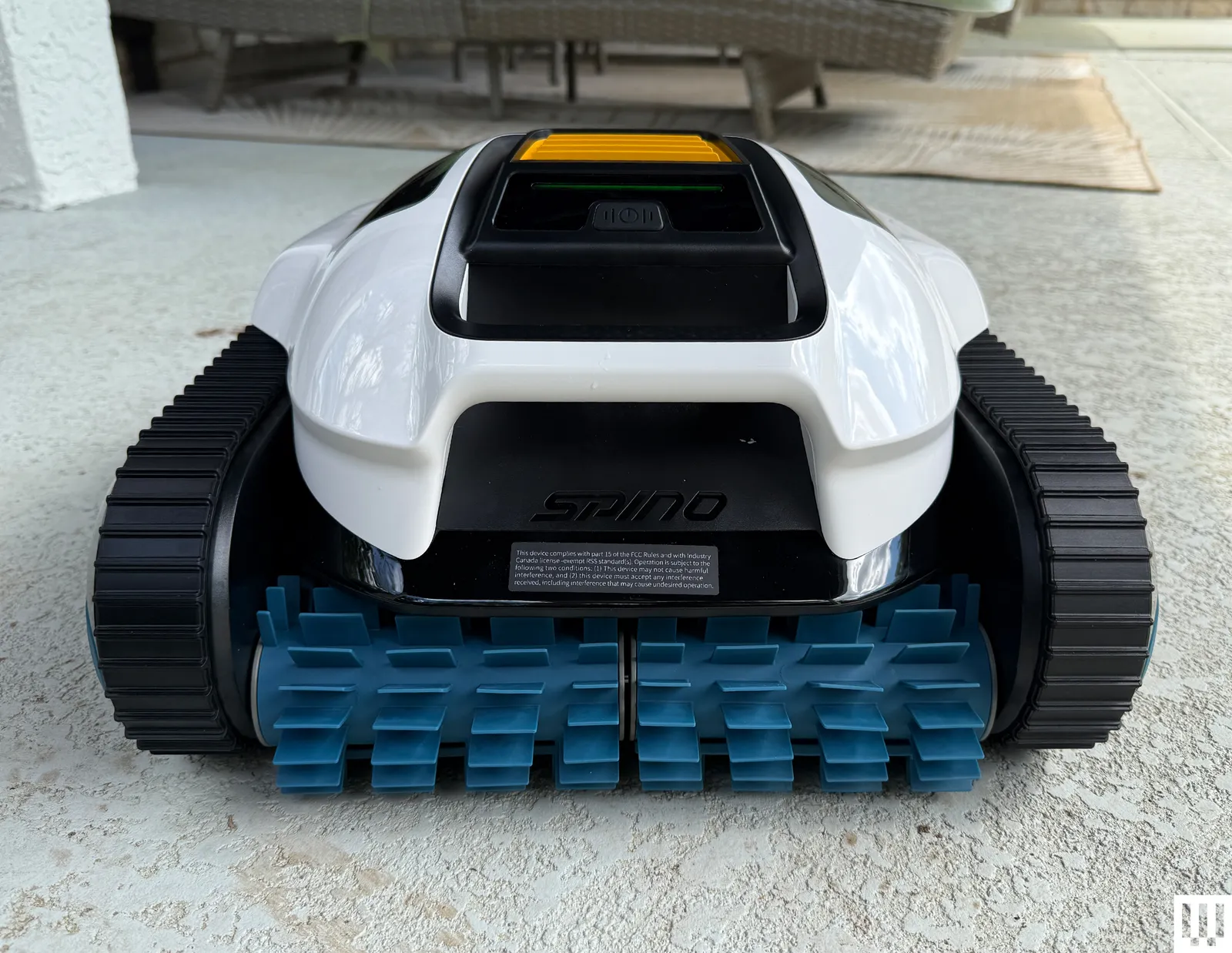
The Scuba V3 made fairly quick work of debris in my pool during test runs, rarely needing more than a couple of hours to scoop up all visible detritus on the pool floor while also scrubbing the walls and waterline. The AI camera system does seem to work as advertised, even locating small pebbles I tossed into the pool and dutifully routing itself to collect them. With organic debris, the pool looked fully clean after each run (ending between 170 and 190 minutes each time), and with synthetic debris, the Scuba V3 achieved a 96 percent cleanliness rating, with just a few test leaves remaining in some difficult corners. That’s especially good performance given that three hours is not a lot of operating time. And note there’s no way to adjust the running time outside of the scheduled modes; on-demand modes always run the battery until it’s nearly dead. Fortunately, Aiper does seem to make the most of this time, formally specifying a maximum coverage area of a significant 1,600 square feet.
I unfortunately didn’t have much success with the AI schedule mode. After running the analyzer, the app suggested a baffling five-day schedule comprising two floor runs, two floor-plus-waterline runs, and a final floor run. It then ignored the schedule and promptly ran a three-hour floor run, which drained the battery completely. I tried again the next day, and the robot missed its schedule, then ran randomly late in the night. I wasn’t a big fan of leave-it-in-the-pool scheduling before testing the Scuba V3, and this showing didn’t improve that opinion.
Advertisement
Video: Chris Null
When finished with a run, the Scuba climbs to the waterline and sends a push notification to the app, alerting you that it’s ready to be collected and cleaned. Note that you only have 10 minutes to reach it: The Scuba can’t float, so it has to use the last of its juice to run a motor to tread water and hold itself in place. After that 10 minutes is up, the spent Scuba sinks to the floor of the pool and must be retrieved with a pool and hook. My best advice is to set a 175-minute timer each time you launch a run to remind you to watch for the completion notification.
Cleanup can be somewhat involved. The filter basket design features a large lid that makes it easy to access the inner filter, and hosing down both of these filters clean is straightforward. The removable mesh on the interior basket is another story, though. While it’s very effective at capturing dirt and other very fine debris, it’s quite difficult to clean, and if you don’t remove it from the basket, lots of debris gets caught between the mesh and the basket itself. Removing and replacing the mesh is difficult, especially when it’s wet, so I usually just left it in place and cleaned it the best I could after each run, accepting that it would never be perfect. I expect most users will do the same.
Google has confirmed that Android will not retire app sideloading, but the company is implementing measures that make the process cumbersome – something only “power users” are likely to attempt. According to Matthew Forsythe, the newly introduced advanced flow is designed to protect users from potential coercion, scams, or malicious software. Read Entire Article Source link
If you thought Apple accessories were getting expensive, Hermès has just taken things to a completely different level.
The luxury fashion house is now selling a range of MagSafe-compatible chargers priced from $1250, with some models going well beyond that price.
At the entry point, the Paddock Solo Charger is a single-device magnetic charger priced at $1250. If you step up to the Paddock Duo at $1750, you can charge both an iPhone and an Apple Watch at the same time. Furthermore, there’s also the Paddock Yoyo, also $1750, which adds a wraparound USB-C cable designed for travel.
And if that somehow isn’t enough, Hermès is also bundling these chargers with its leather cases. This pushes prices anywhere between $3725 and $5150, firmly into top-end MacBook territory.
Advertisement
Advertisement
The big sell here isn’t functionality – it’s craftsmanship. Each charger is wrapped in Swift calfskin leather with traditional saddle stitching. It is finished with a subtle “H” logo to help align your device on the magnetic pad. It’s classic Hermès: understated, premium, and unapologetically expensive.
That said, the actual charging experience doesn’t sound all that different from standard MagSafe gear. You’ll still need to bring your own 20W power adapter, as one isn’t included in the box. This is a move that mirrors Apple’s own decision to stop bundling chargers back in 2020. You do at least get a USB-C cable in the box.
Hermès and Apple have worked together for years, particularly on high-end Apple Watch models and bands. However, these chargers aren’t currently sold through Apple itself.
Advertisement
For most people, this is clearly overkill. But for Hermès buyers, that’s kind of the point – it’s less about charging your phone, and more about how you do it.
“After nearly a decade of delays and industry skepticism, Tesla’s electric big rig is finally rolling out of Nevada’s Gigafactory for mass production starting summer 2026,” writes Gadget Review. And some truckers who tested the vehicles already love them (as reported by the Wall Street Journal):
Dakota Shearer and Angel Rodriguez, among other pilot drivers, rave about the centered cab that eliminates blind spots during tight maneuvers. The automatic transmission means no more wrestling with 13-gear diesels, reducing physical stress on long hauls. Most surprisingly, the Semi maintains highway speeds on grades where diesel trucks typically crawl at 30 mph. The 500-mile range enables multiple daily round-trips — think Long Beach to Vegas or Inland Empire runs — without range anxiety…
Sure, the Semi costs under $300,000 — roughly double a diesel equivalent — but the math gets interesting quickly. Energy costs drop to $0.17 per mile compared to $0.50-0.70 for diesel fuel. Maintenance requirements shrink dramatically; one fleet reports needing just one mechanic for their electric trucks versus five for 40 diesels… Tesla offers Standard Range (325 miles) and Long Range (500 miles) versions, both handling 82,000-pound gross combined weight at 1.7 kWh per mile efficiency.
The tri-motor setup delivers 800 kW — over 1,000 horsepower equivalent — enabling loaded 0-60 mph acceleration in 20 seconds versus 45-60 for diesel. Fast charging hits 60% capacity in 30 minutes [which Tesla says is 4x faster than other battery-electric trucks] using the new MCS 3.2 standard, while 25 kW ePTO power runs refrigerated trailers without diesel auxiliaries. Charging networks remain the biggest hurdle for widespread adoption. Public charging stations lack the Semi’s massive power requirements, limiting long-haul routes. Tesla plans dedicated fast-charging corridors starting this summer, but coverage remains spotty. The lack of sleeper cabs also restricts the Semi to regional freight rather than cross-country hauling.
Advertisement
Production scales to 5,000-15,000 units by 2026, then 50,000 annually — assuming charging infrastructure keeps pace with demand. Thanks to long-time Slashdot reader schwit1 for sharing the article.
We have to admit, we didn’t know that we wanted a desktop electric jellyfish until seeing [likeablob]’s Denki-Kurage, but it’s one of those projects that just fills a need so perfectly. The need being, of course, to have a Bladerunner-inspired electric animal on your desk, as well as having a great simple application for that Cheap Yellow Display (CYD) that you impulse purchased two years ago.
Maybe we’re projecting a little bit, but you should absolutely check this project out if you’re interested in doing anything with one of the CYDs. They are a perfect little experimentation platform, with a touchscreen, an ESP32, USB, and an SD card socket: everything you need to build a fun desktop control panel project that speaks either Bluetooth or WiFi.
We love [likeablob]’s aesthetic here. The wireframe graphics, the retro-cyber fonts in the configuration mode, and even the ability to change the strength of the current that the electric jellyfish is swimming against make this look so cool. And the build couldn’t be much simpler either. Flash the code using an online web flasher, 3D print out the understated frame, screw the CYD in, et voila! Here’s a direct GitHub link if you’re interested in the wireframe graphics routines.
Advertisement
We’ve seen a bunch of other projects with the CYD, mostly of the obvious control-panel variety. But while we’re all for functionality, it’s nice to see some frivolity as well. Have you made a CYD project lately? Let us know!
Need something new for your reading list? Here are two titles we think are worth checking out. This week, we’ve got Andy Weir’s Project Hail Mary and The Thing on the Doorstep, an H.P. Lovecraft adaptation for Image Comics.
This article originally appeared on Engadget at https://www.engadget.com/entertainment/what-to-read-this-weekend-revisiting-project-hail-mary-and-the-thing-on-the-doorstep-190000250.html?src=rss
You must be logged in to post a comment Login