







Connect with us

Tech

GameCube Ports Sneak Into the Switch 2 Dock

Published

on

GameCube Ports Switch 2 Dock
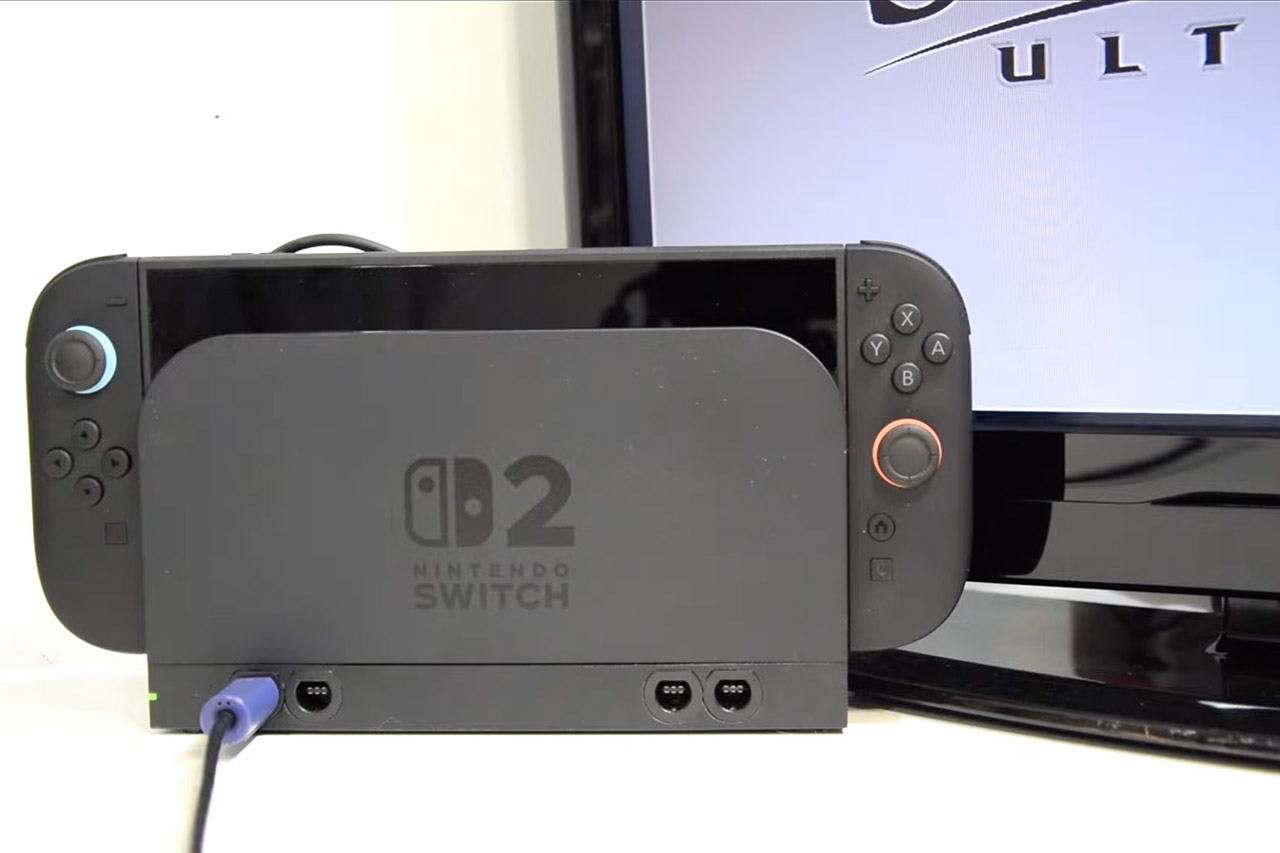
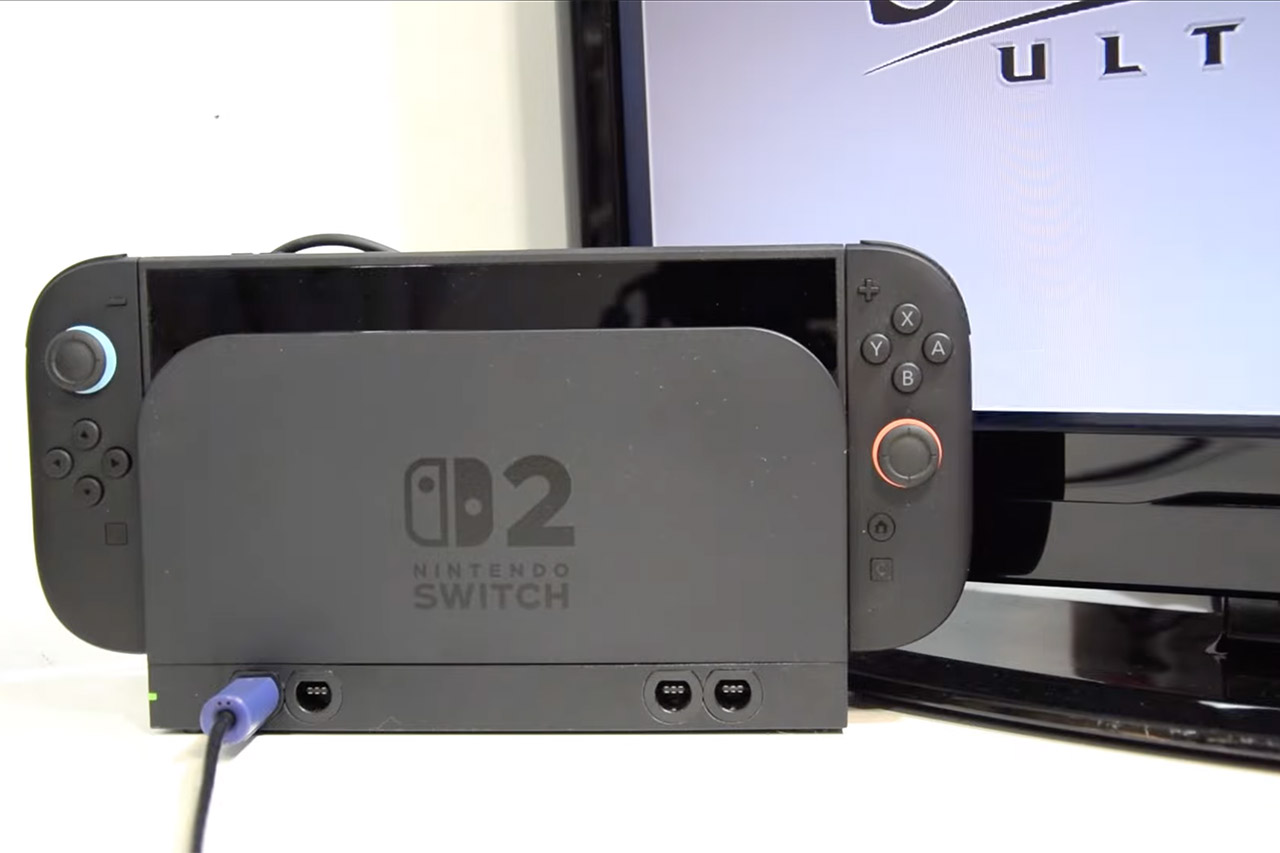
Gamer Dorison Hugo has been working on a crazy concept for seven years: squeezing four GameCube controller ports onto a normal Nintendo Switch dock, and he’s finally done it. Players can now just plug in their hefty purple GameCube controllers without having to clutter up their TV stand with additional boxes. The end result appears polished enough to pass as a factory-made accessory.


Hugo starts with the normal Switch dock that comes with the console. Inside, there’s mostly empty space, making it ideal for hiding a Gamecube adaptor. He chooses a little one from Input Integrity, primarily because larger ones, such as the Wii U version, will not fit. Next, he removes some of the adaptor ports to make room. Then a few precise holes are made at the front of the dock. He has a mixture of superglue, epoxy, hot glue, and other adhesives to keep everything together. Some simple connectors allow you to easily replace out cables if necessary. To finish, he only needs to solder four wires from the adapter to the dock’s circuit board. Gamecube controllers now glow up as normal on the Switch screen or any TV you connect.


Nintendo Switch 2 + Mario Kart World Bundle
  • This bundle includes a system and a full GAME DOWNLOAD for the Mario Kart World game, exclusive to Nintendo Switch 2. Limited quantities. While…
  • One system, three play modes: TV, Tabletop, and Handheld
  • Larger, vivid, 7.9” LCD touch screen with support for HDR and up to 120 fps

GameCube Ports Switch 2 Dock
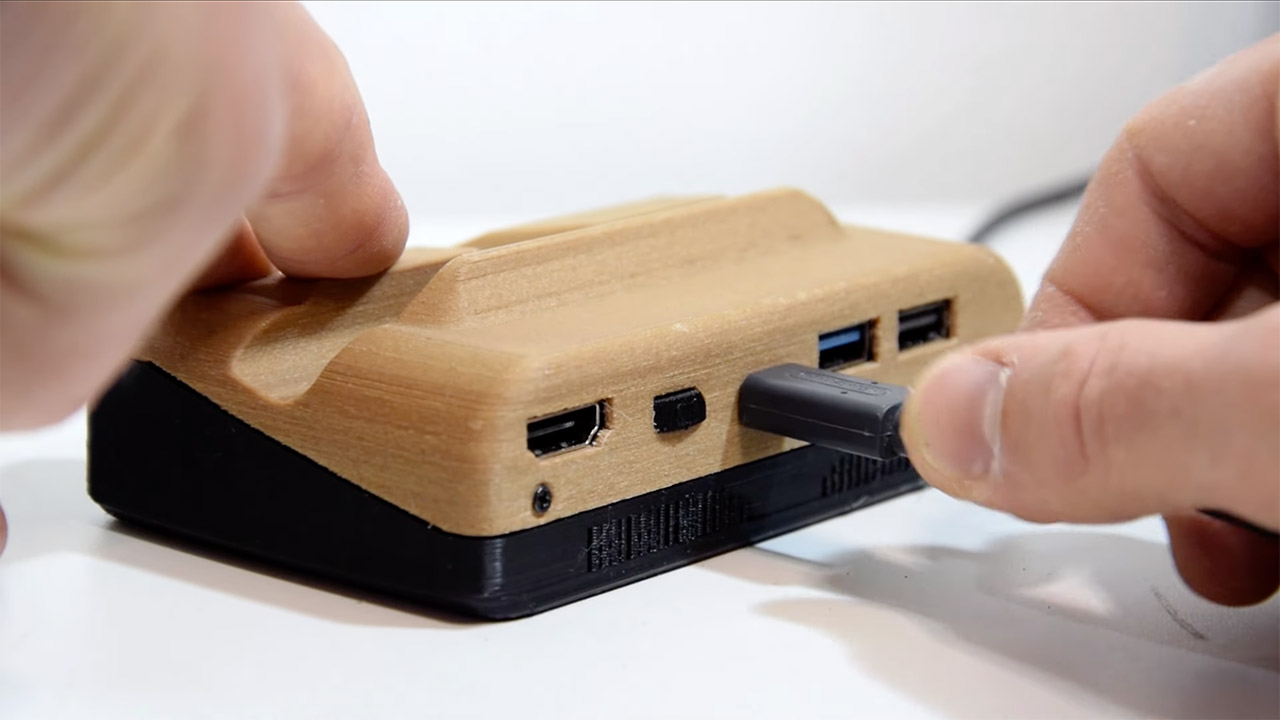
There’s also a version that reduces the whole thing down to pocket size. All you have to do is slot the Switch in, connect the HDMI and power, and you can play it from anywhere. There’s even a special “handheld mode” that allows you to utilize the Switch’s built-in screen without a television. If you want to play for hours on end, external batteries make it possible.

GameCube Ports Switch 2 Dock
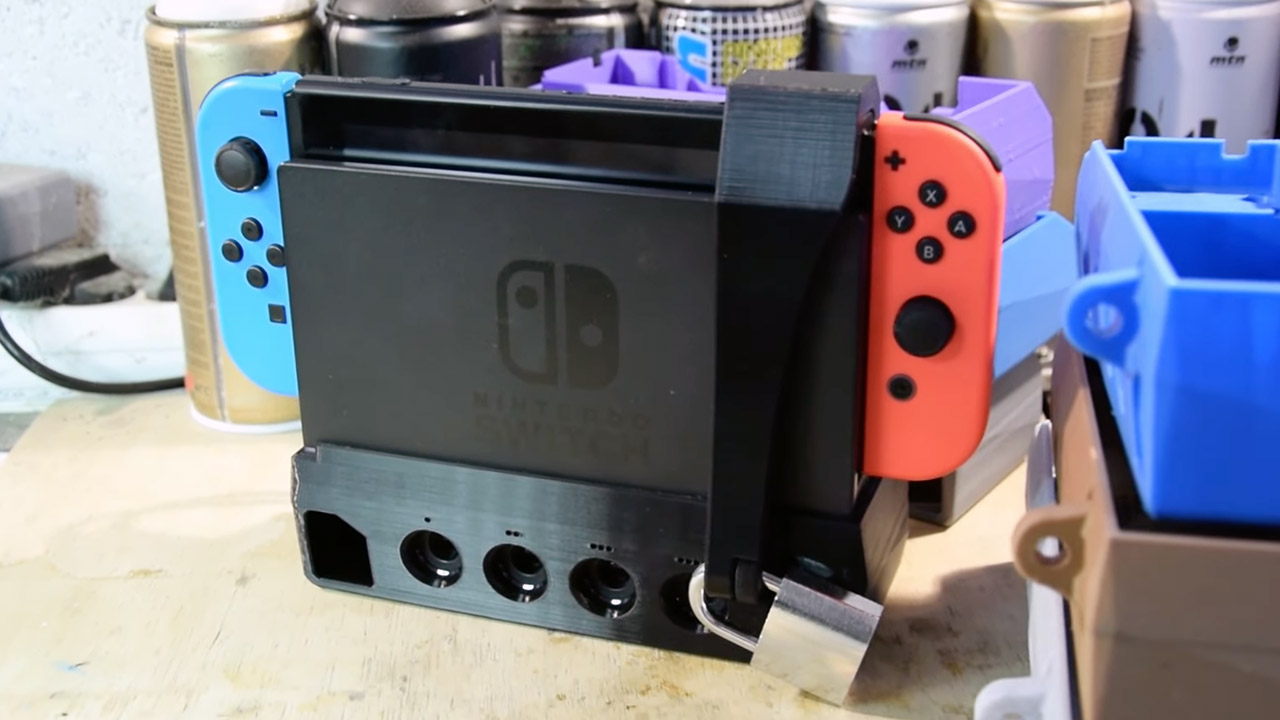
Security becomes an issue for tournament participants, so Hugo installs a mechanical lock that snaps over the dock. A modified padlock secures the Switch, cords, and game card, but strong printed walls and side holes prevent bike locks or bolts from causing problems. Organizers of events can assign keys with numbers to keep setups safe.

GameCube Ports Switch 2 Dock
There’s some good news for Switch 2 owners: there’s more room within the dock, making it easier to hide the connections. The ports are cut down somewhat at the top so that they fit flush. A 3D printed extension maintains the USB-C port easily accessible. Hugo scanned all of the pieces to ensure accurate fits, preventing any frequent mistakes that modders may make.

GameCube Ports Switch 2 Dock
There are several additional features that improve the design, such as reinforced USB-C ports that can withstand intensive use. Some configurations even offer the option of adding USB hubs and Ethernet slots. Mayflash adapters are good for cheap solutions, but the Input Integrity unit is the one to acquire if you want top-notch reliability (which is essential at a tournament). Every single button and stick works just as Nintendo intended. Hugo is enabling everyone with a 3D printer participate by sharing the print files on Cults3D. And for those who simply want to buy one off the shelf, he is selling limited editions on eBay to fund his expenses.
[Source]

Source link

Advertisement
Continue Reading
Click to comment

Leave a Reply

Your email address will not be published. Required fields are marked *

Tech

Google’s AI Overviews Can Scam You. Here’s How to Stay Safe

Published

on

These days, rather than showing you the traditional list of links when you run a search query, Google is intent on throwing up AI Overviews instead: synthesized summaries of information scraped off the web, with some word-prediction magic added, and packaged together in a way to sound as accurate and reliable as possible.

We’ve written before about some of the problems with these AI Overviews, which regularly contain mistakes or nonsense, and of course rip off the work of the human writers who actually know the answers to the questions you’re putting into Google. There’s another problem though—these AI answers can actually be dangerous.

As with every other new technology through history, scams are now making their way into AI Overviews as well, apparently injecting Google’s AI answers with fraudulent phone numbers that you shouldn’t trust. Here’s what’s happening, and how you can make sure you stay safe.

How AI Overview Scams Work

Image may contain Page Text and File

It’s a good idea not to trust AI for contact details.David Nield

Both The Washington Post and Digital Trends have spotted instances of scam support numbers showing up in Google AI Overviews, reports of which appeared on Facebook and Reddit respectively. Credit unions and banks are also warning their customers about these scams.

Advertisement

It doesn’t seem to be a completely new problem, but the way Google Search works now, it’s been given a new twist.

Here’s what happens: The unfortunate victim Googles a company name looking for a contact number, then calls the number thrown up by AI. This doesn’t actually lead to the company in question, but rather to someone pretending to be that company, who then tries to take payment information or other sensitive details from the caller.

It’s not clear exactly how these fake numbers are being planted, but the best guess is that they’re being published in multiple low-profile places online, alongside the names of major companies. AI Overviews then comes along and scoops them up, without running the proper checks to verify the information.

The planting of misleading phone numbers by bad actors is not a completely new danger of course; misinformation has been a part of the web for a long, long time. But the design of AI Overviews, which picks out information from the web and presents it as fact rather than encouraging you to do the research yourself, is making people much more susceptible to this kind of con.

Advertisement

Source link

Continue Reading

Tech

9 Best Windows Laptops (2026): WIRED-Tested Laptops to Buy

Published

on

You’ll want to read our extensive guide on How to Choose the Right Laptop, but for the basics, you’ll want to decide what category of laptop you need. Most people should buy a 13-inch or 14-inch laptop, and spending around $750-$1,000 is a good place to start. You should expect a laptop around this price to get good battery life, have a decent screen, perform well enough for basic tasks, and have a comfortable keyboard and touchpad. You should also expect at least 16 GB of RAM and 512 GB of storage. Anything more than that gets into premium territory where you’re paying for higher specs, more performance, or extra features. If you want something with a discrete GPU for either gaming or creative workflows, you’ll need to spend more than this.

A laptop like the Dell 14 Plus is the ideal example of what you can get while shopping in this price range. You can even find laptops with OLED panels, up to one terabyte of storage, depending on how good the discounts happen to be. I would consider anything under $750 to be a cheap laptop, and it will therefore come with some significant compromises, especially around the quality of the panel and the touchpad. Fortunately, laptops that use the Qualcomm Snapdragon X chip get great battery life, despite often falling under $750 in price.

Here’s a list of important specs to consider:

CPU: For thin and light laptops, I would recommend one of the Snapdragon X, X Plus, or X Elite chips. They get the best battery life and performance for their class of laptop. As an alternative, the Intel Core Ultra 7 258V is also quite good. The next generation is coming soon though, with all eyes on Intel’s Core Ultra Series 3 (also known as Panther Lake, which is rolling out now and is really great) and Qualcomm’s Snapdragon X2 chips.

Advertisement

GPU: As of now, Intel’s Lunar Lake chips, such as the Core Ultra 7 258V, have the best integrated graphics. For discrete options, you’ll want to pick something with one of the latest Nvidia RTX 50-series GPUs, such as the RTX 5060. The biggest leap in performance is between the RTX 5070 and the RTX 5070 Ti, which increases VRAM to 12 GB.

RAM (or memory): Stick with at least 16 GB if you can. Since the advent of the Copilot+ designation, it has become the new standard. You’ll even find laptops as cheap as $600 that have 16 GB of memory. Gamers and content creators should upgrade to 32 GB if possible, though the ongoing memory shortage may make this more expensive in the near future.

Storage: Similar to memory, many laptops have moved to 512 GB as the new standard, and you’ll find lots of affordable laptops with 512 GB as the base configuration. Upgrading to one or two terabytes, where possible, will make your life that much easier, especially since many laptops don’t offer expandable storage.

Display: Laptops are usually categorized by screen size, with 13-inch, 14-inch, and 16-inch being the most common. You’ll want to consider size, resolution, refresh rate, and panel type here.

Advertisement

Portability: Outside of display size, the thickness of the chassis and weight are the primary factors here, determining how portable a laptop is to travel with. Other dimensions are important too, but more often than not, that is determined by the screen size.

Ports: Many laptops are limited to just USB-C and headphone jack these days, with some exceptions where USB-A or HDMI are included. Make sure your laptop has what you need, or else you’ll need a USB Hub or laptop docking station to get more ports or to increase external display support.

Source link

Advertisement
Continue Reading

Tech

As AI data centers hit power limits, Peak XV backs Indian startup C2i to fix the bottleneck

Published

on

Power, rather than compute, is fast becoming the limiting factor in scaling AI data centers. That shift has prompted Peak XV Partners to back C2i Semiconductors, an Indian startup building plug-and-play, system-level power solutions designed to cut energy losses and improve the economics of large-scale AI infrastructure.

C2i (which stands for control conversion and intelligence) has raised $15 million in a Series A round led by Peak XV Partners, with participation from Yali Deeptech and TDK Ventures, bringing the two-year-old startup’s total funding to $19 million.

The investment comes as data-center energy demand accelerates worldwide. Electricity consumption from data centers is projected to nearly triple by 2035, per a December 2025 report from BloombergNEF, while Goldman Sachs Research estimates data-center power demand could surge 175% by 2030 from 2023 levels — the equivalent of adding another top-10 power-consuming country.

Much of that strain comes not from generating electricity but from converting it efficiently inside data centers, where high-voltage power must be stepped down thousands of times before it reaches GPUs. This process currently wastes about 15% to 20% of energy, C2i’s co-founder and CTO Preetam Tadeparthy said in an interview.

Advertisement

“What used to be 400 volts has already moved to 800 volts, and will likely go higher,” Tadeparthy told TechCrunch.

Founded in 2024 by former Texas Instruments power executives Ram Anant, Vikram Gakhar, Preetam Tadeparthy, and Dattatreya Suryanarayana, along with Harsha S. B and Muthusubramanian N. V, C2i is redesigning power delivery as a single, plug-and-play “grid-to-GPU” system spanning the data-center bus to the processor itself.

C2i co-founders Vikram Gakhar, Preetam Tadeparthy, Ram Anant, and Dattatreya Suryanarayana (Left to right)Image Credits:C2i

By treating power conversion, control and packaging as an integrated platform, C2i estimates it can cut end-to-end losses by around 10% — roughly 100 kilowatts saved for every megawatt consumed — with knock-on effects for cooling costs, GPU utilisation and overall data-center economics.

Techcrunch event

Boston, MA
|
June 23, 2026

Advertisement

“All that translates directly to total cost of ownership, revenue, and profitability,” Tadeparthy said.

For Peak XV Partners (which split from Sequoia Capital in 2023), the attraction lies in how power costs shape the economics of AI infrastructure at scale. Rajan Anandan, the venture firm’s managing director, told TechCrunch that after the upfront capital investment in servers and facilities, energy costs become the dominant ongoing expense for data centers, making even incremental efficiency gains highly valuable.

Advertisement

“If you can reduce energy costs by, call it, 10 to 30%, that’s like a huge number,” Anandan said. “You’re talking about tens of billions of dollars.”

The claims will be tested quickly. C2i expects its first two silicon designs to return from fabrication between April and June, after which the startup plans to validate performance with data-center operators and hyperscalers that have asked to review the data, according to Tadeparthy.

The Bengaluru-based startup has built a team of about 65 engineers and is setting up customer-facing operations in the U.S. and Taiwan as it prepares for early deployments.

Power delivery is one of the most entrenched parts of the data-center stack, long dominated by large incumbents with deep balance sheets and years-long qualification cycles. While many newer companies focus on improving individual components, redesigning power delivery end-to-end requires coordinating silicon, packaging, and system architecture simultaneously — a capital-intensive approach that few startups attempt and one that can take years to prove in production environments.

Advertisement

Anandan said the real question now is execution, noting that all startups face technology, market, and team risks when betting on how industries evolve. In C2i’s case, he said, the feedback loop should be relatively short. “We’ll know in the next six months,” said Anandan, pointing to upcoming silicon and early customer validation as the moment when the thesis will be tested.

The bet also reflects how India’s semiconductor design ecosystem has matured in recent years.

“The way you should look at semiconductors in India is, this is like 2008 e-commerce,” said Anandan. “It’s just getting started.”

He pointed to the depth of engineering talent — with a growing share of global chip designers based in the country — alongside government-backed design-linked incentives that have lowered the cost and risk of tape-outs, making it increasingly viable for startups to build globally competitive semiconductor products from India rather than operate only as captive design centers.

Advertisement

Whether those conditions translate into a globally competitive product will become clearer over the coming months, as C2i begins validating its system-level power solutions with customers.

Source link

Continue Reading

Tech

Today’s NYT Connections Hints, Answers for Feb. 16 #981

Published

on

Looking for the most recent Connections answers? Click here for today’s Connections hints, as well as our daily answers and hints for The New York Times Mini Crossword, Wordle, Connections: Sports Edition and Strands puzzles.


Today’s NYT Connections puzzle has some really unusual categories. Read on for clues and today’s Connections answers.

The Times has a Connections Bot, like the one for Wordle. Go there after you play to receive a numeric score and to have the program analyze your answers. Players who are registered with the Times Games section can now nerd out by following their progress, including the number of puzzles completed, win rate, number of times they nabbed a perfect score and their win streak.

Advertisement

Read more: Hints, Tips and Strategies to Help You Win at NYT Connections Every Time

Hints for today’s Connections groups

Here are four hints for the groupings in today’s Connections puzzle, ranked from the easiest yellow group to the tough (and sometimes bizarre) purple group.

Yellow group hint: Good joke!

Advertisement

Green group hint: They all sound like Homer Simpson.

Blue group hint: Bwack-bwack!

Purple group hint: Oh no! What now?

Answers for today’s Connections groups

Yellow group: Knee slapper.

Advertisement

Green group: Homophones.

Blue group: Sounds a chicken makes.

Purple group: Stress responses.

Read more: Wordle Cheat Sheet: Here Are the Most Popular Letters Used in English Words

Advertisement

What are today’s Connections answers?

completed NYT Connections puzzle for Feb. 16, 2026.

The completed NYT Connections puzzle for Feb. 16, 2026.

NYT/Screenshot by CNET

The yellow words in today’s Connections

The theme is knee slapper. The four answers are hoot, laugh, riot and scream.

The green words in today’s Connections

The theme is homophones. The four answers are do, doe, doh and dough.

Advertisement

The blue words in today’s Connections

The theme is sounds a chicken makes. The four answers are buck, cackle, cluck and squawk.

The purple words in today’s Connections

The theme is stress responses. The four answers are fawn, fight, flight and freeze.

Source link

Advertisement
Continue Reading

Tech

Driverless freight hits a new milestone with Aurora's 1,000-mile route

Published

on


The journey takes Aurora’s autonomous trucks roughly 15 hours, or about half the time a human operator could legally drive under federal hours-of-service rules. Existing regulations limit truck drivers to 11 hours of driving within a 14-hour window, require a 30-minute break after eight hours, and mandate a 10-hour rest…
Read Entire Article
Source link

Continue Reading

Tech

Pastebin comments push ClickFix JavaScript attack to hijack crypto swaps

Published

on

Bitcoin falling with a man grasping for them

Threat actors are abusing Pastebin comments to distribute a new ClickFix-style attack that tricks cryptocurrency users into executing malicious JavaScript in their browser, allowing attackers to hijack Bitcoin swap transactions and redirect funds to attacker-controlled wallets.

The campaign relies on social engineering that promises large profits from a supposed Swapzone.io arbitrage exploit, but instead runs malicious code that modifies the swap process directly within the victim’s browser.

It could also be the first known ClickFix attack to use JavaScript to alter a webpage’s functionality for a malicious purpose.

Wiz

Promoted through Pastebin

In the campaign spotted by BleepingComputer, threat actors are iterating through Pastebin posts and leaving comments that promote an alleged cryptocurrency exploit, with a link to a URL on rawtext[.]host.

The campaign is widespread, with many of our posts receiving comments over the past week claiming to be “leaked exploit documentation” that allows users to earn $13,000 in 2 days.

Advertisement
Phishing comment on Pastebin
Source: BleepingComputer

The link in the comment redirects to a Google Docs page titled “Swapzone.io – ChangeNOW Profit Method,” which claims to be a guide describing a method to exploit arbitrage opportunities for higher payouts.

“ChangeNOW still has an older backend node connected to the Swapzone partner API. On direct ChangeNOW, this node is no longer used for public swaps,” reads the fake guide.

“However, when accessed through Swapzone, the rate calculation passes through Node v1.9 for certain BTC pairs. This old node applies a different conversion formula for BTC to ANY, which results in ~38% higher payouts than intended.”

At any given time, these documents typically show between 1 and 5 active viewers, suggesting the scam is circulating.

Anonymous users viewing the Google Doc
People viewing the Google Doc
Source: BleepingComputer

The fake guide provides instructions to visit Swapzone.io and manually load a Bitcoin node by executing JavaScript directly in their browser’s address bar.

The instructions tell victims to visit a URL on paste[.]sh and copy a JavaScript snippet hosted on the page.

Advertisement
First stage JavaScript code used in ClickFix attack
Source: BleepingComputer

The guide then tells the reader to go back to the SwapZone tab, click on the address bar, type javascript:, and then paste the code. When the code has been pasted into the address, they state to press Enter on your keyboard to execute it, as explained below.

ClickFix attack instructions in fake SwapZone exploit guide
Source: BleepingComputer

This technique abuses the browser’s ‘javascript:’ URI feature, which allows users to execute JavaScript from the address on the currently loaded website.

By convincing victims to run this code on Swapzone.io, attackers can manipulate the page and alter the swap process.

BleepingComputer’s analysis of the malicious script hosted at paste[.]sh shows that it loads a secondary payload from https://rawtext[.]host/raw?btulo3.

This heavily obfuscated script is injected directly into the Swapzone page, overriding the legitimate Next.js script used for handling Bitcoin swaps to hijack the swap interface.

The malicious script includes embedded Bitcoin addresses, which are randomly selected and injected into the swap process, replacing the legitimate deposit address generated by the exchange.

Advertisement

Because the code executes within the Swapzone.io session, victims see a legitimate interface but end up copying and sending funds to attacker-controlled Bitcoin wallets.

In addition to replacing the deposit address, BleepingComputer was told that the script modifies displayed exchange rates and offer values, making it feel like the alleged arbitrage exploit is actually working.

Unfortunately, as Bitcoin transactions cannot be reversed, if you fell for this scam, there is no easy way to recover your money.

A novel ClickFix variant

This campaign is a variant of the ClickFix attacks, a social engineering technique that tricks users into executing malicious commands on their computer, typically to install malware.

Advertisement

Normally, ClickFix attacks target operating systems by telling victims to run PowerShell commands or shell scripts to fix alleged errors or enable functionality.

In this case, instead of targeting the operating system, the attackers instruct victims to execute JavaScript directly in their browser while visiting a cryptocurrency exchange service.

This allows the malicious code to modify the page and intercept transaction details.

This may represent one of the first reported ClickFix-style attacks specifically designed to use JavaScript in the browser and steal cryptocurrency.

Advertisement

Modern IT infrastructure moves faster than manual workflows can handle.

In this new Tines guide, learn how your team can reduce hidden manual delays, improve reliability through automated response, and build and scale intelligent workflows on top of tools you already use.

Source link

Continue Reading

Tech

The Nothing That Has the Potential to Be Anything

Published

on

A recent example was published in 2025 by researchers at the European X-Ray Free-Electron Laser Facility near Hamburg, among other institutions. They cooled iodopyridine, an organic molecule consisting of 11 atoms, almost to absolute zero and hammered it with a laser pulse to break its atomic bonds. The team found that the motions of the freed atoms were correlated, indicating that, despite its chilled state, the iodopyridine molecule had been vibrating. “That was not initially the main goal of the experiment,” said Rebecca Boll, an experimental physicist at the facility. “It’s basically something that we found.”

Perhaps the best-known effect of zero-point energy in a field was predicted by Hendrick Casimir in 1948, glimpsed in 1958, and definitively observed in 1997. Two plates of electrically uncharged material—which Casimir envisioned as parallel metal sheets, although other shapes and substances will do—exert a force on each other. Casimir said the plates would act as a kind of guillotine for the electromagnetic field, chopping off long-wavelength oscillations in a way that would skew the zero-point energy. According to the most accepted explanation, in some sense, the energy outside the plates is higher than the energy between the plates, a difference that pulls the plates together.

Quantum field theorists typically describe fields as a collection of oscillators, each of which has its own zero-point energy. There is an infinite number of oscillators in a field, and thus a field should contain an infinite amount of zero-point energy. When physicists realized this in the 1930s and ’40s, they at first doubted the theory, but they soon came to terms with the infinities. In physics—or most of physics, at any rate—energy differences are what really matters, and with care physicists can subtract one infinity from another to see what’s left.

That doesn’t work for gravity, though. As early as 1946, Wolfgang Pauli realized that an infinite or at least gargantuan amount of zero-point energy should create a gravitational field powerful enough to explode the universe. “All forms of energy gravitate,” said Sean Carroll, a physicist at Johns Hopkins University. “That includes the vacuum energy, so you can’t ignore it.” Why this energy remains gravitationally muted still mystifies physicists.

Advertisement

In quantum physics, the zero-point energy of the vacuum is more than an ongoing challenge, and it’s more than the reason you can’t ever truly empty a box. Instead of being something where there should be nothing, it is nothing infused with the potential to be anything.

“The interesting thing about the vacuum is every field, and therefore every particle, is somehow represented,” Milonni said. Even if not a single electron is present, the vacuum contains “electronness.” The zero-point energy of the vacuum is the combined effect of every possible form of matter, including ones we have yet to discover.


Original story reprinted with permission from Quanta Magazine, an editorially independent publication of the Simons Foundation whose mission is to enhance public understanding of science by covering research developments and trends in mathematics and the physical and life sciences.

Source link

Advertisement
Continue Reading

Tech

Removing The BIOS Administrator Password On A ThinkPad Takes Timing

Published

on

This would be a bad time to slip. (Credit: onionboots, YouTube)

In the olden days, an administrator password on a BIOS was a mere annoyance, one quickly remedied by powering off the system and pulling its CMOS battery or moving a jumper around. These days, you’re more likely to find a separate EEPROM on the mainboard that preserves the password. This, too, is mostly just another annoyance, as [onionboots] knew. All it takes is shorting out this EEPROM at the right time to knock it offline, with the ‘right time’ turning out to be rather crucial.

While refurbishing this laptop for a customer, he thought it’d be easy: the guide he found said he just had to disassemble the laptop to gain access to this chip, then short out its reset pin at the right time to make it drop offline and keep it shorted. Important here is that you do not short it when you are still booting the system, or it won’t boot. This makes for some interesting prodding of tiny pins with a metal tool.

What baffled him was that although this method worked, and he could now disable the password, on the next boot, it would be enabled again. As it turns out, to actually save the new supervisor password status to the EEPROM, you should stop shorting its pin, else you cannot write to it. Although the guide said to keep shorting it, this was, in hindsight, a clear case of relying too much on instructions and less on an obvious deduction. Not like any of us are ever guilty of such an embarrassing glitch, natch.

At any rate, it was still infinitely faster than trying to crack such a password with a brute-force method, even if helped by an LLM.

Advertisement

Source link

Advertisement
Continue Reading

Tech

This HP Victus gaming laptop deal brings serious specs under $1,000 before Presidents’ Day ends

Published

on

A good gaming laptop deal is not just about saving money. It’s about landing the right mix of GPU, CPU, and storage so you don’t feel boxed in six months from now. This Presidents’ Day promo on the HP Victus 15.6-inch gaming laptop hits that sweet spot: it’s $999.99, down from $1,369.99, saving you $370. The important detail is the deadline. The deal ends on Feb. 17, 2026, so this is more of a “grab it while it’s live” situation than a price you can assume will stick around.

What you’re getting

This configuration checks the boxes most people actually care about for 2026 PC gaming and everyday use:

  • 15.6-inch Full HD display with a 144Hz refresh rate for smoother gameplay and less blur in fast motion
  • Intel Core i7-13620H (2023), a capable CPU for gaming plus school/work multitasking
  • NVIDIA GeForce RTX 5060 for modern titles and GPU-accelerated creative apps
  • 16GB memory for running games, voice chat, browsers, and background apps without constant slowdowns
  • 1TB SSD so you can install several large games and still have room for projects, clips, and downloads

In other words, it’s a “play, stream, edit, and study” machine, not a laptop that only feels good on day one.

Why it’s worth it

Here’s the practical angle: many laptops around this price force compromises that become annoying quickly (small storage, weaker GPU, or screens that feel laggy). This one avoids the common traps. The 144Hz panel matters more than people expect because it makes everything feel more responsive, even outside gaming. And 1TB storage is a quality-of-life perk if you bounce between a handful of big games or keep media locally.

It’s also a smart pick for anyone who wants a laptop that can handle gaming now and still be useful later for productivity. The i7 chip and 16GB memory are what keep it feeling “current” when your workload is not just one app at a time.

Advertisement

The bottom line

At $999.99, this HP Victus is a solid Presidents’ Day deal for anyone who wants a balanced gaming laptop with a high-refresh display, modern graphics, and enough storage to avoid juggling installs. If you were already shopping in the under-$1,000 range, the $370 discount and the Feb. 17, 2026 end date make this one worth moving on sooner rather than later.

Source link

Advertisement
Continue Reading

Tech

Windows 11 KB5077181 fixes boot failures linked to failed updates

Published

on

Windows 11 logo with a blue background

Microsoft says it has resolved a Windows 11 bug that caused some commercial systems to fail to boot with an “UNMOUNTABLE_BOOT_VOLUME” error after installing recent security updates, with the fix delivered in the February 2026 Patch Tuesday update.

The boot issue, which Microsoft previously investigated and linked to failed December 2025 updates, affected a limited number of commercial Windows 11 devices running versions 25H2 and 24H2.

According to a private enterprise advisory seen by Susan Bradley of Ask Woody, the issue has now been marked as fully resolved in the Windows 11 KB5077181 security update released on February 10, 2026.

Wiz

Microsoft says impacted devices suffered boot failures after installing the January 13, 2026, security update KB5074109 or later updates, displaying a black screen and the message: “Your device ran into a problem and needs a restart. You can restart.”

At that point, impacted systems were unable to boot and required manual recovery to restore functionality.

Advertisement

Microsoft previously confirmed the issue was caused by the failed installation of the December 2025 security update, leaving devices in an improper state after the installation rolled back. 

Attempting to install future Windows updates on devices with this “improper state” could cause the system to become unbootable.

Microsoft said the issue affected only physical devices running Windows 11 25H2 and 24H2, and did not receive reports of it affecting home users or virtual machines.

Fix delivered in February Patch Tuesday update

Microsoft says it previously released an initial resolution in the optional non-security preview update KB5074105 on January 29, 2026, which helped prevent additional systems from becoming affected by the bug.

Advertisement

The company now says the issue is fully resolved in the Windows 11 KB5077181 update released during the February 2026 Patch Tuesday and later updates.

“This issue is fully resolved in the Windows security update released on February 10, 2026 (the Resolved KBs listed above), and later updates,” reads Microsoft’s advisory.

Unfortunately, devices that became unbootable before the fix was released may still require additional remediation. 

Microsoft advises enterprise customers whose devices remain affected to contact Microsoft Support for Business for assistance restoring system stability.

Advertisement

It is unclear why Microsoft did not share this advisory publicly, as it does for other known Windows issues.

Modern IT infrastructure moves faster than manual workflows can handle.

In this new Tines guide, learn how your team can reduce hidden manual delays, improve reliability through automated response, and build and scale intelligent workflows on top of tools you already use.

Source link

Advertisement
Continue Reading

Trending

Copyright © 2025