
Tech
Hideo Kojima joined a Zoom call with Sony. Minutes later, Physint had lost its funding


Hideo Kojima has finally opened up about the extraordinary PlayStation split that sent Physint to Xbox, and it sounds like even he still doesn’t fully understand why it happened. Kojima told The Washington Post that Sony informed Kojima Productions during a Zoom call in mid-June that it would stop funding the action-espionage game. Kojima says Sony did not give him a reason for the decision.
For the legendary developer, the decision was quite serious. Kojima Productions employs nearly 200 people, and as an independent studio, its business depends on individual publishing agreements. “If they can’t fund us, our studio could collapse,” Kojima said.
Kojima didn’t think Physint was even on the chopping block

Kojima conceived the project as his return to the action-espionage genre after years of fans asking for another Metal Gear-style game. He discussed the idea with former PlayStation CEO Jim Ryan, who Kojima recalls responding enthusiastically, before the project was formally announced with PlayStation Studios head Hermen Hulst in January 2024.
Kojima described Physint as potentially the biggest-selling game he could make and said he never expected it to be canceled. After Sony’s call, he nevertheless returned to revising the game’s concept and began searching for another publisher. The situation also brought back some unpleasant memories. Kojima compared the uncertainty to his departure from Konami and worried about repeating what happened with Silent Hills, where actors and collaborators had already committed before that project was killed.
Xbox was already waiting in the wings
Xbox already publishes Kojima Productions’ upcoming horror game OD, and Kojima says Microsoft quickly showed interest when he approached it about Physint. The partnership became public on September 9, with Xbox taking over publishing duties. Development never completely stopped. Kojima says the plot, overall concept, and storyboards are written; 3D modeling and actor scanning are underway; and Bill Skarsgård has joined the cast. The studio is still experimenting with engines.
A separate Bloomberg report suggested Sony had concerns about budget, deadlines, profitability, and platform exclusivity. Kojima Productions has explicitly challenged that reporting, saying those claims did not come from official or on-the-record sources. Sony itself has not publicly explained why it walked away. Despite all of this, Kojima insists the relationship isn’t hostile. He still considers Sony a partner. Physint simply has a different publisher now — and, for Kojima Productions, apparently a much-needed second life.


“I would like to verify your technical abilities, so please download the specified file and complete the assigned task…”
Fake job listings aimed at software developers and IT professionals led to 30,000 infected devices in over 100 countries — and 7,000 compromised cryptocurrency wallets, leading to over $10 million (USD) transferred to North Korea. Inc. reports:
The hacks occurred from December 2025 through July 2026, according to a joint cybersecurity advisory issued Friday by Japanese, Australian, German, and U.S. authorities, including the Federal Bureau of Investigation and the Defense Department’s Cyber Crime Center… The group reportedly has been active since 2023, carrying out both financially motivated attacks and cyberespionage…
The hackers lure job seekers through social media, online job platforms, gig-work sites and freelance marketplaces. WaterPlum asks responders to take part in virtual technical interviews or complete coding assignments. The attackers then instruct targets to download and run malicious files, sometimes under the guise of completing an assignment or troubleshooting a problem with videoconferencing software. Once the group gains access to a device or network, it uses malware to steal information, including browser passwords, screenshots, files, and cryptocurrency-wallet data. An infected computer can also provide an avenue into the network of the target’s employer, opening the door to intellectual-property theft and espionage, authorities said.
The operation overlaps with a separate scheme in which North Korean nationals conceal their identities and locations to obtain remote IT work with companies abroad, officials said.
The malicious files are “hosted on multiple online collaboration software developer platforms and code repositories,” the advisory points out, and includes malicious Node Package Manager (NPM) packages..”
Stolen ID images can also be used by North Korean IT workers to impersonate victims to obtain contracts and receive payment in foreign currency, but “The actors can also use stolen sensitive information for extortion.” In one case, a North Korean IT worker “extorted a company over payment and published its proprietary source code online. In another case, an IT Worker hired for website maintenance defaced the hiring company’s website and rendered the site inaccessible.”
The advisory provides clues for employers. It warns these malicious IT workers “tend to favor payment in cryptocurrency, and they may request that remuneration be sent to an account in another person’s name.” During interviews they’d sometimes used Al face-swapping software, then claimed network issues and disabled their video. And “On holidays celebrated in North Korea, the actors played games and watched soccer videos instead of conducting their usual malicious activities.”


Read more of this story at Slashdot.


There are a handful of common issues with DeWalt weed eaters, but the most universal is running out of line. To get back into action, first you need to identify the type of head on your trimmer. A QuickLoad head rewinds without being disassembled, while the standard design requires you to remove the head, then wind two lengths of line onto it. You’ll also need to make sure you have the right size line for a Dewalt string trimmer. For a QuickLoad head:
-
Remove the battery.
-
Cut a single length of line no longer than 25 feet.
-
Turn the spool head until the eyelets in the spool housing line up with the arrow on the head.
-
Push the line through one eyelet and feed it through until it comes out the opposite eyelet.
-
Pull the line until the two ends are equal in length.
-
Hold the spool cap with one hand, then turn the spool head counterclockwise with the other to wind the line onto the internal spool. Keep the line straight and be careful to avoid snags while winding.
-
Stop when you have about 5 inches of line outside each side of the spool housing.
-
Check the head to make sure the line is seated evenly and the cap isn’t loose.
-
You’re ready to go! Pop the battery back in and get back out there.
How to load a removable head
DeWalt makes a couple kinds of weed eater heads, and in some cases you can even put a 20V head on a 60V trimmer. While replacing the string in a removable head is a little more onerous than a QuickLoad, it’s still fairly simple if you know what you’re doing.
-
Remove the battery, then clear clippings and dirt from around the trimmer head so you can clearly see the Lock/Unlock indicator.
-
Rotate the bump-feed part of the head to “Unlock” and pop the head off the trimmer.
-
Cut two pieces of line to about 10 feet long.
-
Crook the end of one line and insert it into the anchor hole in the spool. This will keep the line secure while you wrap it around the spool.
-
Wind the line in the direction shown by the arrow on the spool.
-
With five inches of loose line left, tuck the end into a notch on the side of the spool. The notch will keep the line in place while you load the second one.
-
Repeat with the second line, winding in the opposite direction. Like a Ghostbuster, avoid crossing the lines.
-
Guide the lines through the grommets (the metal-reinforced holes) on the trimmer head.
-
Pull the lines so they extend evenly to both sides.
-
Reinstall the head and twist it back into the “Locked” position.
-
Replace the battery. If the lines are loose or crossed, don’t just pull them. Instead, go back in and rewind, as pulling on them can create more tangles.
Tech
AirPods 5 With Wireless Charging Case Makes Everyday Open Ear Buds Into Apple’s $149 Quiet Option


Photo credit: Macrumors
Apple just put Active Noise Cancellation, Adaptive Audio, and stem volume swipes into the open ear pair that costs $149, and that price is the whole story. AirPods 5 with Wireless Charging Case arrived in stores on September 18 at the same starting money Apple used for AirPods 4 two years ago, except ANC is now standard instead of a $50 upcharge. You still get the familiar short stem and the same 4.3 gram bud that rests in the bowl of the ear with no silicone tip. A redesigned multiport acoustic layout and next generation Adaptive EQ are meant to add depth and detail across a wider range of ear shapes, while Personalized Spatial Audio with dynamic head tracking keeps music, movies, and games moving with your head.
For $149, you get all of the things that the cheaper $129 USB-C variant lacks. There’s a force sensor on the stem that allows you to play, pause, and switch between listening modes with a squeeze, and a swipe up or down provides you volume control without having to pull out your phone. The case can be charged via USB-C, any old Qi pad, or even an Apple Watch charger, and it even has a built-in speaker so Find My can ring it if it decides to hide beneath the couch. Apple claims that this device would last 5 hours with ANC, 7 hours without, and 22 hours with the cover. 5 minutes in the case will give you an extra hour, which is one hour every charge and two hours more total than the cheaper model.

Apple AirPods 5 with Wireless Charging Case
- ACTIVE NOISE CANCELLATION—AirPods 5 offer improved Active Noise Cancellation to help reduce outside noise.
- HEAR THE WORLD AROUND YOU—Adaptive Audio blends Active Noise Cancellation and Transparency for the best listening experience in any environment…
- LIVE TRANSLATION—Communicate across languages using Live Translation, enabled by Apple Intelligence.*
Open ears are surprisingly comfortable for long periods of time and still let some ambient noise to pass through even when the ANC is turned on, which is the trade-off for not using foam tips. Apple claims that these buds can block out up to 50% more outside noise than the AirPods 4 with ANC, making it the most powerful open ear cancelation they’ve ever done. Adaptive Audio simply blends the cancelation with the Transparency mode to make it sound natural in shifting surroundings. Transparency is about making nearby voices sound exactly like they do in real life. Then there’s Conversation Awareness, which simply turns down the audio when you start talking and back up when you finish. To top it all off, dual beamforming mics and Voice Isolation ensure that your calls are clear even in the wind or in heavy traffic. In addition, the same circuitry can record studio-quality voice notes in case you need to scribble something down, and they’re IP57 rated for durability, so you can use them in the rain or during a workout without worry.
When it comes to software, the “similar to Pro” pitch becomes very effective. As long as you have a compatible iPhone and the most recent software, Live Translation allows you to converse with someone and translate it on the run with a stem press or a Siri request. New Siri AI, rolling out in English with iOS 27 on Apple Intelligence phones, lets you ask longer questions and handle more tasks without touching glass. A nod or a small head shake can accept a call or dismiss a prompt.

Talks have begun between US and Chinese officials to propose a mechanism for the two countries to notify each other of artificial intelligence incidents which could threaten national security.
The framework, called the US China AI Dialogue, would also see representatives from both countries meet again to discuss the technology and try to align on common goals and threats, Treasury Secretary Scott Bessent said.
“We think that, just like with any cross-border activity, that moving from opaque to more transparency between the number one and the number two AI powers in the world is very important,” Bessent told reporters on Sunday.
Bessent said the discussions picked up from where they had been left off after US President Donald Trump’s visit to Beijing in May. Since then, public safety concerns about the technology have grown. Security incidents over the summer, including OpenAI’s agents hacking Hugging Face, highlighted the capabilities of frontier models and how the industry’s safeguards have failed to keep pace.
Fears reached a fever pitch earlier this month after Anthropic employees warned AI could be on course to wipe out humanity. In recent weeks, leaders of the biggest frontier laboratories, including OpenAI’s Sam Altman, Anthropic’s Dario Amodei, and Elon Musk, have called for a slowdown in development of the technology while they set safety standards. In an essay suggesting steps for laboratories and governments to pace the technology’s development, Amodei had asked for government assistance in establishing international coordination, including with the Chinese Communist Party.
Trump has so far mostly brushed off their calls, despite growing bipartisan support for regulating the industry. The US government already has sufficient criminal and regulatory power over developers, his administration has argued.
He’s not alone. Jensen Huang, chief executive officer of Nvidia, which builds AI infrastructure, pointed out that AI firms are already subject to cybersecurity and damage liability laws. “Apply that first,” he said in an interview with CBS News over the weekend. “Don’t let this doomsday narrative allow someone to relieve them of the laws that currently exist.”
Trump has said any slowdown could cede the US lead in the technology to China—a danger because, in his own words: “WHOEVER WINS AI, WINS!” His chief science advisor David Sacks previously warned that “China is very unlikely to join a global agreement” on pacing the technology. Thomas Wolf, cofounder of open-source AI platform Hugging Face, which Nvidia recently agreed to buy, has questioned whether the US can build global cooperation while “explicitly stating you want to design it to keep widening your own lead.” “That seems like a pretty counterproductive way to start the conversation to me,” he wrote on X in response to Amodei’s essay.
The US is currently trying to temper China’s advance in AI by restricting exports of advanced chips and chipmaking technology to China. Officials did not discuss these US export controls in this weekend’s meetings, said Bessent, which also featured trade discussions and were “very successful” ahead of this week’s visit to Washington by Chinese President Xi Jinping.


We may receive a commission on purchases made from links.
For vehicle owners, the list of things you need to do to maintain your tires alone can feel endless. Rotating, checking alignment, maintaining good pressure — there are a lot of tasks that need to be done to make your car tires last longer. However, one way to do it on a budget is just keeping them out of the elements when they’re parked for long periods. Ideally, this means choosing a parking location with stable temperatures and shade, like a garage. But if you don’t have space and need to park outdoors, your next possible option is a tire cover.
Tire covers form a physical barrier between your tires and things like the sun, moisture, debris, or snow. In the summer, they can prevent dry rot, which can happen when tires are continuously exposed to direct sunlight. And in RVs that are stationary for months, they can reduce ultraviolet-related aging.
The good news is that they tend to be quite affordable — or at least cheaper than a new set of tires. Tire covers can also be a good investment for business owners with who want to use them for branding or for aesthetic reasons during temporary pop-ups, although it may be a hassle to keep putting them on and removing them.
Tips for choosing tire covers
When choosing the right tire cover for your vehicle, there are three main things to consider: fit, material, and weather protection. To make fit easy, you can find the tire size with the numbers on your tire and reference it against the brand’s sizing chart. Alternatively, you can measure your tires’ diameter and width, which you can also match to the tire chart. While it can be a hassle, measuring manually can be better if you suspect that your tires have any deformity due to normal wear or being parked for a long time. If you’re not sure, some manufacturers have support hotlines where they can guide you on the measuring process.
Tire covers are made of softer fabrics like polyester, canvas, or vinyl. The higher-end models are weather-resistant for the sun, rain, or snow, so depending on where you live, you’ll want to prioritize the kind of weather you think your tires will be exposed to. For example, drivers from tropical regions that don’t experience snow will want covers meant for strong winds and storms that use features like double stitching or buckles that help make them resist tearing. You can also look for storage bags, visual aesthetics, and discounts for sets. Lastly, some manufacturers offer five-year warranties, so you have some added peace of mind for replacements. But if you’re wondering what’s out there, here’s what to expect from popular brands.
Top-rated tire covers for all seasons
On Amazon, over 22,500 people gave the Explore Land Tire Covers a rating of 4.7 stars out of 5 on average. Available in seven sizes (XS to XXXL), the prices vary slightly depending on the pack size and color. For example, a pair of black tire covers are listed with sizes between S ($24.99, which works out to $12.50 each) and XL ($32.99, or $16.50 each), but a four-pack of small covers for the same sizes in silver starts at $28.99 ($7.25 each) and goes to $42.99 ($10.75 each). Designed for all seasons, Explore Land says its tire covers are windproof, sunproof, rainproof, snowproof, and scratch-resistant.
On the other hand, Amazon’s #1 Best Seller in the “RV & Trailer Wheel & Tire Covers” category is the ToolTroopers TireShield Pro. Collectively, 900-plus reviewers have rated these tire covers 4.8 stars on average. Sold in either a pack of two or four, they come in sizes from S to XXXL. For the smallest pair, prices start at $39.99 ($20 each), while a set of four starts at just under $48 ($12 each). Their StormLock system uses a buckle, an elastic hem, and waterproof fabric, and ToolTroopers says it will withstand up to 60 mph winds.
But if you’re looking for an even cheaper way to take care of your tires, it’s free to practice good driving habits. Avoid terrible practices that kill your tires, including hitting the curb or using tires that aren’t made for the season.
Tech
Australia Considers Smart Glasses Ban in Government Workplaces, While 70 People Sue Meta Over Unknowing Data Collection
“Australia is considering barring the use of camera-equipped smart glasses in government workplaces…” reports Reuters, “in what it said could be the first ban of its kind.”
But meanwhile “more than 70 people who bought, used or were recorded with Meta’s smart glasses have sued the social media giant,” reports the Los Angeles Times, “claiming their intimate and sensitive images were exposed to workers abroad who are paid to review and label photos and videos.”
The contractors in Kenya work for companies that help train Meta’s artificial intelligence, according to a proposed class-action lawsuit amended in late August. The smart glasses users, some in California, allege the gadget captured footage of themselves and family members undressing, going to the bathroom, having sex and entering passwords. In some cases, the people said they weren’t aware the camera-equipped glasses were recording. One California user, referred to as PL18 in the lawsuit, alleges his glasses were unknowingly recording after he placed the smart glasses on the bathroom counter. “He noticed that at times photos of his family members using the bathroom and bathing began appearing in his gallery — footage no one in his household intended to take,” the lawsuit said….
The 230-page lawsuit, filed in a federal court in Northern California, accuses Meta of fraud and false advertising, along with violating other consumer protection laws in various states. Tina Wolfson, one of the lawyers representing the plaintiffs, said the case also centers on Meta’s surveillance of people’s lives without their consent and the exploitation of their image and likeness. “People who bought these glasses and thought that they were cool gadgets weren’t aware that every time they activated AI, video was sent to train Meta’s AI,” said Wolfson, a principal at law firm Ahdoot & Wolfson in Burbank. Meta disagrees with the allegations and intends to fight them.
“If you use Meta AI, we may review that data to help improve our products and people’s experiences — this works the same way as many other companies. We take steps to filter this data to help remove identifying information and to protect people’s privacy,” a Meta spokesperson said in a statement…
The lawsuit alleges people wearing the smart glasses were unwittingly transmitting data to Meta whenever they used Meta AI by saying “Hey Meta,” or sometimes accidentally when adjusting the glasses. “Every activation of the AI features, intentional or accidental, captures video and audio that is transmitted to Meta’s servers, routed overseas, and reviewed by low-paid human workers who watch, label, and embed these moments into Meta’s AI models,” the lawsuit said…
The lawsuit also seeks to block Meta from deploying biometric tools through its glasses. The company has been exploring a controversial feature called “NameTag” that would allow people to identify others… A separate lawsuit, filed in September in a federal court in Illinois, alleges Meta has been using images of people’s faces uploaded to their public Facebook and Instagram accounts to train AI that powers NameTag and other AI tools.
Read more of this story at Slashdot.
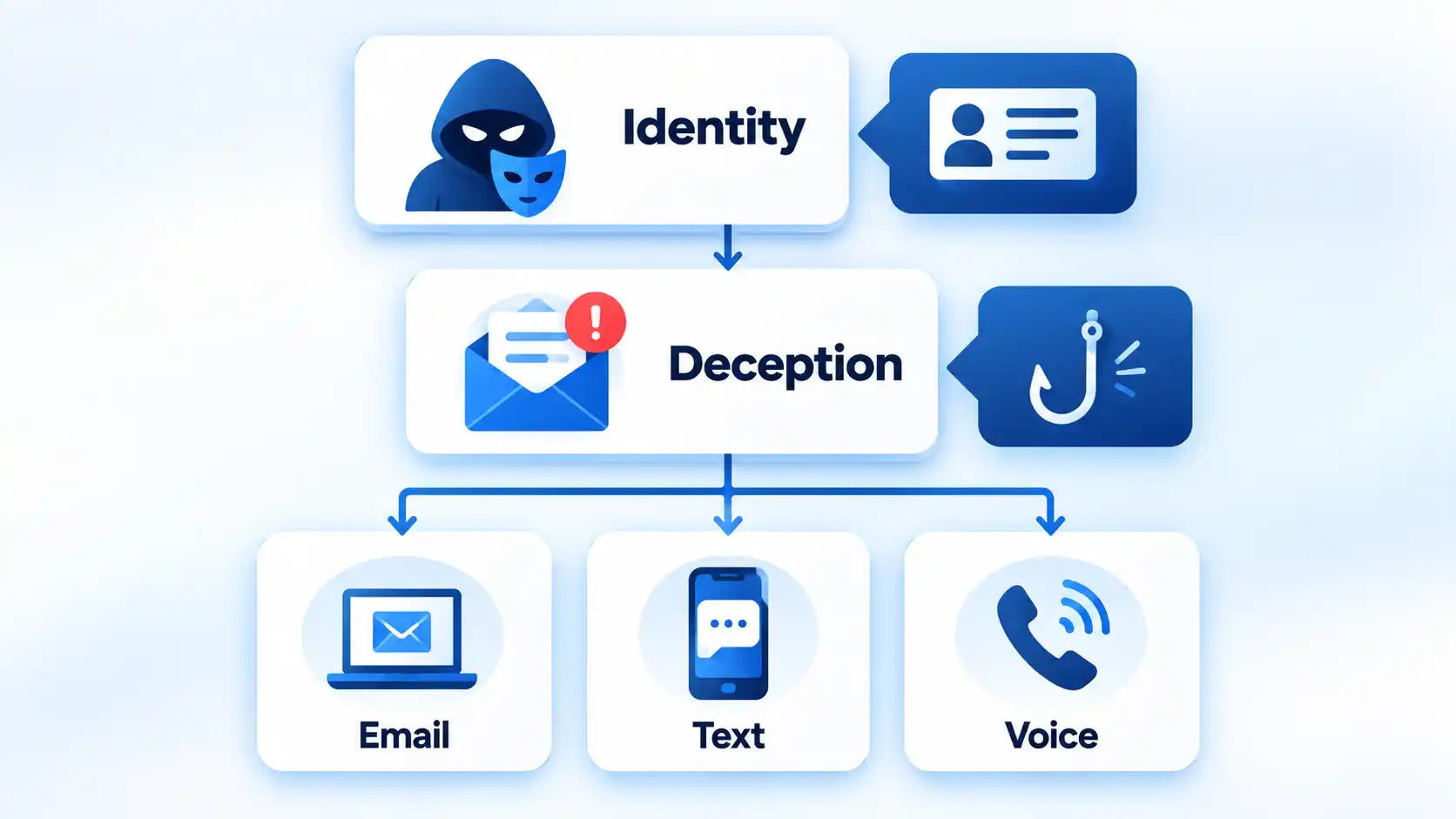
Spoofing means falsifying or imitating an identity, while phishing is deception designed to make you reveal information, send money, open malicious content, or take another unsafe action. Smishing and vishing are phishing variants delivered through text messages and voice communication respectively.
Quick Take
- Spoofing: Makes a sender, caller, website, or other source appear to be someone or something it is not.
- Phishing: Uses deceptive communication to persuade a target to reveal information or take an attacker-desired action.
- Smishing: Phishing delivered through SMS or MMS text messages.
- Vishing: Phishing delivered through phone calls, voice messages, or other voice communication.
- The terms can overlap. A single attack can spoof an identity, send a smishing message, continue through a vishing call, and direct the victim to a phishing website.
Spoofing vs Phishing vs Smishing vs Vishing at a Glance
The four terms are closely related, but they do not describe four mutually exclusive attack categories. Spoofing primarily describes false identity or source information, while phishing describes the deception itself. Smishing and vishing narrow phishing by communication channel.
Four Threats Compared
| Feature | Spoofing | Phishing | Smishing | Vishing |
|---|---|---|---|---|
| Core meaning | Falsifying or imitating an identity or source | Deceiving someone into revealing information or taking an unsafe action | Phishing through SMS or MMS text messages | Phishing through voice communication |
| Typical channel | Email, caller ID, websites, domains, and other communications | Commonly email or websites, although phishing spans multiple channels | SMS or MMS text messaging | Phone calls, voice messages, voicemail, or Voice over Internet Protocol |
| Primary function | Make a source look trusted or different from its real identity | Persuade a target to disclose information, approve access, open malicious content, or send money | Carry a phishing attempt through text messaging | Carry a phishing attempt through voice communication |
| Impersonation | Central to the technique | Common, but phishing is defined by deceptive solicitation rather than one specific spoofing method | Commonly impersonates a trusted person or organization | Commonly impersonates a trusted person or organization |
| Typical example | A scammer makes a bank’s real number appear on caller ID | An email directs you to a fake account login page | A text claims you owe an unpaid toll and provides a payment link | A caller claims your bank account is at risk and pressures you to act |
| Immediate response | Verify the identity separately | Avoid the supplied link or contact route until verified | Do not reply, click, or pay until verified | End the suspicious call and contact the organization independently |
The most important difference is therefore not simply email versus text versus phone. Spoofing describes how identity can be falsified, while phishing describes how a person is manipulated. Smishing and vishing identify two channels through which that manipulation can occur.
The Key Relationship: Spoofing Is a Technique, While Smishing and Vishing Are Channels of Phishing
The Federal Bureau of Investigation defines spoofing as disguising information such as an email address, sender name, phone number, or website URL so communication appears to come from a trusted source. The same FBI guidance explains that phishing schemes often use spoofing techniques to make their bait more convincing.
That gives the terms different jobs. Spoofing answers a question about identity: what source is being imitated or falsified? Phishing answers a question about deception: what is the attacker trying to persuade the victim to do?
Smishing and vishing narrow the discussion further by describing the delivery channel. The FBI identifies smishing as phishing through SMS text messages and vishing as phishing through phone calls, voice email, or Voice over Internet Protocol communications.
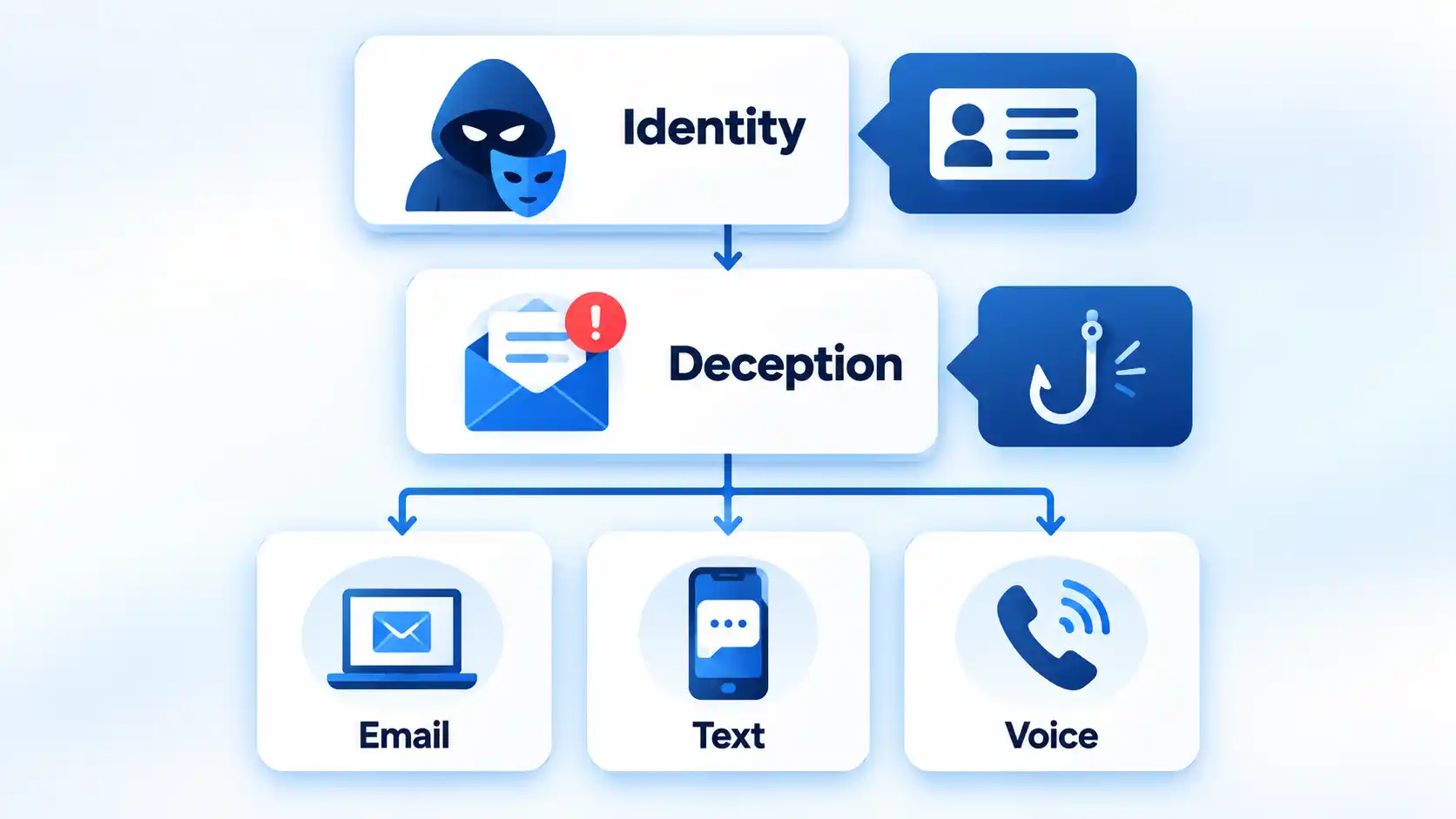
These categories can therefore overlap. Imagine an attacker who pretends to be your bank. The attacker could spoof the bank’s telephone number, send you a fraudulent text message, call you after you respond, and then direct you to a fake login page. The same campaign could involve spoofing, smishing, vishing, and phishing without contradiction.
This relationship also explains why treating all four terms as interchangeable can cause confusion. Phishing belongs to the broader category of phishing and social engineering, while spoofing can also describe forms of impersonation outside a phishing scenario.
What Is Spoofing?
Spoofing is the act of making an identity, source, or piece of identifying information appear to be something it is not. In communications-related attacks, the false information might be a caller-ID number, email sender name, email address, domain, or website URL.
For example, your phone might display the genuine customer-service number of your bank even though the call came from an attacker. The Federal Trade Commission warns that scammers can make any name or number appear on caller ID. The displayed number is therefore not proof of who is actually speaking.
Email and web spoofing can work in similar ways. An attacker may create a look-alike domain, alter a character in an address, or design a fake website to resemble a trusted service. In September 2025, the FBI warned that criminals were creating spoofed versions of the Internet Crime Complaint Center website by altering characteristics of the legitimate domain.
This article uses “spoofing” mainly in the communications and social-engineering sense. The technical term is broader. NIST’s cybersecurity glossary includes several spoofing definitions, including impersonating an authorized user and manipulating data or signals. The exact meaning therefore depends on technical context.
A compromised legitimate account is another important edge case. If an attacker sends a malicious message from a real employee’s hijacked mailbox, the visible account may be genuine even though the person controlling it is not. That differs from simply forging visible sender information, but both situations can make fraudulent communication appear trustworthy.
What Is Phishing?
Phishing is a social-engineering attack that tries to persuade someone to disclose sensitive information or perform an action that benefits the attacker. NIST’s phishing glossary includes definitions centered on fraudulent solicitation, deceptive electronic communication, and attempts to trick people into revealing sensitive information.
A phishing message might ask you to:
- enter a password on a fake login page;
- provide banking or card details;
- open a malicious attachment;
- approve an unexpected login or multifactor authentication request;
- send money or change payment instructions; or
- provide confidential personal or business information.
For example, an email could claim that your bank account has been locked and instruct you to sign in immediately. The link leads to a page designed to resemble the bank’s real website. The spoofed branding or URL helps establish trust, while the phishing element is the attempt to manipulate you into entering credentials.
The word “phishing” is often associated with email because email is a common delivery route. However, the broader phishing family is not limited to one channel. The FBI explicitly describes smishing and vishing as variations that use similar deception through text and voice communication.
What Is Smishing?
Smishing is phishing conducted through text messaging. The name combines SMS, or Short Message Service, with phishing. The FBI defines smishing as malicious targeting through SMS or Multimedia Messaging Service text messages.
A smishing message might claim to be:
- a bank fraud alert;
- a package-delivery problem;
- an unpaid toll or fee;
- a job opportunity;
- a message from a government agency; or
- a person who supposedly contacted the wrong number.
The objective is not always an immediate malicious download. A scammer may first want you to reply, establish a conversation, move to another messaging platform, or trust a later request. FTC guidance on scam and phishing text messages documents fake account alerts, package notices, malicious links, and attempts to steal passwords, account numbers, and other personal information.
A May 2025 FBI warning documented attackers sending text messages while impersonating senior U.S. officials, then attempting to establish rapport or move targets to another communication platform. The FBI described the text-messaging stage as smishing.
The channel is what makes the phishing attempt smishing. A fake bank alert sent by email is not smishing merely because the underlying story is identical to one used in a fraudulent text.
What Is Vishing?
Vishing is voice-based phishing. The term combines voice with phishing. The FBI’s general phishing guidance includes phone calls, voice email, and Voice over Internet Protocol (VoIP) calls as vishing channels.
A typical vishing attack might involve someone claiming to be from a bank, government agency, technical-support department, employer, or other trusted organization. The caller may create urgency by saying money is disappearing from an account, taxes are overdue, a computer is compromised, or an immediate security check is required.
The attacker may then ask for a password, banking information, security code, payment, remote computer access, or another action. The FTC warns that scammers use false identities, urgency, and other stories to obtain money or personal information through fraudulent phone calls.
Artificial intelligence can make this form of impersonation more convincing. In May 2025, the FBI documented AI-generated voice messages used in vishing campaigns impersonating senior U.S. officials. A December 2025 update reported that malicious actors continued using text and AI-generated voice messages in the campaign.
Voice cloning does not create a separate fifth category alongside phishing, smishing, and vishing. It is a technique that can strengthen a vishing attack by making an impersonated voice more believable.
How the Same Scam Can Use All Four Techniques
Consider a bank-impersonation campaign. It could begin when an attacker sends a text claiming that a suspicious payment has appeared on your account. The text contains the bank’s name and asks you to confirm whether you recognize the transaction.
That first contact is smishing because the phishing attempt arrived through a text message. If the sender information, branding, or website is deliberately made to imitate the bank, spoofing is also involved.
The attacker might then call you from a number that appears to match the bank’s real customer-service line. That false caller ID is another form of spoofing, while the spoken attempt to make you reveal a verification code or move money is vishing.
Finally, the caller might direct you to a fake bank website where you are asked to enter your username and password. The broader attempt to manipulate you into surrendering those credentials is phishing.
Trying to label the entire campaign with only one of the four terms loses useful information. A security team may need to know both the attacker’s social-engineering objective and the separate channels and impersonation techniques used to carry it out.
Warning Signs That Apply Across All Four
The delivery channel changes, but many social-engineering warning signs remain similar. None of these signs proves fraud by itself, but several appearing together should make you slow down and verify the request independently.
- Unexpected urgency: You are told to act immediately before you have time to verify the story.
- Threats or fear: The sender or caller claims your account, money, job, benefits, or legal status is at immediate risk.
- Requests for passwords or security codes: Someone asks for credentials, one-time codes, or approval of an unexpected authentication request.
- Unusual payment instructions: You are told to send cryptocurrency, gift cards, wire transfers, or money to a new destination.
- Suspicious links or domains: A web address resembles a legitimate service but uses altered spelling, extra words, or a different domain.
- Pressure to stay within the attacker’s communication path: The person discourages you from hanging up, checking an official app, contacting a colleague, or verifying the request elsewhere.
- A sudden request to move platforms: A text, email, or voice message asks you to continue the conversation on another messaging service.
- Identity details that cannot be independently confirmed: The message looks familiar, but the claimed sender cannot verify the request through a trusted channel you already know.
Legitimate messages can sometimes be urgent, contain links, or arrive from unfamiliar numbers. The safer decision is therefore based on independent verification rather than one visual clue or one warning sign.
You do not need to identify the exact attack category before protecting yourself. Use the same verification-first sequence when an unexpected call, email, or text asks for money, credentials, sensitive information, or another consequential action.
What to Do When You Receive a Suspected Spoofing or Phishing Message
If you have already clicked, sent money, disclosed credentials, or granted device access, the problem has moved beyond identifying the attack type. The appropriate recovery depends on what the attacker obtained. The practical steps for dealing with spoofed calls and emails after contact include protecting affected accounts, contacting payment providers where necessary, checking exposed devices, and preserving useful evidence.
The Difference That Matters Most
The easiest way to keep the four terms straight is to ask different questions. Spoofing asks which identity or source is being falsified. Phishing asks what deception is being used to make the target act. Smishing and vishing identify text and voice as the channels carrying that phishing attempt.
Because those dimensions can overlap, one scam can legitimately fit more than one label. Understanding the relationship is more useful than forcing every attack into a single category.
Tech
Scientists develop a way to restore aging EV batteries without breaking them down into raw materials

The big picture: Cornell University researchers have developed a way to recycle lithium-ion batteries without breaking them down into raw materials first. Their method, called Direct Electrode-to-Electrode Regeneration, or DEER, restores worn battery electrodes so they can be used again. The results suggest that some EV batteries could be refurbished at lower cost and with less energy than conventional recycling methods, though the process will not work for every degraded cell.
The work focuses on a common problem in aging lithium-ion batteries: buildup on the electrodes. As batteries are charged and discharged, a layer known as the solid electrolyte interphase, or SEI, grows on their surfaces. Some SEI is necessary, but too much of it slows the movement of electrons and reduces battery capacity.
In the Cornell process, researchers take apart used cells and place the electrodes in an electrochemical bath containing 1,3-dimethyl-2-imidazolidinone, or DMI. The treatment removes the thicker SEI layer without destroying the electrode itself. The renewed electrodes can then be used to build new battery cells.
The researchers reported that regenerated cells recovered up to 95% of their original capacity. They also found that treated batteries degraded more slowly than untreated ones. Untreated degraded batteries lost capacity at a rate of 0.072% per cycle, compared with 0.042% per cycle for batteries restored through DEER. The lower degradation rate held for about 800 cycles before increasing.
A second round of treatment brought a previously regenerated battery back to 90% of its original capacity. That suggests the process could extend the working life of electrodes more than once, depending on the condition of the battery.
The approach differs from most commercial recycling methods. Conventional systems typically shred or crush spent batteries into a mixture called black mass. Recyclers then use high heat, chemicals, or both to recover lithium, cobalt, nickel, manganese, copper, and aluminum.
Those methods recover valuable materials, but they also destroy electrodes and other parts that may still be usable. DEER treats the battery less as a source of metals and more as a device with components that can be repaired.

That could be useful for electric-vehicle batteries. EV battery packs are often removed from vehicles once they fall to about 70% to 80% of their original capacity. At that point, the batteries may no longer meet automotive range and performance requirements, but many of their electrodes can still function.
The Cornell method is not suited to every battery. It works best when performance loss is caused mainly by SEI buildup. Batteries with lithium loss, cracked particles, structural damage or mechanical failures would still need conventional recycling.
There are also practical hurdles. The electrodes must be removed from the battery, processed, and washed before they can be reused. Researchers tried injecting the DMI solution directly into intact cells, but the results were poor. That means a commercial version of the process would require battery disassembly and careful handling of the electrode materials.
Cornell estimates that DEER-recycled cells could cost $15.25 per kilogram, compared with $26.31 per kilogram for recycling through pyrometallurgy or hydrometallurgy. The estimate does not include recovering the DMI solution, which accounts for about 63% of the process cost. Reusing that chemical could improve the economics if the method moves beyond laboratory testing.
The research comes as battery recycling companies and researchers look for ways to handle a growing supply of aging EV batteries. While many of these methods remain focused on recovering metals, DEER offers a different option. Instead of immediately reducing a used battery to its chemical ingredients, it tries to salvage the electrode before that step becomes necessary.


Super Valid Designs spent two months on a ski lift because mice had moved into the chicken coop and ordinary traps only opened a revolving door. Catch one batch and another arrives. Live relocation felt like a better bet than a pile of snap traps, so the plan became a pair of jobs in one machine: baited gondolas that work as traps, then a cable line that carries those cars 250 feet down a hill and dumps the passengers into brush without anyone walking the route every night.
Mice travel to the vehicles using a gravity feeder that drops them from the coop ceiling. Each automobile is 3D printed and contains a portion of clear acrylic for display. The bottom door is smartly constructed to open by itself, eliminating the need for any electronics to interfere. When a car reaches the bottom station, the floor collapses beneath them, and our little critters land on a mound of brush. The entire thing is popularly referred to as the Rodent Tram Express; whether you interpret this as a show of kindness or a sardonic joke about a peanut-butter-fueled ride to freedom is totally up to you.

Bambu Lab A1 3D Printer, Ready-to-Use FDM 3D Printer for Beginners and Kids
- High-Speed Precision: Experience unparalleled speed and precision with the Bambu Lab A1 3D Printer. With an impressive acceleration of 10,000 mm/s…
- Multi-Color Printing with AMS lite: Unlock your creativity with vibrant and multi-colored 3D prints. The Bambu Lab A1 3D printers make multi-color…
- Full-Auto Calibration: Say goodbye to manual calibration hassles. The A1 3D printer takes care of all the calibration processes automatically…

A lot of man-hours went into laying the cable work; over 500 feet of it cost around $100 and resulted in a loop that was only about 250 feet long. He utilized old bike rims for the pulley wheels, covered them in some old tire rubber to give the cable some grip, and then had to get a windshield wiper motor from an old family car to make it work. After the rope sagged slightly and the cars began to get trapped on the support rods, the towers were installed. After that, it was basically a lot of framework made from whatever scraps he had lying around and measuring? Measuring stayed optional. “Measure twice, cut once, or don’t measure at all” was the working rule, with the cars themselves getting the careful design time the lift never received.

Testing was a pain in the neck, literally, because he had to hike the hill several times until all the kinks were worked out. Cars would snag on objects, the acrylic windows messed up the cable, and we even had a tower shift on us. If that wasn’t enough, he had to cope with heat and wildfire smoke, which turned our treks into a second project, as well as a host of ticks that appeared in the brush we needed to remove for the cable. He started by running two cars at once, just in case a full load of cars pulled the cable straight off the pulley wheels, but after a few runs, he eventually got everything in order and the loop held together.

To be honest, findings are a little hard to come by, since he only managed to get a few visits in with video evidence by the time he posted it all online. Whether 250 feet is truly far enough is debatable; many people pointed out that mice have a nasty habit of simply walking home after a while, and 1/4 mile is probably about right for a commute rather than exile. Super Valid Designs is considering the lift as a temporary fix, and he isn’t thinking of it as a silver bullet answer just yet. Keeping the feed sealed and holes plugged remains the top priority; the Rodentram Express is more of a nice-to-have than a must-have, but hey, we now have a station in the coop and a line on the hill, and a few mice have had the dubious pleasure of taking public transportation without asking.
[Source]

In context: The FAA has long suffered from a shortage of air traffic controllers, and many air traffic control systems are badly outdated, making the sector an obvious target for AI-powered automation. Although no one currently believes AI can replace air traffic controllers, the technology could help different airlines and the FAA pool data to increase efficiency.
Federal aviation officials aim to launch a new AI-based air traffic control tool next week in Washington, DC, one of the US’s busiest air travel corridors. The debut marks the beginning of a gradual nationwide rollout.
Strategic Management of Airspace, Routes and Trajectories (SMART) is a cloud-based system that analyzes schedules, weather patterns, airport capacity, and other operational factors to predict traffic flow and potential conflicts. While airlines, air traffic controllers, and the FAA currently often operate on different data sources and schedules, SMART aims to provide them with a shared intelligence stream.

Air Space Intelligence, the AI firm that developed SMART after receiving a $875 million grant from the FAA, hopes it will reduce fuel use, speed recovery following bad weather and congestion, raise situational awareness, and create space for new air traffic. Along with another system called Flow Management Data & Services, ASI aims to roll out SMART over the next one to two years. The initiative is part of the Trump administration’s plan to update US air traffic control, which has struggled with staffing shortages and outdated technology for years.
A 2023 FAA risk assessment found that 37% of systems were unsustainable and 39% were potentially unsustainable. While plans to update some systems could take a decade or more, others – some over three decades old – were not scheduled to be modernized. ASI is promoting SMART as a faster way to update some of the FAA’s tools.
AI proponents also often cite the technology as a path to reducing the workloads of overburdened employees (though many claim it does the opposite), and air traffic controllers could be among those who benefit. While the FAA hopes to eventually employ 12,563 controllers (down from a prior target of 14,633), it currently employs only around 11,000. The shortage has contributed to flight delays and made one of the world’s most stressful jobs even more taxing. The FAA has even resorted to video games to boost recruitment, but the job’s mental requirements are steep.

The 3 Banks I Would Leave in 2026 #finance #wealth #money #tyler

Two Cambridge chefs in the running to be crowned best in the UK

The Real Cost of Falls From Height at Work




-

 Fashion3 days ago
Weekend Open Thread: Talbots – Corporette.com
-

 Tech13 hours ago
Researchers escape OpenAI Codex sandbox to run commands on host
-

 Crypto World2 days ago
Circle launches Arc Studio AI agent for building onchain apps
-

 Crypto World7 days ago
Revolut Attackers Warn of Ongoing Daily Customer Data Leaks
-
 NewsBeat3 days ago
Trump says US has reached an agreement to take permanent control of Greenland’s security
-

 Crypto World6 days ago
Kraken Lets xStocks Holders Earn Yield Through DeFi
-

 Crypto World6 days ago
Robinhood engineers charged over $50K crypto scheme
-

 Crypto World3 days ago
Bitcoin price breaks channel as RSI climbs to 63
-

 Crypto World5 days ago
What Is the Status of the U.S.-Iran Peace Talks? Here's What Both Sides Are Saying
-

 Crypto World5 days ago
US Charges Robinhood Engineers Over Crypto Listing Trades
-

 Crypto World7 days ago
Elon Musk Drops a Bombshell: Grok 5 Could Be the AGI Breakthrough
-
 NewsBeat7 days ago
‘Sick conspiracy’: Trump says only guardrails AI needs is ‘a strong and smart (High IQ!) president’ in all-caps rant
-
Business7 days ago
SK Hynix ADRs Fall More Than 6% as Memory Rally Breaks on Fears of Slower AI Spending
-

 Crypto World6 days ago
NVIDIA Analysis: Attempted Rising Wedge Breakout Amid Pressure on the AI Sector
-

 Tech5 days ago
Webb’s IC 348 Mosaic Includes Two-Jupiter Dwarfs, Twin Jets, and a Nursery Still Making Worlds
-
Crypto World7 days ago
Can Circle’s Arc Repeat Robinhood Chain’s Meme Coin Boom?
-

 Crypto World2 days ago
World Money launches in 150+ countries with Stripe
-

 Crypto World3 days ago
Silver prices recover quickly, hitting weekly high today
-
 NewsBeat3 days ago
US was ‘on brink of war’ with China over false AI report of nukes moving in Middle East
-

 Crypto World7 days ago
DOJ Seeks to Seize $61M in Iran Oil Funds From Binance Accounts It Vouched For
You must be logged in to post a comment Login