Over the past couple of years, Google has found ways to stuff Gemini in nearly every app and service it offers. Whether it’s Gmail with its AI inbox or Chrome with its chat sidebar, Gemini is now inescapable inside of Workspace. I don’t know about you, but I don’t need an AI to tell me how to write a =SUM equation in Sheets or an outline for a first draft. Most of the time, I find Gemini is a distraction. If you feel the same way, this how-to is for you.
How to remove Gemini from your personal Workspace account
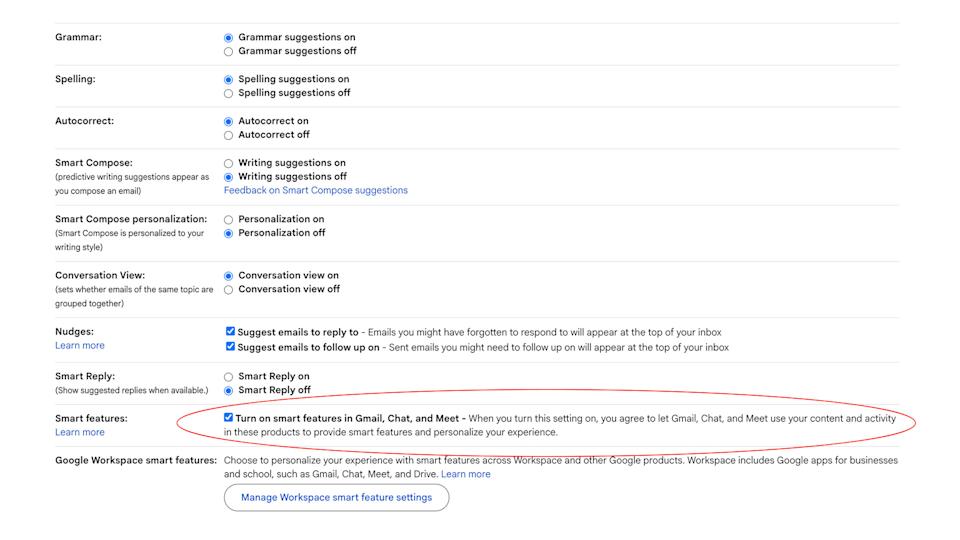
From the “General” tab of Gmail’s settings menu, look for the Smart features checkbox. (Igor Bonifacic for Engadget)
To turn Gemini off, you will need to disable two separate sets of options. The first set covers a set of features, including smart compose, that are shared across Gmail, Chat and Meet — so if you turn them off in one app, they won’t be available in any of the three. All of this is most easily done through Gmail’s web client.
In Gmail, tap the cog icon.
Under the General tab, scroll down to find Smart features.
Disable Turn on smart features in Gmail, Chat, and Meet.
In Japan, Switzerland, the United Kingdom or European Economic Area, smart features are turned off by default.
Next, turn your attention to Workspace.
Advertisement
In Gmail, tap the cog icon.
Under the General tab, scroll down and click Manage Workspace smart feature settings.
Toggle off smart features in Google Workspace and Smart features in other Google products.
A word of warning: completely disabling smart features in Google Workspace turns off not only Gemini integration but also access to basic capabilities like spelling and grammar corrections. You’ll also lose features that have been Google staples for years. In Gmail, for example, the app will stop sorting incoming emails by priority, a notification at the top of the screen informing you that smart features are required for inbox categorization. Whatever Google’s motivation for this state of affairs, it’s a design decision that actively discourages users from disabling Gemini integration.
Disabling Gemini in Google Workspace will also turn off other features. (Igor Bonifacic for Engadget)
If you want to rid yourself of Gemini but would still like to use some of the other features the company offers through Gmail and its other apps, I recommend leaving the first set of smart features on while disabling the Workspace-specific ones. You can also opt to turn off some of the features included in the first group, while leaving others on. Below is a list of those features, with a brief overview of the less self-explanatory ones.
Smart Compose — as you write an email, Gmail will generate predictive writing suggestions
Smart Compose personalization — as you write, Gmail will tailor Smart Compose suggestions to your writing style
Nudges — Gmail will generate notifications prompting you to respond or follow up on unanswered emails
Smart Reply — Gmail will generate suggestions on how to respond to an email
Package tracking — Google will display shipping updates inside of Gmail
Desktop notifications — Yes, for some reason you need the power of AI to get notifications on your PC
Unfortunately, Google doesn’t offer this same level of granular control when it comes to smart features inside of Workspace. For instance, if you turn off Gemini in Docs, Calendar won’t automatically display events from Gmail. Again, Google really wants to dissuade you from disabling Gemini.
How to remove Gemini from your professional Workspace account
If your workplace uses Google Workspace, all of the above options should be present in Gmail’s settings menu, and you can follow the same steps to turn off most of the smart features Google offers. Unfortunately, the second part of the process does nothing. You will still see Gemini in Docs, Sheets and elsewhere, even with smart features in Workspace turned off. Only your admin can completely turn off Gemini for you.
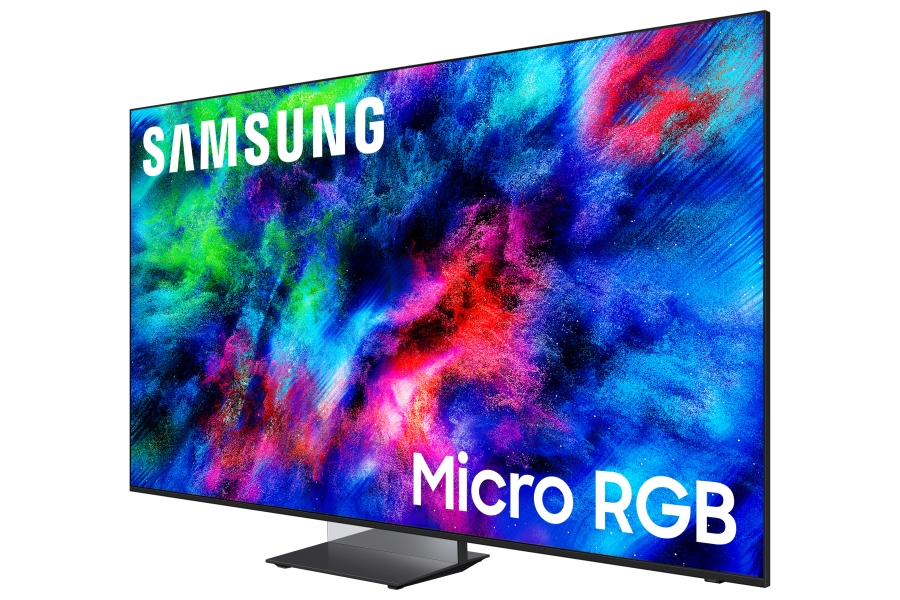
The Samsung R95H Micro RGB TV the company had on display at CES 2026 was a sight to behold, its bright picture and rich color managing to punch through even under the bright lights of Samsung’s First Look exhibit at the Wynn Las Vegas.
It was a solid next step for the company’s new RGB LED display tech, which made its debut in late 2025 with the launch of a 115-inch model priced around $29,999. At 130 inches, the Samsung R95H shown at CES made its predecessor look small in comparison. It also begged the questions of whether RGB LED TVs would be made available in real-world screen sizes, and if so, when?
The answer to those questions are yes, and now. Samsung has announced the availability of its R95H Micro RGB TV lineup in 65, 75, and 85-inch screen sizes pricedat $3,199.99, $4,499.99, and $6,499.99, respectively. As for the 130-inch model shown at CES, that one is scheduled to arrive later this year at a price that will likely make your head spin. Samsung also previously announced a 115-inch version of the R95H though pricing and availability of that size are not yet available. For now the 2025 model 115-inch R95F Micro RGB TV is carrying over into 2026.
In terms of new 2026 models, alongside the R95H series Micro RGB TVs, Samsung also announced the step-down R85H series Micro RGB TVs, which will be available in 55- to 85-inch screen sizes priced from $1,599.99 to $3,999.99.
Advertisement
The Samsung R95H Micro RGB TV features a Glare Free screen and has high brightness for daytime viewing.
Samsung R95H Micro RGB Features & Design
Samsung’s Micro RGB tech uses micro-sized red, green, and blue LEDs in place of the blue or white light modules found in typical mini-LED TVs like Samsung’s own Neo QLED models. The promise here is of greater color accuracy and 100% “full UHD color spectrum” coverage, along with more refined local dimming to eliminate backlight blooming.
Other features found in the new Samsung R95H series TVs include a Glare Free screen similar to the one found in the company’s 2025 flagship mini-LED and OLED models, Wide Viewing Angle, Ultimate Micro Dimming Pro, and Auto HDR Remastering Pro to upscale standard dynamic range programs to HDR. There’s also something new called Micro RGB HDR Pro, along with Real Depth Enhancer, a feature that debuted in the company’s 2025 models which analyzes pictures in real time to better define the foreground and background elements.
Samsung continues to go all in on AI features for its TVs, and the R95H series offers 4K AI Upscaling Pro, AI Motion Enhancer Pro, and Micro RGB AI Engine Pro. There’s also an Adaptive Picture feature that uses AI to optimize images based on program genre and also provides an AI Customization mode that can create a custom picture preset based on your response to an array of displayed images.
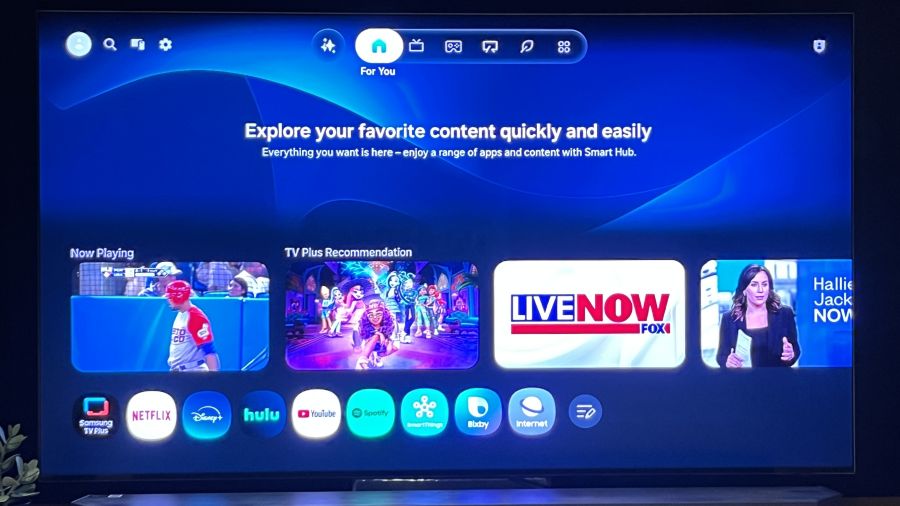
Samsung’s updated Tizen smart interface moves tabs from the screen’s left side to the top.
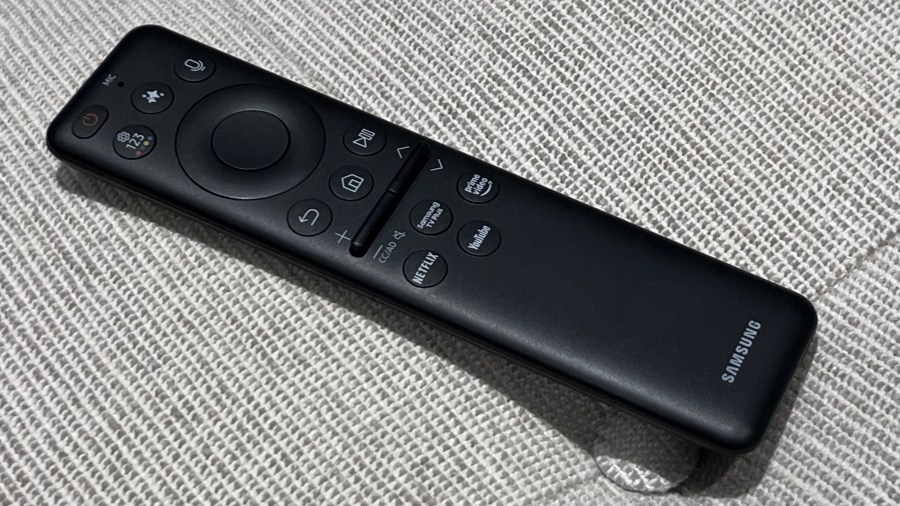
AI also gets top billing in Samsung’s updated Tizen Smart TV interface, which repositions tabs from the side to the top of the screen. The new layout is cleaner and more-user friendly, and it features a Vision AI Companion tab that lets you explore all manner of topics via Copilot or Perplexity using either the TV’s built-in far-field mic, or the one located in the TV’s Solar Cell Bluetooth remote control. Other Tizen features include Generative Wallpaper for creating custom screensavers, and access to the subscription-based Samsung Art Store that was previously limited to the company’s The Frame TVs.
Advertisement
Samsung TVs have long been a top option for gaming, and the R95H series continues that tradition with 165Hz support across four HDMI 2.1 ports, Freesync Premium Pro, and HDR10+ gaming. There’s also cloud-based gaming available on Samsung’s Gaming Hub, which features Xbox, NVIDIA, GeForce Now, Luna, Blacknut, Antstream, Boosteroid, and more.
While the 130-inch R95H model Samsung showed at CES 2026 featured a “Timeless Frame” floor mount, the 65-85-inch models come with an Infinity Air stand that, combined with the four-side Bezel-less screen, gives the display something of a floating effect. A 4.2.2-channel speaker array powered by 70W delivers Dolby Atmos audio, and there’s Object Tracking Sound+, along with a Q-Symphony feature that combines the TV’s speaker output with that of a compatible Samsung soundbar. Additionally, the R95H is Wireless One Connect Ready, giving you the option for a wireless 165Hz connection using Samsung’s optional Wireless One Connect Box.
The Solar Cell remote used to control the Samsung R95H.
Hands-on with the Samsung R95H Micro RGB TV
Samsung invited eCoustics to its New Jersey headquarters in early March to get hands-on experience with a 65-inch R95H, and I was provided with ample time to make a full set of measurements.
Advertisement. Scroll to continue reading.
Advertisement
As stated above, Samsung claims “full UHD color spectrum coverage” for the R95H, which is another way of saying BT.2020 color space coverage. In the set’s default Filmmaker Mode, P3 color space coverage measured 98.8% and BT.2020 was 92%. That BT.2020 number is obviously lower than what Samsung cites for the TV, but as I learned in a demonstration put on by the company’s engineers at Samsung HQ, they based their specification on the TV’s Dynamic picture mode rather than the more accurate Filmmaker Mode.
By way of comparison, when I measured the Samsung QN90F, the company’s flagship mini-LED TV, P3 color space coverage measured 93.6% and BT.2020 was 76.5% so this TV represents a marked improvement in color reproduction.
The R95H’s REC.709 grayscale delta-E averaged out to 6 in Filmmaker mode, which is a higher than average result. (A delta-E lower than 3 is considered to be imperceptible). This variation would likely be mitigated by a full calibration.
The R95H’s peak HDR brightness in Filmmaker Mode measured on a 10% white window pattern was 1,541 nits, and it was 639 nits on a 100% (fullscreen) pattern. In the Standard picture mode, peak HDR brightness measured higher at 2,223 nits on a 10% window, and 654 nits fullscreen. The R95H’s Standard mode results exceed what I measured on the Samsung Q90F, though the QN90F’s peak brightness was higher in Filmmaker Mode.
Advertisement
In a nutshell, the new Samsung R95H Micro RGB TV offers a wider color space coverage and higher brightness than last year’s top Samsung mini-LED TV, a model that is carrying over to 2026.
The R95H Micro RGB TV’s BT.2020 color gamut coverage exceeds that of top mini-LED and OLED models.
Alpha is a movie I’ve only seen specific clips from because, as an example of a 4,000 nits HDR transfer, it’s a good test for a display’s HDR tone mapping capability. (It involves prehistoric tribes, and there’s a wolf.) Watching a scene where the boy, Keda, and his wolf companion commune in front of the setting sun, there was a fine level of detail in the bright highlights, indicating that the TV’s Micro RGB HDR Pro feature was properly doing its job.
Two picture quality improvements promised by RGB LED tech are a reduction of backlight blooming artifacts and improved off-axis picture uniformity. A check of the white on black scrolling text that opens Blade Runner confirmed the R95H’s ability to deliver solid, halo-free performance, while the uniformity test pattern from the Spears & Munsil Ultra HD Benchmark showed that its picture could retain solid contrast and color saturation even when viewed from a far off-center seat.
Wrapping things up with the opening title sequence of Baby Driver, the R95H displayed only a limited level of motion judder as the titular character strolls along a city street. If that doesn’t sound like a big deal, I’ve seen the picture on some other TVs get seriously wobbly during this sequence, so the Samsung’s motion handling here was nothing short of impressive.
Advertisement
The Bottom Line
My take on the Samsung R95H Micro RGB TV after doing an initial test is that it provides an appreciable step up in picture quality over Samsung’s also-impressive flagship mini-LED TV, the QN90F. My limited time with the R95H meant I didn’t have an opportunity to do a deep dive into its many AI-related picture enhancements, and I also didn’t have a chance to evaluate its built-in sound. But as the first example of an RGB LED TV I’ve spent hands-on time with, I’m excited for this new category, which is finally creating serious picture quality competition for OLED TVs.
Amazon has confirmed it’s acquiring Globalstar and plans to integrate the satellite operator’s low Earth orbit (LEO) satellites and spectrum into the Amazon Leo network. With this acquisition, Amazon seeks to accelerate the deployment of direct-to-device (D2D) capabilities, allowing standard smartphones to support calling, texting, and data via satellite. Amazon has already secured big customers for its satellite broadband service, and this deal will allow it to bypass several infrastructure hurdles.
The Apple partnership and 2028 roadmap
A key component of the deal is a new agreement between Amazon and Apple. Amazon Leo will now power satellite services for the iPhone and Apple Watch, including Emergency SOS, Messages, and Find My. Globalstar is Apple’s current partner, and this collaboration ensures Apple users will transition to Amazon’s expanded network as it matures. Amazon’s acquisition of Globalstar is expected to close in 2027, pending regulatory approval.
@amazon is acquiring @Globalstar to integrate their low Earth orbit satellites into our constellation. This combination will rapidly accelerate our plans to add direct-to-device capabilities into our satellite network to support calling, texting, data, and more. pic.twitter.com/qX7tbwyZw7
Amazon also plans to deploy its own next-gen D2D satellite system beginning in 2028. Designed for higher spectrum efficiency, the company says this system will lead to faster speeds and better performance than current satellite-to-cell offerings.
Advertisement
Why this matters
The competition between Amazon and SpaceX is no longer just about who can provide the fastest home Wi-Fi. With this move, it’s now about who owns the most comprehensive connectivity ecosystem. We have already seen Amazon challenge Starlink’s dominance in aviation, and this merger is expected to expand that reach to every handheld device on the planet.
By integrating Globalstar with its infrastructure, Amazon is building the backbone of global communication. For the average user, this means the safety net of satellite connectivity is about to become a standard feature on mobile devices. And network “dead zones” may finally become a thing of the past.
Behind the breakthrough is JX Metals Circular Solutions, a subsidiary of one of Japan’s largest non-ferrous metal companies. While it was announced back in April 2025, it really started grabbing headlines this month after some Japanese publications revealed the actual process at the company’s plant in Tsuruga. Tadashi Nakagawa, the… Read Entire Article Source link
OpenAI has acquired Hiro Finance, a startup that offers AI-powered financial planning tools. As first reported by TechCrunch, fiscal terms of the deal, which was announced on Monday, were not disclosed by OpenAI. However, all signs point this to being an acquhire, with Hiro founder Ethan Bloch writing on LinkedIn that the company’s product would stop working on April 20. Users have until May 13 to migrate their data off of Hiro’s servers before everything is deleted.
It’s unclear if OpenAI plans to offer a dedicated financial planning tool in the mold of Hiro. At the start of the year, the company released Prism, a Claude Code-like app for scientific research that built on its acquisition of the startup behind Crixet. At the very least, it sounds like some of the expertise Hiro has built will make its way to OpenAI’s chatbot. “For decades, personalized financial guidance has been too expensive, too generic, or too hard to access. ChatGPT is finally changing that,” Bloch wrote on LinkedIn.
The deal is the second acquisition in only two weeks to be announced by OpenAI. At the start of the month, the company bought Technology Business Programming Network (TBPN), a media company known for its daily tech podcast. For a company that has by all indications a long and tough road ahead to profitability, it sure does seem OpenAI is spending a lot of time and money on startups that might not end being central to its core business, which in recent months has seen it target the coding market to edge out Anthropic.
At some point, we all stopped memorizing phone numbers. It happened gradually, and now most of us can barely recall two or three phone numbers off the top of our heads. So when your iPhone contacts vanish, whether after a software update or an accidental delete, it can feel like a minor crisis.
Thankfully, if you act fast, you can easily restore deleted contacts on your iPhone. So, before you start texting people asking for their numbers again, try these methods to get your contacts back. These methods will work on all latest iPhone models.
Recover contacts using iCloud on your iPhone
If your contacts disappear due to a sync issue, the fix is surprisingly simple. Just head to Settings, toggle contacts sync off, then back on. Your contacts should reappear on your iPhone shortly after.
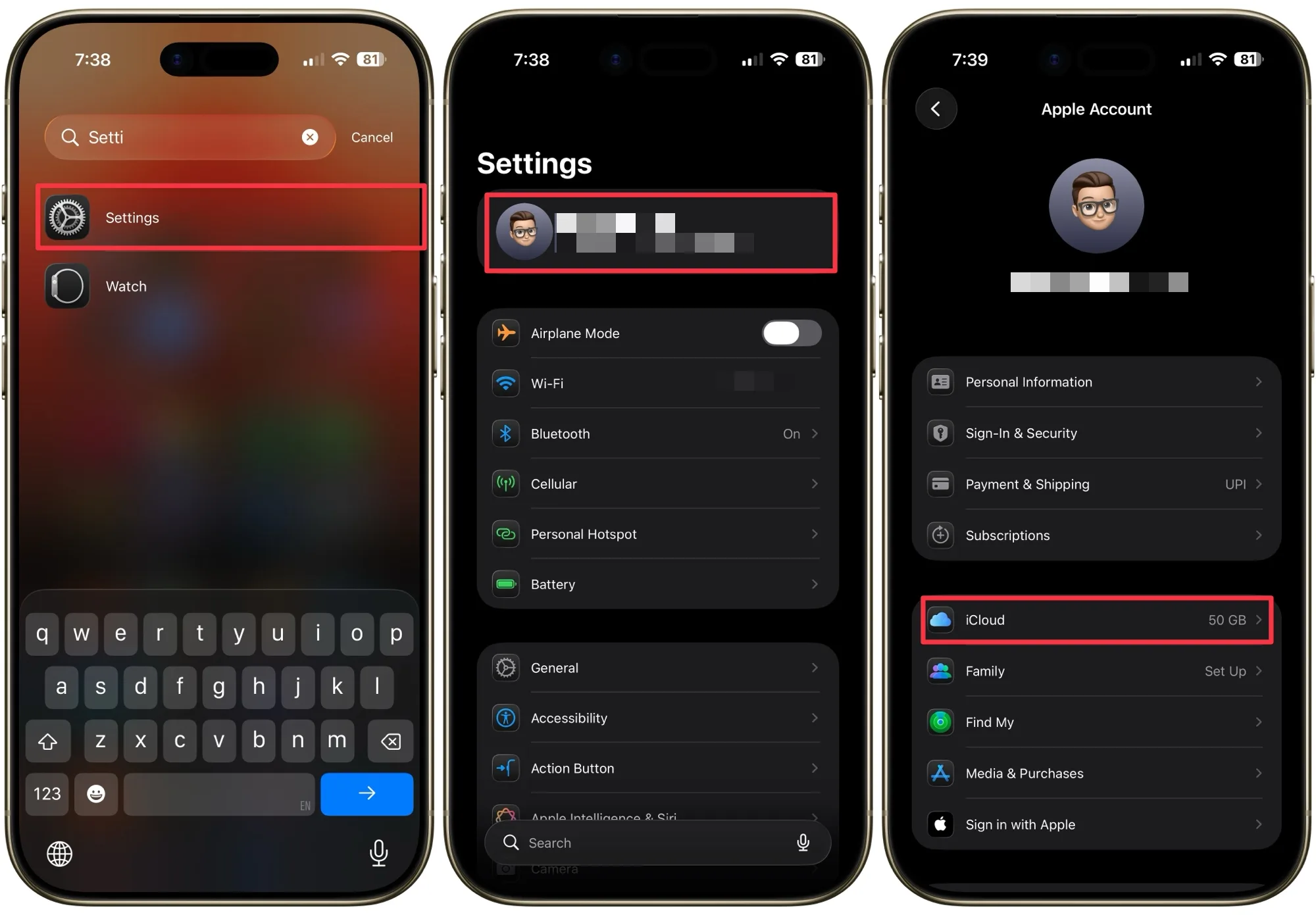
Step 1: Launch the Settings app on your iPhone, click on your name, and open iCloud settings.
Advertisement
Rachit Agarwal / Digital Trends
Step 2: Tap the See All button and turn off the toggle next to Contacts. Select the Keep on My iPhone option when prompted.
Rachit Agarwal / Digital Trends
Step 3: Turn the toggle back on and select Merge. Wait a little while, and you should see the deleted contacts back on your iPhone.
Rachit Agarwal / Digital Trends
Recover contacts using iCloud.com
If you have accidentally deleted a contact, you can restore it from your iCloud. However, if you have turned on Advanced Data Protection for iCloud or updated to iOS 26.4, which automatically enables it, first, you will have to enable iCloud data access on the web.
Step 1: Launch the Settings app on your iPhone, click on your name, and open iCloud settings.
Rachit Agarwal / Digital Trends
Step 2: Scroll to the bottom, tap iCloud.com, and turn on the “Allow Data Access” toggle.
Rachit Agarwal / Digital Trends
Step 3: Once you have enabled iCloud data access on the web, launch Safari on your iPhone, visit iCloud.com, and log in with your credentials.
Rachit Agarwal / Digital Trends
Step 4: Click on the menu dots in the top-right corner, scroll to the bottom, and open “Data Recovery.” Scroll down and tap on Restore Contacts.
Rachit Agarwal / Digital Trends
Step 5: Now tap the Restore button next to the date and time when the contacts were deleted to restore them.
Rachit Agarwal / Digital Trends
More techniques for restoring iPhone contacts
Here are some more things you can try:
If the above techniques don’t work, you can also try to restore your phone from an iTunes backup, which will also have contact data.
If you still have your old iPhone and haven’t changed many contacts since then, you can port them over or add important ones.
You can try third-party iOS recovery tools.
Losing your contacts is stressful, but as you can see, getting them back is usually a quick fix. The key takeaway here is to make sure your contacts are always syncing with iCloud so you are never caught off guard again. And if you haven’t backed up your iPhone in a while, now is a great time to do it. Think of it as insurance you hope you never need, but will be very glad you have.
‘We’re in a race whether we choose to accept it or not,’ Richard Browne said.
Mythos’ creation shows just what is possible with AI tools in the cybersecurity space, National Cyber Security Centre (NCSC) director Richard Browne told the Oireachtas Joint Committee on Artificial Intelligence this afternoon (14 April).
“The issue is not that that Anthropic has created this. The issue is that Anthropic has demonstrated that this is possible,” Browne said in response to questions posed by Social Democrats TD Sinéad Gibney, who said Anthropic is engaging in a “PR exercise”.
“This technology exists and it’s possible to use it. [Currently] it’s in the hands of a company. In five months – six months – it’ll be in the hands of an active state [actor], Browne said. “Governance is great, very important, but it doesn’t stop criminal actors.”
Advertisement
Anthropic launched Mythos earlier this month to a select group of top companies globally. At its launch, Anthropic noted Mythos’ abilities to detect and generate exploits at a much faster rate than its competitors.
The company, concerned about bad actors, chose instead to let businesses boost their cyber defences using the tool. In the days since its launch, US, UK and Canadian leaders have already expressed their concerns.
NCSC, in a public statement yesterday (13 April) said that Mythos appears to represent “a significant change in the way hardware and software vulnerabilities are identified”.
Anthropic’s decision to restrict the release of the model and to work collaboratively with industry partners is a responsible approach,” it added.
Advertisement
AI is having an “inherently unpredictable” impact on cybersecurity, Browne told the Committee. He noted that AI is “genuinely revolutionary” and poses a “generational change” that is set to affect every other digital technology.
The question is no longer whether AI needs to be adopted, but rather how to do so safely, he added.
Threat actors are already “heavy users” of AI tools, Browne said, while on the other side, security workers are also employing agentic AI to boost their defences.
Advertisement
The National Cyber Risk Assessment launched in December outlines how AI drives systemic risk by increasing the speed, scale and sophistication of cyberattacks.
“We’re in a race whether we choose to accept it or not,” Browne said. “The technical frontier is moving ahead week by week, and the role of managing cyber-related risks to society and to the economy is becoming far more dynamic.” Look at AI as a tool, a threat and a target, the director added.
The speed at which AI models are growing also gives way for an “AI gap”, leaving states that are unable to adapt behind. Security can no longer be an afterthought, no matter how promising an AI system might be, Browne said.
Don’t miss out on the knowledge you need to succeed. Sign up for the Daily Brief, Silicon Republic’s digest of need-to-know sci-tech news.
Most Gmail users deal with a constant flow of spam, promotions, and unnecessary updates every day. Even after trying to unsubscribe or block certain senders, unwanted messages often continue to appear. Some don’t even offer a proper way to opt out. Instead of dealing with each email individually, using the right settings and filters can make a big difference. Here are different ways to stop spam from taking over your Gmail inbox.
1. Use Gmail Filters to Manage Emails Automatically
Filters are highly effective in addressing recurring spam problems in Gmail accounts. Rather than constantly deleting similar emails, filters can automatically treat specific messages based on the sender’s identity or specific keywords.
Filters can be created directly from an email. Simply open the message, click the three-dot menu, and select “Filter messages like this.” After that, choose what action Gmail should take, such as deleting or organizing the email.
2. Block Entire Domains Instead of Single Senders
Some individuals still use multiple versions of their addresses when sending email messages. The problem is that simple blocking is ineffective, since the same individual will continue to send new emails. To address this issue, it may be better to block all emails from a specific domain.
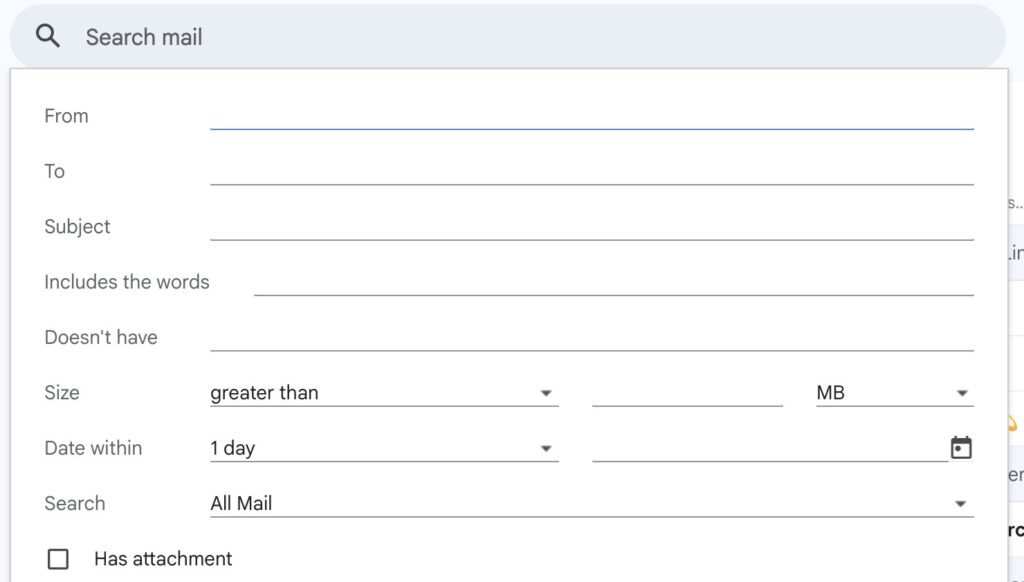
Just like filters, one can do the following to block these emails. Type the domain in Google’s Gmail search tab, click on “filter,” and then proceed to choose actions such as deleting the email, marking it as spam, etc.
3. Use Email Aliases to Track Spam Sources
Gmail allows the use of aliases by adding a “+” sign to an existing email address. These variations can be used while signing up on different websites, while still keeping everything in one inbox.
Advertisement
This makes it easier to track where spam is coming from. If unwanted emails start appearing on a specific alias, the source can be identified and then filtered or blocked more effectively.
4. Avoid Opening Suspicious Emails
Most suspicious emails include tracking components that activate when the recipient opens them. These are typically invisible pictures that indicate whether the recipient has viewed the message, hence increasing the likelihood of receiving more spam.
To prevent this, one should refrain from opening any strange-looking emails, such as those from unknown sources or with funny subject lines. Such emails can either be disposed of immediately or filtered through other means. One can use Gmail’s settings to request permission to view external images.
5. Turn Off Automatic Image Loading
Images inside marketing emails are often used to track activity. As soon as an email opens and the images load, it confirms to the sender that the email address is active. To stop this, automatic image loading can be disabled in Gmail. After enabling the setting to ask before showing images, tracking images will no longer load automatically.
6. Report Spam Instead of Just Deleting
Removing spam by deleting emails is only a short-term fix. It clears space but doesn’t prevent new spam from arriving. Using the “Report Spam” option is more effective. It helps Gmail understand which emails are unwanted and improves its filtering system over time, reducing similar spam in the future.
7. Limit Use of Primary Email Address
A primary email address can quickly become overloaded if it is used everywhere. Over time, it gets shared across many platforms, leading to more promotional and spam emails. To avoid such inconvenience, one should use their primary email address only for essential accounts and, in other cases, use a secondary email.
Advertisement
Although spam cannot be entirely eliminated from a user’s life, it is possible to control its impact using certain tactics. Simple things like filtering, reporting spam, and reducing the number of emails you receive will significantly help you manage your inbox.
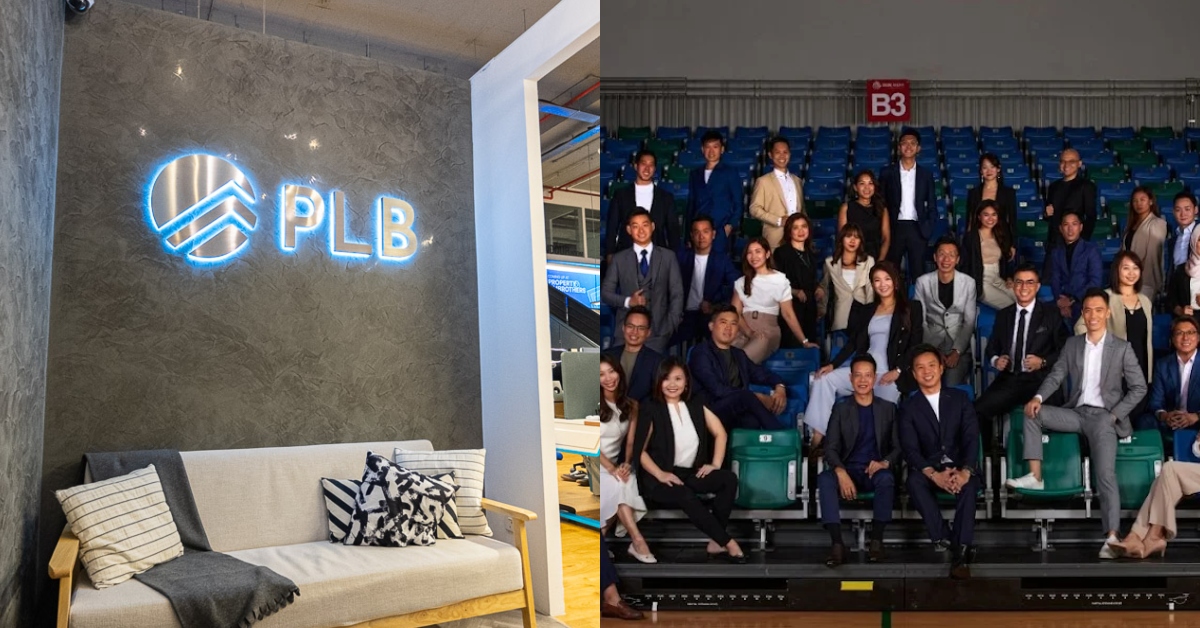
Singapore property agency PropertyLimBrothers (PLB) is undergoing a major internal reshuffle, with its media arm, PLB Media, reportedly laying off around 90% of its staff as several realtors also exit the business.
According to a report from The Edge, the cuts are part of a wider restructuring that has seen key leadership changes within the company, following recent controversies and leadership exits.
As of Feb 2026, PLB Media had close to 100 employees across its editorial, tech, video, and overseas teams. The staff supported the agency’s realtors by handling research, marketing, and social media execution, forming the backbone of its content-driven property business model.
About 90% of PLB Media’s video team, made up of close to 50 staff, were affected by the retrenchment exercise. They were informed via meetings with HR executives, which reportedly began last week.
Advertisement
An affected employee who spoke to The Edge said staff were given a choice between voluntarily resigning or being retrenched, with just two days to make a decision. The employee also shared that the retrenchment package offered was equivalent to one week’s salary for each year of service at PLB.
Separately, another affected employee shared that those who chose to resign were also offered the same retrenchment package. They were additionally allowed to keep their company-issued devices and would receive a recommendation letter to support their job search.
In late Jan, rumours began circulating online alleging that PLB co-founder Melvin Lim and then vice-president of strategy Grayce Tan were involved in an extramarital affair. Both Lim and Tan are married, and the claims quickly drew public attention to the firm.
The two subsequently stepped down, prompting leadership changes and the introduction of a new whistle-blowing channel within the company.
Advertisement
Following the controversy, several realtors have reportedly left PLB for other agencies in recent months.
Vulcan Post has reached out to PLB for comment.
Read other articles we’ve written on Singaporean businesses here.
Lucid Motors has finally found a new CEO in long-time industrial executive, Silvio Napoli, marking the end of a more than year-long search following the sudden resignation of its former chief, Peter Rawlinson.
The company on Tuesday said that Napoli, who has spent the last few decades in various leadership positions at elevator and escalator company Schindler Group, will also join its board of directors.
Alongside the CEO appointment, Lucid said it has received another $200 million commitment from Uber, which has agreed to buy an additional 25,000 robotaxi-ready versions of Lucid’s upcoming mid-size vehicle. That brings Uber’s total committed investments in Lucid Motors to $500 million, and its minimum vehicle order to 35,000.
Finally, Lucid’s majority owner, the Saudi Arabian Public Investment Fund, is purchasing another $550 million of its shares.
Advertisement
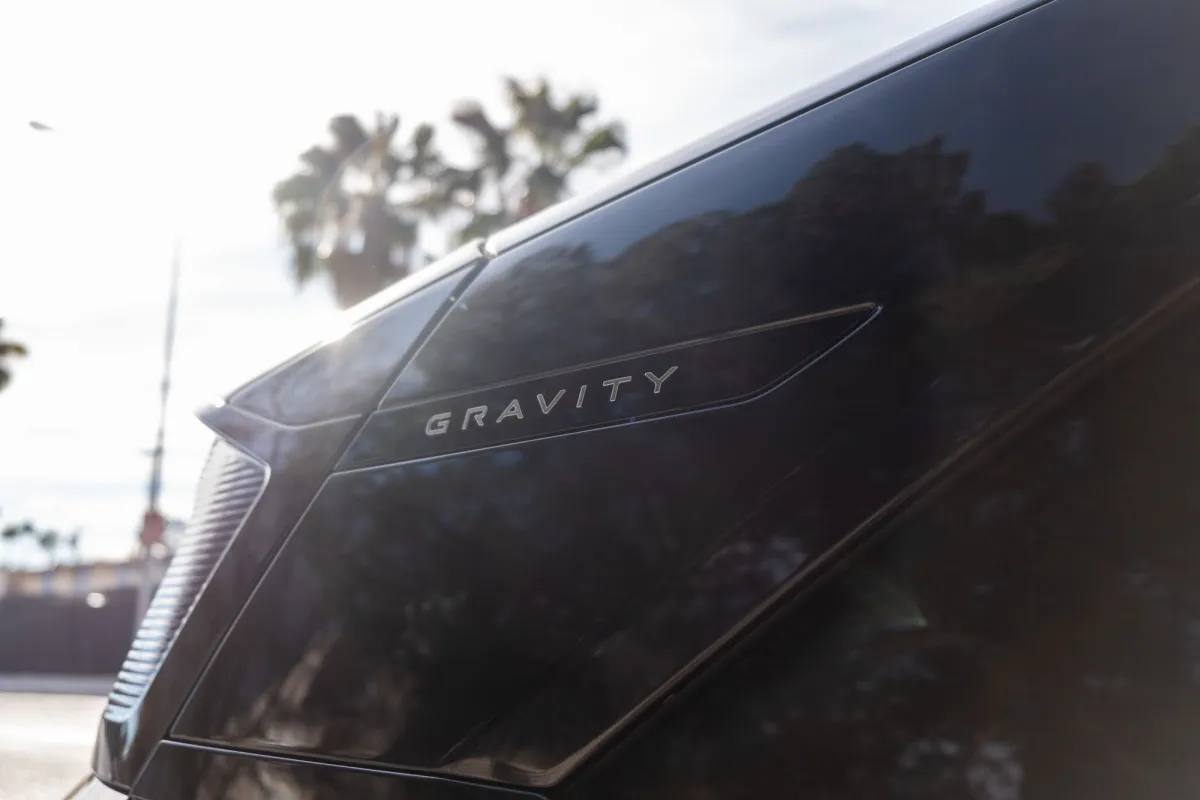
The announcements come during an all-important year for Lucid Motors. The company is currently trying to ramp up production and sales of its second model, the Gravity SUV, after struggling to find a large market for its Air sedan. Lucid is also planning on releasing the first of three vehicles built on its mid-sized platform, which will allow it to target buyers looking to spend around $50,000 on a new car.
The company has taken tough measures to ensure it gets that vehicle into production. In February, it decided to lay off 12% of its workforce, TechCrunch reported. On Tuesday, Lucid Motors said in a regulatory filing that it has recently “reduced contractor headcount” at its Arizona factory “to improve cost efficiency.”
Lucid Motors has been without a permanent CEO since February 2025, when long-time leader Rawlinson suddenly left the company. Its chief operating officer, Marc Winterhoff, has served as interim CEO since, and had designs on taking over the CEO role, as TechCrunch previously reported, while the company cast an extremely wide net for a replacement. But Winterhoff’s oversight coincided with multiplequality issues during the rollout of its Gravity SUV.
Techcrunch event
Advertisement
San Francisco, CA | October 13-15, 2026
Napoli will not start as CEO right away. He still needs to receive “the right to work in the U.S.,” according to a regulatory filing. Until that happens, he will be an “executive director” of Lucid Motors’ board under a Swiss employment agreement (where he lives). Lucid expects Napoli to receive permission to work in the U.S. “in the coming weeks,” after which Winterhoff will resume his role as chief operating officer.
Advertisement
Napoli stands to make a lot of money as Lucid’s new CEO. He’s starting with a base salary of $1.5 million, and is being given $1 million to move to the U.S. He’s also being awarded a bonus package, a grant of shares worth nearly $10 million, as well as a performance-based stock package that could be worth tens of millions of dollars.
Uber’s new commitment comes just a day after the ride-hail giant and its autonomous vehicle partner Nuro began testing modified Lucid Gravity SUVs for a luxury robotaxi service launching in San Francisco later this year. Uber first partnered up with Lucid Motors and Nuro last July, when it made a $300 million investment and agreed to buy at least 20,000 Gravity SUVs.
Lucid Motors revealed at an investor day event earlier this year that it was near an agreement with Uber to make a similar arrangement for its more affordable mid-size vehicles. The finalized agreement unveiled Tuesday reduces the minimum number of Gravity SUV orders to 10,000.
The Saudi investment is the latest in a long line of cash injections from the Kingdom into Lucid that started off as a company-saving investment in 2018.
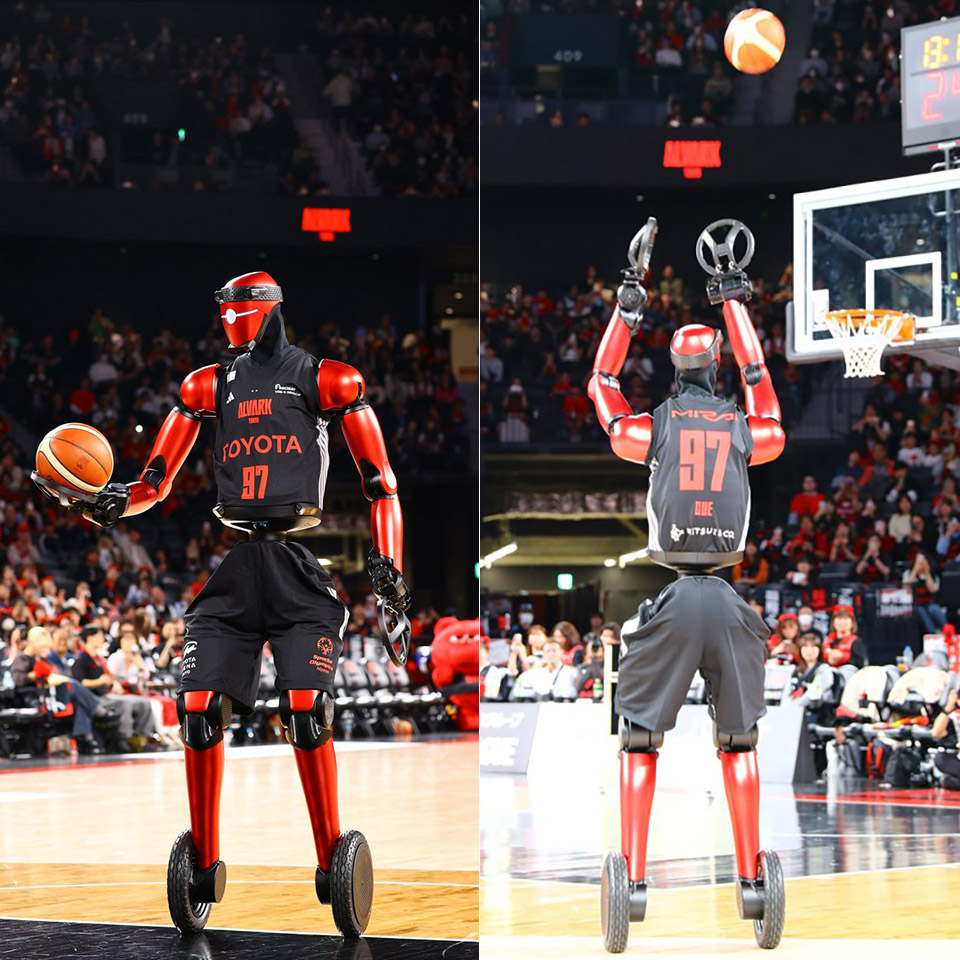
On April 12, crowds flocked to Toyota Arena in Tokyo to witness CUE7 come to life on the court. Standing 219 cm (7’2″) tall, it moved with an unsettlingly steady balance as it retrieved a basketball off the ground. When the robot began to move, it appeared to be playing basketball like any other player, with deft dribbles and precise motions. When the robot took a free shot in front of 8,400 yelling spectators, the ball left its hands in a perfect arc and fell over the net.
Its weight was reduced by engineers to 74 kg, a nearly 40% decrease from its previous iteration. The CUE7 now rolls on two wheels rather than a four wheel base, which helps conserve parts and provides it with a more secure footing when jetting down the court. The robot has the consistent power it needs to move fluidly and effortlessly around the court thanks to high-torque batteries from race cars.
TOY CAR MODEL KIT– Boys and girls ages 9 and up create thrilling movie action by building one of the most iconic cars in movie history with the LEGO…
FAST AND FURIOUS CAR – Fans will be delighted by the LEGO Toyota Supra sports car toy, which is packed with realistic details and authentic movie…
ACTION-PACKED FEATURES– Builders assemble the 6-cylinder engine, steering, opening hood and removable Targa top roof, then recreate favorite Fast…
Thanks to the stereo camera in its “head,” which can detect the hoop from a distance, the robot is continuously collecting data from everything around it. It knows exactly where it is in relation to the basket thanks to the extremely accurate distance and depth readings provided by the LiDAR units in its midsection.
Advertisement
The new robot operates entirely differently from previous iterations of CUE7, which required precise human coordination. It has a hybrid system that blends model predictive control and reinforcement learning. This means that via constant practice and trial-and-error, the machine can test out its own actions, identify what doesn’t work, and make necessary adjustments. Additionally, it has model predictive control, which provides the machine with a blueprint for its next movements. This combination enables the robot to adjust to novel circumstances as they arise.
The vision system first latches onto the hoop and determines the distance as the robot advances through a shot. It then establishes the ideal trajectory by slightly altering its arm angle and stance. The arms stretch in a single motion, the ball is elevated to a fixed position, and it follows a precise arc through the air and into the net without any wobbles that could damage the shot. It repeatedly repeats this with almost the same outcomes.
— トヨタ 未来創生センター | Toyota Frontier Research Center (@TOYOTA_FRC) April 13, 2026
Advertisement
The system immediately enters analysis mode when the robot misses, examining what went wrong, adjusting the machine’s calculations, and improving the subsequent try. This indicates that the robot can quickly become consistent, making free throws with ease and even longer shots that were previously difficult. When it comes to dribbling, the robot bounces the ball with just the proper amount of force as it travels across the court with the same natural ease as any other basketball player.
Toyota created the CUE7 robot as a test platform to fine-tune its motion planning, precise control, and vision technologies. They will eventually be able to create machines that can handle objects in a factory or on the road with far greater delicacy thanks to the lessons they are learning here. Nearly ten years ago, the project began as a sort of side project, and with every iteration, it has been getting better.























































You must be logged in to post a comment Login