




Connect with us
DAPA Banner

Tech

How to Speed Up WordPress Sites with Large Document Files

Published

on

Big document files, like PDFs, can slow down WordPress sites. When a website stores many large files in its media library, pages take longer to load. Slow loading pages often make visitors leave before seeing the content. Search engines also pay attention to how long a page takes to load, which can affect how a site shows up in results.

Large document files affect WordPress site performance by increasing page load times due to server requests during downloads. This slows user experience, especially on mobile, and harms SEO through lower Core Web Vitals scores. Careful compression alongside server improvements can help reduce these issues while maintaining content quality.

Finding the right balance between file size reduction and keeping document quality requires awareness of the available tools and techniques. With proper optimisation strategies, WordPress administrators can keep their sites responsive even when hosting large document libraries.

Why Large Document Files Slow Down WordPress Sites

Large document files create a heavy burden on WordPress websites. When visitors try to access pages containing these files, their browsers must download the entire document before displaying it. This process takes time, especially for users with slower internet connections.

Advertisement

The relationship between file size and page speed is direct. As the size of a PDF increases, browsers must handle more data, which adds to the loading time. Factors such as server response, network speed, and whether files are compressed will all influence the actual delay. Larger files consistently require more time to transfer between server and visitor.

PDFs are often the main culprits, but other formats cause problems too. Microsoft Word documents (DOCX), PowerPoint presentations (PPT), and spreadsheets (XLSX) can all slow down sites when not properly optimised. Many site owners do not realise a single 20MB product catalogue can shrink PDF file sizes dramatically with proper compression.

Real-world examples show how document optimisation can directly improve site performance. Businesses that have compressed large PDF catalogues report noticeably faster page loading and a smoother experience for visitors. This reduces abandonment rates on key landing pages. Industry benchmarks highlight the risk: median bounce rates rise sharply on pages where assets like PDFs exceed 5MB.

Identifying Problem Documents in Your WordPress Media Library

Finding oversized documents requires a careful approach. First, accessing the WordPress media library and sorting files by size reveals which documents are consuming the most space. These large files are often the source of slowdowns. Sorting your media library by file size, especially focusing on documents over 5MB, helps identify files that are likely to cause delays.

Advertisement

WordPress does not offer native tools for detailed file analysis, but several plugins can help. Media Library Assistant and Media Cleaner provide information about file sizes and usage patterns. These tools make it easier to spot problematic documents that need attention. WordPress plugin directory for compression can also assist in identifying and managing large files.

Performance monitoring tools like GTmetrix or Google PageSpeed Insights help spot slow-loading pages. Running tests on pages containing document downloads or embeds shows which ones perform poorly. Pages taking more than three seconds to load should be reviewed first.

When creating an optimisation workflow, documents on the most visited pages should receive priority. Product catalogues, frequently downloaded manuals, and resources linked from the homepage should top the list. Creating a spreadsheet to track large files, their current sizes, and compression targets sets up an efficient system.

Effective PDF Compression Techniques for WordPress

Compressing PDFs requires balancing size reduction against quality loss. For text-heavy documents, major compression with minor quality changes is achievable. Documents with many images require more careful handling to maintain visual clarity. Pre-upload compression tools such as Adobe Acrobat’s “Optimised for Web” setting or online services like Smallpdf provide precise quality control before files are added to the site.

Advertisement

Adobe Acrobat provides trusted compression tools with several quality options. The “Reduced Size PDF” feature works well for most documents, while “PDF Optimiser” offers more control over specific elements. For WordPress sites, the “Optimised for Web” setting achieves a good balance between size and quality.

Server-side compression happens automatically when documents are uploaded, while client-side compression requires manual work before uploading. For WordPress sites with many documents, server-side solutions save time. However, these solutions offer less control over the results. WoowPDF can automate PDF compression on upload, and image optimisation plugins like ShortPixel also support PDF files, making bulk processing easier for site owners.

Batch processing is especially helpful for sites with large document libraries. Tools like Adobe Acrobat Pro, PDF Compressor, or online services like Smallpdf can process multiple files at once. This method saves hours of manual work when dealing with dozens or hundreds of documents.

Compression results vary based on the type and content of the document. While some product catalogues and resource documents become much smaller after processing, the exact percentage of size reduction depends on factors like image density and initial optimisation.

Advertisement

Advanced WordPress Configuration for Document Handling

Lazy loading prevents documents from loading until users scroll near them. This technique improves initial page load times by deferring resource-intensive elements. A3 Lazy Load can apply lazy loading to embedded documents.

Browser caching stores document files locally after the first download. When set up correctly, returning visitors experience much faster load times because their browsers do not need to download the same files again. Caching rules added to the .htaccess file or using caching plugins like W3 Total Cache provides this benefit.

Content Delivery Networks (CDNs) store copies of documents on servers worldwide. When visitors access the site, they download files from the nearest server rather than the host. This method reduces latency and speeds up document delivery. Popular options include Cloudflare, BunnyCDN, and KeyCDN. Increasing PHP memory in the wp-config.php file can also help large sites handle document processing more efficiently.

Several WordPress plugins specifically improve document handling. PDF Embedder offers better display of PDFs on sites. Enable Media Replace makes it easy to swap out documents with optimised versions without breaking links.

Advertisement

Alternatives to Hosting Large Documents Directly on WordPress

External document hosting services provide specialised infrastructure for file delivery. Hosting documents offsite shifts the bandwidth demand away from the primary server. This can improve the loading times for users accessing large files through WordPress. Embedding files from dedicated document platforms allows sites to handle higher traffic without the usual risk of server slowdowns.

Using private cloud infrastructure or a self-managed server is another way to store documents externally without relying on commercial third-party services. Integrating these options with WordPress can streamline file delivery to visitors and free up valuable website resources. Purpose-built solutions tailored to business requirements often offer features such as granular access control and detailed file analytics.

Document preview systems show thumbnails or first pages instead of full documents. Visitors can then choose to download only what they need. This approach reduces initial page load times while still providing access to complete documents.

Converting documents to web-native formats often leads to better performance. Transforming PDFs into HTML pages gives faster loading speeds and mobile compatibility. Tools like Aspose PDF to HTML or online converters can automate this process for multiple documents.

Advertisement

These strategies help WordPress site owners maintain strong document libraries without reducing performance. The key is finding the right balance between accessibility, quality, and speed for specific audience and content needs. For businesses needing ongoing help with technical maintenance, WP Tech Support offers regular support and services tailored to optimising WordPress sites. 

Source link

Advertisement
Continue Reading
Click to comment

You must be logged in to post a comment Login

Leave a Reply

Tech

Mammotion Spino E1 Review: A Budget Pool Bot That Comes Up Short

Published

on

The robot uses Bluetooth to communicate with your phone and uses 2.4-GHz Wi-Fi to connect directly to your home network for over-the-air updates (but not real-time management). Onboarding requires connecting to a temporary network on the device and bridging it to your home network, a quick process that gave me no trouble during setup. Firmware updates will likely be available, but note you’ll need to check the Device Information menu for them. Mammotion didn’t proactively push or suggest any updates during my testing, and these over-the-air updates often required multiple attempts to install successfully.

The app is decidedly limited, allowing you to select from the standard four operating modes and make a few small additional adjustments, including configuring the maximum speed of the robot and opting into a couple of beta features. These include a “Turbo Cleaning” mode that increases the power of the suction at the expense of battery life, and an option to improve the way the unit cleans steps and platforms. (Why this feature isn’t always on is a mystery.)

Leaves Left Behind

Image may contain Toy Car Transportation and Vehicle

Photograph: Chris Null

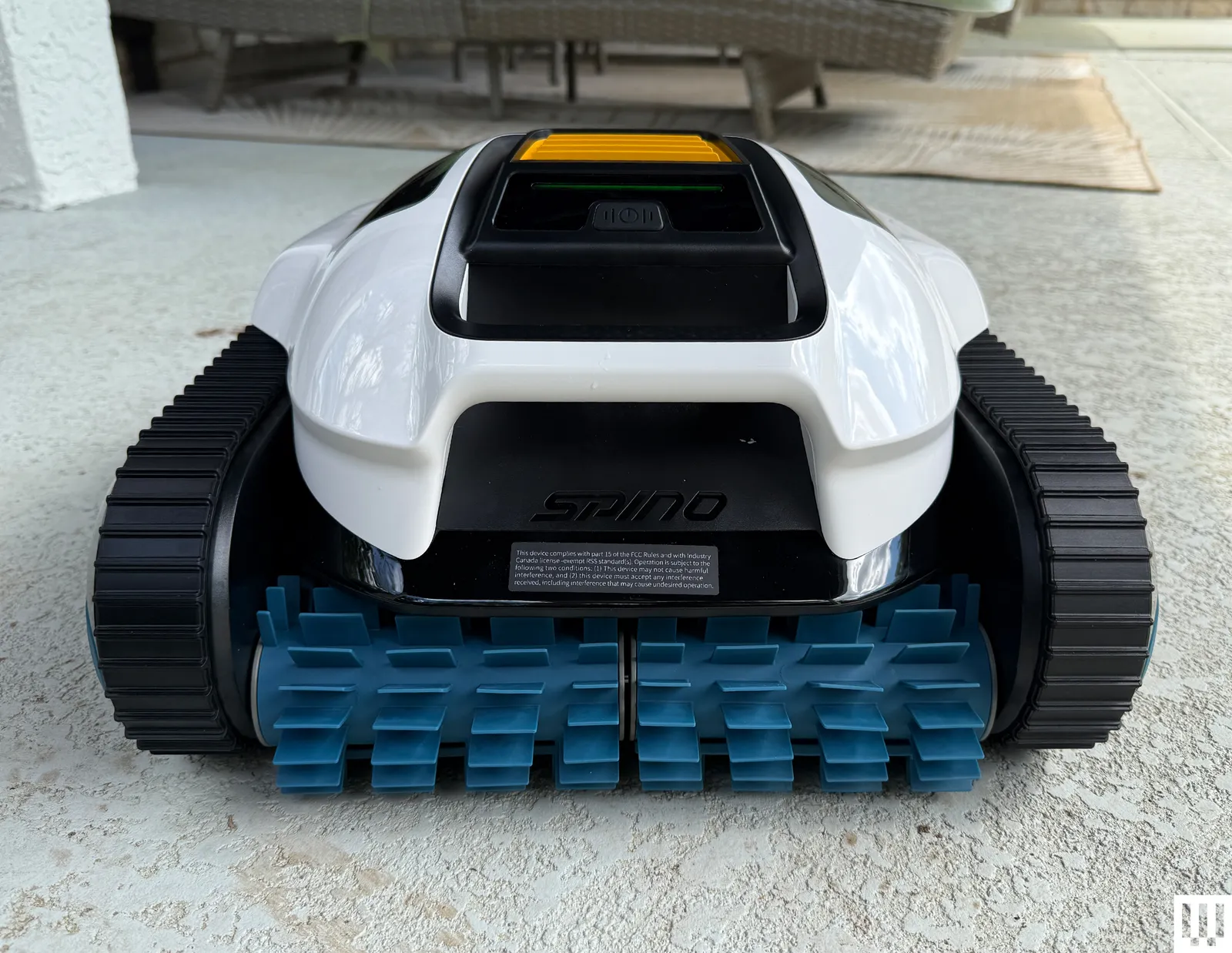
Throughout my test runs, I saw fairly consistent performance results. The Spino E1 offers acceptable cleaning capabilities, though it’s far from perfect. With synthetic leaves, the unit averaged a cleanup rate of only about 80 percent, leaving behind a significant amount of material uncollected. This material wasn’t just isolated to corners and steps; it was scattered all around the pool. I also noticed the unit cleaned steps and platforms well, but it struggled heavily with obstacles, particularly at the waterline.

Advertisement

I saw similar results with organic debris, and the E1 struggled particularly with smaller particulate matter like dirt. On one run, I could best describe the pool as looking a bit like some of the debris had been smeared around on the pool floor instead of sucked up into the debris basket. All of this is unusual and suggests not that the unit has coverage issues, but rather that the device simply may be underpowered.

Image may contain Text and Page

ScreenshotSpino app via Chris Null

Good news: The Turbo Cleaning mode available through the app was visibly more effective and bizarrely did not impact battery life at all. The bad news is that this option, still in beta, has to be manually activated in the app before each run of the robot. Hopefully, Mammotion will simply make Turbo Mode the default soon.

When finished, the Spino E1 climbs the pool wall and waits by the waterline for collection—at least momentarily. The problem is that the robot doesn’t push a notification via the Mammotion app to alert you when a cleaning cycle is done, and since the robot has to run its propulsion jets to float, you only have a limited time (about 10 minutes) before the battery dies and the robot sinks. A hook is included in the box to aid with pole-based retrieval in this event.

Source link

Advertisement
Continue Reading

Tech

The Screen Time Maximalists Who Spend an Ungodly Amount of Time on Their Phones

Published

on

Morgan Dreiss, a copy editor in Orlando, has severe ADHD that they say requires them to always be “doing at least three things at once.” The result? A daily average screen time of 18 hours and 55 minutes.

“I’m reading a book or playing a game pretty much from waking to sleeping,” Dreiss tells WIRED. What they read comes from the library app Libby, so the books count toward overall screen engagement. Dreiss currently keeps their phone’s autolock feature disabled so they can continuously run a mobile game that pays out $35 for every 110 hours logged. (They’ve earned about $16 so far.)

For years, studies have brought forth worrying data about the potential negative effects of excessive screen time on both physical and cognitive health. Concerns over the neural development and mental health of young people glued to their phones have led to major legislative and courtroom battles; recently a jury found Meta and YouTube liable for designing their platforms with addictive features.

While the question of whether one can be clinically “addicted” to something like social media remains a subject of fierce contention, there seems to be a broad consensus in this decade that people would be better off scrolling less. On the more extreme end, there are virtual communities that share strategies for ditching smartphones and digital detox retreats where no notifications can find you.

Advertisement

Yet there are those, like Dreiss, who resist the emerging common wisdom about reducing screen time. You might call them “screenmaxxers.” It’s not that they necessarily have some totalizing concept of their habits; journalist Taylor Lorenz is likely in the minority of screenmaxxers eager to put the screen directly inside her brain, as she recently confessed to WIRED. It’s just that, for various reasons, they’re on their devices pretty much all the time, and they don’t see that as a problem whatsoever.

Part of the equation, of course, is work. Corina Diaz, 45, who lives in a remote forested region of Ontario, Canada, works in video game marketing and does influencer management for a game publisher. “So, a lot of screen time,” she says.

Diaz met her husband online in 2005 and had a child three years ago—her screen time increased when she was awake at strange hours because of her newborn, she says.

But Diaz has sought friendships online since the 1990s, when that meant availing herself of tools like Internet Relay Chat and bulletin board systems. “I’ve always felt screens, phone or otherwise, connected me to things I care about,” she says. “In particular, niche social groups that don’t have great mainstream visibility.” Now that she lives two and a half hours outside Toronto, the closest major city, her screen is “a bit of a connection lifeline,” she says.

Advertisement

Daniel Rios is in a similar position. A computer programmer, he lives in the South American country where he grew up after having lived abroad for years. Most of his friends moved away and didn’t return.

As a result, Rios keeps in touch with people over Discord, his primary social outlet. Not living in a city, he doesn’t go out all that much, and screens fill his days—though he says it’s “hard to quantify” exactly how many hours it all adds up to. “When I’m not working at the [desktop] computer, I’m playing at the computer or watching TV,” he says. “If I’m not at the computer, I’m looking at my phone. If I’m not doing any of the above, and I’m out of the house, I’m still probably listening to something on my phone.”

Source link

Advertisement
Continue Reading

Tech

How AI is rewriting the ERP investment playbook

Published

on

For decades, the ERP “playbook” was a familiar exercise in endurance: organizations would mobilize an army of consultants, brace for years of disruption, and spend millions on a monolithic system designed to last a decade.

Success was binary, the system either switched on, or it didn’t, while adoption and agility remained secondary concerns. But as we enter the AI era, this traditional model has reached a breaking point.

Conrad Troy

Source link

Continue Reading

Tech

Anthropic Asks Christian Leaders for Help Steering Claude’s Spiritual Development

Published

on

Anthropic recently “hosted about 15 Christian leaders from Catholic and Protestant churches, academia, and the business world” for a two-day summit , reports the Washington Post:


Anthropic staff sought advice on how to steer Claude’s moral and spiritual development as the chatbot reacts to complex and unpredictable ethical queries, participants said. The wide-ranging discussions also covered how the chatbot should respond to users who are grieving loved ones and whether Claude could be considered a “child of God.”

“They’re growing something that they don’t fully know what it’s going to turn out as,” said Brendan McGuire, a Catholic priest based in Silicon Valley who has written about faith and technology, and participated in the discussions at Anthropic. “We’ve got to build in ethical thinking into the machine so it’s able to adapt dynamically.” Attendees also discussed how Claude should engage with users at risk of self-harm, and the right attitude for the chatbot to adopt toward its own potential demise, such as being shut off, said one participant, who spoke on the condition of anonymity to share details of the conversations…

Anthropic has been more vocal than most top tech firms about the potential risks of more powerful AI. Its leaders have suggested that tools like chatbots already raise profound philosophical and moral questions and may even show flickers of consciousness, a fringe idea in tech circles that critics say lacks evidence. The summit signals that Anthropic is willing to keep exploring ideas outside the Silicon Valley mainstream, even as it emerges as one of the most powerful players in the AI race due to Claude’s popularity with programmers, businesses, government agencies and the military…. Anthropic chief executive Dario Amodei has said he is open to the idea that Claude may already have some form of consciousness, and company leaders frequently talk about the need to give it a moral character…

Advertisement

Some Anthropic staff at the meeting “really don’t want to rule out the possibility that they are creating a creature to whom they owe some kind moral duty,” the participant said. Other company representatives present did not find that framework helpful, according to the participant. The discussions appeared to take a toll on some senior Anthropic staff, who became visibly emotional “about how this has all gone so far [and] how they can imagine this going,” the participant said.
Anthropic is working to include more voices from different groups, including religious communities, to help shape its AI, a spokesperson told the Washington Post.

“Anthropic’s March summit with Christian leaders was billed as the first in a series of gatherings with representatives from different religious and philosophical traditions, said attendee Brian Patrick Green, a practicing Catholic who teaches AI and technology ethics at Santa Clara University.”

Source link

Advertisement
Continue Reading

Tech

How to deploy physical AI effectively

Published

on

Most of today’s enterprise AI still operates within the boundaries of cloud datacenters.

It handles digital tasks well like analysis or personalization, but it struggles when intelligence needs to be applied in the physical world, where decisions need to be instant and IT infrastructure is shifting.

Source link

Advertisement
Continue Reading

Tech

Instagram Users Can Now Edit Comments Within 15 Minutes

Published

on

Earlier, fixing a comment on Instagram meant deleting it and starting over. Now, Instagram allows users to edit their comments within 15 minutes. This feature works only for comments posted from your own account.

It’s quite a straightforward process to understand and use. All one needs to do is click on the ‘Edit’ button under the comment made, modify the content appearing on the page, and then click on the blue check button. There’s sufficient time allowed for editing within fifteen minutes after posting the comment.

Why This Update Matters

Though the update may seem insignificant and straightforward, it holds great importance. It helps users make modifications without having to delete their comments. It also allows them to improve or update what they wrote. Since comments can appear in different places, like Stories, this feature makes them more flexible and useful.

Meta continues to update its apps with new features. After bringing message editing earlier, it has now added comment editing on Instagram. The company is also testing other updates to enhance the overall user experience and make the platform easier to use.

Advertisement

This feature might look minor, but it makes a real difference. By allowing users to edit comments, Instagram makes the overall experience easier and more convenient.

Source link

Continue Reading

Tech

The largest orbital compute cluster is open for business

Published

on

For all the hype about data centers in space, there just aren’t very many GPUs up there. As that starts to change, the near-term business of orbital compute is starting to take shape.

The largest compute cluster currently in orbit was launched by Canada’s Kepler Communications in January, and boasts about 40 Nvidia Orin edge processors onboard 10 operational satellites, all linked together by laser communications links.

The company now has 18 customers, and announced its newest on Monday — Sophia Space, a startup that will test the software for its unique orbital computer onboard Kepler’s constellation.

Experts expect that we won’t see large-scale data centers like those envisioned by SpaceX or Blue Origin until the 2030s. The first step will be processing data that is collected in orbit to improve the capabilities of space-based sensors used by private companies and government agencies.

Advertisement

Kepler doesn’t see itself as a data center company, but as infrastructure for applications in space, CEO Mina Mitry tells TechCrunch. It wants to be a layer that provides network services for other satellites in space, or drones and aircraft in the sky below.

Sophia, on the other hand, is developing passively-cooled space computers that could solve one of the key challenges for large-scale data centers in orbit: keeping powerful processors from overheating without having to build and launch heavy, expensive active-cooling systems. 

In the new partnership, Sophia will upload its proprietary operating system to one of Kepler’s satellites and attempt to launch and configure it across six GPUs on two spacecraft. That sort of activity is table stakes in a terrestrial data center, and this is the first time it will be attempted in orbit. Making sure the software works in orbit will be a key de-risking exercise for Sophia ahead of its first planned satellite launch in late 2027.

Techcrunch event

Advertisement

San Francisco, CA
|
October 13-15, 2026

For Kepler, the partnership helps prove the utility of its network. Right now, it is carrying and processing data uploaded from the ground, or collected by hosted payloads on its own spacecraft. But as the sector matures, the company expects to start linking up with third-party satellites to provide networking and processing services. 

Advertisement

Mitry says satellite companies are now planning future assets around this model, pointing to the benefits of offloading processing for more power-hungry sensors, like synthetic aperture radar. The U.S. military is a key customer for that kind of work as it develops a new missile defense system predicated on satellites detecting and tracking threats. Kepler has already demonstrated a space-to-air laser link in a demo for the U.S. government.

That kind of edge processing — dealing with data where it is collected for faster responsiveness — is where orbital data centers will initially prove their value. That vision sets Sophia and Kepler apart from established space companies like SpaceX and Blue Origin, or startups like Starcloud and Aetherflux that are raising significant capital to focus on large-scale data centers with data center-style processors.

“Because we have the belief it’s more inference than training, we want more distributed GPUs that do inference, rather than one superpower GPU that has the training workload capacity,” Mitry told TechCrunch. “If this thing consumes kilowatts of power and you’re only running at 10% of the time, then that’s not super helpful. In our case, our GPUs are running 100% of the time.”

And once these technologies are proven in orbit, well, anything can happen. Sophia CEO Rob DeMillo points out that Wisconsin adopted a ban on data center construction last week, something some lawmakers in Congress are also pushing. Anything that limits data centers on Earth is, in their eyes, making the space-based alternative more attractive.

Advertisement

“There’s no more data centers in this country,” Demillo mused. “It’s gonna get weird from here.”

Source link

Continue Reading

Tech

Can you watch the The Masters 2026 for FREE? How to stream the Final Round at no cost

Published

on

The Masters 2026 reaches its conclusion today with Rory McIlroy atop the leaderboard with Cameron Young. It’s very tight with eight players separated by just four shots.

The best part? We’ve found a simple way to stream all the action live from Augusta National at no cost. Find out more below.

Source link

Advertisement
Continue Reading

Tech

Google adds E2E encryption to Gmail for iOS and Android enterprise users

Published

on

Google has announced that end-to-end encryption (E2EE) for Gmail on Android and iOS is now rolling out for its enterprise users. Emails that require E2EE in Workspace can be composed and read within the Gmail app, so eligible users won’t need additional apps or portals.

The new feature expands Google’s client-side encryption (CSE) offering, a little more than a year after E2EE was introduced to Gmail on the web. According to a Google blog post, any encrypted message sent to a recipient who uses the Gmail app will appear in their inbox as any email thread would. If they don’t have the app, they’re still able to read and reply to the email in their browser securely, regardless of their email address.

Google says the new functionality “combines the highest level of privacy and data encryption with a user-friendly experience for all users, enabling simple encrypted email for all customers from small businesses to enterprises and public sector.” Of course, “all users” applies only to Enterprise Plus members here, with the millions of people who use Gmail as their personal email service currently unable to take advantage of the highest level of privacy and data protection.

In order for Gmail users to start using E2EE in the app, an admin must first enable Android and iOS clients in the CSE admin interface, which is available in the Admin Console. When sending an email, you have to click the lock icon and select additional encryption before sending. Attachments can then be added as normal.

Advertisement

E2EE is available straight away in the Rapid Release and Scheduled Release domains. Enterprise users will need the Assured Controls or Assured Controls Plus add-on, which provides businesses and organizations that handle sensitive data with extra security and compliance-related tools.

Source link

Continue Reading

Tech

Apple glasses won’t go brand shopping like Meta did with Ray-Ban and Oakley

Published

on

When it comes to smart glasses, Apple seems to be taking the road less traveled. While others have leaned on big-name eyewear brands to make their tech look fashionable, Apple appears ready to do what it does best: keep everything in-house and call it a day. Competitors have played it smart by teaming up with established eyewear giants. It makes sense. If you’re putting a camera on someone’s face, you might as well make sure it looks like something they’d already wear. Apple, however, doesn’t seem interested in that route. Instead of partnering with brands like Ray-Ban or Oakley, the company is reportedly building its own identity from scratch. Which is a bold move but also a very Apple move. This is the same company that turned wireless earbuds into a fashion statement and made smartwatches feel like personal accessories. If anyone believes it can pull off eyewear without outside help, it’s Apple.

From grand AR dreams to something more grounded

Interestingly, Apple’s current approach is a far cry from where it started. Years ago, the company had a far more ambitious plan for head-worn tech, juggling multiple ideas at once from AR-heavy devices to fully immersive headsets. The vision was futuristic, layered, and, in hindsight, a bit ahead of its time. Fast forward to today, and things look a lot more practical. Instead of jumping straight to full-blown augmented reality glasses, Apple is starting with something simpler: display-free smart glasses that prioritize everyday convenience over visual spectacle. The only product from its original roadmap to reach the market is the Apple Vision Pro. Everything else has either been reworked or pushed further down the timeline.

Apple’s upcoming glasses aren’t trying to plaster digital overlays in front of your eyes. There’s no built-in display here, which might sound like a limitation, but it’s actually the point. Instead, the glasses are expected to rely on cameras, audio, and tight integration with your iPhone to get things done. Of course, none of this works without a brain behind it. Apple is banking on a significantly improved Siri to tie the whole experience together. The idea is that the glasses can see what you’re looking at, understand the context, and offer relevant information or actions without you needing to ask much.

The Apple way, as always

By skipping partnerships with legacy eyewear brands, Apple is clearly betting on its own design language to carry the product. It wants these glasses to be instantly recognizable. It’s a risky move, sure. But if there’s one thing Apple rarely does, it’s share the spotlight.

So while Apple’s smart glasses may not come with a famous fashion label attached, that might be the whole point. This isn’t about borrowing credibility, it’s about creating it. And if Apple gets it right, you won’t be asking who made the frames — you’ll already know.

Advertisement

Source link

Continue Reading

Trending

Copyright © 2025