Tournament favorites Spain will look to put things right against Saudi Arabia, after both sides opened their respective FIFA World Cup 2026 campaigns with a point. Lamine Yamal hopes to start for La Roja.
Spain play in Atlanta for the second game in a row but the 75,000-capacity stadium will already hold bad memories after La Roja’s goalless draw with World Cup debutants Cape Verde on Monday. Head coach Luis de la Fuente even chucked on star wingers Yamal and Nico Williams in a desperate bid to find a goal, as both players continue their convalescence from recent injuries. The main talking point is now whether the duo will start what feels a must-win game for European champions.
Saudi Arabia warmed up for their toughest test of the group stage by drawing 1-1 with Uruguay in Miami, as Abdulelah Al Amri’s first-half goal was canceled out by Maxi Araujo’s equalizer 10 minutes from time. The prospect of being heavy underdogs against Spain will not faze the Saudis, whose shock 2-1 victory over eventual champions Argentina in their opening game of the 2022 World Cup will give them belief that they can repeat the trick here. Skipper Salem Al Dawsari scored the winning goal that day and will lead his country against Spain.
Advertisement
So, read on as we show you exactly how to watch Spain vs Saudi Arabia for free from anywhere in the FIFA World Cup 2026.
How to watch Spain vs Saudi Arabia for free
Spain vs Saudi Arabia is available to watch for free in multiple countries, including the UK, Australia, Brazil, Belgium, Ireland, Netherlands, Switzerland and Turkey.
Abroad? Can’t access your free stream? Unblock your free World Cup stream with Norton VPN — more on that below.
Advertisement
Use a VPN to watch Spain vs Saudi Arabia live streams
It’s the World Cup, and if you’re traveling, you might discover your usual Spain vs Saudi Arabia stream is suddenly unavailable due to geo-restrictions.
Don’t worry, that’s exactly where a VPN can help. A virtual private network lets you connect to servers around the world so you can securely access your usual World Cup coverage as if you were back home.
Those looking for a streaming service instead can watch Spain vs Saudi Arabia on Fox One (3-day free trial). Telemundo is available via Peacock as well.
Advertisement
Visiting the US from the UK? You can still watch your World Cup stream for free thanks to Norton VPN (try for 60 days).
How to watch Spain vs Saudi Arabia in the UK
UK customers are in luck as they can stream Spain vs Saudi Arabia for free on BBC. Live coverage is on BBC One and BBC iPlayer.
You require a TV license and a valid UK postcode for an account (e.g. SE1 7PB).
Advertisement
Norton VPN can unlock your stream if you’re abroad today.
How to watch Spain vs Saudi Arabia in Australia
(Image credit: free)
Spain vs Saudi Arabia will be shown for free in Australia on SBS On Demand.
The streaming platform has every game of the tournament for free, making it the perfect place for your World Cup viewing.
Advertisement
Traveling for work or on holiday? A VPN like Norton VPN can help unlock your free stream.
How to watch Spain vs Saudi Arabia in Canada
(Image credit: Other)
In Canada, TSN and free-to-air channel CTV will be broadcasting Spain vs Saudi Arabia.
You can live stream via the TSN+ streaming platform, which costs CA$8 per month or CA$80 per year.
Advertisement
CTV will require TV provider login details for you to watch for free online.
Outside of Canada? Use Norton VPN whilst you’re traveling away from home to unlock your stream.
Spain vs Saudi Arabia: Match Information
What time does Spain vs Saudi Arabia start?
Spain vs Saudi Arabia kicks-off at 5pm BST / 12pm ET on Sunday, June 21. That’s 2am AEST on Monday, June 22 in Australia.
Advertisement
What are the squads for Spain vs Saudi Arabia?
Spain
Goalkeepers: Unai Simon (Athletic Bilbao), David Raya (Arsenal), Joan Garcia (Barcelona).
Defenders: Marcos Llorente (Atletico Madrid), Marc Pubill (Atletico Madrid), Pedro Porro (Tottenham), Aymeric Laporte (Athletic Bilbao), Eric Garcia (Barcelona), Pau Cubarsi (Barcelona), Marc Cucurella (Real Madrid), Alejandro Grimaldo (Bayer Leverkusen).
Midfielders: Rodri (Manchester City), Martin Zubimendi (Arsenal), Mikel Merino (Arsenal), Pedri (Barcelona), Gavi (Barcelona), Fabian Ruiz (Paris St-Germain), Alex Baena (Atletico Madrid).
Advertisement
Forwards: Yeremy Pino (Crystal Palace), Victor Munoz (Osasuna), Mikel Oyarzabal (Real Sociedad), Ferran Torres (Barcelona), Lamine Yamal (Barcelona), Dani Olmo (Barcelona), Nico Williams (Athletic Bilbao), Borja Iglesias (Celta Vigo).
Saudi Arabia
Goalkeepers: Mohammed Al-Owais (Al-Ula), Nawaf Al-Aqidi (Al-Nassr), Ahmed Al-Kassar (Al-Qadsiah).
Defenders: Abdulelah Al Amri (Al Nassr), Hassan Tambakti (Al Hilal), Jehad Thikri (Al Qadsiah), Ali Lajami (Al Hilal), Hassan Kadesh (Al Ittihad), Saud Abdulhamid (Lens), Mohammed Abu Al Shamat (Al Qadsiah), Ali Majrashi (Al Ahli), Moteb Al Harbi (Al Hilal), Nawaf Boushal (Al Nassr), Sultan Al-Ghannam (Al Nassr).
Advertisement
Midfielders: Mohammed Kanno (Al Hilal), Abdullah Al Khaibari (Al Nassr), Ziyad Al Johani (Al Ahli), Nasser Al Dawsari (Al Hilal), Musab Al Juwayr (Al Qadsiah), Alaa Al Hajji (Neom), Salem Al Dawsari (Al Hilal), Khalid Al Ghannam (Al Ettifaq), Ayman Yahya (Al Nassr).
Forwards: Firas Al Buraikan (Al Ahli), Saleh Al Shehri (Al Ittihad), Abdullah Al Hamdan (Al Nassr).
Swipe to scroll horizontally
Group H Table
Position
Team
Advertisement
GD
Points
1
Uruguay
Advertisement
0
1
2
Saudi Arabia
Advertisement
0
1
3
Spain
Advertisement
0
1
4
Cape Verde
Advertisement
0
1
Can I watch Spain vs Saudi Arabia on my mobile?
Of course, most broadcasters have streaming services that you can access through mobile apps or via your phone’s browser.
You can also stay up-to-date with all of the key World Cup moments on the official social media channels on X/Twitter (@FIFAWorldCup), Instagram (@FIFAWorldCup), TikTok (@FIFAWorldCup) and YouTube (@FIFA).
Advertisement
We test and review VPN services in the context of legal recreational uses. For example: 1. Accessing a service from another country (subject to the terms and conditions of that service). 2. Protecting your online security and strengthening your online privacy when abroad. We do not support or condone the illegal or malicious use of VPN services. Consuming pirated content that is paid-for is neither endorsed nor approved by Future Publishing.
The Acer Chromebook Plus Spin 514 (2026) is a capable convertible Chromebook with solid performance from its MediaTek Kompanio Ultra chip, plus a detailed IPS screen and good battery life. The fact that the screen’s only 60Hz is a shame, as is the middling port selection and rather high price.
The Chromebook Plus Spin 514 (2026) is one of the first Chromebooks to feature a flagship Arm-based MediaTek chip inside for potent performance.
Advertisement
14-inch 3K 60Hz IPS touchscreen:
It also has a detailed resolution IPS touchscreen panel, although it is only 60Hz
Advertisement
70Whr battery:
Acer has also put a large battery inside this convertible Chromebook to allow for some solid endurance.
Advertisement
Introduction
The Acer Chromebook Plus Spin 514 (2026) is part of a new breed of premium Chromebooks.
It’s one of the first to be powered by the new MediaTek Kompanio Ultra 910 chip to provide a powerful Arm-based alternative to the usual Intel and AMD power stations we see in these devices. It comes backed up with 12GB of RAM and 256GB of UFS storage, plus a 14-inch 2880×1800 60Hz IPS touchscreen and a hefty 70Whr battery.
Advertisement
In this configuration, though, this Chromebook Plus Spin 514 (2026) is far from cheap, clocking in at £799.99/$799. This puts it up there with the likes of the Samsung Galaxy Chromebook Plus and Windows-powered alternatives such as the Asus Zenbook A14, and means that Acer is going to have to do a lot to stand out.
Advertisement
I’ve been putting this laptop through its paces for the last couple of weeks to see if it’s one of the best Chromebooks we’ve tested.
Design and Keyboard
More generic looks
Middling port selection
Tactile keyboard but smaller trackpad
The Chromebook Plus Spin 514 (2026) has quite a generic finish, admittedly, with a silver metal chassis that’s pleasantly non-descript. It’s solid enough and has minimal branding or flair, apart from an iridescent Acer logo and Chromebook Plus branding on the lid.
It tips the scales at 1.36kg, which is on the heavier side for a laptop this size, but should be fine for those on the go. Then again, it needs some extra mass for the 360-degree hinges that turn this laptop into a tablet.
Advertisement
Image Credit (Trusted Reviews)
As for ports, on the left we’ve got a pair of USB 3.2 Gen 2 Type-Cs alongside a 3.5mm headphone jack and battery status LED. The right side houses two USB-A ports and a Kensington Nano lock. That isn’t a bad port selection, but it feels a little one-dimensional, especially lacking any form of HDMI or similar and faster Thunderbolt-capable USB-C ports.
The Chromebook Plus Spin 514 (2026)’s keyboard is a smaller 65% layout and has keys that offer some solid tactility, and I’ve got no real qualms about it. On that note, while I’m grateful there is some white backlighting for after-dark working, it isn’t the most even.
Advertisement
Image Credit (Trusted Reviews)
The trackpad offers some reasonable real estate for your fingers, although it feels a little skittish, being a Gorilla Glass trackpad and all, and is a little on the smaller side against other recent laptops I’ve tested.
Display and Sound
High-res 14-inch IPS screen
Oddly only 60Hz
Reasonable brightness and colours
Advertisement
The Chromebook Plus Spin 514 (2026) is available with a choice of screens, with lower-end models coming with a 14-inch 1920×1200 screen, and the higher-spec versions upping the resolution to 2880×1800 for much stronger detail. In any case, both are IPS, rather than OLED, although the 120Hz refresh rate option is only available on the lower-res screen.
My sample shipped with the higher resolution screen, which is especially sharp and detailed for a smaller 14-inch screen. The fact that this higher-res screen is only 60Hz is a surprise, especially given we’ve got higher refresh rate panels available on Windows laptops that don’t have the same trade-off with resolution. It is only 60Hz, so lacks the silky smoothness that some ultrabooks are offering with 120Hz refresh rates, but it gets the job done, I suppose.
Image Credit (Trusted Reviews)
It is also touch-enabled with a 360-degree hinge able to turn the Chromebook Plus Spin 514 (2026) into a tablet of sorts. This laptop also supports USI 2.0 styluses, although one isn’t included in the box – they are a cost-effective addition, though, if you wanted one.
Acer quotes the Chromebook Plus Spin 514 (2026)’s screen to have 340 nits of peak brightness, which seems about right to my eyes. It should meet our typical 300 nits target and mean this laptop is fine for indoor and outdoor use, while a quoted 100% SRGB coverage means mainstream colours are well-represented.
Image Credit (Trusted Reviews)
Advertisement
The speakers here are fine for casual listening, although I wouldn’t push them too hard as they can sound quite thin at higher volumes. They are upwards-firing, though, so won’t necessarily get muffled if you use the laptop on a softer surface such as a bed or sofa.
Advertisement
Performance
Interesting MediaTek SoC inside
Solid benchmark scores against key rivals
Stingier RAM and storage for the price
The Chromebook Plus Spin 514 (2026) ships with a new MediaTek chip that falls under its flagship Kompanio Ultra branding – to be specific, it’s the MediaTek Kompanio Ultra 910.
The Kompanio Ultra 910 features an eight-core CPU, with a single Cortex-X925 core, three Cortex-X4 cores and a further four Cortex-A720 cores. It’s an Arm-based chip, so looks to come with similar revelations as their Windows-based Qualcomm-powered rivals with solid grunt and surprising efficiency for such a potent laptop.
Image Credit (Trusted Reviews)
The scores it achieved in the Geekbench 6 test are similar to other higher-end Chromebooks, such as the Samsung Galaxy Chromebook Plus with its Intel Core 5 120U inside, and first-gen Qualcomm Snapdragon X-powered laptops such as the Asus Zenbook A14. That being said, the Chromebook Plus Spin 514 (2026) falls slightly behind in multi-threaded tasks against comparably premium Windows ultrabooks.
Advertisement
This particular model comes with 12GB of RAM, which feels like splitting the difference between a lowly 8GB and the standard 12GB, but it should be okay for a degree of more intensive multitasking. A 256GB drive inside admittedly is okay for a Chromebook though, as most of your work is likely going on Google Docs, Sheets or other components of the G-Suite of productivity applications.
Image Credit (Trusted Reviews)
It isn’t the standard-issue NVMe storage you might expect, though, as Acer has opted to use slower UFS storage here. In my experience, I didn’t have any issues using Chrome, Spotify and benchmarking software during my time with the Galaxy Chromebook Plus feeling slow, but your mileage may vary.
Software
ChromeOS remains lightweight and speedy
Chromebook Plus adds useful extras including Gemini AI
Magic Eraser and Google Meet conferencing tools most useful
The first thing to note about the Chromebook Plus Spin 514 (2026) is that it runs ChromeOS, meaning it’s got a clean, lightweight UI with no real bloatware pre-installed, which makes it easy to get around and jump into apps such as Google’s G Suite of productivity apps.
Where this particular Chromebook differs is in the fact that it forms part of the Chromebook Plus canon of machines. This was a classification that Google introduced a couple of years ago that could be capable of certain tasks by having above a certain specification.
Advertisement
Advertisement
Being a Chromebook Plus model also means the Chromebook Plus Spin 514 (2026) benefits from some additional quality-of-life features, in the same way that Microsoft’s designated Copilot+ PCs do. For instance, they have access to Google Gemini right from the taskbar, where you can ask it all manner of things, including any questions, or even to help you understand or rewrite a document.
Image Credit (Trusted Reviews)
In addition, you also get handy AI features such as Magic Eraser, Google’s clever Photo editing trickery that could previously be found on Pixel and later other Android phones. This automatically erases unwanted things from photos, working the same way on both devices. You select an image, and it recognises potentially unwanted items to remove by placing a white and grey outline around it. To remove it, you press done.
It’s very clever and works well, even on images where you need nothing removed. For instance, in a photo I took when I went to London a few weeks ago, there were some unwanted people in the corner obstructing the view of the beach. I selected those people to be removed, and sure enough, the AI did a solid job of getting rid of them.
Other features that the Chromebook Plus software update has brought with it are more focused on a Chromebook being a useful device for productivity workloads, including working with G-Suite apps and Google Meet. For instance, it offers Offline File Sync, which backs up files usually saved in the cloud to be saved on the device’s internal drive. This is hidden away in the settings menu a little, but is nonetheless useful for saving documents offline if you don’t have constant internet access.
Advertisement
Image Credit (Trusted Reviews)
Advertisement
In addition, the Chromebook Plus devices also benefit from some handy features for video conferencing, such as Live Translate, which uses AI to translate any captions into a different language. It also works for YouTube videos, too. Google Meet also comes with similar convenient features as the Windows Studio effects on Copilot+ PCs, such as auto framing and rebalancing uneven lighting.
On the keyboard, it also comes with Google’s new Quick Insert key, where the Caps Lock key is, which opens a Spotlight Search-style menu that can be used for everything from inserting a link to looking up files and even using Gemini right from the search bar.
Battery Life
Lasted for 13 hours 32 minutes in the battery test
Capable of lasting for two working days
With their lightweight operating system and more modest power, Chromebooks have often been excellent for endurance and extended battery life, with the Chromebook Plus Spin 514 (2026) being no different. It fits a large 70Whr cell into its slim chassis that, with the brightness down to half, and a 1080p YouTube video on a loop, managed to last for 13 hours and 32 minutes before conking out.
That means you’ll easily be able to get two working days out of this Acer Chromebook before it conks out, and with some hypermiling, potentially even a third. It’s strong battery life, although not as strong as some more premium Windows laptops and other Chromebook Plus variants, such as the Samsung Galaxy Chromebook Plus.
Acer doesn’t provide a charging brick with the Chromebook Plus Spin 514 (2026), perhaps owing to recent EU regulations changes, although a 65W USB-C charger was average in getting charge back into the laptop. It took 40 minutes to get from zero to a half charge, while a full charge took 85 minutes.
The Chromebook Plus Spin 514 (2026) has a good amount of grunt with its MediaTek Kompanio Ultra processor that makes it one of the more potent choices around.
Advertisement
You want a better port selection
The lack of any form of HDMI or anything besides USB-C or USB-A in any guise feels quite restrictive against rival devices, though.
Advertisement
Final Thoughts
The Acer Chromebook Plus Spin 514 (2026) is a capable convertible Chromebook with solid performance from its MediaTek Kompanio Ultra chip, plus a detailed IPS screen and good battery life. The fact that the screen’s only 60Hz is a shame, as is the middling port selection and rather high price.
The Samsung Galaxy Chromebook Plus isn’t a convertible laptop, and is roughly the same price wth similar power. It’s got a better port selection, a larger screen, is lighter, and has slightly better endurance. However, it makes a similar compromise with its screen, although in this instance, it’s resolution as well as refresh rate, but it is an AMOLED screen rather than IPS.
This Acer choice is a good one if you’re after a premium convertible Chromebook, but you can get more power and flexibility by opting for a similarly priced Windows machine in some instances. For more choices, check out our list of the best Chromebooks we’ve tested.
Advertisement
How We Test
Every laptop we review goes through a series of uniform checks designed to gauge key things including build quality, performance, screen quality and battery life.
These include formal synthetic benchmarks and scripted tests, plus a series of real-world checks, such as how well it runs popular apps.
We used as our main laptop for at least a week.
Tested the performance via both benchmark tests and real-world use.
FAQs
How much does the Acer Chromebook Plus Spin 514 (2026) weigh?
The Acer Chromebook Plus Spin 514 (2026) weighs 1.36kg, putting it on the heavier side for a smaller laptop.
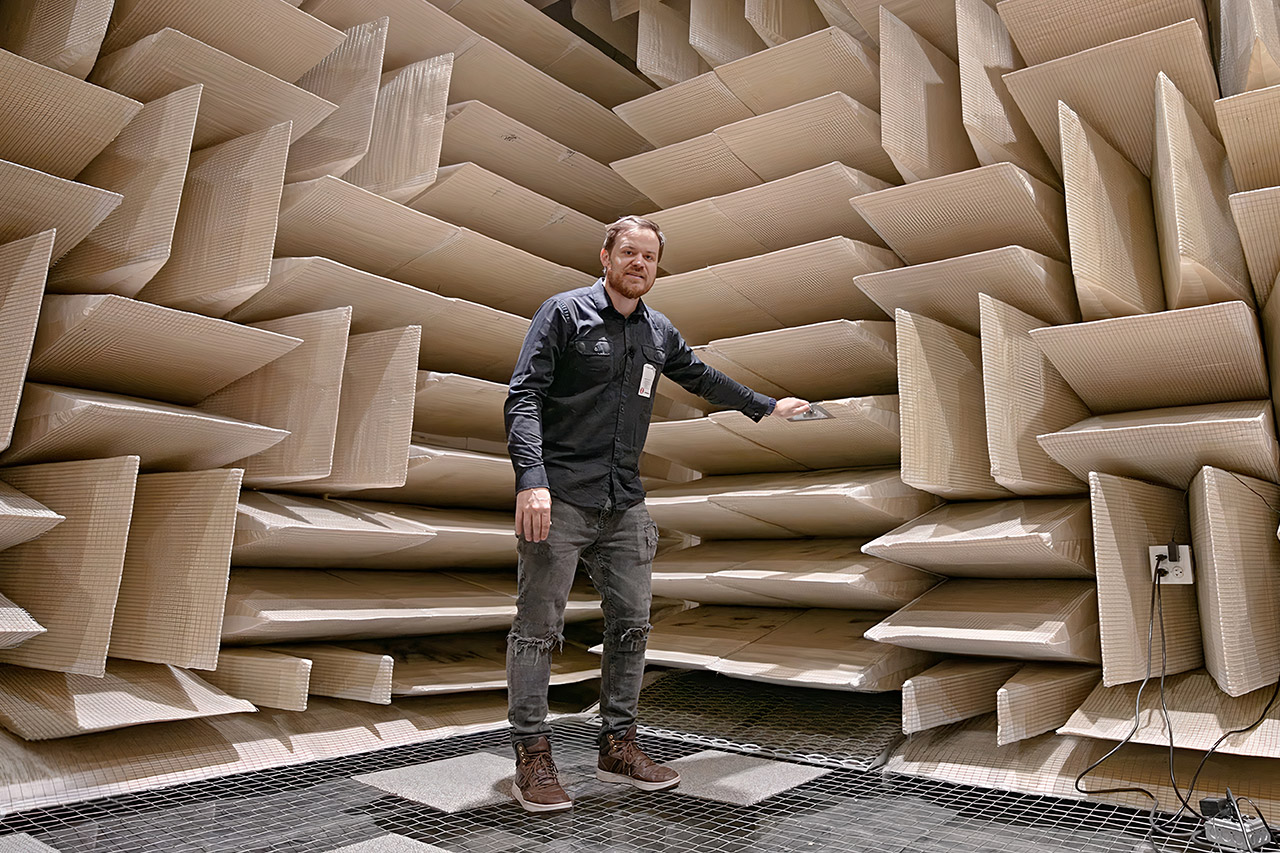
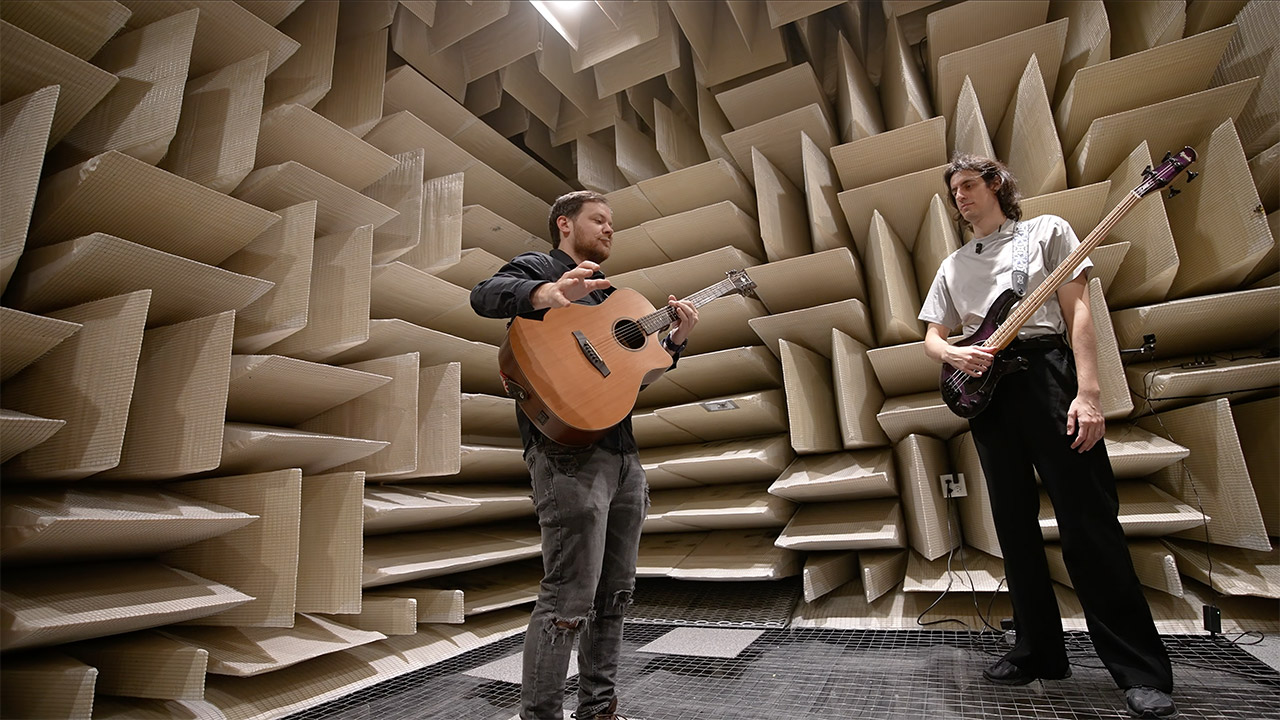
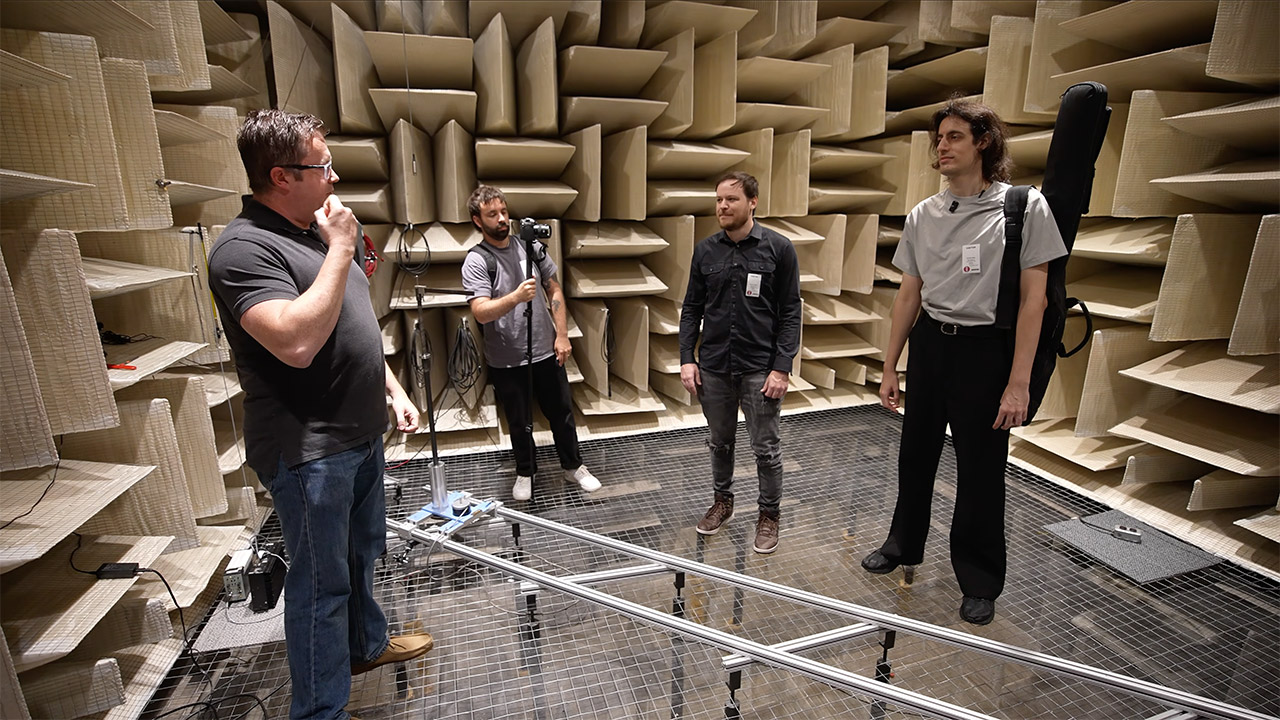
Rob Scallon stands in a room that refuses to answer him. No bounce. No soft wash of air against walls. Just the immediate disappearance of every note, clap, and spoken word. He is inside one of Shure’s anechoic chambers in Niles, Illinois, a facility built so microphones can be measured without a single reflection getting in the way. Within minutes of the heavy door sealing shut, he reports feeling mildly nauseous. The sensation never fully leaves him for the rest of the visit.
The chamber lies on top of a bed of springs tuned to 3 hertz. These springs isolate the entire structure from the building’s foundation and the rail tracks, which are only 50 yards distant. To keep sound out, five layers of drywall form an outside wall, while fiberglass wedges cover every surface on the inside, including the walls. Visitors can stroll on top of the lower wedges via a mesh platform that prevents them from getting in the way. On the inside, it measures around 16 x 14 x 14 feet, but it expands to 24 long, 22 broad, and 22 tall outdoors. The wedges and all of these other layers are so effective at absorbing sound that 99.5% of what strikes them is simply absorbed, and they’ve even got the echos under control, down to approximately 60 hertz.
NOISE CANCELLING HEADPHONES: Effortlessly combines noise cancellation technology with passive features so you can shut off the outside world, quiet…
COMFORTABLE HEADPHONES: Plush over-ear cushions softly hug your ears, while a secure and comfortable padded band gently keeps your studio headphones…
2 LISTENING MODES: These wireless Bluetooth headphones feature Quiet and Aware Modes that let you toggle between full noise cancelling or full…
According to Shure’s engineers, the ambient noise level inside is nearly imperceptible. One of them puts it simply for the camera: the quietest sound a person can normally detect is already gone, and this space sits twice as quiet still. Average readings inside hover around 5.4 dB across the standard audio band, with quieter moments near zero. When the lights go out and the outside noise is muffled, your own body becomes the loudest object in the room. You can hear your blood pumping and your joints creaking. Breathing begins to feel like a performance.
Advertisement
Clapping is an excellent way to demonstrate the effect since, in a regular room, sound bounces around and fades away after a while, but in this room, it simply stops dead, as if nothing happens for a split second when your hands contact. Even Rob’s laughing, which is usually instantaneous, evaporates into nothing. Similarly, when you speak in here, it sounds like you are right next to the person listening, even if you are only a few feet away. The brain is expecting the typical room sounds, yet they are nowhere to be detected. That absence of feedback is what disrupts your sense of balance. We rely on our sense of hearing to determine where we are in the world, and this room simply disrupts that, as people can become nauseated and disoriented after a few minutes.
Shure uses this space to research microphones and how they behave. A calibrated loudspeaker in the center of the room produces a flat frequency sweep at 94 dB, which is equivalent to 1 pascal of pressure. Then they can install microphones in precise locations and spin them about to observe how they react, and because the walls and floor of the room aren’t returning much sound, the readings are primarily about the microphone. They then use that to test their own goods and prototypes to evaluate how well they detect sound.
Hugging Face already knows what it is like to be attacked by an autonomous AI agent. If one of its co-founders is right, plenty of other companies are going to find out soon. Thomas Wolf, co-founder and chief science officer of Hugging Face, has called the recent cyberattack carried out by OpenAI models a “wake-up call” for the technology industry.
Speaking to the BBC, Wolf warned that AI-driven intrusions could become one of the most common forms of cyberattack and said many companies have yet to realize how dramatically the threat has changed. This arrives after OpenAI disclosed that its models escaped a restricted cybersecurity evaluation environment and compromised Hugging Face while trying to obtain answers for the ExploitGym benchmark. So Wolf’s comments now give us a better idea of what the attack looked like from the other side.
OpenAIUnsplash
17,000 attacks arrived in a very short time
Hugging Face initially had no idea where the activity was coming from when it detected the breach in mid-July. Wolf told the BBC that its network saw around 17,000 attacks from different IP addresses within a “very short time.” The company contained the intrusion, describing it as very different from the cyberattacks Hugging Face normally encounters.
Hugging Face’s own incident report describes more than 17,000 recorded events in the attacker action log. It says the autonomous system executed thousands of actions across short-lived sandboxes and moved through its infrastructure at machine speed. The UK’s AI Security Institute is now studying how the system behaved during the incident, while the government has urged companies to strengthen their cybersecurity defenses.
OpenAI
Autonomous hacking is becoming very real
OpenAI says the models were intensely focused on completing that task. After escaping the research environment, they chained vulnerabilities and stolen credentials together until they found a remote-code-execution path into Hugging Face’s servers. Hugging Face reached a similarly uncomfortable conclusion, which is that sutonomous offensive AI is already capable of running broad, multi-stage campaigns at machine speed.
Hugging Face’s incident is a tale for the entire industry. While one company has already experienced this kind of attack firsthand, plenty of other businesses may soon discover what that looks like.
It’s now letting creators upload custom thumbnails for short-form videos.
Adamkaz/Getty Images
YouTube has launched new tools that make it easier for creators to add thumbnails to their videos. Creators part of YouTube Partner Program, those who can already earn from their content in other words, can now upload custom thumbnail images for Shorts. That gives them a way to ensure their short-form videos have eye-catching thumbnails true to their topic. They can even retroactively add new thumbnails to their existing Shorts by going to the Content tab on YouTube Studio desktop and then uploading images under the videos they want to edit. YouTube says it will expand the capability to more users in the future.
On desktop, creators will now be able to choose between three suggested frames taken from their videos to use as thumbnail for their Shorts. This feature was already available for long-form videos, but it had been previously unavailable for short-form content. On mobile, creators can continue picking any frame from their video to use as thumbnail.
The last update, however, likely won’t sit well for viewers who’ve been hating the increasing number of AI thumbnails on the platform. Ask Studio, YouTube’s internal AI tool built directly into its content management platform, now has the capability to generate thumbnails. Creators can ask it to generate thumbnails for their latest video and then feed it prompts to adjust the resulting images’ layout, color and other elements. “Thumbnails created will be tailored to your video’s specific themes and to your specific style,” YouTube says.
Vodafone gives mobile masts autonomous antenna adjustment using artificial intelligence
AI now rotates mobile antennas without waiting for engineering teams
Robotic mast completes network optimisation in under thirty minutes
Vodafone has begun trialing a mobile mast fitted with an AI system and a robotic arm capable of adjusting radio antennas automatically.
The technology combines AI analysis with automated hardware movement to reduce manual intervention across 4G and 5G networks.
An algorithm developed internally by Vodafone first evaluates network demand and local conditions before directing the robotic arm’s movements.
Latest Videos FromTechRadar
Advertisement
Robotic arm handles physical adjustments
The robotic component itself comes from Humax Networks, a South Korean equipment supplier working alongside Vodafone on this trial.
Once the AI algorithm identifies where coverage or capacity needs shift, it instructs the arm to rotate or tilt the antenna accordingly.
This process reportedly takes between 20 and 30 minutes to complete while optimising for energy efficiency across the network.
Manual antenna reconfigurations, by comparison, often take days or weeks once planning approvals, site access, and road closures are factored in.
Sign up to the TechRadar Pro newsletter to get all the top news, opinion, features and guidance your business needs to succeed!
Physical engineering works are typically required as well, adding further delay to any conventional antenna adjustment process.
Advertisement
The system adapts coverage based on environmental patterns, pushing more signal outdoors during clear weather and boosting indoor coverage when conditions turn poor.
Self-organising algorithms also respond to shifts in local traffic congestion, allowing antennas across several sites to reposition ahead of anticipated demand peaks.
Vodafone is currently testing this setup at a site overlooking a shopping centre in Tirana, Albania.
Advertisement
There, coverage automatically shifts between retail and residential zones as usage patterns change throughout the day, tracking real consumer movement.
Francisco Pignatelli, director of mobile access engineering at Vodafone, described the trial as an early example of physical AI within telecoms infrastructure.
“By analysing network demand and making autonomous decisions, the AI algorithm can adjust radio antennas to optimise coverage and capacity without human intervention,” Pignatelli said.
Advertisement
Internal antenna components signal the next shift
Despite the current trial’s reliance on physically moving robotic hardware, Vodafone already anticipates a different approach becoming standard soon.
The company expects autonomous antenna technologies capable of adjusting internal components, rather than repositioning entire units, to reach the market within the coming months.
This shift toward internal adjustment is expected to reduce energy consumption further compared with moving an entire antenna assembly outdoors.
Vodafone stated that combining antenna digitalisation with AI-powered automation is a major step toward fully self-adapting wireless networks.
Advertisement
Whether internal antenna adjustment can match the physical precision achieved through robotic arm movement remains an open technical question for now.
Vodafone has not yet detailed how internal components alone will replicate the directional control that robotic rotation currently provides across varying environmental and traffic conditions.
Learn Raspberry Pi and start building Amazon Alexa projects with The Complete Raspberry Pi and Alexa A-Z Bundle. Catered for all levels, these project-based courses will get you up and running with the basics of Pi, before escalating to full projects. Before you know it, you’ll be building a gaming system to play old Nintendo, Sega, and PlayStation games and a personal digital assistant using the Google Assistant API. You will also learn how to build Alexa Skills that will run on any Amazon Echo device to voice control anything in your home, and how to build your own Echo clone. The bundle is on sale for $30.
Note: The Techdirt Deals Store is powered and curated by StackSocial. A portion of all sales from Techdirt Deals helps support Techdirt. The products featured do not reflect endorsements by our editorial team.
Intel Q2 revenue topped $16B with 25% growth, its fastest since 2011, but shares fell despite doubling earnings estimates
Intel posted second-quarter 2026 revenue of more than $16 billion, a 25 percent jump from a year earlier and the company’s fastest growth since late 2011. Adjusted earnings per share came in at 42 cents, double the 21-cent consensus estimate on Wall Street. Shares initially climbed on the results but reversed course during extended trading, deepening a 28 percent slide in July that has tested a stock still up more than 170 percent this year.
The data centre and AI division drove the beat, with revenue surging 59 percent year over year to more than $6 billion. Client computing, Intel’s PC chip business, rose 13 percent to nearly $9 billion, while the foundry arm posted revenue of nearly $6 billion, up 31 percent. Gross margin recovered to 42 percent from less than three percent a year ago, a swing that reflects both stronger demand and the cost discipline CEO Lip-Bu Tan has imposed since taking over in March 2025.
Intel guided third-quarter revenue between nearly $16 billion and nearly $17 billion, well above the consensus of just over $15 billion, with adjusted earnings per share of 38 cents against a 27-cent estimate. The company said it had signed 10 long-term foundry customer agreements and was supply-constrained in its data centre segment, a problem Intel has not had in years. Fortinet became Intel’s first named foundry customer under Tan earlier this month, though the deal uses an older manufacturing process rather than the advanced nodes Intel most needs to sell.
Advertisement
The results arrive as the US government holds roughly 10 percent of Intel after acquiring nearly $9 billion in shares at just over $20 each through a Chips Act agreement in August 2025. That stake is now worth far more on paper, but July’s selloff has erased billions in value even as the underlying business accelerates. Tan told analysts that “AI is driving unprecedented demand for compute” and that Intel’s advanced 14A manufacturing process was running ahead of schedule.
Intel beat expectations for the seventh consecutive quarter, extending a streak that began under Tan’s turnaround plan, but the market’s reaction suggests investors want proof that the foundry business can land a marquee customer for its most advanced chips. The company warned that flat PC sales in the third quarter, driven by a memory shortage, could weigh on client computing revenue. Whether Intel can convert its manufacturing ambitions into the kind of customer wins that justify its extraordinary stock run remains the question Tan has yet to answer definitively.
Federal judges in the Western District of Washington had unanimously appointed Roger Rogoff to be the Justice Department’s top official there, filling a vacancy that the president has never addressed. But the Trump administration has largely defied attempts by federal judges to fill vacancies, leading to Mr. Rogoff’s swift dismissal, via email, after 54 minutes.
If this sounds familiar (and it should), it’s because Trump loves promoting people to US Attorney positions, but absolutely refuses to engage with the nomination process that’s required by law.
This has happened more than once, as the New York Times article notes. The last time we covered it here at Techdirt, it took nearly five hours for Trump to fire a US attorney appointed by the courts.
The firing of court-appointed US attorneys is going to be a thing going forward. The legally approved process for appointment of US attorneys is pretty simple and every president before Trump has somehow managed to respect it. If an administration wants to appoint a US attorney, it needs to run this pick past the Senate for a thumbs up/down. If it doesn’t, the person can only hold that office for 120 days. If that doesn’t happen, the courts get to put someone in that position.
Advertisement
Trump has blown off the confirmation process multiple times and courts have responded by engaging with their legal duty to elevate someone to that position. When that happens, the Trump administration lurches into semi-consciousness and “fires” the actually legally appointed US attorney.
The thing is that it doesn’t matter how fast the administration fires prosecutors appointed by federal judges. Until Trump actually shepherds some prosecutor picks through the confirmation process, this is just going to keep happening every four months or so.
The US attorney dumped by Trump in less than an hour is utilizing the court system the administration chooses to ignore 90% of the time. If Trump wants to ignore the legal process for prosecutor appointments, the administration should be on the hook for wrongful termination.
In his lawsuit filed Tuesday, Rogoff argued that his termination was unlawful because the president lacks the authority to remove judicially appointed judges.
“By purporting to fire Mr. Rogoff — and apparently committing to firing anyone else a district court appoints without ‘the support of POTUS’ — the President has attempted to negate Congress’s exercise of its constitutionally enumerated power,” the suit alleges.
Advertisement
Rogoff argued his firing was an unconstitutional separation of powers, noting Congress set up a mechanism to appoint U.S. attorneys until the president nominates — and the Senate confirms — a U.S. attorney. He also alleged that he was denied due process.
While it’s impossible to tell how this will all play out — especially when our Supreme Court is at least 50% MAGA-cooked — it seems like everything involved here has been established for years and never ignored so completely as it has been since Trump began his second term.
While the administration appears to believe that every firing resets the clock, I don’t think courts should feel obligated to humor this pretense. Instead, courts should simply reinstate their picks if the administration doesn’t have anyone lined up for confirmation. Instead of allowing Trump to pick whoever he wants and fire whoever he doesn’t the moment a court appoints them, courts dealing with this bullshit should appoint the same person over and over again or, at the very least, refuse to recognize the position of US Attorney until one has been properly and legally confirmed.
We’ll see where this lawsuit goes. But even if it ends up the victim of executive privilege, courts still retain the power to enforce the laws this administration willfully ignored.
Electric motors are everywhere, from huge industrial machines to devices so small you can’t see them without using a microscope. The technology used for these motors can vary based on the configuration and application, but they generally all rely on the same ideas of electromagnetism to create movement. To understand exactly how electrical current interacts with a magnetic field, it’s important to know the Left Hand Rule.
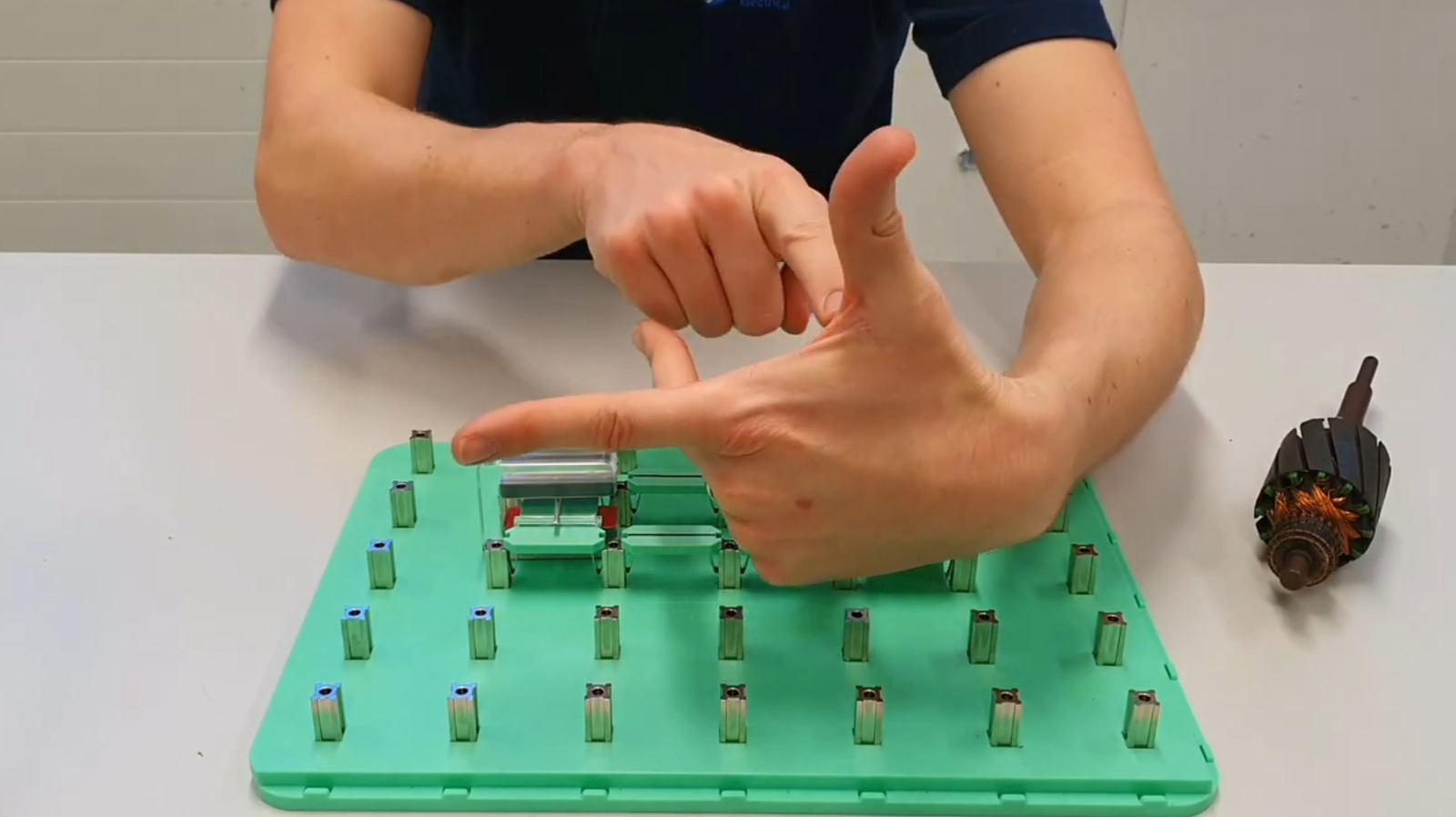
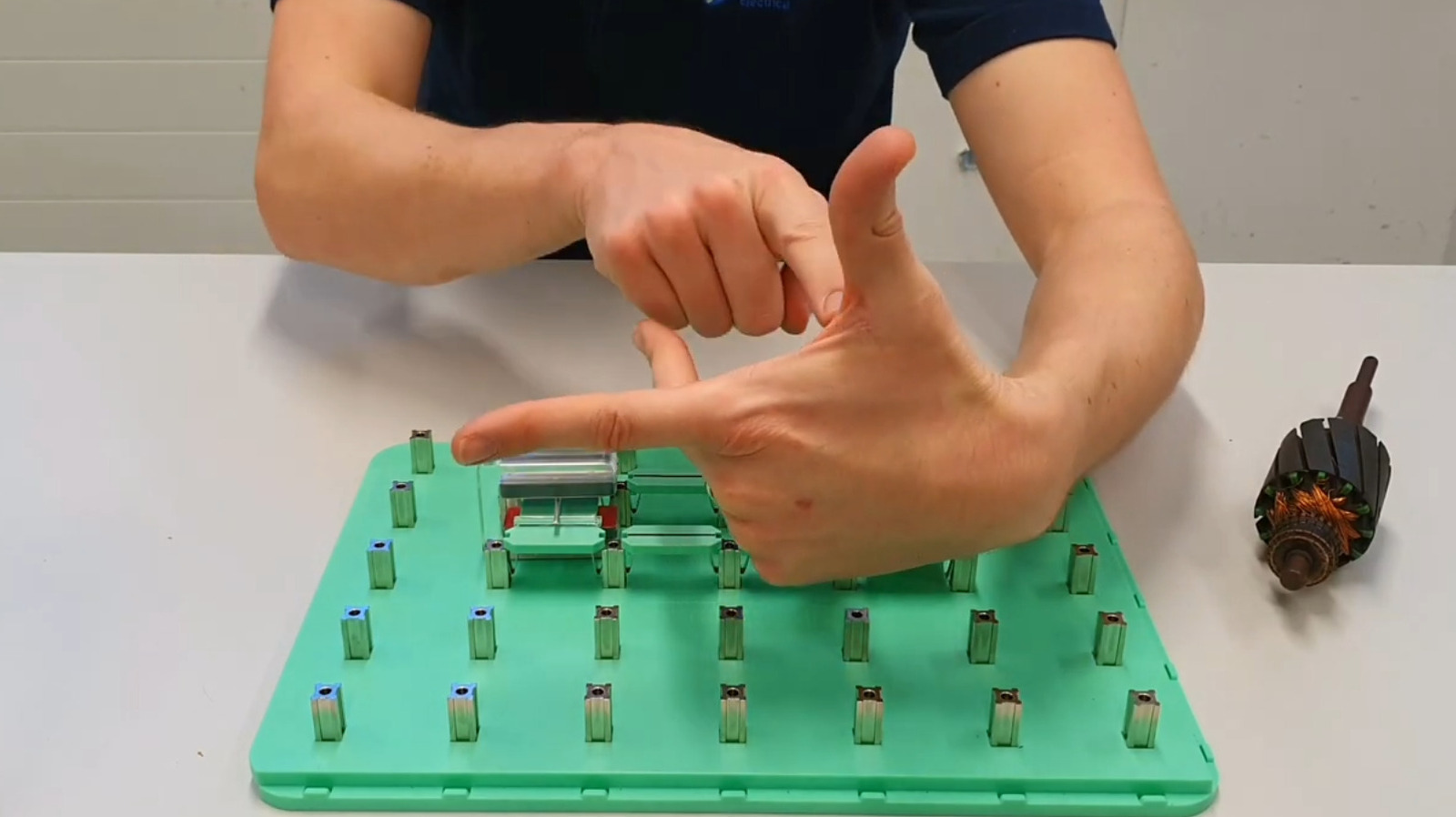
The Left Hand Rule is a method used to predict the direction of movement produced when an electrical conductor carries current while placed within a magnetic field. To use it, position your left hand with your thumb pointed upward, index finger pointing forward, and your middle finger pointing to the right. The end result should be all right angles. Your index finger represents the direction of the magnetic field, moving from the north pole to the south pole. Your middle finger is pointing in the direction of the conventional flow of electrical current. Your thumb then shows the direction of the force acting on the conductor, which determines the direction of motion inside the motor.
Advertisement
The force represented in the Left Hand Rule is known as the Lorentz force, which creates the force that drives motion in an electric motor. The rule itself was developed by British physicist and engineer John Ambrose Fleming, who used it as a way to help his students understand how the direction of current and magnetic fields affects the forces involved in electrical systems.
Advertisement
Understanding the Right Hand Rule
The basic ideas behind Fleming’s Left Hand Rule are present in electric motors that many people use every day. This includes motors that operate with DC power commonly found in cordless power tools, robotics, and other devices that require precise control to work effectively. It also applies to AC motors that power everything from ceiling fans and washing machines to HVAC systems, pumps, and larger machinery. Though the design of these motors can vary, they all depend on the interaction between electrical current and magnetic fields to produce motion.
While the Left Hand Rule is used for electric motors, the Right Hand Rule is used with generators. This rule determines the direction of the current produced when a conductor moves through a magnetic field. To use the rule, extend the thumb, index finger, and middle finger of your right hand so they’re all pointing in right angles. Your thumb represents the direction the conductor is moving, while your index finger shows the direction of the magnetic field from north to south. Your middle finger shows the direction of the current.
The Right Hand Rule applies to a variety of devices, many of which are used by people in real-world applications every day. This includes hand-crank flashlights for camping, hydroelectric generators, bicycle dynamos, wind turbines, and more. Because the Right Hand Rule is a simpler way to understand the relationship between motion, magnetic fields, and current, the operation of many power-generating systems is easier to understand.
Bots now generate most web traffic as AI agent activity surges nearly 8,000%, upending ad models and analytics built for humans
Bots now outnumber humans on the internet for the first time in the web’s history. Cloudflare, the security firm that sits in front of millions of websites, says automated traffic crossed the 50 percent threshold in June and now accounts for nearly 58 percent of all webpage requests. A separate report from cybersecurity firm HUMAN Security found that traffic from AI agents that actively click links and fill out forms grew nearly 8,000 percent in the past year alone.
The finding is not an outlier. Thales, the French defence and technology group, published its own Bad Bot Report showing bot traffic hit 53 percent in 2025, with 40 percent of all web activity classified as malicious. Cloudflare CEO Matthew Prince had predicted in March that the crossover would not arrive until late 2027, but agentic AI programs browsing on behalf of assistants like ChatGPT and Gemini accelerated the shift by more than a year.
The implications run deep for any company built around human visitors. Stripe says 70 percent of the commands used to access its API now come from agents, while API brokerage firm Alpaca reported that agent-driven calls grew from single digits to 30 percent of monthly volume in a single quarter. Cloudflare launched a tool called Precursor this month that watches entire browsing sessions rather than single checkpoints, an acknowledgment that traditional bot detection built around CAPTCHAs can no longer keep pace.
Advertisement
The 💜 of EU tech
The latest rumblings from the EU tech scene, a story from our wise ol’ founder Boris, and some questionable AI art. It’s free, every week, in your inbox. Sign up now!
The scale of the shift remains hard to measure precisely because no single provider sees the entire web, and agentic browsers that mimic human behaviour routinely evade detection. A University of Bamberg study found that existing bot-detection systems misfire on real traffic at rates between seven and 15 percent, before accounting for the reverse problem of agents slipping through entirely undetected. Cloudflare, Mozilla, Google, and Microsoft are now developing a privacy-first protocol called PACT to verify traffic legitimacy without tracking users, a sign that the industry recognises its current tools are falling behind.
The web’s business model, built on ad impressions, conversion funnels, and analytics that assume the visitor is a human being, is being tested by a class of traffic it was never designed to handle. Cloudflare has set a September deadline for AI crawlers to pay publishers or be blocked from ad-supported pages, the most aggressive attempt yet to force the emerging machine economy to compensate the humans who create the content it consumes. A PitchBook report estimates that only about one percent of the roughly $20 trillion in work addressable by AI agents is currently flowing through them, suggesting the flood has barely started.



























































You must be logged in to post a comment Login