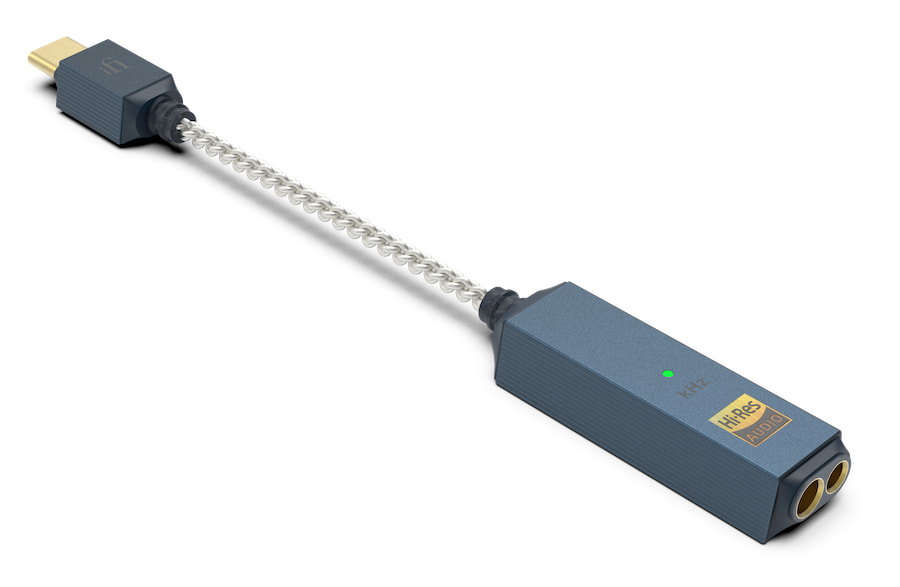
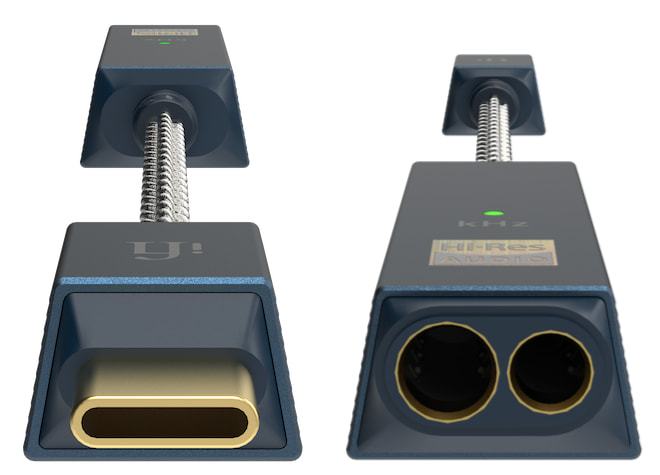

iFi Audio is back in the dongle DAC fight with the new GO link 2 Max, a compact USB-C DAC/headphone amplifier designed for smartphones, tablets, laptops, and PCs. Announced around High End Vienna 2026, the new model lands at $85 USD which puts it directly into one of the most crowded corners of personal audio.
And crowded is being polite.
The dongle DAC category is now packed with options from iFi, FiiO, Shanling, AudioQuest, Schiit Audio, Questyle, and enough other brands to make your phone’s USB-C port consider early retirement. AudioQuest has a new model coming as well, so clearly nobody got the memo that the boat was already full and starting to take on water.
Still, iFi has been at this long enough to know the assignment. The GO link 2 Max is not trying to be a desktop replacement, a battery-powered Bluetooth DAC, or a tiny slab of CNC-machined jewelry with a price tag that makes you clean your glasses, reload the page, and wonder if someone misplaced a decimal point. It is a wired USB-C dongle DAC with more output power, dual-DAC architecture, iFi’s S-Balanced technology, and app-based firmware support for under $100.
Advertisement
That might actually be a good deal if the sound quality has been improved and the cable can take the abuse.
Dual ESS Sabre DACs in a Tiny USB-C Package
The GO link 2 Max uses a dual ESS Sabre DAC architecture, with one DAC chip assigned to each audio channel. iFi says the design improves detail, definition, and instrument separation versus a single-DAC layout.
Format support is also strong for the price: PCM up to 32-bit/384kHz and native DSD256. That is more than enough for the overwhelming majority of users streaming from Qobuz, TIDAL, Apple Music, or a local hi-res library. Nobody needs to pretend they are casually commuting with 11.2MHz DSD files. Call your therapist if that’s actually something on your smartphone.
The GO link 2 Max also uses iFi’s GMT clock circuitry with a specialized crystal oscillator, along with ESS technologies such as Time Domain Jitter Eliminator. The goal is lower distortion, cleaner timing, and better clarity from a device small enough to disappear into a pocket.
Advertisement
More Power Than the Size Suggests
The headline number is up to 241mW of output power, which is a lot for something this small and affordable. That does not mean it will replace a proper desktop headphone amplifier, and nobody should expect it to drive planar headphones without some strain at higher levels.
But for IEMs, efficient dynamic headphones, and many portable over-ear models, 241mW gives the GO link 2 Max enough muscle to be more than a basic USB-C phone adapter with delusions of grandeur. Han Solo would understand.
In our review of the previous iFi GO link Max, the appeal was clear: it was small, solidly built, genuinely plug-and-play, and offered a lot more volume, resolution, clarity, bass texture, imaging, and separation than a basic laptop or phone headphone output.
Advertisement. Scroll to continue reading.
Advertisement
It also brought dual ESS Sabre DACs, 32-bit/384kHz PCM, DSD256 support, and a 4.4mm balanced output to the sub-$100 category, which made the $79 price feel like someone at iFi had either lost a bet or found religion.
The limitations were also clear: the attached USB-C cable was a structural weak point, the 3.5mm output had less power than the 4.4mm jack, and high-impedance dynamic headphones were not always the best match.
The GO link 2 Max appears to stay focused on the same core idea, but with more output power, dual DACs, Dynamic Range Enhancement, THD compensation, and better software support through iFi Nexis.
That is the right direction.
Advertisement
S-Balanced Output, Not a 4.4mm Balanced Jack
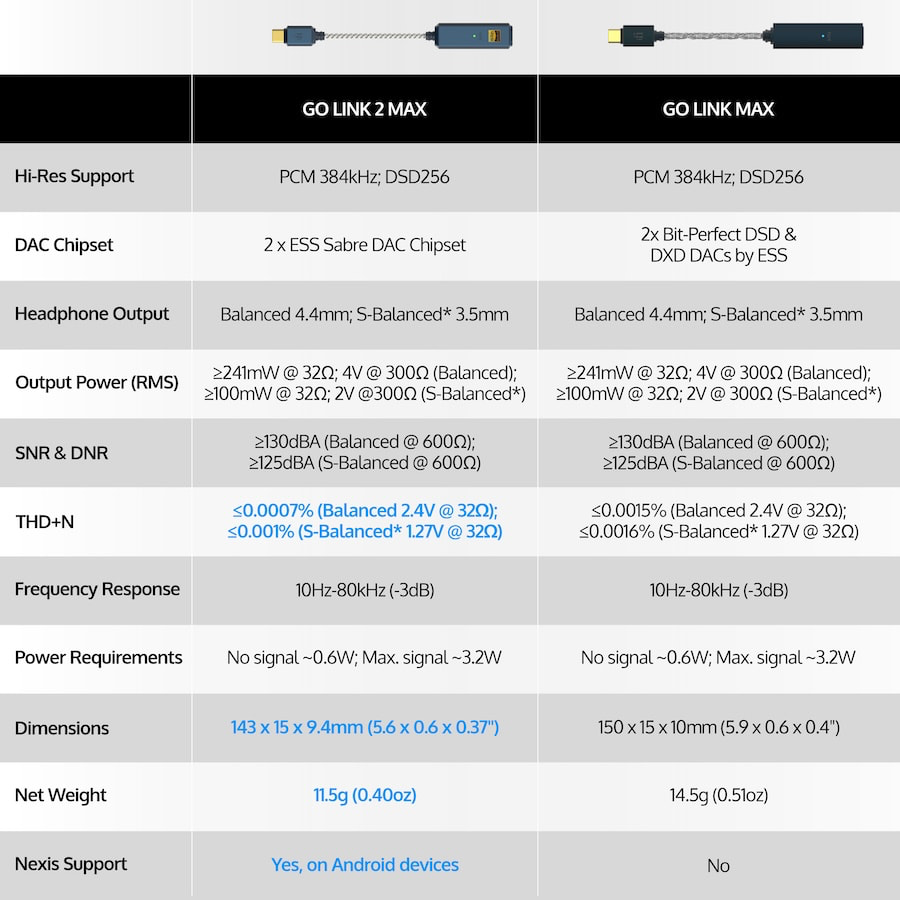
One detail needs to be stated accurately: the GO link 2 Max does not appear to add a 4.4mm balanced headphone output. Instead, it uses iFi’s S-Balanced technology through its 3.5mm headphone output.
iFi says S-Balanced applies balanced circuit principles to a single-ended 3.5mm output to reduce channel crosstalk and improve separation. According to iFi, the implementation cuts crosstalk between channels in half.
That distinction matters because “balanced” gets thrown around in portable audio like free drink tickets at a trade show. This is not the same thing as a 4.4mm balanced output. It is iFi’s own approach to lowering noise and improving separation from a standard headphone jack.
For most users with 3.5mm headphones and IEMs, that is probably more useful than adding another cable standard to the drawer of shame.
Dynamic Range Enhancement and Lower Distortion
The GO link 2 Max also includes Dynamic Range Enhancement, or DRE, which iFi says adds up to 6dB of additional range between the quietest and loudest moments in the music.
Advertisement
iFi also claims its THD compensation reduces distortion by more than 50% compared to the original GO link Max. That is a useful claim, but again, the listening test matters. Measurements can tell part of the story. Headphones, IEM sensitivity, source device behavior, and volume control implementation will tell the rest.
iFi Nexis App Support, But Android Gets the Good Stuff
The GO link 2 Max supports the iFi Nexis app, which enables over-the-air firmware updates, selectable digital filters, and volume limiting.
There is a catch: iFi says those Nexis features are exclusive to Android devices. That means iPhone, iPad, and Mac users should not assume they are getting the same app-based control experience.
Advertisement. Scroll to continue reading.
Advertisement
The two selectable digital filters are hybrid and linear, giving Android users some control over the DAC’s sonic behavior. Whether most listeners will hear a dramatic difference is another matter. Digital filters are useful, but they are not fairy dust. They tend to make subtle changes, not convert a $85 dongle into a $2,000 desktop DAC because someone tapped the right button.
Hardware Volume Control Is the Smart Move
One practical feature is the GO link 2 Max’s hardware-based volume control. iFi says this lets users adjust volume without reducing digital resolution in the way software volume control can.
That matters most with sensitive IEMs, where small volume changes and low noise are important. It is not the flashiest feature on the spec sheet, but it is the kind of detail that can make a portable DAC easier to live with every day.
Specifications Compared
The Bottom Line
The iFi GO link 2 Max is for listeners who want a real upgrade from a phone, tablet, or laptop headphone output without carrying a desktop DAC or another battery-powered box. For $85, it offers dual ESS Sabre DACs, up to 241mW of output, S-Balanced technology, hardware volume control, and hi-res PCM/DSD support in a tiny USB-C package.
The dongle DAC market is packed tighter than a CanJam elevator, but this one stands out by focusing on the basics: more power, cleaner conversion, and better control for IEMs and efficient headphones.
The bill awaits Gov. Hochul’s signature after passing the state legislature
New York lawmakers have approved a bill imposing new labor, energy, environmental, and community-benefit requirements on datacenters, including a one-year moratorium on certain permits for facilities drawing 20 MW or more.
The bill now heads to New York Gov. Kathy Hochul for a signature. A spokesperson for the governor told the New York Post she would review the legislation, but gave no signal as to whether she would sign it. Hochul has previously said she hoped to leave regulating datacenter construction to the local communities.
Advertisement
“Today we face an unprecedented wave of proposed large-scale data center development across New York,” the bill’s sponsor Assemblymember Anna Kelles wrote in a statement posted to Instagram. “My legislation seeks to provide New York with the time necessary to fully evaluate the environmental, energy, water, and ratepayer impacts of these facilities and to develop appropriate regulatory safeguards before additional projects move forward.”
The Assembly approved the bill on Thursday, the same day Anthropic, the AI giant behind Claude, called for a pause on LLM development sprints as developers believe the models could soon be capable of building themselves. In light of that possibility, researchers at Anthropic said the world would benefit from a slowdown in the race to make models more powerful.
In New York, lawmakers hope to protect consumers from higher energy bills by creating a special classification for datacenter electrical customers and mandating that all necessary infrastructure upgrades, administrative expenses, and operational costs be assigned entirely to the datacenter.
The bill also outlines electricity-sourcing requirements for datacenters with a peak load of at least 5 MW, requiring a phased shift toward renewable energy, with one-third of electricity coming from renewable sources between 2030 and 2034, two-thirds between 2035 and 2039, and 90 percent from 2040 onward.
Advertisement
For trade workers who are employed to build the facilities and maintain the buildings later, the bill requires the datacenters to meet prevailing wage requirements, unless the workers are operating under a collective bargaining agreement. Additionally, it demands datacenter companies help host communities with renewable energy initiatives, and mitigate the strain on local wastewater treatment facilities.
Business leaders are urging Hochul to reject the bill, saying it was rushed through at the end of a legislative session and presented without appropriate debate.
In a statement provided to The Register, Julie Samuels, president and CEO of Tech:NYC, which promotes the state’s technology industry, said a blanket moratorium on datacenters would slow investment in the next generation of infrastructure projects.
“Energy usage, grid capacity, and the community impact of data centers must be addressed, and the Governor’s Public Service Commission is already pursuing the right approach by ensuring data centers pay their fair share for grid upgrades and energy usage,” Samuels wrote in a statement.
Advertisement
Republican Assemblymember Phil Palmesano argued that datacenters were being unfairly targeted when other technology companies were given tax incentives to build, pointing to the recent groundbreaking of the Micron chip fab in Clay, New York, which is expected to create 50,000 New York jobs throughout construction, and up to 90,000 nationally.
The bill, approved by the Senate on Friday, includes carve-outs for certain industrial computing applications, including manufacturing.
“If we told Micron they had to power their energy demands strictly using renewable resources, they wouldn’t be here,” Palmesano said, according to the NY Post.
One of the first drafts of the bill had called for a three-year pause on datacenter construction. ®
Google may have just accidentally shown everyone where Gemini is headed next. According to TestingCatalog, a new Troubleshooting mode has quietly appeared inside the Gemini model picker menu for some users.
It sits alongside existing options like Gemini 3.5 Flash and 3.1 Pro, which are the standard AI models you already switch between in the app.
GOOGLE 🔥: A new Troubleshooting mode has been spotted on Gemini.
In this mode, Gemini will explain troubleshooting process via text responses and interactive widgets. Even though it is working and available, it still looks like an unintended release and might get reverted… https://t.co/FWQLelYXjupic.twitter.com/Y73PJb7y1e
— 🚨 AI News | TestingCatalog (@testingcatalog) June 4, 2026
Advertisement
What does the Troubleshooting mode in Gemini actually do?
Rather than giving you a wall of text to read, the Troubleshooting mode guides you through a problem step by step using a mix of text responses and interactive widgets.
TestingCatalog
For example, if you tell Gemini your car will not start, it might identify common causes like a dead battery and then present you with symptom options to tap, such as “clicks or silent,” to help narrow down the issue faster. It is a more structured, guided experience than asking Gemini a question in regular chat mode.
How is this different from just asking Gemini normally?
That is a fair question, and the answer comes down to how the mode is tuned under the hood. Redditors who got early access suggest it runs on a lower temperature setting, which means it sticks closely to the problem at hand and skips the conversational filler.
@BartokGabi17 / X
Its responses are reportedly focused on diagnosis and practical fixes rather than general information. Google has not officially announced the feature, and it remains unclear whether this is a planned rollout or an internal test.
For now, the Troubleshoot feature appears to be an unintended release, meaning Google likely flipped it on by mistake, and could pull it back at any time. More details are expected in the coming weeks.
Asking venture capitalists for investment is a rite of passage for tech founders. This has led to another universal experience: the VC pitching horror story. A massive conversation sharing such stories has taken place all week on X, with the comments both funny and infuriating. We read through them all to find the most interesting ones so you don’t have to.
Greg Isenberg, a startup podcaster, newsletter writer, and founder of Late Checkout Studio — a holding company whose previous ventures include a company acquired by WeWork — got the conversation started with a story about a VC falling asleep during a pitch meeting. Isenberg has a large following on X, and his post clearly struck a nerve.
“I was once pitching in a board room at a top 3 VC firm for a $15M Series A. 12 people in the meeting. One of the GPs fully fell asleep. Out cold for 30+ minutes. Nobody acknowledged it. Everyone just kept going,” he shared on X.
VCs sleeping through pitch meetings was far and away the most common horror story shared. Not just drowsing, but full on zonked.
Advertisement
Zynga founder Mark Pincus told his VC-asleep story. “I looked at my friend who set up the meeting and asked if i should keep presenting and she said yes. It was ‘weekend at bernies’ meets Silicon Valley,” he wrote.
Interestingly, falling asleep didn’t mean the VC wouldn’t invest. Multiple founders reported receiving term sheets from partners who’d dozed off during the pitch.
“I once pitched a partnership in 2015 for our Series A where one partner (famous Midas lister) fell asleep & another couldn’t stop scowling. Got a call 2 hrs after the IC that they were sending a term sheet over,” wrote Liz Wessel. Wessel, who co-founded and sold HR startup WayUp and is now a partner at First Round Capital, said her team didn’t take the money — and that the VC was shocked.
There were so many stories about VCs sleeping that former a16z partner Arianna Simpson wrote, “Are VCs ok?? Narcolepsy appears to be running rampant.”
Travis Kalanick, the Uber co-founder renowned for his determination, told a story about discovering that a VC was attempting to ghost the meeting and leave the building. Kalanick said he followed the VC to his car and pitched from the passenger’s seat.
Not everyone had bad experiences to report. Some founders said they’ve never had anything but great experiences with VCs, with a few even sharing love stories about specific investors. Yes, most VCs are hardworking, genuinely try to be helpful, and don’t take naps during meetings. But poor experiences are so common that Pincus exclaimed, “I f*cking love this moment, when founders no longer have to be afraid to call out VCs for dumb behavior.”
The most stunning stories
Still, the stories that truly stunned were the ones posted by Cloudflare founder Matthew Prince. “A Sequoia partner passed on Cloudflare because he didn’t think a woman could lead a security infrastructure company,” Prince wrote. The woman in question is Cloudflare’s co-founder and COO Michelle Zatlyn. Given that Cloudflare is now an $87 billion market cap company, with expected annual revenue of $2.8 billion in 2026, the judgment hasn’t aged well.
Advertisement
Sequoia partner Shaun Maguire, no stranger to controversy over his remarks himself, replied that he’s always admired Zatlyn, and asked Prince to spill the name of the partner who said that. Prince punted, “Maybe over a drink one day. But I bet you have a good guess already.”
But wait, Prince dished more!
He told a story about prominent investor Vinod Khosla, who offered to invest and then, according to Prince’s recollection, suggested that the founder “fire” his co-founders and take their stock. “I think the charitable read was it was a test of my character. But I was so offended that we never spoke again. Literally blocked his number.”
Prince was quick to add nuance about Khosla: “He’s extremely smart/clever. Has been an incredible investor — can’t argue with his track record. Just not the personality I’d choose to work with.”
Advertisement
It’s worth noting that recollections of conversations tend to vary, and we don’t know what Khosla actually said, meant, or remembers. But eyes popped at such open talk about one of the Valley’s most successful, powerful VCs. Many people called Prince’s candor an example of having “FU” money. Prince, of course, is a billionaire these days.
Not all of Prince’s stories cast VCs as the villains. Specifically, he thought he had lined up a simple meet-and-greet on a Monday with Marc Andreessen, the co-founder of venture firm a16z. Instead, Andreessen showed up with his whole investment team, ready to be wowed. The ill-prepared Prince did not impress. “I framed the rejection letter they sent,” he said of the result. Others told similar stories of meetings with Andreessen and his firm.
Perhaps the funniest story came from Julie Fredrickson, a founder-turned-investor, who received a call from a VC associate before arriving at a firm’s office — warning her about a rock formation visible outside the window that, apparently unbeknownst to the investors inside, was shaped like male genitalia. “The firm will forever in my mind be Dickrock Ventures,” she wrote.
While the Valley’s VCs got roasted most heavily, founders shared incidents involving international VCs, too. Some VCs also dished about pitching to limited partner investors.
Advertisement
The threads are worth reading not just for the laughs, but for what they reveal: The fundraising process is opaque, the power dynamic is real, and the experiences that founders whisper about privately are a lot more common than the industry tends to acknowledge publicly.
Perhaps Isenberg explained the moral behind all of these stories best. “If you’re raising right now, just know: every founder has a story like this. The process is weird. The power dynamic is weird,” he wrote.
A second lesson may be: If Andreessen agrees to meet with you, he means business.
When you purchase through links in our articles, we may earn a small commission. This doesn’t affect our editorial independence.
Playtonic is shifting the Yooka-Laylee series from platforming to familiar-looking arcade racing.
Playtonic
Last year’s Mario Kart World didn’t quite hit the mark for a lot of folks. But during the Summer Game Fest edition of Day of the Devs, one game popped up that looks set to take arcade racing fans back in time. With Super Yooka-Laylee Kart, developer Playtonic Games is smushing together the characters from its Yooka-Laylee platformer series with the original Super Mario Kart.
It’s immediately obvious that Playtonic was inspired by Nintendo’s 1992 kart racer here, because of both the title and the game’s aesthetic. It looks like a modern spin on Super Mario Kart with pixel-art characters racing on a course that has coins and boxes containing power-ups laid flat on the track. Those drifts around corners look mighty familiar too.
Still, there are lots of other differences between Super Yooka-Laylee Kart and Super Mario Kart beyond the characters, track layouts and power-ups. The new game features a Rage system that builds up as you jostle for position during a race and perhaps get hit by the equivalent of a blue shell a little too often. This eventually allows you to use “devastating revenge abilities capable of changing the outcome in an instant,” Playtonic says, allowing for “tactical comebacks.”
Advertisement
The studio envisions Super Yooka-Laylee Kart as a skill-based, pixel-perfect arcade racer in which mastering the mechanics and items will stand you in good stead. There’s a “deep story campaign” that includes tournaments, time trials, endurance events and skill challenges. You can spend the coins you collect during races on upgrades. There are also online modes as well as local splitscreen multiplayer support for up to eight people. Races are highly customizable too. You can, for instance, make all the competitors invisible or modify the boost pads so they slow players down instead.
I haven’t played any Yooka-Laylee games (the series is a spiritual successor to Banjo-Kazooie), so I have no connection to any of the characters. However, I grew up on Super Mario Kart, so I definitely want to give this a spin.
Super Yooka-Laylee Kart is in development for Steam. There’s no word on whether it’s coming to consoles as yet, but it’s bound to end up on Nintendo Switch 2 at some point, right? In any case, beta tests for the online multiplayer modes will take place soon.
An anonymous reader quotes a report from Ars Technica: Just over a year ago, the Trump Administration issued an executive order meant to accelerate the development of nuclear power in the US. While an entire startup ecosystem has developed around the use of different — and typically smaller — reactor designs, only one of them has been fully licensed so far, and there are no plans to actually build any instances of that design.
The executive order directed the Department of Energy to have three different reactor designs reach criticality in a bit over a year. On Thursday, a startup called Antares announced that a test reactor it had placed at the Idaho National Laboratory had reached criticality, making it the first new design to cross this threshold. Criticality means that the nuclear reactions inside the hardware had become self sustaining; it does not mean the reactor had started to generate power. […]
At the moment, Antares is just testing what it calls a Mark 0 reactor, which is not connected to the power-generation portion. Instead, it’s being used to validate the company’s modeling of the physical conditions in its reactors and generate safety data that can be used during licensing applications. Attempts to run the entire system, including electrical generation, are expected to happen next year. While the work was done at a Department of Energy Lab, the company is working with the Department of Defense’s Project Pele program for developing a mobile nuclear reactor. The company has also received support from NASA.
After successfully replacing the firmware with a replacement image that did nothing more than display the word “patched” on the speaker’s LED display, the researcher got to wondering what else a hacker might do. So he turned his attention to FreeRTOS, the open source operating system that ran the Katana V2X. It contained a set of HID functions for allowing the speaker to act as a human interface device, a classification that includes keyboards, mice, and webcams. The speaker implemented a limited HID that allowed for things like changing the volume and playing or pausing sound, but little else.
The researcher discovered that he could change the speaker’s USB descriptor set, which is essentially a report that informs devices about the capabilities of a USB- or Bluetooth-connected peripheral. He was able to augment the existing descriptor set with a second one that reported the speaker being a keyboard. Then he used code already included in the firmware to streamline the process of sending keypresses.
All of this gave Moorats an idea: What if he used his device to send commands to the speaker that used the HID to pass them along to the connected PC? After some trial and error, he found that he could. In a blog post published on Wednesday, he wrote:
Chaining it all together, I was able to totally remotely, over the air, upload a custom firmware to my speaker which I hadn’t paired with, which would reboot, flash the custom firmware, and after rebooting type in the command echo pwned and execute it.
Advertisement
In a real attack scenario, I would execute the keystrokes for opening powershell.exe or similar and paste an actually malicious one-liner into that, but as a proof of concept, this was more than enough for me. A real attacker would also likely disable the routine for updating the firmware in both normal and recovery mode, making it impossible to wipe the malicious firmware from the device or patch it in the future.
This is worsened by the fact that Bluetooth is always on for the speaker, even in sleep mode, with no apparent way to disable it.
Advertisement
Before the speaker and USB-connected device can interact, they must successfully complete a challenge-and-response authentication procedure. Since the devices perform this handshake automatically each time the software boots, this isn’t usually a problem for the hacker. In certain cases, however, such as when the Katana V2X app isn’t open on the connected device, it’s a requirement.
Over 4,300 fake FIFA domains, banking malware in pirate streaming apps, and credential-harvesting phishing operations are already targeting World Cup 2026 fans ahead of the 11 June kickoff. The FBI, Group-IB, Fortinet, and Kaspersky have all published warnings.
The most oversubscribed sporting event in history is also the most phished. With more than 150 million ticket requests in the first 15 days and just six million seats across 16 cities in the US, Canada, and Mexico, the 2026 FIFA World Cup has created exactly the conditions that fraud thrives on: scarcity, urgency, and money moving fast.
Advertisement
Security researchers, the FBI, and multiple cybersecurity firms have published warnings in the past week describing a fraud infrastructure that is already operational, well-resourced, and scaling. The picture that emerges is not a handful of opportunistic phishing pages. It is a layered ecosystem of fake domains, banking malware, credential theft, and social media impersonation, all converging on the same window.
One operator, 300 cloned FIFA sites
The most detailed findings come from Group-IB, which tracked more than 4,300 fraudulent FIFA domains registered since August 2025. At the centre is a group it calls Ghost Stadium, a Chinese-speaking, financially motivated operation running a single phishing kit across more than 300 of those sites.
The fake is good. The page is a near-perfect copy of fifa.com, mimicking FIFA’s real single sign-on login, run by PingIdentity, down to the genuine client ID copied from the live site. It loads images directly from FIFA’s own servers, so the page looks authentic and slips past tools that flag copied assets.
The damage is in the details: the fake login also asks to reset the password. Once a victim enters credentials, the attacker locks them out of their real FIFA account and resells any tickets tied to it. Most traffic comes from Facebook ads with reused tracking codes, plus links on Telegram, WhatsApp, and in search results. Payment options include card entry, money-transfer apps like Chime and Nequi, Mexico-only processors, and a crypto option that converts card payments into cryptocurrency. That last one is a reliable tell, since FIFA’s official ticketing never accepts crypto.
13,000 domains and counting
FortiGuard Labs counted more than 13,000 World Cup-themed domains registered between January and May, roughly 8.8% of them classified as malicious or suspicious. The FBI’s public service announcement lists dozens of fake FIFA domains, from misspelled lookalikes to phony job pages, and warns more are coming.
Advertisement
Ticket fraud is just one piece. Group-IB also found counterfeit merchandise shops, bogus streaming sites that take a subscription fee and then install malware, and fake betting platforms that collect passport scans and selfies for identity theft. Bitdefender separately tracked FIFA lottery emails promising payouts of up to $2 million.
Group-IB estimates losses from premium and hospitality ticket fraud alone at $71 million to $474 million, with the broader campaign potentially reaching into the billions. Those are projections based on visible infrastructure, not confirmed losses.
Banking malware in streaming apps
For fans chasing free match streams, the bigger danger is on the phone. ThreatFabric observed a spike in malicious unofficial streaming apps, many posing as the popular RojaDirecta, around the recent Champions League final and expects a repeat at the World Cup on a larger scale.
Kaspersky tied those apps to two Android banking trojan families: Massiv and Perseus. Neither is distributed through Google Play, so installing one requires clicking past Android’s built-in warnings. Once installed, the malware uses accessibility tools to overlay fake bank login screens on real apps, record keystrokes, intercept one-time codes from SMS and authenticator apps, and control the screen remotely.
Advertisement
Perseus, built on leaked code from the older Cerberus trojan, even reads note-taking apps for saved passwords and crypto recovery phrases. The simplest red flag, according to ThreatFabric, is a streaming app requesting accessibility access. No legitimate streaming app needs it.
Social media, stolen credentials, and open Wi-Fi
Fortinet counted over 1,700 spoofed FIFA accounts, nearly 90% on Facebook and Instagram, plus a scheme using fake FIFA job ads and calendar invites to redirect applicants to a lookalike Google login. Bitdefender found more than 55 football-themed ad campaigns on Facebook and Instagram pushing counterfeit kits, fake Panini stickers, and phishing pages.
Stolen FIFA logins are already circulating. Fortinet found hundreds of thousands of user credentials, plus more than 4,600 FIFA-related URLs, in data collected by credential-stealing malware families including Vidar, LummaC2, and RedLine.
Host-city Wi-Fi is its own problem. A Kaspersky survey that drove around Mexico City, Monterrey, and Guadalajara found 10% to 12% of networks open and password-free, with the WPS pairing feature still active on nearly half. Both leave openings for rogue “evil twin” hotspots that copy a real network and quietly intercept traffic.
Advertisement
What to watch for
The scams leave clear tells. Buy tickets only through fifa.com, typed directly, not via an ad or search result. Enable multi-factor authentication, and treat any seller requesting cryptocurrency as a scam. On Android, refuse accessibility permissions for streaming apps. On open Wi-Fi in host cities, use mobile data for banking and email.
Meta says it is now showing warning pop-ups when people search Facebook for FIFA tickets, and it partnered with Visa to take down a Facebook network linked to fake World Cup gambling sites. The FBI is asking victims to report at IC3.
The bigger concern is what has not yet been activated. Group-IB counted roughly 3,800 fraudulent FIFA domains sitting parked and unused, ready to switch on. With ready-made scam kits and ticket-buying bots already for sale, the peak window is easy to predict: 11 June to 19 July, when searches for tickets, streams, and travel will be at their highest.
Thinking about investing in a Fire TV Stick? You’ve timed it well — there’s another Amazon Prime Day fast approaching, and these little gadgets are almost certainly going to be heavily discounted during the event.
A Fire TV stick plugs into your TV’s HDMI port to turn it into a smart TV, from which you can access various apps — including not just Prime Video but all the best streaming services. It’ll also enable you to control your TV using your voice, via Alexa — a game-changer for commands that would otherwise require lengthy typing using your remote’s arrow keys (truly, is there anything more dull?).
There are now a few different Fire Stick options, and they all look roughly the same (aside from the Cube, which to be fair is pretty distinctive). Figuring out which one you need can be confusing, so I’ve pulled together a straightforward buying guide below.
What’s the difference between the various Fire TV sticks?
The main distinguisher between the different Fire TV sticks is in the image, video and audio quality they support. All the options work with Alexa+ via the voice remote.
The very cheapest option — the standard Fire Stick HD — is the only one not to offer 4K Ultra HD picture. Most modern TVs support 4K picture, but if you have an older TV or an especially budget-friendly model, it might not. In that case, there’s not much point going for anything other than this budget-friendly option.
Advertisement
Your next decision is whether you also want Dolby Vision and Dolby Atmos. Check first if your TV will work with these premium AV technologies in the first place — Dolby Vision is starting to feature on more TVs, but you still won’t find it on some cheaper models. Samsung doesn’t support Dolby Vision full stop, instead featuring HDR10+. If you don’t need either, go for the 4k Select.
Sign up for breaking news, reviews, opinion, top tech deals, and more.
Assuming your TV does support Dolby Atmos and Vision, and you want both, you can choose between the 4K Plus or 4k Max sticks.The key differences are that the latter offers twice as much storage, and supports Wi-Fi 6E (which allows for support of the new 6GHz band). In contrast, the Plus only supports regular Wi-Fi 6.
Finally, there’s the Cube, which is a slightly different proposition. It’s at least twice the price of all the sticks, and acts as a hub into which you can connect and control devices like your set-top box, games consoles, webcam and so on.
We spend hours testing every product or service we review, so you can be sure you’re buying the best. Find out more about how we test.
Denon Home 400: two-minute review
The Denon Home 400 sits in the Japanese brand’s completely repositioned Home 2.0 range for 2026, and it doesn’t take much to see the updates as a direct challenge to Sonos and the best wireless speakers on the market. The range features three speakers — the Denon Home 200, 400 and 600 — all of which promise spatial audio from a single box. They’re all tuned by sound masters, built for native stereo playback even as singular units, deliver an immersive experience, and have refined designs.
The Denon Home 400 sits right in the middle of the range, but occupies a bit of a sweet spot. Its $599 price tag puts it at the same ball park as the Sonos Era 300, and I think Denon comes out of the comparison looking like the better option.
Advertisement
Along with Sonos, though, there’s no shortage of competition from the likes of Apple’s HomePods, JBL’s Authentics 300 and the WiiM Sound smart speakers. While the Denon range technically supports Siri, this is a product that’s much more about the sound than it is the smarts.
Latest Videos From
In use, it sounds tremendous and is highly customizable with a full spatial audio experience where you really can hear the difference. The HEOS app works brilliantly, and set-up is a doddle. It also has a sense of style. This is a speaker that looks premium rather than plasticky, and that alone may make it easier to recommend than Sonos for many potential buyers.
Is it worth the premium price, though? I’ve been hands-on to find out what the Denon does differently.
(Image credit: Future / Simon Cocks)
Advertisement
Denon Home 400 review: price and availability
Released on March 24th, 2026
$599 / £449 / AU$999 (approx.)
The Denon Home 400 costs $599 / £449 / AU$999 (approx.) and is clearly positioned to rival the Sonos Era 300, which costs $479 / £449 / AU$749 officially, but it is a bit more likely to be available on offer, having gone down to $379 / £339 on Amazon within the past six months.
Other similarly sized rivals include the JBL Authentics 300, which costs $450 / £380 / AU$600, or the bass-heavy Brane X for $599 / £475 / AU$915. Apple fans will also, of course, consider whether a HomePod 2 ($299 / £299 / AU$479) may better suit their needs, as it has a few clever tricks and perks for the iOS faithful.
Sign up for breaking news, reviews, opinion, top tech deals, and more.
(Image credit: Future / Simon Cocks)
Denon Home 400 review: specs
Swipe to scroll horizontally
Speaker drivers
Advertisement
2 x 0.75-inch tweeters, 2 x 1-inch upfiring drivers, 2 x 4.5-inch woofers
Amplification
6 x Class D amps
Dimensions
Advertisement
11.8 x 5.9 x 8.6 inches (300 x 150 x 219 mm)
Connectivity
Wi-Fi 6E, Bluetooth, 3.5mm line-in, USB-C
Streaming support
Advertisement
HEOS app, Tidal Connect, Spotify Connect, Apple AirPlay 2
Voice assistant support
Siri (only if you have a HomePod on the same Wi-Fi network)
Other features
Advertisement
HEOS multi-room, stereo pairing
Colors
Charcoal, Stone
(Image credit: Future / Simon Cocks)
Advertisement
Denon Home 400 review: features
Native Dolby Atmos with adjustable height and bass
Several connectivity options
Voice control only via Siri, and only if you already have a HomePod
The core selling point of all the new speakers in the Denon range is Dolby Atmos support with adjustable sound modes. I’ll go into that in more depth in the ‘Sound quality’ section below, but it is a meaningful differentiator between this speaker and most of its competition. The vast majority of other smart speakers will either not have Atmos or rely on (the admittedly clever) digital processing trick of spatial virtualization. That’s what the Denon Home 200 does, too.
The one option offering proper Atmos is the aforementioned Sonos Era 300. The Denon Home 400, just like this rival, packs in true Dolby Atmos with a six-driver setup: dedicated left and right drivers, upfiring drive units and two 4.5-inch woofers (all powered by six independent Class-D amplifiers). What this means is that you’ll get much more width — throw a Dolby Atmos track at this speaker and you’ll hear a wider soundstage — and real height, as it bounces sound off your ceiling. The adjustability in the Auto mode means you can dial in exactly how much bass extension, width or height you want.
You can use voice assistance on this speaker, but I’m not going to pretend it’s a headline feature. Apple’s Siri is the only voice assistant on offer, so you’re not going to find Google Assistant or Alexa as an option during setup. And, in order to set it up, you need to have an Apple HomePod or HomePod mini on your Wi-Fi network to handle the Siri requests you make on the Denon speaker.
Luckily, I’ve got some HomePods in another room, so I could test this, and it works fairly well, but I wouldn’t go around suggesting that this is a speaker with built-in voice control. It’s more of a niche added extra, as long as you already have an extra accessory that would cost you at least £99.
(Image credit: Future / Simon Cocks)
In general, the HEOS app (HEOS stands for Home Entertainment Operating System, thanks for asking) is excellent and great if you think you might set up a multi-room ecosystem of speakers after investing in this one. It covers multiple brands, not just Denon, and works with a wide range of speakers, soundbars and receivers.
Advertisement
Overall, the Denon Home 400 offers a broad range of connectivity options, including a 3.5mm AUX for use with turntables or MP3 players, and a simple native Bluetooth button to connect to other devices if you’re not using the app. Bluetooth LE Audio is coming via an update, and it has support for ALAC and aptX formats over Bluetooth. You’ve also got Apple AirPlay 2, Spotify Connect, Tidal Connect, and Qobuz Connect built in, too.
Through the USB-C port, you can deliver firmware updates via a pen drive or use wired Ethernet via any USB-C adapter, which is a nice benefit compared with others that might make you buy a proprietary dongle. Obviously, it’s not quite the same as built-in Ethernet, but it’s not a feature everyone would use.
There’s no remote with the speaker, it’s designed for use with the feature-filled HEOS app, where you can gather together your music services — including Spotify, Amazon Music, Deezer, Soundcloud, Tidal, Qobuz and TuneIn — and internet radio stations, along with control of the multi-room setup and audio customizations. I wish my choice of streaming service, Apple Music, were added to the picks, but it’s otherwise an app I find hard to fault.
(Image credit: Future / Simon Cocks)
Advertisement
Denon Home 400 review: sound quality
Outstanding spatial audio performance from a single unit
Excellent customization for height and width
Pure mode for a more direct and balanced experience
We’re going to be talking a lot about spatial audio in this section, because that really is the Denon Home 400’s party piece. It can take a well-encoded Atmos mix and make it feel three-dimensional. It’s in the Auto setting by default, and that’s probably where I’d leave it in my environment, in which it’s more than capable of an immersive room-filling sound.
If spatial isn’t for you, you’ll prefer the Pure sound mode. This bypasses the DSP and works as a great mode for anyone wanting the typical stereo image experience.
I’d already had a chance to hear the Denon Home 400 in a London hotel suite, and that gave me a sense of just how impressive it would be. During Ed Sheeran’s Shivers, I could hear a noticeable height extension that makes it perceptibly different when compared with the Home 200. Listening to the Atmos mix of Riders on the Storm by The Doors reveals background vocals in the height layer, an element that’s harder to pick out in the neutral mode.
Having the speaker within my own apartment only further confirmed how adept it is with spatial sound. To test it, I mostly focused on playing Dolby Atmos from Apple Music over AirPlay, but I also used it with Spotify Connect, radio stations, and I set up both Spotify and Deezer within the HEOS app to test those, too. The experience is convincing, there’s a lot of clarity to be heard across the whole frequency range, and two woofers deliver significant bass oomph.
(Image credit: Future / Simon Cocks)
Listening to Raye’s Where Is My Husband! in Dolby Atmos is highly rewarding for how much extra detail you start to hear in the layers of instrumentation, all while keeping her powerful vocals right in the center. I used the HEOS app to dial up the width and height, and you can feel the backing vocals spread out on the soundstage, with the instruments becoming easier to identify in space.
Advertisement
Putting the 400 in Pure mode and switching over to Click Clack Symphony shows that there’s a place for both modes. Pure is much more direct and balanced. There’s clearly more vocal presence in this mode, and the stomps have far more impact. You can get a different sonic experience by switching between both modes, something this track shows so well — it’s bordering on ethereal in Auto with those spatial customisations, yet sounds intimate on the Pure setting.
In general, I find the sound hard to fault. By default, the Auto mode may have a smidge too much bass for my tastes, but it’s easily remedied by moving the slider down two notches in the app. The Pure mode is fairly neutral in its approach, but still has its fair share of energy and dynamism. If you listen to spatial tracks, play around with Auto, but most of us should find Pure less fatiguing, making it a better ‘set and forget’ option.
Sound quality score: 4.5 / 5
(Image credit: Future / Simon Cocks)
Denon Home 400 review: design
Durable and stylish look
Two neutral colorways
Will suit most living spaces
Immediately after unboxing, it’s clear that the Denon Home 400 is more than your average utilitarian speaker. The best thing about its design is the lack of visible plastic, which is only really visible on the speaker’s top section. The rest is covered by a seamless piece of fabric with no obvious seams, and the bottom of the speaker — just like every model in the new Denon range — is a sturdy titanium base plate. It adds a little bulk, sure, but also the satisfaction of knowing that this is durable and not something that can be tipped over.
Underneath the speaker, a light glows to let you know it’s turned on. This was something that my wife initially felt ruined the look, but it’s easily solved because you can lower the brightness (or turn the light off entirely) in the app. Crisis averted. There are physical controls on the right side of the device, allowing you to control volume and playback, along with three quick select buttons (for your favourite internet radio stations or streaming services) and an action button to summon voice control.
Advertisement
The speaker also comes in the same two neutral colorways as the rest of the range – Charcoal and Stone (my review unit). I’ve got no complaints. It’s a speaker that’s designed to look good in the living room without commanding attention, and it does exactly that. It’s also worth noting that, on the back, there’s a switch to mute the microphone and that it’s a hard-wired off button that’s not connected to the network circuitry.

I find this looks much less plasticky in comparison to rival speakers (looking at you, Sonos) and that the Home 400’s buttons and controls are easier to understand and use (looking at you, Apple). It ends up being a winner on multiple fronts.
(Image credit: Future / Simon Cocks)
Denon Home 400 review: Usability & setup
Controls are easy to understand and use
The HEOS app is intuitive and full of features
But there’s not much voice control available here
The Denon Home 400 is an exceptionally straightforward speaker to set up and use. The box gives you the speaker unit itself and the power cable. Once it’s plugged in, you set it up with the HEOS app, a process that took me approximately five to 10 minutes, and connect it to your home Wi-Fi network, telling the app whether the speaker is away from walls, in a corner, or just in front of one wall, which helps it adapt its sound.
You do need to use the app so that you get all of the internet-connected features, but it doesn’t take long at all to get started. Once you pick some favourite radio stations in the app, you can also press and hold on the preset buttons to save them for quick access, and you can always just use the Bluetooth button to connect devices that might not be on your wireless network. The same applies to wired playback.
Advertisement
I tested both with my MP3 player, the Activo P1, and found it seamless in use. However, it’s worth mentioning that I couldn’t get the Denon to play back at one of its supported higher-res Bluetooth codecs over the P1; it stayed stuck in SBC despite supporting higher bandwidth options.
In day-to-day use, though, this is highly intuitive to use, both wirelessly and if you were to connect an AUX cable to an MP3 player, CD player or turntable. Denon has said a goal with this product is getting you to your music with minimal button presses, and that holds true in use, whether you’re using those quick select buttons, or just playing wirelessly over the HEOS app, Spotify Connect or AirPlay. The one downside would be for those who are used to voice control of their playlists. Unless you use Siri and already have a HomePod, this doesn’t work well for that.

If you were keen to set up multi-room groups, this would also work well, with controls within the HEOS app, plus the ability to create a stereo pair with two Denon Home 400s. It’s also a great feature that the ability to mute the microphone is a physical control, not something that exists only in software, something that’s great for peace of mind if you don’t want to use voice assistance or have your voice recorded.

Usability & setup score: 4.5 / 5
(Image credit: Future / Simon Cocks)
Advertisement
Denon Home 400 review: value
Premium price to match the Sonos Era 300
Cheaper units don’t deliver spatial audio this good
Rivals are a bit better for voice control, though
At $599, the Home 400 is priced at the top of the standalone premium home speaker market, making it a direct rival to the Sonos Era 300. For me, the Denon more than matches its Sonos competition when it comes to powerful spatial audio and is also a more stylish speaker with more intuitive control and better connectivity. The Denon gives you spatial customization missing from Sonos, and it also has built-in AUX, USB-C and the option of Ethernet.
While rivals like the Sonos Era 100 and Apple HomePod are cheaper, they’re also more locked into ecosystems. They’re good as affordable rivals, but the Denon offers the more powerful, more immersive and more customizable sound. And, while the JBL Authentics 300 also holds a lot of appeal, and I’m a particular fan of its style and retro controls, it lacks native Dolby Atmos, so it doesn’t feel like a direct rival.
The one thing you’ll want to keep in mind is the lack of capable voice assistance from the Denon at launch, but if that doesn’t matter to you, the customizable spatial sound, ability to connect to players and turntables, plus intuitive control make the Denon Home 400 a good value buy in this price tier. Just make sure you’re keen on spatial sound and know you want to hear the layers inside a mix, as that’s what sets this apart.
Should I buy the Denon Home 400?
Swipe to scroll horizontally
Attribute
Advertisement
Notes
Score
Features
Native Dolby Atmos, with multiple connectivity options, but limited voice control possibilities.
Advertisement
4.5 / 5
Sound quality
Outstanding spatial audio, with solid set-and-forget settings.
4.5 / 5
Advertisement
Design
Durable, stylish look with two colorways to choose from, plus a general absence of plastic.
5 / 5
Usability & setup
Advertisement
Easy-to-understand controls, with an intuitive app, but needing a HomePod to make Siri work is a drawback.
4.5
Value
It’s not cheap, but it’s certainly worth the money with spatial audio this good.
Advertisement
4.5 / 5
Buy it if…
Don’t buy it if…
Advertisement
Denon Home 400 review: also consider
Swipe to scroll horizontally
Denon Home 400 competitors
Header Cell – Column 0
Denon Home 400
Sonos Era 300
Apple HomePod 2
Price
Advertisement
$599 / £449 / AU$999 )approx.)
$449 / £449 / AU$749
$299 / £299 / AU$479
Speaker drivers
Advertisement
2 x 0.75-inch tweeters, 2 x 1-inch upfiring drivers, 2x 4.5-inch woofers
4x tweeters, 2x woofers
5x tweeters, 1x woofer
Amplification
Advertisement
6x Class D amps
6x Class D amps
Not listed
Dimensions
Advertisement
11.8 x 5.9 x 8.6 in (300 x 150 x 219 mm)
6.30 x 10.24 x 7.28 in / 160 x 260 x 185 mm
5.6 x 6.6 x 5.6 in / 142 x 168 x 142 mm
Connectivity
Advertisement
Wi-Fi 6E, Bluetooth, 3.5mm line-in, USB-C
Wi-Fi 6, Bluetooth 5.0, USB-C (3.5mm line-in and Ethernet via adapter)
Wi-Fi (802.11n), Bluetooth 5.0 (not audio)
Streaming support
Advertisement
HEOS app, Tidal Connect, Spotify Connect, Apple AirPlay 2
Sonos app, Apple AirPlay 2
Apple AirPlay 2
Voice assistant support
Advertisement
Siri (only if you have a HomePod on the same Wi-Fi network)
Dolby Atmos support, Thread/HomeKit smart home hub, auto-calibration, stereo pairing option, Apple TV home theater option
Advertisement
(Image credit: Future / Simon Cocks)
How I tested the Denon Home 400
Tested with music streamed from Spotify, Deezer and Apple Music via AirPlay, and radio stations within the HEOS app
Also tested Bluetooth and wired performance with the Activo P1 audio player
Used Audio Pro A10 MkII for comparison during listening tests
Tested over several weeks of both casual and critical listening
I tested the Denon Home 400 using a wide range of different music genres and styles, including popular hits, soundtracks, ambient playlists and classical. I listened to podcasts and radio content, too, over several weeks of testing. I primarily used the Denon Home 400 in one spot, on a table in my living room, and that gave me a sense of how well it was able to fill the space in my small flat.
I used Bluetooth and wired connections with my Activo P1 music player, and also streamed using the HEOS app itself, accessing Deezer, Spotify and radio stations from this interface. Most of my spatial listening was tested via AirPlay, playing tracks mixed for Dolby Atmos through Apple Music.
For some direct comparisons, I used the other speakers that I currently have in my flat, including an Audio Pro A10 MkII and a couple of HomePod Minis in a stereo pair. And, to get a great understanding of the speaker’s performance, I made sure to listen to the widest possible range of genres at varying volume levels.
Among a slew of announcements at Summer Games Fest 2026, Shift Up revealed the sequel to its breakout hit, Stellar Blade. The sequel, which we now know is called Stellar Blade: Blood Rain, is said to be in the same universe as the first game in the series. Shift Up says it will take that world in a “bold new direction.” Blood Rain will also feature a new protagonist named Evie, a clear homage to Eve from the original title.
The original Stellar Blade was generally well received, earning an 81 on Metacritic for its combination of stylish visuals and slick combat. Blood Rain looks to build on those strengths, and the lengthy trailer shown during the reveal features a mix of extremely shiny-looking cutscenes and flashy combat sequences punctuated with earth-shattering hero landings that Deadpool would balk at (very hard on the knees). As befitting its title, Blood Rain‘s enemy designs look fittingly body-horror themed. They’re appreciably different from the seemingly Souls-inspired baddies of the first title, and the trailer shows their transformation from human to video game monsters in gory detail. Not a speck of that blood can be seen on our incredibly shiny and uncomfortably shapely, skin suit-clad protagonist, though.
Advertisement
Shift Up will self-publish the title, a sharp turn from its previous release through Sony Interactive Entertainment for the first Stellar Blade. The move comes after some players balked at a PlayStation exclusivity window for that game before its PC launch, and amid a renewed focus on exclusives at Sony that will see titles withheld from PC.
You must be logged in to post a comment Login