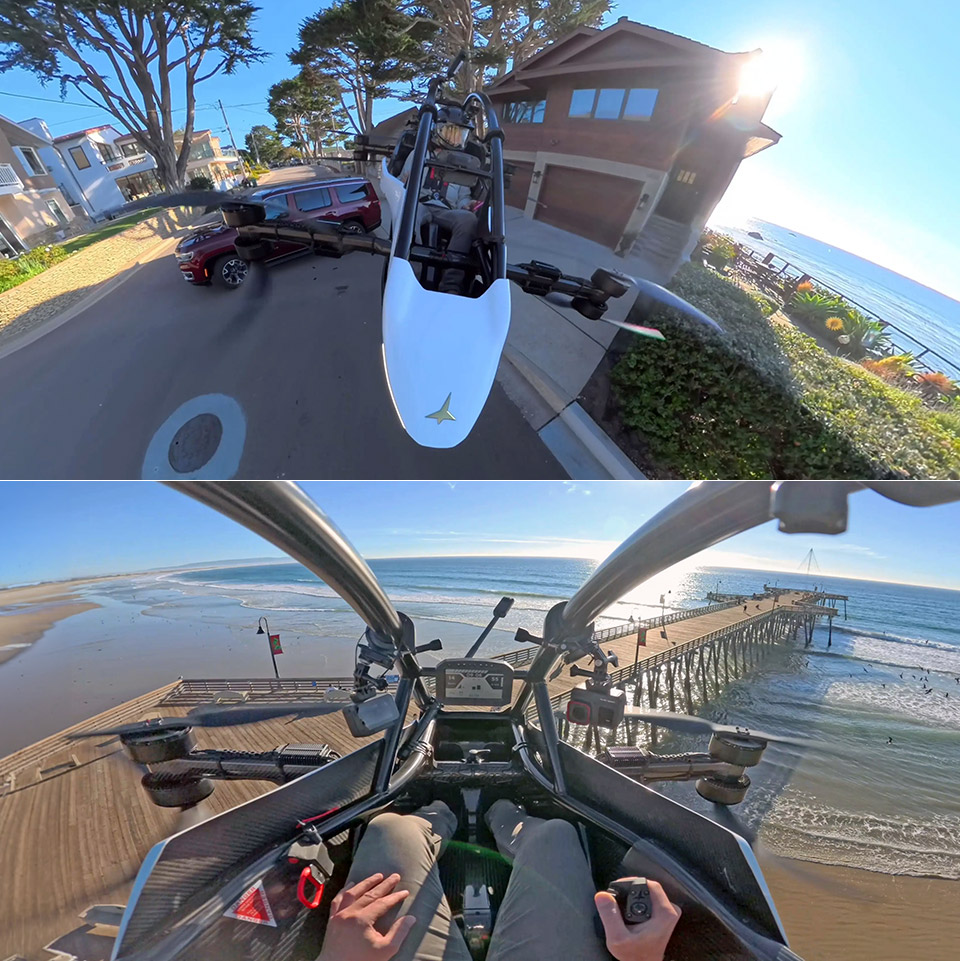
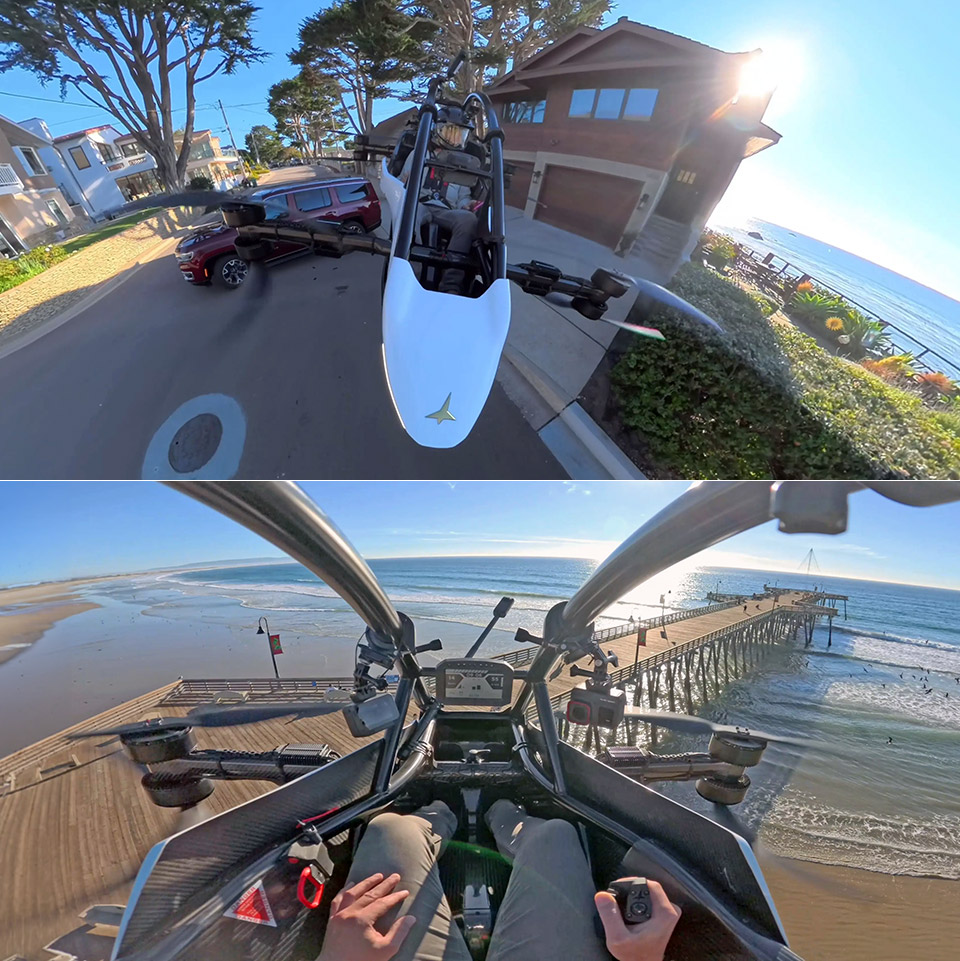
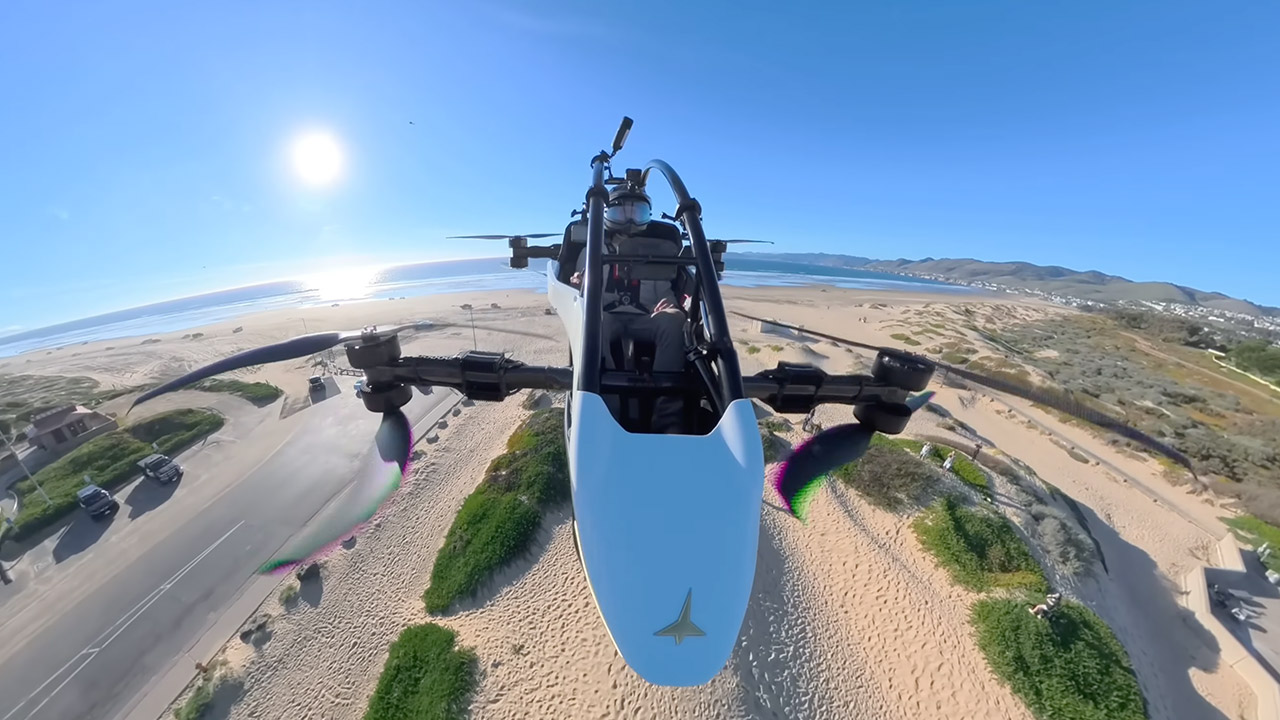
Tomasz Patan took off from his own driveway in a Jetson ONE eVTOL, heading straight out to sea. Soon, he was flying low over the cliffs of Pismo Beach, following the coastline and headed directly over the pier, and the view most certainly stole his breath away as he made his way down the shoreline, passing a beach restaurant he’d flown over many times before.
Surfers were in the sea below, and the entire coastline was laid out in all its grandeur before him. Patan later described the view as one he would never forget, as the marathon brought him from Pismo Beach to Grover Beach, where hundreds had gathered to watch him pass by. Local groups had secured for all of the essential permissions from a variety of different organizations, which required some effort but ultimately paid off.
Due to platform compatibility issue, the DJI Fly app has been removed from Google Play. DJI Neo must be activated in the DJI Fly App, to ensure a…
Lightweight and Regulation Friendly – At just 135g, this drone with camera for adults 4K may be even lighter than your phone and does not require FAA…
Palm Takeoff & Landing, Go Controller-Free [1] – Neo takes off from your hand with just a push of a button. The safe and easy operation of this drone…
Without a runway or airport to worry about, he could plot the most direct route possible and just go. The flight itself was straightforward, a short hop from his house to a familiar stretch of coastline where the Pacific was doing its usual thing, waves rolling in against the rocks and sand with the hills and houses of the shoreline sitting quietly in the background. The Jetson ONE just did its thing without a hitch, unbothered by the wind or weather throughout.
The Jetson ONE runs on eight electric motors driving eight individual blades, all wrapped in an aluminum and carbon fiber frame that keeps the total weight down to around 254 pounds with the batteries fitted. The open cockpit can accommodate a pilot of up to 209 pounds, and from there you get roughly 20 minutes of flight time before needing to touch down again. Top speed is around 63 mph, though most flights never push anywhere near that. Control comes down to a single four axis joystick, which keeps things refreshingly simple, and the high discharge lithium ion batteries deliver plenty of power throughout. Recharging from a standard wall socket takes just a few hours, and when you’re done the whole thing folds down neatly for storage.
Patan began working on the Jetson ONE in 2017, and now oversees production from a separate factory. So far, they’ve received more than 650 orders totaling nearly $100 million. They are planning their first 100 deliveries for next year and are already accepting bookings for 2028. A full airframe parachute system is included as standard, which is a true lifesaver in the event of an emergency, and it also complies with all ultralight vehicle regulations, which is a good thing.
Consider Nvidia’s work on Neural Texture Compression (NTC). In its “Tuscan Wheels” demo, the company showed VRAM usage dropping from roughly 6.5GB with traditional BCN-compressed textures to 970MB using NTC, while keeping image quality close to the original. Read Entire Article Source link
Since March, Israeli attacks on Beirut and the occupation of southern Lebanon have displaced over 1 million people. Families are sheltering with relatives, renting if they can, or sleeping in cars and out in the open, placing immense strain on already fragile infrastructure. Over 130,000 people have also crossed into Syria, many in urgent need of food, cash assistance, and shelter, according to a report by the International Organization for Migration.
As humanitarian needs surge, so does the flow of money from abroad. Yet much of this support is not moving through traditional aid channels. Instead, it is being routed through digital fintech platforms to trusted individuals on the ground, who buy necessary items or distribute funds directly to the displaced.
There is no real-time dataset capturing donations linked specifically to the war. However, remittances—the closest available proxy—offer context. Lebanon receives roughly $6 billion to $7 billion annually from abroad, equivalent to about a third of its GDP, according to the United Nations Development Programme (UNDP) in 2023.
The UNDP reported that remittance costs there averaged 11 percent, higher than the global average. In times of crisis, these flows often shift towards emergency support. What is different now is how that money moves: Increasingly, it is being sent instantly, peer-to-peer, through digital wallets.
Advertisement
“These informal inflows are captured by the formal BDL figures and constitute around 70 percent of the inflows during the crisis,” the UNDP added, noting that money is also often sent as cash with people traveling to the country.
From Gift Cards to Financial Infrastructure
Being Lebanese myself, my social media feed has been inundated with former colleagues and friends setting up their channels to receive donations, sharing photos of receipts, and showing where money is going.
One grass-roots campaign run by Lebanese lawyer Jad Essayli raised $65,125 in 10 days, purely through social media and digital transfers. When asked which platforms have been the most impactful, he and other fundraisers pointed to Whish Money, though many other platforms, including Paypal, Zelle, and Venmo are also being used.
Originally launched to digitize gift cards, the company has evolved into a broad financial platform offering remittances, peer-to-peer transfers, and payment services with more than 2 million users across 110 countries. “We started off from the fact that we wanted to disrupt the distribution of gift cards,” says Toufic Koussa, cofounder and chairman of Whish Money, describing how the company built an early wallet system in 2007 that allowed retailers to issue digital cards on demand. Over time, that infrastructure expanded into a full financial ecosystem.
Advertisement
When Banks Stop Working
The company’s core focus has been the unbanked and underbanked—those with limited or unreliable access to traditional banking. Those groups became central during Lebanon’s financial collapse. Globally, 1.4 billion people remain unbanked; the World Bank cites access to affordable financial services as being “critical for poverty reduction and economic growth.”
In Lebanon, as banks froze deposits and restricted withdrawals, platforms like Whish Money filled a critical gap, enabling people to move and access money outside the traditional system.
That infrastructure now shapes how aid moves in crisis. Money from family, diaspora, or grass-roots campaigns lands straight in a digital wallet and can be spent immediately. On Whish Money, peer-to-peer transfers are the most popular, followed by international remittances. Koussa also notes that Whish Money is uniquely connected to US banking infrastructure, allowing users to link accounts abroad directly to wallets in Lebanon.
Displacement is changing how people use these platforms. Overall growth is steady, but transaction patterns have shifted. Families are making bigger purchases, stocking up on essentials as uncertainty grows. Grocery bills that might have been $200 are now climbing as people prepare for the worst, Koussa says.
Natural Cycles, the only FDA- approved contraceptive and fertility tracking app will now be integrated into select Garmin watches. This is an intriguing step forward for women’s health, as it could allow for more insight into individual cycles.
Compatible Garmin wearables, including many we’ve hailed as being among the best smartwatches, will now include the Natural Cycles app with either a monthly or annual subscription.
In case you’re unaware, Natural Cycles is a smartphone app that tracks your temperature throughout your cycle and shows you when you’re at your most fertile point. That means you can use Natural Cycles as an alternative to more “traditional” contraceptives like the pill or the coil, or you can use the app as a method to plan pregnancy.
Previously, you’d have to use either Natural Cycles’ own NC band, a compatible Oura Ring or Apple Watch to track your temperature. Now, those sporting a compatible Garmin watch can benefit too.
Advertisement
Advertisement
Natural Cycles’ integration with Garmin could be a huge leap for cycle tracking. While many of the best wearables do offer some cycle tracking, personally I find it difficult to find one that’s actually insightful. Plus, those on a controlled cycle (say if you’re on the pill) will likely find that wearables seem to almost guess what’s going on with their body.
As reported in a 2025 study, although “general biometric wearables, such as smartwatches and fitness trackers” do provide useful data, it’s thought they “fail to capture the complexity of menstrual cycles, hormone therapies and their physiological implications”.
I’d agree with this as I wear a Whoop MG and, although it’s undeniably great at tracking my (occasional) workouts and sleep, I wouldn’t necessarily rely on it for anything to do with my cycle tracking.
Sure, it offers somewhat of an overview, and allows me to log my periods and symptoms via the journal, but I find Whoop tends to automatically list general behaviour as a symptom of my cycle. For example, if I record that I’m feeling nervous: that’s PMS. Had disrupted sleep? Classic PMS sign right there (or was it actually because my phone went off after I failed to put it on do not disturb and woke me up? We’ll never know.)
Advertisement
Garmin and Natural Cycles
So, how will Garmin and Natural Cycles be any different? Well, a compatible Garmin will track your skin temperature during sleep, with the information then relayed to you via the Natural Cycles app. From here, you can see your fertile days — based purely on your own metrics rather than it being based on a “standard” 28-day cycle or relying on you, the user, to track your periods accurately.
Advertisement
According to Natural Cycles, tracking your cycle with its app will offer you up to 93% effectiveness, which is the same as the contraceptive pill. This stat will likely impress those who have previously taken the contraceptive pill and experienced many unwanted side effects, including mood swings, acne and weight changes too. That’s a pretty common occurrence for those on the pill, with controlled studies reporting nearly 50% of those observed reporting side effects. Not only that, but just open up the accompanying leaflet in a box of one of the mainstream pills and you’ll be greeted with an unpleasant array of side effects that may or may not affect you.
If you don’t want to risk experiencing any side effects, but want to avoid pregnancy, you’d be forced to avoid hormonal methods like the contraceptive pill and instead opt for either less reliable birth control methods or even have to endure an invasive and painful procedure instead. It undoubtedly feels like a lose/lose situation.
With this in mind, tools like Natural Cycles within Garmin offer a welcome alternative to traditional birth control methods.
Advertisement
However, all of this isn’t to say that anyone who wants to either prevent or plan a pregnancy should just opt for a Garmin smartwatch and Natural Cycles. Instead, this partnership is ideal for those who either want to move away from traditional and hormonal methods of birth control but still want control over their bodies.
While we still have a huge way to go, I’m quietly optimistic about this milestone and would be keen to try it myself.
T.H.E. Show returned to the Alexis Park Hotel in Las Vegas from March 20 to 22, 2026, marking its 30th anniversary right where it started. As North America’s longest running hi-fi show, its survival is not luck. It is persistence. Credit goes to the late Richard Beers for building it, Maurice Jung for keeping it alive after 2016, and now Emiko Carlin, who is steering the brand into its next phase with expanded events in Austin and New York City. The show had moved from Las Vegas to Southern California with stops in Newport Beach, Irvine, Long Beach, and now Costa Mesa, but it is still standing. That alone says something in an industry that tends to burn through its own history.
Context matters, and 2026 is shaping up to be one of the busiest show calendars this industry has ever seen. Between eight CanJam events, AXPONA, CES, ISE, NAMM Show, CEDIA Expo, the relocated Vienna based HIGH END, and a growing list of shows in Toronto, Paris, Singapore, SWAF, and CAF, it is relentless. There is barely time to unpack before the next badge gets printed.
Which makes T.H.E. Show’s return to Las Vegas feel less like nostalgia and more like defiance. Thirty years in, it is still in the fight.
With four events on the T.H.E. calendar in 2026, the Vegas stop did not exactly start on solid footing. The show was originally scheduled for January 9 to 11 at the Tuscany Suites & Casino, but had to be postponed to March due to unforeseen issues with the venue. Credit where it’s due, the team managed to regroup and secure the Alexis Park Hotel in less than three months. That kind of turnaround is not easy in Las Vegas, where convention space gets locked up fast.
There were tradeoffs. The new dates could not accommodate every exhibitor, and the show ended up noticeably smaller than originally planned. In total, eight oversized ballrooms were filled with high-end audio systems, supported by a modest marketplace that included T10 Bespoke, Island Routers, a vinyl seller, and a portable audio accessories vendor. It felt more curated by necessity than design.
Advertisement
Timing did not help either. Running the same weekend as the Montreal Audiofest split both exhibitors and attendees across two countries that are not exactly a quick plane ride apart. Add AXPONA 2026 looming just weeks later, with the eCoustics team heading to Chicago that same week, and the reality sets in. There is only so much travel budget and bandwidth to go around, even in an industry that seems determined to test both in 2026.
Best in Show
Best Over $50K: YG Acoustics / Bergmann
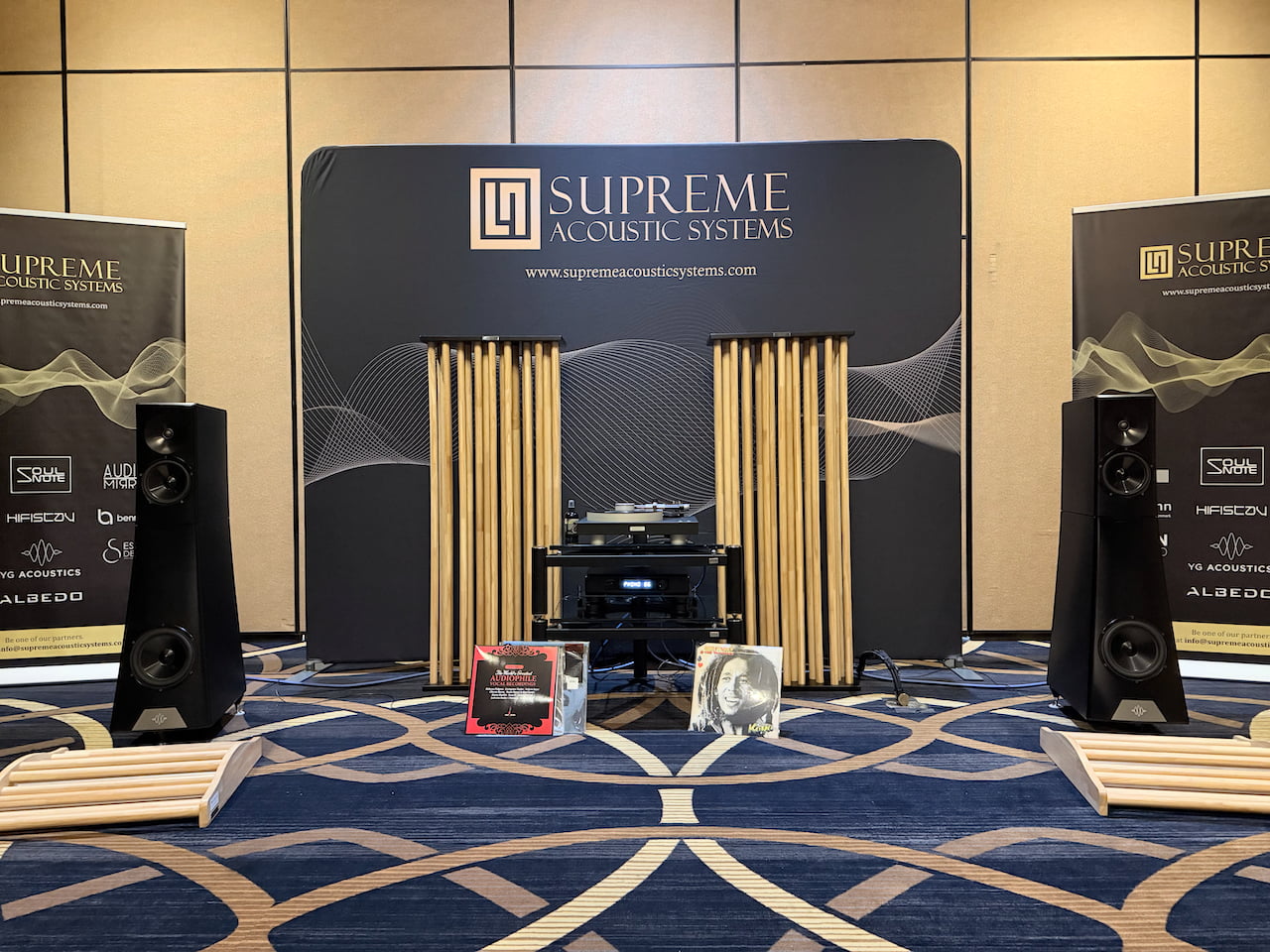
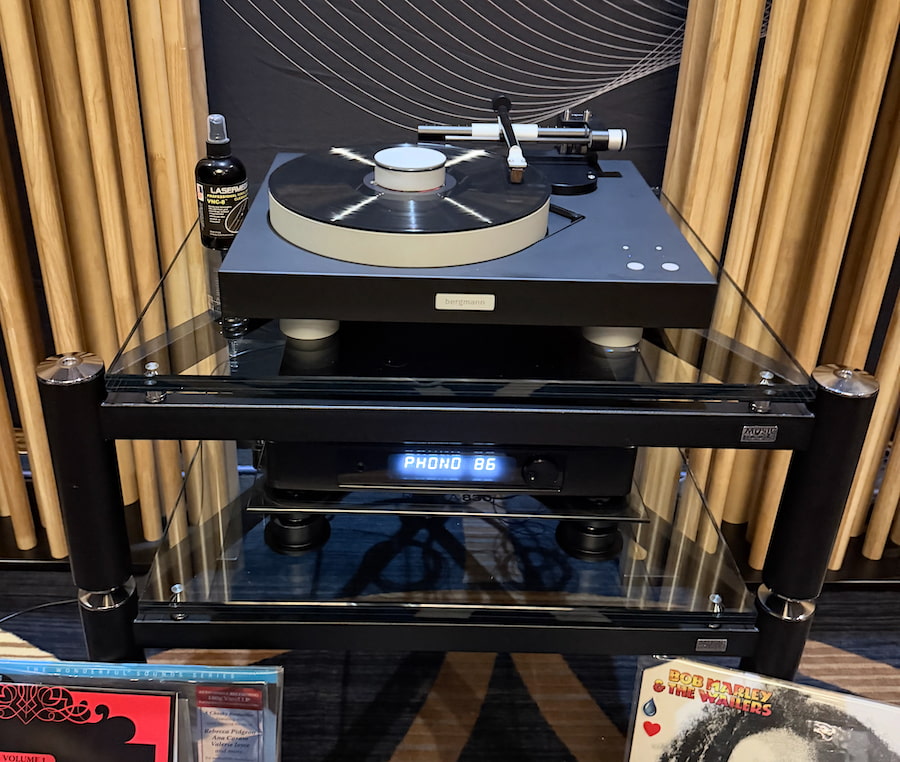
I’ve heard a number of YG Acoustics systems at shows over the years, and they rarely miss. This time, instead of rolling in with something that costs as much as a brownstone, they kept it almost reasonable. Almost. The Vegas system (presented by Supreme Acoustic Systems) came in around $100K and centered on the Vantage 3 Live active towers at $73K per pair, paired with a Bergmann Magne Airbearing Turntable at $12K, all sitting on a Music Tools ISOstatic rack at $1,495 per level.
The setup was refreshingly clean. No spaghetti pile of cables, no rack full of separates. Just two power cords and a pair of optical cables, one feeding each speaker. That alone tells you this is not your typical active speaker. The Vantage 3 Live uses a fully integrated DSP architecture with an external control unit that handles preamp duties and includes a phono stage. Everything is managed upstream, then sent digitally to the speakers.
The key here is that the signal stays in the digital domain all the way to the speakers, or is converted to digital before it gets there. That is why YG uses optical connections instead of traditional speaker cables. It is a different way of thinking about system design, and it cuts out a lot of variables.
There is no Bluetooth or Wi-Fi, but Ethernet based network streaming is built in, with support for TIDAL Connect and Qobuz Connect, and optional Roon integration. Use your phone or tablet, hit play, and let the system do the rest. No clutter, no guesswork, and very little standing between you and the music.
Advertisement
Bergmann Magne Airbearing Turntable with YG Acoustics Vantage 3 Live preamp/control unit.
Additional elements rounded out the system, including AGS Diffusors (Acoustic Groove System) from Nihon Onkyo Engineering, which could easily add another $20K to the total. No, I didn’t A/B test them like a lab experiment, but patterns matter. Two of the best sounding rooms at the show used AGS, and that’s not a coincidence. In addition, power conditioning was handled by the AudioQuest Niagara 5000 at $6,900, delivering clean and stable current to the entire system.
Advertisement. Scroll to continue reading.
The Vantage 3 Live is not shy about muscle. Each speaker packs 2,100 watts of amplification, with 700 watts dedicated to each driver. That kind of headroom is not just for bragging rights. It shows up immediately in control, dynamics, and composure, regardless of source.
“Is This Love” by Bob Marley and the Wailers on vinyl was captivating. The soundstage stretched wide without losing focus, and Marley’s voice stayed locked dead center. It had the kind of precision you expect from a mastering studio, pulling every last bit of information out of the grooves without sounding clinical.
Switching to digital via Roon and Anette Askvik’s “Liberty” didn’t feel like a compromise. Nothing collapsed, nothing softened. The presentation remained spacious, detailed, and controlled, with a level of consistency between analog and digital that most systems struggle to achieve. This is what YG does when everything lines up.
Best Under $50K: Atlantis Lab / Neoson / Audiobyte
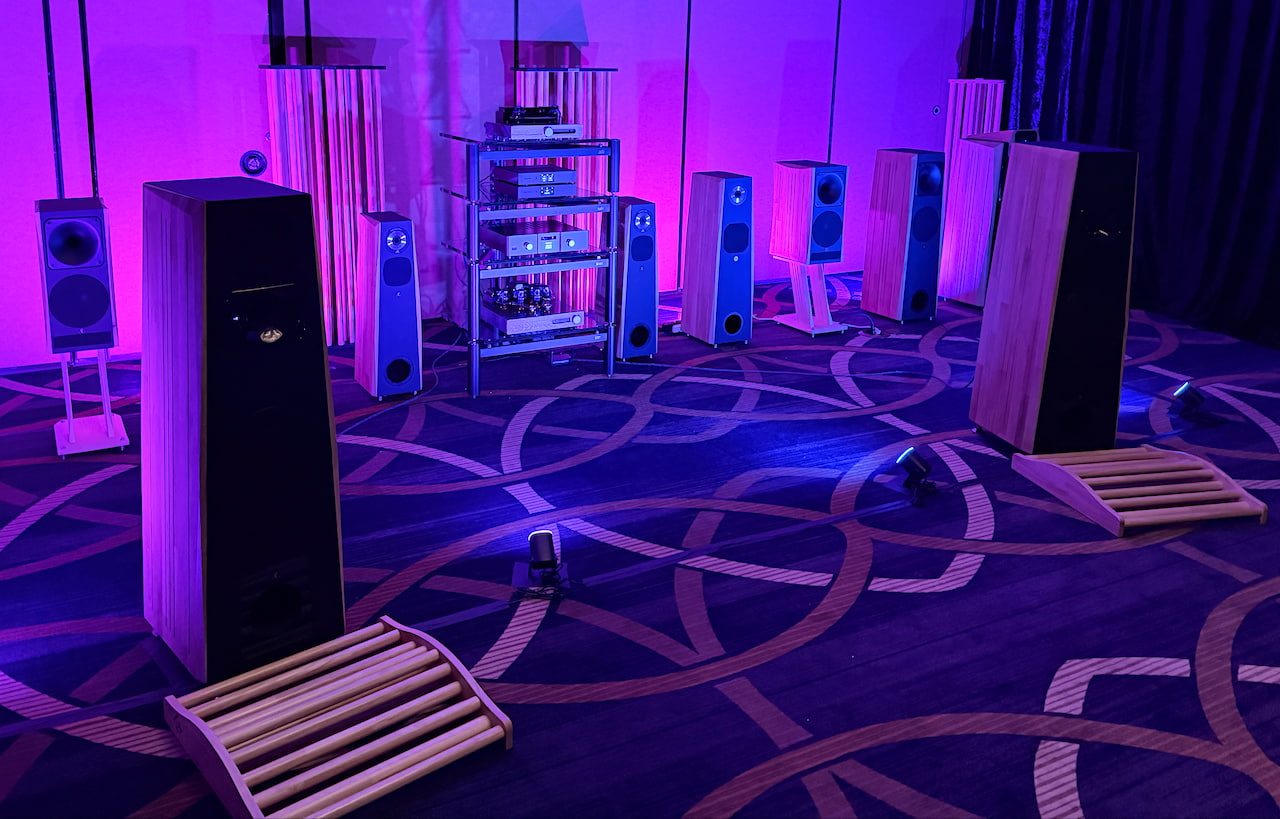
Atlantis Lab A31 Pro Loudspeakers in foreground.
Interestingly, just a few rooms over, the Atlantis Lab speaker system (presented by U.S. distributor Decibel+) went in the exact opposite direction of the YG setup. Where YG leaned on brute force and digital control, this one stripped things down to something far more old school. We’re talking roughly 1/100th the power, less than half the price, and yet it delivered a wildly intoxicating tube driven presentation that pulled you in just as quickly, if not faster.
The system was built around three brands that, frankly, were not on my radar before this show. Atlantis Lab handled loudspeakers, Neoson provided amplification, and Audiobyte (new company out of Romania) rounded things out with a streamer and DAC.
It should not have worked as well as it did on paper, especially in a show environment. But sometimes the rooms that make the least sense end up being the ones you remember. This was one of them.
Neoson Evolution Tube Amplifier
Atlantis Lab brought its high efficiency loudspeaker lineup, with models ranging from just over $3K to roughly $24K. The system was driven by the Neoson Evolution Tube Amplifier at $11,828, delivering 20 watts per channel of pure Class A power. Digital duties were handled by Audiobyte with the SuperHub streamer ($4K) and SuperVOX multibit DSD DAC ($4,500).
Advertisement
What made this setup more than just another good room was the backstory. We were told that each of the French brands was founded by two friends who intentionally designed their products with the other in mind. That kind of collaboration usually sounds like marketing copy. Here, it translated into real system synergy.
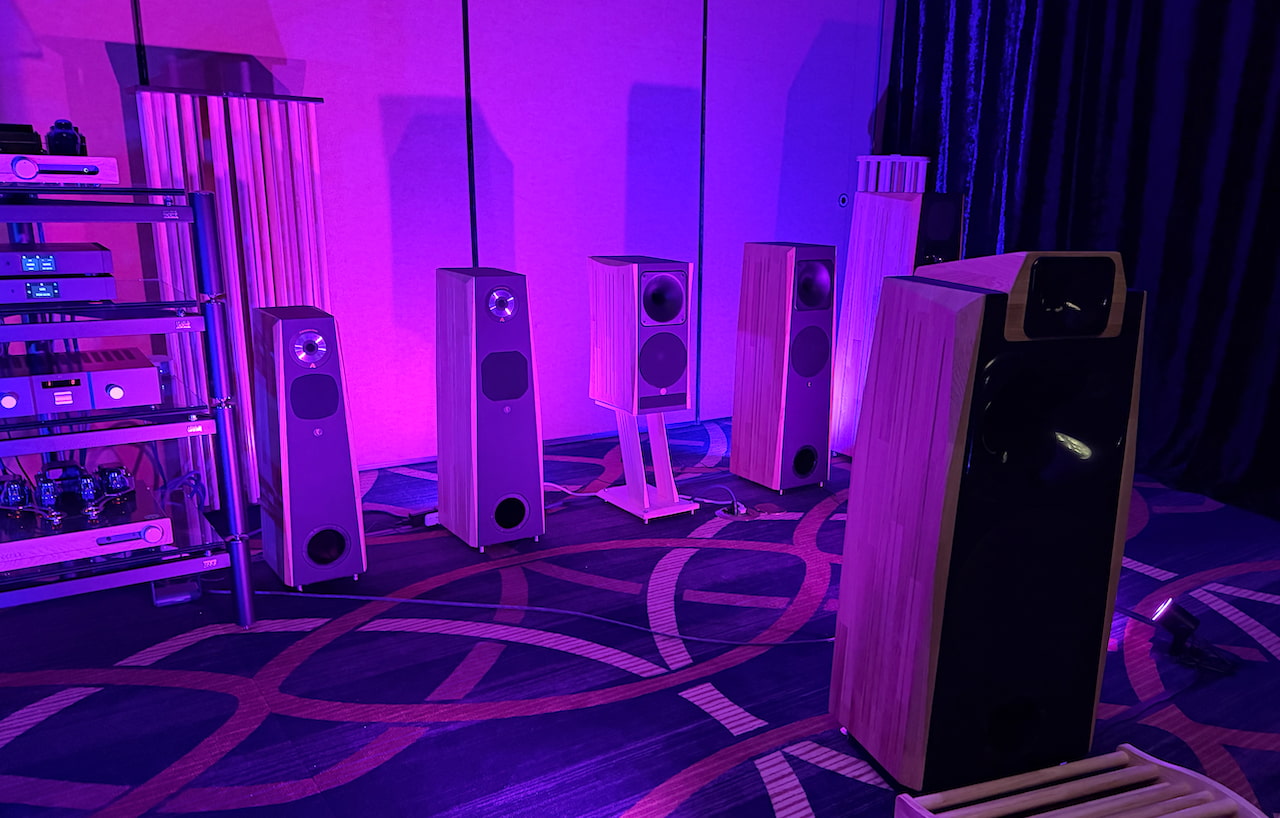
Background (left to right): Atlantis Lab A16 Pro ($3,218) Atlantis Lab A18 Pro ($4,960) Atlantis Lab A21 Pro ($4,196) Atlantis Lab A23 Pro ($6,466) Atlantis Lab A31 Pro ($14,194) Foreground: Atlantis Lab A38 Pro ($23,939)
I spent time with the three largest Atlantis Lab floorstanding models, all paired with the same Neoson Evolution Tube Amplifier and Audiobyte front end. The A23 Pro ($6,466 per pair) did not quite deliver the same level of impact, but that felt more like a room mismatch than a flaw. Large hotel ballrooms are not forgiving, and if you are not sitting in the right spot, even good speakers can sound a bit restrained.
The two larger models stepped up in a meaningful way. They filled the room with more depth, width, and texture, the kind of presentation you usually do not hear until prices climb into far more uncomfortable territory. Comparing the A31 Pro and A38 Pro, which are separated by roughly $10K, was less straightforward. The flagship may have offered a bit more bass weight and scale, but the difference was not night and day. Some of that could have been expectation bias creeping in.
What stood out with both was their ability to throw a wide, stable soundstage while maintaining composure off axis. They did not collapse the moment you shifted in your seat. More importantly, they had a knack for uncovering layers of detail without sounding analytical, pulling you deeper into the performance rather than pushing it at you.
Advertisement
Advertisement. Scroll to continue reading.
These are not brands most people walk into a show expecting to hear. That should change.
Tony Minasian’s custom built loudspeakers remain one of those under the radar discoveries you tend to only encounter at T.H.E. Show. He is not chasing mass market appeal. He builds each pair by hand using the best parts he can source, and prices them accordingly. At $4,500 per pair, his bookshelf models are not entry level, but they are clearly aimed at listeners who care more about nuance than brute force, especially those drawn to acoustic, unamplified music.
The Oriaco G6 is the standout. It has an uncanny ability to expose the small things that most speakers gloss over. The pluck of a guitar string, the decay of a piano note, the snap of a snare drum. Nothing feels exaggerated, just revealed with a level of clarity that pulls you in rather than pushing detail at you.
Advertisement
Tony usually keeps things grounded with a Denon integrated amp and a vintage Marantz CD player, but this year he stepped it up with Electrocompaniet electronics. The system included the ECI 6 MKII integrated amplifier ($6,500) and EMC 1 MKV CD player ($7,200), bringing the total system north of $20K. He even supplied a full loom of his own hand crafted cables, adding another $2,300 to the tally.
It is a complete system with very little left to chance, but the real story is the speaker which features an extra up-firing tweeter for spaciousness. If you are in the market for a high-end bookshelf and live anywhere near Southern California, it is worth reaching out for an audition. Or wait for T.H.E. Show SoCal, where there is a good chance you will find Tony set up again, quietly reminding people what a well voiced speaker can do.
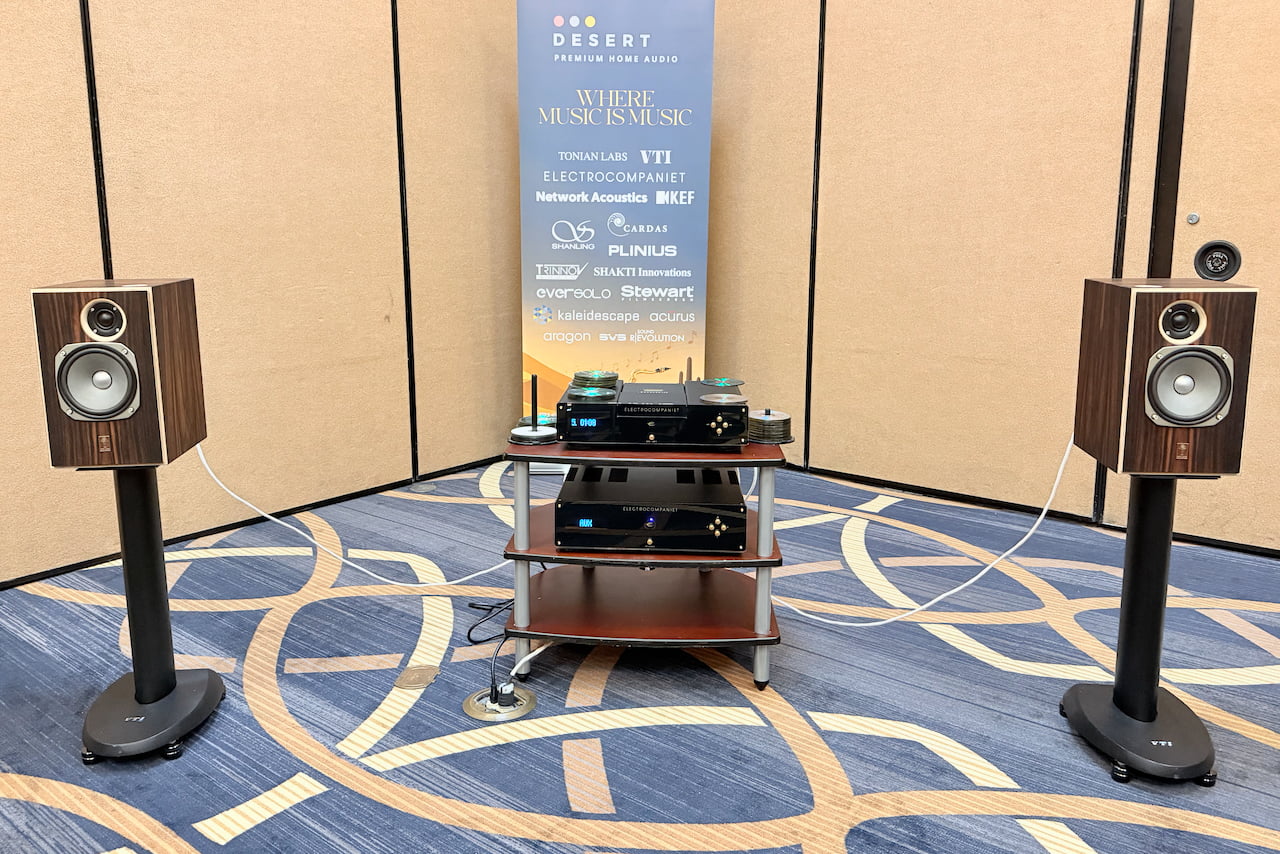
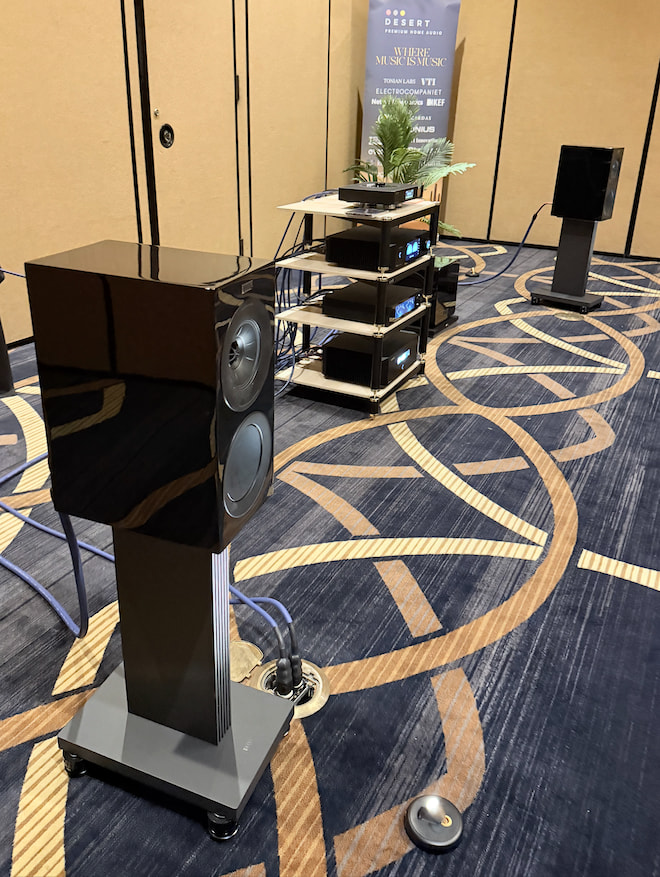
Stepping down to something far more attainable, Desert Premium Audio demonstrated a KEF and Eversolo system that landed just north of $16K and made a strong case for smart system building over brute force spending.
At the core were the R3 Meta bookshelf speakers ($2,500 per pair), supported by dual KEF KC92 subwoofers ($2,500 each), creating a full range foundation that punched well beyond what most would expect from standmounts. Amplification came from the Eversolo AMP-F10 ($2,480), while the DMP-A10 ($4,000) handled preamp duties and streaming. Rounding things out, the Onix XST20 SACD/CD transport ($2,399) added a physical media option for those not ready to abandon discs entirely.
Advertisement
It is a thoughtfully assembled system that balances modern streaming convenience with old school sources, and more importantly, shows how far careful matching can take you without chasing six figure territory.
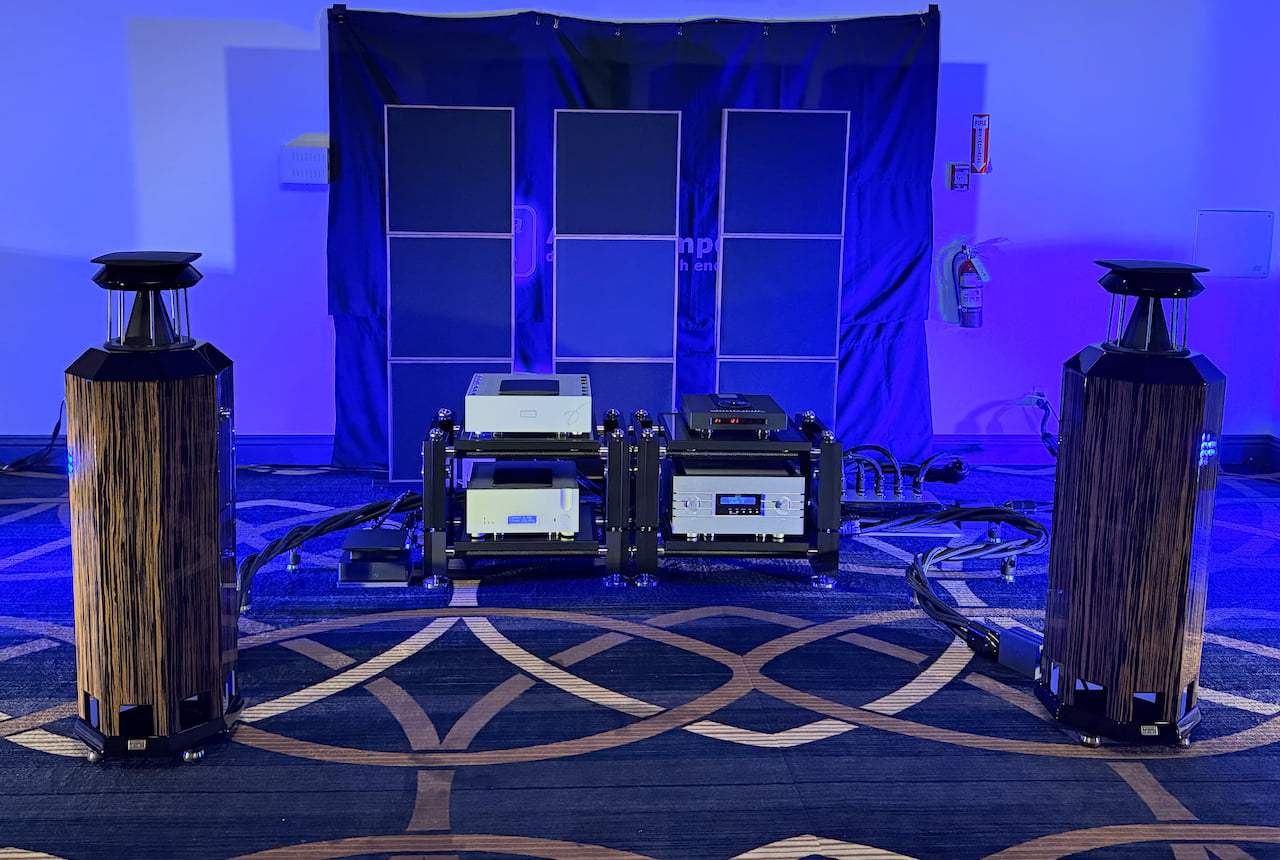
German Physiks
The most expensive system at T.H.E. Vegas came courtesy of Aaudio Imports, and it did not hold back. Priced just shy of $400K, the setup centered on the distinctive Borderland MK II omnidirectional loudspeakers from German Physiks ($54K per pair), driven by the Emperor Extreme solid state integrated amplifier ($60K). Cabling alone, from Stage III, accounted for well over $100K, which tells you exactly where this system was aimed.
The source chain was equally ambitious. A Pink Faun 2.16 Ultra music server and streamer ($43K) fed the system alongside the Ancient Audio Lector Joy CD player ($26K). Digital conversion was handled by the Ypsilon DAC 1000 SE ($50K), supported by a SIN PSD 10 power distributor ($25K), Reiki network switches ($10K), and ART electromagnetic treatment ($18K) to address every possible variable in the signal chain.
Advertisement. Scroll to continue reading.
On paper, it is the kind of system that should stop you in your tracks. In practice, I wanted to be convinced. Here’s a sound clip on Instagram.
Advertisement
T10 Bespoke
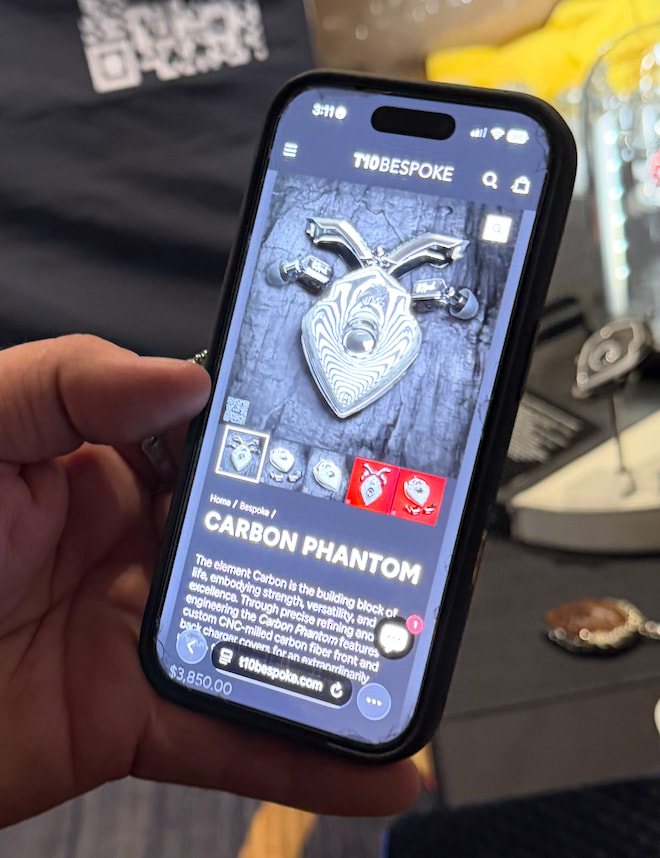
Bear Clark, better known as “Hi-Fi Bear,” was on hand showing the T10 Bespoke wireless earbuds that we named Best in Show at CES 2026 just a few months ago. Starting at $3,000, each pair is hand built and fully customizable, along with its matching pendant charging case. And when we say customizable, we mean it. Snakeskin, gemstones, even diamonds. If you can imagine it, he can probably make it.
Or you can skip the subtlety entirely and go straight for The BillionEAR Attaché Smoker’s Edition at $14,500, which bundles the earbuds in an attaché case with cigars, a smoking pipe, and a few other indulgences thrown in for good measure.
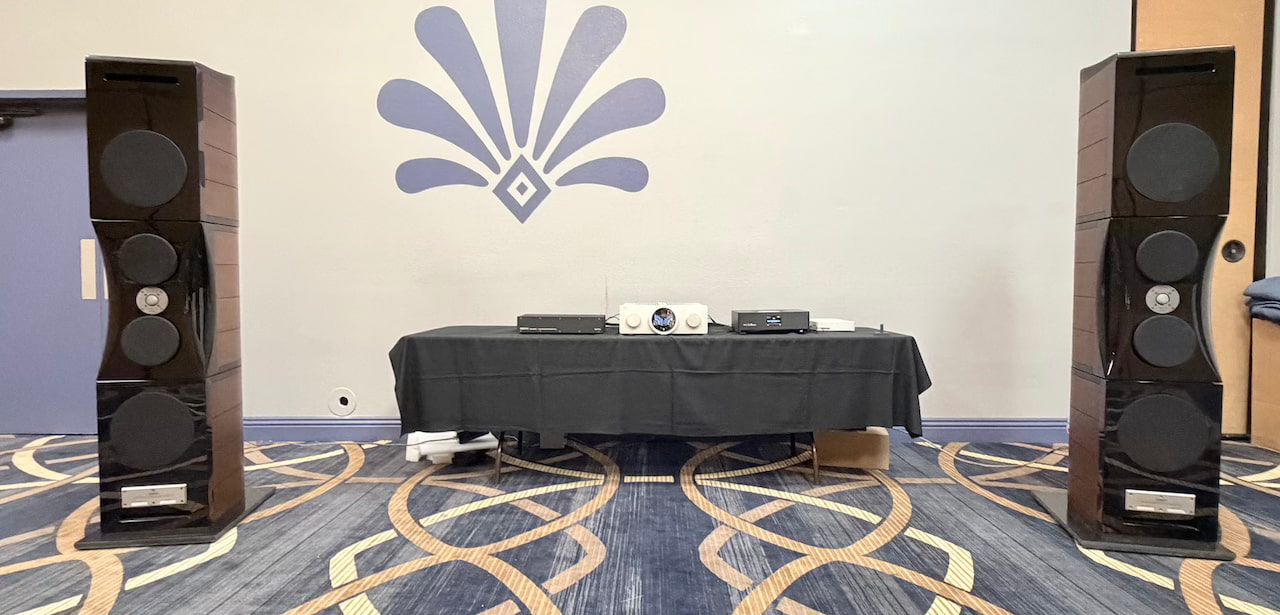
The largest loudspeakers at T.H.E. Vegas came from Usher Audio with the Grand Tower ($42,000 per pair), driven by the BMC Audio CS3 integrated amplifier (around $10K). On paper, 200 watts per channel should have been more than enough to get them moving.
In reality, the room won. Inside a massive untreated ballroom, the Grand Towers struggled to pressurize the space and never quite locked in. It was less about the speakers and more about the environment. Even big systems can feel small when the room refuses to cooperate.
Island Router
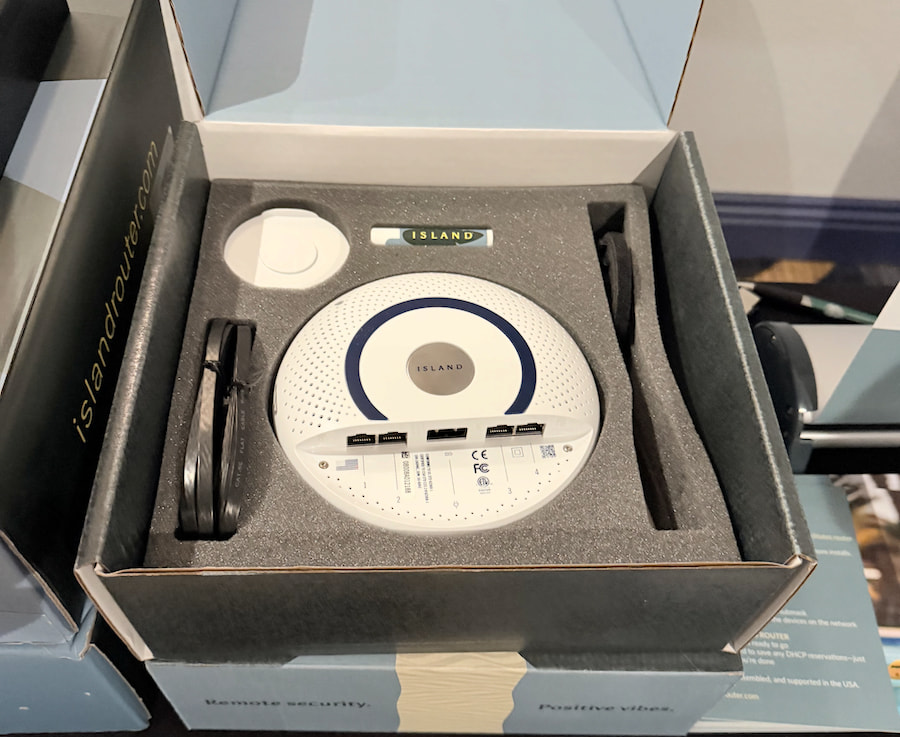
The Island Router is aimed at listeners who take their network as seriously as their system. Priced at $499, it brings enterprise grade routing and firewall capability into the home, with features like fault tolerant failover when two internet lines are connected, straightforward app based setup, and optimization designed to squeeze the most out of whatever bandwidth your ISP delivers.
There is a catch. No built in Wi-Fi. You will need to connect a separate wireless access point or hotspot if you want coverage throughout the house. It is not designed to be an all-in-one solution. It is designed to be stable, secure, and out of the way.
Advertisement
Ai Pro
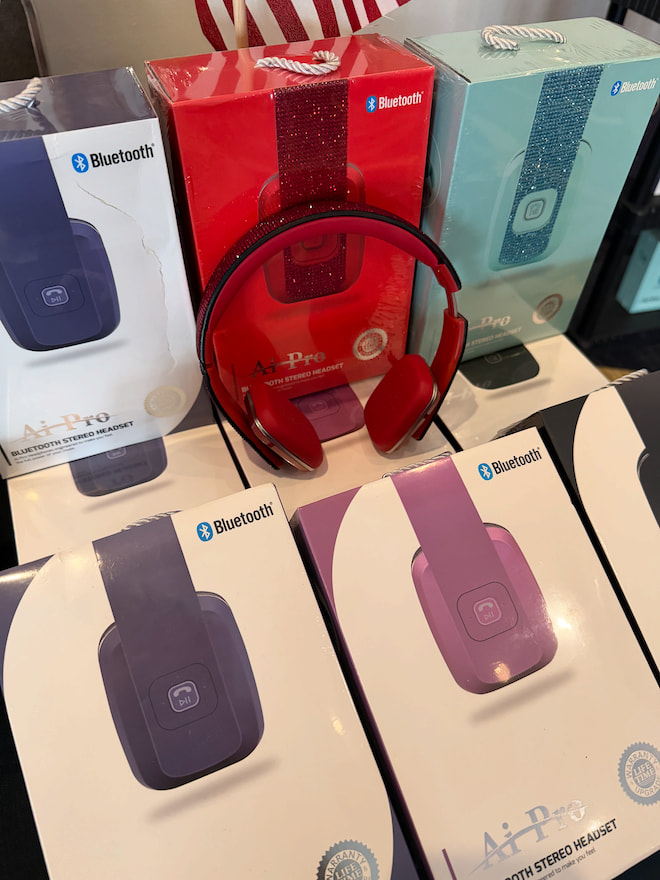
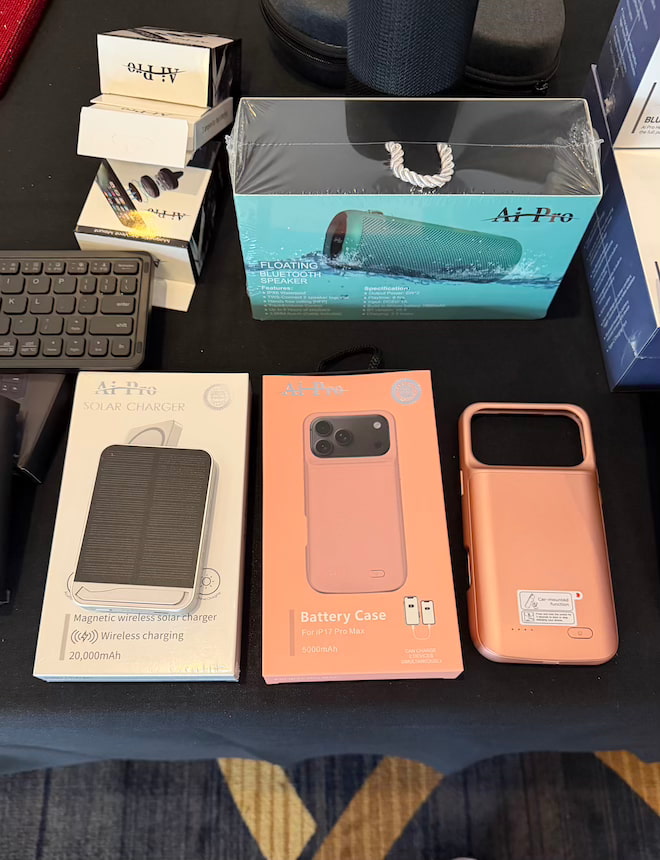
Ai Pro offered up a range of affordable fashion headphones, charging cases, and solar charger.
T.H.E. Vintage Lounge
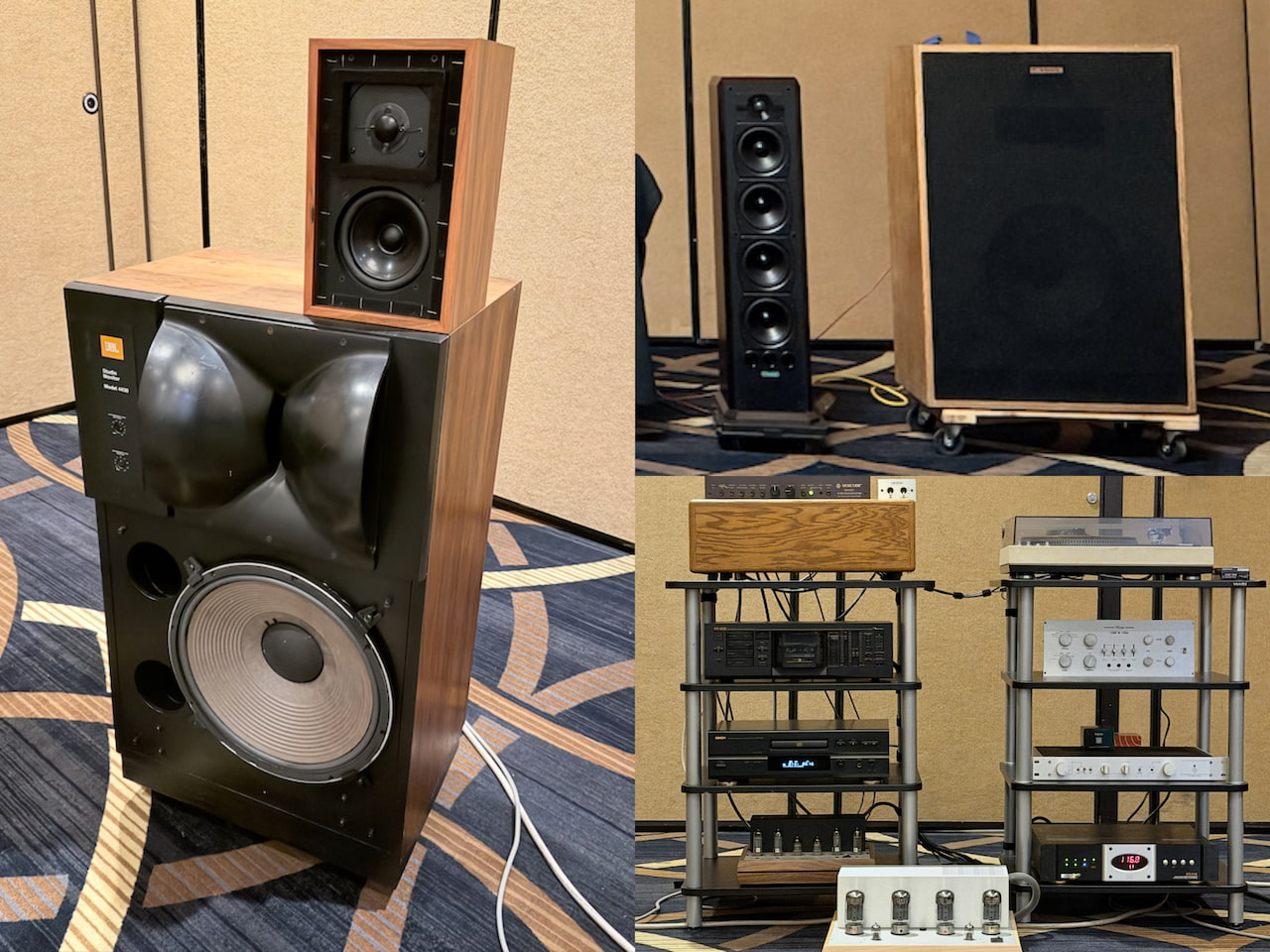
A solid selection of vintage gear was also in active rotation, not just sitting there for nostalgia points. Highlights included the original Klipsch Cornwall, JBL 4430, and Falcon Acoustics LS3/5a, alongside racks of classic amplification.
The Bottom Line
T.H.E. Vegas 2026 was not the biggest show, and it never really recovered from the last minute venue change or the unfortunate calendar clash with the Montreal Audiofest. The lighter exhibitor list and smaller footprint were noticeable. There is no point pretending otherwise.
But smaller is not always worse. The upside was real. Less crowd noise, more time in the rooms, and actual conversations with designers and distributors that did not feel rushed or transactional. It created space to hear systems more clearly, swap components, and discover brands that might have been lost in a larger, more chaotic show.
Advertisement. Scroll to continue reading.
Credit to the T.H.E. team for getting this event back on its feet under difficult circumstances. That kind of recovery is not easy, especially in a year where the industry calendar is already stretched thin.
Advertisement
Next up, T.H.E. heads to Austin from May 22 to 24, 2026, while AXPONA 2026 is right around the corner. We will be in Chicago next week, where the scale, competition, and expectations all ramp up.
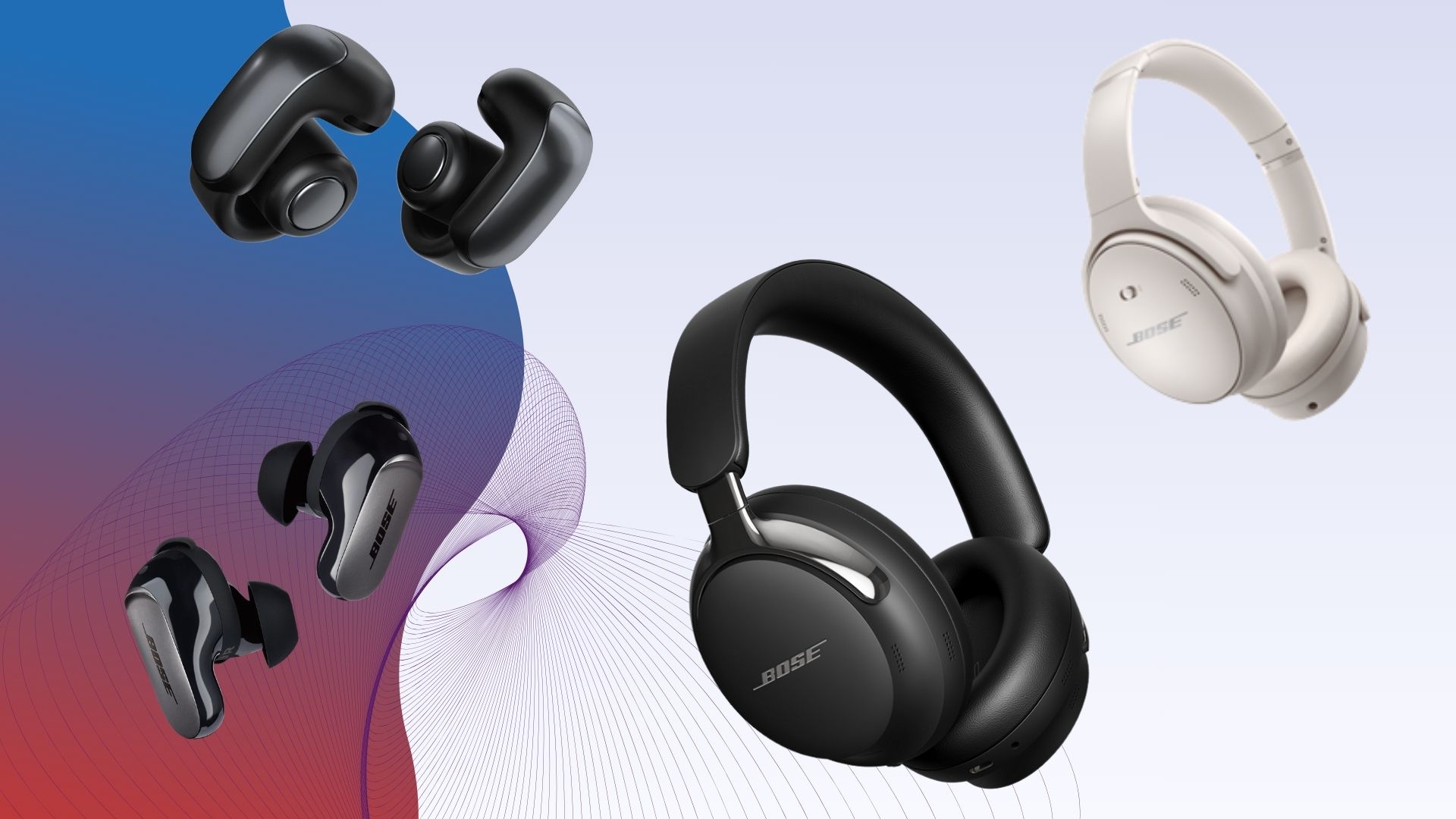
Bose were the pretty much the first brand to bring noise-cancelling cans to the masses, but they also make a wide range of headphones to suit whatever need you’re after.
Whether it’s a pair of wireless over-ears, true wireless or open-earbuds; we’ve got plenty of options for you to choose from. The headphones we’ve highlighted are the best that Bose offers.
Each pair has been put through rigorous testing in real world settings. We test the noise-cancelling in outdoor environments, on planes (when we can), on public transport and walking around cities to give you our best judgement on good Bose headphones cancel noise.
We take calls on the headphones in quiet and busy areas to judge whether they’re good enough in that department. We’ll walk through areas with wireless interference to test how good the connection is. We’ll drain the battery over several hours to see if it lives up to Bose’s claims, as well as test the app and other features the headphones come with.
Advertisement
Sound, however, is king; and we’ll give these headphones a thorough listen with a wide range of music to see how good they sound. Where possible, we’ll compare new Bose headphones to older models to see if they’ve improved and how the sound might have changed.
The aim is always to give you the best picture of how good Bose headphones are. If there’s an area where we don’t think they’re good in, we’ll make it clear in our reviews and you can judge for yourself.
We also have brand-specific best lists as well, including one for Bose’s biggest rival in the best Sony headphones.
SQUIRREL_ANCHOR_LIST
Pros
Class-leading noise-cancellation
Improved call quality
Tweaks to audio are positive
Comfortable to wear
Excellent Bluetooth performance
Cons
Technics edges it for sound
Battery life slipping behind others
Among the most expensive wireless earbuds
Pros
Class-leading ANC for the money
Clear, spacious audio
Excellent Bluetooth performance
Customisable performance
Comfortable fit
Cons
Slightly chunky appearance
Not the most exciting sound
Below-par call quality
ANC isn’t adjustable
Pros
Improved noise-cancellation
Comfortable to wear
Strong wireless performance
USB-C audio
Better battery life
Cons
Average call quality
Rivals offer better sound for less money
Pros
Comfortable to wear
Clear, detailed sound
Solid battery life
Striking looks
Cons
Weak noise isolation
Indifferent call quality
Lacks bass
Expensive
Pros
Warmer, bigger bass than older model
Solid enough noise-cancellation
Very comfortable to wear
Excellent wireless performance
Cons
Beaten for battery life
Strange call performance
Advertisement
Class-leading noise-cancellation
Improved call quality
Tweaks to audio are positive
Comfortable to wear
Excellent Bluetooth performance
Technics edges it for sound
Battery life slipping behind others
Among the most expensive wireless earbuds
Bose’s noise-cancelling earbuds have been excellent ever since we reviewed the very first one. Nearly each and every single one of them has scored five-stars and that’s a run that continues with its latest ANC earbud in the QC Ultra Earbuds 2nd Gen.
They’re not the best noise-cancelling earbuds (that crown would go to Sony) but they’re not far off with a performance that’s even better than the previous earbuds, creating a world that’s almost dead silent, suppressing people’s voices and environmental noises with excellence.
The transparency is excellent too, perhaps the most natural-sounding on the market, filtering in outside sounds with brilliant clarity. If there’s an area they do struggle a little with, it’s in managing wind noise.
Advertisement
Call quality has improved, a previous bug bear of older Bose true wireless, this flagship picks up voices well and isolates your voice from any noises around you. You can now use the Bose earbuds for calls both inside and outdoors without too much of an issue.
The sound quality is mostly the same, with few improvements here and there. The bass performance is slightly reduced for a more balanced performance. The highs are more detailed, while the midrange is clearer and more insightful. It’s an overall more detailed and clearer sound, and so far, the best of any Bose earbuds.
Battery life is the same as before and a little disappointing in the grand scheme of things. You’d hope for more than five hours per charge when Bose’s rivals are offering more.
Nonetheless, if you want the best that Bose offers for earbuds then look no further than the QC Ultra Earbuds 2. If you can’t afford this premium price, then we’d suggest having a look at the QuietComfort Earbuds, which are an excellent mid-tier choice.
They bring Bose’s noise-cancelling skills to more affordable prices, delivering class-leading performance for less than £200. They’re good at suppressing people’s voices, good at reducing noise on planes and public transport, with the ANC good enough that we never felt we had to raise the volume to remove more noise.
The transparency mode is not as clear as the flagship but that’s no surprise. It sounds natural enough and clear when the Aware mode is activated though there is some additional noise to the sound that they create.
The call quality isn’t great though, with voice pick not very strong leading to a mumbly performance.
The sound is on stronger footing. It’s clear, spacious, detailed and balanced across the frequency range. Bass is good, though not the biggest you’ll ever hear, and these aren’t the most dynamic and energetic of earbuds to listen to. They lack a little excitement, but they’re an easy pair to listen to.
Advertisement
When it comes to Bose’s true wireless options, these are the best value earbuds they offer.
If you want the Bose’s best performance for noise-cancellation, battery life, and sound; then the QuietComfort Ultra Headphones 2nd Gen are the headphones you should buy without delay.
The sound is improved with a little more detail, clearer highs and a better performance with Immersive Audio than their predecessors, though we still feel the sound of the headphones’ spatial audio could be better.
They suppress noises better than the original model, though it’s a slight improvement rather than a massive one. The transparency mode is clear and detailed, though call quality we’d rate as average. These headphones let in noise and that affects how clear calls, especially outside, can be.
Advertisement
The design hasn’t changed much aside from a slightly more premium look. These headphones can fold, which means you can pack them in a small bag if you don’t have much space, and they do come with a carry case to keep scratches and marks at bay.
There’s a new Cinema mode for watching video on the go that uses the headphones’ Immersive Audio feature for a bigger, deeper and wider performance. These headphones have also introduced USB-C audio with support up to 24-bit/192kHz. If you want to hear these headphones at their best, we recommend you have a listen over a wired USB-C connection.
They’re comfortable to wear as we’ve come to expect from Bose, and the battery life has been extended to 30 hours, so they can survive a few long-haul flights before they need a charge.
Though they scored lower than the original QC Ultra Headphones, these are a better effort. But they’re still pricey and rivals are better in some respects if you’re thinking of shopping outside of the Bose family.
Advertisement
Comfortable to wear
Clear, detailed sound
Solid battery life
Striking looks
Weak noise isolation
Indifferent call quality
Lacks bass
Expensive
There’s only been one pair of open-ears from Bose and they’re a pretty impressive one in the Ultra Open Earbuds.
They clip on to the ear rather than sit on the earlobe, effectively kickstarting the design that others have adopted.
Since release, Bose has leaned into the visual look of buds by offering different colours. If you want a pair of headphones that also stand out as fashion statement, the Ultra Open Earbuds are very bougie.
We found them very comfortable to wear, with the clip-on design not causing any irritation or pinching. They come with physical controls rather than touch, which makes using them easier. An IPX4 rating means they’re protected against some sweat and water, so you could consider taking these for a run or to the gym.
Battery life is 7.5 hours and in our tests that was right on the money. Fast-charging is supported but there’s no wireless charging unless you pay an additional £70. If there’s a sequel to these earbuds, we hope that Bose includes it as standard given the high price.
Advertisement
There’s support for Bose’s Immersive Audio feature, though we found it doesn’t work as well in an outdoor environment when the audio of the earbuds is competing with everything else.
The sound quality is up there with the best for open ears, though Bose’s in-ear true wireless offer much higher levels of clarity, detail and bass.
But the clarity, sharpness, and levels of detail the Bose offer are best-in-class. Where they’re lacking most is in the bass department, which is not a surprise as it affects most models, but if a sequel were to come along, bass would be an area for improvement.
Leakage of audio is also surprisingly little. Turn the volume up (which you will need to) and people around won’t hear much of what you’re listening to.
Advertisement
The clever, innovative design and solid sound make these open-earbuds a winner. The price is high but as like the rest of the headphones on this list, Bose charges a premium. These are, however, one of the best open-ears you can get.
These are priced around £229 / $229, and they’re a simple pair in comparison to the Ultra models. They don’t feature Immersive Audio, there’s no aptX Bluetooth, the battery life isn’t as long, and the noise-cancellation isn’t as strong.
But we’d expect fewer features and a trade-off in performance for the price.
As usual, the comfort levels of these headphones is good, with a light clamping force so the headphones don’t feel too tight, and the earpads providing a soft cushion against the head. There’s an adjustable slider to fit different head sizes.
Advertisement
Battery life is 24 hours, though our tests suggest it’s less than that. The noise-cancellation isn’t the most powerful performance but it’s good at cutting down environmental noise, traffic and people’s voices, though wind noise can distract on a blustery day.
The call quality isn’t the best, especially in noisy places as it becomes harder for the headphones to pick up your voice when it’s competing against other noise.
Though they look very much like the QC 45 headphones, the QuietComfort Headphones have a different sound profile. Warmer, with more bass, detail and definition than the older model.
These are a rock-solid pair of Bose headphones at a price that’s less expensive than Bose’s other over-ears. If the Ultra Headphones are too expensive, this over-ear is what we’d recommend if you’re not fussed about spatial audio and higher Bluetooth specs.
Anthropic confirmed yesterday that ‘human error’ led to the leak of much of the source code of its star product Claude Code.
Anthropic has accidentally leaked the source code of its Claude Code agent after a misconfigured software package exposed it to the public. It follows a separate incident last week where Fortune said the company had accidentally leaked thousands of files.
The leak was spotted on Tuesday by security researcher Chaofan Shou, according to The Register, who found that the official npm package for Claude Code had shipped with a map file referencing an unobfuscated TypeScript source. Chaofan Shou proceeded to announce his find on X, sparking a flurry of activity.
That file pointed to a zip archive stored on Anthropic’s Cloudflare R2 storage bucket, which anyone could download and decompress. The archive reportedly contained some 1,900 TypeScript files totalling more than 512,000 lines of code, including full libraries of slash commands and built-in tools.
Within hours, a copy of the code was uploaded to GitHub, where it was ‘forked’ more than 41,500 times, according to The Register, effectively ensuring that the exposure could not easily be undone.
Advertisement
“Earlier today, a Claude Code release included some internal source code,” an Anthropic spokesperson told SiliconRepublic.com. “No sensitive customer data or credentials were involved or exposed. This was a release packaging issue caused by human error, not a security breach. We’re rolling out measures to prevent this from happening again.”
The incident comes just days after Fortune reported that Anthropic had accidentally made thousands of files publicly available, including a draft blogpost describing an upcoming model known internally as both “Mythos” and “Capybara” – one that the document said presents cybersecurity risks.
The Register cited software engineer Gabriel Anhaia, who published a detailed analysis of the exposed code, saying the incident should serve as a cautionary tale for development teams everywhere.
“Apparently, a source map file was included in the npm package. Source maps are meant for debugging – they map minified/bundled code back to the original source,” Anhaia wrote in his analysis of the Claude Code leak. “Including one in a production npm publish effectively ships your entire codebase in readable form.
Advertisement
“This is a reminder for every engineering team: check your build pipeline. Make sure .map files are excluded from your publish configuration. A single misconfigured .npmignore or files field in package.json can expose everything,”
As experts and commentators pored through the now available source code, there seemed to be consensus that they were impressed with what they saw.
“Notice no one said the code is slop,” said prominent US tech blogger Robert Scoble in a social media post. “In every painful moment there are always gifts. The gift is that we all know now that Anthropic’s code is pretty damn good.”
However it also clear that the leak is a gift to its powerful competitors who are vying to compete with one of Anthropic’s most successful products, and have been given an inside view of what’s behind it.
Advertisement
Don’t miss out on the knowledge you need to succeed. Sign up for the Daily Brief, Silicon Republic’s digest of need-to-know sci-tech news.
While the US and Anthropic are in the midst of a major dispute, the UK is trying to sway the San Francisco-based AI company to expand its presence on English soil. According to a report from The Financial Times, staffers at the UK’s Department for Science, Innovation and Technology have worked on proposals that include expanding Anthropic’s office in London, along with a potential dual stock listing.
The UK’s strategy follows a public fallout between Anthropic and the US Department of Defense earlier this year. After the AI company said it wouldn’t budge on certain AI guardrails, the Department of Defense pulled its contract and eventually designated Anthropic a supply chain risk. While the designation is currently temporarily blocked by a court-ordered injunction, the feud is far from over. In the meantime, the UK’s efforts to court Anthropic have ramped up in the recent weeks thanks to the company’s disagreements with the US, according to FT‘s sources.
With no end in sight for the debacle with the Department of Defense, Anthropic’s CEO, Dario Amodei, is expected to visit the UK in May, according to FT. However, even in London, Anthropic will have to compete against OpenAI, which already committed to expanding its footprint in the English capital in February.
Physical AI is emerging as one of the next major industrial battlegrounds, with Japan’s push driven more by necessity than anything else. With workforces shrinking and pressure mounting to sustain productivity, companies are increasingly deploying AI-powered robots across factories, warehouses, and critical infrastructure.
Japan’s Ministry of Economy, Trade and Industry said in March 2026 that it aims to build a domestic physical AI sector and capture a 30% share of the global market by 2040. The country already holds a strong position in industrial robotics, with Japanese manufacturers accounting for about 70% of the global market in 2022, according to the ministry.
Based on conversations with investors and industry executives, TechCrunch explored what’s driving that shift, how Japan’s approach differs from the U.S. and China, and where value is likely to emerge as the technology matures.
Driven by labor shortages
Several factors are driving adoption in Japan, including cultural acceptance of robotics, labor shortages driven by demographic pressures, and deep industrial strength in mechatronics and hardware supply chains, Woven Capital managing director Ro Gupta told TechCrunch.
Advertisement
“Physical AI is being bought as a continuity tool: how do you keep factories, warehouses, infrastructure, and service operations running with fewer people?” Hogil Doh, Global Brain general partner, also said. “From what I’m seeing, labor shortages are the primary driver.”
Japan’s demographic crunch is accelerating. The population declined for a 14th straight year in 2024; those of working age make up just to 59.6% of the total, a share projected to shrink by nearly 15 million over the next 20 years, Doh pointed out. It’s already reshaping how companies operate: a 2024 Reuters/Nikkei survey found labor shortages are the main force pushing Japanese firms to adopt AI.
“The driver has shifted from simple efficiency to industrial survival,” Sho Yamanaka, a principal with Salesforce Ventures, said in an interview with TechCrunch. “Japan faces a physical supply constraint where essential services cannot be sustained due to a lack of labor. Given the shrinking working-age population, physical AI is a matter of national urgency to maintain industrial standards and social services.”
Techcrunch event
Advertisement
San Francisco, CA | October 13-15, 2026
Japan is stepping up efforts to advance automation across manufacturing and logistics, according to Mujin CEO and co-founder Issei Takino. The government has been promoting automation to address structural challenges such as labor shortages. Mujin, a Japanese company, has built software that lets industrial robots handle picking and logistics tasks autonomously. Mujin’s approach centers on software — specifically robotics control platforms — that allows existing hardware to perform more autonomously and efficiently, Takino said.
Hardware strength, system risk
Where Japan has historically excelled is in the physical building blocks of robotics. Whether that advantage translates into the AI era is a more open question. The country continues to demonstrate strength in core robotics components such as actuators, sensors and control systems, according to Japan-based venture capitalists, while the U.S. and China are moving more quickly to develop full-stack systems that integrate hardware, software and data.
“Japan’s expertise in high-precision components – the critical physical interface between AI and the real world – is a strategic moat,” Yamanaka said. “Controlling this touchpoint provides a significant competitive advantage in the global supply chain. The current priority is to accelerate system-level optimization by integrating AI models deeply with this hardware.”
Advertisement
Hardware capabilities are strongest in China and Japan, with Japan particularly strong in robot motion control, while the U.S. leads in the service layer and market development, Takino said. Historically, many U.S. companies have leveraged their software strengths to build integrated businesses – similar to Apple – pairing strong software platforms with high-quality hardware sourced from Asia. However, this model may not fully translate to the emerging world of physical AI, Takino said.
“In robotics, and especially in Physical AI, it is critical to have a deep understanding of the physical characteristics of hardware,” Takino said. “This requires not only software capabilities, but also highly specialized control technologies, which take significant time to develop and involve high costs of failure.”
WHILL, a Tokyo- and San Francisco-based startup that makes autonomous personal mobility vehicles, is drawing on Japan’s “monozukuri,” or craftsmanship heritage, as it takes a broader, full-stack approach to global expansion, CEO Satoshi Sugie told TechCrunch. The company has developed an integrated platform combining electric vehicles, onboard sensors, navigation systems and cloud-based fleet management for short-distance and autonomous transport. The company is leveraging both Japan and the U.S. for development, using Japan to refine hardware and address aging population needs, and the U.S. to accelerate software development and test large-scale commercial models, Sugie noted.
From pilots to real-world deployment
The government is putting money behind the push. Under Prime Minister Sanae Takaichi, Japan has committed about $6.3 billion to strengthen core AI capabilities, advance robotics integration and support industrial deployment.
Advertisement
The shift from experimentation to real deployment is already underway. Industrial automation remains the most advanced segment, with Japan installing tens of thousands of robots each year, particularly in the automotive sector. Newer applications are also beginning to gain traction, Doh said.
“The signal is simple – customer-paid deployments rather than vendor-funded trials, reliable operation across full shifts, and measurable performance metrics such as uptime, human intervention rates and productivity impact,” Doh said.
In logistics, companies are deploying automated forklifts and warehouse systems, while in facilities management, inspection robots are being used in data centers and industrial sites.
Companies like SoftBank are already applying physical AI in practice, combining vision-language models with real-time control systems to enable robots to interpret environments and execute complex tasks autonomously.
Advertisement
In defense, where autonomous systems are becoming foundational, competitiveness will depend not just on platforms but on operational intelligence powered by physical AI, Terra Drone CEO Toru Tokushige told TechCrunch. Tokushige added that by combining operational data with AI, Terra Drone is working to enable autonomous systems to function reliably in real-world environments and support the advancement of Japan’s defense infrastructure.
Investment is shifting beyond hardware, with companies allocating more capital to orchestration software, digital twins, simulation tools and integration platforms, according to investors and industry sources.
The rise of hybrid ecosystems
Japan’s physical AI ecosystem is also evolving in ways that differ from traditional tech disruption models. Rather than a winner-take-all dynamic, industry participants expect a hybrid model, with established companies providing scale and reliability, while startups drive innovation in software and system design.
Large incumbents, including Toyota Motor Corporation, Mitsubishi Electric, and Honda Motor, retain significant advantages in manufacturing scale, customer relationships, and deployment capabilities. But startups are carving out critical roles in emerging areas such as orchestration software, perception systems, and workflow automation.
Advertisement
“The relationship between startups and established corporations is a mutually complementary ecosystem,” Yamanaka said. “Robotics requires heavy hardware development, deep operational know-how, and significant capital expenditure. By fusing the vast assets and domain expertise of major corporations with the disruptive innovation of startups, the industry can strengthen its collective global competitiveness.”
Japan’s defense ecosystem is also shifting away from dominance by large corporations toward greater collaboration with startups, the Terra Drone CEO said. Large companies remain focused on platforms, scale and integration, while startups are driving development in smaller systems, software and operations, with speed and adaptability becoming key competitive factors.
Companies like Mujin are developing platforms that sit above hardware, enabling multi-vendor automation and faster deployment across industries. Others, including Terra Drone, are applying similar approaches to autonomous systems, combining AI and operational data to support real-world applications at scale.
“The most defensible value will sit with whoever owns deployment, integration, and continuous improvement,” Doh said.
Hackers are running a large-scale campaign to steal credentials in an automated way after exploiting React2Shell (CVE-2025-55182) in vulnerable Next.js apps.
At least 766 hosts across various cloud providers and geographies have been compromised to collect database and AWS credentials, SSH private keys, API keys, cloud tokens, and environment secrets.
The operation uses a framework named NEXUS Listener and leverages automated scripts to extract and exfiltrate sensitive data from various applications.
Cisco Talos attributes the activity to a threat cluster tracked as UAT-10608. The researchers gained access to an exposed NEXUS Listener instance, allowing them to analyze the type of data harvested from compromised systems and understand how the web application operates.
Advertisement
The main panel of Nexus Listener Source: Cisco Talos
Automated secret harvesting
The attack begins with automated scanning for vulnerable Next.js apps, which are breached via the React2Shell vulnerability. A script that executes a multi-phase credential-harvesting routine is placed in the standard temporary directory.
According to Cisco Talos researchers, the data stolen this way includes:
Environment variables and secrets (API keys, database credentials, GitHub/GitLab tokens)
SSH keys
Cloud credentials (AWS/GCP/Azure metadata, IAM credentials)
Kubernetes tokens
Docker/container information
Command history
Process and runtime data
Sensitive data is exfiltrated in chunks, each sent via an HTTP request over port 8080 to a command-and-control (C2) server running the NEXUS Listener component. The attacker is then provided with a detailed view of the data, including search, filtering, and statistical insights.
“The application contains a listing of several statistics, including the number of hosts compromised and the total number of each credential type that were successfully extracted from those hosts,” Cisco Talos says in a report this week.
“It also lists the uptime of the application itself. In this case, the automated exploitation and harvesting framework was able to successfully compromise 766 hosts within a 24-hour period.”
Volume of secrets collected in the campaign Source: Cisco Talos
Defense recommendations
The stolen secrets allow attackers to perform cloud account takeover and access databases, payment systems, and other services, also opening the door to supply chain attacks. SSH keys could be used for lateral movement.
Cisco highlights that the compromised data, including personally identifiable details, also exposes victims to regulatory consequences from privacy law violations.
Advertisement
The researchers recommend that system administrators apply the security updates for React2Shell, audit server-side data exposure, and rotate all credentials immediately if there is suspicion of a compromise.
Also, it is recommended to enforce AWS IMDSv2 and replace any reused SSH keys. They should also enable secret scanning, deploy WAF/RASP protections for Next.js, and enforce least-privilege across containers and cloud roles to limit impact.
Automated pentesting proves the path exists. BAS proves whether your controls stop it. Most teams run one without the other.
This whitepaper maps six validation surfaces, shows where coverage ends, and provides practitioners with three diagnostic questions for any tool evaluation.
After a season dominated by cheating twists, walkouts and “alternative match” chaos, Married at First Sight Australia is heading into its final week — and if the latest episodes are anything to go by, not every couple will survive. It’s going to be brutal. And awesome.
The Final Dinner Party airs Monday, April 6, followed by the Final Vows on April 7 — where the remaining couples must decide whether to stay together or walk away for good.
Here’s what to expect and why it’s going to be brutal to watch….
Who makes it to the finale – and who doesn’t
Going into the MAFS final, five couples are still technically in the experiment…
Advertisement
Wallflower Bec Zacharia and uber-lad Danny Hewitt, Alissa Fay and David Momoh, geeky.
Rachel Gilmore and Steven Danyluk.
Fan-favourites Stella Mickunaite and Filip Gregov.
The volatile pairing of ‘group chat sabateur’ Gia Fleur and Scott McCristal.
Advertisement
But in a major twist, Gia and Scott’s relationship is imploding before Final Vows, after weeks of tension sparked by the controversial “alternative matches” task – which saw participants meet potential new partners and later watch footage of their spouse’s behaviour, Temptation Island-style (here’s how to watch the new Spanish version, another must for reality fans).
Their brutal final date reportedly ends in disaster, of course, with Gia leaving her wedding ring behind in their apartment — symbolic of a very public exit.
But is it really the end of the road? Or will Gia want cave to save face ahead of final vows… I think we can all guess.
The final dinner party that changes everything
The April 6 Final Dinner Party is set to be one of the most explosive in MAFS Australia history.
Advertisement
Recent episodes have already seen the usual screaming matches, wine-hurling, bitchy accusations of text messages, and even a profanity-filled meltdown from Scott after watching Gia flirt with another match – a moment that shocked viewers and sparked widespread backlash among the brides and grooms.
With all couples returning for one final group showdown ahead of Final Vows on April 7, these unresolved feuds will blow up – and that’s before we throw in the bullying accusations involving Brook, Stella and Alissa.
Final Vows — and blindsides galore
I’ve been watching every episode of this season and rate it an 8.5/10 (where 10 would be the season 11’s utterly jaw-dropping cheating scandals) Gia and Bec’s ongoing S13 bloodfeud has carried things along nicely but Final Vows are where the real heartbreak lands.
Insiders on social media claim that only two couples will make it into the ‘real world’ – and one of the most emotional moments comes from Bec and Danny. One chooses to stay… only to be rejected by the other at the altar. Again: brutal.
Advertisement
Meanwhile, Stella and Filip appear to be the strongest heading into the finale, even making plans to move in together after the experiment – a rare success story in an otherwise turbulent season. If you believe the MAFS hype.
Alissa and David, and Rachel and Steven, remain less certain – i.e. on the rocks – after honesty challenge fails and lingering jealousy triggered by the partner-swapping craziness.
Yep, this finale could be the most brutal yet
(Image credit: 9Now)
Unlike previous years, production has condensed Final Vows into a single episode — a sign of just how many season 13 relationships have already collapsed before the finish line.
Sure, MAFS Australia always serves up some of the best performative ‘showmances’ in the reality TV game – I know, I sat through the whole of Lucinda and Tim – but this season has a high rate of attrition.
Advertisement
If you can bear to stomach the final insults on April 6 and 7, expect tears, shock rejections – and at least one decision that will divide fans long after the credits roll.
Oh, and just when we thought it was all over for another year, there’s the post-show specials promising ‘unseen footage’, cast confrontations and the usual ‘look what you missed out on’ posturing.
Whatever happens in the final, MAFS Australia won’t end at the altar – and what’s not to love about that?
You may also be interested in…
We test and review VPN services in the context of legal recreational uses. For example: 1. Accessing a service from another country (subject to the terms and conditions of that service). 2. Protecting your online security and strengthening your online privacy when abroad. We do not support or condone the illegal or malicious use of VPN services. Consuming pirated content that is paid-for is neither endorsed nor approved by Future Publishing.





























































You must be logged in to post a comment Login