Natural Cycles, the only FDA- approved contraceptive and fertility tracking app will now be integrated into select Garmin watches. This is an intriguing step forward for women’s health, as it could allow for more insight into individual cycles.
Compatible Garmin wearables, including many we’ve hailed as being among the best smartwatches, will now include the Natural Cycles app with either a monthly or annual subscription.
In case you’re unaware, Natural Cycles is a smartphone app that tracks your temperature throughout your cycle and shows you when you’re at your most fertile point. That means you can use Natural Cycles as an alternative to more “traditional” contraceptives like the pill or the coil, or you can use the app as a method to plan pregnancy.
Previously, you’d have to use either Natural Cycles’ own NC band, a compatible Oura Ring or Apple Watch to track your temperature. Now, those sporting a compatible Garmin watch can benefit too.
Advertisement
Advertisement
Natural Cycles’ integration with Garmin could be a huge leap for cycle tracking. While many of the best wearables do offer some cycle tracking, personally I find it difficult to find one that’s actually insightful. Plus, those on a controlled cycle (say if you’re on the pill) will likely find that wearables seem to almost guess what’s going on with their body.
As reported in a 2025 study, although “general biometric wearables, such as smartwatches and fitness trackers” do provide useful data, it’s thought they “fail to capture the complexity of menstrual cycles, hormone therapies and their physiological implications”.
I’d agree with this as I wear a Whoop MG and, although it’s undeniably great at tracking my (occasional) workouts and sleep, I wouldn’t necessarily rely on it for anything to do with my cycle tracking.
Sure, it offers somewhat of an overview, and allows me to log my periods and symptoms via the journal, but I find Whoop tends to automatically list general behaviour as a symptom of my cycle. For example, if I record that I’m feeling nervous: that’s PMS. Had disrupted sleep? Classic PMS sign right there (or was it actually because my phone went off after I failed to put it on do not disturb and woke me up? We’ll never know.)
Advertisement
Garmin and Natural Cycles
So, how will Garmin and Natural Cycles be any different? Well, a compatible Garmin will track your skin temperature during sleep, with the information then relayed to you via the Natural Cycles app. From here, you can see your fertile days — based purely on your own metrics rather than it being based on a “standard” 28-day cycle or relying on you, the user, to track your periods accurately.
Advertisement
According to Natural Cycles, tracking your cycle with its app will offer you up to 93% effectiveness, which is the same as the contraceptive pill. This stat will likely impress those who have previously taken the contraceptive pill and experienced many unwanted side effects, including mood swings, acne and weight changes too. That’s a pretty common occurrence for those on the pill, with controlled studies reporting nearly 50% of those observed reporting side effects. Not only that, but just open up the accompanying leaflet in a box of one of the mainstream pills and you’ll be greeted with an unpleasant array of side effects that may or may not affect you.
If you don’t want to risk experiencing any side effects, but want to avoid pregnancy, you’d be forced to avoid hormonal methods like the contraceptive pill and instead opt for either less reliable birth control methods or even have to endure an invasive and painful procedure instead. It undoubtedly feels like a lose/lose situation.
With this in mind, tools like Natural Cycles within Garmin offer a welcome alternative to traditional birth control methods.
Advertisement
However, all of this isn’t to say that anyone who wants to either prevent or plan a pregnancy should just opt for a Garmin smartwatch and Natural Cycles. Instead, this partnership is ideal for those who either want to move away from traditional and hormonal methods of birth control but still want control over their bodies.
While we still have a huge way to go, I’m quietly optimistic about this milestone and would be keen to try it myself.
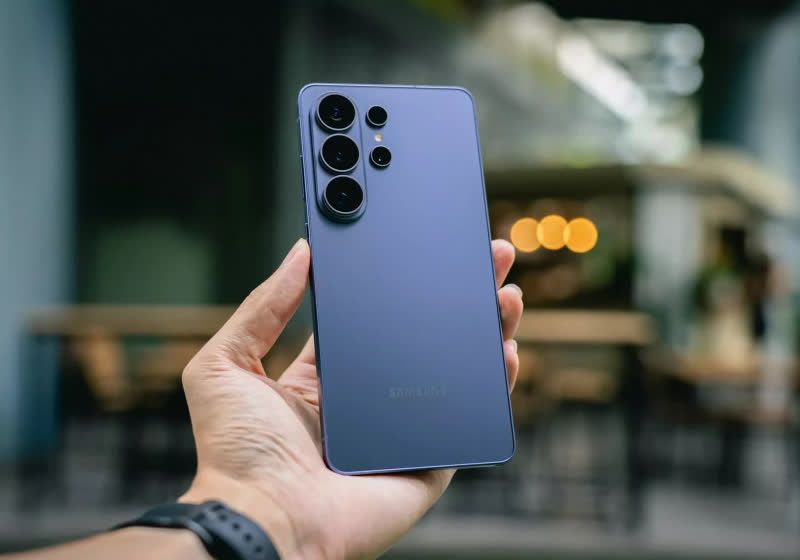
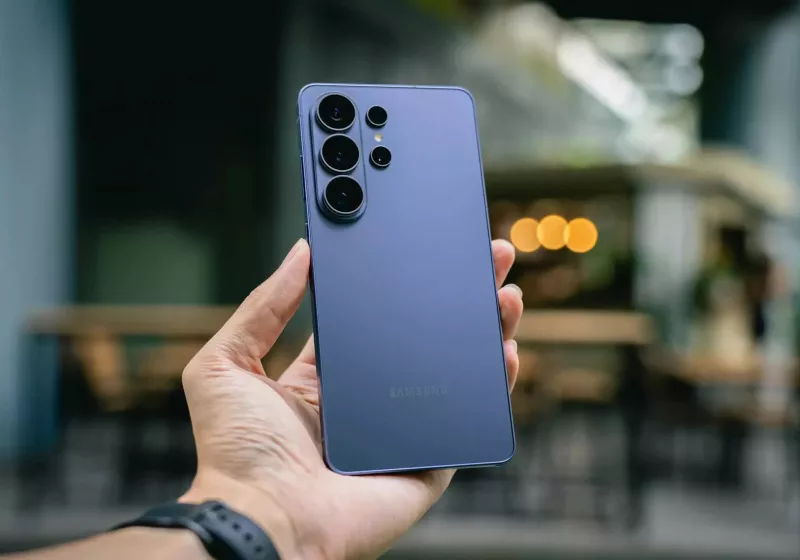
The financial pressures stem from a fundamental shift in smartphone bill of materials. DRAM and NAND used to be minor costs but now dominate device expenses. Read Entire Article Source link
A lot has been made about a post-quantum computer future in which traditional encryption methods have suddenly been rendered obsolete. With this terrifying idea in mind, it’s reassuring to see some recent pushback to the idea with some factual evidence. In a recent blog post by [Filippo Valsorda] – a cryptography engineer – the point is raised that 128-bit symmetric keys like AES-128 and SHA-256 are at risk of being obliterated in a post-quantum future.
Rather than just taking [Filippo]’s word for it, he takes us through a detailed explanation of the flawed understanding of Grover’s algorithm that underlies much of the panic. While it’s very true that this quantum search algorithm can decrease the amount of time required to find a solution, the speed-up with a single thread is quadratic, not exponential. While asymmetric cryptography systems like ECDH, RSA, and kin are very much at risk courtesy of Shor’s algorithm, the same is not true for symmetric systems.
An interesting detail with Grover’s is also that you cannot simply run a search in parallel to get a corresponding speed-up, as it’s not a parallel problem. Barring a breakthrough that replaces Grover’s with something that lends itself better to such a parallel search, it would seem that we won’t have to abandon classical encryption any time soon.
Advertisement
Incidentally, even for Shor’s algorithm, there are still some hold-ups. Current quantum computers are not even able to factor 21 yet. Meanwhile, supposed quantum computing breakthroughs are being trolled with a Commodore 64.
Over the last few days, reports have resurfaced that the EU will mandate that phones have replaceable batteries. These reports are based on 2023 legislation with an implementation date of 2027. I won’t go into the full details here, but that legislation covers removable batteries, and many phones are exempt anyway.
Before we dismiss everything, this kind of coverage presents an opportunity to talk about a different type of replaceable battery: the humble alkaline battery. The non-rechargeable, disposable batteries have been part and parcel of our lives for years, powering everything from game controllers to toys, torches, clocks, scales, smart locks and more.
According to Market Reports World, as of 2023, 8.5 billion AA alkaline batteries were sold (50% of the alkaline market), with AAA coming second and other sizes following.
These batteries will all end up, at some point, being disposed of, which is a huge amount of waste. Sadly, a lot of batteries are just thrown away. According to Business Waste, the UK has a battery recycling rate of just 33-35%.
Advertisement
Cheap to buy, but still disposable
One of the things that the aforementioned EU regulation (New Battery Regulation 2023/1542) covers is alkaline batteries, with improved waste collection targets, restrictions on hazardous ingredients and improved life-cycle assessments.
Advertisement
That’s all well and good, but the question should be, why are so many alkaline batteries out there?
Part of the reason is that manufacturers routinely include a set of batteries with their remote controls, so you can get going right away.
Advertisement
These giveaways are a drop in the ocean, but alkaline batteries are given away because they have a long shelf life, holding their charge for years. Typically, alkaline batteries are sold with a promise of a five-plus-year shelf life, and some even have a ten-year shelf life.
That gives a degree of reliability that the rechargeable alternatives just can’t compete with.
That kind of shelf life means that alkaline batteries are super convenient to have at home, too. When a device runs out of power, a quick swap for batteries in the cupboard and you’re good to go.
And, alkaline batteries are cheap to buy, particularly in bulk. In fact, bulk online sales have grown (24- and 48-pack variants saw 17% year-on-year increases according to Market Reports World). Looking on Amazon, for example, a 40-pack of AA batteries costs £9.03, which is 23p per battery.
Advertisement
Advertisement
Switch to rechargeables and standard NiMH batteries will cost you over £1 per battery. Smaller packs are available, as you don’t need as many batteries.
Over their lifetime, one of our best rechargeable batteries will handle many charge cycles (that is, charging them, using them, and then starting all over again). Say, for example, you get 1000 charge cycles (that’s about average, but some offer 1500 cycles or more), that means that each rechargeable battery does the work of 1000 alkaline batteries; effectively, that’s like paying less than 0.1p per battery.
There’s a cost to having a battery charger and some inconvenience waiting for batteries to charge. NiMH batteries also don’t hold their charge for as long as alkaline batteries (although most will hold 80-90% of their charge for months, so you can have a spare set charged and ready to go). These factors are partly why rechargeable batteries aren’t just routinely used everywhere, but there are other factors.
Advertisement
Some devices just hate rechargeable batteries
Taking the example of AA batteries, NiMH rechargeable and alkaline versions might be the same size (well, give or take a few mm), but internally they are different.
Alkaline batteries are rated at 1.5V, but the voltage drops as the battery is drained, with a faster drop under high loads and a slower drop under low loads (a clock, remote control, or even a smart lock, where the device largely sits idle). NiMH batteries produce a sustained 1.2V until the battery is almost exhausted, so they are better for continuous loads.
Advertisement
The issue is that some devices just hate rechargeable batteries. My Yale Linus Smart Door Lock runs on four AA batteries, but it constantly complains about low battery life whenever I try to put four rechargeable batteries in it.
Advertisement
Image Credit (Trusted Reviews)
Similarly, I bought a radio-controlled alarm clock. Stick two rechargeable AA batteries in it, and the clock comes to life, but it refuses to set the time automatically.
Then there are devices like smoke alarms, which, for safety, need alkaline cells, more for longevity.
Li-ion batteries could be the future, but compatibility issues are still there.
More recently, rechargeable Li-ion batteries have become available, such as the Paleblue AA USB-C Rechargeable Batteries. More expensive than NiMH batteries, these ones can be recharged via USB, produce a constant 1.5V, and hold their charge better.
Advertisement
Advertisement
On paper, these seem the ideal replacement for alkaline batteries. And, in many cases, they are. My Yale Linus lock no longer complains about low batteries and is very happy with a set of Li-ion batteries.
The range of rechargeables is very good, too: Paleblue and other manufacturers make AA, AAA, 9V, C, D and CR123A versions. As most charge via USB-C, you don’t even need fancy compatible chargers for them, either.
Prices are higher than for NiMH batteries, but with around 1000 charge cycles per battery, the lifetime cost is much lower than that of equivalent alkaline batteries. A typical set of four AA Li-ion batteries may cost around £20, but over 1000 charge cycles, that’s the equivalent of 2p per battery.
That’s the good news. The bad news is that some devices are still super finicky about which batteries they will work with. The aforementioned clock also won’t set its time automatically with a set of Li-ion batteries in it; switch to alkaline batteries, and it works perfectly.
Advertisement
I tried to go green by using some Type-C Li-ion batteries in my SureFlap Microchip Pet Door Connect. It all seemed to work, but the door would only unlock for two of my three cats.
Sureflap Pet Door Connect inside Image Credit (Trusted Reviews)
Advertisement
It appears the microchip sensor wasn’t operating at full power, and the chip in my cat may be in a slightly different location or buried a little deeper. For whatever reason, I can’t use rechargeable batteries with this product.
In some cases, manufacturers specifically state that rechargeable batteries should not be used. In fact, Paleblue has a warning to that effect on its 9V page stating that “Most smoke detector and carbon dioxide detector manufacturers do not recommend using rechargeable batteries in their products.”
Advertisement
Devices should be required to work with rechargeable batteries
Whether it’s by design, by mistake or by requirement, too many devices simply don’t work with rechargeable batteries at all, and that’s not good enough. The default position should be that all devices be manufactured to work with rechargeables, even if a requirement is added that a device is only compatible with Li-ion.
We banned disposable vapes in this country (partly due to environmental concerns and also youth addiction), but disposable batteries still seem fair game. Given how many battery-powered devices there are, it’s time more was done to ensure compatibility and reduce the amount of waste that we produce.
Recently observed Trigona ransomware attacks are using a custom, command-line tool to steal data from compromised environments faster and more efficiently.
The utility was emplayed in attacks in March that were attributed to a gang affiliate, likely in an effort to avoid publicly available tools, such as Rclone and MegaSync, that typically trigger security solutions.
Researchers at cybersecurity company Symantec believe that the shift to a custom tool may indicate that the attacker is “investing time and effort in proprietary malware in a bid to maintain a lower profile during a critical phase of their attacks.”
In a report today, the researchers say that the tool is named “uploader_client.exe” and connects to a hardcoded server address. Its performance and evasion capabilities include:
Support for five simultaneous connections per file for faster data exfiltration via parallel uploads.
Rotation of TCP connections after 2GB of traffic to evade monitoring.
Option for selective file type exfiltration, excluding large, low-value media files.
Use of an authentication key to restrict access to stolen data by outsiders.
In one incident, the exfiltration tool was used to steal high-value documents such as invoices and PDFs on network drives.
Trigona ransomware was launched in October 2022 as a double-extortion operation that demanded its victims to pay ransoms in the Monero cryptocurrency.
Advertisement
Although Ukrainian cyber activists disrupted the Trigona operation in October 2023, hacking its servers and stealing internal data such as source code and database records, Symantec’s report suggests that the threat actors resumed operations.
According to Symantec’s observations of recent Trigona attacks, threat actor installs the Huorong Network Security Suite tool HRSword as a kernel driver service.
This phase is followed by deploying additional tools that can disable security-related products (e.g., PCHunter, Gmer, YDark, WKTools, DumpGuard, and StpProcessMonitorByovd).
“Many of these leveraged vulnerable kernel drivers to terminate endpoint protection processes,” Symantec says.
Advertisement
Some of the utilities were executed with PowerRun, a product that can launch apps, executables, and scripts with elevated privileges, thus bypassing user-mode protections.
AnyDesk was used for direct remote access on the breached systems, while Mimikatz and Nirsoft utilities were executed for credential theft and password recovery operations.
Symantec has listed indicators of compromise (IoCs) associated with the latest Trigona activity at the bottom of its report to help with the timely detection and blocking of these attacks.
AI chained four zero-days into one exploit that bypassed both renderer and OS sandboxes. A wave of new exploits is coming.
At the Autonomous Validation Summit (May 12 & 14), see how autonomous, context-rich validation finds what’s exploitable, proves controls hold, and closes the remediation loop.
You know that old meme with the angry looking little kid posed behind the words, “Congrats”; “Happy for you”; “Nice”? That was me reading Caroline Bicks’ Monsters in the Archives: My Year of Fear with Stephen King. Here’s a snippet of the synopsis: “After Caroline Bicks was named the University of Maineʼs inaugural Stephen E. King Chair in Literature, she became the first scholar to be granted extended access by King to his private archives, a treasure trove of manuscripts that document the legendary writerʼs creative process—most of them never before studied or published.”
You hate to see someone else living your dream. (Just kidding). In all seriousness, this book was an absolute delight to read, both as a lifelong Stephen King fan and as a writer who is ever-fascinated by how the greats approach their craft. Bicks picks apart the early works — Pet Sematary, The Shining, Night Shift, ‘Salem’s Lot and Carrie — comparing the changes across multiple drafts for each, and highlighting King’s notes and correspondences with editors that shaped these drafts into the legendary horror stories we know today.
Monsters in the Archives makes for an insightful companion to King’s own On Writing: A Memoir of the Craft, and while you don’t need to be a superfan to enjoy it, anyone who is will surely eat it up.
Microsoft says IT administrators can now uninstall the AI-powered Copilot digital assistant from enterprise devices using a new policy setting, which has become broadly available after the April 2026 Patch Tuesday.
RemoveMicrosoftCopilotApp is available as a Policy CSP and Group Policy after deploying this month’s Windows security updates on endpoints managed via Microsoft Intune or System Center Configuration Manager (SCCM).
This policy will only apply to Windows 11 25H2 devices where the Microsoft 365 Copilot and Microsoft Copilot are both installed, the user did not install the Microsoft Copilot app, and the Microsoft Copilot app was not launched in the last 28 days.
“The new RemoveMicrosoftCopilotApp policy setting allows you to uninstall Copilot from devices in your organization in a non-disruptive way,” Microsoft said.
“If this policy is enabled, the Microsoft Copilot app will be uninstalled. Users can still re-install if they choose to. This setting applies to Enterprise, Professional and Education client SKUs only,” it added.
Advertisement
To enable it, open the Group Policy Editor, and go to User Configuration > Administrative Templates > Windows AI > Remove Microsoft Copilot App.
As BleepingComputer previously reported, the RemoveMicrosoftCopilotApp policy first rolled out in early January to Windows Insiders in the Dev and Beta Insider channels who installed Windows 11 Insider Preview Build 26220.7535 (KB5072046).
The company is also reportedly canceling plans to ship several other Copilot-powered features introduced almost two years ago, which would have embedded the Copilot assistant into Windows 11 system notifications, the Settings app, and the File Explorer.
AI chained four zero-days into one exploit that bypassed both renderer and OS sandboxes. A wave of new exploits is coming.
At the Autonomous Validation Summit (May 12 & 14), see how autonomous, context-rich validation finds what’s exploitable, proves controls hold, and closes the remediation loop.
Looking for the most recent Connections answers? Click here for today’s Connections hints, as well as our daily answers and hints for The New York Times Mini Crossword, Wordle, Connections: Sports Edition and Strands puzzles.
Today’s NYT Connections puzzle is a fun mix of topics. I especially loved the blue category, which harkens back to a very simple and iconic children’s book. Read on for clues and today’s Connections answers.
The Times has a Connections Bot, like the one for Wordle. Go there after you play to receive a numeric score and to have the program analyze your answers. Players who are registered with the Times Games section can now nerd out by following their progress, including the number of puzzles completed, win rate, number of times they nabbed a perfect score and their win streak.
Here are four hints for the groupings in today’s Connections puzzle, ranked from the easiest yellow group to the tough (and sometimes bizarre) purple group.
If you follow [Maker’s Muse] on YouTube, you know he’s as passionate about robot fights these days as he is about the tools he uses to make the robots. Luckily for us, he’s still got fame as a 3D printing YouTuber, as this has given him the platform to share his trade secrets for strong, robot-combat-worthy prints.
He fights robots in a ‘plastic ant-weight’ division, which restricts not only the weight of the robot but also the materials used. Not only must they be primarily plastic, but only certain plastics are allowed: PLA is in, but engineering filaments, Nylon, and TPU are out. Since necessity is the mother of invention, this has led to strong evolutionary pressure to figure out how to print the most impact-resilient PLA parts for armor and spinners.
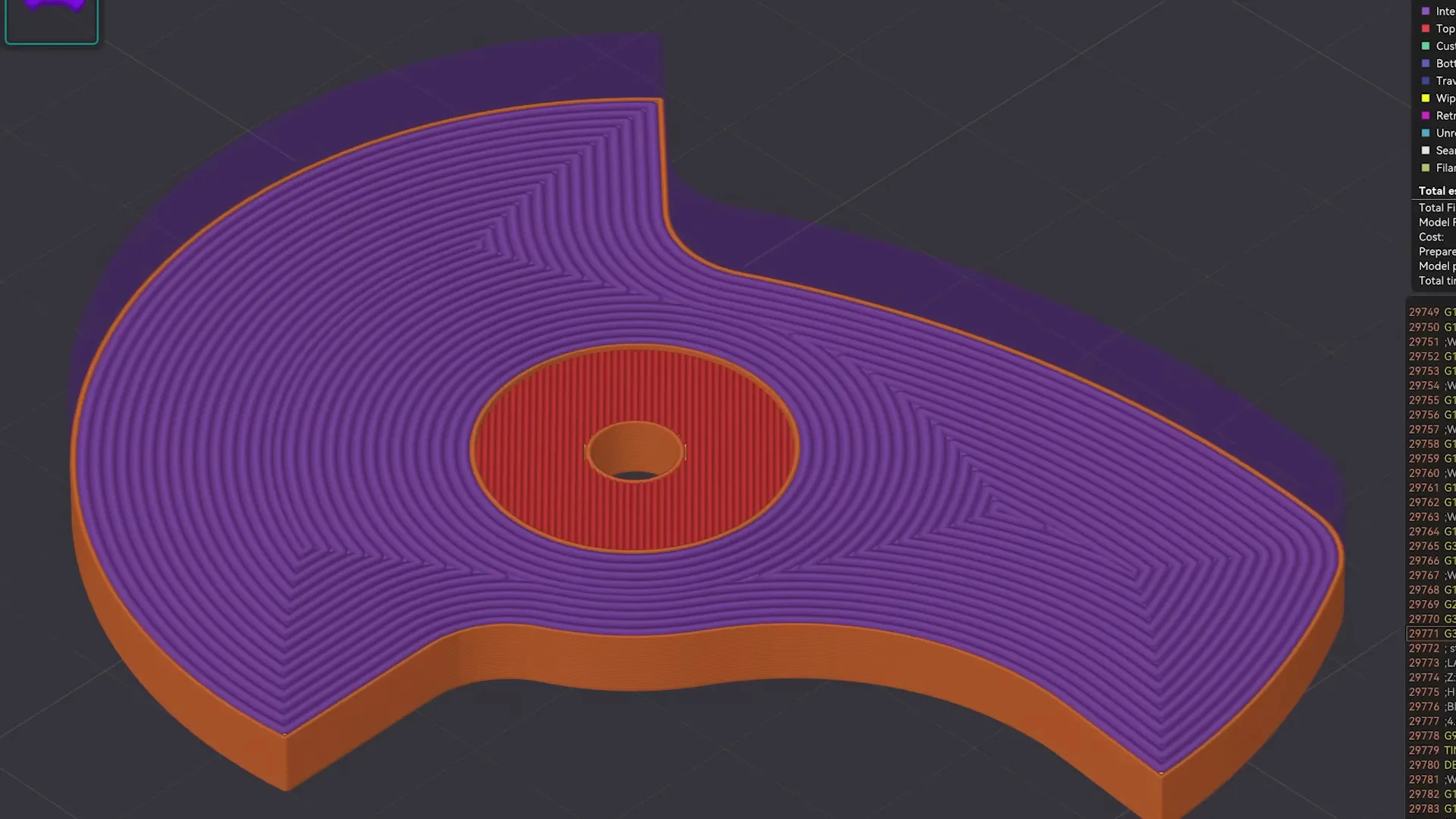
He’s using the latest OrcaSlicer and shares the profile as a pay-what-you-want 3MF file. It’s all about solidity: a solid part with solidly fused walls and solidly linked layers. It makes sense: if you’re going to be hammering on or with these parts, you don’t want any internal voids that could either collapse or pull open.
The infill density is obviously 100%, and you’ll want a concentric pattern — this makes it look like you’re just printing walls, but it allows you to use another trick. To make sure those walls don’t all align, creating a potential weakness, OrcaSlicer’s “alternate extra wall” will put one extra wall every second layer. The extra wall causes the infill pattern to stagger and lock together.
Advertisement
Also helping lock it together, he’s playing with extrusion widths, with the suggested rule-of-thumb being the line width on the walls be one-half that of the internal fill — and as wide as possible. In his case, with a 0.4 mm nozzle, that means 0.4 mm wide walls and 0.8 mm for the infill. OrcaSlicer 2.3.2 also lets you play with specific flow ratios, allowing you to overextrude only the internals for strength, without overextruding on the walls and potentially ruining dimensional accuracy. He also irons all top surfaces, but admits that that’s mostly about aesthetics. The iron may make those layers a little bit stronger, though, so why not?
Would brick layers make these parts even stronger? That’s very likely; [Maker’s Muse] mentions them in the video but does not use them because they’re not implemented in-slicer, and he wants something accessible to all. On the other hand, this post-processing script seems accessible enough for our crowd.
This video/profile is exclusively about fully-solid parts. When you want strong parts that aren’t fully solid, it looks like the answer is walls.
If you miss the days when you used Basic on your classic computer or wrote embedded software with a Basic Stamp, then maybe dust off your Arduino UNO or any similar AVR board and try nanoBASIC_UNO from [shachi-lab].
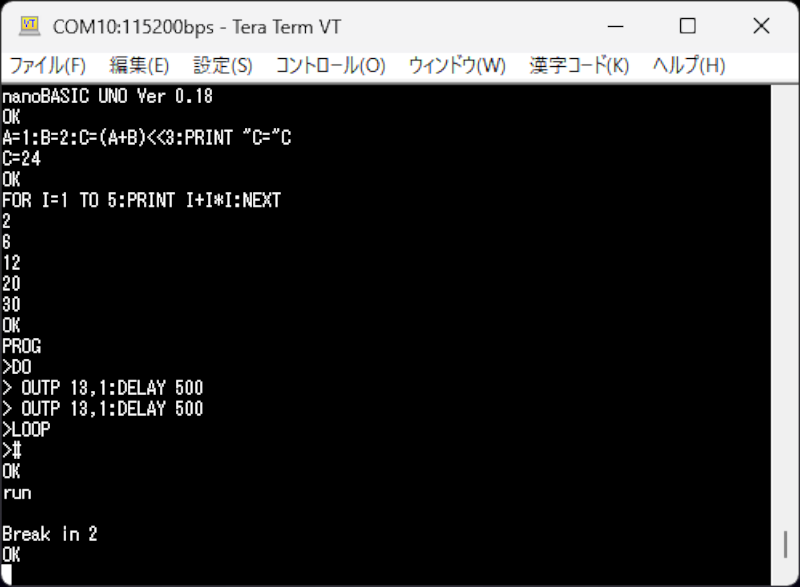
Apparently, the original code was meant for the STM8S, but this port targets the ATmega328P. It is Basic more or less as you remember it. There are enough extensions to deal with GPIO, the analog systems, and so forth. At build time, you can decide if you want 16-bit or 32-bit integers.
One thing that is a little odd is how it handles direct mode. In classic Basic, anything without a line number executes immediately. Line numbers simply store your program line until you type RUN. nanoBASIC_UNO doesn’t force you to use line numbers. To indicate you are programming, you have to start with the PROG keyword. Then you can enter lines into the RAM buffer until you enter a # character. The program is stored in RAM, but there is a way to save programs to flash.
Advertisement
You can also build the code for Windows or Linux if you just want to experiment. Looks like fun.
If you missed the heyday of the Basic Stamp, you missed a lot of fun. If you just want a quick Basic hit, try your browser.
As Apple races to stay competitive in AI while navigating tariffs and supply chain uncertainty, the company’s future is about to shift under new leadership.
On Monday, Apple announced that John Ternus will take over as CEO later this year, succeeding Tim Cook.
Cook transformed Apple into a $4 trillion global powerhouse, expanded its services business, and oversaw some of the most profitable years in tech history. Ternus brings a different kind of skillset. A longtime hardware executive, he has spent his career building Apple’s devices rather than managing the broader business.
Ternus joined Apple in 2001 and rose through the ranks of hardware engineering. Along the way, he has contributed to some of the company’s biggest products, including AirPods, the Apple Watch, and Vision Pro.
Advertisement
His appointment signals a renewed focus on hardware at a moment when Apple is under pressure to define its next era. Ternus will now help determine what that looks like.
Hardware with AI at the center
Rather than trying to compete head-on with companies building the biggest AI models, Ternus may push Apple to focus on the AI-powered devices themselves, whether that be the one in your hand, something you wear, or something that lives in your home.
There’s already a lot of speculation about what Apple could launch next. Ideas floating around include smart glasses, a wearable pendant with a built-in camera, and even AirPods with AI features. According to Bloomberg, the idea is that all of these products would connect to the iPhone, with Siri playing a major role.
Techcrunch event
Advertisement
San Francisco, CA | October 13-15, 2026
Image Credits:Apple
Ternus is also expected to push forward on products that have been stuck in limbo. Foldable iPhones are the obvious example. They’ve been rumored for years, and while competitors have already moved ahead, Apple has taken a slower approach, waiting until the technology meets its standards. Reports say it will arrive in September, which means Ternus will be overseeing the launch.
Apple has also reportedly been exploring robotics, particularly for the home. One concept includes a tabletop device with a robotic arm attached to a display, essentially a smart assistant that can move and turn toward you. Notably, this lines up with Ternus’s long-standing interest in robotics. In college, he built a device that allowed quadriplegics to control a mechanical feeding arm using head movements, as reported by the New York Times.
Advertisement
There are also ideas for mobile robots that could follow you around, handle simple tasks, or act like a moving FaceTime screen. Some reports even mention experiments with humanoid robots, though those are likely years away.
While none of these are guaranteed to happen, they do give a pretty clear sense of where Apple’s thinking might be going.
However, ongoing memory chip shortages, President Trump’s frequently shifting tariff policies, and the company’s reliance on Chinese manufacturing could create a challenging period ahead. Roughly 80% of iPhones were produced in China before the tariffs. The company recently pivoted to India, making about 25% of its iPhones in the country last year, according to Bloomberg.
When you purchase through links in our articles, we may earn a small commission. This doesn’t affect our editorial independence.
























































You must be logged in to post a comment Login