When you think about building wealth, what comes to mind? For a lot of people, it’s seen as an endless sacrifice. No dinners out or vacations. And certainly no margin for impulse buys. Just a constant grind toward a distant goal. So – it’s no wonder many people give up on the idea before they even start.
But you don’t have to live like a cheap minimalist to grow your wealth. You can still enjoy life while steadily building financial security. In fact, the sooner you shift your perspective from deprivation to intention, the easier it becomes.
With that foundation in mind, let’s look at practical ways to build wealth without feeling like you’re constantly giving something up.
Automate the Boring Stuff
One of the easiest ways to grow wealth while protecting your lifestyle is to remove decision fatigue. Every time you stop and ask yourself whether you can afford to save or invest, you give yourself the chance to say “not this month.” Automating your financial habits takes that decision out of your hands.
Set up automatic transfers into a high-yield savings account or investment account the day your income hits your bank. You won’t miss the money because you never had it tempting you. Even small amounts add up faster than you think, especially when invested consistently.
The beauty of automation is that it doesn’t require constant discipline. You still get to enjoy your day-to-day spending, but your future is quietly being funded in the background.
Advertisement
Rethink the Big Purchases
Most people focus on cutting back on small pleasures, like the daily coffee or the occasional takeout. But the truth is, those small indulgences won’t make or break your financial future. What really moves the needle are the big-ticket decisions — housing, cars, and major lifestyle upgrades.
When you approach those purchases with intentionality, you free up enormous amounts of cash flow without feeling deprived. For example:
Choosing a home that’s slightly below your maximum budget gives you more breathing room for travel, hobbies, or saving.
Driving a reliable, efficient car instead of the flashiest new model saves you thousands without sacrificing freedom or convenience.
Thinking twice before signing up for long-term payments (like memberships, financing, or luxury upgrades) helps you protect flexibility.
By focusing on smarter big purchases, you can still enjoy all the little things that make life fun without sabotaging your long-term wealth. This is something that any good financial planner will suggest in order to keep you moving in the right direction.
Credit cards have a bad reputation — and for good reason if you’re carrying balances at high interest rates. But used wisely, credit can actually support both your lifestyle and your wealth-building goals.
Rewards cards give you cash back, travel points, or perks that reduce the cost of the experiences you already enjoy. Financing large purchases at zero percent interest can free up cash flow as long as you pay them off before interest kicks in. And maintaining strong credit opens doors for lower rates on mortgages, car loans, or business financing.
The key is discipline. Pay off your balances in full each month, don’t use credit to live beyond your means, and treat rewards as bonuses — not excuses to overspend.
Advertisement
Invest in Lifestyle-Aligned Assets
Not all investments look like numbers on a brokerage statement. Some of the most rewarding ways to grow wealth also support the life you want to live.
Maybe it’s buying a rental property in a location you love to visit. You can use it as a vacation home part of the year and rent it out the rest of the time, letting others help cover the cost. Or perhaps it looks like investing in your own business, funding growth that not only increases your income but also gives you the flexibility to live life on your terms.
Build in Guilt-Free Spending
Here’s something you won’t hear in most traditional money advice: You should plan to spend on fun. Seriously. If you try to eliminate all discretionary spending, you’ll eventually rebel against your own system.
Set aside a portion of your budget for guilt-free enjoyment. Whether it’s dining out, tickets to concerts, or regular spa visits, knowing you have money earmarked for fun keeps you from overspending impulsively. It also reinforces the idea that wealth-building isn’t about punishment — it’s about balance.
Advertisement
When you see that you can both save for the future and enjoy the present, you’re far more likely to stay consistent over the long haul.
Protect What You’ve Built
It’s easy to overlook this part when you’re focused on growth, but protecting your wealth matters just as much as building it. Insurance, emergency funds, and proper legal documents (like a will or trust) create a safety net that keeps your financial progress from unraveling.
For entrepreneurs and self-employed individuals, this also includes things like disability insurance, liability coverage, and retirement planning. These aren’t glamorous moves, but they ensure that an unexpected event doesn’t wipe out the lifestyle and wealth you’ve worked so hard to create.
The Mindset Shift That Changes Everything
At the end of the day, building wealth without sacrificing your lifestyle comes down to mindset. Instead of asking, “What do I have to give up?” start asking, “How do I make my money work better for me?” That single shift opens the door to smarter choices, better habits, and more confidence with every financial decision.
Advertisement
It’s not about clipping every coupon or saying no to every outing. It’s about aligning your spending with what matters most, automating your future, and seeking out professional advice that keeps you on track.
When you put all of these strategies together, you’ll realize you don’t need to choose between living well today and securing tomorrow. You can have both — if you approach money with clarity and intention.
The astronauts aboard the Artemis II mission are called a crew, but they really regard themselves as a team, right down to just getting around the Orion spacecraft’s cabin. But they have been intently focused on the overall success of the Artemis program, as there is a lot at stake because it’s the first crewed deep-space flight in more than 50 years. And the astronauts are acutely aware of that and how what they will impact future moon missions.
“Part of our ethos as a crew and our values from the very beginning were that this is a relay race,” Mission Specialist Christina Koch said during a virtual news conference with reporters Wednesday evening. “In fact, we have batons that we bought to symbolize physically that. We plan to hand them to the next crew. And every single thing we do is with them in mind.”
Koch referenced tasks she and the Orion crew have performed so far during their mission, such as manually piloting the spacecraft and ensuring that procedures are as they should be.
Advertisement
Watch this: Getting Personal With the Crew of Artemis II | Tech Today
“We’re always thinking from the perspective of what is the next crew going to think about this, how will this help them to succeed,” stated Koch.
It also takes teamwork just to live in such a small space. Koch said that the Orion’s cabin feels bigger in microgravity than what she expected, even though the astronauts are constantly bumping into each other “100% of the time.” Moving around the cabin, even to perform simple tasks, requires them to narrate their exact movements to one another to avoid colliding with crewmates.
“Everything we do in here is a four-person activity, but it’s also really fun,” joked Koch.
Advertisement
That insight was among the personal details the Artemis crew shared from space on Wednesday evening — the eighth day of their mission — as they prepare for their return to Earth on Friday after a historic 10-day journey around the moon. The first crewed deep-space flight since 1972 saw the Orion Integrity spacecraft carry the crew 252,756 miles from Earth — the farthest distance humans have ever traveled from our planet.
Watch this: Watch NASA’s Artemis II Launch to the Moon
During the mission, the astronauts also shared an emotional moment with viewers back on Earth when they proposed naming one of the craters on the moon “Carroll,” in memory of Commander Reid Wiseman’s late wife, a nurse who died of cancer in 2020 at the age of 46. Wiseman opened up about his feelings in that moment when asked during the press conference. Mission Specialist Jeremy Hansen made the proposal to Mission Control to name the crater on Orion’s lunar flyby.
“When Jeremy spelled Carroll’s name C A R R O L L, that’s when I was overwhelmed with emotion. I looked over and Christina was crying. I put my hand down on Jeremy’s hand as he was still talking. (It was right there on that rail.) And I could just tell he was trembling,” remembered Wiseman. “We all pretty much broke down right there. And just for me personally, that was the pinnacle moment of the mission for me.
Advertisement
Wiseman went on to say the moment was “where the four of us were the most forged, the most bonded, and we came out of that really focused on that day ahead.”
Earthset captured through the Orion spacecraft window at 6:41 p.m. EDT, April 6, 2026, during the Artemis II crew’s flyby of the moon. On Earth’s day side, swirling clouds are visible over the Australia and Oceania region. On the moon in the foreground, the Ohm crater has terraced edges and a flat floor interrupted by central peaks.
NASA
The crew is also focused on the journey back to Earth — and has been for more than three years, as Pilot Victor Glover pointed out to reporters.
Advertisement
“We’ve actually been thinking about entry since April 3, 2023, when we got assigned to this mission, and one of the first press conferences, we were asked, ‘What are we looking forward to?’” Glover said. “And I said, ‘splash down.’ And it’s kind of humorous, but it’s literal as well, that we have to get back. There’s so much data that you’ve seen already, but all the good stuff is coming back with us.
He explained that there are so many more pictures and stories that the Artemis II crew still has to share. Glover also admitted that he hasn’t even begun to process everything the astronauts have been through over the past week.
“We’ve still got two more days, and riding a fireball through the atmosphere is profound as well,” Glover exclaimed.
The Artemis crew is scheduled to return to Earth on Friday, with a splashdown in the Pacific Ocean off the coast of San Diego at 5:07 p.m. You can follow the conclusion of the mission on CNET. You can also watch the entirety of Wednesday’s press conference on NASA’s YouTube channel.
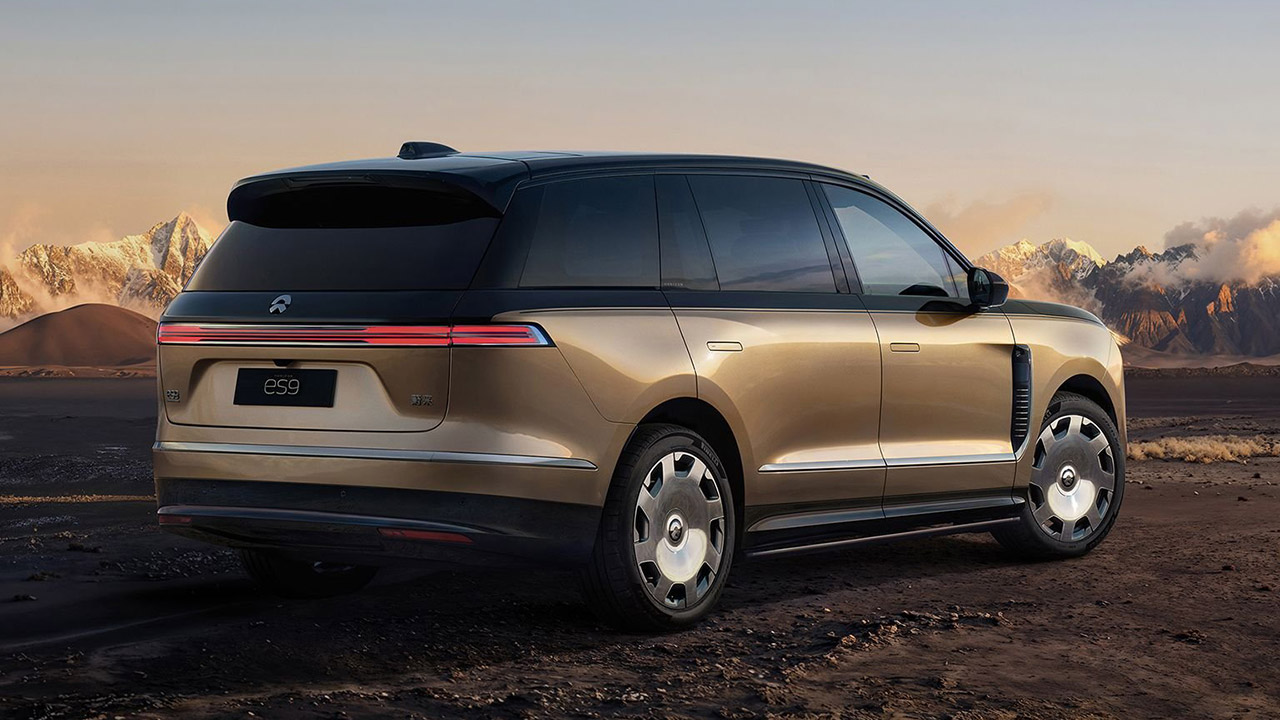
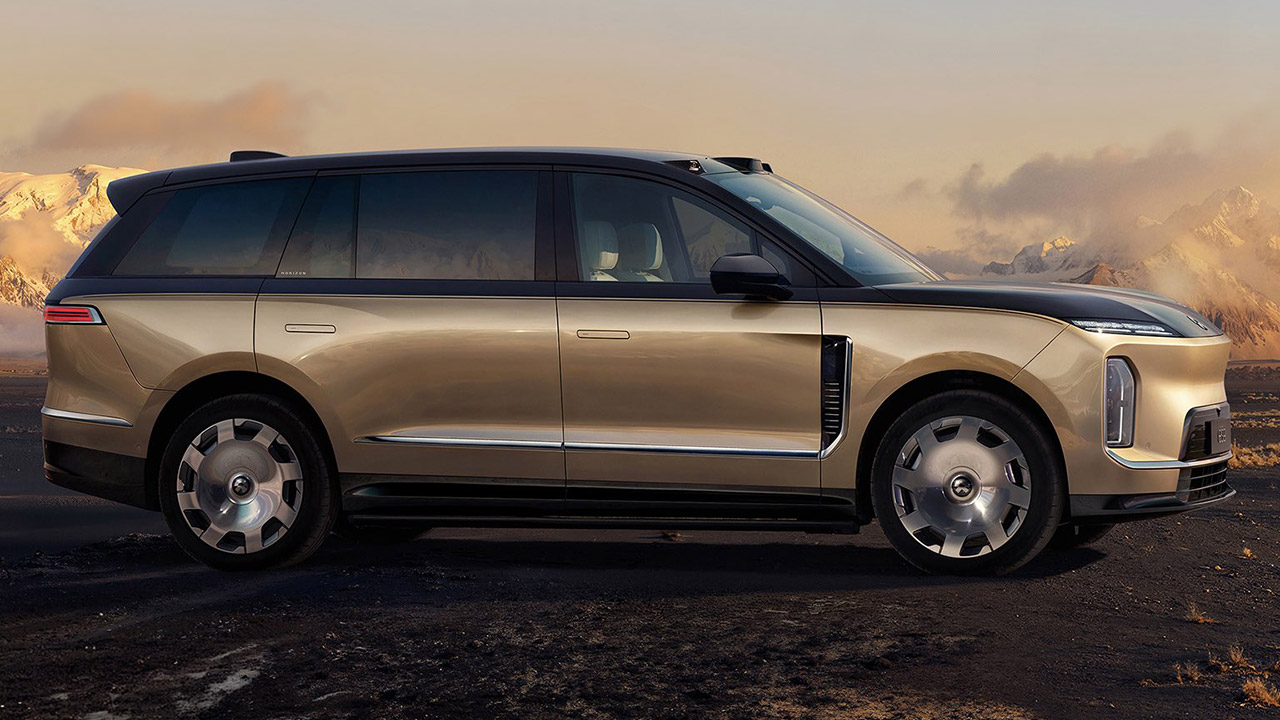
Display vehicles for NIO’s new ES9 electric SUV have arrived in showrooms around China, ahead of tomorrow’s tech showcase. The ES9 measures 211 inches long and has a wheelbase of 128 inches, making it somewhat larger than the ES8, and currently the largest pure electric SUV available in the country.
The ES9’s front end takes a bit of a sharp-headed shark approach, swinging into some split headlights that can project some beautiful patterns in the form of welcome lights. Wide angle LiDAR devices are tucked away in the fenders, along with some extra lighting components, as well as a roof-mounted unit that works with cameras and radar to provide data into NIO’s next-generation support system. The wheels, which range from 21 to 23 inches depending on the trim, help to create a silhouette that appears to be supposed to be there – planted and premium from almost every aspect.
Speed & Range: Experience exhilarating rides with the Ninebot S2’s impressive top speed of 11.2 mph and range of 21.7 miles.
Beginner-Friendly: Perfect for riders aged 16-50, the Segway S2 features a user-friendly learning mode, providing a smooth and gradual introduction.
Adjustable & Supportive: Enjoy a customized fit tailored to your needs, as the Segway S2 accommodates heights ranging from 4’3″ to 6’6″ and supports…
Power is sent to all four wheels via a dual motor system. The front unit produces 241 horsepower, while the rear motor produces 456 horsepower, totaling 697 horsepower and 700 Newton meters of torque. Engineers designed the entire system around a 900volt architecture to get the energy out rapidly and sustain rather fast charging speeds, much exceeding what most people are used to on a regular basis.
Advertisement
The ES9 gets a a 102 kilowatt-hour battery from CATL, which uses the ternary lithium chemistry that NIO prefers. The Chinese cycle has a range of up to 385 miles with the most efficient arrangement, while other models do not perform as well. However, one feature shared by all variations is the incorporation of NIO’s battery swapping network, which allows you to replace the pack in minutes rather than waiting for a full charge.
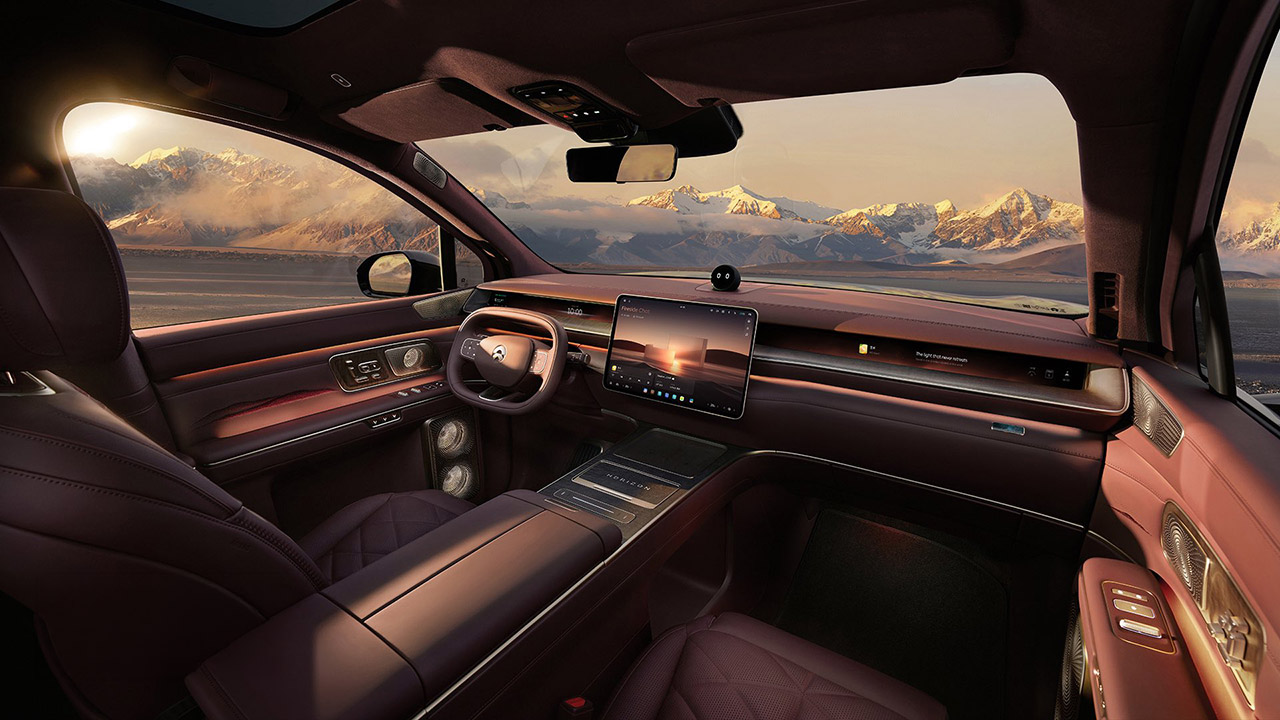
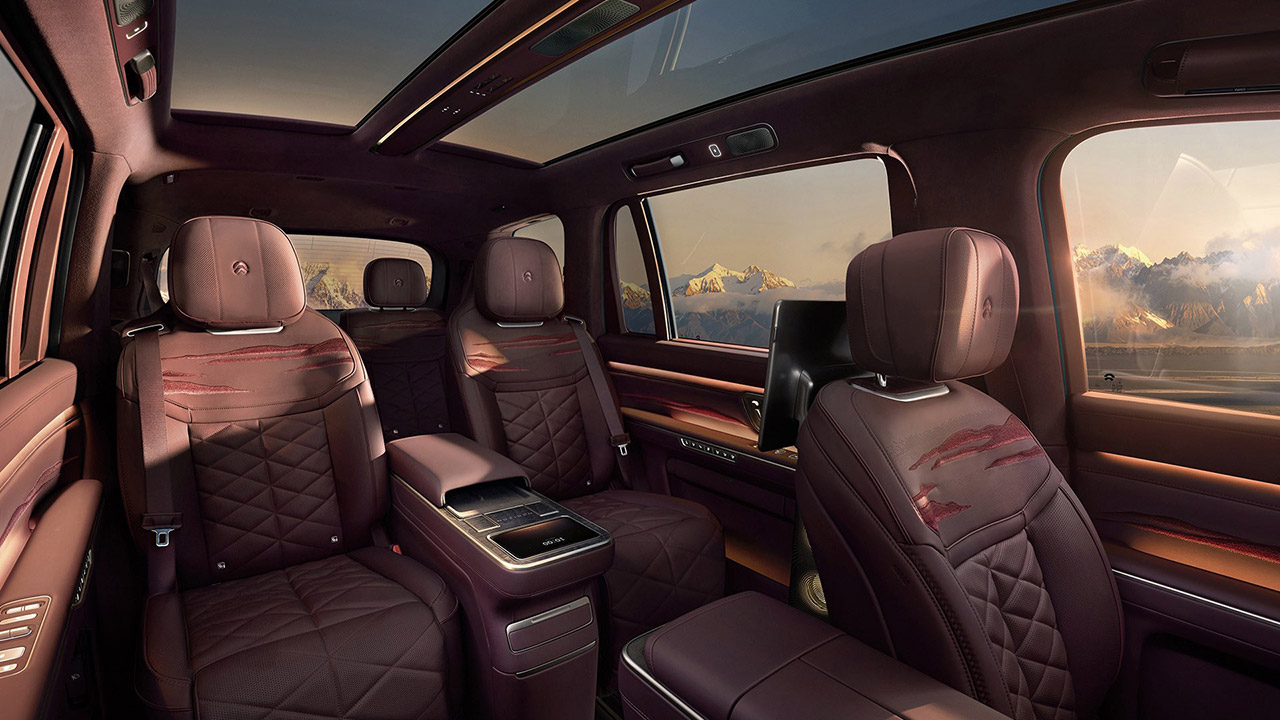
Inside, the ES9’s cabin is divided into two 2+2+2 configurations, with capacity and comfort for six adults as primary priorities. Nappa leather covers every surface, and real wood trim and embroidered details give it a warm, cozy feel. A wraparound dashboard design then houses the true star of the show, a crisp 15.6-inch AMOLED floating screen that runs NIO’s SkyOS interface and sits beside the NOMI Mate 3.0 voice assistant sitting on top. Second row passengers perform particularly well and benefit from the ES9’s 128-inch wheelbase, with higher trims receiving zero gravity seats that recline rather deeply and have all of the frills such as heating, ventilation, massage, and memory features. Then there’s electrochromic glass, which allows you to turn a switch and the rear windows go from clear to tinted in seconds. Add two 14.5-inch entertainment displays and a dedicated 8-inch control screen, and you have a car that will keep passengers happy in the back seat. There’s also a built-in fridge to keep your drinks cool without the need to stop anywhere, as well as a split panoramic roof that lets in plenty of natural light.
Technology does not stop with the touchscreens and seats. How it all works together, in this example the steer by wire technology and the SkyRide chassis, has a significant impact on your driving experience, providing precise handling and a comfortable ride even in a large vehicle like this one. The Shenji NX9031 chip powers it all, combining data from several lidar sensors and 4D radar to make driving feel rock solid regardless of the weather. And if you’ve seen the films of the car being flung around on snow-covered trails and then surviving a high-speed blowout at -30 degrees Celsius with barely a glitch, you know what I’m talking about.
On April 9th, we’ll find out what price the ES9 starts at, which is rumored to be around 500,000 yuan ($73,200). That puts it just below the price of NIO’s top-of-the-line ET9 sedan, but with a lot more room to spread out in and plenty of comforts thrown in, and you’ll be able to get your hands on one just a few months later, in late May. If you are lucky enough to be one of the first in line, you will receive your new ES9 Horizon Edition around a week later.
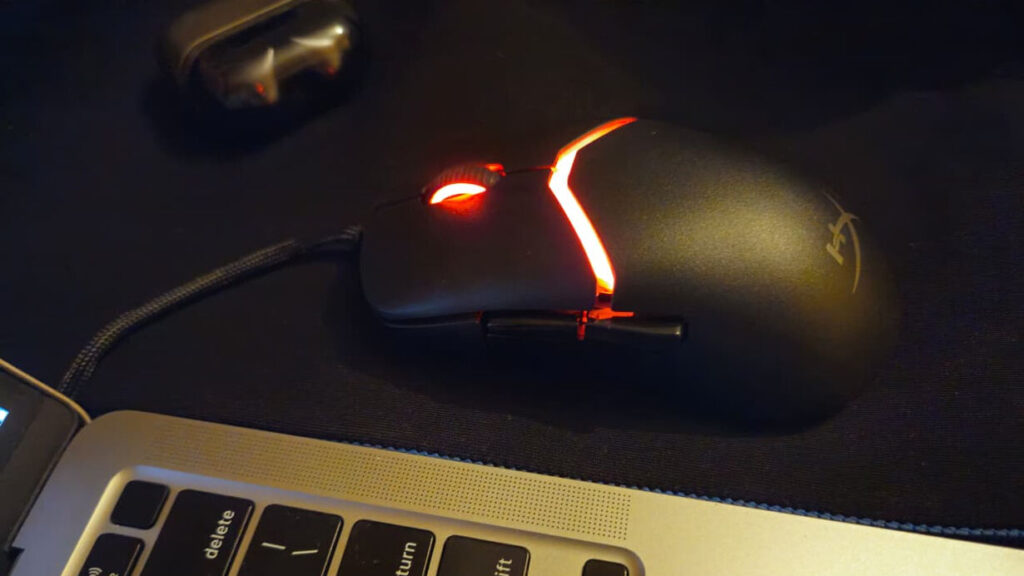
If you’re someone who spends hours gaming, you already know how important a good mouse is. The problem? Most gaming mice look different on paper but feel almost identical in hand. With so many options out there, it’s getting harder to find something that actually stands out. The HyperX Pulsefire Saga tries to flip that idea on its head with a modular design. Instead of adjusting your grip to the mouse, you can tweak the mouse itself to match your comfort. It also promises strong performance, with features such as a 26K DPI sensor and an 8K polling rate. But beyond the specs, I wanted to see if the modular design makes it better to use in real gameplay.
HyperX Pulsefire Saga
Deepti Pathak
Summary
Advertisement
After using the HyperX Pulsefire Saga for a while, it’s clear that it’s more than just a gaming mouse. From a functionality standpoint, I can say it’s held up incredibly well. The sensor is fast and reliable, and the lightweight design is a big plus for long-term use.
Design and Build
The first thing I noticed when I started using the HyperX Pulsefire Saga was how light it felt in my hand. At just 69 grams, it felt easy to control without feeling too fragile. While gaming, this made tracking and quick reactions feel smoother. What really makes this mouse different is its modular build. I was able to change the top shell, button covers, and side buttons within seconds. The magnetic system works well, and everything clicks into place securely. Even after changing configurations multiple times, the build stayed consistent.
In terms of comfort, I used it for long sessions, sometimes up to a few hours at a stretch. The weight, or lack thereof, helps a lot with comfort, and I didn’t experience the strain that I normally get with a heavier mouse. There are a couple of things that didn’t quite work for me, though. The side buttons don’t really feel as high-quality as the rest of the mouse, and there’s a little wobble if you look up close. The scroll wheel is also a bit smaller, but these are just nitpicks.
Advertisement
Overall, the module design is more about function than style, especially if you like to have control over mouse comfort.
Performance
In terms of performance, this mouse does not disappoint. The 26K DPI sensor shines for tracking, and the ability to reach an 8K polling rate is a clear indicator that this mouse is intended for precision use. I tested it with games like Valorant and GTA V, and the performance was pretty stellar. The movements felt smooth, and I did not feel jitters or unusual behavior.
Whether I was making small aim corrections or fast flicks, it reacted instantly. This made it easier to stay consistent during matches. The clicks have a fast and responsive feel, particularly when you’re firing weapons in FPS games.
With a wired mouse, I found that the cable didn’t interfere with my gaming experience because it was flexible enough to allow natural movement. Overall, performance is accurate, fast, and reliable, which is particularly important for a competitive gamer.
Software and Battery
Since this is a wired mouse, battery life isn’t something you need to worry about. I could just plug it in and start playing without worrying about charging or interruptions, which I found really convenient.
For software, HyperX provides NGENUITY. I used it to customize DPI settings, adjust the polling rate, and play around with RGB lighting. The controls are easy to understand, so setting things up didn’t take much effort. There are also options to remap buttons and fine-tune performance settings. It gives enough control for most users without feeling overwhelming.
Advertisement
That said, once I finished setting things up, I didn’t really need to open the software again. It works well, but it’s more of a one-time setup tool rather than something you’ll use regularly.
Verdict
After using the HyperX Pulsefire Saga for a while, it’s clear that it’s more than just a gaming mouse. You can currently buy this mouse from Amazon for Rs. 3,990. I played around with a few settings before finding one that felt comfortable to use, and once I got into the swing of things, it was much more comfortable. From a functionality standpoint, I can say it’s held up incredibly well. The sensor is fast and reliable, and the lightweight design is a big plus for long-term use.
One or two things could be improved, particularly the side buttons and the wheel, but they didn’t really affect my overall experience. If you’re like me and want a slightly more personalized, comfortable experience, this mouse makes a lot of sense.
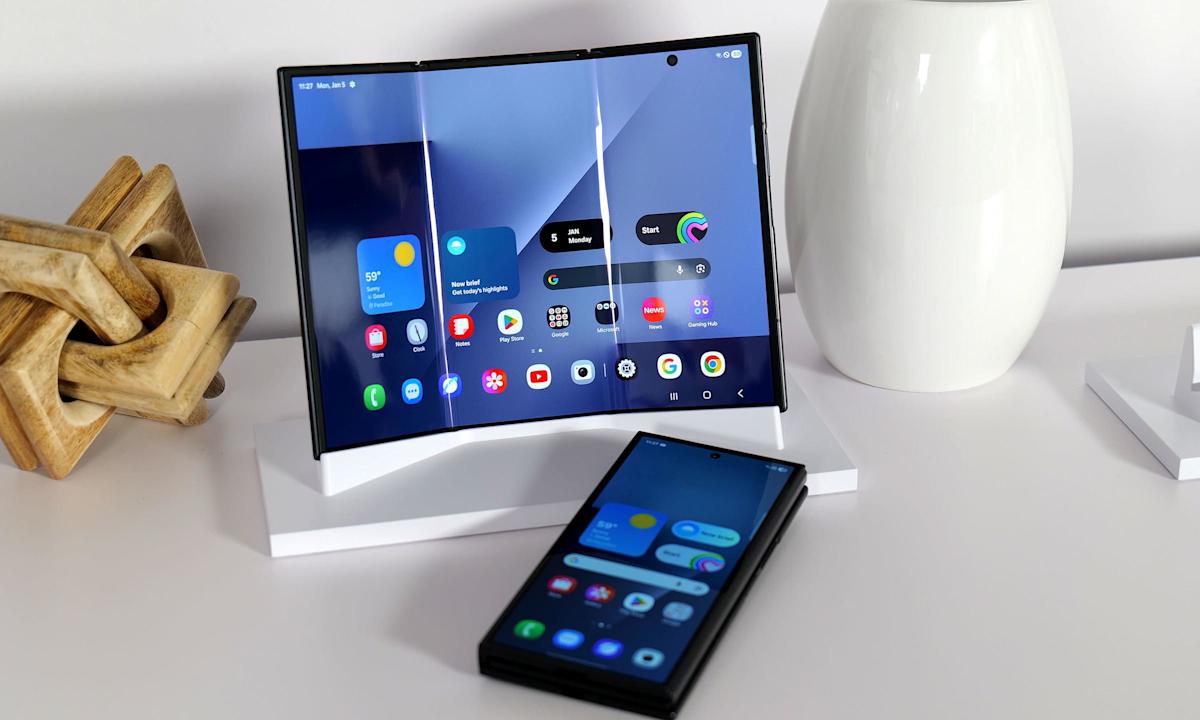
If you missed your chance to pay Samsung $2,900 for a phone earlier this year, we have great news for you. Android Police reported that what may be the final shipment of the Samsung Galaxy Z TriFold will be arriving in the US on April 10. The unique foldable was discontinued a mere three months after it first went on sale, and it seems like Samsung is clearing out whatever inventory it has left. So if you have a spare $3,000 that you’re just desperate to get rid of, bookmark the TriFold’s page where Samsung has a countdown ticking away.
All jokes aside, our hands-on time with the TriFold at CES 2026 revealed a pretty snazzy device that managed to strike a decent balance between size and heft. But perhaps unsurprisingly for a phone with such an intricate design and high price tag, the company didn’t appear to have any intention to make the TriFold widely available. Samsung may have sold out each batch of the smartphone that went to retail, but the device didn’t offer much in the way of profit, according to reports in South Korean newspaper Dong-A Ilbo.
As AI becomes an integral part of workflows across businesses in all industries, ensuring the technology offers genuine gains in efficiency and productivity has become a significant consideration for firms of all sizes.
This is particularly true in financial services, where critical data is analysed and stored most carefully, and the idea of handing such valuable information to an AI could be a cause for concern.
To find out how businesses can allay these fears and unlock true progress with AI, I spoke to Evan Goldberg, CEO and founder of Oracle NetSuite, along with Nicky Tozer, Senior Vice President, EMEA.
Advertisement
Article continues below
AI changes
“We’re reinventing NetSuite from the ground up around AI”Evan Goldberg, CEO and founder of Oracle NetSuite
“Doing things smarter is common across all businesses who are looking to grow,” Tozer notes as we talk at the company’s SuiteConnect London 2026 event, “and having learnt from all of the financial and technological challenges over the last few years, everyone is looking for efficiencies and productivity.”
Advertisement
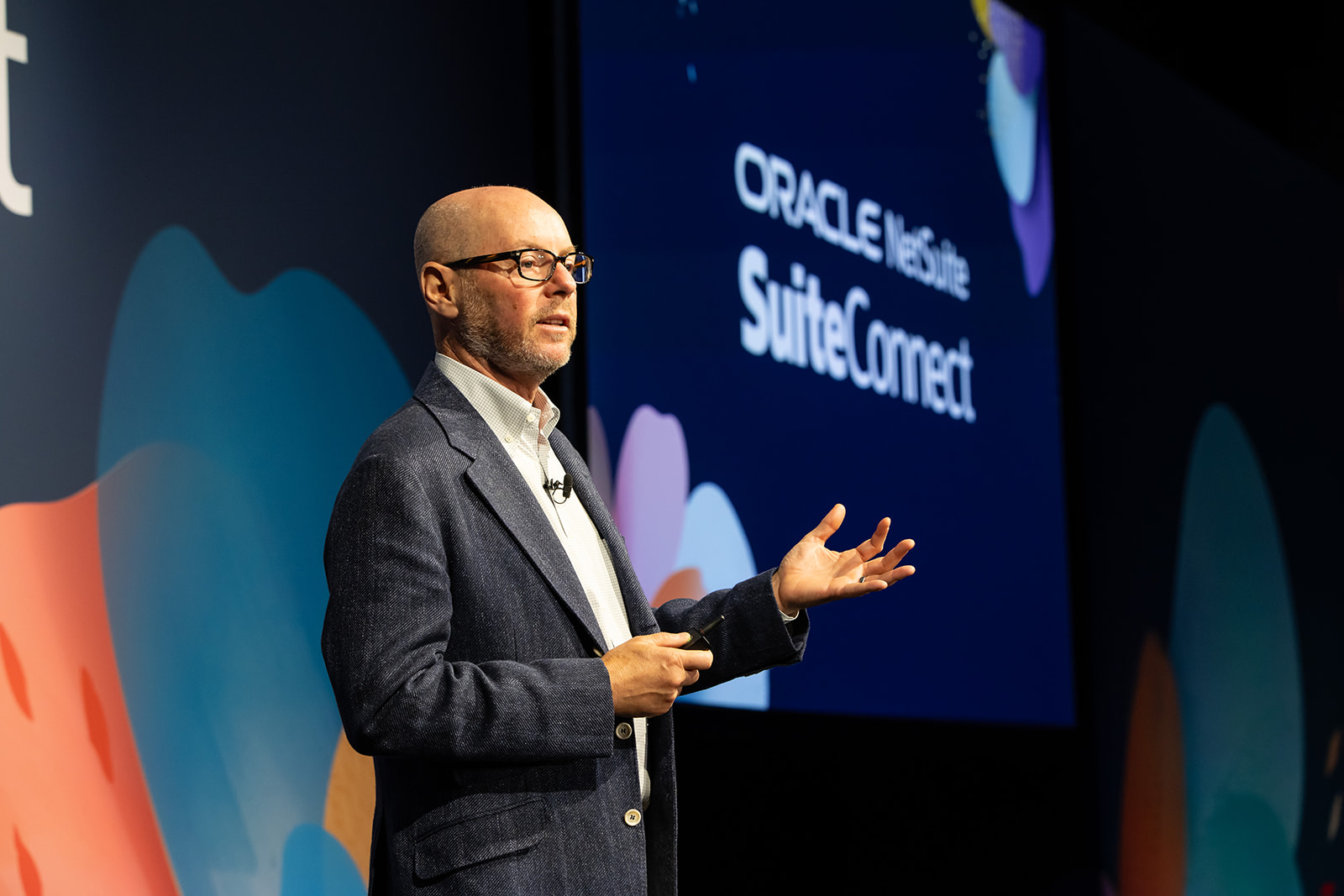
In his SuiteConnect London 2026 keynote, Goldberg had floated the idea of NetSuite being an “autopilot rather than copilot” – so I ask him why the company feels this is the right approach to be taking to such a key form of technology.
“(AI has) changed so much, so rapidly,” he says, “so our approach, which has maybe taken a little longer, is to build it deeply into the system, so that we’re reinventing NetSuite from the ground up around AI.”
(Image credit: Oracle NetSuite)
NetSuite is “letting people experience AI without in the places they’re already working without having to do a lot of work to implement that,” Goldberg notes, particularly via its new new AI Connector Service, which will allow customers to bring the likes of Claude to their NetSuite environment in a secure, governed way, while also being able to control how those assistants access and interact with NetSuite data, workflows, and analytics.
Sign up to the TechRadar Pro newsletter to get all the top news, opinion, features and guidance your business needs to succeed!
Advertisement
“Things are changing very rapidly, how you’re managing across your whole business is changing rapidly, and of course, you want to use AI as much as possible in your business operations,” he adds, “we’re trying to make it a natural extension of how people are already working, so they don’t have to implement AI themselves in their business applications – we’re delivering it to them in the places they’re already working, in a way that’s very easy to adopt.”
Goldberg says he believes NetSuite customers definitely have a leg up on the competition, as his company offers, “not a point solution – it’s more of an all-encompassing business management solution” which sits at the center of a lot of systems and workflows.
“The fact it is all in one system and we have a unified approach and unified data is helpful for AI,” he points out, as these platforms can get confused by multiple inputs and systems – much like human beings.
Having trust in the findings of AI is vital, particularly when it comes to valuable business data, and Goldberg agrees locking this in is crucial to the customer experience.
“Trust exists on a lot of different levels…companies trust us to be strong,” he notes, “this is the nature of AI – just like people, it won’t always give you the right answer every single time – it’s going to continue to get better, and we’re going to guide it with as much knowledge and skill that we can.”
SMB successes
Both Tozer and Goldberg note how SMBs could particularly benefit from AI-assisted tools, as workers in such firms often have to combine several key roles and responsibilities, and where any delay or issues adopting new technologies could lead to being left behind by the competition.
Advertisement
“We’ve always been about democratizing technology…that’s been the great thing about NetSuite,” Goldberg says, “we’ve always tried to make it easy to adopt, easy to use, and so far that’s worked out really well for us.”
“Things that haven’t been happening for a while are starting to happen again,” Tozer notes, highlighting the recent increase in market investment and more hopeful strategic priorities, “And as those things happen, people grow, and they scale a little faster, and that creates complexity in businesses, and requires more automation, but then requires the insight and agility for customers to be able to do that.”
Joseph McNally, former federal prosecutor and director of Emerging Torts and Litigation at McNicholas & McNicholas in California, says jurors agreed with the novel legal argument that Meta and Google were negligent in their design of Instagram and YouTube, respectively, contributing to the mental health problems of the plaintiff. Parent companies of Snapchat and TikTok settled with the plaintiffs before the trial.
McNally and other experts tell EdSurge the verdict will affect thousands of similar cases and influence how tech companies roll out their features — and that the legal tussle over where liability falls when it comes to youth mental health isn’t over yet. With the social media giants vowing to appeal, the case could end up before the U.S. Supreme Court.
Advertisement
Email Evidence
The impact left by the presentation of internal company emails was undeniable, McNally says. Internal Meta communications showed that employees raised alarms about the potential harm to teen girls posed by a beauty filter. Documents also showed they knew that users much younger than 13 — the minimum age required for sign up — were on their platforms, he adds.
“They looked the other way because — the plaintiffs argued — they had a long-term benefit, long-term value of hooking those users early,” McNally says. “I think that the emails painted a picture of a company whose own employees were raising concerns about features in the product, and the plaintiff effectively used those emails to show that they knew about the risk of the product.”
“Addictive” Design
If Meta and Google had settled, the court wouldn’t have had cause to grapple with the legal question of whether social media companies can be held liable for harm caused by their design. But from the defense’s perspective, tech companies had been solidly protected by Section 230 in the past, explains Princess Uchekwe, corporate attorney and founder of The Chief Counsel in New York. That’s the part of the 1996 Communications Decency Act that shields websites and online platforms from being sued over content posted by users.
Just one day before the California verdict, a New Mexico jury found Meta liable in a $375 million consumer protection lawsuit over its failure to protect children from social media harm on its platforms.
Advertisement
“What the lawyers for the plaintiffs were arguing is, essentially, it’s not the content that we have a problem with,” Uchekwe says, “It’s the fact that when people use your platform, you have implemented certain features that make it almost impossible for people to leave. You can scroll into the bottomless pit of hell on Instagram, and nothing ever tells you, ‘Maybe you should pause.’”
The Appeal of an Appeal
The $6 million in damages is a drop in the bucket for the two social media giants, but McNally says there are potential benefits to appealing the ruling anyway. There are thousands more consumer lawsuits against social media companies around the country, with school districts joining as plaintiffs.
One is that an appellate court might find that the long-time protections that social media companies have relied on should have come into play. The verdict barreled through the defenses raised by Section 230, which protects platforms from claims of harm caused by third-party content. It’s a policy that makes a free and open internet possible.
“[Section] 230 has resulted in the dismissal of hundreds of lawsuits over the years where they would’ve otherwise faced hundreds of millions of dollars in liability,” McNally says. “An appeal [based on] Section 230, which is a federal statute, could make its way up to the Supreme Court, who would have the final word on the scope. [If the] court of appeals remanded it back to the trial court and said, ‘Look, Section 230 applies,’ it would essentially bar these claims [of harm caused by the design].”
Advertisement
Uchekwe says failure to win an appeal could be “almost devastating” for tech companies due to the sheer amount of damages they could have to pay across thousands of similar lawsuits, along with the cost of restructuring how their apps function. That could mean rethinking features like targeted algorithms, the ability to endlessly scroll and notifications that draw users back into the app.
“Not only social media companies,” Uchekwe says, “all tech companies that have implemented things like that, especially if they have children as a base, are going to have to start reconsidering.”
First Amendment Question
There’s also a First Amendment case to be made, McNally adds. Some legal experts, including UC Berkeley law professor Erwin Chemerinsky, argue that the “addictive” algorithms that came under fire during the trial are protected free speech. If that argument succeeds on appeal, it could stop the legal cases arguing product liability in their tracks.
“If the Supreme Court overturned it based on Section 230 and the First Amendment, it’s unlikely there’s going to be a new trial. It would likely be dismissed,” McNally says. “I won’t say that with certainty, but the prospects of dismissal would be pretty good for the defendants.”
Advertisement
Ripple Effect
McNally says the fact that a jury ruled Meta and Google’s app features were “unreasonably unsafe for its users” creates challenges for them in the swaths of similar lawsuits they’re facing. Plaintiffs in those cases still must prove a direct link between the social media companies and the harm they’re alleging.
“I think it’s going to result in some cases probably moving closer to settlement, but in all those cases, I think that the defendants are going to be looking closely at the causation issue,” McNally says. “There’s probably other cases out there where the evidence of causation is not as strong, and those cases may be harder for a plaintiff to get across the finish line.”
Uchekwe predicts that if the verdict sticks, tech companies — especially those with users who are under 18 — will be forced to retool their app features to encourage users to spend less time on their platforms. That could hurt the companies’ ad revenue and their ability to gather data on users.
“Undoing some of those things may decrease their bottom line, but I’m not sure it will do it to the extent that it’s detrimental to their revenue,” Uchekwe says. “If you weigh the benefits of putting these safeguards in for children versus your revenue, I never think that your profit should come at the expense of a generation of people.”
WireGuard, the major software project and VPN that underpins popular security software including Mullvad and others, has found itself locked out of a key part of its Microsoft developer’s account and unable to ship software updates to Windows users.
Jason Donenfeld, the creator of the open source WireGuard VPN software, told TechCrunch that he has been locked out of his Microsoft developer account, and as a result cannot sign drivers or ship updates for WireGuard for Windows users, which are critical for its software to run. Donenfeld said in a post on X on Wednesday that the account termination stopped a WireGuard update from shipping.
It’s the second such incident of a high-profile and widely used open source project being shut out from its customers due to a seemingly abrupt account termination from Microsoft, with popular encryption software VeraCrypt facing a similar circumstance. Both developers said Microsoft locked them out of their accounts without first alerting them.
In the case of VeraCrypt, which is used by hundreds of thousands of users to encrypt files and operating systems, its developer Mounir Idrassi told TechCrunch that being locked out of his account means he is unable to update the software in time for a crucial certificate authority expiry, which he said may prevent some users from booting up.
Advertisement
Donenfeld, the WireGuard developer, told TechCrunch in an email: “If there were a critical vulnerability to fix right now — there isn’t! I just mean hypothetically — then users would be totally exposed.”
WireGuard is an open source VPN software used around the world to connect devices over the internet. WireGuard’s code is highly popular for its simplicity and security, as it serves as the foundation of many VPN implementations and commercial services that rely on its code, like Proton and Tailscale.
Donenfeld told TechCrunch in an email that he has spent the past few weeks modernizing WireGuard’s Windows code and was ready to send a copy update to Microsoft for checks before it can ship out to users, but was met with an “access restricted” error when logging into the developer portion of his Microsoft account.
Despite going through the process to verify his driver’s license or passport with Microsoft (the third party Microsoft uses for verification said he was “verified”), Donenfeld said his access was still suspended.
Advertisement
Donenfeld told TechCrunch that he found a page on Microsoft’s website saying that the company had been carrying out “mandatory account verification for all partners in the Windows Hardware Program who have not completed account verification since April 2024,” but that the verification program had since closed.
Microsoft’s Windows Hardware Program allows developers like Donenfeld and VeraCrypt’s Idrassi to “deploy hardware and device drivers for Windows PCs and other devices.” The ability to develop and release drivers for Windows users is restricted to known and vetted developers, as drivers can grant vast access to an operating system and its data and are known to be abused by hackers for that reason.
That account verification process meant that developers were required to upload their government-issued ID before they were allowed to publish potentially highly sensitive code to the broader Windows user base.
“Microsoft never sent me any notification at all about this. I’ve looked in every inbox in every spam folder in every mail log, and zero, nothing, zilch,” Donenfeld said.
Advertisement
The Windows Hardware Program’s verification program has “now concluded” and developers who have not uploaded their documents had their accounts “suspended,” the page reads, meaning that these accounts can no longer send updates.
Donenfeld said that he was referred to Microsoft’s executive support team, which handles customer service and account requests for high-profile individuals, which confirmed his appeal had been received but that they had to wait as long as 60 days for review.
By late Wednesday, there was a glimmer of hope in Donenfeld’s case. He told TechCrunch that he was finally in contact with Microsoft and that hopefully the issue would be resolved soon.
Microsoft did not immediately comment when reached by TechCrunch.
Advertisement
Donenfeld and Idrassi are not alone, with the account lockout issues affecting others as well.
Windscribe, a maker of VPN and other consumer privacy tools, said in a post on X that it had also been locked out of its Partner Center account. The company said it had a verified account for over eight years in order to sign its drivers.
“We’ve been trying to resolve this for over a month, and getting nowhere. Support is non-existent,” Windscribe said in its post. “Anyone know a human with a brain that still works at Microsoft and can help?”
A new campaign delivering the Atomic Stealer malware to macOS users abuses the Script Editor in a variation of the ClickFix attack that tricked users into executing commands in Terminal.
Script Editor is a built-in macOS application for writing and running scripts, primarily AppleScript and JXA, that can execute local scripts and shell commands. It is a trusted application pre-installed on macOS systems.
While this is not the first time it has been abused for malware delivery, the researchers note that, in the context of the ClickFix social engineering technique, it does not require the victim to manually interact with the Terminal and execute commands.
Apart from the Terminal-based variant being widely reported, macOS Tahoe 26.4 added protection against ClickFix attacks in the form of a warning when trying to execute commands.
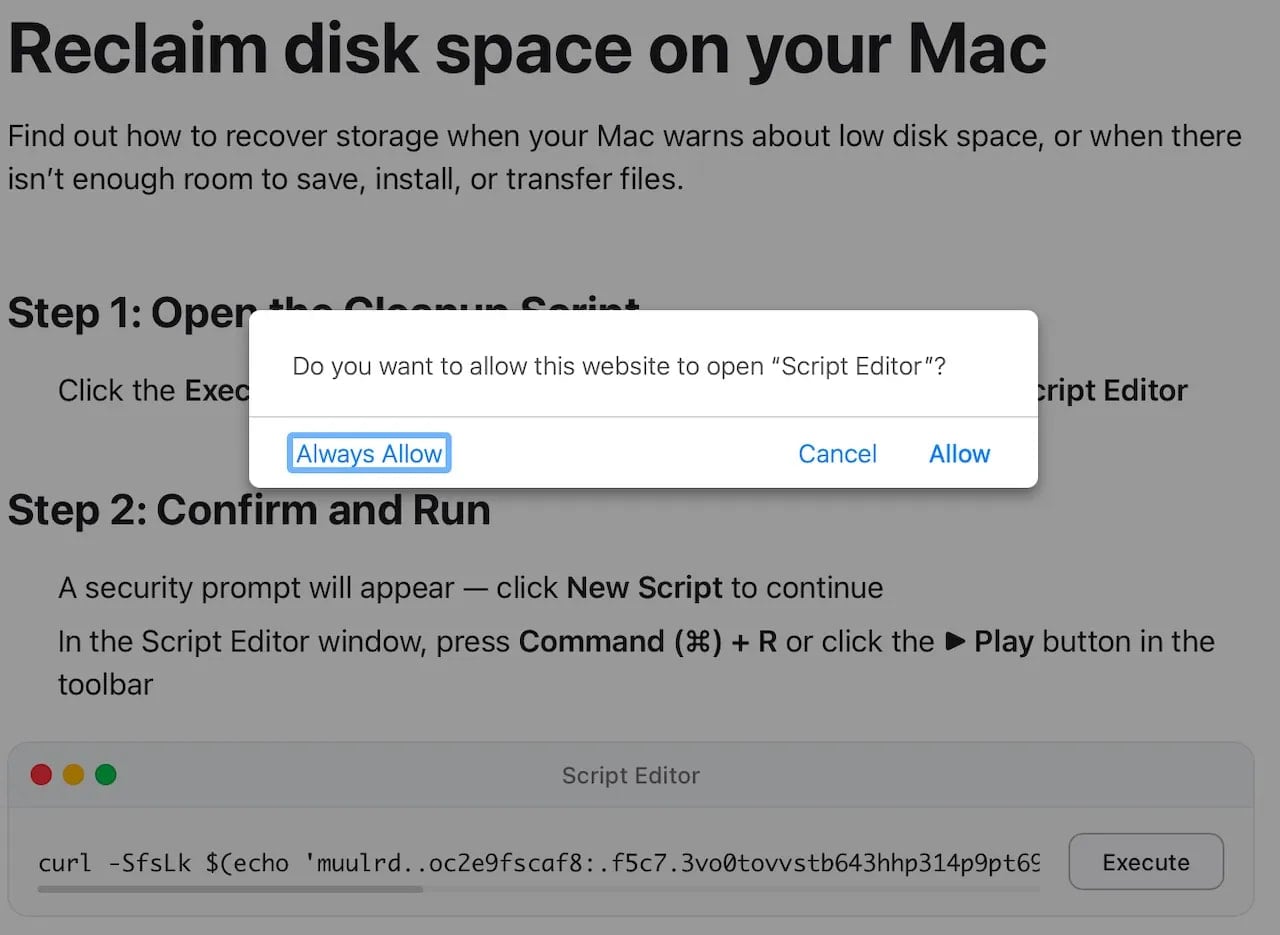
In a new campaign distributing Atomic Stealer observed by security researchers at Jamf, the hackers target victims with fake Apple-themed sites that pose as guides to help reclaim disk space on their Mac computers.
Advertisement
These pages contain legitimate-looking system cleanup instructions but use the applescript:// URL scheme to launch Script Editor with a pre-filled executable code.
Prompt to open the Script Editor by the malicious web page Source: Jamf
The malicious code runs an obfuscated ‘curl | zsh’ command, which downloads and executes a script directly in system memory.
This decodes a base64 + gzip payload, downloads a binary (/tmp/helper), removes security attributes via ‘xattr -c,’ makes it executable, and runs it.
The final payload is a Mach-O binary identified as Atomic Stealer (AMOS), a commodity malware-as-a-service that has been extensively deployed in ClickFix campaigns using various lures over the past year.
The malware targets a broad spectrum of sensitive data, including information stored in the Keychain, desktop, and browser cryptocurrency wallet extensions, browser autofill data, passwords, cookies, stored credit cards, and system information.
Advertisement
Last year, AMOS also added a backdoor component to give operators persistent access to compromised systems.
Mac users should treat Script Editor prompts as high-risk and avoid running them on their devices unless they fully understand what they do and trust the resource.
For macOS troubleshooting guides, it is recommended to rely only on official documentation from Apple.
Apple Support Communities, the forum where Apple customers can help each other with advice, although it may not be risk-free.
Advertisement
Automated pentesting proves the path exists. BAS proves whether your controls stop it. Most teams run one without the other.
This whitepaper maps six validation surfaces, shows where coverage ends, and provides practitioners with three diagnostic questions for any tool evaluation.
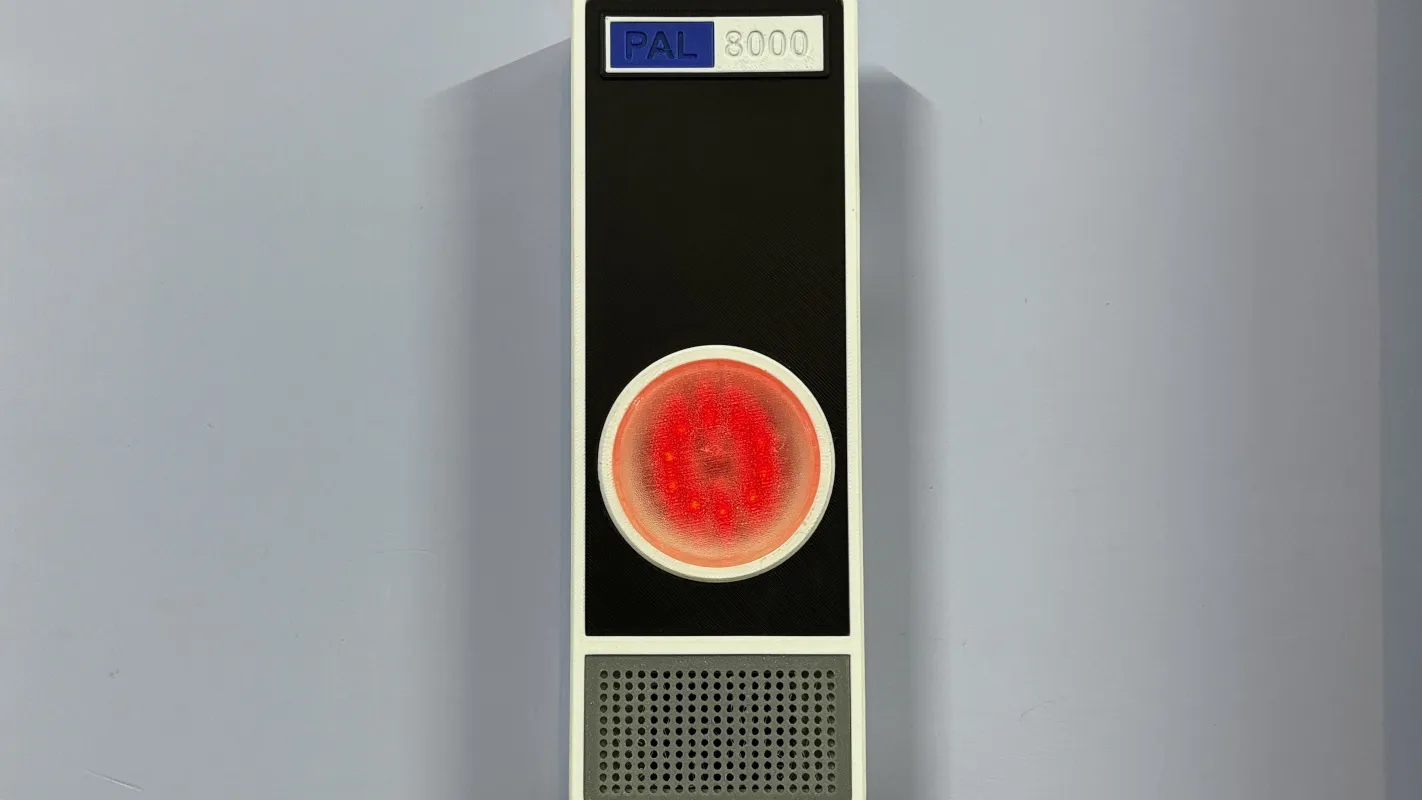
2001: A Space Odyssey not only pushed the boundaries of filmmaking, but introduced us to one of the most enduring villains in all of media. The HAL 9000 artificial intelligence was human-like but inhuman, a singular uncanny red light on a wall, tasked not only with control of a spaceship and its inner workings but also with being a companion for its occupants. It’s gone on to be the inspiration and basis of many projects around here, where it is generally given much less scope than control of a space ship and instead is tasked with something like monitoring air quality in a home.
Called the PAL 8000 by its creator [Arnov], this uses a Raspberry Pi Pico 2 at its core which monitors a volatile organic compound (VOC) sensor to take air quality measurements. The device features a custom 3D printed enclosure with glowing LEDs and plays contextual audio responses based on air quality levels, completing the HAL 9000 theme. The project also includes a local web dashboard which reports on its data, allowing users to see information in real time rather than relying on HAL’s voice reports alone.
For those looking to build other HAL-inspired projects, [Arnov] has made many of the printing files available on the project’s site. It’s a well-polished build faithful to the source material and could be a great addition to any home automation system for many other tasks beyond air quality monitoring. Perhaps something like a more general-purpose voice assistant, minus the megalomania.
The Asus Zenbook A14 (2026) is a beefy and super light Windows laptop that impresses with its potent internals from a new chip, immense endurance and a stylish look. The needle has moved a lot in price against the old model, though, and a 1920×1200 screen for the price feels a little off.
Lightweight and super portable
Increased grunt from Snapdragon X2 Elite chip
Immense battery life
More expensive than its predecessor
1920×1200 resolution feels off for the price
Key Features
Advertisement
Review Price:
£1599
Snapdragon X2 Elite inside:
Advertisement
The new Zenbook A14 (2026) packs a lot of power into a small chassis with its use of Qualcomm’s new Snapdragon X2 Elite processor.
Sub-1kg chassis:
Advertisement
This grunt is packed into a slender and light chassis that keeps this as one of the lightest 14-inch laptops you’ll find today.
70Whr battery:
Advertisement
Asus is also touting upwards of 32 hours of battery life from the capacious cell inside the Zenbook A14 (2026).
Introduction
The Asus Zenbook A14 (2026) beefs up this lightweight marvel with one of Qualcomm’s shiny new processors.
Similar to the Zenbook A16 (2026), Asus has packed in a beefy 18-core Snapdragon X2 Elite chip with this laptop alongside 32GB of RAM and a 1TB SSD. Other core specs remain similar to the original Asus Zenbook A14 that I really enjoyed using, including its sub-1kg chassis, solid 1920×1200 OLED screen and a capacious 70Whr battery.
Advertisement
The problem this laptop has against its predecessor, though, is price, clocking in at £1599, making it some £500 more expensive at retail than the last model. This changes its key rivals somewhat, pushing it more towards pro-grade choices such as the Apple MacBook Pro M4 and the Acer Swift Edge 14 AI.
Advertisement
I’ve been putting the Zenbook A14 (2026) through its paces for the last couple of weeks to see if it’s one of the best laptops we’ve tested.
Design and Keyboard
Incredibly lightweight and sturdy
Excellent port selection
Satisfying keyboard and large trackpad
The fit and finish of the Zenbook A14 (2026) hasn’t changed too much against its predecessor, with a similar sand dune-inspired colourway for my sample that’s different to other laptops you’ll find out there. It is also available in a grey colour if you’d prefer something a bit more conventional.
Asus has also kept the weight down with this new iteration, with it tipping the scales at 990g, a marginal increase over the previous model, for a large boost in performance from the new Snapdragon X2 Elite chip inside. It’s super light for a 14-inch laptop and makes it effortlessly portable – you barely notice it in your bag thanks to how light the chassis is and how thin it is.
Advertisement
Image Credit (Trusted Reviews)
Advertisement
The reason for this being so lightweight is because of Asus’ use of their own innovative ceraluminium material. This has been carried over from the previous generation, plus has been featured on Asus’ other recent laptops, including the Zenbook S 14 (2026).
As the odd name suggests, ceraluminium is an alloy that blends ceramic and aluminium for a rugged, yet lightweight finish. The former material is quite uncommon in laptops and tech generally, and is one I’ve seen more in the world of watches in bezels, cases and bracelets for fantastic durability and lightness.
Image Credit (Trusted Reviews)
The Zenbook A14 is also just 13.3mm thick, and comes with a better port selection than modern MacBook Airs. Whereas a new MacBook Air will come with a pair of USB-C ports, headphone jack and Magsafe charging, this Asus laptop features a full-size HDMI, headphone jack and a pair of USB4-capable Type-C ports on the left side, and a USB-A on the right. That’s more Pro than Air.
Being a more compact laptop, the fact that there’s a smaller keyboard layout here isn’t a surprise. It’s a 65 percent option complete with arrow keys, function row and surprisingly deep travel. The 1.3mm of total travel means keypresses have a certain substance to them, and provides a satisfying typing feel. I also found the white backlighting is vibrant and crisp, with a strong white shine that is excellent for after-dark working.
Image Credit (Trusted Reviews)
Advertisement
For its size and form factor, I’m also impressed with the size of the Zenbook A14 (2026)’s trackpad. It’s large for such a small and light laptop, with slick and smooth inputs and a good amount of real estate for gestures to boot.
Advertisement
The packaging here seems to be entirely plastic-free, with the laptop coming in a cardboard box and paper bag, along with the cable and power brick.
Display and Sound
Deep blacks and fantastic contrast
Resolution and refresh rate seem a little low
Middling speakers
The needle also hasn’t moved on the display front too much from the old model, as the Zenbook A14 (2026) features a 14-inch 1920×1200 resolution OLED panel, albeit with only a 60Hz refresh rate.
This is just okay in terms of overall detail and responsiveness against a range of rivals – while new MacBooks don’t come with an OLED screen, they do pack in a higher resolution for more detail. Likewise, the Zenbook S 14 (2026) has more detail and a zippier 120Hz refresh rate.
Nonetheless, this panel impresses on immediate use with its excellent colours, while this is also backed up when taking out my colorimeter. I saw perfect 100% coverage of both the sRGB and DCI-P3 spaces, plus an excellent 95% coverage of the trickier Adobe RGB (94%) gamut. This makes this screen suitable for productivity and more colour-sensitive workloads alike.
Advertisement
Advertisement
Image Credit (Trusted Reviews)
In addition, it offers virtually perfect blacks and fantastic colour temperature with levels of 0.01 and 6600K, respectively, measured both out of the box and with brightness cranked all the way up. Peak SDR brightness here beats our 300-nit target, with a measured 379.4 nits. That isn’t the brightest we’ve tested, but it is suitable for indoor and outdoor use, although is weirdly lower than last year’s model.
In addition, a measured contrast ratio of 29500:1 is impressive and lends the Zenbook A14 to having some excellent dynamic range. There is support for HDR with HDR True Black 600, and here Asus quotes a peak brightness of 600 nits for even more punch.
Image Credit (Trusted Reviews)
The speakers here are reasonable, if unremarkable. They’re downwards-firing, so you’ll want to ensure the Zenbook A14 (2026) is placed on a harder surface, such as a desk, to avoid sounding muffled. There’s a decent mid-range, although they lack top-end precision and extension in the low end. You can use them for basic tasks, although I’d suggest utilising the headphone jack for any serious content consumption.
Performance
Beefier Snapdragon X2 Elite processor
Improved integrated graphics
Capacious RAM and SSD arrangement
Advertisement
Where Asus has overhauled the Zenbook A14 (2026) is internally, rather than changing the outside too much. The original model from last year was supplied with Qualcomm’s base Snapdragon X chip, with eight cores and more pared-back performance against other x86-based ultrabooks in its more premium price range.
For 2026, this laptop is supplied with Qualcomm’s new Snapdragon X2 Elite processor, the second-in-command to the Snapdragon X2 Elite Extreme that ships with this laptop’s bigger brother. There are two variants of this processor available to manufacturers, with 12-core and 18-core options – the Zenbook A14 (2026) ships with the latter.
Image Credit (Trusted Reviews)
The difference between this chip and the Snapdragon X2 Elite Extreme appears to be clock speeds, with this chip rated for a max boost clock across single or dual cores of 4.7GHz (against the Elite Extreme’s 5GHz) and a max multi-core frequency of 3.4GHz (against the Elite Extreme’s 3.6GHz).
Qualcomm is touting major gains in both single and multi-core performance with this new 18-core chip, which I’d certainly wager is true in comparing it to laptops with the Snapdragon X Elite chip.
Advertisement
Image Credit (Trusted Reviews)
Advertisement
As you’d expect, the numbers here aren’t quite as strong as with the 16-inch variant, but the difference is only a few percentage points in the synthetic benchmarks. It is much the same story, though, with especially high single-core scores in Geekbench 6 that push this laptop into Apple Silicon territory for comparison, plus much-improved multi-core scores, too.
The improvements in Cinebench R23 are slightly more modest and peg this laptop back a smidgen, but there are nonetheless some substantial improvements to be proud of in synthetic terms against the original Snapdragon X Elite chip.
Image Credit (Trusted Reviews)
There is also a major improvement to the Adreno iGPU with the Snapdragon X2 Elite, which provided a doubling in the 3DMark Time Spy test and brings it more into line with more recent iGPUs fitted to x86-based laptop chips from Intel and AMD.
Gaming is technically plausible on the Zenbook A14 (2026) as a result, although the 23.76fps and 23fps at 1080p in Cyberpunk 2077 and Returnal are an indication that there’s still some way to go before these Arm-based chips can go up against Panther Lake.
Image Credit (Trusted Reviews)
Advertisement
We’ve got 32GB of DDR5 RAM with this laptop to provide lots of headroom, plus a capacious 1TB SSD. Speeds here are pretty good, too, with tested reads and writes of 7066.43MB/s and 6021.67MB/s, respectively.
Advertisement
Test Data
Asus Zenbook A14 (2026)
Asus Zenbook A16 (2026)
Apple MacBook Pro M4
Acer Swift Edge 14 AI
PCMark 10
–
–
–
7208
Cinebench R23 multi core
12396
14569
13830
9375
Cinebench R23 single core
1593
1579
2187
1928
Geekbench 6 single core
3699
3711
3767
2740
Geekbench 6 multi core
19254
21940
14955
11294
3DMark Time Spy
3965
4317
–
4449
CrystalDiskMark Read speed
7066.43 MB/s
7101.27 MB/s
2911.8 MB/s
4803.75 MB/s
CrystalDiskMark Write Speed
6021.67 MB/s
5739.05 MB/s
3335.7 MB/s
3910.54 MB/s
Brightness (SDR)
379.4 nits
467.4 nits
900 nits
380.7 nits
Brightness (HDR)
600 nits
1000 nits
1500 nits
–
Black level
0.01 nits
0.01 nits
–
0.01 nits
Contrast ratio
29500:1
34100:1
–
27800:1
White Visual Colour Temperature
6600 K
6600 K
–
6700 K
sRGB
100 %
100 %
–
100 %
Adobe RGB
95 %
94 %
–
92 %
DCI-P3
100 %
100 %
99 %
100 %
PCMark Battery (office)
22.5 hrs
19.25 hrs
–
16 hrs
Battery discharge after 60 minutes of online Netflix playback
-2 %
2 %
94 %
7 %
Battery recharge time
68 mins
95 mins
–
80 mins
Cyberpunk 2077 (Quad HD)
–
16.69 fps
–
–
Cyberpunk 2077 (Full HD)
23.67 fps
28.24 fps
–
–
Cyberpunk 2077 (Full HD + RT)
–
4.33 fps
–
–
Returnal (Quad HD)
–
24 fps
–
–
Returnal (Full HD)
23 fps
31 fps
–
–
Software
Copilot+ PC offers AI smarts
Reasonably clean Windows 11 install
Small compatibility issues, being Arm-based
The Zenbook A14 (2026) comes with Windows 11 and a reasonably clean install, too. There isn’t much in the way of bloatware with regard to an unwanted anti-virus or similar, although there are some pieces of software courtesy of Asus that come pre-installed.
There is MyAsus, which comes as part of the taskbar when you first open the Zenbook S 16. This is where you can check on everything from battery level and enabling battery care modes to choosing which type of workload this laptop’s network connection prioritises.
Image Credit (Trusted Reviews)
Advertisement
In addition, there is GlideX, where you can manage tasks such as wirelessly casting or mirroring the Zenbook A14 (2026)’s screen to other devices, or transferring files over the same network. You can also enable remote access to a mobile device, too. The Storybook app is designed as another way to organise photos and videos, using AI to recognise faces and file them for you, which is handy.
There is also enough AI horsepower from the Snapdragon X2 Elite Extreme chip inside to mark this laptop as a Copilot+ PC, providing access to Microsoft’s AI functionality for generative powers and filters in the Photos and Paint app, as well as the clever Windows Studio webcam effects for background blurring, auto framing and maintaining eye contact. With the latest version of Windows 11, there is also the controversial Microsoft Recall feature.
Image Credit (Trusted Reviews)
Being ARM-based, the Zenbook A14 (2026) also has minor compatibility issues. This is because Windows has traditionally run on x86-based systems, so to run on ARM, apps have had to be translated using Microsoft’s Prism translation software. For the most part, I had few compatibility issues when running a range of benchmark software, as well as Photoshop and similar apps.
As with other Arm-based Windows laptops I’ve looked at, the PCMark 10 benchmark app doesn’t run fully, but that’s an issue we’ve seen on other Arm-based Windows systems. I weirdly had an issue running Rainbow Six Extraction in our benchmark testing, which hasn’t happened on other Arm-based laptops in the past.
Advertisement
Battery Life
Lasted for 22 hours 25 minutes in the battery test
Capable of lasting for three working days
Advertisement
Asus has managed to fit a larger 70Whr cell inside the Zenbook A14 (2026), which, alongside the excellent efficiency that these Qualcomm chips have traditionally yielded, should result in great battery life for this laptop. To this end, Asus quotes this laptop up to 32 hours on a charge, which would easily make it one of the best choices for endurance.
In dialling the brightness down to the requisite 150 nits and running a video loop test in PCMark 10, this Asus laptop lasted for 22 hours and 25 minutes – that’s just about enough for three working days. That makes for a substantial improvement over the previous model by around three hours, and increases Asus’ lead over key rivals such as the Acer Swift Edge 14 AI. It’s still not enough to dethrone our battery life champion, the Dell Pro 14 Premium, which has around half an hour on this Asus choice.
Asus has also provided a small, yet beefy 100W power brick with the Zenbook A14 (2026) that does a decent job of putting juice back into this laptop briskly, taking 28 minutes to get it back to 50 percent, while a full charge took 70 minutes.
Should you buy it?
Advertisement
You want oodles of power in a lightweight chassis:
The Zenbook A14 (2026) packs a lot of performance with its Snapdragon X2 Elite processor into a slender and lightweight chassis.
Advertisement
You want something more affordable:
The much higher price tag of this year’s model leaves a sour taste against last year’s, and it is a fair jump up in price. You can still go for the older model and feel happier with a few extra hundreds in your pocket.
Advertisement
Final Thoughts
The Asus Zenbook A14 (2026) is a beefy and super light Windows laptop that impresses with its potent internals from a new chip, immense endurance and a stylish look. The needle has moved a lot in price against the old model, though, and a 1920×1200 screen for the price feels a little off.
Against the older Asus Zenbook A14, you’re getting a lot more grunt and a little more in the way of battery life, although for £500 more in terms of retail price. The Acer Swift 16 AI (2026) provides similar grunt with an Intel Panther Lake chip, plus a larger and higher-res OLED screen (although at the expense of 12 hours of runtime) for a similar outlay, while the Acer Swift Edge 14 AI has a higher-res OLED screen with a 120Hz refresh rate and similar computing power for a lower price tag.
Don’t get me wrong, the Asus Zenbook A14 (2026) is a lovely laptop, and a lot of it is in part due to the Snapdragon X2 Elite chip inside, but rising costs mean it suffers the same price-driven criticism as the Samsung Galaxy Book6 Pro. For more options, check out our list of the best laptops we’ve tested.
Advertisement
Advertisement
How We Test
This Asus laptop has been put through a series of uniform checks designed to gauge key factors, including build quality, performance, screen quality and battery life. These include formal synthetic benchmarks and scripted tests, plus a series of real-world checks, such as how well it runs popular apps and extensive gaming testing.
FAQs
What’s different between the Asus Zenbook A14 (2026) and the Asus Zenbook A14 (2025)?
The Asus Zenbook A14 (2026) comes with a newer and faster Snapdragon X2 Elite processor, plus increased battery life and 10g increase in its weight. It’s also a lot more expensive in terms of RRP.
Advertisement
Test Data
Asus Zenbook A14 (2026)
Cinebench R23 multi core
12396
Cinebench R23 single core
1593
Geekbench 6 single core
3699
Geekbench 6 multi core
19254
3DMark Time Spy
3965
CrystalDiskMark Read speed
7066.43 MB/s
CrystalDiskMark Write Speed
6021.67 MB/s
Brightness (SDR)
379.4 nits
Brightness (HDR)
600 nits
Black level
0.01 nits
Contrast ratio
29500:1
White Visual Colour Temperature
6600 K
sRGB
100 %
Adobe RGB
95 %
DCI-P3
100 %
PCMark Battery (office)
22.5 hrs
Battery discharge after 60 minutes of online Netflix playback
-2 %
Battery recharge time
68 mins
Cyberpunk 2077 (Full HD)
23.67 fps
Returnal (Full HD)
23 fps
Full Specs
Asus Zenbook A14 (2026) Review
UK RRP
£1599
CPU
Qualcomm Snapdragon X2 Elite
Manufacturer
Asus
Screen Size
14 inches
Storage Capacity
1TB
Front Camera
1080p webcam
Battery
70 Whr
Battery Hours
22 25
Size (Dimensions)
310.7 x 213.9 x 13.4 MM
Weight
990 G
Operating System
Windows 11
Release Date
2026
First Reviewed Date
07/04/2026
Resolution
1920 x 1200
HDR
Yes
Refresh Rate
60 Hz
Ports
2x USB 4.0 Gen 3 Type-C with support for display / power delivery (data speed up to 40Gbps) 1x USB 3.2 Gen 2 Type-A (data speed up to 10Gbps), 1x 3.5mm Combo Audio Jack 1x HDMI 2.1 TMDS

























![EleganceGad - Time Is Money (Chop Chop) [Official Video]](https://wordupnews.com/wp-content/uploads/2026/04/1775717670_maxresdefault-80x80.jpg)


































You must be logged in to post a comment Login