
If you opened TikTok recently, you probably saw some weird stuff happening. Maybe you couldn’t post a new video. Maybe the app asked for your precise location. Maybe you weren’t seeing as much stuff about ICE or the Trump administration’s latest assault on the global world order. If the latter is the case, you weren’t the only one.
Tech
Is Trump’s new TikTok censoring users?

When it comes to TikTok, the past week has been full of changes, challenges, and conspiracy theories. It was the first week of operations for the new company that’s running TikTok in the United States: the TikTok USDS Joint Venture LLC, a name that really rolls off the tongue. I like to call it TikTok USA so that it doesn’t sound so much like a military operation, but some are simply referring to the new company as TikTok’s MAGA makeover.
There are some reasons to suspect this. Many of the new company’s investors, including Oracle and Abu Dhabi-based investment firm MGX, have close ties to the Trump administration. President Donald Trump has even taken credit for “saving TikTok” by brokering the deal that avoided the app from being banned in the US over national security concerns. And in the past few days, users reported odd activity that seems very much in line with Trump’s agenda: direct messages mentioning Epstein won’t send, videos critical of ICE won’t upload, anti-Trump TikToks are getting suppressed. Oracle spokesperson Michael Egbert said on Tuesday that “a temporary weather-related power outage” impacted TikTok and led to “technical issues.”
What’s probably more significant than an outage and related glitches, however, is how the TikTok USA experience will be different from the classic TikTok experience. Even before the censorship complaints began, the company rolled out an updated privacy policy that collects even more data on its users. That includes their precise location, details of users’ AI interactions, and personal information that it will share with a broader ad network. There is also language in the new privacy policy that TikTok USA could collect data about “immigration status,” but that language was actually in the old privacy policy in order to comply with some state laws.
Then there’s the question of the algorithm. TikTok is what it is because its powerful algorithm consistently delights and surprises hundreds of millions of users with content that’s either uncannily specific or just plain compelling. When the Trump administration announced the terms of the deal to spin off TikTok USA last year, there were a lot of questions about who would own the algorithm for the American app and who would control it. The same goes for content moderation as well as trust and safety policies.
We now know that TikTok USA will control all of these levers. ByteDance, which retains a 19.9 percent stake in TikTok USA, will license the content recommendation algorithm to the new American company, which will host the algorithm as well as all US user data on Oracle servers. Oracle, MGX, and the private equity firm Silver Lake represent the new company’s three managing investors, and they each get a seat on the board. Other investors include firms linked to everyone from Michael Dell to former AOL chair Steve Case to early Facebook investor Yuri Milner. Adam Presser, TikTok’s former head of operations and trust and safety, is the new company’s CEO. Presser was also previously chief of staff to TikTok CEO Shou Chew, who is also on the board of TikTok USA.
We don’t yet know what the leadership of this new company will do. It’s not at all clear that this group of men running the company — yes, the board is all men — is actually a cabal of pro-Trump operatives eager to turn the platform into MAGA’s new mouthpiece.
Some have stronger Trump ties than others. Kenneth Glueck, an Oracle lobbyist and one of Larry Ellison’s lieutenants, played a key role in finalizing the Trump-backed deal and served on the transition team for Trump’s first administration after donating money to it. Jeff Yass, founder of Susquehanna International Group, which owns 15 percent of ByteDance, is possibly the guy who talked Trump into getting a TikTok deal a couple years ago, but he’s not on the board. Susquehanna managing director Mark Dooley is. Silver Lake co-CEO Egon Durban also helped broker the TikTok deal, and he worked closely with Jared Kushner, Trump’s son-in-law, to get Saudi Arabia’s Public Investment Fund in on a deal to acquire Electronic Arts. (Saudi crown prince Mohammed bin Salman is apparently a big gamer.)
Does knowing all of this make you want to delete your TikTok account? Apparently a lot of people already are. Daily uninstalls grew by 130 percent in the first four days of TikTok USA’s ownership compared to the previous 30 days. Smaller social media platforms would be happy to have you. UpScrolled, an app that’s been billing itself as a TikTok alternative, is currently second only to ChatGPT in Apple’s App Store.
It’s unclear if the “glitches” from earlier this week will persist or if the algorithm will suddenly start serving more MAGA-adjacent content, pushing more crypto schemes, or just show you more AI slop. This kind of thing has happened before when social media platforms changed hands.
What seems like the most obvious explanation for what’s happening at TikTok USA is that the formerly China-owned platform is becoming an American one. The updates to its privacy policy more or less mirror what companies like Meta and Google have been doing to their American users for years: collecting as much data and making as much money as possible. TikTok USA’s board has some probably pro-Trump guys on it, but Silicon Valley is full of them these days. Look no further than billionaire’s row at Trump’s second inauguration for evidence that the tech industry cares most about access to power.
If all this bothers you, delete the app. Heck, even if it doesn’t bother you, consider spending your attention elsewhere. TikTok was never very good for you.
A version of this story was also published in the User Friendly newsletter. Sign up here so you don’t miss the next one!

Continue Reading
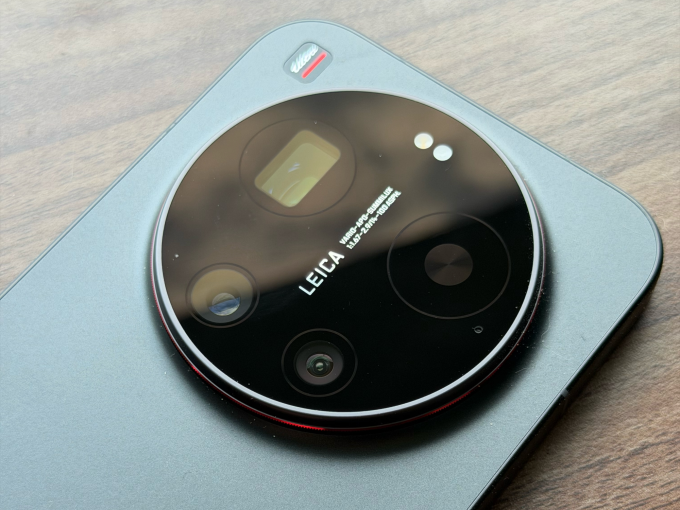
In the U.S., discussions about top camera phones largely center around iPhones, the Samsung Galaxy series, and, lately, the Google Pixel. In contrast, people in Asia and parts of Europe get a wider range of choice with companies like Xiaomi, Oppo, and Vivo upping their camera game.
The Xiaomi 17 Ultra, which recently had its global launch, is one of those devices, with a big camera bump that houses a versatile set of sensors, and a partnership with the storied German camera maker Leica to supply software-level changes and sensibilities to how scenes are shot.
The camera has tons of options to choose from, ranging from different focal lengths on the hardware side to various filters and settings to change how the final image looks.

Xiaomi has also released external add-ons that snap on like a cover to the camera, as well as a USB-based accessory that provides hardware buttons to shoot video or photos. While these add-ons don’t particularly add a lot of features, it makes one-hand operation of the camera easier.
Besides the camera, Xiaomi has packed its phone with top components to compete with the best phones of the year. I will talk about the camera in detail, but let me get the rest of the hardware description out of the way.
Hardware
The Xiaomi 17 Ultra uses Qualcomm’s latest Snapdragon 8 Gen 5 processors, which will be the choice of flagships this year. On the front, there is a 6.9-inch AMOLED screen with 1200 x 2608 pixels resolution and 120Hz refresh rate.
The screen is quite bright at a peak brightness of 3,500 nits. This is handy in operating the phone in bright conditions and also makes for a good video-watching experience.
Techcrunch event
San Francisco, CA
|
October 13-15, 2026
The 6,000 mAh battery is possibly one of the best outcomes of the Silicon/Carbon-Ion tech Xiaomi is using. Given the sheer size of the battery, it can last you a couple of days of light to medium usage, and also has good standby time. While the battery is big, the phone is still lighter than the iPhone Pro Max, so that is also a win for the company’s engineering team.
The phone supports 90W of wired charging, and you can use the charger Xiaomi supplies with the phone or any PD (Power Delivery) 3.0 or PPS (Programmable Power Supply)-based charger. It also supports 50W with Xiaomi’s own charger.
The Xiaomi 17 Ultra has 16GB of RAM and two memory options of 512GB and 1TB.
Camera
Xiaomi is using a 1-inch type 50-magapixel sensor with an f/1.67 aperture for the main camera, aiming to gather more light. The camera takes sharp and vivid photos without losing the white balance. The sensor is good at catching details in different lighting conditions. Just like the iPhone Pro Max, with the main camera, you can switch to 23mm, 28mm, and 35mm equivalent framing.
The phone has a rather unique 200-megapixel telephoto lens. Instead of offering staggered optical zoom options like 2x and 4x, it has continuous optical zoom from 3.2x to 4.3x. On the face of it, this doesn’t seem like a lot, but when taking photos of pets or framing certain objects within the frame, it is very handy. One limitation is that on the camera UI, you can easily jump to 75mm, 85mm, 90mm, and 100mm focal lengths, but you need to press down the zoom control and move around the dialer if you need to get to other focal lengths between 75mm and 100mm.


The company is using a 50-megapixel ultrawide camera with an f/2.2 aperture. This lens is also helpful for very impressive macro shots. Largely, this camera is sufficient, but it does lose a bit of detail as compared to the other two cameras in certain shots. There is also a 50-megapixel selfie camera, but remember to turn off all the beauty filters.


Camera controls are a standard affair, but the option for you to get one object’s photo in different looks is aplenty. By default, the camera follows a Leica authentic color scheme, but with one tap, you can change it to Leica Vibrant. There is a filter option that gives you options like positive and negative film; Leica-specific filters like vivid, natural, black & white, speia, and blue; and Xiaomi’s own filters like cinematic, monsoon, teal mist, and scarlet.
The company’s two add-ons are called The 17 Ultra Photography Kit and The 17 Ultra Photography Kit Pro. The base version acts like a cover and snaps to the phone directly. It connects to the phone through Bluetooth, has a two-stage shutter button (for autofocus and capturing shots), and a video recording button. The case uses contact charging for its battery.

The Xiaomi 17 Ultra Photography Kit Pro packs a cover and another camera-grip-like controller that attaches to the phone via USB-C. The Kit Pro also has a 2,000 mAh battery to power its operation. The grip allows you to hold the phone with one hand easily.
On top of the grip, there is a dedicated shutter button and a video recording button. There is also another customizable dial that can control exposure, filters, ISO, shutter speed, or white balance. You can also use this dial to skim through the gallery. The Kit Pro also comes with a ring, where you can fit in compatible 67 mm camera filters.
I used the Kit Pro consistently when I was moving around the streets because I could easily grip the phone with one hand and take photos with a good number of camera controls at my fingertips. Plus, using a camera-like add-on made it fun to snap photos and videos. I really appreciated having a hardware zoom control.

Both kits activate a fastshot software mode within the camera, which has easily accessible controls for street photography.
The Xiaomi 17 Ultra will face competition in the global market from upcoming devices such as the Vivo X300 Ultra, which also has a swanky photography kit including a 2.35x telephoto extender, and the Oppo Find X9. But because of the earlier launch of its phone, Xiaomi might enjoy this momentum. Apart from the camera, the phone packs a punch if you are okay with a big camera housing on the back.
The Xiaomi 17 Ultra starts at €1,499 in Europe. The Photography Kit is priced at €99.99, and the Photography Kit Pro is priced at €199.99.

Looking for the most recent Connections answers? Click here for today’s Connections hints, as well as our daily answers and hints for The New York Times Mini Crossword, Wordle, Connections: Sports Edition and Strands puzzles.
Today’s NYT Connections puzzle isn’t terrible if you know your Broadway shows. Read on for clues and today’s Connections answers.
The Times has a Connections Bot, like the one for Wordle. Go there after you play to receive a numeric score and to have the program analyze your answers. Players who are registered with the Times Games section can now nerd out by following their progress, including the number of puzzles completed, win rate, number of times they nabbed a perfect score and their win streak.
Read more: Hints, Tips and Strategies to Help You Win at NYT Connections Every Time
Hints for today’s Connections groups
Here are four hints for the groupings in today’s Connections puzzle, ranked from the easiest yellow group to the tough (and sometimes bizarre) purple group.
Yellow group hint: Boogie down.
Green group hint: A portion of a business or venture.
Blue group hint: Popular arcade game.
Purple group hint: Broadway, baby.
Answers for today’s Connections groups
Yellow group: Events with dancing.
Green group: Interest.
Blue group: Components of Whac-A-Mole.
Purple group: Musicals with last letter changed.
Read more: Wordle Cheat Sheet: Here Are the Most Popular Letters Used in English Words
What are today’s Connections answers?
The completed NYT Connections puzzle for April 6, 2026.
The yellow words in today’s Connections
The theme is events with dancing. The four answers are ball, hoedown, hop and rave.
The green words in today’s Connections
The theme is interest. The four answers are claim, concern, share and stake.
The blue words in today’s Connections
The theme is components of Whac-A-Mole. The four answers are holes, mallet, mole and timer.
The purple words in today’s Connections
The theme is musicals with last letter changed. The four answers are carouser (Carousel), Evite (Evita), olives (Oliver) and wicket (Wicked).


Fortinet has released an emergency weekend security update for a new critical FortiClient Enterprise Management Server (EMS) vulnerability that is actively exploited in attacks.
Tracked as CVE-2026-35616, the flaw is an improper access control vulnerability that allows unauthenticated attackers to execute code or commands via specially crafted requests.
The issue was patched Saturday, with Fortinet confirming it has been exploited in the wild.
“Fortinet has observed this to be exploited in the wild and urges vulnerable customers to install the hotfix for FortiClient EMS 7.4.5 and 7.4.6,” warns Fortinet.
Fortinet says the vulnerability impacts FortiClient EMS versions 7.4.5 and 7.4.6 and can be mitigated by installing one of the following hotfixes:
The vulnerability will also be fixed in the upcoming FortiClientEMS 7.4.7. FortiClient EMS 7.2 is not affected.
The flaw was discovered by cybersecurity firm Defused, which described it as a pre-authentication API access bypass that allows attackers to bypass authentication and authorization controls entirely.
Defused shared on X that they observed the flaw being exploited as a zero-day earlier this week before reporting it to Fortinet under responsible disclosure.
Internet security watchdog Shadowserver has found over 2,000 exposed FortiClient EMS instances online, with the majority located in the USA and Germany.
The vulnerability follows a separate critical FortiClient EMS flaw, CVE-2026-21643, reported last week and also actively exploited in attacks.
Both vulnerabilities were discovered by Defused, with Fortinet also crediting Nguyen Duc Anh for the latest flaw.
Fortinet is urging customers to apply the hotfixes immediately or upgrade to version 7.4.7 when it becomes available to mitigate the risk of compromise.

Automated pentesting proves the path exists. BAS proves whether your controls stop it. Most teams run one without the other.
This whitepaper maps six validation surfaces, shows where coverage ends, and provides practitioners with three diagnostic questions for any tool evaluation.
Why you can trust TechRadar
We spend hours testing every product or service we review, so you can be sure you’re buying the best. Find out more about how we test.
GEEKOM A5 Pro: 30-second review
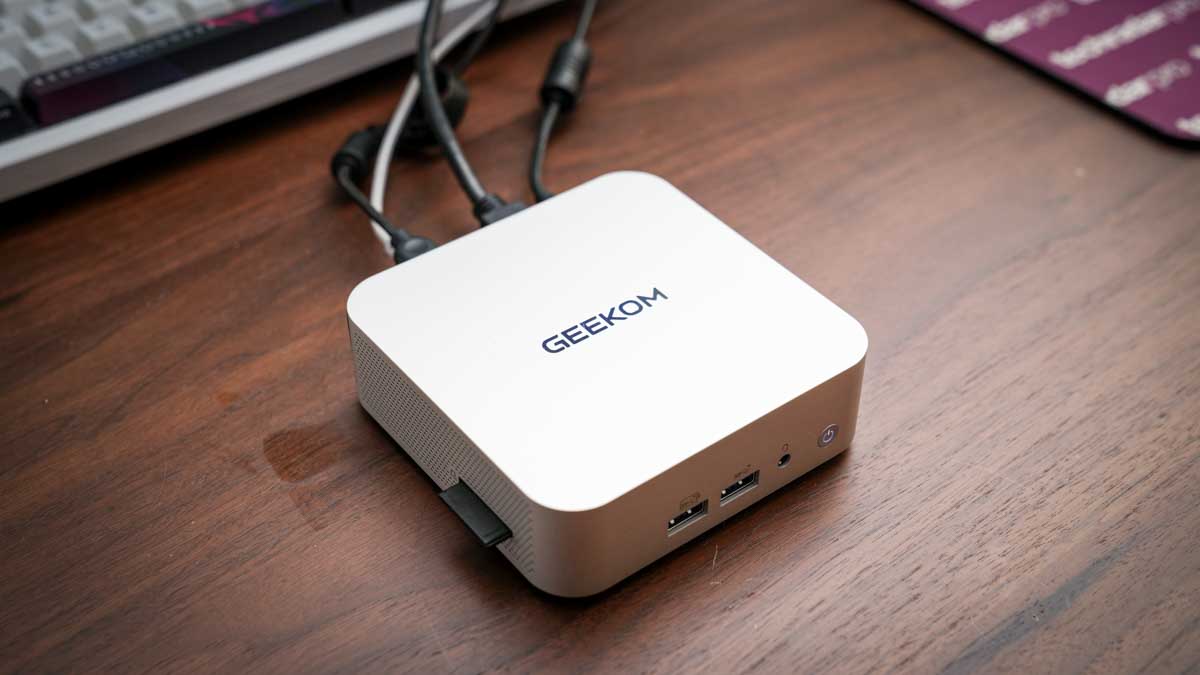
The Geekom A5 Pro at 112.4 x 112.4 x 37mm is one of the smaller Mini PCs that I’ve looked at; however, removing it from the box, the all-aluminium casing gives it an instantly premium look and feel. The finish is exceptional, and it’s a good, solid machine that will be equally at home in the office or used as a portable machine in the field, for events or any situation where a PC is required. The design is decidedly premium, and unlike some of the more plastic Mini PC options, there’s an overall feeling of quality and style that would make this a perfect option for offices as well as stylish studios.
One of the features that I like about this machine is the port layout, which, as ever, is split between the front and rear. The front features two USB 3.2 Gen 2 Type-A ports and a 3.5mm audio combo, and on the side is an SD card reader. Around the back, there are two more USB Type-A ports, one 3.2 Gen 2 and the other USB 2.0.
There are also two USB 3.2 Type-C ports, dual HDMI 2.0 ports, and the 2.5GbE LAN port. That LAN port is a step up from Gigabit Ethernet that I usually see on machines of this size and price, and when connected to the UGREEN NAS, it delivered faster file transfer rates for archiving images and footage.
Powering the machine is an AMD Ryzen 5 7430U, which is paired with 16GB of DDR4. The 16GB is split between two channels, 8GB in each, and this helps ensure that the dual-channel potential is utilised, which is something that has limited other Mini PCs that offer the same RAM but in a single channel, which proves to be far slower. This dual-channel configuration did provide a boost in performance over similar machines, with applications loading faster, especially with Lightroom and Photoshop.
As I pushed the system with the creative apps, the cooling system IceBlast 2.0 kicked in. For a small machine, the noise was kept to a minimum and far lower than I would have expected. For most of the test, it was effectively silent, and even under extended office use, writing this review, the fan noise was hardly noticeable.
One of the additions that I always like to see is an SD card reader on the side. This just makes downloading images and videos that much faster, without needing to locate a card reader. Transferring 90GB of data from an SD card took around 9 minutes and 30 seconds, which is a reasonable speed.
Another feature that highlights its use in the office is the ability for quad display output, and this can be done through the dual HDMI and dual USB-C. I was only able to test with two 4K BenQ monitors running via HDMI or USB-C, but the machine was powerful enough to cope.
While this machine’s GPU is limited, especially for gaming or mid-level creative work, for office use, the small machine packs plenty of power – expect to see it included in our guide to the best mini PCs soon.
GEEKOM A5 Pro: Price and availability
- How much does it cost? $499/£499 RRP
- When is it out? Available now
- Where can you get it? Directly from Geekom and Amazon.com
The Geekom A5 Pro is available from Geekom in the US for $569 and via Geekom UK for £518.
You can save an extra 7% when you use our exclusive code TECHA5PRO
This mini PC is also available from Amazon.com and Amazon.co.uk.

GEEKOM A5 Pro: Specs
CPU: AMD Ryzen 5 7430U
GPU: AMD Radeon Vega 8 Graphics
Memory: 16GB DDR4 SODIMM(Max 64GB)
Storage: 1TB M.2 2280 PCIe 3.0 ×4 NVMe SSD (up to 2 TB) and M.2 2242 SATAIII SSD, (up to 1 TB)
Display output: 2x HDMI 2.0 (4K@60Hz), 2x USB 3.2 Gen 2 Type-C
Front Ports: 2 x USB 3.2 Gen 2 Type-A (10Gbps), 3.5mm audio jack
Rear ports: USB 3.2 Gen 2 Type-A (10Gbps), USB 2.0 Type-A, 2 x USB 3.2 Gen 2 Type-C, 2x HDMI 2.0, 2.5GbE RJ45, DC in
Wireless: Wi-Fi 6, Bluetooth 5.2
Kensington lock: Yes
OS: Windows 11 Pro
Dimensions: 112.4 x 112.4 x 37mm
In the box: A5 Pro Mini PC, VESA mount, 65W power adapter, HDMI cable, user guide
Warranty: 3 years
GEEKOM A5 Pro: Design
The Geekom A5 Pro is one of the smallest mini PCs I have tested, yet while closely packed, the ports, both front and back, are well laid out. The all-aluminium alloy chassis gives it a real premium feel and means that if you want this as a portable machine, that build quality should stand up. The machine feels solid and well-made, with a minimalistic quality that will appeal to many.
When it comes to the size, as already mentioned, it is small at 112.4 x 112.4 x 37mm, just larger than your palm-sized, so if you want, it’s more than small enough to be attached behind a monitor on a VESA bracket or slipped into a bag for location use.
The included VESA mount makes monitor mounting easy; however, as it is so small, it will equally take up very little space on a desk. One practical issue with VESA mounting is that if it is hidden behind a monitor, reaching the SD card reader on the side may be an issue. If you are planning to use the card reader, placing it on your desk will be a better idea, especially as it takes up so little room.
When it comes to connectivity, there are a surprising number of options considering the small size. On the front, there are two USB 3.2 Gen2 ports and an audio jack, while on the side, there’s the SD card reader.
Round at the rear, there’s the rest of the connections: dual HDMI 2.0 ports for monitors, dual USB-C ports with DisplayPort support, a USB 3.2 Gen 2 Type-A and a USB 2.0 port, and the 2.5GbE LAN port. The rear port density is well balanced considering the size, and the fact that it has a 2.5GbE LAN over the more usual Gigabit Ethernet is good to see.
As this is such a small machine, decent cooling is essential, and here the IceBlast 2.0 cooling system is in place. This uses dual copper heatpipes and a large fan with side intake and rear output so that plenty of cool air is drawn through the system.
In practice, even under load, I found that the machine remained exceptionally quiet, which is good if you’re using this as an everyday office machine for general work and light creative use. Even when pushing the GPU harder with Lightroom catalogues or video timelines, the fan remained relatively subdued. Just checking the heat of the chassis, and it remained cool to the touch throughout the test.

While this is in no doubt due to the cooling system, the fact that the chip’s 20W TDP means that the entire system will be running cooler than many higher-powered mini PCs.
Through the test, I took a look at the upgrade root for RAM and SSD, and the internal access is notably easier than that of some competitors. Removing four screws from the base lifts the cover, revealing both SO-DIMM and M.2 slots, all accessible without too much issue.
The primary M.2 2280 slot takes NVMe drives up to 2TB, and the secondary M.2 2242 SATA slot adds up to 1TB more, enabling a potential 3TB of internal storage. Upgrading RAM to up to 64GB is equally straightforward.

GEEKOM A5 Pro: Features
Taking a look at the features, aside from the computing components, the small size has to lead the field. The fact that you have such a small machine in a solid aluminium chassis does make this Mini PC instantly appealing. Although from the outset, the lack of a powerful GPU means that while this is a good, powerful PC for office-based work, for creative and gaming, its feature set and performance are limited.
At the heart of the machine is an AMD Ryzen 5 7430U featuring a 6-core, 12-thread chip based on Zen 3 architecture with a 20W TDP, boosting to 4.3GHz. Essentially, this processor is focused on efficiency rather than performance.
What makes a difference to this machine compared with others that I have looked at that also use this processor is the RAM configuration. The 16GB arrives as two 8GB sticks in dual-channel mode, which delivers a noticeably better experience than single-channel alternatives that I have used.
Storage technology is on the older side, with a PCIe 3.0 x4 NVMe SSD in the primary slot. There is a second slot for storage, although this is an M.2 2242 SATAIII SSD, so it is still relatively fast and will take a module up to 1TB. It’s also worth noting that PCIe 4.0 is increasingly common at this price point, and the absence of a Gen 4 drive is a disappointment, even if the Gen 3 speeds are unlikely to cause an issue for office work.
On the side of the machine is the SD card reader, which will appeal to creative users. Transferring image files from an SD card is quick, and having the reader built in without needing an external adapter or hub is convenient and keeps additional accessories off the worksurface.
Networking is also a step up from most machines of this type, with a 2.5GbE LAN port on the rear. During the test, I connected this to the UGREEN NAS via a wired router, and transfer rates were noticeably faster than with Gigabit connections.
While quad-display output is supported via dual HDMI 2.0 and dual USB-C with DisplayPort, during this test, I was limited to two 4K monitors.
Connectivity was also solid for the most part, with Wi-Fi 6 and Bluetooth 5.2 handling wireless connectivity. Wi-Fi performance was consistent at close range but sensitive to line-of-sight distance to the router, with occasional signal drops when the machine was farther from the Eero network.
The Kensington security slot is a useful inclusion for anyone deploying this machine in a shared office or workspace environment. At this price, it is not a common feature, and its inclusion reinforces the professional positioning Geekom aims for with the A5 Pro.

GEEKOM A5 Pro: Performance
Benchmark scores
Benchmark Results:
CrystalDiskMark Read: 6994.18 MB/s
CrystalDiskMark Write: 6188.09 MB/s
Geekbench CPU Multi: 12,600
Geekbench CPU Single: 2,382
Geekbench GPU: 30,577
PCMark Overall: 7,536
Cinebench CPU Multi: 12,133
Cinebench CPU Single: 1,700
3DMark Fire Strike Overall: 3,091
3DMark Fire Strike Graphics: 3,376
3DMark Fire Strike Physics: 15,071
3DMark Fire Strike Combined: 1,094
3DMark Time Spy Overall: N/A
3DMark Time Spy Graphics: N/A
3DMark Time Spy CPU: N/A
Wild Life Overall: 6,834
Steel Nomad Overall: 188
Windows Experience Overall: 8.0
Getting into the performance and the use of this machine was almost instantly apparent. For office-based work, Microsoft Office and all its applications, browsing the internet and light creative work in CapCut, this machine excelled. However, as soon as I started to place demands on the GPU, the machine’s speed started to struggle.
Checking the benchmark results highlighted the strengths of the machine and the PCMark overall score of 5,933, the Geekbench multi-core of 6,903, and the WEI score of 8.0, all of which highlighted that the A5 Pro is a very capable home office machine.
Over other very similar machines that I have tested, the dual-channel RAM configuration has recently given this machine the edge when it comes to performance, although there are still slowdowns. Switching between Lightroom Classic and Photoshop was notably faster, although there’s still quite a wait for many applications to load.
Where this machine is most at home is when running Microsoft Office, and with all applications, Word, Excel, and PowerPoint, the A5 Pro was able to handle everything from large documents to image-heavy presentations without issue.
This is where the Ryzen 5 7430U and the Zen 3 architecture work well and provide fast and reliable performance. Web browsing, media streaming, and general Windows use are where this machine’s strengths definitely lie.
Switching the type of work to light creative, the A5 Pro continues to perform well, although the 1TB SSD capacity is slightly limiting.
Lightroom Classic opened and catalogued files from the Canon EOS R5 C without issues, and basic editing and batch export were manageable once the application had loaded, which can take a while. Photoshop handled basic editing as well as complex multi-layer files at a reasonable speed, although I did find that as I built up complex focus layer stacks, which created larger files, there was a notable slowdown as the Vega 8 graphics started to work harder. Adobe Bridge showed the GPU limits more clearly, with thumbnail rendering becoming especially slow.
Again, referring back to the benchmarks, the Geekbench GPU score of 13,683 and Fire Strike Graphics of 3,376 show the Vega 8 limitations. 1080p video editing is possible, but 4K starts to challenge the system. In Premiere Pro and DaVinci Resolve, 4K timeline work slowed considerably once effects and colour grading were applied. At 1080p, both applications were more manageable, and in a lighter editor like CapCut, the machine handled social media editing well. This is a machine that you can use for some creative work, but it should be seen first as an office machine rather than creative.
As ever, to really push the system, I loaded a series of games, and this is where the machine really hit its limits. Demanding titles like Indiana Jones and the Great Circle would not run, and Hogwarts Legacy was equally beyond the hardware. Older, less demanding titles ran at low settings, which is about as much as the Vega 8 can handle.
Under sustained load, the IceBlast 2.0 cooling system performed well. Even when the machine was working hard, the fan noise remained relatively low, considerably quieter than that of machines running higher-TDP processors in similarly sized chassis. The 20W limit means there is less heat to manage, and the dual copper heatpipe system seemed to keep the machine in check.
The 20W TDP is both an advantage if low power systems are essential to you, especially out in the field or as part of Van Life; however, it’s also the machine’s limitation. The power consumption is exceptionally low, and through the test, I was able to run the machine from a compact power station for a full day, making it a great portable option for location work or van life setups.
The trade-off for this low power draw is the performance, especially under GPU-intensive creative and gaming workloads. If you are looking for a machine for productivity, this machine is a great choice. If you need a machine for more demanding creative use, then look for a higher-powered machine.

GEEKOM A5 Pro: Final verdict

The Geekom A5 Pro is a well-balanced and genuinely impressive home and office mini PC that just about justifies its price.
The all-aluminium build, dual-channel RAM, 2.5GbE networking, SD card reader, quiet operation, and three-year warranty all come together as a well-balanced offering that just takes the edge over similar machines that I have looked at recently. It essentially runs everything that most offices will need, including Microsoft Office and some creative apps.
The PCIe 3.0 SSD and the Vega 8 GPU do feel like older technologies and do limit the machine’s performance, but these aren’t really an issue for the intended market.
If your daily work stays within Office, browsing, and light photo or video editing, the A5 Pro is more than sufficient for your needs. If 4K video editing or GPU-intensive creative work is part of your day-to-day tasks, then the 20W chip will leave you frustrated. If you’re a home-office professional, small-business owner, or content creator who needs a capable secondary machine, this is a good choice at a reasonable cost.
Should I buy the GEEKOM A5 Pro?
Swipe to scroll horizontally
|
Value |
Aluminium build, dual-channel RAM, 2.5GbE, SD card reader, and a three-year warranty just make this a reasonable value. |
3.5 |
|
Design |
A well built machines at this size and price, with the all-aluminium chassis and compact form factor being genuinely impressive. |
4.5 |
|
Features |
2.5GbE, SD card reader, quad display support, easy internal access, and VESA mount included mean that there’s plenty on offer |
4 |
|
Performance |
Excellent for productivity and light creative work; however, the 20W Vega 8 GPU reaches its limit quickly with 4K video or gaming |
3.5 |
|
Overall |
A premium-feeling, practically well-equipped home office mini PC that runs quietly, although a little pricy |
3.5 |
Buy it if…
Don’t buy it if…
For more productivity machines, we’ve reviewed the best business laptops around.

Artemis II and its four-person crew have entered the Moon’s “sphere of influence,” meaning the spacecraft is more affected by lunar gravity than the Earth’s pull. The transition occurred at a distance of 39,000 miles from the Moon, four days, six hours and two minutes into the mission. The next and most important phase will happen tomorrow when the craft loops around the Moon’s far side, taking humans deeper into space than they’ve ever been before.
At their apogee, Astronauts Reid Wiseman, Christina Koch, Victor Glover and Canada’s Jeremy Hansen will be 252,757 miles from Earth. That will break the previous record held by the Apollo 13 crew by just over 4,000 miles. They’re the first humans to cross the lunar threshold since 1972’s Apollo 17 moon landing mission.
The crew spent this weekend carrying out preparations for their lunar flyby. That included manual piloting demonstrations, reviewing their science objectives for the six-hour observation period and evaluating their space suits, which are there for life support in the event of an emergency and for their return home. But, they’ve had plenty of time to take in the views, too — and those views sure are spectacular. In the latest series of images shared by the space agency, the astronauts are seen gazing at Earth through the windows of the Orion spacecraft.
Orion will reach the moon’s vicinity shortly after midnight on Monday, April 6. Later that day, the crew is expected to reach a point farther than any humans have traveled from Earth, surpassing the record of 248,655 miles from Earth set by the Apollo 13 astronauts in 1970.

Mission specialist Christina Koch takes in the view. (NASA)
The lunar observation period will start at 2:45PM ET, and a few hours later, they’ll be behind the moon and briefly drop out of communication. The spacecraft’s closest approach to the moon is expected to occur at 7:02PM, when it will be 4,066 miles from the surface. “From that distance, the crew will see the entire disk of the Moon at once, including regions near the north and south poles,” according to NASA. The crew will later get a chance to see a solar eclipse “as Orion, the Moon, and the Sun align in such a way that the astronauts will see our star disappear behind the Moon for about an hour.” NASA will have coverage of the flyby starting at 1PM ET.
Update April 7 at 1:40 AM ET: The post has been updated with news that Artemis II has entered the Moon’s sphere of influence.
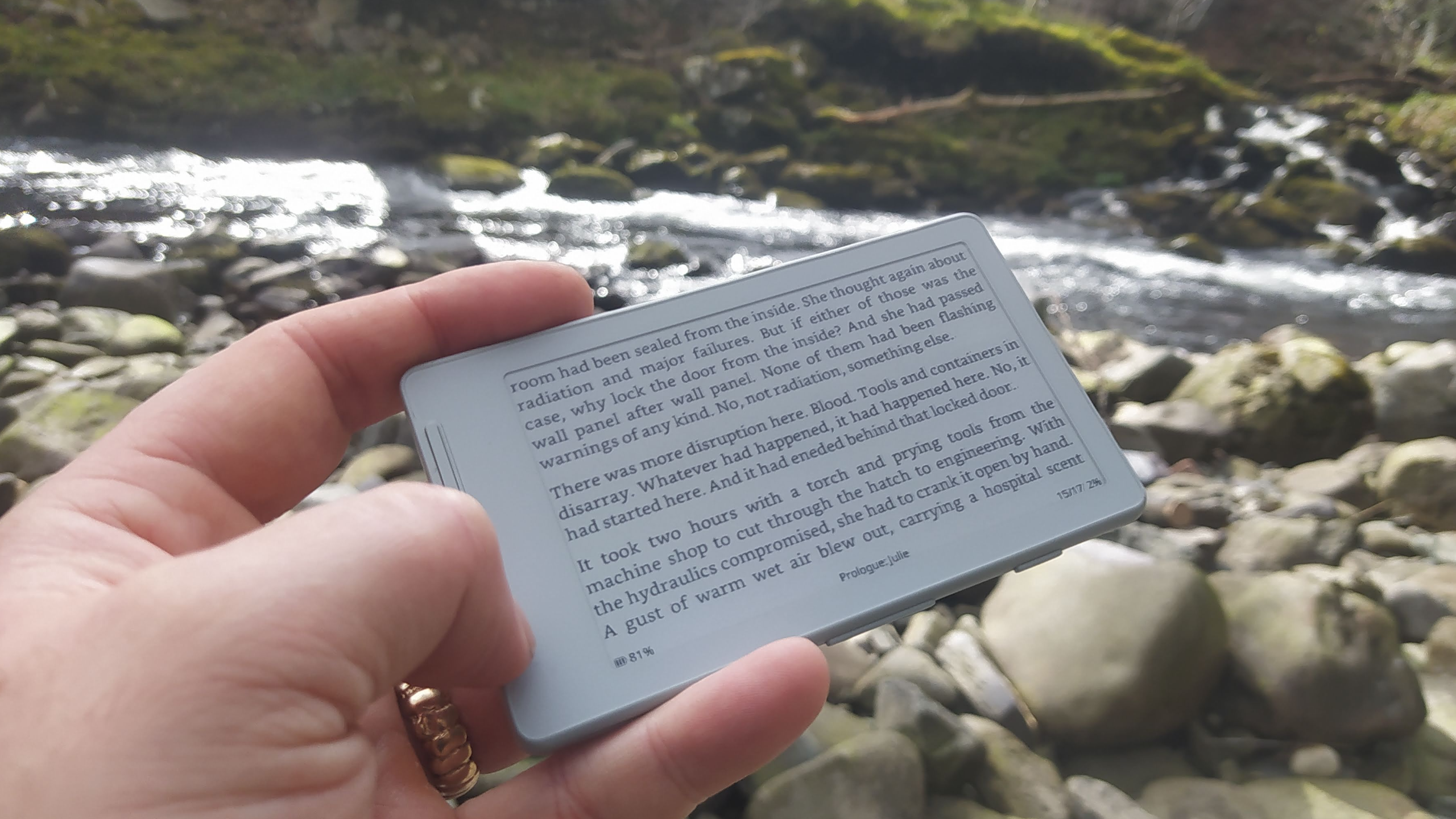
Not so long ago, e-ink devices were rare and fairly pricey. As they have become more common and cheaper, some cool form-factor devices have emerged that suffer from subpar software. [Concretedog] picked up just such a device, and that purchase led to the discovery of a cool open-source firmware project for this tiny gadget.
[Concretedog] described the process of loading the firmware, which is just about as easy a modification as one can make. You plug the e-ink display into your computer, visit a website, and can flash it right from there. Once the display is running the CrossPoint Reader firmware, it unlocks some new tricks on this affordable reader. The firmware lets you turn the device into a WiFi hotspot and upload books wirelessly, or it can connect to an existing network to add files that way. It also enables rotating the display and KOReader syncing if you have multiple devices you read from.
We love seeing the community step in and improve devices that are hardware-wise good, sometimes great, but come up lacking in the software or firmware department. Thanks [Concretedog] for sharing your experience with this device and the cool open-source firmware. Be sure to check out some other projects we’ve featured where a firmware tweak breathed new life into the hardware.
In short: Microsoft has spent billions building Copilot into every corner of its product lineup, pitching it as an indispensable AI co-worker. Its own Terms of Use tell a different story. A clause quietly buried in the document labels Copilot “for entertainment purposes only” and warns users not to rely on it for important advice. The gap between the marketing and the fine print has drawn fresh scrutiny as adoption figures reveal that fewer than one in 30 eligible users is actually paying for the tool.
Somewhere between Satya Nadella’s earnings calls and the product pages promising to “transform the way you work,” Microsoft inserted a sentence into Copilot’s Terms of Use that reads rather differently from the rest of its AI pitch. Updated in October 2025 and surfacing widely in early April 2026, the clause appears under a section in bold capital letters labelled “IMPORTANT DISCLOSURES & WARNINGS.” It says: “Copilot is for entertainment purposes only. It can make mistakes, and it may not work as intended. Don’t rely on Copilot for important advice. Use Copilot at your own risk.”
The same document states that Microsoft makes no warranty or representation of any kind about Copilot, that users should not assume its outputs are free from copyright, trademark, or privacy rights infringement, and that users are solely responsible for any Copilot content they choose to share or publish. The terms apply to consumer Copilot products; the enterprise-facing Microsoft 365 Copilot is excluded from the clause.
What Microsoft has been saying publicly
The disclaimer sits in sharp contrast to years of aggressive promotion. Since integrating Copilot across Windows 11 and the Microsoft 365 suite in 2023, the company has positioned the tool as a productivity multiplier, its “AI companion” for workers in Word, Excel, PowerPoint, and Outlook. Nadella has described Copilot as “becoming a true daily habit” and told investors that daily active users had grown nearly threefold year on year. The company spent approximately $80 billion on AI-related capital expenditure in fiscal year 2025, including a $13 billion investment in OpenAI whose models underpin Copilot’s core capabilities.
Microsoft 365 Copilot is priced at $30 per user per month as an enterprise add-on, with a business tier at $18 per user per month. Premium consumer tiers carry costs that reach into the tens of dollars monthly. “Entertainment purposes only” is not language typically associated with a product charging at those rates.
The legal logic behind the clause
Legal analysts who reviewed the language offered a measured interpretation. The most widely cited read is that the clause represents a lawyer’s attempt to limit liability in circumstances where the product fails, an overcorrection that has become embarrassing because of how bluntly it contradicts the marketing. OpenAI, Google, and Anthropic all include similar advisories in their terms of service, acknowledging inaccuracy and placing responsibility for verifying outputs on users. None of them, however, uses the phrase “entertainment purposes only,” which Android Authority noted is “the same disclaimer that a psychic uses to avoid getting sued.”
The broader legal context matters. Microsoft has faced litigation over Copilot’s outputs before: a class-action suit in a US federal court in San Francisco challenged the legality of GitHub Copilot over alleged open-source licence violations, and a separate dispute in Australia concerned customers who were moved to more expensive plans with Copilot bundled in. The consumer Copilot ToS language, on this reading, is corporate defensiveness made explicit, an attempt to establish in writing that the product never warranted the reliance users might have placed on it.
The adoption numbers that give context
The disclaimer arrives at an awkward moment for Copilot’s commercial trajectory. Data published in early 2026 showed that only 3.3% of Microsoft 365 and Office 365 users who have access to Copilot Chat actually pay for it. Of roughly 450 million Microsoft 365 seats, 15 million are paid Copilot subscribers, a conversion rate that reflects the difficulty of persuading existing users to pay a significant premium for AI they find unreliable.
Research from Recon Analytics traced the problem in part to accuracy. Its tracking of Copilot’s accuracy Net Promoter Score found it at -3.5 in July 2025, deteriorating to -24.1 by September 2025, and only partially recovering to -19.8 by January 2026. In surveys of lapsed Copilot users, 44.2% cited distrust of answers as the primary reason they had stopped using the tool. Separately, the US paid subscriber market share fell from 18.8% in July 2025 to 11.5% in January 2026, a 39% contraction in six months. When users are given a choice between Copilot, ChatGPT, and Gemini, just 8% of workers opt for Copilot.
The hallucination record has not helped. In August 2024, Copilot falsely accused German court reporter Martin Bernklau of the crimes he had covered for years, describing him as a convicted child abuser and fraudster and providing his home address. Microsoft was forced to block queries about Bernklau after a data protection complaint. In January 2026, Copilot generated false claims about football-related violence, triggering further coverage of the tool’s reliability problem. The “entertainment purposes only” clause looks rather less like a legal technicality in that context, and rather more like an accurate description.
Microsoft’s pivot and what it means
Nadella’s response to Copilot’s uneven performance has been to assume direct control over AI product development, reportedly delegating other responsibilities from September 2025 onward to focus personally on the roadmap. The company has also begun building its own models. Microsoft’s launch of MAI-Transcribe-1, MAI-Voice-1, and MAI-Image-2 in April 2026 , its first proprietary AI model releases since renegotiating its contract with OpenAI in September 2025 — signals a strategic intent to reduce dependency on the models that currently sit under Copilot’s hood.
The irony is that Copilot’s limitations are well understood inside Microsoft. The company’s own leaked internal feedback, as reported by several outlets, described integrations that “don’t really work.” The ToS language is, in a sense, the legal department’s way of saying what the product team has been grappling with in private. The expectation that AI tools be trustworthy, verifiable, and fit for purpose has moved from aspiration to regulatory reality across multiple jurisdictions, making the gap between Copilot’s marketing and its terms of service harder to sustain.
None of this means Copilot is uniquely unreliable by the standards of the current generation of AI assistants. Its primary competitor, ChatGPT, has its own well-documented accuracy problems even as OpenAI pushes into commercialisation. The difference is that Microsoft bet earlier, louder, and more money on the proposition that AI assistants were ready to become essential workplace tools. The fine print in its own terms of service suggests the company is hedging on that bet while the marketing continues to double down on it. Competitors raising billions on promises of AI reliability will have noticed the opening. The race that defined 2025 is entering a phase where the gap between “for entertainment purposes only” and genuinely trustworthy AI is the most valuable real estate in the industry.

A growing number of bars and restaurants across the United States are embracing a phone-free experience, reflecting a broader cultural shift toward reducing screen time and encouraging real-world connection. From upscale supper clubs to neighborhood cocktail bars, establishments are introducing policies that either restrict phone usage or actively incentivize guests to put their devices away.
At the heart of this trend is a rising awareness of the negative effects smartphones and social media can have on attention, memory, and interpersonal relationships. Studies continue to highlight how constant digital engagement impacts learning, socialization, and even self-esteem. With Americans reportedly checking their phones around 144 times a day and spending nearly 4.5 hours on their devices, the pushback against screen dependency is gaining traction.
Younger generations, particularly Gen Z, are leading this shift
Surveys indicate that a significant portion of them intentionally disconnect from their devices, followed by millennials and older age groups. This growing appetite for “analog” experiences is now influencing the hospitality industry in noticeable ways.

Restaurants and bars in at least 11 U.S. states have already introduced some form of phone restriction. Washington, D.C., currently leads with the highest number of such venues. Some establishments take a strict approach, such as locking phones away in secure pouches for the duration of a visit, while others offer softer incentives like free desserts for diners who keep their devices off the table.
The reasoning behind these policies is simple: removing phones enhances human interaction. Business owners and industry experts argue that without digital distractions, guests are more engaged with their company, their surroundings, and even their food. Chefs have also noted that phones can detract from the dining experience, making meals feel less memorable.
For customers, the impact can be surprisingly profound
Many report feeling more present and emotionally connected during phone-free outings. Experiences that might otherwise be fragmented by notifications become more immersive and meaningful.

Looking ahead, the trend is expected to expand beyond independent venues. As digital fatigue continues to grow and awareness of screen-time effects increases, more mainstream chains and public spaces may experiment with similar policies. While not everyone may be ready to give up their phones during a night out, the rise of phone-free dining suggests a clear shift: people are beginning to value presence over perpetual connectivity.
Restaurants are finally pushing back against the constant glow of screens at the table, and honestly, it feels long overdue. Dining out was never meant to compete with notifications and endless scrolling. By nudging people to put their phones away, these places are restoring something we’ve quietly lost – real conversation, attention, and presence. It may feel restrictive at first, but the payoff is a far more meaningful experience.
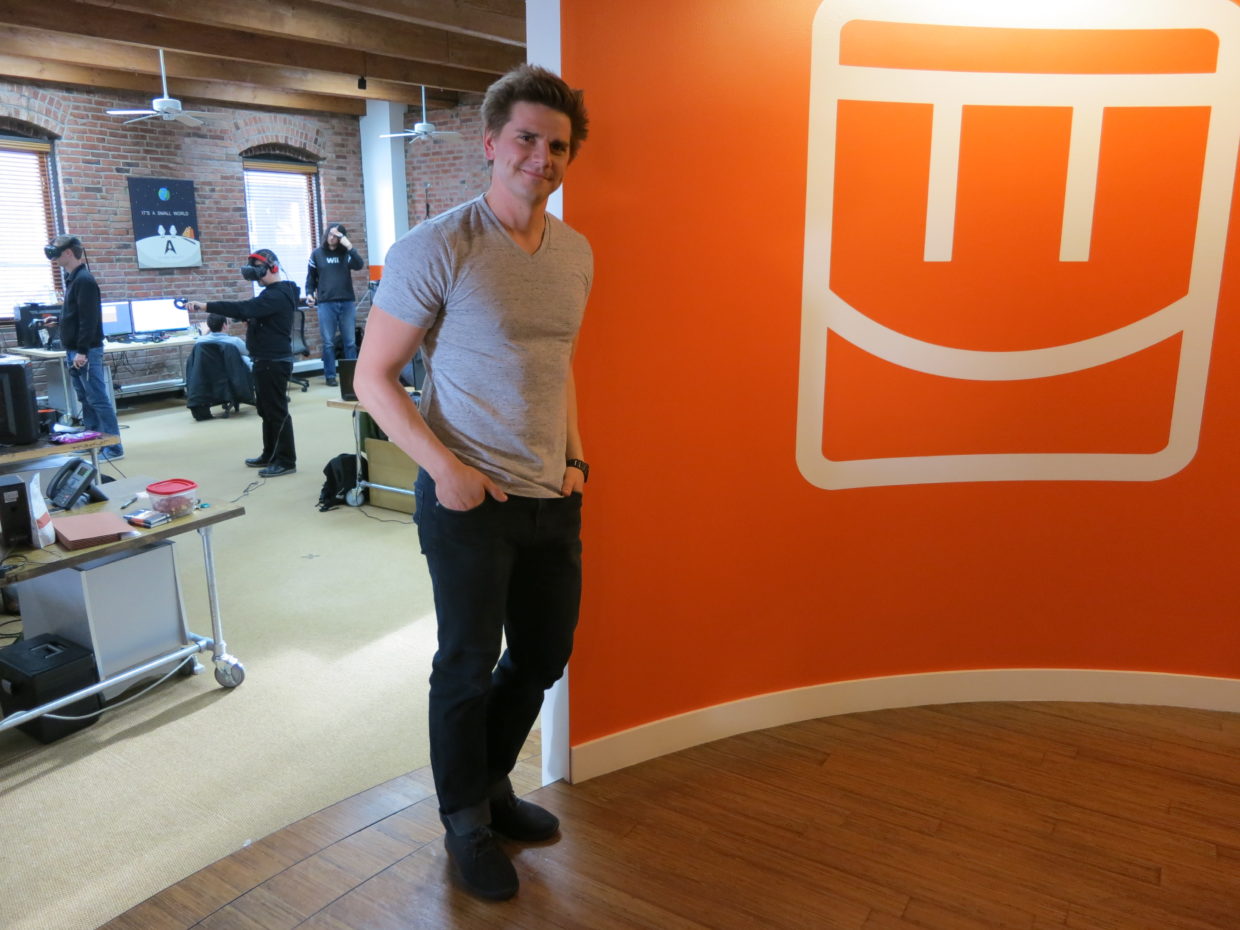
Rec Room, the Seattle-based social gaming company once valued at $3.5 billion, is shutting down its platform on June 1, leaving the future of the company and its employees unclear.
The company made the announcement Monday afternoon, saying it couldn’t find a path to profitability even after serving more than 150 million players over the past decade.
“Despite this popularity, we never quite figured out how to make Rec Room a sustainably profitable business,” the company said in its post announcing the news. “Our costs always ended up overwhelming the revenue we brought in.”
FOLLOW-UP: Snap acquires assets from Rec Room amid shutdown
The platform will go dark at noon Pacific on June 1. Starting immediately, Rec Room is blocking new account creation, new friend requests, and new subscriptions to its Rec Room Plus membership. Creators can no longer publish new monetized content. Token purchases end May 1, creator earnings stop May 18, and a final creator payout will be processed on June 1.
Rec Room users, posting in the community Discord server, expressed shock and surprise, with some holding out hope that the announcement was an early April Fool’s joke.
Alas, it appears not.
“We spent a long time trying to find a way to make the numbers work,” the post said. “But with the recent shift in the VR market, along with broader headwinds in gaming, the path to profitability has gotten tough enough that we’ve made the difficult decision to shut things down.”
The company said it was making the decision now “while we still have the ability to wind things down thoughtfully and do right by the people who built this with us.”

Rec Room was founded in 2016 by Nick Fajt, Cameron Brown and a handful of other co-founders under the name Against Gravity. The Seattle startup built a cross-platform social gaming app that lets players create and share games, virtual goods and experiences across phones, consoles, PCs and VR headsets.
The company attracted backing from Sequoia Capital, Index Ventures, Madrona Venture Group, Coatue Management and others, raising $294 million across six rounds. Its December 2021 Series F valued the company at $3.5 billion, making it one of Seattle’s most prominent unicorns.
Rec Room’s popularity surged during the pandemic as players flocked to virtual hangouts, and the company said it surpassed 100 million lifetime users. But growth in the broader gaming market slowed in the years that followed, and Rec Room’s ambitions outpaced its revenue.
Rec Room laid off 16% of its staff in March 2025 and then cut roughly half its remaining workforce five months later, eliminating 141 positions and shrinking from about 310 employees to just over 100 people at the time.
Fajt said back then that the company needed to become self-sustaining and could no longer count on raising more money, but noted that Rec Room had enough runway to operate into 2029.
“If we had just kept going, we would have run out of money in the next couple of years,” he wrote at the time. “And with no money left, we would have had to lay everyone off.”
The company bet heavily on a vision of letting anyone create games on any device. It rolled out AI features including Maker AI for game creation and an artificial intelligence companion called Roomie, though the per-user costs of AI exceeded subscription revenue.
As of last September, revenue from user-generated content was growing about 70% year over year, and creators earned more than $1 million in a single quarter for the first time.
However, as noted by Fajt in public posts, the margins on user generated content were thin: Rec Room keeps only about 30 cents of every dollar of sales of user-generated content, after paying platforms and creators, compared with 70 cents on sales of first-party content.

Looking for the most recent regular Connections answers? Click here for today’s Connections hints, as well as our daily answers and hints for The New York Times Mini Crossword, Wordle and Strands puzzles.
Today’s Connections: Sports Edition is a tough one. If you’re struggling with it but still want to solve it, read on for hints and the answers.
Connections: Sports Edition is published by The Athletic, the subscription-based sports journalism site owned by The Times. It doesn’t appear in the NYT Games app, but it does in The Athletic’s own app. Or you can play it for free online.
Read more: NYT Connections: Sports Edition Puzzle Comes Out of Beta
Hints for today’s Connections: Sports Edition groups
Here are four hints for the groupings in today’s Connections: Sports Edition puzzle, ranked from the easiest yellow group to the tough (and sometimes bizarre) purple group.
Yellow group hint: City of Angels.
Green group hint: Winter football.
Blue group hint: Like Hemsworth, but in hoops.
Purple group hint: Cinderellas.
Answers for today’s Connections: Sports Edition groups
Yellow group: A Los Angeles athlete.
Green group: College football bowl games.
Blue group: Basketball Chrises.
Purple group: Men’s NCAA tournament 16-seeds.
Read more: Wordle Cheat Sheet: Here Are the Most Popular Letters Used in English Words
What are today’s Connections: Sports Edition answers?
The completed NYT Connections: Sports Edition puzzle for April 6, 2026.
The yellow words in today’s Connections
The theme is a Los Angeles athlete. The four answers are Clipper, King, Ram and Spark.
The green words in today’s Connections
The theme is college football bowl games. The four answers are Fiesta, Orange, Rose and Sugar.
The blue words in today’s Connections
The theme is basketball Chrises. The four answers are Bosh, Mullin, Paul and Webber.
The purple words in today’s Connections
The theme is men’s NCAA tournament 16-seeds. The four answers are Howard, Long Island, Prairie View A&M and Siena.

NewsBeat1 minute ago
Boxing: Delicious Orie says depression fear drove his retirement
Business2 minutes ago
Barclays upgrades First American Financial stock rating on valuation

Crypto World3 minutes ago
China orders Apple to pull Dorsey’s Bitchat, the messaging app used during Iran protests

Crypto World2 months ago
Smart energy pays enters the US market, targeting scalable financial infrastructure

Politics2 months ago
Why Israel is blocking foreign journalists from entering

News Videos2 months ago
Bitcoin: We’re Entering The Most Dangerous Phase

News Videos16 minutes ago
Rug Pull on Solana : 0 to 100k$ Meme Coin Launch Strategy (Live)

News Videos24 minutes ago
Pakistan Rejects Misleading Claims About UAE Financial Reserves | Pak UAE Friendship | GTV News

News Videos50 minutes ago
Crypto Market Crash | Billions Stolen in Market Crash | Huge Losses | Shocking Updates
-

 NewsBeat4 days ago
Steven Gerrard disagrees with Gary Neville over ‘shock’ Chelsea and Arsenal claim | Football
-

 Business3 days ago
No Jackpot Winner and $194 Million Prize Rolls Over
-

 Fashion3 days ago
Weekend Open Thread: Spanx – Corporette.com
-
Entertainment7 days ago
Fans slam 'heartbreaking' Barbie Dream Fest convention debacle with 'cardboard cutout' experience
-

 Crypto World4 days ago
Gold Price Prediction: Worst Month in 17 Years fo Save Haven Rock
-

 Business8 hours ago
Three Gulf funds agree to back Paramount’s $81 billion takeover of Warner, WSJ reports
-
Crypto World6 days ago
Dems press CFTC, ethics board on prediction-market insider trades
-

 Sports1 day ago
India men’s 4x400m and mixed 4x100m relay teams register big progress | Other Sports News
-

 Business4 days ago
Login and Checkout Issues Spark Merchant Frustration
-

 Tech7 days ago
Apple will hide your email address from apps and websites, but not cops
-

 Tech6 days ago
EE TV is using AI to help you find something to watch
-

 Sports6 days ago
Tallest college basketball player ever, standing at 7-foot-9, entering transfer portal
-

 Politics7 days ago
Should Trump Be Scared Strait?
-
Tech6 days ago
Daily Deal: StackSkills Premium Annual Pass
-

 Tech6 days ago
Flipsnack and the shift toward motion-first business content with living visuals
-

 Fashion7 days ago
The Best Spring Trends of 2026
-

 Crypto World6 days ago
U.S. rule change may open trillions in 401(k) funds to crypto
-

 Sports6 days ago
Women’s hockey camp eyes fitness boost, tactics ahead of WC 2026 campaign | Other Sports News
-

 Politics7 days ago
BBC slammed for ignoring author of The Fraud
-

 Tech6 days ago
How to back up your iPhone & iPad to your Mac before something goes wrong
You must be logged in to post a comment Login