The big picture: Apple is entering its fall product cycle with a foldable iPhone, a voice-aware smart display, and an updated Siri platform positioned as core parts of its artificial intelligence strategy. The launches will also provide the first major test for John Ternus, who becomes Apple’s new chief executive on September 1.
Ternus is regarded inside Apple as a leader who can move between broad product planning and the technical details of a device, a skill Tim Cook highlighted when he announced the succession. His test now is whether he can apply that hardware focus to a company facing more than product decisions: Apple is dealing with a memory shortage, pressure on App Store revenue, employee departures, and an AI effort that has yet to match rivals. How he handles those problems while Cook remains executive chairman will shape how quickly he can establish his own authority.
Ternus arrives from the hardware organization at a moment when Apple is trying to turn AI from a software catch-up effort into a broader device strategy. The company is preparing products designed to put AI into more settings: in the home, through a display that can identify speakers and adjust information accordingly; in wearable devices, through planned camera-equipped AirPods and smart glasses; and in product-development systems used internally by Apple’s engineering teams.
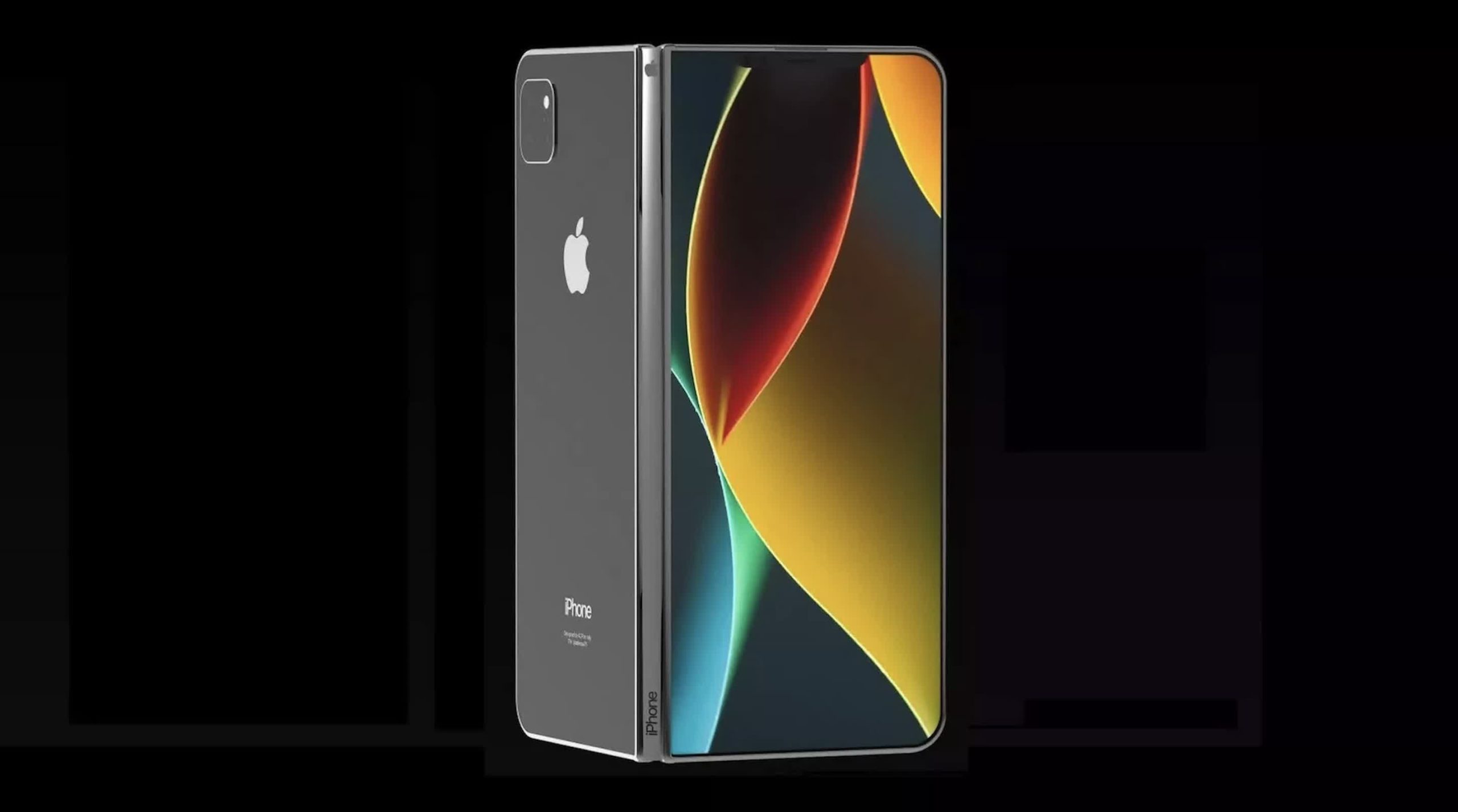
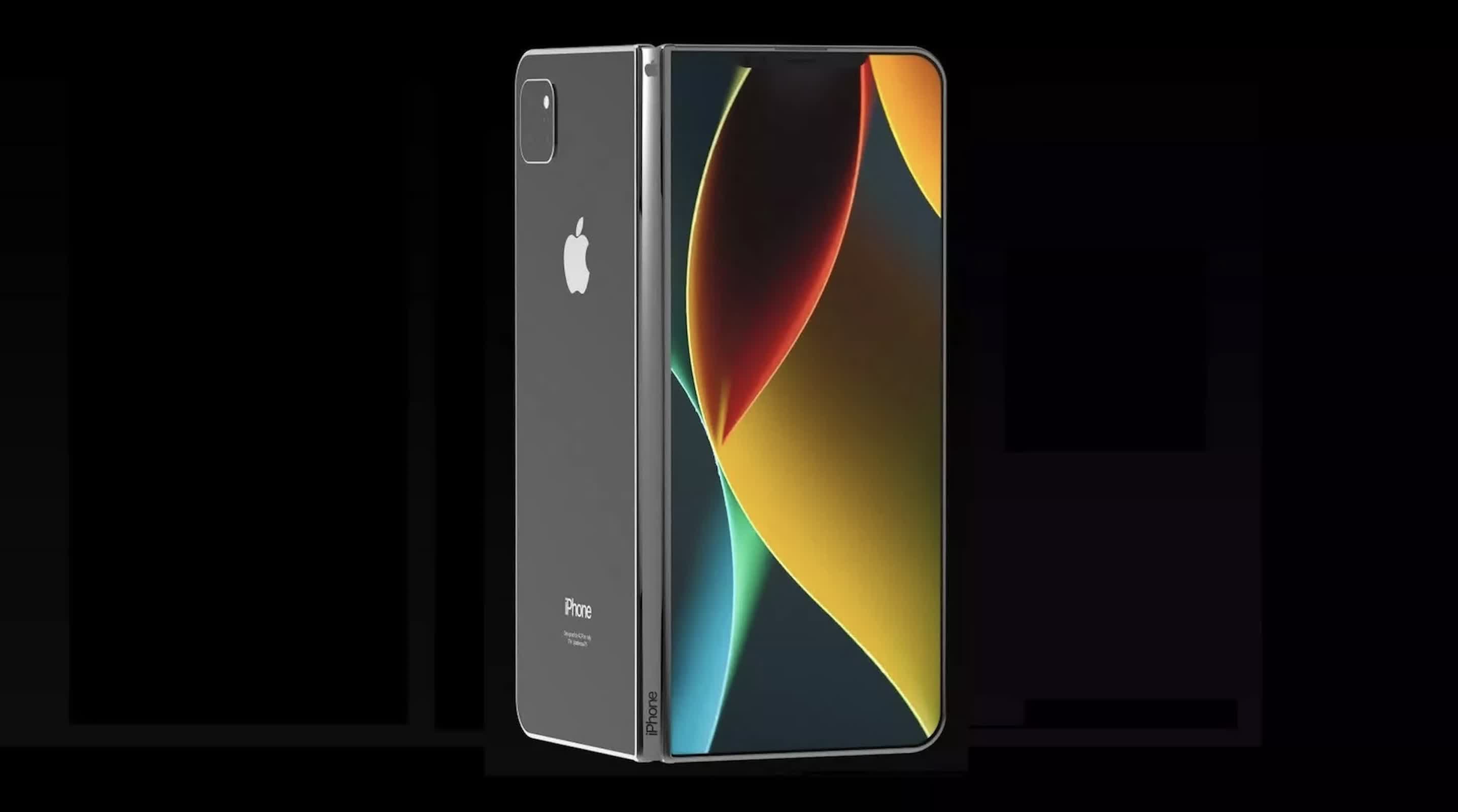
The foldable iPhone is expected to be among the most closely watched products in the coming rollout. It continues a multiyear redesign of Apple’s most important device, following last year’s thinner Air model and preceding a glass-focused iPhone planned for the product line’s 20th anniversary in 2027.
Advertisement
Ternus has argued to Wall Street analysts that the iPhone will remain central to customers’ lives and Apple’s product strategy, despite persistent industry speculation about whether phones could eventually be displaced by glasses or other AI hardware.
That position helps explain Apple’s more cautious approach to mixed reality. The Vision Pro has struggled commercially, and Ternus had concerns about whether its weight and price would allow it to become a mass-market product, according to people who discussed the matter with Bloomberg. Apple has recently cut jobs tied to Vision Pro work, particularly in gaming and immersive-video content, while also reducing roles across functions including security, audio engineering, Siri integration, testing, and the operating system that will be shared with future glasses.
The company still intends to introduce non-augmented-reality smart glasses, code-named N50, next year. But Ternus is open to scaling back Apple’s work in head-worn computing if the category does not gain traction. That could affect the longer-term prospects for an updated Vision Pro, code-named N224, which is slated for possible release as early as late 2028.
For Apple, the larger issue is AI. Its Apple Intelligence rollout has been uneven, and the company has reorganized leadership for both its AI work and Siri. After struggling to advance with internally developed technology alone, Apple began rebuilding the models behind Siri using Google’s Gemini technology. The decision unsettled members of Apple’s large language model group and contributed to departures, including the unit’s leader.
Advertisement
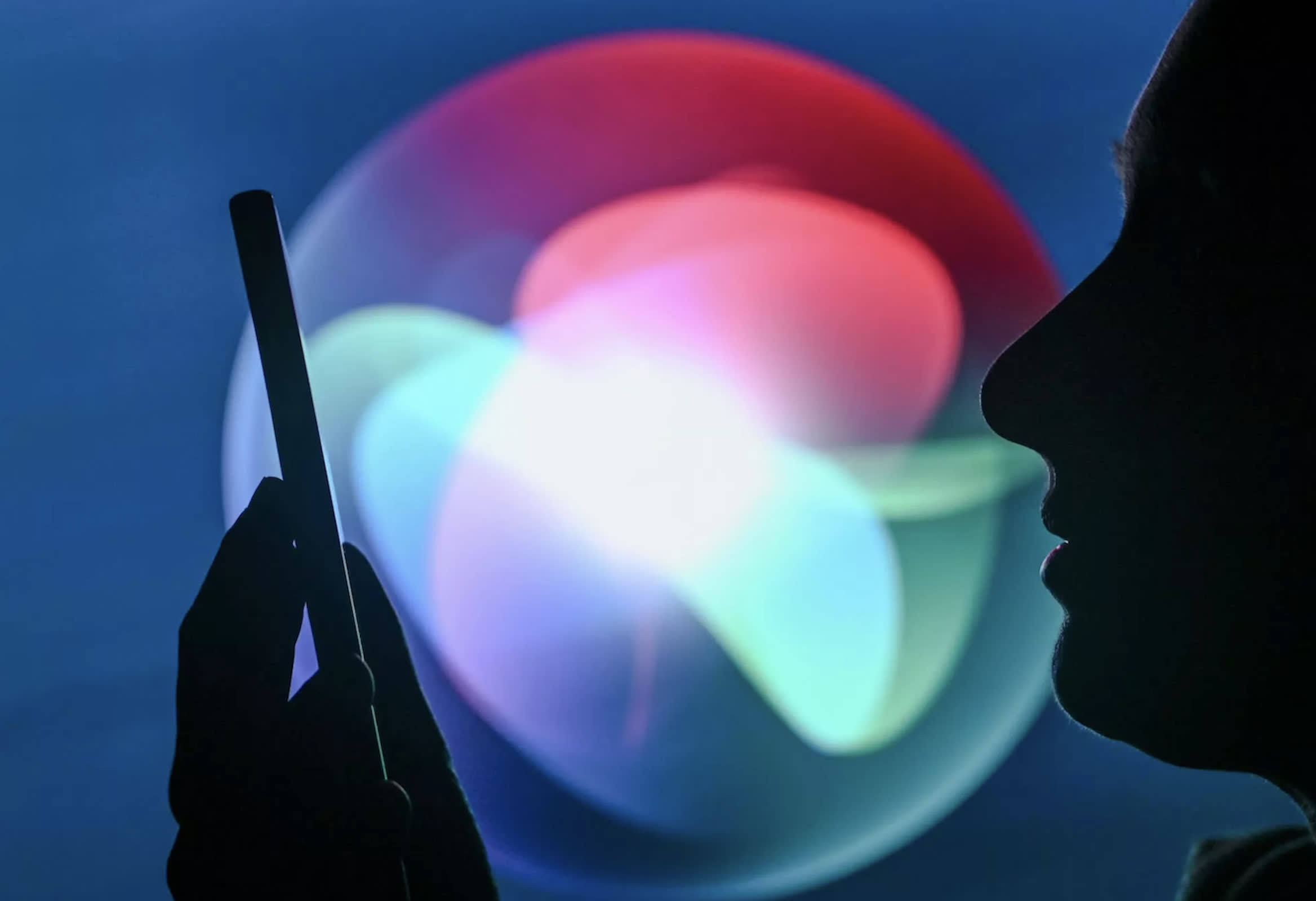
A fuller deployment of Siri AI is expected in September. Apple wants the system to compete more directly with ChatGPT and eventually create revenue opportunities, either through paid access or integrations with third-party apps. Before that can happen, Siri will have to overcome a reputation for unreliable performance and limited usefulness. Early reviews of the new AI version have been positive.
Ternus has also promoted AI as an engineering tool. Before leaving the chief hardware role, he introduced an internal platform intended to speed product development, improve testing, and strengthen device reliability. “We’re going to be able to solve even harder problems,” Ternus told employees during an all-hands meeting, describing AI as a way to apply lessons from previous products to devices still in development.
Some of the devices now on Apple’s roadmap depend on whether that software improves. The company has repeatedly delayed its camera-equipped AirPods and its flagship home display because of shortcomings in AI features.
Apple is also developing a home security product, a robotic-arm display, and a wearable camera pendant. Its planned AirPods cameras and home-security cameras would not produce conventional viewable video. Instead, they would send information to AI systems for environmental analysis, an approach intended to reduce privacy concerns.
Advertisement
That distinction matters for Apple, whose brand has long emphasized privacy. A growing number of AI devices depend on cameras, microphones, and sensors placed in homes or worn on the body. Apple will need to persuade customers that AI-powered awareness can be useful without becoming intrusive.
Ternus inherits other challenges that extend beyond product design. Apple is confronting a continuing memory shortage and higher component costs, areas in which Cook built much of his reputation. Ternus is expected to lean on Chief Operating Officer Sabih Khan, finance chief Kevan Parekh, procurement teams, and operations leadership to manage supply constraints and limit disruption.
Services also face pressure from weaker game purchases, regulatory changes to App Store fees and the European Union’s requirement that Apple permit independent app stores. Meanwhile, Apple has lost hardware talent to competitors offering higher compensation and opportunities to develop new products from the ground up. Hundreds of former Apple employees now work in OpenAI’s hardware division, which Apple has accused in a lawsuit of taking trade secrets.
Cook, who led Apple from 2011, will remain executive chairman and plans to continue handling relationships with the Trump administration and the Chinese government. He told employees, “there can only be one CEO at a time.” Even so, his continued presence will make Apple’s transition gradual rather than abrupt.
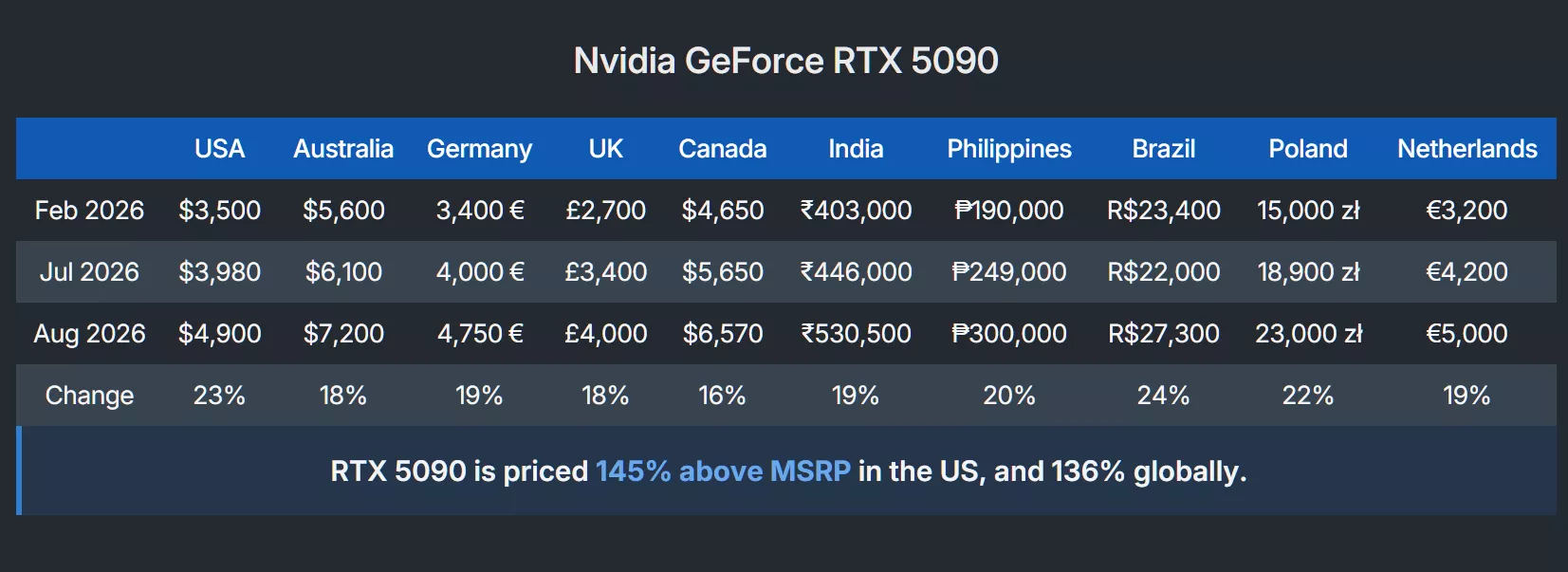
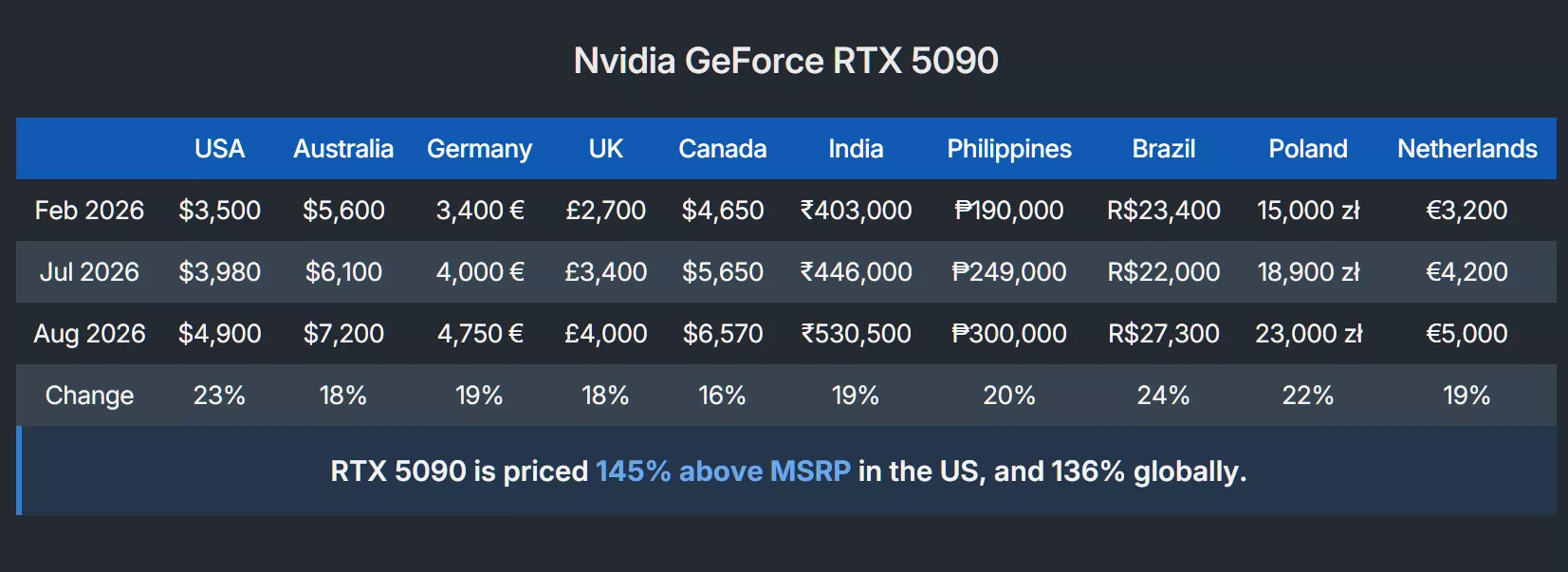
WTF?! Remember those halcyon days when the RTX 5000-series was announced and we were all shocked by the prices, especially the $1,999 RTX 5090. Now, the average price for the consumer flagship is pretty much $5,000, with one regular model hitting an actual $5,090.
As we noted in our recent graphics card pricing feature that shows just how quickly prices are rising, the RTX 5090 was around $4,900 in the US recently.
Prices for the card were up 20% over the past month and are now 41% higher than in February, by far the largest six-month increase of any card in the list. The massive increase since launch means it’s now 145% above MSRP.
Just days later, RTX 5090 prices have climbed even further. It’s at the point now where even regular cards have reached an apt $5,090 – the price of an Asus TUF Gaming OC.
Advertisement
There has already been a $5,090 RTX 5090 announced, but it’s far from normal: The special-edition MSI RTX 5090 Lightning Z, a 1,000W card that some describe as essentially an RTX 5090 Ti. The spec list includes two 12V-2×6 power connectors, a 3 oz copper PCB, a 40-phase VRM, and a carbon fiber backplate. It also has an attached AIO liquid cooler and an 8-inch display panel.
Now, though, that price has become the standard for many RTX 5090 cards.
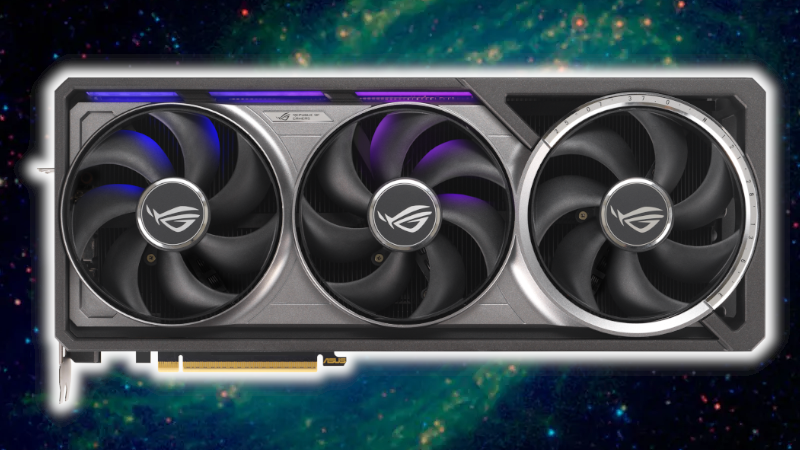
But there’s an even pricier RTX 5090: the Asus ROG Astral RTX 5090 Edition 20. Another special edition card, Newegg lists it for $5,740. We recently covered the story of someone who paid $10,000 for an Asus anniversary bundle that included the card, only for the order to be inexplicably canceled, forcing them to pay an extra $500 for another one.
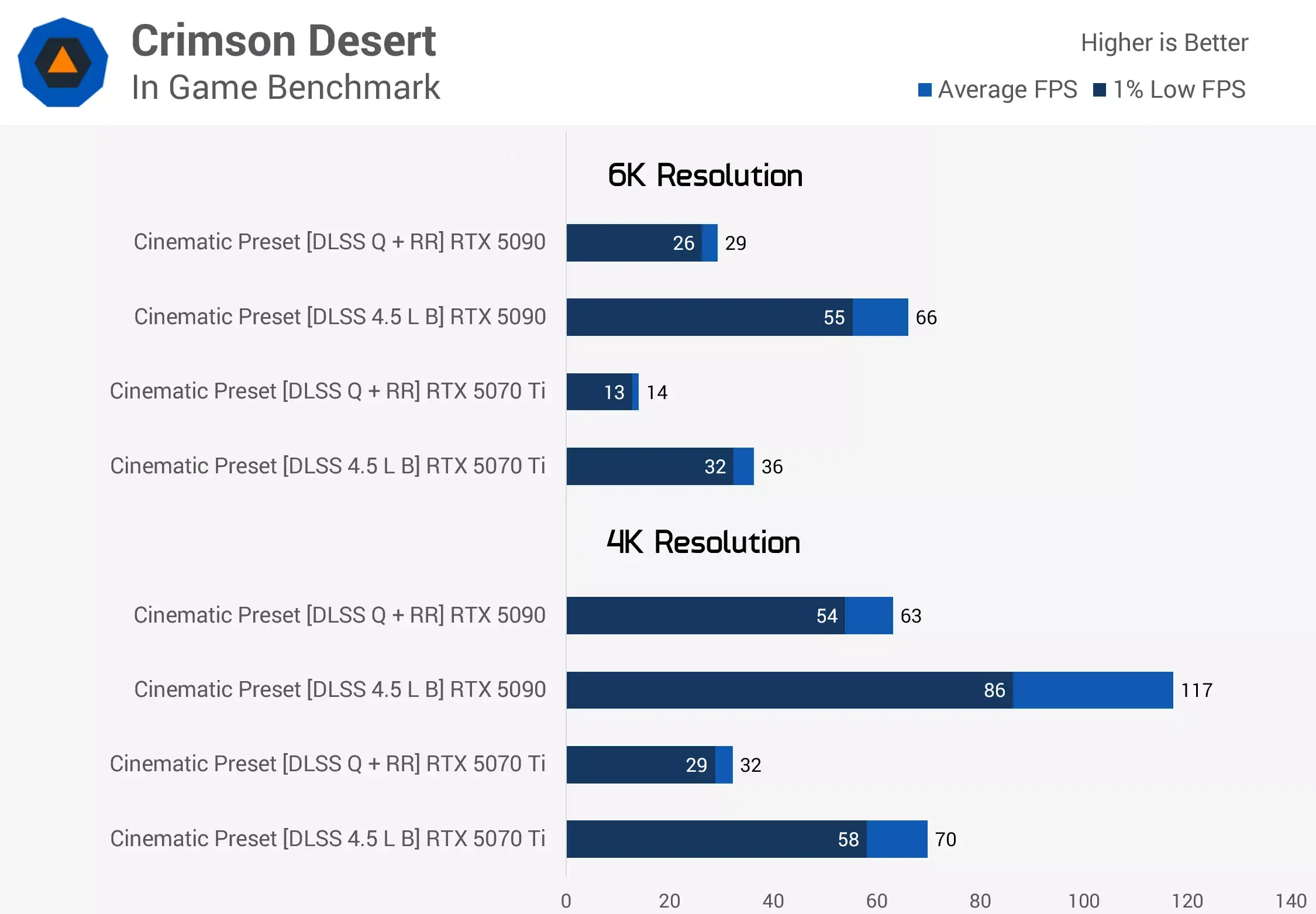
The question now is whether anyone even buying these cards? As we pointed out in our feature, the RTX 5090 is no longer fast enough, at least not when it comes to gaming at 6K on a monitor that supports the resolution.
Advertisement
What’s just as concerning is the prospect of the RTX 5090’s price, and that of pretty much every other graphics card, continuing to rise. It’s little wonder that the RTX 5000 Super series seems to have been canceled indefinitely. And who knows how much RTX 6000-series cards will cost. An RTX 6090 for $6,090, presumably.
Hackers delivered malicious updates to the Virtualizor VPS management software after hijacking BGP routing for its update infrastructure and redirecting update requests to malicious servers.
Virtualizor is a legacy web control panel from Softaculous that hosting providers use to create, sell, and manage virtual private servers (VPS).
An urgent notice from the vendor warns that between 20:57 UTC on August 28 and 06:10 UTC on August 30, an attacker rerouted a block of Hetzner-hosted IP addresses in a BGP (Border Gateway Protocol) hijacking attack.
This enabled the threat actor to divert traffic from Softaculous software update systems and the client/billing portal.
Advertisement
BGP hijacking occurs when a network operator falsely announces a route to IP addresses belonging to another organization. Other organizations may accept the fraudulent route as the preferred one.
An attacker receiving traffic this way can modify or redirect it to malicious destinations.
Softaculous says that the BGP hijacking allowed the hackers to deliver a malicious Virtualizor update to a small number of installations.
“We have confirmed that a malicious Virtualizor update package was delivered to a small number of installations that checked for updates while their traffic was being diverted,” the vendor says.
Advertisement
“This affected a handful of servers rather than the general Virtualizor user base.”
Because the requests were redirected to the attacker, the software vendor does not have logs. Softaculous recommends that Virtualizor operators check for the service:
/etc/systemd/system/java-jre-update.service
If found, admins should rotate and restrict API credentials, and audit systems for unauthorized SSH keys, accounts, scheduled tasks, and outbound connections.
Advertisement
Also, users who accessed the Softaculous client area or entered payment information during the incident window should reset their passwords, review account activity, and monitor card statements.
Softaculous’s investigation into the incident is still underway, but there are no indications that any of its other products were impacted.
Softaculous says routing has now been restored, the fraudulent certificate was reported for revocation, and a new version of Virtualizor, number 3.2.9.9, was released on September 1 with a “Security Analyzer” tool in the admin panel.
The company also plans to implement cryptographic signing for all software packages going forward and migrate to better infrastructure.
Advertisement
Overall prevention scores can hide what happens after initial access. Once attackers are using valid credentials, prevention drops sharply.
The Blue Report 2026 measures defenses technique by technique across 338 million simulations run in customer production environments.
Our full-diapered mad king is at it again, this time urging FCC boss Brendan Carr to go after media companies for the crime of….simply pointing out his terrible, crashing polling numbers:
Trump last week also posted a long, rambling screed on his personal propaganda website, vowing that NBC News‘ Meet the Press moderator Kristen Welker would be “reported to the FCC for rebuke or punishment” for the crime of accurately pointing out Trump’s political endorsements don’t carry the weight they used to.
The comment Welker actually made, as is par for the course for corporate media shows like Meet the Press, was just about as timid as you can get, simply stating Trump endorsements have seen “mixed results”:
“He’s going to loom large over these midterms. There’s no doubt about that. He, of course, has endorsed a slate of candidates in the primaries. He’s had some mixed results, but most recently, his pick of Senator Darline Graham, of course, the sister of the late Senator Lindsey Graham, was successful in her primary battle, so now she takes on Dr. Annie Andrews in South Carolina.”
The irony is that these are simply timid corporate media outlets that can often barely muster the courage to tell the truth (which, in this case, is that Trump’s endorsements will likely be toxic during the whole midterms). If Meet the Press offends Trump so deeply, it would be interesting to see his response to a healthy and vibrant media (if we had such a thing) firm in its conviction to the truth.
It goes without saying that the FCC has no authority to police accurate polling, journalism, or analysis of factual reality. Though overconfident Brendan Carr may certainly try.
Advertisement
As we’ve explored at length, the Trump FCC has been engaged in multiple overlapping manufactured investigations into ABC for a variety of “offenses,” ranging from comedian Jimmy Kimmel making fun of the president’s wife, to the morning talk show The View hosting politicians that Trumpism is clearly worried could erode Republican control of the Senate.
In the latter case, the Carr FCC appears to have colluded with right-wing local broadcast companies to falsely make it appear that a local ABC affiliate violated dated FCC “equal opportunity” rules by hosting Texas Senate hopeful James Talarico last February. Carr used this to try and justify an unprecedented early review of ABC’s eight local affiliate broadcast licenses.
ABC, in response, recently filed suit against the FCC for broad First Amendment violations, suggesting that as Trump’s health, political power, and influence wanes, the empty threats designed to chill media outlets’ desire to accurately criticize the president simply don’t carry the same weight.
Sonos has a new soundbar in its streaming-centric lineup: the Dolby Atmos-capable Beam Ultra. It falls between the existing Beam and the flagship Arc Ultra.
The Beam Ultra is the Dolby Atmos upgrade of the Beam Gen 2 — which remains in the lineup– and adds physical, upfiring drivers and “warmer bass” to become a 7.1.2-channel soundbar.
Sonos says it has redesigned the center channel for clearer dialogue, and the speaker comes with four different levels of AI Speech Enhancement as well as a Night Sound mode. The Beam Ultra also comes with the Trueplay feature for tuning the soundbar to any room.
Connectivityon the Beam Ultra includes Wi-Fi, Bluetooth and HDMI eARC, while the new version of the Sonos app includes Sonos 27voice — the company’s own music assistant — and Sonos 27mcp for connecting an outside AI assistant. The Sonos ecosystem includes compatibility with dozens of streaming apps as well as the ability to add surround speakers and multiroom options.
The Beam is one of CNET’s favorite soundbars, but it has always been limited by its software emulation of Dolby Atmos — something which the Beam Ultra fixes. Adding this option between $500 and $1,000 gives Sonos users more flexibility when building their own home theater systems.
The Beam Ultra is available for preorder starting today for $699, with general availability on Sept. 29, 2026.
Senior editor Ty Pendlebury has been reviewing TVs and home entertainment for CNET since 2006. He has a cat named after one of the best TVs ever made.
See full bio
Recap: While popular manufacturer Keychron offers partially open-source keyboards and is working to open-source its mouse firmware, modder Juho T’s fully open-source Silakka54 design has been inspiring affordable ergonomic split keyboards for some time. A new fork from another tinkerer adds Hall-effect switches.
Fans of minimalist ergonomic split keyboards and users familiar with the Silakka54 might be interested in a new Hall-effect variant. If it catches on with resellers, it could become one of the more affordable Hall-effect keyboards available, while its open-source hardware and firmware allow for unrestricted modding.
Juho T’s original Silakka54 design first emerged on GitHub in late 2024. The 54-key split keyboard draws inspiration from the REVIUNG41 and Corne, supports 5-pin MX-style switches, and uses firmware based on the open-source QMK and VIA standards.
While the project’s GitHub repository includes instructions for building the PCB and firmware from scratch, pre-built models from unaffiliated resellers are available on stores such as AliExpress for as little as $50. As a fully open-source project, forks were to be expected, and a recent creation from modder Hanthebot introduces a useful Hall-effect option.
Advertisement
The Silakka54-HE mostly retains the original design and firmware support. However, in addition to adding Hall-effect switches, it supports Wooting cases and features a reversible design, with its firmware and PCB schematics based on Choi Byungyoon’s TrueStrike42. Other features include adjustable actuation points (APC), rapid trigger, full-duplex communication, and much more.
Currently available only as a DIY project, the Silakka54-HE requires the following off-the-shelf components:
PCB x2
SOT-23 SS49E x54
0805 0.1uf capacitor x62 (0.1~1uf)
PJ320A TRRS socket x2
RP2040 Zero x2
If the Hall-effect model proves popular with resellers, budget-friendly pre-built models might emerge for those unaccustomed to building keyboards.
DIY keyboards like the Silakka54 take customization much further than Keychron’s partially open-source offerings. Like the Silakka54, the popular manufacturer has long supported the open-source QMK and VIA firmware. Keychron also recently open-sourced its cases, plates, and keycaps, but only for use with its PCBs, stopping just short of allowing users to build its designs from scratch.
Open-sourcing mouse firmware is the next step for Keychron. The company’s upcoming ZGM firmware aims to do for mouse sensor tuning, polling behavior, and click processing what QMK did for keyboard firmware. Set to arrive in the first quarter of 2027, ZGM will feature a modular architecture designed to facilitate deep customization. Perhaps it could lead to unique, affordable mouse designs that fill a role similar to the Silakka54.
It’s not going to win awards for its technical performance, but the MovingStyle is a charming lifestyle TV that’s easy to like if you’ll make use of its unique functionality.
Unique, portable design
Responsive touchscreen
Sturdy
Has most apps you’ll need
Only Quad HD
Gaming specs could be better
Sound lacks solidity
Poor contrast and elevated black levels
Key Features
Introduction
The television is having a bit of a PR crisis among younger buyers. As a millennial, I have organised whole rooms around where the TV can go, but research shows Gen Z prefer to watch their favourite shows on their phones or laptops, with only 10% choosing a TV.
Advertisement
With TV watching now as mobile as the devices we own, kitchens, bedrooms and even bathrooms are increasingly becoming the places to catch up on shows. Manufacturers have adapted to this with a new breed of portable and movable TVs, and Samsung’s MovingStyle is very much part of that trend.
The 27-inch model I’m testing is a rollable, portable, shape-shifting touchscreen TV and while it’s not going to blow the socks off anyone looking at its on-paper specs – particularly when paired with its £1,000 price tag – there’s something about it that is very likeable indeed.
Advertisement
Design
27-inch display
Flexible, moveable design
Three hours of battery life
If you hadn’t guessed it, the MovingStyle looks a lot different to a regular TV. The 27-inch Quad HD screen sits high, on a wheeled stand, mounted onto an adjustable arm that lets you change its height and also its orientation. It also has a built-in battery that’s good for three hours away from a plug, meaning you aren’t fixed to a specific viewing location – a big part of its charm.
Image Credit (Trusted Reviews)
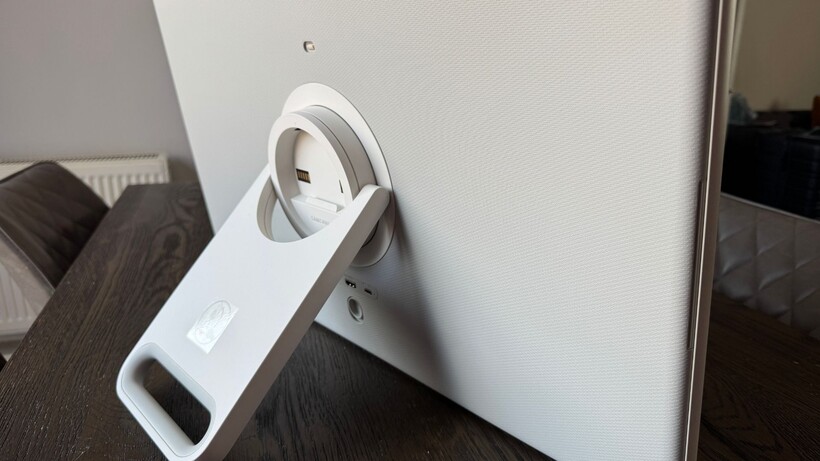
While that in itself is pretty cool, where it really moves things forward from competition like LG’s StanbyME 2, is the ability to remove the screen from the stand entirely. The display has a built-in handle that doubles up as a kickstand, meaning you can take it off and place it on a piece of furniture for even more flexibility.
Considering the wheelable base is very heavy (about 20kg), having this as an option is handy for moving it up or down the stairs, or even into the garden, without having to relocate the stand too. That three-hour battery life is the same whether it’s on the stand or not.
Advertisement
Getting the MovingStyle set up is pretty straightforward – just make sure you read the instructions first to avoid lugging the hefty stand out of the box prematurely. In fact, it needs to be slotted into a rest in the packaging, which then allows you to secure the pole into the base with four screws. You can then hoist it out and stand it up. The screen just clicks on to a circular attachment on the adjustable arm.
Advertisement
Image Credit (Trusted Reviews)
This all works well but I do wish the stand had a brake – I have to either hold the stand with one hand or put a foot on the base while reconnecting the screen to ensure it doesn’t roll backwards in the process.
As for colour, the MovingStyle is currently only available in white, which means it’s a little more “look at me” than some people might like. But a TV on a pole is never really going to blend in, so I guess why not lean into it?
It’s worth mentioning that there are two versions of the MovingStyle – a 32-inch 4K version called the MovingStyle Essential (not officially for sale in the UK), and the 27-inch Quad HD version I’m testing.
Advertisement
While the Essential gets the extra resolution, it loses out on a lot of the functionality that makes the MovingStyle so great, namely its ability to run on battery power, the ability to remove the screen from its base, its touchscreen interface, and it only has a 60Hz refresh rate.
Image Credit (Trusted Reviews)
Advertisement
Connectivity
A single HDMI 2.1
2 x USB-C
Bluetooth 5.3
While some people may use it as such, the connectivity on the MovingStyle doesn’t really scream “main TV”. It only features one HDMI 2.1 port (eARC), and two USB-C ports.
Image Credit (Trusted Reviews)
The base can be charged via the included power cord, but if you need to charge the display independently, while it’s off its base, you can use one of the USB ports for that.
It also has Bluetooth 5.3 on board, allowing you to connect a pair of Bluetooth headphones to the TV should you wish, while wi-fi allows AirPlay 2, Google Cast and things like screen mirroring.
User Experience
Tizen OS
Remote or touchscreen
Good app selection
Advertisement
The MovingStyle features Samsung’s Tizen OS, which will look familiar to anyone who has used a Samsung TV before, and is generally well laid out and easy to navigate.
You can do this using the included small, solar-rechargeable remote or the touchscreen interface, meaning my kids found their way around it almost embarrassingly easily.
Advertisement
It’s responsive no matter which way you do things. However, you’ll find that not all apps work with the touch interface once you’re in them, meaning you’ll need to grab the remote for those, or use the on-screen controller that pops up. That’s a bit clunky in an otherwise smooth experience, but I’d guess is something that’s out of Samsung’s hands. Netflix and Prime Video work just fine with touch, though.
Image Credit (Trusted Reviews)
Finding something to watch is very easy indeed. On the home screen, you have some featured and suggested content from a range of apps, alongside options for live content from Samsung TV Plus. Scroll down and you get a rail of streaming apps, including Netflix, Prime Video, Disney+, BBC iPlayer, ITV X and Apple TV among others. Keep scrolling and you’ll find more rails of themed suggestions, like family favourites, live events and top movies.
On the left hand side, there is a slim vertical menu with some icons. These expand when highlighted, and take you to Samsung’s Gaming Hub, a lifestyle, work and smart home hub called Samsung Daily+, the Samsung Art Store for choosing display art when the TV is not in use (membership required) and a search function.
Advertisement
You can also access the connected devices menu here and all the settings, as well as a shortcut to Samsung’s privacy notices in case you want to review them.
Advertisement
Image Credit (Trusted Reviews)
Gaming
Cloud gaming options
Slow input lag
Some gaming specific features
The MovingStyle has a single HDMI 2.1, so you can hook up a games console if you feel so inclined – but I suspect that only casual gamers will be happy with the specs on offer here.
For example, while the MovingStyle offers a 120Hz refresh rate and supports ALLM, there’s no support for VRR. Input lag also sits at around 17ms, which is pretty sluggish for a TV at this price, even if Samsung’s Game Mode will shave off a bit of that when it’s enabled.
Advertisement
There is also Samsung’s Game Bar, which offers a number of settings that will help give you the edge in a game, or otherwise tailor the gaming experience more closely to your taste.
If you don’t have a console, or you’d rather not use up that single precious HDMI port, Samsung’s Game Hub has access to cloud gaming from the likes of Xbox, Amazon Luna and GeForce Now.
Advertisement
Features
Samsung Vision AI
Bixby or Alexa voice assistants
Support for HDR10+
Samsung’s Vision AI leads on the artificial intelligence here, with a shortcut on the remote to load up the Vision AI homescreen, complete with suggested questions and commands. It’s fun to mess around with but I’ve yet to find any compelling reason to use it like this on a telly.
You can set up Bixby or Alexa as your voice assistant of choice, and that is more successful. With Bixby it integrates with Vision AI, and you can navigate the Samsung TV settings a little deeper, but I find Alexa to generally be better in results for content suggestions. I also like that it offers suggestions and nudges for voice activation when you do things via remote.
You can also use it “hands free” if you want to (you can also opt against it if you prefer), whereas Bixby requires you to hold down the mic button.
Advertisement
Samsung’s SmartThings smart home hub is installed on the TV so you can control, view and add any compatible smart home devices on screen. If you already use Alexa for smart home stuff, choosing that as your voice assistant also gives you access to Amazon’s smart home hub.
The processor behind the MovingStyle is the NQ4 AI Gen 2, which was a flagship processor a couple of years ago, and now generally powers their mid to upper-mid range. It’s a very respectable processor indeed, and it shows in an incredibly smooth performance.
Advertisement
The MovingStyle features a matte filter on its screen, which helps to diffuse light in bright rooms and in unconventional viewing positions. There’s an expected pay off in contrast because of this, but it does really work. I’ll talk about picture quality in a moment, but I think it’s the right compromise in a product like this.
It supports HDR10+ and Dolby Atmos, though natively through the TV you wouldn’t really know about the latter. Of course, connecting a soundbar is possible here, but its form factor and use case doesn’t really lend itself to it being a simple solution. Making use of the 2-channel 10W built-in system is going to be something you’re probably going to have to make peace with.
Picture Quality
Quad HD (2560 x 1440) display
Could be brighter
Matte screen filter impacts contrast
Advertisement
It’s fair to say that you probably shouldn’t buy the MovingStyle if you’re incredibly discerning over picture quality, or want the best picture for your money. You are undoubtedly paying a good chunk of the MovingStyle’s asking price for its rather quirky functionality, and you’re going to want to really appreciate and make use of that for the pay offs you make in picture quality.
First off, the screen is Quad HD (2560 x 1440), so not even 4K. Even the most budget TVs pack a 4K display these days, so that’s worth considering.
Advertisement
However, on this 27-inch display, that loss of resolution doesn’t feel incredibly problematic. Images on streaming services are sharp and detailed enough that I don’t necessarily find myself longing for 4K, though it would make this offering all the more solid.
Image Credit (Trusted Reviews)
It’s in the nuance that you miss out – there isn’t quite the same feeling of depth to images as you’ll get on a 4K display and there’s a lack of finer detail that makes the textures of fabrics, hair and skin all the more life-like. But I still think the majority of people plonking themselves down in front of this will be more than happy with the detail and sharpness levels on offer here.
That said, it is somewhat reliant on the quality of content you give it to work with. Older terrestrial TV streams that you’ll find on Samsung TV Plus can look particularly soft without the extra pixels and upscaling to play with. But Full HD streams of Sky News on the same service look clear, clean of noise and perfectly watchable – and with that as the baseline for most of the TV you’ll be watching, you shouldn’t come into much trouble.
Advertisement
The MovingStyle has a handful of viewing modes, including Standard, Movie, Eco, Vivid and Filmmaker Mode. I opt for the latter, but switch on the Brightness Optimisation setting to ensure the screen adapts to how bright the room is – at its default brightness level, it’s almost unviewable.
Advertisement
This means that for most situations, the screen brightness ends up being maxed out – and I’d take a bit more brightness still if I could, to really help HDR highlights to stand out more. As it stands, they aren’t as impactful as you would notice on a brighter screen.
Image Credit (Trusted Reviews)
Still, colours look good – skin tones are well judged and brighter colours manage to look vivid yet natural.
As I mentioned before, the biggest issue this TV has from a picture perspective is contrast. That matte screen filter feels like an important thing to have on this kind of product, but it does make for less-than-stellar black levels, also not helped by the fact you really have to have this screen at its max brightness most of the time. Very dark scenes can suffer with a lack of distinction and shadow detail too, and even those with mixed light levels don’t have the talent to balance both extremes out to equal abilities.
It’s fair to say that this is a TV for casual viewing, but even as someone who watches TV with a critical eye, I can find plenty to like about the picture quality here when balancing out the other things it offers. Still, there are limitations here, so you’ll want to manage your expectations appropriately.
Advertisement
Advertisement
Sound Quality
10-watt sound system
Standard and Amplify sound modes
Lacks bass but no sharp edges
As a 10-watt system, sound quality here is not the best. It’s certainly not the most expansive performance, and it lacks some solidity too, with very little bass to speak of and the full presentation overall sounding a bit hollow.
However, it does balance out what it can do pretty well. In Standard sound mode, there are no sharp edges to busy action scenes, and dialogue is clear. This holds true up to a pretty decent volume, even if pushing the volume just makes a relatively small sound louder, rather than any bigger. That of course has a ceiling, but I think you’ll hit a volume that you’re happy with before you get to one where things sound really strained.
The Amplify sound mode is also there if you want to add a bit more oomph to the mid-range and higher frequencies, but I find it makes things sound a bit processed and introduces some sharpness at volume.
While the advice for a TV like this would usually be “add a soundbar”, its form factor makes that a little tricky – though not impossible. You could also hook up a Bluetooth speaker for a bit of a boost, though integration with the screen might be a bit off.
Advertisement
Advertisement
Should you buy it?
A fun, flexible lifestyle TV
If you have a household that will find the MovingStyle’s unique design and capabilities useful, there is something very likeable about this TV.
Advertisement
You’re paying for that fun
The price of the MovingStyle doesn’t match its capabilities from a picture and sound perspective, so you’ll need to be fine with paying a premium for its portable/moveable capabilities.
Advertisement
Final Thoughts
The Samsung MovingStyle feels a bit like when the first Frame TV came out. Specs were lower but prices were about the same as some of Samsung’s upper range TVs, and for some people that just didn’t make sense. But its design focus resonated with people who liked how it fit into their homes, and it’s now one of Samsung TV’s biggest success stories.
Ultimately, you have to really want the MovingStyle, to get the MovingStyle. Paying £1,000 for a 27-inch screen that isn’t even 4K, with picture and sound performances that you’ll find much better elsewhere, won’t make sense to a lot of people.
But then wheeling the MovingStyle from the dining room to the kitchen while I’m cooking, or taking it upstairs so my kids give me the main TV downstairs back for an hour – those things really make a difference to how my household runs. A really very charming lifestyle TV.
How We Test
We test every television we review thoroughly over an extended period of time. We use industry standard tests to compare features properly. We’ll always tell you what we find. We never, ever, accept money to review a product.
Advertisement
Find out more about how we test in our ethics policy
It’s already got a small discount, but the code knocks even more off the list price.
Advertisement
Why we recommend it
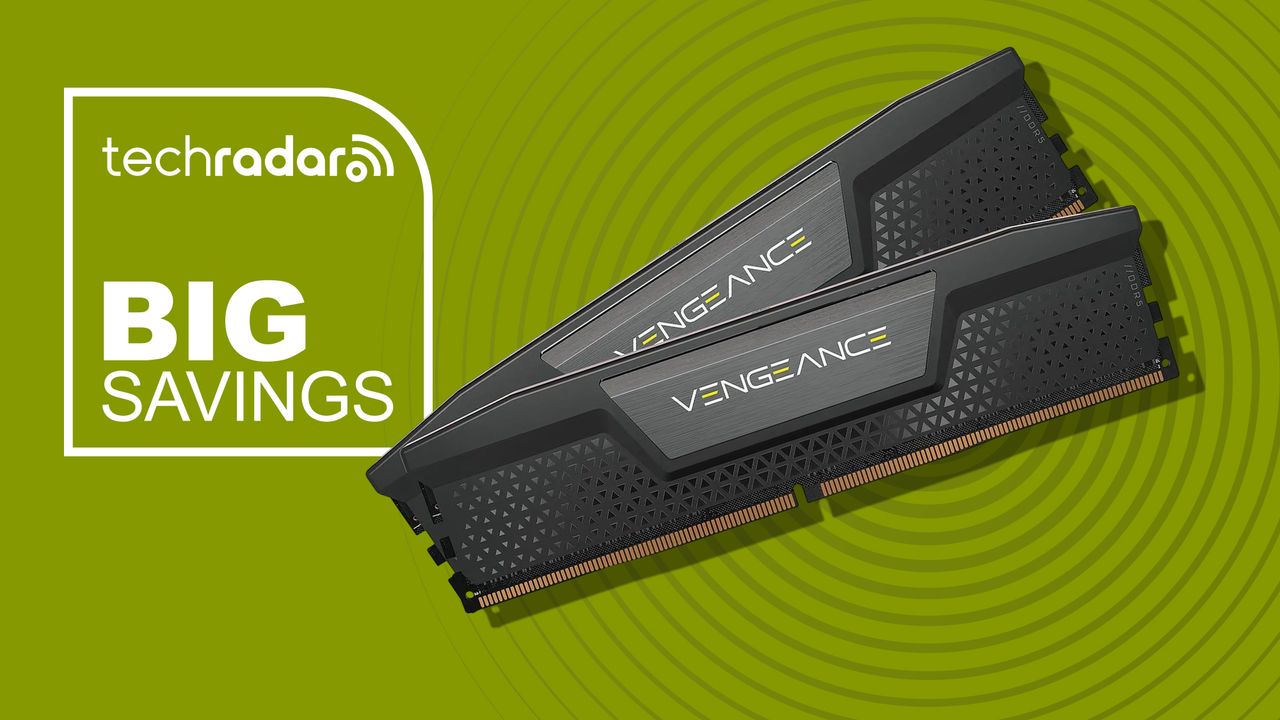
It combines DDR5-6000 speeds with 30-36-36-76 timings and a CAS latency of 30. The two 16GB modules give you 32GB in dual-channel mode, which is a good capacity for everyday work, creative tasks, and more demanding applications.
Intel XMP 3.0 support also makes getting the advertised performance relatively straightforward on a compatible motherboard. Corsair uses a low-profile aluminum heat spreader, so the modules should also play nicely with larger CPU coolers.
There’s no RGB lighting, which could actually be a plus if you prefer a clean build without turning your PC into a miniature nightclub.
Advertisement
Price context & historical value
The regular Newegg price of $605 is very high, but with a discount and the promo code, $490 is a much more affordable option and works out at $15.31 per GB. This obviously is nowhere near an all-time low. The same kit was available for $229.99 in November 2025 and dropped as low as $99.99 in July 2023, showing just how dramatically memory prices have risen.
For more savings, we’ve picked out this week’s best RAM deals.
Should you buy it?
✅ Buy the Corsair Vengeance DDR5 RAM if…
Advertisement
You need 32GB of fast DDR5 memory now and have been waiting for a decent discount. DDR5-6000 and CL30 make it worthwhile and the low-profile design and XMP 3.0 support add to its appeal.
❌ Skip the Corsair Vengeance DDR5 RAM if…
You already have 32GB of reasonably quick DDR5 memory. Unless your existing RAM is particularly slow, replacing it with this kit probably won’t produce enough of a noticeable everyday performance improvement to justify the upgrade.
Advertisement
The Catch: What to know before you buy
This is a decent deal for someone building or upgrading now, but if you’re not in any rush, it’s worth waiting for memory prices to come back down. You should also check your motherboard and CPU compatibility before ordering. This particular kit supports Intel XMP 3.0 rather than being marketed as an AMD EXPO kit.
Earlier this year, one of the smartest internet rights people around, Heather Burns, suggested the “Darnella Test” regarding any kind of “kid safety” rule online. It’s named after Darnella Frazier. You might not recognize her name, but you’ve seen her work. She was the 17-year-old who was walking to the corner shop when she happened to see Derek Chauvin kneeling on George Floyd’s neck, in the process of murdering him. She got out her phone and filmed it, enabling the world to see that the initial statement from the Minneapolis police — the one headlined “Man Dies After Medical Incident During Police Interaction” — was bullshit.
But she was a teen. On social media. So Burns came up with the Darnella test, to explore whether any particular internet regulation would have prevented Darnella from documenting the murder of George Floyd:
For any young person who is just going to be walking along the street for a snack and ends up witnessing something that nobody should ever see because it should not be happening. For that young person whose only recourse, at that moment in time, is to document and report.
And as that future Darnella pulls out their phone to document the event:
Would they be allowed to have that phone, at all, under xyz regulation?
Would they be allowed to have that social media account, at all, under xyz regulation?
Would they be allowed to upload video, or livestream content, under xyz regulation?
Would the video, because of their age-verified account information, be instantly flagged and/or taken down for violent content?
Would the video, as urgent journalistic content in the public interest, be suppressed and censored based not on the content within it but on the age of the person who filmed it?
That’s your Darnella test. Run through it as if your life depends on it. Because it just might.
Thankfully, unlike the various outright bans of social media for teens, the newly announced Meta settlement with most state AGs does not actually ban kids from social media. But that doesn’t mean it passes the Darnella test. At the very least, the settlement will make it much harder for the next Darnella to document and distribute things that need to be documented and distributed.
Advertisement
Let’s start by running the settlement’s terms through the Darnella Test, question by question, to see what a future Darnella would actually be able to do. Especially since the goal of the settlement is that it become the industry norm across all of social media.
The first question doesn’t really apply here, since it has nothing to do with kids having phones directly, so that passes the Darnella test.
You could argue that the second question regarding whether or not the next Darnella would have a social media account also passes, since nothing in the settlement officially bars teens from having an account. But it certainly could impact them indirectly. The age assurance requirements make signing up more of a hassle, so the next Darnella might not bother creating an account at all. And if she does, that verification is precisely what marks her account as a teen account — which is what triggers everything that follows.
We can lump the next three questions together, because they’re all about the content itself. And here is where it seems clear that the settlement agreement fails the Darnella test. The “age-appropriate content restrictions” and the “content restrictions” for teen users would almost certainly create real problems for a teenager documenting a murder like George Floyd’s. A video of a police officer kneeling on a man’s neck until he stops moving is graphic violence by any classifier’s reckoning — and the entire point of a verified teen account is that graphic violence doesn’t stay on it.
Advertisement
And on that last item in the test — whether or not “urgent journalistic content in the public interest” would be suppressed — there are serious problems, even if the video somehow slipped past the content restrictions. The settlement imposes a default two-hour daily time limit on teen accounts — which means the answer might depend on how much time the next Darnella had already burned scrolling before she happened to walk past a murder in progress. Considering that George Floyd was murdered in the evening (around 8:30pm) there’s a good chance a teen user would have already used up their allotted time.
Yes, it’s possible that the next Darnella might have more time due to a parent or guardian bypassing the two hour restriction, but we don’t know that ahead of time. And a teenager watching a man die on the pavement in front of her does not have time to go find a parent and ask them to unlock the app.
Also, crime — and other things worth documenting — doesn’t happen only during your waking hours. The settlement includes “night mode” restrictions that say that teens will not be able to post content between midnight and 6am. If Darnella happened to witness Floyd’s murder past midnight, she might be out of luck. Or, at least, the police would have extra hours to lock in their false narrative.
And this is the problem with so much of the discourse regarding child safety online. It starts from the position that the internet is inherently unsafe for kids, and that the only remaining question is how thoroughly to block them from it.
Advertisement
But reality is more complicated than that. A kid with a phone and a social media account might also be the only thing standing between the official story and the actual truth. A teenager may be the one livestreaming a school shooting from a locked classroom. Or be a bystander filming ICE violating the rights of people across America. They might be the person documenting police violently attacking protestors.
Yet, under a framework built around “protecting teens from the dangerous internet,” such things will face multiple hurdles. A verified minor uploading graphic, unmoderated content in real time will violate all sorts of rules.
Run the actual Darnella video of Derek Chauvin kneeling on George Floyd against the “industry wide” standard Meta just paid $17 billion to create. It doesn’t pass. It’s graphic violence, filmed by a verified teen account late in the evening, perhaps after she’s used up all her allotted time. If it were after midnight she’d be barred entirely from posting. The next Darnella video might not exist. But at least 52 Attorneys General get to pretend they “protected kids.”
If you’ve heard the high-pitched whine or buzz from an electronic device when a current-carrying inductor is vibrating, you’ll know how unpleasant it can be. It’s common in all kinds of equipment, but it’s become a particular annoyance of late in hardware like PC power supplies, GPUs, and cooling pumps. There is plenty of hearsay on the web about which parts whine and which don’t, and [Lowell Wood] wants to get to the bottom of it.
To track the issue, [Lowell] has put together the Coil Whine Database. It accepts user reports on hardware, regarding the level at which coil whine is present. A score of 0 is given to a part that is inaudible in a quiet room, with higher scores representing higher sound levels. A part scored at 2 is audible working at a desk with the computer under load; a part scored at 4 is audible even when the machine or device is at idle.
For now, the database is largely empty—[Lowell] has just opened submissions, adding a report on their own ROG Astral RTX 5080 card for good measure. If you want to submit a report on a unit, either silent or noisy, that’s simple enough—just fill in the coil whine report form. Over time, submissions will hopefully grow, and it will be easier to get a good idea of what equipment whines and what is likely to operate silently out of the box.
The database aims to present a guide to what parts whine, and how much, noting that any given population of devices tends to vary. To that end, any given device won’t be reported on publicly until it receives at least 5 reports. To counter bias, reports of silent parts will be weighted higher, since it’s unlikely that people happy with their quiet hardware will be rushing to research this issue or report it to a database. Relevant files to the project are available on GitHub for the curious.
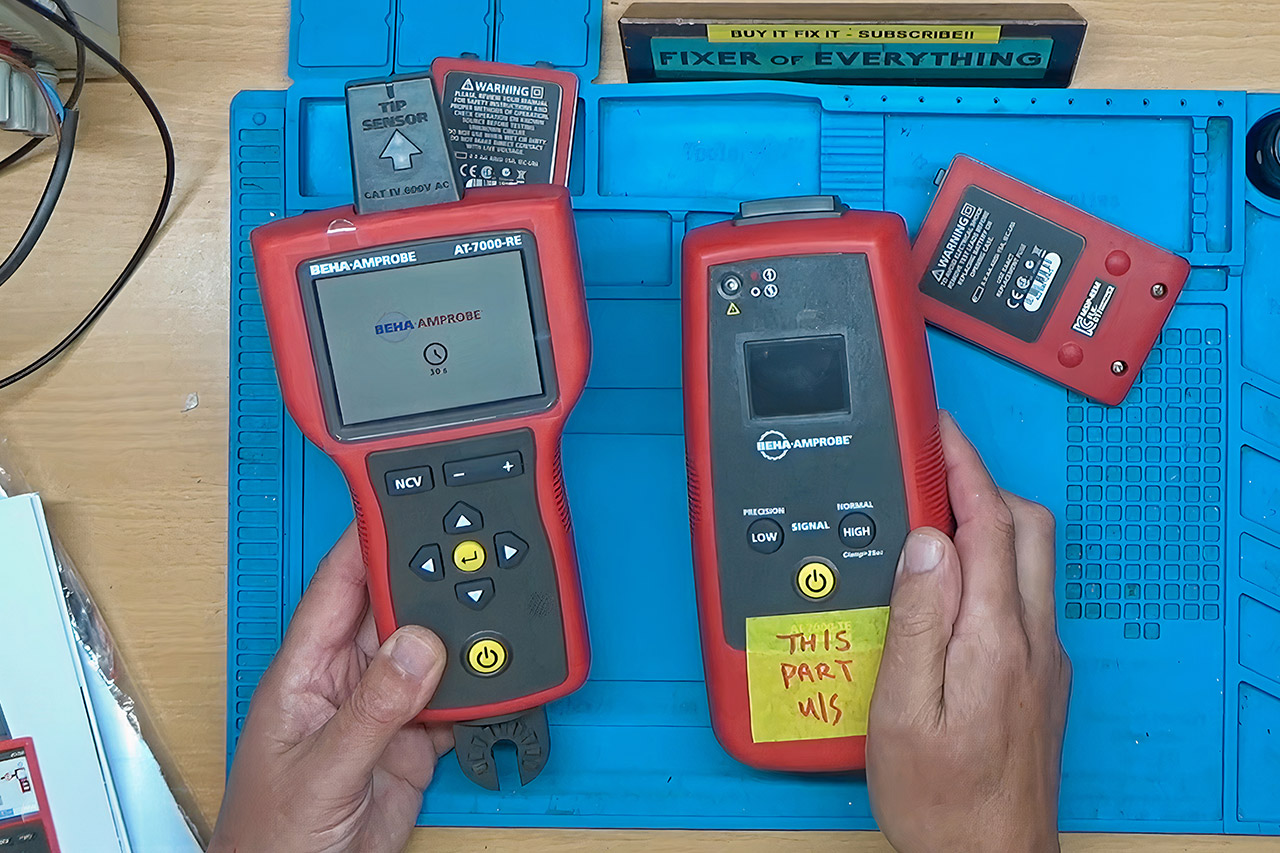
Most people have never held an Amprobe AT-7000-EUR, and even fewer would guess a cable tracer can cost about $2,700. Electricians use this kit when a cable disappears into drywall, a ceiling, a floor, or a crowded panel and a cheap tone probe is not enough. One half of the kit is a transmitter you clip onto a circuit. That box injects a tracing signal, 6.25 kHz on live wires or 32.768 kHz on dead ones, in high, low, or clamp mode. The other half is a receiver with a color screen, a tip sensor, and a Smart Sensor array that shows where the wire runs and which way it is going, often to about two inches, and can pick the correct breaker instead of a handful of false hits.
Tom bought the pair for work at roughly £2000 ($2700). After months of sitting in storage, the transmitter simply went dark for no apparent reason. The transmitter went dead, which means the batteries, buttons, and display did not even twitch. However, the receiver opted to reactivate, which is at least some aid in locating the problem. Fluke’s service team quoted £70 for an initial quote and another £600 to even try a repair. When the fees were factored in, it was off to the “YouTube Heroes for Hire” op Buy it Fix it.
Small but Mighty – The DJI Mic Mini lavalier microphone transmitter is small and ultralight, weighing only 10 g, [1] making it comfortable to wear…
Detail-Rich Sound – Mic Mini wireless microphones delivers high-quality audio. A 400m max transmission range [2] ensures stable recording, even in…
Extended Battery, More Recording Time – Mic Mini wireless lavalier microphone with Charging Case offers up to 48 hours of battery life, [3] ideal for…
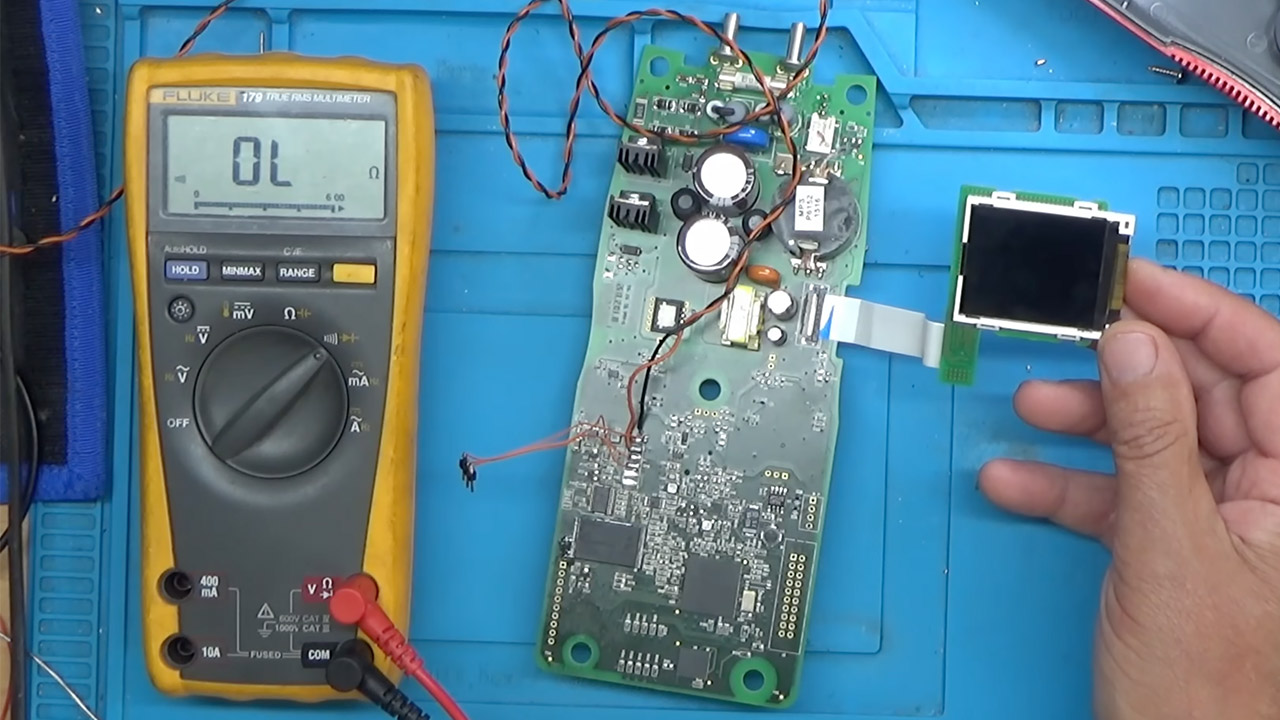
Five small screws later, the transmitter board was on the bench. A 10.2 volt bench supply showed the normal voltages popping up: 5V, 3.3V, and 1.2V, all present and accurate. A thermal camera scanned for hotspots but found nothing unusual. An oscilloscope showed a clear 23.9989 MHz clock signal from the 24 MHz crystal as well. Even the backlight seemed to work well after the ribbon was reseated. So it appeared that the hardware issue was not with the power supply.
Advertisement
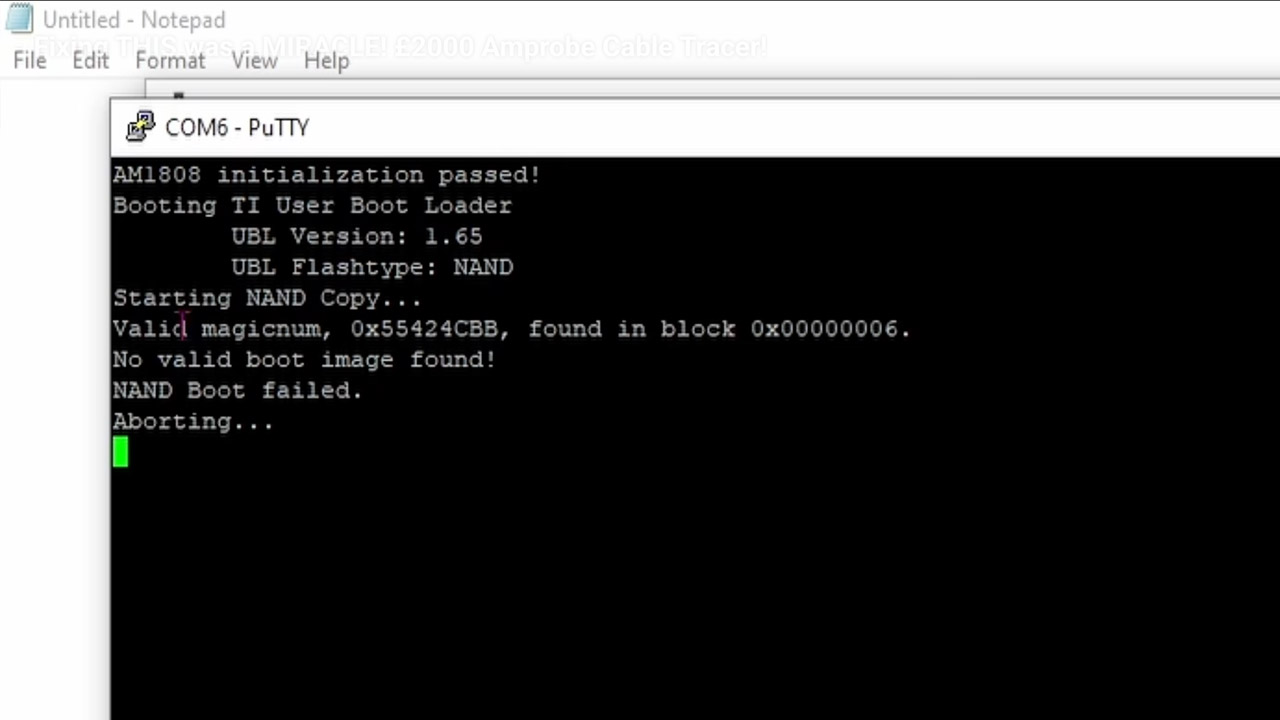
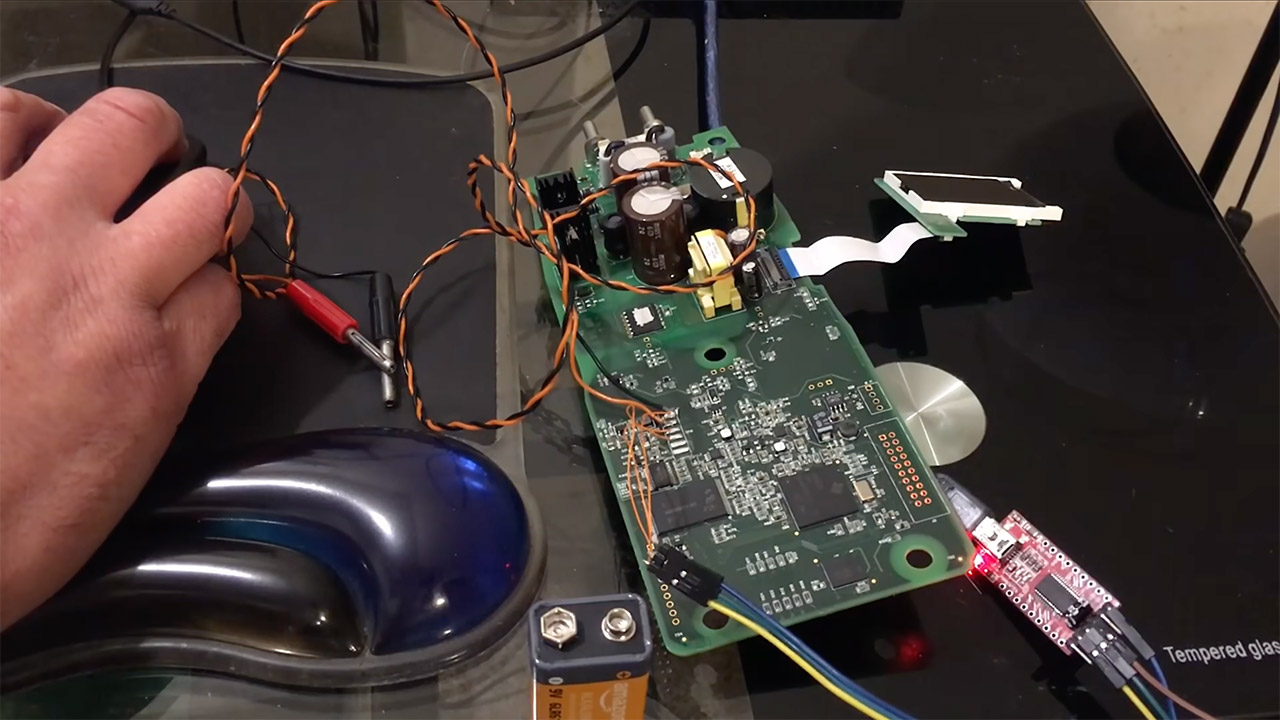
Only after connecting the serial pins to a computer at a baud rate of 115200 did the true tale become obvious. Boot logs appeared before abruptly terminating with a NAND boot failure. Both machines run some ancient Linux 2.6 firmware from a 128 MB NAND chip housed within a TSOP-48 box. At startup, the system on a chip reads that chip, checks the boot image, and refuses to continue if it discovers a problem. This is exactly what the dead transmitter was doing.
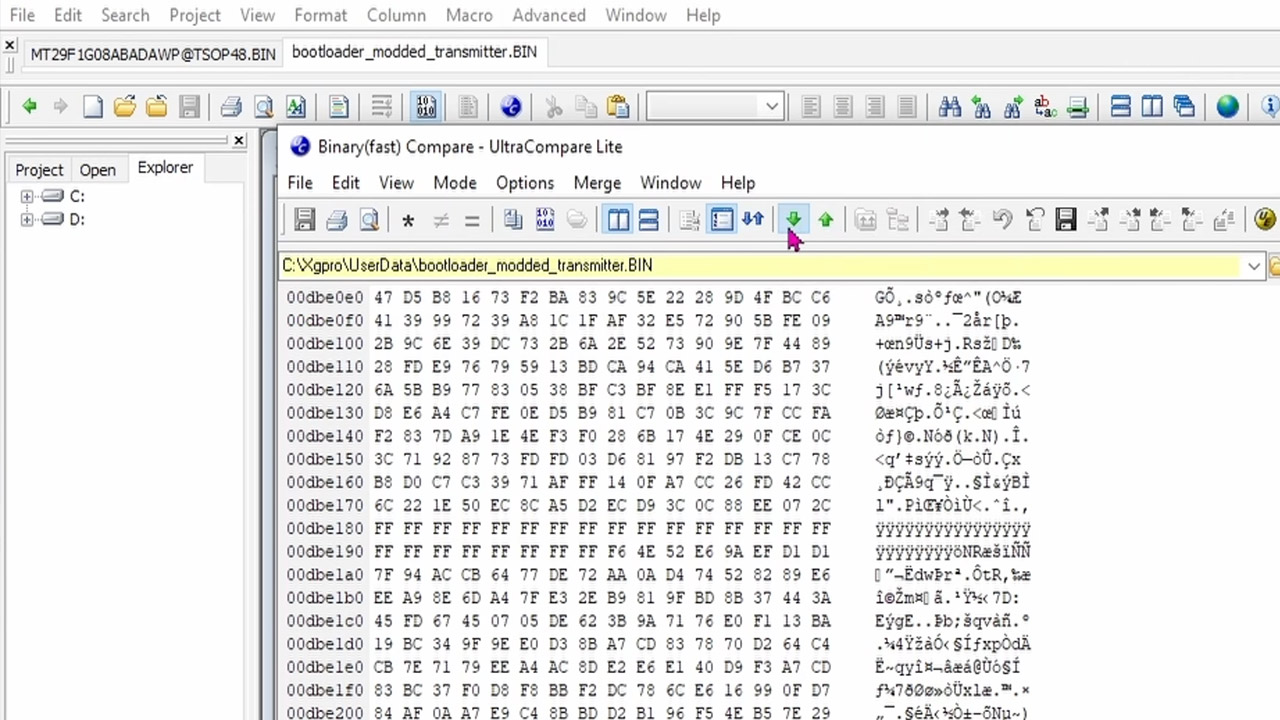
After blowing hot air into the NAND chip, a programmer read it. We could see the data was there, but a hex view looked like a nightmare, with a large empty patch and random bit flips. In the erroneous areas, E1 was where E should be, O where 01 should be, and C9 where C1 should be, among other things. A wild goose hunt through Google’s Gemini chatbot took up half of the day in theory on how ECC works, and I didn’t get anywhere or get the unit up and running, but the smart play was simpler.
The receiver was also ripped apart, and it had the same CPU, RAM, and, most critically, flash IC. So some wires were attached to the serial header, and a fast run of U-Boot with the programmer’s bit-flip settings adjusted slightly resulted in a clean NAND image. The next thing he knew, he had the files side by side, and it was obvious what had gone wrong: only a few cells in the transmitter’s bootloader had faded out after years of inactivity. Using a hex editor, clone the sound healthy bootloader bytes from the receiver into the rotten transmitter bootloader, creating a hybrid image that was then written back into the original chip.
That got him all the way there, and the resoldering should have done the work, but one weak solder joint on the flash pin meant it wouldn’t boot up. After a brief fix up, the transmitter rebooted into its normal Linux 2.6 interface. So a live test was performed, and when the receiver approached the transmitter on the cable, the signal climbed up as it should. The kit was back up and running for daily operations. Those leaky NAND cells are still in there, so a fresh flash IC is the lasting insurance policy. A professional tracer that official service priced like a small appliance came back because two identical boards shared a bootloader, and a handful of forgotten bits were put back where they belonged. [Source]



























































You must be logged in to post a comment Login