For students who need an affordable tablet that includes a stylus and offers great side-by-side multitasking for productivity on the go, the Lenovo Idea Tab Plus is an easy option to recommend.
Stylus included
A great screen and software for multitasking
256GB as standard
Limited software updates
MediaTek chipset has its limits
Not the best stylus experience from Lenovo
Squirrel Widget
Advertisement
Key Features
Review Price:
£299.99
Advertisement
PC Mode:
Resize and minimise apps like on your desktop
Advertisement
12.1-inch 2.5K 90Hz display:
ideal for multitasking and entertainment
Advertisement
Lenovo Tab Pen included:
Indulge in digital drawing and note-taking
Introduction
Need an inexpensive yet work-capable tablet for your time at college or university? The Lenovo Idea Tab Plus might be exactly what you’re after.
Advertisement
As an iPad obsessive for the better part of two decades and as someone who got through the majority of their studies using an iPad Mini as opposed to a dedicated laptop, I’ve always preferred the simplicity of tablet computers, not to mention the portability they bring to the table.
Although I’m fairly knee-deep in the iPadOS ecosystem at this point, I am constantly amazed by the value that Apple’s more affordable Android competitors provide.
Advertisement
The OnePlus Pad Go 2 was easily my favourite budget tablet of last year, and I’ve been continually impressed by others including the even cheaper OnePlus Pad Lite, not to mention more expensive but brilliantly compact Lenovo Yoga Tab.
Advertisement
At £299.99/$259.99, the Lenovo Idea Tab Plus slots itself snugly at the higher end of the budget range, but that’s crucially a lower price than the entry-level iPad A16. The question is, does the Idea Tab Plus do enough to tempt potential buyers away from team Apple (and competing Android tablets)? After testing the tablet myself, here’s what I have to say on the matter.
Design
Sleek aluminium build
Slim at just 6.29mm
No magnetic housing for the stylus
One of the first things I noticed about the Lenovo Idea Tab Plus is that, when picked up, it’s a great example of just how far the market surrounding the best cheap tablets has come. With a smooth aluminium backing and frame, particularly when paired with the Luna Grey colourway of my review unit, Lenovo has done all that it can here to convince you that the Idea Tab Plus is anything but cheap.
Image Credit (Trusted Reviews)
Advertisement
It just feels wonderfully smooth in the hand (or both hands as it’s too large for one-handed use), and the fact that it’s just 6.29mm thick makes it easy enough to fling in a backpack or messenger bag and never feel that it’s taking up more space than it should.
The total weight of 530g is also just at the right level where you can hold the tablet for quite some time without any sense of fatigue, although Lenovo does expect you to bring a keyboard case into the mix to have the tablet propped up on a table, owing to the three-point connector at the base of the device.
The only area where the Idea Tab Plus does lose out to the entry-level iPad A16 is in the variety of colourways available. For Lenovo’s tablet, you can choose between the Luna Grey model featured here, and a slightly more eye-catching Sand Rose alternative, but that’s it. Compared to the four vibrant colours that Apple’s contender offers, there isn’t quite as much freedom for expression here, but you can always mitigate that with a case.
Advertisement
Arguably more detrimental is the complete lack of any housing for the included Lenovo Tab Pen. On the Lenovo Yoga Tab, there’s a magnetic strip along the top of the device so the included Pen Pro can sit there securely when it’s not in use, but there’s no equivalent here, meaning that the stylus sits around awkwardly on your desk.
Even though the Tab Pen doesn’t operate via wireless charging and instead uses a AAA battery, it would still have been nice to have a dedicated spot to keep it out of the way when you don’t need it.
Screen
12.1-inch 2.5K IPS LCD
90Hz refresh rate for smooth scrolling
Plenty of space for multitasking
Advertisement
Even though the Idea Tab Plus is aimed at the budget market, I think Lenovo understands very well that if you have a great screen to go with your tablet, much of the user experience naturally falls into place. That’s certainly the case here.
You’re getting a large 12.1-inch 2.5K IPS LCD panel that gets fairly bright, with a peak of 800 nits, along with a smooth 90Hz refresh rate that immediately gives the device an edge over the now-ancient-feeling 60Hz cap of the standard iPad.
Advertisement
Image Credit (Trusted Reviews)
What I like about the display is its wide 16:10 ratio, which makes it feel brilliantly suited not just to streaming (films feel wonderfully cinematic here), but also multitasking, as there’s plenty of space to have multiple apps take up the screen and never feel as if you’re squinting at any of them. This is handy too, as the tablet has fairly robust multitasking software built in, so it all works in tandem to make this a solid buy for light productivity tasks.
When streaming a bit of Disney Plus and my go-to film of Avengers: Infinity War for testing tablet displays, the climactic battle in Wakanda did wow me with the colours on display. I’ve been a bit spoiled as of late, having moved over to using the uber premium Samsung Galaxy Tab S11 Ultra in between reviews, but even with that knowledge of how good the high-end can be, I still had a very enjoyable experience watching the film on the Idea Tab Plus.
While I do appreciate the 90Hz refresh rate, especially as it makes simple things like web browsing or scrolling through social media feel nice and smooth, it is worth mentioning that the OnePlus Pad Go 2 does have it beat with a 120Hz refresh rate for not that much more at the checkout. That tablet uses an alternative 7:5 aspect ratio, which I do prefer for work, although it isn’t quite as well-suited for entertainment.
Advertisement
Cameras
13MP rear-facing camera
8MP 1080P selfie camera
Gets the job done for scanning and Zoom calls
For the cameras on the Lenovo Idea Tab Plus, you’re looking at a single 13MP rear-facing sensor, along with an 8MP 1080p front camera for work calls and chatting with friends or family. It’s the standard setup you’d expect for a tablet at this price, which is to say it’s functional but should never be used instead of your phone if you can help it.
The back camera can pick up a decent bit of colour with the right amount of light involved, but if you get too close then the colour reproduction can look a bit off, as I soon discovered when taking pictures of my Matcha Green Kindle. It’s best used for scanning documents that can then be interacted with via the Lenovo Tab Pen.
Advertisement
It’s a similar situation with the front-facing camera – other people on a call will be able to see your face well enough, but don’t expect them to pick up on the finer details of your complexion.
Performance
MediaTek Dimensity 6400 chipset
Works well with everyday activities
Struggles with high-end games
Advertisement
Much like the design of the Lenovo Idea Tab Plus, the other aspect that showed me just how far the budget market has come was the tablet’s performance.
Unlike super-cheap tablets such as the OnePlus Pad Lite or the Oppo Pad SE, which are best designed for light entertainment and web browsing only, the Idea Tab Plus can work as a genuine productivity device, so long as your workload includes less intensive apps like Chrome, Google Docs and Canva.
Powering the show is the MediaTek Dimensity 6400 chipset, and in everyday use, it’s a fine CPU that delivers the right level of performance for most people, especially students. Moving through the app tray is smooth, as is jumping from one app to another, and you can delve into a bit of side-by-side multitasking without issue.
Advertisement
Image Credit (Trusted Reviews)
I had Lenovo’s Notepad app open on one side, letting me doodle away, whilst watching YouTube on the other to catch up on the recent glut of trailers for the latest video games. For when you’re studying in the library and need to have Google Docs open alongside a browser for research, the Idea Tab Plus works exactly as you’d hope.
You can have three apps open at one time, wherein two of them are split into quarter blockers on one side of the screen, but this is where I did notice a bit of slowdown, as the tablet didn’t register my drawings at quite the same speed as before, so I don’t recommend it.
Advertisement
An area that left me feeling disappointed was the stylus itself. I’ve been spoiled by years of using Remarkable tablets to know how good the digital writing experience can be, and although I’m not usually a fan of using a stylus on a glass display, the Lenovo Yoga Tab won me over with the Lenovo Pen Pro’s haptic feedback, which recreated the feeling of moving a pencil across a piece of paper.
It’s a great bit of tech, but one that’s unfortunately missing on the standard Lenovo Tab Pen, so although the tablet can respond quickly to your inputs, the whole experience just doesn’t feel as fun or as intuitive as what you’ll find elsewhere.
Advertisement
Image Credit (Trusted Reviews)
When diving into a bit of gaming, a quick round of Call of Duty: Mobile was a fun and engaging experience with no visible lag and a fast pace, bolstered by the 90Hz refresh rate.
Much like with multitasking, however, if you push the Dimensity 6400 chipset even further with a game like Honkai: Star Rail, that’s where you’ll see the limits pretty quickly. By default, Star Rail sets its graphical quality to Low, where the title runs well enough, but change the settings to anything higher than that, and you’ll see the whole thing turn into a slideshow.
Regardless of whether you’re gaming or simply streaming a bit of Netflix, the tablet’s quad-speaker setup does a great job of enveloping you in its soundscape. When cranking the volume up on Avengers: Infinity War, I was able to pick up on a few layers of the overall track that I’d forgotten were there as they can get lost in the overall mix.
Advertisement
The fact that you’re getting 256GB storage as standard, plus the ability to expand that with a Micro SD card slot, means that you won’t have to worry when it comes to downloading tons of films and TV shows for a long journey.
Advertisement
Image Credit (Trusted Reviews)
For those who prefer to be untethered from a Wi-Fi signal when they work, there is a 5G-compatible model of the Idea Tab Plus available to buy.
Software
Lenovo ZUI overlay
PC Mode is great for productivity
A bit of bloatware to contend with
Just like other tablets from the brand, the Idea Tab Plus runs the Lenovo ZUI Android overlay. It’s easily one of the least offensive of its kind, but equally, it’s not enough to stand out as a selling point in itself.
The aforementioned multitasking software feels very much like it’s taken a leaf from OnePlus’ Open Canvas feature, which is exactly why this tablet is such a good fit for students who want to have more than one app open at a time during lectures or while studying at the library.
Advertisement
If you want to take the productivity experience even further, you can delve into the surprisingly efficient PC mode, which replicates the look of a typical desktop and lets you resize apps at your leisure and minimise them for quick access later.
It all works with a higher level of performance than my ageing iPad 10th Gen, and the fact that this is a tablet with a £299.99/$299.99 RRP but can often be found for less, just makes this a bit of a bargain compared to Windows laptops. If you throw in a wireless keyboard like the Logitech Keys-to-Go 2 into the mix then the whole experience feels even more intuitive.
Advertisement
Image Credit (Trusted Reviews)
There is a fair bit of bloatware to deal with once you boot up the Idea Tab Plus for the first time. Not only are there Lenovo’s own-brand apps, but there are third-party apps like Opera, WPS Office and Candy Crush Saga. It’s not quite as abrasive or in your face as what I’ve seen with MagicOS on Honor brand tablets, but it doesn’t surpass the relatively bloat-free look of OxygenOS on OnePlus devices.
The Idea Tab Plus’ biggest hang-up is that Lenovo is only promising a total of two OS upgrades from launch. That is bolstered somewhat by four years of security patches, but it’s a long way from the support provided by the likes of Apple and Samsung.
With that in mind, it’s just enough of an update cycle to get you through your studies, but I’d hesitate to recommend the Idea Tab Plus to an adult who might be looking for a tablet they can use long-term.
Advertisement
Battery life
10,200mAh capacity
45W charging speed
Plenty of juice for all-day working
One of the more eye-catching specs of the Lenovo Idea Tab Plus is that it carries a massive 10,200mAh battery, which is quite a rarity even amongst the more premium crowd. The only other tablets I’m aware of that come close at this end of the market are the OnePlus Pad Go 2 (10,050mAh) and the Honor Pad 10 (10,100mAh).
What you get with that cell, according to Lenovo, is the ability to stream up to 13 hours of YouTube, which I think is more than enough to keep most people satisfied over the course of a day. This means that if you have a long-haul flight ahead of you and you’d rather tune into your own curated library of entertainment, then you’ll have more than enough juice to see you through to your destination.
Advertisement
Image Credit (Trusted Reviews)
Seen another way, if you decide to venture away from the library for a few hours and study with friends at a cafe, then you won’t have to worry about making sure that you’re seated next to a charging outlet.
When it comes time to top up the battery, however, you can rely on 45W speeds over a wired connection, which is faster than the 33W cap of the OnePlus Pad Go 2, so you won’t have to wait long before the battery is full once more.
Advertisement
Squirrel Widget
Should you buy it?
Advertisement
You’re a student in need of a solid productivity tablet on a budget
With a price that undercuts the entry-level iPad, not to mention having a larger display and slick multitasking software, the Lenovo Idea Tab Plus is great for all-day studying.
Advertisement
You want a long-term Android tablet
With a fairly limited cycle of support, the Idea Tab Plus is immediately bettered by the likes of Apple and Samsung for anyone who wants a long-term upgrade.
Advertisement
Final Thoughts
If I were just about to head into university and had about £300/$300 to spend on a new tablet to see me through my studies, then the Lenovo Idea Tab Plus is exactly the option that I’d want to buy. The fact that you’re getting a larger (and faster) 12.1-inch 90Hz display over the iPad A16, and a stylus included, is just too good a package to overlook from a pure value standpoint.
For those who do want a slightly more compact tablet, the Lenovo Yoga Tab is available. Although I also love that tablet for its superior processor and writing experience, when it comes to side-by-side multitasking, I do prefer the Idea Tab Plus because you have more room for apps to spread out.
I do think that you get a better screen and software experience with the OnePlus Pad Go 2, but the Idea Tab Plus still comes out on top for battery life and charging speed.
Advertisement
If Lenovo were to support the Idea Tab Plus beyond the promised two-year OS update cycle, I would just as easily recommend it to adults as well, but for now, it’s just a great buy for students on a budget.
How We Test
We test every mobile phone we review thoroughly. We use industry-standard tests to compare features properly and we use the phone as our main device over the review period. We’ll always tell you what we find and we never, ever, accept money to review a product.
Used as a main tablet for over a week
Tested and benchmarked using respected industry tests and real-world data
FAQs
Does the Lenovo Idea Tab Plus come with a stylus?
Yes, the Lenovo Tab Pen is included with the tablet.
Advertisement
Does the Lenovo Tab Pen have wireless charging?
No, unlike the Tab Pen Pro, the standard Lenovo Tab Pen requires a AAA battery to run.
Does It matter?: Intel is providing a startup with significant access to its chip design schematics as part of a rare licensing deal involving the x86 instruction set architecture. RosaicLabs could now theoretically build its own x86 CPU, although speculation points to more cutting-edge applications such as robotics and AI.
Reuters sources claim that Intel is entering into a secret agreement with RosaicLabs Inc., a company incorporated in Delaware just a couple of months ago. The agreement covers the register-transfer level (RTL) code for Intel’s Atom CPUs, although we don’t have any specific clues about which generation of Atom chips – or which computing core technology – is involved.
Atom chip technology is based on the x86 ISA, although it is designed to operate within significant power and form-factor constraints. In circuit design, RTL code provides a design abstraction that models data transfers between hardware registers and logical operators. In theory, RosaicLabs could use Intel’s RTL IP to develop a brand-new x86 CPU or even design something more complex based on the ISA that has powered most PCs since the IBM PC era.
A few significant hints about RosaicLabs’ business prospects come from the people actually involved in the deal. Reuters reports that the company’s CEO is Amarjit Gill, a longtime business partner of Intel CEO Lip-Bu Tan. Gill and Tan previously worked at Rivos, a chip company that was later acquired by Meta. Amit Parikh, Rivos’ former top financial officer, is also part of the new Rosaic venture.
Advertisement
Besides a long-standing cross-licensing agreement with AMD, Intel is not known for freely sharing official design documents for x86 CPUs with third-party organizations. Incorporation documents filed in Delaware state that RosaicLabs is seeking an initial funding round of $10 million, with executives free to invest up to $5 million without seeking approval from investors or the board.
It’s safe to say that one potential outcome for RosaicLabs is adapting Atom’s peculiar low-profile “skills” to this brand-new world of chip scarcity and data center overprovisioning. The “lesser” x86 processor could find a new role in edge-computing infrastructure, robotic AI, or other emerging applications. In the worst-case scenario, Lip-Bu Tan’s Intel could simply swoop in and acquire whatever RosaicLabs develops a few years down the line. Although, then again, there would be nothing particularly revolutionary about that.
An illustration of a protein created by Accipiter Bio that has two active sites, shown in light and darker green, that can simultaneously bind two targets. (Accipiter Bio Image)
Less than a year after emerging from stealth operations with $12.7 million and partnerships with pharmaceutical giants, Seattle-based biotech startup Accipiter Biosciences has added $10.5 million to its funding total. The new cash will let the company move faster on promising drug candidates.
“We could have stuck with the original plan and been just fine,” said Matthew Bick, Accipiter Bio’s co-founder and CEO. “But we thought we’d rather capitalize on the progress we’ve made now and diversify our clinical portfolio.”
The team has grown to 22 people and includes researchers who worked at the University of Washington’s Institute for Protein Design under Nobel laureate David Baker.
The company uses artificial intelligence tools developed at the institute to engineer proteins with the unusual ability to bind multiple cellular targets at once, potentially amplifying their ability to fight illnesses.
“We’re not just trying to replicate what antibodies can do,” Bick said. “We’re unlocking some really interesting biology.”
Advertisement
Accipiter Bio has a collaboration and license agreement with Pfizer to research and engineer new molecules. The deal provides an upfront payment and the potential to earn more than $330 million through milestones and royalties. The startup has a similarly structured agreement with oncology drug company Kite Pharma, owned by Gilead Sciences, to design proteins for use in cell therapies.
The startup also runs its own in-house drug-development programs. It originally planned to advance one or two into the clinic, but the extra cash will allow it to bring three or four programs forward into clinical trials. Bick said the company is now primarily focused on immunology-related conditions, alongside its lead oncology program.
Matthew Bick, CEO and co-founder of Accipiter Biosciences. (Accipiter Bio Photo)
The company launched in March 2023, emerging from stealth in November 2025. The new funding is an addition to Accipiter Bio’s seed round and includes only existing investors. Flying Fish Partners and Takeda co-led the seed round, which included Columbus Venture Partners, Cercano Capital, Washington Research Foundation, Alexandria Investments, Pack Ventures and Argonautic Ventures.
The new funding will help grow the team, bringing in additional scientists and reaching a headcount of about 30 people over the next six months to a year.
Interest continues to grow in AI’s potential to speed up the creation of new drugs. But Bick cautions that the process isn’t as simple as some might suggest, particularly for more complex therapeutics.
Advertisement
He knows this firsthand: he and two of his co-founders worked at Neoleukin, a biotech company co-founded by Baker that spun out of the UW in 2019. The startup’s lead drug candidate, an engineered protein used in cancer treatment, underperformed in a Phase 1 trial. Neoleukin laid off many of its employees before merging with another company.
“There’s an impression with AI methods that you can just hit a button and you get your molecule out, but it’s not that easy — and certainly when you’re pushing the methods to their limits, it’s really not that easy,” Bick said.
The process still requires asking the right therapeutic questions, manual engineering and a deep understanding of the molecules, he said. “There’s still protein intuition that comes into it.”
The funds raised will enable CoreMap to develop more precise data-driven tools to assist atrial fibrillation ablation.
CoreMap, a US-based medtech, has announced the closure of an oversubscribed Series C funding round, which was led by Medtronic and included participation from existing and new investors.
The organisation, which was established in 2016 and is headquartered in Burlington, Massachusetts, focuses on advancing the diagnosis and treatment of atrial fibrillation. This is a common heart rhythm disorder in which the beat is irregular.
CoreMap will put some of the funds raised towards further developing its electrophysiology mapping system, which is designed to provide physicians with atrial fibrillation (AF) ablation guidance, based on large datasets of highly accurate electrical activation data.
Advertisement
Ablation is a technique that targets tissue in the heart, creating tiny scars via radiofrequency or pulsed field energy; this works to block the faulty signals that result in the irregular heartbeat.
Commenting on the funding announcement Sarah Kalil, the CEO and co-founder of CoreMap, said: “The successful completion of this financing is a significant milestone for CoreMap.
“AF remains one of the most significant unsolved challenges in electrophysiology and physicians need better data to guide treatment decisions and improve patient outcomes. This investment provides the resources to accelerate CoreMap’s next-generation AF mapping platform’s time to market.”
Chris Eso, the global head of corporate and business development, M&A and ventures at Medtronic, said: “CoreMap is addressing one of the critical unmet needs in AF treatment with a differentiated technology platform and strong clinical support. We are excited to support Sarah and the CoreMap team as they advance the company through its next stage of growth.”
Advertisement
SiliconRepublic.com previously spoke with Ronan Rogers, the senior R&D director for cardiac ablation solutions at Medtronic. Alongside his colleague Ruth Callanan, who is Medtronic’s director of site quality, Rogers discussed how the Ireland’s west is building real depth not just in medtech, but across key areas such as pharmaceutical science, advanced analytics and digital technology.
Don’t miss out on the knowledge you need to succeed. Sign up for the Daily Brief, Silicon Republic’s digest of need-to-know sci-tech news.
To confirm that the observed signal was indeed caused by a moon, the research team also examined other possible factors. These included apparent periods resulting from errors in corrections for Earth’s orbital motion, seasonal variations in atmospheric conditions, and the effects of the brown dwarf’s own rotation.
An artist’s concept of a moonlike object (center) orbiting the brown dwarf CD-35 2722 B (right). Researchers refer to this object as an “exosatellite” and describe it as a massive gas giant with a mass at least equal to that of Jupiter.
Video: ESO/M. Kornmesser
Furthermore, calculations of the Roche limit—the boundary beyond which a satellite would be torn apart by the brown dwarf’s tidal forces—and the Hill radius—the radius of the brown dwarf’s gravitational influence—confirmed that the satellite’s orbit falls within a range where it can exist in a physically stable manner.
Advertisement
According to the researchers, this is the first evidence of a satellite orbiting a brown dwarf companion obtained using this method. A few months earlier, another team had gathered clues suggesting the presence of a satellite during observations of the HD 206893 star system using the VLT Interferometer but had not yet achieved a definitive detection.
The object discovered in this study occupies a unique position that cannot be fully understood using the conventional framework for moons in our solar system. “We have a clear delineation between the planets and the Sun in the Solar System, so defining things like moons is simple,” says Alice Zurlo, an astrophysicist at Diego Portales University, in a news release. “In the CD-35 2722 system, where we are blurring the lines between stars, planets, and moons, the whole thing becomes more complicated to describe.”
It remains unclear whether this object should be called a moon. ESO also notes that there is no officially recognized definition for exomoons and the researchers use the term “exosatellite.” The paper itself acknowledges that it is uncertain whether this object will meet future criteria to be considered a moon, but that the discovery is a step toward creating a definitive detection.
Researchers believe this discovery will serve as a catalyst for identifying new directions in future theories of planet formation and celestial mechanics. Furthermore, if there are smaller, rocky moons like the one in the new paper, they could be subjected to tidal heating from brown dwarfs, potentially creating environments suitable for life even at greater distances from their stars—a development that might also have implications for the search for extraterrestrial life.
Advertisement
It’s also possible that once the next-generation Extremely Large Telescope equipped with a 39-meter primary mirror is completed, it will be possible to detect even smaller exomoons.
This story originally appeared onWIRED Japanand has been translated from Japanese.
For years, India was the world’s largest app download market but one of its toughest places to make money. That is beginning to change as Indian consumers spend more on AI, entertainment, and other premium apps.
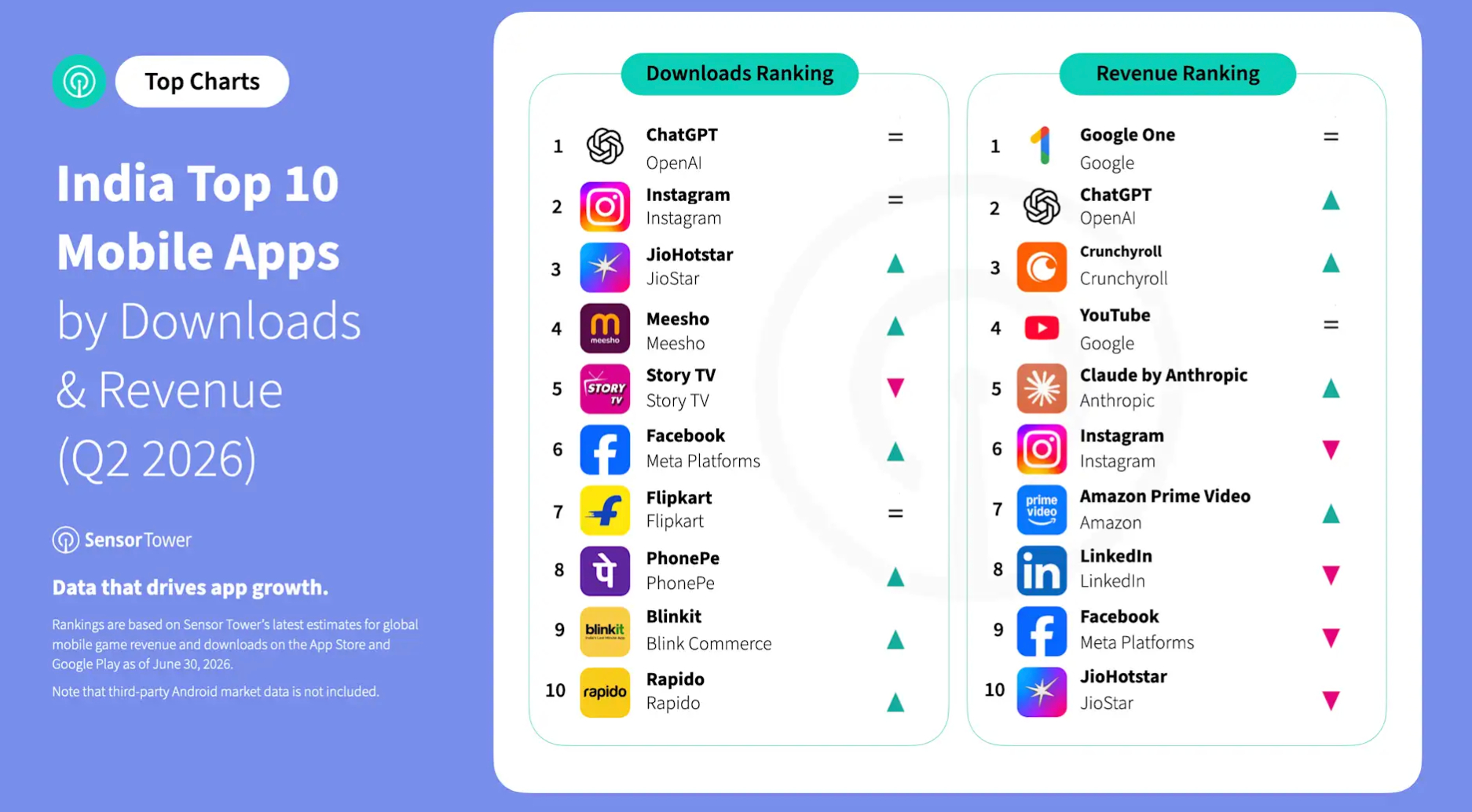
India’s mobile app market generated a record $345 million in consumer spending during the second quarter of this year, up 35% from a year earlier, according to a new report by Sensor Tower. The app-market intelligence firm said the gains were increasingly driven by generative AI, streaming, and productivity apps rather than gaming, as Indian consumers became more willing to pay for digital subscriptions.
The record quarter builds on a broader trend of rising app monetization. India’s revenue per download has more than doubled over the past three and a half years, while quarterly app downloads have remained at around 6.3 billion since 2023.
“We would describe India today as a rapidly evolving mobile market with a large user base and growing willingness to pay for digital services,” Eve Chen, an insights analyst at Sensor Tower, told TechCrunch.
Advertisement
Chen attributed the change to the wider adoption of digital payments, including India’s Unified Payments Interface (a system that lets people pay directly from their bank accounts) and digital wallets, which have reduced friction for in-app purchases, alongside growing acceptance of app-based subscriptions and premium digital services.
The trend also stands out globally. India’s app revenue saw its fastest growth in Q2 among major app markets, generating more than $200 million in quarterly consumer spending, per Sensor Tower’s data shared with TechCrunch. In contrast, Mexico grew 30% and Turkey 25%, while U.S. app revenue actually declined 3% over the same period.
“These figures suggest that India is no longer just the world’s largest market by downloads, but is also emerging as one of the fastest-growing markets for app monetization,” Chen told TechCrunch.
India still trails more mature app markets by a wide margin. Revenue per download stands at about $4.60 in the U.S., $3.90 in South Korea, and $6.10 in Japan, compared with a small fraction of that in India. Nonetheless, Chen said the trajectory matters more than the absolute level, with India’s steadily improving monetization suggesting significant room for long-term growth.
Advertisement
Generative AI has emerged as one of the fastest-growing segments, with OpenAI’s ChatGPT and Anthropic’s Claude together accounting for nearly 83% of India’s AI app revenue in Q2, according to Sensor Tower’s data shared with TechCrunch.
Much of India’s app revenue growth is also being driven by non-gaming apps. Non-gaming categories, Sensor Tower said, accounted for 68% of India’s mobile app revenue in the first half of 2026, up from 58% three years earlier.
The latest data also suggests global subscription apps continue to be among the biggest beneficiaries of rising app spending in India, with Google One becoming India’s highest-grossing mobile app during the quarter. Streaming platforms such as Amazon Prime Video, Crunchyroll, Sony LIV, and JioHotstar also saw growing consumer spending. Gaming also bucked the global trend, with revenue rising 3.7% from the previous quarter despite a worldwide decline, per Sensor Tower.
Image Credits:Sensor Tower
App intelligence firm Appfigures also sees India’s app subscription market continuing to grow, although it says the pace has slowed after an AI-fueled surge over the past two years. Subscription revenue is still rising, but much of the initial excitement around AI has abated, Ariel Michaeli, the company’s founder and CEO, told TechCrunch.
“The numbers are still staggering,” Michaeli added. Appfigures estimates that ChatGPT generates about $60,000 a day in India and attracted around 1.8 million downloads over the past month, although that’s down from roughly $80,000 a day last October.
Advertisement
When you purchase through links in our articles, we may earn a small commission. This doesn’t affect our editorial independence.
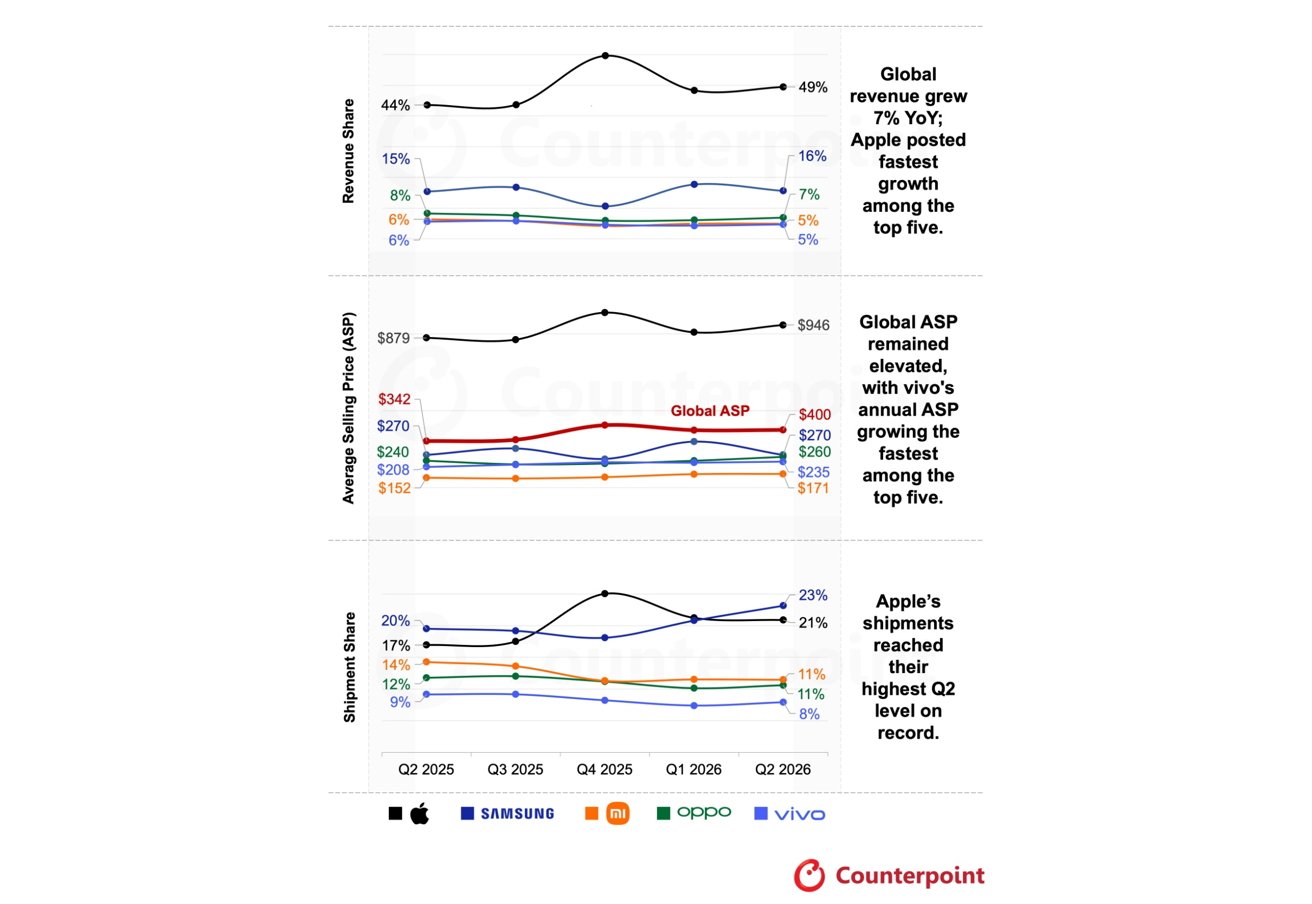
Apple captured 49% of global smartphone revenue in the second quarter despite accounting for only 23% of shipments, showing how much more money the iPhone generates per device than competing smartphones.
The company’s iPhone revenue climbed 22% year over year in the second quarter, the fastest increase among the five largest brands, according to preliminary data from Counterpoint Research. Its share of global smartphone revenue reached a second-quarter record of 49%, up from 44% a year earlier.
Apple’s growth came from higher shipments and a more expensive sales mix. Counterpoint’s latest report estimated that shipments rose 13% from a year earlier, while Apple’s average selling price increased 8% to $946.
Counterpoint attributed the performance to sustained demand for the iPhone 17 lineup, particularly the base iPhone 17 and iPhone 17 Pro Max. Demand for the two models helped keep Apple’s product mix concentrated on premium devices without requiring the steep price increases imposed by some competitors.
Advertisement
The research firm said Apple’s largely stable pricing improved the iPhone’s value as memory costs rose across the industry. Many Android manufacturers depend more heavily on entry-level and midrange devices, where price increases can quickly weaken demand.
Apple gained a similar advantage in China, where rising Android prices made discounted iPhones more competitive. The regional results support Counterpoint’s argument that pricing helped Apple gain ground, although they do not prove that every market followed the same pattern.
Apple’s premium product mix and ability to absorb higher component costs gave it an advantage over several rivals. The company increased both estimated revenue and shipments even as the broader smartphone market shipped fewer devices.
Apple gains as smartphone shipments fall
Global smartphone shipments declined during the quarter, but total revenue increased 7% year over year to a second-quarter record of $109 billion. The industry’s average selling price rose 17% to $400 as price increases and a greater share of premium devices lifted the amount earned from each sale.
Advertisement
Counterpoint’s latest chart gave Apple a record 23% share of second-quarter shipments. Apple’s revenue share remained much higher because the average iPhone sold for substantially more than devices from competing manufacturers.
The shipment estimate differs from a Counterpoint report published July 13, which put Apple’s growth at 3% and its market share at 20%. Counterpoint has not explained whether the newer preliminary figures reflect revised data or a difference in methodology, so the 13% growth estimate should not be treated as settled.
Apple’s market performance came alongside a strong fiscal third quarter that ended June 27. The company’s record earnings included $54.25 billion in iPhone revenue, up 21.7% from a year earlier.
Samsung ranked second with 16% of global smartphone revenue. Image credit: Counterpoint
Samsung ranked second with 16% of global smartphone revenue. Its estimated revenue and shipments each increased 9%, while its average selling price remained roughly flat at $270.
Demand for Samsung’s Galaxy A-series supported shipment growth, while the Galaxy S26 lineup strengthened its premium business. Counterpoint also credited Samsung’s vertical integration and control over component sourcing with helping it limit price increases.
Advertisement
Xiaomi recorded the steepest shipment decline among the five largest brands, falling 26% year over year. Its revenue dropped 17% even as its average selling price rose 13%.
OPPO and vivo posted revenue declines of 10% and 11%, respectively, despite higher average selling prices. Falling shipments outweighed the additional revenue each company collected per device.
The results show the limits of relying on higher prices in cost-sensitive parts of the market. Xiaomi, OPPO and vivo shifted toward more expensive devices, but the higher average selling prices did not offset their shipment declines.
Higher iPhone prices may still be coming
Apple remained relatively insulated from rising component costs during the second quarter, according to Counterpoint. The research firm expects Apple to raise iPhone prices in coming quarters as memory shortages continue.
Advertisement
Separate Counterpoint estimates suggest rising DRAM and NAND costs could add hundreds of dollars to the production cost of the iPhone 18 Pro Max. The projected increases have not translated into confirmed retail pricing, but higher component costs could make Apple’s current advantage harder to maintain.
Counterpoint also expects global smartphone shipments to decline more sharply during the second half of 2026. The firm said limited supplies are becoming a greater constraint as manufacturers face persistent memory shortages and higher costs.
The second-quarter results show that Apple benefited by holding prices steadier than several Android rivals while continuing to sell more premium models. Apple may struggle to preserve that combination if component costs eventually force broader iPhone price increases.
Looking for the best movies to stream this weekend on HBO Max? You have landed in the right place. Max holds a treasure trove of hidden gems that deserve a spot on your watchlist. This week we have a dark comedy, a heartfelt drama, and an unforgettable Studio Ghibli masterpiece. So, grab your favorite snacks and dive into these three fantastic films currently streaming on Max.
Genre: Dark comedy, drama IMDb rating: 7.1/10 Rotten Tomatoes: 97%
Advertisement
Literature professor Agnes Ward (Eva Victor) struggles to rebuild her quiet life in Maine following a deeply traumatic incident at her university. When her pregnant best friend Lydie (Naomi Ackie) comes for an extended visit, Agnes confronts how isolated and paralyzed by grief she has become.
This underrated movie on HBO Max moves between the present and flashbacks to show how Agnes has learned to function around her trauma. I really liked how the friendship between Agnes and Lydie carries the entire film, giving Agnes an anchor without ever solving her pain for her.
Genre: Drama IMDb rating: 7.6/10 Rotten Tomatoes: 96%
Advertisement
Moonee (Brooklynn Prince) is a six-year-old living with her young mother, Halley, in a budget motel just outside Walt Disney World. While Moonee spends her summer running wild with the other kids, Halley’s financial situation quietly unravels, forcing her into increasingly desperate choices to keep a roof over their heads.
Director Sean Baker shoots the film almost entirely from Moonee’s height, keeping the camera locked into a child’s perspective on an adult crisis. I liked the vibrant cinematography that captures pure childlike wonder right alongside hardship without losing its tender spirit.
Genre: Animated, coming-of-age, drama IMDb rating: 7.8/10 Rotten Tomatoes: 95%
This Studio Ghibli movie follows Shizuku, a middle schooler who is also an avid reader. She notices that every library book she checks out was previously borrowed by the same boy, Seiji. Her search to find him pushes her to question what she actually wants from her own future, not just his.
Unlike most Studio Ghibli films, this one skips fantasy entirely and stays grounded in an ordinary Tokyo suburb. What really impressed me was how delicately the story captures the quiet uncertainty of teenage artistic ambition.
For Arlan Rakhmetzhanov, 19, there is no middle ground. Either he builds a company as valuable as Google, he says, or he fails and ends up on the streets. He started coding at 15 in his native Kazakhstan, completed a couple of summer programs in San Francisco, and cold-DM’ed every Y Combinator founder he could find on LinkedIn until one gave him an angel check for his first company at age 17.
That company, now the YC-backed Nozomio, is an API index for AI agents — a tool that helps AI agents find and use software services — and has raised more than $6 million in funding to date. “I either win or lose, and a lot of young founders have the same mindset,” he told TechCrunch. “They just want to win.”
Young founders like Rakhmetzhanov are building under a new set of pressures. Investors are throwing more capital at them, yet the expectation to hit that “north star” milestone — the one big number investors are chasing — hasn’t relaxed, and every misstep along the way is now publicly dissected on social media.
While Silicon Valley VCs have always famously loved backing young college dropout founders, they preferred to see them paired with technical founders, or at least to have some experience — ideally with a FAANG company (Meta, Amazon, Apple, Netflix, and Google) — on their résumés. In many ways, that is still very true. But AI tools have democratized the opportunity to build, shortening the timelines of success and enabling more young people to start successful companies without stepping foot inside a Big Tech company.
Advertisement
Pranjali Awasthi, 19, is an example of that. She dropped out of high school to launch an AI startup, then attended Georgia Tech before dropping out of that, too, to launch Slashy, a YC-backed startup that bills itself as the “Cursor for emails” and helps consumers manage their email inboxes. After more than a year running that company, she recently announced she’s now building yet a new startup currently in stealth.
When she was younger, around 14 or 15, she recalled, investors whom she would pitch often asked why she was looking to build a company. “It’s gotten more normal now,” she said, “post-18.”
It seems more than ever, investors look to founders like Awasthi, whose experiences can be traced through “GitHub activity, open-source contributions, communities they’ve already built, and familiarity with all the latest tools in AI,” Ashley Smith, a general partner at the early-stage firm Vermilion, told TechCrunch. “A lot of young developers learn how to build software through contributing to open-source projects or toying around with the latest AI tooling,” she explained. “They have more time to do that while in college or younger than someone with a full-time job and a mortgage.”
Smith said a “meaningful” share of her portfolio consists of companies founded by those under 30, with a handful even younger than 21, she said, adding that she’s “clearly not skeptical of youth.”
Advertisement
“What they lack in experience, they make up for in excitement to experiment and lack of fear,” she continued.
But she admits the market has become more merciless. “It doesn’t give you room to learn slowly anymore,” she said. There are more funding opportunities than ever, regardless of age — accelerators, incubators, pre-seed funds. But that money comes with strings attached: Founders like Rakhmetzhanov and Awasthi, flush with millions in cash, are expected to deliver growth in months, not years.
“The forgiveness that used to exist at an early stage and the assumption you’d iterate your way to product-market fit doesn’t exist right now,” Smith continued. “Everyone is looking for the next Cursor, even though that growth trajectory is an outlier, not the norm.”
For many founders — especially those building in public — the relentless strain to succeed can lead to murky ethical territory, or even predatory deal terms, since younger founders are often too new to the game to know what’s standard, yet ambitious enough to chase growth at all costs. To keep up, revenue numbers start to look inflated, while content creation for social media starts to crowd out writing good code. The excessive posturing is perhaps inevitable, since getting attention is now harder than ever in a crowded AI market.
Advertisement
It’s all about who can convince “the most people [they] are smarter than everyone else in the space,” Smith said, “and make the most noise about it.”
“In 2004, you could quietly iterate for years without anyone watching,” Awasthi added. “Now there is this constant ambient pressure from LinkedIn and Twitter where every raise, every milestone, every pivot is public.”
That means some young founders aren’t just worried about hitting competitive revenue marks or funding valuations — they’re also under pressure to perform the appearance of being a successful founder. That pressure has always existed in startup culture, but founders say it’s grown more extreme. “If you’re a startup and you’re competing in a market, usually you worry about incumbents,” Timothy Chen, an investor at Essence Ventures, told TechCrunch. “Now you worry about your neighbors.”
For example, “everybody’s doing shiny, good-looking launch videos,” he noted. “It wasn’t even a thing three years ago.” The trend was popularized by Cluely founder Roy Lee, now around age 22, whose startup initially promised to help students cheat on exams — a premise that dazzled investors like Andreessen Horowitz and helped the company raise $20 million.
Advertisement
Though Cluely is now more of a note-taking tool, Lee became a face of young Silicon Valley talent. “The pressure is coming from, ‘I need to show off much better, quick,’” Chen continued.
Not hitting the bar has bred new anxiety. “When Zuck was building Facebook, there wasn’t this huge negative social ecosystem,” Aidan Guo, 20, told TechCrunch. He’s the co-founder of the AI desktop assistant startup Attention Engineering, which has raised around $1.6 million in funding to date.
Much of the strain, as he describes it, is self-imposed. “You already have a constant fear of failure on your mind. You have to steer the ship and learn all these things as you go. And everything can always go wrong at once,” he continued. “And then you have all these people piling on anything you do wrong. I think people need to be more empathetic.”
Amid all that pressure, Awasthi takes a page from the old days. “If you focus your time on what needs to get done, it’s not too hard,” she said.
Advertisement
“The best product that stays active and talks to customers wins,” Rakhmetzhanov added.
In the end, all the founders are describing the same thing: The fundamentals of a good startup haven’t changed — “conviction, intellectual honesty, and obsession with the customer,” as Smith put it. None of that has anything to do with age.
When you purchase through links in our articles, we may earn a small commission. This doesn’t affect our editorial independence.
Today’s Strands puzzle was kind of tough, with some really long clues to unscramble. If you need hints and answers, read on.
Hint for today’s Strands puzzle
Today’s Strands theme is: “As if!”
If that doesn’t help you, here’s a clue: Ha ha!
Clue words to unlock in-game hints
Your goal is to find hidden words that fit the puzzle’s theme. If you’re stuck, find any words you can. Every time you find three words of four letters or more, Strands will reveal one of the theme words. These are the words I used to get those hints, but any words of four or more letters that you find will work:
These are the answers that tie into the theme. The goal of the puzzle is to find them all, including the spangram, a theme word that reaches from one side of the puzzle to the other. When you have all of them (I originally thought there were always eight, but learned that the number can vary), every letter on the board will be used. Here are the nonspangram answers:
SILLY, ABSURD, LAUGHABLE, LUDICROUS, PREPOSTEROUS
Today’s Strands spangram
The completed NYT Strands puzzle for Aug. 1, 2026.NYT/Screenshot by CNET
Today’s Strands spangram is GETREAL. To find it, start with the G that’s the first letter on the top row, and wind diagonally down.
Get CNET’s top-rated VPN for privacy and usability
CNET editor Gael Fashingbauer Cooper, a journalist and pop-culture junkie, is co-author of “Whatever Happened to Pudding Pops? The Lost Toys, Tastes and Trends of the ’70s and ’80s,” as well as “The Totally Sweet ’90s.” She’s been a journalist since 1989, working at Mpls.St.Paul Magazine, Twin Cities Sidewalk, the Minneapolis Star Tribune, and NBC News Digital. She’s Gen X in birthdate, word and deed. If Marathon candy bars ever come back, she’ll be first in line.
See full bio
Cloud revenue now north of $143 billion a quarter, and growth is accelerating
Cloud infrastructure services grew at their fastest for eight years during the second quarter of 2026, thanks to the AI craze and continued demand for flexible and scalable IT infrastructure.
According to the latest figures from Synergy Research, enterprise spending on cloud infrastructure passed $143 billion in Q2, a year-on-year growth rate of 43 percent. This followed 11 successive quarters of increasing growth rates, during which the market has now doubled in size.
Advertisement
Synergy says that total market revenues for the preceding 12 months add up to an impressive $500 billion. Public IaaS and PaaS platforms account for the bulk of this, and these expanded by 47 percent during Q2.
While cloud-based services have been growing at quite a decent rate for some time as organizations expand their IT using this route, the introduction of AI services has given them an extra boost.
“AI has, of course, driven most of that incremental growth, and we now see year-on-year growth rates of 165 percent for AI-specific cloud services. It is the handful of leading cloud providers and neoclouds who are mostly benefiting from that market acceleration,” comments Synergy chief analyst John Dinsdale.
Cloud infrastructure services revenueSynergy Research
And the top three global players continue to dominate the market, with Amazon Web Services (AWS), Microsoft Azure and Google Cloud together accounting for 67 percent of all the cloud revenue during the quarter.
Advertisement
That percentage has increased since the third quarter of last year, when the triumvirate made up 63 percent of enterprise cloud infra spending.
AWS is still the largest beast in this sector of the compute arena, taking 28 percent of the market, but its lead over Microsoft is now less impressive, with the Redmond giant making up another 20 percent. Google remains in third place on the global stage, at 15 percent.
Among the tier two cloud providers, Synergy reckons those with the highest growth rates include CoreWeave, Oracle, Crusoe, Nebius, and Nscale. However, Oracle accounts for 4 percent of market share, while CoreWeave is another 2 percent.
Other firms with a market share of 1 percent (to the nearest percentage point) include IBM, Akamai, Baidu, China Mobile, China Telecom, China Unicom, Snowflake, Tencent, and SAP.
Advertisement
Synergy says that nine rent-a-gpu neocloud operators are now among the top 40 cloud providers, based on service revenue.
Geographically, the US remains the world’s largest cloud market by some margin, and its share is actually increasing, growing by 49 percent in Q2, well above the worldwide average. Other countries growing at above the average include India, Indonesia, Ireland, Thailand, and Malaysia. In Europe, the largest cloud markets remain the UK and Germany, but the fastest growing markets are Ireland, Norway, Denmark, and Finland.®




























































You must be logged in to post a comment Login