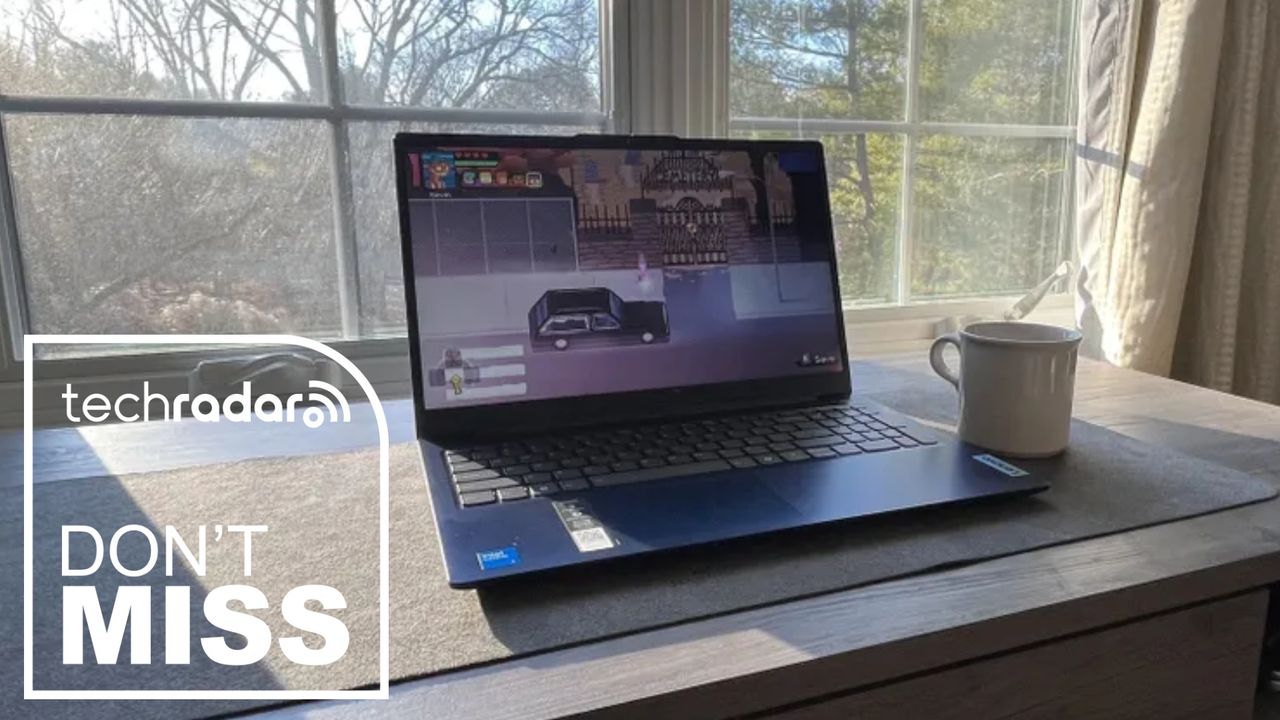
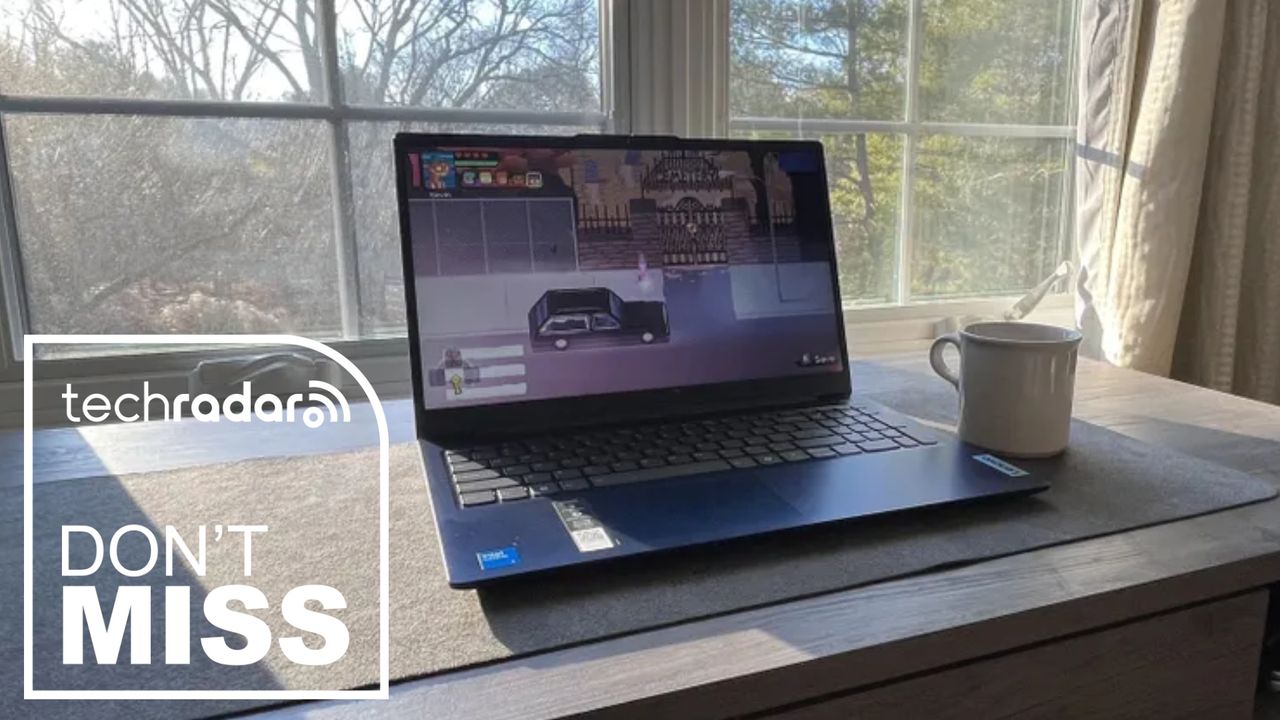
If you just need a reliable Windows laptop for everyday use, this Lenovo deal is a genuinely good price – it’s an easy recommendation for remote and hybrid workers, and for my money, it ticks all the boxes for general business work.
Inside, the machine is equipped with an efficient Intel Core i5 13420H processor and 16GB RAM, so essential office tasks, photo editing, browsing, and streaming won’t be a problem – no slowdowns or sluggishness here.
Advertisement
Today’s top Lenovo laptop deal
This is a budget-friendly configuration built around Intel’s Core i5-13420H, an 8-core, 12-thread chip from the 13th-gen Raptor Lake-H family, with four performance cores boosting up to 4.6GHz and four efficiency cores.
The 15.3in WUXGA (1920×1200) IPS panel uses a 16:10 aspect ratio, which gives you a bit more vertical space for documents and browsing than the more common 16:9 laptops in this price range. It’s rated at 300 nits with an anti-glare coating, with decent contrast and color accuracy (provided you calibrate it). That makes it ideal for creating images for, say, your work’s social media pages, though I wouldn’t recommend it for colour-critical tasks required by creative professionals.
16GB of RAM and a 512GB SSD is a sensible balance for this price point — enough headroom for normal multitasking across browser tabs, office apps, and streaming without feeling cramped. The laptop weighs 1.59kg and measures 17.9mm thick, with Lenovo quoting up to 14.5 hours of battery life, though real-world use — especially on the Intel variant — will likely fall short of that figure.
Advertisement
Connectivity is fairly standard for the budget class: two USB-A ports and one USB-C port, all capped at 5Gbps, plus HDMI 1.4 (so no native 4K60 output — you’ll need the USB-C port’s DisplayPort Alt Mode for that), a full-size SD card reader, and a 3.5mm headphone jack. Wi-Fi 6 and Bluetooth round out the wireless side.
A year ago, AI search was basically one product with one name: ChatGPT. A new report says that era is already over.
Similarweb’s 2026 Generative AI Landscape report tracks a market that is booming and splintering at once. Generative AI websites drew 9.5 billion visits a month worldwide between June 2025 and May 2026, up 70% on the year. App downloads reached 4.4 billion, up 58%.
The growth is not the surprise. The fragmentation is.
ChatGPT is still the biggest. Its lead is shrinking.
ChatGPT is still the largest standalone AI website, and it remains enormous. But Similarweb says its share of web visits has fallen steadily as Gemini, Claude, Perplexity and DeepSeek pull in audiences of their own.
Advertisement
The app data shows who is climbing. By US monthly active users, year on year, Meta AI grew 435% and Claude 349%. Grok rose 117%, Perplexity 94% and ChatGPT itself 87%. Gemini added 31%. Two names slid backwards: Microsoft’s 365 Copilot fell 31% and DeepSeek 23%.
Google’s answer: bury AI inside search
Google is not standing still. Its AI Overviews now surface on a growing share of US searches, and visits to its conversational AI Mode keep rising. Similarweb puts Overviews on nearly four in ten US searches, pulling more of the journey into an AI-native experience.
That squeezes the open web. News was the only major web category to shrink over the year, down 5%, even as AI chatbots grew 57%. Yet people are not leaving Google: 95% of ChatGPT users still use it too.
AI search is growing up, and some are opting out
The audience is ageing into the mainstream. In May 2024, under-35s were 61% of gen-AI users. By May 2026 they were 50%, with the growth shifting to the over-45s. Durable adoption, the report argues, looks like your parents signing up.
Advertisement
Not everyone is joining. A young cohort is actively opting out and turning to AI-free tools. On DuckDuckGo’s no-AI search, 18-to-24-year-olds make up 33% of users, against 16% of the web overall.
Now come the ads
The clearest sign of a maturing market is that it is filling with ads. In the US, the share of ChatGPT chats carrying an ad jumped from 14% in May 2026 to 26% a month later. Two-thirds appear only after the second prompt, and 65% of users keep chatting once one shows up.
The click-through rate is a slim 0.50%, and the early advertisers are unglamorous: Resume.io, Monday.com and Framer topped the June list. The direction, though, is set.
What it means for brands
For marketers, the report reads as a warning to move. AI referral traffic is surging, up 312% for marketplaces, 278% for news and 237% for travel year on year. The share of ChatGPT answers citing a web source has risen more than fivefold in a year, to 6.8%.
Advertisement
Being the name an AI recommends matters, too. Users visited an AI-recommended brand two to four times as often as a rival. But optimising for AI search is its own game: most referrals, 58.8%, land on homepages, while the pages ChatGPT cites sit two or three folders deep.
“Discovery is no longer tied to a single destination,” said Similarweb’s Baruch Toledano. One caveat runs through the data: these are Similarweb’s estimates from web and app traffic, and they exclude API use and AI folded into other apps. The trend is hard to miss anyway.
“It takes close to eight months to produce the topiaries,” explained Debbie Mola Mickler, area manager at Disney’s Horticulture — for installations that were on display for just a few weeks.
On that clock, Disney’s horticulture team is likely already deep into next year’s lineup — even though this year’s International Flower & Garden Festival at EPCOT only wrapped June 1. Mola Mickler oversees production of the living character sculptures that define the festival at Walt Disney World in Orlando. What look like decorative topiaries from a distance reveal themselves up close as something far more complex.
Underneath, engineered steel frames, a moss growth medium, and tightly integrated irrigation work together so that whether it’s Mickey, Buzz, Lightning McQueen, or any other character, the topiary presents itself exactly as it should. They’re closer to architecture than landscaping, and the timeline to build one reflects that.
Latest Videos FromTechRadar
Advertisement
(Image credit: Jacob Krol/Future)
That timeline starts long before any planting begins. Disney’s horticulture team works directly with Walt Disney Imagineering to decide which characters can even be translated into living structures — a process that blends creative direction with real-world constraints like weight, scale, and maintenance. Once a character is selected, Mola Mickler goes straight to the source and thinks about scale — how big the topiaries need to be, and what plant material can tell that story.
From design, Disney’s digital team produces a maquette — a small 3D-printed physical model of each topiary — that serves as the reference guide for everything that follows, from fabrication through final trimming.
That translation from screen to structure is where Disney’s topiaries stop being just landscaping and become systems design problems. “Our Imagineers are so creative, they’ve pushed us towards getting these topiaries with more movement,” she explained. The dresses have folds; legs may be bent like a character is mid-dance. That push toward motion and expression has forced a redesign of how internal structures are built — especially as characters become more dynamic and less symmetrical.
Once a design is approved, Disney builds a full production pipeline that starts with digital modeling and ends with custom steel fabrication. “You can’t just go to the yellow pages and find a welder to make the frame,” Debbie said.
Sign up for breaking news, reviews, opinion, top tech deals, and more.
(Image credit: Jacob Krol/Future)
Each topiary begins as a custom-engineered stainless steel structure designed to support weight, shape, and long-term outdoor exposure. Built into each frame are engineered pick points — load-bearing anchors that allow heavy equipment like cranes and forklifts to position the finished topiaries into their beds in the park. Some characters arrive in multiple pieces and are assembled on-site.
Advertisement
Once the steel frame is in place, it’s filled with sphagnum moss, which acts as the primary growth medium. For larger characters, Disney builds a secondary cage of chicken wire inside the frame first — since plants only need about two to three inches of growing area, the inner cage reduces the amount of moss required while maintaining the structure’s shape.
The moss retains moisture, supports plant plugs, and forms the core structure that everything else grows into. Built into each frame is a segmented irrigation system that allows Disney to control water distribution at a surprisingly granular level.
“We can do arms, we can do the head, we can do the feet,” Debbie said. “And then we’ll turn it off as needed.” That segmentation isn’t just for efficiency — it’s environmental control. Florida’s climate can shift rapidly, and different parts of a topiary may require different hydration levels depending on sun exposure and airflow.
Advertisement
(Image credit: Jacob Krol/Future)
As the plants grow in, the maquette becomes the trimming guide — helping maintain pose accuracy and character shape across months of active growth before the festival opens.
Behind the scenes, Disney operates continuous environmental monitoring across 12 greenhouse facilities, each subdivided into controlled environments that simulate different growing conditions depending on plant type and stage. Debbie described automated alerts that notify her directly if temperatures fall outside safe ranges — a system her team relies on enough that they refer to themselves as “weather watchers.”
The foundational methods, though, have deep roots. “Many years ago when I first started in Disney horticulture, we did not have sphagnum topiary,” Debbie said. “We only had woody topiaries with single shrubs being trained in a frame, and it can take seven to 10 years to grow one.”
Those traditional systems, still used at Disneyland, rely on shrubs trained over lightweight frames and take several years to mature. At EPCOT, the sphagnum system enables faster production cycles and far more expressive designs — but still requires nearly a year of preparation per installation.
Advertisement
(Image credit: Jacob Krol/Future)
Some heritage pieces remain in rotation, including a more than 50-year-old elephant topiary originally built for Magic Kingdom that now makes a special appearance just for Flower & Garden in EPCOT’s United Kingdom Pavilion.
Modern festival builds, meanwhile, sit at the intersection of horticulture and fabrication engineering. Materials like palm fiber replicate textures such as Woody’s hat and boots; coconut coir matting handles facial detailing. Props like belt buckles and sheriff badges are 3D printed and integrated directly into the structures.
Even animation principles feed into final assembly. “We want to make sure the eyes are always looking at the guest when they take a picture,” Debbie said.
It’s that kind of detail — designed not just to be seen, but to be experienced — that makes the topiaries something more than seasonal decoration. They’re living installations built to hold up across an entire festival, in Florida heat, one carefully engineered character at a time.
Despite raising its Apple price target just days before earnings, investment bank Goldman Sachs has recalibrated its forecasts and while still mostly positive, has now pulled the target back down to $360.
That possibly premature rise before the report saw Goldman Sachs take its price target from $340 to $370. So its new value of $360 is still up on what it had been since May 2026, and the company’s analysts believe that Apple is taking the right steps to continue its growth.
In a note to investors seen by AppleInsider, Goldman Sachs analysts say at present, they expect Apple’s stock will trade lower than before. The advice was given to investors, because of Apple’s guidance that it won’t meet demand for the next quarter.
Cook was asked about this very topic during the earnings call. He was clear about what the issue is caused by, and what it isn’t.
Advertisement
“Let me stress this again,” said Cook in the call, re-framing the issue to make it a positive. “This isn’t a partner or supplier issue. This issue is an incredibly strong demand.”
Nonetheless, the result is going to be that Apple will leave money on the table in the next quarter, just through not being physically able to produce enough inventory. This shouldn’t be surprising, given that there are often month-long delays in iPhone deliveries if you are just 15 minutes late to hitting that order button after preorders go live.
Goldman Sachs also predicts that the usual growth in Apple’s Services will decelerate more. Its analysts point to a slowdown in App Store sales.
However, just as with securities firm Rosenblatt, Goldman Sachs also believes that Apple is positioning itself well to surmount current problems. Specifically, its analysts predict that Apple Upgrade will mean there will be a less than expected decline in sales due to high prices.
Advertisement
Although the company also believes that eventually the recent price increases will increase revenues for Apple. That may be down to how Apple is launching the new Siri AI and is believed to have new Mac, iPad, and possibly a Home Hub in the works.
All of this should also reverse any Services decline, Goldman Sachs says. New device sales will increase the number of potential users of Services, for one thing, and usage of AI tokens will drive sales of iCloud+.
By trimming its price target, Goldman Sachs is echoing what Morgan Stanley has done following the earnings call. That investment firm cut its price from $364 to $360, citing the same mix of current concerns but optimism over the future.
Following the call, Apple’s shares dropped, as they generally do. At time of writing are down from the previous close of $333.43 to $301.43. Apple has not been below $300 since the very end of June and start of July
Advertisement
The current drop comes despite a record-breaking earnings report. It’s also in the shadow of the symbolic milestone of the company reaching a $5 trillion market cap.
Cautiously optimistic
Despite trimming its price target, Goldman Sachs still gives Apple a “Buy” rating. But it does also caution that there are potential problems ahead.
One of those is simply to do with the global economy weakening demand for Apple’s hardware and services. Especially as users can elect to hold on to devices for longer, upgrade cycles may lengthen.
Then there could be a similar impact if Apple is not able to produce compelling enough reasons for existing users to upgrade. Plus it does face ever-increasing competition, especially as it operates across so many different product lines and services, each of which has major rivals.
Advertisement
These are reasons why Goldman Sachs predicts that stocks will trade lower than they have, for a time at least. But it also believes that the market is too focused on Apple’s individual product growth, and is ignoring how strong the company’s tightly-intertwined ecosystem is.
£4.3B deal gives telco full control of Britain’s largest mobile operator
Vodafone has paid £4.3 billion ($5.78 billion) for the remaining 49 percent of VodafoneThree, taking full ownership of the UK’s largest mobile operator.
The telecoms giant announced that it planned to buy the stake held by Three’s former parent, CK Hutchison Group Telecom Holdings, in May.
Advertisement
The acquisition comes just over a year after Vodafone UK and Three UK completed their merger following conditional approval from the Competition and Markets Authority (CMA).
The merger reduced the UK market to three mobile network operators: VodafoneThree, BT/EE, and Virgin Media O2 (VMO2).
Vodafone claims full ownership will help it move faster and capture the “significant benefits” of an £11 billion ($14.7 billion) network investment plan and its “targeted synergies.” These include £700 million ($942 million) in annual cost and capital expenditure savings expected by the 2030 financial year.
Vodafone Group chief Margherita Della Valle said: “With full ownership and control, we’ll have the ability to move faster in the next phase of building one of Europe’s leading networks. This best-in-class infrastructure will deliver better connectivity for our customers up and down the country, help drive the UK’s digital economy, and deliver long-term value for our shareholders.”
We asked Vodafone whether VodafoneThree will simply become Vodafone at some point, given that it owns the entire business now, and how long the Three brand will continue to exist (the Three website is still online at the time of writing).
A spokesperson told us the company was happy with its multi-brand strategy and had no plans to change the VodafoneThree name or drop Three, VOXI, SMARTY, or Talkmobile.
Vodafone will hold an investor briefing on October 8 to outline VodafoneThree’s strategy, growth ambitions, and “the value it expects to deliver over the coming years.”
Advertisement
PP Foresight founder and analyst Paolo Pescatore told The Register that the move is good news for subscribers.
“Having a single owner should simplify decision-making, accelerate investment, and reduce some of the complexity that can come with a jointly owned business,” he said.
CCS Insight director of Consumer and Connectivity Kester Mann told us the deal is an endorsement of the strong start made by the merged company.
“A full buyout by Vodafone was always on the cards but the agreement has come sooner than expected, with the joint venture only just into its second year,” he said.
Advertisement
Mann added that it reinforced the widely held industry view that Vodafone will prioritize its own brands over Three’s.
Elsewhere, Della Valle reportedly told the company’s annual general meeting this week that Vodafone intends to begin UK beta testing of its direct-to-device satellite service in early 2027.
Vodafone had originally intended to offer a commercial direct-to-cell satellite service in Europe in 2025 using the AST SpaceMobile orbital network. But those plans have been subject to delays, such as the loss of one of AST SpaceMobile’s BlueBird satellites due to a fault with Blue Origin’s New Glenn rocket that was carrying it.
A Vodafone spokesperson said beta testing depended on AST SpaceMobile having at least 45 satellites in orbit, a milestone now scheduled for early 2027.
Advertisement
In the meantime, VMO2 has beaten it to market, launching its Starlink-powered O2 Satellite direct-to-device service in February. ®
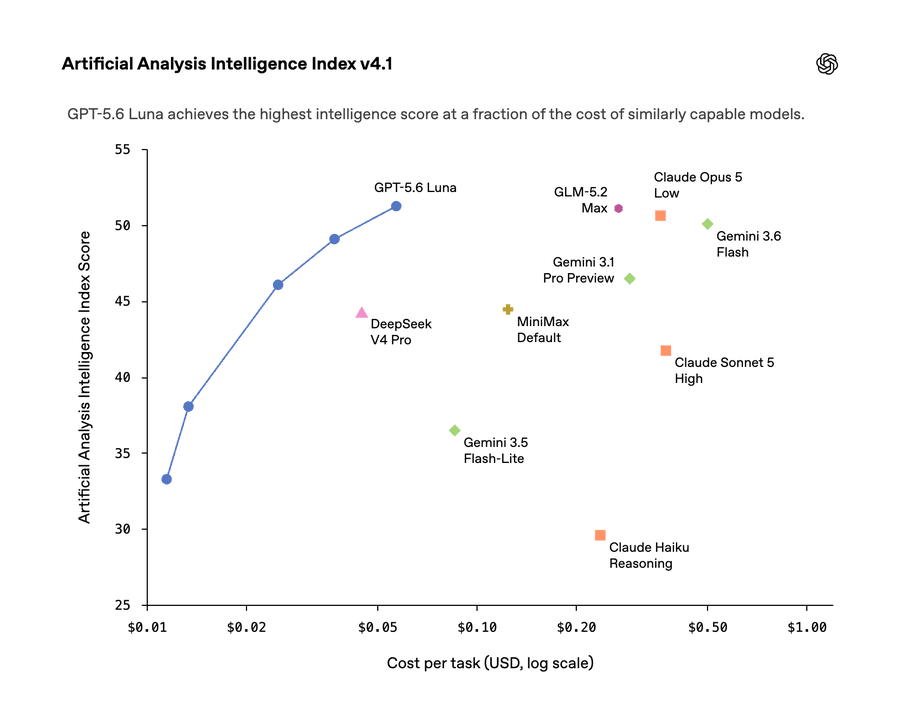
OpenAI says it has reduced the price of two GPT-5.6 models, cutting Luna’s API price by 80% and Terra’s by 20% as it works to make its models more efficient.
As per the updated pricing, GPT-5.6 Luna now costs $0.20 per million input tokens and $1.20 per million output tokens, down from $1 and $6.
Likewise, Terra has dropped from $2.50 to $2 per million input tokens and from $15 to $12 per million output tokens.
Artificial Analysis Intelligence Index v4.1
Source: OpenAI
In a post on X, OpenAI also noted that the new prices affect how it counts usage in Codex and ChatGPT Work.
For example, if new tasks use these models, they deduct less from customers’ allowances, so you can complete more work under the same quota.
Advertisement
OpenAI is also upgrading Auto-review in the ChatGPT app and Codex CLI from GPT-5.4 to GPT-5.6 Luna, which should reduce the cost by approximately ten times.
GPT-5.6 Sol gets a faster API option
OpenAI has also built a Fast mode for API customers, but there won’t be any changes to Sol’s standard pricing, at least not now.
GPT-5.6 Sol Fast mode is up to 2.5 times faster than standard processing without reducing the model’s intelligence.
The extra performance comes at twice the standard API price, which means it’s particularly designed for time-sensitive coding, research, and agentic workloads.
Advertisement
In all other use cases, you really don’t need GPT-5.6 Sol Fast mode.
According to the company, GPT-5.6 Sol’s recent improvements have allowed it to achieve the efficiency gains behind the Luna and Terra reductions.
In its own test results, OpenAI also places Luna at the top of its intelligence index among the compared models, despite its substantially lower cost per task.
Security teams log 54% of successful attacks and alert on just 14%. The rest move through your environment unseen.
The Picus whitepaper shows how breach and attack simulation tests your SIEM and EDR rules so threats stop slipping by detection.
Meta’s answer to the “pervert glasses” problem was a small light. It switches on when the camera records, to warn anyone nearby. A sticker costing a couple of dollars switches it off.
Engadget’s Karissa Bell tested the workarounds now on sale, cheap LED-blocking stickers marketed as “privacy” accessories. One kit cost $16.99 for a dozen. On her second-generation Ray-Ban Meta glasses, worn outside, the recording light was undetectable. It never tripped Meta’s tamper warning.
That is the clever, ugly part. Meta pushed a mandatory update that disables the camera if the LED is physically broken. The stickers do not break it. They leak just enough light to fool the sensor, so no alarm fires, and it is hard to trace who is hiding the light.
The crackdown was already failing
The stickers arrive weeks after Meta announced a ban on people filming themselves harassing strangers with the glasses. It is not biting. An Oligarch Watch investigation, surfaced by Futurism, still found hundreds of such videos live on Meta’s platforms.
Advertisement
Many come from “pickup artists” who accost women in public and rate their bodies on camera. One account has posted dozens of clips since the ban. Another creator, with more than 500,000 followers, draws millions of views insulting women’s weight in the street. In one clip, a man films a girl who tells him she is 17.
Some flagged accounts came down after the report, a drop in the ocean. Instagram boss Adam Mosseri had promised to crack down “every way we can.” Meta now says it is exploring ways to detect tampering, will pull the listings that sell it, and will ban repeat offenders.
A device that watches its own users, too
The recording light is not the only worry. Meta’s glasses have exposed the people wearing them. Contractors reportedly reviewed intimate footage captured by the devices, and Meta uses some clips to train its AI. Its facial-recognition plans have alarmed US lawmakers and privacy groups.
Rivals face the same bind. Apple has reportedly agonised over whether to fit a camera at all, wary of the creepy label. Building a face computer that people trust is proving harder than building one that sells.
Advertisement
None of it is denting sales
Because the glasses are selling. Revenue from smart glasses nearly doubled year on year in the second quarter, according to Ray-Ban maker EssilorLuxottica, first reported by Gizmodo. Meta shifted roughly 7 million pairs in 2025. The backlash is loud. The sales chart is louder.
The pushback does have a punchline. DuckDuckGo has released $35 sunglasses with no camera, no microphone and no AI, billed as “anti-surveillance eyewear.” They join a small run of camera-free glasses. For now, the glasses that record and the glasses that pointedly refuse to are both booming.
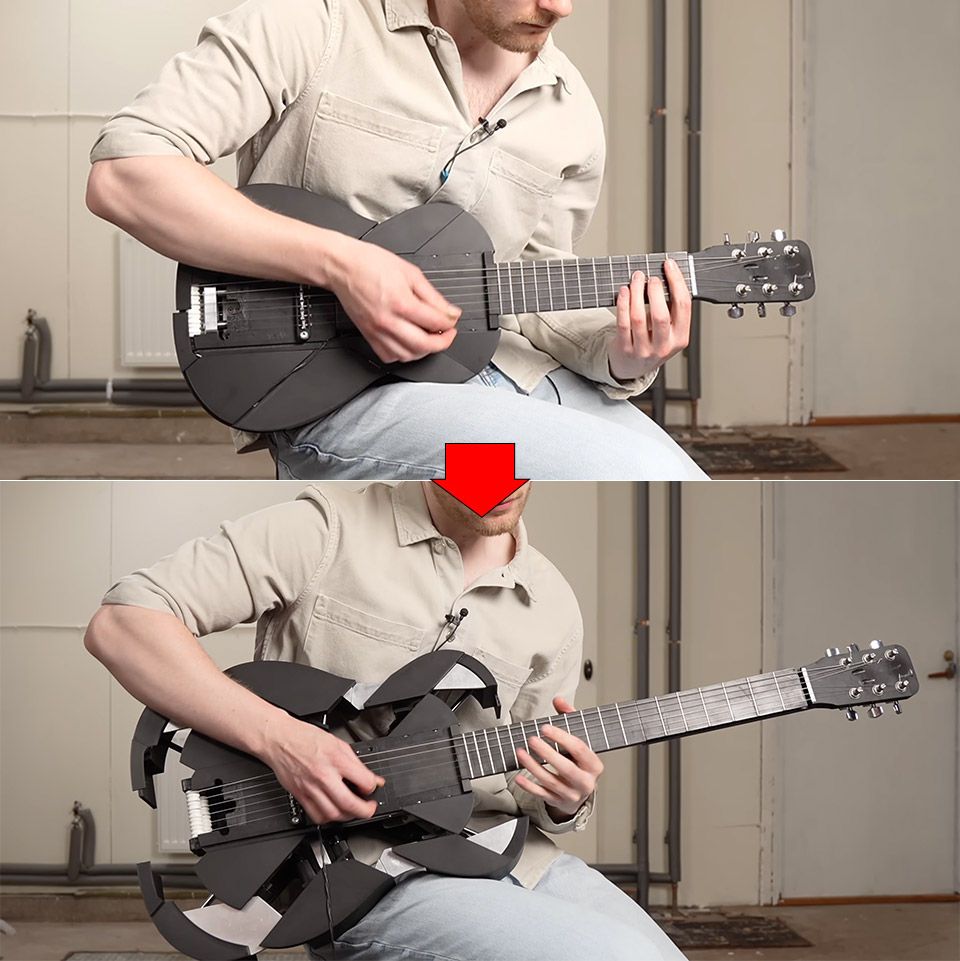
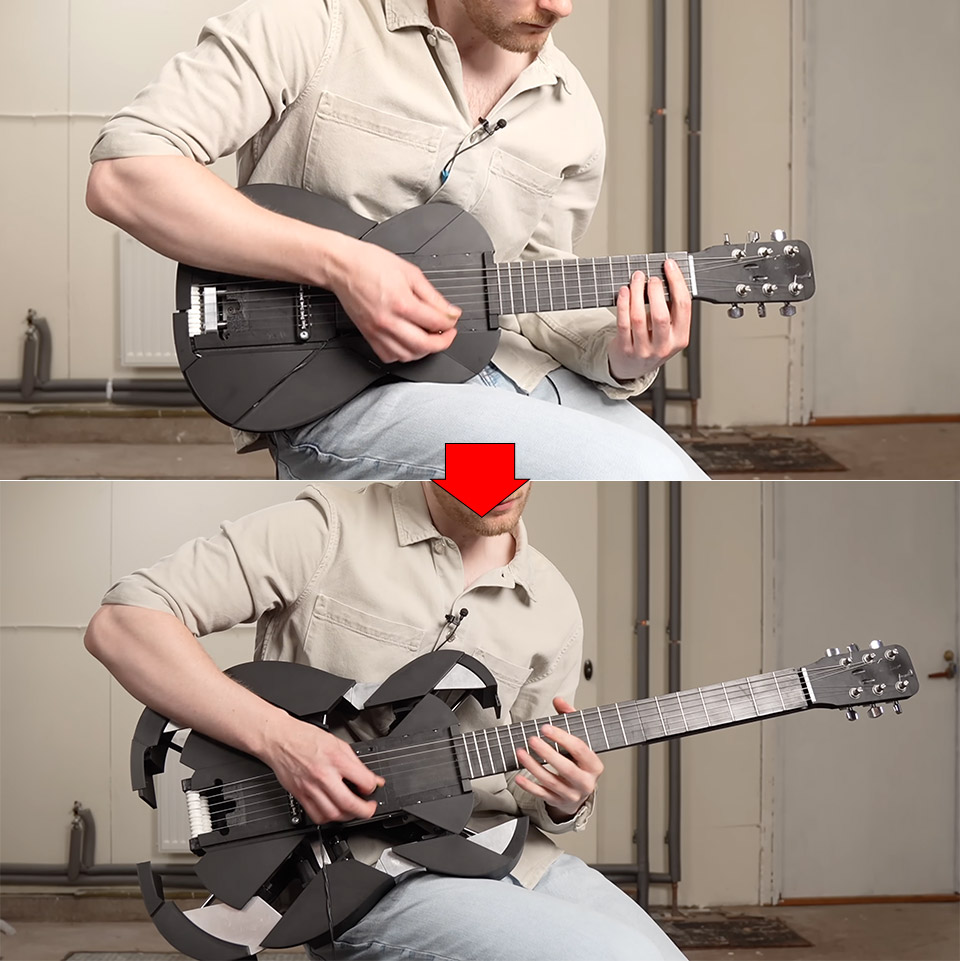
Swedish maker Mattias Krantz has spent years turning ordinary instruments into strange new ones. His latest project starts as a compact electric ukulele that fits in a backpack. One firm pull on the neck and the whole thing stretches, expands, and becomes a full-size guitar while the music is still going.
Krantz set out to address what he saw as the ukulele’s most serious shortcoming. People could easily pick it up and carry it around, yet despite its portability, it remained a curiosity. His response was straightforward: create one that can transform into a guitar in the middle of a song, eliminating the need for the musician to stop and pick up another instrument.
ROCK YOUR CREATIVITY – Embrace the 2 sides of your favorite pop star’s music with the LEGO Editions Olivia Rodrigo’s Dual Guitar…
SUPERSTAR SYMBOLS – Discover 3D decorations that represent the singer’s career and passions, including a purple butterfly, a love heart, new star…
OLIVIA RODRIGO MINIFIGURES – Open the electric side of the guitar model to reveal 2 detailed Olivia Rodrigo minifigures, each with their own mini…
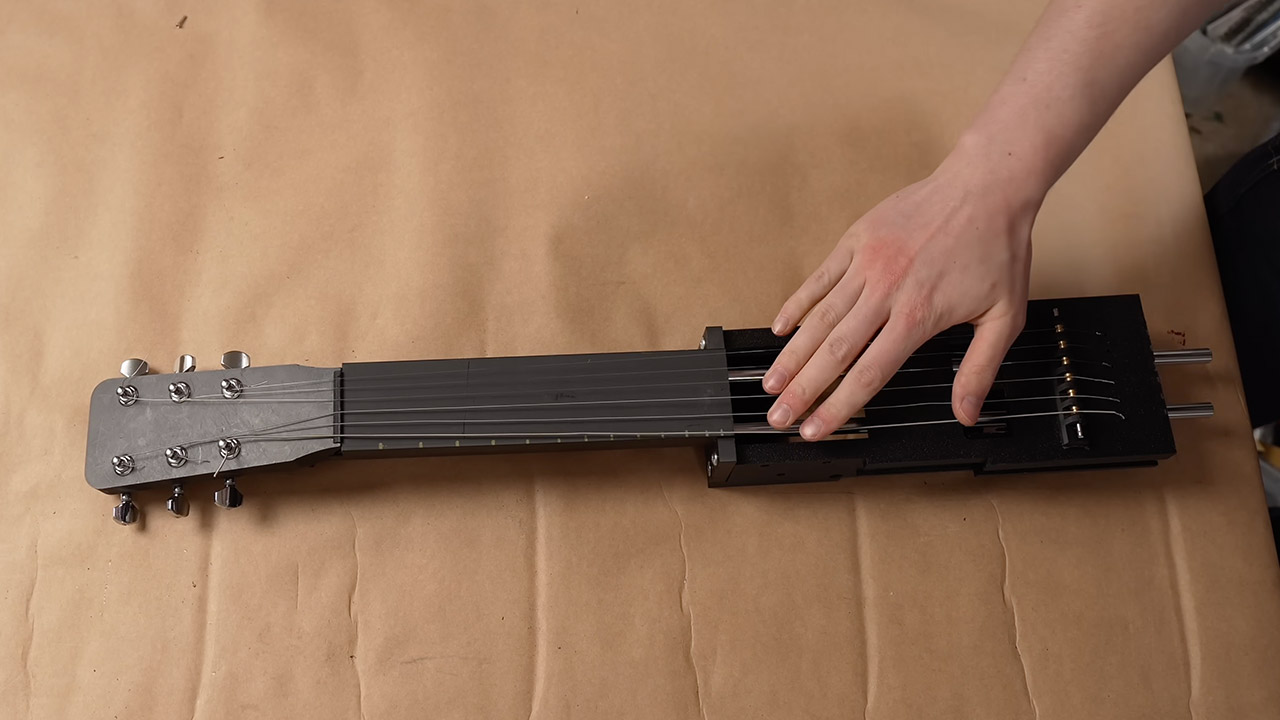
The first significant challenge was the neck. Ukuleles don’t have the same length neck as guitars. Early attempts to crumple it up so that it could fold resulted with half of the object hanging out, which was not particularly handy for playing. Krantz preferred that the excess length just disappear when needed, rather than sticking out uncomfortably. He eventually went with a telescopic design. As the neck stretches, the fretboard components rise up and lock into place directly on top of one another. Adam Damato (his coworker on this project) suggested adding a steel rod to ensure that the pieces snap into position when it’s time to play and don’t simply bend in two with the slightest touch. After several failed prototypes, he finally had a neck that felt solid and familiar under his left hand.
He then had to deal with the strings, which could not be stretched or compressed because they were made of metal. Attaching them when the object is short will retain it in that shape indefinitely. Attach ’em when it’s lengthy, and they’ll simply slink away as the thing collapses. Rubber bands produced a faint, muffled sound. A fishing reel design that allowed extra length to feed out worked in theory, but in fact, the rope stretched or snapped, putting the tune entirely out of sync whenever the size of the object changed. They ended up with strings that were twice as long as normal. They just wrap around some internal rollers when the device lowers, and then pay out well as it extends back up. The tension remains steady, while the tuning is stable.
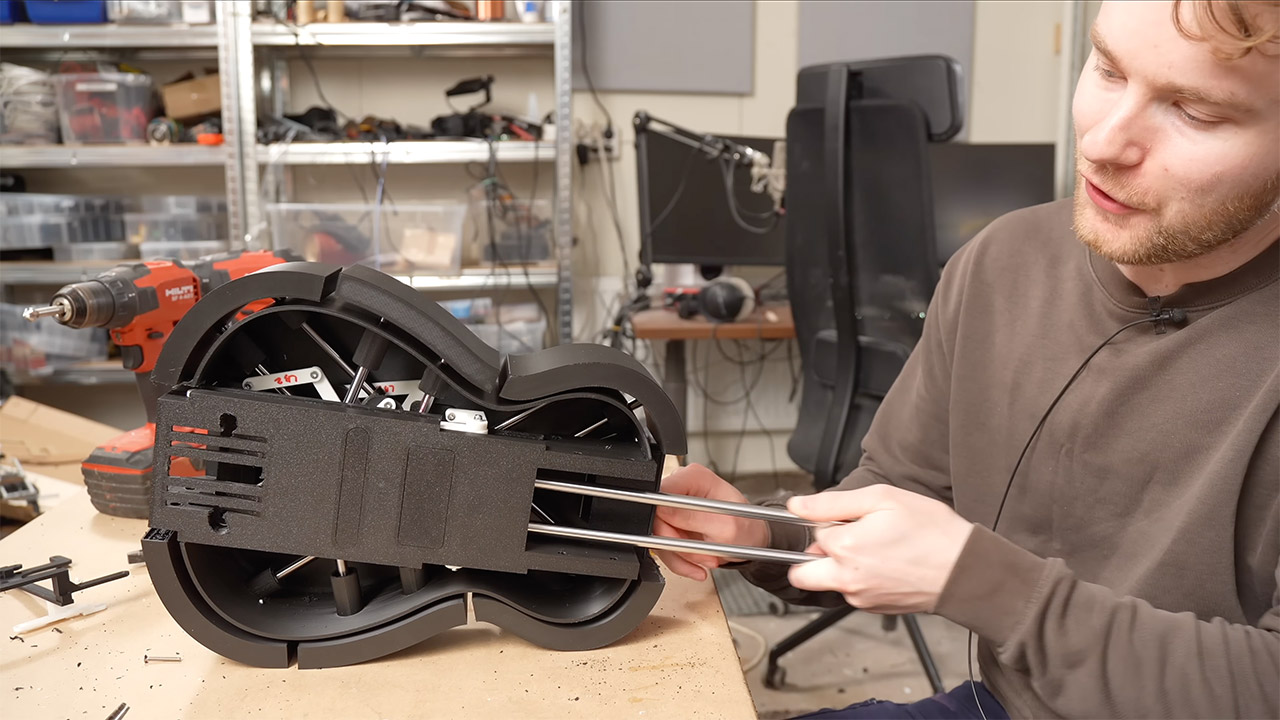
The ukulele body also had to grow up a little, as ukuleles are small, whereas guitars are much larger and have a different shape. It wasn’t just about enlarging the body; different components had to cover many distances and angles at the same time, which was a nightmare. The earlier plastic versions tended to jam. They eventually converted to metal and changed the hub, and six movable panels opened and closed beautifully. They added some decorative plates so that when it grows into a full guitar, it will resemble one.
The finished device is small enough to fit in a backpack, so Krantz would take it out on the street and play it in its compact state. Most people would pass by and handle it as if it were any other ukulele, until he yanks out the neck. The change takes just seconds. Suddenly, the same person who was playing ukulele is rocking out on a full-fledged guitar. A musician even played a few performances with a full band after that, and as soon as the body locks into position, the song continues uninterrupted. [Source]
The cotton and wool layers are GOTS-certified organic, while the Dunlop latex carries the GOLS certification. The finished product does not have any certifications beyond Greenguard Gold, but the material is undyed, which is great for anyone bothered by industrial dyes. As with most of these organic options, the Coyuchi is made without chemicals, foam, or glues, and comes with a 100-night trial, which means you can get a full refund if it doesn’t work for you.
Coyuchi’s Natural REM organic mattress is made to order in the United States. The company offers a 100-night trial, up to an 180-day return policy (there is a restocking fee of $150 if you go over the 100-night trial), and a 25-year warranty.
Coyuchi Natural REM ranges from $1,400 for a twin to $2,400 for a California king.
The Best Kids Organic Mattress
Advertisement
Courtesy of My Green Mattress
Courtesy of My Green Mattress
My Green Mattress
Kiwi Children’s (Twin)
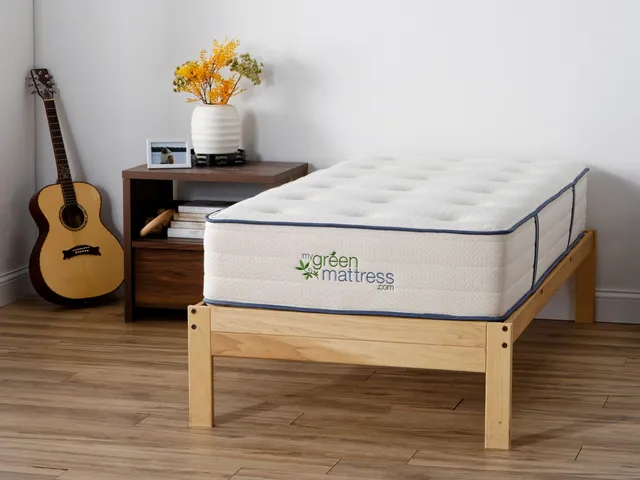
Beds for my kids are what started me down the organic mattress road. I care a lot more about what they’re sleeping on than what I’m sleeping on. Still, as much as I love the Avocado Green mattress, it’s not cheap. For my kids, I bought the more affordable Kiwi Mattress by My Green Mattress. The Kiwi is similar to our top pick Avocado. It’s a hybrid model with pocketed springs and natural materials: certified organic cotton, wool, and latex. It’s also something of a rarity; organic twin mattresses are somewhat difficult to find.
One nice twist that makes the Kiwi appealing for kids is the two-sided option. It costs a little more upfront, but being able to flip it over extends its life, which is handy if your kids think beds are actually trampolines in disguise. The Kiwi is definitely a firmer style, but I think it’s comfortable, and my children loved it when they were younger.
Advertisement
As with our top pick Avocado, My Green Mattress’s Kiwi uses GOTS Certified cotton, GOLS Certified latex, and has both GreenGuard Gold certification and MadeSafe certification.
Six twentysomethings in East London have built what they say is the anti-San Francisco hacker house. The goal is a “holistic improvement in life,” rather than “12 weeks, Demo Day is coming,” Rowan Aldean, 26, explained.
Intrigued, I spent an afternoon visiting the house, meeting its residents, and doing a vibe check. I arrived after Aldean escorted me through the clean sidewalks of a new East London development to where the six-story building stood facing the water.
The house is called the London Island Founder House — or “Lift House” — and Aldean and his wife, Zahraa, 22, an upcoming pharmaceutical research PhD candidate, have lived there since May, just a few months after it officially launched in March. Aldean sold his previous company last year for millions, he said, and now runs an “applied AI” startup that helps companies learn how to deploy agents.
Like all hacker houses, Lift House is part startup workspace, part co-living space. The house is named after both its lift — that is, its elevator — and its mission to uplift tech founders, Aldean said. It’s one of the very few co-living hacker houses to exist in London (compared to San Francisco, where dozens — if not hundreds — are scattered around the city at any given time).
Advertisement
Lift House is a bet that U.K. founders can build successful companies without mimicking the over-the-top hustle culture of Silicon Valley.
Founders have described stories of San Francisco hacker houses illegally running in warehouses, throwing full-on galas, or setting up in a tent or espousing punishing, 72-hour sprints typical of the “996” work culture.
“I don’t expect the performative and over-the-top events will be a thing here,” Aldean said, and pointed to one of London’s most successful AI companies, DeepMind. “They’ve won Nobel prizes and built frontier innovation without any song and dance.”
Instead, Lift House is part of a trend called “Londonmaxxing,” in which founders attempt to optimize everything the London tech scene offers. The London ecosystem feels less showy and less startup bro-y than San Francisco, but its founders share similar ambitions: success, wealth, and market domination.
Advertisement
London AI startups have raised $12 billion so far in 2026, out of $14.7 billion raised by all London startups, according to Dealroom. Six companies have raised more than $500 million: Wayve, Superintelligence, ElevenLabs, Recursive, Ineffable Intelligence, and Isomorphic Labs, the latter three of which were founded by DeepMind alumni.
The excitement from AI has boosted the morale of the U.K. tech scene, inspiring a new generation of founders, like those in the Lift House, to take big swings.
LIFT TourImage Credits:TechCrunch
Journaling vs. demo day
The timeline for living on Lift House is flexible — some people have stayed for a month; others intend to stay for at least six months. They buy their own groceries, Aldean said, although they often cook together and share ingredients. Cleaning is split among the group. Everyone declined to share information about the rent they pay.
The residents of Lift House aim for a balanced approach toward ambition, each one of them tells me — an almost unheard-of idea by San Francisco startup standards.
On Sundays, the group will journal together, a practice introduced by David Amor, 28, who runs a brain coaching and training company, helping founders and business leaders understand more about their brain and how it can help optimize business performance. The idea of journaling is to help everyone track how much time they spent in nature that week, how well they ate, and how much they moved their bodies.
“I’m eating healthier, working out more, and sleeping more,” Luke, 27, who runs an AI-marketing company, said about living in the house. “I always make sure to have lunch now, which is something that is simple, but I wasn’t doing before I lived here.” (Luke asked that his last name be withheld.)
Tuesdays evenings are for volleyball, where the founders play on the house team in a local league.
Advertisement
After dinner on other evenings, Wan Ying L, 25, who just left an AI startup and is working on a new idea, might play the piano in the living room. Sometimes the group plays Catan or visits art exhibitions together.
Presence Plumb, 25, is a tech strategist. She likes to host rooftop dinner parties, serving dishes that reflect the different nationalities in the house — from Iraqi to Spanish — while invited founders, researchers, investors, and operators chat about tech trends and investments.
“It’s a bit calmer, balanced, authentic in a way,” she said of people in the London ecosystem. “They don’t want too much of that only startup tech bro vibe. They want a bit of balance.”
Each founder follows their own schedules for a typical workday. Amor, for example, is up by 8 a.m. and gives himself exactly 30 seconds after waking up before jumping into his morning work. “I have a clear objective of ‘this is what I want to do in the first half of the day, when there’s no distractions.’” After his morning work routine, he takes a cold shower, “because it increases your dopamine by 250% and that gives me that motivation, that spark,” he said.
Advertisement
Wan playing the pianoImage Credits:TechCrunch
Luke, meanwhile, is up at around 8:30. His co-founder, Varun, 27 (who asked that his last name be withheld), typically travels to the Lift House to co-work, and the duo starts work at around 9 a.m. with a team call.
Aldean rarely wakes before 10 a.m. unless something big is happening, like a “crazy angel [investor] call,” he said.
When asked what makes this house uniquely British rather than a wellness-focused Silicon Valley founder house, Aldean joked: “Well, we drink tea together like Brits, and in SF folks just drink filtered coffee.”
More seriously, he spoke of how British founders face a different kind of pressure than those in the U.S. They must navigate a cultural aversion to risk, an inclination toward humility, and a shame associated with failure. Instead of forgoing sleep for hustle and grind, they deal with what they call the “tall poppy syndrome,” when the media builds one up only to ruthlessly tear them down should they become too successful, investors and founders say. It makes some founders in the ecosystem wary of displaying too many wins.
Still, Luke said London is a strong choice for an early-stage founder: There’s a good network, ample early capital opportunities, and an option for a life outside of tech. In many ways, it is much more like New York culturally for founders than in San Francisco.
“London is so diverse that if you look properly enough, you’ll always find something fun to get involved with,” Amor added, “whether that’s a founder-run club, wellness events, [or going] to jazz nights.”
Luke and Varun write marketing terms on the whiteboard. They stand for top of funnel (TOFU), middle of funnel (MOFU), and bottom of funnel (BOFU).Image Credits:TechCrunch
Luke and Varun largely avoided venture capital funding by taking advantage of the U.K. government’s SEIS/EIS, which is supposed to help attract more angel investments into local startups. “There’s people who will pay basically the same rate of tax if they give us the money versus if they pay income tax,” Luke explained as another reason he liked starting out in London.
Aldean also feels the London ecosystem is less cutthroat than the Valley. He recalls his days living in a hacker house in the Bay — everyone’s desk had to face the wall, and it was heads-down, product-building. He felt the ecosystem, at times, was too willing to gossip, which is apparently done quite differently in the U.K.
Advertisement
“There’s nothing like ‘oh my god did you hear that the CTO just, like, did this,’” Aldean said. “It’s like you’re always worried,” he said, that someone would spread negative stories, especially if it benefited them.
Aldean also thinks London startups, more than Silicon Valley ones, sell into slow-moving large corporations rather than to each other, meaning one could build without having to kiss up or posture to get their peers to like them.
To the selling point, Varun and Luke mentioned another difference between the U.S. and U.K. ecosystem. “It’s a relatively fleeting market,” Varun said of the U.S. “You get quick wins. Here, it’s hard to close a customer, but if they close, they stay with you longer.”
Coming to America
Eventually, though, the road for many U.K. startups goes straight to the U.S.
Advertisement
In the U.K., founders have access to affordable top talent from universities like Oxbridge and a time zone that makes it easier to work with the rest of Europe, the Middle East, Asia, and parts of North America. In the U.S., however, they have access to the world’s largest economy and, most importantly, a lot of investors willing to write large checks, from pre-seed to growth stages.
“It’s almost like a factory line in a way,” Varun said. “You start here, and then you expand there or vice versa.”
American investors are also playing a role in luring British talent away from the country. I told the Lift House residents about one startup founder who said a top investor wouldn’t even back the company unless she relocated to the U.S. She ended up doing so, though decided to keep her family based in the U.K. to raise her children.
“We had an investor in Miami who said the same thing,” Luke said of an investor trying to get him and Varun to move to the U.S. “It’s quite a common practice.” He and Varun have already begun their U.S. expansion, and despite loving London, the duo hasn’t ruled out moving to the U.S. to be closer to their customers.
Advertisement
David, who has a brain coaching startup, is the one who introduced journaling into the household. Image Credits:TechCrunch
That’s the tension bubbling beneath not just the U.K.’s tech ecosystem but most of Europe’s. “I work with a lot of people trying to support the European ecosystem more,” Plumb said.
Yet, founders “talk about London; everyone is bullish on the country until they get the opportunity to leave,” Aldean added.
The Lift House lease has about a year left, and there is sentiment in the house to keep it going for as long as they can. After all, there aren’t too many in London, though the city sees many short-term gatherings, like the Solana Hacker House meet-up series. Some of the more public co-living hacker houses are part of a global chain, like the San Francisco-based network The Residency, which expanded into London last year, and BaseJump, which is announcing a London version of its hacker house program soon.
In 2024, two founders tried the opposite version of the Lift House called “The London Founder House,” which Sifted covered under the headline “The people here don’t want work-life balance.” That home is noted as London’s first-ever hacker house, and though it wound down last year, it left an influence through its concept, events, and connected players around the ecosystem. To even be considered for the London Founder House, one had to have raised at least half a million dollars.
For Lift House, prospective residents need to show a hobby outside their companies and an interest in fitness. It’s the same pitch many in the Londonmaxxing ecosystem are using to keep people from leaving: That here one can have it all.
Advertisement
“The culture is to build something that lasts,” Aldean said, “not necessarily burn out chasing a flash.”
When you purchase through links in our articles, we may earn a small commission. This doesn’t affect our editorial independence.
There are times when a physical connection works better. Here’s how to set it up.
Will Shanklin for Engadget
When you think of using a smartphone as a mobile hotspot, the wireless version is probably what comes to mind. But there’s also USB tethering, which lets you share your phone’s cellular connection with a computer over a cable. Here’s how it works, what it’s good for and how to set it up.
Advertisement
Why USB tethering?
For most people, a wireless hotspot is still the easiest way to get a laptop online when you’re away from regular Wi-Fi. It’s more flexible, supporting multiple simultaneous connections. And unlike the USB kind, you’re free to move your phone away from the computer.
But there are some cases where USB tethering could make sense. A wired connection can be more stable, which is handy for crowded places like convention centers or airports. It also means you aren’t broadcasting a visible network in public. As a bonus, your phone might charge while it’s connected.
Advertisement
How to set up USB tethering
Screenshot by Will Shanklin (Samsung)
Before we dive in, note that there’s one big catch: Android phones can’t tether via USB to a Mac. (You can still use a Wi-Fi hotspot instead.) Otherwise, USB tethering works with other phone-to-computer setups, including Android to Windows and iPhone to Mac or Windows.
If you’re tethering from an iPhone to Windows, you may need to install the Apple Devices app or iTunes for Windows from the Microsoft Store.
On Android:
Connect your phone to a Windows PC using a USB cable.
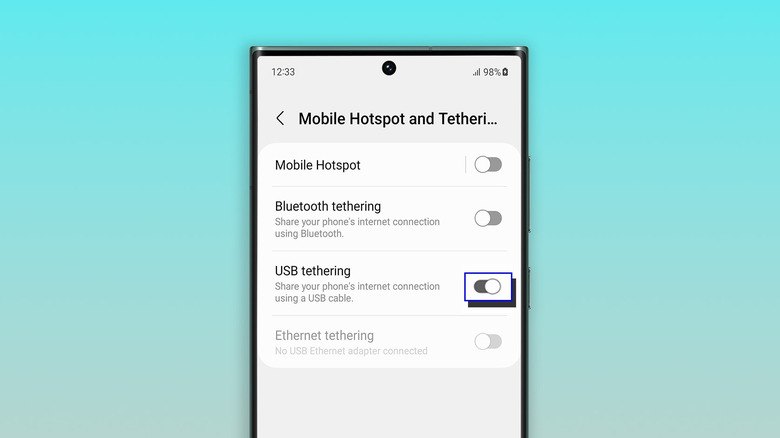
On your phone, navigate to Settings > Network & internet > Hotspot & tethering. (On some devices, it’s under Settings > Connections > Hotspot & tethering.) You can also swipe down to open Quick Settings, then press and hold Hotspot to jump to the tethering menu.
Toggle on USB tethering. If the option is grayed out, make sure you’re using a data-capable USB cable and not a charge-only one.
On iPhone:
Plug your iPhone into a computer using a USB cable.
You may see authentication prompts. If your iPhone asks whether to trust the computer, tap Trust and enter your passcode. If you’re connecting to a Mac and see an “Allow accessory to connect” prompt on your computer, click Allow.
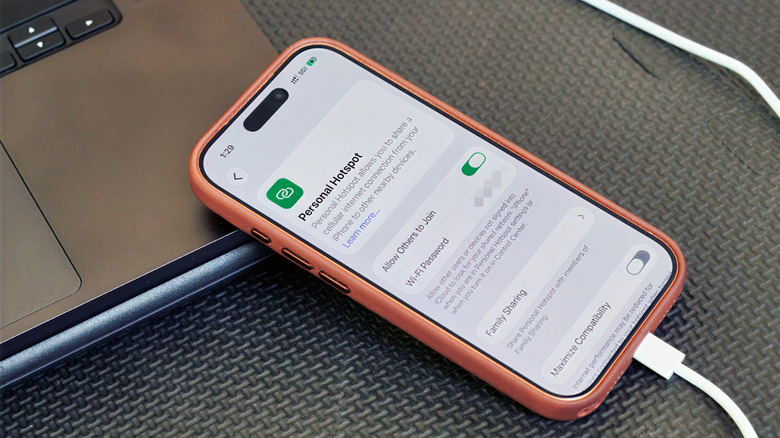
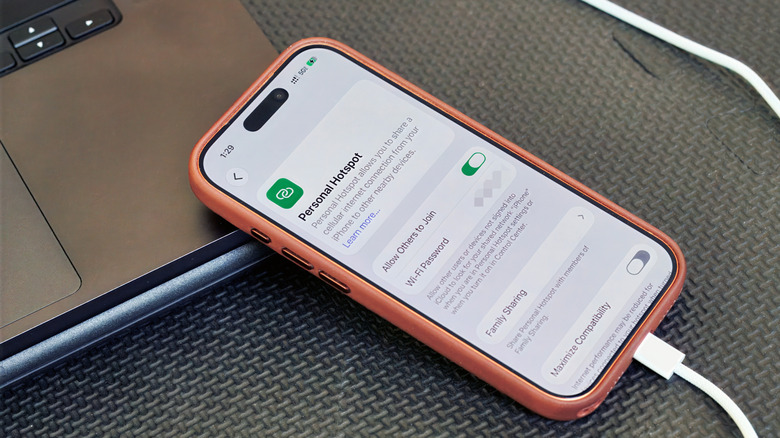
On your iPhone, go to Settings > Personal Hotspot. (If you’ve never used a hotspot before, you may need to start under Settings > Cellular > Set up Personal Hotspot.)
Turn on Allow Others to Join.
A few things to keep in mind
USB tethering usually makes more sense for one device than as a full hotspot replacement. So, for example, if you’re trying to get both your laptop and tablet online at the same time, a Wi-Fi hotspot is the solution.
Keep in mind that laptops can burn through data with background tasks like updates and cloud syncing. Your carrier may also limit hotspot use, charge extra for it, count it against a separate data allowance or not support it at all. So it’s worth checking your plan before tethering over USB or Wi-Fi.
Advertisement
And while a wired connection can be more stable than a wireless hotspot, it’s still relying on your phone’s cellular signal. Spotty service will still mean spotty internet, no matter how you connect.
































































You must be logged in to post a comment Login