














Connect with us
DAPA Banner

Tech

Lenovo Legion Go Fold Leaks, Merges Portability of a Handheld Gaming PC with the Versatility of a Laptop

Published

on

Lenovo Legion Go Fold Leak
Photo credit: Windows Latest
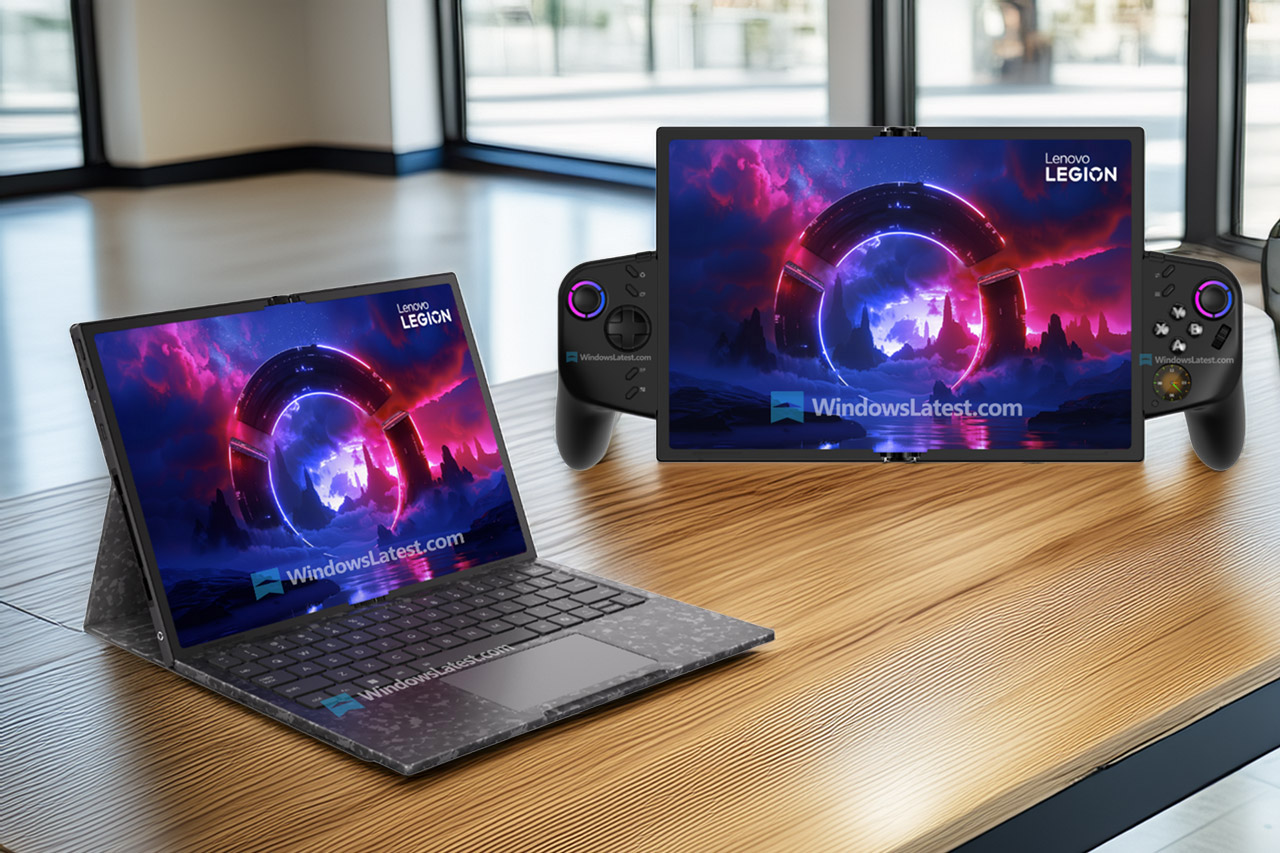
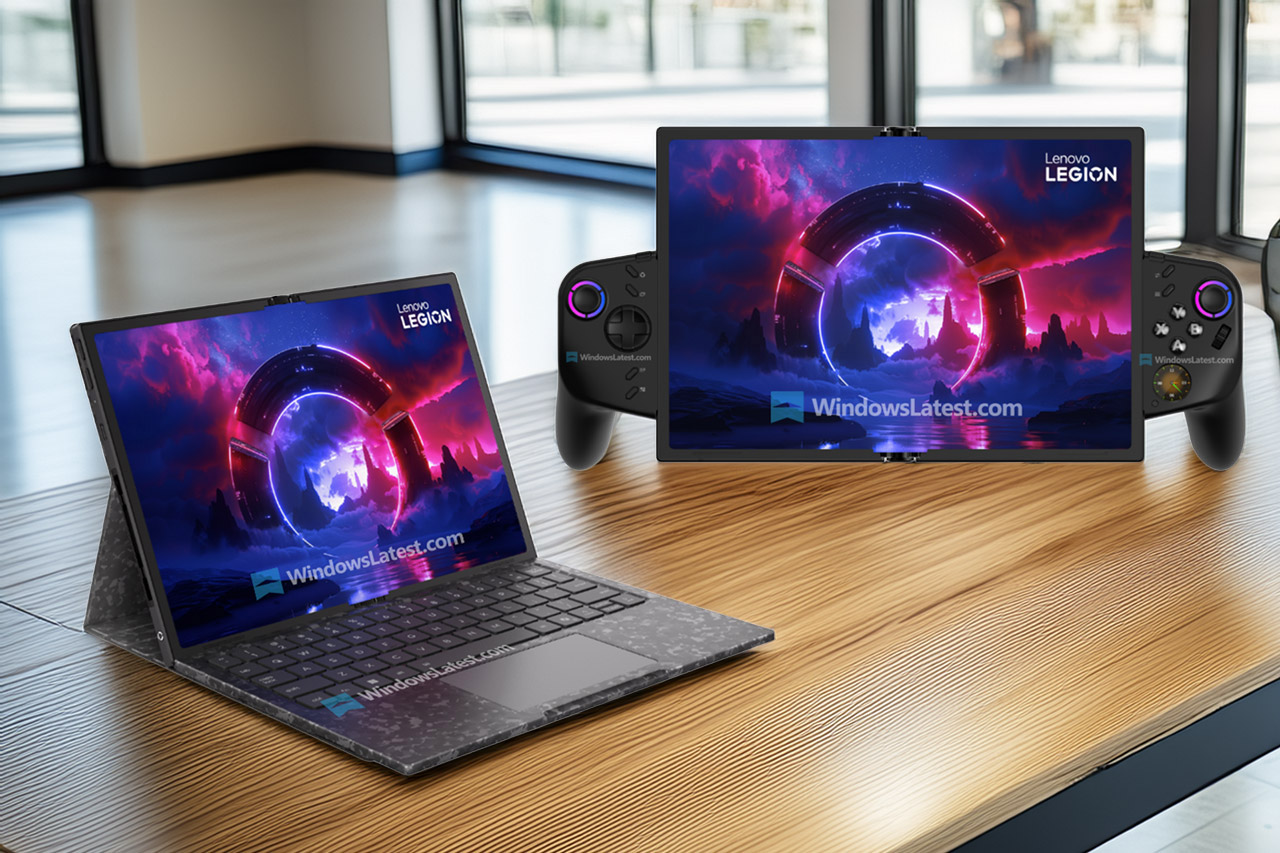
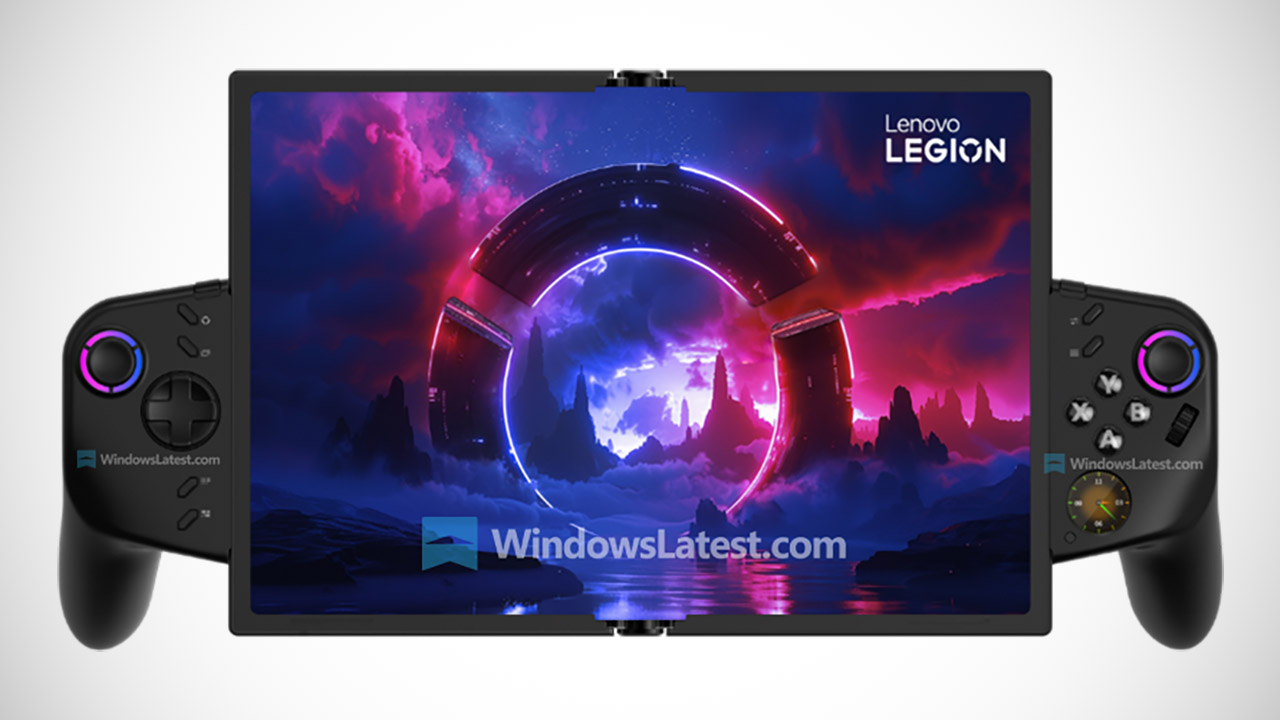
The Lenovo Legion Go Fold debuts as a novel attempt to combine the portability of a gaming handheld with the versatility of a small laptop, all in a single foldable chassis. Lenovo will unveil this at the Mobile World Congress in Barcelona on March 2, 2026, and as of now, it appears that the device will be a game changer.


Lenovo Legion Go Fold Leak
At its center is a flexible pOLED screen, which when folded up measures 7.7 inches across the diagonal, making it ideal for gripping like a traditional handheld. As you open it, the screen stretches all the way to 11.6 inches. That’s a lot of real estate, almost like you’re using a compact tablet. The way it unfolds is also very fascinating, as it simply opens along a central crease, giving you a broader view of two halves of about 7.7 inches each, or stacked vertically.


ASUS ROG Xbox Ally – 7” 1080p 120Hz Touchscreen Gaming Handheld, 3-month Xbox Game Pass Premium…
  • XBOX EXPERIENCE BROUGHT TO LIFE BY ROG The Xbox gaming legacy meets ROG’s decades of premium hardware design in the ROG Xbox Ally. Boot straight into…
  • XBOX GAME BAR INTEGRATION Launch Game Bar with a tap of the Xbox button or play your favorite titles natively from platforms like Xbox Game Pass…
  • ALL YOUR GAMES, ALL YOUR PROGRESS Powered by Windows 11, the ROG Xbox Ally gives you access to your full library of PC games from Xbox and other game…

Lenovo is powering it with an Intel Core Ultra 7 258V CPU, a Lunar Lake chip that has been tuned for battery longevity in ultra-slim laptops. With a huge 32GB of RAM, this device can handle demanding games and multitasking without blinking an eye, even in its portable form. It is powered by a 48Wh battery, although if you use the screen in full immersion mode, the battery life may be reduced.

Lenovo Legion Go Fold Leak
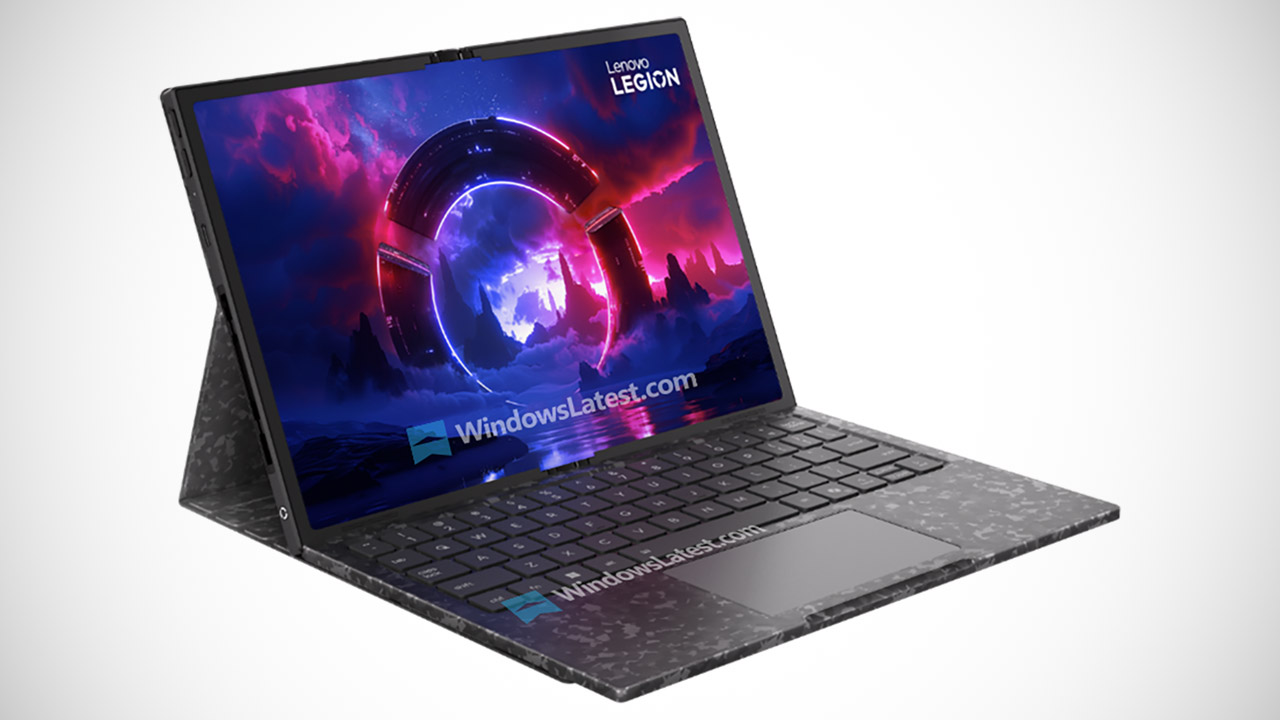
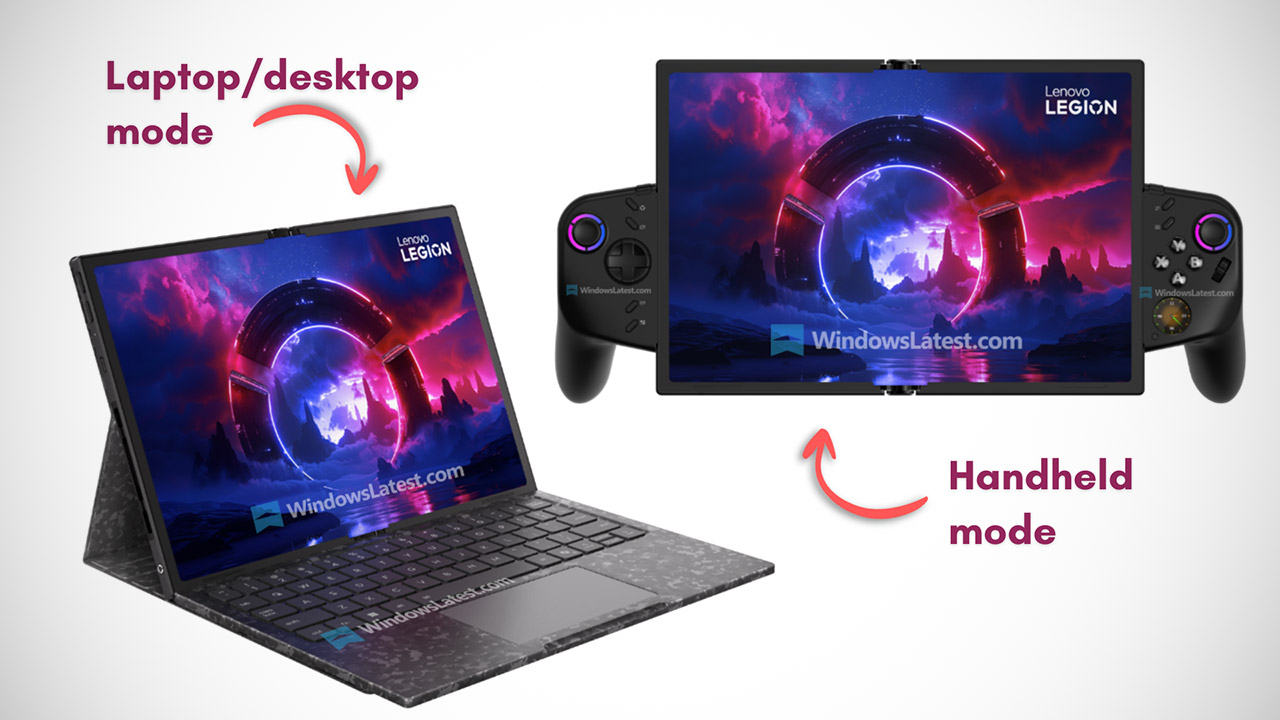
Here’s the cool part: there are detachable controllers that snap into the sides when used in handheld mode, and they have the familiar grips and buttons you’d expect for comfortable gameplay. One of the controllers has an additional little screen built in that displays your performance information, quick settings, and even hotkeys. Furthermore, in some situations, the same controller can morph into a vertical mouse for ultra-precise aiming in first-person shooters. When you unfold the screen, you can switch to split-screen mode, which allows one half to run a game while the other half streams or chats on the web. Alternatively, you may choose full-screen horizontal mode, which gives you an entire 11.6 inches for gaming. If you do opt to use it on a desk, it comes with a wireless keyboard and a touchpad that connects to the folding screen, transforming it into a makeshift laptop with the controller performing mouse functions.

One thing that’s missing right now is any information on how many ports it has or how thick it is, but I believe it’s safe to say that Lenovo’s priority here is getting the flexibility right rather than cramming in every feature under the sun.

Lenovo Legion Go Fold Leak
As a concept, the Legion Go Fold has no set release date or pricing, but it does show a lot of promise. Lenovo has previously turned ideas like this into genuine devices, so who knows? This one may be itching to get out of the lab and into the market at some point, but that is entirely just a pipe dream for the time being.
[Source]

Advertisement

Source link

Continue Reading
Click to comment

You must be logged in to post a comment Login

Leave a Reply

Tech

Game Jam Winner Spotlight: As I Lay Flying

Published

on

from the gaming-like-it’s-1930 dept

It’s time for the third in our series of spotlight posts looking at the winners of our eighth annual public domain game jam, Gaming Like It’s 1930! We’ve already covered the Best Adaptation and Best Deep Cut winners, and this week we’re looking at the winner of Best Visuals: As I Lay Flying by Geouug.

In a first for these game jams, Geouug is a double winner, having taken the prize in two different categories with two different games. As I Lay Flying is the more ambitious submission of the two: it’s a challenging physics-based game based on William Faulkner’s 1930 novel As I Lay Dying, which tells the story of the Bundren family’s effort to return their recently deceased aunt’s body to her hometown. In the book, it’s a journey of diverse trials and tribuilations; in the game, it’s a slapstick adventure about launching a wagon through the sky.

It’s a fun if slightly finnicky challenge that’s easy to understand but hard to master. There’s more than just the core physics gameplay too: progressing requires purchasing upgrades using the money you earn with each attempt, and the selection of these upgrades is crucial to finishing each stage.

The resource management layer turns As I Lay Flying into a complete game, and it was a strong competitor for Best Digital Game. But even more than that, the game stands out for its graphical ambition, completeness, and attention to detail. Everything is designed to fit into the style and setting, and no interface element is left plain and generic: they are rendered in wood and paint and cloth, with little touches like period-appropriate stamps to mark purchased upgrades. During the main gameplay there are parallax-scrolling backgrounds and physics-based animation of the wagon and its occupants, and the levels are bookended by dialogue and narration scenes illustrated with photos and original character portraits.

Though most of the graphics are composed of very simple pieces (stock grass textures and vector tree silhouettes abound), the whole is much greater than the sum of its parts. No corners are cut and nothing feels overlooked. For achieving such a comprehensive graphical style that ties together every element of the game, and with some fun gameplay to boot, it’s this year’s winner for Best Visuals.

Congratulations to Geouug for the win! You can play As I Lay Flying in your browser on Itch. We’ll be back next week with another winner spotlight, and don’t forget to check out the many great entries that didn’t quite make the cut. And stay tuned for next year, when we’ll be back for Gaming Like It’s 1931!

Filed Under: game jam, games, gaming, gaming like it’s 1930, public domain, winner spotlight

Advertisement

Source link

Continue Reading

Tech

Phone Running Out Of Storage? Any Of These 12 Types Of Apps May Be Why

Published

on


It never seems like smartphones have enough storage. Even as we see Apple finally admit that 128GB isn’t enough — the iPhone 17 and iPhone 17 Pro now start at 256GB — that space still somehow magically gets eaten up by high-resolution photos and mobile games. We’ve previously covered all sorts of ways to get more storage on an iPhone or to use your Android’s microSD card to pick up the slack, but the best way to reclaim space is to do a bit of spring cleaning. Apps on your phone tend to get gummed up as time goes by, hoarding data and often failing to declutter automatically.

You can see which apps are the culprits easily on both Android and iOS. On Android, head to Settings > Storage > Apps; on iOS, go to Settings > General > iPhone Storage. Both list apps by size, so you know right away which ones are the worst offenders. Android lets you go to town clearing out storage and cache, and the iPhone lets you offload apps, but hold your horses. Here’s a list of apps that tend to hog storage and how to trim them down without doing anything too drastic. We’ll look at apps on both Android and iPhone.

Advertisement

Messaging apps

Your preferred messaging app (or apps) is where you exchange gigabytes of messages, photos, videos, and files with family and friends over the years. Anecdotally, I’ve sometimes seen these apps cling onto several dozen gigabytes of data alone. Google Messages, iMessage, WhatsApp, Telegram, Messenger, it doesn’t matter which one you use, head into its in-app settings and start clearing house.

We’ll use WhatsApp as our primary example. In the app settings, go to Storage and data > Manage storage. Here, you’ll see how much each chat is taking. Open the biggest chats on the list one by one and delete the largest videos, photos, and files within — at least the ones you don’t mind parting with. You might want to back up your chat history in Settings > Chats > Chat Backup beforehand to ensure anything important isn’t lost. Unfortunately, the only way to have WhatsApp automatically clear up storage is by enabling disappearing messages, which permanently deletes old chats after a certain period.

Some apps will make this process easier than others. Telegram, for example, lets you set a hard local storage ceiling and automatically removes any local storage of chats after a certain date. The app will never go beyond that storage ceiling, and you won’t lose your messages either. Go to Settings > Data and Storage > Storage Usage, and then choose how long before each chat type (especially private and group chats) is automatically removed. We’d recommend setting the maximum cache size to a lower threshold, like 5GB. Note that some apps — like iMessage — have their storage-clearing options in your phone’s settings, not in-app. If your preferred messaging app hasn’t been mentioned here, check its in-app settings and you’ll likely find some means of clearing out storage.

Advertisement

Streaming service apps

You’ve probably got one or two of the best streaming service platforms on your phone. Depending on the one you use — Netflix, HBO Max, Apple TV — a good chunk of your storage could be quietly taken up there. Any time you save movies or TV shows for offline viewing, unwatched downloads generally remain unless manually removed.

Let’s look at Netflix. The app’s offline downloads expire, though they remain on your phone rather than being automatically deleted. You have to manually go in and delete them one by one. It’s the same situation with other streaming services, like HBO Max and Hulu. Anecdotally, these downloads pile up fast if you don’t keep an eye on them; if you’re the sort of person who frequently downloads something with the intention of watching it later, then you might have gigabytes of unwatched media. Note: On iPhone, you can delete these directly from Settings with the “Review Downloaded Videos” option in iPhone Storage.

Advertisement

If you’re really tight on storage, we’d recommend disabling any automatic downloads. For example, Netflix has its “Smart Downloads” feature, which downloads content it thinks you might like for offline watching. Also take advantage of apps that let you choose the download quality going forward. HBO Max allows for selecting a trim “Good” video option that — while it looks like DVD quality — can be a fraction of “Better” or “Best,” which might consume 2GB for a single movie or episode.

Advertisement

Map apps

Map apps do a lot more than just provide directions these days. Apple Maps, for example, can be invaluable for daily commuters who need to make sure they’re taking the right train, especially when paired with offline maps. These are a boon on vacations, when you might be in a foreign city with limited or no internet access and need to navigate a confusing transit system. But you guessed it, offline maps eat up storage like no one’s business; the city I live in takes up half a gigabyte on its own.

Similar to streaming apps, offline maps don’t usually automatically delete themselves. In Google Maps, for example, an offline map that you download will last a year before expiring, and Google does not have an option to automatically delete unused offline maps. So if you took a vacation six months ago and downloaded the offline map for that area, the download is still sitting there, wasting your space. If the map app you use does have the option to automatically delete them, enable it; Apple Maps has an “Optimize Storage” option in iPhone Storage.

Advertisement

Photos apps

The default photos app where you keep your pics and videos will likely be the biggest offender on this list. Luckily, cloud storage options these days are cheap. Provided you have a reliable internet connection, offloading your entire photo library to the cloud comes with minimal downsides.

On iPhone, simply go to Settings > iCloud > Photos, and make sure the “Optimize iPhone Storage” option is enabled. From that moment on, your iPhone only keeps small, storage-efficient copies and downloads the full-resolution ones on demand. In Google Photos, find the “Free up space on this device” option under your account profile photo. Deleted photos and videos will remain in the cloud. You can downgrade your media to “Storage saver” quality, which is helpful if you still want to keep those photos on-device, or you’re limited to Google’s free 15GB of storage.

Besides the obvious stuff like deleting large video files, another option available to you is to merge duplicates. On iPhone, simply go to Utilities > Duplicates in the Photos app and merge them one by one, or select all to merge them all; you won’t see this option if you don’t have any. If you have duplicates in Google Photos, you will need to manually review them with Google Photos’ stacking feature.

Advertisement

Cloud storage

You know the drill by now. Your cloud storage app of preference — Google Drive, iCloud, OneDrive, etc. — may be storing files offline that you forgot about. If you’ve been working with large files (or a lot of files) on your smartphone, double-check that they are not still lingering in storage.

In Google Drive, you can hit “Make available offline” next to any file, and it will appear in Menu > Offline. This includes Google Workspace documents, like Google Docs, making this a one-stop shop to delete offline files from multiple apps. OneDrive does things similarly. Files can be stored on your device with the “Keep Offline” option and found later in the “Files Available Offline” section of your profile.

The iPhone has a similar feature with iCloud, where choosing “Keep Downloaded” in the context menu for a file leaves it stored on your device. Unfortunately, there doesn’t appear to be a single, easy place to find these offline files; in iPhone Storage settings, you’ll only see how much data is being kept offline, but not file names or folders. Also, it appears that, in order to remove a file you’ve selected “Keep Downloaded” for, you need to go back to that specific file itself and uncheck “Keep Downloaded” to remove it locally. Luckily, nested files and folders show a “Show Downloaded File” option to find them. Still, you’ll have to go through manually and remove files you’ve previously kept downloaded. Look for the cloud with a down arrow symbol, which means it’s stored in the cloud, compared to a checkmark, which means it’s on your device.

Advertisement

Music apps

The debate will likely rage on for years over whether Spotify is better than Apple Music, but we’re not here to weigh in on that today. If you download your music offline to listen to later, then your favorite playlist could easily take up dozens of gigabytes. Let’s look at deleting unwanted songs from your device in Spotify, Apple Music, and YouTube Music.

In Spotify, you can manually remove any downloads by hitting the green arrow and selecting “Remove.” Otherwise, you can delete everything in Settings and Privacy > Data-saving and offline > Storage > Remove all downloads. For YouTube Music, go to Settings > Downloads & storage and hit “Clear downloads” to remove any you don’t want.

The easiest way to delete all music downloads in Apple Music is to go to Settings > Apps > Music and then individually delete songs, or delete them all. If you want to be more aggressive, make sure the “Optimize Storage” setting is turned on and “Automatic Downloads” is off. We’d also recommend toggling off “Dolby Atmos,” since this uses more storage. In Apple Music, you can tap and hold individual items — or entire playlists — and choose “Remove download.” Make sure not to choose “Delete from Library” by accident.

Advertisement

Podcast apps

Who doesn’t love a good podcast? Here are five tech podcasts we recommend adding to your rotation. Problem is, a podcast that’s an hour long (or longer) is going to take up space on your storage if you save it for offline listening. I’ve noticed anecdotally that podcasts can pile up really fast since you download new ones as they release with the intent of listening to them later, then forget. If you use Spotify to listen to your podcasts, then you can manage downloaded podcasts in the same place as music downloads. Third-party podcast apps also make this pretty easy. In Overcast, for example, just go to Settings > Manage Storage.

Apple Podcasts arguably makes this even easier since you can delete podcasts directly from Settings > General > iPhone Storage. You may also wish to go to Settings > Apps > Podcasts and turn off the “Automatically Download” setting, especially the new “Download Video” setting. Make sure “Remove Played Downloads” is also on.

Advertisement

Inside the Podcasts app, you can individually delete downloaded episodes. Or tap the three-dot icon in the downloaded section and choose “Remove All Downloads.” If there’s a show you still want to get automatic downloads for, then we’d recommend going to that show (or shows) specifically and turning on the “Automatically Download” option for it alone.

Advertisement

YouTube

YouTube Premium might be expensive, but at least it beats Netflix in customer satisfaction. And one of the best parts of YouTube Premium is being able to download videos for offline watching, similar to the offline downloads for other streaming services. But if you’re like me, you have the same issue with YouTube Premium as you do with podcasts: you download a whole bunch of them that you think you’ll watch later, then forget about them and wonder why your storage space is running out.

To find your downloaded videos, press your profile picture and scroll down to the Downloads section. To delete them, press the three-dot button and choose the “Delete from downloads” option that appears at the bottom. Note, you can also delete the download of a video you’re currently watching by tapping the “Downloaded” button beneath it.

If you’re low on space, we recommend getting rid of those longer videos, like explainers and video essays, particularly the ones that get up to an hour or longer; deleting them is going to be like deleting a movie. Or you can delete all the downloads by going to Settings > Background & downloads > Delete downloads and then confirm with the pop-up. If you want to keep your storage trim going forward, change the “Download quality” in the same section to 720p — or lower, if you can stomach it.

Advertisement

Browsers

Browsers can silently take up gigabytes of space when you account for their bookmarks, browsing history, and extensions. That’s something you don’t normally think about on desktop, but it makes a bigger impact on smartphones where storage tends to be more limited. Chrome users on mobile, if you haven’t done so in a while, open the app and delete old browsing history and the cache — but avoid deleting cookies, as that’s what stores your logins. We’d recommend the same for basically any other browser, like Microsoft Edge, Firefox, and Brave. Some browsers, like Vivaldi — an excellent browser you should ditch Chrome for — include the option to “Clear browsing data on exit” to keep it clean.

For Safari on iOS, the process is a bit different. Go to Settings > General > iPhone Storage, find Safari on the list, tap the Website Data option, and clear it out. Anecdotally speaking, it’s good to do this about once every six months since the data steadily piles up with regular usage.

Advertisement

Social media apps

Social media apps — TikTok, Instagram, X — are also prime targets for a storage cleanup. They use a cache similar to a web browser, which over time can balloon in size without you realizing it’s so large; I’ve personally seen some of my social media apps reach almost ten gigabytes in size, despite sparing usage and no offline media.

Some apps, like TikTok, make it easy to clear the cache. In your profile, go to Settings and privacy > Free up space and use the “Clear” buttons to quickly get rid of both the cache and any downloaded TikToks, if you have them. Some apps make it a bit harder. X (formerly Twitter) buries it deep in the settings. You’ll have to go to Settings and privacy > Accessibility, display, and languages > Data usage > Media storage > Clear media storage. While you’re in that section of settings, you might also hit “Clear web storage.”

Some, like Instagram, make clearing their cache basically impossible within the app. You’re in luck if you have Android, because you can just go to the app in Settings and delete its cache. On iPhone, you have no such option. You’ll have to delete the app entirely, then redownload it. It’s annoying, but fortunately, Instagram saves your login details so you can log in immediately once you redownload. If any other app you use is unnecessarily bloated on iPhone, then deleting and reinstalling is a surefire way to clear it.

Advertisement

Translate apps

Major translation apps like Google Translate and Apple Translate allow you to download language packs for offline use, which is a lifesaver when traveling abroad without the assurance of a solid internet connection. But over the years, it’s entirely possible that you’ve downloaded a dozen different language packs here or there for foreign travels or when taking a stab at a new Duolingo course. It doesn’t hurt to check. As far as I can tell, the languages will just sit there downloaded forever until you remove them manually.

If you’re using Google Translate, go to Menu > Downloaded languages and then hit the trash can icon for any you don’t want. For Apple Translate, tap the three-dot icon, Languages, and then swipe left to delete any offline ones — or hit the Edit button to delete all. Admittedly, the packs don’t take up much space — usually less than 100 MB, if that — but deleting half a dozen of them to secure about half a gigabyte of space is not bad.

Advertisement

E-reader apps

For a while now, it hasn’t been necessary to buy a Kindle or a non-Kindle e-reader to enjoy digital copies of your books. Kindle, Apple Books, and other apps have every advantage over e-readers other than e-ink screens, and we’re spoiled with excellent reader apps for converting ebooks and managing libraries. However, if you’re an avid reader, that offline downloaded media could stack up as years go by — particularly for unread content that you haven’t gotten around to.

On the Kindle app, simply navigate to your Library and switch over to the “Downloaded” tab. Books with checkmarks are downloaded. Open the context menu and make sure you choose “Remove Download” so the book stays in your library. And you’re done. For Apple Books, you cannot delete books conveniently from the iPhone storage section like in other apps. Instead, simply open Apple Books, go to Library, select any downloaded books with the context menu, and choose “Remove Download.” Note, you can have Apple Books automatically remove books as you finish them.

Of course, ebooks only amount to a few megabytes. The real space hogs will be any audiobooks. In Audible, for example, go to your library, find an unwanted audiobook, and choose “Remove download.” In Apple Books, audiobooks are stored in the same library as other books, so the same deletion process as above will work.

Advertisement


Source link

Advertisement
Continue Reading

Tech

iPhones take the global smartphone crown in 2026 as Google Pixels make a big leap

Published

on

The global smartphone market just had a bit of a shake-up, and this time, it’s Apple sitting comfortably at the top. Yep, iPhones have officially taken the crown in early 2026, while Google’s Pixel lineup is quietly pulling off one of its best growth runs yet.

iPhones take the top spot (for the first time ever in Q1)

According to the latest data from Counterpoint Research, Apple grabbed the No.1 spot globally in Q1 2026, marking the first time it has ever led the market in a first quarter. The company held around 21% market share, edging past Samsung’s 20%, even as the overall smartphone market actually declined by 6% year-on-year.

What’s driving that, you ask? A mix of strong demand for the iPhone 17 series, aggressive trade-in offers, and solid performance in key markets like India and Asia-Pacific. Meanwhile, Samsung slipped slightly due to delayed launches and weaker entry-level demand, showing that even the biggest players aren’t immune to market slowdowns right now.

Pixel’s quiet growth is the real plot twist

While Apple grabbing headlines isn’t shocking, Google’s Pixel story is where things get interesting. The Pixel lineup reportedly saw around 14% year-on-year growth, even as most of the industry struggled. That growth is being attributed to Google doubling down on things it does best: AI features, computational photography, and a clean software experience. Add to that the launch of newer models like the Pixel 10a also helped push those numbers up.

It’s still not challenging the top three just yet, but it doesn’t need to. Pixel’s strategy seems less about dominating volumes and more about steadily carving out a loyal, premium niche. And in a market that’s shrinking overall, that kind of growth stands out. While Apple is busy winning the crown, Pixel is quietly proving it might be one of the most interesting players to watch next.

Advertisement

Source link

Continue Reading

Tech

This Is The Worst-Rated Major Computer Brand For Customer Satisfaction

Published

on


Buying a computer is an investment. Even budget brands aren’t exactly cheap, especially if you’re buying a new, non-refurbished model. It’s easy to drop at least a couple of hundred dollars on a new laptop or computer — and that’s before you even get into buying any peripherals you might need, like a monitor, keyboard, or mouse. Whatever you buy, you want to know that you’re going to get your money’s worth, and that you won’t be spending big again any time soon. That’s doubly the case if you use it all the time, for working from home, gaming, or anything else you might see fit.

If you want to be happy with whatever computer you wind up picking, you probably don’t want to exclusively research the specific model or specifications of the device you have your eye on. You should also take a look at what people have to say about the make or brand of computer you’re planning to purchase from.

Per the data from 2025 shared by the American Customer Satisfaction Index (ASCI), hardware manufacturer Acer ranks as the singular worst brand for customer satisfaction, with a rating of 75 out of 100. They also held the same rank in data from 2024, but the company has fallen by a further four points since the last ASCI analysis, when it had previously scored 78 out of 100. For context, the overall satisfaction rating for all personal computers is 81, meaning the company ranks below average compared to others analyzed for the report.

Advertisement

Why does Acer rank poorly for customer satisfaction?

The ASCI report itself doesn’t publicly state exactly why Acer ranked the lowest compared to other personal computer manufacturers, nor does it say why the company’s score fell from last year. However, there is a breakdown of which benchmarks are considered while assessing customer satisfaction, varying from technical considerations, to other factors like call center or website satisfaction, as well as a device’s design, the availability of compatible software or apps, how easy devices are to use, and what peripherals or accessories are available. The overall score given to Acer is lower than the average score for most of those benchmarks.

Advertisement

It’s also not just the ASCI report that suggests that Acer computers could be disappointing. A quick look at customer reviews and consumer forums leaves little room for surprise that it ranked so low in ASCI’s report. The Trustpilot score based on user reviews attains the company a Poor rating, with an average of 2.7/5. Similarly, customer reviews on the Better Business Bureau gives Acer an average of 1.2/5, albeit based on a small sample size of only around 20 reviews.

Meanwhile, an analysis shared by Which? revealed that after one year of ownership, around 4% of Acer laptops develop faults. The figure rises to 13% after three years of ownership, and 22% — so, almost a quarter of those sampled — after seven years. However, Acer isn’t alone with these figures. LG took the title of having the highest fault rates after three years, with 6%, and Acer tied with Dell for the amount of faults developed after three years. Similarly, the usually high-ranking HP also matched Acer’s fault rate after seven years of use, with Dell close behind.

Advertisement

How Acer compares to other personal computer manufacturers

When it comes to customer satisfaction, Acer ranks the lowest by ASCI’s standards — but some other brands are surprisingly close behind. Microsoft and Asus each sit two ranks above it, each with a score of 76. The next company above that is Amazon, with a rating of 78. It’s a close race, with only three points making a big difference in terms of rankings.

There are also only nine major companies that earn their own individual ranks on the podium. A category labeled All Others sits with the same rating as Amazon, which accounts for a collection of other, smaller manufacturers that don’t have their own public, individual scores. Above that is Lenovo, with 79; the last company to bag a below-average rating. The remaining four major computer companies — Samsung, Dell, Apple, and HP, in order — all received an average or above rating of 81 or higher. So, although Acer sits below average in terms of customer satisfaction, it certainly isn’t alone.

Something else notable about the ASCI data is that almost every company’s score decreased in the 2025 data compared to the previous year. The only two that didn’t lose points from the previous year were Dell, which increased its score by three points, and the All Others category, which scored exactly the same. Acer tied with Apple and Microsoft as the three companies to have dropped the most points in comparison to the previous year, with each manufacturer falling by 4 points. Despite the general downward trend for many companies, overall customer satisfaction with personal computers stayed stable, at 81 out of 100.

Advertisement


Source link

Advertisement
Continue Reading

Tech

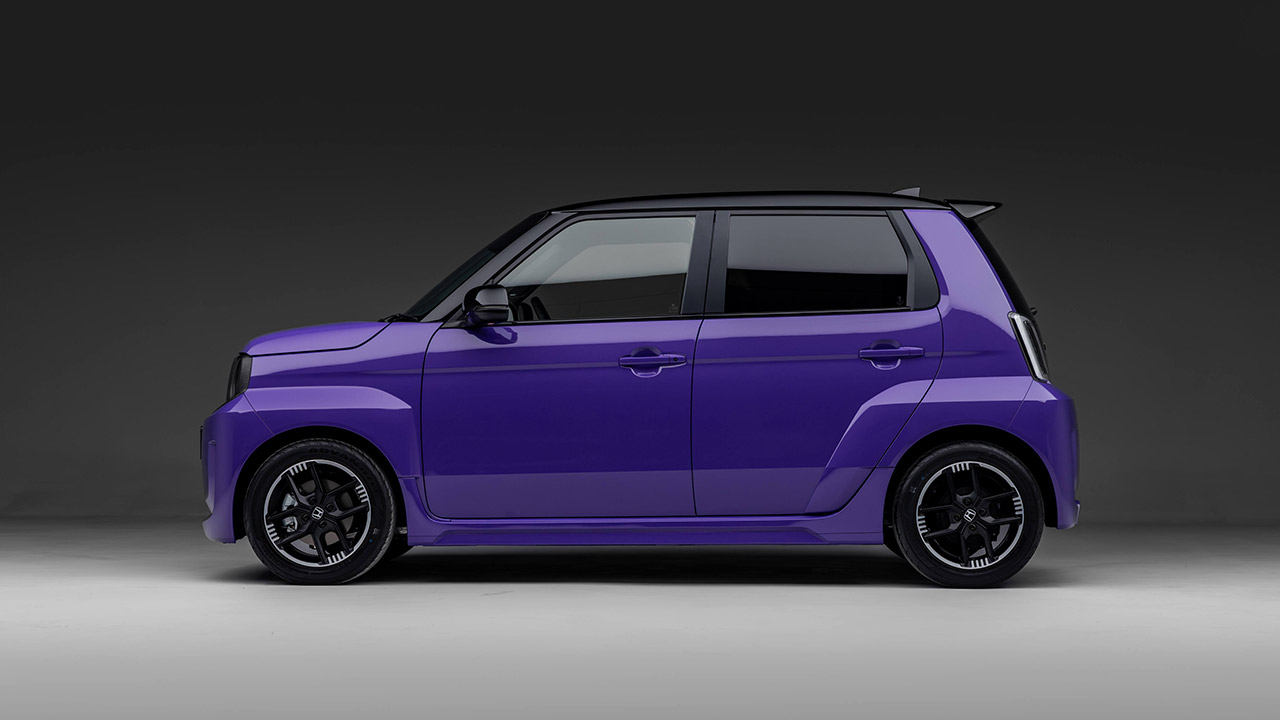
Honda Super-N Electric Car Arrives in the UK This July With Serious Character for a Low Price

Published

on

Honda Super-N Electric Car UK Arrival
Starting next month, UK shoppers can order the Honda Super-N for less than £20,000 ($26,910). This cool electric vehicle pays homage to a famous 1980s Honda model and injects some joy back into daily travels. Honda constructed the Super-N on a lightweight architecture derived from their popular kei cars in Japan, where it was initially known as the Super-One. The end result is a low-slung car that’s easy to drive in traffic, feels agile, and saves money without compromising any of the necessities.


The exterior design is similar to the original City Turbo II, but with some interesting modifications. It has a broad track and hefty wheel arches, giving the vehicle a sturdy, planted feel. Larger bumpers and cute small side vents give visual appeal and, more significantly, aerodynamic flair. You can choose from a variety of colors, including a two-tone roof in gloss black and some amusing body graphics. Fifteen-inch wheels with Yokohama tires fit the arches perfectly, resulting in some very sharp handling on UK roads.

Sale


Segway Ninebot S2 Electric Self-Balancing Scooter – Master Your Commute w/t 11.2 mph Max. Speed, 21.7 Mi…
  • Speed & Range: Experience exhilarating rides with the Ninebot S2’s impressive top speed of 11.2 mph and range of 21.7 miles.
  • Beginner-Friendly: Perfect for riders aged 16-50, the Segway S2 features a user-friendly learning mode, providing a smooth and gradual introduction.
  • Adjustable & Supportive: Enjoy a customized fit tailored to your needs, as the Segway S2 accommodates heights ranging from 4’3″ to 6’6″ and supports…

A 29.6kg battery pack lays flat beneath the floor, helping to reduce the center of gravity and keeping the Super-N stable as you corner. The end result is a total weight of just over 1,097 kilograms, making it one of the lightest electric vehicles on the market in Europe right now, and you can really feel the difference while you’re driving, as the car changes direction quickly and there’s almost no body roll when you take a turn.

Advertisement


In everyday driving, you get a respectable 47 kilowatts/63 horsepower. However, using the BOOST button increases the output to 70 kilowatts / 94 horsepower. In addition, the system includes a nifty simulated 7-speed transmission that shifts smoothly and even emits authentic engine noises via Active Sound Control. Honda has fine-tuned the suspension and chassis to provide a smooth ride over bumps while remaining extremely responsive when necessary. According to official tests, you can anticipate to go up to 199 miles in the city or approximately 128 miles on a mixed road.

Honda Super-N Electric Car UK Interior
Inside, it’s all about simplicity, with plenty of physical buttons and no messing with menus. The seats feature wonderful extra side support for prolonged trips, as well as a striking blue accent reminiscent of the original Turbo model. The ambient lighting is also a wonderful touch, with a cool blue for normal use and a deep purple when you push the boost button. And, of course, Honda’s Magic Seats design allows the back seats to easily fold, slide, and get out of the way. Storage compartments, a handy glovebox, and all of the other necessities are also included.

Honda Super-N Electric Car UK Arrival
Charging the Super-N is as simple as it gets, with a standard connection that fits most household wall outlets and public charging points without the need for any extra adapters. Honda has adopted a prudent approach to development, paying special attention to what constitutes the usual daily routine for owners, such as the daily commute and a few errands around town, which is where most people spend their time. The little battery they’ve chosen keeps weight and price low, while still providing adequate range for a full week of average use before requiring a battery recharge.

Honda Super-N Electric Car UK Arrival
For the time being, the Honda Super-N will only be available in the United Kingdom, so if you live anywhere else, you’ll have to either wait patiently or hunt elsewhere for one. At this price point, it naturally competes with other tiny electric choices on the market, but what distinguishes it is its ability to pack a playful personality into its lightweight body, resulting in a very enjoyable driving experience. Orders will open soon, and the first cars will be delivered in July, at which point we should anticipate news to spread about how much pleasure can be packed into such a small box.
[Source]

Source link

Advertisement
Continue Reading

Tech

Over 20,000 crypto fraud victims identified in international crackdown

Published

on

Hacker Bitcoin

An international law enforcement action led by the U.K.’s National Crime Agency (NCA) has identified over 20,000 victims of cryptocurrency fraud across Canada, the United Kingdom, and the United States.

Dubbed “Operation Atlantic,” this joint action took place last month, and it involved the NCA, the U.S. Secret Service, the Ontario Provincial Police, the Ontario Securities Commission, and multiple private industry partners.

“The NCA hosted law enforcement agencies at their London HQ and through real time intelligence sharing, technical capabilities and victim outreach, multiple fraud networks were disrupted across the world,” the NCA said. “City of London Police, Financial Conduct Authority and other international law enforcement bodies also joined the weeklong action.”

Wiz

The investigators have also frozen more than $12 million in suspected criminal proceeds obtained through “approval phishing” attacks, in which scammers trick victims into granting them access to their cryptocurrency wallets, typically via investment scams. They also identified more than $45 million in stolen cryptocurrency connected to fraud schemes worldwide.

Officials said the public-private partnership model used in Operation Atlantic will be a core element of the U.K. government’s recently announced Fraud Strategy, which connects industry data and law enforcement expertise to enable fraud prevention.

Advertisement

“Operation Atlantic is a powerful example of what is possible when international agencies and private industry work side by side,” added Miles Bonfield, NCA Deputy Director of Investigations.

“This intensive action has led to the safeguarding of thousands of victims in the UK and overseas, stopped criminals in their tracks and helped save others from losing their funds.”

The NCA added that, together with law enforcement and private-sector partners, it will continue to analyze intelligence gathered during this joint action to support other victims and pursue potential criminal activity.

Since January 2024, the FBI has also identified more than 8,000 victims of cryptocurrency investment fraud (also known as pig butchering) with support from the U.S. Secret Service, as part of Operation Level Up. The FBI said that roughly 77% of those victims were unaware they were being scammed and that the estimated savings to victims is $511,511,288.

Advertisement

In its 2025 Internet Crime Report, the FBI said it received 61,559 complaints of cryptocurrency investment fraud last year, linked to $7.228 billion in losses and representing a massive 48% increase in complaints and a 25% increase in losses from 2024.

Automated pentesting proves the path exists. BAS proves whether your controls stop it. Most teams run one without the other.

This whitepaper maps six validation surfaces, shows where coverage ends, and provides practitioners with three diagnostic questions for any tool evaluation.

Source link

Advertisement
Continue Reading

Tech

Electricity Sparks Movement in MIT’s New Artificial Muscle Fibers

Published

on

Electrofluidic Muscle Fibers Artificial MIT
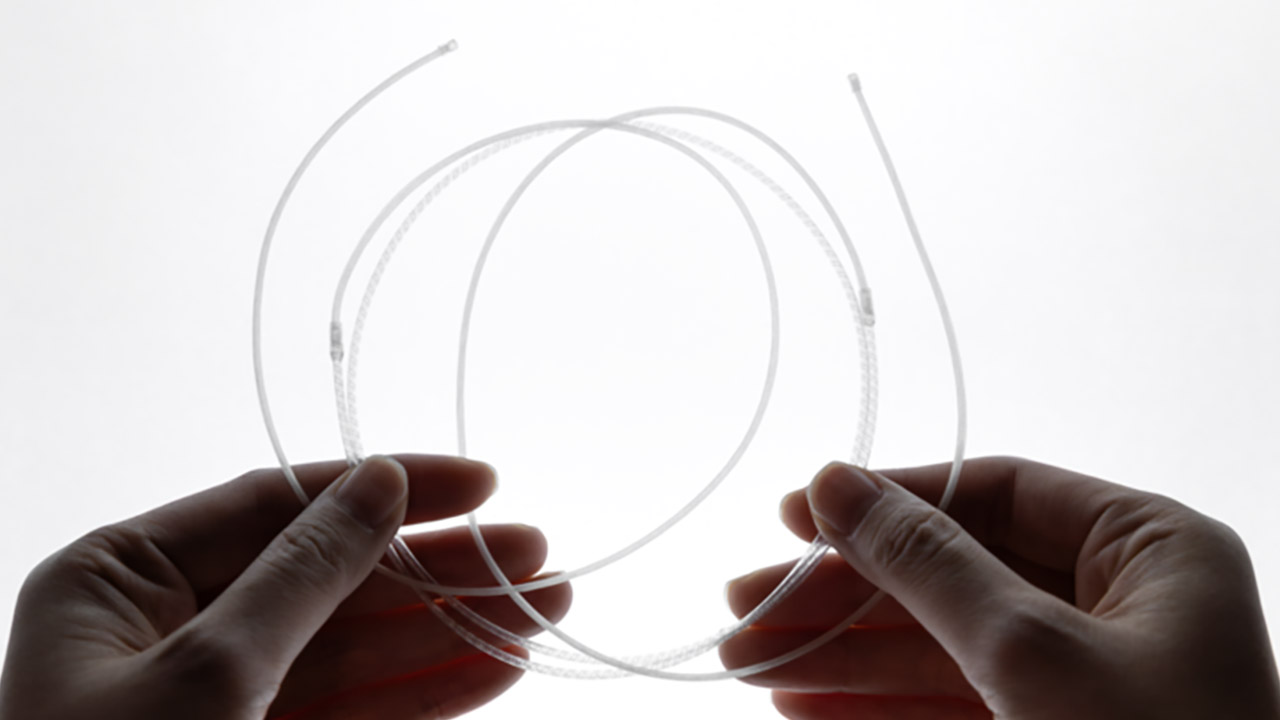
Scientists from MIT’s Media Lab have developed extremely thin strands that wrap and unravel at the flip of an electric switch. They strikingly resemble your own muscles. When grouped together, they can generate significant force and movement, all while remaining completely silent and hidden.


Each electrofluidic muscle fiber is only 2 millimeters thick and weighs roughly 2 grams. Inside, there’s a little self-contained loop of highly unique liquid and a tiny pump the size of a toothpick. When you run some electricity through the pump, the liquid zooms ahead without any of the rotating elements or big storage tanks you’d expect. On one side, the liquid accumulates and shortens the fiber, while on the other, it is sucked out and the fiber extends out, similar to how your biceps and triceps work together to bend your elbow.


Unitree G1 Humanoid Robot(No Secondary Development)
  • Sleek & Durable Design: Standing at 132cm tall and weighing only approx. 35kg, the G1 is constructed with aerospace-grade aluminum alloy and carbon…
  • High Flexibility & Safe Movement: Boasting 23 joint degrees of freedom (6 per leg, 5 per arm), it offers an extensive range of motion. For safety, it…
  • Smart Interaction & Connectivity: Powered by an 8-core high-performance CPU and equipped with a depth camera and 3D LiDAR. It supports Wi-Fi 6 and…

Before turning on the electricity, the engineers kept everything steady and supplied gentle ongoing pressure to the entire system. Just that simple method prevents the development of microscopic air bubbles, allows the pump to operate at greater voltages, and allows the fiber to contract far more than it would otherwise. As a result, they can now achieve a 20% contraction in roughly a third of a second and generate 50 watts of power per kilogram, which is comparable to human skeletal muscle.


Bundles of these fibers scale up quickly, with one configuration lifting and moving 4 kilograms, or 200 times its own weight, and stretching out around 30 millimeters. Another one, with several more pumps working simultaneously, elevates a lever arm at 180 millimeters per second and flings small items around in less than a tenth of a second. Woven into a cloth sleeve, the same fibers bend a robotic arm 40 degrees while remaining soft enough to allow for a friendly handshake.

Advertisement

Electrofluidic Muscle Fibers Artificial MIT
Photo credit: Ozgun Kilic Afsar
Traditional motors in robots have large heavy cylinders near each joint, forcing designers to add a slew of gears and other connections that add bulk and make it difficult to achieve the fine movement required. However, these fibers may be stretched the whole length of a limb or an article of clothing, distributing weight evenly and allowing the structure to bend and twist in all the correct places. Everything remains sealed inside, allowing you to operate the device without the noise or mess of compressors and dangling hoses. This makes all types of wearing exoskeletons much more practical, and a sleeve knitted from the fibers allows you to lift huge objects without feeling stiff or being driven insane by incessant whirring. Prosthetic arms can achieve motion that is far more natural, quiet, and obedient.

Electrofluidic Muscle Fibers Artificial MIT
Photo credit: Gabriele Pupillo, Ozgun Kilic Afsar
Ozgun Kilic Afsar, the project’s lead student who also worked with academics from Politecnico di Bari and MIT’s Media Lab, points out that previous fluid-powered systems all required large, heavy support equipment that was difficult to transport or wear. The new fibers address this by putting all of the necessary components directly inside the strand. Vito Cacucciolo, one of the team’s professors, observes that these fibers allow engineers to distribute actuators throughout a robot rather than grouping them all at the joints.
[Source]

Source link

Continue Reading

Tech

Playing The Last of Us with friends made my favorite PlayStation game feel brand new again

Published

on

This article contains story spoilers for The Last of Us Part 1.

The Last of Us is an institution of modern media – Naughty Dog’s post-apocalyptic zombie shooter escaped the confines of its PS3 game case almost immediately after its initial release in 2013, and has since spanned live events, comic books, remasters, a full-on sequel, and even a TV series on HBO.

From the Backlog

Every gamer has a backlog — and that’s no different for us at TechRadar Gaming. From the Backlog is a series about overdue first-plays, revisiting classics, returning to online experiences, or rediscovering and appreciating established favorites in new ways. Read the full series here.

Advertisement

When a franchise becomes this popular, not to mention this critically acclaimed, it can be a little surprising to find that there are people who haven’t engaged with it. Until recently, one of those people was a good friend of mine – let’s call him Ralph, because that’s his name – who, despite having The Last of Us Part 1 installed on his PS5, had never really got into it.

Source link

Advertisement
Continue Reading

Tech

5 Cool Flags Flown On US Navy Ships Besides The Stars And Stripes

Published

on


Flags flown on vessels have been a nautical tradition for centuries. They’ve allowed pirates to project fear, and enabled naval vessels and civilians alike to identify themselves. The United States’ formidable Navy, of course, is no exception to this rule, and its ships will frequently boast the beloved Stars and Stripes. However, there are other important U.S. military traditions that help to vary the flags that its vessels display, such as mascots and emblems.

U.S. Navy ships are typically named for servicepeople or high-ranking officials, as is the case with the service’s formidable USS Gerald R. Ford – the world’s largest aircraft carrier. Along with this often comes an emblem that emphasizes the connection. These symbols evoke crew pride and togetherness, while also serving as an important identifier. They can take the form of different animals or other symbols, and there are some iconic ones in the U.S. Navy in particular that make for excellent flags. From a legendary pirate symbol to a furious grizzly bear, here are some of the coolest ones that have been sported by U.S. naval vessels besides the Star-Spangled Banner itself.

Advertisement

1. The grizzly bear flag of USS Harvey C. Barnum Jr

As noted, with the likes of the USS Gerald Ford and the USS Abraham Lincoln, there have been a lot of U.S. Navy ships named after American presidents. It’s not simply about those who have held the highest office in the land, though. Take the USS Harvey C. Barnum Jr., for instance, a guided missile destroyer of the Arleigh Burke class and one of the more recent additions to the Navy’s arsenal of ships. Its now-retired namesake Colonel Harvey C. Barnum Jr. was a member of the Marine Corps and is a proud Medal of Honor recipient.

Advertisement

The ship’s battle flag, Task & Purpose notes, is also designed as a tribute to the colonel, featuring a formidable grizzly bear. It’s an intimidating and imposing sight in its own right, of course, but it serves a secondary function: Those with whom the colonel served knew him well for his words of wisdom, including the pithy “If you’re going to be a bear, be a grizzly.” Sailors who will serve on the vessel, of course, will surely be inspired to do so boldly, fiercely, and uncompromisingly, like the grizzlies that the former colonel wants them to be. There are few more intimidating flags on the seas than this one, that’s for certain.

As for the ship itself, it’s designed to take on a broader combat role, allowing it to combat a range of nautical threats from above and below the waves, and is set to be commissioned in April 2026. It will be stationed at Norfolk, Virginia, having arrived at the Naval Station there in March.

Advertisement

2. The flag of the President of the United States

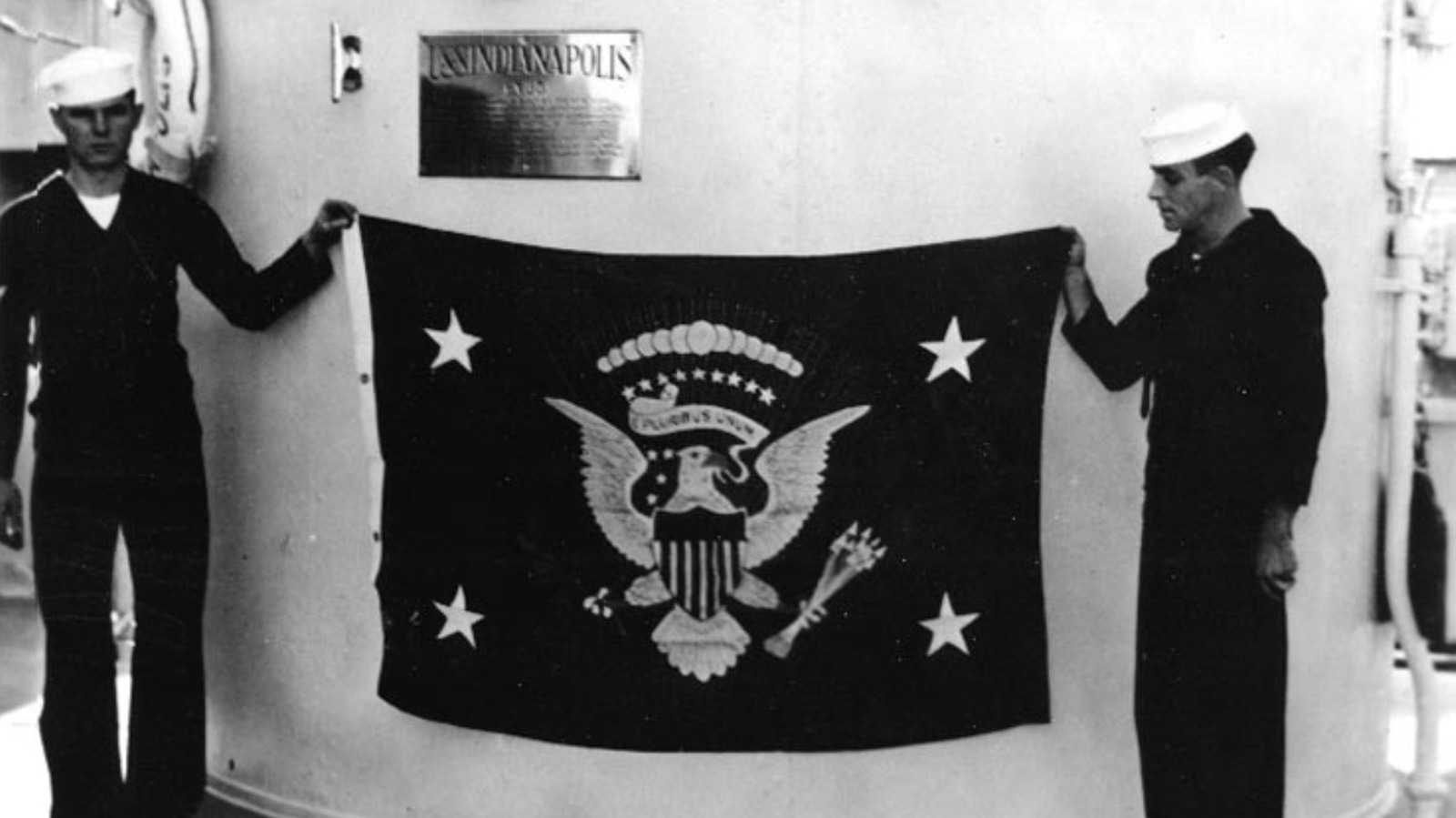
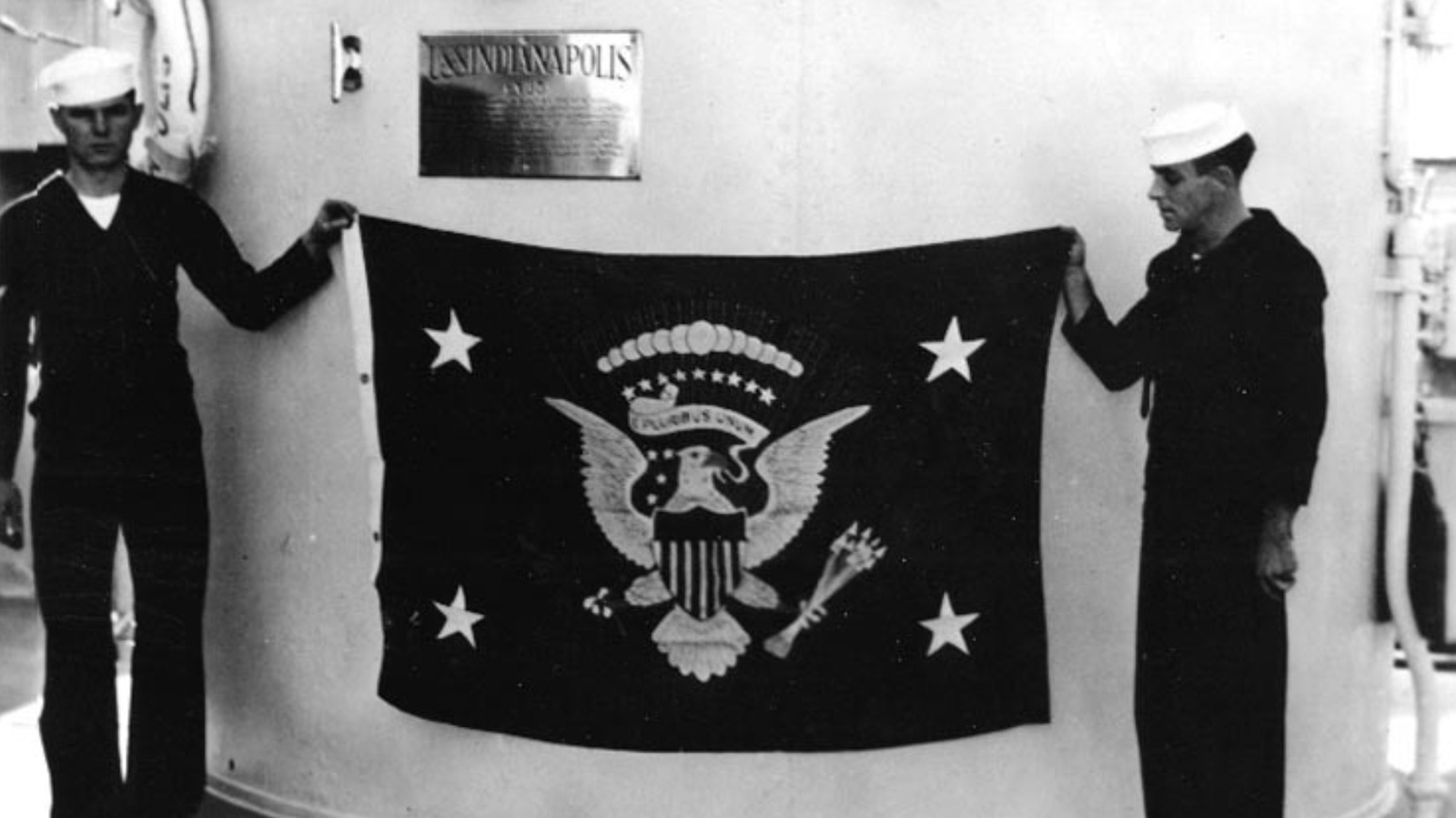
As part of the far-reaching official duties of the office, the president may find themselves on board a naval vessel. When this happens, another particularly notable flag may be seen: the flag of the president of the United States. Simply named for the office and not unique to any particular holder, the president’s flag is a majestic dark-blue design, often featuring a circle of 50 stars (one for each state) encircling an eagle. It grips arrows and an olive branch in its talons, and also features the country’s famous motto, “E pluribus unum” (“Out of many, one”).

The call sign Air Force One is applied to any Air Force aircraft carrying the president, and it’s a similar use case to the flag. It is raised on a naval vessel when the current incumbent arrives aboard. It remains raised while they are aboard, signaling that this particular ship has the current great responsibility and honor of hosting them. As they leave, the flag is then lowered again. It is also prominently displayed on other vehicles the U.S. president travels in, such as the president’s limousine. The Beast, as it’s often dubbed, is frequently seen sporting both the Stars and Stripes and the Commander in Chief’s personal flag.

Advertisement

3. USS America’s battle standard

Since the advent of the MCU with 2008’s “Iron Man,” the Avengers crew and the broader Marvel characters have embraced the mainstream to an extraordinary degree. One of the clearest signs of this is on the mast of USS America: its flag bears the emblem of Captain America’s shield. Only the most patriotic superhero on the planet will do for such an iconically American vessel, and it’s an astonishing sight to behold to see Cap’s famous red, white, and blue emblem of circles and that central white star on the mast of a warship. 

The America class is a class of amphibious assault ships. Though a very different kind of ship from the USS Harvey C. Barnum Jr., it’s similarly armed with a wide range of weaponry to keep it a formidable foe for all kinds of threats. Its arsenal includes Sea Sparrow and Evolved Sea Sparrow missile capacity, as well as seven .50-caliber machine guns. As a valuable offensive and defensive measure, it’s also equipped with the advanced PHALANX CIWS. This is a sophisticated computer-controlled weapon system used by the Navy to automatically target and destroy threats that have eluded the ship’s other multi-faceted defensive systems. 

Advertisement

The America class is set to be a considerable part of the U.S. Navy’s force projection into the future, with advanced capabilities beyond simply weaponry. It has a revolutionary secondary means of propulsion aimed at addressing one of the most significant issues affecting the success of many military vessels (and vehicles more broadly): fuel efficiency. It seems that Captain America’s flag and the ship that bears it will be a significant presence going forward.

Advertisement

4. USS Carl M. Levin’s battle flag

Carl M. Levin is another prominent American who was honored with a military vessel named after him. Levin was not a president but a long-time Michigan lawmaker well known for his efforts in pursuing justice for military veterans. As a result of his tenacity and dedication, his namesake was constructed, boasting a motto appropriate to the man himself: “Tenacious in the fight.” Along with the USS Harvey C. Barnum Jr., it’s one of the most recent additions to the Navy’s Arleigh Burke-class repertoire. Perhaps its most notable feature is its battle flag, designed by Damage Controlman 3rd Class Hector Mendoza. 

As Fox News reports, Mendoza explained to Military.com that he had a simple objective with the design: to make it as formidable and stand-out as possible, and he certainly succeeded on that score. Perhaps inspired by some of the coolest set-pieces from the “Pirates of the Caribbean” movies, he depicted a phoenix flying above a scene that evokes every sailor’s worst nightmare: a kraken tearing a pirate ship apart.

Mendoza’s depiction of these two mythical creatures also boasts considerable symbolism. He explained to Military.com that the addition of these creatures both sets the design apart and, through the phoenix, “symboliz[es] how the crew will persevere through any hardships or challenges.” Life on such a vessel is not for the faint-hearted when it comes to long deployment, but it’s certainly true that Navy sailors are as committed as they come. Who wouldn’t have their spirits lifted when serving under such a flag? Hopefully, though, the hardy crew doesn’t encounter any krakens in real life.

Advertisement

5. USS Kidd’s Jolly Roger

When it comes to captains called Kidd, many would immediately think of the Scottish-born privateer turned notorious pirate William Kidd. However, there’s another Captain Kidd, an honorable naval officer named Rear Admiral Isaac Campbell Kidd, Sr. The latter, tragically, was killed in the Japanese attack on Pearl Harbor in December 1941. He had been on his ship, USS Arizona, at the time of the attack. As such, USS Kidd, which was first launched in February 1943, was named for the rear admiral. This meant the ship was associated with two famous Kidds, which could have been problematic. Instead, the crew embraced the connection, as did the rear admiral’s widow, Mrs. Inez Kidd. Together, they secured something unique from naval authorities: the official right to fly the Jolly Roger. This is a right that vessels named USS Kidd still hold today, over eight decades after the original Kidd’s debut.

The current iteration of the USS Kidd that serves in the U.S. Navy, as of the time of writing, is a member of the Arleigh Burke class, one of the most powerful destroyer classes in the world. Constructed by Northrop Grumman Ship Systems and having been commissioned in 2007, it’s a 509.5-foot-long powerhouse capable of traveling at more than 30 knots, propelled by gas turbines of approximately 100,000 horsepower. Its pirate theme isn’t only symbolized by the vast skull-and-crossbones flag it sometimes flies, either. It also sports, according to the United States Navy, an “iconic drawing … [of] the Jolly Roger on the rear of the 5-inch gun on the ship’s forecastle,” by Fire Controlman 1st Class Juan Morales, whose work adorns several Navy ships.

Advertisement


Source link

Advertisement
Continue Reading

Tech

US court won’t pause Anthropic ban, but wants case expedited

Published

on

A Washinton DC appeals court has declined to pause the US administration’s Anthropic ban, but recommended that the case be expedited.

Anthropic won its first round in court on 26 March, when a district judge granted a temporary injunction against the US administration’s decision to designate the Claude creator a ‘supply chain risk’, something normally reserved for foreign actors.

However, last night the Pentagon succeeded in a related but distinct case, as a Washington DC appeals court declined to pause the effective ‘ban’ on government use of Anthropic products. The court did, though, recognise the likely damage caused to Anthropic, and recommended the case be expedited.

The court substantially sided with the US administration in its order, saying: “In our view, the equitable balance here cuts in favour of the government. On one side is a relatively contained risk of financial harm to a single private company. On the other side is judicial management of how, and through whom, the Department of War [sic] secures vital AI technology during an active military conflict. For that reason, we deny Anthropic’s motion for a stay pending review on the merits.”

Advertisement

However, the court also recognised the potential harms that were being done to Anthropic and recommended the case be expedited: “Nonetheless, because Anthropic raises substantial challenges to the determination and will likely suffer some irreparable harm during the pendency of this litigation, we agree with Anthropic that substantial expedition is warranted.”

That latter request to expedite the process had been made by Anthropic’s legal team as an alternative to any stay, should that be unsuccessful, and the AI company welcomed that element of the order.

“We’re grateful the court recognised these issues need to be resolved quickly and remain confident the courts will ultimately agree that these supply chain designations were unlawful,” an Anthropic spokesperson told SiliconRepublic.com.

“While this case was necessary to protect Anthropic, our customers and our partners, our focus remains on working productively with the government to ensure all Americans benefit from safe, reliable AI.”

Advertisement

The judgement also found that “Anthropic’s petition raises novel and difficult questions, including what counts as a supply-chain risk under section 4713 and what qualifies as an urgent national-security interest justifying the use of truncated statutory procedures”, and that will be the fundamental question as the case proceeds.

US district judge Rita F Lin had found in the first court case, when granting a temporary injunction against the ban last month, that: “These broad measures do not appear to be directed at the government’s stated national security interests. If the concern is the integrity of the operational chain of command, the Department of War [sic] could just stop using Claude. Instead, these measures appear designed to punish Anthropic.”

It’s a view held by many. Anthropic drew the ire of the US administration after a standoff with the Pentagon, where Anthropic refused to change its safeguards related to using its AI for fully autonomous weapons, or for mass surveillance of US citizens. The relatively ethical stance in the face of huge pressure from the US administration has earned the company many defenders, and indeed a slew of new customers.

Project Glasswing

Anthropic again flexed its ethics and safety chops this week as it declined to release its powerful new Claude Mythos model to the public, as many fear the consequences of it falling into the hands of bad actors.

Advertisement

Instead, its Project Glasswing will bring together leading businesses, including Amazon Web Services, Apple, Broadcom, Cisco, CrowdStrike, Google, JP Morgan Chase, the Linux Foundation, Microsoft, Nvidia and Palo Alto Networks, allowing them to access the Mythos preview (released on 7 April) to boost their cyber defences.

According to Anthropic, its unreleased Claude Mythos has already found thousands of high-severity vulnerabilities, including some in every major operating system and web browser.

Anthropic’s Mythos preview is significantly capable at generating exploits. In its research, the company noted that Mythos developed working exploits 181 times out of the several hundred attempts, while Opus 4.6 had a near 0pc success rate.

“AI models have reached a level of coding capability where they can surpass all but the most skilled humans at finding and exploiting software vulnerabilities,” said Anthropic, which has promised to share learnings from Project Glasswing to benefit the wider industry.

Advertisement

Don’t miss out on the knowledge you need to succeed. Sign up for the Daily Brief, Silicon Republic’s digest of need-to-know sci-tech news.

Source link

Advertisement
Continue Reading

Trending

Copyright © 2025