LG’s best OLED yet? The OLED65G6 delivers an excellent picture performance across a range of sources. There are a few flaws and aspects I’m not fond of, but this is a strong start to LG’s 2026 TV line-up
Bright, colourful, accurate-looking HDR picture
Impressive upscaling
Anti-reflection panel
Robust gaming performance
Wealth of entertainment options
Sound system is just ‘fine’
Apps ringfenced webOS sign-up
Dolby Vision x Filmmaker mode doesn’t seem to ‘adapt’
Anti-glare panel produces purple colour
Game mode is a little too bright and sounds a too sharp
SQUIRREL_PLAYLIST_10208579
Advertisement
Key Features
Hyper Radiant Colour Tech
2nd Gen panel of the Primary RGB OLED panel
Advertisement
LG Shield Security
Secures data, offers multi-year updates
Advertisement
Dolby Atmos FlexConnect
Supports wireless immersive sound
Advertisement
Introduction
Another year, another G-series OLED from LG. But don’t assume that this is another rehash because there have been changes under the hood.
LG has bet big on OLED with only Samsung as its main challenger, while others have placed their chips on alternatives such as Mini LED and RGB TVs.
The reasoning behind Mini LED/RGB is that they offer higher brightness, wider colour range and better performance in bright rooms. LG disagrees.
Advertisement
Advertisement
And with the OLED G6, it’s taking on the naysayers to disprove the notion that OLED may be inferior.
This is LG’s brightest OLED yet, and more than a decade after it launched its first OLED, it wants customers to know that OLED is still the best in the business.
So the gloves are off (again). Can LG’s G6 OLED knock its RGB rivals out, or is this going to go the distance?
Design
Stand or wall-mount version
Vanta Black Anti-Reflective panel
Strong viewing angles
There haven’t really been any significant changes to LG’s design of the G6-series in years – ‘if it ain’t broke, don’t fix it’.
Advertisement
Advertisement
The stand takes about four minutes to assemble, but it seems to be the same as the G5 and G4 stands. Of course, if you buy the wall-mounted version, you just deal with hanging it up on your preferred surface. Connections are side- and downward-facing for feeding sources to the TV.
Image Credit (Trusted Reviews)
The stand is adjustable. You can hang it in its low orientation, or if you want to put a soundbar below, put the stand into its high position.
The OLED65G6 features LG’s Vanta Black Anti-Reflective coating to reduce reflections and maintain black levels in a bright room. Black levels remain strong, but I don’t find the G6 necessarily as good as Samsung’s glare-free OLEDs at mitigating glare and reflections. That said, the S95H does raise blacks slightly in a dark room but the OLED G6’s panel does create a purple tinge to reflections.
Wide angles are very strong, and while brightness and colour saturation do tail off, you’d have to be very wide and far to notice this.
Image Credit (Trusted Reviews)
Advertisement
User Experience
Five-year software updates
LG webOS platform
LG’s webOS interface still fundamentally looks like the webOS it’s been for the last few years. There’s no room for Freely but all the UK catch-up and on-demand apps are provided, side-by-side with the big global apps such as Disney+, Netflix and Apple TV.
Accessing these apps requires an LG account. In previous years, this was ring-fenced to some but not all apps; now it’s required for all apps. It’s not a change most will like unless they already have an LG account.
Advertisement
Image Credit (Trusted Reviews)
You get five years of updates with LG’s Re:New program that guarantees four major software updates.
The interface itself is swift and responsive. Scrolling down to the bottom doesn’t take long, the interface free from clutter or meaningless diversions. There are ads, of course, but I don’t find them intrusive. Flick to the left and you’ll be received by LG’s Information Board, which offers weather updates, Google Calendar and any smart tech in your Home Hub.
Advertisement
Image Credit (Trusted Reviews)
Given this is the G-Series TV (which once upon a time stood for Gallery), there is LG’s Gallery+ app, where you turn the G6 into a picture painting (not to be confused with LG’s Gallery TV, which can also do the same thing). A subscription is required, but there’s free content alongside AI-generated… things.
With the LG Sports app, you can keep track of your favourite teams across a range of sports, as well as access content via Prime Video, YouTube, Apple TV, and DAZN. Currently, there’s a spotlight on the World Soccer Festival (you can guess what that is).
Image Credit (Trusted Reviews)
Gaming
Cloud gaming
4K/165Hz for PC gaming
AMD and Nvidia VRR
LG still pushes the G-Series as a gaming TV despite its more lifestyle focus, and I measured input lag remains quick at 12.9ms. All four HDMI 2.1 inputs support ALLM, VRR and 4K/120Hz.
Advertisement
Advertisement
PC gamers get a boosted 165Hz refresh rate with both AMD FreeSync Premium and Nvidia G-Sync included. There’s also Dolby Vision Gaming (4K/120Hz) and the HGIG standard, which covers off most of the gaming HDR formats aside from HDR10+ Gaming.
Image Credit (Trusted Reviews)
For further tweaking, press the Settings button when the TV is in its game mode, and the Game Optimiser pop-up allows for deeper customisation, including adjusting black levels or switching the Game Genre setting to optimise for specific game types.
Head to LG’s gaming portal and that has cloud gaming options in GeForce NOW (which supports 4K/120Hz in the cloud), Amazon Luna, Xbox app, Utomik, and Blacknut, while Twitch broadcasting is built in too.
Connectivity
Four HDMI 2.1 inputs
Bluetooth
If this feels like Déjà vu, then that’s because nothing much has changed on the connectivity front. There are four HDMI 2.1 inputs, one of which supports eARC for a sound system. Other HDMI 2.1 features include QFT to reduce latency during gaming and QMS, which eliminates black screens when switching to other HDMI sources.
Advertisement
The rest covers a headphone output, digital optical output, two RF aerials for broadcasts, Ethernet, three USB 2.0 inputs, and a CI+ 1.4 common interface slot.
Advertisement
Image Credit (Trusted Reviews)
That’s virtually the same as it’s been for the last few years, which is fine, though the Hisense UR9 drops a HDMI input for a DisplayPort, which is different from the accepted norm.
This is the second year of LG Display’s Primary RGB Tandem panels, and the G6 is upping brightness further.
Advertisement
This year, it boasts what LG calls its Hyper Radiant Colour Tech, and along with the Alpha 11 AI Processor Gen3, it says it can boost peak brightness by 3.9 times.
That sounds like the usual marketing mumbo jumbo that doesn’t mean much to most people. I wasn’t able to record the figures of the OLED65G5 as I didn’t have the necessary equipment, but now I do and the OLED65G6 is one of the brightest OLEDs I’ve tested. In its Standard mode it registers the following:
Advertisement
HDR Window (%)
Nits
2
2668
5
2499
10
2458
100
400
The OLED65G6 can go even brighter, registering above 3000 nits in Filmmaker and Vivid modes, while very briefly reaching 4000 nits in the latter. If you’re of the opinion that OLEDs aren’t bright enough to watch during the day, the OLED G6 rebuffs that. And I suspect that when the G7 turns up, it’ll be even brighter.
HDR support covers HDR10, HLG, and Dolby Vision, and LG says there’s Dolby Vision x ambient Filmmaker mode, though as I’ll get to later, I’m not entirely convinced this is the case.
The 4.2-channel system has 60W of power at its disposal. On paper, it’s the same as the OLED65G5 model, but LG has re-tuned it to sound warmer and offer more bass. As always, we’ll hear whether that’s the case.
Advertisement
Advertisement
Image Credit (Trusted Reviews)
LG’s α11 AI Sound Pro feature claims to up-mix Dolby Atmos sound to 11.1.2 virtual channels, and I’d recommend using it – it’s a much more expansive sound when enabled.
WOW Orchestra combines the TV’s speakers with an LG soundbar to create a bigger sound, but the OLED65G6 also supports Dolby Atmos FlexConnect and will work with the Sound Suite speaker system LG launched in 2026.
The G6 features AI experiences powered by Google Gemini and Microsoft Copilot, which you can mostly (if not completely) avoid. LG’s Shield security system protects your data through the cloud and in real-time.
Picture Quality
Crisp, clear, detailed 4K images
Not the brightest Dolby Vision performance
Slick motion processing
There’s been a lot of kerfuffle surrounding the launch of LG’s new 2026 TVs. Reviewers have mentioned different issues, different firmware updates – it’s all been a slightly messy rollout.
Advertisement
On my part, the G6 OLED I received seemed to have firmware dating back to 2024, which I couldn’t believe and thought I’d misread, but I updated the TV anyway. I’ve not experienced the issues some have, but there is one issue I’d like to point out.
Advertisement
I don’t think the Dolby Vision x Filmmaker mode is working properly.
On its website, LG notes it is the ‘ambient’ version of Filmmaker mode, but this is either not true, or it’s not working. Dolby Vision x Filmmaker mode is dark – and it’s meant to be like that as it’s tuned for watching with the lights off. The problem is that when the TV asks you to watch in this mode, it doesn’t compensate for ambient light. In a bright room, it’s so dark that detail is missing. I’ve turned on the AI Brightness mode in the settings, and that’s had zero effect.
Dolby x Filmmaker
Dolby Vision Home Cinema
Advertisement
Whether it was night-time scenes in Civil War, Dune or Sinners; detail is lost to the darkness in a bright room. Switching to Dolby Vision Home Cinema fixed this, but every time the LG G6 OLED receives a Dolby Vision signal, it’ll ask to watch in Filmmaker mode. My advice is to decline unless you’re watching in a dark room.
Aside from that, the LG OLED65G6 looks terrific in virtually all its picture modes. It’s not a massive increase in a real-world sense from the G5, but it is better.
Advertisement
Advertisement
Colours are rich, punchy, varied, but also seem accurate out of the box. Compared to a Hisense UR9 sat alongside it for the majority of testing, colours, shades and tones always seem to strike a better expression on the LG, with a more convincing performance.
Sharpness and detail are excellent; the OLED65G6 wrings every last bit of detail from the dank corridors and rusty surfaces of the Romulus station in Alien: Romulus; better than the Hisense UR9, which is softer, not as sharp and not as defined.
Image Credit (Trusted Reviews)
Where the LG loses points is with dark detail, which, while good across the films I demo on the OLED65G6, there are instances where black levels are a little impenetrable. But overall, black levels are rich and rock solid. There’s not a raised black in sight, even in a brightly lit test room. The pixel-perfect control of black levels means OLED TVs still reign over backlit LCD TVs.
In Disney’s Soul when Joe falls into The Great Beyond, highlights are rendered brightly, the sense of contrast from the TV is greater than the Hisense UR9, the pixel-perfect dimming also means it’s more precise with the starfield, picking out the varying brightness of the stars clearly and sharply.
Image Credit (Trusted Reviews)
Advertisement
It’s even more notable with Interstellar as they travel through the wormhole into another galaxy. As the camera pans past stars, the LG picks up more stars – and therefore more detail – than is visible on the Hisense.
Advertisement
With HDR10 content, the LG can feature white tones that are a little less bright – especially the ‘Construct’ scene in The Matrix Resurrections where Neo wakes up in a white room. Full-screen brightness is an area where Mini LEDs still have the advantage.
The Vivid mode features colours that are punchy, pure and rich – a boost in colour volume over the Home Cinema mode with a wider range of colours, and a performance that’s more balanced than it has been in recent years.
Image Credit (Trusted Reviews)
Brightness is excellent, contrast is terrific, detail levels are excellent and motion is handled with few issues. The Vivid mode boosts brightness and colours in all the right places, and it does so without adding distracting noise or garish colours. There are moments where it is oversaturated, but this the best Vivid mode I’ve seen on an LG TV.
A brief note on the Game Optimiser mode. It’s a little too bright to my eyes, and seems to introduce some clipping (loss of detail) with bright sources.
Advertisement
Advertisement
Upscaling
Impressive levels of detail
While the LG G6 OLED handles HDR content impressively well, most tend to watch in HD rather than 4K. It’s a good thing the OLED65G6 continues its excellent performance in this area.
With a Blu-ray of Mad Max: Fury Road, colours strike the right look (the red-orange of the ‘wasteland’, the blue skies, the white tones of the clouds). The LG uncovers more detail than the Hisense UR9 with a clearer sense of sharpness and finer detail visible. The LG retrieves more detail in the characters’ clothing, revealing more of the wear and tear they’ve been through.
Image Credit (Trusted Reviews)
The same is true with a Blu-ray of Pacific Rim – colours are consistently better on the LG than on the Hisense, complexions feature more colour and life, and the dark detail performance is the opposite of its HDR picture, offering more insight into dark scenes than the Hisense.
Colours have more punch, solidity and range. It’s a very pleasing HD image.
Advertisement
With a DVD of There Will Be Blood, the LG handles noise well, although it doesn’t eliminate all of it; it balances noise reduction without affecting film grain better than the Hisense.
Advertisement
Image Credit (Trusted Reviews)
Sharpness and detail are good enough for a DVD source, and I noticed the LG picked out more detail with Plainview’s beard than the Hisense UR9 did. There’s a touch more definition on the LG, colours – again – seem more accurate, with a richer and punchier feel for colours.
Sound Quality
Warm delivery
Clear dialogue
AI Sound Pro with Atmos
LG’s taken the G6 OLED in a different direction with its sound, responding to customer feedback.
The issues ‘fixed’ with the G6 aren’t the ones I’d have gone for. While the G5 sported a thinner sound, it was clear and sharp, especially with the highs. The G6 carries more bass and a warmer tone, but the highs have dulled and it’s not as detailed.
Advertisement
The built-in system isn’t very loud at my usual listening levels, and has to be pushed to close to 80 to have an impact. You won’t want to listen to stereo programming with AI Sound Pro as the processing can make it sound harsh. If it’s a Dolby Atmos soundtrack, enable AI Sound Pro; otherwise, use Standard mode for everything else.
Image Credit (Trusted Reviews)
For stereo content, the Standard mode is a good choice. Watching The Capture on iPlayer, and it’s clear, with a big, broad soundstage, good bass, and decent dynamism.
Switch to Atmos in AI Sound Pro, and there’s a warmer tone with richer bass and a smoother performance. Despite the emphasis on more bass, the LG can sound a bit tubby at times –in Blade Runner 2049, the lows can sound muddled and soft, and the highs aren’t the sharpest.
Advertisement
Image Credit (Trusted Reviews)
With Civil War, the LG isn’t the most energetic, coming across as tepid and quiet at half volume. Pump the volume up and there’s slight distortion but regardless the action scenes sound sluggish. It’s fine but not exciting.
Advertisement
Dialogue is clear and, for the most part, natural, though there have been times when the warmth of the sound renders male voices a little bassy. Watching series two of Daredevil: Born Again, and there are moments where the tone of voices isn’t quite right.
Nevertheless, sound is spread across the screen, and at times you can hear effects pushed out from the frame, widening the soundstage even further.
When playing games on the PS5, the sound system goes for a sharper response, and I find it too crisp and sharp in Game Optimiser mode.
Advertisement
SQUIRREL_PLAYLIST_10208579
Should you buy it?
It’s too soon to say whether this is the best OLED of 2026, but the LG G6 OLED delivers impressive picture across a range of sources
Advertisement
The Dolby Vision x Filmmaker mode isn’t quite working
If the Filmmaker mode is meant to be adaptive, changing its performance with regards to the amount of light in a room, then it’s not working properly.
Advertisement
Final Thoughts
The G6 OLED is another excellent effort from LG. The picture quality is brighter, slightly more colourful, punchier, and feels like it’s more accurate.
The Dolby Vision x Filmmaker mode isn’t working as advertised in terms of its ambient function. It’s preferable to play in Dolby Vision Home Cinema in a room with lots of ambient light (if you’re in a dark room, Filmmaker mode is preferred).
Even though LG has given the sound system a retune, it still struggles with volume and is not the most exciting delivery. I also wish LG hadn’t locked all apps behind an account sign-up, either.
But the LG remains great for gaming, and there’s a wealth of entertainment options (if you get past the sign-up). RGB Mini LEDs are brighter, but they don’t offer the same level of contrast and control as far as black levels go. At least not yet.
Is it the best OLED? It depends on what you want. In terms of respecting the source, I’d say it’s the Sony Bravia 8 II. For sheer spectacle and mitigating reflections, it’s the Samsung S95H.
The LG G6 OLED finds itself in between those two, delivering accurate but great-looking HDR images without the slightly raised blacks of Samsung’s S95H.
LG’s best OLED yet? Absolutely, and a contender for one of 2026’s best TVs.
Advertisement
How We Test
The 65-inch LG G6 OLED TV was tested over a month with real-world use and benchmark tests that included measuring brightness, input lag and using the Spears and Munsil Benchmark UHD disc to test viewing angles and colour accuracy.
Advertisement
Tested with real world use
Tested for a month
Benchmarked with Spears and Munsil disc
FAQs
Does the LG G6 OLED come in sizes bigger than 77-inches?
At the time of review, the LG G6 OLED is only available in 48, 55, 65, and 77-inch models.
Test Data
LG OLED65G6
Contrast ratio
Infnity
Input lag (ms)
12.9 ms
Peak brightness (nits) 5%
2499 nits
Peak brightness (nits) 2%
2668 nits
Peak brightness (nits) 10%
2458 nits
Peak brightness (nits) 100%
400 nits
Set up TV (timed)
240 Seconds
Full Specs
LG OLED65G6 Review
UK RRP
£3099
Manufacturer
LG
Screen Size
65.4 inches
Size (Dimensions)
1441 x 263 x 910 MM
Size (Dimensions without stand)
826 x 1441 x 24.3 MM
Weight
27.3 KG
Operating System
webOS
Release Date
2026
Model Number
OLED65G62LW
Model Variants
OLED65G66LS
Resolution
3840 x 2160
HDR
Yes
Types of HDR
HDR10, HLG, Dolby Vision, Dolby Vision x Filmmaker
Refresh Rate TVs
48 – 165 Hz
Ports
Four HDMI 2.1, three USB, ethernet, optical digital out, CI+, two RF tuners
HDMI (2.1)
eARC, ALLM, VRR, 4K/165Hz, QFT, QMF
Audio (Power output)
60 W
Connectivity
Wi-Fi, Google Cast, AirPlay 2, WiSA, Bluetooth 5.3
In November, Sam Altman wanted OpenAI to be the first big company run by an AI boss. He said it would be an embarrassment if it were not. This week, he said people do not want an AI boss at all.
“Shame on me if OpenAI is not the first big company run by an AI CEO,” he said on the Conversations with Tyler podcast last year. He framed being beaten to it as a failure.
Eight months later, on the Invest Like the Best podcast, he took the opposite view, Business Insider reported. The OpenAI boss now says the market wants a human in the chair.
“The world wants to know about the person that’s going to be responsible for the decisions of a company,” Altman said. “And they don’t really want an AI CEO.”
Advertisement
A pattern of walking it back
The 💜 of EU tech
The latest rumblings from the EU tech scene, a story from our wise ol’ founder Boris, and some questionable AI art. It’s free, every week, in your inbox. Sign up now!
The reversal fits a habit. Altman has spent the past year softening the maximalist predictions that made his name.
He once warned that AI would wipe out “entire classes” of jobs. He now says he is delighted to be wrong about the short-term hit to entry-level work. It is part of a wider narrative flip. The bosses who warned AI would take your job now insist it will not.
Advertisement
His explanation is that people still prefer people. “I definitely would much rather engage with a person than engage with an AI for almost everything,” he said. He pointed to art. “You read a novel, you want to know about the person behind it.”
Conviction or convenience
There is an obvious tension. Altman sells the most aggressive vision of AI in the industry. A message that humans remain irreplaceable suits him. His tools take the blame for cutting jobs and flooding feeds with machine-made content.
He does gesture at something real. AI can now do much of what people do. It still stumbles on the judgment a good manager or artist brings. Altman admits the industry lacks the vocabulary for it.
“The world may need a new kind of word for the kind of judgment that people are very good at, that AIs seem to really deeply struggle with,” he said.
Advertisement
It is a striking thing to concede. This is the man who recently wanted to hand his own job to a machine. Whether the humans keep the corner office, or Altman changes his mind again, is the open question.
Data security company Cyera, which recently raised $600 million at a $12 billion valuation, announced Tuesday that it signed a letter of intent to acquire Oasis Security for approximately $1 billion in a deal expected to be paid mostly in cash, with the remainder in Cyera shares.
Oasis focuses on non-human identities, primarily AI agents. As the number of AI agents proliferates, companies must deploy cybersecurity software that monitors these agents’ behavior and grants them permission to access other software.
Founded in 2022, Oasis has raised about $195 million from Accel, Craft Ventures, Cyberstarts and other investors.
The deal highlights a surging market for cybersecurity providers defending enterprises against AI-weaponized threats.
Advertisement
Cyera, which shares investors Accel and Cyberstarts with Oasis, has been on an acquisition spree, recently purchasing Index Ventures-backed Ryft and the less-than-one-year-old Genie Security.
Post-acquisition, Cyera plans to integrate Oasis’s technology into a unified identity and data security platform.
Although Cyera recently surpassed $150 million in annual recurring revenue (ARR), the company is far from profitable, TechCrunch reported last month. The five-year-old company has raised about $2.3 billion in total funding.
This is the latest arrest in a months-long investigation conducted by Taiwanese authorities over suspicion of illegal exports.
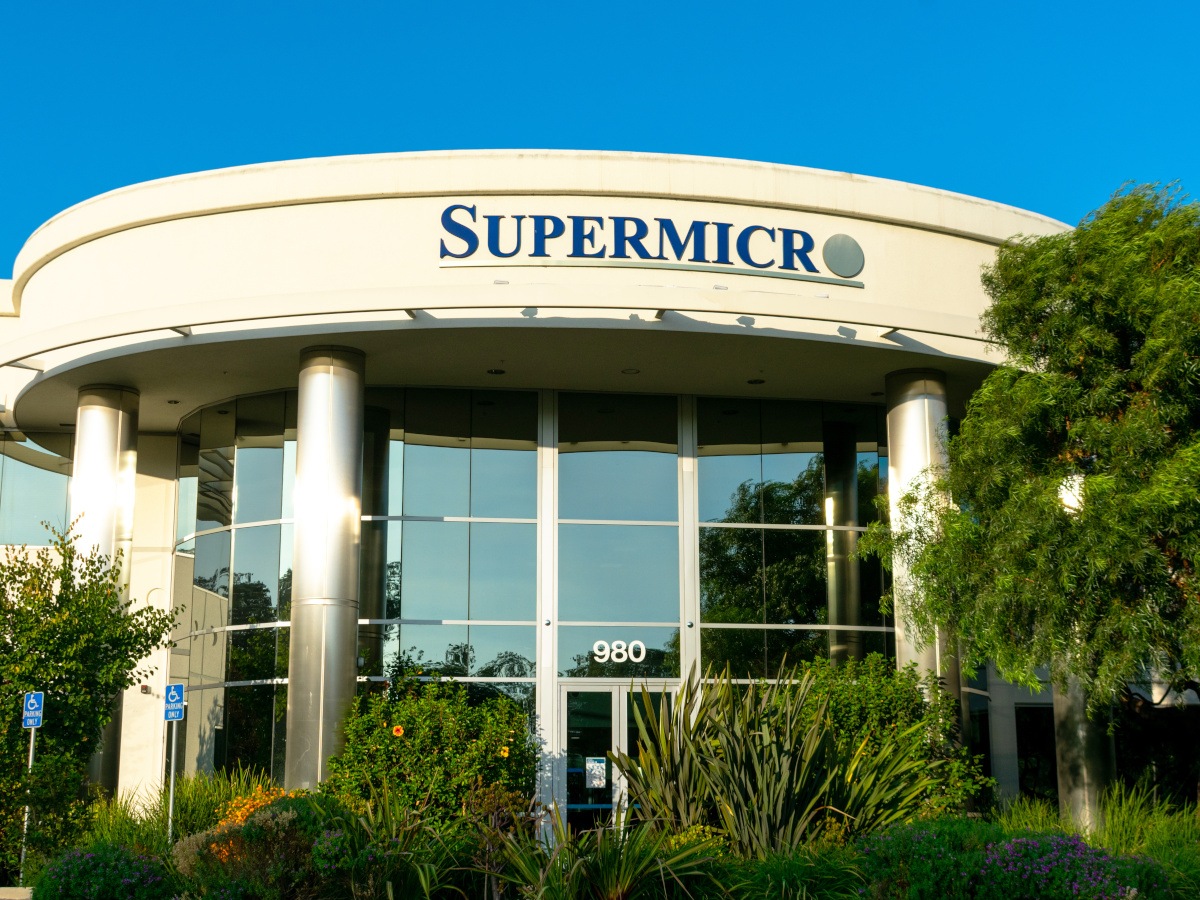
A Taiwanese national, reported to be an Nvidia employee, was arrested in the country on Tuesday (28 July) on suspicion of illegally exporting high-end AI servers manufactured by Supermicro.
According to a translated statement from Taiwan’s Keelung district prosecutor’s office, the suspect, named Chang, is accused of crimes including making false entries in business documents.
Investigation into his activity began on 24 July, and authorities conducted searches of his residence and business. Chang was later brought in for questioning.
Advertisement
Authorities detained Chang after determining him to be a flight risk. Concerns were also raised around the suspect potentially destroying evidence or colluding with accomplices.
The prosecutor’s office did not mention Nvidia in its statement, although multiple news publications have reported that the Supermicro AI servers in question were equipped with Nvidia chips, which are subject to US export controls and cannot be transported into China.
Nvidia did not confirm whether the detainee was its employee. “We primarily sell our products to well-known partners, including OEMs (original equipment manufacturers), who help us ensure that all sales comply with US export control rules,” the company said in a statement to Reuters.
This is the latest arrest in a months-long investigation conducted by Taiwanese authorities over suspicion of illegal exports, and came amid a third round of searches. Earlier in July, Supermicro said that two of its workers at its Taiwan unit were arrested as part of the investigation into the alleged illegal exports, while a previous round saw three people being detained.
Advertisement
In March, the US government charged three people associated with Supermicro, including co-founder Yih-Shyan Liaw, over allegations of helping smuggle at least $2.5bn of AI technology into China.
Don’t miss out on the knowledge you need to succeed. Sign up for the Daily Brief, Silicon Republic’s digest of need-to-know sci-tech news.
Given the meteoric rise in BGMI players, Krafton India has just announced the BGMI Campus MVP Program. This 90-day campaign will have 150 student ambassadors selected from 17 IITs and 28 NITs. The objective being to build an active BGMI community among the participants by getting them involved in organizing tournaments and events. KRAFTON also plans to combine online gameplay with offline meet-ups to keep students engaged throughout the program.
What Is BGMI Campus MVP?
Campus MVP BGMI is an initiative by KRAFTON India that aims to create gaming communities among college students. Under the 90-day campaign, certain students would be appointed as BGMI ambassadors at their respective campuses. These students would promote gaming among other students by organizing tournaments, creating content, and conducting community activities. This campaign attracted over 16,000 applications from students from 5,000 different institutions. KRAFTON selected 150 students for the first batch, while an additional 100 students were selected as reserve candidates.
The chosen student ambassadors will conduct BGMI sessions within their respective colleges during the 90-day program period. They will arrange classic matches, scrims, and tournaments, generate gaming content for college students, and also hold offline meet-ups. The ambassadors will conduct inter-department and inter-college competitions before participating in national college gaming competitions.
The first phase of the Campus MVP program is already in progress. After completing onboarding and orientation, student ambassadors have begun organizing BGMI matches, creating gaming content, and running campus events. The initiative follows a three-phase format over 90 days.
KRAFTON’s Vision Behind the Initiative
According to KRAFTON, BGMI is no longer just about playing matches. KRAFTON claims that the game has turned into a platform where players can not only challenge each other but also create content and network with people. In this way, with the Campus MVP program, KRAFTON hopes that students will be able to network through games as well as take up leadership positions at college. This program is one of the many ways in which the company aims to strengthen ties with young gamers in India. KRAFTON also plans to use the learnings from the first batch to expand the program to more institutions in the future.
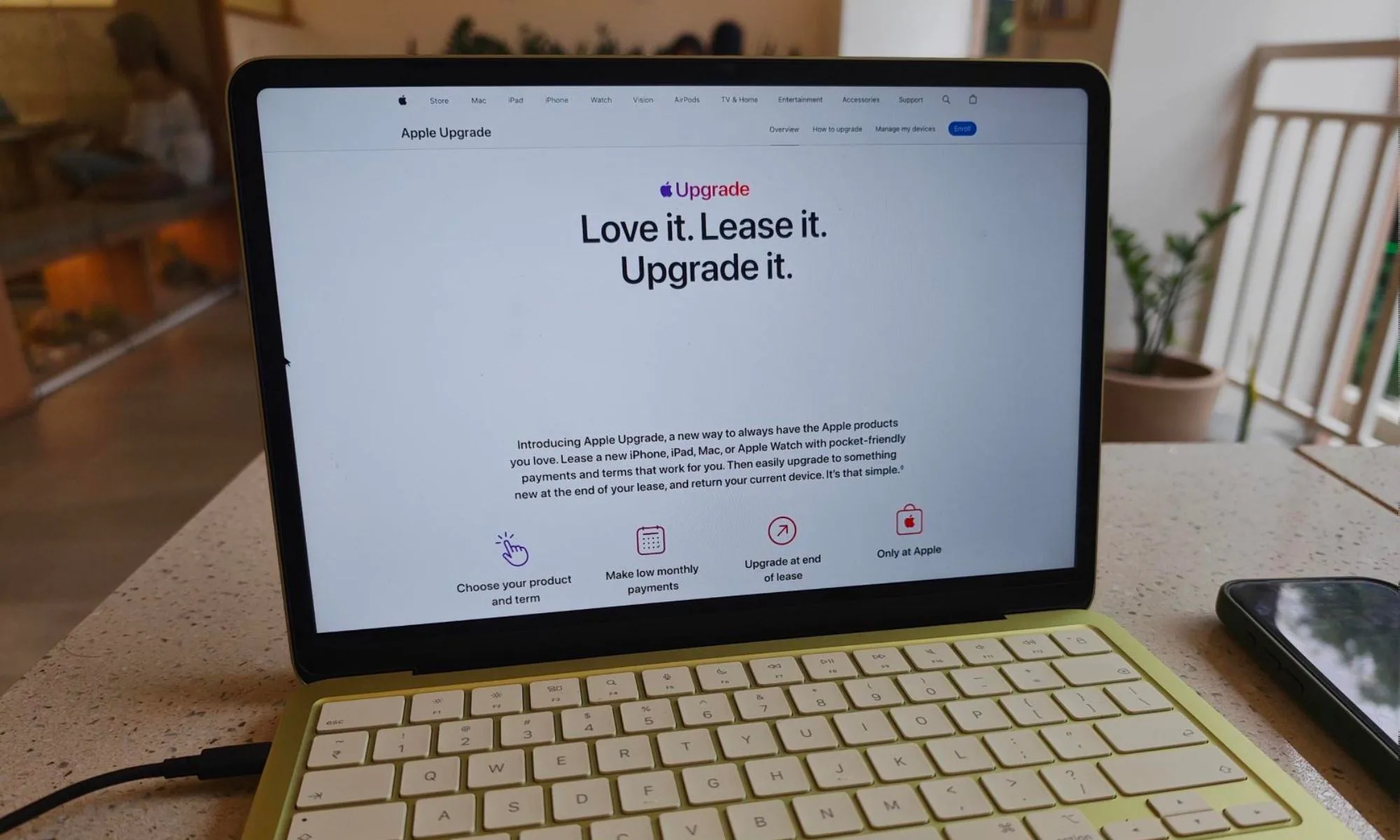
Apple just gave you a new way to own an iPhone, iPad, Mac, or Apple Watch without buying it. The newly launched Apple Upgrade program lets you lease Apple hardware through Klarna instead of paying full price upfront, and I’ll admit that the monthly numbers genuinely look tempting.
I went through Apple’s own published rates device by device to figure out where this actually saves you money, and where it’s just a slower way to pay full price for something you’ll never own.
Who qualifies for Apple Upgrade?
Nadeem Sarwar / Digital Trends
Apple Upgrade relies on Klarna as the lease provider. Applying for a device only triggers a soft credit check. To apply, you need to be 18 or older, a US resident, verified by SMS, and carrying an eligible credit/debit card, along with your Social Security number.
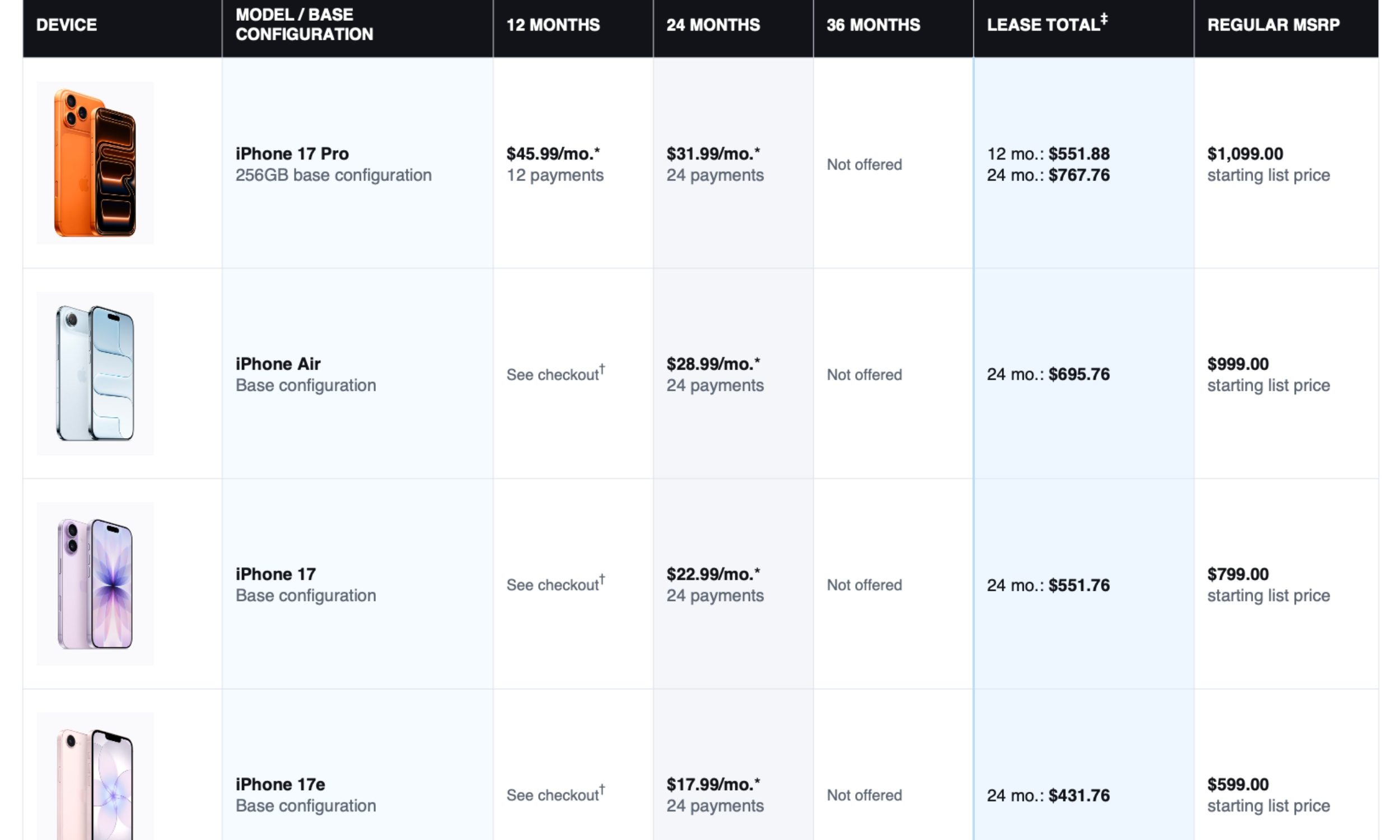
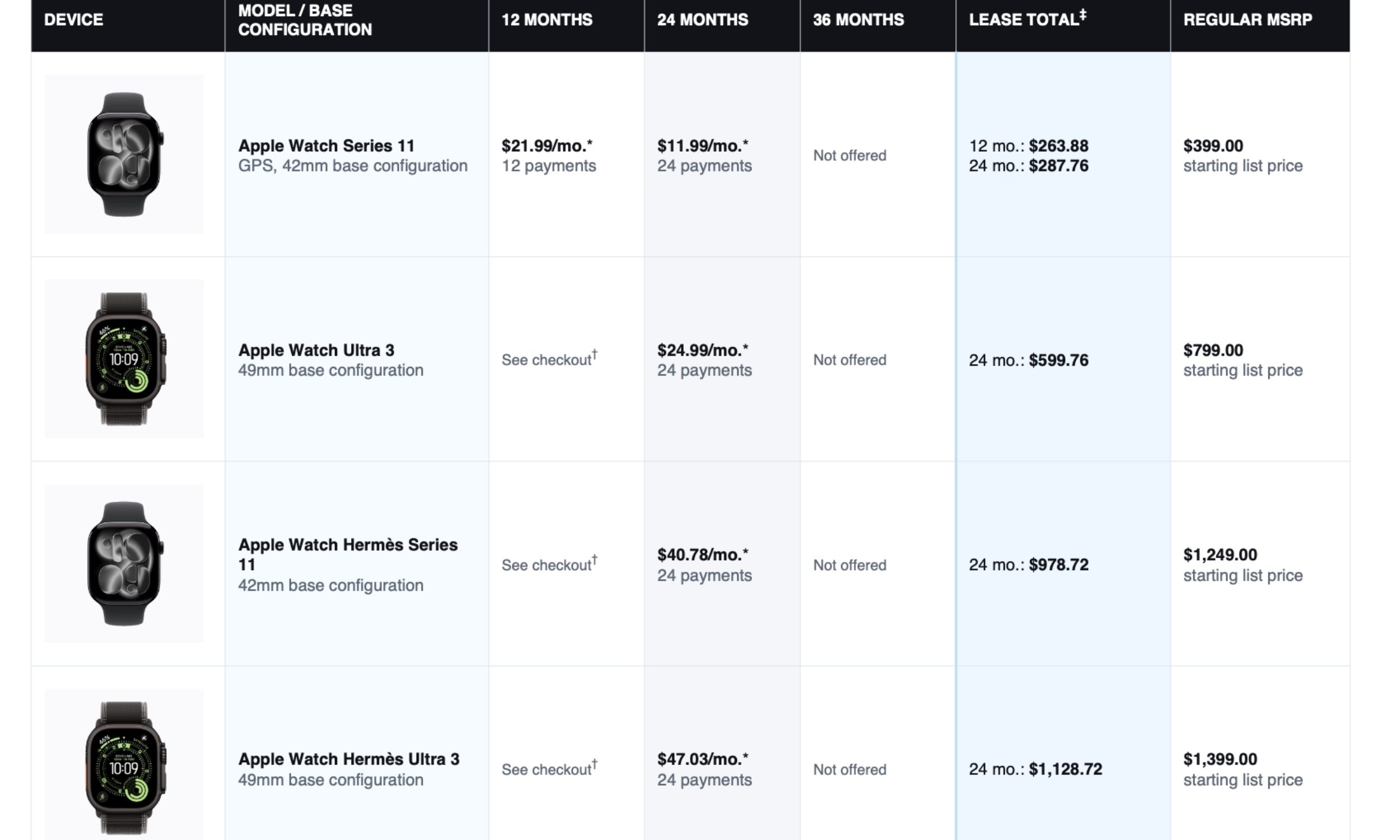
As part of the program, iPhones and Apple Watches are leased over 12 or 24 months, while iPads and Macs stretch to 24 or 36 months.
iPhones also require an active AT&T, T-Mobile, or Verizon plan, though the phone itself ships unlocked. AppleCare+ isn’t bundled anymore; it’s billed separately.
What happens when your lease ends?
Once the lease ends, you actually have three options based on what you want to do with the device: return and upgrade, pay to own, or walk away empty-handed.
Apple gives you up to six months after your term ends to decide. If you do nothing, Klarna automatically charges that purchase-option fee on your behalf.
Option
Pros
Cons
Best For…
Return & Upgrade
Latest features every 1–2 years
Infinite monthly bills
Tech enthusiasts who want the newest model annually.
No hassle selling old tech
Build zero device equity and loss on the trade-in value
Fresh battery life
Miss out on carrier deals
Pay to Own
Monthly bills hit $0
Highest total cash spent
People who plan to keep their device for 4+ years.
You keep a valuable asset
Paying a premium to buy out
Freedom to sell/trade later
Walk Away
Clean break from debt
Spent thousands for a rental
Someone switching away from Apple ecosystems entirely.
No future financial ties
Left with no phone/computer
No further obligations
iPhone: Does leasing actually save you money?
Let’s consider the iPhone 17e at $599 on a lease-and-return basis. If you lease it for 24 months and pay $17.99 a month, you’ll hand over roughly $432 total before sending the phone back. Basically, you never owned anything; you just rented it for two years.
Digital Trends
If you decide to keep the phone instead, you’ll pay the difference, roughly $165 to $170 more on the 17e. Add that to your lease payments, and the total lands right around $599, the exact price you’d have paid on day one had you purchased the iPhone outright.
To me, that’s where Apple Upgrade’s real appeal lies. It gives you the flexibility to spread out the cost, keep your cash available for other priorities, and still have the option to own the device later. However, I think the program makes far more sense for expensive Pro models than entry-level iPhones, where the upfront cost is easier to justify.
Advertisement
iPad: Worth the monthly commitment?
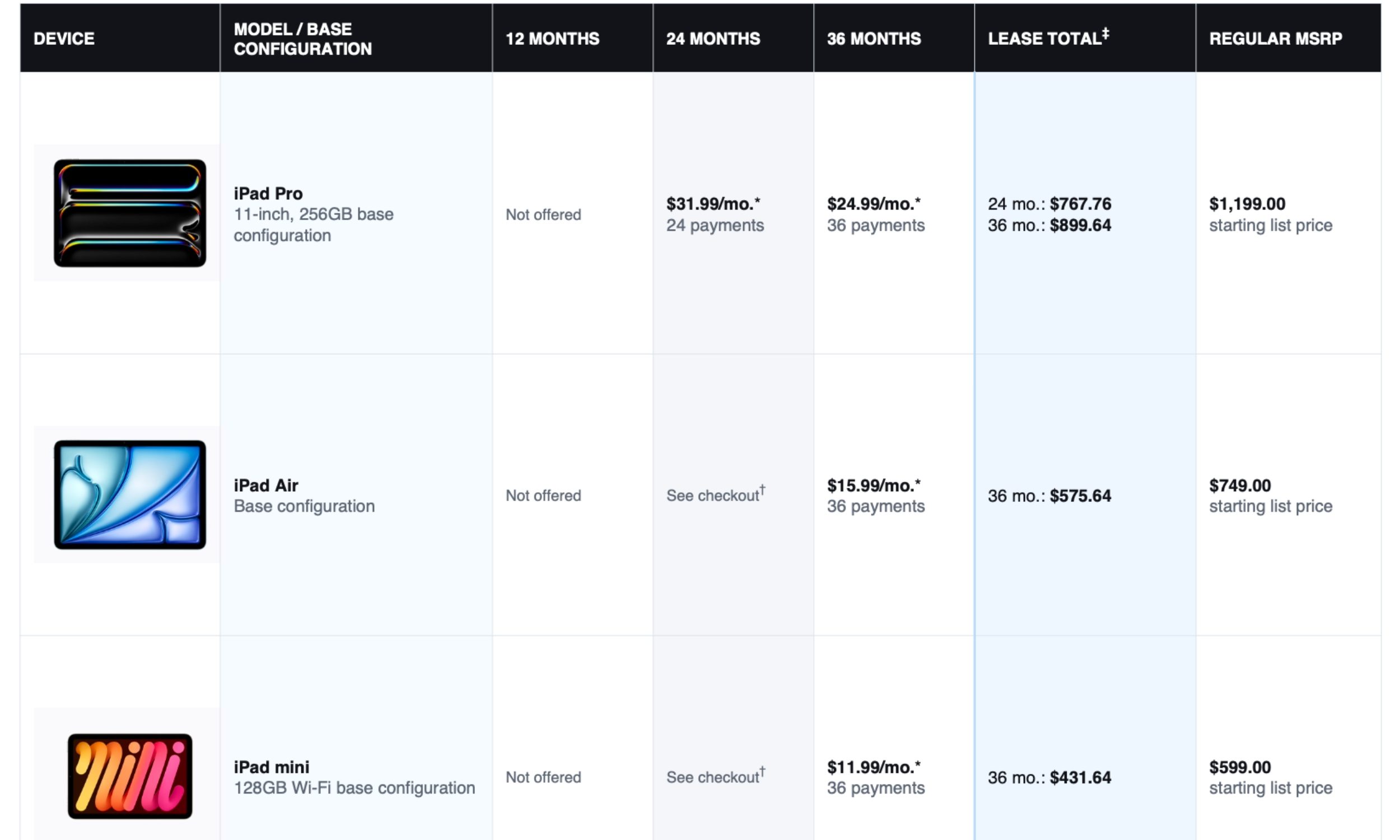
Given that buyers tend to keep their iPads longer than iPhones, Apple provides longer tenure options to lease them: 24 or 36 months. If you’re a student or an entry-level professional who simply wants an iPad for studies or getting done with the day-to-day digital chores, going for the lease makes good sense.
Digital Trends
For one, you’ll save the $599 (for the iPad mini) or the $749 (for the iPad Air) you’ll spend upfront, pay $11.99 or $15.99 per month over 36 months, and then, depending on whether you need those devices, can either pay the difference or simply upgrade to the latest one without paying any additional money.
Again, there are no discounts here: just ease of usage.
Mac: A better deal or just a bigger bill?
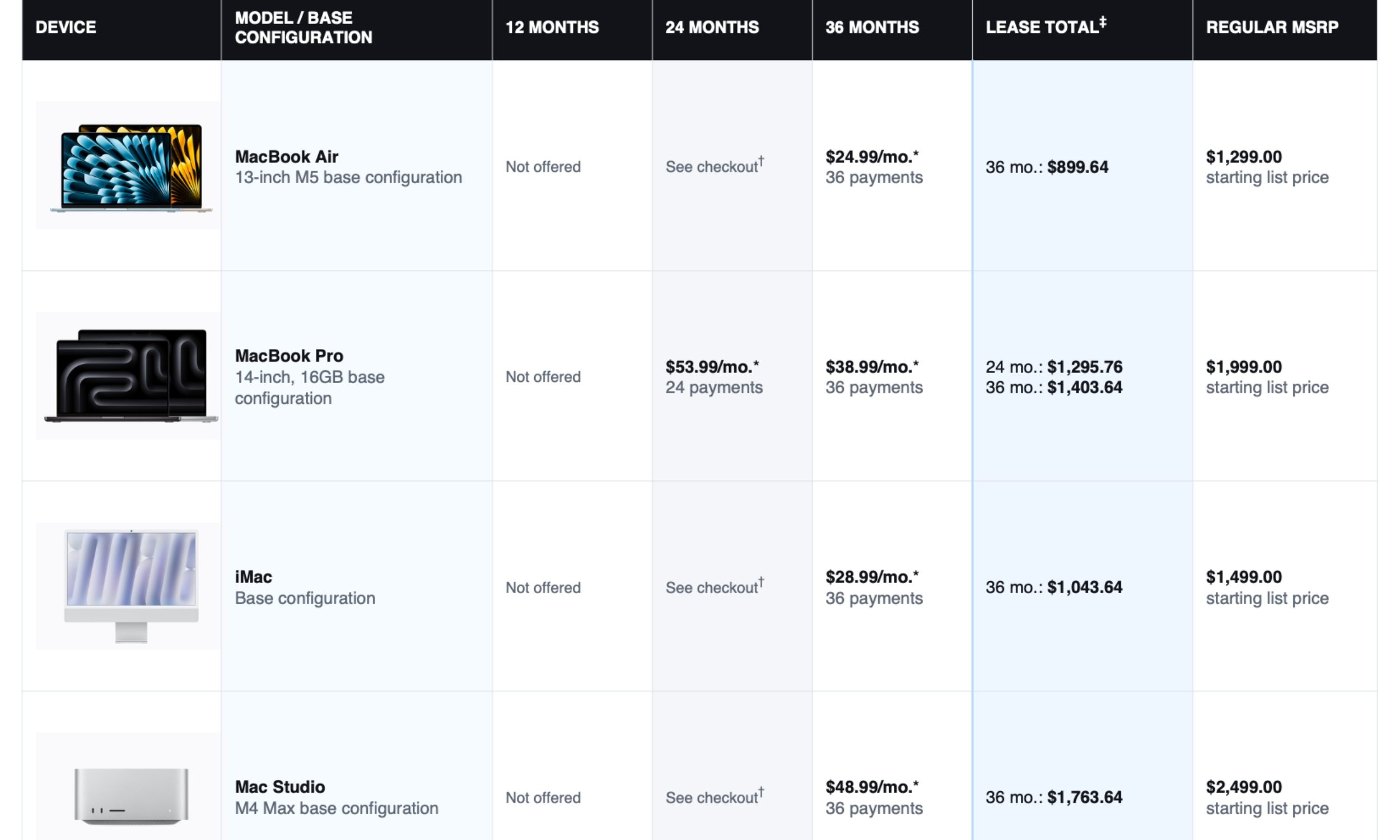
If you don’t have that kind of money upfront but still want to upgrade from an old Intel-based MacBook or even an M1- or M2-powered MacBook Air, the Apple Upgrade program breaks that upfront cost into monthly installments starting at just $24.99 over 36 months.
Digital Trends
However, there’s another side to this. The M5 family of chips offers enough performance headroom to stay relevant for the next four to five years, which is why I expect these MacBooks to hold their resale value exceptionally well.
That’s why I’d stretch the payments over the full 36 months and then pay the remaining amount to keep the MacBook. Unlike an iPhone, a MacBook is something that I’d comfortably hold on to for four or five years, choosing long-term ownership over upgrading.
Advertisement
Digital Trends
Apple Watch: The one category where leasing might win
I’d personally say that it makes more sense to buy the Apple Watch instead of leasing it.
First, the Apple Watch upgrade trajectory hasn’t really been on an upward path lately. For most users, the Series 10 is going to serve the same purpose as the Series 11. With a new release around the corner, you can generally find the outgoing models at a decent discount.
Take me as an example: I’ve been using the Watch Series 8 for three years now, and I don’t really feel like upgrading. The upfront cost isn’t as much as a Pro iPhone or MacBook Air either.
For a long time, cell site simulators, a.k.a. “Stingrays” made headlines on nearly a daily basis. Then they just kind of fell off the map.
L3Harris — the manufacturer of cell site simulators that commanded enough market share to see its flagship product become the victim of genericide — saw the writing on the wall and exited the market. Part of this was due to cell tech advances that made it more difficult to obtain the information these faux cell towers were meant to collect. Part of that was also Supreme Court precedent that made the tech inherently less popular with US law enforcement.
Riley raised questions about cell site simulator use by requiring warrants for cell phone searches. And spoofing a cell tower was definitely a search, as the devices forced every cell phone in the area to connect to the Stingray and cough up identifying info about the device. Carpenterarrived a few years later and made it clear long-term tracking via cell site location was no longer something covered by the Third Party Doctrine.
But the biggest contributor to the decline in Stingray device usage were the warrant requirements instituted by both federal and local law enforcement agencies. What used to be a Wild West free-for-all was now something that required judicial approval. Apparently, a lot of cops decided this tech they once claimed was so useful to investigations it couldn’t be discussed in open court was useless now that it was subject to oversight.
Advertisement
We’re seeing a bit of an anomaly here. Not only is the use of cell site simulators being discussed in open court, but the federal officers have been denied their unusual — and outrageous — request to basically go wardriving for a month in Akron, Ohio. Here’s This Week in Security with more details:
A U.S. magistrate judge last month denied to issue a search warrant allowing federal agents to snoop on the phones of “thousands of uninvolved, unsuspecting individuals” across Ohio in an effort to identify a suspected criminal’s device, a rare rebuke by a court blocking the use of a cell-site simulator.
In the ruling, the judge said the federal government wanted to deploy a cell-site simulator that would have allowed “access to the information of thousands of individuals in the Akron, Ohio area,” but refused the warrant on grounds that it would have allowed federal agents to “gain unbridled discretion to examine the movements of private citizens at all times for thirty days.”
The ruling [PDF] by the magistrate doesn’t name the federal agency seeking the warrant, nor does it give any details about the alleged criminal activity that might help narrow the list down. The rest of the docket remains sealed so it may be weeks, months, or never before we learn anything else about this incident.
Here’s what it does say about the events leading up to this severely deficient warrant:
Advertisement
On June 15, 2026, the government sought approval of a warrant for use of CCSS for up to 30 days, 24 hours a day, to identify the cellular device(s) used by a suspect involved in criminal activity in Akron, Ohio. The affidavit to the warrant application established probable cause to believe that a specific individual is using one or more unknown cellular devices in criminal activity. The affidavit also suggested that there is probable cause to believe that uncovering the identity of the cellular device(s) would unveil more evidence of criminal activity.
The problem is right there in the first sentence. The government appeared to think the only thing it had to do to satisfy the particularity requirements of the Fourth Amendment was to suggest it might limit this roving, 24/7 surveillance to a few areas in Akron.
Moreover, in an attachment to the warrant application, the government described five different locations at which a CCSS could be used to identify the suspect’s cellular device(s) “when the officers to whom it is directed have reason to believe that [the suspect] is present” and “in the vicinity of” the following locations:
the suspect’s residence; the suspect’s overnight location; the suspect’s daytime location; and two other densely populated locations the suspect frequently visited.
That’s wild. This is basically telling the court the government wants to force thousands of devices to connect to its cell site simulator at multiple locations for a period of 30 days. That the agency said it would “take no further investigative steps” until it had gathered enough info to make sure it had found its preferred suspect is hardly comforting. The fact that it claimed it would delete any irrelevant information (at an unspecified time) following its 30 days of wardriving doesn’t help much either.
The court says this is obviously impermissible under any interpretation of the Fourth Amendment, especially given Supreme Court precedent handed down in recent years. It also cites geofence warrants that have been recently rejected by magistrates for pretty much the same reason: wholesale surveillance of hundreds or thousands of people attempting to present itself as a legitimate search under the Fourth Amendment.
The court reminds the government that the Fourth Amendment says this about warrants:
Advertisement
[N]o Warrants shall issue, but upon probable cause, supported by Oath or affirmation, and particularly describing the place to be searched, and the persons or things to be seized.
The court says this warrant is no better than the geofence warrant rejected by an Illinois federal court back in 2023: searching for a suspect by searching everyone officers encounter isn’t “particular,” and the use of warrant doesn’t make it more acceptable.
There, just as here, the proposed warrant allowed the government access to thousands of identifiers and location data in an undetermined geographic area. Id. at 715–16. The court found the CCSS [canvassing cell site simulator] “akin to a warrant application to search an entire apartment building—or an entire city block—where the government has probable cause only that evidence of a crime will be found in one specific apartment unit, for up to 30 days.”As that court recognized—and as this Court now concludes—the Fourth Amendment’s particularity requirement bars this sort of “rummaging” through the proverbial home.
That much should have been obvious to the investigators seeking to have this warrant approved. Either this was ignored in hopes investigators could slip one by the judge or the government thought this might somehow be more constitutional than a geofence warrant with the same parameters. Either way, the government was wrong.
Despite cops relying on Google location data more than cell tower dumps or Stingray devices these days, it’s clear they’re still relying on tech that has completely fallen out of favor over the past several years. I guess if you’ve already bought it, you may as well use it. Sunk cost meets diminishing returns. Fortunately for the Fourth Amendment, blowing the dust of a cell site simulator hasn’t changed the way courts view these warrants.
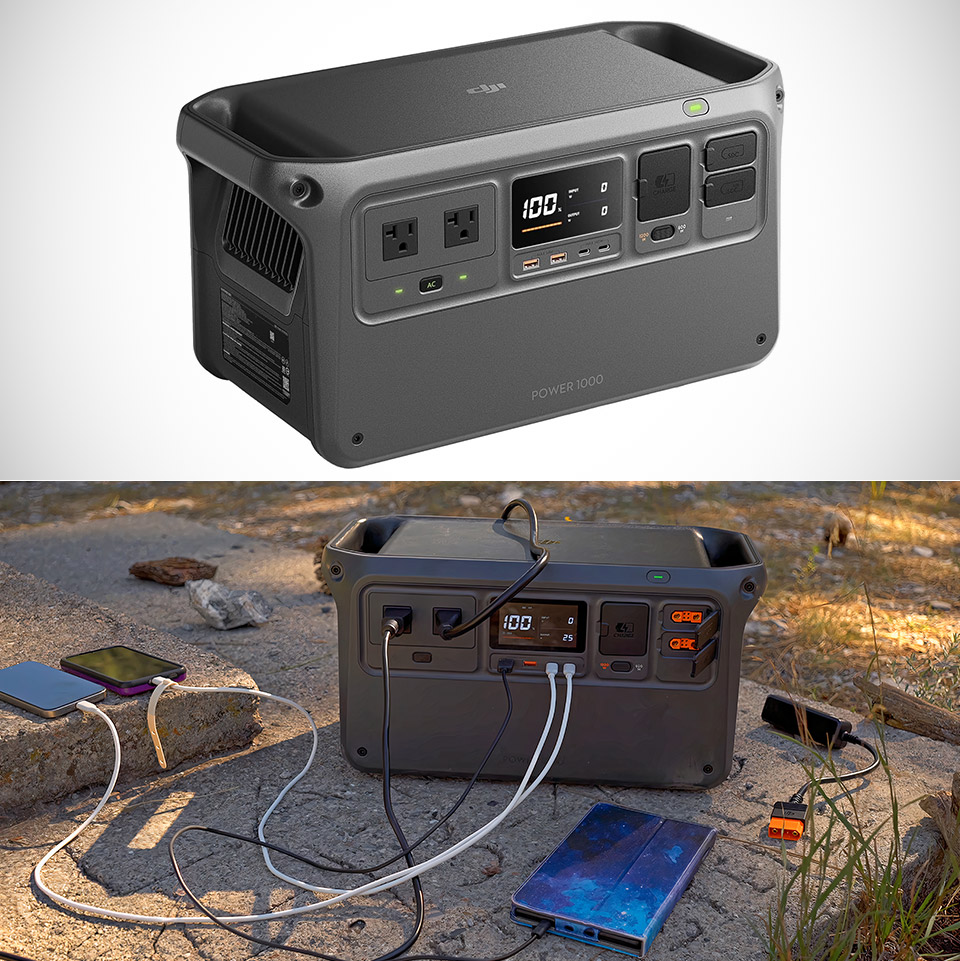
Summer temperatures keep pushing higher across the map, and grids feel the pressure. Air conditioners run nonstop, transformers strain, and outages arrive with little warning. In those hours a reliable backup power station stops being a nice-to-have and becomes the difference between a minor inconvenience and a real problem. The DJI Power 1000, priced at $349 (was $699), steps into that role with a combination of capacity, output, and practical design that matches the needs of actual emergencies.
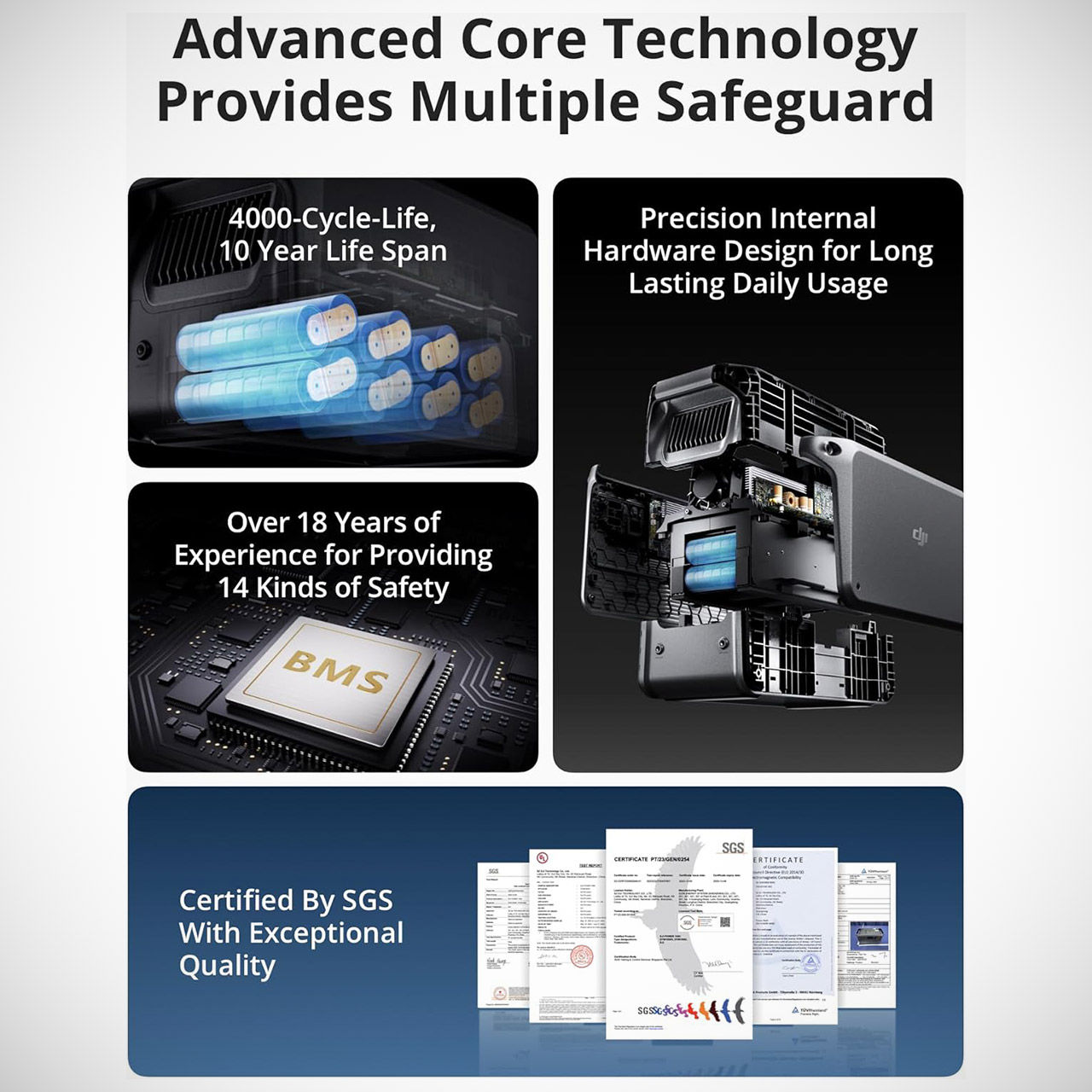
A 1024 watt-hour Lithium ferrophosphate battery is packed into a unit that weighs only 29 pounds and measures 17.6 by 8.9 by 9.1 inches, making it compact enough to transport from room to room or fit into a vehicle if you ever need to make a rapid departure. Size isn’t everything; the relationship is what really matters. LFP cells have a reputation for delivering over 4,000 charge cycles while keeping more than 70% of their original capacity, equating to nearly a decade of regular use without significant drop down.
Power 99% of Household Appliances – With a 2200W max continuous output power, DJI Power 1000 easily handles high-watt appliances like outdoor camping…
Fully Recharged Fast – DJI Power 1000 can be fully recharged in just 70 minutes using grid power. Charge fast and save time so you get moving on your…
Safe and Secure – An LFP battery provides up to 4000 cycles and a service life of approximately 10 years. The DJI Battery Management System (BMS…
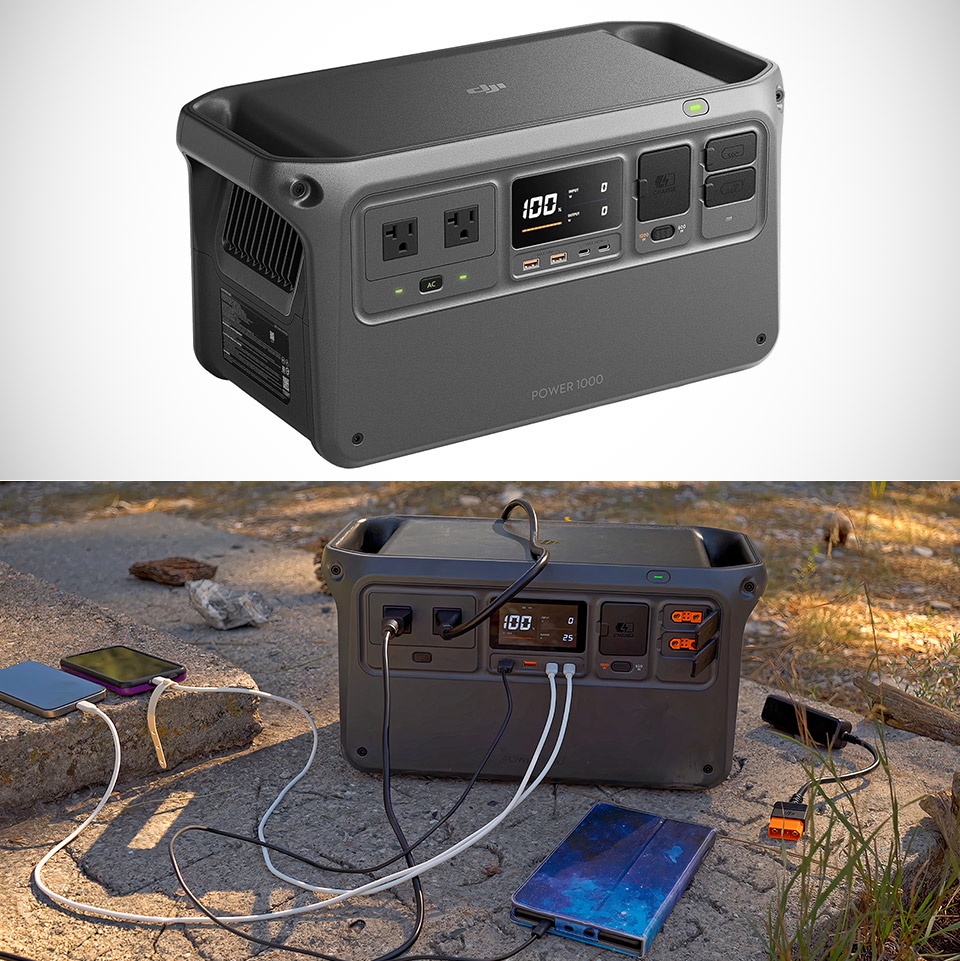
Continuous AC power reaches 2200 watts with a short-term peak of 4400 watts, which is handled by two normal household outlets. A typical fridge or freezer consumes less power than that continuous rating, therefore the station should be able to keep your food safe for an extended duration. Medical gadgets, fans, phone chargers, routers, and laptop computers all remain operational without incident. Two USB-C connectors supply up to 140 watts each, enough to charge current laptops and phones simultaneously, while two USB-A ports power older devices and accessories.
Advertisement
When the power is restored, even momentarily, recharging occurs quickly, with 80 percent completed in approximately 50 minutes and a full charge in about 70 minutes under ideal conditions. That speed allows your station to recover from periodic outages rather than sitting idle for hours, which is an extra benefit. If you do have sun, the DJI adapter module is an alternative for getting through longer events. The unit’s quiet functioning at 23 dB allows it to sit in a bedroom or living room overnight without adding to the stress level.
In UPS mode, the station ensures a smooth transition. When you put it into a wall outlet and your gadgets consume power from it, a grid breakdown activates the battery power in roughly 0.02 seconds, with no interruption, data loss, or worry. Bypass charging keeps the battery charged while supplying power, ensuring that the system is ready for the next reduction in power.
An intelligent battery management system monitors for overcurrent, overvoltage, and overdischarge concerns. Individual circuits are protected by multiple fuses. The bright color display reveals remaining capacity, input and output levels, and status at a glance, allowing you to monitor things and make educated decisions even in low light conditions.
Giant anime robots are landing in the Seattle area.
Bandai Namco is opening an official Gundam Base retail store at Westfield Southcenter mall in Tukwila, Wash., this fall, giving Pacific Northwest anime and model-kit fans a permanent flagship destination for all things Gunpla.
For the uninitiated, Gundam isn’t just a nostalgic cartoon; it’s a massive, multibillion-dollar global media franchise that revolutionized Japanese animation when the original “Mobile Suit Gundam” series debuted in 1979.
Owned by Tokyo-based entertainment giant Bandai Namco, the IP spans decades of TV shows, video games, and movies, but its biggest cash cow is “Gunpla” — a portmanteau of “Gundam” and “plastic model.”
Unlike standard pre-assembled action figures, Gunpla kits are snap-together, highly engineered mechanical puzzles that fans clip off plastic runners and assemble by hand, ranging from entry-level builds to ultra-intricate models with thousands of pieces.
Advertisement
Bandai Namco says the new Southcenter location will be built around four core pillars for visitors: “watch, buy, build, and learn.”
Rather than functioning as a standard retail shop, the flagship is designed as an experiential destination. Shoppers can expect life-sized mecha statues and immersive themed environments for photo ops, alongside displays featuring fully painted master builds spanning 45-plus years of Gundam lore.
The store will carry model kits catering to every skill level — from beginner-friendly “Entry Grade” sets to complex “Perfect Grade” builds — along with exclusive, store-only Gunpla kits and limited-edition merchandise. The location will also feature community spaces hosting building workshops, special activations, and hands-on guidance from staff.
The Tukwila store is part of a broader U.S. brick-and-mortar push by Bandai Namco. Alongside the Southcenter opening, the company is launching a location at the Mall of America in Minneapolis this fall. Both follow the late-2025 debut of The Gundam Base Chicago at Fashion Outlets of Chicago — the entertainment giant’s first permanent retail footprint in North America.
If you regularly fill up at a gas station in the U.S., you are probably familiar with the various grades of gasoline available for purchase: regular 87 octane, mid-grade 89 octane, and premium 91 or 93 octane. While most people stick to regular 87-octane fuel, owners of high-performance vehicles typically opt for premium 91-octane or 93-octane gasoline. You may, then, wonder who fills up with 89-octane fuel.
Historically, very few vehicles have required 89 octane, a fact that’s true to this day. According to the EPA database, only a handful of new vehicles sold between the 2024 and 2026 model years specifically require mid-grade gasoline. These are vehicles from Stellantis subsidiaries, namely Dodge and Ram, and all are powered by the company’s long-running 5.7-liter Hemi V8 engine.
As of 2026, the Stellantis vehicles available with this engine are the Ram 1500 and Dodge Durango, making these the only new vehicles that require 89-octane gasoline. Outside of these models, virtually every other new vehicle sold in the U.S. is designed to run on either regular 87-octane or premium 91-plus octane fuel.
Advertisement
Usage of 89-octane gasoline is on the decline
Jan Zabrodsky/Shutterstock
Aside from the aforementioned new cars, drivers of older 5.7 HEMI cars like the discontinued Chrysler 300, Dodge Challenger, Dodge Charger, and Jeep Wagoneer continue to use mid-grade gasoline. Predictably, then, 89 octane accounts for a tiny percentage of overall gas use. A 2022 study conducted by the U.S. Department of Energy showed that consumption of 89 octane gasoline has been steadily decreasing over the years, with only around 1% of gasoline users in the U.S. still using 89 octane fuel as of 2021, and it’s probably shrunk since then.
While only a few cars need mid-grade gas, some may opt for it thinking it is better than regular fuel. They do this on the mistaken assumption that the more expensive the fuel, the better it is for their cars. This, however, is not true at all. There is no significant improvement in horsepower, fuel economy, or emissions when higher-octane fuel is used in vehicles designed for regular gasoline.
Advertisement
As to why fuel stations continue to offer 89 octane fuel despite low demand, it’s possibly because it doesn’t require dedicated hardware. Gas stations only really store regular and premium gas; when a customer chooses 89 octane, the dispenser simply blends a metered amount of regular and premium gas to create mid-grade gasoline on the fly. So, the next time you are at a gas station wondering whether or not to choose 89 octane gas, do it only if your car manufacturer explicitly recommends using it.
Spur Intelligence, a cybersecurity startup based in Lake Mary, Florida, has raised a $200 million round led by Insight Partners.
Spur, founded by two former Defense Department engineers in 2017 — five years before ChatGPT’s public launch — was prescient. The startup’s tech helps enterprises distinguish legitimate human users from increasingly well-hidden bot traffic to help identify fake users and threats.
“As sophisticated criminal VPNs, residential proxy networks, and anonymization infrastructure proliferate, organizations are increasingly operating with a critical blind spot: they can see the activity, but not the infrastructure behind it,” Insight’s Thomas Krane said in a written statement.
Detecting malicious traffic has, of course, been a hill corporate security teams have been climbing for eons. But nothing compares to the onslaught facing them today. As of mid-2026, bots are now more active on the internet than humans, Cloudflare reported last month.
Advertisement
“Thought it would be end of 2027, then early 2027, but agentic traffic growing so fast that bots have now passed human traffic online for the first time in the Internet’s history,” Cloudflare founder and CEO Matthew Prince posted on X last month, pointing to his company’s latest traffic report.
























































You must be logged in to post a comment Login