
Connect with us
DAPA Banner
DAPA Coin
DAPA
COIN PAYMENT ASSET
PRIVACY · BLOCKDAG · HOMOMORPHIC ENCRYPTION · RUST
ElGamal Encrypted MINE DAPA
🚫 GENESIS SOLD OUT
DAPAPAY COMING

Tech

Lorde says AI glasses are “not sexy”

Published

on

While Kylie Jenner serves as a human billboard for Meta’s AI glasses, pop star Lorde isn’t buying it.

During a set at the Mad Cool Festival in Madrid last week, Lorde had some choice words about the new technology, which many security experts have deemed a privacy nightmare.

“Increasingly in our world, it gets harder and harder to know what is real,” Lorde told the audience. “You don’t know if someone is wearing sunglasses, or if they’re wearing those f–ed up, f–ing [AI glasses]. Can I just say, for the record, f— the glasses. Don’t get the glasses. Not sexy.”

Lorde has written before about throwing her phone into the ocean, but this was next level.

Advertisement

Lorde was possibly moved to comment on the latest trends in tech because Ray-Ban, a sponsor of the festival, partners with Meta to make AI glasses. Lorde also performed immediately before the singer Jennie, who is an ambassador for Ray-Ban x Meta’s smart glasses line.

Lorde isn’t alone in raising concerns. Smart glasses, which come with cameras and AI features, have been used as tools for harassment and extortion. Meta, the most popular smart glasses maker, has said it takes privacy seriously and builds in safeguards like a visible recording light, but the company is facing many investigations and lawsuits alleging privacy violations. One lawsuit alleges that Kenyan contract workers were made to watch graphic videos obtained with the glasses to help train Meta’s AI. (Meta hasn’t publicly detailed its response to that specific claim.)

Advertisement

None of this has stopped the product from strong sales. EssilorLuxottica, the Ray-Ban maker, said it sold more than 7 million Meta AI glasses in 2025 — more than triple the roughly 2 million units it sold in 2023 and 2024 combined. Ray-Ban Meta glasses have been such a hit in the smart-glasses category that an emboldened Meta keeps expanding the lineup.

But hey, if privacy doesn’t make people think twice about the glasses, maybe vanity will. Lorde nails it pretty concisely with her declaration that they’re simply “not sexy.”

The here and now, she added, now that “is sexy.”

When you purchase through links in our articles, we may earn a small commission. This doesn’t affect our editorial independence.

Advertisement

Source link

Continue Reading
Click to comment

You must be logged in to post a comment Login

Leave a Reply

Tech

Beyond the Galaxy Z Fold: Samsung’s Future Phone Concepts That Roll, Slide and Expand

Published

on

Over the years, phone-makers have shown off handsets that stretch, bend and fold. But inside a secret room at Samsung Display’s headquarters in South Korea — one that had never before been opened up to the press — I got a firsthand look at the company’s vision for the future of smartphones.

Along one wall sat a lineup of concept displays that could eventually make their way into future mobile devices. I wasn’t allowed to touch the prototypes, but they were mounted on machines that repeatedly bent, folded and rolled the displays, showing off their range of motion.

Advertisement

Watch this: I Went Inside Samsung’s Secret Display Lab and Saw Its Wildest Phone Concepts

Consumer tech shows such as CES and Mobile World Congress have become stages for companies to exhibit their most ambitious innovations — many of which never see the light of day. Still, they show how manufacturers are exploring ways to make our devices more intuitive and compelling. Samsung is one of the biggest players in the foldable phones market, having released the clamshell-style Flip, book-style Fold and even the phone-tablet hybrid Galaxy Z TriFold. The company’s expected to unveil the Galaxy Z 8 series next week at its Galaxy Unpacked event

During my visit to Samsung’s global headquarters in June, I got a rare behind-the-scenes look at how the company tests its latest mobile displays, along with an exclusive preview of what may be coming next. Samsung didn’t share specs for its concept displays, but here’s what I saw during my tour — and what it could mean for your future phone.

Advertisement
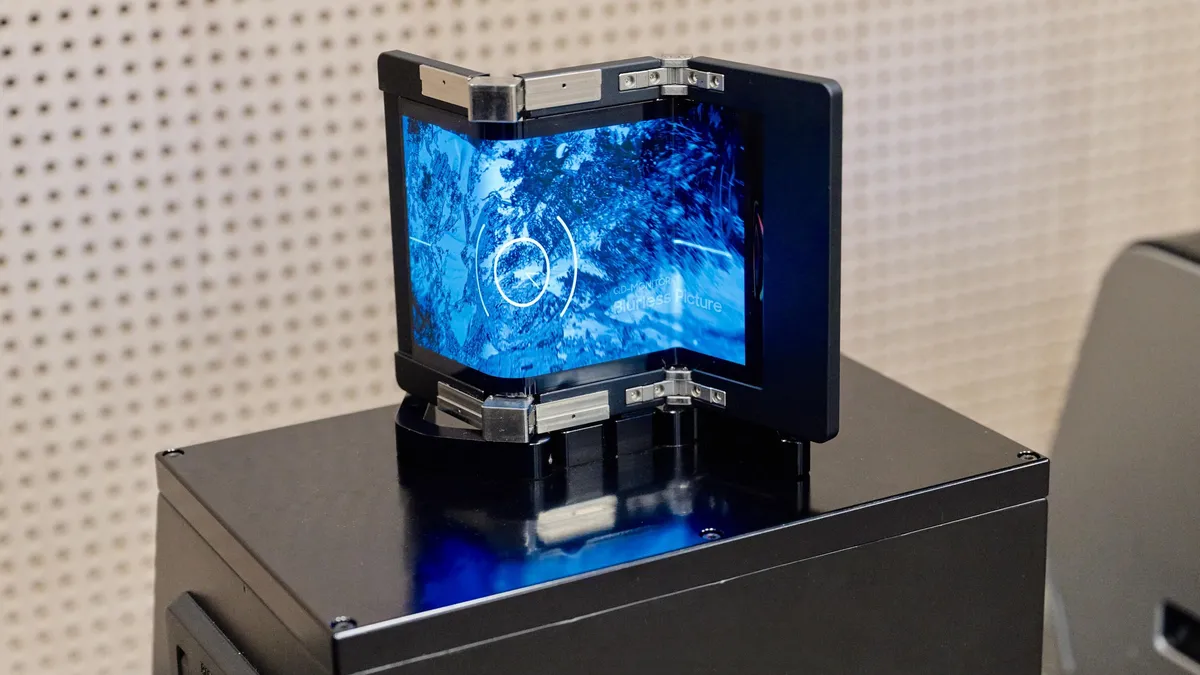
Samsung Display Flex S concept

The Flex S folds into a Z shape.

Samsung

One concept, called the Flex S, opens and closes in a Z shape (not to be confused with the Galaxy Z TriFold, which forms a C shape and folds shut like a pamphlet). The Flex S opens up to a tablet-sized display, which could be ideal for watching movies. That’s what I appreciated about the TriFold, which I happened to review while recovering from strep throat. Lying in bed, I enjoyed having a larger screen for streaming that I could simply fold shut when I was finished.

See also: From Extreme Heat to Half a Million Folds: A Rare Look Inside Samsung’s Display Lab

Advertisement
Samsung Display Out Foldable concept

The Out Foldable has screens on the outside of both panels.

Samsung

Another prototype, called the Out Foldable, is like a reverse book-style foldable. Instead of placing the larger display on the inside, as Samsung does with the Galaxy Z Fold 7, the design puts both screens on the exterior and unfolds into a wider, mini-tablet-like layout, similar to some early foldables such as the 2019 Huawei Mate X

This is a configuration I’m a little more wary of for a couple of reasons. One, it might be hard to avoid scratching or cracking the wrap-around external display. And two, I’m not sure I really need a touchscreen display on the back of my phone. But I have to admit, it looks pretty cool nonetheless. 

Advertisement
Samsung Display Flex Slidable concept

The Flex Slidable (right) can expand horizontally.

Samsung

The Flex Slidable does as the name suggests. It can roll out to a wider display, which could be helpful for gaming or watching videos. 

My first thought when I saw this concept was, “LG is rolling in its grave right now.” (Pun intended.) The company teased a rollable smartphone at CES 2021, but the product was canceled after the company shuttered its mobile division just a few months later. In 2023, Motorola also unveiled a rollable smartphone concept with a screen that extends upwards, and its parent company, Lenovo, showcased laptop concepts at this year’s CES that extend both horizontally and vertically. We’ll have to see if Samsung’s ideas make it out of the lab.

Advertisement
Samsung Display Flex Hybrid concept

The Flex Hybrid can fold and roll open to a wider screen.

Samsung

Lastly, Samsung combined elements from its other concepts to create what it’s dubbed the Flex Hybrid. This model can fold open and also expand with a rollable display. This makes for a more compact design while ensuring you don’t damage the screen. 

A foldable device with a rollable component provides extra screen real estate without adding as much bulk. One of the biggest drawbacks of the Galaxy Z TriFold is that it feels thick when its three display panels are folded shut. This approach could eliminate the need for an additional foldable panel, instead using a display that rolls out when you need more space and tucks away when you don’t.

Next to these concepts were a couple more that caught my eye — quite literally, in the case of one device that had a dazzling 5,000-nit peak brightness. For reference, the Galaxy S26 Ultra can hit a peak brightness of 2,600 nits. It was a lot to look at indoors, but that level of luminance could make it easier to peer at your screen in bright sunlight. 

Advertisement
Two phones with bright displays and colorful umbrella wallpapers

Looking at a 5,000-nit display indoors might not be very comfortable, but it can come in handy in the bright outdoors.

Samsung

And finally, I saw a prototype mobile display with bezels so thin they were almost invisible. To highlight just how narrow the 0.6mm borders around the screen were, Samsung placed the phone-sized concept device on top of a tablet display. The two screens combined to form a single image of colorful cathedral windows. From a distance, it was hard to tell there was even a phone in the middle of the tablet; the image appeared seamless, uninterrupted by a phone’s thick borders.

Advertisement
A mobile display with thin bezels sits nestled on top of a tablet, creating one nearly seamless image of colorful cathedral windows

With bezels this thin, it’s hard to tell there’s a mobile display nestled in the center of this tablet.

Samsung

An expansive display stretching from one end of the phone to another can feel more immersive, but I also wonder how tricky it might be to hold the device without accidentally tapping something on the screen. 

As with all concepts, it’s not clear if or when Samsung will work these display technologies into its future mobile devices. But seeing these concepts offered a rare and fascinating glimpse into where smartphones could be headed.

Advertisement

Source link

Continue Reading

Tech

UDP Broadcasting And The Joys Of IPv4 Subnetting

Published

on

In the previous installment on UDP broadcasting and service discovery, the basics of both were explored, including an implementation in the form of NyanSD and its protocol. Contained in the comment section was a very good demonstration of why one of the most exciting aspects of software development is the opportunity to share your latest creations with other people. This being the ability to get solid feedback on all the points – including any potential boneheaded omissions – that you really should address, whether intentional or accidental.

The most pertinent point raised was definitely that of broadcast addresses and IPv4 subnets, with the latter topic especially being something that the sysadmins at the office would talk about all the time, but which us software developers were always happy to ignore as something that didn’t concern us. Turns out the joke was on me and everyone else – like our esteemed readers – who thought that they could escape the fascinating world of subnets, as today we’ll take an in-depth look at what subnets are and how they are relevant to the world of UDP network discovery.

I somewhat alluded in the first article to the topic of ‘which broadcast address to use’ as being somewhat of a rough topic to figure out, which is clearly why I just stuck to a blatantly ‘works for me’ /24 subnet that usually will work on networks, until it does not.

Subnet And Conquer
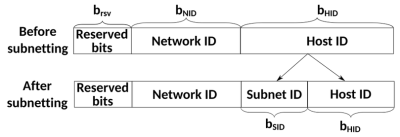
Basic subnetting concept. (Credit: Michel Bakni, Wikimedia)

The short version of ‘what is a subnet’ is to point at the subnet mask that we have been mostly mindlessly mashing into networking configuration dialogs along with the IPv4 address for many decades now. Usually this takes the form of 255.255.255.0, which is just the human-readable version of the actual bitmask. Here the loopback interface already tends to use 255.0.0.0 as its netmask, which is a detail that tends to be easy to gloss over as this is just one of those local OS things.

Putting netmasks in the crudest and simplest terms, they are a bitmask that is used to identify how an IPv4 pool of addresses is split up by defining which bits of the 32-bit IPv4 address identify a subnet. Normally we call the trailing part of an IPv4 address (the .123) the host identifier, with the preceding section the network identifier.

Advertisement

By masking part of this host ID and using it to create a subnet identifier, we can then use this for additional routing, just at the cost of a reduced number of possible host IDs within that subnet.

As an example, the common 255.255.255.0 mask identifies the first 24 bits (3 bytes) of the 32-bit (4-byte) IPv4 address, hence the mask being referred to as /24. With this mask, the remaining host ID bits allow for 256 hosts, of which two are not used for hosts: the first (e.g. 192.168.0.0) and last (e.g. 192.168.0.255) in the range. The last host ID in the range forms the broadcast address for that subnet.

This is why, for a /24 subnet, you can generally get away with just slapping a .255 on the end of an interface’s address, but also why for other subnet configurations it’s likely to explode violently.

To get briefly back to the loopback’s /8 style netmask, this means a single subnet with a maximum of 16,777,214 hosts, which ought to be sufficient for local system networking shenanigans. Its opposite extreme would be the /31 style netmask, which with just two potential host IDs is practically useless.

Advertisement

IPv6 subnetting is similar, but due to the much larger address pool and differences in the protocol this is a whole other kettle of fish that is as likely to send a network administrator’s heart racing in excitement as it is to make the average software developer run away screaming. This can be a fun topic for another day, perhaps.

This overview of IPv4 subnetting also skips over details like the different classes of IPv4 subnets beyond the Class A type here, but those are happily left to sysadmins and kin for now.

Sub-casting

In order to thus obtain the broadcast address for a given network interface you need to know two things: the IPv4 address and its associated netmask. From this you can then tell three things: the subnet ID, the broadcast address in that subnet, and the current host ID. Of these we only really care about the the second item.

Although you can obtain the broadcast address yourself by applying the netmask to the address, the OS’s APIs tend to happily give you the precomputed broadcast address. If that’s not your style or not an option, a manual procedure is to:

Advertisement
  1. Determine the number of host ID bits using the netmask.
  2. Set all bits to 1 in these bits to get the highest possible host ID.
  3. Use this value along with the original masked (i.e. network ID) bits to obtain the broadcast address.

If we thus start with a 192.168.0.0/24 network, we end up with 192.168.0.255, while for a 192.168.0.0/26 network with just six bits available the maximum value is 64, ergo we get 192.168.0.63, since we start counting at 0.

With this we can now broadcast UDP packets on any interface without any (major) worries.

Local Broadcast Address

A small glitch in the whole above story is that there’s actually another broadcast address, one which is always the same for each interface and can be considered to make the whole preceding explanation completely irrelevant. This being the local, or limited, broadcast address, which is either the best thing since sliced bread or the worst sin ever committed in the history of IP networking, depending on whom you ask.

This cheat code takes the form of the address 255.255.255.255 and if you send a packet on a UDP socket to it, you’ll get happy UDP responses from any service that is listening on the specified port. This raises the point of why you’d not just use this broadcast address on all interface, rather than bother with all the earlier described nonsense.

The only major difference between this local broadcast address and the earlier described directed broadcast address is that the latter can also be used to target a foreign network, instead of just the local network. This makes it a very attractive option if you just want to query the local network with UDP broadcast packets.

Advertisement

As for why you’d not want to use a local broadcast address, I couldn’t really find any references or citations on why this would be the case. Both would appear to be perfectly valid approaches to broadcasting, each with its own pros and cons.

Bugs

One final topic was my mistaken hardcoding of a /24 style broadcast address in NyanSD. Here reader ziew helpfully pointed me towards the Poco::Net::NetworkInterface::broadcastAddress() function, which seemed perfect. Unfortunately Poco’s implementation at least on Windows 10 appears to be rather broken.

After getting only 0.0.0.0 as broadcast address from this function, I had a bit of a look at what was happening, including checking what I got as subnet mask both for the default index parameter and for the next index. Across two different Windows 10 installations and both GCC in MSYS2 as well as MSVC 2017/2022 with various versions of Poco the returned values were… interesting enough to file a bug report on the Poco issue tracker.

Clearly this isn’t going to be fixed just yet, but on the bright side the horrific atrocity that I committed by hardcoding a /24 broadcast address will still work on basically every home LAN out there that NymphCast is likely to be used on.

Advertisement

Maybe I could just switch to a local broadcast address and that’d be even better. Feel free to torch down this idea in the comments, just be sure to provide solid reasoning and cite your sources.

A Complex Topic

Writing out the above pretty much clarifies I think why past me got a bit overwhelmed when trying to ‘just do a UDP broadcast thing’. Even just scratching the surface of IPv4 subnets and not even venturing into IPv6 territory makes one already feel a bit antsy.

Certainly, one could totally argue that anything other than a /24 network is unlikely to be encountered outside of certain government and business networks with either very specific needs, very enthusiastic sysadmins, or both, but it’s always better to design software with such real-life scenarios in mind.


Advertisement

Source link

Continue Reading

Tech

OpenAI’s First Device Will Reportedly Be a Portable Smart Speaker

Published

on

OpenAI’s entry into the world of consumer devices is expected to begin with the release of a portable smart speaker that lacks a screen, according to a Bloomberg report on Tuesday. The device is being positioned as “a new type of computer for the AI era,” Bloomberg’s Mark Gurman reported, adding that it would “serve as a humanlike AI companion that lives in the home.”

The device, which Gurman wrote is still in development, is expected to operate in much the same way today’s smart speakers do: answer questions, play media, operate smart-home appliances, as well as respond to messages and make use of capabilities offered by OpenAI’s ChatGPT.

But OpenAI’s device is expected to go a bit further into homes by offering a “personality” that would make a humanlike connection with users. It will include “mechanical elements that can move on their own, creating a sense that it is alive,” Bloomberg reported.

Advertisement
AI Atlas

The product leak comes days after Apple sued OpenAI, accusing the company of stealing its trade secrets. Apple alleged it “uncovered a pattern of theft of Apple’s trade secrets by OpenAI employees who were formerly at Apple.” Apple also called the instances it uncovered “the tip of the iceberg.”

However, OpenAI feels its new product “veers significantly” from any Apple device currently on the market and that it is “unlikely” its new device violates any Apple trade secrets, according to anonymous sources described as knowledgeable of OpenAI’s plans.

There’s been much speculation lately about OpenAI’s hardware ambitions. The company has been linked to a possible release of AI earbuds later this year or early 2027 and is also said to be working on a smartphone in partnership with component-makers MediaTek, Qualcomm and Luxshare. 

OpenAI’s hardware ambitions have included a high-profile partnership with former Apple designer Jony Ive. One recent rumor was that the devices could include one worn in the ear, but that OpenAI could have as many as five different devices ready by the end of 2028. 

Advertisement

OpenAI didn’t immediately respond to a request for comment. 

(Disclosure: Ziff Davis, CNET’s parent company, in April 2025 filed a lawsuit against OpenAI, alleging it infringed Ziff Davis copyrights in training and operating its AI systems.)

Source link

Advertisement
Continue Reading

Tech

NYT Strands hints and answers for Wednesday, July 15 (game #864)

Published

on

Looking for a different day?

A new NYT Strands puzzle appears at midnight each day for your time zone – which means that some people are always playing ‘today’s game’ while others are playing ‘yesterday’s’. If you’re looking for Tuesday’s puzzle instead then click here: NYT Strands hints and answers for Tuesday, July 14 (game #863).

Strands is the NYT’s latest word game after the likes of Wordle, Spelling Bee and Connections – and it’s great fun. It can be difficult, though, so read on for my Strands hints.

Want more word-based fun? Then check out my NYT Connections today and Quordle today pages for hints and answers for those games, and Marc’s Wordle today page for the original viral word game.

Advertisement

Source link

Continue Reading

Tech

Grok Build was uploading entire Git repositories to xAI’s cloud, including committed secrets

Published

on

A security researcher published a wire-level analysis on July 12 proving that xAI’s Grok Build coding CLI was packaging developers’ entire tracked repositories, including full Git history, committed secrets, and API keys, and sending them to a Google Cloud Storage bucket. The upload volume was roughly 27,800 times greater than the data the coding task actually required, according to the analysis.

The researcher, publishing as cereblab, tested version 0.2.93 of Grok Build, intercepted the upload, cloned the git bundle from the captured request, and recovered a file the AI agent had been explicitly told not to open. xAI had marketed the tool with claims that “nothing from your codebase transmitted to xAI servers during a session.” The wire data directly contradicts this.

The privacy toggle that was supposed to prevent data transmission did nothing, according to multiple reports. Grok has a history of privacy issues, including training on X user data without consent in what regulators called a “very likely” breach of EU law. A quarter of European firms have banned Grok entirely in favour of alternatives with better security controls.

Elon Musk confirmed the uploads and said SpaceXAI would delete all prior Grok Build user data. The company documented a “zero data retention” policy and added a /privacy endpoint. A same-client retest observed a server-side flag disabling the uploads. However, no independent audit has confirmed the deletion. Grok Build launched alongside Grok 4.5 as xAI’s answer to Claude Code and Cursor, making the privacy breach particularly damaging for a product positioned to win enterprise developer trust.

Advertisement

Source link

Continue Reading

Tech

OpenAI’s First Device Will Be Moveable, Screenless Speaker Built as AI Companion

Published

on

OpenAI is reportedly developing a screen-free, portable smart speaker meant to act as a personalized home computer and humanlike AI companion. “It will help control smart-home appliances, play media, answer questions, respond to messages and tap into the range of capabilities offered by OpenAI’s ChatGPT,” reports Bloomberg, citing people familiar with the matter. The device, expected to be unveiled this year and released in 2027, would mark OpenAI’s first major hardware push after acquiring Jony Ive’s io Products. Bloomberg reports: Apple sued OpenAI last week, accusing the company of stealing trade secrets. But OpenAI believes that the device veers significantly from anything Apple has on the market today and that it’s unlikely that it violates trade secrets belonging to the iPhone maker, the people said. OpenAI’s success in hardware will hinge on bringing a novel approach to the market — something it aims to do with the smart speaker. For instance, the device’s technology is meant to become increasingly personalized and proactive as it gains a deeper understanding of its owner over time, according to the people.

OpenAI envisions the device anticipating needs, surfacing information proactively and serving as an expert on its user, they said. Though the speaker is designed to stay in the home, it will be easy to move around the house. OpenAI believes the product’s defining feature will be its personality and ability to connect on a humanlike level with users. The speaker incorporates mechanical elements that can move on their own, creating a sense that it is alive and not just an object responding to commands. The machine also will draw on personal information such as emails to better understand its owner. The goal is for the device to feel like a companion and become a physical manifestation of OpenAI’s ChatGPT. Still, the exact plans could change as the company works through the development and legal process.

The device’s communication abilities will rely on a more advanced version of the ChatGPT Voice Mode — GPT-Live — that OpenAI rolled out this month. The new voice mode is designed to act more like a human. It can listen and talk at the same time, adapt more naturally during conversations, and quickly process information. Though the new product resembles a speaker, OpenAI internally describes it as the first of its kind: a computer built for AI to help make busy people more productive. It includes a camera and other sensors that help it understand a user’s surroundings and context, as well as advanced AI models beyond those available on conventional smart speakers. Another central difference is that the device includes a rechargeable battery, allowing it to be carried from room to room throughout the day. A user could bring it into the laundry room while doing chores, move it into the kitchen for cooking assistance, and later place it in a living room or bedroom to have it play music. It can also remain plugged into a single room if the customer chooses.

Source link

Advertisement
Continue Reading

Tech

4 Essential Tools Homeowners Need For DIY Roof Repairs

Published

on


We may receive a commission on purchases made from links.

Hiring a professional to do work around the house is convenient, but it can get expensive. Thus, the DIY option may seem enticing. Some jobs are more daunting than others, though, and one of the more challenging is likely fixing up the roof — not just because it requires you to climb. After all, the last thing you want is to damage the roof or make things worse, so stocking up on the correct tools for the job is the first big hurdle to conquer. 

Advertisement

Smaller repairs generally won’t require large or expensive tools. For the most part, you’ll only need tools to remove worn or damaged parts and install their replacements. If you need to do anything more than that, it’s probably better to leave the repairs to professionals. Structural repairs aren’t for novices, and given how essential a functioning roof is, it’s fair to say extensive roof repairs are among the DIY projects you should never try to do yourself.

With that said, there’s no shame in learning something new and making some minor fixes to your roof. These are some essential tools you’ll want for DIY roof repairs.

Advertisement

Extension ladder

No matter what the task at hand is, if you need to get on the roof, you’ll need a good ladder. An extension ladder is generally the way to go for roof repair, as it leans and stabilizes itself against the gutter. Step ladders, while must-own home improvement gadgets, are likely to wobble and tip, becoming a life-threatening hazard in short order. Besides, an extension ladder is a sound investment even if you don’t plan to make a habit of repairing rooftops. The height and stability they offer can help with everything from repairing upstairs windows to trimming tree branches.

When shopping for an extension ladder, there are a few things to consider. You’ll, of course, want one tall enough to reach your roof. The material is key, too; if you want to stay safe and avoid any potential issues with power lines, a ladder made from non-conductive fiberglass is the way to go. Unfortunately, sturdy fiberglass extension ladders do get expensive: A Werner 16-foot Fiberglass Extension Ladder costs $300, for example. But the combination of safety, functionality, and versatility they offer makes it a small price to pay.

Advertisement

Pry bar

If you need to repair or patch a roof that’s falling apart, you’ll need to remove the damaged material first. You may be able to remove loose shingles by hand, but a quality pry bar will make the whole process much easier. A good one will also help tremendously when removing old roofing nails and be useful for a host of other DIY tasks as well, making it a versatile buy. Fortunately, this isn’t a complicated tool, nor will it break the bank.

There’s no shortage of pry bars on the market, and most quality ones aren’t all that expensive. For example, the Stanley Wonder Bar II retails for just $4.99 at Home Depot, while the Milwaukee 15-inch Pry Bar is pricier but still affordable at $16.97. If you want to spend a bit more, though, there are designated shingle removal tools to consider. These operate similarly to traditional pry bars but are specifically designed to get below roof shingles and lift them. Examples of this include the $53.30 Guardian Fall Protection 54-inch shingle remover and the $24.98 24-inch Husky Mini shingle roof shovel.

Advertisement

Roofing hammer

Once you’ve removed the old shingles and nails, it’s time to install replacements. A good roofing nailer is an option, but you could also consider a roofing hammer instead, especially for small-scale work. Not only can you use them to drive in and remove roof nails, but they can also cut shingles and underlayment material down to size, eliminating the need for another tool.

Naturally, there’s an argument that a roofing nailer is the superior tool. While these power tools are quicker and more effective at nailing material into rooftops, though, they have downsides for the DIYer that make them a potentially inferior choice. The main issue is that they’re bulkier tools that may be hard to use, especially for the inexperienced. You’ll also need supporting equipment, such as an air compressor or a battery and chargers, making them an even bigger investment and more cumbersome to set up. On top of all of this, they’re more expensive on their own. Nailers rarely dip below $100, with most models costing multiple hundreds of dollars. Meanwhile, roofing hammers like the Crescent 28-ounce Steel Shingler Hammer can be had for under $40.

Advertisement

Caulk gun

Shingles are great for keeping the weather out, but there are times when you’ll need to use sealant as well, be it for waterproofing or filling cracks. That’s where a caulk gun can come in handy. There are several major electric caulk gun brands out there, which are great choices if you’ve already bought into their battery systems and expect to use such a tool regularly. However, they might be overkill for those who only plan to use them occasionally — and, crucially, don’t want to spend a ton of money. In that case, a manual caulk gun is a cheap yet effective alternative. There’s an Anvil caulk gun for $5.98 at Home Depot or the $4.99 Project Source caulking gun at Harbor Freight, for example.

Caul guns can come in handy for other home DIY projects, too. These tools are excellent for sealing cracks around window frames, waterproofing bathtubs and showers, repairing concrete, and more. If you’re going down this route, you may be able to justify the higher price of an electric model. These can start as low as the $40 20-volt Bauer caulk gun from Harbor Freight and go up to the Milwaukee M18 electric caulk gun, which retails for $299.00 at Home Depot.

Advertisement

How we selected these tools

The first step in selecting these tools was determining the scope of DIY roofing work itself. We defined the limits of such work as anything outside of full-on roof replacement and structural repair — both of which demand extensive roofing knowledge and a serious arsenal of high-end tools. All of this helped narrow the field, but this was only the start, and more filtering was needed to come up with the final list.

From here, we settled on a few key criteria that tools had to fit. We wanted to focus on tools that the average DIY-capable homeowner could use; thus, they had to be easy to use, safe, or both. We also decided to focus on reasonably affordable tools, since the goal was to have a selection of somewhat entry-level suggestions for roofing newcomers. Similarly, we made sure to choose tools that could be used for other DIY jobs beyond roofing. This way, a potential buyer can get more use from their tools.

Advertisement


Source link

Advertisement
Continue Reading

Tech

Full Body VR Tracking Is Just Some Recycled Hardware Away

Published

on

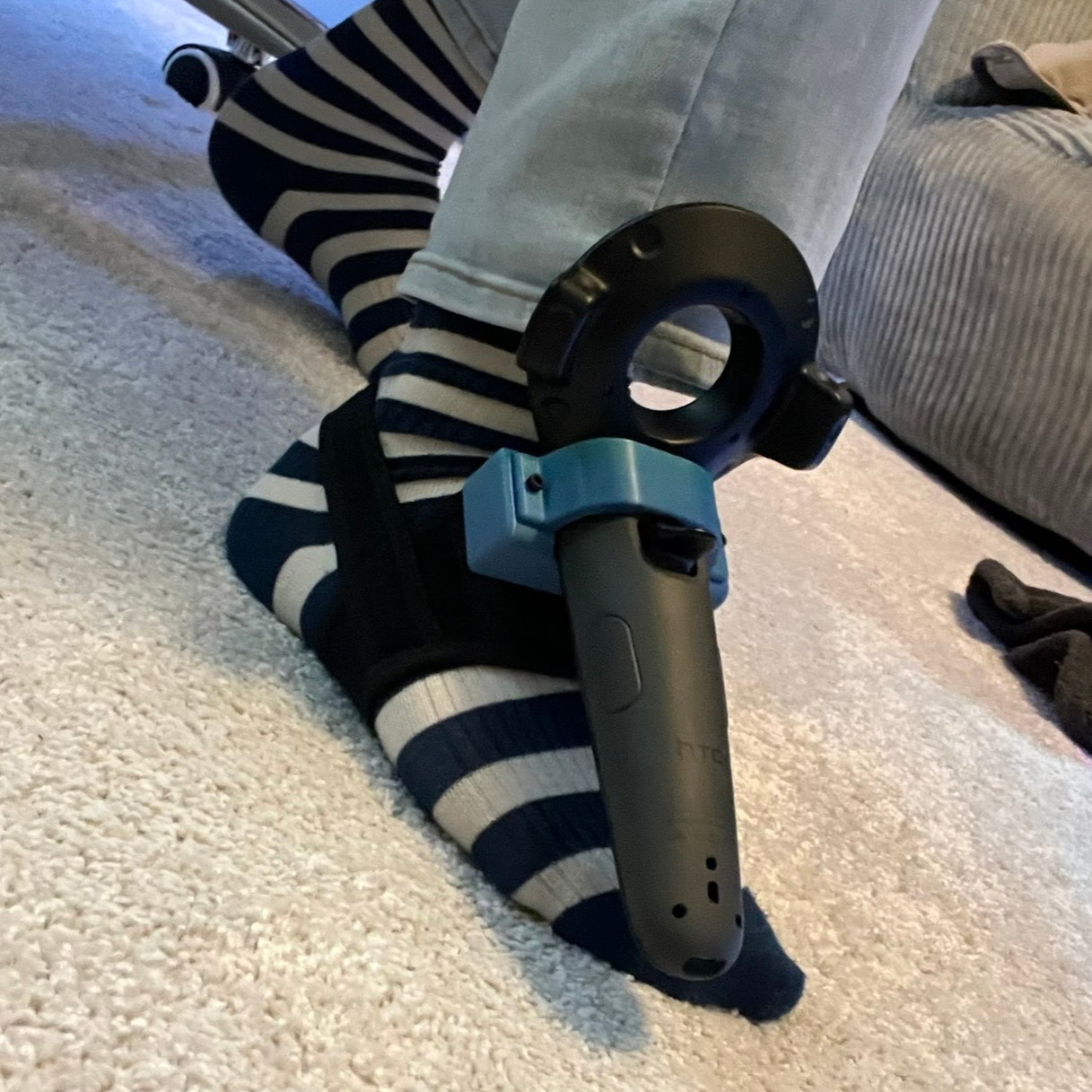
Full body tracking in VR applications involves attaching sensors to one’s body, and [Jaki] has a DIY method to do it on the cheap: the Vive Tracker Lite project repurposes Vive controllers as lighthouse-based trackers, no hardware modifications required.

A common method of doing body tracking is to strap on some Vive trackers. Those are extremely hacker-friendly pieces of hardware, but [Jaki] observed that older Vive VR controllers can be had for cheap, and already contain everything a tracker needs. Some new firmware and a custom mount is all it takes to turn them into perfectly usable body trackers.

But what about a wireless receiver? [Jaki] has that covered as well with the $5 Viva Dongle, which uses a Pro Micro NRF52840 to act as a cheap DIY alternative to the official dongle hardware.

We appreciate the effort put into making this project accessible to everyone, even novices. [Jaki]’s put effort into a Python program with a full GUI to make the flashing of firmware as easy as possible for both projects. Experimenting with body tracking in VRChat or games with mods is just some recycled hardware away.

Advertisement

Granted, a Vive controller is not the slimmest piece of hardware, but all it takes is a firmware change and a 3D-printed fixture to make a perfectly serviceable tracker. That being said, we’re sure an enterprising hardware hacker may crack a controller open and embark on a serious rebuild, or even interface to some of the inputs in a clever way. If you’ve done that or know of someone who has, drop us a note on our tips line because we’d love to see it.

Source link

Advertisement
Continue Reading

Tech

This sleek Japanese power strip finally fixes your office desk’s ugliest pain point

Published

on


  • Kokuyo Energy Line replaces discrete sockets with one continuous slot that takes up to five two-prong plugs anywhere along its length
  • It won a 2025 Good Design Award thanks to its accessibility, style, and attention to detail
  • The Kokuyo Energy Line also offers an inclusive design that allows users with upper limb disabilities to easily use the product with just 1 hand

Kokuyo is a well-known Japanese furniture giant that focuses on both functionality and aesthetics across its furniture and interior design lines.

It regularly collects Good Design Awards even as it runs a public “live office” where users can test out hardware in a workplace setting, in addition to HOWS DESIGN, an inclusive-design program that has birthed multiple successes.

Source link

Continue Reading

Tech

Is Overnight Charging Killing Your Smartphone’s Battery?

Published

on


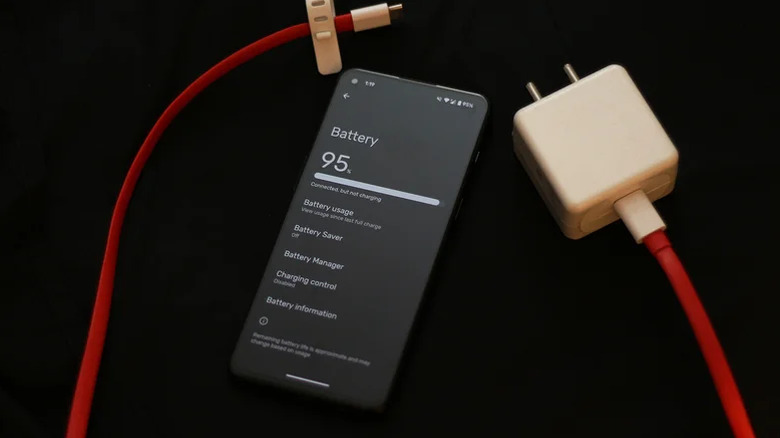
How long your smartphone lasts on a full charge is important, especially if you know you’re going to be away from a charger for a while. Despite massive improvements in battery technology, one of the most common myths about charging is that leaving your phone plugged in overnight will damage its battery. This is simply not true.

Modern phones come with smart chips that regulate how much power the battery receives. As your phone nears 100% battery, charging speeds should be reduced and eventually halted, so it won’t be actively charging. Power is drawn in short bursts when your phone loses a few percentage points. Samsung calls these “maintenance charges” and says there’s no risk of overcharging although it does note the small caveat that unplugging at 100% can marginally extend battery lifespan.

Lithium-ion cells indeed last the longest when they spend less time at very high or very low levels of charge — this is where the 20-80 rule in charging comes from. Many manufacturers, like Apple and Samsung, therefore let you turn on an optimized charging option of sorts that’s designed for overnight charging sessions. On iPhones, the feature pauses charging at 80% and finishes topping up shortly before you typically wake, while Samsung’s version offers modes that either cap the charge at 80% or adapt to your sleep schedule. The feature may be labeled a bit differently depending on which smartphone you own.

Advertisement

How to optimize battery degradation

To maximize battery life, you could religiously follow the 20-80 rule — but at this point, you’re effectively only using 60% of your phone’s battery. Some smartphones even let you set charging limits, helping make sure that your phone never exceeds, say, 80% even when plugged in overnight. Regardless, one factor that definitely damages the battery is heat, so avoid charging your phone in hot weather. Apple claims charging your device in temperatures higher than 95 degrees Fahrenheit could negatively impact its battery health.

Gaming-centric smartphones often go through their battery charge quickly, but there’s one way to ease the strain: bypass charging. If your device supports it, this feature powers the phone directly from your charging brick and lets your battery rest. 

Advertisement

There’s also the myth that charging your phone with a stronger charger will destroy its battery. This is, once again, not true. The battery controller chip only lets in as much wattage as the phone is designed to accept. That said, sticking with a compatible charger will ensure your phone charges at its maximum rated speed.

Ultimately, battery degradation depends on the charge cycle count. You can change various settings to extend your phone’s battery life on both iPhones and Android devices. This will, in turn, reduce the number of full charge cycles your battery goes through over time.

Advertisement


Source link

Continue Reading

Trending

Copyright © 2025