

Tech
Military Drone Insights for Safer Self-Driving Cars

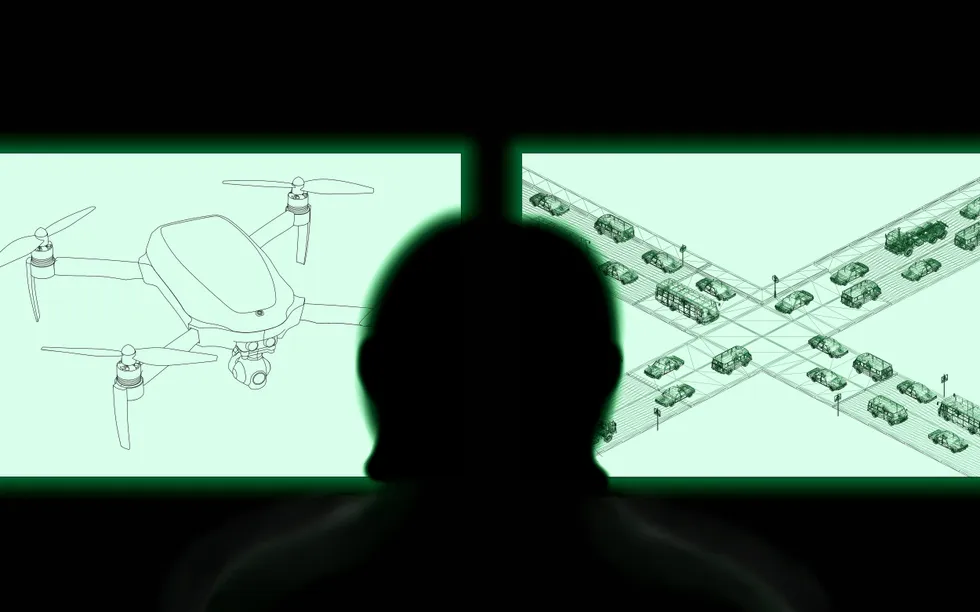

Self-driving cars often struggle with with situations that are commonplace for human drivers. When confronted with construction zones, school buses, power outages, or misbehaving pedestrians, these vehicles often behave unpredictably, leading to crashes or freezing events, causing significant disruption to local traffic and possibly blocking first responders from doing their jobs. Because self-driving cars cannot successfully handle such routine problems, self-driving companies use human babysitters to remotely supervise them and intervene when necessary.
This idea—humans supervising autonomous vehicles from a distance—is not new. The U.S. military has been doing it since the 1980s with unmanned aerial vehicles (UAVs). In those early years, the military experienced numerous accidents due to poorly designed control stations, lack of training, and communication delays.
As a Navy fighter pilot in the 1990s, I was one of the first researchers to examine how to improve the UAV remote supervision interfaces. The thousands of hours I and others have spent working on and observing these systems generated a deep body of knowledge about how to safely manage remote operations. With recent revelations that U.S. commercial self-driving car remote operations are handled by operators in the Philippines, it is clear that self-driving companies have not learned the hard-earned military lessons that would promote safer use of self-driving cars today.
While stationed in the Western Pacific during the Gulf War, I spent a significant amount of time in air operations centers, learning how military strikes were planned, implemented and then replanned when the original plan inevitably fell apart. After obtaining my PhD, I leveraged this experience to begin research on the remote control of UAVs for all three branches of the U.S. military. Sitting shoulder-to-shoulder in tiny trailers with operators flying UAVs in local exercises or from 4000 miles away, my job was to learn about the pain points for the remote operators as well as identify possible improvements as they executed supervisory control over UAVs that might be flying halfway around the world.
Supervisory control refers to situations where humans monitor and support autonomous systems, stepping in when needed. For self-driving cars, this oversight can take several forms. The first is teleoperation, where a human remotely controls the car’s speed and steering from afar. Operators sit at a console with a steering wheel and pedals, similar to a racing simulator. Because this method relies on real-time control, it is extremely sensitive to communication delays.
The second form of supervisory control is remote assistance. Instead of driving the car in real time, a human gives higher-level guidance. For example, an operator might click a path on a map (called laying “breadcrumbs”) to show the car where to go, or interpret information the AI cannot understand, such as hand signals from a construction worker. This method tolerates more delay than teleoperation but is still time-sensitive.
Five Lessons From Military Drone Operations
Over 35 years of UAV operations, the military consistently encountered five major challenges during drone operations which provide valuable lessons for self-driving cars.
Latency
Latency—delays in sending and receiving information due to distance or poor network quality—is the single most important challenge for remote vehicle control. Humans also have their own built-in delay: neuromuscular lag. Even under perfect conditions, people cannot reliably respond to new information in less than 200–500 milliseconds. In remote operations, where communication lag already exists, this makes real-time control even more difficult.
In early drone operations, U.S. Air Force pilots in Las Vegas (the primary U.S. UAV operations center) attempted to take off and land drones in the Middle East using teleoperation. With at least a two-second delay between command and response, the accident rate was 16 times that of fighter jets conducting the same missions . The military switched to local line-of-sight operators and eventually to fully automated takeoffs and landings. When I interviewed the pilots of these UAVs, they all stressed how difficult it was to control the aircraft with significant time lag.
Self-driving car companies typically rely on cellphone networks to deliver commands. These networks are unreliable in cities and prone to delays. This is one reason many companies prefer remote assistance instead of full teleoperation. But even remote assistance can go wrong. In one incident, a Waymo operator instructed a car to turn left when a traffic light appeared yellow in the remote video feed—but the network latency meant that the light had already turned red in the real world. After moving its remote operations center from the U.S. to the Philippines, Waymo’s latency increased even further. It is imperative that control not be so remote, both to resolve the latency issue but also increase oversight for security vulnerabilities.
Workstation Design
Poor interface design has caused many drone accidents. The military learned the hard way that confusing controls, difficult-to-read displays, and unclear autonomy modes can have disastrous consequences. Depending on the specific UAV platform, the FAA attributed between 20% and 100% of Army and Air Force UAV crashes caused by human error through 2004 to poor interface design.
UAV crashes (1986-2004) caused by human factors problems, including poor interface and procedure design. These two categories do not sum to 100% because both factors could be present in an accident.
| Human Factors | Interface Design | Procedure Design | |
|---|---|---|---|
| Army Hunter | 47% | 20% | 20% |
| Army Shadow | 21% | 80% | 40% |
| Air Force Predator | 67% | 38% | 75% |
| Air Force Global Hawk | 33% | 100% | 0% |
Many UAV aircraft crashes have been caused by poor human control systems. In one case, buttons were placed on the controllers such that it was relatively easy to accidentally shut off the engine instead of firing a missile. This poor design led to the accidents where the remote operators inadvertently shut the engine down instead of launching a missile.
The self-driving industry reveals hints of comparable issues. Some autonomous shuttles use off-the-shelf gaming controllers, which—while inexpensive—were never designed for vehicle control. The off-label use of such controllers can lead to mode confusion, which was a factor in a recent shuttle crash. Significant human-in-the-loop testing is needed to avoid such problems, not only prior to system deployment, but also after major software upgrades.
Operator Workload
Drone missions typically include long periods of surveillance and information gathering, occasionally ending with a missile strike. These missions can sometimes last for days; for example, while the military waits for the person of interest to emerge from a building. As a result, the remote operators experience extreme swings in workload: sometimes overwhelming intensity, sometimes crushing boredom. Both conditions can lead to errors.
When operators teleoperate drones, workload is high and fatigue can quickly set in. But when onboard autonomy handles most of the work, operators can become bored, complacent, and less alert. This pattern is well documented in UAV research.
Self-driving car operators are likely experiencing similar issues for tasks ranging from interpreting confusing signs to helping cars escape dead ends. In simple scenarios, operators may be bored; in emergencies—like driving into a flood zone or responding during a citywide power outage—they can become quickly overwhelmed.
The military has tried for years to have one person supervise many drones at once, because it is far more cost effective. However, cognitive switching costs (regaining awareness of a situation after switching control between drones) result in workload spikes and high stress. That coupled with increasingly complex interfaces and communication delays have made this extremely difficult.
Self-driving car companies likely face the same roadblocks. They will need to model operator workloads and be able to reliably predict what staffing should be and how many vehicles a single person can effectively supervise, especially during emergency operations. If every self-driving car turns out to need a dedicated human to pay close attention, such operations would no longer be cost-effective.
Training
Early drone programs lacked formal training requirements, with training programs designed by pilots, for pilots. Unfortunately, supervising a drone is more akin to air traffic control than actually flying an aircraft, so the military often placed drone operators in critical roles with inadequate preparation. This caused many accidents. Only years later did the military conduct a proper analysis of the knowledge, skills, and abilities needed to conduct safe remote operations, and changed their training program.
Self-driving companies do not publicly share their training standards, and no regulations currently govern the qualifications for remote operators. On-road safety depends heavily on these operators, yet very little is known about how they are selected or taught. If commercial aviation dispatchers are required to have formal training overseen by the FAA, which are very similar to self-driving remote operators, we should hold commercial self-driving companies to similar standards.
Contingency Planning
Aviation has strong protocols for emergencies including predefined procedures for lost communication, backup ground control stations, and highly reliable onboard behaviors when autonomy fails. In the military, drones may fly themselves to safe areas or land autonomously if contact is lost. Systems are designed with cybersecurity threats—like GPS spoofing—in mind.
Self-driving cars appear far less prepared. The 2025 San Francisco power outage left Waymo vehicles frozen in traffic lanes, blocking first responders and creating hazards. These vehicles are supposed to perform “minimum-risk maneuvers” such as pulling to the side—but many of them didn’t. This suggests gaps in contingency planning and basic fail-safe design.
The history of military drone operations offers crucial lessons for the self-driving car industry. Decades of experience show that remote supervision demands extremely low latency, carefully designed control stations, manageable operator workload, rigorous, well-designed training programs, and strong contingency planning.
Self-driving companies appear to be repeating many of the early mistakes made in drone programs. Remote operations are treated as a support feature rather than a mission-critical safety system. But as long as AI struggles with uncertainty, which will be the case for the foreseeable future, remote human supervision will remain essential. The military learned these lessons through painful trial and error, yet the self-driving community appears to be ignoring them. The self-driving industry has the chance—and the responsibility—to learn from our mistakes in combat settings before it harms road users everywhere.
From Your Site Articles
Related Articles Around the Web

Tech
Samsung Health app for Galaxy phones gets a Medications tool that also works as a discount hunter
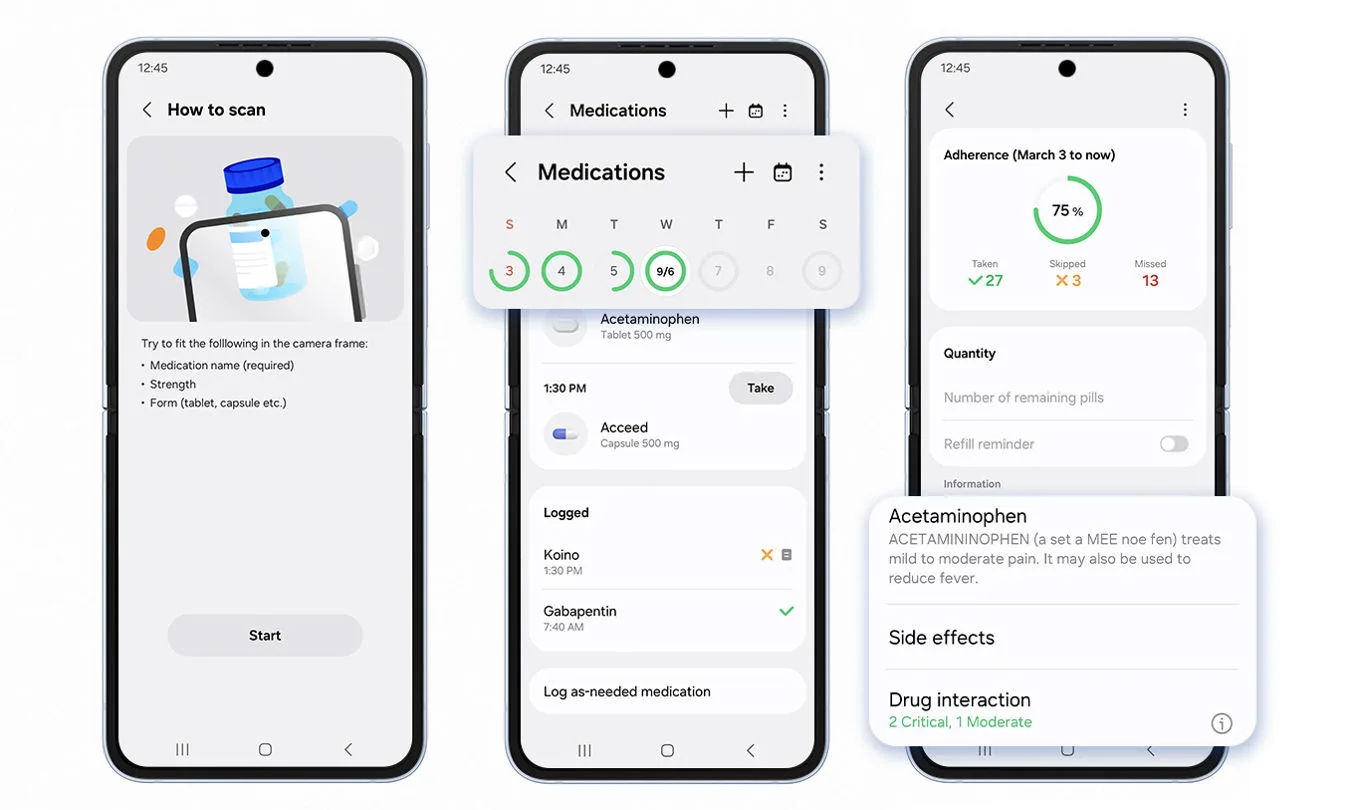
Samsung Health‘s Medications tracker just got a serious upgrade. It now hunts for prescription discounts across more than 70,000 pharmacies. Find a better price and you can save the coupon to Samsung Wallet with one tap. At the counter, just open Wallet and you’re done.
No more printing paper coupons or juggling separate apps. The whole thing lives inside two apps you probably already have on your Galaxy phone. Samsung says the goal is simple, make filling prescriptions less of a headache by combining medication tracking with instant savings.

How the prescription discount tool works
Open the Medications tracker inside Samsung Health. Log your prescriptions, set up your schedule, and now there’s a new option to search for discounts. The tool checks prices at local and national chains. Samsung claims access to deals at thousands of locations.
Found a lower price? One tap saves the coupon directly to Samsung Wallet. At the pharmacy, you tap your phone or show the barcode like you would with any other saved card. The discount applies right there.
The fine print says it’s limited to participating pharmacies. So not every drugstore may be included. But for the ones that are, you just saved yourself a few bucks and a bunch of hassle.
A broader push into health management
This isn’t happening in a vacuum. Samsung Health already lets you pull in health records from your doctors, so lab results and visit summaries live in one spot. It also offers access to board certified physicians through a partnership with HealthTap. You can discuss prescriptions without leaving the house.

Now add discounts to that mix. You track your meds, consult a doctor about them, and find a better price before you ever walk into the pharmacy. The app stops being just a step counter and starts helping you manage what you actually spend on your health.
Samsung hasn’t said whether the discounts work with insurance copays or just manufacturer deals. But for millions of users, it’s one more reason to open the app.
What’s next for Samsung Health users
The feature is live now. You’ll need the latest version of Samsung Health and Samsung Wallet installed. No word yet on international availability, US users are the likely focus given how pharmacy discounts work.
If you take regular medication, spend five minutes poking around inside the Medications tracker. You can even schedule a consultation with a doctor. Run a search on your prescriptions and see what turns up. Worst case, you stick with your current pharmacy. Best case, you save some money with a few taps and forget about it until your next refill. That’s the kind of update worth checking for.
We may receive a commission on purchases made from links.
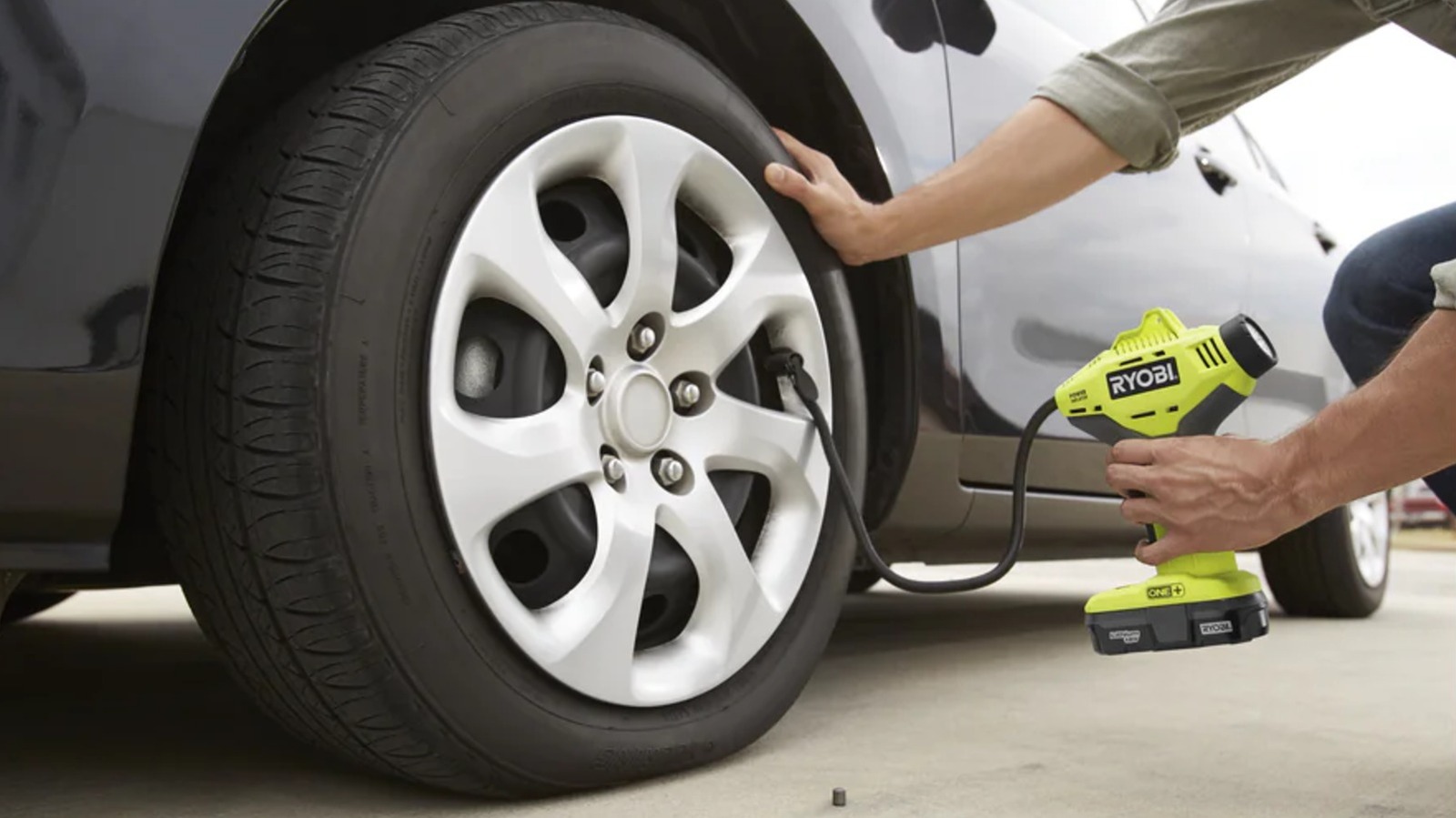
Ryobi’s tool offerings extended beyond one’s workshop or garage. There are plenty of Ryobi tools you should keep in your car in case of an emergency, though you should be mindful of where and how you store tools in your car. All it takes is one ending up in a position it shouldn’t be for things to turn catastrophic in a hurry. Case in point, Redditor u/BrianP84 found that their Ryobi handheld air compressor suddenly caught fire in their car — seemingly through no fault of Ryobi’s.
The Reddit user explained that the compressor caught fire, melting itself, the car’s seats, and parts of the floorboard. They also noted that the battery wasn’t the culprit, as there wasn’t any sign that it caught fire, so the Reddit community tried to fill in the blanks. The best guess was that the compressor may have moved around and had its power trigger pressed down and held in that position, likely because it wasn’t stored securely. This would have caused heat buildup over time as the tool ran, leading to overheating and eventual flames. Ryobi isn’t to blame here, as there’s no indication of a faulty tool. Instead, this was seemingly just a matter of circumstance.
All in all, this is a cautionary tale of what can happen when tools aren’t properly stored in a vehicle. That raises the question: What is the right way to keep Ryobi power tools in a car? Well, there are a few steps one can take to ensure the safety of tools and the vehicle they’re stored in.
Best practice for in-vehicle Ryobi tool storage
If you absolutely need to keep Ryobi power tools in your vehicle, there are a few steps to keep yourself, your ride, and your collection safe. First, don’t leave batteries connected to your tools. Keeping a power source connected opens the door for accidental activation. Besides, a vehicle is one of the many bad places to store a Ryobi battery anyway: Ryobi recommends against long-term storage over 30 days in temperatures over 80 degrees Fahrenheit, which a vehicle interior can certainly reach. If not stored properly, lithium-ion batteries can overheat, leak, or even explode, which can spell disaster for you or your tools.
As for the tools themselves, it’s worth investing in a container to hold them while you drive. For example, Ryobi has its own line of storage containers, featuring latched lids, built-in organization, and more. These also support foam inserts, preventing your tools from rattling or moving around inside and potentially being damaged. Alternatively, a tool bag could be a good choice, as they’re designed for durability with pockets for organization and restricting tool movement. In especially hot conditions, though, moving tools to a climate-controlled area is best. Even without a battery, heat can cause damage to internal elements and thus reduce a tool’s life.
Ryobi tools generally aren’t prone to breaking or overheating suddenly, but they, and any other brand’s tools, could become dangerous in the right conditions. If you tend to leave tools in your vehicle for any amount of time, it’s in your best interest to do so as safely and responsibly as possible.
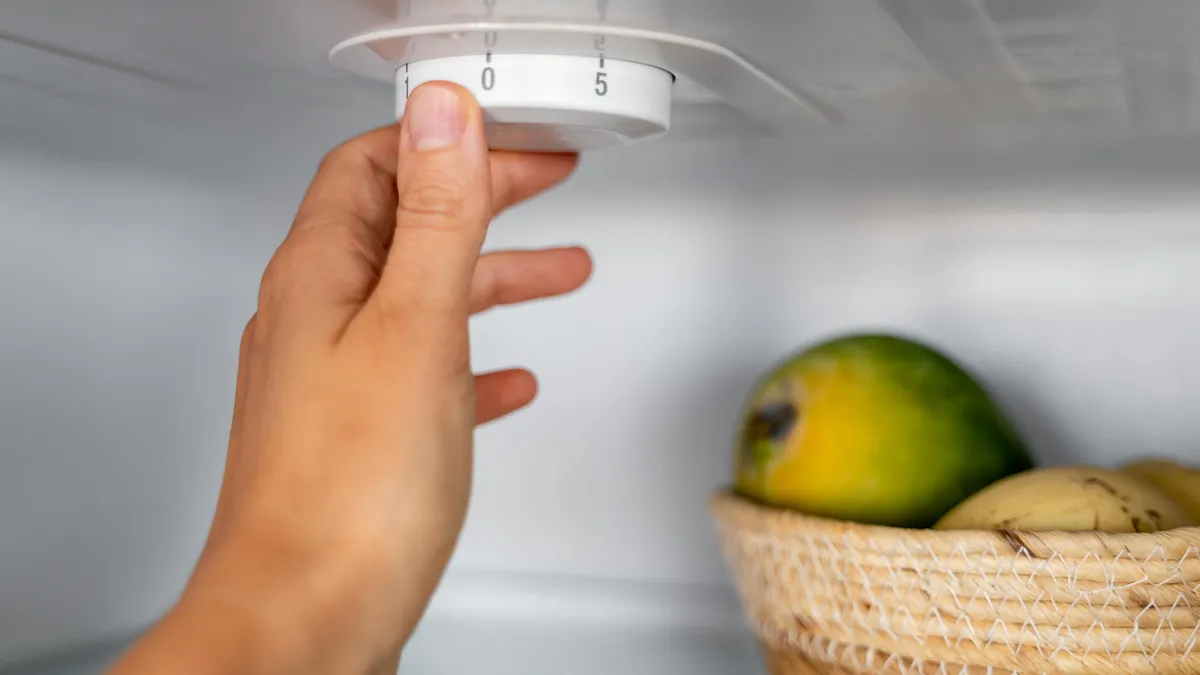
A fridge that’s too cold or too warm will struggle to keep your food fresh. Produce is particularly susceptible to errant temps, but nearly everything you stick inside benefits from keeping your icebox set to a magic number,
Not one to waste, I set out to find out how cool my fridge was since there’s no built-in thermometer. The ultimate goal was to ensure it’s set to that Goldilocks zone: the recommended temperature to keep most items as fresh as possible without freezing.
Here’s how it went down and what I learned after testing nearly every temp setting on my fridge.
What temperature should your fridge be?
Before I can determine the best temperature setting for my fridge, we need to know what constitutes a safe temperature for storing food.
The scientific consensus puts the ideal fridge temperature at 40 degrees Fahrenheit (4 degrees Celsius) or below — cold enough to keep bacteria in check, but not so cold that it freezes delicate foods.
Your freezer should be set to 0 degrees Fahrenheit (minus 18 degrees Celsius) or lower. It might seem like anything below 32 degrees Fahrenheit (0 degrees Celsius) would do the job, but the colder target exists for good reason: it keeps food solidly frozen even when you open the door, add fresh items, or ride out a brief power outage. As a bonus, lower temperatures also speed up freezing, which means smaller ice crystals and better preservation.
I ran tests using real-world conditions
When storing food in your refrigerator, ensure it falls within the safe temperature range for food storage.
When testing the fridge temp settings, I didn’t unload all of my food, though I did move more sensitive items — fresh produce, eggs, and some glass jars — into temporary coolers for colder tests. Likewise, I couldn’t keep items outside the fridge or at warmer temperatures for longer than two hours.
This all required me to keep my tests short. Every time I opened the door, checked the temperature or changed a setting, I affected the test. These inconsistencies, while distressing to my scientific mind, yielded findings that align more closely with real-world conditions in which you might open a packed fridge multiple times an hour.
Fridge thermometers make these tests possible
An abundance of fridge thermometers and smart sensors helped with my test.
As with any test, I needed a way to measure and track temperatures over time. For this test, I used three different kinds of temperature sensors: ThermoPro Refrigerator Thermometers, Hatusoku Digital Thermometer with External Sensor and the recently announced Ikea Timmerflotte smart temperature and humidity sensor.
ThermoPro is the most suitable option for most people because it can be hung from shelves or flipped back into a helpful stand. The built-in light also helps you see the LCD in low lighting — like my freezer, which has no interior light.
Hatusoku’s long temperature probe makes it a great option for a thermometer that you can stick on the outside of the fridge for at-a-glance checks. Still, the probe is extremely sensitive and almost always reacts when I open the door.
ThermoPro and Hatusoku can track minimum and maximum temperatures, allowing you to see if the temperature leaves the safe zone or how much it fluctuates when the fridge compressor is running.
Because it’s so sensitive, the min/max setting isn’t as useful. Consider waiting a few minutes after a cooling cycle before checking the temperature. You also need to contend with an additional wire when placing the probe.
Timmerflotte made my testing arsenal after I floated the idea to a company representative. They were just as curious to see how the sensor performed in the fridge as I was. Still, a developer with the company said the sensors could handle the internal temperature of my fridge, but that the metal might interfere with its connection to the Dirigera smart hub. (Fortunately, I had no connection issues during my test.)
I liked that I could press the front of the Ikea sensor to show its current temperature and humidity without my phone.
Because it’s a smart temperature sensor, Timmerflotte provided me with real-time temperature measurements without requiring me to open the fridge. Ikea sent enough sensors so that I could track the temperature in both the front and back of the fridge, which was incredibly helpful for finding the perfect setting. The Ikea Home Smart app didn’t have a way to track temperature over time — I couldn’t spot trends beyond my manual checks.
However, I should note that the minimum temperature for Timmerflotte was around 14 degrees F (minus 10 degrees C), so it was unable to track the temperature of my freezer. It also turned off after about 12 hours because freezing temperatures and Alkaline batteries don’t get along.
How I tested my fridge temps: Limitations and caveats
My refrigerator uses a simple dial thermostat to control both the fridge and freezer. The dial lists numbers 1 through 9, with 9 being the coldest setting. Starting with 1, I measured the temperature for at least 20 minutes (often longer with colder settings) to allow it to stabilize after each compressor cycle.
My refrigerator uses a simple dial thermostat to control both the fridge and freezer. The dial lists numbers 1 through 9, with 9 being the coldest setting.
Here’s the rub: My results are unique to my home and fridge.
- Although GE still makes my fridge (Model GTR15BBMRWW), it’s an old model with a likely manufacture date of April 2001. The owner’s manual even recommends setting the temperature control dial to 5 and adjusting from there.
- I have a lot of food in my fridge due to Thanksgiving preparations. With such a large thermal load, it takes considerable time for the temperature to stabilize after adjustments are made. A high food load also blocks airflow during cooling, resulting in cold and hot spots.
- The average temperature of my kitchen during these November tests was about 64 degrees Fahrenheit, which affects how long the fridge runs.
- Frequently opening the door during testing certainly affected the results.
- I usually use a slightly colder setting in the summer to keep foods in the safe zone, and GE’s advice reflects this. Even then, I only put items that are safe to freeze in the back of the fridge, just in case.
Finally, my measurements were more consistent and reliable in the fridge than in the freezer, which fortunately stayed below 14 degrees Fahrenheit (minus 10 degrees Celsius) throughout the test. (I mostly chalk this up to forgetting to photograph refrigerator thermometer readings for Levels 2, 3 and 4.) However, the freezer thermometer wasn’t consistently at 0 degrees Fahrenheit (minus 18 degrees Celsius) or below until I reached Level 4.
My test results and takeaways
I kept both thermometers in the back of the refrigerator to get consistent readings from both.
Ultimately, Level 5 (actually slightly below this) was the only one that kept all of my food within the target range. The front, back and freezer all met the aforementioned food safety guidelines. The other settings either froze items in the back or kept front items too warm.
Fridge temperature test results
Setting Level
Fridge Front
Fridge Rear
Freezer
1
44º F (Fail)
41º F (Pass)
12º F
2
44º F (Fail)
39º F (Pass)
No data
3
45º F (Fail)
38º F (Pass)
No data
4
42º F (Fail)
37º F (Pass)
No data
5
40º F (Pass)
33º F (Pass)
0º F
6
40º F (Pass)
29º F (Fail)
-3º F
7
40º F (Pass)
26º F (Fail)
-7º F
8
32º F (Fail)
19º F (Fail)
-12º F
9
Canceled
Canceled
Canceled
You can see why I canceled the test after Level 8, which put the entire fridge at or below freezing. This level also caused the compressor to run continuously for almost an hour before shutting off.
So, I couldn’t risk spending at least as much time trying to hit Level 9, which I suspect could turn my entire fridge into a freezer — even if the fridge compartment doesn’t quite hit 0 degrees Fahrenheit. (I don’t have enough cooler space to hold a fridge’s worth of food.)
For my fridge, Level 5 is right in the middle, which is likely what the manufacturer intended when curating the various settings. From a user standpoint, I found that impressive. My biggest takeaway from the results is that setting the fridge to a colder temperature isn’t necessarily better, which is sometimes my instinct when I perceive that food is spoiling too quickly.
A simple set of fridge thermometers can help you hit your target temp.
Should you test the temperature of your own fridge?
If your food is consistently spoiling or freezing without explanation, it could be because your settings aren’t calibrated properly. You may not even know which setting is intended to hit the target fridge temp of 40 degrees Fahrenheit (4 degrees Celsius) or below. If that’s the case, running a similar test on your own fridge would be wise.
I recommend getting a set of fridge thermometers as I did. I consider them essential for simple fridges like mine, which use a dial thermostat that doesn’t display the actual temperature.
While many fridges have a digital thermostat with your target temperature, an independent fridge thermometer’s flexibility can help you learn more about your fridge. For example, you’ll be able to move the thermometer around to find cold spots or track temperatures during a power outage.

from the whoops dept
It’s a tale as old as time, assuming time began a decade or two ago. A music artist who just wants to make and perform their craft gets on the internet and performs the song he or she created, only to receive some version of a copyright notice or warning, confusing the hell out of them. Sometimes this happens due to fraud. More often it’s due to some mistake with some automated bot that trolls for rights violations on behest of some massive company.
The latter is likely the case when it comes to OPM performer Jireh Lim, who recently performed one of his songs from over a decade ago on Facebook, only to be notified that his reel was being demonetized.
OPM singer Jireh Lim appeared amused and puzzled at the same time after he got a copyright notice for singing his 2013 song “Buko” in one of his social media posts. Lim shared a video of himself singing his song along with a band, through his Facebook page on Saturday, Feb. 21.
Lim shared a screenshot of the notice that reads, “Your reel’s earnings are being claimed by music rights holders. Multiple rights owners requested changes to your video because a large amount of their music was detected.”
Lim included a response in the caption of the screenshot in what I believe is Tagalog. I’m sure the translation isn’t perfect, but he essentially says, “Guys, this is me. It’s my song.”
So, what’s going on here? Well, the details are somewhat lacking, so I’m left to speculate a bit. Here’s what I know for sure. Lim is currently signed with Warner Music Philippines. Warner definitely has the rights to Lin’s album Love and Soul, which he made in 2015 while with Warner. Before Warner, and in 2013 when Buko was recorded, he was an independent artist. His pre-Warner catalog, however, made its way onto streaming platforms also in 2015.
And now for the speculation. I am guessing that Warner also acquired the rights to his older music, at least for streaming distribution and the like. Warner is not only extremely protectionist on copyright matters, but also employs copyright bots that automatically look for infringing content on the internet, particularly on YouTube and social media sites. So, I would guess that Lim’s reel performing “his” song got flagged by whatever automated setup Warner Music has going.
None of which changes the fact that’s it’s crazy-pants that a musical artist can’t perform his own song on the internet unmolested, nor the fact that copyright laws are obviously so stupidly insane that even these artists can’t figure out how to navigate them properly.
Filed Under: automated copyright notice, copyright, demonetization, jireh lim
Companies: warner music group

Warner Bros. is developing a feature film set in the world of Game of Thrones with writer Beau Willimon of Andor and House of Cards. “That’s about all we know right now, and as with everything ‘Thrones’ things could change, but the film is firmly in development,” reports TheWrap. Page Six Hollywood was first to break the news and speculated that the story could revolve around Aegon I, the legendary Targaryen king who spawned a dynasty. From the report: The Targaryens have been at the center of all things “Thrones” on HBO, with “Game of Thrones” following Daenerys Targaryen’s (Emilia Clarke) quest to usurp the throne, spinoff “House of the Dragon” set in the midst of the Targaryens’ reign and recent spinoff “A Knight of the Seven Kingdoms” following the squire-ship of Aegon “Egg” Targaryen towards the end of the family’s run atop the Iron Throne. All, of course, based on George R.R. Martin’s expansive book universe.


Hackers are abusing the legitimate OAuth redirection mechanism to bypass phishing protections in email and browsers to take users to malicious pages.
The attacks target government and public-sector organizations with phishing links that prompt users to authenticate to a malicious application, Microsoft Defender researchers say.
with e-signature requests, Social Security notices, meeting invitations, password resets, or various financial and political topics that contain OAuth redirect URLs. Sometimes, the URLs are embedded in PDF files to evade detection.

Source: Microsoft
Forcing risky redirections
OAuth applications are registered with an identity provider, such as Microsoft Entra ID, and leverage the OAuth 2.0 protocol to obtain delegated or application-level access to user data and resources.
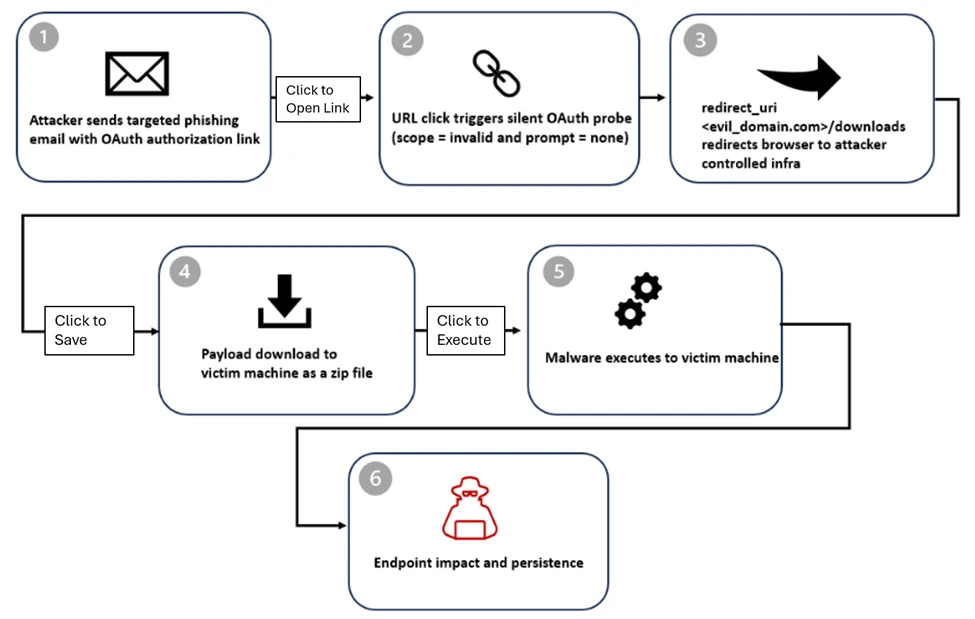
In the campaigns observed by Microsoft, the attackers create malicious OAuth applications in a tenant they control and configure them with a redirect URI pointing to their infrastructure.
The researchers say that even if the URLs for Entra ID look like legitimate authorization requests, the endpoint is invoked with parameters for silent authentication without an interactive login and an invalid scope that triggers authentication errors. This forces the identity provider to redirect users to the redirect URI configured by the attacker.
In some cases, the victims are redirected to phishing pages powered by attacker-in-the-middle frameworks such as EvilProxy, which can intercept valid session cookies to bypass multi-factor authentication (MFA) protections.
Microsoft found that the ‘state’ parameter was misused to auto-fill the victim’s email address in the credentials box on the phishing page, increasing the perceived sense of legitimacy.
Source: Microsoft
In other instances, the victims are redirected to a ‘/download’ path that automatically delivers a ZIP file with malicious shortcut (.LNK) files and HTML smuggling tools.
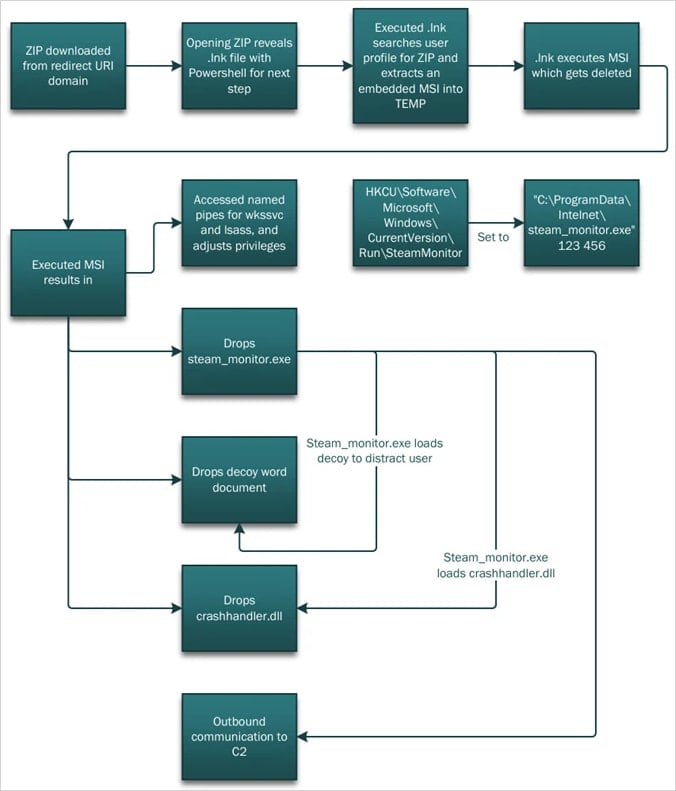
Opening the .LNK launches PowerShell, which performs reconnaissance on the compromised host and extracts the components required for the next step, DLL side-loading.
A malicious DLL (crashhandler.dll) decrypts and loads the final payload (crashlog.dat) into memory, while a legitimate executable (stream_monitor.exe) loads a decoy to distract the victim.
Source: Microsoft
Microsoft suggests that organizations should tighten permissions for OAuth applications, enforce strong identity protections and Conditional Access policies, and use cross-domain detection across email, identity, and endpoints.
The company highlights that the observed attacks are identity-based threats that abuse an intended behavior in the OAuth framework that behaves as specified by the standard defining how authorization errors are managed through redirects.
The researchers warn that threat actors are now triggering OAuth errors through invalid parameters, such as scope or prompt=none, to force silent error redirects as part of real-world attacks.

Malware is getting smarter. The Red Report 2026 reveals how new threats use math to detect sandboxes and hide in plain sight.
Download our analysis of 1.1 million malicious samples to uncover the top 10 techniques and see if your security stack is blinded.
The iPad Air with M4 isn’t going to have identical performance to the iPad Pro, and Geekbench scores have confirmed how that shows up in the spec sheet.
iPad Air is updated with M4
Once Apple finally announces a product to the public, it tends to start making its way out to testers. Then, the tester performs an inevitable Geekbench benchmark, and the results are public.
The iPad 16,11 in Geekbench is undoubtedly one for the iPad Air with M4. It was first discovered by MacRumors and the results aren’t surprising.
Continue Reading on AppleInsider | Discuss on our Forums


There’s a reason why the most important part of a structure is often described as its “backbone.” Your spine is literally holding you up, and damage to it can affect all kinds of motion elsewhere (not to mention all it does for your central nervous system). Even minor aches and pains should be avoided, because they can lead to greater problems much further down the line — when standing, walking, and even lifting lightweight items become much harder with age.
Spending time in a garage or on a jobsite often requires a lot of lifting, bending, and twisting, which can take its toll on your back. Sure, manual labor is part of the job, or if you’re a DIYer, it may even be part of the fun, but not all physical effort is the same — and not all of it is necessary. Reducing strain on your spine and back muscles is always a good thing, no matter how fit you are. That’s why it’s just as important to include items in your toolset that specifically help your back, even if they’re not totally necessary for the job.
Among its other hardware and home improvement products, Harbor Freight sells several tools, accessories, and other gear that can help reduce or prevent back strain. Many of these come from one or more of Harbor Freight’s house brands and include equipment that can help bear weight, prevent injuries, or keep you from having to bend so low or at awkward angles all the time. Here are six currently available Harbor Freight products that will help save your back.
Pittsburgh Mechanics Roller Seat
There are several Pittsburgh tools worth buying from Harbor Freight, but the house brand makes other gear and accessories as well, including a Mechanics Roller Seat. A roller seat may not be as comfy as a high-end office chair, but the ability to roll around the garage, whether it’s to your workbench or to another tire, greatly minimizes the number of times you need to get up and down from the ground, saving your back a ton of strain.
The Pittsburgh Mechanics Roller Seat costs $31.99 and is 14 ½ inches tall. With a max load capacity of 250 pounds, the seat is 15 x 14 inches and rests on 2 ½-inch swivel casters. The casters are constructed from high-impact polyurethane to better resist oil and other chemicals commonly found in garages. The frame is built with durable steel, and the seat sports foam cushioning, so it isn’t the worst thing in the world to sit on all day as you work on a vehicle.
One very useful feature is an integrated tray to keep the tools you need most — that way, you don’t even need to roll over to your chest to grab them. It’s made from high-impact PVC, so you won’t have to worry about putting tools back as gently as possible. This feature is one of the reasons Pittsburgh’s Mechanics Roller Seat is so highly rated by Harbor Freight customers, with 93% of those surveyed recommending the product.
Western Safety Back Support Belt
In addition to tools and other hardware, there are also several Harbor Freight products that will help keep you safe on the jobsite, such as hard hats and safety goggles. These are obvious accessories that can prevent harm to your body, but an unsung safety product is the Western Safety Back Support Belt. By increasing abdominal pressure and reducing load on your lumbar area, as well as limiting movement so you don’t accidentally pull or twist something, it can help prevent less-conspicuous injuries. Plus, it also encourages you to maintain good posture, which can be especially hard when working.
The Western Safety Back Support Belt comes in several sizes and costs less than a sawbuck. Adjustable suspenders and a hook-and-loop design allow you to quickly make yourself comfortable in the apparatus and size it so that it can properly do its job. It’s built with tapered abdominal support panels and elastic outer panels for better comfort.
It weighs less than a pound, so you won’t need to worry about it weighing you down, either. Harbor Freight also sells a Western Safety Back Support Belt with Reflector, doubling down on safety. It’s built exactly the same, so it’s providing the same benefit to your back, but with the addition of highly visible reflective strips and neon-orange suspenders. That way, your coworkers and others can easily spot you on a jobsite, even while you’re lifting something heavy.
Pittsburgh Telescoping Magnetic Pickup Tool
If you’re not already, you should be maximizing the efficiency of your workshop or jobsite by taking advantage of magnetic tools and accessories. Magnets may be simple, but they can offer lots of convenience when it comes to mounting, storage, cleaning, and more, which is why there are multiple magnetic tools from Harbor Freight that users love.
One such tool is the Pittsburgh Telescoping Magnetic Pickup Tool, which makes it easy to grab metal items from the ground without having to bend over and strain your back. Whether it’s a small tool or a tiny screw that’s rolled off the workbench, Pittsburgh’s deceptively straightforward pickup tool can take a lot of frustration, time, and effort out of your workday.
The Pittsburgh Telescoping Magnetic Pickup Tool has a 15-pound load capacity, so there are plenty of metal objects in the garage that it can lift on your behalf. It telescopes from 7-½ inches to over 29-½ inches, allowing you to use it in tight spaces or reach something nearly a yard away. The tool won’t add to your burden since it’s lightweight and the grip is layered with foam, so it’s more comfortable to use throughout the day.
The device has a ¾-inch wide head and is built with steel to keep it strong and durable over time. Users love the product, and it’s one of the higher-rated tools in Harbor Freight’s catalog. In customer reviews, multiple users specifically say it’s great for your back, whether you’ve got a bad back or are trying to prevent one while you can.
Bauer Steel Adjustable Sawhorse
Many carpenters, both professional and casual, know that there are many Harbor Freight woodworking tools that are worth buying. One of these products — Bauer Steel Adjustable Sawhorse — can save your back in addition to helping you accomplish your woodworking tasks. That’s because its nine different height settings allow you to erect the sawhorse at a level that’s optimal for you and your back, enabling you to cut wood without having to hunch in an awkward — and potentially damaging — position.
The Bauer Steel Adjustable Sawhorse is built to be heavy-duty and can hold 1,300 pounds, giving it a 2,600-pound max capacity when paired with a second one. It’s made entirely of durable steel and is powder-coated and zinc-plated to better withstand harsher jobsite conditions. It includes material support pegs and pivoting feet to provide users with better stability during cuts. It can easily be adjusted, and the tallest of its nine height options is 32 inches.
Besides being better for your back, it’s also easy to move around and store. It folds up into a more compact, easier-to-carry shape and includes an integrated carrying handle. With all this in mind, it’s not hard to see why 96% of surveyed Harbor Freight customers recommend the product and why it’s highly rated. While some owners say it can be a bit of a hassle to initially set up, more than one user reports that it makes working without back pain possible.
Cosco 3-in-1 Convertible Hand Truck and Franklin Hardwood Dolly
Lifting a car all on your own is preposterous, which is why Harbor Freight’s metallic red Daytona jack and similar tools are readily available. But there are plenty of reasons why you shouldn’t lift and carry smaller loads, either. You might be physically strong enough to move around heavy tool boxes, lumber, or equipment, but your back would really appreciate it if you lightened the load when you can.
Over time, you’ll appreciate it yourself, because straining your back as you carry items, as well as bending up and down to lift and drop them, takes its toll on your spine and surrounding muscles. Harbor Freight sells several kinds of hand trucks, wagons, and dollies that will handle most of the weight for you. The Cosco 3-in-1 Convertible Hand Truck can be used as an upright 2-wheel truck, as well as a 4-wheel cart or hand truck, and can be switched between these modes one-handed and without tools. When horizontal, it can hold up to 1,000 pounds; when vertical, it can hold up to 800 pounds.
Franklin also makes a heavy-duty hand truck, but an even simpler option is its 18 x 12-inch Hardwood Dolly, which has a 1,000-lb capacity. Its carpeted surface prevents scratches on whatever you’re carrying, like furniture. Using products like Cosco’s hand truck and Franklin’s dolly will save your back a lot of wear and tear. You might be the type of person whose pride is hurt when others see you not lifting the big stuff all on your own, but wounded pride is a lot, lot better than a wounded back.
The wellness club was founded by GJ Wee, son of UOB CEO Wee Ee Cheong
Homegrown wellness club Trapeze Rec. Club (TRC), opened by GJ Wee, son of billionaire UOB CEO Wee Ee Cheong, is set to close by Mar 22.
In a post on its Instagram page yesterday (Mar 3), the business said “rising costs” made continuing at its current location unsustainable. The decision was reportedly made last week.
TRC said its team is individually reaching out to members, processing refunds, and supporting its coaches, though the post did not clarify what would happen to the coaching staff and encouraged the community to contact them directly.
The club added that it is also “closing the chapter right” with suppliers, vendors, and partners.
Classes and private training will continue until the closure date.

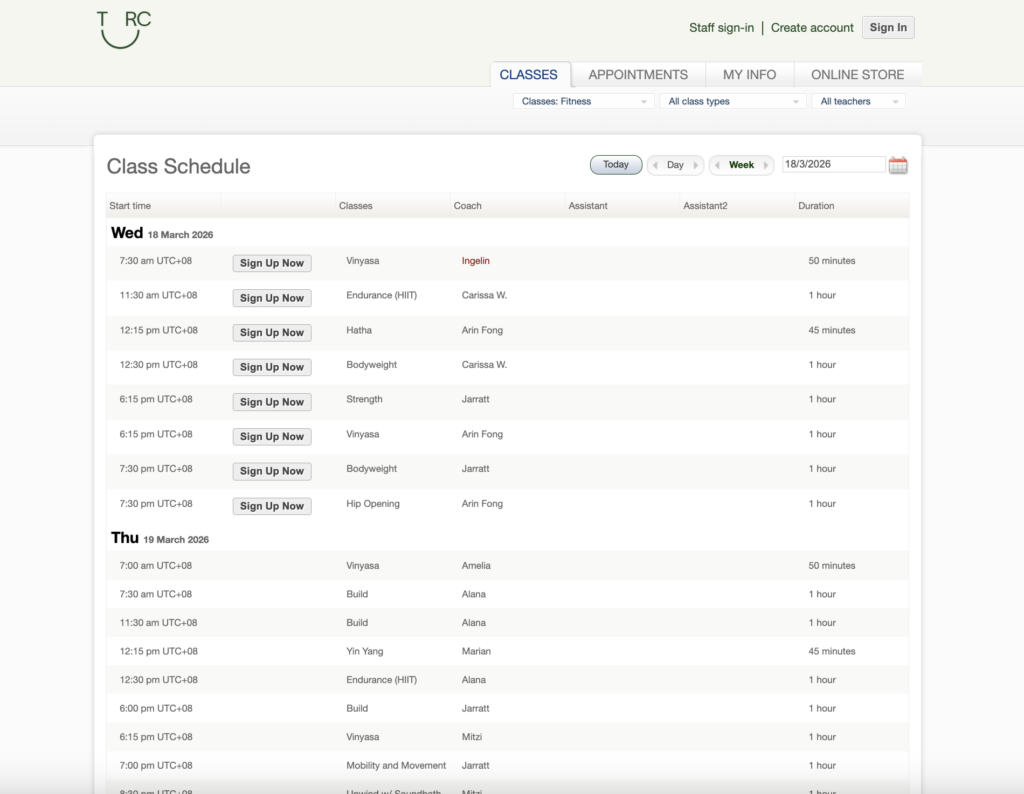
As of Mar 4, TRC’s website is still open for bookings until Mar 18, while there are classes still scheduled until Mar 22.
Launched in 2021, TRC is a four-storey fitness club spanning 8,000 square feet that’s located in a pre-war shophouse at Tanjong Pagar. It offers group classes covering fitness, wellness, and more, alongside personal training.
The club operates under the wellness-focused lifestyle company Trapeze Group, also founded by GJ Wee. Other brands under the group include Hideaway, a massage and bathhouse-style recovery concept in New Bahru, which appears to be operating as usual.
A “surprising closure”
A day prior to TRC’s official Instagram announcement on Mar 2, a netizen going by @swiftologist was already seeking answers about the club’s “imminent (and surprising) closure” from both TRC and its founder.
He called the closure sudden and “disruptive,” while lauding TRC’s trainers “who did everything they could to keep Trapeze going, despite clear indifference to the well-being of members and staff from upper management.”

In response to the official announcement on Mar 3, the netizen added that members were “given less than a month’s notice,” after seeking clarification on Mar 2 and only “finally” getting an official address on Mar 3.
He further questioned if TRC’s closure was “truly unavoidable due to rising costs,” and that “the community deserves a direct explanation from the founder itself—not just a message via the brand account.”
@swiftologist also went on to question the founder’s priorities “when other projects appear to continue while this space (the one with a real, invested community) is deemed ‘unsustainable’.”
Other members have echoed similar concerns, describing the closure as given on “very short notice.” One netizen noted that members were informed of a possible relocation “just last month,” only to now be told that operations are shutting down entirely, which they said “feels abrupt, poorly handled and communicated.”
That said, some members have also expressed support amid the discussion.
When Vulcan Post approached @swiftologist and TRC for additional comments, both said that they had nothing to add.
- Read more stories we’ve written on Singaporean businesses here.
Featured Image Credit: Trapeze Rec. Club

Initially, Gorham used his brain-computer interface for single clicks, Oxley says. Then he moved on to multi-clicks and eventually sliding control, which is akin to turning up a volume knob. Now he can move a computer cursor, an example of 2D control—horizontal and vertical movements within a two-dimensional plane.
Over the years, Gorham has gotten to try out different devices using his implant. Zafar Faraz, a field clinical engineer for Synchron, says Gorham directly contributed to the development of Switch Control, a new accessibility feature Apple announced last year that allows brain-computer interface users the ability to control iPhones, iPads, and the Vision Pro with their thoughts.
In a video demonstration shown at an Nvidia conference last year in San Jose, California, Gorham demonstrates using his implant to play music from a smart speaker, turn on a fan, adjust his lights, activate an automatic pet feeder, and run a robotic vacuum in his home in Melbourne, Australia.
“Rodney has been pushing the boundaries of what is possible,” Faraz says.
As a field clinical engineer, Faraz visits Gorham in his home twice a week to lead sessions on his brain-computer interface. It’s Faraz’s job to monitor the performance of the device, troubleshoot problems, and also learn the range of things that Gorham can and can’t do with it. Synchron relies on this data to improve the reliability and user-friendliness of its system.
In the years he’s been working with Gorham, the two have done a lot of experimenting to see what’s possible with the implant. Once, Faraz says, he had Gorham using two iPads side by side, switching between playing a game on one and listening to music on the other. Another time, Gorham played a computer game in which he had to grab blocks on a shelf. The game was tied to an actual robotic arm at the University of Melbourne, about six miles from Gorham’s home, that remotely moved real blocks in a lab.
Gorham, who was an IBM software salesman before he was diagnosed with ALS in 2016, has relished being such a key part of the development of the technology, his wife Caroline says.
“It fits Rodney’s set of life skills,” she says. “He spent 30 years in IT, talking to customers, finding out what they needed from their software, and then going back to the techos to actually develop what the customer needed. Now it’s sort of flipped around the other way.” After a session with Faraz, Gorham will often be smiling ear to ear.
Through field visits, the Synchron team realized it needed to change the setup of its system. Currently, a wire cable with a paddle on one end needs to sit on top of the user’s chest. The paddle collects the brain signals that are beamed through the chest and transmits them via the wire to an external unit that translates those signals into commands. In its second generation system, Synchron is removing that wire.
“If you have a wearable component where there’s a delicate communication layer, we learned that that’s a problem,” Oxley says. “With a paralyzed population, you have to depend on someone to come and modify the wearable components and make sure the link is working. That was a huge learning piece for us.”

Fortus, Brittons and Cundalls to stage event in Malton

Big investors exiting for-sale housing market, even before Trump ban

Vitalik Buterin defends Ethereum’s neutrality amid calls for political engagement


-

 Politics6 days ago
ITV enters Gaza with IDF amid ongoing genocide
-

 Politics1 day ago
Alan Cumming Brands Baftas Ceremony A ‘Triggering S**tshow’
-

 Fashion5 days ago
Weekend Open Thread: Iris Top
-

 Tech3 days ago
Unihertz’s Titan 2 Elite Arrives Just as Physical Keyboards Refuse to Fade Away
-

 NewsBeat6 days ago
Cuba says its forces have killed four on US-registered speedboat | World News
-
Sports4 days ago
The Vikings Need a Duck
-
 NewsBeat4 days ago
Dubai flights cancelled as Brit told airspace closed ’10 minutes after boarding’
-
 NewsBeat7 days ago
Manchester Central Mosque issues statement as it imposes new measures ‘with immediate effect’ after armed men enter
-

 NewsBeat3 days ago
‘Significant’ damage to boarded-up Horden house after fire
-
 NewsBeat4 days ago
The empty pub on busy Cambridge road that has been boarded up for years
-

 NewsBeat4 days ago
Abusive parents will now be treated like sex offenders and placed on a ‘child cruelty register’ | News UK
-

 Business6 days ago
Discord Pushes Implementation of Global Age Checks to Second Half of 2026
-

 Entertainment2 days ago
Baby Gear Guide: Strollers, Car Seats
-

 Business6 days ago
Only 4% of women globally reside in countries that offer almost complete legal equality
-
 Tech5 days ago
NASA Reveals Identity of Astronaut Who Suffered Medical Incident Aboard ISS
-
Politics3 days ago
FIFA hypocrisy after Israel murder over 400 Palestinian footballers
-
 NewsBeat3 days ago
Emirates confirms when flights will resume amid Dubai airport chaos
-

 Crypto World6 days ago
From Crypto Treasury to RWA: ETHZilla Retreats and Relaunches as Forum Markets on Nasdaq
-

 NewsBeat2 days ago
Is it acceptable to comment on the appearance of strangers in public? Readers discuss
-

 Tech3 days ago
Viral ad shows aged Musk, Altman, and Bezos using jobless humans to power AI