A robotic spacecraft called LINK will soon tug the telescope to a higher orbit.
NASA
The NASA Swift Boost mission has launched from Marshall Islands on July 3 at 4:36AM Eastern time after a couple of delays, and the agency has started preparing it for its ultimate goal: To rescue the Neil Gehrels Swift Observatory, which is falling faster than anticipated. Swift Boost’s ground teams have already established communication with LINK, the robotic spacecraft designed by Arizona company Katalyst Space to dock with the observatory and to tug it back into a higher orbit.
It wasn’t your typical rocket launch. LINK was attached to a Northrop Grumman Pegasus XL rocket, which was in turn attached to the belly of a plane called Stargazer. The plane took off from Kwajalein Atoll, Marshall Islands and then released the Pegasus XL rocket in the air at an altitude of around 40,000. After free falling for a few seconds, the rocket’s engines fired up to deliver LINK to space.
NASA says making contact with LINK was the mission’s first objective, and it was successful in doing so. LINK has already powered on and will undergo health checks by Katalyst over the next several weeks to assess its propulsion, sensor and navigation systems. After its health checks are done, LINK will head towards the Swift observatory to survey it.
Advertisement
LINK will then capture Swift, dock with it using its three robotic arms and then tug it upwards until they reach an orbit with an altitude of approximately 370 miles, which will extend its life by a decade or so. Delivering the observatory to a higher orbit is expected to take 10 to 12 weeks. While all spacecraft will eventually fall, recent solar activity caused the observatory’s orbit to decay much faster. Without the help of LINK, the Swift telescope would be falling from orbit by the end of the year.
The Neil Gehrels Swift Observatory has been studying gamma ray bursts for over two decades. Brad Cenko, Swift’s principal investigator, describes gamma ray bursts as “short-lived flashes of high-energy light that release more energy in just a few seconds than the sun will in its entire lifetime.” These bursts are thought to be created by exploding and colliding stars. Cenko says data from Swift confirmed that the “heaviest elements in the periodic table, including the gold and platinum in our jewelry, are forged in these systems.” Scientists now also use Swift as a “dispatcher” or a “first responder” to gather critical information when a sudden cosmic event takes place.
Australia’s Senate blocked amendments to strengthen the world-first child social media ban, sending the bill to an eight-week inquiry. Seven in 10 children who had accounts when the ban took effect in December are still on restricted platforms.
Australian Prime Minister Anthony Albanese on Friday condemned senators who blocked amendments to the country’s world-first social media ban for children, warning that the delay would give tech platforms time to destroy documents that could be used as evidence against them. The conservative Liberal Party and the minor Greens party referred the legislation to an eight-week Senate inquiry on Thursday.
Advertisement
The amendments would have expanded the powers of eSafety Commissioner Julie Inman Grant, Australia’s online safety watchdog, to enforce the ban that has prohibited children under 16 from holding accounts on platforms including Facebook, Instagram, and YouTube since December.
The enforcement gap
The ban looked effective on paper. The government initially reported that more than five million under-16 accounts had been removed, deactivated, or restricted after the law took effect on 10 December.
The reality proved different. The eSafety Commissioner reported in March that seven in 10 children who held accounts on restricted platforms when the ban began were still on Facebook, Instagram, Snapchat, and TikTok.
Most had simply declared an age over 16 or submitted a selfie that the platform’s verification system accepted.
Commissioner Inman Grant said in April she was considering court action against those four platforms and YouTube, alleging they were not taking reasonable steps to exclude children. She was satisfied with progress made by the remaining five restricted platforms: X, Kick, Reddit, Threads, and Twitch.
Advertisement
What the amendments would change
The current law gives the commissioner power to demand information from platforms, but not documents. The amendments would close that gap, allowing her to compel internal records, board minutes, and communications about how platforms have responded to the ban.
The bill would also let the commissioner demand information from third parties, including age assurance technology providers, to test whether platforms’ claims about underage circumvention are accurate. Maximum fines would double from A$49.5 million to A$99 million ($68 million).
“If it was passed yesterday, that would have been the date from which these demands could be made by the commissioner,” Albanese told the Australian Broadcasting Corp. “So then fines can be issued.”
Who blocked it and why
The centre-left Labor government does not hold a majority in the Senate. The Liberal opposition and the Greens, who have always opposed the ban, combined to send the bill to an inquiry despite having supported the original legislation with overwhelming support in 2024.
Advertisement
Opposition communications spokesperson Sarah Henderson said the amendments “need to be tougher,” calling the ban “a half-baked law which is poorly designed, which was rushed, which is badly implemented and which is not working.” Greens Senator David Shoebridge questioned why a fine that had never been issued needed to be doubled.
The global wave
Australia’s struggles have not discouraged other countries from following its lead. The UK announced in June that it would ban under-16s from social media apps including TikTok, Instagram, and YouTube, with restrictions expected to take effect in spring 2027.
Passing the law is the straightforward part. Getting platforms to comply, proving they have not, and building age verification systems that actually work without compromising privacy is where every child safety regime runs into the wall.
Advertisement
Communications Minister Anika Wells said this week she had received monthly updates from the eSafety Commissioner since March. “We are not seeing improvements,” she said.
HiFiMAN is bringing back one of the true legends of the planar magnetic headphone world with the HE6 Remastered. The original HE6 earned its near-mythic reputation the old-fashioned way: by delivering exceptional speed, detail, dynamics, and an expansive open-back soundstage when paired with amplification capable of keeping up. It was a headphone prized for its sonic abilities, even if it also developed a reputation for treating underpowered headphone amps with a genuine level of contempt.
The new $1,899 HE6 Remastered retains the original HE6 driver design and open-back architecture, but replaces the older headband with a lighter composite design for greater long-session comfort. The trade-off, such as it is, remains unchanged: with 83.5dB sensitivity and a 50-ohm impedance, this is not a planar headphone for a feeble dongle DAC. Think again. The HE6 Remastered needs serious current and a genuinely capable headphone amplifier to reveal why the original became such an enduring favorite in the first place.
Related Reviews:
“From trade shows to the sales floor and online forums, our customers continually cite the HE6 and its series successors as HIFIMAN favorites,” says Dr. Fang Bian, President and CEO, HIFIMAN Electronics. “The HE6 Remastered uses the original’s driver complement to maintain the sound signature that continues to set the bar for open-back planar models at its price point, but with greater comfort for hours of continuous listening.”
HE6 Legacy
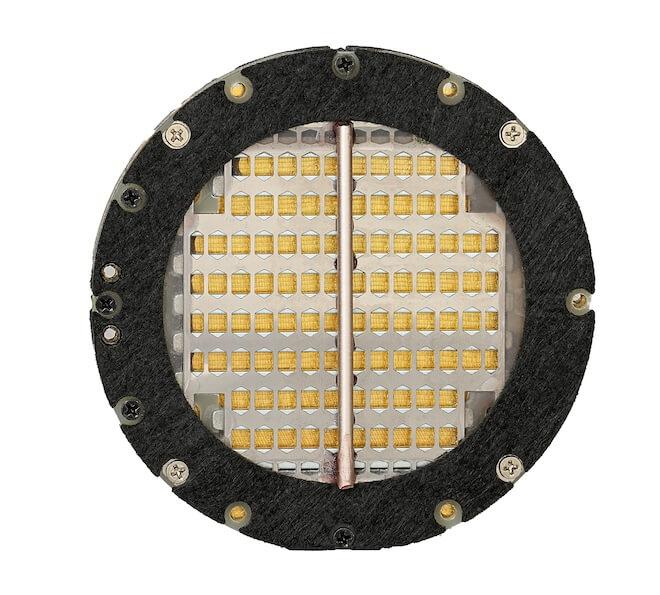
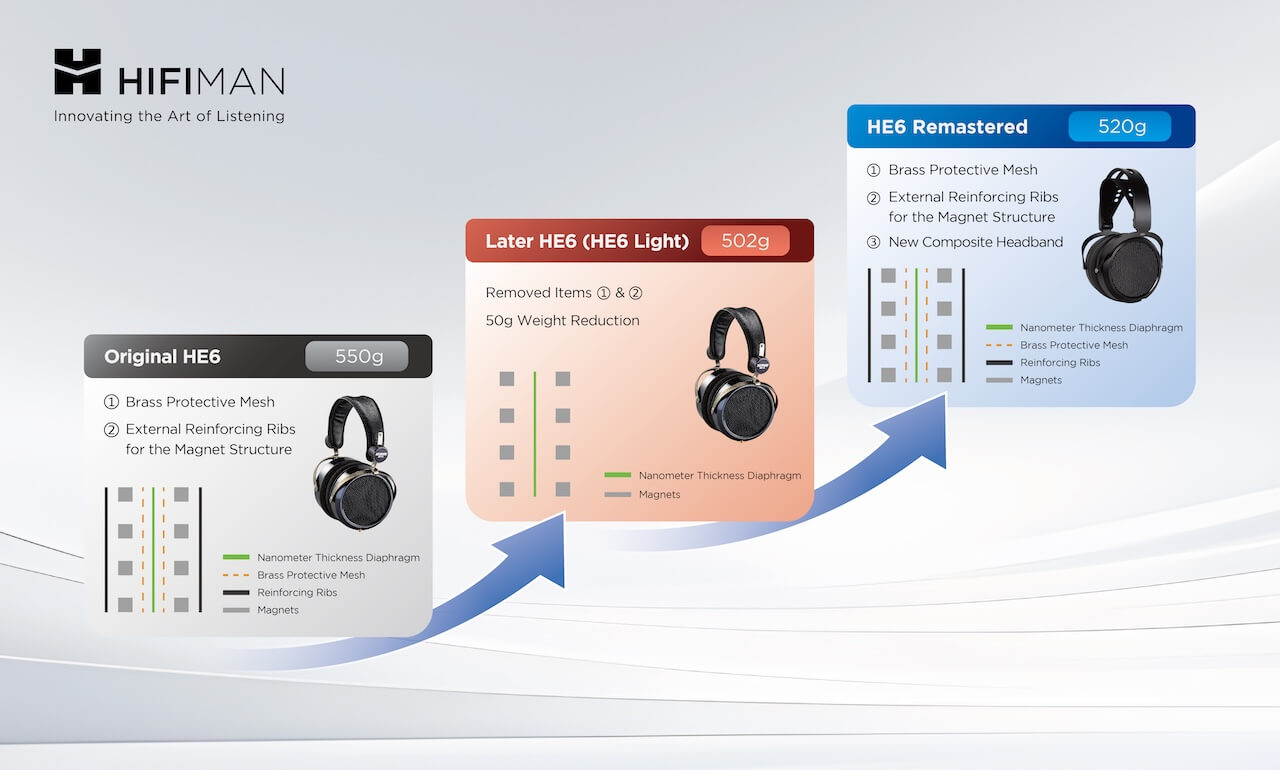
The original HE6 was introduced in 2010 and quickly became sought after by headphone enthusiasts, audiophiles, and music lovers, thanks to HIFIMAN’s approach to planar magnetic design, which incorporated a brass protective mesh and reinforcing ribs.
The HE6 was also the first headphone to feature an ultra-thin Nanometer Diaphragm, measuring less than one-millionth of a meter thick and extremely light. This gave the HE6 an extremely fast response, outstanding dynamic range and frequency characteristics, low distortion, high transient response, and comprehensive improvements in dynamics and detail.
Advertisement
The brass protective mesh was implemented to protect the diaphragm from damage, while the reinforced ribs further enhanced the stability of the magnets and overall reliability.
However, as a result of further R&D, HIFIMAN’s engineers determined that the Nanometer Thickness Diaphragm and powerful magnetic system were safe from environmental exposure and mishandling without the need for protective elements. Removing them reduced weight without affecting performance. As a result, HIFIMAN released a later model variant called the HE6 Later, named for the fact that it is a “later” version of the HE6.
What’s New with HE6 Remastered
Sixteen years after the original HE6 was released, many audiophile headphone fans continue to embrace its sonic output, making it an often-requested sample at enthusiast audio shows. In response to this ongoing interest and support, HIFIMAN now offers the HE6 Remastered, which features the same driver design as the original but adds a new composite headband that reduces overall weight from the original’s 550 grams to 522 grams. That is an improvement, certainly, but 522 grams is not exactly light by modern headphone standards.
The HE6 Remastered’s sensitivity is 83.5dB, identical to the original HE6. Frequency response is rated at 8Hz–65kHz, and impedance is measured at 50 ohms. Those specifications make it clear that this is not a headphone for a modest dongle DAC or lightweight portable source. To get the most from the HE6 Remastered, owners should be thinking about a capable desktop headphone amplifier from Schiit, HIFIMAN, Burson, Auris, or one of the many other manufacturers building serious amplification for demanding planar magnetic headphones.
Adds Dr. Bian: “We are very fortunate to have so many of our headphones considered industry standards. The HE6 is a longtime favorite, and I’m thrilled to bring an updated version to our most dedicated consumers and thousands of newcomers.”
Advertisement
The Bottom Line
The HIFIMAN HE6 Remastered is not an attempt to reinvent one of the company’s most iconic planar magnetic headphones. It is a deliberate return to the original HE6 formula, with the brass protective mesh and external reinforcing ribs restored after their removal on the HE6 Later, alongside a lighter composite headband and replaceable earpads. The new headband design, also used on HIFIMAN’s newer HE600 and Edition XV, should improve long-term comfort, but let’s not pretend that 522 grams is “very light.” It is lighter than the original by almost 30 grams, but it is still a substantial headphone.
Advertisement. Scroll to continue reading.
At $1,899, the HE6 Remastered is targeted squarely at longtime HE6 fans and listeners who want a demanding, open-back planar magnetic headphone built around serious desktop listening. The 83.5dB sensitivity and 50-ohm impedance remain unchanged, which means this is not a product for a phone, laptop jack, or feeble dongle DAC. A proper amplifier from Schiit, HIFIMAN, Burson, Auris, or another manufacturer with real power on tap will be required to make the HE6 Remastered sing.
The competition is not standing still. Audeze’s $1,199 LCD-X is heavier at 612 grams, but far easier to drive; Dan Clark Audio’s 455-gram E3 costs $2,299.99 and adds closed-back isolation; and HIFIMAN’s own $1,399 HE1000 V2 is a considerably lighter 420 grams. The HE6 Remastered is not the obvious value play, nor is it the most convenient choice in this price range. Its appeal is more specific: it brings back the distinct sound and amplifier-hungry personality that made the original HE6 a cult favorite in the first place.
Advertisement
Price & Availability
The HE6 Remastered is priced at $1,899 and is available at HIFIMAN
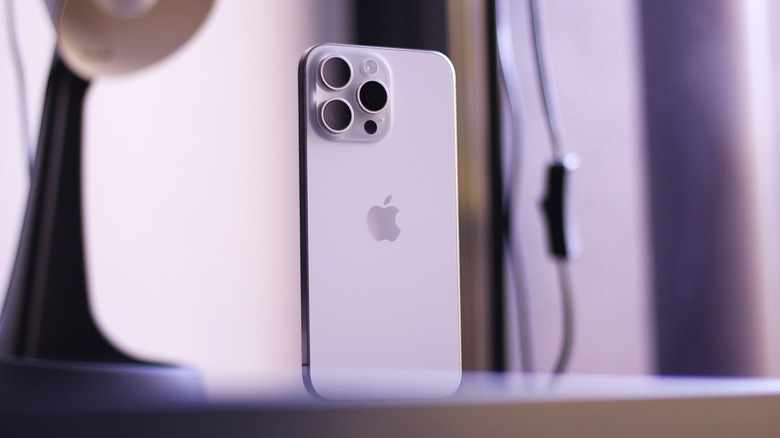
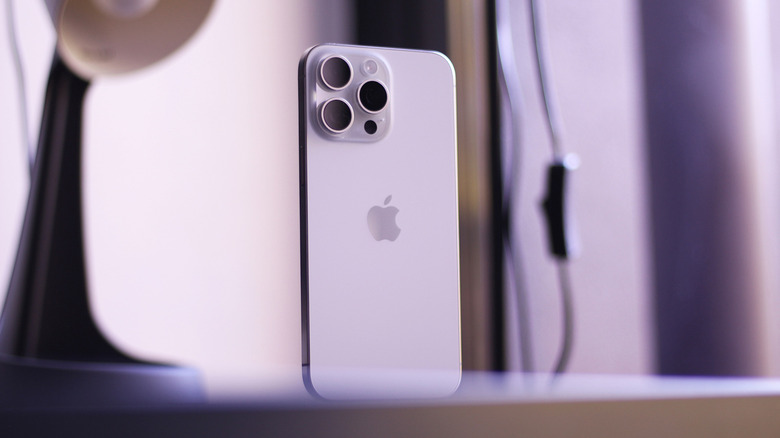
Apple seldom makes design changes to its products, so the introduction of a titanium frame with the iPhone 15 Pro lineup marked an interesting shift. Even the marketing around the iPhone 15 Pro series was heavily centered on the new material. The previous few generations shipped with stainless steel frames, which looked spectacular but added quite a bit of heft, especially on the larger Pro Max models. Titanium is not only durable but also lighter than stainless steel. The iPhone 15 Pro Max was nearly 20 grams lighter than the outgoing iPhone 14 Pro Max.
The iPhone 16 Pro models continued the trend, but Apple switched to an aluminum unibody design for the iPhone 17 Pro and Pro Max. Apple hasn’t publicly commented on why it has made the switch except for mentioning that the new “design is crafted with a lightweight aerospace-grade 7000-series aluminum alloy to deliver the best-ever thermal performance in an iPhone.” Overheating was a common complaint iPhone 15 Pro users had — our model also runs uncomfortably hot sometimes.
That said, Apple hasn’t completely ditched titanium. The thin-and-light iPhone Air that we reviewed is wrapped in a grade 5 titanium frame. In fact, the titanium is probably why the device turned out to be one of the most durable phones you can buy. The iPhone Air surpassed all expectations in JerryRigEverything’s brutal durability test, where it withstood a three-point bending test with a load of 200 pounds (90 kilograms) before failing.
Advertisement
The pros and cons of Apple ditching titanium
Adnan Ahmed/SlashGear
Aluminum has high thermal conductivity, which makes it a better material for heat dissipation. This is why most premium laptops rely on aluminum chassis to get heat away from the processor as quickly as possible. Apple also equipped the iPhone with a vapor chamber for the very first time. Stress testing conducted by The Mac Observer reveals that the iPhone 17 Pro Max maintains higher sustained performance than the iPhone 16 Pro Max and achieves better stability scores.
We can only speculate why Apple switched to using aluminum in its still-expensive iPhones. Lower procurement costs, ease of manufacturing, and better thermal performance are plausible explanations. Aluminum is also easier to work with when it comes to surface treatments like anodization or painting, which explains why the bright orange colorway is available on the iPhone 17 Pro models.
Advertisement
If an iPhone Air 2 is in Apple’s plans, it would make sense for the device to continue using titanium for its strength. The rest of the lineup, however, will likely stick with aluminum despite it being a less premium material. Samsung had also jumped on the bandwagon when it switched to a titanium frame for the Galaxy S24 Ultra we reviewed, but is now back to aluminum on its latest flagship. Perhaps the brief fascination with titanium on smartphones was more of an experimental thing than a permanent shift.
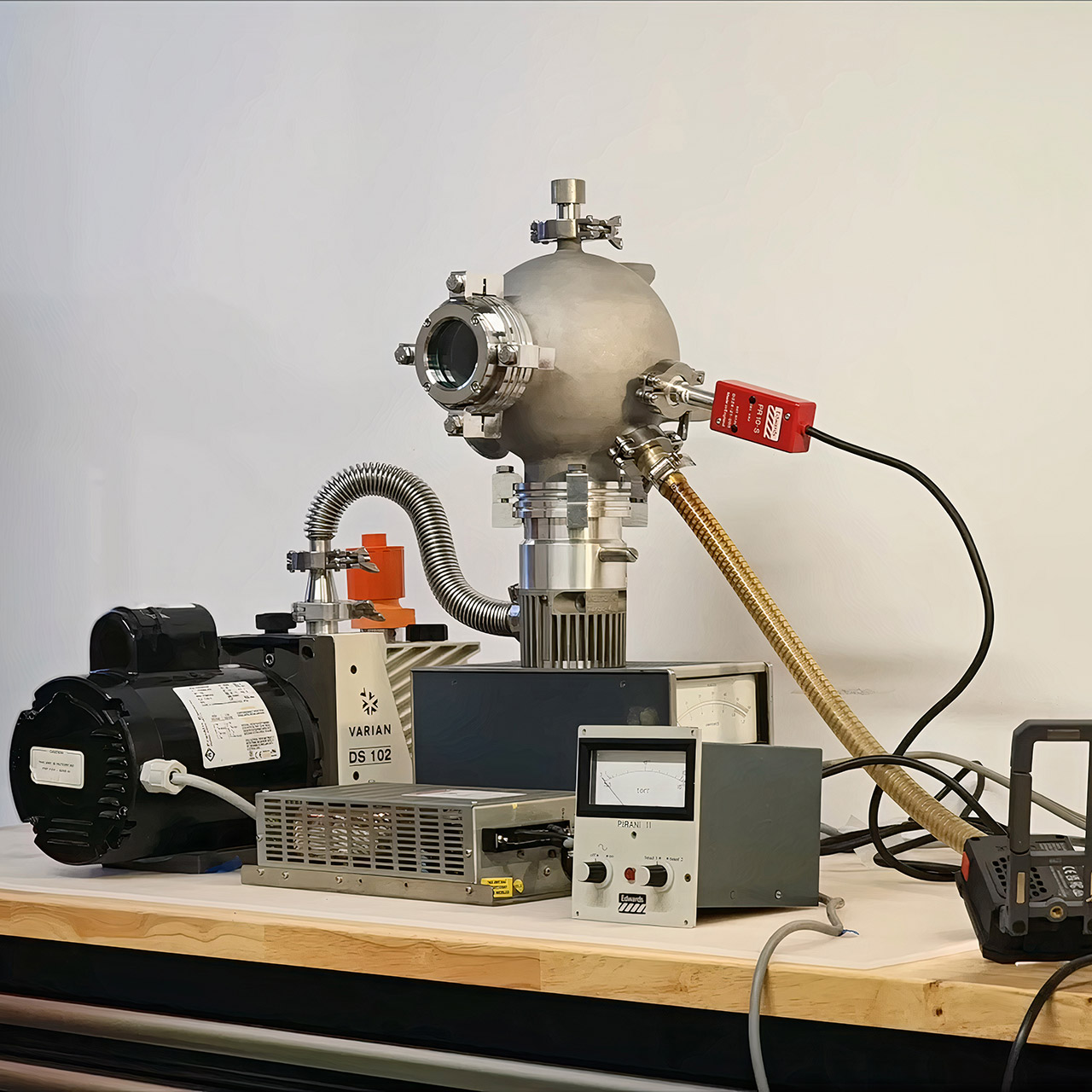
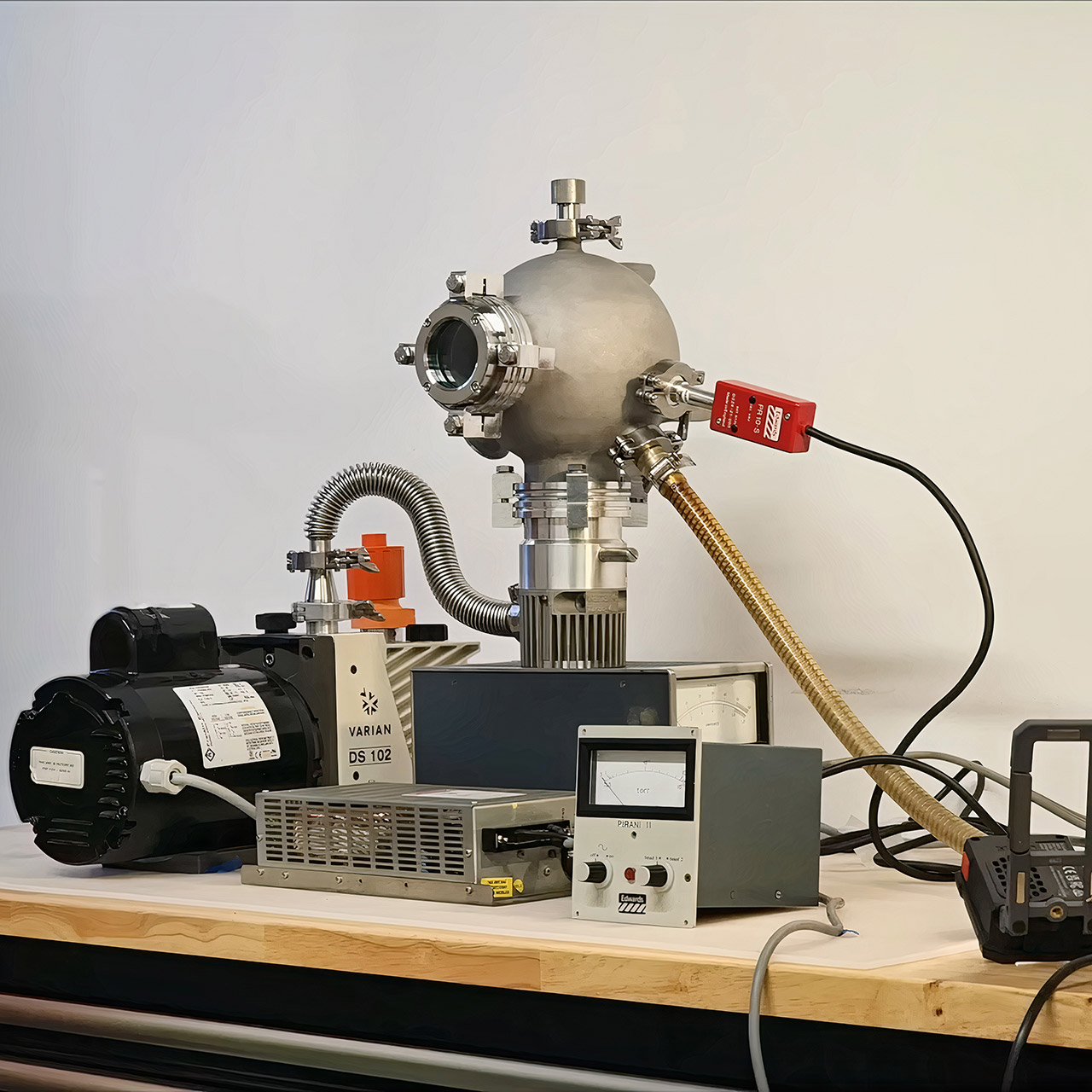
Martin never meant to spend a year and a half building anything nuclear. Another demanding task kept getting pushed aside, and the delay turned into something much larger. What began as avoidance became a complete fusor, a compact device that creates the conditions for atomic nuclei to fuse using straightforward electric fields instead of the enormous machines found in national labs.
A fusor works by separating gas molecules and crashing their nuclei together at high speeds. Martin targeted deuterium, a heavier type of hydrogen. Inside a sealed spherical chamber, a central wire grid is at a high negative voltage. Electrons shoot off the grid, transforming the gas into plasma. The remaining positive ions accelerate inward. Because the chamber is spherical, many ions bounce off the inner wall and return to the center for another chance to collide. Under the right vacuum and voltage conditions, these collisions can produce fusion and emit neutrons.
A1 mini + LED Lamp Kit for Creative Light Projects: Bring your ideas to life with the included LED Lamp Kit. Simply print compatible lamp models and…
The Perfect 3D Printer for Beginners: A1 mini 3D Printer is designed to make 3D printing easy from day one with automatic calibration, simple setup…
Experience the Bambu Lab Ecosystem: Access MakerWorld’s huge library of ready-to-print models, manage prints through the Bambu Handy app, and enjoy…
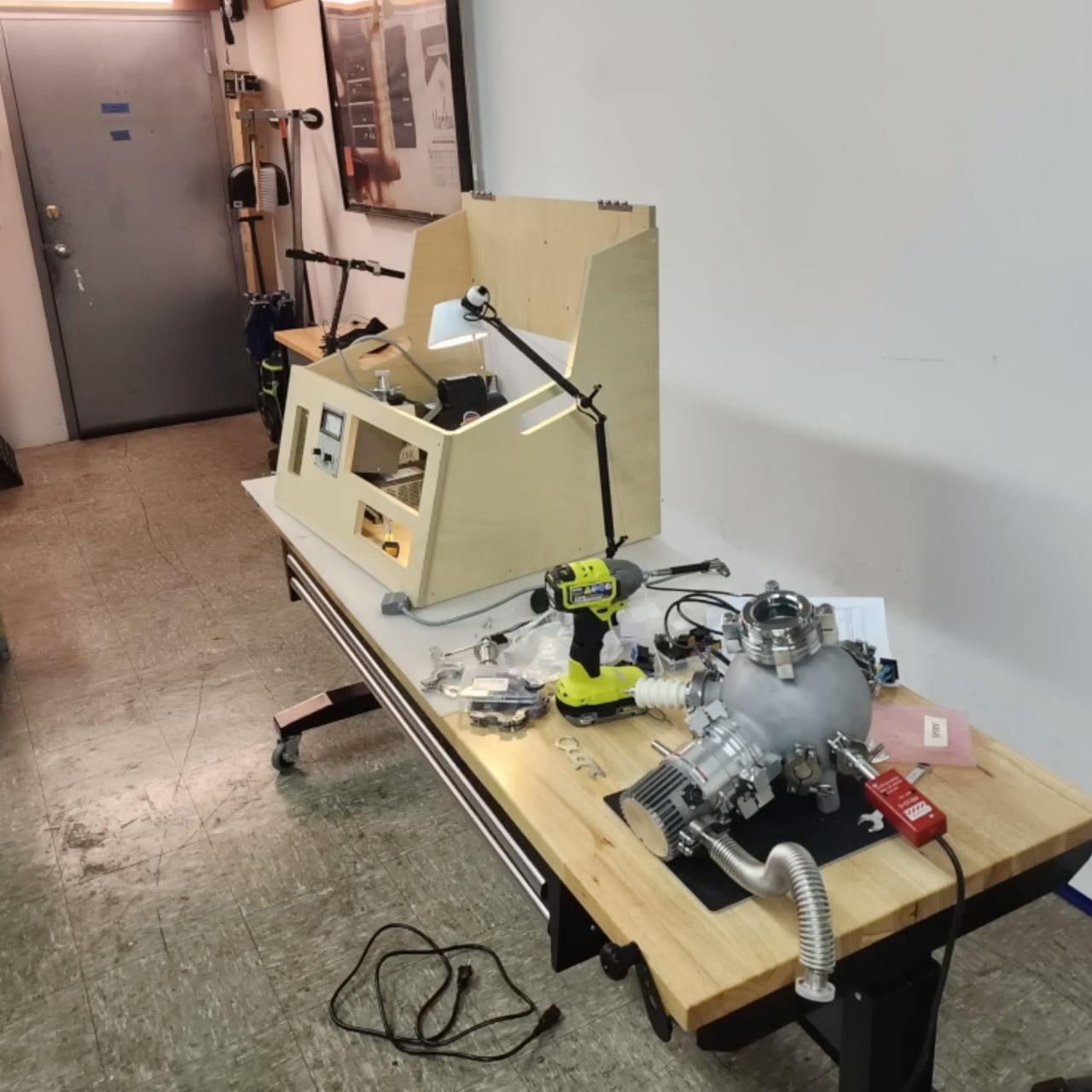
Traditional fusor builds begin with a significant cost. A ready-made spherical vacuum chamber with many ports for pumps, power, and equipment can cost more than $15,000. Welding flanges onto a bespoke steel sphere or constructing standard fittings still costs thousands. Martin wanted something far less expensive while maintaining the spherical form that allows ions to cycle properly. Metal 3D printing offered the breakthrough by melting metal powder with a laser, one thin layer at a time, to build complex forms with minimal waste material. Martin printed the whole chamber body, including all essential ports, in a single run. The part came out sturdy and geometrically perfect, but the surface quality caused the following issue.
Advertisement
Vacuum seals require mirror-smooth metal where rubber O-rings contact flanges. Standard ISO connections were chosen because they are easier to build than knife-edge. Conflat sealing will leak on the slightly rough texture created by 3D printing. Martin solved this problem with smart fixturing rather than purchasing a more expensive printer or post-processing equipment. He added feet to the chamber floor and arranged most apertures along a single axis. A steel base plate perforated with a series of holes allows the item to spin into six different positions. The assembly was delivered to a nearby CNC shop, where a five-axis machine (three-axis machines may perform identical tasks with additional settings) carved precise sealing grooves and flat faces on the key surfaces.
Once machined, the chamber was compatible with ordinary vacuum hardware. Martin attached a roughing pump to swiftly lower pressure, followed by a turbomolecular pump to achieve the deep vacuum required for ions to traverse long distances without interacting with stray air molecules. A rudimentary Pirani gauge purchased on eBay was used to check the pressure. Unused ports remained blanked off. The system pulled down and maintained vacuum for days without measured leakage, demonstrating that the seals and printed-and-machined chamber functioned well.
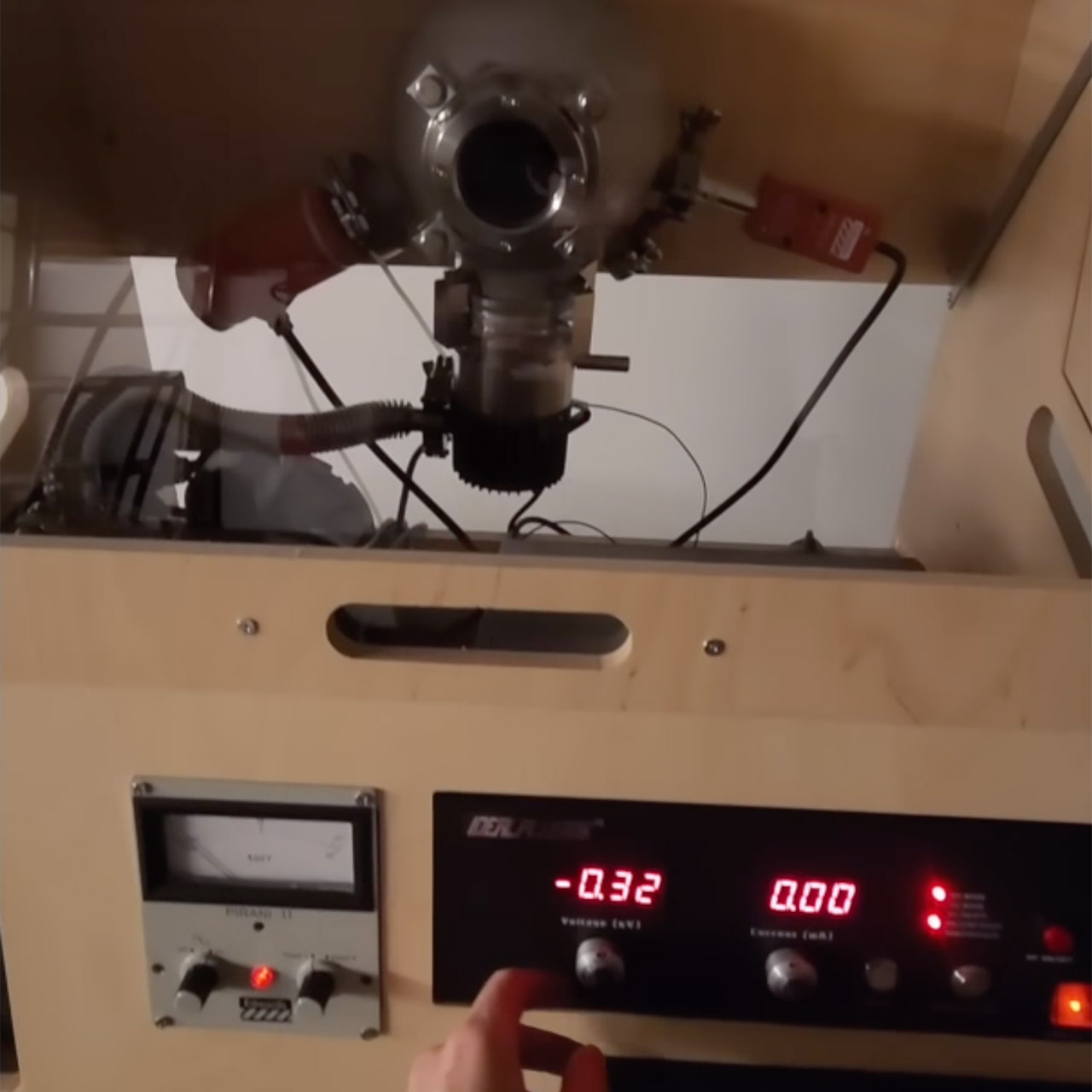
Power came last, as high voltage fed to the central grid created precisely the plasma conditions required for fusion process. The chamber glowed with the typical glow of ionized gas in the presence of intense electric fields. Martin confirmed that the machine had entered the regime where adding deuterium would result in genuine fusion. He simply never introduced the gas. Fueling was impracticable at the time due to supply constraints and high deuterium prices in his location, as well as the cost of producing it at home using heavy water. Without fuel, the project was unable to produce neutrons, but all supporting systems functioned well.
Martin also created a wooden enclosure for the system using CNC technology. It completed the project by establishing a basic physical barrier during high-voltage operation. The actual shift occurred after the plasma formed. Martin concluded that the vacuum chamber itself was the most valuable consequence. Ultra-high vacuum capabilities is useful for much more than only fusion demonstrations. The same technology may power ion thrusters, support electron microscopy studies, and facilitate other complex hobby and student projects. His attention shifted from completing a single reactor to developing designs and technologies that allow anyone to order or build viable vacuum systems without large budgets or factory access.
Starling Bank is cutting around 130 jobs as it restructures operations and pushes AI deeper into its business. The neobank’s profits fell for a second consecutive year, but its technology licensing arm Engine grew revenue 25%.
Starling Bank is cutting around 130 jobs, roughly 3% of its 4,000-strong workforce, as the London-based neobank restructures its banking and technology operations. Staff were told this week that the changes were intended to simplify how the company operates, reduce duplication, and accelerate product delivery.
Advertisement
The cuts come as Starling pushes AI deeper into its operations. In March, it launched Starling Assistant, an agentic AI tool that can set up savings goals, organise bill payments, and quiz customers on their spending patterns using voice or text prompts.
Falling profits in a falling-rate world
The restructuring follows a second consecutive year of declining earnings. Pre-tax profit fell to £217 million in the year to March, down from £223 million a year earlier, while total revenue dropped from £940 million to £887 million.
The 💜 of EU tech
The latest rumblings from the EU tech scene, a story from our wise ol’ founder Boris, and some questionable AI art. It’s free, every week, in your inbox. Sign up now!
Advertisement
Starling attributed the decline to falling interest rates, which have squeezed margins across UK banking. The neobank remains profitable, having now posted five consecutive years in the black, but the direction of travel is clear.
Customer numbers continued to grow, with platform accounts reaching 6.2 million, up from 5.3 million the previous year. Deposits rose to £12.7 billion.
The AI arms race among neobanks
Starling’s AI push is part of a broader race among digital banks to automate customer-facing operations. Revolut launched its own AI assistant, AIR, to UK customers in April, offering similar capabilities around spending analysis and account management.
Starling’s scam detection tool, launched in October 2025, uses Google’s Gemini models to analyse marketplace listings and flag fraud in real time. The tool has since been expanded to detect more than ten types of scam, including romance fraud and deepfake phishing.
Advertisement
“A key factor in our competitive edge over legacy banks is our agility, our ability to test, launch, learn and reorganise at pace,” a Starling spokesperson said. The bank added that it is continuing to hire technology and AI engineers even as it cuts elsewhere.
Engine as the growth story
The brighter part of Starling’s business is Engine, the software-as-a-service arm that licenses the bank’s core technology stack to other financial institutions. Engine’s revenue grew 25% last year as its client base doubled on international demand.
Engine already powers banks in the UK, Romania, Australia, and New Zealand, and is now targeting the US market. The division has opened an office in New York with a reported $50 million investment and is in discussions with mid-tier American lenders.
A sector-wide shift
Morgan Stanley estimated in June that AI could eliminate as many as 400,000 European banking jobs by 2030, double its earlier forecast of 200,000. ABN Amro announced last year that it would cut roughly 20% of its workforce by 2028, primarily through automation.
Advertisement
Starling’s 130 cuts are modest by comparison, but they signal a shift within the neobank sector itself. The digital challengers that once defined themselves against the bloated workforces of high-street banks are now applying the same efficiency logic to their own operations.
The device is still in the early stages of development. SpaceX has told some investors that the design could change and that it is not yet clear whether the product will ultimately come to market. Representatives for SpaceX and Qualcomm did not respond to requests for comment. Read Entire Article Source link
China’s Alibaba will ban employees from using Anthropic’s programming tool Claude Code, starting on July 10, according to multiplereports.
Anthropic already prohibits Chinese companies, as well as foreign entities owned by those companies, from using its models. The company has reportedly been working to close loopholes that allow Chinese users to access Claude.
According to a recent Reddit post, some of that loophole-closing involved a version of Claude Code that could secretly identify Chinese users. Anthropic’s Thariq Shihipar said in a post on X that this was “an experiment we launched in March that was meant to prevent account abuse from unauthorized resellers and protect against distillation.” (Distillation is a practice where AI models are trained on the outputs of other models.)
“The team has landed stronger mitigations since then and we’ve actually been meaning to take this down for a while,” Shihipar said.
Advertisement
Nonetheless, Alibaba has reportedly classified Claude Code as high-risk software and is instructing employees to use the company’s own Qoder tool instead.
We spend hours testing every product or service we review, so you can be sure you’re buying the best. Find out more about how we test.
D-Link G572: 30-second review
Living in the south of England, you’d expect the internet speeds to be pretty decent, and at one time, not long ago, in the New Forest, they were. But then, as the area started to develop, connection speeds dropped and became increasingly unstable, meaning that if you run a business, fallbacks are needed if you want to keep running.
However, even then, the cellular networks can be hit and miss, aim for the high ground, and ordinarily, you can get a signal, so when my fibre network at home keeled over completely, I reached for my usual choice of mobile network router to get me back online.
Advertisement
However, this time the fibre connection has not been short and tipping over for over a week with no connection and intermittent service for the last few months, I’ve had to look for a more permanent solution. Thankfully, the G572 was in for review and has now been delivering impressive connection speeds to the 4G network from its high point in the house and office.
Unlike my high-end portable 5G router, this box requires AC power, but then it provides wireless coverage that essentially matches that of the Eero 6 routers we usually use at home. In an area where connection speeds are usually lacking, the powerful antennas do the job.
While I still can’t connect to a 5G network, the 4G connection speeds are impressive, with the speed test nearly reaching 80 Mbps and upload speeds of around 6 Mbps. Still some way off the fibre connection, but a lifesaver when you rely on that connection for work and, of course, entertainment.
Advertisement
But this router has not only stepped in where the fibre connection fails, in the office, but another once-sweet spot for bad fibre connection, which, on last checking, has now dropped below 10Mbps and the cellular network is close to non-existent. Using this router, the cellular network connection speeds have improved enough to enable some email, web browsing, and music streaming; video streaming might be wishful thinking. Then there’s also the ability to just plug it directly into the 10G network, fully integrating it with the office network.
The other point at home is that multiple devices can be easily connected with surprising efficiency. Most days when working at home, I’d have two to three machines, three robot vacuums, which I discovered only work when there’s an internet connection, the Alexa, and a couple of mobile phones.
Sign up to the TechRadar Pro newsletter to get all the top news, opinion, features and guidance your business needs to succeed!
In the evening, that volume of connection uplifts with my partner’s phone and laptop and the use of the Fire Stick. Ordinarily, this volume of connections would cause a slowdown of the connection speeds, especially as the usual mobile router would need to be placed in relative proximity to where the devices were being used, but here, placed on another floor, the connection speeds are still impressive, with a floor between the router and the devices used.
Advertisement
I looked at the previous iteration of this router, the D-Link G530, last year, and was impressed with the Wi-Fi 6 performance. This new model boosts the wireless connection speed to Wi-Fi 7 and adds three more network ports to the back. The uplift in performance is significant to the point that, for most people, with a dedicated network SIM, you can seriously move away from a wired broadband connection, even if you’re limited to the 4G connection.
In my household, while this unit came in for review, the real-world testing has been a little more real-world than I would have liked. While I’m impressed with the download speeds, the upload is a little more limited.
However, if you need a fast and reliable connection in a workshop, studio, office, or at home where you don’t have a fibre connection, or you have a good 5G connection and are happy to rely on a cellular network, then this is a great option. Most importantly, while this box is expensive and the data-only SIM also doesn’t come cheap, the impact of no internet at all makes this fallback a valuable addition to your business costs.
Advertisement
D-Link G572: Price and availability
How much does it cost? £350
When is it out? Now
Where can you get it? Online at major retailers
At present, the D-Link G572 will set you back around £350 for the base unit. On top of that cost, you will also need a mobile SIM contract.
In this test, I used the Unlimited plan from Vodafone, which is uncapped on both usage and speed through the business plans, and this set me back around £250 for the year.
There are cheaper data plans out there, but if you rely on the internet and a clean connection, then this plan, even when limited to the 4G speeds due to local network coverage, will ensure you can keep your business going.
(Image credit: Alastair Jennings)
Advertisement
D-Link G572: Specs
Antenna: 10 x Wi-Fi internal antennas, 4 x LTE/5G NR internal antennas, two of which can be substituted with external TS-9 antennas Interfaces: 4 x Gigabit Ethernet LAN ports, 1 x 2.5 Gigabit Ethernet WAN port, 1 x SIM card slot Wireless speed: 7200Mbps (5GHz up to 5764Mbps / 2.4GHz up to 1376Mbps) IEEE Standard: IEEE 802.11be/ax/ac/n/g/b/a, IEEE 802.3u/ab Size: 137 × 146 × 205mm; 660g OS installed: Router firmware with Web UI and D-Link Falcon app management Accessories: Power adapter Wi-Fi standard: IEEE 802.11be/ax/ac/n/g/b/a Wi-Fi speed: BE7200, up to 5764Mbps on 5GHz and 1376Mbps on 2.4GHz Ethernet: 4 × Gigabit LAN, 1 × 2.5GbE WAN SIM: 1 × Nano SIM card slot Antennas: 10 internal Wi-Fi antennas; 4 internal LTE/5G NR antennas, with two substitutable via external TS-9 antennas Security: WPA/WPA2/WPA3, WPS, SPI firewall, anti-spoofing, IP filtering, and DMZ support
D-Link G572 Review: Design
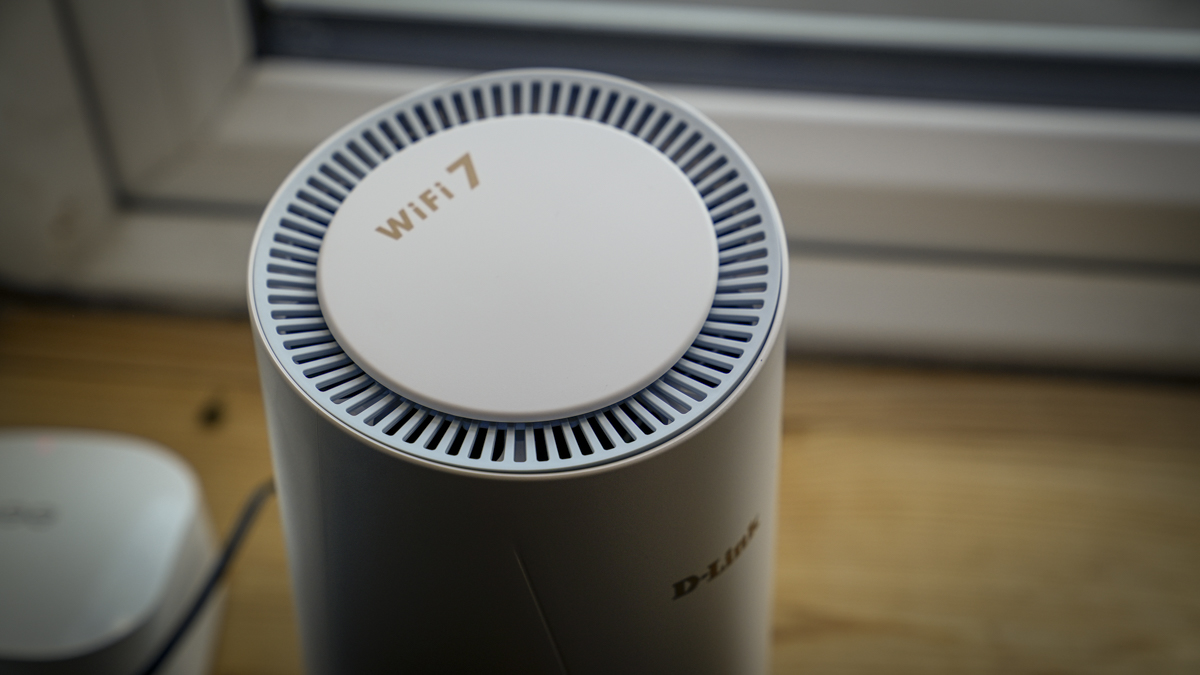
Like the excellent G530 I looked at last year, the G572 uses an almost identical upright white tower design that sits neatly on a shelf or windowsill. Throughout the test, I moved the router around to find the strongest connection in the home, and, just like with your mobile phone, it’s worth checking the signal strength.
As there’s no screen or readout on the router itself, you need to rely on the companion app, which, while simple, highlights basic information, including that all-important signal strength. While mine was still only three bars, flickering onto four on occasion, the performance was maximised for the area.
Advertisement
The relatively small footprint of 137 x 146mm enables easy positioning. However, you do need to make sure that the positioning is near an AC plug. In the house, that wasn’t an issue, with the prime location directly next to a socket.
Likewise, in the studio, a plug was easily located; however, in the office, the prime location was some distance from the nearest AC socket, so rather than using an extension cable, I used a Jackery 1000 V2 power station, which kept the router running happily throughout the day with a minimal impact on the capacity.
While the unit has a relatively small footprint, the height of 205mm means that you do need a decent-sized shelf height to position the router, and as I moved from one location to another, I actually found that this height was pretty average for most of the shelving units that I use across all locations, so the router fitted without issue.
(Image credit: Alastair Jennings)
On the back of the router is a 2.5GbE WAN and four gigabit Ethernet ports, which I was able to plug directly into the network, then there’s the all-important slot of the Nano SIM and AC power socket and the option to connect the TS-9 antenna if you need a connection signal strength boost. Locally, for me, this might have been an idea, but those were not provided for this review.
Advertisement
Getting started with the router is straightforward: install the Nano SIM, then plug the box into the mains. Once done, you install and connect the app, update passwords, and create or log in to your D-Link account, and then you’re pretty much set to go.
For wireless, like any router, you need the username and password; for the wired network connection, it just needs to be plugged in. I installed the DXP4800 GT and the IDX6011 Pro as part of my usual video setup.
As a cellular router, the ease of use and integration into my existing network while I wait for the fibre to be fixed was surprisingly smooth and easy.
(Image credit: Alastair Jennings)
Advertisement
D-Link G572: Features
The G572 is quite an upgrade from the already impressive G530, with the main focus being the switch to Wi-Fi 7 and the inclusion of four network ports on the back. The cellular connection also offers 5G NR support, with theoretical download speeds of up to 7.01Gbps in SA mode for pure 5G potential and up to 5.67Gbps in NSA mode, where the 4G/LTE network is still the base infrastructure, which is the system by which I tested the unit.
Wi-Fi 7 BE7200 supports multi-link operation and dual-band speeds of up to 7200 Mbps, which really makes a difference as more devices are connected. It lets multiple devices connect to the same router using different bands, freeing up bandwidth and improving speeds.
On the back of the router are five network ports, with one WAN 2.5GbE set apart from the four Gigabit LAN ports that enable you to connect to your computer, NAS devices and other office equipment.
The main feature that sets this apart from a standard router is the slot for a Nano SIM. This is essentially the same type that you find in most phones, and you can get a data-only SIM package from most mobile providers.
Advertisement
Once inserted into the slot, it can connect to the cellular network to provide a fast internet connection. While a cellular network connection option is what differentiates this from the standard router, you can also plug directly into your standard wired fibre network connection with automatic failover.
The incoming network cable plugs directly into the 2.5GbE port; if your wired network fails, then it will automatically switch to the mobile connection, so you don’t have any downtime.
Through the test, I tried several locations, in the studio where it stood alone with the cellular network connection. In the home, the fibre internet had failed, so the box was positioned on the second story for the best hebest cellular network signal.
Finally testing in the office, where the wired connection is extremely slow and has dropouts, I put the router between the wired connection and used it as my Wi-Fi network so that when the fibre connection dropped, it automatically switches to the cellular network.
Advertisement
Alongside the hardware is also the D-Link Falcon app and the web UI, which enable you to set up and manage the box. The app, which is how most people will access and communicate with the router, is relatively simple and easy to navigate with access to all the settings you want. If you want a little bit more in-depth control, then you can use the web view that can be accessed directly from your browser window.
When it comes to security, the usual boxes are ticked: WPA/WPA2/WPA3 security, SPI firewall, anti-spoofing, IP filtering, DMZ, and WPS. I was also pleased to see that it offers parental controls, as well as a switch that basically turns everything off at night, so if you’re in the office and you want to switch it off completely when you leave, then you can just access the app, and it’s a simple one-touch button to switch it off.
If you’re in the home, using separate parental controls on the access, essentially saying that after 6 o’clock in the evening, all internet connections are off. The great thing here is that D-Link has really sorted this out, so it’s probably one of the quickest and easiest options I’ve come across in a long time.
The other big feature here, especially for office use, is that you can connect plenty of devices, so within the studio, I had one PC, two Macs, and two mobile phones connected. I also had two NAS systems, and the box handled everything with ease, providing fast internet and network access over the cellular and wired networks.
Advertisement
Even though the LAN ports only offer a Gigabit connection, as my network is isolated at 10GbE through the switch, this wasn’t too much of an issue and only limits the speed at which the wired devices to the router will connect to the internet, which, with the 4G connection, didn’t really pose an issue.
The G572 sounds like a great idea on paper and can be used in several ways. Firstly, if you’re in an office, outhouse, studio or other location where there is no wired internet connection, then you can use this router to connect to the cellular network, and then all of the devices can connect to it in exactly the same way as you usually have with a wireless router.
Alternatively, if the internet connection is absolutely critical and slightly unstable, as it often is here in the New Forest, you can place it between your wired connection and use it as a wireless router in exactly the same way as all other routers of this type. However, if that wired connection falls over at any point, then the cellular connection kicks in, meaning that you have no break in network connectivity. If you plug it into your existing wireless network, as I have in this review, you’ll notice very little difference in the connection, even if there is a slight drop in speed, unless it’s uploads where there will a significant slow down.
Unlike portable cellular routers that you can take anywhere, this one is designed to be plugged into mains power, so you can use it in your office, home, or anywhere else with mains power. In this review, I also had to plug it into a Jackery 1000 V2 power station because the place with our best cellular connectivity in the office was too far from a plug to connect without an extension lead. Used in this way, it actually provided a sound solution.
Getting set up and started with it was all easy enough, and once the unit was taken out of the box, it was simply a case of plugging my Nano SIM into the slot on the back and then plugging it into the mains. In the studio, this was as far as it went. I was able to connect using the app and get the rest of the unit set up; it was all quick and really straightforward.
Advertisement
Once connected, whilst I could only find a 4G connection, the transfer rates were almost at 80 Mbps, which was impressive on the download, although the upload speed, closer to 5 and 6 Mbps, was less impressive than my usual wired connection, but in line with what I’ve experienced in the past.
Once everything was set up, I could connect to whichever device I wanted to the router, select that network name, enter the password, wait a couple of seconds, and it would connect. What was impressive here was that every device I connected to delivered similar performance: newer Wi-Fi 7 devices were limited only by the cellular network speed, while older devices that only featured Wi-Fi 6 still produced very fast speeds. Unfortunately, there is no 5G coverage in this area.
Used off-site with no wired connection, I had the router running for around six weeks, and it provided a solid, stable connection throughout, even during the heatwave, when the wired connection at home decided to come to a grinding halt and has since failed to come back online.
While the first month of the test proved just how good this router was in the office and studio, where it provided decent internet connection for download and moderate for upload, the real test came where I had to package up the router and take it home, find a location around the house where I could actually get a mobile phone signal for that data connectivity, and then plug it in.
Advertisement
I’m used to network speeds of around 150 Mbps and upload speeds that are equally impressive; however, while we used to have very decent cellular connectivity, that connectivity has recently dropped out this year. In searching around the house for a decent location for the router, I finally settled on the second floor and the rear of the house, which must have had the clearest line of sight to whichever mast it’s picking up.
Once it was switched on and connected, the 4G connectivity showed at three to four bars, and testing out the transfer rates, I was again surprised to see that I was getting around 80 Mbps, not at all bad.
Now, in my second week of using it as my main internet connection, I can confirm it works incredibly well. I might not be able to test out the 5G speed, but even at 4G, with the slightly ropey connectivity of the area, I’m still getting those fast download rates, although uploads are slightly slower at about 5 to 6Mb per second, and you do have to pick your time of day, with that signal dropping to about 20Mb per second at the height of what seems to be mobile phone use in the area.
Despite that, in the evenings, we’d have at least one Alexa going, two laptops, possibly two mobile phones, and the Fire Stick playing whichever streaming channel we’d settled on for the evening. The D-Link G572 was able to supply all devices without issue, and whilst you could tell, especially with the streaming services, that I wasn’t having the usual speed of connection that I’m used to with the wired fibre connectivity, it was still incredibly impressive.
Advertisement
When the unit first arrived, and after I’d initially set it up, I tested it with the wall connection, installing it as the main router for the house and connecting it to the 2.5GbE WAN port at the back. I was again really surprised by the coverage it provided in the house, surpassing the Eero 6 wireless router I presently use. I also noted that those devices that utilise Wi-Fi 7, primarily a couple of mini PCs that I have for a review, saw the transfer rates vastly increased, still limited somewhat by the 2.5GbE input, but still significantly more than the other router.
Back in the office, and with it just connected to the mobile network and with one of the worst fibre connections going, I connected to the back of the D-Link G572 again, although this time it was more to see whether it could improve the connectivity I usually have in the office.
Here, I was really impressed: every time the wired connection cut out and switched to the mobile network, it was still not great and was far slower than when I was using it at home, but a definite improvement on what I’m used to.
To get a fast connection in my office, I need to cross the car park and go into the next building. There’s obviously a connection somewhere within the old building. However, having this router in between meant that when my wired connection was actually feeling like working well, I’d have a relatively decent connection, and then when it would drop out, it switched over to the cellular network, and for the first time, I was able to work nonstop using the internet connection without worrying about it dropping out partway through a call or upload.
Advertisement
What I really like about the router, although its speed was slightly limited, was the fact that it had those four Gigabit LAN ports, which means I can plug in my NAS boxes for archive and working, along with the network printer, which made them more easily accessible on the network, both wired and wireless. While my actual network in the office runs at 10GbE, this downgraded it to just one. For most office work, this is absolutely fine, and when I actually need faster connectivity, I can go through the switch and plug directly into the faster NAS.
As I’m used to working in an environment where the internet connection can be variable, from very good to absolutely non-existent, always having some sort of wireless router with me is an essential part of my working kit, and I usually rely on the Netgear Nighthawk M7, as it’s just a very powerful and portable solution, although even that struggles at the moment in the office.
The D-Link G572 is a far cheaper solution, which is good, especially considering the cost of a 5G unlimited data package, which can also see costs rise rapidly. With this AC-powered router, I was impressed from the outset. It is a bit of a shame that those LAN ports are limited to a Gigabit, but when it comes to one of these devices, it’s just simple. It does what it does, and you don’t need to really think about it. It’s exceptionally good, and for someone like me, who works in an older building in a town with very little internet, this makes a lot of sense.
(Image credit: Alastair Jennings)
Advertisement
D-Link G572: Final verdict
(Image credit: Alastair Jennings)
When I tried out the predecessor to the D-Link G572 last year, I was impressed by just how versatile it was and by the fact that it could serve as a backup to my internet connection. At that time, my wired and cellular network connections around the New Forest were exceptional, but in the intervening year, the cellular network dropped out entirely, and even the wired network that had always been so reliable became especially unreliable, meaning I had to look for alternative solutions.
Having now burnt through EE, O2, Vodafone and a few other providers, it turns out there’s been an issue with our mast for almost a year, so a device with a good antenna to pick up whatever signal you can get is essential.
What I found with the D-Link G572 was that, even without the optional antenna, it still picked up a pretty decent signal as long as it was positioned correctly. That place in the house took quite some time to locate, but once I did, I was seeing speeds in excess of 80 Mbpsd, far faster than I would have thought possible and over 20 Mbps faster than the comparable rate on my iPhone 15 Pro using the same network.
I also like that I could plug it in between my wired fibre connection and use it as my wireless router, with it switching to cellular when the wired connection drops out. Even though many of my devices around the house couldn’t fully use that Wi-Fi 7 connectivity, it was fully backwards compatible and still provided all devices with a strong signal, enabling me to continue working despite cellular and wired connection issues.
Advertisement
As a solution for anyone working off-grid or in a location where a wired or even cellular data network can be an issue, this D-Link G572 is certainly worth the money. Whilst it might seem that it is a premium option, especially when you consider you’re also going to need a data SIM contract, actually, just the fact that it keeps you working online and able to do business makes it a valuable asset for any business.
Should I buy the D-Link G572?
Swipe to scroll horizontally
Value
Initially, it seems expensive, especially when you put the cost of a cellular network package on top, but then, if it keeps you working, it more than pays for itself.
Advertisement
4.5/5
Design
Very neat, with a tower design that sits easily on a shelf or window ledge, as long as you have power nearby to keep it running.
4/5
Advertisement
Features
5G and Wi-Fi 7 are leading features, and it’s also good to see that it’s fully backwards compatible with your older gear.
4.5/5
Performance
Advertisement
Only really limited by your cellular network connection, and when it works, plugging it into your wired connection improves usability.
4/5
Overall
A great choice as a fallback if you have an internet connection that is temperamental and unreliable, and more than worth the money to keep you working.
Keeping your windshield clean and clear is quite important while driving, so it can be frustrating when there’s a stubborn stain blocking your vision and windshield wipers don’t seem to be enough to wipe it away. However, don’t act too hastily. There are a few things you should keep in mind if you don’t want to scratch your windshield and keep it as clear as can be.
You’ll first need some essential tools, including microfiber towels, a soft-bristled brush, distilled water, white vinegar, glass cleaner, and rubbing alcohol. Some tougher stains may even call for a clay bar. If you’re cleaning a water stain, start by rinsing the windshield with plain water to remove loose debris that could scratch it. Spray your glass cleaner onto the stained area, then let it sit for a little while. Take out the microfiber towel and gently wipe the area in a circular motion. You may need to use the soft-bristled brush for tougher stains. After, rinse the windshield with the distilled water. If the stain is still there, try white vinegar instead of water and repeat the process.
Advertisement
Tougher windshield stains and avoiding new ones
Volodymyr Kalyniuk/Getty Images
While your car is parked outside, a bird may poop on your car, or tree sap can even start dripping onto the windshield. But even driving isn’t safe, since you may end up hitting some bugs that splatter onto the glass. For these kinds of situations, dampen a microfiber towel with rubbing alcohol and let it sit on the stain to soften the debris. Then, using a dedicated clay lubricant or soapy water as a glide, gently rub a clay bar over the area to remove the remaining debris. Even for these tougher stains, don’t use paper towels or sponges — they can leave behind tiny scratches on the glass.
It can be tough to fully avoid these kinds of windshield stains, but there are a few preventative measures you can take. Using a scratch-resistant car cover or windshield cover is always a great option, but even then, you should regularly clean your car to avoid debris turning into stubborn stains. Luckily, there are a lot of household items that are perfect for cleaning your car’s windshield. You may also want to consider a protective coating for your windshield.
Looking for the most recent Strands answer? Click here for our daily Strands hints, as well as our daily answers and hints for The New York Times Mini Crossword, Wordle, Connections and Connections: Sports Edition puzzles.
Today’s NYT Strands puzzle is a fun one, and if you’re a fan of a certain domestic animal, you might ace this puzzle. Some of the answers are difficult to unscramble, so if you need hints and answers, read on.
Today’s Strands theme is: Barking up the right tree
Advertisement
If that doesn’t help you, here’s a clue: Doggone it!
Clue words to unlock in-game hints
Your goal is to find hidden words that fit the puzzle’s theme. If you’re stuck, find any words you can. Every time you find three words of four letters or more, Strands will reveal one of the theme words. These are the words I used to get those hints but any words of four or more letters that you find will work:
PANS, SNAP, POINT, HEED, HEEDS, SIEVE, HUNT, SPAN, POINTED
Answers for today’s Strands puzzle
These are the answers that tie into the theme. The goal of the puzzle is to find them all, including the spangram, a theme word that reaches from one side of the puzzle to the other. When you have all of them (I originally thought there were always eight but learned that the number can vary), every letter on the board will be used. Here are the nonspangram answers:
HOUND, POINTER, TERRIER, SPANIEL, RETRIEVER
Today’s Strands spangram
The completed NYT Strands puzzle for July 5, 2026.
NYT/Screenshot by CNET
Today’s Strands spangram is HUNTINGBREEDS. To find it, start with the H that is the last letter on the far-left vertical row, and wind over and up.































































You must be logged in to post a comment Login