Mullvad, a virtual private network (VPN) named after the Swedish word for “mole,” is often recognized as one of the best VPNs for privacy. I put it on my best VPN list for exactly that reason. I’ve got huge respect for the extra lengths Mullvad goes to in order to ensure its user’s privacy.
To give you a preview, Mullvad is one of the few VPNs — other than my normal privacy recommendation, Proton VPN — that lets users pay entirely in cash. But even Proton VPN asks for an email address to make an account and uses a few marketing cookies on its own website. Mullvad represents every account as a randomly generated 16-digit code and uses no marketing cookies whatsoever.
That’s just one example of how Mullvad goes beyond the call of duty to keep users private. But while privacy is the most important aspect of a VPN alongside security, it’s not the only thing that matters. For this review, I set out to investigate whether Mullvad pairs its rights-protecting bonafides with versatile, convenient and enjoyable VPN apps. Using our rigorous VPN testing procedure, I’ll rate Mullvad in 11 areas. You can find a summary of my results in the table below, skip to the sections that matter most to you or just read my final advice in the conclusion.
Editor’s note (2/11/26): We’ve overhauled our VPN coverage to provide more detailed, actionable buying advice. Going forward, we’ll continue to update both our best VPN list and individual reviews (like this one) as circumstances change. Most recently, we added official scores to all of our VPN reviews.Check out how we test VPNs to learn more about the new standards we’re using.
Advertisement
Mullvad
A VPN with average speeds and features but a great pricing scheme and no compromises on anonymity.
Pros
Can sign up without any personal information and pay in cash
Saves no data whatsoever on users, even on its own website
Excellent apps on all OSes
Cons
WireGuard is the only protocol
Disappointing browser extension
No live chat support
Findings at a glance
Category
Notes
Advertisement
Installation and UI
All apps share roughly the same user interface
Apps are responsive and easy to navigate, with no design choices that would threaten beginners
Lack of “fastest server” button is an issue
Advertisement
Browser extension is only available on Firefox and still in beta
Speed
Reasonably good average latency
Reduces download speeds by 26 percent and upload speeds by 17 percent
Advertisement
Speed declines are consistent and chartable
All speed metrics are quite good on nearby servers
Security
Only uses WireGuard protocol
Advertisement
No IP address leaks, even when switching servers
Packet test showed successful encryption
Pricing
Always costs 5 Euro per month, though prices outside Europe depend on exchange rates
Advertisement
No auto-renewal — membership lasts until money runs out
Can pay using cash or by purchasing scratch-off vouchers on Amazon
14 day money-back guarantee, except on cash payments
Bundles
Advertisement
Only app besides the VPN is the free Mullvad Browser, which removes the tracking habits of typical web browsers
Allows several smaller VPNs to use its servers in their networks
Privacypolicy
No vague lines or loopholes in privacy policy
Advertisement
Only saves account numbers and expiration dates for each user
Uses an extremely limited range of cookies with no marketing trackers
Has undergone a total of 17 audits of different aspects of its service
Swedish police demanded customer information in 2023; Mullvad couldn’t comply because the data wasn’t logged
Advertisement
Virtual location change
Unblocked Netflix 13 out of 15 times
When it failed, virtual location was still changed
Server network
Advertisement
90 locations in 50 countries, majority in North America and Europe
No virtual servers whatsoever
Features
DAITA conceals traffic patterns that might let an AI identify what sites you visit
Advertisement
Uses quantum-resistant encryption on WireGuard
Can choose your own multihop entry and exit points
Several options for getting around nation-level firewalls
Can block ads, trackers, malware and other unwanted content using predetermined DNS block lists
Advertisement
Supports IPv6 traffic
Kill switch and stronger lockdown mode
Split tunneling by app
Customer support
Advertisement
Help center includes useful filters to find the topic
Well-written articles with good internal linking
No live chat support, but staff answers emails quickly
Can view app logs at any time
Advertisement
Background check
Founded in 2009 in Sweden; still owned and operated by initial founders
User account numbers were exposed in a 2023 incident, but Mullvad quickly closed the leak
Installing, configuring and using Mullvad
Let’s start by examining how Mullvad feels as a piece of software. In this section, I’ll be testing its desktop apps for Windows and Mac, its mobile apps for Android and iOS and its browser extension for Firefox. To start with the installation process, Mullvad downloads and installs in a snap on mobile. On desktop, installation requires a few more steps than is typical, but the app guides you quickly through everything.
Advertisement
Across the board, my only serious complaint is that there’s no option for automatically choosing the fastest server. You can usually assume that the nearest one to you will be the fastest, but there’s always the chance of an unusual server overload. It’s a bizarre oversight for an app that otherwise goes out of its way to be usable.
Windows
Mullvad’s Windows app has a slim UI that uses space efficiently without being too cramped. It doesn’t give you a lot of information, such as live speed tests or data in transit, but I’ve mostly found that to be needless filler on VPN apps.
Mullvad on Windows. (Sam Chapman for Engadget)
Speaking of needless filler, the map may be a little bigger than it needs to be, but maps on VPN clients aren’t just about teaching you geography — they do a lot to make the apps more welcoming to casual users who might not otherwise fire up security software. In fact, Mullvad’s UI is admirably beginner-friendly, befitting its focus on privacy for everybody rather than just the tech-savvy.
All the settings are accessed by clicking the gear in the top-right. Here, you can turn on DAITA (Mullvad’s defense against AI traffic scanning), activate multihop and control Mullvad’s other features. There are also some quality-of-life features for the UI itself, such as whether it remains pinned to the taskbar or operates as a standalone window. Some options, especially under the VPN settings tab, are a bit technical, but don’t need to be touched for a good experience.
Advertisement
Mac
Mullvad’s macOS app is quite similar to its Windows app, both in terms of the interface and the features offered. The big difference used to be that macOS lacked split tunneling, but that’s been added in a recent update. The only serious distinction now is that the Mac client can’t be unpinned from the taskbar, which is just a little bothersome.
Mullvad on Mac. (Sam Chapman for Engadget)
Other than that, you’ll find every setting you need under the gear, just like on Windows. Similarly, connections to VPN servers happen quickly, and selecting locations from the menu is very straightforward. While connected on either app, you can click the circular arrow by your location to swap to another server in the same location — highly convenient if you’re trying to unblock Netflix.
Android
Mullvad’s Android app has the same nearly-perfect design approach as all its other apps. The main page has nothing on it but the connect/disconnect button, the choice of server locations, a map and the buttons for your account information and preferences. Those preferences are a manageable set of options that are almost all managed with simple on-off switches. It’s all highly responsive and annoyance-free.
Mullvad on Android. (Sam Chapman for Engadget)
iOS
Mullvad’s iOS app looks very similar to its apps on every other platform. The front page is kept simple, with large controls in the foreground and a map taking up most of the space. Everything else is located in the menu accessed through the gear icon at top right. Neither mobile app has the options for toggling the UI itself that the desktop apps have, but it’s mostly free of quality-of-life problems to start with.
Advertisement
Mullvad on iPhone. (Sam Chapman for Engadget)
Browser extensions
Mullvad’s browser extension is only compatible with Firefox. You can’t actually connect to the VPN through this extension. Its main functions are to tell you whether you’re connected to a Mullvad server and to connect to a SOCKS5 proxy in a Mullvad location. If you do this while connected to Mullvad through the desktop app, you’ll get a second layer of protection, similar to the multi-hop feature.
The Firefox extension is a rare misfire for Mullvad — perhaps fair, since it’s still in beta. Its only real feature is something that the desktop app already does perfectly well, and it looks like a software malfunction to boot. However, given Mullvad’s track record, I’m confident they’ll figure out what to do with it in time.
Mullvad speed test
A VPN almost always slows browsing speeds and increases latencies. It’s unavoidable, given the extra steps a VPN protocol adds to the process of getting online. The trick is to find VPNs that keep the slowdown to a minimum, using a combination of regular maintenance, good planning and smart load balancing.
For this test, I used speedtest.net to check how six of Mullvad’s server locations influenced three key speed metrics. Ping measures latency, the time in milliseconds (ms) that one data packet needs to travel between a client device and an ISP. Download speed measures the amount of data in Megabits that a web browser can download in one second. Upload speed tracks how much data can be uploaded in a second. We’re looking for low latencies and high download and upload speeds.
Advertisement
Server location
Ping (ms)
Increase factor
Download speed (Mbps)
Advertisement
Percentage drop
Upload speed (Mbps)
Percentage drop
Portland, USA (unprotected)
Advertisement
15
—
58.96
—
Advertisement
5.85
—
Seattle, USA (fastest location)
23
Advertisement
1.5x
55.07
6.6
5.51
Advertisement
5.8
Montreal, Canada
165
11.0x
Advertisement
44.28
24.9
4.62
21.0
Advertisement
Fortaleza, Brazil
307
20.5x
40.96
Advertisement
30.5
4.65
20.5
Prague, Czechia
Advertisement
368
24.5x
43.17
26.8
Advertisement
5.47
6.5
Lagos, Nigeria
528
Advertisement
35.2x
37.41
36.6
4.61
Advertisement
21.2
Bangkok, Thailand
473
31.5x
Advertisement
39.76
32.6
4.13
29.4
Advertisement
Average
311
20.7x
43.44
Advertisement
26.3
4.83
17.4
I’ll start with the bad news: the tests didn’t exactly make Mullvad look like a speed demon. Its speeds have gone up and down in the years I’ve been using it, and right now they appear to be on the downswing. If you use locations all around Mullvad’s server network, you can expect your download speeds to decrease by about 26 percent and your upload speeds to decline by 17 percent.
Advertisement
However, it’s important to put those numbers in perspective. First, Mullvad’s numbers aren’t markedly worse than the ones I got when testing CyberGhost. Its speeds are average, but by definition, most things are average. Its average worldwide latency is actually better than Surfshark, the current champion of download and upload speeds.
Speed-testing a Mullvad server in Los Angeles. (Sam Chapman for Engadget)
It’s also nice that Mullvad’s speed drops follow a predictable curve. Lots of VPNs have unexpectedly sharp declines in certain locations, frequently in Africa. By contrast, Mullvad’s speed decreases pretty much as a direct function of how far from the server you are. This not only makes speed drops easier to plan around, but also means you can expect very good speeds on nearby servers.
This property of being fastest on servers near the user is another sign of Mullvad’s focus on its core privacy mission. If anonymity is your main reason for using a VPN, it doesn’t matter what your IP address is, so long as it’s not your real one. Using a nearby Mullvad server should guarantee you an internet connection that’s both fast and private.
Mullvad security test
To be secure, a VPN has to check two critical boxes. It must provide you with a secondary IP address without leaking your real one, and it must encrypt your communications with its servers so your activity can’t be traced. In the sections below, I’ll see whether Mullvad meets those requirements.
Advertisement
VPN protocols
VPNs use protocols to mediate between end devices, ISPs and their own servers. The first step is to ensure that the service you’re considering uses protocols that have expert confidence. Mullvad has kindly made this step easy for me by using only WireGuard on all its apps, with no OpenVPN, IKEv2 or in-house unique protocols.
There’s no question that WireGuard is a solid protocol. It uses the ChaCha20 stream cipher for symmetric encryption and Poly1305 for authentication, both uncrackable with current technology. Mullvad has even added its own fix for WireGuard’s one flaw, its need to save static IP addresses — the Mullvad implementation is set up to delete the IP address if it goes 10 minutes without being used.
Even so, it’s unfortunate to lose the ability to change protocols, which is one of the most common steps for troubleshooting a VPN connection. I understand Mullvad’s reasoning for cutting out OpenVPN (it claims the cryptography isn’t strong enough) but don’t agree. It’s one of this provider’s few unforced errors.
Leak test
There’s a straightforward test to determine if your VPN is leaking. Load up any website that shows your IP address — I personally use ipleak.net — and see what IP and location it reveals without your VPN active. Then activate the VPN and refresh the page. If you see your real IP address anywhere, your VPN is leaking.
Advertisement
Testing Mullvad for IP leaks. (Sam Chapman for Engadget)
I ran that test on five Mullvad servers. Each time, the website showed me the IP address of the VPN server, concealing my real one. To keep things simple, I ran the initial tests with IPv6 blocked via the Mullvad client. When I turned it on and tried again, the IPv6 traffic didn’t leak any more than the IPv4 did. I also saw no signs of WebRTC leaks. Unless you set up a custom DNS server, Mullvad also uses its own DNS, which remains entirely within the VPN tunnel.
I had one more leak test to try. Frequently, VPNs are leak-proof when maintaining a connection to one server but drop encryption when switching between servers. That problem is why I ultimately couldn’t recommend Norton VPN. Luckily for me, Mullvad has a button that lets you shuffle to another server in the same location, so I used that to see if it stayed leak-proof.
Mullvad doesn’t leak your IP even while changing servers. (Sam Chapman for Engadget)
As you can see in the screenshot, Mullvad jumped seamlessly from one server to another without showing my real location in-between. On a practical level, that’s enough for me to declare Mullvad leak-proof.
Encryption test
For one final experiment, I used the WireShark packet sniffer to see whether the data Mullvad sent from my computer to my ISP was encrypted. After capturing a few packets, I was gratified to see that they were totally unreadable to interlopers. Most established VPNs pass this test, but it’s still important for due diligence.
Advertisement
How much does Mullvad cost?
Mullvad’s pricing structure is one of the most unusual things about it. This is normally the section where I untangle 47 different Pro+ and Business- accounts that are all sold at three different durations. Mullvad couldn’t be further from that. It costs 5 Euro a month — that’s it. Each 5-Euro subscription can be used on five devices at once.
It manages payments through a system inspired by parking meters. When you sign up for Mullvad, you’ll buy as much time as you want. That time will count down until it expires, unless you top it up with more 5-Euro payments. If you run out of money, Mullvad won’t charge you a new subscription fee because you didn’t tell it not to. It’ll just stop working until you pay again. Every payment also comes with a 14-day money-back guarantee, except for payments made in cash.
The Mullvad account dashboard. (Sam Chapman for Engadget)
The only real complexity in the process is that Mullvad always figures out its prices in Euro, so outside the EU, the cost per month is affected by exchange rates. If you happen to live in a country where the government’s economic policy shuttles between capricious and arbitrary, you might want to grab a few months in advance.
The other most interesting thing about Mullvad’s pricing is the options you can use to pay. For maximum privacy, you can pay with cash using the payment token you’ll find on your account page. Note that this is not the same as your account number. To find it, log into your dashboard on Mullvad.net, click Add time to your account in the left-hand bar, then click the button labeled Cash and scroll down. Make your cash payment by writing the token on an envelope and mailing it to Sweden (full instructions here).
Advertisement
Unredacted, in case any hackers out there want to buy me some more time. (Sam Chapman for Engadget)
You can also get untraceable Mullvad vouchers by paying cash at participating retail locations. Most of them are in Europe, but you can order them from Amazon. While your payment to Amazon won’t be private, the voucher can’t be linked directly to your VPN account, since the actual number is hidden behind a scratch-off panel. It’s actually pretty ingenious.
Of course, you can also pay using any of the normal methods, including credit cards, cryptocurrency and bank wires (though not PayPal). But the more private methods are always there for people who need them.
Mullvad side apps and bundles
Mullvad is that rare VPN that’s still content to be a VPN and not an all-inclusive security suite. No shade to NordVPN or Surfshark, whose extra features are generally quite good, but it’s nice to see at least one of the top providers staying focused.
Although Mullvad doesn’t have any partners that sell their products alongside its VPN, it does have several partnerships with other VPNs who use its network as the basis for their own products. MalwareBytes Privacy VPN, Mozilla VPN, Tailscale and Obscura can all be considered Mullvad side apps if you squint.
Advertisement
Mullvad Browser
Mullvad’s only product other than the VPN is Mullvad Browser, which is free to download and works on Windows, macOS and Linux. Mullvad Browser works in the background, blocking common methods of browser fingerprinting that can be used to deduce your identity even when you have a VPN running.
For example, it automatically reports your time zone as UTC, disguises personal preferences like font and window size, scrambles information sent by APIs and conceals your browser version and computer operating system. It’s also in private mode by default, which doesn’t hide what your ISP sees but is useful for concealing your activity from other people that might use your computer.
Close-reading Mullvad’s privacy policy
Since privacy is Mullvad’s main selling point, this section is even more important than usual. Loopholes in the privacy policy of the privacy VPN would be deeply ironic. Fortunately, Mullvad’s privacy policy backs up its high-flying rhetoric. It’s a short, pointed and readable document with no problems I could discern. Mullvad has no parent company or subsidiary it might use as a loophole, and no clauses in its policy are left open to interpretation. It’s a masterpiece of the privacy-policy genre.
The document is actually three policies: a privacy policy, a no-logging policy and a cookie policy. The privacy policy lists all the times Mullvad might collect data about a user. That’s exactly two situations — using financial information to process payments (which will be entirely anonymous if you use cash or a voucher) and using your email address to track support tickets you open. That’s it.
Advertisement
The no-logging policy is a bit longer, but mostly because it’s explaining exactly how Mullvad manages to run a VPN service with so little information on individual users. For each account, it stores a number and an expiration date, plus public keys and tunnel addresses if you’re using WireGuard (deleted at most 10 minutes after your session ends). Everything else is completely anonymized. Mullvad even claims that its 500,000 or so user accounts could have been created by the same user 500,000 times, which I suppose is one way to spend 2.5 million Euro.
The cookie policy is the shortest because Mullvad uses exactly five cookies. One saves your login status in your browser, one saves your language preferences, one protects its site from being used in a specific kind of forgery hack and the other two are for handling Stripe payments.
Independent privacy audits
Mullvad corroborates its privacy policy with regular audits of various aspects of its service. Currently, there are 17 audits listed on its website, including four infrastructure audits by Cure53. All of its apps have been separately audited and found to be solid. It has been a couple of years since the last full infrastructure audit in 2024, but given how many other targeted reviews Mullvad has gone through since then, it’s hard to be too upset about the pause.
In 2023, Mullvad achieved the holy grail of VPN privacy: being ordered by subpoena to turn over customer information and not being able to comply because that information didn’t exist. Nothing compares to a VPN’s privacy being tested in the wild like this.
Advertisement
Can Mullvad change your virtual location?
Sometimes, a VPN appears to be working, but still reveals your real location to websites. Netflix is a useful proxy for this. To unblock a streaming site like Netflix, a VPN needs to change your virtual location while not appearing to do so — if Netflix sees any hint of VPN traffic, you’ll get blocked with the hated proxy error. I used five different locations to check whether Mullvad is up to the streaming task.
Server location
Unblocked Netflix?
Changed content?
Advertisement
Vancouver, Canada
3/3
3/3
Gothenberg, Sweden
Advertisement
2/3
2/3
Istanbul, Turkey
3/3
Advertisement
3/3
Johannesburg, South Africa
3/3
3/3
Advertisement
Singapore, Singapore
2/3
2/3
Mullvad did well for streaming, but it didn’t manage a perfect score like its fellow anti-establishment VPN Windscribe did. Two of the 15 servers I tested failed to unblock Netflix, one in Singapore and one in Mullvad’s hometown of Gothenburg. I also had trouble logging into Netflix while connected to a Vancouver server, though that server did unblock the site consistently once I got inside.
Advertisement
Mullvad’s servers all tricked Netflix into believing my new location. (Sam Chapman for Engadget)
In Mullvad’s defense, no location failed more than once. It’s completely possible to get good streaming performance out of this VPN; you just have to be willing to click the server refresh button a few times. Privacy is still the main use case for Mullvad, but it’s fine for streaming too.
Investigating Mullvad’s server network
Mullvad has 90 server locations in 50 countries and territories. Unusually for a VPN, users can choose between all 590 of its total servers, including several in each location. There’s even a list on its website that shows you the status of every server.
Mullvad does not use virtual server locations, so every server is physically located in the place where it claims to be. Here’s how they’re distributed.
Region
Advertisement
Countries with servers
Total server locations
North America
3
Advertisement
25
South America
5
6
Advertisement
Europe
29
41
Africa
Advertisement
2
2
Middle East
2
Advertisement
2
Asia
7
8
Advertisement
Oceania
2
6
Total
Advertisement
50
90
Over half the countries with servers are in Europe and over two-thirds of the cities with servers are in either Europe or North America. That lopsided network is a limitation of Mullvad’s refusal to use virtual server locations, since its real servers have to be concentrated in nations developed enough to host data centers. With an all-real network, it’s easier to tell which servers will give you the fastest performance, but you can’t simulate as much of the world as you can with larger services like ExpressVPN.
The good news is that there’s at least two real server locations on every continent. Mullvad has a surprisingly robust presence in South America and two bare-metal servers in Africa, which is more than some other VPNs have. In the end, though, the best application of Mullvad is to protect the online privacy of users in North America, Europe and eastern Asia.
Advertisement
Extra features of Mullvad
Most of Mullvad’s features are augmentations to the VPN itself, rather than side options that do other things. Some of them are bread-and-butter, like the kill switch and split tunneling, but a few you won’t find anywhere else. Note beforehand that Mullvad does not support port forwarding, so if you depend on that for your torrenting, try another VPN.
DAITA AI defenses
Mullvad’s most novel feature is a recent one. DAITA, which stands for Defense against AI-guided Traffic Analysis, can be toggled on and off in the Mullvad app. According to Mullvad, certain patterns in how browsers communicate with websites can be analyzed by AI to reveal the truth behind encrypted internet history. DAITA hides those packets by filling communications with background noise so the AI won’t know what’s real.
Mullvad’s anti-AI settings. (Sam Chapman for Engadget)
DAITA is a laudably forward-looking feature, but as Mullvad itself admits, it will make your browsing speeds slower and drain your battery. I recommend only using it for activities you really want to hide.
Quantum resistance
Mullvad’s desktop apps establish quantum-proof WireGuard tunnels by default. Quantum computing isn’t yet a threat to WireGuard, but it may become dangerous in the future, so Mullvad is getting ahead of the problem (along with a few other services like NordVPN). When quantum resistance is active, Mullvad encapsulates its keys using the current standard mechanism, ML-KEM.
Advertisement
Anti-censorship
If you find yourself in a country where government censorship makes it hard to access the internet, Mullvad has options that might help. These anti-censorship features can be used to get around firewalls that block visible VPN traffic. You have several options, including changing your WireGuard port, randomizing your port number, disguising your VPN traffic as an ordinary HTTPS connection or using an obfuscated Shadowsocks proxy.
Mullvad’s anti-censorship involves more features than most VPNs have in this area. This makes it a bit less user-friendly, but a lot more likely to work. If you’re new to getting around censorship, Mullvad’s help center has a helpful page about using its anti-censor settings.
Multihop
Many VPNs offer a double-hop connection that routes your traffic through two servers instead of one, adding a redundant layer of encryption in case one server malfunctions. Mullvad pulls ahead of the competition (except Surfshark, which also does this) by allowing you to choose your entry and exit servers. When you activate the multihop option and open the server list, you’ll be prompted to pick two locations instead of one.
Mullvad’s server list with multihop enabled. (Sam Chapman for Engadget)
This means you can select an entry server that’s close to you and an exit server in any country whose location you want to spoof, letting you fine-tune your own performance. It’s way nicer than being railroaded into certain paths.
Advertisement
DNS content blockers
Mullvad includes six blocklists that can keep you or your family members from looking at unwanted content: ads, trackers, malware, gambling, adult content and social media. These lists can’t be customized like Windscribe’s R.O.B.E.R.T. blocks can, so you’re limited to just turning them on and off.
IPv6 support
The internet is gradually transitioning from the old IPv4 standard over to IPv6, which will allow many more addresses to be shared out. Mullvad is one of a few VPNs looking ahead to the IPv6 era. You can leave it to block all IPv6 traffic, but if you do need IPv6 for any reason, you can enable it while still being connected to a Mullvad server.
Kill switch and lockdown mode
Mullvad comes with two features that protect against unexpectedly losing your VPN defenses. The first is a kill switch, a common VPN option that cuts off internet access if the VPN tunnel ever fails. This simple measure helps guard against accidental leaks.
Lockdown mode is the stronger option. While it’s active, you will be unable to get on the internet unless you connect to a Mullvad server first. This will remain true if you turn the connection off yourself and even if you quit the app.
Advertisement
Split tunneling
Split tunneling is available on Mullvad’s apps for every system except iOS. It lets you send some apps outside the VPN tunnel so they get online with your normal IP address. It’s helpful if you have some apps that don’t work with the VPN active — this is common with online banking, as an example. Another common application is to protect a torrenting client in the background while using your browser unprotected for better speeds.
Mullvad customer support options
Mullvad makes two forms of support available in the app. You can report a problem by going to Settings -> Support -> Report a problem, typing your question (requested to be in either English or Swedish, though they’d probably be able to read a question run through Google Translate) and optionally providing your email. You can also view the app’s logs at any time, which can be useful to help a technician diagnose your problem.
If you’d rather search for a solution at your own pace, you can go to that same page and click FAQs and Guides instead. This opens the help center in a browser.
Mullvad’s help center, including the dropdown filter menus. (Sam Chapman for Engadget)
I love Mullvad’s approach to laying out its FAQs. Instead of crowding topics into five or six categories and making you guess whether your problem falls under setup, usage or troubleshooting, Mullvad gives you a set of dropdown filters to narrow down the articles which might relate to your problem.
Advertisement
By the time you’ve named which device, OS and protocol you’re dealing with, you won’t have many articles left to sift through. There is an annoying tendency for certain sets of filters to reduce the number of surfaced links to zero, but for those cases, there’s a search bar that also works well.
The articles themselves are good enough that I referred to them several times while writing this review. Some of them are a bit overlong, but they’re diligent about including both internal and external links to get you where you’re going fast.
Live support experience
This is normally where I cover how it feels to get live chat support from the VPN I’m reviewing. However, Mullvad doesn’t have live chat support. That’s unfortunate, although it’s still better than Windscribe’s approach of forcing you to banter with a sarcastic robot. Instead, I sent a question via email to Mullvad’s support team, and got a response within 24 hours.
Mullvad background check
Mullvad was founded in 2009 in Sweden. It’s still owned and operated by its original founders. According to a detailed timeline on its website, its 16-year history has been as uneventful as any user could ask for, with not much changing except updates to stay on the technological leading edge. The only controversy mentioned in Mullvad’s own materials is the 2023 police raid of its headquarters, which (as I covered in the privacy section) only makes them look better.
Advertisement
So as not to take Mullvad at its word, I scoured the last 16 years of news items and user reports to search for any other blemishes on its record. Based on that research, I found no reason to doubt Mullvad’s honesty about its location, owners or team.
I found just one leak that wasn’t noted on Mullvad’s own site. In 2023, a security research group called ZATAZ alleged that it found anonymized information on Mullvad users saved on an Internet Archive page, including account numbers (linked article is in French). According to ZATAZ, Mullvad contacted the Archive and got the page deleted.
To my mind, the only mistake Mullvad made in response to the ZATAZ allegations was not making a public statement about the incident. I can see why they didn’t think it was a big deal, since even logging into someone else’s Mullvad account wouldn’t show you their browsing history, but it’s always better to communicate about these things.
Final verdict
Mullvad is a VPN that knows what it wants to be and achieves that goal with flying colors. It’s not trying to be an everything app — it does privacy and does it well. That’s not to say it has nothing going on outside the VPN itself, as its DNS blockers, AI defenses and split tunneling all work smoothly. But if you want a VPN that’s not ashamed to be a VPN, Mullvad is the right choice.
Advertisement
Of course, it has its own compromises. It’s solidly in the middle of the speed pack and occasionally trips up when unblocking streaming sites. The lack of any protocols other than WireGuard grates on me a bit, since it reduces the user’s options for troubleshooting. With all that said, those are minor hiccups on a VPN that does such a thorough job keeping you anonymous online.
If you’re online at all in 2026, you know it can feel like April Fools’ Day every day. You’ve almost certainly come across videos and content, often created with AI, and had to stop and ask yourself if what you’re looking at is true or made up.
Some are obvious. You mean, there aren’t really beds made of kittens, cotton candy and rubies? And I wasn’t really offered a job guarding a spooky funeral home where I might hear tapping coming from the morgue freezer at 3 a.m.? (Both of these are TikTok videos, and the AI is scarily good — and also just scary.)
As brands roll out their April Fools’ Day jokes for this year, I keep thinking that in an AI-heavy world, the jokes seem less surprising, the faked-up art less novel. Here are some highlights from this year’s list of April 1 corporate and tech jokes.
Advertisement
Fortnite: Big heads and llama riding
Here’s an April Fool’s prank that’s more than a joke, it’s real — but only temporary. Fortnite players can try out a 24-hour-only April Fool’s Day game update that throws some truly wacky changes into the popular game. Players get enormous heads, can ride on other players’ shoulders, can use finger guns that go “pew, pew,” make a splat sound when landing after a fall, and, perhaps best of all, rideable llamas have appeared.
Warhammer: The Musical
Hey, if Broadway can make a musical about Alexander Hamilton, or a bunch of cats, surely they can make one about the Warhammer universe? That’s the joke behind this trailer for The Emperor Protects: A Warhammer 40,000 Musical, the April 1 joke from Games Workshop, creator of the popular game world. The 2.5-minute trailer, with impressive costumes and music, really sells it.
Traeger: AI-powered grilling glasses
A
Advertisement
Screenshot by Gael Fashingbauer Cooper/CNET
This April 1 joke seems like it could maybe be a practical, real thing. Traeger makes wood-pellet grills, and this year’s joke is their claim to offer AI-powered grilling eyeglasses. “With smart guidance, thermal imaging, night‑vision, and hands‑free photo and video capture, MEAT‑AI lets you command every cook like never before,” the site touts. Hmm, I wouldn’t actually mind a pair of glasses that could look down at my grill and tell me whether my steak is done or how much more time it needs to cook. Get on that, Traeger.
T-Mobile cologne
Can you smell me now? Wait, wrong cellphone company.
T-Mobile
Want to smell like your cellphone? What does that even mean? Wireless tech giant T-Mobile’s prank is Metro by T-Mobile CALLoGNE, combining call, as in phone call, with cologne. The company touts its April 1 joke as “the world’s first luxury fragrance inspired by the unmistakable scent of a brand-new phone.” Metro is T-Mobile’s prepaid brand, formerly known as MetroPCS.
Advertisement
Timekettle British translation
They say the US and UK are two nations separated by a common language. You may already know some British phrases, including “boot” for what Americans call a car trunk, and “bonnet” for what we call the hood of a car. Timekettle makes AI-powered translation products, and its April 1 prank is a British-to-American language translation update for its translation devices. Cheerio, old chap.
Timekettle offers translation services, but the British English to American English version is a special April 1 joke.
Timekettle
Whisker cat hair clothing
Advertisement
From couture to cat hair, Whisker’s April 1 prank involves cat-hair clothing.
Whisker
If you own a cat, cat hair is already on everything in your closet. So Cataire (like couture, I guess), a line of designer clothing made out of real cat hair, doesn’t seem that far off. Whisker, the company behind the Litter-Robot litter box, is taking this April 1 prank to the meowy max. They’ve actually used real cat hair from adoptable cats at a Michigan animal shelter to adorn three sweaters that will later be sold on eBay. Each eBay listing doubles as an adoption profile for a real shelter cat.
Yahoo’s Scrōll Stoppr
Doomscrolling isn’t even a possibility with Yahoo’s thumb guard, ScrōllStoppr.
Advertisement
Yahoo
Those who spend too much time on their phones might appreciate the idea behind Yahoo’s prank, Scrōll Stoppr. It’s described as “a delightfully absurd finger accessory that physically blocks your thumb from touching your phone screen.” I hate to break it to Yahoo, but I discovered this myself years ago when I cut my thumb slicing onions for Thanksgiving and had to wrap it in a Band-Aid. Yahoo says you can actually buy this — it will be available for $5 on Yahoo TikTok Shop on April 1 and will be delivered in a box that sounds off with the Yahoo signature yodel. If it sells out, just put on a Band-Aid for the same results. BYO yodel.
Omaha Steaks pocket steak
Stake out a spot in your shirt for this pocket steak.
Omaha Steaks
Need a spot of protein on the go? Omaha Steaks is best known for sending giant crates of beef as gifts, but the company’s April 1 product is “the world’s first pocket-sized steak.” It gets beefier: The company jokes that the steak is cooked by motion-activated technology. A rare deal indeed, if well done.
Advertisement
Baskin-Robbins ice cream soup
Slurp up Baskin-Robbins April Fools’ Day joke, ice-cream soup.
Baskin-Robbins
Baskin-Robbins has always had creative ice cream flavors, but for April 1, the company is hyping… ice cream soup. Not real, of course, but they’re promoting the faux frozen dessert in hopes that people will be inspired to take advantage of a buy-one-get-one 50% off deal on pre-packed quarts April 1-2 for Baskin-Robbins Rewards Members. Slurp ’em if you got ’em.
Baby Bottle Pop, supplement style
Advertisement
Suck on this, say the makers of Baby Bottle Pop.
Baby Bottle Pop
Grown-ups don’t get any of the fun kid candy, but instead are stuck taking vitamins and supplements. Baby Bottle Pop Candy, which is exactly what it sounds like, candy in a baby-bottle container, is pretending for April 1 that it now comes in adult flavors. Is protein a flavor? Is fiber? Salmon is, but candy salmon is too much, even for this Seattleite. Thankfully, it’s just for April Fools’ Day.
NASA’s Artemis II Space Launch System (SLS) rocket and Orion spacecraft and the launch gantry at the Kennedy Space Center in Florida on March 31, 2026.
NASA/Keegan Barber
Fifty-four years after the last Apollo mission to the moon, NASA’s Artemis II mission is set to return. The Space Launch System rocket carrying the Orion spacecraft is scheduled to take off from the Kennedy Space Center in Florida on Wednesday afternoon. The four-person crew, made up of American and Canadian astronauts, will be 250,000 miles from Earth at its farthest point in the journey to orbit the moon. This is everything you need to know about NASA’s mission, its dreams for a future lunar base and this new age of space exploration.
How to watch Artemis II moon launch
Advertisement
Takeoff is scheduled for Wednesday at 6:24 p.m. ET / 3:24 p.m. PT from NASA’s Kennedy Space Center in Cape Canaveral, Florida. Delays are common during launches, especially due to weather, so we’ll keep this story updated if the takeoff time changes.
Here’s all the ways you can keep up with the Artemis II mission.
Advertisement
NASA
What to expect from this mission to the moon
The Artemis II mission is designed to orbit the moon on a 10-day trip. The astronauts will not be touching down on the moon’s surface this trip, but they will be testing the system’s life support systems for the first time, according to NASA. This mission also sets the stage for future Artemis missions, including Artemis IV, scheduled for 2028, which should put humans back on the moon.
We’ll be keeping up-to-date on all the latest Artemis II news, so check back here today and throughout the week for updates.
The giant funding round gives OpenAI a post-money valuation of $852bn.
Artificial intelligence company OpenAI has announced the closure of a recent funding round at $122bn, exceeding the projected figure of $110bn.
The round was backed by strategic partners Amazon, Nvidia and SoftBank, with continued participation from OpenAI’s long-term partner Microsoft. SoftBank co-led the round alongside a16z, DE Shaw Ventures, MGX, TPG and accounts advised by T Rowe Price Associates. There was also participation from several global institutions.
For the first time, OpenAI extended participation to investors through banking channels, raising more than $3bn from individual investors. The funding round gives OpenAI a post-money valuation of $852bn, the company said.
Advertisement
In a post about the announcement, OpenAI said, “This is commercial scale and it is mission scale. The fastest way to widen the benefits of AI is to put useful intelligence in people’s hands early and let that access compound globally.
“AI is driving productivity gains, accelerating scientific discovery and expanding what people and organisations can build. This funding gives us the resources to continue to lead at the scale this moment demands.”
The announcement comes at a time when OpenAI is calling a halt to specific features and products, as it aims to better manage costs and reprioritise resources. For example, plans for an erotic ChatGPT were reportedly put on hold indefinitely, as OpenAI elected to carry out additional research and to address concerns from staff and investors.
Additionally, in late March, the platform revealed plans to shut down controversial AI video generator Sora just a few months after announcing a multi-year licensing deal with Disney. OpenAI explained that bybending the feature, the organisation can redirect its focus onto other projects.
Advertisement
OpenAI is facing significant challenges from rivals in the AI space and recently news surfaced indicating the company’s plans to combine its AI chatbot, coding tool and web browser into a desktop ‘superapp’.
Sources noted that the move is intended to counter harsh competition from the AI giant’s rivals, such as Anthropic.
Don’t miss out on the knowledge you need to succeed. Sign up for the Daily Brief, Silicon Republic’s digest of need-to-know sci-tech news.
Robinhood isn’t waiting to get sued in Washington state.
The financial services company filed a preemptive federal suit against Washington’s attorney general and gambling commission, arguing the state can’t use its gambling laws to shut down prediction market trading that it contends is authorized under federal commodities law.
The suit comes a few days after Washington Attorney General Nick Brown sued prediction market platform Kalshi in state court. The state takes the position that event contracts — which let users wager on the outcome of real-world activities ranging from NFL games to elections to the number of measles cases in a given year — amount to illegal gambling.
In its lawsuit, filed March 30 in U.S. District Court in Tacoma, Wash., Robinhood argues that federal law preempts Washington’s gambling statutes as applied to event contracts traded on exchanges regulated by the Commodity Futures Trading Commission.
Robinhood Markets, based in Menlo Park, Calif., is known for popularizing commission-free stock trading. The suit was filed by its Chicago-based subsidiary, Robinhood Derivatives.
Advertisement
The company, which is registered with the CFTC as a futures commission merchant, offers event contracts through the Kalshi and ForecastEx exchanges and says it plans to launch trading on a third exchange, Rothera, later this year, according to the complaint.
Pre-emptive move: The company points to the Kalshi suit and a December warning from the state Gambling Commission declaring prediction markets “unauthorized” as evidence that enforcement against the company is imminent.
The complaint was filed on behalf of Robinhood by the law firms Davis Wright Tremaine in Seattle and Cravath, Swaine & Moore in New York.
Robinhood’s suit cites Brown’s statement, at a press conference last week, that Kalshi is “just a bookie with a fancy name, and a huge amount of venture capital behind them.”
Advertisement
The suit says the company had “no choice but to file this lawsuit to protect its customers and its business.”
“[W]e believe in the power of prediction markets and the important role they play at the intersection of trading, news, economics, politics, culture, and sports,” a Robinhood spokesperson said via email, noting that the markets are federally regulated. “This step, consistent with our past actions in other jurisdictions, aims to preserve access for customers in Washington.”
GeekWire has reached out to the Washington AG’s office for comment.
Broader landscape: The case is part of a national wave of litigation over prediction markets. Kalshi is fighting more than 20 civil lawsuits, and Arizona’s AG filed criminal charges last month.
Advertisement
Courts are split on the issue. Federal judges in New Jersey and Tennessee, for example, have ruled that states cannot enforce their gambling laws against federally regulated prediction markets, while state courts in Massachusetts and Ohio have ruled that they can.
Washington state has staked out a broader position than other states in this fight, arguing that all event contracts — not just sports bets — are illegal under state law. Other states have focused their enforcement on sports-related contracts specifically.A bipartisan bill introduced last week by Sens. Adam Schiff (D-Calif.) and John Curtis (R-Utah) would ban sports betting on prediction market platforms.
Leaf blowers are pretty versatile tools for keeping your yard tidy, blowing snow off your car, or anything else that needs a healthy measure of forced air. Unfortunately for people with more space constraints, your average blower is pretty big and unwieldy. Additionally, for people with limited mobility options or noise limitations, a smaller, more compact leaf blower might be the ticket.
Advertisement
Enter the advent of the mini leaf blower. We all know that a full-size leaf blower packs some power, but how does a tiny handheld version perform? Does the reduction in size make it less useful? In this video, we take a couple mini leaf blowers purchased online through the ringer and see what each one is capable of.
Will the name brand come up on top, or will a lesser-known brand take the crown as the winner? More importantly, are mini leaf blowers even worth it compared to the full-size versions?
Mark Lanier, the folksy Texas litigator who doubles as a part-time pastor, held a jar of M&Ms in front of the Los Angeles jury and told them that each one represented a billion dollars of Meta’s market capitalisation. There were, by that maths, roughly 1,400 sweets in the jar. The jury awarded his client six of them. The question now stalking Silicon Valley is what happens when the other jars start to empty.
On Wednesday 25 March, a California jury found Meta and Google liable on all counts in the first bellwether trial to test whether social media platforms can be treated as defective products, engineered, like a faulty car seat or a contaminated drug, to cause harm. The plaintiff, a 20-year-old woman identified only as K.G.M. and referred to in court as Kaley, told the jury she had begun using YouTube at six years old and Instagram at nine, and that the platforms had amplified personal struggles into body dysmorphia, depression, and suicidal thoughts. After nine days of deliberation, 43 hours in total, the jurors agreed.
The damages were modest by big-tech standards: $3 million in compensatory damages and $3 million in punitive damages, split 70-30 between Meta and Google. Meta’s share amounts to $4.2 million against a company whose market capitalisation, at the time of the verdict, stood at approximately $1.4 trillion. But the financial significance of the ruling lies not in what was awarded but in what it unlocked. More than 10,000 individual cases and nearly 800 school-district claims are pending in federal multidistrict litigation, with eight further bellwether trials scheduled for the months ahead. The verdict establishes, for the first time, that a jury will accept the legal theory that social media apps should be treated as products whose design is inherently defective.
The ruling landed one day after a separate jury in Santa Fe, New Mexico, ordered Meta to pay $375 million in civil penalties ,$5,000 per violation — after finding the company had violated state consumer-protection laws by enabling child sexual exploitation on Facebook and Instagram. New Mexico became the first state to prevail at trial against a social media company over child-safety concerns. Evidence presented during that six-week trial included internal Meta documents and testimony from former employees establishing that the platform’s design features had enabled predators to target minors. A bench trial on the state’s remaining claims against Meta is scheduled to begin on 4 May.
Advertisement
The 💜 of EU tech
The latest rumblings from the EU tech scene, a story from our wise ol’ founder Boris, and some questionable AI art. It’s free, every week, in your inbox. Sign up now!
The back-to-back verdicts sent Meta’s stock into its steepest decline in more than two years. Shares fell 6.8 per cent the day after the Los Angeles verdict, continued sliding to an 8 per cent drop the following day, and finished the week down 11 per cent. By month’s end, Meta was down 19 per cent, having shed roughly $310 billion in market value. Analysts at JPMorgan and Goldman Sachs began revising their price targets, citing what they described as unquantifiable tail risk from the cascade of litigation now using the verdict as a template.
Inside Meta, the verdict is viewed as a disappointment rather than a crisis — at least publicly. The company had entered the trial confident in its position, arguing that Kaley’s struggles with family and school predated her use of Instagram and thatreducing something as complex as teen mental health to a single causerisked leaving broader issues unaddressed. A spokesperson told the BBC that many teenagers rely on digital communities to find belonging. Meta said it would appeal, and gave no indication it would settle future cases or alter its product design.
Advertisement
Google took a different tack, arguing that YouTube had been mischaracterised in the trial. YouTube is “a responsibly built streaming platform, not a social media site,” the company said — a distinction the jury evidently did not find persuasive. Both companies will have the opportunity to refine their legal arguments as the bellwether programme continues, but the evidentiary record from Kaley’s trial, including internal documents in which Meta executives discussed efforts to attract and retain young users, can now be recalled in subsequent proceedings.
TikTok and Snapchat’s parent company Snap Inc had been co-defendants in the case but settled before the trial began. The settlement amounts remain undisclosed, and neither company admitted liability, but the decision to resolve their exposure before a jury could weigh in suggests their legal teams reached a different calculus than Meta’s. Both companies remain defendants in several upcoming bellwether trials.
The broader implications extend well beyond courtroom damages. Eric Goldman, an associate dean and professor of law at Santa Clara University, told the BBC he viewed the social media addiction cases as a potentially existential threat to the industry’s current business model. The social media industry, Goldman wrote after the verdict, “faces existential legal liability and inevitably will need to reconfigure their core offerings if they can’t get broad-based relief on appeal.” Former Twitter executive Bruce Daisley framed the structural problem more bluntly: two decades of growth had produced businesses “geared for trying to force people to spend more and more time” on their platforms, and any regulation or litigation that threatened that engagement model becamea problem to be neutralised through lobbying and public relations.
The legal reckoning arrives at a moment when the technology industry’s relationship with regulators is already under severe strain. Australia’s social-media age ban, which took effect in December 2025, has prompted enforcement actions against five platforms for non-compliance. The European Union’s Digital Services Act and AI Act areimposing new obligations that many companies have struggled to meet. The NIS2 Directive has expanded cybersecurity regulatory scope across eighteen sectors. And the US Congress, where Meta chief executive Mark Zuckerberg was meeting Senate Majority Leader John Thune on the day the verdict landed, continues to weigh federal age-verification and platform-liability legislation.
Advertisement
What distinguishes the litigation from the regulatory push is that juries, unlike legislators, do not negotiate. They decide. And in Los Angeles last week, twelve citizens decided that the products Meta and Google built were defective, that the companies knew they were defective, and that a young woman was harmed as a result. The $6 million penalty is a rounding error for companies worthmore than the GDP of most nations. The legal precedent is not.
As Kaley’s attorney Jayne Conroy told the BBC after the verdict: there is, right now,a lot of maths going on in boardroomsat Meta, Google, Snap, and TikTok.
Spotify has spent the better part of two decades convincing the world that convenience beats fidelity. Now it wants you to sit down, shut up, take your shoes off, and listen. Really listen. Inside its London headquarters, the company has opened a 30-seat Listening Lounge designed to showcase its long-delayed lossless tier, which finally arrived in 2025 after competitors like TIDAL, Qobuz, and Apple Music had already moved on to higher ground. Timing has never been Spotify’s strong suit when it comes to sound quality, but at least it showed up.
The Listening Lounge is invite-only, which feels about right. Spotify Premium users and “top fans” get the nod, assuming they want to trade playlists and background noise for something resembling focus. The room is built around album-centric sessions and curated listening events, which Spotify now calls “intentional listening.” Audiophiles have been calling it Tuesday night since 1978, but sure, let’s rebrand it and roll it out to the press who will eat it up like horseradish on gefilte fish at the Passover seder. On second thought — stick with the biltong and some mustard.
To Spotify’s credit, it didn’t cheap out on the system. This isn’t a soundbar and some mood lighting. The setup leans hard into old-school hi-fi: custom horn-loaded speakers from Friendly Pressure, Bryston 3B Cubed power amplifiers, a PrimaLuna DAC paired with an Evo 400 tube preamp, and a Bluesound Node Icon handling streaming duties.
The speakers are big, unapologetic, and built around Alnico drivers and compression horns that don’t care about your furniture layout or your neighbors. This is two-channel stereo with no Atmos tricks, no DSP safety net, and no interest in pretending otherwise. Left, right, and whatever your ears can handle.
Advertisement
The room itself plays along. Designed with a Japanese vinyl bar aesthetic, the system sits elevated like some kind of altar, because apparently we’re doing ritual now. Acoustic treatment is handled seriously, reflections are controlled, distractions minimized. And yes, you take your shoes off. Nothing says “we’re serious about lossless audio” quite like white socks from Marks & Spencer on a polished floor while a tube preamp warms the room.
The timing of all this is hard to ignore. Spotify’s lossless rollout wasn’t early. It wasn’t even competitive. It was late. While others were pushing 24-bit streams and building credibility with listeners who actually care about sound, Spotify leaned into scale, algorithms, and playlists designed for people who don’t want to think too hard about what they’re hearing. Now that fidelity has become “important,” Spotify is doing what large companies do best. Build an experience, control the narrative, invite the right people, and hope nobody remembers how they had to be dragged kicking and screaming into the room.
The system, however, does its job. Reports point to serious dynamics, scale that fills the room, and a level of clarity that makes lossless audio feel like more than a marketing checkbox. Horn speakers bring speed and impact, along with a presentation that can get a little sharp if the recording demands it. That’s the trade-off. This setup doesn’t smooth things over or make bad recordings sound polite. It tells the truth, whether you like it or not. There’s a lesson there for the high-end audio community.
This whole exercise isn’t really about a room in London. It’s about positioning. Spotify wants to be seen as a company that understands high-end audio, not just one that delivers background music between podcasts and ads. It wants a seat at the same table as services that built their reputations on fidelity, not convenience. That’s a tough pivot when your entire business model was built on making music easier, faster, smaller, and rather crappy sounding.
Advertisement
The Bottom Line
The Listening Lounge is impressive. The system is real. The intent is finally pointed in the right direction. But there’s an unavoidable edge of irony here. Audiophiles have been building rooms like this for decades without the need for an invite list or a press release. Spotify didn’t invent serious listening. It just discovered that it matters.
And that’s where this either becomes something meaningful or just another well-lit detour. Spotify isn’t a niche player trying to earn credibility. It’s the largest music streaming platform on the planet, with hundreds of millions of users; more than all of its direct competitors combined. If lossless audio actually matters to the company, this can’t stop at a single curated room in London with a guest list and a carefully controlled narrative. That’s not a movement. That’s a demo.
Because the real test isn’t what happens inside that room. It’s what happens outside of it. Does Spotify push lossless as a core feature across the platform, front and center, where its massive user base can actually engage with it? Does it educate listeners on why better sound quality matters? Does it integrate that experience into everyday listening in a way that doesn’t require an invitation and a plane ticket?
Advertisement. Scroll to continue reading.
Advertisement
Right now, it feels like Spotify is trying to prove something—to the press, to the industry, maybe even to itself. But if this is going to land, it needs to scale beyond a showcase and become part of the product story in a real, unavoidable way. Otherwise, this Listening Lounge risks being remembered for what it looks like today: a very expensive reminder that Spotify showed up late and is still figuring out how serious it wants to be.
I’m going to trust that most of our audience will have some idea of what McCarthyism was in the 1950s. To summarize very briefly, it was an anti-communist campaign that spread into becoming equally anti-leftist throughout the country, with a specific focus on driving the supposed communist influences out of major media in America, such as radio and Hollywood. This led to a public hyper-vigilant in looking for supposed communists everywhere, as well as plenty of cases of false accusations of communist activity purposefully foisted upon people for personal reasons. This rabid, frothy-mouthed era of suspicion became a major stain on America in the 1950s.
I’m watching a version of this begin to take form around artificial intelligence. I know, I know: there are very real dangers and negative outcomes that could come to be from AI. That was true of communism and our Cold War enemy in the Soviet Union as well. My point is not that AI is great all the time and any pushback against it is invalid. Instead, my point is that we’re starting to see what I’ll call McPromptism, where some percentage of the public looks for AI everywhere it can and, if use is suspected, immediately decries it as terrible and demands that people not engage with the supposed user.
And just like McCarthyism, McPromptism gets its accusations wrong sometimes. You can see a version of that in the story of Aspyr’s remastering of old Tomb Raider games and the horrible outfits that were produced for the protagonist, Lara Croft.
Earlier this week we reported on fan reaction to the latest update to the Tomb Raider I-III Remastered collection, in which the game received a new Challenge Mode, while Lara received a suite of new outfits to wear as rewards. And oh wow, they were bad. Comically bad. So bad, in fact, that one of the remaster’s original artists posted on X to distance himself and his colleagues from the dross. Alongside all of this was the suspicion that genAI might have been involved in the fits’ creation, given just how dreadful they looked. Publisher Aspyr has now finally responded to the claims to insist no AI was used at all, instead stating they were created by “our team of artists.” Which raises more questions.
If you want to see a somewhat humorous look at the outfit textures that are the subject of public complaint, here you go.
Advertisement
On the one hand, for someone like me who is not into the anti-AI dogma out there, it is objectively funny for some people to point at bad video game textures and claim they’re so bad because they’re obviously created using generative AI… only to have the company that made them say, “Nuh uh! It was our human employees who made them!” It’s almost Monty-Python-esque, in a way.
But this default among some in the gaming public to be “This thing in gaming is bad, so it must have been made using AI!” is just one more kind of silly that is out there right now. Aspyr doesn’t exactly have a perfect reputation when it comes to remastering games, after all, and it built that reputation long before genAI came along.
It seems clear that this was a case of images being released to promote the remastered game that Aspyr didn’t live up to in the actual game itself. No AI, just human beings not hitting the mark. It happens all the time. Hell, there is even a chance that AI could have done a better job. Not a certainty by any stretch, but a possibility.
Advertisement
But the real take away from this otherwise minor episode for me was the McPromptism misfire. If you’re going to rage against the literal machine in the video gaming industry, which I think is the wrong stance to take anyway, at least let it be righteous rage.
NASA’s Space Launch System rocket stands on its launch pad in preparation for the Artemis 2 moon launch. (NASA Photo / Bill Ingalls)
After years of postponements and close to $100 billion in spending, NASA is finally counting down to its first attempt to send astronauts around the moon since Apollo 17 in 1972.
The 10-day Artemis 2 mission is set to begin today with the liftoff of NASA’s Space Launch System rocket from NASA’s historic Launch Complex 39B at Kennedy Space Center in Florida. The two-hour launch window opens at 6:24 p.m. ET (3:24 p.m. PT), and NASA is streaming live mission coverage of the countdown on twodifferent YouTube channels.
NASA has fueled up the 322-foot-tall SLS rocket with liquid hydrogen and oxygen, and there’s an 80% chance of acceptable weather for launch. Rain showers are the main concern.
Artemis 2 is the first crewed test flight in a series leading up to a moon landing that’s currently scheduled for 2028. It follows Artemis 1, which sent a crewless Orion space capsule around the moon in 2022. This time, four astronauts will be riding inside Orion: NASA mission commander Reid Wiseman, NASA astronauts Christina Koch and Victor Glover, and Canadian astronaut Jeremy Hansen. Koch will be the first woman to go beyond Earth orbit, and Hansen will be the first non-American to do so.
Although the astronauts won’t be landing on the lunar surface, they’ll follow a figure-8 trajectory that will send them 4,700 miles beyond the far side of the moon and make them the farthest-flung travelers in human history.
Advertisement
Last week, NASA Administrator Jared Isaacman laid out a plan for establishing a permanent base on the moon and preparing for even farther trips into the solar system. On the eve of the launch, Isaacman played up the significance of Artemis 2 in that plan. “The next era of exploration begins,” he said in a post to X.
Senior test director Jeff Spaulding, a veteran of the space shuttle program, said he was looking forward to the mission. “I’m excited about going to the moon,” he told reporters. “I’m excited about establishing a presence there. It’s something that I have had a desire for, for a great many years — and then to get humans out to Mars as well.”
“They’re going to be able to see the whole moon as a lunar disk on the lunar far side,” Marie Henderson, lunar science deputy lead for the Artemis 2 mission, said in a NASA video. “So, that’s a brand-new, unique perspective that humans haven’t been able to look at before.”
Advertisement
At the end of the trip, the crew and their Orion capsule are due to splash down in the Pacific Ocean off the California coast. They’ll be brought to a recovery ship for medical checkouts and their return to shore, following a routine that became familiar during the Apollo era.
Artemis 2 is about the history of America’s space program as well as its future. The round-the-moon mission profile matches that of Apollo 8, which served as a unifying event for a nation riven by the social tumult of the time. That mission’s commander, Frank Borman, reported receiving a telegram reading, “Congratulations to the crew of Apollo 8. You saved 1968.” Notably, less than a third of Americans living today were around when Apollo 8 flew.
The main motivation for the Apollo program was America’s superpower competition with the Soviet Union, and today, the geopolitical stakes are similarly high. NASA and the White House are seeking to jump-start progress on Artemis in part because China is targeting a crewed moon landing by 2030.
Sen. Maria Cantwell, D-Wash., said this week during a visit to Seattle-area suppliers for the Artemis program that it’s important for America to get to the moon first. “We’re trying to get the best real estate on the moon,” she said. “So, to do that, you’ve got to get up there to claim it.”
Advertisement
The course of the Artemis program, which is named after the goddess of the moon and the twin sister of Apollo in Greek mythology, hasn’t always run smooth. When the program was given its name in 2019, the Artemis 2 mission was planned for 2022 or 2023, with the moon landing scheduled for 2024. The cost of the program has been estimated at $93 billion through 2025, with each Artemis launch costing $4.1 billion.
Artemis 2’s launch team ran into several challenges during this year’s preparations for launch. Liftoff was initially scheduled for February, but a liquid hydrogen leak forced NASA to reset the launch for March. The launch date was reset again when a helium pressurization problem required a rocket rollback for repairs. The SLS was brought back out to the pad on March 20, and preparations went smoothly since then.
Several companies with a presence in the Seattle area are banking on Artemis’ success. For example, a facility in Redmond operated by L3Harris (previously known as Aerojet Rocketdyne) builds thrusters for the Orion spacecraft and is already working ahead on the Artemis 8 mission.
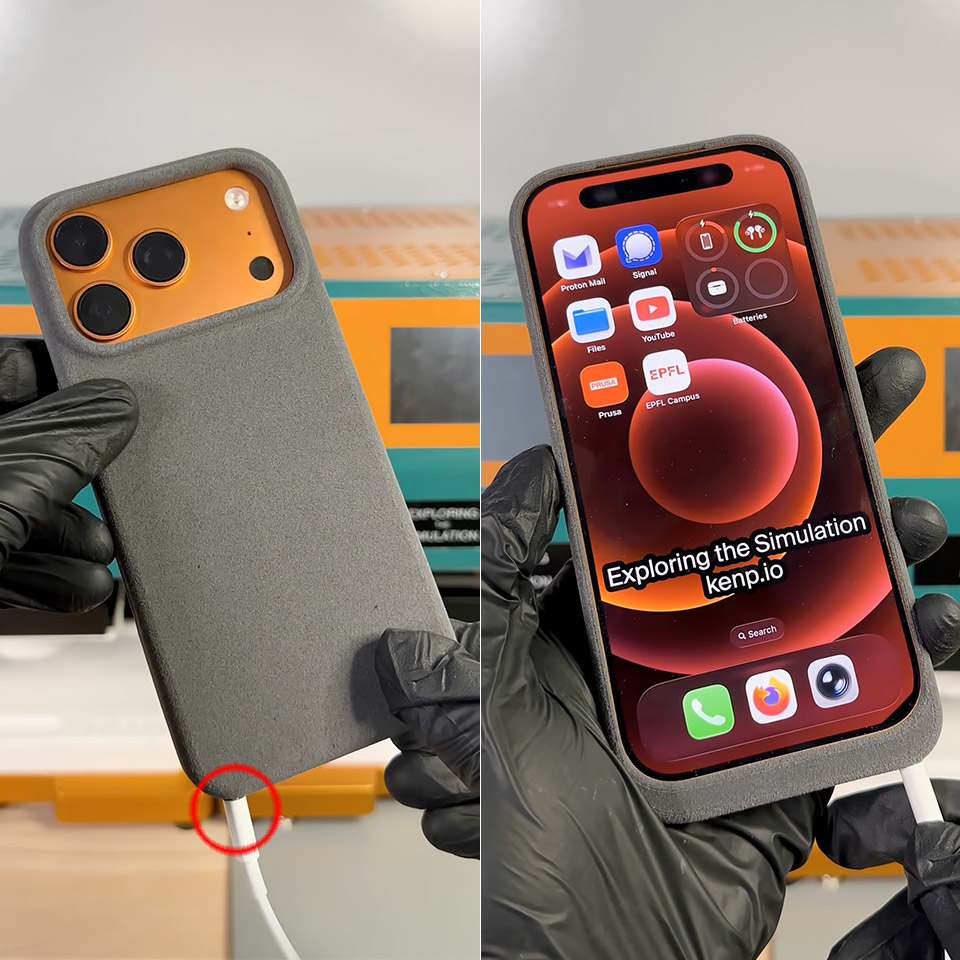
Ken Pillonel, a Swiss engineer, struck again. He’s well-known for refurbishing outdated iPhones with creative add-on cases, which he even sells. This time, however, he turned the tables. On April 1st, he completed a totally new prototype in just a few days, a slim protective cover that hands the iPhone 17 Pro a working Lightning port right where Apple moved on from it.
If you’ve recently updated from an iPhone 14 or earlier, you understand the pain. All of those old cords, docks, and chargers you used to love are now rendered worthless unless you carry a separate adapter with you everywhere. Pillonel effectively solved the challenge by working in reverse. Instead of forcing the phone to use a newer plug, he designed a cover that allows Lightning cables to plug right in while the iPhone 17 Pro remains safely tucked inside its USB-C shell.
3 in 1 Wireless Charger Station: This 3-in-1 wireless charger is designed to work seamlessly with a variety of devices, including iPhone 17 16e…
Fast Charging Power: Ensure your devices are efficiently charged with up to 7.5W for phones, 5W for earbuds, and 3W for watches. The charger is…
Portable and Foldable Design: Featuring a foldable, lightweight design, this charging station is ideal for home, office, travel or trip. Manufacturer…
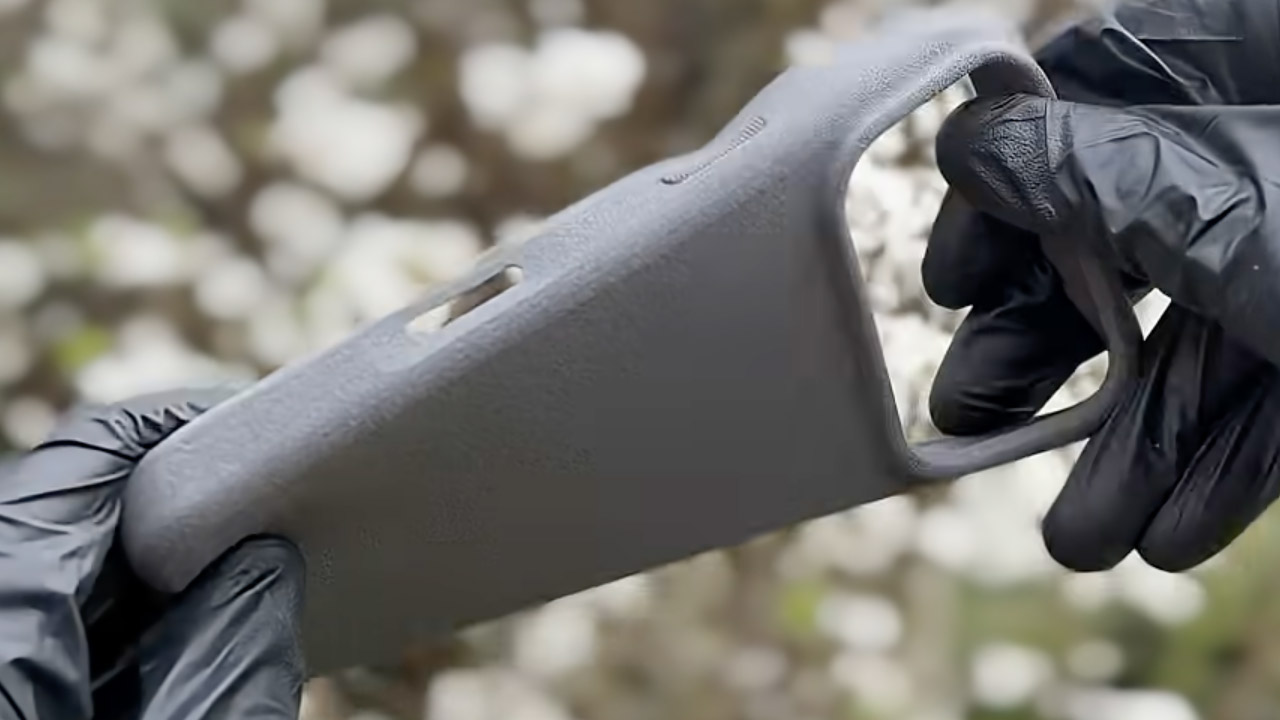
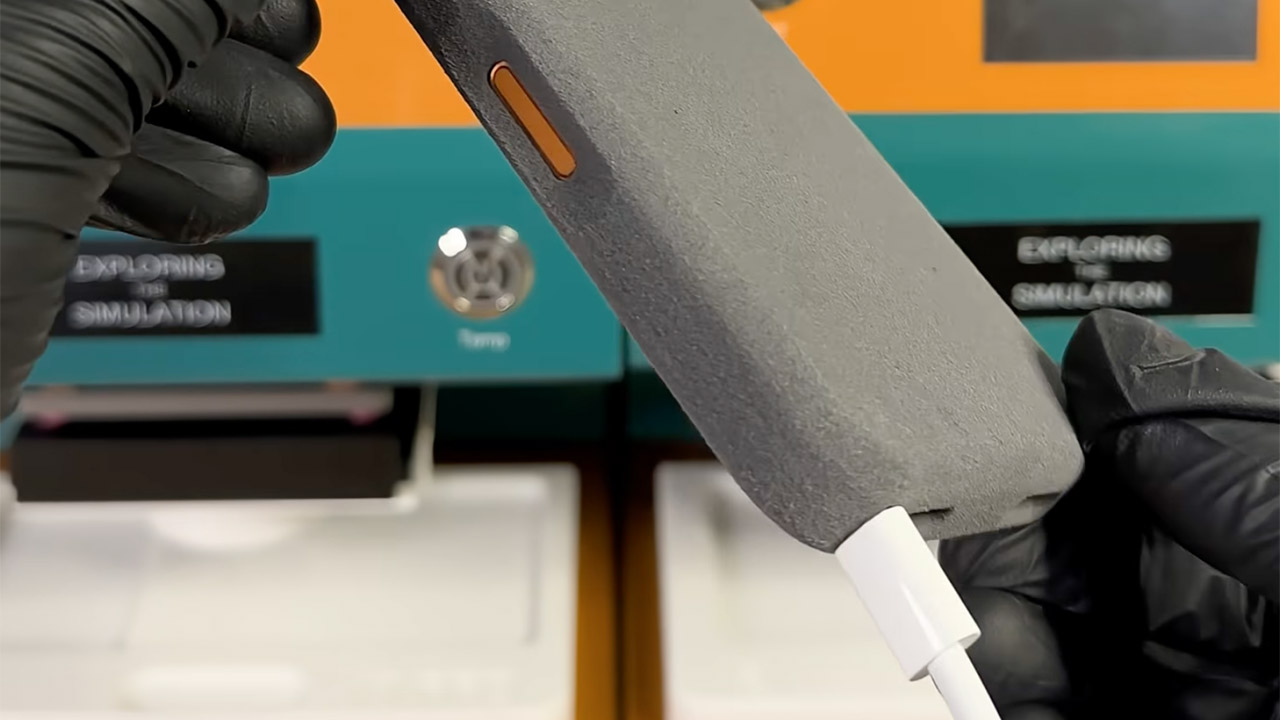
It all starts with some careful effort on the electronics side. He designed tiny custom circuit boards to shrink a standard USB-C to Lightning adapter down to almost nothing. These boards are located inside the bottom border of the casing and add only a few mils of thickness. Next came the casing, which was produced in flexible TPU using a high-end 3D printer that is good at reducing waste. He also made a little jig to help get the MagSafe magnets in the appropriate place, and when he snapped everything together, it fit like a charm, no tools required.
When it’s all put together, the case feels exactly like any other you’d get in a store, soft to the touch and durable enough for daily use. When you insert the iPhone 17 Pro inside, the internal cables align neatly with the phone’s USB-C port. Plugging a Lightning cable into the new hole outside just works; power flows exactly like it would on an older model. Yes, charging works well, as he demonstrated in his whole build video; now he just needs to test data transfer and other accessories.
Pillonel never meant to sell this one. He refers to the finished piece as one of the oddest things he has ever put together, a tongue-in-cheek reference to Lightning’s official departure from the roster years ago. Nonetheless, the project illustrates a wider point. With some work and the correct parts, compatibility gaps between old and new technology can be bridged in inventive ways that keep favorite accessories alive. [Source]





























































You must be logged in to post a comment Login