South Carolina’s pine forests “have spent centuries hiding a secret as old as America itself,” reports CBS News:
In August 1780, British and American soldiers clashed there, leading to a terrible defeat for the Continental army [fighting for the 13 colonies rebelling against England]. Battlefield archaeologists Jim Legg and Steve Smith have been studying the site for decades, but recently, they made a shocking discovery: The sandy soil was home to several sets of remains buried in shallow graves. Metal buttons suggested the men had been Continental soldiers, but there was no other identification… About 2,000 Continental soldiers were killed, wounded or captured, and some men never returned home.
Their families could only guess at their fates. But Legg and Smith’s discovery, paired with an explosion in DNA technology, is changing what’s possible. A set of remains, previously known only as 9B, has been identified as John Pumphrey, a young man from Maryland who enlisted in the Continental Army’s 7th Maryland Regiment as young as 13… Pumphrey likely marched more than a thousand miles with the regiment. The unit fought in battles with then-Gen. George Washington in New Jersey and Pennsylvania.
Advertisement
Pumphrey likely marched more than a thousand miles with the regiment. The unit fought in battles with then-Gen. George Washington in New Jersey and Pennsylvania. In late June, members of the extended Pumphrey family came together to hear his story and say his name for the first time in centuries. His remains are interred in South Carolina, where he and the other soldiers were discovered, but the tombstone, once marked “Unknown,” will soon have his name carved on it.
Looking at theingredient labels on foods lining supermarket shelves, it’s common to see names such as “potassium sorbate,” “citric acid,” and “L-ascorbic acid (vitamin C).” These substances are food additives used to prevent spoilage and preserve quality, and they are widely incorporated into industrially produced processed foods. According to Open Food Facts, the world’s largest open food database, more than 20 percent of the processed foods and beverages in its database contain at least one preservative.
Against this backdrop, a research team led by scientists at Sorbonne Paris Nord University and Université Paris Cité analyzed data from the large-scale NutriNet-Santé cohort study, which followed 112,395 participants for a median of 7.9 years, to investigate the relationship between dietary preservative intake and the risk of developing hypertension and cardiovascular disease.
“Experimental studies suggest that some preservative food additives may be harmful to cardiovascular health, but we have not had enough evidence on the impact of these ingredients in humans,” said Anaïs Hasenböhler, the doctoral researcher who led the study, in a press release. “As far as we know, this is the first study of its kind to investigate the links between a wide range of preservatives and cardiovascular health.”
8 Preservatives Linked to Hypertension Risk
The researchers divided preservatives into two broad categories. The first consisted of non-antioxidant preservatives, such as sorbates, nitrites, and sulfites, which inhibit the growth of mold and bacteria. The second consisted of antioxidant preservatives, including ascorbic acid, citric acid, and erythorbates, which prevent oxidation and discoloration in foods. According to the researchers, nearly every participant (99.5 percent) consumed at least one preservative during the first two years of the study.
Advertisement
The analysis found that participants with the highest intake of non-antioxidant preservatives had a 29 percent higher risk of developing hypertension than those with the lowest intake. They also had a 16 percent higher risk of overall cardiovascular disease, including heart attack, stroke, and angina. Participants with the highest intake of antioxidant preservatives likewise showed a 22 percent higher risk of hypertension.
The researchers also examined the 17 most commonly consumed preservatives individually. Of these, eight were associated with an increased risk of hypertension: potassium sorbate (E202), potassium metabisulfite (E224), sodium nitrite (E250), ascorbic acid (E300), sodium ascorbate (E301), sodium erythorbate (E316), citric acid (E330), and rosemary extract (E392). Among these, ascorbic acid was also associated with an increased risk of cardiovascular disease.
During the follow-up period, researchers recorded 5,544 cases of hypertension and 2,450 cases of cardiovascular disease, including 1,142 cerebrovascular events and 1,308 cases of coronary artery disease. The study also found that approximately 16 percent of the association between non-antioxidant preservatives and cardiovascular disease was mediated indirectly through hypertension. In other words, the findings suggest that preservatives may contribute to hypertension, which in turn may increase the risk of cardiovascular disease.
Calls to Reevaluate Food Additive Regulations
The researchers emphasize that these findings come from an observational study and do not establish a causal relationship between food preservatives and hypertension or cardiovascular disease. The study also has important limitations. Women accounted for 78.7 percent of participants, and the cohort included a relatively high proportion of highly educated individuals, meaning it does not perfectly represent the general population.
Advertisement
Even so, the statistical models accounted for a wide range of potential confounding factors, and the results remained consistent across multiple sensitivity analyses.
“These results suggest we need a reevaluation of the risks and benefits of these food additives by the authorities in charge, such as the EFSA in Europe and the FDA in the USA, for better consumer protection,” said Mathilde Touvier, research director at the French National Institute of Health and Medical Research, in a press release. “In the meantime, these findings support existing recommendations to favor nonprocessed and minimally processed foods, and avoid unnecessary additives.”
The possibility that preservatives long regarded as safe could affect cardiovascular health raises important questions about current regulatory approaches. For additives that are consumed continuously through multiple foods without numerical limits on their use, the findings suggest it may be time to reopen the debate over whether existing regulations are adequate.
This story originally appeared onWIRED Japanand has been translated from Japanese.
Two hundred and fifty years after the signing of the Declaration of Independence, a new commercial from Google asks: What if the Founding Fathers had access to Google Workspace?
With the tagline “Group project, but make it 1776,” the ad depicts a largely unseen Thomas Jefferson mid-draft when he gets a nagging text from Ben Franklin, leading to a very Google-centric collaboration process. Edits are suggested in Google Docs, a meeting gets scheduled in Google Calendar and conducted remotely via Google Meet (with every single attendee apparently turning their camera off?), then the whole thing is finalized with e-signatures; cue the fireworks.
Of course, since this is an ad from a tech company in the year 2026, AI has a role to play. The fictionalized founders use Google’s “help me visualize” AI tool to try out different animals on the national seal, Gemini takes notes on the meeting, and the founders also ask the chatbot for advice before declining King George III’s document access request.
The whole thing is very tongue-in-cheek (at one point, Sam Adams asks, “Can we settle this over beers?”), and the AI evangelism is relatively discreet when compared to many other recent ads. And unlike that infamous Google commercial in which a father uses Gemini to write a fan letter for his daughter, this one shies away from any suggestion that the actual text of the Declaration of Independence would be improved with AI. Perhaps the most AI-forward element of the ad is the footage itself, which to my eye has the uncanny glow of AI-generated video.
Advertisement
While viewer comments on YouTube and Instagram appear to be mostly positive, you may not be surprised to learn that the response on Bluesky has been far more critical. Posters declared the commercial “cringey” and “stunningly tone deaf,” and the AI angle was the biggest target — even as many users, including historian Angus Johnston, noted that it’s “amazing how little of this is actually AI.”
“Even in a corny fantasy joke, it’s impossible to make the case that AI is a useful tool for political organizing, writing, or human collaboration,” Johnston said.
When you purchase through links in our articles, we may earn a small commission. This doesn’t affect our editorial independence.
Although there’s probably no good reason to want to run image editing software from 1996 other than for nostalgia’s sake, if you ever wanted to run the GIMP version 0.54 from back when Windows 98 was still called Windows 97, you can do so now from the comfort of a modern-day Linux desktop. What enables this is a Flatpak version of a beta release, assembled by [balooii] for everyone’s enjoyment.
It wasn’t a simple matter of compiling the old software’s code and packaging it up, with the repository for the project containing a series of patches that were required to make this possible. Also of note is that this is the first version of GIMP with full surviving source code. Back then, GIMP used the Motif widget toolkit. Later on, it switched to the GIMP Toolkit (GTK).
Bundled with this Flatpak release are a lot of plugins and tutorials that were created at the time, making it a veritable time capsule of a more innocent era. As noted by [balooii], this version of GIMP was very much Beta software, with all of the UI quirks you’d expect. It also features the multiple unconnected windows (not MDI) approach to its UI – dropped in more recent GIMP releases — that has enraged proponents of the single window approach, as used by all commercial competitors, including Paint Shop Pro and Photoshop.
Modi has inaugurated commercial production at CG Semi’s $870m OSAT plant in Sanand, Gujarat, which will initially package 200 million chips a year and scale to 500 million. It is the third packaging plant to come online under the India Semiconductor Mission, after Micron and Kaynes Semicon.
Prime Minister Narendra Modi has inaugurated commercial production at CG Semi’s chip assembly and testing plant in Sanand, Gujarat. The facility will initially turn out 200 million chips a year, according to ANI, with plans to scale to 500 million.
Advertisement
The plant is an outsourced semiconductor assembly and test, or OSAT, facility. That covers the packaging and testing end of the chip supply chain rather than fabricating silicon from scratch.
CG Semi is a joint venture between Mumbai-listed CG Power and Industrial Solutions, Japan’s Renesas Electronics, and Thailand’s Stars Microelectronics. CG Power holds 92.3% of the venture, which is investing INR 7,600 crore (around $870m) over five years.
The 💜 of EU tech
The latest rumblings from the EU tech scene, a story from our wise ol’ founder Boris, and some questionable AI art. It’s free, every week, in your inbox. Sign up now!
Chips packaged at Sanand will go into cars, scooters, and industrial equipment, with a significant share exported to Japan, the US, and Europe. The plant is expected to create around 5,000 direct and indirect jobs over the next five years, according to local reports.
Third plant off the line
CG Semi is not India’s first packaging plant to fire up. Micron’s Sanand facility began operations in February and Kaynes Semicon followed in March.
Six semiconductor projects worth a combined $14.7bn have now been approved in Gujarat, including ventures from Tata Electronics and Suchi Semicon. Sanand is emerging as the country’s first chip packaging cluster.
Advertisement
At full ramp, CG Semi has said the site could handle 15 million units a day, a peak annual capacity of roughly 4.7 billion chips. It will produce legacy packages such as QFN and QFP alongside advanced FC BGA and FC CSP formats for automotive, consumer, industrial, and 5G customers.
Speaking at the inauguration, Modi called semiconductor growth the next phase of “Make in India” and pledged to build out the entire electronics value chain. Whether Sanand’s packaging lines can anchor that ambition is the question the next few years will answer.
Imagine if you could bring 250 people together in a massive room and have them discuss and debate an important issue, arguing the points and counterpoints, and converging on answers that accurately reflect their collective knowledge, wisdom, values, and sensibilities.
Now imagine that you convened this debate on America’s 250th birthday and asked 250 randomly selected Americans to come up with the top three innovations that America has contributed to the world over the last 250 years.What would they come up with?
I know – this all sounds impossible.
After all, you can’t get more than a dozen people to have a productive conversation on anything. At large scale, nobody would get enough airtime to express their views or respond to others. This is why typical business meetings or focus groups never have more than 8 to 10 people. Thoughtful real-time conversations just don’t scale.
Advertisement
To solve this, a new category of AI technology called “hyper-communication” is greatly expanding the size, scope, and efficiency of large-scale deliberations. It uses specialized AI agents to connect groups in real-time, allowing people to discuss and debate issues at any scale. The goal is to enable hundreds or even thousands of participant to hold thoughtful discussions where they can express their views and argue the merits of any issue.
I first wrote about this emerging technology in VentureBeat two years ago in an article about “Collective Superintelligence.” In that piece, I explain how large human groups can be hyper-connected by AI agents in ways that greatly amplify the group’s collective intelligence. You can check out the science behind hyper-communication in that prior VentureBeat piece. Here I am focusing on the debate among 250 Americans on America’s birthday.
To do this, I asked the team at Unanimous AI to field a randomly selected group of at least 250 Americans (with a broad distribution from every region in the country and diverse mix of political and social demographics) and invite them to a twenty-minute online debate inside a hyper-communication platform called Thinkscape that enables massively scalable discussion by text, voice, or video.
Once connected, we asked the group to come up with the top three contributions that America has made to the world over the last 250 years – not a survey of opinions, but deliberation of ideas, arguments, evidence, and reasoning. The group converged on a set of top answers that surprised me – but on reflection, they were sensible and well-reasoned.
Advertisement
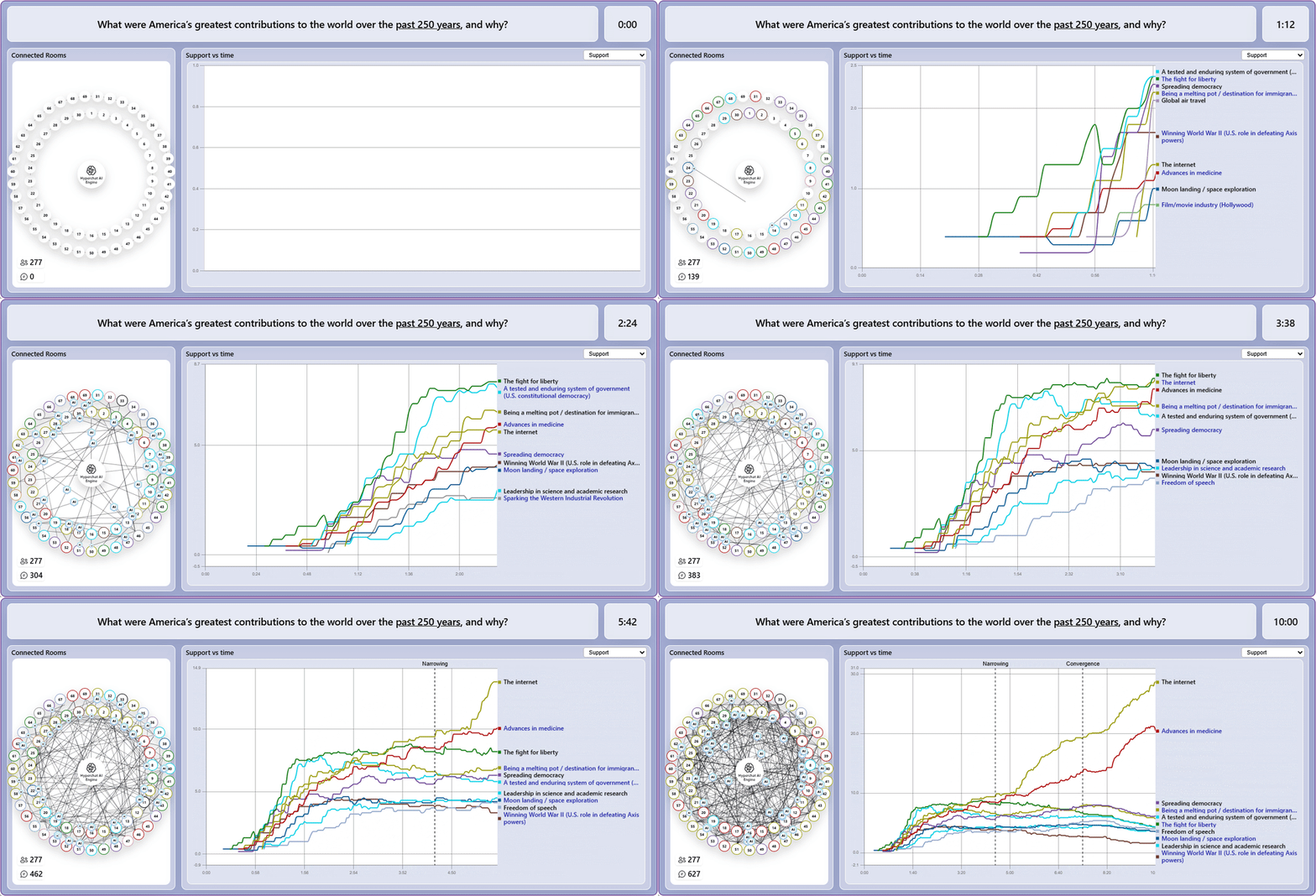
Before getting into the answers, let me show you what the debate looks like behind the scenes. There were 277 people, each of them debating the issues with four or five other people in parallel discussion spaces. The magic is the swarm of AI agents that connect all the small groups together into a single real-time deliberation.This is what it looks like at high speed:
In the debate above, the group of 277 people came up with 94 different ideas and then narrowed it down to a top 10, then a top 3. In the gif above, we just plot the top ten ideas as they emerged and battle for support during the live conversational debate.
The most interesting part of a large debate like this is not the answers, but the reasons that emerge to justify the answers. Here is the group’s reasoning behind the “top three innovations” that America has given to the world over the last 250 years:
#1: The Internet:“Our collective perspective is that America’s greatest contribution to the world over the past 250 years is the internet. It was born exclusively in the U.S. through academic and government research and was scaled globally with profound impact. It transformed communication, democratized information and education, enabled commerce, medicine, research and cultural exchange, and amplified soft power and civic organizing. We also acknowledged significant harms (misinformation, addiction, privacy loss) and arguments that it’s recent, global, or not uniquely American.”
#2 Advances in medicine: “Our collective perspective is that the United States has saved and prolonged hundreds of millions of lives worldwide. American-developed vaccines have successfully eradicated or controlled once-deadly diseases, significantly extending life expectancy and enabling broader societal and technological progress. From major breakthroughs in cancer research and treatments to cutting-edge medical technologies that have revolutionized hospital safety and procedures, U.S. ingenuity has redefined healthcare. Ultimately, while the global diffusion of affordable medicines and vaccines has extended these benefits across borders, the U.S. remains a premier medical destination where people from around the world travel to receive the most advanced treatments.”
Advertisement
#3: Spreading democracy: “Our collective perspective is that one of America’s most significant global contributions is the nation’s system of governance. The US has long demonstrated democracy in practice as an enduring global model. The U.S. Constitution provided a vital blueprint for representative government, inspiring democratic movements and revolutions worldwide while actively promoting human rights and individual liberties internationally. By empowering citizens with the fundamental power to vote and choose their own leaders, this framework has served as a foundational framework for broader societal advances and directly helped establish thriving democracies around the world.”
It’s important to remember, this is 100% human intelligence — a pure reflection of the collective knowledge, wisdom, and values of 277 randomly selected Americans. That’s because the role of the AI agents in a hyper-communication system is to connect people, not replace them. The agents work to enable scalable human deliberation in which every participant is given optimized ability to express their views, respond to others, and converge on solutions based on their merits. The only question left is — what should we ask next?
Louis Rosenberg earned his PhD from Stanford University, was a professor at California State University (Cal Poly) and has been awarded over 300 patents for his work in human-computer interaction, AI, and collective intelligence.
Welcome to the VentureBeat community!
Advertisement
Our guest posting program is where technical experts share insights and provide neutral, non-vested deep dives on AI, data infrastructure, cybersecurity and other cutting-edge technologies shaping the future of enterprise.
Read more from our guest post program — and check out our guidelines if you’re interested in contributing an article of your own!
It’s called Assistive Access. Introduced with iOS 17, Apple designed it for those with cognitive disabilities. If you’ve never encountered or stumbled across it, it’s a distinctive iOS experience: fewer options, more focused features, easier to navigate. The aesthetic is ideal for kids: large, friendly tiles for the apps replace the smaller icons of the “normal” Apple interface.
Here’s how you set it up: Head into Settings, tap Accessibility, scroll down to the General section at the very bottom, and tap Assistive Access. Now, tap Set Up Assistive Access, then Continue. It will then ask you to select your preferred appearance: rows or a grid. I suggest choosing a grid. This is how you get those super-large tiles. Now the OS will ask you to select allowed apps—tap the green plus icon next to the apps you want to allow.
Crucially, this is where, unlike with Apple’s standard child screen-time restrictions, you can choose to completely block internet browsing by simply not allowing Safari, Chrome, or any other similar app. And, unlike with those screen-time restrictions, if someone texts your child a link, it won’t work. Why? Assistive Access is designed to prevent accidental navigation, so the system restricts unexpected web browsing.
Advertisement
Even though Assistive Access on Apple devices allows internet access, it is heavily restricted by design, and it’s turned off by default. In this mode, the phone treats any link in a message as plain text, preventing the user from accidentally leaving the simplified interface.
Made for caregivers or trusted supporters, the user must specifically add internet-enabled apps like Messages, Safari, or third-party web apps to the Assistive Access interface. And once you add, say, Messages or Calls, you then choose whether your child can contact or be contacted by everyone, their contacts only, or just selected favorites.
Building your ideal hi-fi setup is no small task. Depending on your specific goals, you could be in for buying a lot of different gear to perfect your sound and make sure you have everything you need to listen to what you love, how you’d love to. That’s an expensive endeavor — and sometimes, a confusing one. It’s sometimes difficult to tell what different devices can do, or how they differ from one another.
Deciding how to play vinyl is similarly difficult, yet vital. If you’re interested in vinyl, then there’s a good chance that you’re already committed to achieving the best sound you can at home. So, naturally, you’ll want to make sure you pick up the most suitable gear possible. There’s a great turntable out there at almost any budget, but there’s a crucial difference to be aware of before you splash the cash: whether you need a record player or a turntable.
Although the two phrases are used interchangeably, they’re actually different equipment. Generally speaking, a record player is an all-in-one device that has everything you need to play vinyl, including built-in speakers. Turntables, on the other hand, only play records themselves, with no speakers. That means you need to hook turntables up to amps and speakers if you want to hear anything. That offers invaluable flexibility if you’re an audiophile crafting your dream listening experience, even if it can be a little inconvenient.
Advertisement
A turntable offers more flexibility
kopi std/Shutterstock
When you pick a turntable, you’re just choosing the device that spins your records and the stylus that translates the grooves into electrical signals, not your speakers, amplifier, subwoofer, or anything else. As a result, you can build the exact setup you want by picking up a turntable instead. Think of it as a modular system, where the turntable makes up one part of the wider hi-fi setup. Meanwhile, when you pick a record player, you’re also often picking the amplifier, speakers, and anything else it comes with.
For many audio lovers, selecting the equipment to get the sound they want is a big part of the fun. Audiophilia is a hobby, after all. With that in mind, using ready-out-of-the-box audio equipment — like a record player with a built-in amplifier and speakers — can take some of the joy out of the process. Using a turntable, on the other hand, opens up a world of possibilities, since you can use it with other components you may be interested in.
Advertisement
While it’s convenient to grab a record player and be able to use it straight away without needing other equipment, that convenience comes with a compromise: you’re generally restricted to the components it comes with, at least to some extent. That’s not always the case, though, as some record players do essentially double up as turntables, allowing you to hook them up to other equipment like speakers. But you’re still going to be somewhat restricted by the player’s internals and overall capabilities.
Advertisement
All-in-one record players don’t always offer the best sound
New Africa/Shutterstock
Being stuck with the amplifier and speakers that your record player comes with isn’t only a problem of limited customizability. Unfortunately, sometimes whatever’s built into your all-in-one record player just doesn’t sound that good to start with. These decks have to spin the records, amplify the sound, and push it through the built-in speakers, and this all-in-one nature can lead to sonic compromises. If you can’t enjoy the sound, it defeats the purpose of investing time and money into your setup.
Generally speaking, all-in-one record players don’t offer the best sound quality. They can sound tinny and lack clarity, stopping you from getting the most out of your collection’s potentially high-fidelity capabilities. Instead, you run the risk of getting a listening experience you could just as easily get from a small radio, speaker, or even your phone. For that reason, some opt to skip all-in-one options in favour of turntables designed to work with proper hi-fi equipment.
Interference is also a common problem with all-in-one record players. That happens when the stylus picks up vibrations from the built-in speakers as it’s playing a record. Usually, this happens with a slight delay, which can lead to a messy, discordant, and even distorted sound. This can happen with any vinyl setup, but the proximity of the speakers to the turntable’s stylus means it’s much more common with record players.
Advertisement
Issues are easier to deal with
Josefephotography/Getty Images
When a record player breaks, you could be looking at anything from a duff speaker to a busted amplifier and a good few things in between. That’s because of all the functions they perform. In some cases, a broken part could even be the end of the line for that record player altogether, leaving you to pick up an entirely new one.
Turntables, on the other hand, are typically a little more straightforward. Sure, there is still plenty that can go wrong — including the belt (or drive motor), cartridge, arm, or power supply — but it’ll be something specific to the vinyl-spinning process itself. Pretty much everything else that makes up your setup is separate, meaning that replacing a busted speaker is a matter of buying some new speakers rather than opening up your player to see what’s inside, or replacing the player altogether.
One related area where record players are at a significant disadvantage compared to turntables is the stylus or needle. Styluses wear down over time, and you should replace them to reduce the risk of damaging your records. However, some record players are designed in a way that means you can’t replace the stylus. So, that means that when your needle reaches the end of its life, your record player does as well. That’s a lot of waste, and a fair amount of risk for your records.
Advertisement
Some record players can even damage your records
Tatiana Dyuvbanova/Getty Images
Even with all their faults, an all-in-one record player might still tempt some with its ease of use and affordability. However, that convenience and cost could quickly turn into an expensive and awful ordeal if it ends up damaging your records. There are a couple of culprits behind this, but one of them is down to the placement of your record player’s speakers.
All sound is vibration. That means that when your record player’s speakers blare out whatever you’re spinning, your deck is also vibrating. Your record spins on top of the deck, while it’s being read by the player’s needle. Except that the vibrations will cause all of it to move slightly. In turn, the player’s stylus might move around more than it should, and it may skip across the record and scratch it. Some slight scratches on records can go unnoticed, but damage builds up over time, and deeper scuffs can cause audible imperfections or even skips. Nobody wants that, audiophile or otherwise.
That isn’t the only time that needles can cause damage to your records. Records can wear down over time, and this can happen on any system, regardless of whether it’s a record player or turntable. However, budget all-in-one record players may also have budget needles, which could cause more damage in the long-term compared to a finer needle. Another thing to keep in mind is that you won’t have much room to adjust settings like the tracking force.
Advertisement
Record players can have tonearm limitations
Taigi/Shutterstock
All-in-one record players are at a particular disadvantage compared to turntables when it comes to the tonearm. The tonearm is a crucial part of any record deck, as it holds the cartridge in place, allowing it to follow grooves on a vinyl record and for the turntable to produce sound. It also ensures the needle is stable and that the pressure (or tracking force) is consistent, reducing the risk of damaging your records while reproducing the music as clearly as possible. Overall, being able to adjust the tracking weight is important for playback, ensuring your records sound great, don’t skip, and don’t wear out too quickly. Despite that, it’s not an option on many popular all-in-one record players.
In some cases, the arm is set to the wrong weight altogether, so the tonearm places far too much pressure on the record. That’s no big deal if you can adjust the weight, but if you can’t, you’re stuck with a significant risk of your LPs getting damaged over time. That’s the last thing anyone would want, but it’s probably going to be a deal-breaker if you’re especially invested in enjoying the highest fidelity sound possible, or if you collect rare records. As a result, any gear that doesn’t offer tonearm adjustability is inherently less appealing than gear that does.
This article is crossposted from IEEE Spectrum’s careers newsletter. Sign up now to get insider tips, expert advice, and practical strategies, written in partnership with tech career development company Parsity and delivered to your inbox for free!
You want to become a senior developer. A CTO, maybe. Start your own company, perhaps. Or maybe you just want to land your first role in tech.
You will not get there from raw engineering skill alone.
There’s a skill that’s quietly essential to technical leadership and yet consistently overlooked: public speaking.
Advertisement
If you’re anything like I used to be, you’re already listing reasons not to. “I got into this to code, not to give presentations.” “I don’t want to lead.” “I’m too junior to speak about anything.” No, no, and no again. There’s a ceiling on the return from technical skill alone.
I was terrified of public speaking for the first three years of my career. I wanted to hide behind code, and for the most part it worked. I did my job and did it well.
Then I joined a startup where hiding wasn’t an option. The whole company was five people. I was one of two developers. I had to form opinions on our technical direction and defend them, and the CTO told me directly that I needed to speak up more.
A few things happened once I did. I took more pride in my work. I said some cringe-worthy stuff, lived through the mini-anxiety attacks, and got better. To my own disbelief, I’m now an engineering manager whose job is largely speaking to groups of developers and leading presentations, online and in person.
Advertisement
Here’s why this is worth your time:
Leadership. Communicating ideas clearly, influencing decisions, and aligning your team are core leadership functions, and they matter more the further you climb.
Visibility. Speaking lets you show your expertise, build a reputation, and connect with people who open doors to better roles.
Durability. As automation absorbs more routine technical work, skills rooted in human interaction and judgment are far harder to replace.
Advertisement
The good news is you can build this deliberately, in low-stakes steps.
Record yourself. Use a screen-recording tool to walk through your work, explain a concept, or narrate your code. You can edit, re-record, and over-think it as much as you want. That’s the point. It gets you comfortable on camera before the stakes are real.
Volunteer for demos. Next time you ship a feature or fix a bug, ask your manager for a short time slot to walk the team through it. No format for that on your team? Suggest a monthly lunch-and-learn and kick it off with a 15-minute lightning talk on something you know.
Start small—really small. If your anxiety is spiking, don’t jump into the deep end. In your next meeting, ask one question. Write it down beforehand if you have to. Then be the first to break the awkward silence when someone else asks one. Developers are a famously quiet bunch, so it doesn’t take much to stand out.
Advertisement
The further you grow, the more you’ll be expected to hold opinions and voice them publicly. So start now. Record yourself, ask questions, get uncomfortable, and notice that it gets easier every time you do it.
—Brian
Salome Mikadze-Struk built her tech company Movadex as an undergraduate student at the height of the COVID-19 pandemic—then kept it running during the outbreak of war in her native Ukraine. Now, she’s channeling what she learned into mentoring tech founders and speaking about the importance of resilience as AI upends the software industry.
LLMs are now part of many engineers’ daily workflow, and the demand for technical expertise in implementing and securing the models is rising. But to build tools that work consistently, developers must have a strong understanding of the core principles that govern how the models work. IEEE is now offering a five-course program to teach how to use LLMs effectively, starting with the fundamental engineering behind the technology.
Two researchers at the City University of Hong Kong developed a method to make a circuit trace by simply bending a piece of paperlike material. With the right ingredients—isopropanol and liquid metal—you can make your own origami circuit board. The researchers also created a toolkit, called LiqMetCraft, with software tools and instructions to make it easy for beginners, whether in papercraft or electronics.
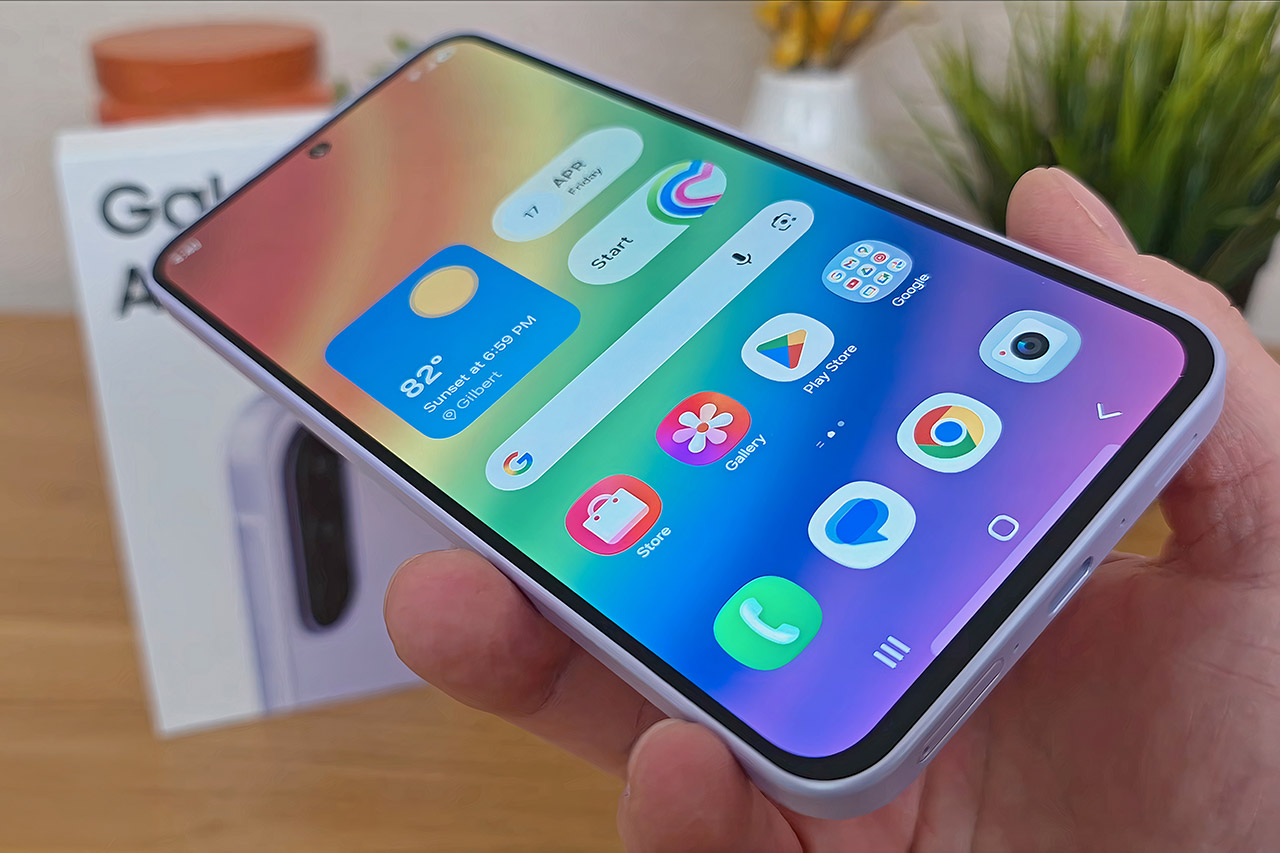
Many smartphone shoppers today simply want a device that manages their routines smoothly. They need reliable calls, zippy apps, clear photos for everyday moments, and enough battery to last without constant worry. Samsung built the Galaxy A37 5G, priced at $399.99 (was $539.99), around those priorities.
Samsung delivers the Galaxy A37 5G in a compact package, measuring just 7.4 millimeters thick and weighing only 196 grams. A layer of glass coated with Corning Gorilla Glass Victus+ protects both the front and back, making it more than capable of withstanding the wear and strain of everyday living. The phone also has an IP68 rating, so it will easily recover from an accidental drop in water.
AWESOME SCREEN. ENDLESS POSSIBILITIES: Elevate your content no matter where you are with the 6.7″ Super AMOLED display¹ of the Galaxy A37 5G. Enjoy…
LONG-LASTING BATTERY: Whether it’s family moments or important calls, stay powered without the wait with Galaxy A37 5G. Super Fast Charging…
NEVER MISS THE SHOT, EVEN IN LOW LIGHT: With effortless Nightography, you can capture clear high-quality photos and videos on your phone automatically…
The Galaxy A37 5G’s impressive screen quality is thanks to a 6.7-inch Super AMOLED panel that delivers full high-definition resolution with a smooth 120-hertz refresh rate. This means you’ll be able to easily cycle through feeds and enjoy your apps with silky smooth animation. Furthermore, it is quite bright, allowing you to see what is going on in the sunshine. Let’s not forget about the colors, which are brilliant and natural, as one would expect from a high-quality display. The same Gorilla Glass protection that shields the screen from scratches and drops also protects you from pocket detritus.
Advertisement
The Galaxy A37 5G features an Exynos 1480 processor with 6GB of RAM. This combination results in a very responsive interface that works continuously throughout the day. To top it all off, you get 128GB of internal storage, which will greatly improve your load times and multitasking capabilities. A 5000-milliamp-hour battery provides plenty of juice to go through the day and typically has plenty left over for the next one, as long as you don’t push it too hard. If you’re doing a little bit of everything, including calls, social applications, navigation, and the occasional video, this power consumption is quite efficient. If you run low, simply plug it in and the 45-watt charging will bring it back up to speed in about 30 minutes, or a full recharge in around 70.
The Galaxy A37 5G’s rear cameras are based on a 50-megapixel primary sensor with optical stabilization. It does an excellent job of capturing detailed photos throughout the day and even outperforms expectations in low-light circumstances. However, the 8-megapixel ultra-wide lens allows you to record a wider image, while the 5-megapixel macro lens is available for close-up shots. With video recording at 4K and great steady stabilization, you’ll be able to shoot some extremely smooth footage. A 12-megapixel camera on the front is in charge of taking selfies and video calls, and it does a pretty good job with the added punch of Super HDR.
Android 16 is preloaded with Samsung’s One UI, which is quite simple to use. As a bonus, Samsung will keep the phone updated with new software and security patches for at least six years, ensuring that it remains safe and current for a long time to come.
The company’s robotaxi roadmap mentions future expansions to Orlando and Tampa.
Miami residents are getting another option for autonomous taxi services, at least for those who live in a specific portion of the Floridian city. As posted on X, Tesla has expanded its Robotaxi service to a small section of West Miami.
Like we saw with the robotaxi rollout for Dallas and Houston earlier this year, Tesla is limiting its initial Miami availability to outside of the busy downtown. However, customers were already seen riding in unsupervised Tesla robotaxis in videos circulating on X. Notably, the Teslas are seen operating without a safety monitor in the car, which was a controversial inclusion when the company first rolled out its autonomous ridehailing service in Austin, Texas. We’re expecting Tesla to expand the geographic scope of its Miami robotaxi service eventually, considering it expanded availability to the entirety of the Austin metro last month.
Advertisement
For those wondering why Tesla is expanding to Miami, the city is already home to Waymo’s autonomous robotaxis that kicked off in January. Similarly, Zoox is targeting an expansion to Miami and has begun testing its fleet with its employees as of this year. Beyond Miami, Tesla’s roadmap includes introducing its robotaxi service to more cities across the US, including Phoenix and Las Vegas along with Orlando and Tampa, Fla.






















































You must be logged in to post a comment Login