The Nothing Phone 4a Pro is one of the most unique phones on the market, with distinctive hardware design, software and features you won’t find elsewhere. It’s a genuine joy to use for non‑demanding users, and a great choice if you’re bored of the same old glass rectangle slabs.
Unique design and wonderful metal build
Glyph matrix can actually be useful
Strong battery life
Brilliant, big display
No interactive Glyph Toys
Inconsistent camera stabilisation performance
Not the fastest phone out there
SQUIRREL_PLAYLIST_10208357
Advertisement
Key Features
Review Price:
£499
Advertisement
Unique metal build
We very rarely see all-metal phones like the Nothing Phone 4a Pro these days, offering a durable alternative to the usual glass designs.
Advertisement
Polished, stylised hardware
Nothing OS is a visual treat, offering one of the most visually interesting Android skins around, packed with unique features.
Advertisement
A big, gorgeous screen
The Nothing Phone 4a Pro’s 6.8-inch AMOLED screen feels anything but mid-range in use.
Introduction
It’s safe to say that few companies make phones the same way that Nothing does. And while it’s a bit of a departure from some of its previous efforts, there’s something quite special about the 4a Pro.
Advertisement
Sure, there might be some compromises in some parts of the experience, but there’s so much to love about it. I’ve been putting it to the test for the past few weeks, and here’s what I think.
Advertisement
Design
Mostly metal design
Glyph Matrix, but it’s not interactive
Only IP65-rated
For its first few generations of products, Nothing phones all shared a similarity in design: transparent backs. Each phone – including the regular non-Pro 4a – has that in common. With the 4a Pro, Nothing has gone in a different direction, but still has imbued it somehow with a clear sense of Nothing-ness.
Image Credit (Trusted Reviews)
Rather than have an entire back cover made of transparent glass with interesting details and texture beneath it, the phone is all metal. It’s got a solid aluminium unibody design, the likes of which we rarely see these days. In fact, apart from OnePlus’ brief flirtation with the OnePlus Nord 4, it’s generally not been seen at all in years in the Android space.
One thing that can be said about that decision is that it gives the phone a real sense of solidity. And I can’t deny it, I’ve actually missed that feeling of aluminium in my hand. It’s not as slippery as glass, and gives you that sense of security that if you drop it, that back panel isn’t going to crack.
Image Credit (Trusted Reviews)
Advertisement
It wouldn’t be Nothing without at least some playful iteration of transparency though, and so the company decided to make it a feature of the camera island. Which, again, I think is a great decision.
Advertisement
For many manufacturers, that bump on the back of the phone is very much thought of as a practical necessity to make space for the lenses needed for modern smartphone cameras. At best, they’re a featureless, inoffensive bump. At worst, they’re hideous mounds.
With Nothing, it’s a feature that catches the eye, thanks to its playful arrangement of textures, exposed screws, and the round Glyph Matrix display, along with a simple square LED that flashes when you’re recording video or audio.
Image Credit (Trusted Reviews)
That Glyph Matrix display is similar to the one introduced on the Nothing Phone 3 in 2025, but, despite being larger, isn’t as feature-rich as that version. You can still use it as a countdown timer, or to flash when notifications come in, or even use it as a very basic selfie mirror, but the interactive Glyph Toys have gone.
On the Phone 3, you could press a small button on the back of the phone to play spin the bottle, or ask a virtual Magic 8 Ball a question. There’s no button on the Phone 4a Pro, just a slightly recessed dimple in the bottom corner which looks like it could be a button, but, sadly, is not.
Advertisement
Advertisement
That’s not to say there are no Glyph Toys at all. They’re just not interactive. You can enable a feature where you have an always-on Glyph Toy when the phone is flipped on its front. In this menu, you can choose a digital clock, battery level indicator, solar path tracker, or moon phase graphic. And if you wiggle the phone, it can show a charging meter when charging or a caller ID when someone is ringing you.
Image Credit (Trusted Reviews)
Still, what it lacks in fun it more than makes up for in usefulness and customisation. You can create your own rules in the software based on notifications from specific apps, contacts or even keywords in the messages. You can even create your own custom graphic to show when a particular notification comes through.
You could, for instance, enable a custom graphic every time you get a message from a particular family member or loved one. If you have the time, it’s well worth putting it in to create the experience you want. It may not be as interactive as the Phone 3, but it’s got more going for it than the simple stack of LEDs on the regular Phone 4a.
All built into a phone which sadly doesn’t have full water and dust protection, but will give you at least splash resistance at IP65. So if you buy one, don’t go taking it underwater for photos.
Image Credit (Trusted Reviews)
Advertisement
I will say this too: the phone is pretty hefty, despite being Nothing’s thinnest phone to date. With its flat edges, large sides and weighty metal, it’s certainly not the most palm-friendly phone in the world.
Advertisement
Software
Nothing OS 4.1 based on Android 16
A very visually appealing Android skin
Plenty of unique features
As well as the industrial design of its products, the feature set and the software play a big role in creating the feeling of a company that’s different from the others.
Most Android phone makers have a unique take on software, but few of them tie the user interface’s aesthetics and features so well to the hardware design. The retro-futurism that so clearly defines the outward appearance is very evident and consistently applied throughout the software skin.
Image Credit (Trusted Reviews)
There’s a huge collection of widgets, folders, and app icons, all of which fit together really well. There’s a sense of playfulness to some of those, and an effort to make the widgets interactive too. All presented with the usual monochrome flat and dot-matrix fonts.
Advertisement
The widget collection also includes Nothing’s community-driven Playgrounds widgets, which lets community members create their own widgets for the Home Screen. There are loads in there, from clocks and F1 calendars through to mini games. Once I discovered the Pokémon hunting widget, I ignored all the rest. Because, obviously, I’ve got to catch them all now.
Image Credit (Trusted Reviews)
There’s not much new to talk about here that we haven’t mentioned in previous Nothing reviews. Essential Space remains on the new models, along with its dedicated button on the side. With this, you can save screenshots and voice memos to a dedicated space in the software. AI will then make sense of it all, transcribing any memos, creating to-do lists or just describing what’s in the screenshot.
All in all, it’s one of my favourite custom Android skins on the market, also helped by the fact that it’s incredibly light on bloat. There are no additional or duplicate apps that don’t need to be there, or where Nothing hasn’t put its own distinct stamp on the design. You will find a weather app, but Nothing is otherwise content to leave the standard app set to Google.
Advertisement
Image Credit (Trusted Reviews)
Screen
6.8-inch 144Hz AMOLED display
Excellent in everyday use
Optical fingerprint scanner
Advertisement
From a hardware performance perspective, it’s the display that stands out to me as a feature that outperforms its price tag. It’s big, bright and fluid. With a peak of 5000 nits for HDR scenes, even darker scenes in HDR movies look good on it. It can reach up to 144Hz if you enable the highest refresh rates, and has a pixel density over 400ppi.
In short, for the most part, it keeps up with the best of them and even has competitive PWM dimming levels to stop flicker at low brightness levels from straining your eyes. It’s not LTPO-based sadly, so can’t adapt refresh rates at small increments automatically. That means you may see a very slight stutter when going from a static page to a moving one as it jumps to the next refresh rate.
Image Credit (Trusted Reviews)
There’s very little negative I can say about it at all, and, as Nothing points out, it is the best display in the company’s entire portfolio. Measuring 6.83 inches diagonally, it’s super expansive, and the skinny uniform bezels around the sides mean you get an immersive view with zero distractions.
My only complaint has nothing to do with the display, but the fingerprint sensor built into it.
As more manufacturers move towards fast, instant ultrasonic fingerprint scanners, it can feel a little jarring to have to take the time to set up an optical scanner. But at this sort of price point, it’s one of the compromises you expect to find. And in truth, to use day in and day out to unlock, I rarely had an issue with its reliability. It failed to scan only once during my entire testing period.
Advertisement
Advertisement
Image Credit (Trusted Reviews)
Cameras
50MP main camera is the best performer
50MP 3.5x zoom lens works well to 30x
8MP ultrawide is a little basic
For a phone in its price range, the triple-camera system on the back of the 4a Pro is very capable. For the most part, when shooting in bright conditions, even when HDR is needed to balance bright backlighting with darker foreground objects, it can contain the highlights and deliver sharp images with great colour from all three lenses.
Image Credit (Trusted Reviews)
It’s not without its weaknesses, though. As is typical of most phones, the ultrawide camera appears to be the weakest. It’s not horrendous at all, but there was some noticeable distortion towards the edges of the photos from that camera in the daytime. And at nighttime, it can’t draw in as much light as the main camera. Neither can the telephoto 3.5x zoom lens.
That telephoto zoom can go further, using a mix of machine learning, processing and digital cropping, you can go all the way up to around 140x. But I found that once I’d reached the 30x mark, I didn’t want to push any further, as the image quality started to look a little rough.
Advertisement
And while it is great for zooming further into far away scenes, its strength I think is in taking photos of small leaves, plants and flowers in the medium distance. It can’t focus super closely, but it’s close enough that it almost passes as a solid macro lens. And it delivers great detail and a lovely depth-of-field effect.
Advertisement
There were a couple of general weaknesses I found with the system as a whole, though. Regardless of which lens I used, there were times when the camera struggled with motion blur and focus. So I’d have shots, particularly at night time when the night mode was keeping the shutter open for longer, when photo results were blurry or soft.
Compared to much more expensive phones I have also been testing around the same time, that’s the one thing that stood out to me. It’s that consistency in that when you press the shutter, it instantly captures an in-focus, blur-free shot, where the Phone 4a Pro didn’t. If you keep your hands steady, that shouldn’t often be a problem.
Like the Phone 4a, you get access to a number of different photo styles too, adding what are essentially filters to the photos to add grain, contrast and adjust the temperature for a particular vibe.
Advertisement
Advertisement
Performance
Mid-range Snapdragon 7 Gen 4 power
Runs smoothly in everyday use
Not the most powerful chipset for the money
Just like the Nothing Phone 4a, the performance of the company’s Pro variant won’t blow anyone away, but with the Snapdragon 7 Gen 4 inside, it’s got more oomph than its non-Pro sibling with either 8- or 12GB of RAM.
Those who really care about gaming performance and how a phone handles demanding graphics would be better off looking at phones from the likes of Poco, with the recently announced X8 Pro series definitely worth a look.
Image Credit (Trusted Reviews)
Running it through our usual suite of benchmarks, it became clear quite quickly that this phone doesn’t sit at the top of the pile. But at the same time, it can keep its performance running consistently for long periods, even if it doesn’t blow you away with mega frame rate stats.
Still, for most tasks, especially the everyday, casual type use-cases, there’s enough speed and responsiveness here to keep most people happy. I’d be perfectly happy using it as my daily device for communication, less-demanding games, and social media.
Advertisement
Test Data
Nothing Phone 4a Pro
Nothing Phone 4a
Google Pixel 10a
Oppo Reno 13 5G
Geekbench 6 single core
1315
1236
1753
1322
Geekbench 6 multi core
4169
3312
4551
3846
Geekbench 6 GPU
4701
3549
8803
–
3D Mark – Wild Life
2076
–
2608
–
3D Mark – Wild Life Stress Test
97.2 %
–
91 %
–
On the communication theme, it’s worth noting that the 4a Pro supports eSIM. At least, it does in markets except India, where you’ll get an extra beefy battery at 5400mAh, rather than the 5080mAh you’d get in other markets.
Advertisement
Battery life
5000mAh battery
Easily lasts all day
50W wired charging
Battery life depends largely on how you use a phone, where it’s used, and how many of its features you enable. Cranking the display up to 144Hz and keeping the Glyph Matrix on all the time while travelling around a lot in a busy urban 5G environment will drain more than if you’re someone like me in a quiet rural 4G-only area with the display set to its automatic defaults.
Image Credit (Trusted Reviews)
Still, my sense from using this particular phone is that the battery should last even the most demanding users a full day on a fully topped-up battery. Even on the days when testing the camera, video recording and benchmark stress tests, I wasn’t able to completely drain it. And most days I’d have more than half of the battery left over with my typical quite light usage.
Advertisement
I rarely use more than three hours of screen time in a day, and when I do, it’s pretty casual gaming, YouTube, reading news, sports, social media and messaging. At just over 5000mAh, it’s not the largest battery around, but the software appears well optimised to make the most of it.
And when it’s empty, it takes just over an hour to fully refill it using a 50W charger, providing you have a compatible one handy.
SQUIRREL_PLAYLIST_10208357
Advertisement
Should you buy it?
You want a stylish phone with equally stylish software
Very few manufacturers marry the style of hardware and software as well as Nothing.
Advertisement
You want the best performance possible
The Snapdragon 7 Gen 4 is fine for everyday use, but it’s not the most powerful you can get for the money.
Advertisement
Final Thoughts
The Nothing Phone 4a Pro is one of the most unique phones on the market, for a number of reasons. Nothing’s approach to hardware design, software and features means there’s nothing quite like it available from anyone else.
It’s a genuine joy to use, and as long as you’re not super demanding, you’ll have a great time using it, and maybe even be delighted by those little touches that make it special. If you’re bored with the same old glass rectangle slabs, give it a go, but if not, our list of the best mid-range phones should point you in the right direction.
Advertisement
How We Test
We test every mobile phone we review thoroughly. We use industry-standard tests to compare features properly and we use the phone as our main device over the review period. We’ll always tell you what we find and we never, ever, accept money to review a product.
Used as a main phone for over a week
Thorough camera testing in a variety of conditions
Tested and benchmarked using respected industry tests and real-world data
In the recently released JD Power 2026 U.S. Customer Service Index (CSI) Study, one mass-market SUV brand topped all others. And even though JD Power combined SUVs and minivans into one category, the brand that came in first place does not sell any minivans. That brand is Subaru, which, with a few exceptions, is a brand mostly made up of SUVs. Subaru also did very well in the 2025 version of the JD Power CSI Study, being selected as the mass market car brand that owners trust most for service.
The JD Power 2026 U.S. Customer Service Index Study, in which Subaru ranked highest in the mass-market SUVs/minivans category, gave the brand a top-rated score of 887 points out of a possible 1,000. Following Subaru in the JD Power CSI rankings in this category were Nissan in second place with 885 points, and Buick in third with 882 points. Then came Honda with 880 points, Ford with 879 points, GMC with 878 points, Chevrolet with 876 points, Dodge with 872 points, and Mazda with 871 points, which was also the average score in the mass-market SUVs/minivans category. Those brands that fell below the average score, in descending order, were Mitsubishi and Toyota, tied at 870 points; Hyundai, 854 points; Kia, 851 points; Jeep, 850 points; and Volkswagen, last at 846 points.
Advertisement
The JD Power 2026 U.S. CSI Study covered 51,228 survey responses from lessees and registered owners of vehicles between one and three years old. The survey period ran from January through December 2025.
Advertisement
What else should you know about the JD Power U.S. Customer Service Index Study?
As JD Power states on its website, the 2026 U.S. Customer Service Index Study, “…continues to be the auto industry benchmark for measuring customer satisfaction with maintenance and repair service at new-vehicle dealerships, based on survey responses from owners of 1 to 3-year old vehicles.” Study subscribers can now receive monthly updates that keep them current with newly supplied data, allowing manufacturers to monitor their dealers’ customer service ratings in near-real time. This is just one of the many studies done by JD Power, one of which reveals the most dependable cars you can buy.
A wide variety of vehicle categories are covered in the JD Power CSI study. These include premium brands, mass-market brands, mass-market cars, mass-market SUVs/minivans (the topic of this article), premium cars, premium SUVs, and trucks. In each of these categories, the brands are evaluated using the same criteria.
The study’s methodology surveys owners of vehicles that are one to three years old. It asks about their level of customer satisfaction during their latest dealer service episode, which can pertain to either work paid for by the customer or work done under the new car’s warranty. Five areas of the customer’s experience with the service department are then analyzed. These include the start of the service experience, the pick-up of the vehicle, impressions of the facility where the car was serviced, the quality of the service itself, and perceptions of the service advisor who interfaced with the customer.
Advertisement
What else should you know about the Subaru brand?
Aside from its three non-SUV vehicles, the Impreza hatchback, the WRX sedan, and the BRZ sports coupe, the current Subaru lineup consists primarily of SUVS. These SUVs consist of the three-row Ascent, the Crosstrek, the Crosstrek Hybrid, the Forester, the Forester Hybrid, the Outback, the Solterra EV, the Trailseeker EV, and the Uncharted EV. This model lineup offers consumers four pure ICE SUVs, two hybrid SUVs, and three EV SUVs.
Subaru’s pricing range starts with the least expensive model, the 2026 Impreza Sport, at $27,790, including destination and delivery. Our review of the Impreza appreciated it as an affordable hatchback that’s sensible and simple. If you are in search of Subaru’s cheapest compact SUV, the 2026 Crosstrek Base is priced at $28,415. Next comes the 2026 Forester Base at $31,445, followed by the 2026 Outback Premium at $36,445. At the top of the range sits the leather-clad 2026 Ascent Onyx Edition Touring 7-Passenger, priced from $53,445. Our review of the Subaru Ascent found it to be a pretty well-rounded three-row SUV.
Advertisement
Then there are Subaru’s EVs, all of which are SUVs. The range starts with the 2026 Subaru Uncharted Premium FWD, priced from $36,445, continues with the Solterra Premium from $39,945, and tops out with the 2026 Subaru Trailseeker, which will arrive at dealers sometime in early 2026 at an MSRP of $39,995, with destination charges not yet revealed by Subaru at this point.
On Wednesday, January 7, federal immigration enforcement and deportation officer Jonathan Ross shot and killed Renee Good at approximately 9:37 am local time. That same day, an official from the Minnesota Bureau of Criminal Apprehension (BCA) texted a Federal Bureau of Investigation counterpart, repeatedly requesting access to the crime scene evidence.
But according to records WIRED obtained through a public records request, the FBI did not respond for at least two days.
The texts appear to have been sent shortly before the FBI, according to the BCA, told the agency that the investigation into Good’s death would “be led solely by the FBI” and that the BCA “would no longer have access to the case materials, scene evidence or investigative interviews necessary to complete a thorough and independent investigation.”
The texts provide new insight on a breakdown in communication between the two agencies that eventually contributed to the BCA, Hennepin County Attorney, and the state of Minnesota filing a lawsuit against the Department of Homeland Security and the Department of Justice, which includes the FBI. The lawsuit, filed on March 24, demands that federal authorities give state and local law enforcement access to investigative material relevant to the shootings of Good; Alex Pretti, a nurse shot and killed by Border Patrol agents on January 24; and Julio Sosa-Celis, a Venezuelan Minneapolis resident shot and injured by a federal immigration agent on January 14.
Advertisement
“The longstanding practice of cooperation and evidence-sharing between federal and Minnesota law enforcement authorities broke down during DHS’s Operation Metro Surge,” the lawsuit claims, adding that this partnership “abruptly ended once federal leadership became involved.”
In response to WIRED’s request for all emails, text messages, and digital communications the agency exchanged with the FBI on January 7 and January 8, the day the public record request was filed, the agency provided an image showing texts exchanged between a top BCA official and the FBI. (The agency added that “no emails were discovered.”)
The image obtained by WIRED, which was seemingly captured between January 9 and 13, shows text messages that appear to have been sent from an iOS device. The BCA says that the texts were sent on January 7 by Drew Evans, the agency’s superintendent to an individual whose name is redacted but is identified in Evans’ device as an “FBI ASAC,” or assistant special agent in charge. The FBI’s Minneapolis branch currently has three people with that title, according to its website.
The only text the FBI agent sent was delivered at 11:17 am local time. The message was mostly redacted by the BCA, but it begins with “ERO”—an apparent reference to Enforcement and Removal Operations, the ICE branch that oversees arrests, detainments, and deportations.
Advertisement
At 12:56 pm, Evans sent three messages to the FBI agent in quick succession.
“Can you be sure with your folks to include us on interviews,” Evans began. “It sounds like they have tried to do some and keep us out of them. I know this is a little challenging, but it really helps us to just have one set of interviews/interactions so we have a common understanding of the facts and information.”
“We are going to cancel crime scene – sounds like a lot of federal agents showed up to confront the crow[d] and it’s getting very contentious now,” Evans wrote in the second text. “We are in a lot of these in that city and our [special agent in charge] is working with your folks to clear – really unfortunate we did not get this done.”
The beginning of Evans’ next message was redacted, but likely includes the name of the FBI agent. “Do you think once they get [things] a little under control today our management teams and team leaders should connect today yet?” Evans wrote in the third text. “We could do it at your office at a time that makes sense once they can breathe a bit?”
Advertisement
Protesters began gathering near the site of Good’s killing shortly after news of her death began circulating. The lawsuit eventually co-filed by BCA claims that on January 7, its investigators had “trusted that important evidence gathered by federal investigators”—including Good’s car, the ICE agent’s gun, and the shell casings at the scene—would be available to them.
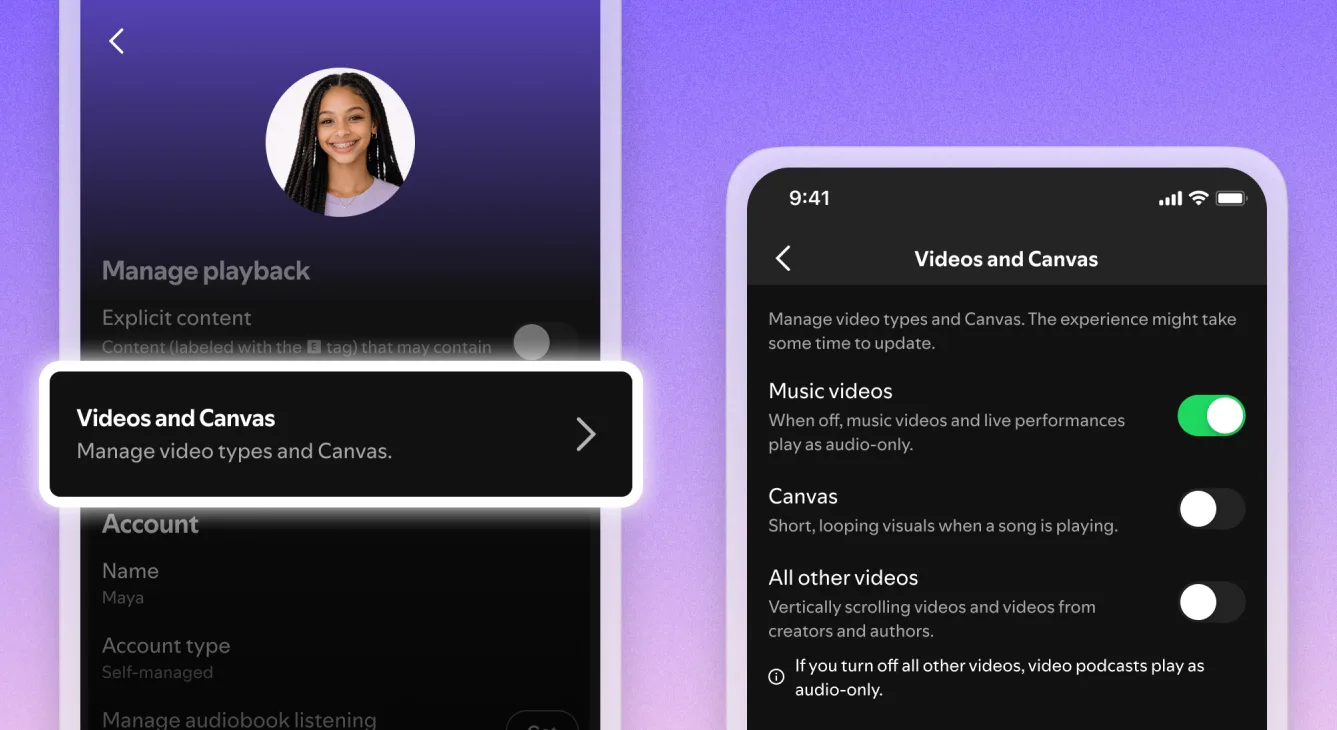
Update (8:45 AM PT): Spotify has now officially begun rolling out the feature globally, confirming that you can disable all video content across music and podcasts. The new controls are being added to settings across mobile, desktop, web, and TV. The company will also allow Premium and Basic users across Individual, Duo, Family, and Student plans, along with free users, to control how video content appears in the app.
If you find Spotify’s music videos annoying, you will soon be able to turn them off. Spotify is adding new video controls that will let you turn off any and all video content inside the app. The update was shared by Rowland Manthorpe on X.
Just got an email: Spotify is introducing controls which let users turn off video for music or podcasts, both for themselves and family plan members. I think the enshittification theory says this is impossible? Or is it actually a secret plot to make the service worse
How to turn off videos for music and podcasts on Spotify?
The new controls are not available in my region yet. According to The Verge, the new controls to turn off videos in Spotify will appear under the “Content and display” section in your settings on mobile, or under the “Display” section if you are on desktop.
Advertisement
Spotify
There will be three separate toggles to work with. The first is an existing toggle that disables Canvas clips, which are the short, looping, autoplay videos that play in the background while a track runs.
The second will be a brand new toggle that specifically turns off access to music videos. The third, also new, will disable all other video content on the platform, including podcast videos and vertical video. Together, these three controls will give you granular options to pick and choose exactly how much video you want in your Spotify experience.
How do Spotify’s new video controls work for Family Plan subscribers?
Spotify
If you manage a Spotify Family Plan, you will be able apply these video controls to each individual member on your subscription, similar to how managed account controls already work.
Once you disable video at the plan level for a specific member, that person will no longer have the option to switch to the video version of a song or podcast on their own.
At the time of writing, Spotify hasn’t made any official announcement about the new video controls. The availability may also vary depending on your region and account. If you haven’t seen them appear yet, try updating your app and checking your settings over the next few days.
Candace Owens spent years building a pro-MAGA audience by supporting President Donald Trump. Now, she’s calling for his removal from office.
Over the past few months, right-wing media figures like Owens have broken with Trump on a number of issues, including the Epstein files and the administration’s intervention in Venezuela. But the fracturing among the MAGA media coalition appears to have reached the point of no return after the president’s threats to annihilate “a whole civilization” in Iran this week.
“The 25th amendment needs to be invoked,” Owens wrote Tuesday on X. “He is a genocidal lunatic. Our Congress and military need to intervene. We are beyond madness.”
Owens is one of several right-wing media figures calling for Trump’s removal. Former congressperson Marjorie Taylor Greene also called for invoking the 25th Amendment, referring to Trump’s actions in Iran as “evil and madness.” Alex Jones urged Trump’s ouster on his InfoWars program on Tuesday, asking a guest “how do we 25th amendment his ass?” On an episode of Joe Rogan’s podcast last week, comedian Theo Von, who hosted Trump on his own show in 2024, called the US and Israel “fucking terrorists.” “It is vile on every level,” former Fox News pundit Tucker Carlson said during his show on Monday, referring to Trump’s recent Truth Social posts about Iran. The red-pill streamer Sneako wrote, “I miss Joe Biden” on X last week.
Advertisement
This pushback from major right-wing figures has fractured the MAGA media coalition even further; seemingly in response, a handful of pro-Trump stalwarts have called on the Justice Department to investigate American influencers for taking foreign money without disclosing it. The conservative activist Laura Loomer called posts from Owens “the most obvious foreign influence operation ever” before urging a DOJ investigation on Tuesday.
“The DOJ can investigate me all they want, Larry—they won’t find a thing,” Candace Owens posted in reply to Loomer on Wednesday.
Jack Posobiec, a prominent Pizzagate conspiracy theory promoter, echoed Loomer’s calls for an investigation. Benny Johnson, a former Turning Point USA contributor, wrote on X that he would “welcome” an investigation. (In 2024, the Justice Department alleged that Tenet Media, an online media company that produced shows for Johnson and other high-profile influencers, was largely funded by Russian state-backed news network RT. Johnson, whom the US government did not accuse of wrongdoing, issued a statement at the time denying awareness of the alleged Russian influence scheme and portraying himself as a victim.)
Throughout Trump’s second term in office, the administration has frequently worked with creators to push its messaging online. Last fall, the Pentagon revoked press credentials from mainstream outlets, replacing them with creators like Loomer and Cam Higby. While many of these creators have attended recent Pentagon press briefings, the White House hasn’t seemingly been in touch on messaging about the war in Iran.
Advertisement
“There is/was none,” one source familiar with the Republican influencer pipeline tells WIRED about the administration not reaching out to creators about Iran. “The online right wasn’t supportive, and there wasn’t anything that was going to change that. The best they could hope for is silence.”
Experts find credit card skimmer hidden in 1×1 SVG image
Fake “Secure Checkout” overlay stole card data
Likely exploited Magento PolyShell flaw, affecting many stores
Security researchers recently found a credit card skimmer on almost a hundred compromised ecommerce websites hiding in a tiny image.
Experts from Sansec reported finding 1×1-pixel Scalable Vector Graphics (SVG) elements with an ‘onload’ handler inside many e-commerce websites’ HTML.
“The onload handler contains the entire skimmer payload, base64-encoded inside an atob() call and executed via setTimeout,” the researchers said. They explained that with this technique, the attackers did not have to create external script references that usually get picked up by security scanners. “The entire malware lives inline, encoded as a single string attribute.”
Article continues below
Advertisement
Leveraging PolyShell
People who would try to buy something from these websites would, during checkout, be presented with a fake “Secure Checkout” overlay that includes card details fields and a billing form.
Everything they would submit this way would then be validated in real-time using the Luhn verification, and then sent to an attacker-controlled server in an XOR-encrypted, base64-obfuscated JSON format.
Advertisement
The researchers found a total of six domains used for data exfiltration, all of which were hosted in the Netherlands. Each was getting data from up to 15 confirmed victims.
Discussing how the websites may have been compromised, Sansec said it was possible that the attackers leveraged PolyShell, a vulnerability plaguing stable version 2 installations of Magento Open Source and Adobe Commerce, which was discovered in mid-March this year. Sansec, who were also the ones to discover PolyShell, warned about ongoing attacks at the time.
Sign up to the TechRadar Pro newsletter to get all the top news, opinion, features and guidance your business needs to succeed!
“Mass exploitation of PolyShell started on March 19th, and Sansec has now found PolyShell attacks on 56.7% of all vulnerable stores,” Sansec said, without giving a raw number of targeted sites.
Advertisement
Adobe patched it, but the fix was only available in the second alpha release for version 2.4.9, meaning production versions remained vulnerable.
This remains the case today, and Sansec recommends users hunt for hidden SVG tabs, as well as monitor and block traffic coming from the attackers’ servers.
“5G” is an umbrella term that encompasses the current fifth-generation cellular wireless network technologies. All the major carriers and phones support 5G connections, which can offer faster data speeds than older technologies such as 4G LTE or 3G.
Essentially there are three types of 5G: Millimeter-wave (mmWave), which can be fast but has limited range; low-band 5G, which has slower speeds but works on a broader range; and midband, which is a balance between the two that’s faster than low-band but also covers a larger range than millimeter-wave. Midband also incorporates C-band, a batch of spectrum auctioned off by the Federal Communications Commission in 2021.
Your phone’s 5G connection depends on which type blankets the area you’re in, as well as other factors, such as population density and infrastructure. For instance, mmWave is super fast, but its signals can be thwarted by buildings, glass, leaves or by being inside of a structure.
When your device is connected to a 5G network, it can show up as several variations such as 5G, 5G Plus, 5G UW or others, depending on the carrier. Here’s a list of icons you see at the top of your phone for the major services:
Advertisement
AT&T: 5GE (which isn’t actually 5G, but rather a sly marketing name for 4G LTE), 5G (low band), 5G Plus (mmWave, midband)
Verizon: 5G (low band, also called “Nationwide 5G”), 5G UW/5G UWB (midband and mmWave, also called “5G Ultra Wideband”)
T-Mobile: 5G (low band), 5G UC (midband and mmWave, also called “Ultra Capacity 5G”)
There’s also 5G Reduced Capacity (5G RedCap), which is a lower-power, smaller-capacity branch of 5G used by devices such as smartwatches and portable health devices; the Apple Watch Ultra 3, for example, connects via 5G RedCap.
Advertisement
Just around the corner is 5G Advanced, promising much faster speeds because of carrier aggregation, or combining multiple spectrums.
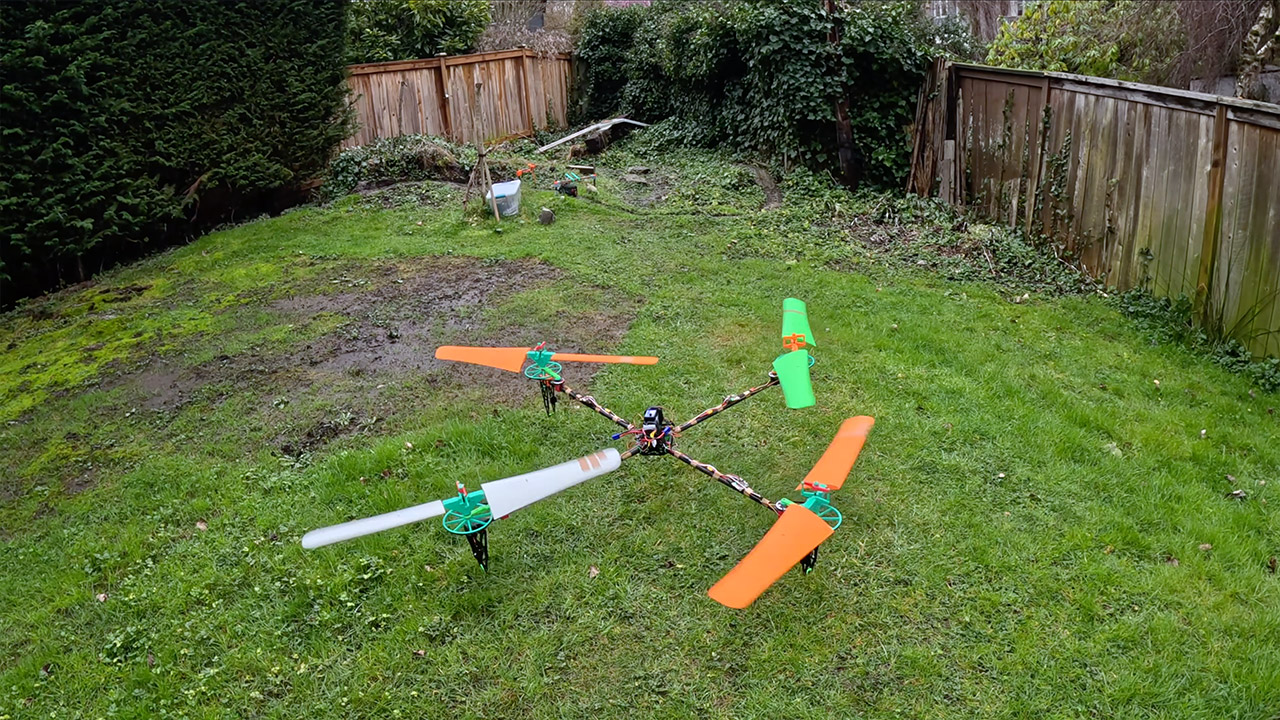
Daniel Riley set out to tackle an issue that had been plaguing him: what if you built a drone with propeller blades a mile longer than regular models? His design features 41-inch blades that reach from tip to tip and spin at a steady 350 to 500 revolutions per minute, a far cry from the tiny, high-speed propellers seen on nearly every commercial drone on the market.
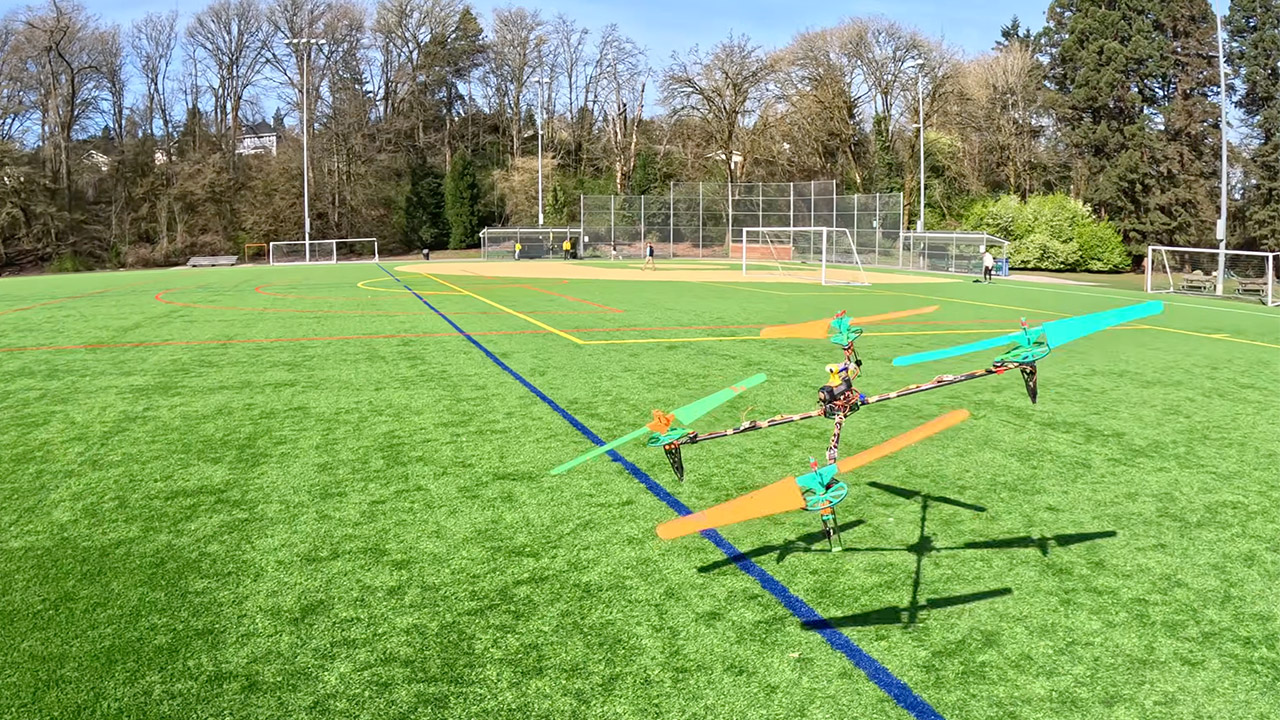
His quadcopter stands out from the crowd due to its gigantic 41-inch blades, and not only because of their size. They also spin at a nice, calm speed of 350 to 500 rpm, as opposed to the thousands of rpm seen on standard models. Riley paired these blades with a sophisticated variable pitch mechanism that allows each rotor to change the angle at which it bites into the air while keeping the motor speed constant. This combination enables the drone to generate lift and remain airborne with significantly less energy than you might expect, especially considering the blades’ high inertia.
High-Speed Precision: Experience unparalleled speed and precision with the Bambu Lab A1 3D Printer. With an impressive acceleration of 10,000 mm/s…
Multi-Color Printing with AMS lite: Unlock your creativity with vibrant and multi-colored 3D prints. The Bambu Lab A1 3D printers make multi-color…
Full-Auto Calibration: Say goodbye to manual calibration hassles. The A1 3D printer takes care of all the calibration processes automatically…
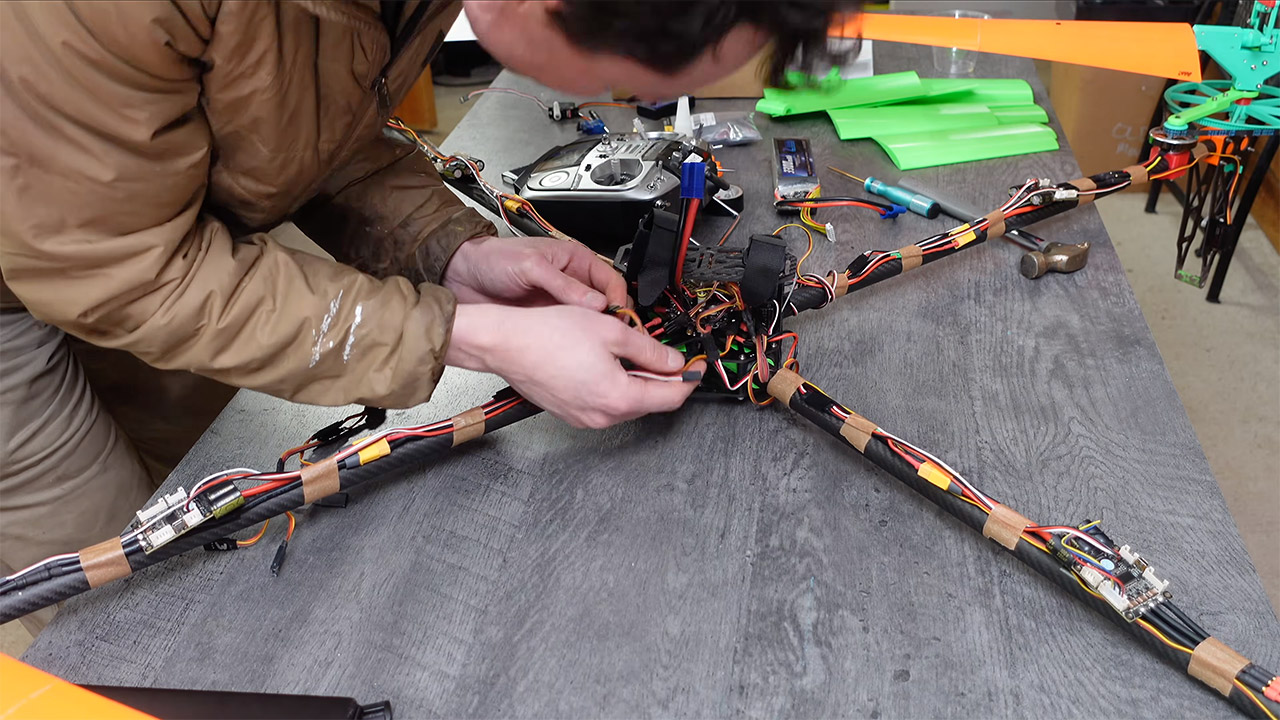
Riley designed a variable pitch system that allows the servos to change the angle of each blade while the motors continue to run at a consistent speed. This is a creative solution to the problem of high rotational inertia, which would normally make it difficult to swiftly increase and decrease motor speed in order to operate the drone successfully. He mounted high-torque servos at the base of each arm and ran a pushrod through them to the blade roots. As a result, the drone gains precise control over lift and attitude without constantly adjusting the engine speed.
The drone’s chassis was built of carbon fiber tubes attached to 3D printed polycarbonate parts, which gave just enough strength to keep things from breaking without adding too much weight. The propellers were made from PETG plastic reinforced with carbon fiber rods. Four pancake-style 5010 360KV motors power the blades via a belt reduction system, which reduces the speed and increases torque. Riley even removed the motor controllers’ heat sinks and sealed them in epoxy to save a few grams of weight. Every little piece added up to keep the overall power consumption low, allowing the huge rotors to support the airframe with minimal effort.
Ground tests produced some really impressive results. When the drone was hovering in situ, it produced a remarkable 18.1 grams of torque for every watt of electricity used, which is roughly half as much as a well-optimized conventional quadcopter. When the power was turned off, the drone was able to slowly circle its way to the ground. The only reason it didn’t come out of it without losing its balance was that it lacked a stabilisation system and crashed.
Engineers have long recognized that the key to making rotorcraft fly is getting the power loading just right. Spreading the weight over a larger rotor surface allows you to stay aloft with less energy, like Riley did here. He applied a principle that most commercial drone manufacturers are afraid to explore since it is more sophisticated, and it paid off handsomely. His approach demonstrates that scaling up to larger blades and adding some sophisticated pitch control can result in significant increases in flight time without simply throwing some heavier batteries on it. [Source]
All it takes is two to three weddings to break even
Two to three weddings. That’s all it takes for entrepreneurs Edmund Teo from Octopus Reels and Jessica Tay from Leave Your Message to fully recoup their startup costs—and everything after is profit.
Their business? Renting out digital guestbooks that capture audio and video messages from wedding guests. As more couples seek personalised, interactive experiences, this niche service is quickly gaining popularity and turning into a profitable opportunity.
Set up is simple, only requires two to three people, and the equipment is reusable, making margins compelling with limited costs.
Vulcan Post speaks with the two founders to uncover what it takes to run a digital guestbook business—and just how lucrative it can be.
Advertisement
What’s driving couples to ditch traditional guestbooks
Digital guestbooks that record audio (left) and video (right) have emerged in popularity in recent years./ Image Credit: Leave Your Message/ Octopus Reels
In Singapore, couples are increasingly moving away from traditional guestbooks because digital formats offer something far more engaging and memorable.
While handwritten guestbooks are sentimental, they are often stored away and rarely revisited. More often than not, only a few pages are filled while the rest remain blank.
Audio and video recordings, on the other hand, capture the tone, laughter, and emotions behind each message, allowing couples to relive those moments for years to come.
We have had couples share how moved they were when revisiting their recordings.
Edmund Teo, founder of Octopus Reels
(Left): Traditional physical guestbooks that guests are invited to write in; (Right): Recorded video from a digital video guestbook./ Image Credit: Artisan Prints, Octopus Reels
Jessica added that digital guestbooks make memories feel “more alive” by preserving expressions, voices, and interactions that a page of writing cannot convey.
She also noted that the rise of digital guestbooks connects to broader cultural currents. “In recent years, there has been a strong comeback of nostalgia, like the rise of digital cameras and Y2K aesthetics, where people are drawn to things that feel a bit more raw and authentic.”
Advertisement
Typically, digital guestbooks use a vintage telephone setup. Guests pick up the handset to hear a short, pre-recorded message from the couple, then record their own message after a tone. The retro telephone design, complete with rotary dials or classic handsets, adds a memorable touch.
Weddings, being highly emotional occasions, naturally attract formats that combine familiar, nostalgic elements.
At the same time, the industry itself also offers fertile ground for niche services like digital guestbooks. In 2024, the Singapore wedding market was valued at US$153.22 million (S$196.57 million), and is projected to reach US$292.38 million (S$375.11 million) by 2033, growing at an annual rate of 7.46%.
Both founders of Octopus Reels and Leave Your Message now run their businesses full-time, though Jessica initially started hers as a side hustle before leaving her full-time job as demand grew.
At first glance, the business seems simple and low-cost.
Similar digital video guestbook equipment sells for around S$533 on Amazon.sg, while each accordion-style column stand—typically used to hold and elevate the vintage telephone handsets—costs between S$72 and S$101. That totals to S$797 for a digital guestbook telephone setup with three cylindrical columns of varying heights.
With rates starting at S$295 for six hours for a basic digital guestbook setup by Octopus Reels and S$380 for two hours by Leave Your Message, both businesses can recoup their initial setup costs in just three bookings, making them highly lucrative ventures.
However, running the business goes beyond purchasing equipment. Set up, logistics, and manpower are all crucial to delivering a smooth and memorable guest experience. There are also additional technical support and post-production editing required to transform raw footage into polished keepsakes.
Advertisement
Edmund shared that the average breakdown of costs for each setup, excluding equipment, is as follows:
Category
Cost
Manpower
S$80-S$200 for two to three people, depending on theme and requirements.
Transport and logistics
S$30-S$120. More decor-intensive setups require larger vehicles.
Post-production
S$60 to S$300, depending on the number of messages and the amount of footage to process.
Storage and maintenance costs
Low, but expected to increase with more props and larger volumes of data as they are handled over time.
Advertising
S$70 per booking through Meta, plus ~3% processing fee of S$2.10.
Minus off all these costs, the overall profit margin for Octopus Reels is 20–30% for simpler setups, and tends to increase with larger or customised events, making the business still highly attractive.
Leave Your Message, however, declined to disclose exact figures, with Jessica explaining that these are “commercially sensitive for the business.” She did note, though, that there are “less obvious costs,” including seasonal fluctuations in bookings and downtime between events.
“While this can be a profitable business under the right conditions, there is also a fair amount of operational work behind the scenes that people may not immediately see,” she added.
Advertisement
Standing out in an increasingly crowded market
(Left): Leave Your Message’s London Phone Booth; (Right): Octopus Reels’ setup for a Chinese New Year event./ Image Credit: Leave Your Message/ Octopus Reels
Demand is booming for these businesses’ offerings.
Octopus Reels currently runs 10 to 12 events every weekend, and in 2025, it supported 208 events across 98 venues, with demand peaking in Oct when the company managed up to eight events in a single day. Meanwhile, Leave Your Message has participated in over 400 events since 2023.
While weddings remain the core revenue driver, both companies have expanded into adjacent markets.
Octopus Reels has supported corporate events, birthday celebrations, and community initiatives, including a meaningful project with Sport Singapore for individuals with dementia.
Similarly, Leave Your Message has recorded appreciation messages at company award ceremonies and participated in large-scale activations like the National Day NTUC Youth initiative, where messages collected across institutions were showcased during the National Day Parade.
Advertisement
This diversification reduces reliance on wedding seasonality for sales on digital guestbooks—a critical business strategy in an industry where demand fluctuates throughout the year.
(Left): Today, Octopus Reels also offers interactive wedding experiences such as low-fog effects; (Right): For guests who want to leave a message virtually or are unable to attend in person, Leave Your Message provides QR codes at events to submit videos./ Image Credit: Octopus Reels/ Leave Your Message
As competition intensifies with more businesses offering similar services, differentiation becomes especially important.
Hence, both companies have also diversified beyond their core guestbook services. Octopus Reels now offers interactive photo gallery installations, creating “mini exhibitions” of couples’ memories and low-lying fog effects for “walking on clouds” march-ins. They are also partnering with a local coffee cart vendor to bring Vietnamese coffee experiences into wedding spaces.
Jessica’s company, on the other hand, has expanded its digital guestbook concept with a virtual video option, where guests scan QR codes to record messages on their mobile phones. This extends the experience to overseas guests who cannot attend physically.
Will digital guestbooks stay?
Edmund considers video guestbooks an “early-stage trend,” with the potential to become a standard feature at weddings.
Advertisement
But as with any trend, it can flare up quickly—and fade just as fast. Despite this, Jessica is confident it will endure, at least in terms of its core intent.
“The format may continue to evolve, but the intention behind it, capturing meaningful messages from loved ones, will always be relevant.”
Ultimately, the emotional resonance is a key driver of the business model.
Edmund described parents leaving messages for newlyweds: “In many Asian families, emotions are not always expressed openly. The guestbook creates a space for parents to share heartfelt messages they might not say in person.”
Advertisement
For entrepreneurs entering this space, the playbook is clear: source reliable equipment, master post-production workflows, build vendor relationships for referrals, and differentiate through unique experiential offerings.
The wedding and events industries reward specialists who can deliver reliability and emotional impact.
A new feature that lets you create an AI avatar with your likeness is now live on YouTube. First in a blog post earlier this year, avatars are designed to be used in Shorts (provided you still them to show up), allowing you to insert yourself into video content in a way that YouTube deems to be safe and secure.
YouTube’s approach to combatting the AI sloppification of the internet and the proliferation of appears to be adding more and more AI features to its platform, framing this latest addition as a tool that gives creators more control of their digital identities. Any video generated using an avatar will feature YouTube’s AI disclosure and include visible watermarks and labels like SynthID and C2PA.
YouTube has published a pretty in-depth on how to create and use an avatar in either the YouTube or YouTube Create app, but here’s a brief summary of how to do it using the former. Once you’ve opened AI Playground, you’ll be taking a “live selfie” that also records your voice. You can then preview your photorealistic virtual self and either proceed with it or redo the process if you’re unhappy with anything. Creating an avatar in the YouTube Create app is broadly similar, but you have to navigate to the My Avatar homepage first.
YouTube recommends that you hold your phone at eye level and keep yourself centered as much as possible. Lighting is also important, as is ensuring your whole face is visible, you’re in a quiet area, and there’s nobody else in the background. You also have to be the account owner to create an avatar, and over the age of 18.
Advertisement
Once you have an avatar you like, you simply type in a prompt and wait for the AI to generate a video, which according to can be up to eight seconds long. Alternatively, YouTube will also let you add an avatar to existing “eligible” Shorts by tapping “Remix” and then “Reimagine” with your avatar selected.
Avatars can be deleted or retaken whenever you like, as can any video with your avatar in it. You can also limit who’s able to remix your videos, but deleting a video with your avatar in it won’t also delete the original video, or that avatar from your account. YouTube will automatically delete any avatar that hasn’t been used to create new video content for three years.
The new avatar feature will roll out gradually, and is the latest in a long line of AI-centric tools and updates YouTube has added to the platform in the last year, including for low-res videos, for creators and an for search results.
Mitsotakis called the legislation, which is expected to pass this summer, “difficult but necessary.” He started the video by referencing the phrase that became hugely popular among young people last year: “6-7 – Now that I have your attention.” Read Entire Article Source link




























![Tom Lee & Raoul Pal: "Don't SELL Your Ethereum Before Watching This" | [2026 Crypto Prediction]](https://wordupnews.com/wp-content/uploads/2026/04/1775752451_maxresdefault-80x80.jpg)





































You must be logged in to post a comment Login