
Security teams log 54% of successful attacks and alert on just 14%. The rest move through your environment unseen.
The Picus whitepaper shows how breach and attack simulation tests your SIEM and EDR rules so threats stop slipping by detection.




If your internet feels unstable or slow at times, it’s natural to blame the ISP or the router. A router essentially handles everything and your ISP is responsible for providing fast, seamless internet. In such cases, upgrading to a high-speed internet plan or buying a new router may seem like the perfect solution. But as surprising as it may sound, these might not be the real problems. The router could just be overloaded, and as a result, struggling to deliver optimal performance. And there are typically two router settings that can help solve the problem, QoS (Quality of Service) and SQM (Smart Queue Management). If configured correctly, this will significantly reduce slowdowns, allowing you to delay the router upgrade.
Before we delve into configuring the settings, it’s vital to understand why your router could be the bottleneck due to bufferbloat. Data transmitted over the internet is broken into small packets which your router handles, and it can only transmit a given number of packets at once. When traffic exceeds the available bandwidth, extra packets are stored in a memory buffer and wait for their turn. As the buffer grows, so does the time it takes for recent packets to be transmitted. This directly translates into increased latency. Regular internet speed tests don’t help pinpoint the problem, because they generally check for the download and upload speeds. That’s why you need to configure features like QoS and SQM.
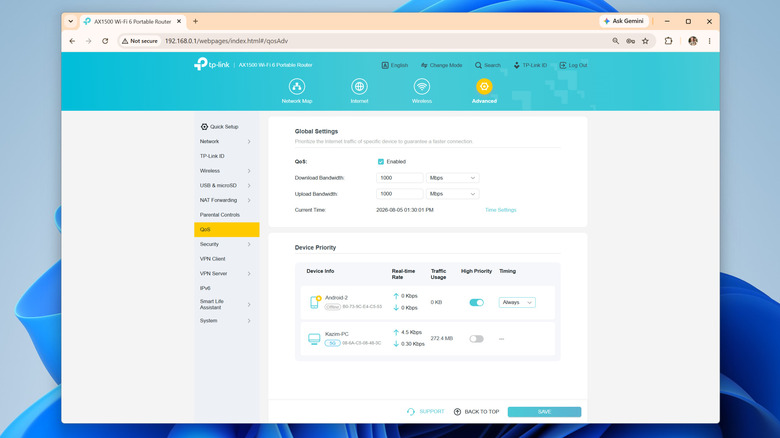
QoS or Quality of Service is a feature available on most routers that allows you to prioritize specific devices or data types on the network. For instance, you could prioritize your PC over your smartphone, or gaming over downloads and backups, and vice versa. Different router manufacturers offer different controls over QoS, but the feature is generally available on most modern routers. SQM or Smart Queue Management, on the other hand, is an advanced QoS feature designed to handle bufferbloat, which is basically the overloaded memory queue we discussed earlier. With SQM, your router prioritizes traffic from tasks that are latency-sensitive, say gaming and video calls.
If you are aiming for lower latency, SQM will help. But if download speeds are slow because multiple devices are competing for the available bandwidth, you are better off with QoS. That’s because Quality of Service lets you prioritize important devices and traffic types, which in this case is downloads. Also, on older routers, SQM may not be natively available, and you may need to install an open-source router firmware like OpenWRT to set up the feature, which is a hassle for the average user.
Turning on and setting up QoS and SQM will vary based on your hardware, so check your instruction manual to know for sure (most routers have a PDF version on the manufacturer’s website), but it generally goes like this: open your router’s admin panel, go into the QoS section (it may be under something like Advanced Settings), turn the feature on, and configure device or traffic priority. For instance, if you actively download files on your computer, prioritize it over other resource-intensive devices on the network. On routers that grant granular controls, you can specifically prioritize downloads or file transfers over other types of traffic.

Beyond QoS and SQM, there are a couple of other tips and tricks that will help improve connectivity and speed up downloads. The most important of all, and perhaps the simplest, is effective router placement. If your router is far away from the connected device, the signal strength will be low, and you will subsequently notice lower download speeds. Simply bringing the router closer to the device or using a Wi-Fi range extender or a mesh network will do the trick for most.
If physically moving the router is not an option, you can consider connecting the more important devices using an Ethernet cable. When it comes to stability and consistent speeds, Ethernet is undoubtedly a better choice over Wi-Fi, although the difference is usually less noticeable on modern routers with better coverage. In case your laptop doesn’t feature a LAN port, get a USB-to-Ethernet adapter to add the functionality.
Similarly, optimal band selection and minimizing interference is just as important. You should ideally have the non-critical devices, like smart plugs and security cameras, on the 2.4 GHz band, while reserving the 5 GHz band for computers, smartphones, gaming consoles, and smart TVs. As for wireless interference, move common interference-causing household appliances like microwaves and baby monitors away from both the router and the device in question.


Identity security is under growing strain. The passwords, multi-factor authentication (MFA) responses, IP reputation, geolocation and browser characteristics organizations have traditionally used to judge whether a login is legitimate are becoming easier for attackers to steal, imitate or work around.
AI is adding to that pressure, not by creating a completely new class of attack, but by making familiar identity attacks faster and more efficient. Meanwhile, rotating IP addresses and disposable browser profiles make malicious logins harder to distinguish from legitimate ones.
Against this rapidly evolving threat landscape, organizations need effective Zero Trust measures that protect against ‘legitimate’ logins from attacker-controlled infrastructure. It’s here that device trust helps, ensuring that valid credentials are insufficient without the device context they were meant to be used from.
AI has not created a fundamentally new form of account takeover. Attackers still rely on familiar techniques: phishing, credential theft, MFA abuse, session hijacking and social engineering. What has changed is the amount of manual work needed to run those attacks effectively.
Threat actors can create and send thousands of convincing phishing emails with little effort. If a more personalized message is needed, AI can pull public information from across the internet to build a detailed profile of the target.
Attackers can then adapt their message to match the target’s language and business context. A finance employee might receive a supplier-related request, while an administrator is approached with a cloud access issue.
None of this means AI is autonomously running the entire intrusion. In most cases, people still choose the targets, control the infrastructure and decide what to do with successful access.
The more accurate way to describe the change is that AI compresses the human work between acquiring information and acting on it. It lowers the cost of personalization and triage, allowing teams to run more campaigns and focus their effort on accounts with the highest expected value.
Verizon’s Data Breach Investigation Report found stolen credentials are involved in 44.7% of breaches.
Effortlessly secure Active Directory with compliant password policies, blocking 6+ billion compromised passwords, boosting security, and slashing support hassles!
Identity platforms often combine several signals to decide whether a login should be trusted. Each still has value, but attackers increasingly know how to steal, imitate or bypass the evidence these controls rely on.
While passwordless options are becoming more popular, credentials are still required in most authentication flows. As such, phishing and credential-harvesting malware like infostealers form the first step in many account takeover attacks.
Attackers can also simply reuse credentials from previous breaches. In an incident earlier this year, IGN’s Twitch stream was hijacked by an unknown attacker, using Restream.io credentials that had sat in infostealers dumps for roughly a month before being exploited.
The attack highlights the importance of scanning for leaked credentials. Solutions such as Specops Password Auditor carry out a read-only scan of your Active Directory to identify leaked passwords and related vulnerabilities.
You’ll then receive an easy-to-understand report to help you prioritize fixes. Download Specops Password Auditor for free here.
MFA significantly improves security, but its strength depends on the method and the surrounding authentication flow.
One-time codes can be captured through phishing. Push notifications can be abused through repeated prompts or social engineering. Adversary-in-the-middle phishing can relay credentials and MFA responses to the legitimate service in real time.
Attackers may also steal session cookies after authentication and avoid the MFA challenge entirely.
IP reputation can identify connections from known malicious infrastructure, while geolocation can flag activity from an unexpected region.
However, attackers can route traffic through residential proxies, mobile networks or compromised systems. They may choose an exit node close to the victim, making the login appear geographically plausible.
Legitimate activity is equally difficult to interpret. Remote work and corporate VPNs can produce unfamiliar locations. Stricter policies may block more attacks, but they also increase false positives and support work.
NIST’s Zero Trust Architecture guidance reflects this limitation. SP 800-207 states that organizations should not grant implicit trust based solely on physical or network location.
It treats user and device authentication as separate functions that should take place before access to an enterprise resource is established.
Most identity controls still depend on credentials that can be presented from almost anywhere. This is why organizations need to extend trust decisions beyond traditional identity signals.
Solutions like Specops Device Trust limit an attacker’s ability to spoof legitimate login attempts and reduce the risk of account takeover by:
Organizations should be able to register and limit trusted devices, different policies to corporate, personal and third-party hardware.
If the login comes from an unknown device, the identity platform should treat that as a meaningful change in risk. Access shouldn’t be granted simply because the credentials and MFA succeeded.
A successful login should not create permanent trust for the rest of the session. Access should continue to depend on both the user’s identity and the health of their device.
If posture changes, such as through disabling endpoint protection or the device falling out of compliance, the level of access should change.
Security teams are right to be cautious about adding friction, so device posture policies do not have to make every issue a blocking event.
Depending on the application and the severity of the problem, organizations can reduce privileges or give the user a short grace period to fix the device.
That approach keeps the control proportionate. A missing update should not always be treated in the same way as disabled endpoint protection or a rooted device.
When access depends on device health, users need a clear way to resolve problems. Self-guided remediation allows employees to fix issues quickly, which reduces disruption while keeping the required security standard in place.
As AI improves the speed and personalization of account takeover, IT teams need solutions that blunt the effectiveness of those attacks.
While it may be a challenge to identify every malicious login from network signals alone, organizations can make valid credentials insufficient without the device context they were meant to be used from.
If you’re interested in seeing how Specops can help evolve your identity security strategy by bringing device trust into access decisions, contact us today.
Sponsored and written by Specops Software.

One element of the 80s F1 rubber straps that has not carried over to the new collection, though, is the V-shaped grooves on the bottom portion of the original straps. TAG made the 80s rubber straps extra long so surfers and divers could wear the F1s over wetsuits. The V-shaped grooves meant these could easily be cut down to a desired length—particularly useful if you were just going to wear it on the wrist and not in the waves. Clearly, TAG doesn’t want anybody cutting up its new rubber straps.
I’ve wanted a classic original orange TAG F1 for years, and finally managed to pick one up earlier this year, although it is the later WA1213 model. Eddy Burgener, who designed the TAG F1 in the 80s, has stated that bright, popping colors were key to the original collection, and that the models were not, initially at least, thought of as being linked to driving but watersports instead.
Speaking to watch site Hodinkee last year, Burgener said TAG was “trying to create a new style of watches for American surfers, divers, and other young folks heading for the beach,” so the brief was to create a new watch that was fun, colorful, and young, emulating the bright surfboards and the clothes surfers were wearing at the time.

To nail the bright colors, Burgener stated that the case had to be synthetic, which then added the complication of trying to make a diver’s watch using synthetic materials, something that was incredibly difficult at the time. In the end, they settled on a mixture of fiberglass and plastic as the base material for increased hardness and stability.
TAG’s solar F1s now sport a form of bioplastic—a more eco-friendly castor-based polyamide which the brand has named TH-Polylight—replacing the old “Arnite” thermoplastic. As before, this is molded over a steel inner core, making for a sports watch that’s more robust than most plastic-cased equivalents.


CISA has confirmed that ransomware gangs have begun exploiting two recently patched SonicWall SMA1000 vulnerabilities, including a maximum-severity server-side request forgery (SSRF) flaw.
SMA1000 is an enterprise-grade secure remote access gateway used by large corporations, government agencies, and Managed Service Providers (MSSPs) to provide VPN access to internal applications and corporate networks.
SonicWall released patches for the two security flaws (tracked as CVE-2026-15409 and CVE-2026-15410) in mid July, when it also warned that threat actors had been exploiting them in zero-day attacks.

“SonicWall PSIRT has investigated multiple cases indicating the active exploitation of the vulnerabilities described in this advisory,” the company warned at the time. “Customers are strongly urged to upgrade to the hotfix release as soon as possible to remediate these vulnerabilities.”
Incident response firm Volexity later revealed that a threat actor tracked as UTA0533 began exploiting the vulnerabilities as early as June 22 (weeks before SonicWall publicly disclosed the flaws) to deploy custom malware known as KNUCKLEBALL, Sou5, ROOTRUN, and ORANGETAIL on vulnerable VPN appliances.
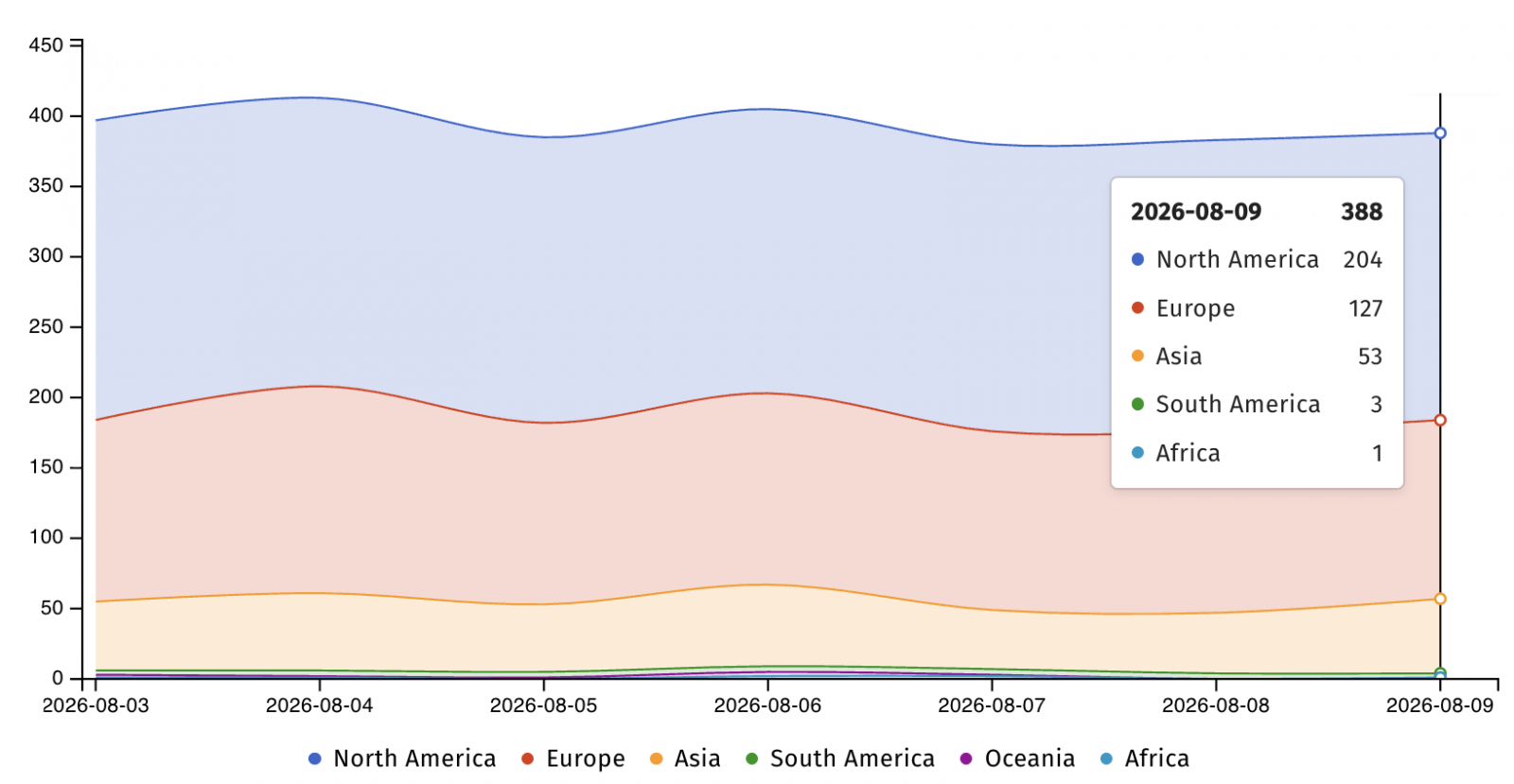
Internet security watchdog Shadowserver currently tracks over 380 SMA1000 appliances exposed online, although some may already have been secured against attacks.
The U.S. Cybersecurity and Infrastructure Security Agency (CISA) added the two flaws to its Known Exploited Vulnerabilities (KEV) Catalog on July 14, ordering Federal Civilian Executive Branch (FCEB) agencies to patch their systems within three days.
“This type of vulnerability is a frequent attack vector for malicious cyber actors and poses significant risks to the federal enterprise,” the cybersecurity agency said.
While SonicWall has yet to update its original advisory to confirm that CVE-2026-15409 and CVE-2026-15410 are targeted in ransomware attacks, CISA has now also flagged them as exploited by ransomware gangs in recent updates to the KEV Catalog.
In December, the company warned customers to patch another vulnerability (CVE-2025-40602) in the SonicWall SMA1000 Appliance Management Console (AMC) that was being chained by hackers in zero-day attacks to gain root privileges.
One month earlier, SonicWall linked state-sponsored hackers to a September security breach that exposed customers’ firewall configuration backup files after researchers warned of over 100 SonicWall SSLVPN accounts compromised using stolen credentials.
In September, it also pushed a firmware update to help remove OVERSTEP rootkit malware deployed in attacks targeting SMA 100 series devices.

Security teams log 54% of successful attacks and alert on just 14%. The rest move through your environment unseen.
The Picus whitepaper shows how breach and attack simulation tests your SIEM and EDR rules so threats stop slipping by detection.
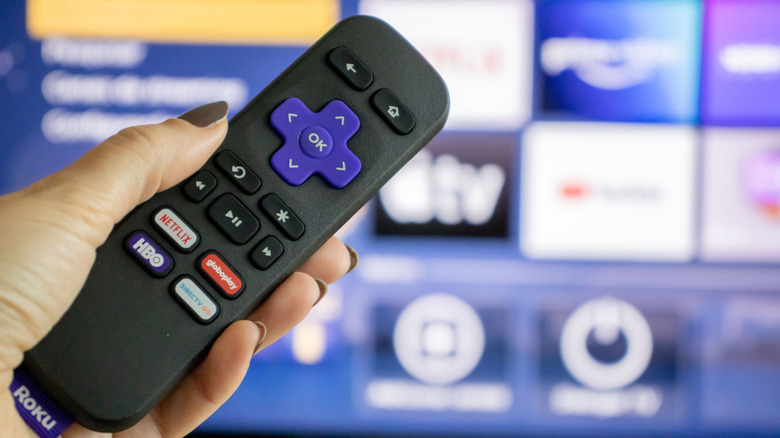
If you lost your remote and just got your new one, this is for you.
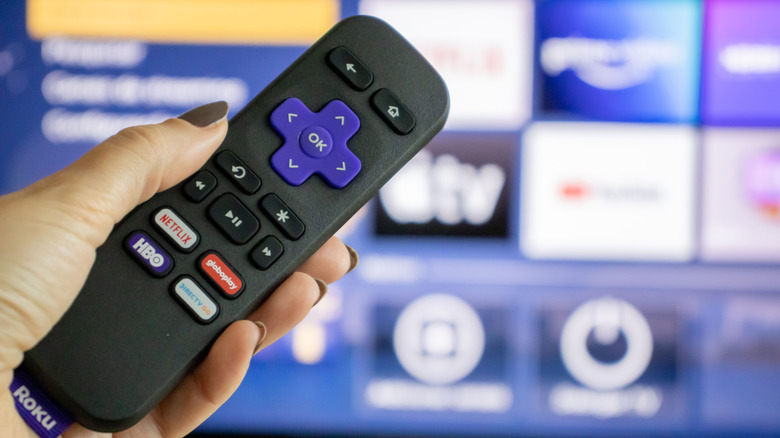
Picking up a streaming device like an Amazon Fire TV Stick or the Google TV Streamer is a cost-effective way to breathe new life into an older television. Roku’s fleet of streaming sticks and boxes enjoys a reputation for being affordable, easy to set up and offering a less bloated experience than Android TV. Like other streaming devices, every Roku model ships with a remote control that lets you control media playback and other actions.
Unlike your TV’s infrared remote, though, most modern Roku devices communicate with their remotes over newer technologies like Wi-Fi Direct or Bluetooth. This lets you enjoy more features like voice control and the ability to control your Roku device without requiring a clear line of sight between it and the remote. However, remotes using these technologies need to be paired before you can use them. This is done when you first set up your streaming device, but if you’ve replaced your remote or performed a factory reset, you’ll need to pair it with your Roku again.
To do this, you will need to put both the Roku device and its remote in pairing mode. Assuming you don’t have an extra remote to control your Roku device, unplug it from the power source, wait around five seconds, plug it back in and turn it on. Flip your remote over and look for a pairing button. It’s usually under the battery cover. Press and hold the button for five seconds until you see the status light flashing. If your Roku remote doesn’t have a pairing button, press and hold the Back and Home buttons simultaneously for 5 seconds. Your Roku remote control should now be paired with your device.
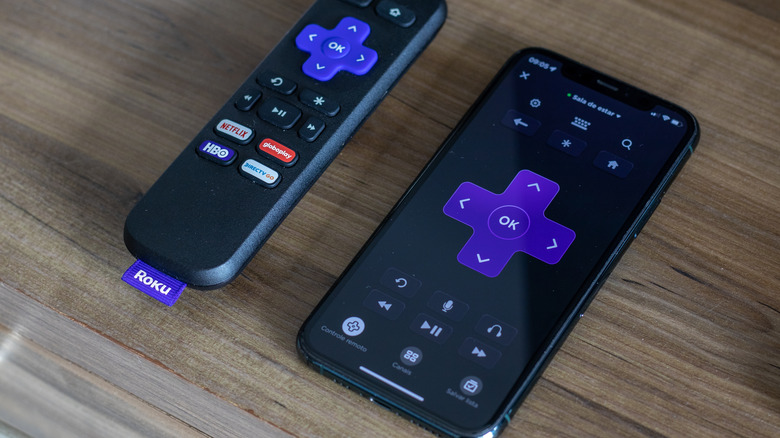
The Roku remote is a convenient way to control what’s on screen, but if you’ve misplaced it or if it refuses to pair, there is still one handy alternative: the Roku mobile app. You can install it on your Android or iOS device and use your phone to control your Roku device instead. Make sure your phone and Roku are both connected to the same Wi-Fi network. Launch the app on your phone, navigate to the Remote tab and tap on Connect device when it recognizes your Roku device.
The interface looks very similar to the layout of the physical remote. You get giant D-pad controls in the middle with your usual playback controls right below. The Home and Back buttons are situated at the top, where you will also find a microphone icon that lets you perform searches with your voice. Another advantage of using the Roku mobile app to control your TV is that you can type things out much faster on your phone’s keyboard whenever you trigger a search field.
The app also doubles as a hub for discovering new content and launching recently used apps faster. Plus, if you have headphones connected to your phone, your TV’s audio can be routed through them, making late-night movie watching more convenient.
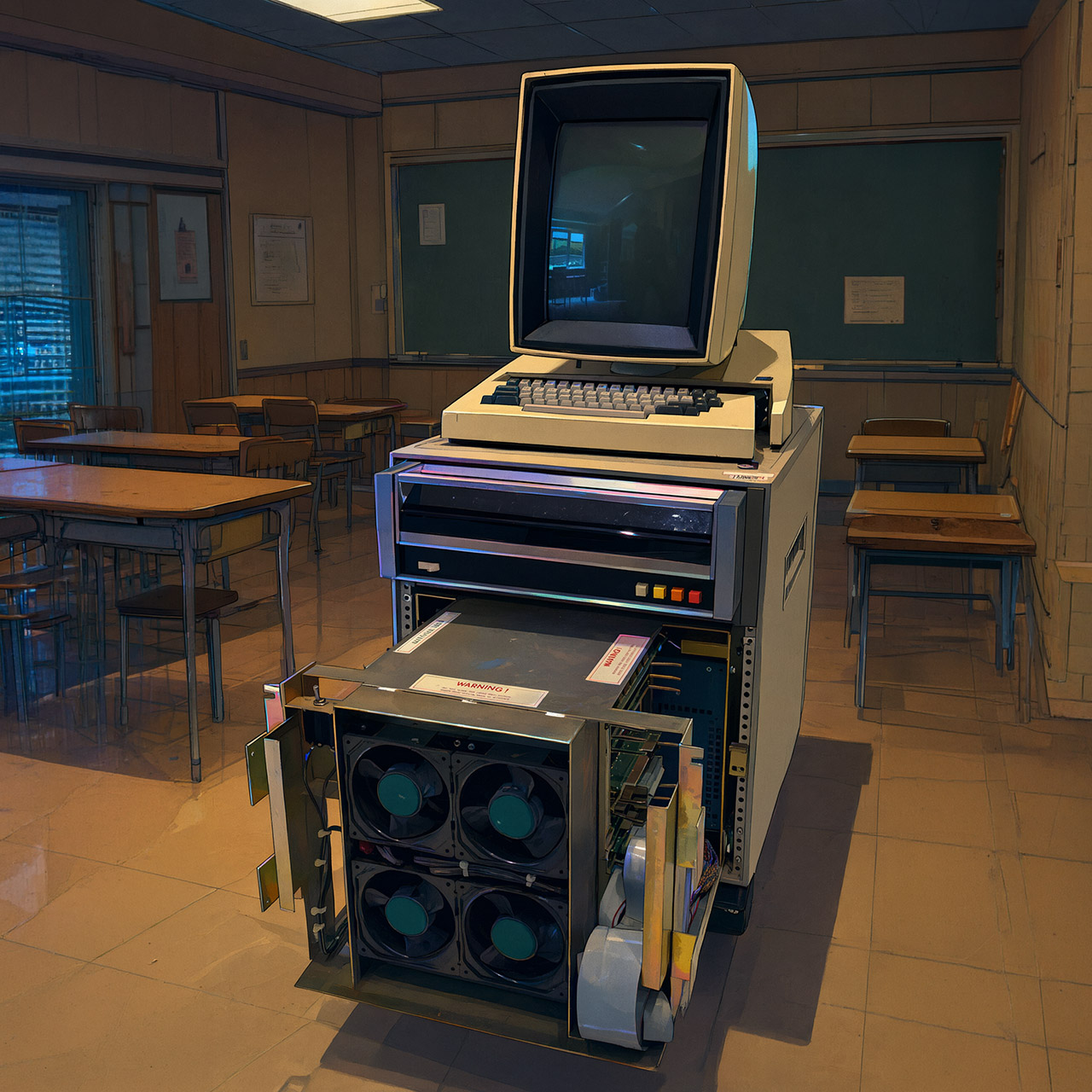
Photo credit: Righto
In late 1972 Butler Lampson sat down at Xerox PARC and wrote a short internal memo titled “Why Alto?” He wanted a machine each researcher could claim as their own. Alan Kay had been dreaming of a portable Dynabook for years. Lampson and Chuck Thacker offered him an interim version that would fit under a desk instead. Bob Taylor gave the project its name, and work began that November. By April 1973 the first unit was running, with a Sesame Street Cookie Monster test pattern appearing on its tall portrait screen.
The screen was an unusual 606 by 808 pixels, with each of them entirely independent and controlled by the Alto. No one else came close to creating a display that functioned like a blank piece of paper on its end (right on the edge of your desk). A three-button mouse lay on the edge, beside a detachable keyboard. The main box, about the size of a compact filing cabinet, housed a microcoded CPU running at around 5.8 Mhz, 128 kilobytes of memory, and a 2.5 megabyte detachable disk cartridge. Each Alto cost Xerox a hefty $12,000 in 1973 ($90,257 today).
Sale

PARC researchers immediately filled their offices with Alto machines by the dozens. By 1975, there were dozens buzzing away under desks across the facility. Users began pointing and clicking rather than entering obscure commands. They changed the documents and saw the final layout on screen before printing them. Charles Simonyi and his colleagues created Bravo, the first word processor that delivered on its promise of what you see is what you get. You could use Laurel to send emails, interact with vector graphics and paint tools, and even construct software with Smalltalk by treating everything as an object capable of communicating with other objects.
Bob Metcalfe and David Boggs used Alto to create a network called Ethernet, which flowed at roughly three megabits per second. Laser printers, pioneered at PARC by Gary Starkweather, sat immediately on the same network, allowing anyone to print a clean page without leaving their desk.
Over the next decade, around 2,000 Altos were manufactured. The majority of them ended up in Xerox offices. A few hundred made their way to universities and research facilities. One even ended up at the White House. However, none of these ever made it into a store catalog. Xerox’s headquarters were a long way to the east, and their definition of success was essentially steady sales of copiers, toner, and drums. A machine that could reduce paper usage appeared to be a threat to their ongoing revenue rather than a beneficial concept. Earlier efforts into large computers had cost the corporation a lot of money. The government’s inspection of Xerox’s dominance in the photocopying business gave them still another reason to be wary about selling a whole new type of computer. Selling a new type of computer also put them at risk of being accused of abusing their position in one market to get access to another.
In December 1979, a young Steve Jobs walked thru PARC as part of a stock deal. He observed the cursor travel under the mouse, jumping between overlapping windows, and subsequently stated that this type of demonstration made all of the other tech feel very evident. Apple’s Lisa and then Macintosh brought the same principles into people’s homes and offices. Charles Simonyi later contributed to the development of Microsoft Word. Ethernet became the standard as local networks began to be wired with it. The visual language of icons, menus, and pointing devices spread like wildfire, making it feel like it was meant to be.
It wasn’t until 1981 that Xerox introduced a commercial version known as the Star, which cost a whopping $16,000 ($58,781 today) and arrived after cheaper machines had already appeared on the market. Sales were poor, but the people who built the Alto had moved on to start new companies.
[Source]

I’ve written a fair bit about Dolby Vision 2 in the past year. From seeing it demoed at Dolby Live at the Park MGM in Las Vegas, to viewing it at a Philips event, and then having a brief chat about LG about what it thinks the future may hold for the HDR format, it’d be fair to say that there’s plenty of opinions flying about.
But within the next few weeks – and if you have a Hisense 2026 TV – you’ll find out what all the fuss has been about.
Or will you?
Perhaps I’m a pessimist by default but my understanding of Dolby Vision 2 has increased with each event I’ve encountered it at, but the one pressing issue that’s not been fully addressed is how you’ll be able to take advantage of having this fancy new feature on your TV – and in effect, it’s whether there’s anything in Dolby Vision 2 to actually watch.
Dolby Vision 2 is a new format. At first we thought it could be an extension that incorporated Dolby Vision, but in several ways it’s completely brand new offering. While there is some backwards compatibility with Dolby Vision in the sense that Dolby’s sequel can take content mastered in the original format and improve it, Dolby Vision 2 has an appetite for new metadata, and newly mastered content is the only way that features such as the Intensity Slider and Authentic Motion will work as intended.
So while there’s some backwards compatibility, and having seen it action, it does produce a better image – especially with mid-range and more affordable TVs – any customer with interest in picture quality will want the TV they’ve bought to fully unleash the potential performance available. And this is where we run into a slight problem.


Much like Carmen Sandiego (famously from San Francisco), Dolby Vision 2 has been somewhat elusive. Dolby has announced that Peacock (in the US) will produce content natively in Dolby Vision 2, though from what’s been mooted, this will be live broadcasts.
CANAL+ will have Dolby Vision 2 content through its streaming service – but CANAL+ is French, and obviously, it’s only available in select countries in Europe (and French overseas territories). And then there’s iQIYI, a Asian-based video on demand service, which I hadn’t heard about partnering with Dolby until the Hisense TV announcement.
While that covers North America, parts of Europe and Asia; it’s not an extensive number of partners, and despite the widespread availability of Dolby Vision, you might have expected more to sign up and be a part of the launch. But the lack of support suggests that many are hesitant or waiting to see what happens with Dolby Vision 2.
Where’s Disney’s support for it? Why haven’t Sky in the UK talked about it? What about HBO Max, which – and I stand to be corrected – broadcast this year’s Champions League final in Dolby Vision?
At this moment, content seems to be a trickle rather than a torrent. If I don’t subscribe to Peacock in the US, will the presence of Dolby Vision 2 make me want to sign up for the service? I think that’s unlikely, since what I’d want is not to pay for another service but hold out for the service that I’m paying for to support it.
It doesn’t help that Dolby Vision itself is viewed as a premium HDR format, so despite its widespread availability on many manufacturers’ TVs, you’ll only experience Dolby Vision if you a) buy a 4K Blu-ray player that supports it and b) subscribe to the premium tiers of streaming services.
It would seem that most people aren’t paying for the 4K HDR tier on many streaming services, a situation I find galling since people have invested in 4K TVs, but it potentially means that their exposure to Dolby Vision is small, and that the appearance of Dolby Vision 2 on the scene is not one that’ll be a difference maker to most buyers unless you’re a customer who’s in the know about these things.

It’s not just Dolby that is in this situation either. We’ve heard even less about Samsung’s HDR10+ Advanced until a press release this week about Prime Video adopting support for the HDR format. That in itself would seem to be something of a blow to Dolby that one of the bigger, global streaming services has opted for its rival first.
Of course, HDR10+ Advanced is free to license; and along with that, Amazon and Samsung have a relationship going back to the formation of the HDR10+ Alliance, but HDR10+ Advanced is currently only available on Samsung TVs – which are still no.1 in market share – and take up of HDR10+ Advanced seems to have been even slower than Dolby Vision 2.
I don’t doubt that Dolby Vision 2 will have a beneficial impact on picture quality, but the TV industry as a whole seems less enthusiastic, which does strike me as a little odd. We’ve not heard much about Dolby Vision 2 from TCL, and we’re still waiting for Philips’ TVs to launch.
Given the TV industry’s move to streaming, now seems to be time to invest in these pipelines and deliver content that produces even better viewing experiences.
But despite bursts of news here and there, it’s rather quiet on the Dolby Vision 2 front and rather than being wrapped up warm watching great-looking HDR programming, I’m feeling the breeze and wondering when we’ll really see Dolby Vision 2.


We may receive a commission on purchases made from links.
DIY jobs can include a ton of small, non-professional tasks that beginners can carry out in the comfort of their home, such as pruning tree branches, clearing overgrown fence lines, and cutting wood for heating. You wouldn’t want to spend a ton purchasing professional-grade chainsaws just for these tasks. If you are reading this article, you probably have your mind set on getting a chainsaw from the popular tool brand Stihl. The brand offers different chainsaws for different types of users, and as you’ll see in a moment, that includes some great DIYer chainsaws.
The lightweight design, comfortable handling, easy maneuverability, and comparatively low price make them more suited for DIYers. However, since there are many factors to consider when choosing the right chainsaw for your needs (bar size, power source, and extra features), our selection includes four different products. Hopefully you’ll find one that works for you.
Priced at $409.99 on the official Stihl website, the MSA 200 C-B is a powerful battery-powered Stihl chainsaw that the company says is ideal for thick tree branches and lightweight logs. It uses a brushless motor that produces a low-noise operation so you can use it for your DIY projects without disturbing the neighbors, as mentioned by Popular Mechanics in its review of the chainsaw model. With this chainsaw, you won’t have to deal with a power cord for the tool to work; just attach a compatible battery, press the trigger, and enjoy a zero-exhaust-emission performance.
In addition, the Quick Chain Adjuster feature lets you adjust the chain’s tension without requiring additional tools, while the Ematic Lubrication System keeps the chain well-lubricated and minimizes bar oil consumption. The lightweight design (only eight pounds) makes it suited for DIYers by increasing portability and maneuverability, to aid cutting in different angles and positions. The IPX4 rating keeps it protected against splashes of water for stress-free outdoor working.
The MS 212 gasoline chainsaw is a 38.6 cc petrol-powered chainsaw that is great for small-scale maintenance tasks, cutting firewood and thinning tree branches, and trimming thick branches in your backyard to give them a neat shape. It comes built with Stihl anti-vibration technology to reduce fatigue and make working long hours more comfortable. The brand claims to provide an air filter with a long service life, so you can use the saw on multiple projects before having to clean the air filter.
In addition, you can use the saw in snow or freezing weather, thanks to the integration of special polyamide filters that prevent the snow from blocking the air channels. A single-lever control allows for one-handed adjustment, while the adjustable carburetor lets you tackle jobs in different conditions.
Other than these, the chainsaw is pretty easy to restart thanks to Stihl’s “Easy2Start” system — the combi lever has only one start position, so it automatically returns to the operating position once turned off. All you have to do is pull the starter rope, without having to adjust all the settings again. You can buy the MS 212 for $409.99 from the Stihl website.
The MSE 170 C-B is an electric chainsaw that’s ideal for everyday cutting and has a lightweight design with an ergonomic grip to increase comfort. It comes with overload protection, which keeps the tool safe against overheating, while the QuickStop Plus feature stops the chain within one second from the release of the rear handle for added user safety.
The chain tensioning process is simple and requires no extra tools — just turn the adjusting wheel to release or increase tension. For quick access to the oil and fuel tanks, this chainsaw has a bayonet closure so you can access it without requiring additional tools, consequently leading to quick refuels. However, remember that this is a corded model, so you would need to have access to an electrical outlet nearby. The MSE 170 C-B is not currently sold on Stihl’s U.S. website, but it can be usually found for $450.
When looking for a chainsaw for simple DIY jobs, the MS 162 is another tool to keep in mind. The lightweight build allows easy portability and maneuverability, plus the high-tech polymer body keeps corrosion at bay and is resistant to impacts.
The brand’s IntelliCarb Compensating Carburetor balances the air-to-fuel ratio in the chainsaw when the air filters have become dirty or clogged. When a filter is blocked, the airflow to the engine reduces: the IntelliCarb adjusts how much fuel is supplied to the engine to maintaining a consistent RPM. The chain also uses Stihl’s Oilomatic tech, and is designed with special grooves that help keep the areas most vulnerable to wear well-lubricated.
It also features a screen that helps minimize the emission of sparks. This is important because, during DIY tasks, you might not always be working with professional safety gear.

Newly revealed security research found that until recently, marketing tech giant Klaviyo was inadvertently sharing the sign-up information of its new customers, including their passwords, with outside advertisers.
Sam Jadali, a security researcher and co-founder of cybersecurity startup Melurna, told TechCrunch that the web form on Klaviyo’s sign-up page was misconfigured between at least February 2024 through November 2025, though likely longer.
The startup’s tests found that anyone who signed up to Klaviyo using the misconfigured form may have had their sign-up information shared with any of the third-party tech giants and advertisers whose trackers are also embedded on the company’s website.
This sign-up data included the customer’s email address and password, as well as their company’s name, website address, and phone number. This information was shared with advertising and tech giants including Facebook and Google; marketing giant HubSpot; Microsoft and its subsidiary LinkedIn; social media site X, and others.
The startup shared its findings with TechCrunch ahead of its talk at the Def Con security conference in Las Vegas.
Klaviyo confirmed to TechCrunch that it fixed the website bug, but questions linger about the incident, including how many people were affected by the data leak over the years. The Boston-based marketing giant allows its 205,000 paying customers to send advertising campaigns across email, text messages, and other channels. Klaviyo’s website says it manages over seven billion customer profiles.
The bug underscores the data risks that third-party trackers can pose to website users when not using defensive tools, like ad-blockers. Klaviyo is the latest company in recent years to have been caught out by inadvertently sharing data with outsiders.
Website trackers, known as “pixels,” allow website and app owners to collect information about their visitors and users, often for understanding how their apps are used and for identifying bugs. These trackers can be misconfigured to also share personal information entered into any web page that they are on.
In the past few years, security lapses stemming from misconfigured pixel trackers have resulted in companies filing data breach disclosures and regulators taking enforcement action.
When reached by TechCrunch, Klaviyo spokesperson Danielle Zanatta confirmed that the bug was related to an “application configuration issue.” Zanatta said the number of known individuals affected was fewer than 200 people, “based on our readily available active logs.” Klaviyo would not say how far back it stores logs, or for how long the bug was active on its website.
Klaviyo said it notified the known individuals affected, but would not provide a copy of the communication that the company allegedly shared with affected customers when asked by TechCrunch.
It’s unclear why the company did not publicly disclose the incident.
When you purchase through links in our articles, we may earn a small commission. This doesn’t affect our editorial independence.

Ceva Logistics, one of the world’s largest shipping and logistics giants, has been hacked. Several companies that rely on Ceva for shipping their products to their customers say that their personal information was also stolen in the breach.
The cyberattack on Ceva is affecting at least eight warehouses across Europe used for shipping goods across the continent, the company told TechCrunch.
Industry news site FreightWaves reports that the hack began on July 29 and is causing shipping delays for many of the goods in affected warehouses.
Ceva is a France-headquartered shipping and logistics giant that companies around the world rely on to deliver their goods from their assembly lines to customer homes. The company, which brought in $18.3 billion in revenue in 2025, has over a thousand warehouses across the world.
Shipping and logistics giants have become a growing target for cybercriminals in recent years for their ability to access and hijack trucks and containers full of goods into the hands of real-world gangs.
The hack at Ceva also resulted in a data breach, affecting a large amount of personal information belonging to retail customers that Ceva relies on for delivering goods to people’s home addresses. Several companies reported that hackers took their customers’ names, home addresses, phone numbers, and email addresses used to place their orders from Ceva’s systems.
Dutch online retail giant Bol said on its website that hackers gained access to systems of its warehousing partner, Ceva, and warned that their customers’ data may have been taken. Bol also said that it expects delays and some customer orders to be cancelled as a result of the incident.
De Bijenkorf, another Dutch luxury retailer, similarly confirmed order delays following the theft of its customers’ data, per local media. Football club Ajax, banking giant ING, and eyeglass maker Ace & Tate also reported that customers’ shipping information was affected.
Video game giant Valve told customers that it learned on August 7 that data was taken from Ceva’s systems, and alerted customers who recently bought its Steam hardware that they had personal information taken in the incident. Valve said in its note to customers, posted to Reddit, that Ceva stores their shipping and delivery information for 90 days following their order.
Valve spokesperson Doug Lombardi did not respond to a request for comment about the incident.
Ceva confirmed in a statement to TechCrunch that it was experiencing a cyberattack.
“On Aug. 1, CEVA Logistics confirmed to affected customers that a cyber intrusion was impacting part of its European contract logistics operations. As soon as the incident was identified, CEVA’s cybersecurity teams immediately activated its security protocols and launched a thorough investigation, which is still ongoing,” per the statement provided to TechCrunch. “The operational impact is limited to eight warehouses. No other CEVA systems globally were affected, and all other operations continue without incident.”
Ceva spokesperson Ryan Fisher would not answer TechCrunch’s questions about the incident, such as if the company knows how much personal data was taken, or if Ceva has received any communication from the hackers, such as a ransom demand.
Ceva said some of its affected applications and services are back online, and that it was working with the authorities. Ceva’s website was not properly loading at the time of publication on Monday.
Authorities in the Netherlands are said to be investigating the incident.
Mark Schenkel, a spokesperson for the Dutch data protection authority, did not respond to TechCrunch’s request for comment on Monday about the incident.
When you purchase through links in our articles, we may earn a small commission. This doesn’t affect our editorial independence.
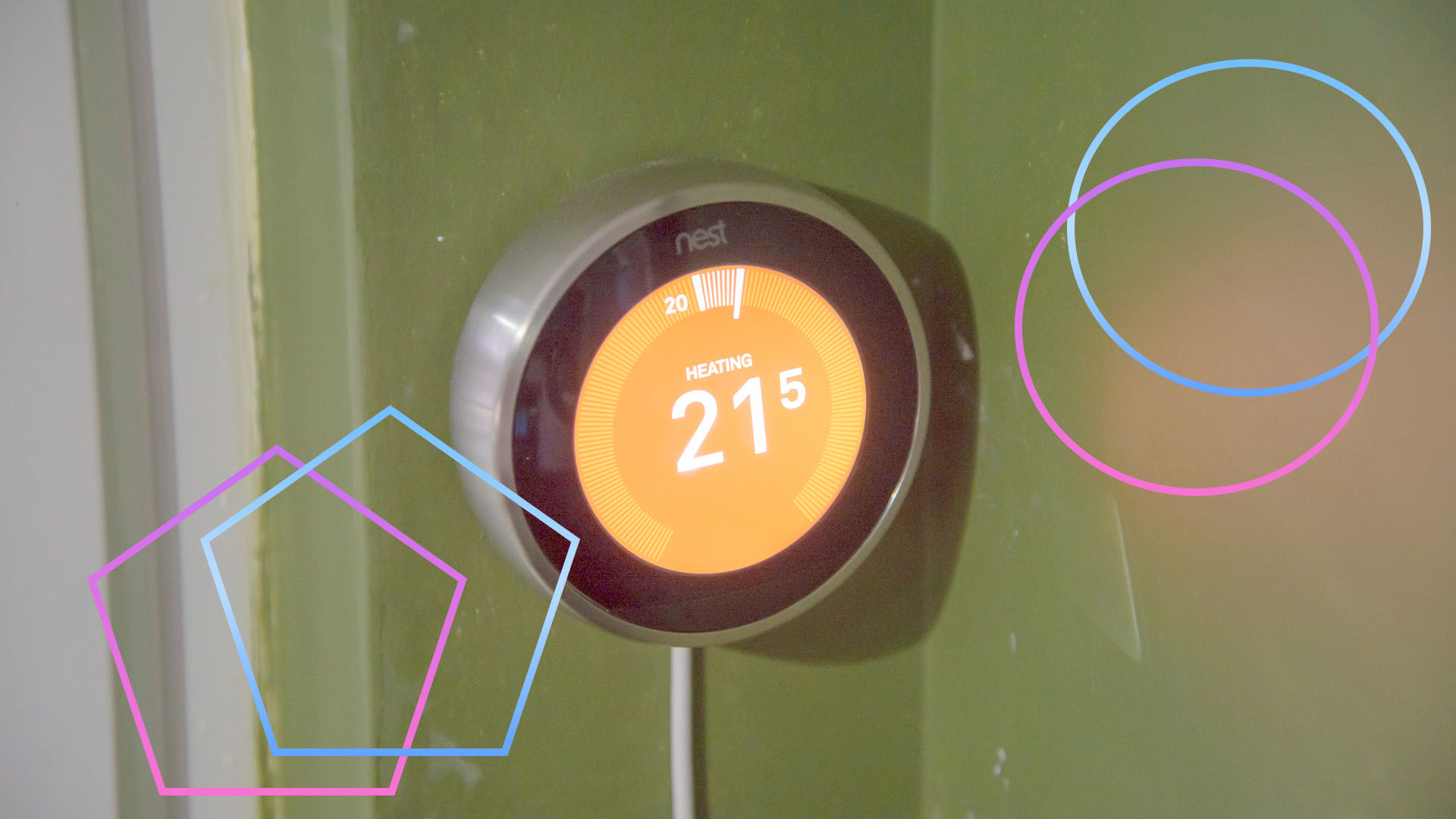
I’ve spent a fair bit of time being rude about how Google has handled Nest, with the company that kickstarted smart thermostats seeing a sad decline. Credit where credit’s due, Google has been extremely helpful dealing with a broken thermostat.
I use a Nest Thermostat 3rd Gen in a house we rent out because the hardware is robust, the device is mains-powered (so it can’t run out of battery), and it lets me turn the heating on and off depending on whether people are in the house.
Getting down to the house a week ago, I walked past the thermostat, only for it to light up and say that it can’t connect to the Heat Link. No problem, I thought; it had done this before, usually when a guest had turned the boiler off by mistake.
I checked, and the power to the boiler was on. So, I checked the Nest Heat Link (the device that actually controls the boiler), and it was dead, with no lights. I pressed the button in the middle, but nothing. I turned the boiler off and back on again, and nothing.
As the Nest Thermostat was installed back in 2019, I was resigned to the fact that I’d have to try and buy a new Heat Link online, but while searching, I came across this page on the BOXT website, offering free Heat Link replacements, provided you’d been through Google support.
Next, I went to the Google Home and Nest Help site, and filled in my product details, including the product’s serial number, and the problem I was having. I then had a choice of either using an online chat or having Google call me when a support person was free.
I picked the latter, and a minute later my phone rang. Within five minutes, I’d explained the issue, and it was agreed that there was a fault and that Google would authorise the repair.
A few seconds later, I had an email with a link to the BOXT website, with my support number pre-filled out. Then, I just had to pick a date for an engineer to come out (Friday 7 August), and that was it.
Sure enough, the engineer came out on the day, checked that the Heat Link was indeed dead. Now, I just need to wait a few days longer for the replacement Heat Link to be shipped out, and a the engineer will come back and fit it for me, free of charge.
For a product that’s now over seven years old, and well out of warranty, that’s quite a brilliant service. I’m glad it will keep my Nest Thermostat working for longer, even if I’m still a bit sad that the UK won’t see any future products.





Weekend Open Thread: Mattifying Sunscreen


Frugal Friday’s Workwear Report: Cap-Sleeve Pointelle Crewneck Sweater


Jordan Coyle & Cordiamo take Laya Arena Stakes at RDS


Can Astrology Help Find Gold and Silver Trends? A Financial Astrology Guide

US stocks: Dow closes at record on Mideast optimism; SpaceX, AMD drag Nasdaq


US Tech Stocks See Largest 5-Week Inflow in History: Can Nasdaq Break Its Downtrend?


Reform UK And Greens Sink To Lowest Favourability Ratings To Date


Nvidia Stock Climbs 2.5% as Chip Sector Rally Builds Ahead of AMD Earnings, Nvidia’s Own Report Looms


Polymarket targets $20 billion valuation as competition heats up in prediction market sector


OpenAI, Anthropic AI agents targeted real people and systems in cyber tests


Supply chain issues impact Ingredion

CLARITY Act Senate Vote Locked In, But 60-Vote Hurdle Looms Large


Rinn Pharma & Biopharma to join NordicPharmaTrain network


The Senate has one week: CLARITY’s last August window


Dow and S&P 500 Hit Records on AI Earnings: When Will the Bubble Burst?


California Wildfire Bets Expose Polymarket’s Dark Side


How to Start a Cleaning Business: A Step-by-Step Guide


Datadog: Best Of Breed For Multiple Reasons


CNH Industrial Shares Jump Over 15% After Beating Estimates and Raising Full-Year Earnings Guidance


BDC Weekly Review: Private BDC Q2 Numbers Are Strong


You must be logged in to post a comment Login