Enterprise AI teams have stopped betting on a single orchestration platform. The median enterprise now runs three at once — not by accident, but because none of them fully trusts a single vendor to run the show, according to VB Pulse data.
This is not just to avoid vendor lock-in and retain flexibility (although that’s a big part of it). There’s still a lot of uncertainty, even distrust, in vendors’ security and permissioning capabilities. Enterprises want the ability to impose their own.
Microsoft leads on primary usage today, while Anthropic leads by a wide margin in what enterprises are considering next. But enterprises still struggle with many challenges, notably around token usage and visibility into agent spending.
These findings are from an ongoing analysis of how enterprises are actually deploying and using AI: Their platforms of choice, what guides their decision-making, what they prioritize, their AI expectations, how they control costs, and whether their AI is actually agentic or still a chatbot in an “agent” label.
Advertisement
VB Intelligence is getting feedback from builders actually in the trenches: software and machine learning (ML) engineers, product and program managers, and data/AI/analytics VPs and directors.
Concerns around retaining visibility and control
Across 107 enterprises, agentic orchestration has become decidedly plural. The survey found that the majority of enterprises are not committing themselves to any one model: 85% are using two or more orchestration tools; 64% are using three. Just 15% run a single orchestration platform.
Microsoft AI Foundry/Copilot Studio shows up in 70% of stacks, OpenAI’s Agents SDK in 68%, and Anthropic’s Claude Platform in 47%. Builders surveyed are also to some extent using Google’s Enterprise Agent Platform, LangChain/LangGraph, Salesforce Agentforce, Amazon Bedrock, and LlamaIndex. Augmenting vendor tools, 22% of builders run custom in-house orchestration.
This trend of hybridability is only expected to continue. More than half of respondents (53%) said the primary control plane will be hybrid by the end of 2026. Fourteen percent expect to use a provider-managed service, 13% plan on a custom in-house control plane, and 11% are betting on external platforms that are abstracted away from model providers.
Advertisement
Dovetailing with this, more than two-thirds of respondents plan to change platforms within the year: 15% in the next three months (or sooner), 24% in three to six months, and 28% in six to 12 months. Claude Agent SDK is a top tool under consideration; 43% of builders are exploring the Anthropic-built model. Roughly one-third are looking at Google’s Enterprise Agent Platform, another 31% are focused on custom in-house orchestration, and 25% are investigating OpenAI’s options.
Perhaps learning from the lock-in of the early cloud days, enterprises aren’t choosing one “winner.” They are deliberately building for a future where multiple orchestration platforms, models, and agents work with each other across a hybrid control plane.
Generally speaking, respondents are pleased with the platforms they’ve been running, rating them 4.17 out of 5 for overall satisfaction. But they are less satisfied with ease of implementation (rating it 3.91 out of 5) and value for the money (3.63 out of 5). Keep an eye on these ratings as orchestration platforms and AI roadmaps mature.
Where enterprises are putting their money
Enterprise buying logic is now based on a mix of several factors. Beyond flexibility (cited by 29% of respondents), top considerations include security and permissions (17%), production reliability (15%), and control over agent execution (15%). Just one out of 10 identify model gravity — native alignment with a state-of-the-art base model — as important in purchasing decisions; 8% name ease of development, 4% cite total cost of ownership, and just 2% cite latency and memory performance.
Advertisement
Spending also reflects enterprise priority on visibility, security, and control. Builders are investing the most in agent monitoring and debugging (31%) and security and permissions enforcement (30%). Workflow tooling accounts for another 19%. That’s a shift from VentureBeat’s prior wave a month earlier, when workflow tooling led orchestration spending outright.
Enterprises are largely optimizing for task completion reliability (30%), multi-step workflow management (27%), developer productivity (23%), and operational stability (13%). Just 7% of respondents name end-user experience as a top priority at this point, indicating that many are still focused on orchestration at this point rather than UX.
Essentially, enterprises are signaling that workflow succeeds when it carries multiple steps to completion. Simplifying development and end-user experiences could become a larger concern when platforms are actually in place.
The visibility problem
Builders’ biggest concerns when choosing platforms center around control and oversight. They don’t want vendors to constrain their ability to see what their agents are doing on a given platform. Factors top of mind include security and permissioning limitations (37%), vendor lock-in (23%), limited visibility and observability (22%) and inflexibility around models and tools (16%).
Advertisement
Meanwhile, in these early days of AI agents, enterprises still struggle to control agent token use; one in five still can’t stop a runaway agent’s spending in real time.
Builders are using various strategies to try to keep agent spending in line: 30% rely on native platform controls (built-in budget caps or throttling) and 25% have built custom gateway plumbing (proxy middleware to intercept runaway agents).
A quarter of respondents use dynamic routing to offload heavy work to low-cost models, and 21% still rely solely on reactive monitoring, such as post-hoc logs; these enterprises have no real-time kill switches.
One interesting finding: unlike the prior wave, organization size makes little difference in fiscal control maturity — 18% of enterprises with 10,000-plus employees exercise only reactive control, compared to 23% of smaller ones.
Advertisement
Clearly, while enterprises recognize the problem with spend, many have not yet instrumented their stacks to rein it in.
Most enterprises still aren’t running true multi-step agents
Builders polled were asked to honestly assess their tech stacks; the consensus seems to be that ‘agents’ are slowly but surely progressing beyond chatbots wrapped in that fancier label.
Here’s how the numbers break down: A small number of respondents (2%) report that 76 to 100% of their systems are advanced and largely autonomous; 14% say 51 to 75% of their systems are complex, multi-agent pipelines; and 47% report that 26 to 50% of their systems are true orchestration.
On the other end of the spectrum, 35% say just 1 to 25% of their systems are true orchestration; most deployments remain basic assistants, and 3% are still only deploying chatbots.
Advertisement
This is in line with VB’s June Pulse survey: 71% of respondents said a quarter or fewer of their deployed “agents” can autonomously complete multi-step work, and just one-tenth say they have deployed agents at scale.
There’s no doubt that enterprises are building control planes and infrastructures for agents; but for many of them, the true agentic wave is still off on the horizon.
The Bambu Lab P1S Combo is designed to remove much of the tinkering traditionally associated with 3D printing. It arrives assembled, can be set up in around 15 minutes, and automatically handles jobs such as bed leveling and vibration compensation before you start printing.
Alongside common materials such as PLA and PETG, the P1S supports ABS, and its combination of high acceleration and automatic calibration is designed to deliver fast prints without any loss of quality.
Advertisement
Why we recommend it
Ease of use is one of the P1S Combo’s biggest benefits. It arrives assembled, requires relatively little initial setup and handles important calibration tasks automatically.
The AMS gives the Combo considerably more creative potential than the printer alone. Automatic filament switching opens the door to multicolor models without requiring you to manually swap spools throughout a print.
Its enclosed body is useful if you want to move beyond basic PLA projects. Combined with its speed, automatic calibration and broad material compatibility, the P1S is a machine you aren’t likely to outgrow quickly.
For more options, check out our roundup of the best 3D printers you can buy.
Advertisement
Should you buy it?
✅ Buy the Bambu Lab P1S Combo if…
You want to get into more ambitious 3D printing without spending your time manually configuring the printer before every job. Automatic bed leveling and vibration compensation take care of some of the routine setup, making the P1S a good choice if you want to concentrate on what you’re making rather than constantly adjusting the machine.
The Combo is also the one to choose for easy multicolor printing.
Advertisement
❌ Skip the Bambu Lab P1S Combo if…
You only want to make straightforward single-color PLA prints. In that case, you’re paying extra for an enclosed printer and the AMS when a simpler model will cover your needs for less.
Price context & historical value
This is about as low as the P1S Combo goes on sale currently. You’re saving a cent shy of a dollar by going direct to Bambu Lab, but it’s a good price at all three retailers.
Advertisement
At Amazon, it’s at its at an all-time low, which also dropped to $500 back in July, but usually holds steady at around the $550 mark. And it’s price-matched over at Best Buy, too.
It’s not the biggest discount for the fully-enclosed 3D printer, but it’s a good choice if multicolor printing is on your wishlist.
The AMS is the main reason to choose the Combo, but not every filament is equally suitable for use with it. Flexible materials such as TPU can require different handling, so don’t assume every material supported by the P1S can simply be loaded into the AMS.
The P1S also prioritizes printing rather than giving you a sophisticated onboard interface. Its 2.7-inch display is relatively basic, although you’ll likely spend considerably more time controlling and monitoring prints through Bambu Lab’s software anyway.
Sean Grindal, 23, co-founded Yapper (Dream Vision Labs) after a decade of coding that started at age 13. The AI content studio uses a conversational agent to hide model complexity behind a single interface. It launched with satirical viral videos (one hit 100M+ views), expanded into general video and ad creation, and reached a ~$2M run rate with 300,000 users. The team is two people. Grindal bets that simplicity, not feature count, will win the AI creation market.
At just 23, Sean Grindal is betting on an idea he has watched take shape across a decade in software: that the hardest part of AI tools is no longer what they can do, but how few people can figure out how to use them. In a category racing to add features, he believes the winning product will be the one that makes creation the most accessible and intuitive.
He’s making that bet as co-founder and head of product of Dream Vision Labs, the company behind Yapper, an AI content studio he designed and built himself. Grindal reached this point on a path that started earlier than most careers do, and it explains much of how he now thinks about simplicity.
A Decade of Code Before Adulthood
Grindal, in his own words, got an early start in the world of software. “I’ve been a software developer for about 10 years,” he says. “I got my first software job when I was 13 or 14 at a design and development agency, so I did software work there all throughout high school.”
Advertisement
Grindal got his first software job early on, working at a design and development agency. He stayed there through high school, then studied computer science at the University of Toronto. During university he worked on a series of startups before founding his own web development and design firm, Deco. The agency took on sizable clients, including NASDAQ-listed companies.
That decade of work is central to how Grindal describes his edge. He frames the combination of experience and age as unusual: he spent roughly eight years building software before AI was widely available, which gave him a grounding in how products are assembled by hand. The agency years, he adds, sharpened a sense of design taste that now informs his product decisions as much as his engineering does.
The agency model had a ceiling, though. It generated steady cash flow but meant making content for other companies instead of owning something that could grow on its own. Grindal had done enough product and startup work to believe a scalable software tool could expand far faster than services ever would, so he started looking for the right idea to build.
Turning Yapper Into a Viral Engine
The idea for what would become Yapper came from a close friend. Emmet, who had been part of Harvard’s main comedy club and brought a background in comedy and viral marketing, had been developing an early variation of the concept but lacked the software and development experience to build it out.
Advertisement
Yapper — Credit: Sean Grindal
Having decided that a scalable product beat more agency work, Grindal saw the idea, joined to make it real, and the pair shipped a quick prototype, and early traction was promising enough that they committed to it full-time.
Yapper launched as a tool for easily creating satirical AI videos that could be easily sent to friends and posted on social media. The product was engineered around distribution from the start, with every feature designed to produce output that was ready to share.
The first version was narrow, but starting with humor-driven content proved to be a fruitful concept. “The product was built from the ground up with distribution in mind because you could make these funny videos with AI of something satirical and over-the-top, and then you could post them on Instagram and they’d go viral,” Grindal says. Early clips routinely drew millions of views, and one reportedly passed 100 million across platforms, feeding new users straight back into the product.
Two People Behind a 300,000-User Platform
Yapper has since widened from satire into a general video and content tool, but the core argument has stayed the same: make the latest image and video models easy enough that a first-time user can finish something. Instead of presenting a wall of options, the homepage leads with a conversational agent. A user describes what they want, and the agent chooses the models, writes the prompts, and generates the result.
Grindal contrasts that with larger competitors he considers capable but hard to approach. “If you go on the UI for similar products, it’s extremely overwhelming, offering far too many separate tools,” he explains. His aim is a prosumer product, simple enough for a beginner but capable enough for a professional who wants to push it further. Current uses run from advertising assets such as posters and product videos to serialized micro-dramas; one user, the anime studio Moshi.tv, produces short episodes on the platform.
Advertisement
The numbers behind that are the part Grindal finds most telling. Yapper reached a roughly $2 million run rate in under a year, including about $500,000 in the most recent three to four months, with steady monthly growth across some 300,000 users.
The team is two people. Grindal designs and builds the product, while his co-founder Emmet runs marketing; a handful of contractors and YouTube help round out the operation. “Getting to a $2 million run-rate product in under a year with a two-person team was sort of unheard of three years ago,” he says. The story he keeps returning to is less about the technology than about how few people it now takes to build a business of that size.
Lowering the Cost of Making Things
Grindal expects AI-generated images and video to make up a rising share of social media, and the speed of improvement is what keeps his attention. A year ago, he points out, there were no strong AI video models; Veo 3 was among the first to generate audio alongside footage. The field has since reached near-photorealistic video.
He sees that shift opening creative work to people without large budgets, and the same logic extends to commerce, where a small brand can generate professional-looking ads rather than pay for an expensive shoot.
Advertisement
The mission is personal for someone who has been building things since he was a teenager. “I think within a few years, any person can make a Hollywood-level anime that they could distribute, make money off of, and use to tell their own stories, for fractions of a penny compared to what it used to cost,” he says.
He wants Yapper to become the default agent that hides the complexity of these tools behind one interface. The point, as he puts it, is to remove the barriers that once stopped people from acting on an idea: “You’re taking excuses away from action.”
For now, Sean Grindal is betting that the company best positioned for this future is not the one with the most tools, but the one that asks the least of its users. Through Yapper, he’s wagering that simplicity, not scale, is what will bring the next wave of creators in the door.
The Toyota Tundra is one of the automaker’s most well-known vehicles and a recognizable full-size pickup truck. But the Tundra has been the subject of recalls over the past couple of years, related to an issue with manufacturing debris that can damage the engine’s main bearings. Now, dealership technicians are using a unique way to find out whether an affected engine needs to be replaced, and it involves a hammer.
The Tundras in question are certain 2022-2024 models with the V35A twin-turbo V6 engine. The hammer is used as part of a test officially called the V35A Crank Bearing Inspection, and it begins with an oil change. The accessory belts are then removed and the crankshaft is set to the specified position. An accelerometer is then attached to the crankshaft bolt. Using a plastic hammer, a technician hits the crankshaft pulley at the 3 o’clock position, creating an impact that the accelerometer measures as the engine responds, while computer software checks the quality of each hit.
Toyota requires three usable measurements for the test and the collected information, along with the test results, is sent to the company’s cloud system. The test will yield either an “OK” or a “Replace” result. As of this writing, Toyota hasn’t explained which aspects of the vibration data cause an engine to pass or fail. But the hammer method is perhaps a more practical way to evaluate the engine’s status without completely disassembling it.
Advertisement
The science behind Toyota’s unusual engine test
Just dance/Shutterstock
The ongoing concern with Toyota’s V35A engine’s main bearings is due to the important role these components have inside the engine. Engine bearings provide a controlled surface for the crankshaft to rotate against, with engine oil being used to help keep the two components separated during engine operation. If that separation is interrupted, friction can generate heat as a result. If enough heat is produced over a period of time, both the bearing and crankshaft can become worn, or even damaged.
The hammer test that’s being used for some third-gen Toyota Tundra models isn’t exactly a new science. In fact, vibration analysis is a common method for evaluating the condition of mechanical equipment, including vehicles. When a machine or component is subjected to a force, the resulting vibration can reveal information about its condition. This is important, because certain mechanical faults can produce identifiable vibration patterns.
Advertisement
But vibration testing can also reveal more than just how much an engine component moves. Engineers can actually break down the resulting vibration by specific factors like frequency and amplitude. This can help identify specific characteristics of a mechanical problem. So when automotive testing uses these techniques to analyze engine vibration, engineers get better insight into what’s happening inside a vehicle’s mechanical systems.
Noticed that your Wi-Fi isn’t quite able to reach certain points in your home or garden? Worry not, as a decent Wi-Fi extender will help and we’ve reviewed a bunch of the best picks.
Also known as a Wi-Fi Booster or a Wi-Fi Range Extender, a Wi-Fi extender is used to expand your Wi-Fi’s network range within your home and even out to your garden.
It might sound complicated, but in reality an extender is usually pretty easy to set up and can make a huge difference. You just need to ensure that it’s placed somewhere that’s in-between your router and the area where your Wi-Fi doesn’t reach.
With so many options available, from surprisingly cheap plug-ins to more powerful and feature-packed alternatives, it can be difficult to know which Wi-Fi extender to go for. That’s where we come in.
Advertisement
We’ve tested a huge number of different Wi-Fi extenders over the years and, regardless of price, subject each one to the same rigorous review process. We test speed, overall performance and reliability, while determining how easy each one is to configure. Only the best performers make it into this guide.
Before you jump in, we should point out that a Wi-Fi extender might not suit all households. For example, if you have a larger home that needs more areas covered then you’ll likely be better off with a mesh system instead. If you’re not sure whether this applies to you, then visit our Wi-Fi extender vs mesh guide for a detailed breakdown.
Advertisement
We’ve also put together a guide to the best routers currently on the market, which is worth considering if you’re using an old, default router supplied by your broadband provider when you first signed up. Otherwise, keep reading to see our list of the best Wi-Fi range extenders.
Advertisement
Best Wi-Fi Extender at a glance
How we test Wi-Fi extenders
Testing Wi-Fi extenders is all about seeing how they perform in a variety of situations. For that reason, we test them all with a Wi-Fi 6 router. First, we measure throughputs with our router, when connected in different rooms. Then we connect the Wi-Fi extender in different parts of our home, and retest connection speeds to see what improvement we can get.
When rating routers, we take into account price and performance: if you just want to boost Wi-Fi to usable speeds, a cheaper extender will do; if you need to improve the quality of your network for multiple devices that use a lot more bandwidth then a higher-end model will be required.
We test all extenders to see how easy they are to configure, and how easy they are to manage, too./h
Excellent performance
Handy Ethernet port
OneMesh option for easy management
Advertisement
Oversized casing
No mains passthrough
As far as Wi-Fi extenders go, the TP-Link RE700X is one of the most expensive that you can buy. There’s a good reason for this: it’s extremely fast and well worth the cash if you want the best performance and range.
The downside of this model is that it’s big and bulky, and could block the second socket in a double wall socket. There’s also no passthrough.
This model is a Wi-Fi 6 repeater, using one of the latest versions of Wi-Fi. It will work with older Wi-Fi 5 routers, but if you happen to have a newer Wi-Fi 6 model, you’ll get the best out of this model. Its specs include a 2×2 2.4GHz 574Mbps network and a 2×2 5GHz 2402Mbps network.
Advertisement
This extender will work with any router, connecting manually or via WPS. However, if you have a TP-Link OneMesh compatible router, the RE700X will work in mesh mode, making it a neat upgrade.
Performance is excellent. We found that network throughputs in our living room doubled to 218Mbit/s using this extender. It was a similar story around the house, bar in our utility room. Here, the RE700X could only muster 80Mbit/s, although that’s an upgrade from the 12Mbit/s we were getting.
Whether you want to upgrade a TP-Link router to a mesh system or just need the best performance from a Wi-Fi extender, the TP-Link RE700X is the model to buy.
Advertisement
Impressive coverage for the price
Ethernet port
Doesn’t support Wi-Fi 6
Wired connections are slow
Shockingly affordable, the Mercusys ME30 costs just under £30. This would normally have alarm bells sounding, with the low cost offset by poor performance. While this extender won’t win any throughput awards, it’s fast enough and good enough for basic use.
Advertisement
This model uses the older Wi-Fi 5 standard, rather than the newer Wi-Fi 6 or 7 standard. Given that most ISP-provided routers are Wi-Fi 5 models, this is unlikely to make much of a difference to most people.
This extender can be used in repeater mode, although its Ethernet port also lets it act as an access point, hardwired to your router, which is handy if you want Wi-Fi in an outbuilding. In normal extender mode, we found the Mercusys ME30 easy to set up using its web-based management page.
We saw good speed increases using this extender. The best of which came in the bedroom, with our router providing 41Mbit/sec and the Mercusys ME30 upping this to 202Mbit/s. Even in the utility room, which normally gives us 12Mbit/sec, we saw speeds increase to a more usable 50Mbit/s.
If you need to connect a lot of devices to an extender, then something else on this list will do; if you want a cheap way to boost a signal to a slow part of your house, this is a great low-cost choice.
Advertisement
Excellent wireless speeds
Practical design with twin Ethernet ports
Informative management interface
You may be fine with a much cheaper alternative
Advertisement
Most Wi-Fi extenders are built to a price, but the Devolo WiFi 6 Repeater 5400 is built to be fast and reliable. To that end, it uses a different design to most other extenders. Rather than being an all-in-one device that sits in a plug socket, this model is a square router-like box that needs to sit on a table.
That can be useful, as Wi-Fi devices work best when they’re out in the open, rather than being hidden behind furniture or sitting on the floor.
This model has two Gigabit Ethernet ports, which makes it a great choice if you’ve got multiple wired devices that you want to plug in. One port can also be used to hardwire the extender into a router, which is handy if you need to put Wi-Fi into an area a long way from your router, such as an office building.
From the price, you can probably guess that this is a Wi-Fi 6 extender. It’s top-end Wi-Fi 6, too, promising maximum speeds of 4800Mbit/sec throughputs. While real life speeds don’t quite reach those claims, they are still impressive. In our kitchen, we saw throughputs jump from 44Mbit/sec to a whopping 279Mbit/sec – the fastest speeds that we’ve seen from an extender.
Advertisement
If you want the extra Ethernet ports and the best overall speed, this is the Wi-Fi extender to buy.
Improves Wi-Fi speeds over a wide area
Good range of software features
Advertisement
There are cheaper Wi-Fi extenders, and there are faster, more expensive models, but the Netgear EAX12 Wi-Fi Range Extender delivers great speeds at a more palatable price, which makes it a good choice for a lot of people.
This model uses Wi-Fi 6, although its throughputs top out at 1200Mbit/sec, rather than the industry-leading 4800Mbit/sec. In practice, this model is fast enough for most uses: in our kitchen, we saw speeds more than double from 44Mbit/sec to 112Mbit/sec, while our utility room jumped from 12Mbit/sec to 49Mbit/sec. In other words, we saw speeds increase to the point where we could watch 4K video in any room.
A simple plug that you connect to a power socket, the Netgear EAX12 Wi-Fi Range Extender is small and easy to connect. It also has a Gigabit Ethernet port, for either a wired device or for hardwiring it to a router.
Netgear’s setup software is slick and easy to use, and includes some extras that not all extenders provide, such as a guest network. Overall, for features, price and performance, the Netgear EAX12 Wi-Fi Range Extender covers all the bases you’ll likely need.
Advertisement
Fast
Wall mountable
Can be used in a mesh
Not ideal for larger homes
Advertisement
We’re cheating a little here, as the Asus RT-AX59U Extendable Router is actually a router, and so can be used as a standalone device rather than an add-on for an existing wireless setup. But we’ve still included it, as Asus has added in the functionality for this router to be used as a wireless extender too, albeit only with Asus routers with the AiMesh feature.
This makes the Asus RT-AX59U Extendable a great choice as an entry-level router, as you’ll later be able to use it as a wireless extender in a mesh system once you’re ready to expand your Wi-Fi coverage. It’s also a great back-up option to have, just in case your main router breaks down.
During our review, we were impressed with the design. It’s small and thin, so shouldn’t prove obtrusive, and can even be mounted to the wall. Performance is excellent too.
But it’s important to remember that the Asus RT-AX59U Extendable Router can only be used as an extender for Asus routers with the AiMesh feature. And even if you do own an Asus router, you may well be better off with a cheaper Wi-Fi Extender if you don’t really need a back-up router.
Advertisement
Advertisement
FAQs
What type of extender do you want?
Advertisement
Traditional extenders give you a new wireless network, then connect wirelessly to your router. They’re easy to set up, but you’ll have two networks to manage. A mesh extender works with your existing network, using the same name. They’re more expensive, but a more elegant solution.
Do you need Ethernet ports?
Having wired Ethernet ports on your extender lets you plug in devices that don’t have Wi-Fi built-in, or gives a more stable connection when you have a device that has slightly flaky wireless properties.
Advertisement
Would Powerline help you?
A Powerline-based Wi-Fi extender works by running data over your home’s mains power, rather than using a wireless connection. Performance can vary hugely between homes, but these devices can work in houses that have thick walls or suffer from a lot of interference.
Advertisement
What version of Wi-Fi do you want?
Wi-Fi 5 (also known as 802.11ac) is a good, well-supported standard, with products available at a decent price. This will likely suit most people, particularly those with older routers. Wi-Fi 6E is the latest standard and can help you upgrade your network in preparation for new wireless devices, but you’ll pay a little more for these devices.
What speed do you need?
Advertisement
We’ve listed the speeds that manufacturers list, although they’re not indicative of the speeds you’ll actually get, as it’s the connection to your router that governs the overall speed. The newer (and faster) your main router is, the faster the extender that it will take, so use your router’s age as a rough guide.
If you’re like me, and you grew up in a house where your mom refused to let you get a video game console, because she believed sitting and staring at a TV was bad for you, you might think of video games as antithetical to health. And there is plenty of research about the ways in which gaming too much can harm your physical and mental well-being. I don’t think anyone would argue that eight hours of Call of Duty every day is doing your body or your mind much good.
But the old caricature of video games as simple brain rot is increasingly out of date. Even some normal, non-educational games can help with brain function (as long as they are played in moderation — and some games are better than others).
Beyond that, what if we could take something that is wildly popular (there are 3 billion gamers worldwide, 190 million in the United States) and reimagine it in a way that goes beyond just entertainment? Gaming tech has advanced to the point that we can put people into hyperrealistic virtual realities or use AI to create new personalized gaming apps with a brief voice prompt. These and other capabilities are unlocking new ideas from ambitious physicians and game developers that would have sounded like science fiction when I was a teen.
There’s increasing evidence that these platforms can be adapted to do genuinely incredible things to benefit our health. Here are just two ways in which video games are poised to change medicine — including one that allows any of us to game out in the name of advancing science. I can’t wait to tell my mom.
Advertisement
Video games could solve some big challenges in caring for kids
My perspective on video games in medicine started to change when I learned about one specific use: as an alternative to anesthesia for children and adolescents.
Here is a genuine clinical problem: For years, doctors have had few options beyond general anesthesia for kids who need to undergo imaging or minor surgeries. An MRI, for example, really only works when the patient is able to stay completely still and, as anyone who has spent a single minute around a child can attest, that’s hard for kids to do. So, children have been put under during routine MRIs or minor procedures that, when they’re performed on an adult, require only local anesthesia or no anesthesia at all.
Sign up for the Good Medicine newsletter
Advertisement
Our political wellness landscape has shifted: new leaders, shady science, contradictory advice, broken trust, and overwhelming systems. How is anyone supposed to make sense of it all? Vox’s senior correspondent Dylan Scott has been on the health beat for a long time, and every week, he’ll wade into sticky debates, answer fair questions, and contextualize what’s happening in American healthcare policy. Sign up here.
But giving children general anesthesia comes with health risks. The FDA warns against repeated or lengthy use of general anesthesia for children 3 and younger because of the risks to their growing brains and future learning development. Other studies have suggested that general anesthesia also poses some risk to the development of older children, and its use should be minimized as much as realistically possible.
Enter virtual reality video games.
“Games and VR can be especially effective for reducing pain and anxiety during pediatric procedures, including burn care, needle procedures, and other medical treatments,” Dr. Kimberly Hieftje, co-director and co-founder of XR Pediatrics and the Yale Center for Immersive Technologies in Pediatrics, told me over email. “If we can help a child get through a procedure comfortably without sedation, that’s a significant benefit. Sedation and anesthesia carry risks, and minimizing unnecessary or repeated exposure is particularly important in children.”
Advertisement
Several small-scale studies have examined using virtual reality games as an alternative to general anesthesia for minor and routine surgeries and for MRI imaging — with promising results. In one 2024 experiment, more than 100 kids (average age of 11) wore a mobile VR headset during a minor procedure (most frequently a hormone implant) and played a relaxing game such as Pebbles the Penguin (in which players navigate a snowy world and collect pebbles) or Space Pups (in which they play as a canine soaring through outer space and eating treats) while doctors performed the operation.
The surgical team kept general anesthesia on hand in case it was needed, but none of the children involved in the experiment required it or any other kind of sedation. They were also able to follow simple directions from their physician during the procedure. Their post-surgery reports of pain were similar to patients who did receive anesthesia, and they had shorter recovery times.
Likewise, a study out of Canada published in December 2025 tested how younger patients responded to VR as an alternative to anesthesia when they needed an MRI. It was a small study of only 18 patients, but, once again, the results were encouraging. The kids (average age of 5) went into a VR game prior to the MRI scan, learning about the procedure while collecting magic fairy dust. Then, they went into the actual MRI. And all of the kids who had played the VR game prior to the procedure were able to complete the imaging scan without any additional sedation or anesthesia.
A young patient in Germany wears a VR headset to distract himself during a medical examination.Daniel Löb/picture alliance via Getty Images
The foundational idea here is: Kids are not little adults. It’s harder for them to sit still. They get anxious about even imaging scans. “We create for adults and, then, put kids in it,” Hieftje said, “and we need to think backwards.”
Advertisement
Video games can help kids stay calm and stop moving — or, for kids with different medical needs, start moving. As any parent knows, children also aren’t very good at following directions or being self-motivated to exercise — even if it would be good for their health, like if they have Type 1 diabetes, for example. That’s why a group of researchers from Yale, as described in a study published earlier this year and which Hieftje co-authored, experimented with introducing kids with Type 1 diabetes to a virtual reality video game that coached them through exercises.
It was a small group — 17 adolescents, an average age of 15 — but patients who participated were motivated to play the game, followed through with their routines, and even registered a small but detectable decrease in their blood sugar levels. The researchers are hoping that larger studies could demonstrate the program’s effectiveness and continue taking it mainstream.
The list goes on: Hieftje said their work uses games and immersive technologies to address everything from substance use and human trafficking prevention to mental health, child loss and grief, and infection prevention for infants in a natal intensive care unit.
But video games are doing more than changing clinical care for challenging patients. They are also unlocking the basic science that leads to new breakthroughs in treatment for everybody.
Advertisement
Video games could allow all of us to contribute to future scientific advances
When I think of massive multiplayer online games, I think of my friends and I camping out in somebody’s basement to play Halo against strangers for hours on end. But Attila Szantner, the co-founder and CEO of Massively Multiplayer Online Science, has found a more productive use for these remarkable platforms that can connect hundreds of people from all around the world.
What his company has done, in tandem with academic scientists, is integrate important but tedious basic research tasks into the gameplay of popular commercial multiplayer games like Borderlands 3. When I attended the Aspen Ideas: Health summit this summer, Szantner presented a demo of one of his company’s modules. What appeared to be players sorting colorful tiles in gameplay that would look familiar to anyone who’s played Tetris, he said, was actually players — normal people with no special training — helping to sequence DNA samples for people’s gut bacteria. Players in the game learn the task from a Borderlands character — including its ultimate scientific aim — and, then, complete the puzzles that the scientists have set up.
“Games are the absolute masters of engagement. They found the magic formula to make repetitive tasks feel fun,” he said. “In citizen science, people have intrinsic motivation to help, but standard tasks get monotonous and people drop off. Games solve that completely.”
Advertisement
They’ve turned the boring but vital work of number crunching and sequencing into gameplay — and convinced millions of their fellow citizens to help. In a paper published in October 2024 in Nature Biotechnology, Szantner and his co-authors described a project that involved more than 4 million individuals completing more than 135 million science puzzles in order to align a million human microbiome sequences. They found that the players’ collective contributions led to better sequencing than the current state-of-the-art computational methods. In another project, they turned some basic cellular analysis tasks into gameplay on the multiplayer game EVE Online that, once again, performed better than what is now the standard.
We have only scratched the surface of gaming’s awesome potential. Clinicians are also optimistic about gaming’s ability to preserve the cognitive health of aging adults and coach them through exercise routines (much like the kids in that Yale experiment), especially as the native gamer generations get older. Video games could revolutionize trauma care by placing burn victims inside of a cold VR environment — and what if you could reduce PTSD by playing Tetris? In 2020, the FDA approved the first video game for ADHD treatment: EndeavorRx. Experts confronting a male loneliness epidemic believe they can use video games to bring young men together. These programs could also transform medical training and allow surgeons to preplan and practice surgeries using their patient’s unique data to produce a bespoke virtual reality practice module.
The point is: The caricature of video games as a gateway to couch potato-itis is a relic of the past. Gaming could help all of us stay healthy — seriously.
Adenot and NASA’s Anil Menon conducted the spacewalk with the goal of replacing a failed space-to-ground antenna on the International Space Station.
Sophie Adenot, a European Space Agency (ESA) astronaut, has become the first French woman and second European woman – after Italy’s Samantha Cristoforetti in 2022 – to successfully complete a spacewalk, having carried out the mission on Tuesday (18 August).
Adenot, who was joined by NASA’s Anil Menon, undertook the six-hour, 23-minute spacewalk outside of the International Space Station in order to remove a failed space-to-ground antenna. The antenna was designed to track NASA’s Tracking and Data Relay Satellite, however, the device has failed to do so for months.
While the pair managed to remove the device, stuck bolts and connectors on the failed antenna delayed the work, preventing Adenot and Menon from installing the new antenna as planned.
Advertisement
The plan was revised with Mission Control advising the crew to perform a ‘long-duration tie-down’ on the ISS’s truss structure, rather than transporting the failed antenna. It was decided that the installation of the spare antenna would be carried out on a future spacewalk.
The ESA explained that this is the 282nd spacewalk to occur as a means of supporting space station assembly, maintenance and upgrades. Another spacewalk is scheduled for 25 August and will be the fifth of the Epsilon mission.
Referencing the mission in an ESA livestream, Menon said: “We got into this with the mindset that we wanted everything to go perfectly. Things were a lot different than expected, but what I would say that I am really impressed with is that all of those contingencies were well thought out.”
Prior to her excursion, in a post on social media platform X, Adenot said: “A successful EVA [extravehicular activity] starts long before the hatch opens and that’s where my focus has been these past few days, rehearsing, preparing and focusing.”
Advertisement
In June, Irish Manufacturing Research announced the next ESA Phi-Lab Ireland Open Call, inviting Irish companies to better position themselves in the global space economy. Interested organisations have until 8 September 2026 to apply.
Don’t miss out on the knowledge you need to succeed. Sign up for the Daily Brief, Silicon Republic’s digest of need-to-know sci-tech news.
It’s called Pocket and is described as a “platform for making and sharing gizmos.”
Meta’s little vibe-coding app Pocket has now arrived in the US after a brief testing phase in Brazil. The app lets people generate minigames, called gizmos, via prompts. The games get published to a scrollable feed, bringing in a social media component. Users can save gizmos to a favorites list and repost gizmos to their feed.
These games make full use of the capabilities available in modern smartphones. They can respond to both touch and tilt and can include photos and even songs. Once saved to a profile, other people can remix them into unique creations.
Advertisement
They are called gizmos instead of minigames for a couple of probable reasons. First of all, they aren’t just games. The marketing advertises simple experiences like a canvas to paint on. Also, Meta hired nearly the entire team behind an app called, well, Gizmo. This led to the app shutting down. Gizmo was basically the same thing as Pocket and even used similar nomenclature (referring to the creations as gizmos).
In any event, Pocket is available right now and it’s free. It could be worth a download and a couple of minutes before getting bored.
This is just the latest AI-forward move that Meta has made. Last year, the company launched a feature for the Meta AI app called Vibes that’s basically a feed for AI slop. Facebook also recently introduced the ability to tweak profile photos with AI-powered animations.
Ever since the launch of the Galaxy Z Fold 8, there has been a visible clamoring among enthusiasts for more palm-friendly and smaller phones. And trust me, it’s not merely nostalgia. I’ve been using Samsung’s compact foldable phone for weeks, and the only reason that I can’t stop using it is that it’s just so comfortable to hold and easy to slide in your pocket. What if a candybar-style phone could mimic that form factor? Well, Huawei just heard your prayers.
Huawei
The latest from the Chinese technology giant is the Pura X View. It comes with a wide 16:9.5 aspect ratio and focuses on delivering a wider expanse. As you can see in the press shots, the phone looks pretty cute and handy.
Huawei
But don’t make any mistakes. This one packs quite a punch, it seems. Huawei hasn’t officially shared all the specifications of this phone, but there are still a few standout details available on its website.
Huawei
The screen offers a resolution of 2232 x 1320 pixels, while the peak brightness climbs all the way up to 6500 nits. That’s nearly double the brightness output of an average smartphone in the higher-end price bracket these days. The bezels are also uniform and extremely thin, with Huawei claiming a screen-to-body ratio of 96.1% on the Pura X View.
Huawei
It tips the scales at 201 grams, and despite its wider form factor, the thickness stands at just 6.65 millimeters. For comparison, the iPhone 17 Pro’s waistline comes in at 8.75 millimeters. Despite its thin profile, the phone comes equipped with a massive 7,000 mAh battery. And if Huawei’s smartphones are anything to go by, this one should also support ultra-fast wired and wireless charging.
Huawei
Details about its pricing are still under wraps, but the phone will come in four colors and three memory configurations, each packing 12 GB of RAM. The big caveat? It runs Harmony OS 7, and there is very little chance that Huawei is ever going to launch it outside the Chinese smartphone market.
from the what-about-the-rights-of-the-poor-surveillance-tech-ceos dept
Flock’s ALPR (automated license plate reader) tech spread from HOAs to police departments at an alarming rate of speed. What was once a toy for the over-privileged soon became the go-to source of license plate images. Flock became the Ring of ALPRs, to mix a metaphor. And that’s when the bad news began to roll in.
Everything happened pretty much all at once. Cops were revealed to be using this tech to track people who simply wanted to seek legal abortion options in other states. Federal officers were revealed to be leaning heavily on local law enforcement to generate Flock ALPR searches federal officers weren’t legally allowed to perform on their own. And once the spread of Flock cameras reached an inflection point, cops did what cops have always done:
When blessed with persistent tracking tech, far too many officers tend to run searches targeting ex-wives, ex-girlfriends, their new paramours, and anyone else an officer might have a less-than-professional reason to be tracking.
Advertisement
Flock has felt the heat. It is now making extremely belated changes that might limit abuse in the future, but only if cop shops don’t choose to opt out of the default settings. Meanwhile, cities all over the nation are ditching Flock tech. And they’re finding out it’s almost impossible to do because Flock seems to prefer activated cameras to complying with the desires expressed by their now-former customers.
Flock is struggling to defend its contribution to easily abused surveillance. And cops aren’t doing themselves any favors by continuing to abuse this surveillance tech. Because no one asked him to do it, Atlantic contributor Charles Lehman has decided that now is the best time to defend Flock.
Given that background, it comes as no surprise that Lehman’s defense of Flock is as abhorrent as it is abysmally stupid. Let’s go to the leadoff, which suggests that there’s not enough data to support arguments against the efficacy of Flock’s ALPRs — an argument that deliberately chooses not to engage the data that has already been collected in this country.
Advertisement
Opening with anecdotal “evidence” provided by a single podcast guest, Lehman rolls into a mess of his own making:
Although research on Flock’s effectiveness is still in the making, ALPRs are likely a valuable tool for any modern police force. Privacy concerns can be best addressed through smart regulation, not bans. Indeed, in our surveillance-saturated society, police cameras can help make the criminal-justice system both fairer and less punitive—if we let them.
Lehman opens up with an assumption he can’t back with data (“likely”). Then he heads directly into claiming mass surveillance tech can be brought to check by “smart regulation.” Finally, he makes the literally unbelievable claim that adding more surveillance tech will make policing less biased and more forgiving — something that has never been the case no matter how much tech cop shops buy. If anything, adding surveillance tech tends to amplify these existing problems by allowing cops to target whoever they want while feeding compromised data to systems that are “trained” to output garbage if their only inputs are garbage.
Lehman is a rube: a guy who hears that this one time Flock cameras caught a guy in a stolen car and has extrapolated that singular event to signify a wholesale improvement in public safety. He’s no different from the people who see the 1-in-a-thousand “good guy with a gun” takedown of a mass shooter and declare gun control to be a public harm.
But let’s allow Lehman to speak for himself… at least as far as he’s capable of doing so:
Advertisement
The case for Flock is simple. Cameras help police catch criminals. That reduces crime through two channels: incapacitating offenders who are caught and convicted, and increasing the certainty of apprehension, which theoretically should deter criminals from offending in the first place. But is it true in practice? Although the research base is still developing, the answer is “probably.”
When your closing argument is “probably,” you’re basically just overstating the probability of “maybe?” and hoping no one will notice the difference. Dumping a “theoretically” between two statements you want to connect by bridging them with a term that scientifically demonstrates uncertainty absolutely subtracts from the conclusion Lehman hopes his fellow rubes will derive from this poorly-conceived construct.
You may think this argument in favor of a massive network of Flock cameras couldn’t get any stupider. But that may be because you’re hoping Lehman himself couldn’t get any stupider because you’re actually starting to feel bad for him — like he’s a substitute gym teacher who suddenly got asked to fill in for an absent sociology professor.
Don’t. He wanted this published and the Atlantic agreed to it. Let’s just let him wallow in his amazing arguments in favor of his “Flock is good actually” theory, especially when he decides the best proof that surveillance tech works can be found in countries where human rights and civil liberties are barely an afterthought:
An analysis exploiting the quasi-random distribution of cameras in Medellin, Colombia, found that they reduced crime by about 19 percent. Another paper showed a 25 percent reduction in crime in subway stations in Stockholm, Sweden, after cameras were installed in them. A third found a 20 percent reduction in areas of Montevideo, Uruguay, where cameras were introduced. And a fourth estimates that nearly tripling cameras per capita in China reduced crime by about 10 percent.
Medellin’s violent crime rate has been dropping for years. The recent introduction of cameras hasn’t appreciably changed anything about this downward trend.
Advertisement
Citing a study focused on Stockholm is just inadvertently funny, because no one has ever thought of Stockholm as a criminal hellhole in need of maximal surveillance. While crime rates have been trending upward, some of that is due to law enforcement’s positive relationship with the people they serve — something that tends to result in more crimes being reported because the public actually feels law enforcement cares and will try to do something about it.
(And because I’m going to be far more fair than Lehman when dealing with this issue, I would assume some of our historical lows in crime rates are due to US citizens preferring not to interact with US law enforcement if at all possible, especially when they know some criminal acts will be ignored and that far too many cops will use a criminal investigation excuse to engage in warrantless searches, subject victims to harassment, or do the bare minimum needed to pencil whip an investigation checklist.)
But let’s really focus on the last sentence: here’s a person arguing in favor of persistent surveillance by citing supposed success in China. Let that sink in for a bit. Even ignoring the fact that Lehman thinks something that happened in a totalitarian nation supports his argument for increased surveillance of US people, we’re still left with the even more unseemly aspects of this citation in favor of Lehman’s pro-Flock theories: that crime reduction stats provided by a nation-state that completely controls the narrative are trustworthy. Good lord, man. Have some self-respect. Because if this is what you think is trustworthy data, you’re going to do nothing but spin in whatever direction Flock Safety PR reps or local law enforcement officials tell you to spin.
Lehman tries to temper that by saying he knows some people “will blanch” at using data from China to support ALPR cameras. And while he claims to recognize a trade-off is being made (often without our consent) to sacrifice privacy for law enforcement “efficiency,” he uses the term “security” to disguise the fact that this is just about cops wanting to get everything they want as quickly and easily as possible, no matter what harms it may pose to US residents and their rights.
Advertisement
After all of this fumbling towards a justification for increased surveillance, Lehman attempts to tie things up with a paragraph that isn’t actually supported by his arguments, his cherry-picked data, or his momentary asides in which he claims he’s respectful of civil rights and liberties:
Flock cameras are an easy target for a populist backlash. But although some of the concerns are reasonable, a panic about a “slave state” shouldn’t determine public policy. Intelligently regulated, ALPRs can be one among many tools in the toolbox of smarter—and therefore less severe—police forces. Dumping the cameras would just be foolish.
This is all bullshit. First, Lehman tries to diminish any rejection of mass surveillance systems and opposition to Flock and its tactics/services as “populist.” That’s pretty rich, coming from a fabulist who thinks he can add 2+2 and get 5 by pointing to data that doesn’t actually say what he thinks it says (and data that only says what the Chinese government wants it to say). Then he conjures up the theory of “intelligent regulation” before making it clear that any regulation he would consider to be “intelligent” would not result in the ditching of Flock ALPR systems. According to Lehman, “intelligent regulation” is limited to regulation he personally agrees with. Anything else is just “populism.”
To sum up: Lehman says persistent surveillance is right and everyone else is wrong. So long as it results in a few more arrests, the public should consider itself lucky to involuntarily be relieved of its constitutional protections.
Adding an AI agent to Slack sounds appealing to many enterprises — but, as VentureBeat has experienced ourselves first hand — the reality is often far more complex and clunkier than it first seems.
Now NanoCo., the company behind the hit open source, enterprise-friendly, autonomous AI agent harness NanoClaw (a more sandboxed, lower code version of OpenClaw), is hoping to make it just as easy as typing a Slack message. To go one step further: the company’s new NanoClaw Slack integration lets human users spin up entire teams of agents with their own specialized skills, workflows, and even custom avatars, all from a single Slack prompt.
“In the next 12 to 18 months, everyone on a team will be a manager of agents,” NanoCo CEO and co-founder Gavriel Cohen told VentureBeat in an exclusive interview.
Advertisement
Furthermore, the NanoClaw agents can work together in channels and shared Slack Canvases, and can even be messaged outside of Slack on other platforms like Telegram or WhatsApp, letting their human colleagues ping them across messaging platforms, just as they would their fellow humans.
“I think this is agents arriving natively in Slack for the first time,” Cohen added. “In the past, you had to do all these weird things to try to have multiple different agents behind the scenes using the same bot, and now every agent gets its own identity in Slack — its own avatar, its own face, its own name. You can tag them. They can tag each other.”
For enterprise teams, the more consequential part is persistence and separation. NanoClaw is not presenting the additional workers as invisible subagents that disappear after one task. Each can be given its own role, memory context, instructions and permissions, creating a structure closer to a small digital department than a single chatbot with a long prompt.
As with the original open source version of NanoClaw released in January 2026, developers and enterprises can further choose whichever underlying large language model (LLM) they wish to power their NanoClaw agents, optimizing for performance, cost, or other combinations of factors.
Advertisement
From a single NanoClaw Slack agent to a whole specialized team
For a new installation, NanoClaw’s current setup process starts by cloning the project and running its nanoclaw.sh installer, which walks the user through dependencies, credentials, building the agent container and pairing a first messaging channel. NanoClaw’s website says the installer takes a user “from a fresh machine to a named agent you can message,” with Slack among the supported channels.
Cohen described the Slack-specific flow to VentureBeat as a significant simplification over building a traditional Slack bot. Previously, he said, a user would have to navigate Slack’s administrative and developer interfaces, create an app, collect secrets, API keys and tokens, and then move those credentials into wherever the bot was running.
With the new integration, the NanoClaw setup instead offers a Connect Slack option. The user names the agent, authenticates, chooses the NanoClaw Add to Slack option and goes through Slack’s installation and authorization flow. Once authorized, the first agent can appear in Slack and begin communicating with the user.
The important distinction is that this initial authorization is largely a one-time workspace connection. Slack’s Marketplace listing says users “connect a workspace once,” after which NanoClaw can provision each additional agent as its own Slack bot, complete with its own name, generated avatar and identity.
Advertisement
Those agents continue running on the customer’s infrastructure and connect to Slack over Socket Mode. NanoCo says it does not store the agents’ Slack tokens; according to the Marketplace listing, those tokens remain on the user’s machine.
Slack’s standard administrative controls still sit around that system. Organizations can apply their normal app-approval policies to the NanoClaw integration, while NanoClaw’s Marketplace listing says the app’s Home tab displays the agents provisioned in a workspace and lets users revoke individual agents or disconnect the workspace entirely.
The result is less a one-click replacement for NanoClaw’s underlying infrastructure than a one-time bridge between that infrastructure and Slack: users still own and operate the agent runtime, but once the bridge is authorized, the agents themselves can create and coordinate additional Slack-native colleagues without sending the user back through manual app configuration each time.
Behind the scenes, Cohen said, the lead agent has a Model Context Protocol (MCP) tool that can create new agents and define their instructions, personas, skills and tools; another tool can place them into shared rooms. The agents come prepared to work with Slack Canvas and can communicate with every human user on the Slack Channel, and with one another.
Advertisement
The interaction itself is deliberately simple. Rather than opening a separate agent builder every time a new role is needed, Cohen said users can tell the agent they already have what kind of colleague or team they want.
“Your agent in Slack, you can say, ‘Create me another agent to handle my code reviews. Create another agent to review the contributor articles. Create a team of agents that reviews contributor articles from different perspectives.’ And then your agent can create new agents, and they just pop up in the sidebar and send you messages.”
That means a developer could ask for a product manager, architect, implementation agent, code reviewer and testing agent, then give each a different toolset and have them hand work between one another. Cohen said the testing agent, for example, could have access to a testing environment while the review agent carries code-review-specific skills and the product agent monitors user feedback.
Cohen argues that this division of labor is more than cosmetic role-playing. “There are advantages in terms of giving each one specific skills, instructions, and tools for different tasks,” he said. “I can have, let’s say, a code review agent, a code testing agent, a code writing agent, and I can have them in a loop.” If the implementation agent runs into an ambiguity, he added, it can tag the product or architecture agent for clarification rather than forcing one general-purpose model to hold every responsibility and tool in the same context.
Advertisement
NanoClaw for Slack agent team promotional screenshot. Credit: NanoCo. AI
Agents work together with humans on a share Slack Canvas
A supplied demo screenshot shows the same pattern applied to marketing: a lead agent named Nano creates Atlas for strategy, Sage for content, Echo for social, Scout for outreach and Compass for SEO and analytics. The agents introduce themselves in the same Slack conversation and begin coordinating work, with Atlas noting that it had added an item to Canvas so the task would not get lost.
Users do not have to specify every detail up front. Cohen said someone could give the lead agent exact review procedures, priorities and required tools, or leave more of the configuration to the agent based on its existing context and memory.
The design also tries to avoid a familiar multi-agent failure mode: bots endlessly triggering one another. NanoCo says the agents reply only when tagged, while comments left on work in Canvas can be routed back to the agent responsible for that piece.
Advertisement
And the model can extend beyond teams of task-specific bots created by one person. Cohen described a workplace where individual employees each have persistent agents that can communicate with one another under human-defined policies.
“Each person having their own agent means that I could have my agent and you have your agent in Slack, and your agent can ask my agent questions,” he said. “Maybe I’m out of the office for the day. Your agent can ping my agent and ask a question about availability, and I can set some policies about whether my agent can answer or if I need to give approval.”
That pushes the concept closer to organizational delegation: some agents specialize by function, while others effectively represent individual employees and the context they have accumulated. Cohen said the agents can be equipped with browser and internet access, memory, coding capabilities and other tools, while newly created agents arrive with built-in support for Canvas work, agent-to-agent communication and spawning still more agents.
Slack is opening the door to more third-party agents
The underlying Slack change is broader than NanoClaw.
Slack said the deployment mechanism automates OAuth, manifest configuration and environment setup so an externally built agent can be brought into the workspace without being rebuilt specifically for Slack.
Salesforce’s newly published Slack Code page now names NanoClaw alongside Lovable, Hyperagent, Superhuman, n8n, Vercel, ChatGPT, LangChain, Runlayer and Skydive, and says Add to Slack can bring agents from those platforms into Slack in a few clicks with their own identity.
Slack is already crowded with AI assistants. OpenAI, for example, lets ChatGPT workspace agents be deployed into Slack channels, where they can answer questions, perform tasks through connected systems and output files. Slack also supports Claude and custom Agentforce agents. NanoClaw’s differentiation is therefore not simply “AI in Slack.” It is the ability for an already-running agent to create additional, independently addressable teammates from inside the conversation itself. NanoCo calls that a first for Slack; that specific market-first claim is the company’s.
Advertisement
“Add to Slack means one message can spin up a full team of NanoClaw agents, working right alongside people in Slack,” Josh Milas, director of product management at Slack, said in the supplied announcement.
How NanoClaw differs from Claude Tag, ChatGPT agents and Agentforce in Slack
NanoClaw is not alone in trying to turn AI from a sidebar chatbot into something resembling a persistent Slack colleague.
Anthropic’s Claude Tag, which began rolling out in beta to Claude Team and Enterprise customers in June, may be the closest conceptual comparison.
Administrators can give @Claude access to selected channels, tools, data sources and codebases; everyone in the channel can then delegate work to it by tagging it. Claude remembers relevant information from the channels it inhabits, can work asynchronously over hours or days, and, when administrators enable its “ambient” behavior, can proactively flag information or revive unresolved work without waiting for another prompt.
Advertisement
Anthropic says separate Claude identities can also be scoped to different use cases so that, for example, a sales Claude does not share its memories or tools with an engineering Claude.
The difference is in how those digital coworkers are provisioned and organized. Claude Tag’s documented workflow is administrator-led: admins pair Claude with Slack, decide which channels, tools and information each Claude identity can access, set spending limits and then expose those identities to employees.
Within a given channel, Anthropic describes “one Claude that interacts with everyone.” Its public documentation does not describe an end user asking that Claude to create several new, independently named Slack bots on demand. NanoClaw’s model is almost inverted.
After an organization connects its NanoClaw installation to Slack once, NanoClaw says an existing agent can itself provision additional agents from a conversational request, with each new worker receiving its own Slack bot identity, name, generated avatar and token and running back on the customer’s infrastructure.
Advertisement
OpenAI’s ChatGPT Workspace Agents occupy another point on that spectrum.
Business, Edu and Enterprise customers can build reusable agents in ChatGPT, give them instructions, models, files, apps, custom MCP connections and schedules, and then attach those agents to Slack channels.
Builders assign each agent a unique Slack handle and can configure it either to respond only when mentioned or to respond automatically to relevant messages in a channel.
But the construction still happens primarily through ChatGPT’s agent builder: OpenAI’s setup documentation tells users to create the agent first and then add Slack as a channel. Under the hood, the Slack handles rely on Slack user groups managed by the ChatGPT Agents app, rather than NanoClaw’s model in which every provisioned agent is itself a separate Slack bot.
Advertisement
Salesforce’s Agentforce similarly allows organizations to create multiple specialized agents that employees can DM or @mention inside Slack, and it arguably provides the most conventional enterprise administration model of the group.
Companies build the agents in Agentforce Builder, often starting from Slack-specific templates for jobs such as customer insights, employee help or onboarding, and can add subagents and actions that let them search information, create Canvases or perform other work.
Once configured and activated in Salesforce, administrators bring those agents into Slack for employees to use. That makes Agentforce powerful for organizations already centering identity, data and workflows on Salesforce, but again places agent creation before deployment rather than making creation itself something an existing Slack agent can perform during a conversation.
That distinction helps clarify what NanoClaw is actually adding to an increasingly crowded market. Slack itself now provides an Agent Kit for developers and a deployment standard for agents built on outside platforms, automating pieces such as OAuth, manifests and environment configuration. Claude Tag, ChatGPT Workspace Agents and Agentforce all demonstrate that persistent, specialized AI teammates inside Slack are no longer novel on their own.
Advertisement
NanoClaw’s more unusual bet is recursive provisioning: Slack becomes not merely the place where workers invoke agents, but a place where an existing agent can assemble additional named agents, assign them roles and put them together in a channel as a working team.
There are tradeoffs to the different approaches. Claude Tag comes with Anthropic-managed models and centralized administrative controls, including channel-specific permissions, audit logs and token-spending limits, while also offering proactive “ambient” behavior that NanoClaw’s supplied materials do not claim in the same way.
ChatGPT Workspace Agents offer a managed agent builder, schedules, app connections and organization-level publishing and access controls. Agentforce ties agents closely to Salesforce permissions, enterprise data and predefined business actions.
NanoClaw instead emphasizes self-hosting, open-source modification and separate agent identities, shifting more control — and more operational responsibility — to the organization running it.
Advertisement
The result is less a direct replacement for those systems than a different answer to the same emerging question: whether enterprises want a small number of centrally configured AI assistants, or an environment in which employees and existing agents can continuously create specialized digital colleagues as new work appears.
How NanoClaw got here
NanoClaw began far from the enterprise collaboration market. Cohen, a former Wix engineer, launched it under the MIT License on Jan. 31, 2026, as a deliberately small, security-focused alternative to OpenClaw.
The original pitch was that a personal agent with access to messages, files and tools should run inside an OS-isolated container rather than directly on the host, and that the orchestration layer should remain small enough for a developer or security team to understand — an initial core of roughly 500 lines of TypeScript and a design centered on container isolation and a minimal single-process architecture.
The project then moved steadily toward enterprise infrastructure. In March, NanoClaw partnered with Docker to run agents inside Docker Sandboxes, using stronger MicroVM-backed isolation for workloads that may install packages, modify files and launch processes.
Advertisement
In April, NanoClaw 2.0 added Vercel’s Chat SDK and OneCLI’s credential gateway, allowing organizations to define policies around sensitive actions and require human approval before credentials are injected for protected requests.
By May, Cohen and his brother Lazer Cohen had formed NanoCo around the project and raised a $12 million seed round led by Valley Capital Partners, with Docker, Vercel, monday.com and others participating. The commercial strategy is to keep NanoClaw open source while selling managed, organization-wide deployments and “professional assistant” infrastructure to enterprises. The company now says NanoClaw has surpassed 250,000 downloads and 30,000 GitHub stars.
That open-source structure remains central to Cohen’s pitch as NanoClaw moves deeper into workplace infrastructure.
“You’re really able to now integrate an open-source agent into Slack that you fully control,” he said. “You can change all those configurations. Plus, you can fork NanoClaw and completely rewrite or change behaviors — create your own memory system, your own coding harness, agent harness. Whatever you want to do, you can do. Total freedom.”
Advertisement
Persistent agents, but infrastructure stays under the user’s control
Cohen said NanoClaw remains self-hosted: an organization can run it on a local machine or its own cloud VM, with agent data stored there.
The same agent can also appear across Slack, WhatsApp or Telegram while retaining the same memory, workspace and tools, although each messaging surface uses a separate session.
NanoClaw can pull recent context across those sessions so the agent can maintain continuity without merging every chat history into one stream. NanoClaw’s documentation likewise describes a multi-channel architecture in which the same agent can retain one workspace and memory while maintaining separate per-channel sessions.
“This is all self-hosted,” Cohen said. “You’d be running this on your computer or on your virtual machine in the cloud, and that data is stored on your computer or on your [virtual machine] VM. This could be an open-source model running on your Mac Mini, and your data isn’t going anywhere besides your Mac Mini and then into Slack.”
Advertisement
The cross-channel continuity is also intended to make an agent feel less like a Slack-specific bot and more like a persistent colleague that happens to be reachable through Slack.
Cohen said the same agent could exist in Telegram, WhatsApp and Slack with access to the same memory, files and tools. The conversations remain separate sessions, but they share a workspace and persistent context so the agent can carry knowledge from one surface to another.
That architecture matters when an organization starts creating many agents. Cohen said one agent can see its own sessions across channels, but not another agent’s private sessions by default. NanoClaw’s current documentation likewise describes agents running in their own sandboxes and configurable model providers, with Claude Code as the default and Codex, OpenCode and local Ollama models available as alternatives.
There is one cloud dependency for the new Slack flow. Cohen said NanoCo operates a small service that handles Slack provisioning requests and avatar generation. He said it does not receive users’ messages or agent memory.
Advertisement
Continued commitment to open source
NanoCo is not charging for this community Slack capability, according to Cohen, and is absorbing the provisioning-service and avatar-generation costs. Users can still incur their own model inference and hosting expenses, so that does not make a deployed agent team cost-free in practice.
NanoCo says the integration is available through the Slack Marketplace, subject to normal workspace app approval and governance. Slack says workspace owners and administrators can require apps to be approved before installation.
Cohen framed that decision as part of NanoCo’s broader open-source strategy rather than a standalone monetization play. “We’re not making any money off this one. This one is for the community, really,” he said. “We know that in the long run that’s going to benefit NanoCo as a company. As NanoCo grows and builds out capabilities, those go back to the open source. I think that’s the new model of open source, where we’re not trying to monetize every bit of value we bring to the community.”
Whether companies get there that quickly will depend less on how easily agents can be created than on whether IT teams can govern their permissions, memory, spending and failure modes at the same pace. NanoClaw is betting that the next problem is managing the digital coworkers that appear once that barrier is gone.





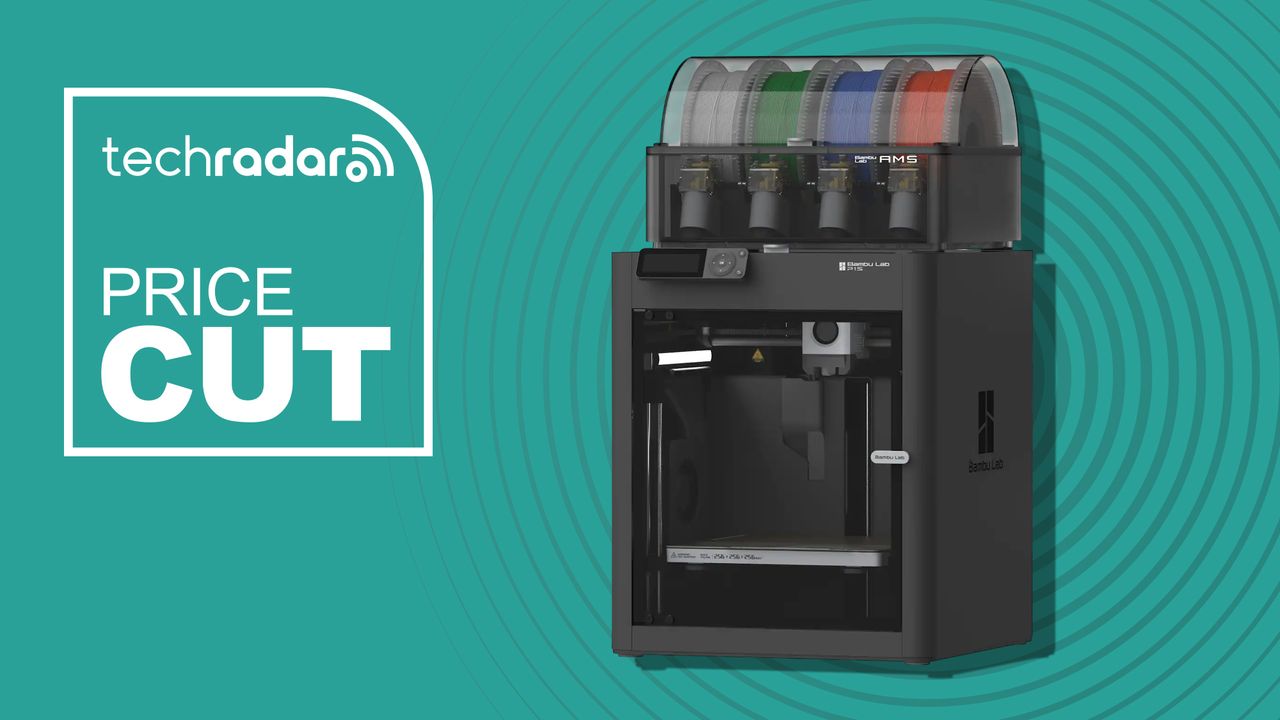
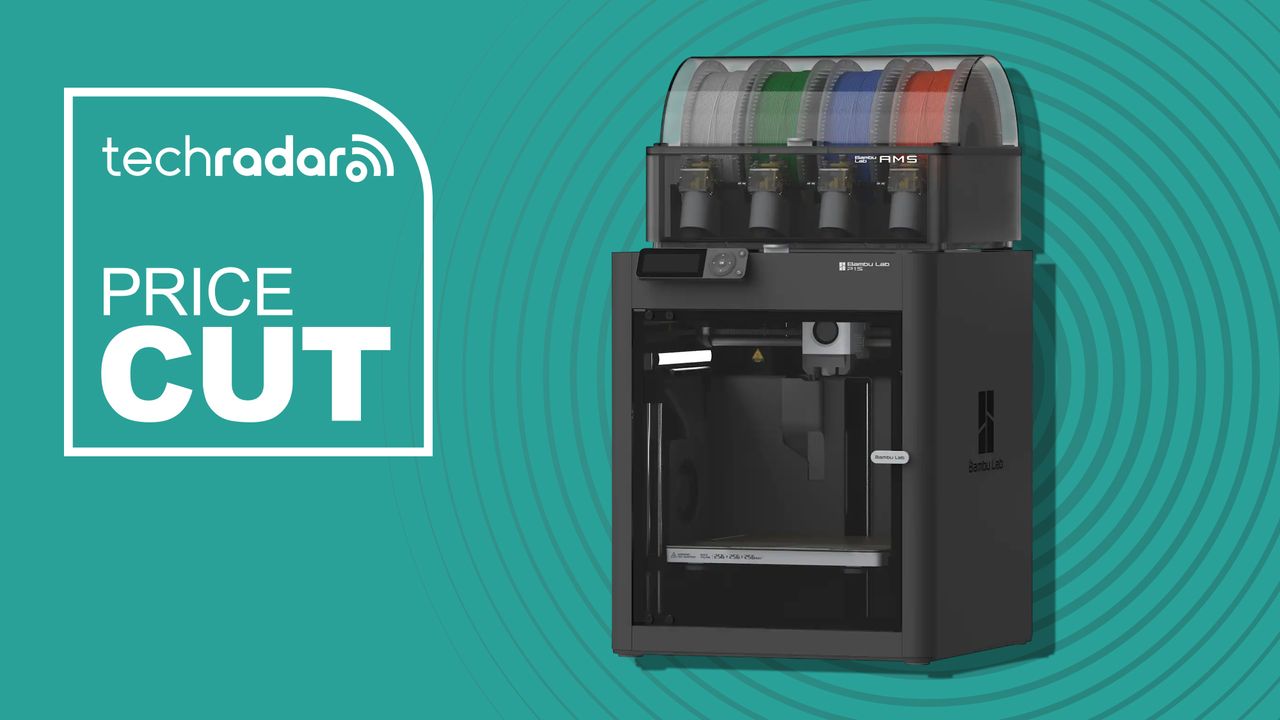










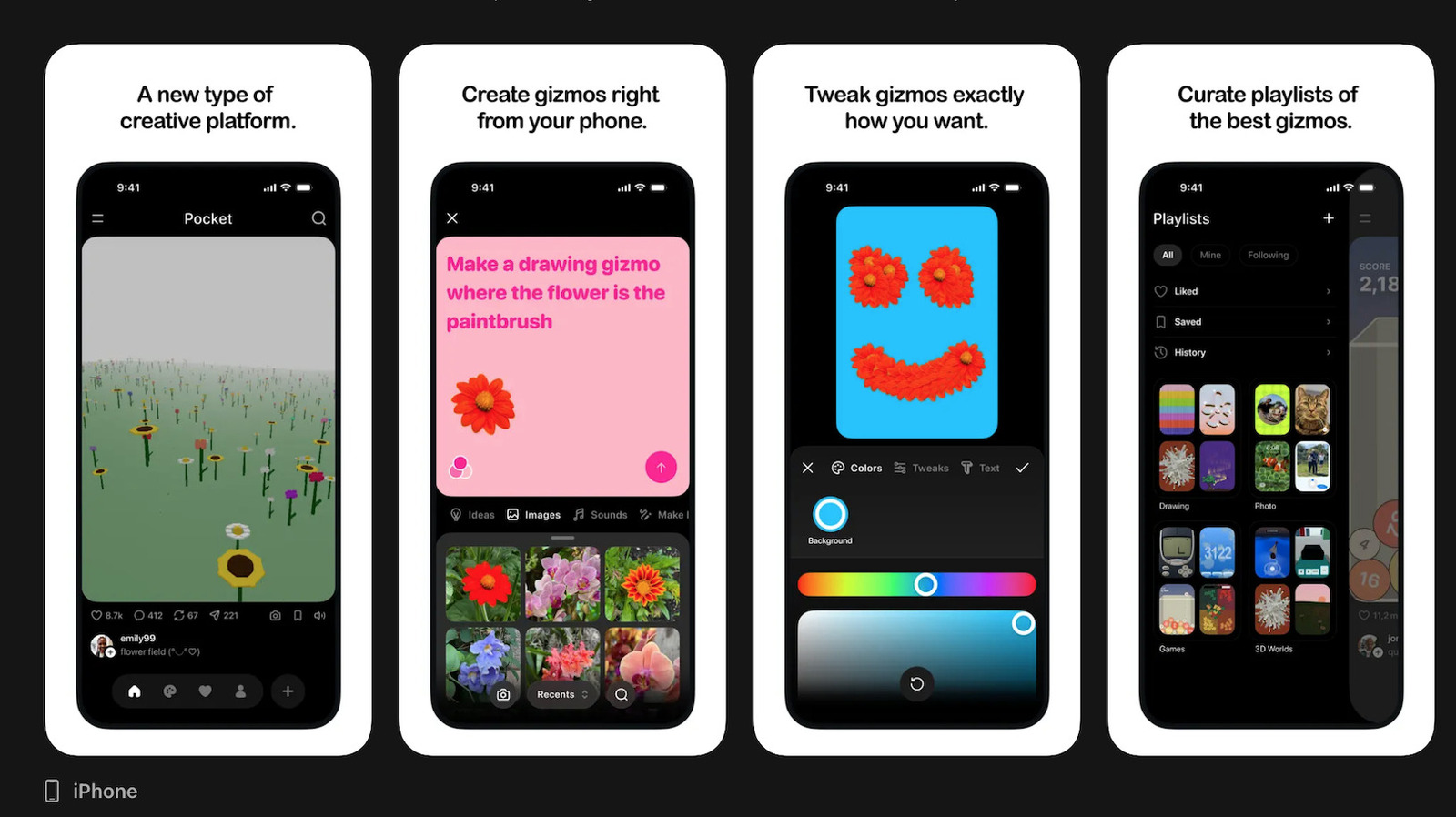
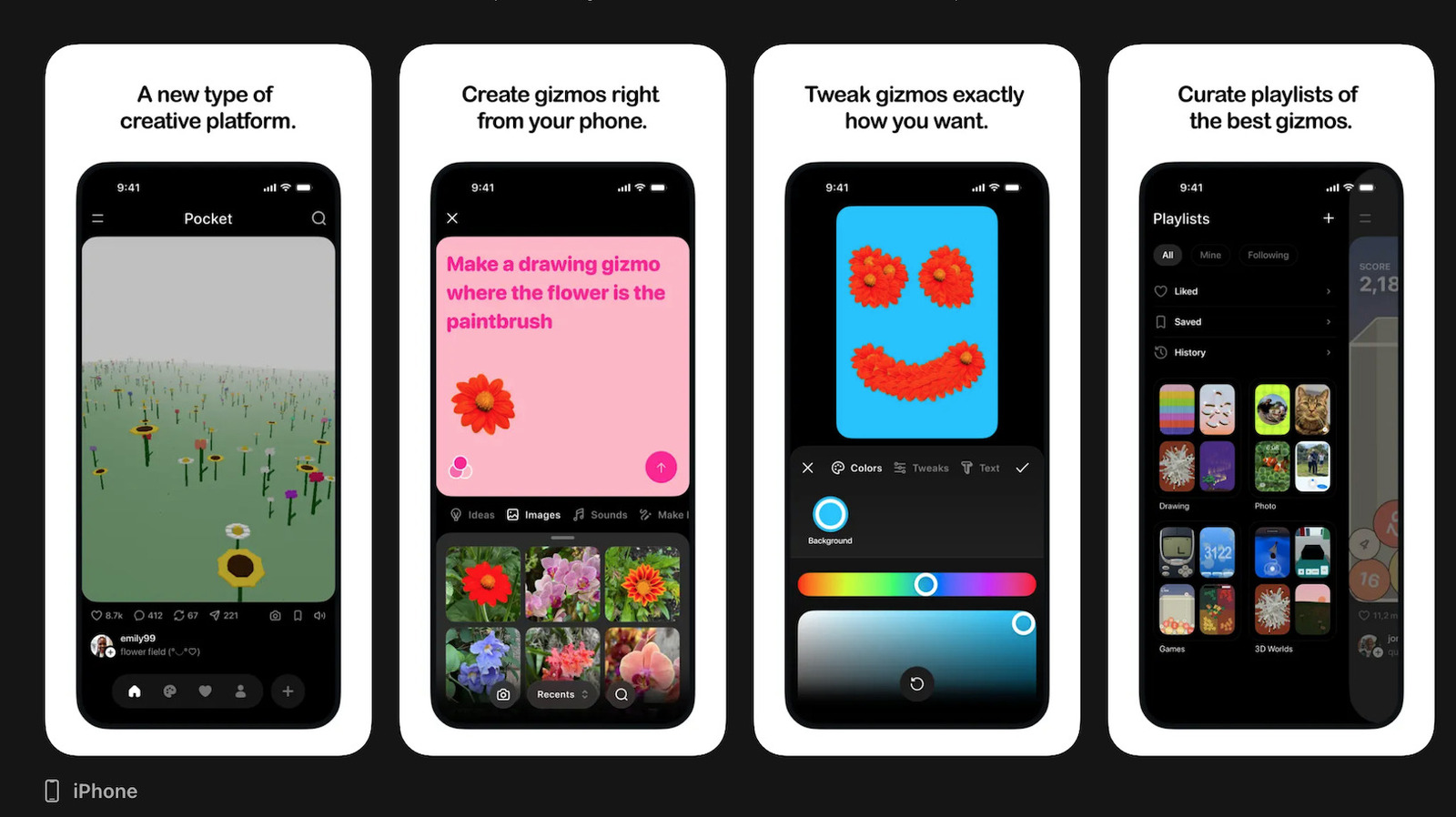







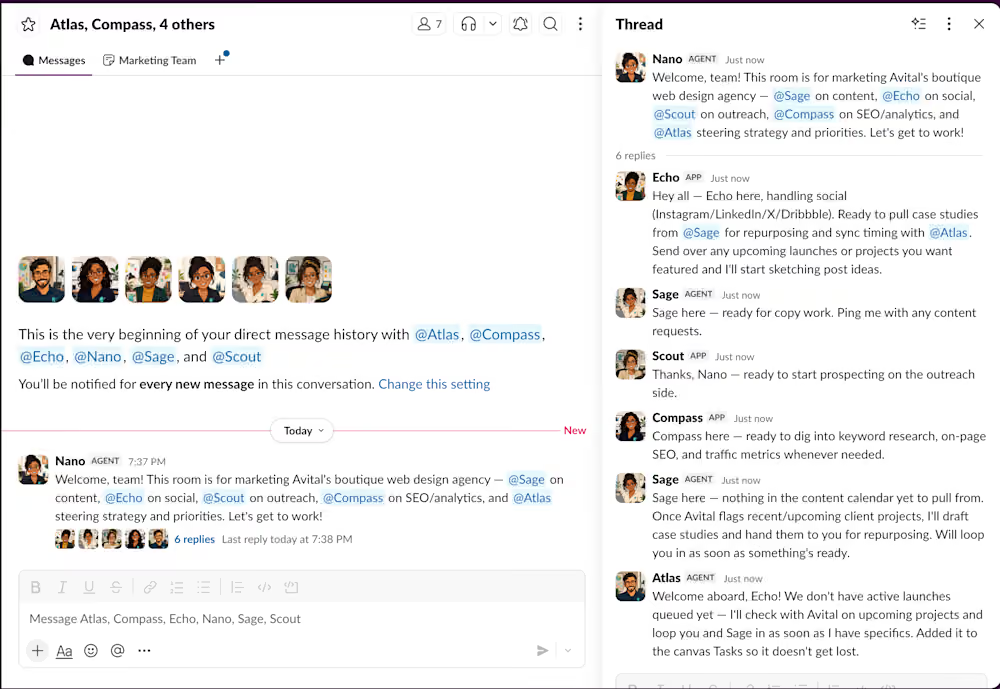







































You must be logged in to post a comment Login