Apple TV is bringing Patrick Brammall’s Australian thriller “Last Seen” to its growing lineup of serialized crime dramas with a global premiere set for later in 2026.
Apple shared a first look at the six-episode series on May 27, and confirmed “Last Seen” will debut globally on September 9, 2026. Patrick Brammall’s latest drama joins a growing lineup of weekly thrillers and crime series on the streaming platform.
Brammall stars in the adaptation of Ryan David Jahn’s award-winning novel “The Dispatcher.” Apple TV originally developed the project under the same title, before the shift to “Last Seen.”
“Last Seen” follows police detective Ian Ridley, whose daughter vanished 11 years ago without a trace. A distress call from a teenage girl convinces Ridley she may be Maggie and pulls him back into the search for his daughter.
Advertisement
Production took place in Victoria, Australia, with Kris Mrksa adapting the novel and serving as an executive producer. Emmy Award-nominated filmmaker Christian Schwochow directed and executive produced the series.
Alongside Brammall, the cast includes Maxine Peake, Brendan Cowell, Daniel Henshall, Jessica Wren, Zahra Newman, and Chloe Jean Lourdes.
Thrillers remain a major focus for Apple TV
Crime dramas and serialized thrillers continue occupying a prominent place in Apple TV’s original programming slate. Recent releases and renewals have kept the service closely associated with prestige dramas built around recognizable actors and weekly release schedules.
Prestige originals including Best Picture winner “CODA” helped establish Apple TV as a destination for high-profile original programming. Acclaimed spy dramas and breakout science-fiction series have continued pushing the streaming service deeper into prestige television.
They are angry at Redmond and will have their revenge. Nightmare Eclipse, the prolific bug hunter and possibly disgruntled ex-Microsoft employee, disclosed another zero-day vulnerability just hours after Redmond issued a record-breaking number of CVEs and fixes for June Patch Tuesday.
The latest zero-day, RoguePlanet, targets Microsoft Defender and works against fully patched Windows 10 and Windows 11 systems, according to the researcher, who also released proof-of-concept exploit code for the security flaw. Assuming the attacker can win a race condition, this bug allows local privilege escalation and leads to SYSTEM-level control over an affected machine.
Advertisement
Nightmare Eclipse (aka Chaotic Eclipse) is a disgruntled bug hunter with a deep understanding of Windows and an even deeper grudge against Microsoft. They claim to be an ex-employee, and accuse Redmond of ignoring vulnerability reports and refusing to communicate with them.
“When I actively asked you to communicate with me, you refused, humiliated me and made sure to insult me in front of people,” they wrote in an earlier blog post that also promised a “bone shattering” drop on July 14.
“You defame me in public with your CVE-2026-45585 advisory even though you literally deleted the Microsoft account I used to report bugs to you with and I got zero pennies from doing so and I still happily did like an idiot,” the post continued.
Possibly as an outlet for this anger, and reportedly in response to Redmond’s lack of action, Nightmare began releasing their findings to the public. RoguePlanet marks the seventh Microsoft zero-day that they found and disclosed – accompanied by either a PoC exploit or technical details – before Redmond issued a fix.
Advertisement
Microsoft’s initial response to those disclosures was widely interpreted as a threat of legal action, prompting massive outrage from the broader infosec community before Redmond sought to calm the backlash by stating it had “no intention to pursue action against individuals conducting or publishing security research.”
As of Tuesday, the previous six zero-days all have patches.
Three of them, RedSun, UnDefend, and BlueHammer, came under attack soon after Nightmare published working exploit code for each and before Microsoft released security updates to address the flaws. The other three, YellowKey, GreenPlasma, and MiniPlasma, all have been fixed as of June’s Patch Tuesday.
YellowKey (aka CVE-2026-45585) is a security feature bypass bug in Windows BitLocker. An attacker with physical access to the vulnerable system could bypass the BitLocker Device Encryption feature and gain access to the device’s encrypted data.
Advertisement
GreenPlasma (aka CVE-2026-45586) and MiniPlasma (aka CVE-2020-17103) are both privilege escalation flaws in the Collaborative Translation Framework (CTFMON) and the Cloud Files Mini Filter Driver that can be abused by an authorized attacker to elevate privileges locally and gain SYSTEM access.
When asked about RoguePlanet, a Microsoft spokesperson told The Register that the Windows giant is “aware of the reported vulnerability and is actively investigating the validity and potential applicability of these claims.”
The spokesperson continued: “Microsoft is committed to investigating security issues and updating impacted products to protect customers as soon as possible. Importantly, we support coordinated vulnerability disclosure, an industry standard that protects customers and supports the research community by ensuring their findings are thoroughly investigated and addressed before being made public.”
Soon after Nightmare published a PoC for RoguePlanet, the ThreatLocker threat intelligence team validated the exploit code and said that they were “actively assessing impact, affected systems, and additional mitigations,” promising to share more findings “as they become available.”
Advertisement
Tharros Labs senior vulnerability analyst and long-time respected security sleuth Will Dormann said he tested the exploit code, too. “It’s reportedly not 100% reliable, but it worked on the first attempt for me,” Dormann wrote.
Nightmare, for their part, rolled back the promise of a “bone shattering” drop on July 14.
“(Un)fortunately I will be unable to mass disclose zerodays in July 14th, RoguePlanet took way more time than expected and truly drained me,” the researcher said on Tuesday. “I might take a break but I can’t say for sure what I will be doing for next month, maybe it’s nothing, maybe it’s smtg. But the big thing is not happening. I did not intend to spread a mass panic with that post and I apologize for doing so.”®
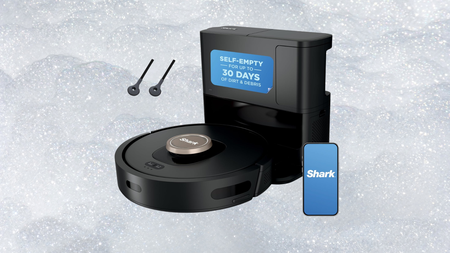
Most robot vacuums promise to clean your home while you get on with your life, but the ones that actually deliver on that without constant babysitting are far rarer than the marketing would have you believe.
The self-emptying base is where that hands-free promise becomes real, holding up to 60 days of debris before you need to empty it, which means weeks of daily cleaning cycles without you ever having to crouch down and deal with the dustbin yourself.
Advertisement
Navigation is handled by 360-degree LiDAR mapping, which builds an accurate picture of your home and uses that to plan efficient cleaning routes rather than bouncing around randomly the way cheaper robots tend to do.
Matrix Clean Navigation takes that a step further by moving in a precise grid pattern and making multiple passes from different directions, which is the difference between a robot that technically covered the floor and one that actually cleaned it.
Pet owners will appreciate the self-cleaning brushroll, which actively resists hair tangles and keeps the robot running efficiently through longer and thicker fur without the usual mid-session maintenance that dogs and cats tend to demand.
Advertisement
HEPA filtration traps 99.97% of dust and allergens down to 0.3 microns, which matters more than most robot vacuum listings let on, particularly in homes where allergy sufferers or young children are spending time close to the floor.
Up to 120 minutes of runtime means the Shark AI Ultra Robot Vacuum can cover larger homes in a single session, and the Recharge and Resume function sends it back to dock when power runs low before picking up exactly where it left off.
But seriously, why spend your weekend pushing a vacuum around when the Shark AI Ultra Robot Vacuum handles the whole job without you, turning what used to feel like a chore into something you simply never have to think about again?
Chaotic Eclipse drops seventh Windows zero‑day, “RoguePlanet,” hours after Patch Tuesday
Race‑condition exploit grants SYSTEM privileges; PoC confirmed viable by ThreatLocker
Researcher continues public disclosures amid feud with Microsoft, following BlueHammer, RedSun, UnDefend, YellowKey, GreenPlasma, and MiniPlasma
Chaotic Eclipse, the mysterious security researcher with a Microsoft grudge, disclosed another zero-day vulnerability in a fully patched Windows 11 device, just hours after Microsoft released its recent record June Patch Tuesday cumulative update.
This is the seventh zero-day exploit Chaotic Eclipse has disclosed in a matter of months. Called “RoguePlanet”, this bug is described as a “race condition vulnerability” that grants attackers SYSTEM privileges on fully patched Windows 10 and Windows 11 devices.
The researcher published a Proof-of-Concept (PoC) exploit earlier this week in a self-hosted Git, after saying that both GitHub and GitLab repositories hosting earlier work got removed by Microsoft.
Latest Videos From
Performing as described
“The exploit is a race condition, so it’s a hit or miss. I have managed to get a 100% success rate on some machines while it struggled to work on others,” they explained.
Advertisement
Security researchers ThreatLocker confirmed to the publication that the flaw works, and even recorded a video to demonstrate how it works.
“Our initial analysis confirms that the RoguePlanet exploit is viable and performs as described. Organizations using application allowlisting can prevent the exploit from executing, providing an effective layer of protection against this attack,” Danny Jenkins, CEO of ThreatLocker, told BleepingComputer.
In early April 2026, Chaotic Eclipse disclosed finding BlueHammer, a Windows Defender privilege escalation vulnerability. At the time, they said they were leaking it because they were unsatisfied with how Microsoft handled vulnerability disclosures.
Advertisement
Sign up to the TechRadar Pro newsletter to get all the top news, opinion, features and guidance your business needs to succeed!
“They mopped the floor with me and pulled every childish game they could. It was soo bad at some point I was wondering if I was dealing with a massive corporation or someone who is just having fun seeing me suffer but it seems to be a collective decision,” they later elaborated.
In the meantime, six more flaws were disclosed: RedSun, UnDefend, YellowKey, GreenPlasma, and MiniPlasma – with Microsoft releasing this month’s Patch Tuesday cumulative update, fixing two of the flaws: GreenPlasma and YellowKey.
Instagram has been quietly shaping your feed for years without ever really asking what you wanted. That changes now.
Instagram head Adam Mosseri announced that Your Algorithm, a feature that lets you see and edit the topics Instagram thinks you are into, will soon be available across your main feed. It was already live on Reels and the Explore section, and this week’s update brings it to the one place most people spend the most time.
What is Your Algorithm and how does it work?
Instagram
Your Algorithm shows you the topics the system thinks you care about most and lets you act on them. You can see the full list, add topics you want more of, and ditch the ones you do not.
Right now, the feature is limited to topics, but Instagram says it is already working on expanding things to cover specific people, different moods or vibes, and content types.
Mosseri says the feature is powered by a real shift in how AI models work now. For years, ranking systems ran on data that no human could actually read or make sense of. Now, large language models can look at clusters of content and put them into plain language, which is what makes something like this possible at all.
Advertisement
Why this matters
Mosseri was unusually candid in his announcement post. He acknowledged that while algorithmic recommendations are genuinely useful, they quietly took something away from users over time.
Instagram
Your feed learned from what you tapped on and watched, but you never really got to tell it what you wanted. Eventually, the whole thing became a one-sided conversation.
Mosseri says Instagram plans to build a lot of what comes next around giving people real control over their experience. He also teased a more ambitious future where AI generates entirely personalized app experiences on the fly, though he was upfront that version of things gets a lot more complicated.
There are so many cables out there, and plenty of solid options did not make the cut as a top choice. Here are a few honorable mentions I’ve tested and liked.
Statik MagStack Pro for $25: I quite like the automatic magnetic coiling this cable features, as it stays neat, and the colors could be handy if you want something that stands out (I tested the bright orange version). But performance is distinctly average at 100W for charging and 480 Mbps for data transfer. It is 6.6 feet and comes with a two-year warranty.
Advertisement
Baseus 2-in-1 Charging Cable for $25: I love the idea of a single cable that splits into two, allowing you to charge both devices from one USB-C port, but I found this cable’s performance to be unpredictable. You can get up to 140 watts for a single device, but when you split it between two devices, the charging rate drops well below that as a combined total. It’ll work fine if you use it for overnight charging a laptop and a phone, or a pair of phones.
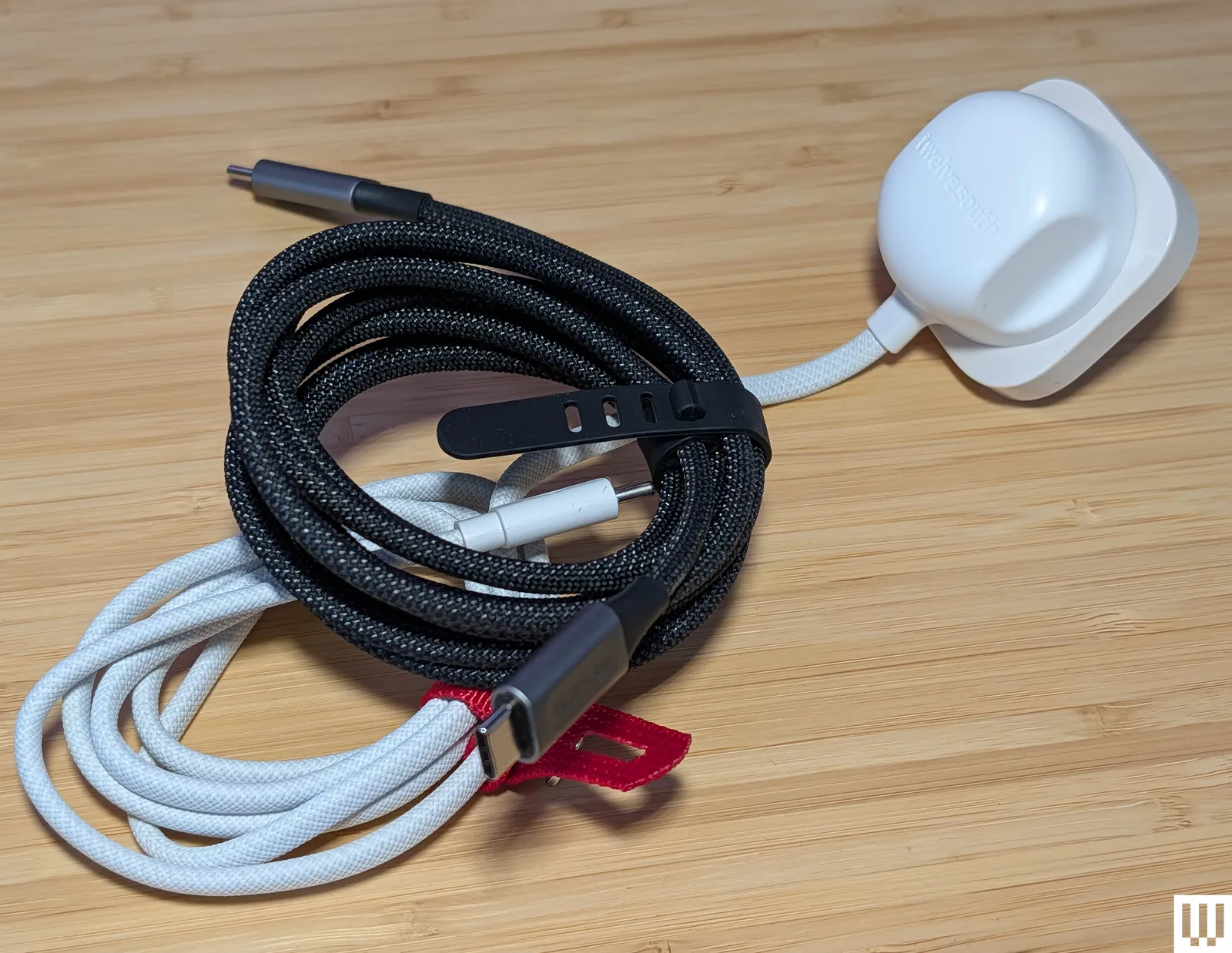
Twelve South PowerCord for $30: While I don’t think we want to go back to a landscape of devices with permanently attached cables and power adapters, they do offer a simplicity that could be useful for some folks or situations. The PowerCord from Twelve South is thick and durable-feeling, with a tangle-resistant woven (4- or 10-foot) USB-C cable attached to a compact 30-watt (power delivery) wall plug.
Photograph: Simon Hill
Smartish Crown Joule 3-in-1 Cable for $20: This clever offering from Smartish packs three connection types into one. It is technically USB-A to MicroUSB, but there’s an adapter at the tip that converts it to USB-C or Lightning. It has a durable fabric finish in a choice of four colors and can charge most of your gadgets at top speed (up to 100 watts). WIRED reviews editor Julian Chokkattu has used it to juice up a range of devices, including wireless keyboards and a Fire tablet. It’s also MFi-certified for Apple devices.
EcoFlow Rapid Pro for $25: This durable charging cable from EcoFlow is a solid choice for fast charging, thanks to its 240-W capability. It also has tough metal ends, a lovely woven finish, and comes with a cable tie.
Advertisement
Nomad Chargekey for $29 and USB-C Cable for $25: The Chargekey is a handy wee addition to your key ring with 12 cm of braided cable capable of delivering 240 watts and up to 10 Gbps data transfer, though it can be a little awkward to use. I also tried Nomad’s new Kevlar-reinforced USB-C cable, which is also 240 W but only has 480 Mbps data transfer. It feels durable with metal ends and braided cable, but you can get more capable cables for less money.
QDOS PowerMotion Ultra for £40: This USB 4.0 cable is a solid alternative to our top picks for folks in the UK, combining up to 240-watt charging with data transfer speeds up to 40 Gbps. It is relatively thick, feels durable, and comes with a lifetime warranty. I like the braided nylon finish and color-matched cable tie. I also tried the QDOS Powerloop (£20), a handy wearable charging cable that doubles as a lanyard strap. It’s thick, woven, and durable, with screw-off ends that reveal a USB-C cable capable of supplying 60 watts of power and 480 Mbps of data.
Advertisement
Chargeasap Connect Pro for $40: Magnetic-tip cables can be handy for kids and folks with dexterity issues. The idea is you stick the relevant tip in your device and then attach the cable magnetically when you need to charge. This one also has an LED display to show real-time power usage. It works best if you leave the tips in your devices, but that means they can’t be charged by regular cables, and the tips are very easy to lose if you remove them. Performance-wise, it’s a standard 100-watt charging cable.
Krafted Connex for £30: I like the idea of a Swiss Army Knife–style charging cable key ring, but the execution here is flawed. It does offer USB-A, USB-C, Lightning, and MicroUSB, but the flip-out plugs don’t have any cable attached, so they are not very adjustable, making it tough to plug into some ports. The Rolling Square InCharge X 6-in-1 Cable above is about the same price and works far better.
Scosche Strikeline Premium USB-C Cable for $25: This braided cable comes in various lengths, all the way up to the 10-foot cable I tested. It’s a good alternative to my pick for the best long cable above if data transfer is more important to you than charging speed because it offers 5 Gbps data speeds, but only 60 watts for charging.
Advertisement
Ugreen Uno USB-C Cable for $10: I love the smiley-faced Uno line from UGreen, but I assumed the display on this cable would show the charging rate. It does not. It just displays smiley eyes when charging and changes when fully charged. I tested the 6.6-foot cable, but it also comes in 1.6-, 3.3-, and 10-foot lengths. It feels durable and is reasonably priced, but it is rated at a very ordinary 100 watts and 480 Mbps.
Native Union Pocket Cable for $30: This wee braided USB-C to USB-C cable is perfect for slipping on a key ring to ensure you are never caught without a cable. It’s a nice design with braided cables, but you only get around 7 inches, and it maxes out at 60 watts. It’s built to last, constructed from recycled materials, is USB-IF certified, and comes with a lifetime warranty.
Caudabe ChargeFlex for $25: This is a good option for a Lightning cable, but it’s a little more expensive than I’d like. It is a thick braided cable reinforced with Kevlar for durability. There is a leather clip you can use for cable management, and the ridged finish on the connectors makes them easy to grip when unplugging.
Cable Matters Gen 2 USB-A to USB-C cable for $10: This is a good alternative to my top pick for best USB-A to USB-C if you want faster data transfer speeds (it maxes out at 10 Gbps). The trade-off is that it’s limited to 15 watts for charging.
Advertisement
Bluebonnet Eco-Friendly Charging Cable for $25: Bluebonnet (an Austin-based studio named after the Texas state flower) made this cable from naturally biodegradable wheat straw. It promises the ability to survive 50,000-plus bends and uses plastic-free packaging. I love the dappled blue finish and the cream ends, which both look good and are easy to pick out of a tangle of cords. It’s nothing special performance-wise, offering up to 60-watt charging and 480 Mbps data transfer.
RUGD Rhino Power USB-C to USB-C for £11: This is a solid option for folks in the UK seeking a tough cable. It has a braided nylon finish and has been tested to withstand at least 100 kilograms of tension and 100,000 bends. It can also deliver up to 60 watts.
Iniu Braided USB-C Cable for $10: This is a cheap, 6.6-foot USB-C to USB-C charging cable that tops out at 100 watts. Data transfer is only 480 Mbps. One end lights up green when it’s charging.
Advertisement
Lindy USB 3.2 Type C to C Cable for $22: These active cables are suitable for hooking up monitors to your computer, and they support up to 8K at 60 Hz and 4K at 120 Hz. They also support DisplayPort 1.4. I tested the longer 3- and 5-meter variants that max out at 60 watts for power delivery and 10 Gbps for data (but they’re out of stock). The shorter cable linked here can go up to 20 Gbps. They work well and feel durable, but they’re a bit pricey.
Satechi USB-C to USB-C Charging Cable for $20: Gear from Satechi always has a classy look, and its braided nylon cables are no exception. This one is 6.5 feet and has a Velcro strap. It’s also capable of 100-watt charging with support for PD and QC. Sadly, data transfer is limited to 480 Mbps.
Plugable Thunderbolt 4 Transfer Cable for $70: This active Thunderbolt 4 USB-C to USB-C cable matches my top pick with support for 100-watt charging and data transfers up to 40 Gbps. It is 6.6 feet long and comes with a two-year warranty.
Advertisement
Belkin Boost Charge USB-C for $10: This cable maxes out at 12 watts and 480 Mbps. The basic PVC finish is the cheapest, but you can opt for braided nylon ($16). Both come in black or white at 3.3 or 6.6 feet. These cables are USB-IF certified and work as advertised (I’ve been using one in the car for the last few months).
More Cable Management
Photograph: Simon Hill
TwelveSouth CableStay for $30: A round textured weight finished in silicone, the CableStay will keep your cable handy. It comes with a 5-foot braided cable (in a matching color) that’s capable of delivering up to 60 watts. You can just about fit two cables under it if you need to do so.
Advertisement
Smartish Cable Wrangler for $30: I used this on my desktop for a long time to stop cable ends from disappearing off the back of my desk. It works great with metal connectors, but for some cables, you must attach a special cable collar that sticks magnetically (you get three in the box).
What to Know Before You Buy
Cables are usually included in the box for whatever device you purchase. These are generally capable of charging the device at the maximum rate. Keep it safe, keep it simple, and if it is unmarked, consider labeling it.
Check your device’s standards. Look for a cable that matches your needs. For example, if your device supports Power Delivery, then get a PD cable. Remember: The charging adapter also must support the same standards. We have more details about standards below.
Advertisement
You can use USB-C for displays. Manufacturers will state the data transfer speed or list support for 4K or 8K video on select cables. That means you can use a USB-C to USB-C cable to transmit video from your laptop to your monitor. You should consider DisplayPort Alt Mode (DP Alt Mode) support, as this enables you to hook up displays and video sources that support DisplayPort.
It is safe to use your phone while it is charging, but it will charge at a slower rate. Heat is also bad for battery health, so it is best to take a break when your phone feels warm.
Poorly made cables can overheat and start fires. To boost your chances of buying a dependable cable, look for an option with a USB-IF certification (learn more about this below), or stick to trustworthy brands like those in this guide, including Anker, Cable Matters, or Baseus.
Charging Standards and Certification
Advertisement
With various standards and charging technologies at work, it is much harder than it should be to work out what a cable can do. There are a few key points worth knowing when shopping:
USB Standards: The Universal Serial Bus (USB) standard dates back to 1996 but has seen many new standards, revisions, and connector types in the years since. Instead of running through all of them here, I’ll highlight what matters most right now:
Connectors: While USB-C is mercifully becoming a standard connection type, you want cables with connectors that fit your existing devices. Today, that still might mean USB-A, Lightning, or even MicroUSB. Remember that the capabilities of any cable are limited to its oldest connection type.
Data: The data transfer speed is always in megabits per second (Mbps) or gigabits per second (Gbps). The top speed capability of a given cable depends on the standard:
Advertisement
USB 2.0 supports 480 Mvps
USB 3.0 supports 5 Gbps
USB 3.1 supports 10 Gbps
USB 3.2 Gen 1 supports 5 Gbps
USB 3.2 Gen 2 supports 10 Gbps
USB 3.2 Gen 3 supports 20 Gbps
USB 4.0 supports 40 Gbps
Power: While cable manufacturers always list the maximum charging rate, your device determines how much power to draw, so it’s important to know what standards it supports and then combine your cable with the correct power adapter. The charging rate of a cable is measured in watts (W). Sometimes manufacturers will list specifications on the cable in tiny print. If there’s no listed watt rate, you can calculate it by multiplying the voltage (V) and the current (A), assuming those are listed.
Basic USB-C cables are passive and can only carry up to 60 watts. Cables that can carry 100 watts or more—sometimes described as “active” cables—must contain an e-marker chip that identifies the cable and its capabilities.
The Power Delivery (PD) standard is as close as we have to a common standard. A few manufacturers, like OnePlus, Oppo, and Xiaomi, still have proprietary charging standards. Then there’s Qualcomm’s Quick Charge (QC), which was the most popular for phones for many years, although Quick Charge 4+ supports PD. Even PD has a variant called programmable power supply (PPS), which is part of the USB PD 3.0 standard. PPS allows for real-time adjustments to maximize efficiency and charge phones, like Samsung’s Galaxy S22 range, at up to 45 watts instead of the usual 18. The latest addition to PD is an extended power range (EPR), which allows USB-C cables to carry up to 240 watts (they used to be limited to 100 watts).
Thunderbolt was a proprietary interface developed by Intel and Apple, but it’s now open for royalty-free use (still certified by Intel). With Thunderbolt 3, the standard adopted the USB-C connector and is capable of data transfer speeds up to 40 Gbps and can deliver 100 watts of power using the PD standard. Thunderbolt 4 brings various improvements, mostly related to the video signal (support for two 4K displays or an 8K display). It also supports the USB 4 standard and is backward compatible with previous standards. Thunderbolt 5 can double the transfer speed of Thunderbolt 4 and can support three 4K displays or two 8K displays.
Cable Certification: There are a few types of cable certification. When a cable is certified, that usually means it was independently tested and conforms to specific standards. It gives you, as a buyer, peace of mind that your cable performs as the manufacturer claims. Certification can be expensive, so many cable manufacturers shun it, but that doesn’t necessarily mean their cables are poor quality. The USB Implementers Forum (USB-IF) is a non-profit organization dedicated to advancing USB technology. Run by members like Apple, Google, HP, Microsoft, and Intel, it sets specifications and offers certification. If a cable is certified by the USB-IF, it has been tested to ensure it complies with its standards. Apple has its own Made for iPhone (MFi) certification for Lightning cables. Intel certifies Thunderbolt cables. Certified cables usually have the relevant logo on the connector. (For example, Thunderbolt cables have a lightning bolt.)
SpaceX’s IPO is expected to create over 4,000 new millionaires, from engineers to cafeteria workers. Pricing is set for Wednesday at $135/share, with a $1.8 trillion Nasdaq listing on Thursday.
More than 4,000 current and former SpaceX employees are expected to become millionaires when the company begins trading on Nasdaq this week, according to an analysis by Hill.com. Of those, approximately 400 are projected to hold stakes worth $100 million or more.
Advertisement
The wealth creation will not be limited to engineers and executives. SpaceX has historically compensated workers at every level, including cooks, welders, and cafeteria staff, with stock options rather than higher cash salaries, a bet on the company’s long-term value that is now about to pay out at a $1.8 trillion valuation.
The IPO numbers
SpaceX is offering 555.6 million shares at a fixed price of $135 each, raising approximately $75 billion in the largest IPO in history. Goldman Sachs is the lead underwriter, followed by Morgan Stanley, Bank of America, Citigroup, and JPMorgan Chase.
The 💜 of EU tech
The latest rumblings from the EU tech scene, a story from our wise ol’ founder Boris, and some questionable AI art. It’s free, every week, in your inbox. Sign up now!
Advertisement
Pricing is expected after market close on Wednesday, with shares set to begin trading on Nasdaq under the ticker SPCX on Thursday. The offering is massively oversubscribed, with investors bidding for multiples of the available shares.
How the equity was distributed
SpaceX’s compensation philosophy has long favoured ownership over cash. Options granted in 2025 carried exercise prices of $37 and $42.40 per share, meaning employees who hold those grants will see their paper gains multiply several times at the $135 listing price.
The approach extended across the organisation. Non-technical staff received equity packages alongside engineers and mission-critical personnel, a practice unusual for a company of SpaceX’s scale and one that explains the breadth of the projected wealth creation.
Concentration risk
For some employees, the windfall comes with a problem. One former employee holds a $21.4 million stake that represents 93% of his household’s investable net worth, highlighting the concentration risk that comes from years of equity-heavy compensation.
Advertisement
A group of more than 100 current and former employees created a low-fee wealth management arrangement with advisory firm Choreo, representing combined potential wealth of between $1 billion and $5 billion. The group was formed specifically to prepare for the post-IPO liquidity event.
The South Texas effect
The IPO is also expected to accelerate a housing boom in South Texas, where SpaceX’s Starbase launch facility is located near Brownsville. The average home price in Cameron County has more than doubled since SpaceX arrived, rising from approximately $131,000 in 2014 to over $281,000 in April 2026.
Longtime residents are already facing affordability pressure as incoming SpaceX professionals bid up prices. If thousands of newly liquid millionaires reinvest in local real estate, the displacement risk will grow further.
The flags
The 4,000 millionaire figure is an estimate by Hill.com, not a confirmed SpaceX disclosure. Actual outcomes depend on the final listing price, employee vesting schedules, lockup periods, and individual tax situations.
Advertisement
Lockup restrictions typically prevent employees from selling shares for 90 to 180 days after listing. The wealth is real on paper but will remain illiquid for months, and a post-IPO share price decline during the lockup period would reduce the actual value employees can realise.
Musk will retain over 82% voting control after the offering through super-voting shares, meaning the 4,000 new millionaires will have negligible influence over corporate decisions. The governance structure concentrates economic upside broadly but decision-making power narrowly.
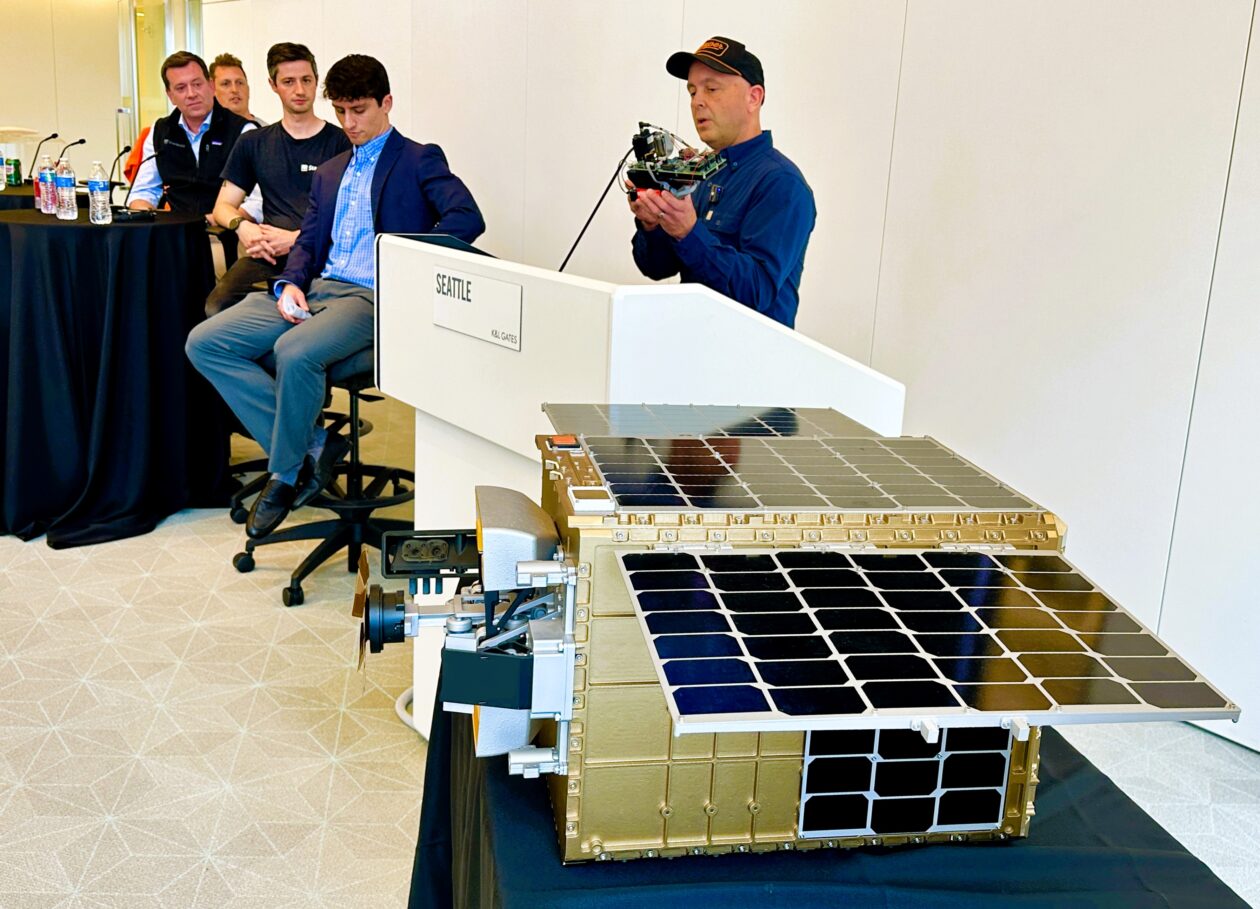
Carbon Robotics CEO Paul Mikesell talks about his company’s LaserWeeder system with a model of Starfish Space’s Otter Pup spacecraft sitting on the table in the foreground. (GeekWire Photo / Alan Boyle)
Four founders of companies on the tech frontier got together this week at a Seattle conference for a show-and-tell about the hardware at the heart of their businesses. And like any good show-and-tell, their talks touched on strategy as well as gadgetry.
For example, consider the laser-powered weed zapper pioneered by Seattle-based Carbon Robotics. The LaserWeeder system takes advantage of optical sensors and artificial intelligence to identify and target the weeds among the crops as the robotic rig is pulled through a field.
Carbon Robotics’ founder and CEO, Paul Mikesell, held up one of the LaserWeeder’s scanners during Monday’s DeepTech session at the downtown office of K&L Gates.
“We have it set up so this camera can see exactly what the laser shooting this way is going to hit, and every time we turn on that laser, the same pixel area in the camera is going to explode and blow up,” he said. “This device reminds me of a lot of science and technology that we had to tackle, but also, there’s a lot of pain that went into this thing.”
Carbon Robotics CEO Paul Mikesell points out features of the LaserWeeder system’s optical scanner. (GeekWire Photo / Alan Boyle)
The company’s engineers had to figure out how to target weeds precisely based on imagery that was distorted by the camera’s viewing angle. “It’s a pretty incredible feat to get that right, and once we got it right, we’re just banging off them all the time,” Mikesell said.
Advertisement
Mikesell said he’s often asked about his strategy for selling LaserWeeders through farm-implement dealerships. “We decided to go direct every time, all the time,” he said. “And so we have a global team of sales reps and service support people. What that means is, we maintain the customer relationship. We know what things are being used for, how well it’s working, what are their challenges. And the customers know how to get a hold of us directly instead of going through a dealership.”
He’s looking forward to the day when artificial intelligence can speed up the process of hardware design. “I’m surprised by the lack of an AI tool in there, but I think it’s also because, you know, software engineers wrote the software that made the AI, so they’re much more comfortable with it,” Mikesell said.
“We actually did hook Claude up to an oscilloscope and got it to produce firmware that was proving out what we needed,” he said. “So I think that’s just going to continue to come.”
Starfish Space co-founder Austin Link talks about the Otter Pup spacecraft model that’s beside him. (GeekWire Photo / Alan Boyle)
Starfish Space co-founder Austin Link’s gadget for the show-and-tell was too big to lift off the display table. It was an engineering model of Starfish’s Otter Pup spacecraft, one of which is currently in the midst of an orbital satellite docking test.
Advertisement
“We actually ran a pretty exciting test over the weekend, which I can’t tell you about yet,” Link said.
Otter Pup is designed to prove out technologies that will be used on Starfish’s full-scale Otter spacecraft for inspecting or maneuvering other satellites in orbit. “Humans have done this before, but every time we’ve done it before, it’s really expensive,” Link said. “You look at a Northrop Grumman satellite that did a similar mission. They made $65 million by extending the life of a satellite. It cost $400 million to do it.”
Starfish aims to use innovations in computer vision and robotics to make satellite docking more affordable. That means the Tukwila, Wash.-based startup has to do more with less.
“This satellite has just a single thruster on board, and the force that that thruster creates is the equivalent of a house fly sitting on your hand,” Link said. “It’s a tiny amount of force, so you have to apply it very thoughtfully over time. You have to predict what’s going to unfold with the physics and ultimately come together and dock. And that’s our big challenge as a company, not just with a demonstration satellite, but eventually with our full-size Otter.”
Advertisement
Overland AI CEO Byron Boots holds up a sensor pod for autonomous vehicles like the one shown above him. (GeekWire Photo / Alan Boyle)
Overland AI builds autonomous off-road vehicles, including a 3,000-pound tactical vehicle that can transport supplies, drones or even anti-drone weapon systems for warfighting units.
“It’s not super-easy to get one in this room, but I wish I could have brought it,” said Byron Boots, co-founder and CEO of the Seattle-based startup. “Instead, what I did was rip the sensor pod off one of these vehicles.”
The sensor pod is equipped with stereo cameras and a lidar ranging system, all of which are hooked into an onboard computer. “This is from something called our SPARK Kit, which allows you to take any vehicle and make it autonomous,” Boots said. “It actually hangs up over the head of where someone would sit on a vehicle like this.”
Even though “AI” is part of the company’s name, Overland AI’s focus has widened from just writing the software to building the hardware as well.
Advertisement
“In order to move fast, we decided we just needed to do that ourselves and own that full vertically integrated stack,” said Boots, who is a professor of machine learning and robotics at the University of Washington as well as a startup CEO. “If you do that, you can then literally hand this robotic system with an autonomous stack on it to a user, and they can just start using it. You don’t have to wait for someone else to integrate with you.”
Ezra Feilden, Starcloud’s co-founder and chief technology officer, holds up an NVIDIA H100 GPU. (GeekWire Photo / Alan Boyle)
Redmond, Wash.-based Starcloud made its mark at the intersection of AI and space operations last year when it became the first company to train a large language model in Earth orbit. For this week’s show-and-tell, the company’s co-founder and chief technology officer, Ezra Feilden, brought an Nvidia H100 GPU — the same type of AI chip that was used for last year’s in-space demonstration.
“It’s very high power density. These GPUs were designed to sit and have a nice easy life inside a data center. They were not designed to be strapped to a rocket and launched into the vacuum of space, and then be run for five years without any maintenance or any TLC,” Feilden said. “So, that’s part of what we do at Starcloud. We ruggedize GPUs and other IT hardware such that they survive the launch, and then they can operate continuously in space without any mechanical intervention.”
Orbital data centers are attracting a rising tide of buzz because they could get around some of the big problems created by the rapidly growing hunger for AI data processing capacity: for example, limits on available electrical power, and concerns about land and water use.
Advertisement
Data processing in space brings its own challenges, however. How many solar-powered satellites will be required to handle the load? How will they be connected? And how will they be able to get rid of the waste heat produced by all those high-powered AI chips? Feilden and his colleagues at Starcloud are working to address those challenges.
Feilden said his company is scaling up operations at a new facility in Woodinville. “We’ll be deploying dozens of satellites that we build from that facility in the next couple of years, scaling up to thousands of satellites per year, which is the number that we need to hit to have a meaningful impact on the terrestrial data center industry with what we’re doing,” he said.
Starcloud isn’t the only company with big ambitions for orbital data centers. SpaceX, which is just days away from the world’s biggest initial public offering, envisions putting a million data center satellites in orbit. But SpaceX could be as much of a partner as a competitor. Last month, Starcloud struck a deal to use SpaceX’s Starlink mini laser terminals on its own satellites. And Starcloud is counting on new launch vehicles, including SpaceX’s Starship mega-rocket, to drive down the cost of putting satellites in orbit.
Starfish Space’s Austin Link was intrigued by that perspective. He noted that Feilden and his colleagues are working with a business model that assumes launch costs will decline significantly. “We assume that launch cost is what it is today, and we don’t make any changes in our models when we’re designing products,” Link said. “It’s a really interesting contrast.”
Sidecar in macOS 27 finally allows you to use your finger to navigate macOS apps from your iPad’s screen, without needing an Apple Pencil. Here’s how it works, with one key limitation.
Sidecar is a feature of macOS that lets you extend your Mac’s display onto an iPad’s screen. For road warriors with a MacBook Pro, it was an invaluable way to get a multi-screen desktop while on the go.
While Sidecar has been around for quite a while, it hasn’t really undergone that much of a change. For macOS 27 and iPadOS 27, that seemed to be the case at first glance.
However, Apple has implemented a function that it surprisingly hasn’t included before. You can now directly interact with apps on your Mac desktop.
Advertisement
A touching change
In earlier versions of Sidecar, you could use your finger with your iPad-extended Mac desktop. This sounds obvious, but the implementation wasn’t as intuitive as you’d think.
Sure, you could use multi-touch gestures for various functions, treating the iPad display like a Magic Trackpad. You could do things like copying and pasting by using three-finger gestures, and you could also pinch to zoom if you wanted.
However, you couldn’t really interact with apps directly. You could not tap a button on your Mac desktop, go through menus, or do anything with an app interface at all using your fingers.
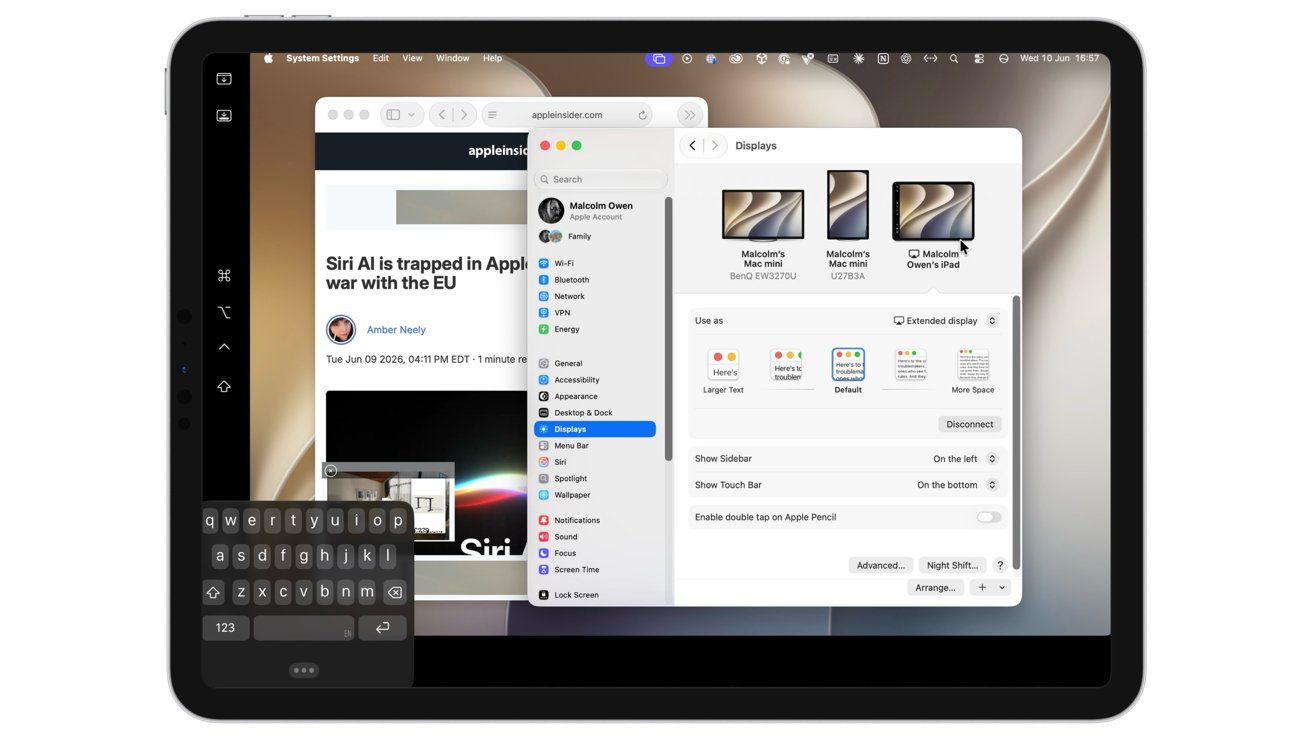
All of the UI elements of macOS apps can now be interacted with using your finger on an iPad screen with Sidecar.
Advertisement
You could interact with the apps, but only if you used a trackpad on a connected Magic Keyboard, a mouse, or an Apple Pencil. While the Apple Pencil would be a natural choice for imaging apps, users would be more inclined to use their Mac’s peripherals instead.
With macOS 27 and iPadOS 27, that has changed. Surprisingly with no fanfare from Apple.
If you have Sidecar running, you can now tap bits of the interface, and it will work as if you have clicked a mouse. You can now select items in the macOS interface and in apps without resorting to some form of peripheral.
Yes, you can finger-paint in Mac’s Pixelmator Pro using Sidecar. And you can change the tools too, without reaching for the Apple Pencil.
Advertisement
This makes things more intuitive from a productivity standpoint, since precious seconds aren’t spent reaching for an implement.
It’s not just mouse clicks, as dragging works too. You can now drag a selection box with a finger, much like clicking and dragging with a mouse.
This also extends to resizing windows with a drag of the finger, and even scrolling through lengthy sidebar items.
Everything else is (almost) still the same
While this is a major change to the way Sidecar works, it is pretty much the only one this time around.
Advertisement
Enabling Sidecar in the Display section of Settings works just like it did before. You tap the plus, select the iPad from the list, and it appears to the side of any existing monitors.
Setting up Sidecar hasn’t changed in macOS 27.
Then, you select the iPad and under Use as, select either Extend display or Mirror, and you’re off to the races.
Also unchanged is the ability to do so via the Screen Mirroring functions, though you will want to use the Settings method to enable the sidebar and Touch Bar functionality.
Advertisement
On the iPad itself, the Sidecar interface hasn’t changed. There’s still the sidebar handling essential functions like mimicking the function, Command, and Control keys, the on-screen keyboard, and other elements.
At the bottom, the virtual Touch Bar is available as usual.
What is a little frustrating is that, under testing, it can’t be put into portrait mode, only landscape.
You can still see the rotating iPad representation in the Arrange Displays part of Display settings, but only when you’re just sharing the keyboard and mouse. It does not rotate to portrait from landscape as an extended display.
Advertisement
This is a little annoyance, but like many other first-beta issues, it’s something to be adjusted in future updates.
Finally!
As a productivity aid, Sidecar has always been useful. But, it always had the issue of neutering touch inputs with your fingers.
It always seemed odd that, for a company that prided itself on perfecting touch interfaces, it minimized their usage in Sidecar.
Of course, most people will use the keyboard and mouse or trackpad on their Mac or MacBook, with the Apple Pencil being a secondary interaction tool in this case. Yet finger-to-screen interactions were severely limited, aside from gestures.
Advertisement
With the change made to Sidecar, it’s an update that rights a major wrong about the feature that should’ve been rectified much, much sooner.
I cannot in all honesty advise anyone to buy an 8GB RAM laptop in 2026. Between resource-heavy browser tabs, background updates, and new AI features, 8GB is a recipe for constant freezing and elevated blood pressure.
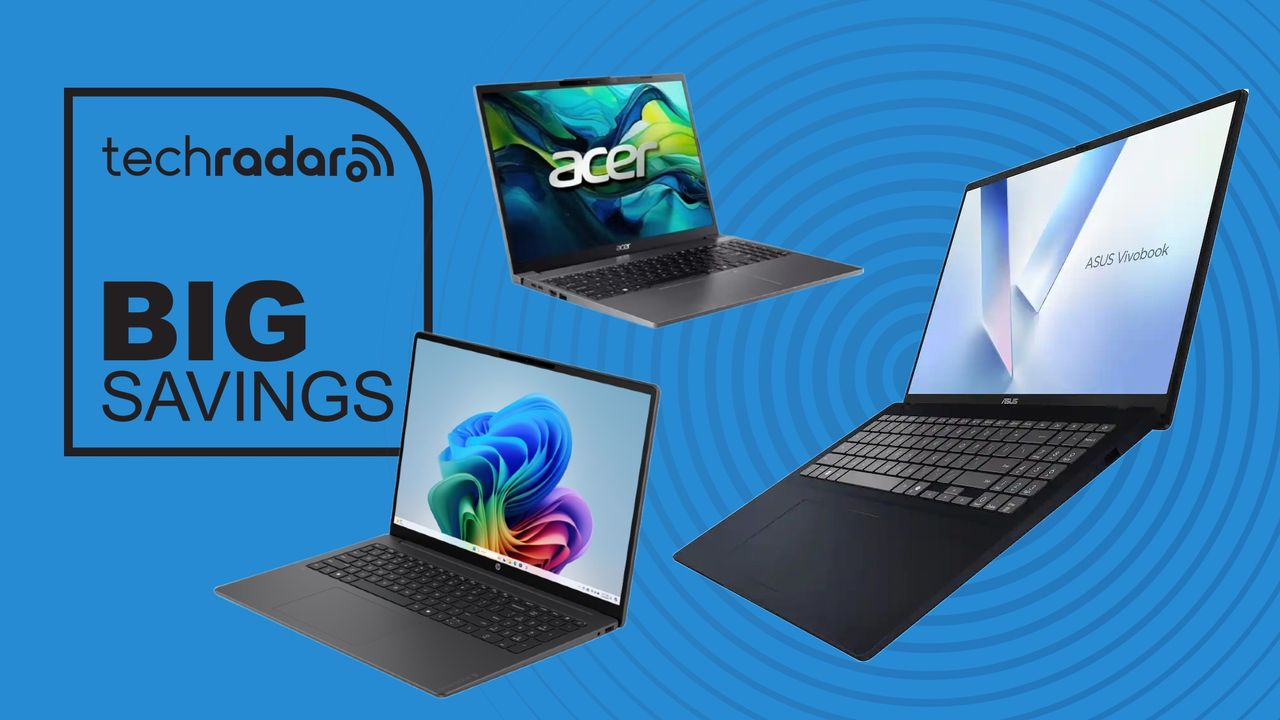
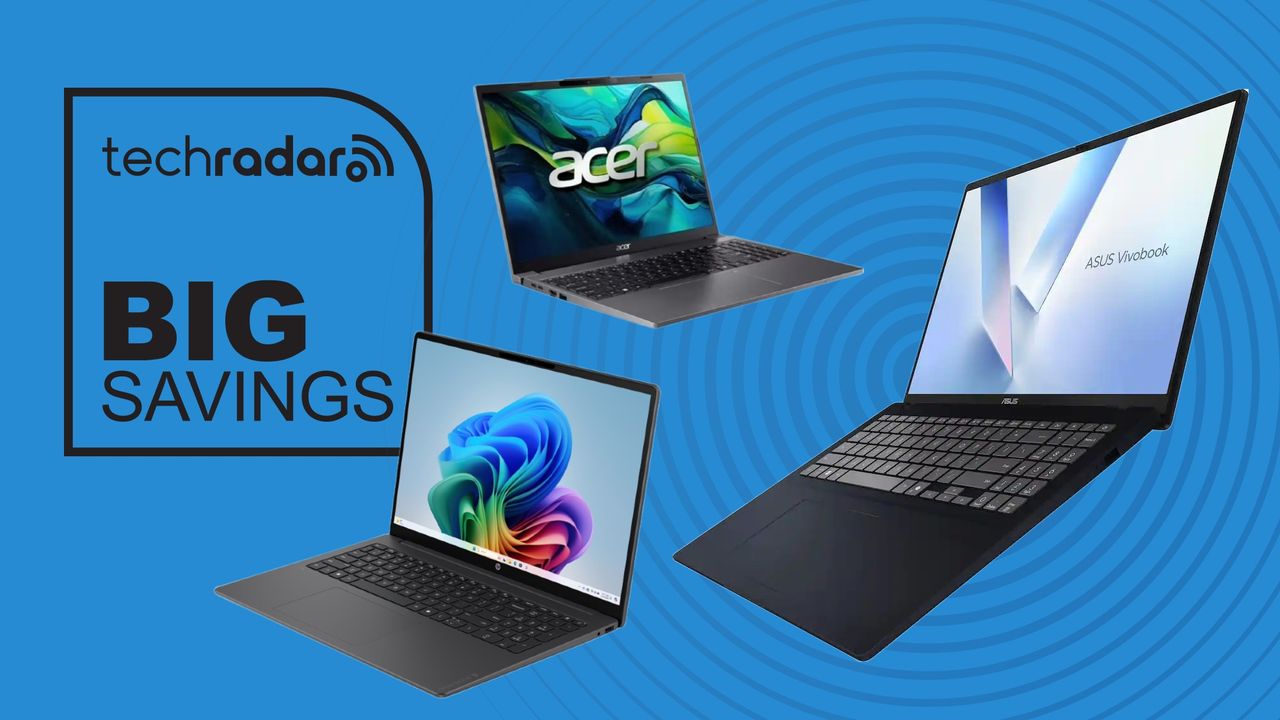
Fortunately, you don’t need a massive budget to save your sanity. After scouring Amazon, Dell, Lenovo, and Newegg, I found that new, name-brand 16GB Windows laptops with actual decent processors under $500 are nearly extinct.
However, these three incredible exceptions are live right now — but you’ll have to act fast, as one is a major clearance deal.
Advertisement
Best 16GB laptops under $500
Why buy it: This machine sports the fastest CPU of the three. Because of its smartphone-style architecture roots, it can easily squeeze out 20 hours of battery life — enough to let you leave the charger at home. It features a spacious screen and a dedicated numeric keypad, making it perfect for students, freelancers, and spreadsheet warriors. At just over $500, it’s a total steal when you consider HP sells the lesser 256GB version for $750.
Why buy it: This is a remarkably capable workstation masquerading as a budget notebook. Originally priced at $750, Best Buy is actively clearing these out for just $501 (compared to $659 at Newegg). The Ryzen AI processor is an absolute beast for multi-tasking and light content creation, though it won’t quite match HP’s legendary all-day battery life. Snag this one quickly before clearance stock dries up.
Advertisement
Why buy it: If you want the absolute lowest price tag, this is it. While it has a smaller 256GB SSD and shorter battery life than its rivals, it still holds its own in raw performance thanks to fast DDR5 RAM and a reliable Intel i5 chip. Even better? Unlike most modern budget laptops, you can upgrade its internal components down the road. Walmart has this marked down to $480, easily beating Amazon’s $540 price tag.
The verdict
Please don’t buy a cheap 8GB machine just to regret it the moment you power it on. Whether you choose the ultra-efficient HP Snapdragon, the powerhouse Asus on clearance, or the wallet-friendly Acer, upgrading to 16GB of RAM is the single smartest tech move you can make today.
Advertisement
I couldn’t find any new, branded Windows laptop with 16GB RAM and a decent CPU (no N-series, no Core i3, no older tech) from Amazon, Dell, HP, Lenovo or Newegg. I have focused only on Windows 11 laptops rather than Chromebook ones.
I’m not the first to say this, but it’s a strange and heartbreaking time to be a teacher and parent of young children.
As a recent transplant to New Mexico, I admire the ways the state invests in children, regardless of their identities. Seeing these state policies in action has changed my perspective and made me think differently about what students deserve and how much better things would be if we chose to care for students and families more consistently.
There are days when my own children are crawling into my lap with a book while I continue to process footage of children suffering in conflicts on the other side of the world. My high school students are writing the kind of poetry that leaves me speechless, even as I privately wonder about their career options as artificial intelligence receives more investment than the arts. Yet, my experience in New Mexico has shown me that another approach is possible.
I have a unique vantage point, both as a parent and an educator who sees these challenges reflected in the lives of my students and their families. My local school district in New Mexico has yet to pivot to hybrid learning in response to the palpable fear parents felt, while the actions of federal agents created widespread fear in their community. My state is not banning books and restricting curricula. Instead, as a recent transplant to the state, I’m in awe of the ways New Mexico invests in children and our more vulnerable residents.
Advertisement
After the 2024 election, a shockwave swept through my school as students grappled with what another Trump presidency would mean for their futures. At the performing arts school where I teach, we have a high percentage of queer and trans students, a stark contrast to my previous school in California, where most LGBTQ+ students often chose to remain closeted until well after graduation. I grieve for what my previous students lost when they did not acknowledge or affirm their queer and trans classmates. In English class, they missed robust discussions; the depth their queer and trans peers bring to literary discussions, while leveraging queer theory, translates into highly analytical and more engaging coursework. In the scope of a school day, there were countless other ways all students missed a more complete experience, while their queer and trans peers chose safety in an environment hostile to their identities.
And while New Mexico is much less hostile to trans residents, I still can’t imagine what it would be like to be growing up in a world that constantly demands you to defend and fight for your humanity. Guaranteed care by the state means nothing if authority figures are consistently exposed to negative messaging about transgender people or if your lack of insurance prevents you from getting the life-saving care you need.
And yet, trans students in New Mexico are able to attend school in an environment with teachers who are largely committed to affirming a variety of gender identities, select curriculum that allows LGBTQ students to see themselves, bond with accepting and encouraging peers from across the gender spectrum, and learn from LGBTQ teachers who embody a hopeful future of what it means to be your full self in your career. This is all possible when a school doesn’t just accommodate gender and sexual diversity, but embraces it. Extensive research confirms the ways in which affirming environments like ours can be life-saving for LGBTQ teens, especially trans students.
Earlier in my career, I felt optimistic about my queer and trans students’ futures. Today, seeing my trans students grapple with the new political realities has renewed my commitment to making an optimistic future visible for them. In a past article, I reflected on my role as a teacher in presenting a hopeful future for my students during unhopeful times. There is no one for whom this is more crucial than our queer and trans students.
Advertisement
Ultimately, I wonder what it would look like for our world to care about children as much as the state of New Mexico does. What will happen when all children can attend high-quality early childhood education without adding to the financial burden of a growing family? What does it look like when gender affirming care is protected by law? Or when our lawmakers prohibit book and curriculum censorship? Or when we finally decide that school shootings do not have to be a certainty of American life?
I know these questions will remain abstract while we watch students as young as Liam Ramos fear for their lives. But we cannot have a different future if we are not imagining a better one in the present. I’m thankful for my students, past and present, who encourage my imagination.
This story is part of an EdSurge series chronicling diverse educator experiences. These stories are made publicly available with support from the Learning Commons. EdSurge maintains editorial control over all content. (Read our ethics statementhere.) This work is licensed under aCC BY-NC-ND 4.0.





























































You must be logged in to post a comment Login