If your Playdate wishlist is anything like mine (endless), here’s a good excuse to actually go ahead and free some of those games from limbo: Panic is running a sale across the Playdate Catalog to celebrate its three-year anniversary. Sure, the majority of Playdate games are pretty cheap as is, but they can still add up when you’re on a wild purchasing spree. Ask me how I know! The sale started on March 5 and goes until March 19 at 1PM ET (10AM PT), so take advantage of the discounts while you can.
There are 423 games available in the Catalog now, according to Panic, so if you’re having trouble deciding on which you should go for, I’ve got you covered with a few recommendations right here.
Season Two
If $39 felt like too much to drop on Season Two when it came out last summer, now’s the time to get it. Playdate’s second season had only half the number of games as its first, but it still felt like a much stronger collection. Each of its 12 games is really solid, and there’s plenty of variety in terms of genre and style, from puzzles and hours-long adventures to fast-paced action games that are great for bursts of intense play. And, it comes with Blippo+ — an oddball cable TV simulator that’s unlike anything out there right now.
All of these games are worth playing, but there were definitely some standouts from the bunch: The Whiteout, a post-apocalyptic adventure that’ll surely hit even harder now considering the winter we’ve had; the puzzle platformer Taria & Como; the arcade action game Fulcrum Defender; the climbing adventure, Tiny Turnip. I also really enjoyed Dig! Dig! Dino! for something on the chiller side.
Outside Parties
I have not been able to shut up about this game since it came out. It’s unique, it’s creepy, it’s completely engrossing and it really pushes the limits of what the Playdate can do. Outside Parties is a horror scavenger hunt, presenting you with one massive picture to scrutinize and find hidden scenes within, using the crank to adjust the brightness constantly so you can find anything that may be buried in shadow. As you find these targets, more and more of the game’s story comes to light through eerie audio clips. It is such a cool experience and the atmosphere of it all is incredible. You’ll get many hours of playtime out of this one too, with over 150 targets to find and lots of lore to uncover.
Crankstone
A full-blown western for the Playdate! Crankstone is a gallery shooter with minigames mixed throughout, and between the aesthetic, the music and the activities, it’s a lot of fun. You can choose the story mode to get right into the shooting and defending the town from outlaws, or head to the saloon to pick from the handful of mini games individually, including some fast-paced “spot the correct card” deck shuffling games and a few mimicry games involving the crank. It’s like a wild west theme park crammed into the Playdate, which is to say, it’s wonderful.
Echo: The Oracle’s Scroll
This is one of my all-time favorite Playdate games. Echo: The Oracle’s Scroll is a metroidvania without the usual combat, focusing entirely on exploration and puzzle-solving in a vast network of subterranean kingdoms. In this game, the Blight has forced civilization underground, and you play as a child who has been sent on a mission to deliver a scroll from the bottom-most territory, where the humans live, up to The Archives.
There are all sorts of treacherous environments underground, including magma lakes and areas filled with hostile vegetation, making for what is at times a challenging platformer that requires lots of creativity to make your way through. The tone is a bit somber, but quirky characters — like a frog prince with a bouncy belly — keep things from getting too dark.
Advertisement
Carte Blanche
This one’s for lovers of classic card games. There are six games in this virtual card game parlor (which is run by a bird named Blanche): Cribbage, Gin Rummy, Spades, Cassino and Spite & Malice. It’s great for if you already know what you’re doing, but I found Carte Blanche to be a really good introduction to these games for absolute beginners too, thanks to the easy-to-follow tutorials. When you win games, you’ll be rewarded with coins that you can spend at Blanche’s slot machine, which is stocked with little trinkets she’s collected.
Castle Kellmore
Castle Kellmore absolutely rules. This first-person action game puts you in a series of mazes where you have to fight off floating-head-style monsters as you hunt around for keys and try to find the doors and portals to your escape. There are sixteen levels, and upon finishing each one you’ll get a little summary of how long it took you to complete that area and what percentage of the level’s enemies you killed. I also really get a kick out of the sounds in this game. The enemies slurp and squelch, and your character will let out a hilariously passionless, “Ah” or “Ooeuugh” after picking up a health boost or getting injured. Great for fans of dungeons!
Piña Rollada
If you’ve ever played any of the Super Monkey Ball games, the gist of this one should be pretty familiar: roll the ball through the course and collect all of the fruits before reaching the exit. Don’t fall off the edge, and do it all in as little time as possible. Piña Rollada makes use of the Playdate’s accelerometer, which means you control the ball’s movement by tilting the console (there is also the option to use the D-pad instead). The courses start getting tricky pretty much right away, with thin paths that don’t have any guardrails, obstacles to avoid and moving platforms. And, just going near the exit will result in the ball getting sucked in, so you have to keep that in mind as you collect any surrounding fruits if you don’t want the level to end prematurely.
This is another one of those games that is both frustrating (in the fun way) and totally addicting. Expect to yell a lot.
Other games to try
These are just the games I’ve been enjoying lately, but there are tons of other Playdate games worth checking out during the sale, like these cheese games and Spilled Mushrooms. And if you need even more recommendations, take a look through our list of the best Playdate games, where you’ll find gems like Summit and Bwirds. There are quite a few I’m planning to finally spring from my wishlist too, including The Shape That Waits.
Update, March 15 2026, 7:15 PM ET: This story has been updated to include additional game recommendations.
Reliable technology now rivals pay as a core workplace expectation
Meeting failures continue disrupting workflows across both hybrid and office environments
Time loss from technical issues steadily erodes productivity during routine meetings
The modern British workplace has arrived at an uncomfortable crossroads where employees now rank reliable technology almost as highly as their monthly pay, new research has claimed.
A report from Owl Labs found good technology access is important to 89% of UK workers, placing it just behind compensation at 92% and a supportive manager at 91%.
This near-tie reveals a striking reality: seamless digital tools have become non-negotiable for the workforce.
Technical failures have increasingly become the primary source of frustration for workers participating in hybrid meetings across different environments
Three in four UK employees report experiencing challenges during these interactions, with 79% admitting they lose time to technical difficulties.
Advertisement
Audio echo or distortion affects 78% of workers, while 74% find themselves missing crucial visual cues.
“When meeting technology fails, it doesn’t just cause mild annoyance — it undermines wellbeing and derails collaboration,” notes Frank Weishaupt, CEO of Owl Labs.
Sign up to the TechRadar Pro newsletter to get all the top news, opinion, features and guidance your business needs to succeed!
The report found the average worker wastes six and a half minutes per meeting simply getting equipment to function properly.
Advertisement
Younger employees, despite their reputation as digital natives, are not immune to these struggles – 82% of Gen Z and 79% of Millennials report time lost to tech issues, compared with 73% of Gen X and 72% of Boomers.
Even more surprisingly, full-time office workers face the greatest difficulties, with 83% experiencing technical delays versus 77% of hybrid workers.
The physical office, supposedly designed for productivity, has become a source of unexpected friction, and to tackle these issues, employers are significantly investing in new hardware and AI tools.
Advertisement
Over four in five workers say their organisation made office changes in 2025, including the introduction of AI tools (42%), increased IT support (38%), and upgraded meeting room equipment (35%).
Three-quarters of employees report that their company encourages AI usage. However, this spending spree has not yet solved the underlying problem.
“The UK is at a turning point,” Weishaupt adds. “The real value comes when those tools are intuitive, inclusive and trusted.”
The report noted that instead of investing in smarter meeting technology that alleviates setup challenges, employers are banking on systems that add further complexity.
Advertisement
This suggests employers may be misreading what workers actually prioritise in their daily workflows.
For a workforce already stuck in a cycle of frustration, progress depends on removing friction rather than adding more software layers.
A supportive manager cannot fix a broken audio connection, but a properly functioning camera and microphone just might.
Anthropic is no longer offering a free ride for third-party apps using its Claude AI. Boris Cherny, Anthropic’s creator and head of Claude Code, posted on X that Claude subscriptions will no longer cover using the AI agent for third-party tools, like OpenClaw, for free. As of 3PM ET on April 4, anyone using Claude through third-party apps or software will have to do so with an extra usage bundle or with a Claude API key, according to Cherny.
Most of Claude’s workload may come from simple user questions, but there are those who use the AI chatbot through OpenClaw, a free and open-source AI assistant from the same developer as Moltbook. Unlike more general AI solutions, OpenClaw is designed to automate personal workflows, like clearing inboxes, sending emails or organizing calendars, but leans on external large language models, including Claude, ChatGPT and Google Gemini.
Cherny replied to X users that this change is about engineering constraints and optimization. “We’ve been working hard to meet the increase in demand for Claude, and our subscriptions weren’t built for the usage patterns of these third-party tools,” Cherny explained on X. “Capacity is a resource we manage thoughtfully and we are prioritizing our customers using our products and API.”
If OpenClaw users still want to use Anthropic as its LLM, they will have to buy a usage bundle, which are currently discounted, or switch to another AI integration like xAI, Perplexity or even DeepSeek. Of course, Anthropic has its own alternative, which tackles some similar tasks as OpenClaw, called Claude Cowork.
LinkedIn might be doing a lot more than just showing you job posts and connection requests. If the latest reports are anything to go by, it’s also quietly peeking into your browser setup.
LinkedIn
A new investigation is raising serious privacy concerns, claiming the platform is scanning thousands of Chrome extensions and collecting device-level data in the background. And yeah, it’s as uncomfortable as it sounds.
LinkedIn may be scanning thousands of your browser extensions
According to findings from the BrowserGate report, LinkedIn allegedly injects hidden JavaScript into its website that scans users’ browsers for installed extensions, over 6,000 of them. The way it works is surprisingly simple (and a bit sneaky). The script checks for known extension IDs by attempting to access specific files tied to those extensions. If the file responds, LinkedIn knows the extension is installed, all happening silently in the background without any visible prompt.
LinkedIn gathering information about visitors’ devicesBleepingComputer
But it doesn’t stop there. Independent testing by BleepingComputer further confirmed that the platform is also collecting detailed device information like CPU specs, memory, screen resolution, language settings, and even battery status; essentially building a unique “fingerprint” of your device. And here’s the kicker: because LinkedIn profiles are tied to real identities such as your name, job, and company, this data could potentially be linked back to you directly, making it far more sensitive than typical anonymous tracking.
Why is this raising serious red flags?
The biggest concern isn’t just the data collection, but how quietly it’s happening. Users aren’t clearly informed, and there’s no explicit consent before the scanning begins. There’s also the issue of what this data reveals. Installed extensions can hint at sensitive details like job hunting, finances, or personal interests, making this kind of tracking far more intrusive than it sounds.
Souvik Banerjee / Unsplash
LinkedIn says it’s for security, but critics argue it goes too far. And honestly, it leaves you wondering how private your “professional” life online really is.
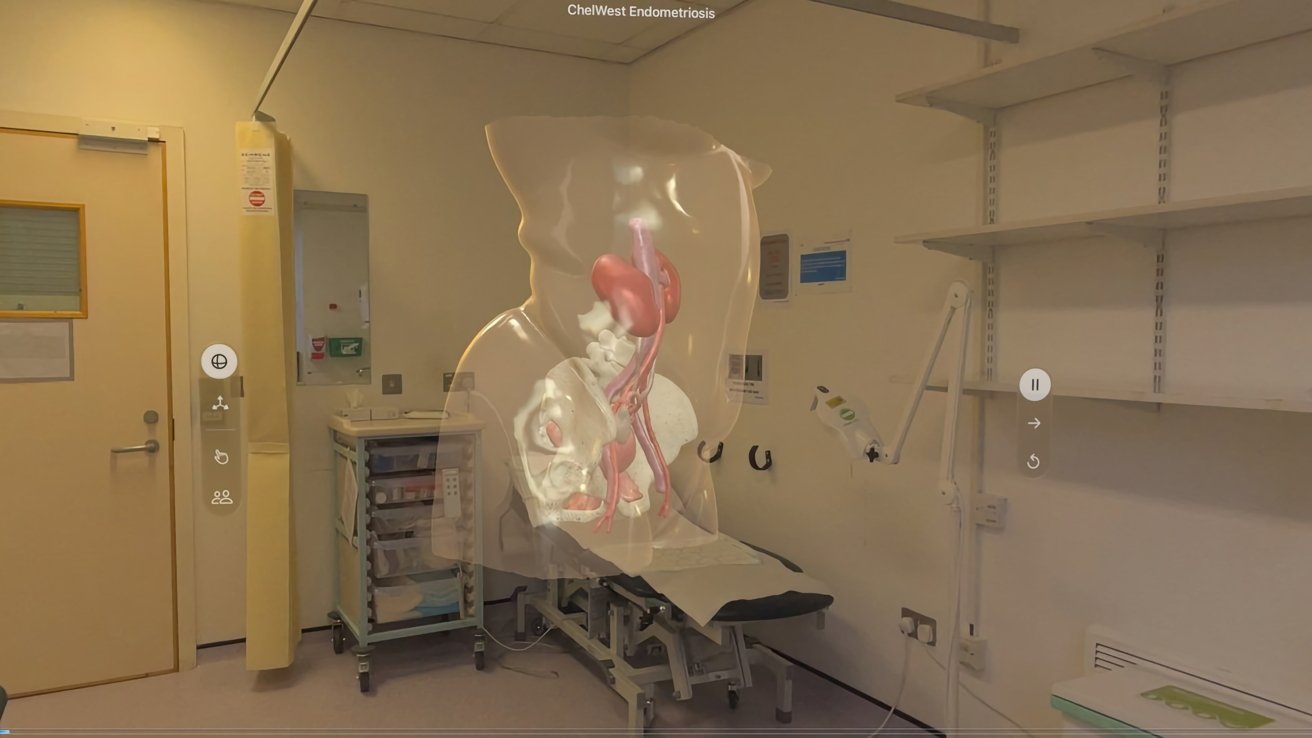
The Apple Vision Pro is being used to help patients in a UK hospital visualize upcoming surgeries, expanding the headset’s use in medicine.
A patient view from the Apple Vision Pro in a pre-surgery consultation – Image credit: Chelsea and Westminster Hospital
One of the problems with medical procedures is explaining what needs to be done to the patients, in a clear and understandable manner. To help some patients suspected of having endometriosis, the Apple Vision Pro is coming into play. An app developed by Medical iSight is being used in the Chelsea and Westminster Hospital, London, UK, in preparation for surgery, reportsBBC News. Patients wear an Apple Vision Pro, and are shown an AR model in pre-surgical consultations. Continue Reading on AppleInsider | Discuss on our Forums
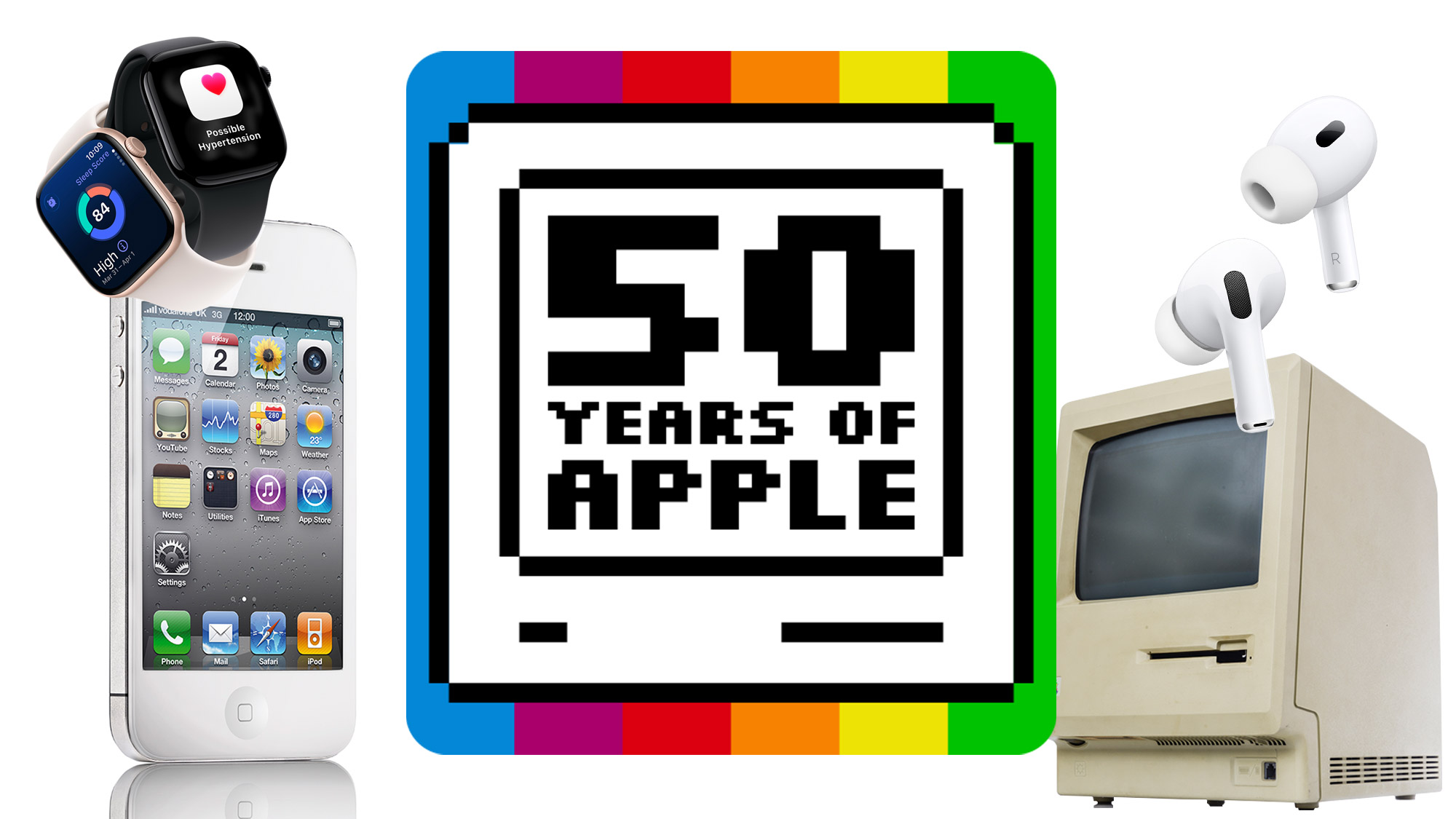
We’re celebrating Apple’s 50th birthday with a week of content about the tech giant. It covers everything from personal recollections from our writers to the greatest — and worst — Apple gadgets as voted by you, and you can read it all on our 50 years of Apple page.
Apple might be responsible for some of the most famous and successful products in human history, but not everything the company touches turns to gold.
While billions of iPhones and millions of iPods and iPads have been sold, there’s a rogues’ gallery of Apple creations that had far less impact and ended up being consigned to the footnotes of tech history.
Advertisement
Some you might have heard hushed mentions of, while others barely exist on the margins of the internet, but there’s a good chance you’ve never seen any in the flesh. How many do you remember?
Article continues below
1. Apple Silentype (1980)
(Image credit: http://www.allaboutapple.com/)
Apple’s image has changed so much since it launched the iPod that it’s hard to imagine it making something as prosaic as a printer, but the Silentype wasn’t really an Apple invention at all.
It has become a bit of a cliché that Apple just takes existing products and packages them up in a more appealing way, but that is quite literally what happened with the Silentype.
Most printers at the time were big, noisy and expensive, but a company called Trendcom had a thermal printer that was much smaller, quieter and more affordable. Apple took the Trendcom 200, made some internal tweaks that offloaded some of the work to software inside the Apple II, and stuck an Apple logo on the front.
Advertisement
The company stopped making printers at the end of the nineties when Steve Jobs returned and it began the move towards more glamorous products, which explains why people have forgotten about the Silentype and its successors, but it was an early example of Apple’s ‘think different’ ethos in action.
Sign up for breaking news, reviews, opinion, top tech deals, and more.
2. Apple PowerCD (1993)
(Image credit: Blake Patterson)
The PowerCD was a bit like a supercharged Sony Discman, but significantly less successful.
Advertisement
Essentially just a rebadged Philips CDF-100, the back of the box promised three separate uses. Plug it into a Mac and it would function as an external CD-ROM drive; connect it to your TV and you could use it to view your holiday snaps from a disc on the big screen; or plug in a pair of headphones or speakers and it could play music CDs.
The PowerCD could also run off six AA batteries, which technically meant you could take it out and about, but with its bulky frame and pointed corners you’d have to be wearing clown trousers for it to qualify as pocketable.
Its lack of a singular focus seemed to make it a hard sell, though, and it suffered from being a jack of all trades but master of none. A couple of years later it was discontinued.
Advertisement
3. Apple QuickTake 100 (1994)
Kodak designed the Apple QuickTake 100 and the 150 (above), whereas the 200 model was designed by Fujifilm. (Image credit: Getty Images / Frederic J. Brown)
Back in the early ‘90s, Apple was not the world-conquering tech behemoth it is now, so taking a punt on an entirely new product was a brave move. The QuickTake 100 was one of the first digital cameras aimed at Joe Public and if it doesn’t look very typically Apple to you that’s because Kodak was responsible for the binoculars-meets-projector design.
With a 0.3MP CCD sensor and only enough storage for eight photos at the highest resolution (640×480), the convenience offered by the QuickTake didn’t make up for the lack of quality in comparison to a traditional film camera.
Still, Apple released three different models in the QuickTake range before Steve Jobs culled it in 1997. Work on the iPod project began shortly after, which was the start of the long road to the iPhone — a product that has arguably contributed to the downfall of the compact camera more than any other, even if the indestructible compact is still making a comeback of sorts.
Advertisement
Did you also know Apple’s forgotten digicam secretly lives in your iPhone today? A feature called QuickTake is built into the phone’s shutter button, and let’s you quickly shoot both videos and a burst of photos.
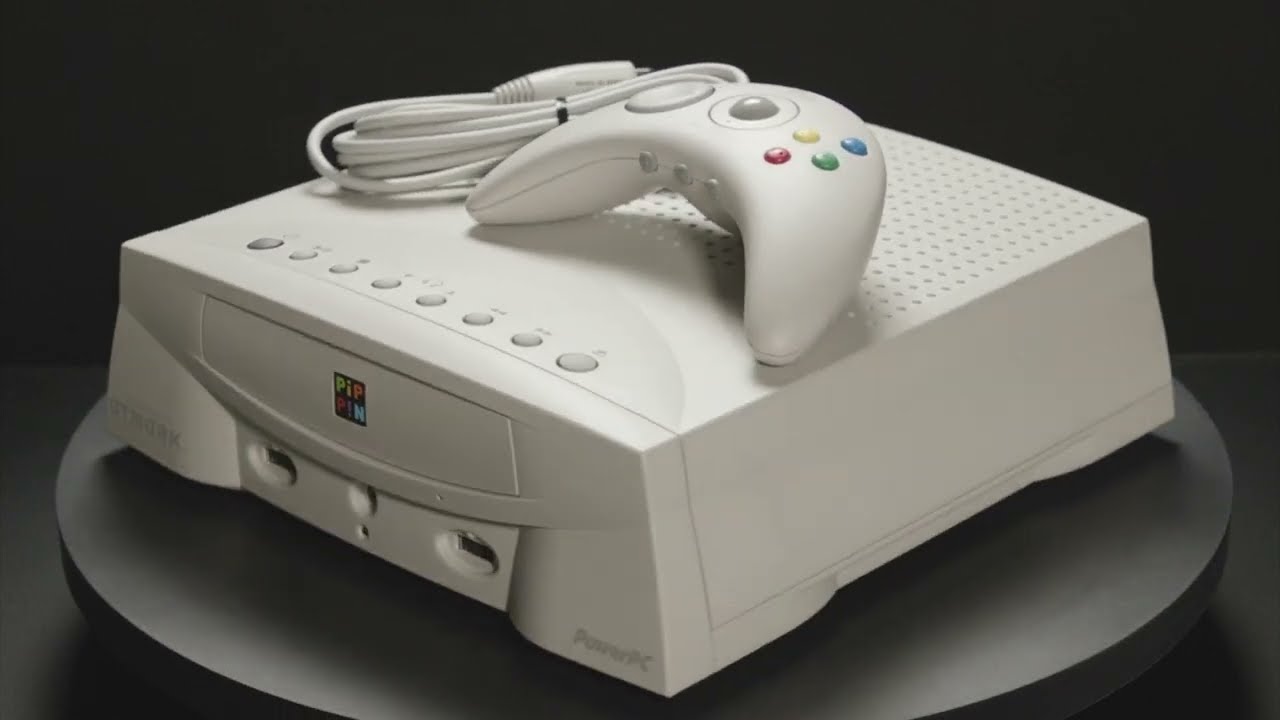
4. Apple Bandai Pippin (1996)
Apple Pippin (1996) video game console platform – YouTube
Another one of Apple’s mid-nineties punts before Steve Jobs came back to steady the ship, the Pippin was designed by Apple but actually released by Japanese toy giant Bandai (of Tamagotchi fame).
Based on a Macintosh Classic II, Apple tweaked the fundamental hardware and Bandai packaged it in a very nineties-looking chassis. In some ways the Pippin was ahead of its time, with internet connectivity and a wireless controller called the Applejack.
But with competition from the Nintendo N64 and original Sony Playstation, plus a significantly higher asking price than both, and fewer games to play on it, the Pippin was always facing an uphill battle.
Advertisement
It’s said that only 42,000 Pippins were sold worldwide, mainly in Japan, so it’s no surprise that Bandai was the first and last company to license its tech from Apple, and even less surprising that most people don’t even know it ever existed.
Rumors of a touchscreen MacBook have been circulating for ages, and may finally come to fruition this year, but did you know Apple has already made a touchscreen laptop of sorts?
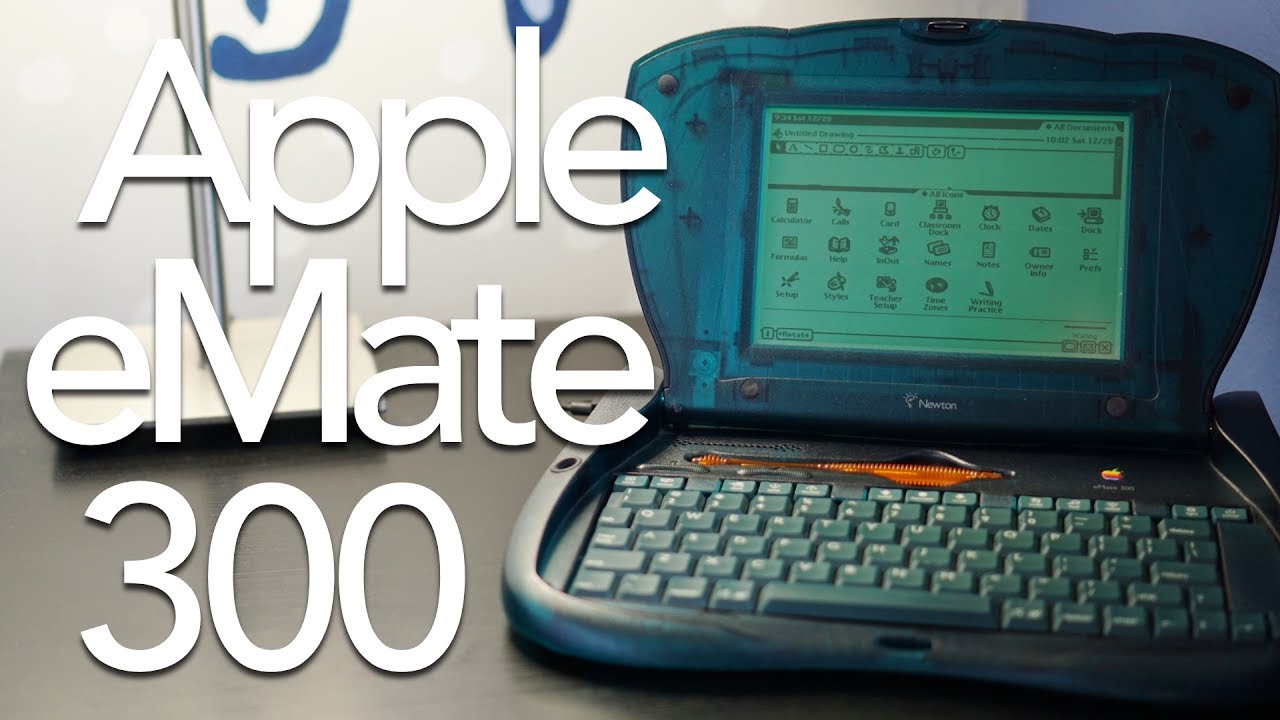
Over a decade before the first keyboard accessory was released for the iPad, Apple launched the eMate 300 — a cross between a PDA (that’s a Personal Digital Assistant, not a Public Display of Affection) and a notebook that was designed by Jony Ive. It had a 6.8-inch greyscale screen, ran the same operating system as the Newton, and could last a whopping 28 hours on a single charge. Those were the days, eh?
The eMate 300 lasted less than a year, another victim of the great Jobs purge, but you might recognize its translucent shell from the iMac G3, which was released just a year later and had a huge influence on tech aesthetics, helping to turn Apple’s fortunes around in the process.
You’d have to have been living under a Microsoft Zune for the past 25 years to not know what an iPod was, but did you know that it was briefly possible to buy one with an Hewlett-Packard logo on it?
HP was known for making PCs, printers, scanners and other boring office stuff, but at CES in 2004 CEO Carly Fiorina announced that the company would be launching a range of branded iPods with an exclusive blue finish.
In return, HP would pre-install iTunes on all of its desktops and laptops. The blue version never made it to market, although you could download and print your own ‘tattoos’ for it from the HP website instead. No, we didn’t do that either.
Advertisement
The partnership was short-lived, with HP announcing it was over just 18 months later, but if the reaction to U2’s 2014 album Songs of Innocence being added to all iTunes libraries is anything to go by, a lot of people would probably rather own an HP-branded iPod than one with the names of Bono and co inscribed on the back.
6. Apple iPod Hi-Fi (2006)
(Image credit: Getty Images / Peter DaSilva)
There’s an old urban myth in the UK that you’re never more than six feet away from a rat — and back in 2006 it felt like you could say the same about iPod docks.
Apple released one of its own in February of that year and promised to “redefine the home stereo system”, with Steve Jobs even claiming he was ditching his actual hi-fi in favor of one.
Advertisement
The iPod Hi-Fi was certainly striking to look at, although once somebody points out that it looks like a milk crate it’s hard to shake that image. Still, as our three-star review pointed out, there was “no way that any sensible person would mistake this for even a budget hi-fi or mini system.”
It was discontinued about 18 months later and Apple didn’t make another speaker until the HomePod in 2018.
7. Apple Macintosh TV (1993)
(Image credit: Shutterstock / Anton_Ivanov)
The ugliest Apple product ever made? The Macintosh TV certainly has a strong case for that title — this monstrosity was effectively a 14-inch Sony Trinitron CRT mashed together with a Performa 520 and it was the first Mac that could display a TV / VCR signal.
Advertisement
Unfortunately, the Macintosh TV came with a number of drawbacks that explain why only around 10,000 were ever made in its five-month lifespan. Firstly, you couldn’t sneakily watch TV in another window while you worked. Sadly, you also couldn’t record any of the shows or movies you watched, as it only came with a CD-ROM drive alongside its 160MB hard drive.
It was another case of Apple’s ambitions exceeding the tech of the time, then, but at least it laid the foundations for the Apple TV — and as the first black Mac, it’s also the distant ancestor of the iconic, matte-black MacBook which lived from 2006-2008.
And of course, you can also follow TechRadar on YouTube and TikTok for news, reviews, unboxings in video form, and get regular updates from us on WhatsApp too.
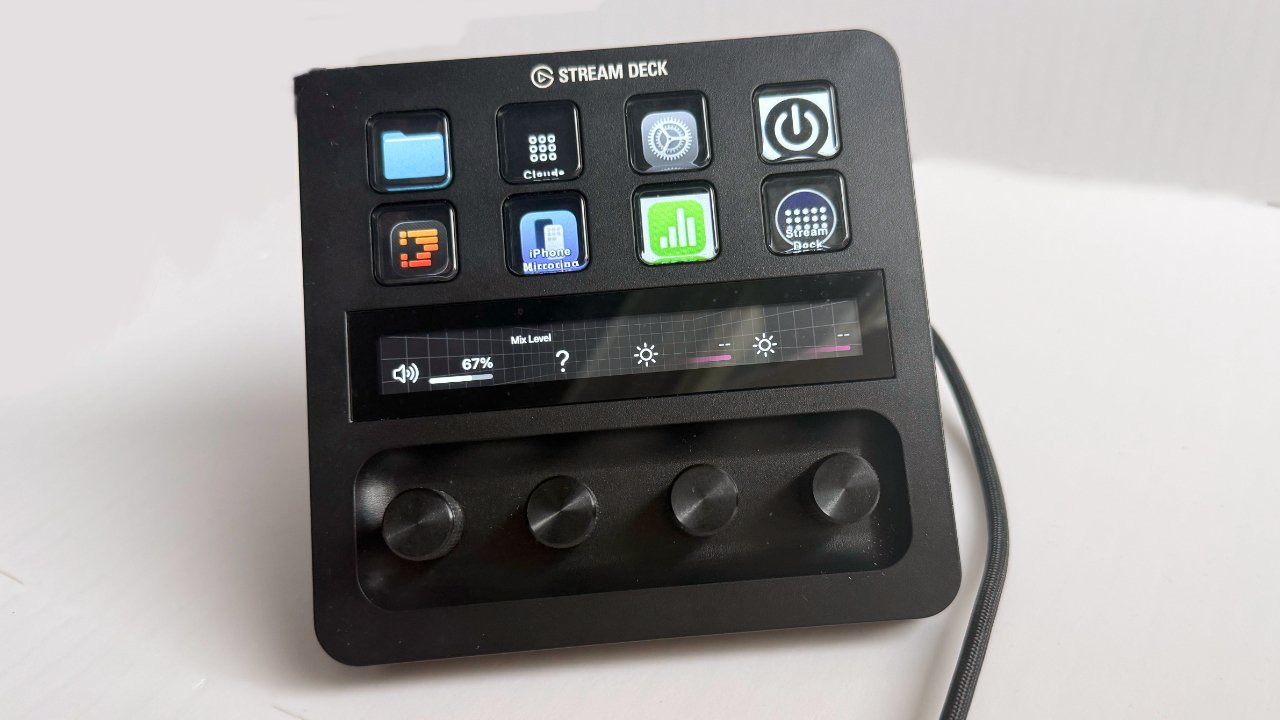
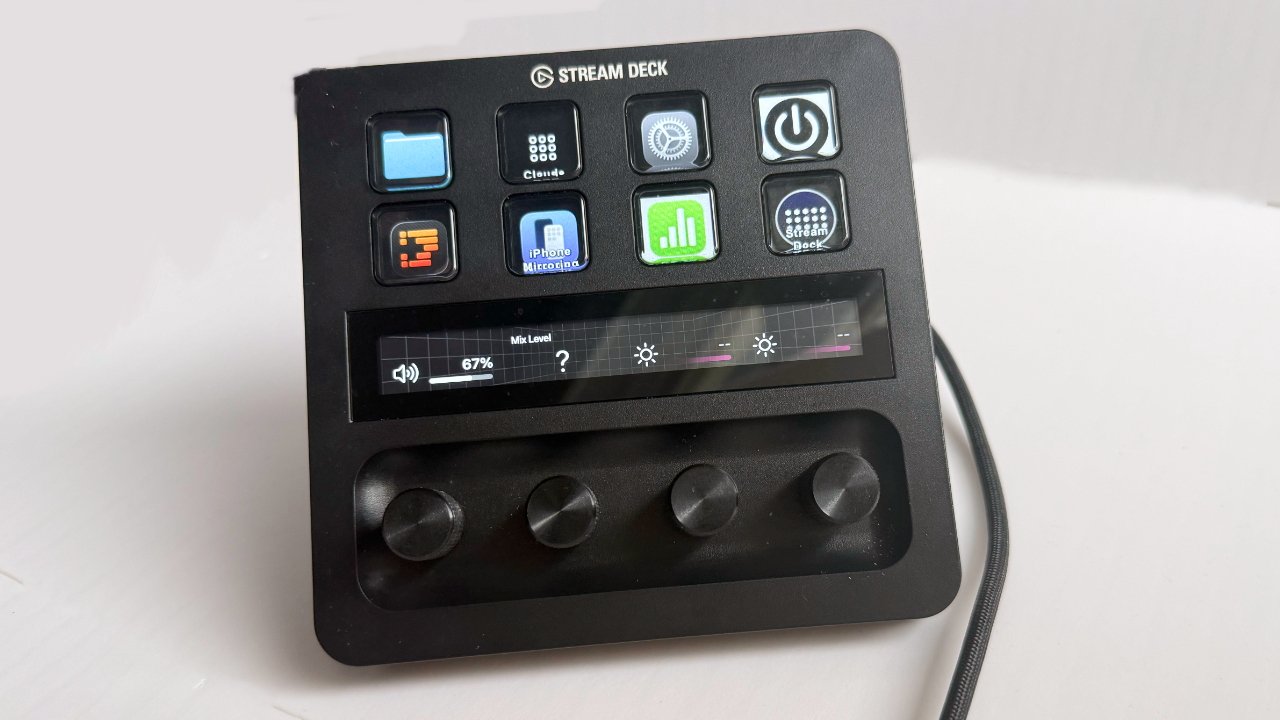
First, you can’t see why you’d ever want a Stream Deck for your Mac, then you try one, and you will never give it back. Out of all the different models, though, the Stream Deck+ is best, and here’s why.
Get a Stream Deck+ and you’ll never use a Mac without one again
Every Stream Deck is a Mac accessory that provides buttons to launch apps, perform entire sequences of tasks, or turn on your smart lights. You connect it through a USB-A or USB-C cable, and the difference in the models is chiefly in how many buttons you get and whether you also have dials. Get any of them. I’ve just set up a button that switches audio between my Mac and my headphones. I have one that opens all the folders for the books I’m writing. Another launches every app I need for AppleInsider, and positions them on the screen where I want. Continue Reading on AppleInsider | Discuss on our Forums
Costco is the ultimate stop for the average shopper to fill their pantry, get a good deal on a set of tires, and even plan an affordable vacation. To shop at the warehouse store or on the company’s website, you must have a membership. Plans start at $65 a year, plus sales tax. Some may balk at the idea of paying for the privilege of shopping, but there are numerous benefits to a Costco membership.
Not only can you stock up on groceries and daily staples, you can also shop in-store or online for everything from diapers to electronics. Even if you don’t have a Costco store nearby, you can take full advantage of the warehouse store’s low prices. Costco’s website offers a large inventory of products that aren’t always available in the store, and with Costco Direct Savings, you can save even more when you bundle items. You can also take advantage of exclusive online deals, and shipping on most items is free.
Advertisement
Costco may not be the first place you think about for new gadgets, and you may not always find what you’re looking for at your local store. But there are plenty of fun options online. Here are four electronics that you can keep an eye out for the next time you stop in for a bulk pack of paper towels or are simply browsing the website for snacks and detergent.
Advertisement
Logitech G Driving Force Racing Simulator Bundle
ZHMURCHAK/Shutterstock
If you own a PlayStation 4 or PlayStation 5 and you love racing games, you may want to check out this racing bundle from Logitech, which includes a steering wheel, pedals, and a shifter. Normally priced at $399.99, this bundle is intended to take your gaming into a fully immersive experience.
The steering wheel and shifter can be mounted to a desk or other surface. The racing wheel, which is made with hand-stitched leather, provides feedback for a realistic feel. The brake pedal is made to simulate a pressure-sensitive brake system and designed not to slip on carpeted surfaces. The programmable dual-clutch system emulates launch assist in games that support this function, and the “H” shifter provides six speeds.
This system is also compatible with Xbox Series X|S or Xbox One and PCs running Windows 11 or Windows 10 or later. Compatible PS4 and PS5 games include Gran Turismo 7, the Need for Speed games, The Crew 2, and even Farming Simulator, should you enjoy driving tractors rather than race cars.
Advertisement
Solar Smart Hummingbird Feeder
You don’t always need to travel to an exotic location to see wildlife. Unless you’re determined to see a polar bear or a crocodile, all you really need is a window and a good pair of binoculars. A cardinal or a hummingbird may not have that same level of excitement, but there are more perks to bird watching than simply boosting your mental health. This simple pastime can help migrating birds, attract pollinators to your yard, and support local bird populations. You can pick up a simple hummingbird feeder at your local gardening shop, but Costco offers a more fun, high-tech option: the Evergreen Solar Smart Hummingbird Feeder. This bird feeder, priced at $114.99 at time of writing, does require a bigger upfront investment, but it boasts a 2K high-definition Wi-Fi camera with a 148-degree view.
This smart feeder has a handblown glass reservoir for easy filling, though some customers do report problems with leaks. The camera pairs with an app that allows you to watch visiting birds on your phone, even when you’re not home. It also has free cloud storage, saving 20-second video clips for three days. Along with the feeder, buyers also get a solar panel and mounting hardware.
Advertisement
Skylight 15-inch Smart Touchscreen Calendar and Organizer
The Skylight Smart Calendar may not be fun in obvious ways, but it can turn mundane tasks into an interactive experience for your entire family. It can showcase memories and help your kids positively interact with chores, routines, and upcoming events they may be looking forward to.
The Skylight Smart Touchscreen Calendar and Organizer has a 15-inch touchscreen and can sit on your countertop or desk or hang on your wall like a typical calendar. This device allows you to track family events, make to-do and grocery lists, and organize schedules. When not in use, you can convert it to a digital photo frame to display your favorite family pictures and videos. Your purchase at Costco includes one free year of Skylight Calendar Plus, which offers import features, meal planning, photo and video screensavers, and a reward system to help make chores more fun for kids. Users can sync multiple calendars into this one device, and reviewers particularly like the photo display feature and its auto-syncing capabilities. Skylight works with Google, iCloud, Outlook, Yahoo, and Cozi.
Advertisement
Singing Machine Ultimate Karaoke Party System
A karaoke machine is arguably the most “fun” gadget included on this list, though public singing is some people’s idea of a nightmare! The Ultimate Karaoke Party System from Singing Machine is a portable machine with Wi-Fi connectivity and built-in music streaming apps, including Apple Music, Spotify, Amazon Music, YouTube, and Deezer. It also has Bluetooth capability and line-in options that allow you to connect to your TV and display your videos on a larger screen.
Advertisement
After you pick your favorite song, you can personalize your performance with 22 voice effects and echo effects. There are two wireless rechargeable microphones so you can duet with a partner, and two additional mic jacks if you want to add additional microphones for a group song. For more fun, a light show synchronizes with the beat of the music. Most reviewers praised the machine’s sound and connectivity, while a few found the app interface lacking. One user called it “fun for the whole family”, and another said the machine is “simply the best I ever bought.”
Advertisement
How we chose these products
PJ McDonnell/Shutterstock
To select “fun gadgets” from Costco, we had to settle on a definition of fun. Of course, the idea of “fun” is subjective and varies from person to person. The feeling is universal, but the experiences, ideas, and even places that bring about that feeling can vary wildly from person to person. Your idea of fun — Disney World, for example — may be another person’s idea of a stressful, expensive day. Some people are thrill-seekers who thrive in high-energy activities like mountain biking, while others prefer quiet or creative hobbies, like reading or crocheting.
Additionally, Merriam-Webster defines the word “gadget” as “an often small mechanical or electronic device with a practical use but often thought of as a novelty.” With that in mind, we sought gadgets that can meet varied definitions of fun. These objects offer more than just function, bringing about enjoyment to some buyers even if it’s not everyone’s cup of tea. We also looked for at least one gadget that may be useful in daily life, combining novelty with practicality.
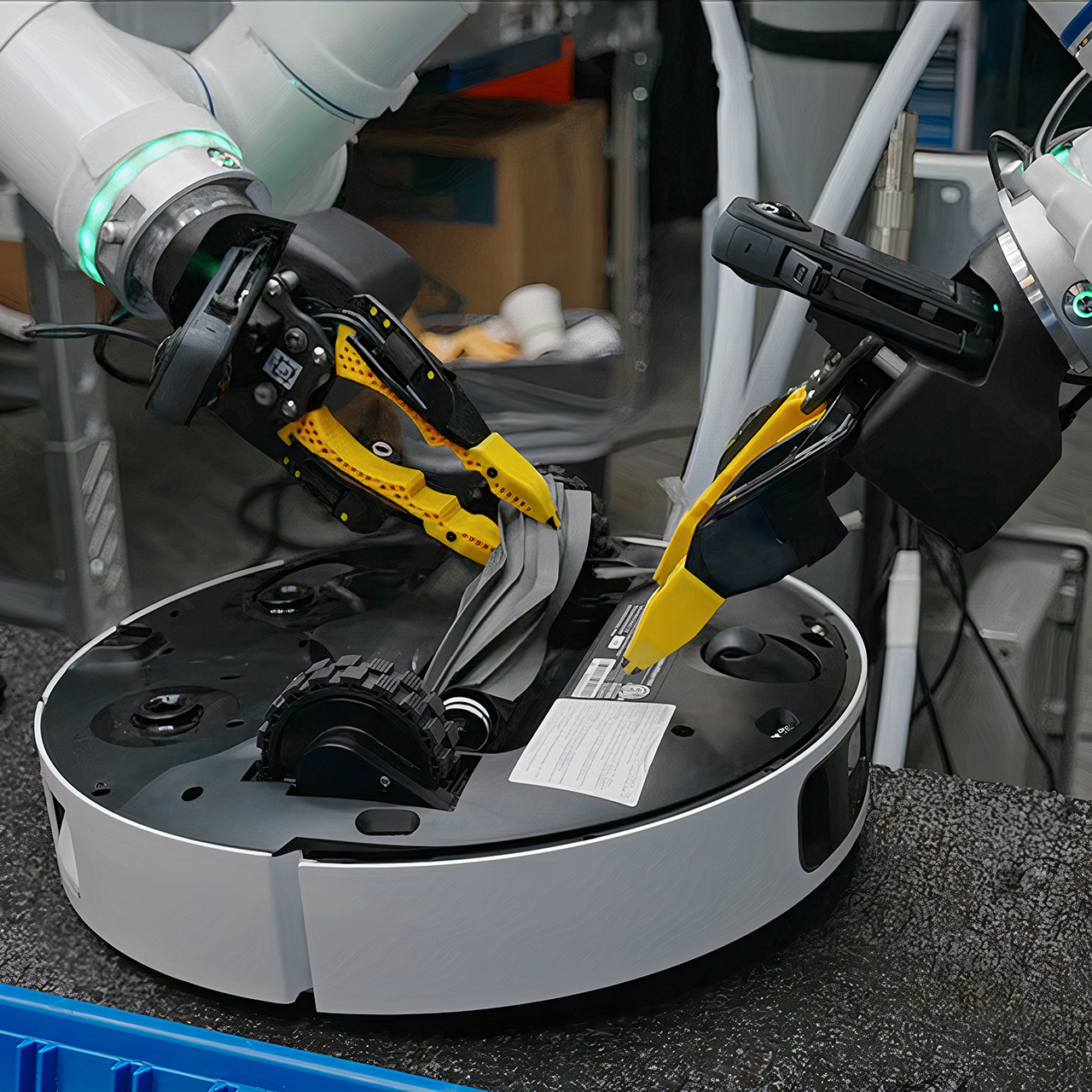
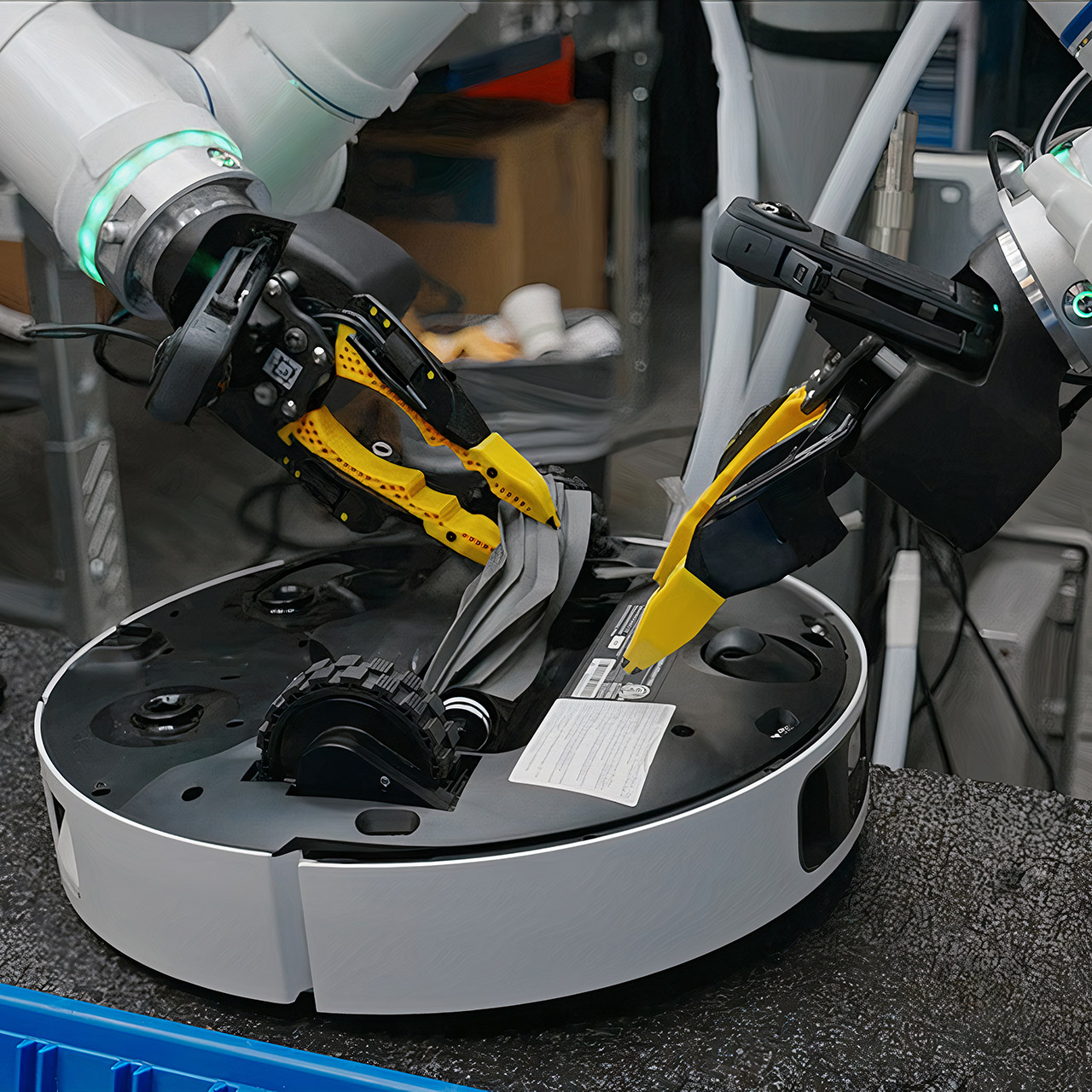
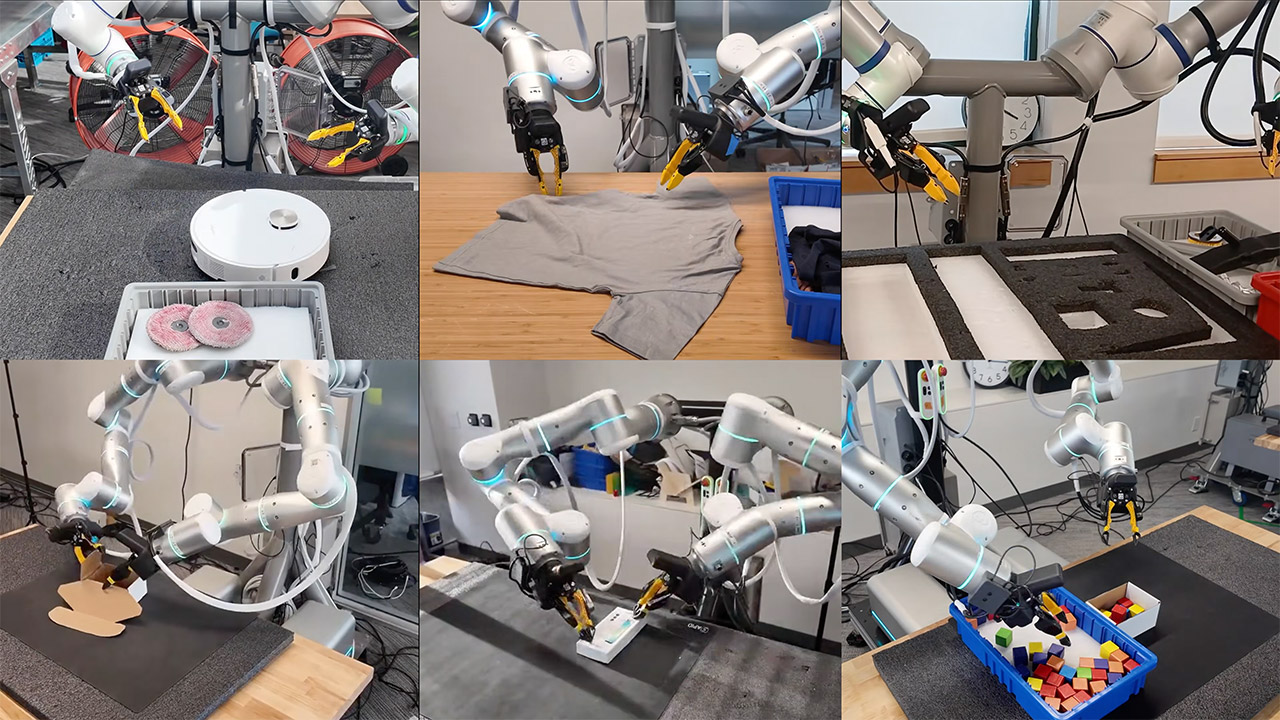
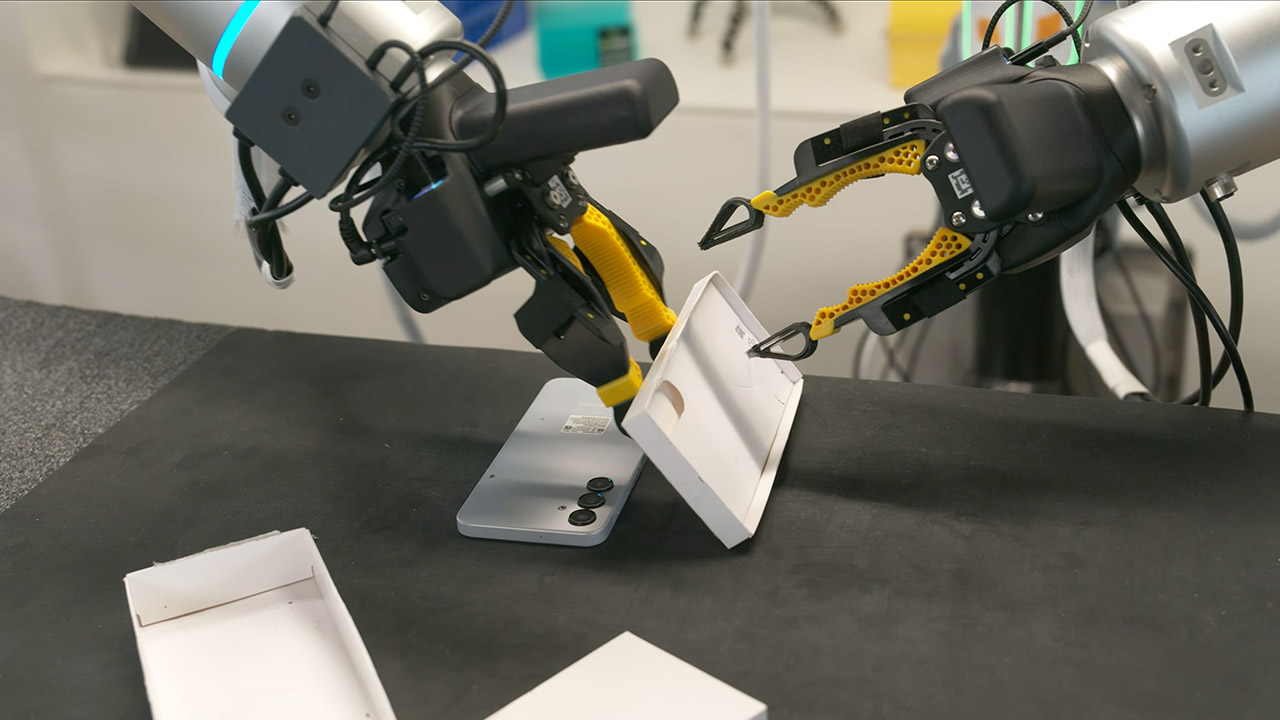
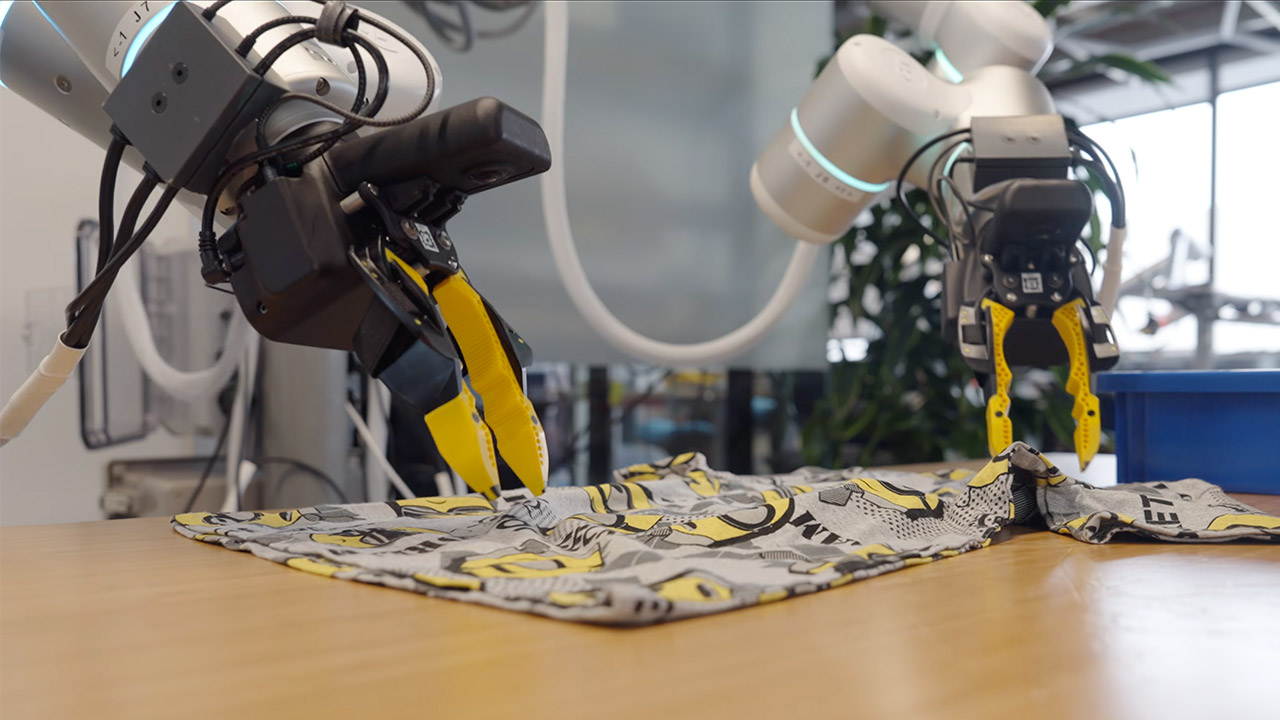
Robots equipped with Generalist AI’s new GEN-1 model have evolved into the ultimate automation workhorses, capable of completing the same simple tasks repeatedly without fail. You can witness in real time as one arm folds shirts row after row, carefully placing each one neatly into a basket, while another robot services robotic vacuums.
It’s only been a few days since Generalist AI introduced GEN-1 to the world, but this startup is already demonstrating how far AI can take robotics in a short period of time. Speaking of which, Generalist AI has only been active for two years, but the amazing work of its three creators gives us a sense of the enormous potential that awaits us here. There’s the one who worked on a key Google robotics project. Another was the creative mind who devised a completely new method of capturing data while observing someone pick up trash with a grabber. Then there’s the guy who worked for Boston Dynamics, the company that created the famously horrifying (but interesting) Big Dog robot. Together, they’ve gathered a lot of backing to pursue the idea that robots could handle the mundane activities of everyday life in the same way that flashy new chat systems handle language.
Sleek & Durable Design: Standing at 132cm tall and weighing only approx. 35kg, the G1 is constructed with aerospace-grade aluminum alloy and carbon…
High Flexibility & Safe Movement: Boasting 23 joint degrees of freedom (6 per leg, 5 per arm), it offers an extensive range of motion. For safety, it…
Smart Interaction & Connectivity: Powered by an 8-core high-performance CPU and equipped with a depth camera and 3D LiDAR. It supports Wi-Fi 6 and…
The key to all of this magic begins with some incredibly cool, and, let’s be honest, slightly strange, strap-on devices worn on their wrists. These effectively transform typical hands into miniature robot grippers, allowing you to perform a variety of normal tasks. Over time, this approach has accumulated an incredible five hundred thousand hours of genuine human interaction, and it’s all from people doing their thing in the real world.
Once that foundation is established, the engineers add a bit of robot-specific practice, as we’re only talking about one hour of robot motions each project, at most. Somehow, that’s all it takes to make this super-smart system that can see its surroundings, and then send out all the action commands it needs to get the job done, and to think, GEN-1 is built directly on top of the last model from just five months ago. It demonstrates how much further they’ve pushed the limits of what’s possible.
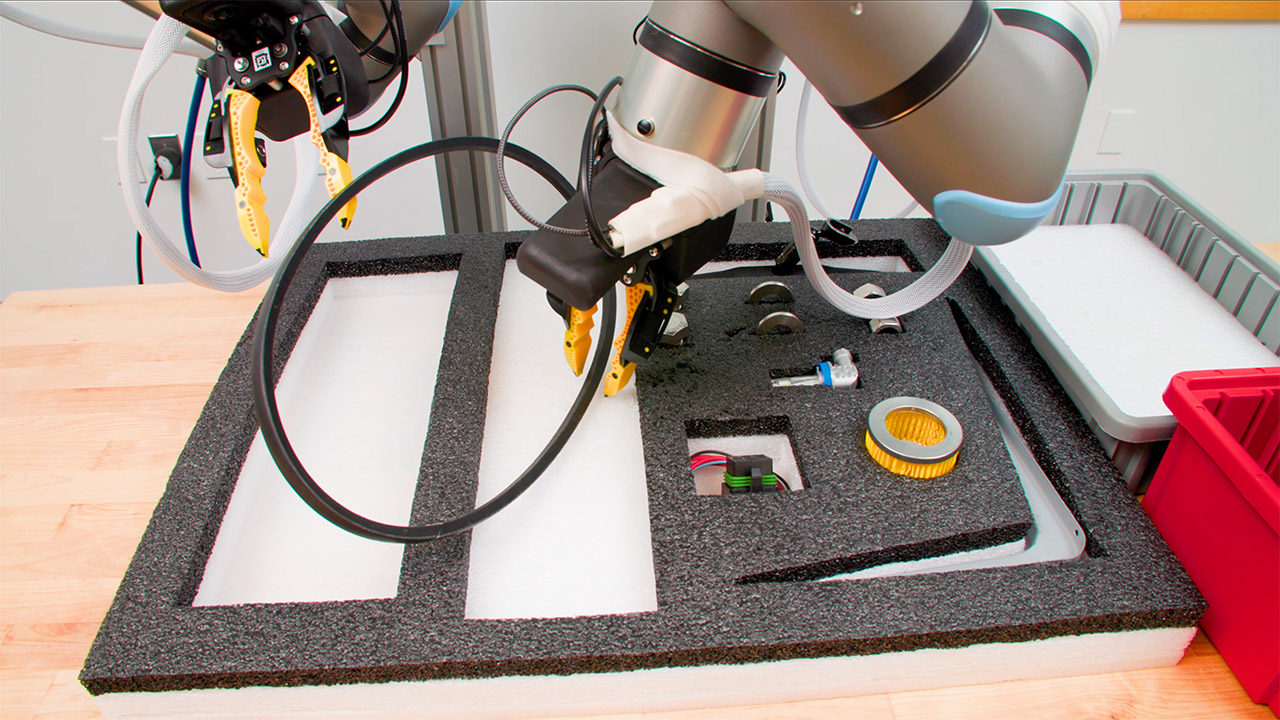
Let’s get to the figures, since that’s what matters in the end. For starters, dependability has improved dramatically. Their previous versions only got the job done approximately 64% of the time, but GEN-1 has increased that average success rate to a solid 99%. In one test, the robot worked nonstop for more than an hour, putting auto parts into kits without a single human hand lifting a finger, while in another, the robot slotted block after block into tidy little kits for an eye-watering 1800 successful cycles. When it came to packing phones, the robot surpassed 100 cycles, demonstrating an incredible level of precision and consistency.
This is significant because, at the end of the day, factories and warehouses are all about machines that simply keep working, day after day, hour after hour, without ever pausing to ask for a break. With GEN-1 at the helm, these facilities can finally rest assured that their machines will complete the task at hand, regardless of the circumstances.
Then there’s improvisation, which is the third element of the GEN-1 puzzle. When something unexpected happens, the robot simply adapts, making adjustments on the go. A washer is knocked out of place, and before you know it, the arm is reaching out with both grippers to nudge it back into place in a clever little trick. Or if a bag becomes caught in the middle of stuffing with soft toys, the machine just jiggles the bag briefly before sliding the item in without disturbance. [Source]
Finalists for the prestigious EY Entrepreneur of the Year programme include Manna’s Bobby Healy, Neurent Medical’s Brian Shields and Sisterly’s three co-founders.
It is a list that always catches the eye. The EY Entrepreneur of the Year (EOY) programme finalists for 2026 have been announced today and there’re some very familiar faces to our readers. According to EOY, the 24 companies featured collectively employ more than 3,000 people, generating revenues of close to €1bn.
It’s little surprise also to see the inclusion of Sisterly and its three co-founders Aoife Matthews, Jennifer O’Connell and Louise O’Riordan. The three seem to have captured the women’s health zeitgeist with their easy-to-use, science-backed ‘The Elevator’ supplement, which is designed specifically for women and was endorsed early by some big names like former star athlete Sonia O’Sullivan.
Advertisement
In total, there are 31 entrepreneurs representing 24 companies from across the island of Ireland shortlisted over three categories.
EOY Finalists – Emerging
Aoife Matthews, Jennifer O’Connell & Louise O’Riordan of Sisterly
Bobby Healy of Manna Air Delivery
Brian Shields of Neurent Medical
Danny Buckley of ADHDNow
Dr Harriet Tracey of Beyondbmi
Jennifer Rock of Skingredients Ltd
Laura McCarthy of Drink Botanicals Ireland
Liam Kearney of The Revive Group
EOY Finalists – Established
Tommy Kearns of Xtremepush
John Corley of Spanish Point Technologies
John Lunn of Lunn’s
Karl Zimmerer of Glanua
Oltian Dervishi of Forte Pespa
Paul Vallely and Clare Walsh of Kukoon
Robin Jones of Golden Bake
Trevor Casey of EPH Controls
EOY Finalists – International
Brian Moloney of StormHarvester
Chris Horgan of Dexgreen
David Brennan of Eastgate Engineering
Dermot O’Shea of Taoglas
Ian Morgan and Sanjay Abraham of XPress Healthcare Ltd
Maire Claire Reid of TST Group
Paul, Gary & Mike Martin of Martin Group
Ronan and Conor Burke of Inscribe
“Entrepreneurship in 2026 looks very different to even a few years ago,” said Roger Wallace, head of assurance & EY Entrepreneur of the Year, Ireland.
“We are operating in a world shaped by geopolitical instability, rapid advances in AI and a level of economic uncertainty that demands creativity as much as resilience. Our finalists this year have not only adapted to this environment, but are shaping it.”
This year’s finalists have been shortlisted by an independent judging panel of previous winners chaired by Harry Hughes, who is CEO of Portwest.
“Selecting just 24 finalists was an exceptionally difficult task,” Hughes said. “The entrepreneurs we met represent both long‑established sectors and fast‑emerging fields, but all of them are reshaping their industries with new ideas and new ways of working, and are turning challenges into opportunity.”
Advertisement
The EY Entrepreneur of the Year Ireland programme is supported by Julius Baer, Enterprise Ireland and Invest Northern Ireland.
Don’t miss out on the knowledge you need to succeed. Sign up for the Daily Brief, Silicon Republic’s digest of need-to-know sci-tech news.
When Fizz quietly debuted in Saudi Arabia in the middle of March, founder and CEO Teddy Solomon wasn’t expecting the app to catch on like it did. Within 48 hours, the app hit No. 1 overall on the App Store charts, and users in the country have since sent more than 1 million messages. For an anonymous social app that started on college campuses, it was a surprising debut.
Solomon and his co-founder, Ashton Cofer, started Fizz in 2022 while they were students at Stanford, before dropping out. After raising $40 million and launching on 700 campuses, the app has been pushing beyond its college roots with Fizz Feed, a feature that opens the platform to non-students through location-based communities. Think of it as similar to Reddit, but without the ability to create or join topic-specific communities. Saudi Arabia — where Fizz currently holds the No. 1 spot in the news category — is its first overseas test of that ambition.
“We’ve always known that our big goal is to be a generational social product, rather than a college social app, and now we’re finally executing on it,” Solomon said.
Fizz has not previously spoken about its international expansion.
Advertisement
Solomon said that when he attended a conference in Dubai, he saw the potential for Fizz’s expansion into the Middle East. Soon after, Fizz marketing analyst Michael Fonseca moved to Saudi Arabia to make connections in the area and better understand the culture, which paved the way for Fizz’s international launch.
“Mike was really welcomed with open arms,” Solomon said. “I think [Saudi Arabia] changed quite a bit in recent years.” The country is “jumping right now,” said Solomon. “Business is booming. The social scene and social landscape is booming. Snapchat’s huge there. And social apps are just massive in the region, whether it’s Snap, or WhatsApp, or TikTok — whatever other app it might be.”
Image Credits:Fizz
This shift in the country’s image is intentional. In 2016, Crown Prince Mohammed bin Salman launched a government plan called Saudi Vision 2030, which aims to decrease the country’s financial dependence on oil. This strategy involves modernizing the country’s image — women can now legally drive, for instance — and investing in Western technology companies, like Google and Uber. More recently, the crown prince launched a state-funded AI company called Humain.
Techcrunch event
San Francisco, CA | October 13-15, 2026
Advertisement
Despite these changes, Saudi Arabia remains an absolute monarchy, ruled by a royal family that suppresses free speech. In 2024, the Saudi government sentenced Manahel al-Otaibi to 11 years in prison for the “terrorist offense” of tweeting about women’s rights and posting photos on Snapchat in which she was not wearing a traditional abaya, according to Amnesty International.
Operating in Saudi Arabia, Fizz has to be aware that the monarchy could monitor its app for posts it deems offensive, demand that certain content be taken down, or even arrest someone based on their Fizz posts. Solomon doesn’t have a clear plan for how Fizz would handle such situations.
Advertisement
“The answer is, [we will] cross that bridge when we get there,” he said. “We have a lot of confidence in our guidelines. We are moderating very strictly and in a way that is satisfying people in the region and making sure that we’re abiding by the rules of the region and rules of the country.”
Solomon said that Fizz has invested heavily in Arabic natural language processing tools to support its content-moderation efforts. The company has also onboarded “hundreds” of volunteer moderators from the Saudi Arabian Fizz community. Fizz uses a similar strategy in its college communities — it uses AI content moderation tools, but it also seeks out volunteer moderators who have a better understanding of the nuances of campus culture, giving them more context when making moderation decisions.
Fizz says it has not received investment from any Saudi Arabian entities and has not communicated with any members of the government.
“There’s a lot of care for their community,” Solomon said. “There’s a lot of pride in their country, a lot of pride in the city that they live in, and they like the platform. They want to keep the platform safe, and they take a lot of honor in doing so.”
























































You must be logged in to post a comment Login