Sony has confirmed the next batch of games coming to the PlayStation Plus Game Catalog in August, and there are two particularly great additions. Helldivers 2 is available through the service for the first time, while the excellent Kingdom Come: Deliverance II joins later this month.
The two games offer very different experiences, but both are among the most notable releases of the past few years.
Two very different games headline August
Sony PlayStation Blog
Helldivers 2 launched in February 2024 and quickly became one of the biggest multiplayer breakout hits of the year. More than two years later, it still has a healthy player base. PlayStation does not publish active player numbers, but SteamDB shows close to 100,000 players currently active on PC alone as of writing this article.
Sony PlayStation Blog
Kingdom Come: Deliverance II, meanwhile, is almost the complete opposite. The sequel to 2018’s critically acclaimed Kingdom Come: Deliverance is a story-driven, single-player open-world RPG with heavy survival and simulation elements. Our review called it a “magnificent medieval masterpiece,” praising its story, freedom of choice, combat, and enormous medieval world.
There are plenty more games coming
Hell is Us is another notable addition, which offers a darker action-adventure with intense melee combat, exploration, and environmental discovery. Vampire Survivors, which became a breakout indie hit in 2022, is one of the easiest games on the list to lose hours to. It has simple controls, offers constant progression, and a basic 30-minute survival run can always turn into complete on-screen chaos.
Sony PlayStation Blog
The rest of August’s Game Catalog lineup isn’t too shabby either. Sony is also adding Umamusume Pretty Derby – Party Dash, Two Point Museum, Metro Exodus, and Dying Light 2. PlayStation Plus Premium members also get Onimusha: Dawn of Dreams and Disney’s Atlantis: The Lost Empire through the Classics Catalog.
Overall, it’s an excellent month for PlayStation Plus. Helldivers 2 is available to PlayStation Plus Extra members worldwide starting August 12, while the rest of the lineup arrives on August 18 unless Sony notes otherwise.
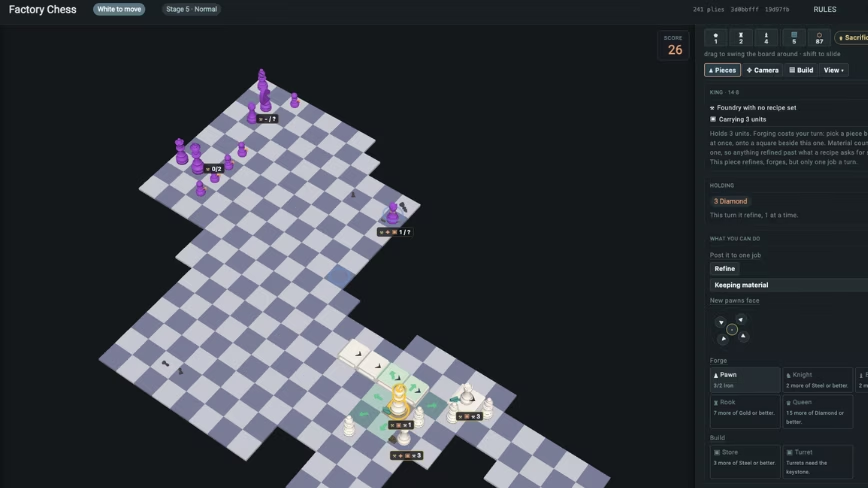
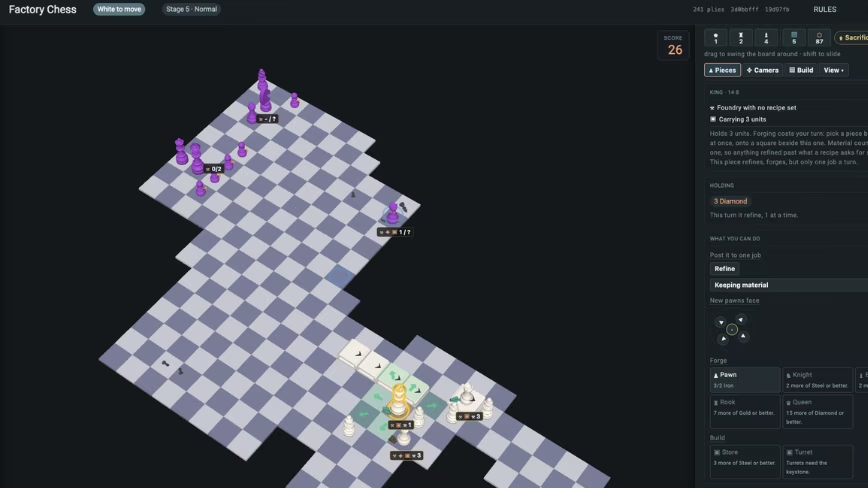
The GDC 2026 survey shows 28% of game developers were laid off in two years and 36% now use generative AI. Former Boston Dynamics engineer Robert Brownstein runs Gnarled Helix, a ~10-person indie studio that used AI-assisted development to prototype a chess-resource-management game in days after spending years on a higher-budget project. He keeps AI-generated art out of the production pipeline while using LLMs for coding and ideation, and has built Tauric Tools, a free collaborative level editor.
The economics of making a blockbuster game are starting to look as demanding as the games themselves. Development cycles stretch across years, budgets climb into extraordinary territory, and a single failed release can erase enormous amounts of investment. The industry’s latest workforce data makes the pressure difficult to ignore. 28% of respondents to the 2026 Game Developers Conference State of the Game Industry survey said they had been laid off during the previous two years, while two-thirds of AAA respondents said their companies had experienced layoffs.
The problem is not simply that games cost more to make. Bigger production commitments can also make experimentation harder. Sony’s Concord, reportedly eight years in development, was pulled from sale only two weeks after launch after failing to find an audience, illustrating how quickly an enormous production cycle can collide with player expectations. The lesson is uncomfortable for an industry built around increasingly ambitious bets; scale can magnify both the potential payoff and the consequences of being wrong.
Meanwhile, the tools available to smaller developers are changing rapidly. The 2026 GDC report found that 36% of game-industry professionals now use generative AI in their work, with code assistance and prototyping among its common applications. Yet 52% believe generative AI is having a negative impact on the industry, showing just how unsettled the technology’s place in game development remains.
Advertisement
This tension points toward a consequential question for gaming: if smaller teams can test ideas faster and iterate without carrying the financial weight of a major production, could originality become a more meaningful competitive advantage than production scale?
Robert Brownstein believes it can. His own experience has given him a close view of how quickly development economics are changing.
Brownstein, a full-stack developer who earned a computer science degree in 2014, most recently worked at Boston Dynamics, where he helped build software for Spot, the company’s quadruped robot. He later applied that engineering background to Gnarled Helix LLC, a roughly 10-person studio that grew from a side project he pursued while working at Boston Dynamics. Brownstein notes that moving from web development into game development also changed how he thought about building products, particularly the value of testing an idea before committing heavily to it.
Credit: Gnarled Helix LLC
“Rapid prototypes are lower risk,” Brownstein says. “You’re able to produce something that you can verify as fun and meaningful before you spend all this budget on art that maybe no one’s ever going to see.” AI has accelerated that philosophy for his team. Brownstein notes that tools such as large language models have shifted Gnarled Helix toward ideation and prototyping, allowing engineers to spend less time buried in implementation details. He sees AI as useful precisely because human developers remain responsible for understanding and evaluating its output.
“Everything we do, AI-wise, is gated by a human. The real constraint is maintaining enough technical understanding to know what the tools are producing,” he explains.
Advertisement
AI’s growing role in game development has also sharpened an older industry question: where does production efficiency end and creative authorship begin? As developers adopt AI for coding, prototyping and other technical work, the debate is increasingly about which parts of a game should remain distinctly human. Brownstein’s approach offers one example of that boundary. At Gnarled Helix, he says AI-generated art does not enter the production pipeline, while game design, graphics and writing remain human-led. His approach reflects a wider concern for an industry trying to absorb advancing tools rapidly without allowing efficiency to become the measure of creative value.
This stringency is visible in the studio’s forthcoming chess project, which emerged from Brownstein’s interest in chess and Satisfactory. The game turns captured pieces into resources that can be extracted, refined, and converted into new pieces, placing a familiar ruleset inside an unfamiliar economic system. Its single-player roguelike mode expands the board across waves while introducing different armies and economies; another mode allows players to use the mechanics in a traditional chessboard setting.
The project also reflects a shift Brownstein sees across the industry. He believes smaller teams can move through experimental ideas without exposing every prototype to the public risk that accompanies major publishers. Gnarled Helix’s own development history gave him a practical lesson in that process: the studio spent years developing a higher-budget programming-learning game, then used AI-assisted development to produce a new chess concept in days.
Game development is also creating demand for tools that can make production more efficient. Brownstein’s Tauric Tools grew from his experience building map-editing systems across several companies, translating that expertise into a free level editor with real-time collaboration and interchange support for formats including AutoCAD drawings, Tiled files, and GeoJSON, with Brownstein considering future white-label applications for other businesses.
Advertisement
The direction of gaming may ultimately depend on how quickly it can discover what players want. Brownstein expects more technically capable developers to move into independent gaming as AI lowers some production barriers, creating opportunities for small teams to attempt projects that would be difficult to justify at AAA scale. His goal for Gnarled Helix follows the same direction. He says, “What I really want to do with this studio is find novel mechanics that people haven’t tried before and try and make games out of them.”
If the next generation of developers can combine sophisticated tools with fast experimentation, gaming could become a market where a small team does not need to imitate the production model of a giant publisher to command attention. Success, in Brownstein’s view, increasingly hinges on finding the more interesting idea, testing it sooner, and giving players a reason to keep playing.
A 150M model reached 29.5% while costing just $0.0007 per task
ChatGPT scored higher, yet its comparable reasoning runs cost substantially more
BDH-CQ performs reasoning internally instead of generating lengthy intermediate text
Pathway, an AI lab focused on building Post-Transformer architectures, has released new benchmark results for its BDH-CQ reasoning model.
According to the researchers, their 150M-parameter model scored 29.5% pass@2 on the public ARC-AGI-1 evaluation set.
It achieved this at a computed inference cost of $0.0007 per task, roughly eleven times cheaper than ChatGPT’s underlying GPT 5.6 Luna (Low) model.
Latest Videos FromTechRadar
Advertisement
A cheaper way to reason
Today, many AI tools waste computing power because of how they are designed, not because deep reasoning demands it.
“Today’s AI pays a steep token cost for reasoning, but that cost is imposed by architecture, not by any law of intelligence,” said Zuzanna Stamirowska, CEO and co-founder of Pathway.
“We show that a different architecture changes the game and opens up a whole new space in terms of how much intelligence per dollar.”
Amazon Web Services believes that BDH-CQ’s result is a promising step toward using advanced AI reasoning in real products more affordably.
Sign up to the TechRadar Pro newsletter to get all the top news, opinion, features and guidance your business needs to succeed!
“Customers are increasingly exploring how to move advanced reasoning from experimentation into production, where performance, efficiency, and scalability all matter,” said Nicolas Tarducci of AWS.
Advertisement
ARC-AGI-1, a widely used reasoning benchmark for AI systems, checks whether a system can infer an underlying rule from limited examples and apply it correctly to new inputs.
In this test, OpenAI’s Luna model scored only slightly higher at 34.2%, yet running it still costs significantly more ($0.008 per task).
That price gap already includes OpenAI’s recent 80% price cut on Luna, which began on July 30th of this year.
Advertisement
Further up the chart, Claude Opus 5 and Gemini 3.1 Pro reach 97–98% but cost around $0.5 – $0.6 per task, meaning the frontier’s very top costs close to a thousand times more than BDH-CQ for the highest scores.
On the cheap end, Qwen3 235B costs over three times more than BDH-CQ while scoring worse than even its Low variant, so it isn’t a real competitor on either price or performance.
“Pathway shows that model architecture, not just scale, can drive the next leap in AI reasoning,” said Łukasz Kaiser, co-author of the original 2017 Transformer paper.
Advertisement
Why it costs so much less
The efficiency gap stems mainly from a structural difference in how each system actually performs reasoning during inference computations.
Many reasoning AI systems generate intermediate text, adding one token after another before producing their final answers.
The longer that written reasoning becomes, the more it costs to run and the slower the AI responds to each request.
BDH-CQ works quite differently, quietly solving problems inside its own memory instead of writing everything down first as visible text.
Advertisement
Pathway also confirmed that early experiments already follow standard Transformer-like scaling laws across model sizes from 1B to 600B parameters.
The company also plans to extend this approach toward harder benchmarks, including mathematical reasoning, ARC-AGI-2, and eventually full ARC-AGI-3 evaluations.
If these efficiency gains hold across larger and more difficult tasks, cost rather than raw capability could increasingly separate rival reasoning systems.
The first national speed limit law limiting speed to 55 mph was enacted in 1974 by then-President Richard Nixon as part of the Emergency Highway Energy Conservation Act. This was done mostly in response to the OPEC Oil Embargo that started the previous year. However, a byproduct of this new law was a drop in vehicle fatalities, which fell from 4.28 per million miles traveled in 1972 to 2.73 in 1983.
This national limit was raised to 65 mph on April 2, 1987, after Congress passed the Surface Transportation and Uniform Relocation Assistance Act. It was repealed in 1995, however, returning authority over speed limits back to individual states. This has subsequently led to a tangled web of state-specific laws rife with political and legal complexities. Take, for example, having speed limits that include fractions, speed limit signs that show decimal points, or having two completely different speed limits on the same stretch of road.
After states were given the authority to regulate their own speeds, some implemented Uniform Speed Limits for both passenger cars and heavy trucks. Other states, however, decided to go another route and set different limits for automobiles and semis. This is referred to as a Differential Speed Limit (DSL), and it is one reason why you might see a single road with multiple speed limits listed.
Advertisement
Do Differential Speed Limits make the roads safer?
Joseph Sohm/Shutterstock
As if this writing, only eight states — California, Idaho, Montana, Oregon, Washington, Arkansas, Indiana, and Michigan — still used DSLs, with lower speeds designed to limit big rigs or passenger vehicles towing a trailer or another vehicle. Throughout the 1990s, when several states implemented DSL policies, average speed and crash rates increased regardless of whether a state used DSLs or USLs, suggesting it wasn’t the limits themselves that were impacting driver behavior.
However, others studies do show that reducing speed can impact crash rates. One study from 1964 conducted by a government agency, for example, examined 10,000 drivers and found that vehicles traveling 10 to 15 mph slower than others on the road experienced more traffic interactions. In 2005, the University of Arkansas reaffirmed that a 10 mph differential increased the frequency of traffic interactions by 227%. However, these studies didn’t specifically look at the vehicles targeted by DSLs, like big rigs or towing vehicles.
Advertisement
Interestingly, the United Kingdom raised its national speed limit in 2015 for commercial trucks with a gross vehicle weight (GVW) over 7,716 pounds. This was done to lower traffic interactions, preventing frustrated drivers from making risky passes and overtaking slow-moving trucks. In the U.S., the Owner-Operator Independent Drivers Association supports eliminating DSLs, claiming that roads are safer when all vehicles travel at roughly the same speed.
Fermi, the AI nuclear power firm, has named a new CEO more than three months after firing co-founder Toby Neugebauer from the top executive post.
Fermi said Wednesday it has hired Lee McIntire, an independent member of the company’s board who has held chief executive positions at CH2M Hill and TerraPower, the nuclear power startup founded by Bill Gates.
Fermi America, which was co-founded by former U.S. Energy Secretary Rick Perry, is developing an AI campus in Amarillo, Texas, called Project Matador that will eventually use nuclear reactors to power data centers.
The announcement, along with Monday’s news that it had signed TensorWave as its first binding customer lease for its Project Matador campus, provided a welcome boost to Fermi’s stock. (The stock is up nearly 23% since Monday.) The young company took a hit in April when Neugebauer and CFO Miles Everson were pushed out of the company. At the time, the company described the executive shakeup, along with other plans including a corporate headquarters in Dallas, as Fermi 2.0.
Advertisement
“Fermi’s next chapter is a construction and power delivery story, and we believe Lee is the ideal executive to lead Fermi through that process,” Marius Haas, Fermi’s chairman of the board, said in a statement. “The job now is to build on schedule, on budget, and safely. Lee has spent 40 years delivering exactly this kind of large, complex project. He also knows Fermi from the inside, having served on our board through our latest period of growth, and he brings a reputation for integrity that Fermi’s customers, employees, regulators, and neighbors can rely on.”
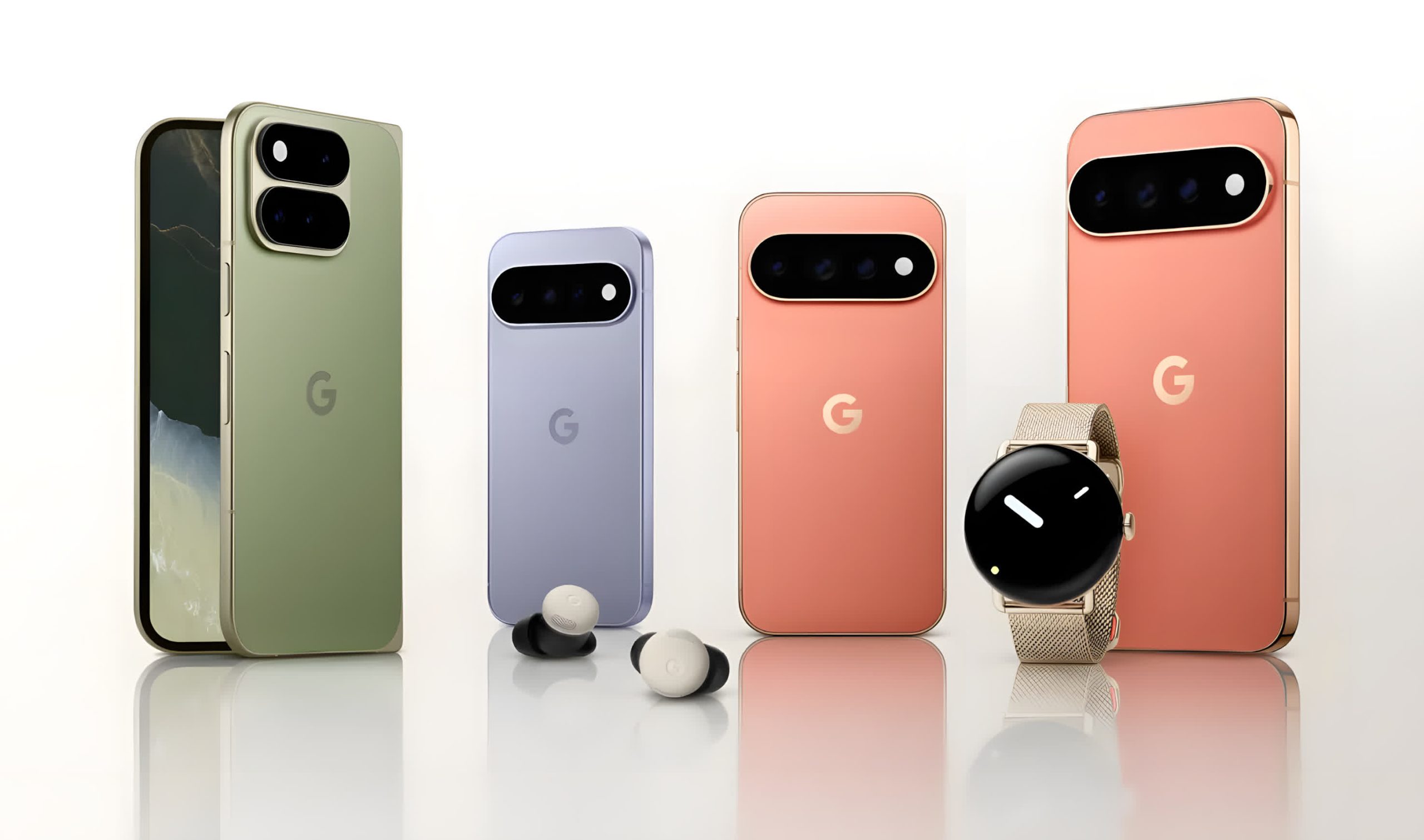
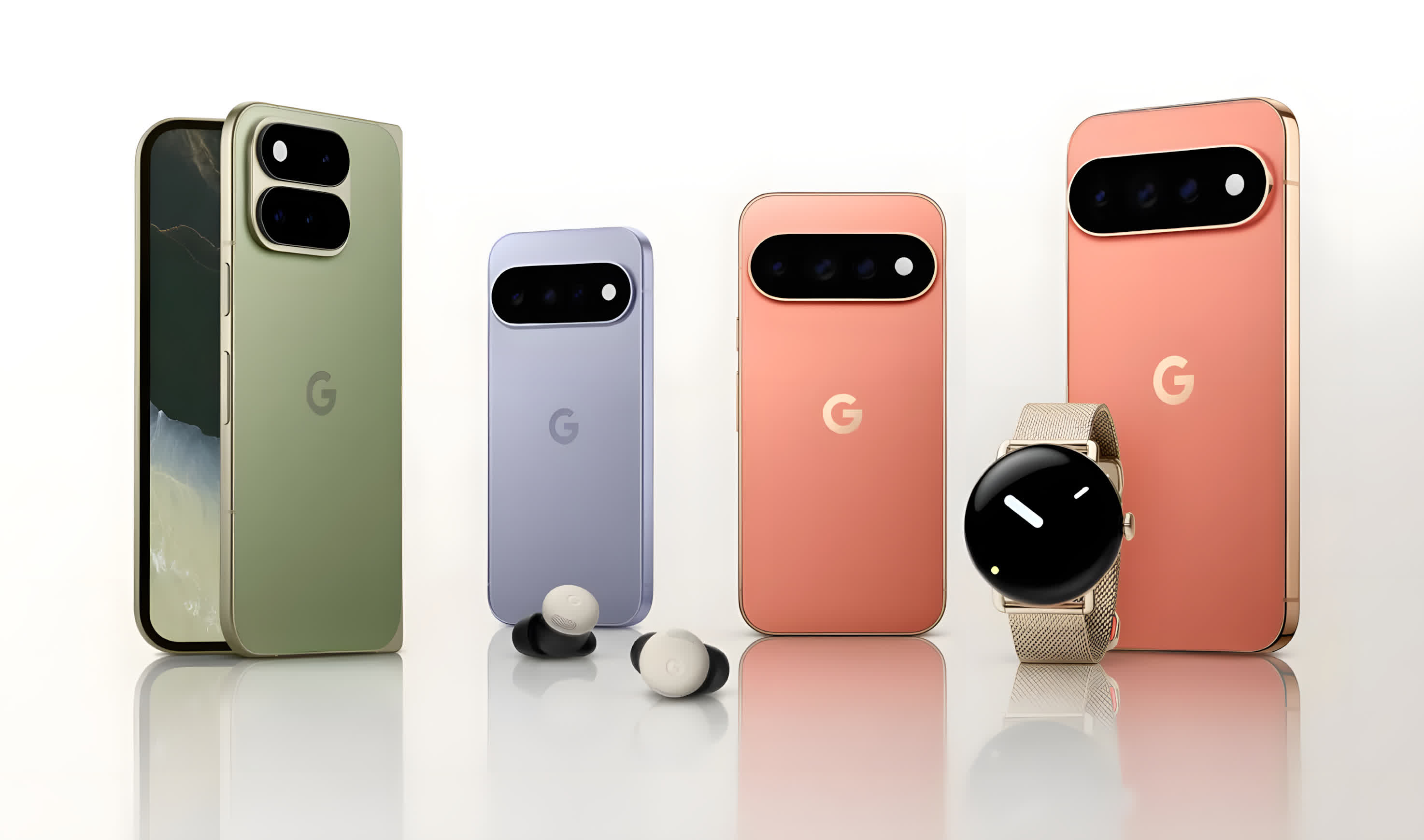
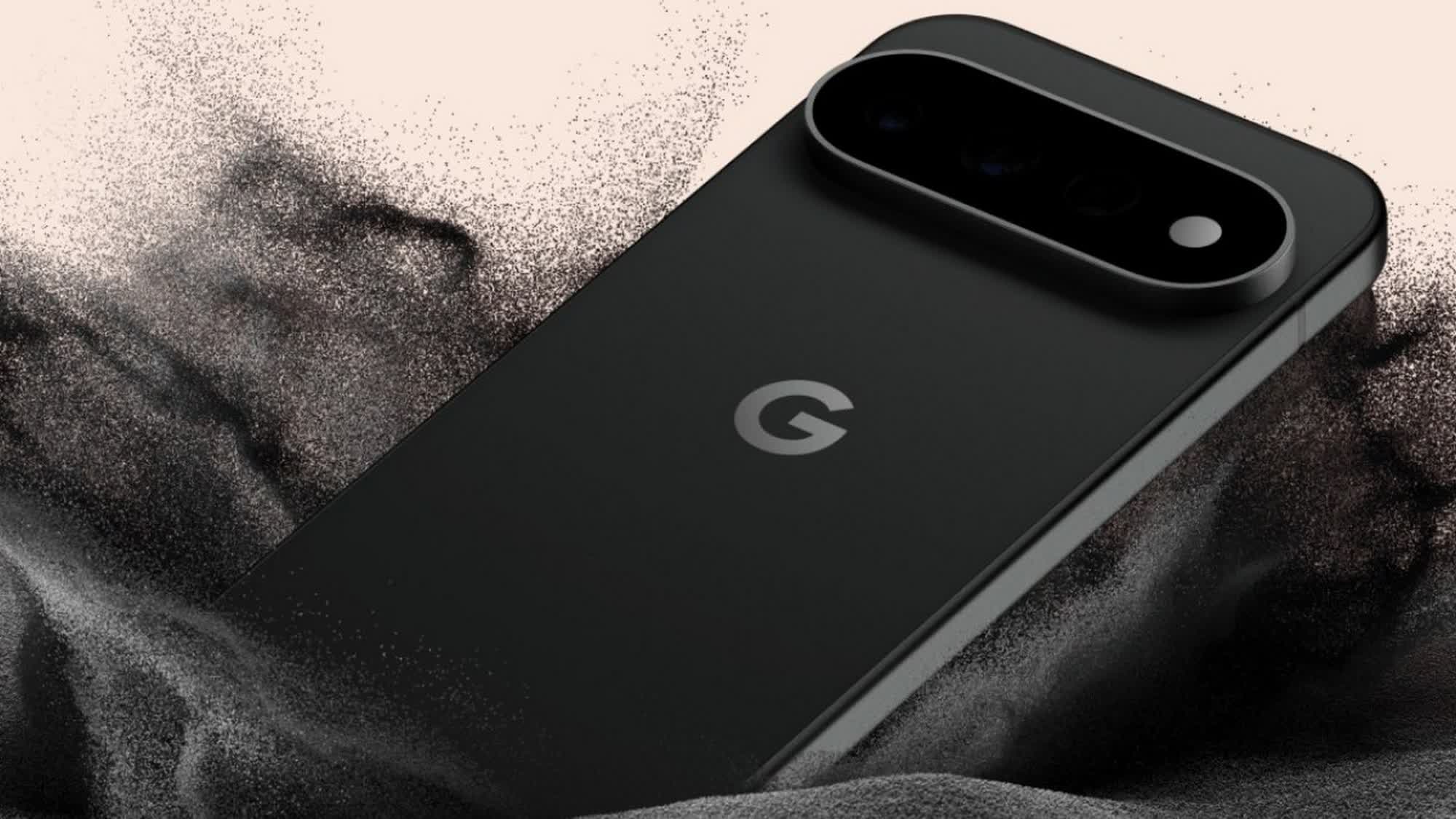
First look: Google’s Pixel 11 series marks the company’s most aggressive AI play yet, pairing a new 2nm Tensor G6 chip with deeper on-device Gemini integration across all four models – Pixel 11, Pixel 11 Pro, Pixel 11 Pro XL, and Pixel 11 Pro Fold. It’s also the first Pixel generation to drop Samsung’s Exynos modem in favor of MediaTek, a move aimed squarely at years of connectivity and heat complaints. Pricing starts at $899 for the base Pixel 11, climbing to $1,099 for the Pro and $1,299 for the Pro XL.
The base Pixel 11 gets a 6.3-inch Full HD+ AMOLED display with up to 120Hz adaptive refresh, up to 3,000 nits of peak brightness, and Corning Gorilla Glass Victus 2 on top. Inside, it packs 12GB of LPDDR5X RAM, up to 512GB of storage, and a 4,985mAh battery with 30W wired and 25W Qi2.2 Pixelsnap wireless charging.
On the imaging side, the Pixel 11 sticks with a triple rear camera, led by a 48MP primary sensor (f/1.7, OIS, LDAF), joined by a 13MP ultra-wide and a 10.8MP 5x telephoto. Up front, a punch-hole cutout houses a 10.5MP selfie camera at f/2.2.
Step up to the Pro models and the displays grow more capable: the Pixel 11 Pro carries a 6.3-inch 1.5K LTPO AMOLED panel at 2856 x 1280, while the Pixel 11 Pro XL moves to a 6.8-inch QHD+ AMOLED panel at 1344 x 2992. Both hit up to 3,600 nits peak brightness, 120Hz adaptive refresh, and the same Gorilla Glass Victus 2 protection.
Advertisement
The two Pro phones also share a camera system, built around a 50MP primary sensor (f/1.68, OIS, LDAF), backed by a 48MP ultra-wide and a 48MP 5x telephoto capable of 120x digital zoom. Selfies come from a shared 42MP front camera at f/2.2.
Battery capacity is where the two split: the Pixel 11 Pro carries a 4,850mAh cell, while the larger Pro XL steps up to 5,115mAh. Charging speeds diverge too: the Pro tops out at 30W wired, while the Pro XL supports 45W, though both share 25W Qi2.2 Pixelsnap wireless charging.
The standout new hardware feature on the Pro models is HiLight, a ring of ambient LEDs circling the camera flash. It glows in custom, user-set colors to signal when Gemini is active, and can flag calls from favorite contacts with color-coded alerts, a feature Google says will later extend to incoming messages as well.
Advertisement
Every phone in the series ships with Android 17 out of the box and carries Google’s promise of seven years of OS updates, security patches, and Pixel Drops.
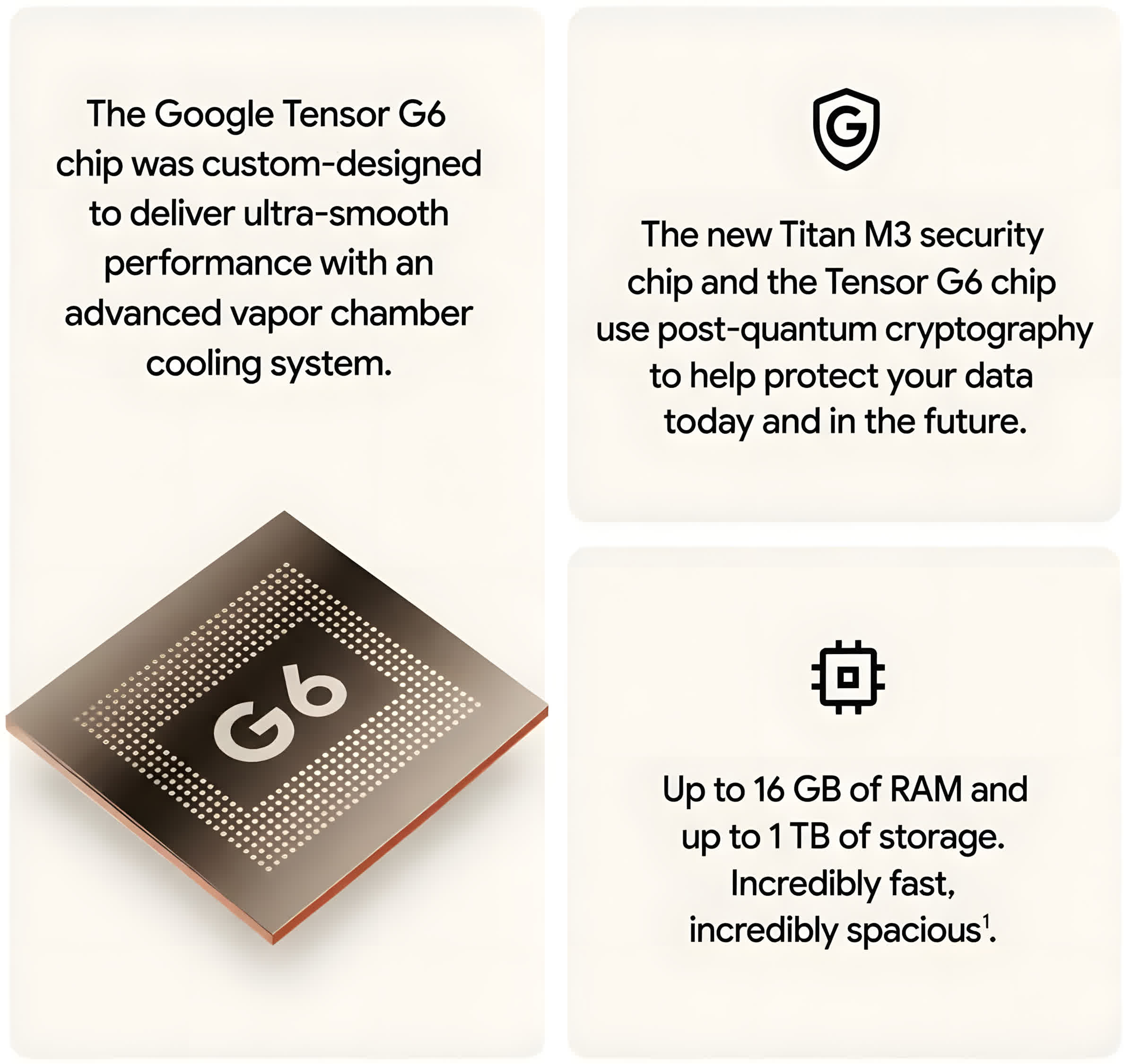
All four run on the Tensor G6, which brings a 7-core CPU, a 50% boost in TPU-driven on-device AI performance, and MediaTek’s M90 5G modem, that’s a a notable shift from Google’s longtime use of Samsung Exynos modem. The Titan M3 security chip rounds out the platform.
The Pixel 11, Pro, and Pro XL (though not the foldable) share an ultrasonic under-display fingerprint scanner and IP68 dust and water resistance. Connectivity across the lineup includes 5G, Wi-Fi, GLONASS, Galileo, BeiDou, NavIC, NFC, and USB-C 3.2.
Pricing starts at $899 for the 256GB Pixel 11, with the Pixel 11 Pro and Pro XL starting at $1,099 and $1,299 respectively, also at 256GB. All three are available for preorder today.
‘The bucket is leaking, and the industry keeps blaming the tap,’ writes Nahla Davies discussing the cybersecurity talent shortage.
For a decade, the cybersecurity industry has told itself one story about its staffing crisis: there aren’t enough people. Train more, certify more, run more bootcamps, and the 4.8 million global workforce gap will close. It’s a comforting story, because it makes the problem someone else’s job: the schools’, the government’s, the pipeline’s.
There’s just one difficulty. The people who own the most-cited version of that gap statistic, ISC2, also explained why it grew, and the reason has nothing to do with a shortage of talent.
The year the pipeline delivered and the gap grew anyway
In ISC2’s 2024 study, the global cybersecurity workforce grew by just 0.1pc, effectively flat after years of expansion, while the workforce gap widened by 19pc. If this were a supply problem, those two numbers would move together.
Advertisement
Instead, the study named the actual cause: budget was the top factor, cited by 39pc, ahead of any talent shortage, with 37pc of organisations reporting budget cuts, 38pc hiring freezes and a quarter making layoffs.
Read plainly, that means the gap grew in a year when supply held steady and demand for hiring was cut. The bucket is leaking, and the industry keeps blaming the tap.
The sector loudly requests more pipeline, then refuses to hire the pipeline’s output. The famine is partly self-imposed.
Advertisement
Where the people are actually going
If supply isn’t the bottleneck, the exits are. And the data on why experienced people leave is damning, precisely because it rules out the easy explanation.
It isn’t pay. CISO compensation rose 6.7pc in 2025 and salaries across the field remain strong. People are walking away from good money.
This is why the pipeline framing fails on its own terms. The shortage isn’t of bodies; it’s of experience, and experience is the one thing a bootcamp cannot manufacture on demand.
That target is usually discussed as a recruitment challenge. It is really a retention challenge wearing a recruitment costume, because if half of organisations can’t keep the people they already have, the pipeline has to first refill the leak before it adds anyone net new.
The fixes are known, cheaper than perpetual re-hiring, and almost entirely within an employer’s control. Automate the toil, because when SOC analysts name manual work as their top frustration, the 64pc of their time lost to it is a resignation letter being drafted in real time.
Build a blameless culture, since Gartner’s own diagnosis put culture, not headcount, at the root. Hire and train juniors, given that ISC2 found entry-level hires productive within a year at modest cost, yet transition-training programmes are being cut rather than expanded. And de-risk the senior roles with proper liability cover and documented governance, so the experience you have is not frightened out of the profession.
One honest caveat – none of this means the pipeline is irrelevant. Long term, the field genuinely needs more entrants and Ireland’s education investment matters.
But pouring water into a leaking bucket faster is not a plan, and calling the leak a supply shortage is the industry’s most expensive act of denial. The gap statistic everyone quotes to demand more training is, on ISC2’s own reading, substantially a measure of churn and cut budgets, laundered into the language of a talent famine.
Advertisement
The people exist. The question the industry keeps refusing to ask is why so many of them are leaving.
Nahla Davies is a software developer and tech writer. Before devoting her work full time to technical writing, she managed – among other intriguing things – to serve as a lead programmer at an Inc 5,000 experiential branding organisation, where clients include Samsung, Time Warner, Netflix and Sony.
Advertisement
Don’t miss out on the knowledge you need to succeed. Sign up for the Daily Brief, Silicon Republic’s digest of need-to-know sci-tech news.
Anthropic recently made the decision to watermark Claude’s outputs — inserting invisible code into the chatbot’s editorial text that marks it as AI-generated.
Anthropic rolled out this new policy to satisfy the EU AI Act’s Transparency Code, which now requires tech companies to label content that has been AI-generated or edited in a manner identifiable to computer systems. Yet while European regulators may be happy, some AI users are decidedly not.
One need look no further than Reddit to find evidence of brewing discontent, though other posters on the site are not in agreement. One of the more histrionic posts I came across was from a user named visionode, whose account is notably only three weeks old. According to visionode, the new watermarking system is a draconian conspiracy designed to victimize innocent chatbot users worldwide.
Visionode’s basic argument appears to be that, while savvy Claude users may be able hide evidence of their AI usage by paraphrasing or otherwise cleaning their outputs through other AI services, the average user of Claude will be caught.
Advertisement
“Who will get caught? You. The student who used Claude to reorganize a paragraph. The journalist who asked the AI to summarize a two-hundred-page transcript. The writer who had creative block and asked for synonyms. Those guys come out of the process with a digital tattoo on their forehead.”
Far be it from me to undermine visionode’s outrage, but those are not the best examples. A journalist asking AI to summarize a two-hundred-page transcript is not going to be bothered by a watermark attached to that summary, unless they are copying and pasting the summary verbatim into their article — which is plainly unethical and shouldn’t be happening.
It is equally unethical for a student who copies and pastes Claude’s output into an essay after asking it to “reorganize a paragraph.”
Other Redditors were also not particularly supportive of the poster’s outrage.
Advertisement
“Get a load of this guy,” one poster merely commented.
Another asked the OP to take “a deep breath.”
Visionode wasn’t the only one complaining. Another unhappy camper called the watermarks “unethical” and “disgusting” and argued that by using Claude, they had done the lion’s share of the work. In their view, the chatbot was merely a “tool” that had facilitated their arduous labor.
“I gave the instructions, context, decisions, and countless refinements, claude was the tool. If Claude starts watermarking the code or anything else it generates, what exactly is it claiming credit for?” the poster asked.
Advertisement
Again, other users dogpiled onto the critic.
“It’s not claiming credit though,” one user shot back. “It’s about being able to detect AI generated outputs because of the risks AI generated outputs can cause in various situations.”
“Bro couldn’t even complain about Claude without using Claude to write it,” another quipped.
Some critics have steered clear of the victimhood narrative and made slightly more nuanced arguments against Anthropic’s new policy.
Advertisement
For instance, one poster complained of a general hypocrisy in watermarking an editorial product that was, itself, generated by hoovering up other people’s work. “I think it’s a very sinister direction to take,” said the user. “I don’t use Claude to write anything but having an AI that watermarks your work is terrifyingly ironic given how many of the frontier models came by their training data.”
In general, however, users have tended to support the watermarking system as a sensible way to track material that was generated by algorithm. “There is literally no good argument for why this isn’t a good idea,” a user on another thread said. “The only reason you wouldn’t want this is to lie to people.”
When you purchase through links in our articles, we may earn a small commission. This doesn’t affect our editorial independence.
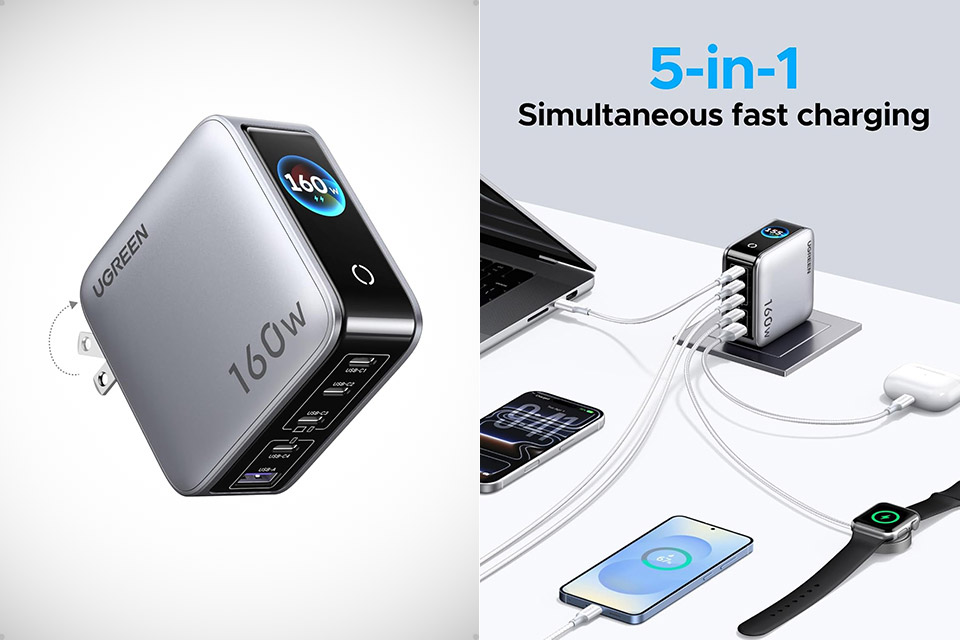
Travel used to mean a tangle of bricks and cables pouring out of every suitcase. Laptops require their own big adapters, phones require another, while tablets and earbuds occupy separate compartments of the suitcase. UGREEN’s Nexode Pro 160W GaN 5-Port charger, priced at $59.99 (was $90), ends that ritual with a single compact block that handles nearly every device you carry.
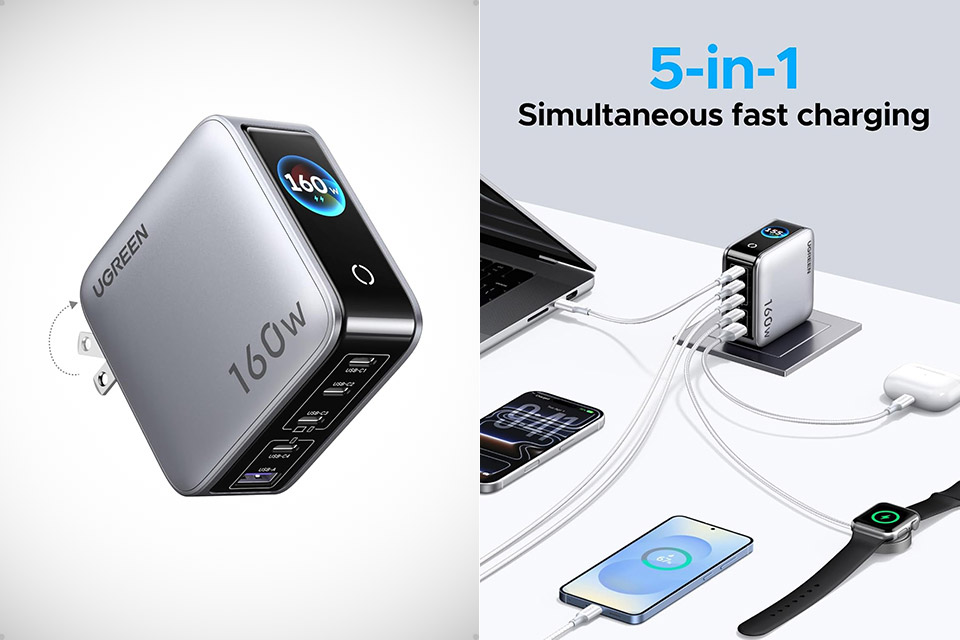
Four USB-C ports and a single USB-A port sit at the front of a unit that is almost three inches square and nearly an inch thick, yet the foldable prongs tuck away so neatly that it glides into a side pocket without snagging anything or taking up space intended for clothing. The Starlight gray color and substantial feel give it the appearance of being designed to not just withstand but thrive in airport security trays and hotel nightstands.
160W High Power PD Fast Charging Technology: Premium GaN laptop charger delivers total 160W overall output, C1 & C2 single port supports up to 140W…
5-In-1 Multiport USB Charging Block: All-in-one charging station comes with 4 USB-C ports plus 1 USB-A port, enables simultaneous multi-device…
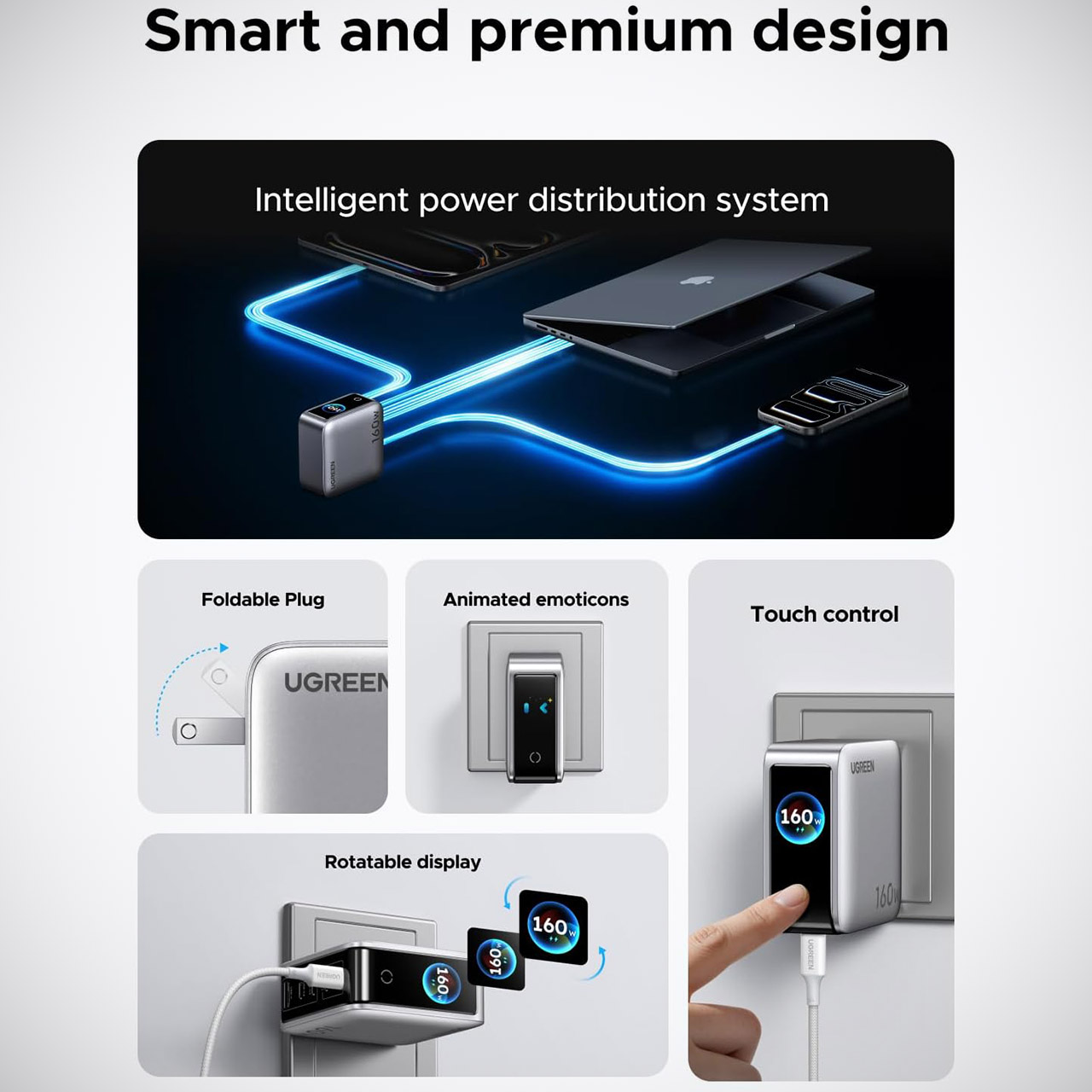
Smart Rotatable Touch Digital Display Design: Unique real-time monitor screen multiport charger features rotatable touch control panel, intuitively…
The total output of this little guy is 160 watts. Plugging a high-demand laptop into one of the top two USB-C ports on its own delivers up to 140 watts, more than enough to charge a 16-inch MacBook Pro from empty to half-full in approximately half an hour. The other USB-C ports are fast enough for tablets and phones, while the USB-A port is suitable for older gadgets or earbuds. When you have multiple devices connected at the same time, the charger simply distributes the 160 watts so that your laptop receives a good charge while phones and smaller gadgets top up for you.
Advertisement
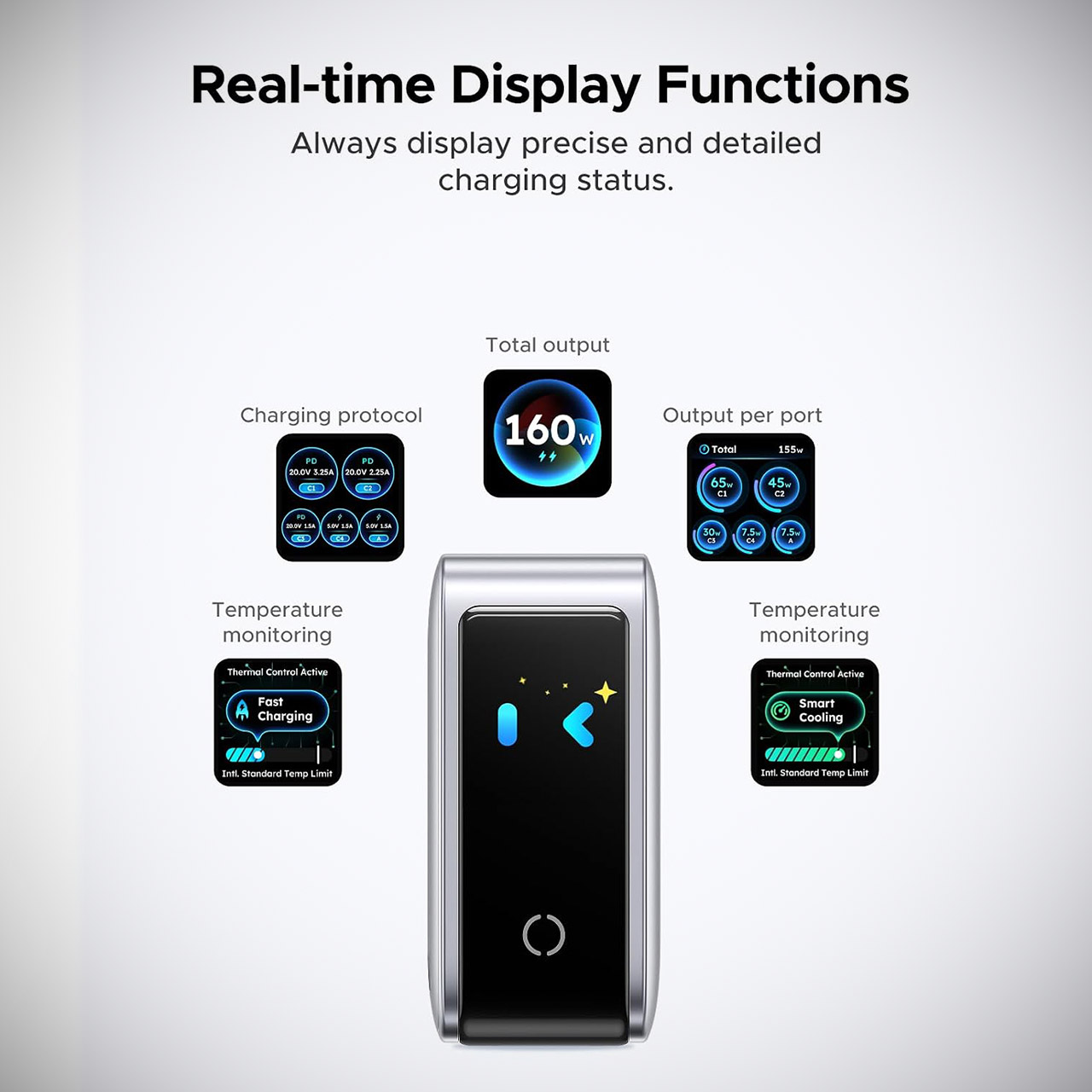
There’s a little touchscreen on the side you can spin. Give it a tap and it will cycle thru all of the live readings you need, such as total power, each port, protocol, and internal temperature. Even when you’re trapped in a long charging session, it displays some simple animated faces to help pass the time, and no matter where you place it, whether it’s hanging from a wall outlet or sitting flat on a desk, the screen remains beautiful and easy to read.
GaN circuitry allows them to keep the entire package compact and efficient, making it ideal for use on the go. Safety systems monitor for heat, voltage spikes, current difficulties, and short circuits. They also have multiple temperature control modes, which keep the unit steady even when loaded with devices for an hour or longer. It works with MacBooks, newer iPhones, Galaxy phones, iPads, Windows computers, and hundreds of other USB-powered devices without requiring any additional adapters.
Simply pack this one charger in your backpack and leave the rest at home, as one wall socket contains an entire charging station. Your bags will be lighter, your hotel room will not be a cluttered mess, and for anyone traveling between home and the office, then to the airport with a laptop, phones, and gadgets, the Nexode Pro 160W eliminates the guesswork of which charger to bring; it simply covers everything.
You probably haven’t heard of TXN Sound before. Based in Vietnam, TXN builds both universal and custom in-ear monitors. With a focus on excellence through simplicity, the company offers a small, carefully curated selection of IEMs aimed squarely at enthusiasts with substantial budgets.
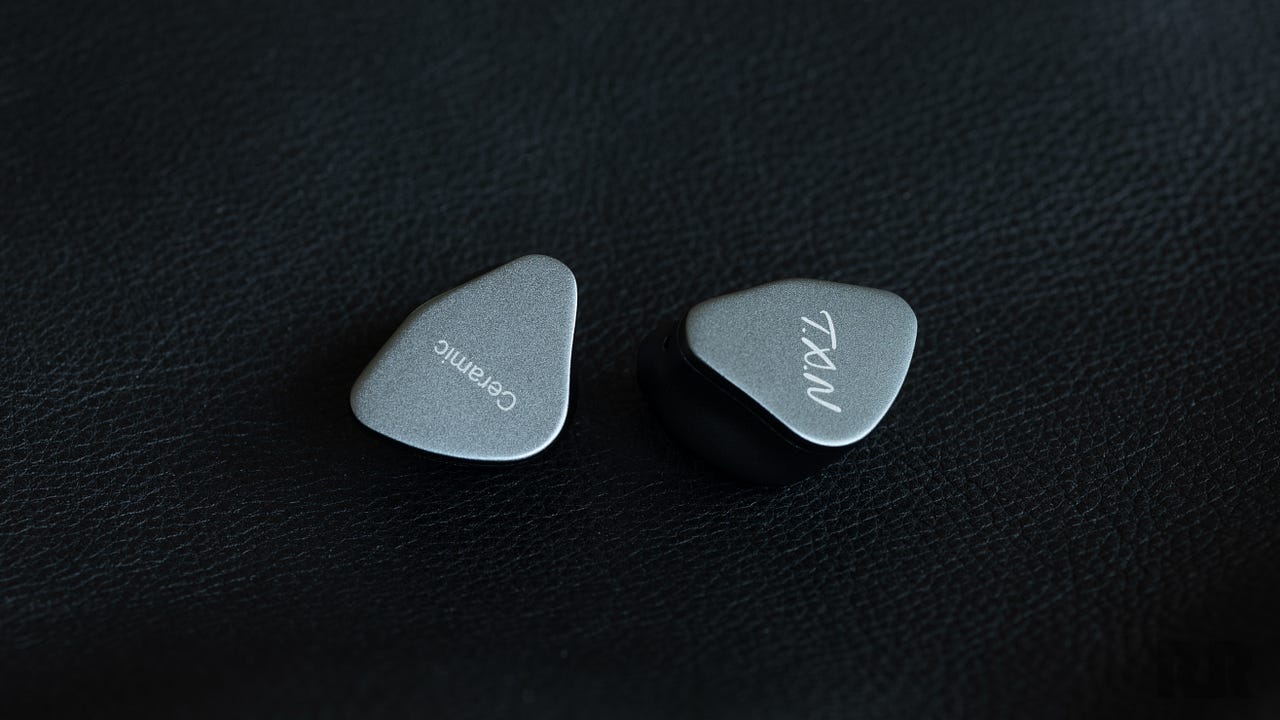
Today, we’re taking a look at TXN’s entry-level IEM, the Ceramic, which features anodized aluminum shells and a single dynamic driver per side. At nearly $600, however, the Ceramic faces some stiff competition. Does TXN’s engineering go the distance? Let’s get into it.
About My Preferences:
This review is a subjective assessment and is therefore influenced by my personal preferences. While I try to minimize those biases as much as possible during the review process, I’d be lying if I said they could be eliminated entirely. With that in mind, here’s what you should know about my listening preferences:
My ideal sound signature includes capable sub-bass, textured mid-bass, a slightly warm midrange, and extended treble.
Advertisement
I have mild treble sensitivity.
My testing equipment and standards can be found here.
Related Reviews:
TXN Ceramic IEMs
TXN Ceramic Specifications
Weight: 10 grams, excluding cable
Type: Universal in-ear monitor (IEM)
Driver: Single Golden Ceramic diaphragm dynamic driver
Cable Conductor: 7N OCC copper, sourced from Taiwan
IEM Connectors: Gold-plated 0.78 mm 2-pin
Termination: Gold-plated 4.4 mm balanced
Build
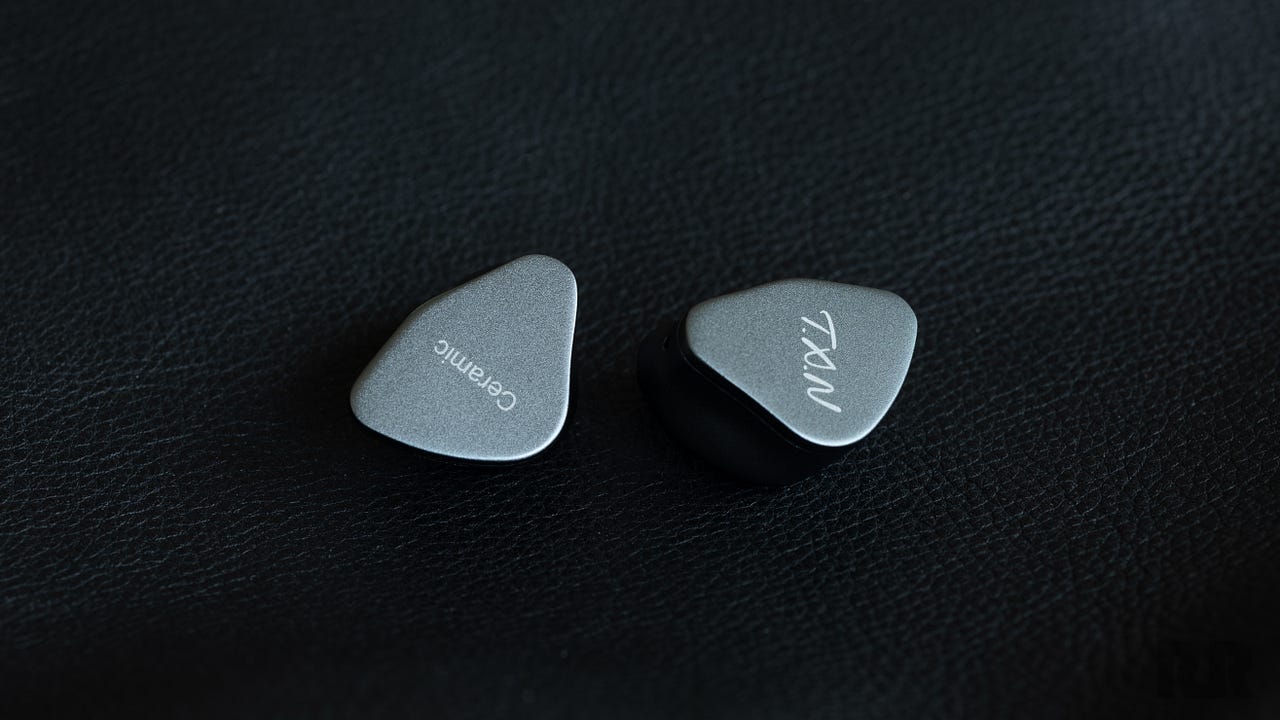
The Ceramic’s shells are made from beautifully anodized aluminum. They’re cleanly machined and exude both class and quality. The aluminum faceplates are mostly unadorned, save for some screen-printed text. I don’t mind printed text, but I find the Ceramic’s mismatched fonts somewhat cheapen its otherwise austere aesthetic.
Photo credit: Resonance Reviews
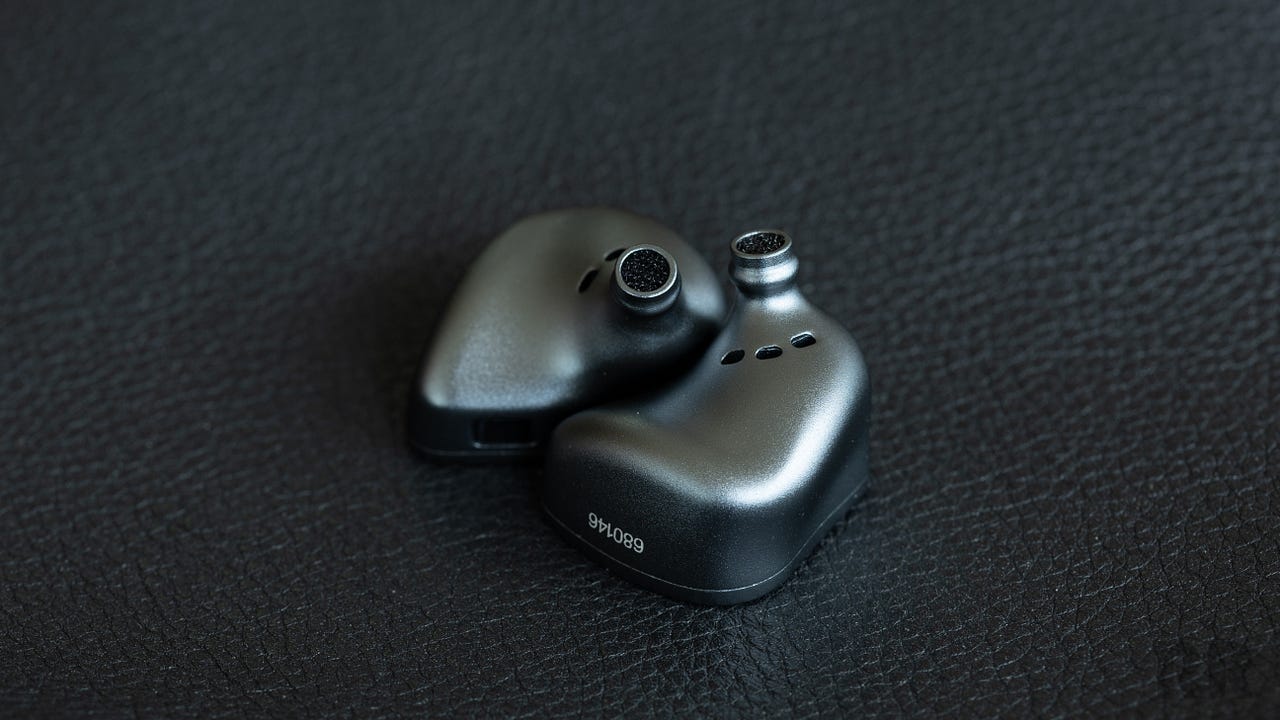
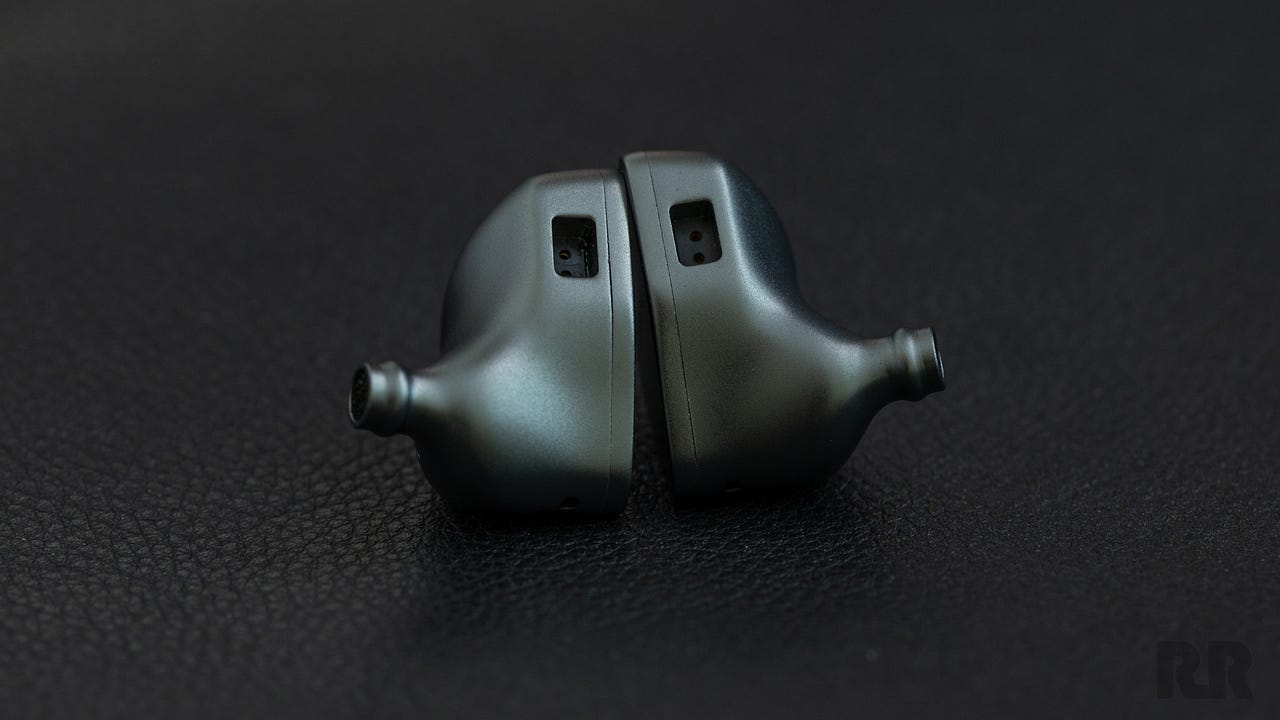
I’m a big fan of the Ceramic’s thoughtful proportions. A lot of brands reuse generic shell designs, but it’s clear that TXN has taken a different approach. The nozzles are metal and integrated directly into the main shell. They’re narrower than most, allowing for deeper insertion and better overall ergonomics.
The top of each Ceramic shell houses a recessed 0.78 mm 2-pin socket that feels firmly seated. Aftermarket cable compatibility is also excellent, and I had no issues using offerings from PlusSound, THIEAUDIO, or NiceHCK with the Ceramic.
Advertisement
The Ceramic’s cable is reasonably soft and has very little memory or stiffness. Its outer jacket has a somewhat rubbery feel, reminding me more of old-school high-end IEM cables than the smooth, low-friction materials commonly used today.
The cable features polished metal plug housings and a simple rubber chin cinch. There isn’t much strain relief, however, so I’d be careful not to pull or bend it sharply at awkward angles.
Advertisement. Scroll to continue reading.
Photo credit: Resonance Reviews
Comfort
Comfort is a metric that depends heavily on individual ear anatomy, so your mileage may vary.
The Ceramic is a very comfortable IEM with a clear focus on ergonomics. Its slender nozzles allow for deeper ear tip insertion, resulting in excellent passive isolation. While the Ceramic isn’t particularly light, it never feels overly heavy, and the cable remains comfortable during extended listening sessions.
Advertisement
Overall, TXN has done an excellent job making the Ceramic easy to wear for long periods.
Accessories
Photo credit: Resonance Reviews
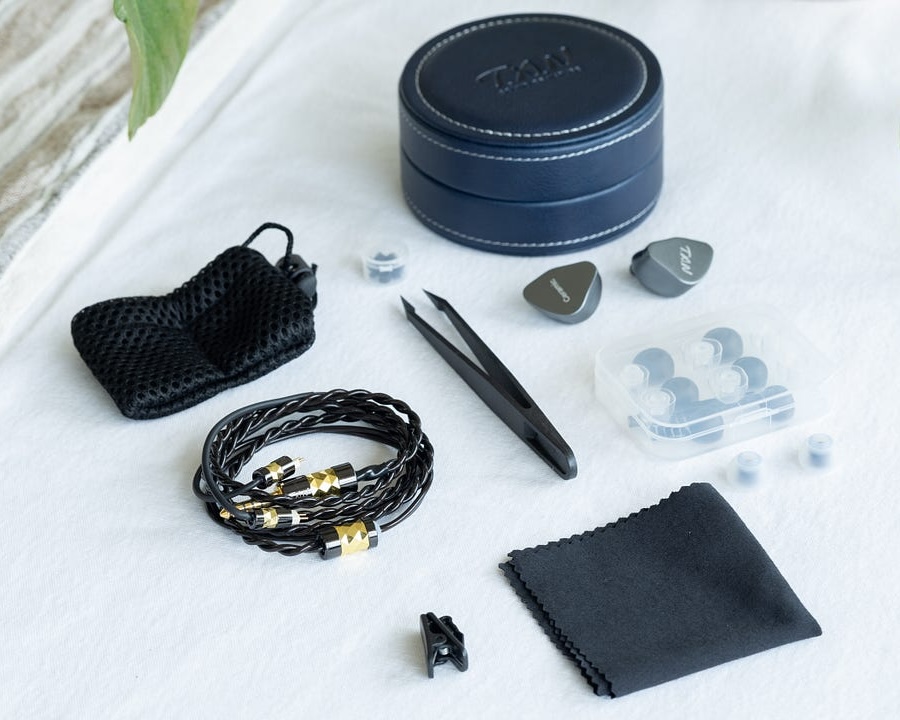
The Ceramic comes with a solid selection of accessories in the box:
1 x Semi-hard carrying case
1 x Padded IEM pouch
1 x Microfiber cleaning cloth
1 x Shirt clip
1 x 4.4 mm cable
7 x Pairs of silicone ear tips
1 x Pair of tweezers
3 x Pairs of nozzle dampers
I’m glad to see that TXN included a padded IEM pouch, as the Ceramic’s metal shells could potentially damage one another if they collide during transit. That’s a concern with many metal-shelled IEMs, so it’s good to see TXN thinking ahead and providing some extra protection for long-term ownership.
The included carrying case, however, leaves something to be desired. I generally dislike cases that lack a positive locking mechanism, such as a zipper, because they tend to become less secure over time. Wear and tear can loosen components, eventually compromising the closure.
The Ceramic’s case is attractive and feels premium, but the lid is loose enough to separate from the base under its own weight. That isn’t especially secure and could potentially lead to accidental damage if the case opens during handling or transit.
TXN’s choice of ear tips, however, is quite good. The included silicone and liquid-silicone tips are comfortable and provide a solid seal, although foam ear tips are conspicuously absent. That’s unfortunate, as the Ceramic’s slender nozzles and ergonomic design make it especially well suited to the improved isolation that foam tips can provide.
Advertisement
Listening
The Ceramic features a gently V-shaped sound signature. Its bass is moderately elevated above a refined, neutrally toned midrange. The upper mids are lifted enough to give vocals and instruments clarity and separation, but not so much that they take on an artificial sense of forwardness.
Above that sits a mild, transparent, and airy treble response. The Ceramic’s overall presentation is notably free of drama and exceptionally cohesive.
Refinement and Clarity Without Intensity
The beauty of the Ceramic’s treble is how articulate it sounds without the sheen of artificial boosting. Hi-hats and cymbals are clear and distinct, attacking and decaying with impressive speed. The Ceramic grasps the edges of percussive decay greedily, rendering them with depth and texture. In essence, the Ceramic is precisely as bright as it needs to be to resolve music with air and honesty, and no brighter.
This philosophy of organic emphasis not only allows the Ceramic to render an impressive breadth of tones and textures, but also to extract detail without sounding sharp or sibilant. Harshly mastered tracks such as “Satisfy” by Nero pose no threat to even highly sensitive ears. Albums with peaky, aggressive mastering, such as Famous by Puddle of Mudd, are likewise surprisingly pleasant through the Ceramic, as its carefully tuned treble renders the metallic slam of hi-hats without unnecessary drama.
Advertisement
Advertisement. Scroll to continue reading.
Polished Midrange Tuning
The Ceramic’s midrange is tonally neutral, with a small amount of lower-midrange warmth concentrated in the narrow region adjacent to the mid-bass. Combined with its responsibly elevated upper-midrange response, the Ceramic renders vocals with clarity and focus, but without the cold sterility that often accompanies so-called “reference” IEMs.
The lonesome vocals in “Drag Path” by Twenty One Pilots demonstrate this particularly well as they drift across the track’s wide, windswept soundstage. Lyrical intelligibility is excellent, with the Ceramic properly articulating even filtered or distorted vocals in busy mixes.
TXN nailed the Ceramic’s balance between natural, organic timbre and tonal cleanliness. String instruments and percussion sound harmonically complete without becoming heavy or burdened. As a result, complex and nuanced tracks exhibit strong layering and contrast, especially during busy passages.
Advertisement
The chaotic verses of “Destroya” by My Chemical Romance demonstrate this technical ability nicely, as the Ceramic blends high-strung electric guitars with gritty vocals and feral drum strikes, all without smudging or blurring the presentation.
Audiophile-Grade Bass
The Ceramic is not a mainstream IEM, and its tuning fully acknowledges that. Bass emphasis, while elevated above what I’d consider truly neutral, is still not particularly intense. There’s a noticeable lift through the sub-bass and mid-bass, although emphasis begins to roll off somewhat below 40 Hz.
There’s still plenty of tonal depth, and the Ceramic is capable of producing convincing rumble when a track truly calls for it. The atmospheric bass lines in “Dial Tone” by Catch Your Breath are a great example, as the Ceramic effectively conveys the scale and imposing nature of those elements.
The mid-bass delivers a subtle sense of punch, placing tight, well-controlled bursts of emphasis around drum hits and synthetic bass pulses. The weighty bass guitar and drums in “One Debt Away” by Middle Class Rut reveal plenty of texture and depth, working especially well with the Ceramic’s natural and transparent low-end presentation.
Advertisement
Electronic music sounds full and tonally complete through the Ceramic, but it never becomes especially vibrant or intense. I suspect that’s largely by design, given the Ceramic’s apparent mission: clarity over drama. “Divide” by ODESZA, for example, is rendered with depth and contrast, but it doesn’t shake my head the way a more bass-oriented IEM might.
Similarly, the hectic bass drop in “Trapdoor” by Feed Me reaches deep and offers subtle hints of punch and rumble, but I’m still left wanting more.
Comparisons
Comparisons are selected solely based on what I think will be most interesting and useful. If there’s another IEM you’d like to see compared with the Ceramic, feel free to leave a request in the comments below.
Campfire Audio Cascara
Photo credit: Resonance Reviews
The Cascara is a resin-shelled IEM with metal nozzles and a single dynamic driver per side. Pricing ranges from $499 to $699, depending on the accessory package selected.
Both the Cascara and the Ceramic are ergonomically designed, although the Ceramic’s smaller nozzles allow me to achieve a better seal. The Cascara’s Timestream cable is excellent, and I prefer its aesthetics to those of the Ceramic’s cable. Both are comfortable in use, and neither is particularly microphonic.
Advertisement
Advertisement. Scroll to continue reading.
While the Cascara and Ceramic have similar driver configurations on paper, they sound entirely different. The Cascara is an unapologetically V-shaped IEM, with boisterous bass that is elevated well beyond the Ceramic’s. Both IEMs sound deep and well extended, although the Cascara’s bass is richer and imparts a greater sense of depth with electronic music.
The more reserved Ceramic trades some of that sense of fun for a more controlled approach, dialing back warmth in the lower registers. Its cooler lower midrange blends nicely with the restrained bass response, creating a more consistent sense of openness and cleanliness.
The Cascara’s upper mids are more forward, adding greater vocal contrast to the mix, but at the expense of some grain that the Ceramic avoids. That difference carries into the treble as well, where the Ceramic’s more refined presentation sounds more natural and less grainy overall.
Advertisement
Both IEMs retrieve a substantial amount of treble detail, although the Ceramic edges out the Cascara when resolving subtle hi-hat and cymbal decay during busy passages.
And while I’d like to call this a clean sweep one way or the other, I can’t. The Cascara and Ceramic excel in areas where the other simply does not.
The Cascara’s deeper V-shaped tuning makes it more immediately engaging with a wide range of music, especially tracks that rely heavily on sub-bass rumble. The Ceramic, however, is more tonally refined and offers some modest technical advantages over the Cascara.
It’s clear that not everyone will appreciate what the Cascara brings to this comparison, but it’s still the IEM I reach for more often when I’m in the mood for casual listening at higher volumes. The Ceramic is certainly entertaining, but it doesn’t quite capture the Cascara’s charisma.
Advertisement
Xenns Mangird Tea Pro SE
Photo credit: Resonance Reviews
The Tea Pro SE is an all-metal hybrid IEM and a limited-edition revision of the venerable Tea Pro. At $449, it costs about $140 less than the Ceramic. Both IEMs come well equipped with accessories, including a wide selection of comfortable ear tips. The Tea Pro SE includes foam tips, while the Ceramic does not. Both also come with soft, comfortable cables, although the Ceramic uses a fixed 4.4 mm termination rather than the modular system found on the Tea Pro SE.
The Tea Pro SE also targets a “balanced” sound signature, but goes about its business in a very different way. The Ceramic features less bass, both mid-bass and sub-bass, along with a cooler lower midrange. Its upper mids are more forward, and its lower treble is slightly brighter, while the Tea Pro SE places more emphasis on the upper treble.
The Tea Pro SE’s smoother, richer lower register gives it an edge with electronic music, as bursts of bass, like those in “Derezzed (The Glitch Mob Remix),” feel weightier and more tactile. That said, the Ceramic’s cleaner, lighter presentation allows it to render densely mastered tracks like “Waste” by Seether with more air. Both IEMs are highly capable, although the Tea Pro SE’s more dramatic treble presentation allows it to surface certain subtle details more easily.
Those details are still present on the Ceramic, but they require closer listening in quieter environments. The Ceramic’s lower register, while less “fun” because of its more restrained emphasis, feels tighter and more textured.
The Tea Pro SE is a clear winner for listeners who prefer a U-shaped sound signature. It clearly appeals to those who enjoy meta-style tuning, and does so for substantially less than the Ceramic. That said, the Ceramic offers an unmistakable improvement in cohesion and a mastery of subtlety that the Tea Pro SE does not.
Advertisement
Advertisement. Scroll to continue reading.
The Ceramic achieves what it does with a single dynamic driver and, as such, may also prove less susceptible to driver-related failures over time than the more complex Tea Pro SE. I don’t have a strong opinion on which IEM is “better” here, as neither fits cleanly within my personal preferences, and each is clearly aimed at a different audience.
Meze Astru
Photo credit: Resonance Reviews
The Astru is Meze’s new flagship IEM. It features an all-titanium build and a single dynamic driver per side. At $899, the Astru costs a little less than twice as much as the Ceramic. Both IEMs come well equipped with accessories, although the Astru’s case is much more protective and space-efficient. The Ceramic comes with a better selection of ear tips, and Meze still hasn’t quite figured out how to strike the right balance of variety with its IEMs.
I much prefer the Astru’s thicker, sturdier cable and appreciate Meze’s inclusion of a 3.5 mm-to-4.4 mm adapter. The Astru is also much smaller and lighter than the Ceramic, offering better ergonomics and greater comfort during extended listening sessions.
If you’ve heard Meze’s products before, you’ll understand that the company’s house sound is quite different from how I’ve described the Ceramic. “Lean and clean” is pretty far removed from Meze’s unique blend of warmth and richness, and that couldn’t be clearer when A/B testing the Astru and Ceramic. The Astru has more prominent mid-bass and sub-bass, rendering bass elements with greater weight and substance than the Ceramic.
Advertisement
The Ceramic’s lower mids are cooler and more sterile, possessing only a small degree of the Astru’s warmth. The Astru’s upper mids are slightly less forward than the Ceramic’s. The Ceramic has similarly bright lower treble, but the Astru has considerably brighter upper treble, giving it a more V-shaped presentation overall. The Ceramic’s “cleaner” presentation, while lacking the Astru’s honey-like warmth, sounds airier and more open when listening to hectic rock tracks such as “Jars” by Chevelle. That said, the Astru does offer some modest improvements in spatial rendering and upper-treble microtexturing. These subtleties are difficult to perceive outside of critical listening sessions, but they are present nonetheless.
These IEMs aren’t exactly peers, but I found it interesting to compare two modern single-dynamic-driver designs. The Astru is an excellent example of just how far dynamic-driver technology has come in recent years, and the Ceramic isn’t very far behind in technical terms. The Astru is clearly aimed at listeners interested in an exotic, TOTL experience who are willing to pay for it.
As an IEM that fully embraces Meze’s house sound, it should also appeal to listeners who favor warmth and weight. At roughly two-thirds the price, the Ceramic is still a strong performer, but it really belongs in the ears of someone more interested in a “reference-style” or “clean” sound signature.
The Bottom Line
The TXN Ceramic proves that you don’t need a pile of drivers to deliver genuinely high-end IEM performance. Its single dynamic driver produces a remarkably cohesive, clean, and articulate presentation with excellent timbre, controlled bass, an open midrange, and refined treble that extracts detail without becoming aggressive. Build quality and ergonomics are equally impressive, although the carrying case and lack of foam tips feel like strange omissions at nearly $600. Bassheads and listeners chasing a more dramatic V-shaped presentation should look elsewhere, but for those who value tonal balance, clarity, comfort, and single-driver coherence, the Ceramic is a polished and unusually mature performer.
Advertisement
Pros:
Excellent single-driver cohesion and articulation
Refined, balanced tuning without harshness or sibilance
A cash discount program is a legal pricing structure where a business advertises standard card prices and offers an automatic discount—typically 3% to 4%—to customers who pay with cash or check, directly recovering processing fees at checkout. When configured with compliant point-of-sale (POS) software and clear point-of-entry signage, it eliminates up to 100% of credit card acceptance costs without violating payment card network rules or triggering regulatory penalties.
Quick Take
For small businesses operating on thin profit margins, credit card processing fees between 1.5% and 3.5% represent an unnecessary drain on net profits. A properly structured cash discount program protects your bottom line by passing processing costs to card-paying customers through standard listed prices while rewarding cash buyers with a line-item discount at the register. Unlike surcharging—which requires card network registration, prohibits debit card fees, and faces strict state restrictions—cash discounting is legal in all 50 states when implemented with proper point-of-sale disclosures and receipt line-item transparency.
Understanding Payment Processing Costs
Every credit card swipe, chip insert, or contactless tap triggers a sequence of interchange, assessment, and merchant processor fees. Interchange fees, set by networks like Visa and Mastercard and paid to card-issuing banks, make up the vast majority of processing overhead. When combined with processor markups, a typical retail or service business pays an effective processing rate between 2.2% and 3.8% depending on card types, reward tier structures, and transaction methods.
For high-frequency or mobile businesses—such as food trucks, farm markets, and field service contractors—these fractional fees accumulate rapidly into thousands of dollars in monthly overhead. For mobile vendors, pop-up markets, and field service businesses, adopting flexible mobile credit card processing services helps track real-time transaction margins and automate cash discount calculations directly on mobile hardware. Lowering these costs requires understanding how your processing pricing model works before choosing a cost-recovery strategy like cash discounting.
What Is a Cash Discount Program?
A cash discount program is a pricing mechanism that offers a lower price to customers paying with cash, checks, or store-branded gift cards instead of electronic payment cards. The core mechanical difference between cash discounting and other pricing adjustments lies in how base prices are displayed to the public:
Advertisement
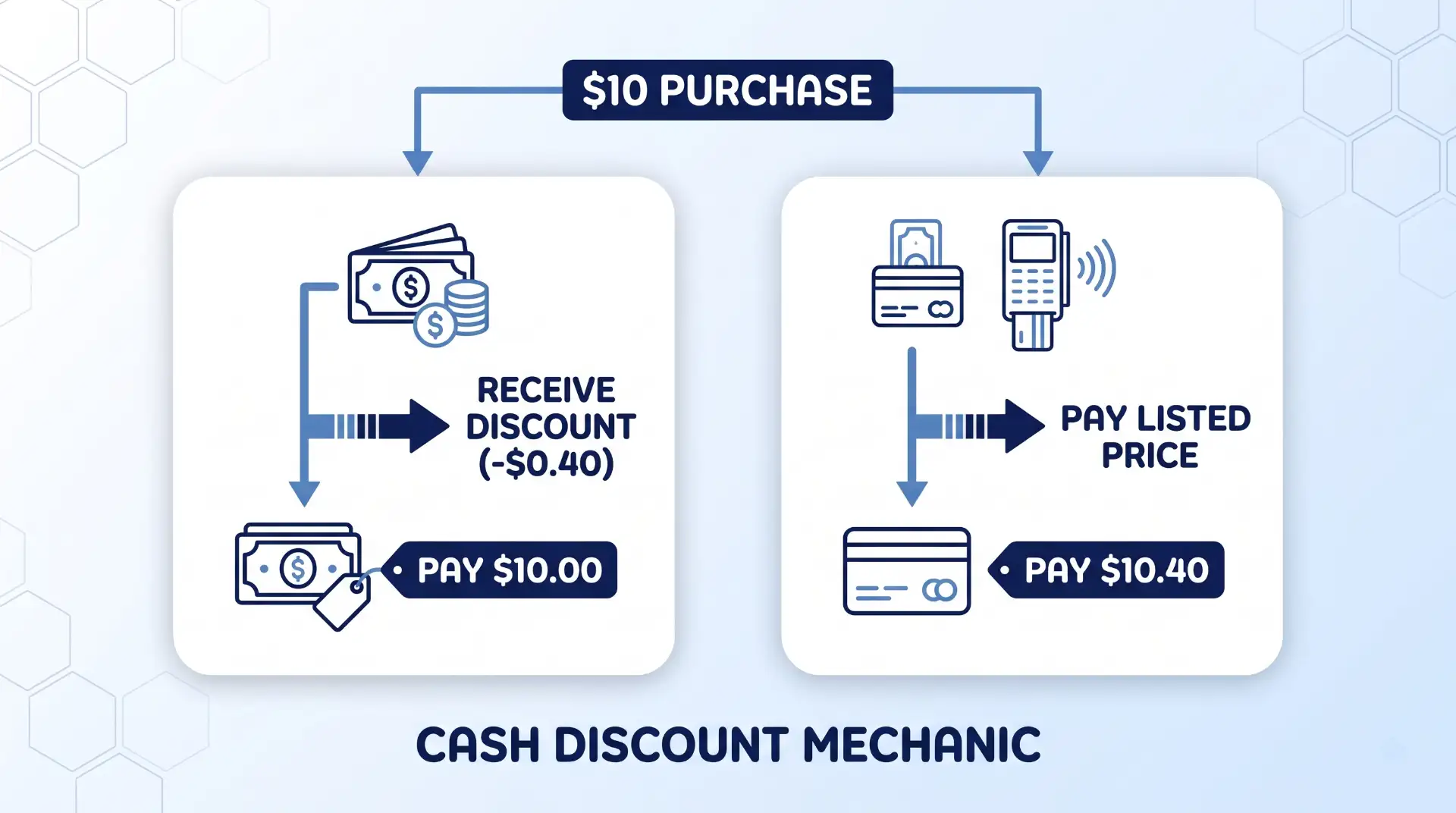
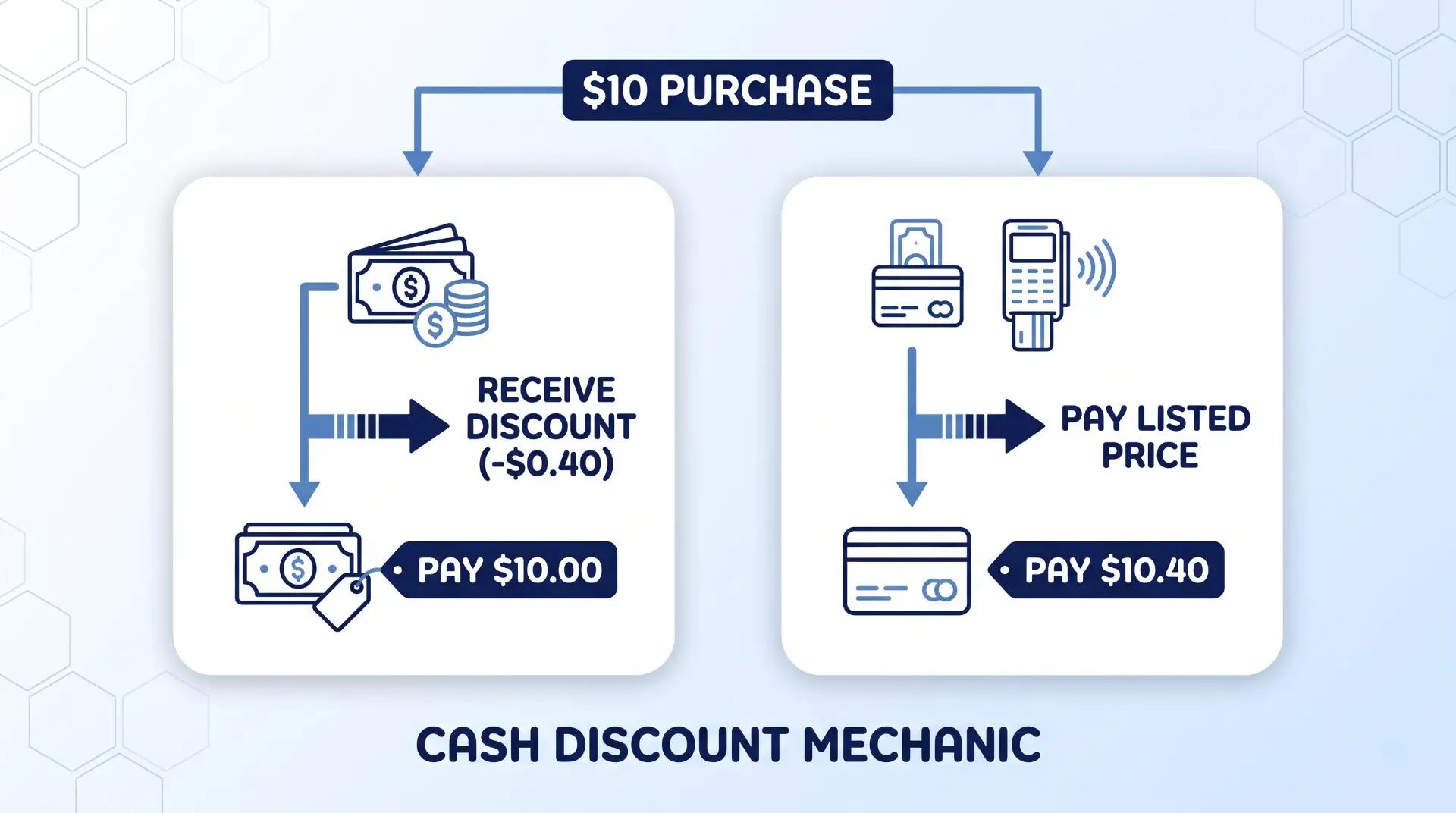
Base Listed Price: All shelf tags, menu boards, service quotes, and online price lists display the regular card price (for example, $10.40).
Cash Transaction: At the register, the POS system automatically applies a cash discount (for example, $0.40), bringing the final price paid down to $10.00.
Card Transaction: The customer pays the full listed base price of $10.40, which covers the underlying credit card processing fee.
Federal law under the Truth in Lending Act (15 U.S.C. § 1666f) explicitly protects the right of merchants to offer cash discounts to induce non-card payments, provided the discount is made available to all customers and disclosed clearly prior to purchase.
Cash Discount vs. Surcharge vs. Dual Pricing
Choosing the wrong fee-recovery model or mislabeling checkout fees can lead to severe processor fines and merchant account cancellation. Business owners must distinguish between three distinct pricing models:
Feature
Cash Discount Program
Credit Card Surcharge
Dual Pricing Model
Listed Price Format
Card Price (highest price displayed)
Cash/Base Price (surcharge added at POS)
Both Cash and Card prices displayed side-by-side
Legality Across US
Legal in all 50 states
Prohibited or restricted in several states
Legal in all 50 states
Debit Card Eligibility
Allowed (applied as cash discount reduction)
Strictly Prohibited by federal law
Allowed (debit pays card or cash price based on method)
Network Registration
No advance registration required
Requires 30-day notice to Visa & Mastercard
No advance registration required
Max Adjustment Cap
No percentage cap (must reflect baseline)
Capped at 3% max (Visa limit)
No percentage cap
Under the Durbin Amendment under Regulation II, merchants are strictly barred from imposing surcharges on debit card transactions, even when the customer selects “credit” at the terminal. Applying a surcharge to a debit card is one of the most common compliance violations recorded by card brand auditors.
Furthermore, Visa’s merchant compliance standards state that if a merchant advertises a lower base price on shelf tags and then adds a fee line item at the terminal for card users—regardless of whether the business labels it a “service fee,” “technology fee,” or “non-cash adjustment”—it is legally classified as a surcharge. Misrepresenting a surcharge as a cash discount risks immediate fines starting at $1,000 per occurrence from card brand compliance teams.
How to Set Up a Compliant Cash Discount Program
Implementing a fully compliant cash discount program requires updating your hardware, software, signage, and customer service workflows in lockstep.
Advertisement
Step 1: Audit Processing Rates and POS Hardware
Before launching any new pricing model, consult with your current payment processor to confirm whether their software supports automated dual pricing and line-item cash discount receipts. Review your average monthly processing statement to determine your effective rate. Select a discount percentage (typically between 3% and 4%) that accurately covers your total processing overhead without overcharging customers.
Step 2: Configure Terminal Software and Receipt Itemization
Your POS terminal must be programmed to handle the discount calculations automatically. Ensure your software meets the following conditions:
Calculates the discount before tax to avoid improper tax collection.
Displays the original card price, the discount amount, and the final cash total on the terminal screen.
Prints receipts clearly itemizing the regular card price alongside the cash discount deduction line.
Transparency is essential for legal compliance and customer retention. According to credit card surcharge regulations and cash discount framework rules, disclosures must be posted prominently where customers make purchase decisions:
At all public business entrances.
At each checkout terminal, register, or counter.
On printed menus, digital price displays, and online order portals.
Signage should use positive language, such as: “All advertised prices reflect our standard card pricing. As a courtesy to our cash-paying customers, we offer a 4% discount at checkout when paying with cash or check.”
Step 4: Train Staff on Customer Communication
Frontline staff should be prepared to explain the cash discount model clearly and politely. Frame the program as a reward for cash buyers rather than a punishment for card users. Staff should emphasize that customers who pay with cash save money on every transaction, while cardholders pay the standard listed tag price.
Common Misconceptions and Compliance Risks
Many small businesses inadvertently commit card network violations by purchasing turnkey “cash discount” packages from unverified vendors. Avoid these critical traps:
Advertisement
The “Non-Cash Adjustment” Trap: Automatically adding a 4% “service fee” at the register to a base cash price is a surcharge, not a cash discount. Calling it a “non-cash adjustment” on receipts does not bypass card brand rules.
Failure to Update Shelf Tags: If your shelf price or menu lists $10.00, but the customer’s receipt shows a $10.40 charge when using a card, you have surcharged the customer. All listed prices must reflect the card price.
Ignoring Card Brand Audits: Both Visa and Mastercard run active compliance auditing programs. Under Visa merchant violation remedies, businesses found operating non-compliant fee programs receive warning notices requiring remediation within 30 days, followed by mounting financial penalties if uncorrected.
Overcharging Surcharges: For businesses choosing a surcharge model instead of a cash discount, Mastercard merchant surcharge rules explicitly cap credit card surcharges at the merchant’s actual cost of acceptance or 3% to 4%, whichever is lower.
Where Cash Discounting Has Limits
While cash discounting protects profit margins for many businesses, it is not universally optimal for every business model:
High-Ticket B2B Transactions: B2B buyers relying on corporate procurement cards rarely carry large amounts of cash. A 3.5% price difference on a $20,000 order may create sales friction or lead clients to demand invoice net-terms instead. Exploring an interchange-plus pricing guide may yield lower fees without altering customer checkout workflows.
E-Commerce and Card-Not-Present Environments: Implementing cash discounts online requires specialized payment gateways capable of supporting alternative payment methods like ACH bank transfers or digital wallets at checkout.
Premium or Luxury Retail: Luxury brands often avoid cash discount signage at checkout, choosing instead to fold processing overhead into standard margin pricing to preserve high-end brand perception.
Key Takeaways
Cash discount programs allow merchants to offer a discount off the standard card price to customers who pay with cash, recovering credit card processing costs legally.
Cash discounting is legal in all 50 states and applies to both debit and credit card transactions when structured correctly.
All shelf pricing, menus, and signage must display the card price as the standard price, with the cash discount subtracted at checkout.
Adding a fee at checkout to a lower listed price is legally classified as a surcharge, triggering strict network limits and debit card prohibitions.
Compliant point-of-sale hardware and staff training are essential to avoid card brand fines and maintain customer trust.
Frequently Asked Questions
Is a cash discount program legal in all 50 states?
Yes. Federal law under 15 U.S.C. § 1666f protects a merchant’s right to offer discounts to customers paying with cash or check across all 50 states. Unlike credit card surcharges, which face restrictions in several states, cash discounting is fully legal nationwide when advertised correctly.
Can I apply a cash discount to debit card transactions?
Yes. Because a cash discount reduces the price for cash buyers rather than imposing an added fee on card users, debit cardholders simply pay the listed card price. Surcharging debit cards is illegal under federal law, but cash discount pricing complies fully with debit regulations.
What is the maximum percentage I can offer as a cash discount?
Unlike credit card surcharges—which Visa caps at 3%—cash discount programs do not have a hard legal percentage cap. However, the discount percentage should reasonably reflect your actual business processing costs (typically between 3% and 4%) to avoid distorting base pricing.
What happens if Visa or Mastercard flags my business for non-compliance?
If a card network auditor flags your business for improper signage or charging unapproved fees, you will receive a formal notice from your acquirer. Merchants are given a remediation window (typically 30 days) to correct their POS setup and signage. Failure to remediate results in non-compliance fines starting at $1,000 and potential processing termination.
How do I explain a cash discount program to customers who complain?
Focus on positive savings rather than fees. Train your staff to explain that all listed prices are standard card prices, and paying with cash earns an instant discount at checkout. Reframe the conversation around rewarding cash buyers rather than charging card users.




























































You must be logged in to post a comment Login