Security teams log 54% of successful attacks and alert on just 14%. The rest move through your environment unseen.
The Picus whitepaper shows how breach and attack simulation tests your SIEM and EDR rules so threats stop slipping by detection.





A new version of the RedHook Android malware abuses the Android Wireless Debugging (Wireless ADB) mechanism in a novel way to gain shell-level privileges without requiring a computer connection.
Researchers at cybersecurity company Group-IB analyzed the new release of the mobile malware and say that it significantly expands its capabilities compared to the previous variant documented in 2025.
At the same time, the malware retains its remote access trojan (RAT) features, allowing it to stream the screen, intercept keystrokes, automate UI interactions, and steal credentials.

ADB (Android Debug Bridge) is Google’s debugging interface that lets a user control an Android device from a command line.
The system, which runs on an Android device as an ADB daemon, enables executing shell commands from a computer running the ADB client.
Wireless ADB, first introduced in Android 11, provides the same capability wirelessly, without requiring the devices to be linked via a USB cable.
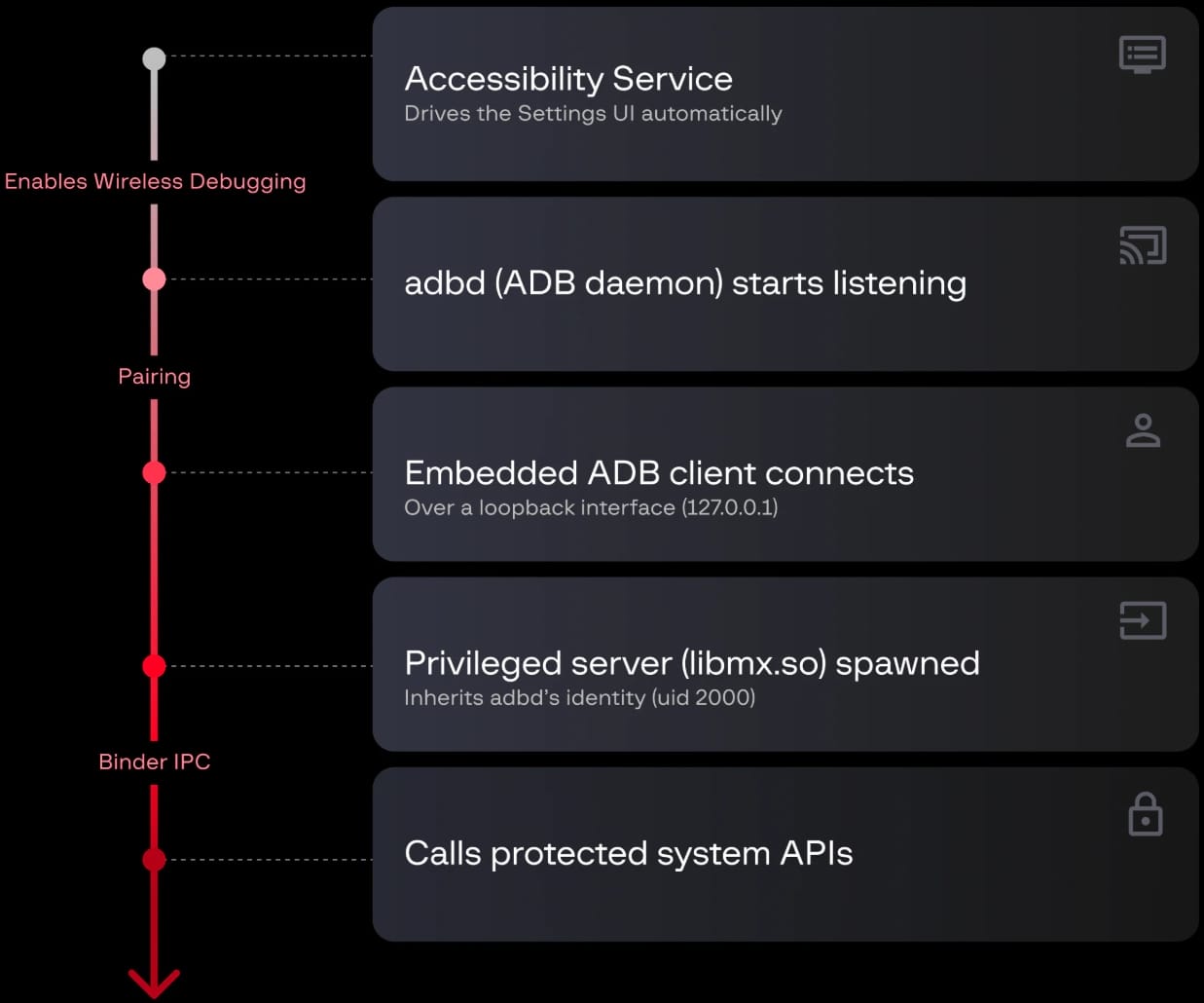
RedHook essentially turns the phone into its own ADB client by tricking the victim into granting it Accessibility permissions, which let it automatically manipulate Settings, enable Developer Options, and activate Wireless Debugging.
After that, the malware retrieves the pairing code displayed on the screen and connects to the phone’s ADB service via the loopback interface (127.0.0.1).
Once paired, the malware gains shell (UID 2000) privileges, which are significantly more powerful than those available to normal Android apps, though not root-level.
The entire attack chain does not require the device to be rooted, so it works across all Android devices as long as the user is tricked into approving the Accessibility Service permission request.
Next, the malware deploys a Shizuku-based framework to execute shell commands, grant itself additional permissions, modify protected Android settings, silently install or remove applications, and perform various operations without displaying user dialogs.
Shizuku is a legitimate Android utility popular among power users and developers, and does not require a rooted device.
RedHook executes Shizuku code as part of its attack chain, using it as a privileged server (libmx.so) to invoke privileged Android APIs as UID 2000.
According to Group-IB’s report, the current version of the malware supports 53 server-issued commands, which include:
The malware’s multiple persistence mechanisms are also highlighted in Group-IB’s report.
RedHook uses silent audio playback to increase process priority, WakeLocks to prevent CPU sleep, and two services that restart each other when one is terminated.
Other mechanisms include a five-minute watchdog alarm, automatic restart after device boot, and setting oom_score_adj to -1000 to reduce the likelihood of being killed when available system memory is low.
The latest version of RedHook is distributed through social engineering, via messages and phone calls where attackers impersonate government agencies or financial institutions to direct victims to fake Google Play sites.
Android users are advised to install apps only from Google Play, scrutinize requested permissions at installation, and ensure that Play Protect is active on the device.

Security teams log 54% of successful attacks and alert on just 14%. The rest move through your environment unseen.
The Picus whitepaper shows how breach and attack simulation tests your SIEM and EDR rules so threats stop slipping by detection.


AI AND ML
PM frames sweeping new regulations as the equivalent of labour movement touchstones like winning a minimum wage
Australian Prime Minister Anthony Albanese has delivered a landmark speech outlining the nation’s AI policy, which will require datacenter builders to contribute more energy than they consume and mean AI companies must reach agreements with local artists and media before using their content.
“Let me make this crystal clear – not everything produced in Australia is up for grabs,” Albanese said, a reference to both content and the nation’s energy and water resources.
The PM said Australia will therefore legislate to require builders of large new datacenters to become net generators of energy, rather than consumers, by funding electricity generation projects to meet their needs and pay for associated work to bolster energy grids.
The policy also requires datacenter operators to pay for water infrastructure and make minimal environmental impacts.
The PM expects Australia’s states and territories to sign up to his plan so the nation can offer expedited approval processes for datacenter builds and consistent operating standards that apply across the country.
Nationwide laws, Albanese argued, will make Australia a more attractive destination for inbound investment by making it easier for AI companies to plan new datacenters – and perhaps offset other elements of the policy that are more onerous than laws in other countries.
“Australian writers, musicians, artists and journalists, must retain ownership and control of their work,” Albanese said. “Anything less is theft.”
He said Australia’s approach “will ensure Australian writers, artists and journalists retain ownership over their work, meaning no company should use Australian creative works to train AI without the artist’s control.”
The PM added his view that no country has given artists and rights-holders sufficient control of how AI companies use their works. Albanese didn’t say how he plans to enforce that control, but his speech framed the effort to do so as getting ahead of AI before big players get too much power.
Albanese asked his audience to imagine how much better off Australia would be if it had regulated social media a decade before the 2024 introduction of a ban on children aged under 16 accessing such services. He also compared the AI plan to past landmark reforms won by the global labor movement, such as winning a minimum wage and fixed working week.
The PM also said that without regulations of this sort, Australia will effectively outsource its security to big tech companies.
“If we are always dependent on someone else, somewhere else, we will be vulnerable,” he said. The AI policy aims to instead make Australia stronger.
Albanese argued that Australians should not see AI as a threat to jobs, but that strong policy can make the technology a means to create new ones – beyond employment created by a short-term datacenter construction boom.
The PM wrapped his speech by suggesting AI can stand for “Australia’s Interest” as well as “artificial intelligence.” ®

Volkswagen has taken some of the most advanced safety features from its passenger cars and squeezed them onto an electric bicycle, unveiling what is claimed to be the world’s first eBike with an integrated rear-view camera and dashboard display.
Developed in partnership with premium eBike manufacturer n+, the new Volkswagen-licensed electric bicycles are designed around the same “safety-first” philosophy that has informed the German automaker’s road cars for decades.
Rather than focusing solely on bigger batteries and more powerful motors, Volkswagen says the new range is engineered to make cyclists more visible to motorists and more aware of their surroundings.
At the heart of the system is Smart View, which combines an integrated high-definition rear-view camera with radar-assisted traffic monitoring.
Neatly integrated into the handlebars, the display takes a real-time feed from a high-definition camera mounted on the rear mudguard that allows riders to see what is happening behind them without having to turn their heads. At the same time, radar sensors, similar to those offered by Garmin, can also warn of approaching vehicles in a cyclist’s blind spot.
The technology resembles the camera mirror systems increasingly found in modern passenger vehicles, and the company says it could represent one of the most significant safety advances to hit the eBike market in recent years.
Volkswagen and n+ have also developed a full-length illuminated LED strip that runs through the bike’s top tube. The system acts like an automotive daytime running light but can also illuminate red when braking and amber when turning, signaling a rider’s intentions to other road users.

An optional Smart Helmet can synchronize with the eBike via Bluetooth, mirroring the bicycle’s lighting signals and incorporating a built-in accelerometer that can detect crashes and automatically send text messages to loved ones in the event of an emergency.
Then there are the Smart Glasses, which are perhaps the most futuristic of all. Inspired by automotive head-up displays and developed by engineers who previously worked on fighter pilot helmet displays, the glasses can project navigation instructions, blind-spot warnings and ride information directly into a rider’s field of vision.
Peter Jost, CEO of Volkswagen Accessories, Lifestyle and Licensing Business, said that technologies like these are “most commonly known from the automotive world” and that seeing them arrive on an eBike demonstrates how safety systems can “evolve and be adapted in meaningful ways”.
Despite the plethora of new technologies onboard, the innovative eBikes are priced to rival premium competitors, with Sport models starting at £3,999 in the UK (around $5,300/AU$7,700), which includes the Smart View rear-view monitor. The Smart Helmet and Smart Glasses cost an additional £499 (around $670AU$960) each.

As cities become increasingly congested and more people turn to electric bicycles as an alternative to driving, safety is rapidly becoming one of the biggest battlegrounds in micromobility.
While innovations in recent years have largely centered on extending range and increasing power, there has been comparatively little focus on helping cyclists avoid accidents in the first place.
Many companies that specialize in cycling accessories have come up with safety solutions that help increase visibility and awareness of other vehicles, but this often requires cyclists to bolt on awkward pieces of technology.
Having it neatly integrated into the bicycle itself feels like a logical solution, and with commuters looking for ever-cheaper ways to get from A to B, these could very well be the sort of innovations that persuade motorists to ditch their cars in favor of something leaner and greener.

Follow TechRadar on Google News and add us as a preferred source to get our expert news, reviews, and opinion in your feeds.



Microsoft has released the Windows 10 KB5099539 extended security update, which includes the July 2026 Patch Tuesday security updates for 570 vulnerabilities, along with additional security fixes.
Initially, Microsoft only offered consumers one year of extended security updates. However, last month, Microsoft quietly extended its free Windows 10 Extended Security Updates (ESU) program for consumers by an additional year, allowing enrolled devices to receives security updates until October 12, 2027.
If you are running Windows 10 Enterprise LTSC or are enrolled in the ESU program, you can install this update like normal by going into Settings, clicking on Windows Update, and manually performing a ‘Check for Updates.’
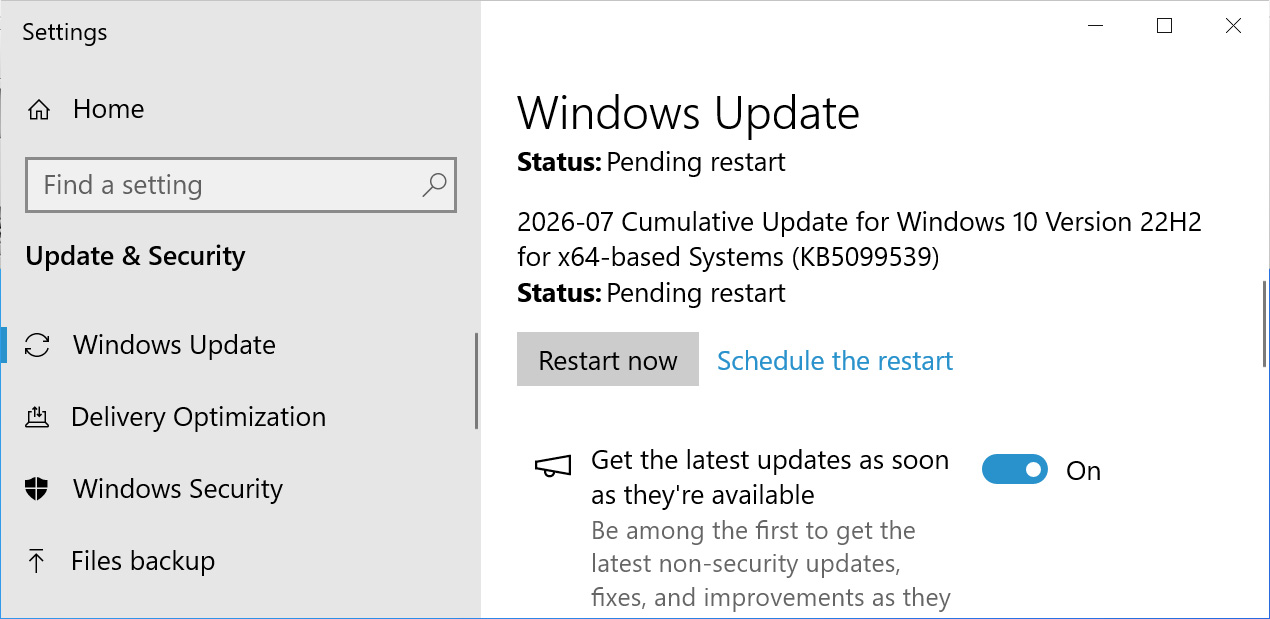
After installing this update, Windows 10 will be updated to build 19045.7548, and Windows 10 Enterprise LTSC 2021 will be updated to build 19044.7548.
Microsoft is no longer releasing new features for Windows 10, and the KB5099539 update primarily contains security updates and bug fixes.
The update also includes fixes released as part of today’s record-breaking July 2026 Patch Tuesday, which fixed a record-breaking 570 vulnerabilities, including two exploited and one publicly disclosed zero-day flaws.
The complete list of fixes in KB5099539 is listed below:
[OLE Automation (known issue)] Fixed: Addresses a compatibility issue in OLE Automation (oleaut32.dll) that was introduced by the June 2026 security update. Some applications that use the IDispatch::Invoke method to call COM methods with BYREF parameters that share the same underlying storage might fail. These failures can include parameter marshaling errors or automation call failures. This update corrects how parameter ownership is managed and restores expected application behavior.
[File Explorer (known issue)] Fixed: An issue where the OneDrive shortcut in File Explorer stops working when File Explorer is run with administrative mode.
[Recycle Bin (known issue)] Fixed: This update addresses an issue where the confirmation dialog might display an internal Recycle Bin file name instead of the original file name when permanently deleting a file.
[Input] This update changes hotkey unregister and cleanup behavior. In rare cases, some built-in Windows experiences that rely on previous hotkey lifecycle behavior might temporarily stop responding to certain keyboard shortcuts. This issue can typically be resolved by restarting the app affected. If the issue is not resolved, report it through the Feedback Hub.
[Secure Boot]
[Networking] This update introduces a security hardening change that enforces TDI transport registration requirements. As a result, applications that use sockets over unregistered third-party TDI transports might stop working after installing this update. Registered TDI transports are not affected. For more information, see Third-party TDI transports might stop working after installing Windows security updates released on or after July 14, 2026.
[Remote Desktop (RDP) Security] Support for SHA-2 certificate thumbprints has been added for trusted RDP publishers, with SHA-1 support retained only for backward compatibility and planned for future removal. New guidance is available for managing RDP file security through Group Policy to help organizations reduce phishing risks by controlling which .rdp files users can open. We recommend IT administrators migrate to SHA-256 thumbprints or a stronger algorithm as soon as possible to avoid disruption.
Microsoft also warns that an intentional security hardening change that enforces TDI transport registration requirements may impact legacy applications that rely on unregistered third-party TDI transports.
Windows users can determine whether they are affected by checking the Windows System event log in Event Viewer for AFD Event ID 16003 entries.
“To determine if you have a TDI transport that is affected by this change, check the Windows System event logs in Event Viewer > Windows > System,” Microsoft explains.
“If you find an AFD Event ID: 16003 ‘An unregistered TDI provider (\Driver
Otherwise, Microsoft says there are no known issues with this update.
Security teams log 54% of successful attacks and alert on just 14%. The rest move through your environment unseen.
The Picus whitepaper shows how breach and attack simulation tests your SIEM and EDR rules so threats stop slipping by detection.

The description for OpenAI’s first hardware device suggests it will be a speaker that can wiggle around a bit while it reads your email, so a HomePod, but more annoying and privacy-invasive.
Just moments after OpenAI shared an empty statement on Apple’s trade secret lawsuit, new information was shared about the company’s upcoming hardware. While it offered no public comment, internally it wants everyone to believe it is a completely unique product.
The newly leaked information comes from Bloomberg, which shares that the first OpenAI hardware product will be a smart speaker. It will have motorized moving parts, a rechargeable battery, and act as a companion to the user.
It is rumored to be the first of five potential hardware products that OpenAI is working on. The device could be revealed later in 2026 and ship in early 2027 as long as Apple’s lawsuit doesn’t stop its release.
OpenAI believes that it’s so unique it couldn’t possibly be seen as a copy of anything Apple ships today.
The supposed speaker device will have a unique design, lack a display, but it will have a camera for processing its surroundings. It will utilize ChatGPT Live and have the ability to parse user speech even as it provides an answer.

Nintendo already makes a product that randomly talks and is overly nice to you
OpenAI also hopes that the product can be proactive and speak without being prompted. If I’ve learned anything about technology, it’s that people hate it when products speak on their own.
Ask anyone that bought Nintendo’s Talking Flower, or perhaps someone who owned a Furby.
The product is meant to connect on a “humanlike” level with users, learn from user data, and feel like a companion.
Frankly, I’m tired of this desire to anthropomorphize AI chatbots. They can’t think, they can’t reason, they don’t hear, or speak, or any of those things.
In any case, this certainly sounds a lot like a HomePod, or perhaps the future Apple Home Hub tablet that will ship with an AI-powered mechanical arm.

The Apple Home Hub is expected to be announced at any time
It seems OpenAI wants this product to act as a kind of home for ChatGPT. Apple pitched the HomePod the same way when it was first announced — a home for Siri.
The parallels couldn’t be more obvious. And given that Jony Ive is behind the product’s design, I’m not sure how this will release without resembling an Apple product.
With only a couple of years of runway left before OpenAI’s cash starts to run out, it seems odd to bet everything on a technology most people probably already have in their homes. Amazon and Google just upgraded their range of smart speakers with AI capabilities, and Siri is getting a significant upgrade later in the fall.
What Apple has that these other companies don’t is user trust with private data. OpenAI needs a way to get access to users’ apps and email, while everyone’s iPhone already has it, privately.
Frankly, if a smart speaker that can wiggle and read your emails is all OpenAI has got after poaching 400 Apple employees, it is in trouble. Perhaps that supposed iPhone killer that’s expected by 2028 will turn things around.

Every summer, social media rediscovers the same “life hack”: if your phone gets too hot, stick it in the fridge for a few minutes. It sounds logical. Refrigerators are cold. Phones are hot. Problem solved. Except it isn’t. Repair technicians, smartphone manufacturers, and safety experts all agree this is one of the worst things you can do to an overheating phone. While the trick might cool the exterior temporarily, it can quietly create a much bigger problem inside the device – one that could permanently damage components or shorten the life of its battery.
According to a new BBC report, the latest warning comes from a UK phone repair shop, but it’s one experts have been repeating for years.
According to a report by the BBC, Jamie Farnell, who runs Shropshire Phone Repairs in Wem, says his shop has been inundated with devices suffering heat-related issues during the recent heatwave. Many customers admitted they had tried cooling their phones by putting them inside a fridge or freezer after seeing the advice circulate on social media.

Farnell says that’s exactly what people shouldn’t do. The problem isn’t the cold itself – it’s what happens when a warm electronic device is exposed to a cold, humid environment. Rapid temperature changes create condensation, allowing moisture to form inside the phone. Unlike the water you might notice on the outside of a cold drink, condensation inside a smartphone can reach the display, charging port, logic board, or battery connectors. That moisture can lead to corrosion, short circuits, or expensive repairs.
Farnell also pointed out another familiar internet myth that refuses to die: putting wet phones in rice. He says that trick is just as ineffective as the refrigerator hack, despite both continuing to circulate widely online. The warning comes after an alarming incident at his repair shop, where an iPad with a swollen lithium battery reportedly burst into flames during June’s heatwave. Swollen batteries are often a sign of excessive heat stress and should never be ignored.
This isn’t simply one repair technician’s opinion. Apple says iPhones are designed to protect themselves when they become too hot by dimming the display, slowing charging, reducing performance, or temporarily disabling certain features until temperatures return to normal. The company’s advice is straightforward: move the phone to a cooler environment out of direct sunlight and allow it to cool naturally. Apple does not recommend exposing the device to sudden temperature extremes.
Samsung offers similar guidance for Galaxy devices. If a phone displays a “Device cooling down” warning, users should stop using it, unplug it from charging, remove any protective case, close background apps, and simply let it cool on its own. The phone automatically reduces performance and pauses charging to protect its internal components while it sheds heat.

Even the Associated Press, citing guidance from Apple, Samsung, Google and UK electronics retailer Currys during last summer’s heatwave, warned against placing phones in refrigerators or freezers because of condensation risks. If your phone genuinely feels too hot to hold, there are safer ways to help it recover. Turn it off if possible, remove the charging cable, close demanding apps, lower the screen brightness, take off thick protective cases, and keep it somewhere shaded with good airflow. Avoid charging while gaming or recording long videos, especially in direct sunlight.
Modern smartphones already contain sophisticated thermal management systems designed to slow themselves down before permanent damage occurs. The temporary performance hit may be annoying, but it’s considerably cheaper than replacing a moisture-damaged motherboard. As tempting as the refrigerator trick may seem during a heatwave, your phone doesn’t need a blast of cold air. It just needs a little patience.
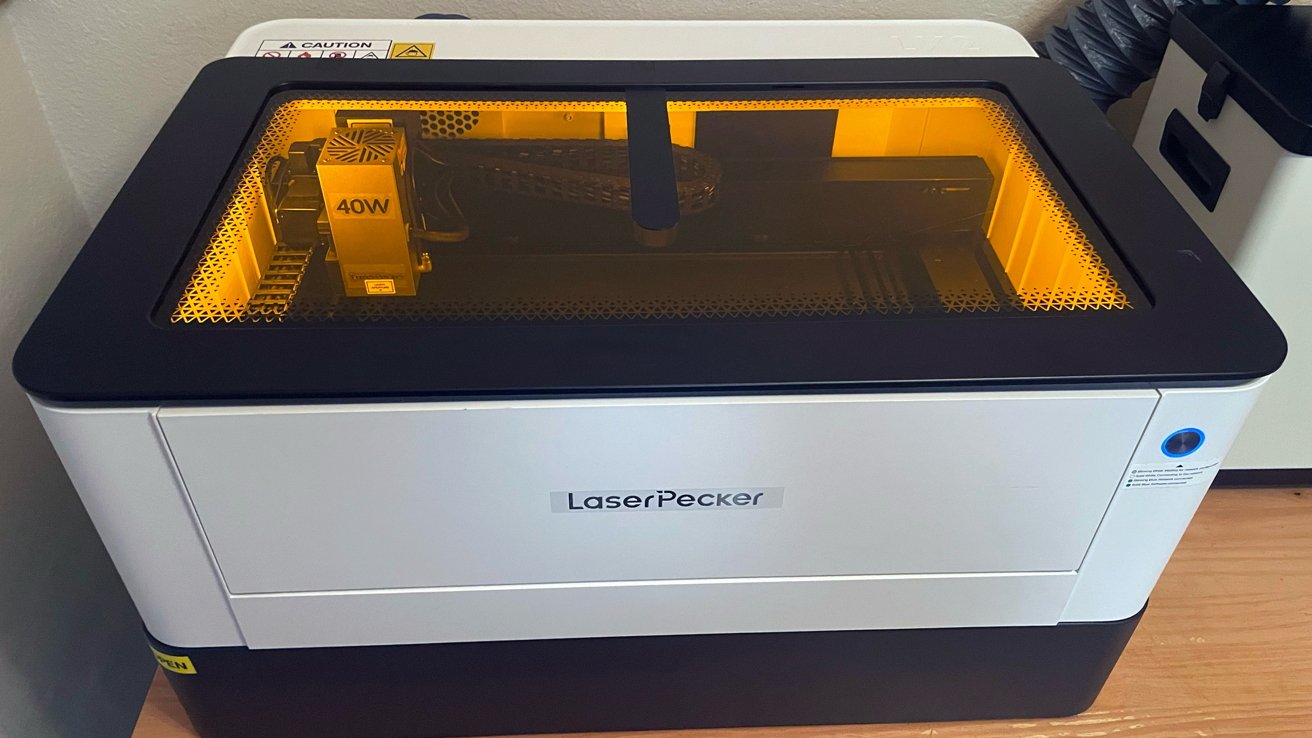
The LaserPecker LX2 is an enclosed desktop laser cutter with swappable modules that bridges hobbyist and small-business laser work. Its sticker price is intimidating, but it’s a useful tool for those who buy it.
A laser cutter was once an industrial machine that needed a dedicated workshop. That has changed.
Desktop models now bring real cutting power to a home office or studio. The LaserPecker LX2 is one of the more ambitious of these.
It is a fully enclosed system with a large work area. The laser heads are interchangeable, so one machine grows with the user’s needs.
| Product | LaserPecker LX2 Laser Cutter |
| Starting price | $1,649 (20W bundle); up to $2,999 (40W with extras) |
| Laser modules | 20W diode, 40W diode, 2W IR; 60W diode coming soon |
| Module swap | Tool-free wedge-lock, swappable in seconds |
| Working area | 19.7 by 12 inches (500 by 305 mm) |
| Max working speed | 1,000 mm/s at 10,000 mm/s^2 acceleration |
| Positioning precision | 0.01 mm |
| Engraving accuracy | 0.01 mm or better |
| Engraving density | 10 to 300 dpi |
| Camera | 12MP overhead with point-to-shape positioning |
| Max processing height | 45 mm standard, 150 mm with optional riser base |
| Max rotary diameter | 130 mm (requires optional riser base) |
| Cutting depth (40W) | 22 mm paulownia, 19 mm cherry, 20 mm acrylic, 0.5 mm steel |
| Supported materials | Wood, acrylic, leather, glass, stone, metals, and more |
| Connectivity | USB and Wi-Fi, offline operation supported |
| Main unit size | 30.7 by 24 by 11.1 inches |
| Main unit weight | 49.6 pounds |
| Input power | 24V, 10A, 240W |
| Safety certification | CE, RoHS, FCC, FDA, and others; Class 1 enclosure |
The LX2 is a large, fully enclosed unit weighing 49.6 pounds. It is built to sit on a workbench rather than be carried around.
The enclosure is the key safety feature. It is Class 1 certified, so it runs safely without you needing to wear separate laser goggles.

LaserPecker LX2 review: The yellow screen protects your eyes from the laser.
LaserPecker lists a nine-layer protection system. This covers overheat detection, smoke and flame sensors, an emergency stop, and a lock.
Dual-door access, on the front and side, makes loading materials easier. A removable base tray catches debris and ash for cleaning.
It ships in 20W and 40W diode versions, plus a 2W infrared option, with each module swappable.
The LX2 arrived in a large, incredibly well-packed box from the manufacturer. This box is large and heavy, so I recommend using a team lift approach if at all possible.
I didn’t. Learn from my mistakes and the sore shoulder I lived with for two days after getting it into my home.
Inside the box, LaserPecker includes:
Out of the box, one fact is abundantly clear: From a hardware standpoint, the LaserPecker LX2 is phenomenally well made.
Every piece and part is machined and precise.

LaserPecker LX2 review: The platform for engraving.
My previous experience with LaserPecker products set a level of expectation for the LX2 before it arrived. LaserPecker actually surpassed those expectations.
This hardware is next level in quality.
Nothing about the LaserPecker LX2 feels cheap or budgeted for budget’s sake. Every single detail on the hardware just works, meaning the LaserPecker LX2 feels like another huge step forward on LaserPecker’s path of quality.
The software is another story.
Unboxing and setting up the LaserPecker LX2 takes time. It is not a painful process at all on the hardware side, but it is not fast.
The components are clearly marked, and the assembly instructions are very clear, with LaserPecker quite literally including all the tools needed to assemble the LaserPecker LX2.
I had the enclosure, rails, base plate, optional riser base, and the laser module assembled and on my work table in less than 20 minutes.
I also pre-attached the exhaust pipe and set up the optional smoke purifier unit next to the LX2. The exhaust pipe included with the smoke purifier was set to exit under the stove hood in my kitchen.
If you plan to purchase the optional riser base, know that you will need to lift the LX2 onto the riser base. This is much easier with two people.
The LX2 runs on LaserPecker’s own Design Space software.
Hardware assembly was a smooth process, but once again, the LaserPecker Design Space app remains lacking compared to the quality of the LX2.
The LaserPecker LX2 connects via wired USB cable and Wi-Fi network.
But to enable the Wi-Fi function, you must connect the laser unit to your Mac or PC via USB-A to USB-C first with the provided cable. You also have to initialize it through the macOS LaserPecker Design Space app Beta, downloadable from the LaserPecker website.
The Beta version is here specifically for the LX2.
Previous versions of the instructions for using the app to connect to Wi-Fi were lacking. This time, the new version does well here.
Where the app falls down again is the lack of refinement in the process.
For example, updating the firmware begins normally and displays a progress bar up to 25%. But then the bar disappears, and the process does not show any visual progress or signal failure, nor completion.
The only way to know is to allow the process to run for (in my approach) 15 minutes, power down the unit, close the app, and then power everything on again. All of this to see if I was then running the current firmware.
It isn’t the end of the world, but it is annoying.

LaserPecker LX2 review: A 40W module is installed, but it can take up to 60W.
Connecting to Wi-Fi nearly drove me to abort the entire process.
Every time I attempted the direct USB cable connection method detailed in the manual, I received an error message.
Exhaustive attempts and borderline witchcraft were performed, booting up the unit and the app in different orders. After changing cables too many times and holding my breath, I could never get the unit on the Wi-fi this way.
I then downloaded the mobile app and tried again. Only the process is tedious and not what I would call polished at all.
To connect via mobile app, the LX2 acts as a temporary hot spot to process the information on the Wi-Fi network to the LX2. If you receive an error, you have to restart everything, power it down, and try again.
This process took five attempts, but it eventually worked, and I connected the LX2 to my Wi-fi network. It has been solid ever since.
The LaserPecker Design Space app does not feel like a macOS application, but rather an 85 percent port over from Windows. In my research on LaserPecker, this seems to be consistent.
On the upside, this version of the app has improved, and I hope that LaserPecker puts time and resources into refining the app moving forward.
The company also lists compatibility with LightBurn, the industry-standard third-party laser application.
LightBurn support is significant for Mac users. It runs natively on macOS, giving Mac owners a professional way to drive it.
For Apple users, Mac-native LightBurn and Wi-Fi control make the LX2 a practical fit. It does not depend on a Windows-only toolchain, a common frustration in this class.
The defining feature of the LX2 is its swappable laser modules. A tool-free wedge-lock system lets users change heads in seconds.
The 20W diode module suits high-detail engraving work. The 40W module is the heavier cutter, handling thicker materials and having a faster throughput.
A 2W infrared module is also available separately. It is built for metal, using a different wavelength to mark gold and silver.
LaserPecker lists a 60W diode module as coming soon. That indicates buyers can expand power later without replacing the base machine.
The modular approach is the LX2’s main argument. One enclosure and motion system can serve several very different jobs as needs change.
LaserPecker provided me with both the 20W and 40W laser modules for testing, and the swapping process is exactly as advertised. It is smooth, quick, and painless.
Calibration and alignment is handled through the app. It requires a few clicks and less than a minute to be up and running.
LaserPecker rates the LX2’s engraving capability at up to 1,000 mm/s, with 10,000 mm/s^2 acceleration. An industrial dual Y-axis and linear guide system keeps that speed stable.
The 40W module is the cutting workhorse. LaserPecker lists single-pass cuts up to 22 mm in paulownia, a type of hardwood tree, and 20 mm in acrylic.
Positioning is handled by a 12MP overhead camera with point-to-shape alignment. A 3D auto-focus system scans the surface and adjusts height as it works.
That curved-surface capability is notable. The laser stays focused across uneven or rounded objects, not just flat stock.
For testing purposes, I chose pieces of my own artwork that have details and variable line widths for engraving tests.
For the best results, SVG files are recommended, so that is what I created.
To begin, I work in Adobe Photoshop with a digital pen display to create illustrations at a high resolution. From here, I can save a high-resolution TIFF file that I open in Adobe Illustrator as a raster image, and convert the line art to vector with the image trace feature in Illustrator.
This gives me clear vector lines I can convert to an SVG file that drops directly into the LaserPecker Design Space app with no issues at all. From there, I clicked the live camera preview inside the enclosure, dropped my balsa wood board, aligned the art where I wanted to engrave, and started the process.
From there, I clicked the live camera preview inside the enclosure, dropped my balsa wood board, aligned the art where I wanted to engrave, and started the process.
Before printing, there is a safety check that requires you to push the main function button on the LX2 to begin. I like this redundancy to ensure no hands or objects are inside the laser space.
The app delivers a live feed of the process and a countdown timer to completion.

LaserPecker LX2 review: Test engravings
I recommend purchasing a few flat, heavy magnets to hold the material in place away from the laser area. The motion of the laser arm can rock the unit slightly on large prints and move the placement of light materials like thin balsa wood.
The end result of my tests are two of the best engravings I have ever seen from a unit like this. The details are outstanding and I know I have not scratched the surface of what is possible with the unit.
The options are staggering, and when you include the optional accessories like the rotary extension for different engravings and materials, my imagination is burning with ideas.
What I really love about the LaserPecker app (despite the initial connection issues) is the array of design and production features it offers for new and experienced designers.
LaserPecker seems to understand that not every user will have access to art programs, or have a deep understanding of how to use them. The app’s design space includes basic tools for adding text, drawing shapes, and pen and line/shape tools to prevent shaky hand-drawn lines when using a mouse and keyboard.
The app also has a series of filters and tracing options for images imported into the design space, to create functional line and engraving-ready pieces for use.
For now, these filters and tracing options are not as robust as a digital art program like Adobe Illustrator, but they do work with a little bit of finessing. The better the contrast on the image, the better the end results using the app’s filters and tracing.
One of the novelty features in the app is a Puzzle setting that allows you to create a puzzle piece grid of cut lines that you can drop on the work surface. All to quickly create your own custom puzzles.
The batch printing feature is brilliant as well.
It utilizes the LX2 camera and auto-focus features to set a parameter on a single piece, and then recreate that engraving on multiple pieces regardless of their placement or angle on the work surface. I intend to get use out of this in the future by creating a series of custom tokens for board games and role-playing games.
With all of the features, I am very happy with the results of each print I create with the LX2, and I am excited to make more.
Where things fall down for the production and quality of life for the LX2 is the amount of fumes and smoke generated.
The enclosure does a fair job of working the smoke away from the work area. But if you have a small workspace or plan to use the LX2 in an apartment like I am, I cannot recommend purchasing the smaller Smart Air Assist enough.
It is a smaller unit that regulates how much smoke is present in the enclosure and works to keep it under control. It is $160 and it is vital with your initial purchase.
However, if you have the budget, I strongly recommend the Smoke Purifier accessory.
Laser cutting and engraving produce smoke and fine particles. For an enclosed desktop unit used indoors, extraction matters.
LaserPecker sells a matching desktop smoke purifier for the LX2. It is a filtration unit that sits alongside the machine and clears the air.
The purifier uses a multi-stage filtration system. A HEPA filter handles fine particles, with activated carbon for odors and gases.

LaserPecker LX2 review: Filtration is essential.
LaserPecker rates it at capturing 99.97% of particles down to 0.3 microns. It also lists noise at around 61 decibels, with filter-life reminders and a timer.
For anyone running the LX2 indoors, the purifier is close to essential. Venting smoke from frequent cutting is not optional.
The smoke purifier is not quiet at all. This unit is powerful, and it does the job very, very well, but you will have to contend with the exhaust noise.
The LaserPecker LX2 packs serious capability into a desktop footprint. The enclosed design and swappable modules make it far more versatile than a portable engraver.
The modular system is its strongest argument. It scales from 20W through 40W and IR, with a 60W module to come.
The cautions are around polish rather than power.
There has been talk online of inconsistent positioning and false probe warnings, which read as firmware issues. But in all of my testing, I did not encounter this issue at all.
For Apple users, the LX2 avoids the usual trap. Mac-native LightBurn support slots it into an Apple workflow cleanly, unlike many competing cutters.
Despite the frustrating initial connectivity, the LaserPecker Design Space app handles job management and output well.
My issues come down to software problems that need to be addressed, and the staggering cost for the LX2 and accessories.
This is a unit for hardcore hobbyists or creators looking to start a small business or Etsy shop. This is a large investment when the smoke purifier, accessories, and materials are factored in.
Consumers should keep this in mind when considering the LX2.
The LX2 is a good machine, and I recommend it. Just be prepared for initial setup struggles and a high out-of-pocket cost.
The LaserPecker LX2 is available in a range of packages. The 20W Standard Bundle from LaserPecker’s website, including the 20W laser module, Smart Air Assist, Slats, and a Fire Extinguisher is $1,499, discounted from $1,999.
On Amazon, the LaserPecker LX2 Basic Bundle is $1,499 for 20W, down from $1,649, while the 40W version is $1,799, down from $2,149.


Virtualization
As VMware itself warns of critical flaw in its load balancer
Google Cloud has admitted it made a configuration change that means some customers of its VMware Engine (GCVE) can’t use stretched cluster.
A G-Cloud incident report time-stamped 13:24 PDT on July 14 (21:24 UTC) reports some customers “are experiencing zonal outages impacting network connectivity across multiple regions” and that the trouble started at 10:00 PDT.
Google first attributed the problem to “an underlying network connectivity issue affecting the infrastructure that links the zones within a stretch cluster,” and warned “This disruption is causing synchronization issues between the affected zones.”
Storage and compute services weren’t impacted, and VMs kept running. Users just couldn’t reach their virtual servers.
That’s bad because the whole point of stretched clusters is to enhance resilience by creating a virtual pool of resources that spans two physical sites, while keeping the two rigs in synch to enable rapid failover without disruption.
Google’s next update offered “underlying inter-zone communication failures and Border Gateway Protocol (BGP) session flapping between cluster zones” as the reason for the mess, adding “Specifically, network connectivity has been lost between the affected zones and the witness appliance. Because the witness appliance is currently unreachable, the cluster zones are unable to safely synchronize state.”
At 16:05 PDT Google ‘fessed up.
“Our investigation has identified a recent configuration update that is the likely cause of the inter-zone network disruption,” the web giant admitted. “Teams are working on remediation.”
Google hasn’t said when it will set things right, so customers in the impacted regions – australia-southeast1, australia-southeast2, europe-west3, and northamerica-northeast2 – must wait to learn when they’ll once again enjoy the resilience they pay for.
Other VMware customers may not want to wait because the Broadcom business unit on Tuesday warned of seven flaws in its VMware Avi Load Balancer. One of them, CVE-2026-47865, is an authentication bypass vulnerability that earned a CVSS score of 9.8.
The product’s name is a little misleading, as it’s actually a full Application Delivery Controller that includes load balancing and a Web Application Firewall
VMware hasn’t said much about the flaw other than warning “A malicious user with network access may be able to access the Avi Control plane by bypassing the authentication mechanism.” The tool works with VMware’s Cloud Foundation bundle, Kubernetes Service, and can connect resources in public clouds. Unauthorized access is therefore distinctly undesirable.
The five remaining CVEs are also significant, with CVSS ratings ranging from 8.8 to 7.1. Broadcom has fixed the flaws in recent updates to the product. ®
This article is brought to you by X Square Robot.
Large language models gave artificial intelligence a working recipe. Pretrain a large model on broad data, and general capability follows. Robotics has no such recipe. Robotics systems have long been assembled from separate perception, planning, and control parts that rarely add up to intelligence a robot can carry from one task to another, or one machine to another. The central problem in embodied AI is to find the equivalent recipe, and the field does not yet agree on what it is.
X Square Robot, a Chinese embodied-AI company, has made an unusually explicit bet. It argues that the recipe is an integrated stack, spanning the data a robot learns from, a world model for predicting changes in the physical world, and an action model that brings together perception, planning, reasoning, and decision-making to generate executable robot behavior. The company also believes that the stack should be built and released in the open.
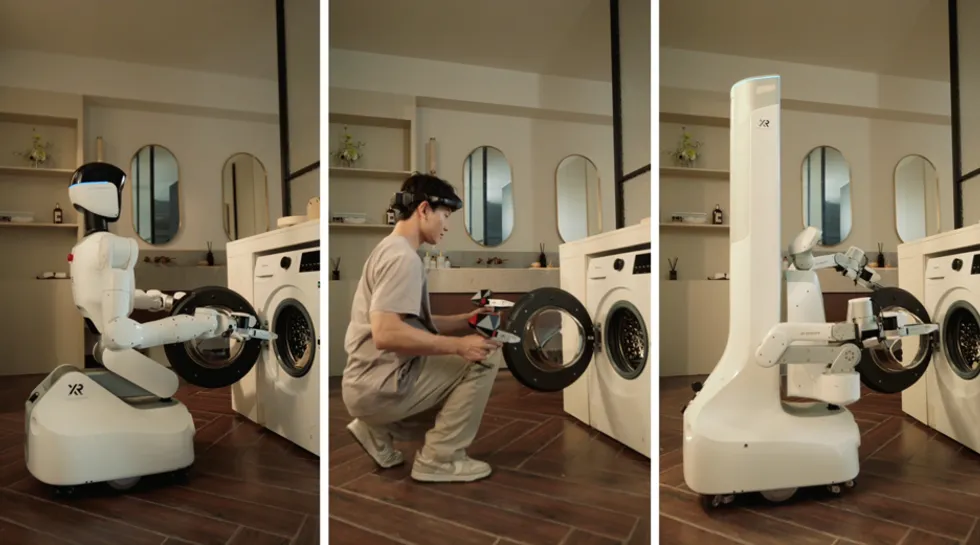
X Square Robot shares its vision of bringing robots into real homes.X Square Robot
What holds the stack together is a small set of principles rather than a single overarching model.
These principles make the layers interdependent, since the same robot-free data that trains the action model is also structured to feed the world model. It is worth being precise, though. The company describes the world model and the action model as complementary but independent model families that share a code base. Both sit within its broader World Unified Model, which it has presented as an architecture for training vision, language, action, and physical prediction together.
For the X Square Robot team, one of the biggest constraints on general-purpose robots is the cost and quality of interaction data, not the number of parameters. To address that, the company built its Universal Manipulation Interface (UMI) data collection system, QUANXTA Zero Series. It works by collecting demonstrations from people wearing a rig with dual grippers rather than teleoperating a robot. This approach is not itself new, and builds on established methods for robot-free data capture. What sets it apart are two engineering choices.
The first is quality control, and it is the most distinctive part. Rather than accepting recorded trajectories as they are, the system runs a closed inspection loop, and its notable step is physical playback. A sample of trajectories is replayed on the real robot, and only those that actually complete the task count as valid. That makes the validity rate a measured quantity rather than an assumption. For example, a gripper that closes a fraction of a second too early still looks like a grasp in the data, yet it has pushed the object away, so it shouldn’t be classified as valid. A smaller clean dataset can be worth more than a larger noisy one.
The second choice is how lower-cost human data and scarce robot data are combined. The company pretrains on a large volume of robot-free demonstrations to build general representations, then adds a small amount of real-robot data as an anchor to the specific machine’s dynamics. It reports that this reaches performance comparable to an all-robot dataset at roughly a 20-fold lower cost of collection, driven mainly by how much cheaper the wearable rig is than a teleoperation setup.
The resulting dataset is deliberately model-agnostic, formatted to feed both action models and world models. The caveat is that the strongest results are measured on the company’s own robots and data-collection pipelines. Broader independent testing will help confirm and extend these promising results across a wider range of settings.
In developing its world model, called WALL-WM, X Square Robot took a differentiated approach. Most action models predict a fixed-length chunk of motion from the current image and instruction. That is convenient, but it segments behavior into fixed-duration windows, so the boundaries fall where elapsed time dictates rather than where one action ends and the next begins. WALL-WM instead treats an action-grounded semantic event as its unit: a coherent piece of behavior such as reaching, grasping, or placing, something that can be named in language, seen in video, and executed as motion.
WALL-WM’s design reflects a specific concern about not discarding what large video models already know. To achieve that, a text-to-video model is coupled to a freshly initialized action network that reads from the video features without overwriting them, which preserves the visual prior. From that one process, it offers two modes. An event mode runs in variable-length segments and suits reasoning over long horizons, while a fixed-length mode produces the steady, real-time output a controller needs. That places WALL-WM between mainstream chunk-based action models and pure video world models, keeping the predictive character of a world model while still yielding executable control.
In a series of experiments, the company relied on a generalization test that is more specific than most. A model trained on a limited dataset was evaluated on long-horizon tasks in unseen settings and, on the company’s real-robot benchmark, reportedly outscored baselines that had been fine-tuned on related data. That is a meaningful result if it holds. For now, it is measured on the company’s own benchmark. With the code now being released, the broader community will have the opportunity to test, reproduce, and build on them across more settings.
The action layer carries two connected ideas. The first is a requirement the company sets for itself with Wall-OSS-0.5, its vision-language-action model: The pretrained model should run on a real robot before any task-specific fine-tuning.
The interest is less in the scores than in the design behind them. The model trains three objectives together, namely discrete action tokens, language grounding, and continuous action generation. And it keeps gradients flowing through all of them rather than freezing parts of the network as some rival designs do. It’s also a more strict method, since it reports untuned behavior such as approaching, grasping, and recovering, including on a deformable task held out of training.
The second idea is the action interface itself, called X-Tokenizer. Most systems that turn continuous motion into discrete tokens produce codes that the language model cannot interpret. X-Tokenizer reframes tokenization as learning a semantic interface, so that the top-level code stands for the intent of a motion while lower-level codes carry finer detail, all aligned with the language model’s own features.
A useful consequence is stability. Adding noise to an action barely moves the intent code, which is what lets one tokenizer to be reused across robots without re-tuning. The tokenizer inside the production action model is a related variant of this approach. Together, the two ideas give the action layer something rather powerful: capability that transfers.
X Square Robot is betting that its unique approach combining three layers, each specialized in solving a key part of the problem, will stand out from other embodied AI stacks. The physical-playback step that grounds data quality is uncommon and sensible. The reframing of world modeling around events, with one backbone serving both reasoning and control, is a genuinely distinct approach. And the pairing of a deployable pretraining standard with a tokenizer designed as a semantic interface gives the action layer unusual coherence.
X Square Robot’s valuation has climbed above 20 billion yuan (about US $2.9 billion), suggesting that investors increasingly view data infrastructure, foundation models, and scalable training systems as long-term differentiators in embodied AI.
The next phase will bring broader validation. Much of the current evidence comes from X Square’s own robots and benchmarks. With the world model code now being made public, and as the community begins to test, reproduce, and build on the work, the reported capabilities will be tested across more robots, tasks, and settings.
X Square Robot’s recent funding rounds reflect similar confidence. The company’s valuation has climbed above 20 billion yuan (about US $2.9 billion), suggesting that investors increasingly view data infrastructure, foundation models, and scalable training systems as long-term differentiators in embodied AI.
To learn more about its future plans, the following Q&A with the X Square Robot team further explores the company’s technology, strategy, and vision.
What made now the right moment, technically, to commit to this stack? What recently became possible that wasn’t possible a couple of years ago?
It is not one breakthrough but several trends maturing together. Foundation models gave us a shared representation across vision, language, and action, so we can model what a robot sees, what it is asked to do, and how its actions change the world in one framework, rather than as separate perception, planning, and control modules.
Compute and infrastructure are finally sufficient for large-scale pretraining over long-horizon, multi-embodiment data. Just as importantly, we realized that data, not model size, is the real bottleneck for general robots—what is scarce is diverse, high-quality, reproducible interaction data. And world modeling has become practical. The useful question is no longer how to predict a few seconds of video, but how to understand the ways actions change objects, contacts, and task states. Two years ago these ingredients existed separately. Today they are mature enough to work as one system.
“We realized that data, not model size, is the real bottleneck for general robots—what is scarce is diverse, high-quality, reproducible interaction data. And world modeling has become practical.”
Your data system captures demonstrations with a wearable VR rig and custom grippers rather than teleoperating robots. What was wrong with standard teleoperation?
Teleoperation is built around controlling the robot. It forces the operator to work within the machine’s kinematics, latency, and viewpoint, and the resulting demonstrations are slower, stiffer, and less diverse. We built our system around capturing human skill instead. Manipulation is really about contact, timing, finger coordination, and recovery, not just the path the hand takes, and a wearable rig records those before the behavior is compressed onto one particular robot. It also breaks teleoperation’s expensive scaling law, in which every demonstration needs a robot.
People can generate rich data independently of any robot, and the crucial property is that those demonstrations can still be replayed and executed on a physical robot through the model. Mobility is convenient, but that replay is the real point, because it is what lets the same data be reused across different platforms.
 In X Square Robot’s approach, demonstrations can be replayed and executed on a physical robot through the AI model, allowing the same data to be reused across different platforms.X Square Robot
X Square Robot reports that its pipeline has roughly an 85 percent data-validity rate. Why is quality control such an underrated bottleneck?
Because errors in robot data are far more expensive than in language data. A small timing or contact error can change what a demonstration means. If a gripper closes a fraction of a second too early, the motion still looks like a grasp, but physically it has pushed the object away. A dataset that mixes failures and accidental successes teaches ambiguity, not skill, because the real unit is the interaction, not the trajectory.
So we run automated inspection, kinematic checks, and physical replay, where we play a sample of trajectories back on the real robot and count only the ones that actually complete the task. Data quality sets the ceiling on how good a policy can be. In our experience a smaller, cleaner dataset often beats a much larger, noisier one, which is why we treat quality control as part of the model, not a preprocessing afterthought.
The model runs in both “event mode” and “chunk mode.” When does each matter?
Both matter, for different reasons. The physical world changes through events—when contact occurs, a grasp forms, or an object slips—not in fixed-frame windows. Event mode concentrates the model’s attention on those moments, and it matters most for long-horizon tasks, like clearing a table, where progress is a sequence of semantic events rather than a smooth stream. It runs in variable-length segments that follow the task rather than a clock. Chunk mode matters for deployment. Real controllers need a stable, real-time interface, and fixed-length chunks integrate cleanly with existing control systems.
We organize learning around events in the first place because a fixed window can split one motion in half or merge two together, which turns training into short-horizon pattern matching and weakens the model on long tasks. So the world model’s job is to connect event-level understanding, which is where the reasoning happens, with a fixed-length output a real robot can actually run.
Why make “deployable before fine-tuning” the criterion?
Pretraining should produce capability, not just a good starting point. If a model is only useful after heavy fine-tuning, then most of the intelligence still lives in the downstream supervision, not in the foundation model. Deployable before fine-tuning is a more honest test of what pretraining actually learned. A well-pretrained robot should already know how to approach, grasp, move, avoid obstacles, and correct itself. Fine-tuning should adapt it to a specific task or robot, not create the ability from nothing. It is also a practical requirement. A robot in a home or a workplace shouldn’t need a brand-new dataset and a new policy every time the task changes, so a foundation model that already carries general skill, and some ability to recover, is the minimum bar for something genuinely useful in the real world.
What is the most challenging part of cross-embodiment learning?
Robots differ in control frequency, delay, compliance, sensing precision, and contact dynamics, so the same instruction can require different action decompositions and recovery strategies, and a behavior that works on one arm cannot simply be copied to another. Cross-embodiment learning needs an intermediate abstraction, lower than language but higher than joint angles: how you approach an object, how you make contact, how you apply force, and how you recover from a mistake.
When we say cross-embodiment, the main capability we mean is multi-embodiment generalization: transferring across robots, training on many embodiments at once, and adapting to different kinematics. Human-to-robot transfer and other techniques are specific approaches to that goal.
“A robot in a home or workplace shouldn’t need a new dataset and policy every time the task changes. A useful foundation model should already carry general skills and the ability to recover.”
What would you most like to see other researchers attempt to reproduce or stress-test?
Three things, above all. Whether event-level representations really generalize beyond our own datasets, across more tasks, scenes, objects, embodiments, and failure conditions. Whether pretraining stays effective on robots the model never saw during training, or whether its capability is still too tightly coupled to what it has already seen. And whether real-robot evaluation can become a shared language for the field, so that we compare not just success rates but the reasons systems fail, where an instruction was misread, where perception broke down, or where recovery fell short. Robotics has been driven too often by impressive demonstrations, and real progress comes from results that are reproducible and diagnosable.
What capability is still missing before robots become dependable in homes?
Benchmarks measure competence, like whether a model can finish a task. Homes demand reliability, safe and consistent operation over time in a place that changes every day, with objects moving, instructions that are vague, and people interrupting. The missing piece is not a higher one-time success rate: it is robust recovery. A dependable home robot has to know when it is uncertain, when to slow down, when to ask for help, and how to bring the world back to a safe state after it drops something or misunderstands a request.
In a real home, failure recovery matters more than raw success, because the home does not reset itself. Homes also demand careful personalization, learning a household’s routines and preferences over time, with safety and trust as first principles. That combination, not any single skill, separates a capable demonstration from a robot people can live with.
 X Square Robot’s approach is that, in a real home, failure recovery matters more than raw success, because the home does not reset itself and it demands careful personalization, with safety and trust as first principles. X Square Robot
How do the open-source components fit into X Square Robot’s World Unified Model direction?
We see these releases as layers of the World Unified Model direction rather than isolated projects. Wall-OSS-0.5, the action model, asks whether an open vision-language-action model can gain directly measurable capability from large-scale pretraining, so it is the capability layer. WALL-WM, the world model, asks how a robot should understand change in the world, shifting from fixed windows to event-level modeling, so it is the representation layer. The data system supplies the interaction data that both of them learn from.
Together they form a loop in which models produce capability, world models organize understanding, and the open-source community drives reproduction and improvement. World Unified Model is the broader architecture those layers support, bringing vision, language, action, and physical prediction together.
We are releasing these pieces openly because embodied intelligence cannot be solved by one organization; it needs many embodiments, many real tasks, and broad feedback, and the long-term goal is a stack that keeps learning and ultimately moves robots from laboratory demonstrations toward reliable everyday use.

Sarah Connor warned us: Multiple reports are routinely confirming that the alleged “AI revolution” is not going the way Big Tech and VC investors would like it to. SoftBank’s founder and largest shareholder, however, still believes the revolution will come to pass. AI skeptics, in his view, are simply on the wrong side of history. Or are they?
Masayoshi Son is hell-bent on bringing AI to the masses, and he’s ready to spend the enormous sums required to reach this historic goal. Speaking at SoftBank’s annual corporate conference in Tokyo, the outspoken founder shared a few numbers about that spending, though he chose not to elaborate on exactly where the money would come from.
Son believes developing and deploying AI for the wider society will cost $5 trillion a year through 2040. He said he’s “confident” that figure reflects the true cost of the AI revolution. His reasoning: if AI-related revenue eventually accounts for 20% of global GDP by 2040, spending $5 trillion, or roughly 800 trillion yen, a year to get there will ultimately amount to a rounding error.
In recent years, Son has emerged as one of the most enthusiastic proponents of generative AI, chatbots, and other LLM-related technologies. SoftBank has invested heavily in OpenAI and several other AI-related unicorns, and Son has previously predicted that the first true artificial general intelligence (AGI) will arrive by 2030.

Given all that, Son doesn’t want to hear anything about an AI bubble. Asking about one, he says, is an absurd proposition, and people who raise the question, in his words, simply don’t understand what AI is about. SoftBank has made a few prescient bets on tech unicorns in the past, providing early investment to Chinese giant Alibaba and bringing the iPhone to the Japanese market.
However, the conglomerate has also made some costly mistakes. WeWork, the office sharing company SoftBank valued at $47 billion in 2019, ultimately filed for bankruptcy a few years later.
The AI revolution could hand the Japanese conglomerate and its “boss” another massive stream of profits, a second Alibaba, but with exponentially bigger margins. Or it could turn into an exponentially larger dot-com bubble, one that burns large parts of the financial world, Wall Street included.

According to Deutsche Bank analysts, the AI boom may currently be the only thing keeping the US economy out of a recession. Separately, several surveys suggest many CEOs privately believe an AI bubble does exist, yet remain in full FOMO mode, planning to keep investing regardless. Meanwhile, nearly half of the data center projects planned for 2026 in the US aren’t likely to come online on schedule, and rising geopolitical tensions in the Middle East add another layer of uncertainty.
And yet, Son appears unfazed. SoftBank’s CEO predicts AI data centers will need 3 terawatts of power generation by 2040, nearly double the total power consumed worldwide today.
To meet that demand, Son said gas will serve as the primary power source in the near term, with nuclear fusion, not traditional nuclear plants, eventually taking over as the cheaper, cleaner alternative. Asked whether space based solar power, as championed by Elon Musk, could be the answer instead, Son said both could play a role, but that fusion on Earth would ultimately be the more practical option.
Within the next decade and a half, Son believes, AI agents will be the ones calling the shots, as many as 100 trillion of them by 2040. “We will go from a human-centric world to an agent-centric world. The age when humans are the highest life form on Earth will end. For better or for worse, it will happen, and it can’t be stopped,” Son said.





Loro Piana Fall 2026 Enters Houston’s Art Scene


Weekend Open Thread: Nutriplenish Leave-In Conditioner

2026 Genesis Scottish Open Thursday TV coverage: Round 1


Super Eagles star Moses Simon opens up on Liverpool transfer regret


Character.AI enters the microdrama arena with its own productions, but there’s a twist


XRP BOMBSHELL… XRP OMBOARDED FOR TRANSACTIONS!!!


Get Your ESP32 Sunny Side Up With This Solar Dev Board


Dark Secrets Emerge When Jailbreaking LLMs


Crypto Just Entered Its Most Important 6-Month Candle (Could Decide Everything!)

Major update after Huntingdon train attack as man enters plea

how to make coin bank box with cardboard #scienceproject #money #diy #shorts


39-year-old Djokovic wins five-hour thriller to enter Wimbledon semis | Other Sports News


Level Infinite Launches Gangstar Mirage City in India with Pre-Registrations

Cloudflare Precursor Watches Your Mouse and Keyboard To Decide If You Are Human


Entra passkey enrollment vishing targets Microsoft 365 users

DeFi Dashboard Zapper to Shut Down After 7 Years


Mark Cuban-Backed DeFi Dashboard Zapper Shuts Down After 7 Years


Claude’s New Reflect Dashboard Wants To Help You Log Off Of Claude


Microsoft Cuts AI Bill by Replacing OpenAI and Anthropic in Software Products


Fed minutes June 2026: officials split on rates




You must be logged in to post a comment Login