Salesforce offices in Seattle’s Fremont neighborhood. (GeekWire Photo / Kurt Schlosser)
Salesforce is cutting 59 jobs in Washington state, impacting a wide variety of tech roles at offices in Seattle and Bellevue, according to a new state filing.
The layoffs at the San Francisco-based enterprise software giant, as well as data visualization company Tableau, are effective Oct. 5 according to a Worker Adjustment and Retraining Notification from the state’s Employment Security Department.
Affected positions include software engineers, product management directors, incident commanders, technical support engineers, and leadership roles across marketing and sustainability.
GeekWire reached out to Salesforce for comment on the reason behind the layoffs and for updated workforce numbers in the Seattle area. We’ll update this story when we hear back.
Last September, 93 employees in Washington state were laid off by Salesforce. At the same time, CEO Marc Benioff was touting efficiency gains at the company achieved through the use of AI tools.
Advertisement
The latest reductions come amid a broader restructuring at Salesforce, marking its third round of job cuts this year. The San Francisco Business Times reported that 74 employees are being laid off at the company’s headquarters, accompanied by a reshuffle in the C-suite that promoted Miguel Milano to COO.
Amid the restructuring, the company continues to pull in top regional leadership. Longtime Microsoft cybersecurity executive Krishna Kumar Parthasarathy announced last week that he’s joining Salesforce as executive vice president of engineering.
Salesforce acquired Seattle-based Tableau in 2019 for $15.7 billion. Despite the recurring job reductions, the company recently renewed its lease for roughly 114,000 square feet at the Data 1 office building in Seattle’s Fremont neighborhood, signaling an ongoing commitment to its long-term home in the city.
In other tech industry layoffs this week, Google announced it was eliminating 52 jobs in Washington and Zillow is cutting 91 jobs.
A New Mexico court ordered (PDF) Meta to create a $567 million fund to address harms linked to youth mental health and child sexual exploitation after finding its platforms constituted a public nuisance. “In sum, the Court finds that New Mexico is in the midst of a teen mental health crisis affecting public health and public safety in and throughout the state, and that Meta’s platforms are a significant contributing cause to the crisis,” wrote Chief Judge Bryan Biedscheid in the decision. The fund comes on top of $375 million in civil penalties, though the judge declined to mandate changes to features such as infinite scroll and autoplay, citing potential First Amendment and Section 230 concerns. Tech Policy Press reports: The decision follows the second phase of in the State of New Mexico v. Meta Platforms Inc., which consisted of a bench trial. Its central question was whether Meta’s platforms amounted to a public nuisance in New Mexico, and, if the court found that they did, what remedy would be needed to address it. In March, a Santa Fe jury found Meta liable for violations of New Mexico’s Unfair Practices Act, awarding $375 million in civil penalties. The jury deliberated less than a day following that nearly seven-week trial. The $567 million abatement fund would be in addition to the civil penalties, according to today’s decision.
New Mexico Attorney General Raul Torrez sued Meta in December 2023, alleging the company made false public statements about the safety of its platforms while knowing internally that its products facilitated child sexual exploitation. The court denied Meta’s Section 230 defense in May 2024. In today’s decision, the court again asserted that “Section 230 does not preclude the State’s public nuisance claim,” but the decision attempted to thread the needle on issues that the court determined might have run “afoul” of the statute, or of the First Amendment, such as issuing remedies around any particular product feature.
More details continue to trickle out about OpenAI’s mysterious new hardware device — described previously as an AI-fueled smart speaker that will be the “physical manifestation” of ChatGPT.
Bloomberg now reports that the device will be “donut-shaped,” designed thusly to allow users to carry it around their home and place it in different locations, like a bedside table or a kitchen counter.
It will be constructed from “high-quality metal,” have a “premium look,” and (in a detail that mystifies) will have distinct “moving parts,” sources told Bloomberg.
It also could be slightly more expensive than your average smart speaker, perhaps $300 to $400 per unit, according to this report. For comparison, most of Amazon’s smart home speakers range in price from $40 on the low end to $240 on the high end.
Advertisement
So, to sum up: an expensive talking AI donut that has … moving parts? OpenAI releasing a smart home device has a certain logic to it, in that it would further integrate ChatGPT into users’ lives. However, historically speaking, smart speakers have not always been profitable and may prove a difficult market to break into. The potentially high price point also might not help.
The device, which is being developed in partnership with LoveFrom, the design studio founded by famous former Apple developer Jony Ive, will likely be released at some point in 2027, Bloomberg writes.
WeatherNext can deliver a 15-day forecast predicting storms’ track and intensity.
Google
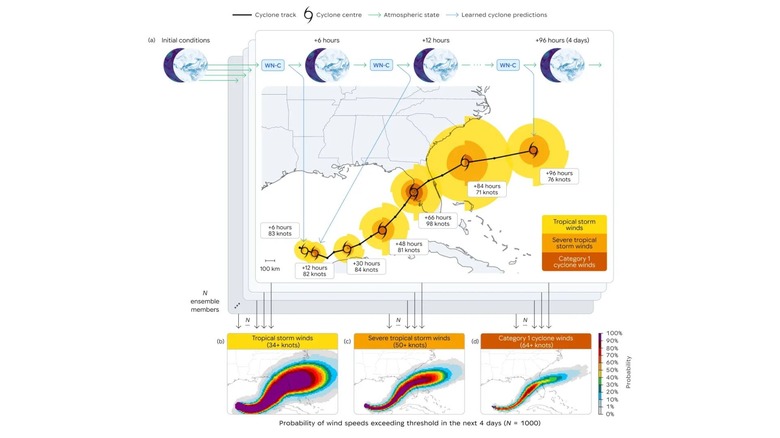
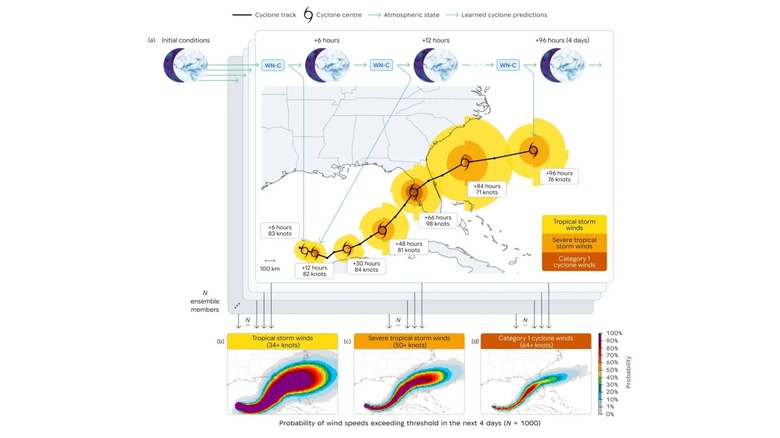
Researchers from the Google DeepMind and Google Research teams have helped train the WeatherNext AI weather prediction model to offer improved cyclone warnings. The National Hurricane Center, the Cooperative Institute for Research in the Atmosphere, the UK Met Office and other weather agencies around the world also contributed to the model’s development. Both the code and the model weights behind the project are being made open source on GitHub, so other scientists can also take advantage of this work.
A study about WeatherNext was published in the journal Nature, and a more layperson version was also shared in a blog post from Google. Tropical cyclones, also known as hurricanes or typhoons depending on where you are in the world, pose a unique challenge to predict because global atmospheric currents that determine a storm’s path have traditionally been best analyzed by coarser global models. In contrast, a storm’s intensity is best predicted by specialized local models that can assess the thermodynamics processes at the cyclone’s core. WeatherNext trained on nearly 20 terabytes of global atmospheric data and historic information collected by the International Best Track Archive for Climate Stewardship to predict both a cyclone’s track and intensity with a single model.
“We can now generate a single 15-day forecast in less than a minute on a TPU, empowering forecasters to quickly evaluate the probability distribution of potentially devastating tail-risks,” the WeatherNext researchers wrote.
Advertisement
Google introduced the second generation of WeatherNext last year. The company’s research teams have also worked on using AI to help predict flash floods.
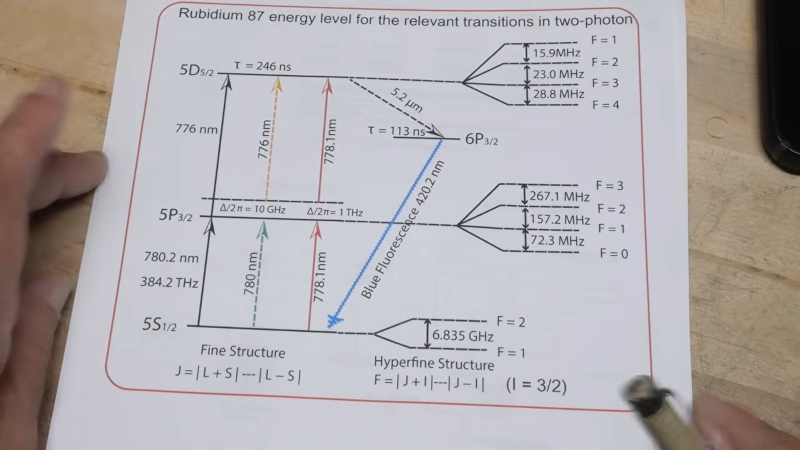
The explainer starts with the periodic table. Rubidium and cesium are both alkali metals, with a single electron in their outermost electron shell. Rubidium has 37 electrons, with the outermost one relatively loosely bound. Naturally occurring rubidium consists mainly of two isotopes, rubidium-85 and rubidium-87, which have the same number of protons and electrons but different numbers of neutrons.
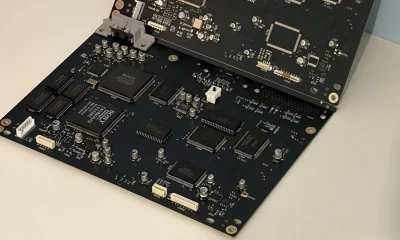
A rubidium standard typically has three gas cells that have a bit of rubidium in them. An RF-excited rubidium-87 discharge lamp produces light at very specific wavelengths. The RF energy excites rubidium atoms into higher electronic states, and when their electrons fall back to lower-energy states, the atoms emit photons.
That light passes through a filter cell containing rubidium-85. The filter preferentially absorbs part of the lamp’s spectrum, leaving light that optically pumps the rubidium-87 atoms in the second resonance cell into one of two closely spaced hyperfine states of the atom’s ground state.
Advertisement
Those two states differ because of the interaction between the magnetic moment of the outer electron and that of the rubidium-87 nucleus. Their energy separation corresponds to a microwave frequency of about 6.835 GHz.
The resonance cell is illuminated by the filtered light while also being exposed to microwave energy from a local oscillator. When the microwave frequency is exactly equal to the rubidium-87 hyperfine transition frequency, it transfers atoms between the two ground-state hyperfine levels. That changes how strongly the cell absorbs the optical pumping light, producing a detectable dip in the light reaching a photodetector.
Electronics then servo the microwave oscillator onto the center of that absorption dip, using a feedback technique somewhat analogous to a phase-locked loop. Once locked, the oscillator is effectively referenced to an atomic transition rather than to the dimensions or mechanical properties of a crystal, giving you an extremely stable frequency standard.
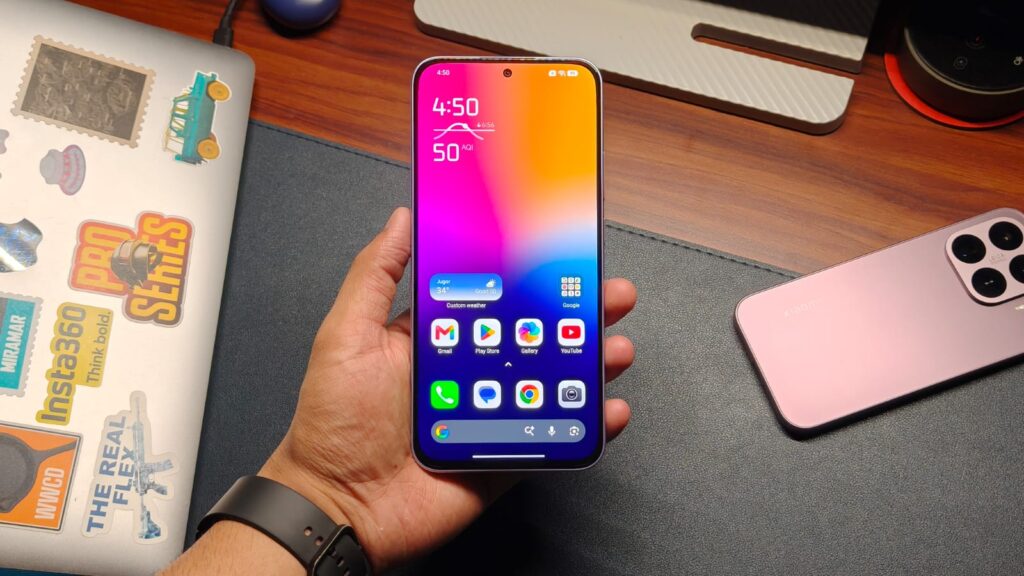
Big batteries are quickly becoming the norm on mid-range Android phones, but Xiaomi is taking things a step further with the new REDMI Note 17 5G. The company has launched the smartphone in India with a massive 8,000mAh silicon-carbon battery, the biggest ever fitted inside a REDMI smartphone. What’s perhaps more impressive is that Xiaomi has managed to squeeze that battery inside an 8.4mm-thick body.
The REDMI Note 17 5G starts at an introductory price of ₹24,999 and also features a 120Hz AMOLED display, the Snapdragon 4 Gen 4 chipset, a 50MP main camera, and Android 16 out of the box. Xiaomi is also promising four years of OS updates and six years of security patches.
REDMI Note 17 5G Features and Specifications
Of course, the headline feature of the REDMI Note 17 is its massive 8,000mAh silicon-carbon battery. Xiaomi claims the phone can last for up to three days of typical usage on a single charge, although real-world endurance will naturally depend on how you use it. The phone supports 45W wired fast charging, and thankfully, Xiaomi still includes the charger in the box. Interestingly, the Note 17 can also double as a power bank in a pinch, thanks to 22.5W reverse wired charging. Xiaomi says the battery is TÜV-certified to retain at least 80% of its original capacity after 1,600 charging cycles, which should help with long-term battery health.
Moving to the front, the REDMI Note 17 features a 6.9-inch TrueColour AMOLED display with a 120Hz AdaptiveSync refresh rate, 100% DCI-P3 coverage, and up to 1,800 nits of peak brightness. The phone also gets Xiaomi’s HydroTouch 2.0 technology, which is designed to keep the touchscreen responsive when your fingers are wet or oily. You also get stereo speakers capable of reaching 200% volume. Under the hood, the REDMI Note 17 is powered by the Snapdragon 4 Gen 4, built on a 4nm process. The chipset is paired with up to 8GB of RAM, while Xiaomi’s memory extension feature can virtually add another 8GB using the phone’s internal storage. There’s also support for expandable storage of up to 2TB and a 10,416mm² graphite cooling system to keep temperatures under control.
Xiaomi claims the phone has been engineered to deliver up to 48 months of lag-free usage. As always, that’s a manufacturer claim, and we’ll have to see how the phone actually holds up after years of software updates and everyday use.
Advertisement
Cameras, Software, and Durability
For photography, the REDMI Note 17 features a 50MP AI dual-camera setup on the back. Xiaomi hasn’t detailed the secondary sensor in its announcement, but the main camera supports features such as Night Mode, AI HDR, Dynamic Shots, 2x in-sensor zoom, and the company’s AI Editor. There’s also an 8MP camera on the front for selfies and video calls. Durability hasn’t been ignored either. The phone gets Corning Gorilla Glass 7i protection on the front, an IP65 rating against dust and water, and a reinforced chassis. The REDMI Note 17 is available in three colors: Arctic Blue, Starlight Purple, and Dark Night.
On the software side, the phone ships with HyperOS 3 based on Android 16. Xiaomi is promising four years of major OS updates and six years of security patches. The software also includes HyperIsland, Xiaomi’s AI features, and Google Gemini integration.
The REDMI Note 17 5G starts at an introductory price of ₹24,999 for the 6GB + 128GB variant, down from its ₹27,999 MRP. The higher-end 8GB + 128GB model costs ₹27,999 as part of the introductory offer, compared with its ₹30,999 MRP.
HItchPiggy founder Skylar Windham, left, on a trip to Florida with his friend and former graduate school professor Alexis Cancemi.
Planning a trip to a college campus, concert or Northwest landmark? Portland startup HitchPiggy is betting the ride you need may already be headed out on the road.
The company’s new marketplace allows drivers to post trips they’re already planning and connect with passengers heading the same way. Unlike on-demand services such as Uber or Lyft, HitchPiggy is focusing on regional travel, allowing drivers to choose who rides with them and what passengers contribute toward the trip.
Founder Skylar Windham says the idea has been percolating in his head for years, sparked from experiences traveling through Europe. Only recently, AI-powered coding tools allowed him to build the platform he always imagined.
The bootstrapped startup is small, with a little more than 100 registered users signing up for Pacific Northwest trips since its launch on June 1. No rides have been completed through the platform just yet, but Windham is looking to grow college ridership this fall through a partnership with the Portland State Business Accelerator.
Arsh Haque, director of the Portland State Business Accelerator, said he loves startup ideas like HitchPiggy that are hatched from international experiences.
Advertisement
“I got to firsthand experience a solution like HitchPiggy abroad, have always wanted it in the U.S., and think Skylar has the raw talent to bring it here,” said Haque.
Windham — a therapist and sailboat instructor by training — believes the service is on the right course as it tackles the complex challenge of matching drivers and riders. In fact, Windham’s background as a certified counselor and sailor is proving to be a useful in getting HitchPiggy on the road.
Counseling has honed listening skills, while sailing has taught adaptability.
“When you’re trying to reach a destination and the conditions change, you have to stay calm and adjust your course without losing sight of where you’re going,” Windham tells GeekWire. “That applies to building a startup too.” Let’s meet our latest Startup Spotlight company: HitchPiggy.
Advertisement
In 50 words or less, give us your elevator pitch.
Skylar Windham using the ridesharing service BlaBlaCar in France in 2015, which later inspired him to start HitchPiggy.
HitchPiggy is like Airbnb for the empty seats in your car. It helps drivers already traveling between cities connect with passengers heading the same way, making travel more affordable and putting existing empty seats to better use.
What problem are you obsessed with solving?
There are already thousands of empty seats traveling between cities every day. I want to help drivers and passengers fill them instead of letting them go to waste.
What surprised you after talking to customers?
Advertisement
I’ve been pleasantly surprised by how encouraging and helpful people have been. Even when there’s been a hiccup, users have been patient and supportive. I think HitchPiggy naturally attracts community-minded people who genuinely want to help each other.
How has AI changed the way you build your company?
I first tried building this idea in 2016 by hiring engineers overseas, but getting the product right was difficult. Eventually, I put the project on the back burner. Today’s AI tools gave me the ability to finally build the platform I had envisioned, despite having no coding background.
What’s one thing people misunderstand about your startup?
Many people assume HitchPiggy is like Uber or Lyft. It isn’t. It’s a community-based rideshare platform for intercity travel, not local, on-demand rides.
Another common misconception is that the idea itself is unusually risky. In reality, people have been sharing rides for years through Craigslist, Facebook groups, and word of mouth. HitchPiggy makes that process more transparent and easier to use. It won’t be for everyone, and that’s okay. But for people who already like the idea of sharing rides, I think it’s a much better option than what has existed before.
What about safety?
Like any platform that connects people online, there is some inherent risk, and HitchPiggy can’t eliminate that entirely. What the platform can do is help people feel more informed and comfortable before deciding to ride together. Users can see details about who they may be traveling with, the vehicle, pickup location, route, timing, cost, and other important trip information. They can also message each other beforehand and ask any questions they need.
Advertisement
What’s the toughest decision you’ve made in the past year?
The toughest decision I’ve made was deciding not to pursue investors, at least not yet. There’s a lot of pressure in the startup world to raise money and grow as quickly as possible, but I wanted to build HitchPiggy differently. I’d rather grow steadily and learn from real users before trying to scale. It hasn’t been the fastest path, but it has felt like the right one.
What’s the one piece of advice you give to other entrepreneurs?
Have thick skin. Most feedback will be positive, but there will always be people who are quick to tell you why your idea won’t work. Anything worth building comes with challenges. Focus on what’s possible instead of everything that could go wrong. If entrepreneurs listened too closely to every critic, very little would ever get built.
Advertisement
We’ll know our company has made it when…
It’s a household name and people naturally check HitchPiggy before looking for a bus or train ticket whenever they’re traveling between cities.
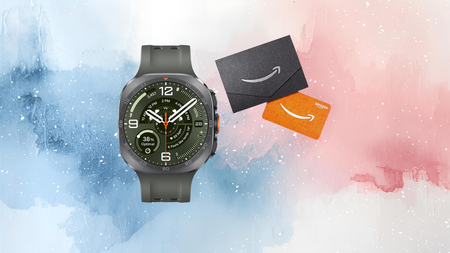
Our review found the standout here is the screen, a 1.52-inch AMOLED panel that hits 5,000 nits of peak brightness, which our reviewer described as bright enough to remain legible in dazzling midday sunshine that left other wearables struggling to keep up.
Advertisement
That kind of visibility earns its keep once you’re actually outdoors, and our testing found the Galaxy Watch Ultra 2‘s dual-GPS setup held a straight, accurate line through Canary Wharf, an area of tall skyscrapers and rivers that regularly throws GPS tracking off course entirely.
That accuracy now extends into a new trail running mode built for this generation, letting you load custom GPX routes with turn-by-turn directions, elevation tracking and personalised hydration alerts as you push further off the beaten path.
Durability hasn’t been sacrificed for any of this either, since the watch retains its shockproof titanium body and now carries an IP69K rating alongside 10ATM water resistance, protecting it through dust, hot water jets and deep submersion.
Advertisement
Built-in LTE connectivity means you can make calls, send texts and get updates straight from your wrist even when your phone stays behind, which our reviewer noted makes it one of the more genuinely useful cellular smartwatches around right now.
Our review did flag that battery life still tops out around two days of real-world use and that several health features remain locked to Samsung phones, so this pre-order bonus suits committed outdoor athletes more than casual browsers.
At $699.99 instead of $799.99, with a $100 Amazon gift card thrown in on top, this is the cheapest way to lock in the Galaxy Watch Ultra 2 before it ships on the 7th of August.
For months, reports have suggested that OpenAI’s first hardware product would be a screen-free smart speaker designed to act more like an AI companion. We already knew it could understand its surroundings, be carried around the home, and proactively help users. A new Bloomberg report now gives us a clearer picture of what the device may actually look like.
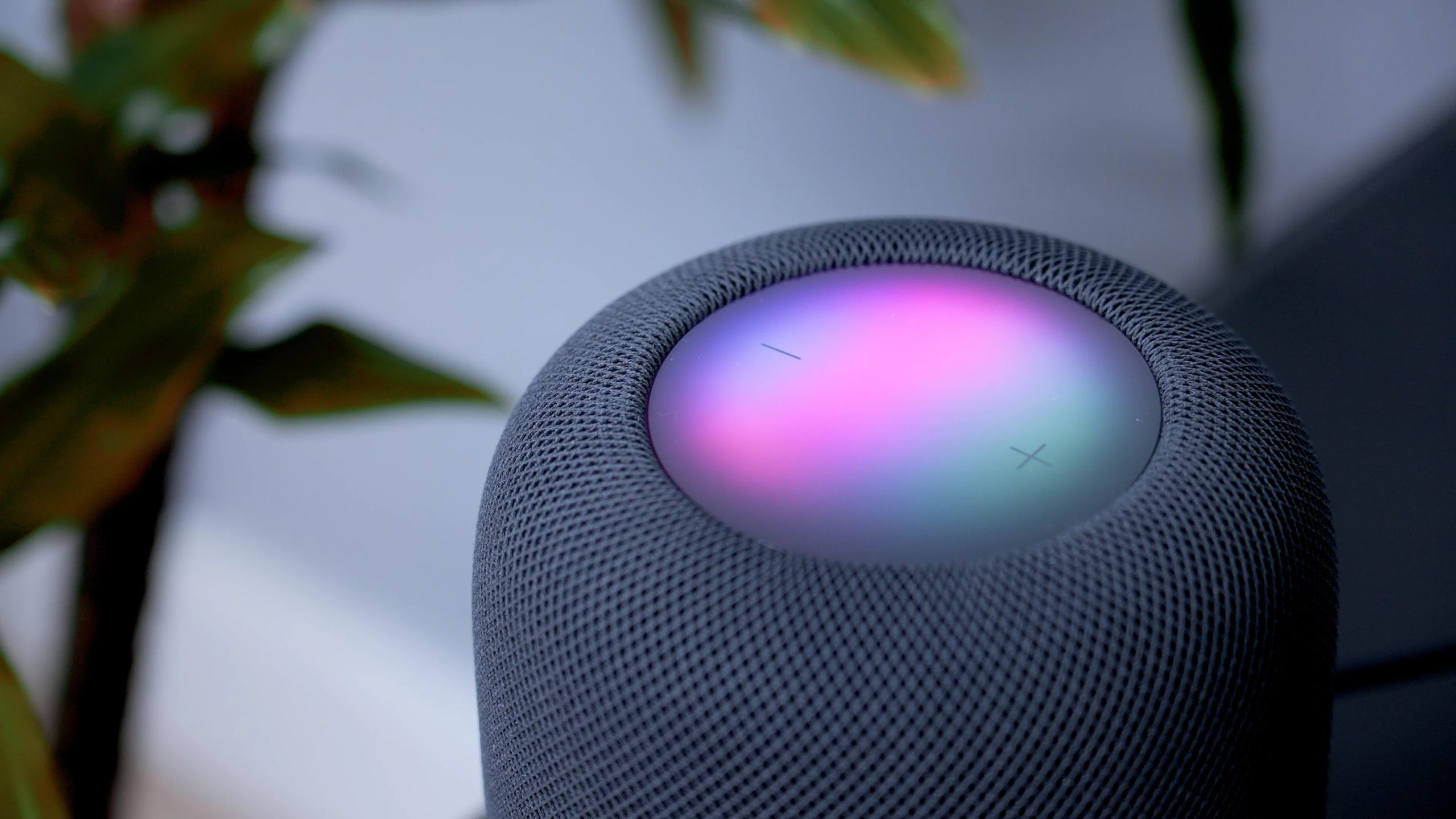
As per the report, OpenAI’s first gadget will be shaped like a doughnut and measure about the same size as a hockey puck. You will be able to carry it between rooms or leave it nearby on whatever surface is convenient. The device is expected to be on the expensive side, as the company has pondered pricing it around $300 to $400. A release is currently planned for 2027.
A smart speaker you are meant to carry around
Previous reports suggested that the device could control smart-home appliances, play media, answer questions, respond to messages, and use ChatGPT to help throughout the day. Voice will serve as the main interface, but the device will also have a camera and environmental sensors. Those additions could let the AI understand what is happening around it instead of relying entirely on spoken instructions. Apple is exploring a similar concept for future AirPods, which could use built-in cameras to understand the wearer’s surroundings.
Zeke Jones / Digital Trends
OpenAI also expects it to become more familiar with its owner over time. Conversations could change according to a person’s routines, preferences, and past interactions, allowing the assistant to offer help before someone reaches for a phone or types a prompt. Of course, the device will have access to advanced models for human-like conversations. OpenAI has already made considerable progress in this area through the recent introduction of ChatGPT Live.
Its body could become part of the interface
Microphones and speakers will handle conversations, while lights will show when the AI is listening or responding. Parts of the device will also move during interactions, giving it the presence of a small robot rather than a speaker sitting passively in the room. The comparison that comes to mind is WALL-E or R2-D2. Their movements and reactions make them feel alive, aware, and emotionally present. OpenAI seems to be pursuing a similar effect by giving ChatGPT a physical form and an expressive personality.
Advertisement
Image via Walt Disney Studios Motion Pictures
I still have questions about how all of this will work in practice. A moving, doughnut-shaped AI companion could easily feel gimmicky if the design or motion is even slightly off. OpenAI is collaborating with legendary former Apple design chief Jony Ive and his LoveFrom studio on the device, which gives me some confidence that the final execution will feel polished rather than toy-like.
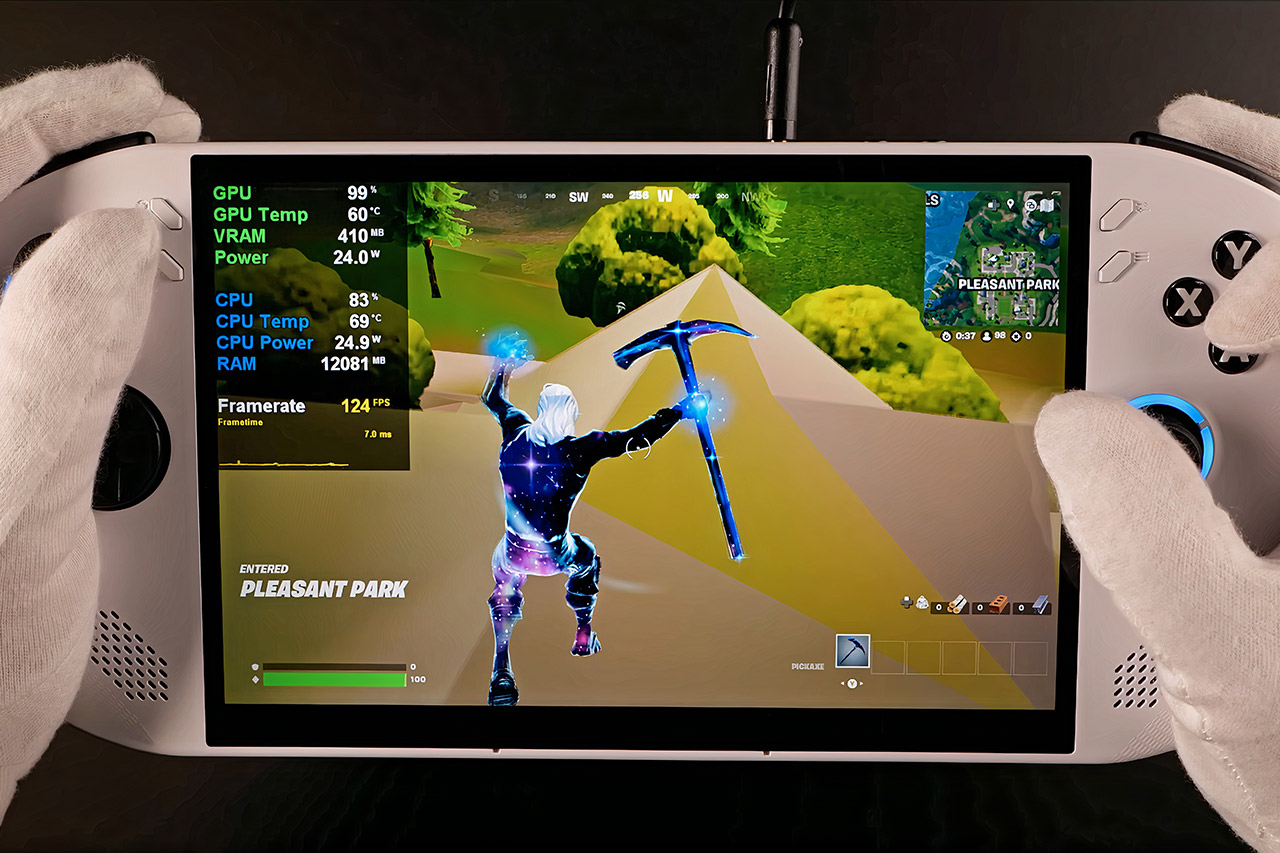
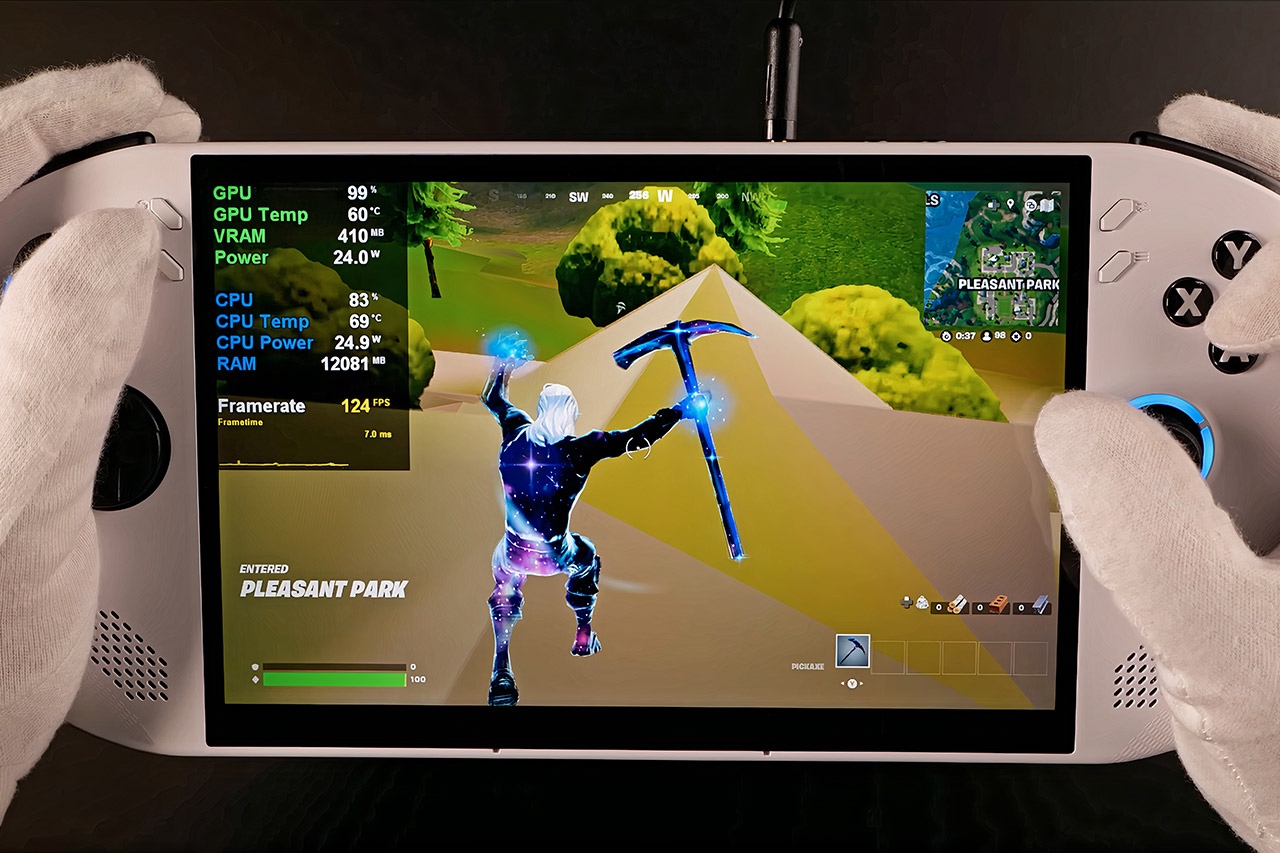
Waiting at the gate stretches on forever when all you have is a phone screen and whatever free Wi-Fi the airport offers. Once the plane doors close, that same stretch of hours can feel even longer. A proper PC game library sitting in your hands changes the entire equation, and the Lenovo Legion Go S, priced at $667 (was $850), is built exactly for that kind of mobility.
The new 2025 portable weighs just 1.63 pounds and is 11.77 inches wide, 5.02 inches tall, and less than an inch thick, making it as easy to transport in a backpack as a big paperback or a slim tablet case. You can put it in a side pocket or under the seat in front of you, and it will just disappear until you need it again. The entire design is really sturdy; there are no loose controllers to lose or rattle about in your backpack to worry about.
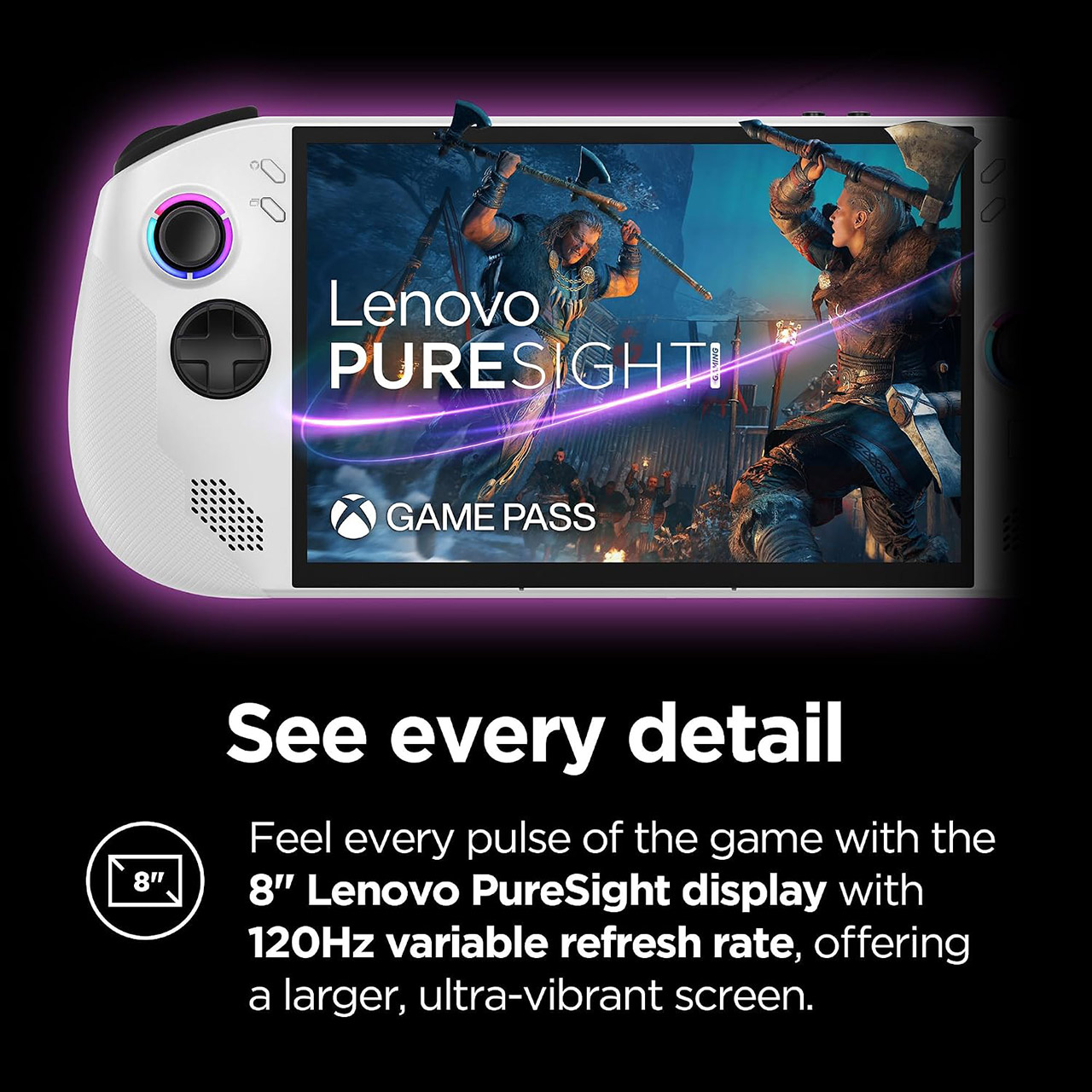
ALL GAMES, ALL PLACES, ALL YOURS – Get ready to game on the 8″ 120Hz Lenovo PureSight display and launch any title using Legion Space. The AMD Ryzen…
SEE EVERY DETAIL – Make every scene pop with 500 nits of stunning brightness and 100% sRGB color accuracy. And with 10-point touch support, your…
PLAY YOUR WAY – Play hundreds of high-quality PC games with your complimentary 3 months of PC Game Pass and EA Play. With new games added all the…
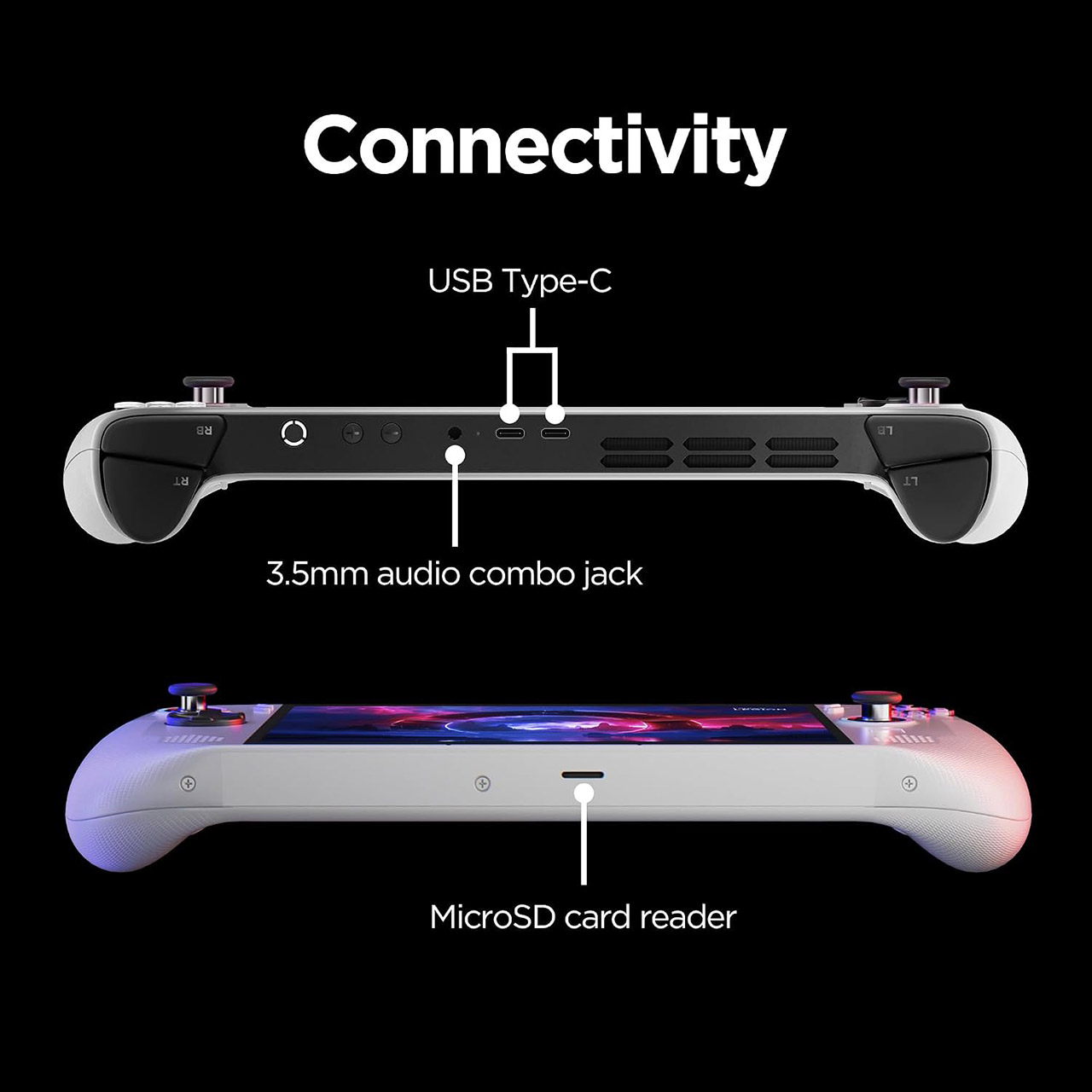
The grips are nicely contoured and fit easily in both hands. The hall-effect joysticks are exceptionally precise, with little drift to interfere with long gaming sessions, and the buttons and triggers deliver sharp, unambiguous feedback. Even after an hour or two of play during a delay or in-flight, your hands are still comfortable and not cramping. The front-facing speakers generate good sound in quieter locations, and there is a 3.5 mm socket for plugging in headphones when cabin noise becomes too loud.
Advertisement
The 8-inch PureSight IPS panel has a respectable 1920 by 1200 resolution, a 120 Hz refresh rate, and variable refresh capability. The colors remain brilliant, and the 500-nit brightness is more than adequate to cut through airport fluorescents or the strange mixed illumination inside a plane. The variable refresh makes motion ultra smooth even when frame rates drop on difficult titles, so the image never becomes choppy on you. If you ever need to rapidly scroll through a menu, touch input works great; no need to grab for that little trackpad.
Under the hood, there’s an AMD Ryzen Z2 Go processor with integrated Radeon graphics, 16 GB of memory, and a 512 GB SSD. It runs Windows 11 and supports PC games from Steam, Epic, and Xbox Game Pass (three free months included). Older and mid-range games run at solid frame rates with acceptable settings. Newer releases may require you to lower the resolution and detail slightly, but they are still totally playable. That’s the beauty of this thing on the road: you may pick and select the game that best suits your current mood and the remaining battery life.
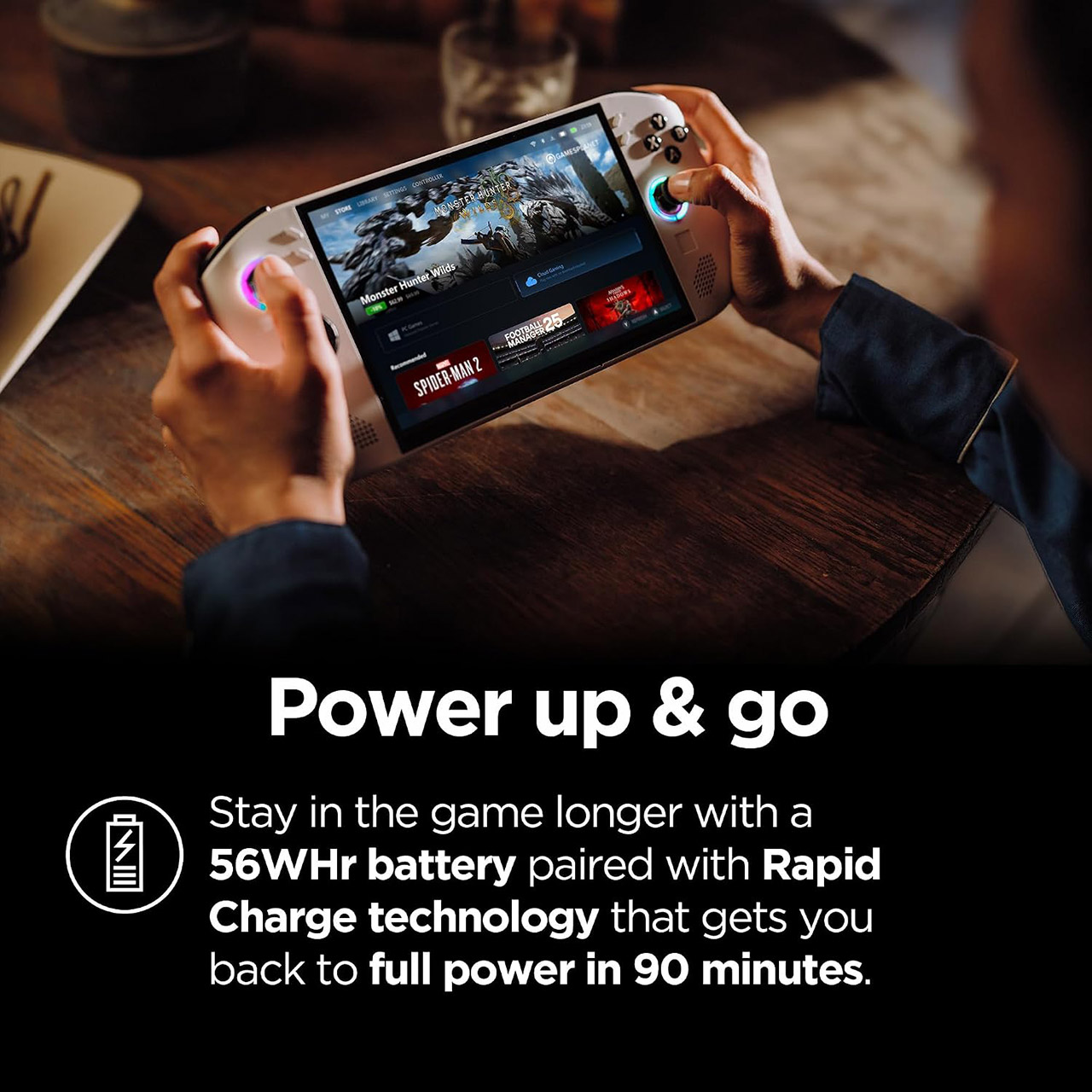
The 55.5 watt-hour battery provides a couple of hours of hard gameplay or much longer sessions with lighter or well-optimized titles. Lower brightness and power limitations can help you squeeze out every last bit of power. Then there’s rapid charging; after half an hour hooked into the supplied 65-watt USB-C adaptor, your battery is as good as new. That’s useful on a brief layover or at the gate when you need a fast refill before flight. Dual USB4 connections are located along the top edge, allowing you to charge and play while also connecting a portable display if you ever want to blow things up on a larger screen at a hotel desk.
The cooling system works well, keeping the device cool against your palms even during extended gaming sessions, and if you ever need more storage, the microSD expansion slot allows you to load up with a selection of games tailored to a specific trip, eliminating the need to cram the internal drive to the gills. Wi-Fi 6E and Bluetooth are also available to keep downloads and controllers operational when airport networks cooperate.
We spend hours testing every product or service we review, so you can be sure you’re buying the best. Find out more about how we test.
Sony Inzone M10S 2: Two-minute review
The Sony Inzone M10S was one of the best gaming monitors of 2024, offering uncompromising performance and a suite of practical tournament-ready features that made it the perfect choice for both professional and aspiring esports players.
Now Sony is back with the Inzone M10S 2, a successor that delivers a number of small but nevertheless impactful upgrades while maintaining everything that made the original so good. It’s the same 2560 x 1440 resolution, but feels even snappier thanks to an increased 540Hz refresh rate and a lower 0.02ms response time. There’s even a dual mode, letting you bump the resolution down to 720p for a staggering 720Hz picture — invaluable for Counter-Strike 2or Rocket League.
Advertisement
If that wasn’t enough, it’s now even brighter, coming in at up to 1,500 nits rather than 1,300, with the same rich colors and impressive contrast. There’s a new anti-glare coating on this model as well, which does a fantastic job of keeping glare at bay. You barely see any kind of reflections, even in a brightly lit room with ring lights and lamps pointed directly at the screen, preventing possible distractions in a tournament setting.
Latest Videos FromTechRadar
I did note that the matte texture makes it prone to smudging and quite hard to clean, though, which might be a little frustrating if you accidentally touch the panel while setting up.
Advertisement
(Image credit: Future)
Like its predecessor, the Inzone M10S 2 is packed with handy esports features like a dedicated 24.5-inch display mode, the ability to set up on-screen timers and crosshairs, or an option to display a frame rate counter to check your performance.
They’re all accessible via the monitor’s options menu, or the easy-to-use Inzone Hub software. The software even lets you import and export your setup, meaning you can take your at-home profile to a competition and access the exact same settings every time.
As this is a Sony product, it shouldn’t come as much of a surprise that it also has a dedicated PlayStation 5 mode, which is activated automatically when the system is plugged in and optimizes the picture for console play.
Advertisement
Sign up for breaking news, reviews, opinion, top tech deals, and more.
It’s all brought together by a market-leading stand. The base included with the original Sony Inzone M10S is one of the best I’ve ever used, with a low-profile disc-shaped base that fits underneath your keyboard, plenty of vertical adjustment, and a full 360 degrees of rotation. The version that comes with the Inzone M10S is even better, benefiting from an additional few degrees of tilt to ensure a comfortable viewing experience no matter how you’re seated.
(Image credit: Future)
Sony Inzone M10S 2: Price and availability
Costs $1,099.99 / £1,199 / roughly AU$2,300
Same price that the original M10S launched at
The older model is now cheaper, though
The Sony Inzone M10S 2 is far from cheap, but it’s not really competing with most other gaming monitors. You can easily find capable 4K screens for far less than this price, such as the Gigabyte M32UC, which is going to be a better fit for those seeking to play cinematic games like Horizon Forbidden Westor The Last of Us Part 1on PC or console.
The Inzone M10S 2 is instead positioned as an alternative to models offered by dedicated esports brands such as BenQ Zowie. The Zowie XL2586X+ is a good point of comparison, as it’s very similarly priced at roughly $1,000 / £1,150 / AU$1,799. That model features a 600Hz 1080p TN panel designed for the best possible motion clarity. While technically faster, you lose out on the higher-resolution picture, more vibrant OLED colors, and stylish design of the M10S 2.
Advertisement
If you’re looking at the Inzone M10S 2, then the original Sony Inzone M10S, which is still sold alongside this newer model, is also a viable alternative. The M10S is now easy to find around $900 / £990 / roughly AU$1,600, so it comes in a decent chunk cheaper — though you do lose the spec upgrades.
Sony Inzone M10S 2: Specs
Swipe to scroll horizontally
Row 0 – Cell 0
Sony Inzone M10S 2
Price
Advertisement
$1,099.99 / £1,199 / roughly AU$2,300
Panel size
26.5in / 67.3cm
Panel type
Advertisement
OLED
Resolution
2560 x 1440
Brightness
Advertisement
1,500 nit
HDR
HDR10
Pixel response
Advertisement
0.02 ms gray-to-gray
Refresh rate
540Hz (or 720Hz HD)
Advertisement
Sony Inzone M10S 2: Design and features
Sleek and attractive
Brilliant included stand
Wealth of ports
The design of the Sony Inzone M10S 2 hasn’t changed that much from the original M10S — but that’s certainly not a bad thing. This is a sleek and attractive-looking monitor that comes bundled with a fantastic stand. Its base is a low-profile, 4 mm thin metal disk that fits comfortably underneath a keyboard and connects to a robust stand that keeps the monitor impressively stable.
You get the same full 360-degree rotation too, so you can freely show your screen to teammates in a match. The large power button and the thumbstick used to edit settings are still as intuitive and easy to use as before, and it retains smart design features like a power indicator LED that’s set off to the side so that it doesn’t shine in your eyes as you play.
The ports are identical to the original M10S as well: DisplayPort, two HDMI 2.1 ports, an upstream USB Type-C alongside two downstream USB Type-A ports for peripherals, a 3.5mm audio jack, and a single USB Type-A port reserved for software updates (accomplished with a USB stick). Its major software features are also unchanged, so you still get support for Nvidia G-Sync, HDR, and a suite of visual modes including an FPS Pro+ mode developed in collaboration with esports team Fnatic.
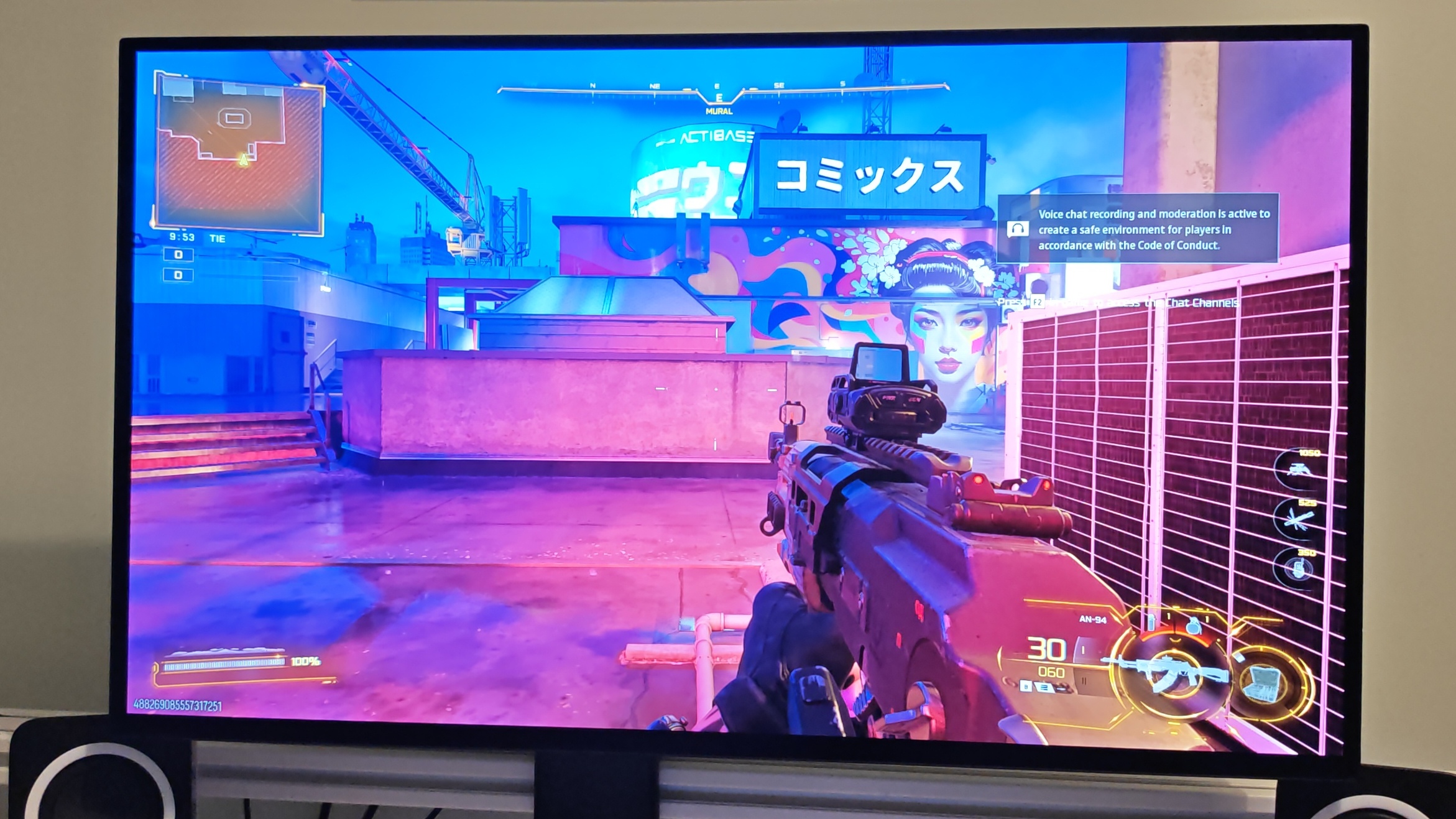
This isn’t the best looking aesthetically, but it makes it far easier to see key visual cues like the red dots that indicate rival players in a match of Call of Duty: Black Ops 7or even obscured enemies in Valorant.
In terms of what’s actually new, it’s a subtle distinction but the M10S 2 benefits from a wider -5 to 35 degree tilt range (its predecessor tilted at -5 to 25 degrees), which allows for even more flexibility in your seating position (the monitor also supports a 100 x 100 mm VESA mount, if you would prefer to use a third-party arm).
Advertisement
The Inzone M10S 2 is also coated with a new ‘Super Anti-glare Film’. It’s incredibly effective, and means you can play unimpeded with a literal torch pointed at the display. The matte texture does make it very prone to picking up smudges, though.
Image 1 of 2
(Image credit: Future)
(Image credit: Future)
Sony Inzone M10S 2: Performance
540Hz refresh rate is incredibly smooth
Beautiful, vibrant colors and strong brightness
Perfect for competitive games
The Sony Inzone M10S 2 looks pretty dim and unimpressive out of the box. The culprit? The power-saving mode is on by default. Once you turn that off and crank the brightness up to about 80%, the vibrant OLED colors are absolutely lush and look gorgeous. The sRGB profile is a good choice if you want color accuracy, and is usually my preference when using monitors, but I found the slightly poppier appearance of the standard preset very appealing.
The enhanced brightness of this model is immediately noticeable compared to the original M10s and, along with the effective anti-glare coating, ensures that the picture remains visible in even harsh lighting conditions like direct sunlight or with the display positioned next to a desk lamp.
In games, the performance is simply perfect. The 540Hz refresh rate is beautifully smooth, and motion is impressively clear. It elevates titles like Counter-Strike 2, where the enhanced smoothness genuinely helps with target tracking. The 0.02ms GtG response time certainly helps everything feel snappy, and sits among the fastest on the market.
Advertisement
(Image credit: Future)
Although my Nvidia RTX 4080 Ti-powered rig didn’t break a sweat achieving a stable 540fps frame rate at 1440p, you can comfortably lower the resolution to 1080p and maintain a decent level of picture quality — especially in the dedicated 23.5-inch display mode. Things feel even better if you take advantage of the dual-mode feature and crank it up even further to 720Hz at 720p, though this does come at a noticeable cost to picture quality.
Competitive first-person shooter titles are what this monitor was made for, but that doesn’t mean that it delivers poor performance in other genres. The grim world of Warhammer: 40,000 Space Marine 2looked absolutely gorgeous with expressive colors and strong contrast, while Forza Horizon 6benefitted hugely from the smoothness of VRR.
Even if I wouldn’t recommend buying the Inzone M10S 2 exclusively to play those kinds of games when cheaper 4K options are available, it’s good to know that you will still be able to enjoy a wide range of titles if you’re an aspiring esports player who picks one up for both practice sessions and home use.
Advertisement
Should you buy the Sony Inzone M10S 2?
Buy it if…
Don’t buy it if…
Also consider
Here’s how the Sony Inzone M10S 2 stacks up against the original model, plus a 4K alternative for those that want something for more general use.
Advertisement
Swipe to scroll horizontally
Row 0 – Cell 0
Sony Inzone M10S 2
Sony Inzone M10S
Gigabyte M32UC
Price
Advertisement
$1,099.99 / £1,199 / roughly AU$2,300
~$900 / £990 / around AU$1,900
$799 / £681 / around AU$1,500
Panel size
Advertisement
26.5in / 67.3cm
26.5in / 67.3cm
32in / 81.3cm
Panel type
Advertisement
OLED
OLED
LCD
Resolution
Advertisement
2560 x 1440
2560 x 1440
3840 x 2160
Brightness
Advertisement
1,500 nit
1300 nit
350 nits
HDR
Advertisement
HDR True Black 400
HDR True Black 400
HDR True Black 400
Pixel response
Advertisement
0.02 ms gray-to-gray
0.03ms gray-to-gray
1 ms
Refresh rate
Advertisement
540Hz (or 720Hz HD)
480Hz
144Hz
Advertisement
How I tested the Sony Inzone M10S 2
Tested for over two weeks
Used as primary display
Evaluated with a wide range of games
I tested the Sony Inzone M10S for more than two weeks, using it as my primary monitor for PC, PS5, and Xbox Series X. Throughout my time with it, I tested a wide range of titles, ranging from esports favorites Counter-Strike 2, Rocket League, Fortnite, and Tom Clancy’s Rainbow Six Siege to popular shooters such as Battlefield 6 and Call of Duty: Black Ops 7.
I also tried a selection of more traditional games, such as Assassin’s Creed Shadows and Stellar Blade, to elevate its more general performance. During my time with the monitor, I endeavored to test each of its available features using both the built-in settings options and the compatible Inzone Hub software.





















































You must be logged in to post a comment Login