Samsung has released the fourth One UI 9 beta for the Galaxy S26 series, bringing another round of bug fixes and refinements ahead of the software’s official debut later this month.
The update has started rolling out in India first, carrying firmware that ends in ZZG4, and is available to users already enrolled in Samsung’s One UI 9 beta programme. At around 1.25GB, it’s a sizeable download.
Rather than introducing major new features, this latest beta focuses on stability as Samsung enters the final stretch before launch. According to the changelog, the company has fixed a range of issues affecting core parts of the interface. These include problems with the clock size, Quick Panel, navigation bar, timer notifications, and the Routines app.
The update also bundles the July 5, 2026 Android security patch, ensuring testers receive the latest security fixes alongside the software improvements.
Advertisement
The timing isn’t particularly surprising. Samsung has been steadily polishing One UI 9 over the past few months. The third beta arrived almost exactly a month ago. Consequently, a fourth beta at this stage suggests the company is ironing out the remaining rough edges before making the software widely available.
Advertisement
One UI 9 is expected to make its official debut alongside Samsung’s next generation of foldables at Galaxy Unpacked on 22 July. At that event, the company is expected to unveil the Galaxy Z Fold 8, Galaxy Z Fold 8 Ultra, and Galaxy Z Flip 8. Those devices will be the first to ship with the new software out of the box, with older Galaxy smartphones and tablets getting it in due course.
While Samsung hasn’t confirmed whether another beta will follow, this release suggests the software is approaching its final form.
Advertisement
As with previous beta releases, availability remains limited to registered participants in supported regions. However, the rollout will likely expand gradually. Galaxy S26 owners enrolled in the programme should see the update appear over the air in the coming days if it hasn’t already reached their device.
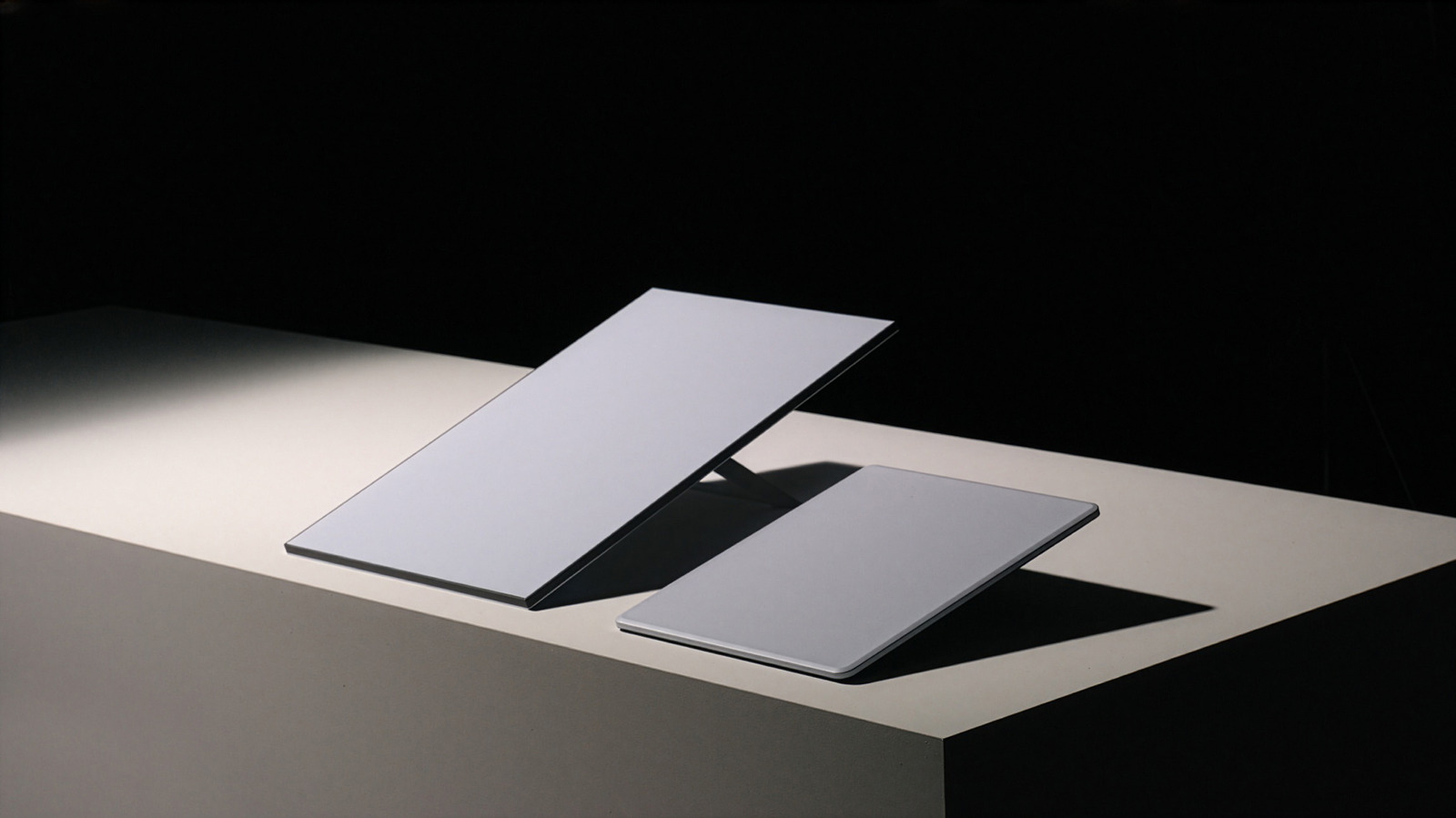
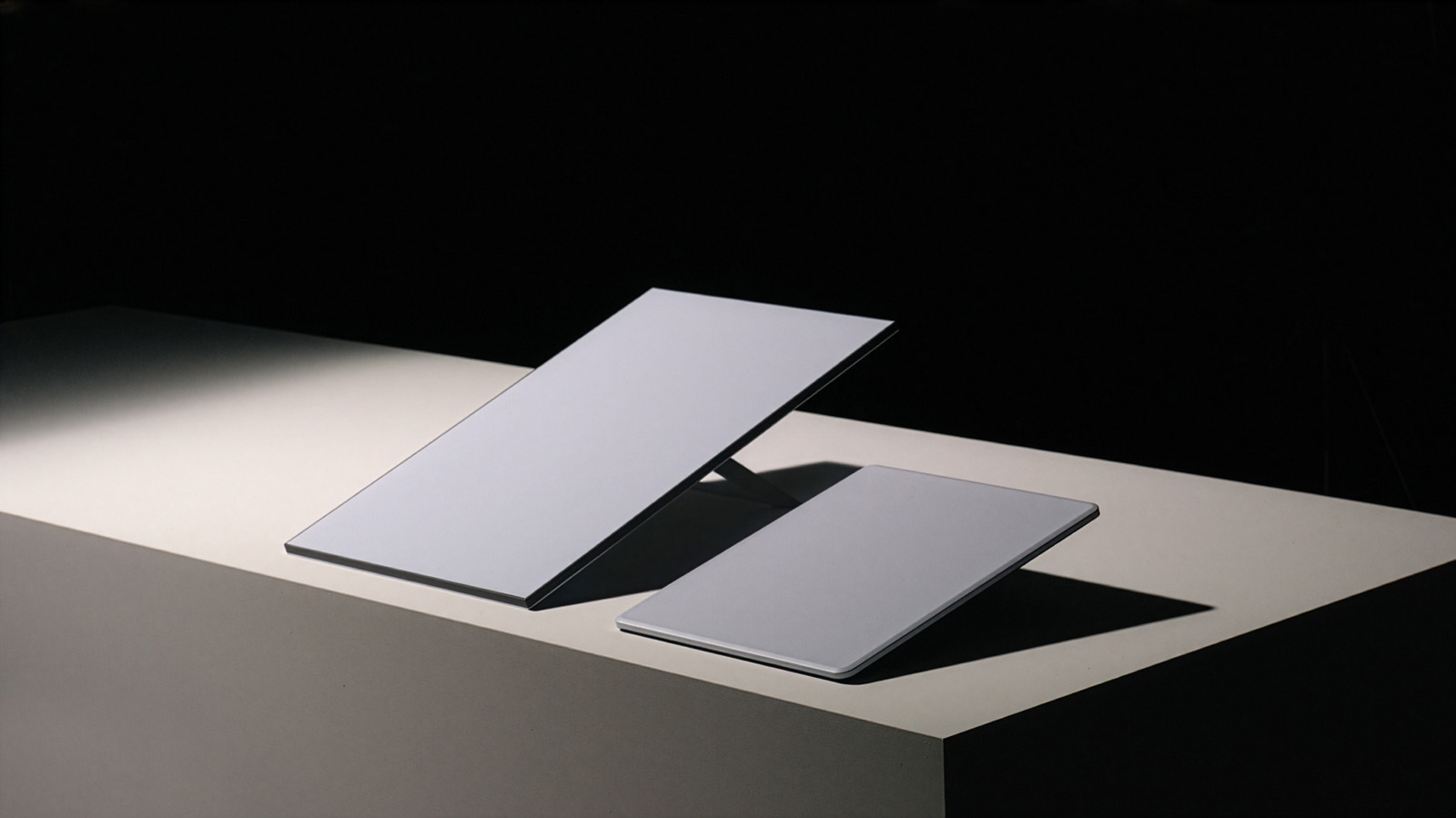
Starlink quietly released its latest V5 residential dish, and while it doesn’t boost data speeds, it offers several improvements. Compared to the previous V4 dish, the new model is smaller, lighter and more energy efficient, which should make it easier to install while also reducing your power bill.
SpaceX confirmed in a post on X that the product will arrive today in the US in certain regions at first. It follows the V4 model that debuted in 2023 and will continue to be offered via the Starlink Residential plan. “Starlink V5 has a smaller form factor, new lightweight design, greater power efficiency than the Starlink V4,” according to a support page that compares the two models.
You may expect a speed boost with a new dish, but the V5 actually supports a slightly lower data rate of 375+ Mbps compared to 400+ Mbps for the V4. However, the new model is considerably smaller at 2.4 pounds rather than 6.5 pounds and is just 5.12 x 12.05 x 1.34 inches in size, compared to 23.4 x 15.1 x 1.5 inches for the V4. It also consumes less power at 35 to 50 watts compared to 75 to 100 watts for the previous model.
It weighs nearly the same as the portable Starlink Mini, but unlike that model, the V5 isn’t designed for in-motion use, Starlink says. It will be bundled with the Router Mini and come with a “pipe adapter” for rooftop installation.
Advertisement
One region offering the new dish, according to a Reddit post seen by PCMag, is Drummond, Montana. There, the V5 dish is offered only with the least expensive $55 per month 100Mbps Residential plan. The pricier Residential and Residential Max plans only support the V4 dish with the superior Router 3, for now.
Elon Musk showed the new dish off recently in a video post on X, saying the new dish would be made in “much higher volume than the current terminals.” The company recently announced its next-gen Starlink Mobile network, set to launch in mid-2027, that would provide up to 150 Mbps speeds and “feel like you’re connected to a high-performing 5G terrestrial network.” Last year, the company also showed off a new $2,000 Performance dish designed to handle gigabit internet speeds.
A judge has dismissed an attempted class action lawsuit against Apple, which accused the tech giant of failing to stop the storage of child sexual abuse material on iCloud.
A lawsuit from August 2024 that accused Apple of “privacy-washing” and failing to properly deal with the issue of child sexual abuse material (CSAM) on iCloud has been dismissed.
In a ruling reported by Reuters on July 14, U.S. District Judge Noel Wise in San Jose, California, agreed with Apple’s argument that it was shielded from the claims by Section 230 of the Communications Decency Act. This refers to a section that protects online platforms from liability for third-party content, namely that of its users.
Representing the plaintiffs, Attorney James Marsh said that an appeal was being considered, as well as other potential legal claims. The attorneys claimed that the class of 2680 people were entitled to compensatory damages of $32.8 billion in total.
Advertisement
Under the ruling, Wise added that there’s no federal law that would force Apple to create new tools or deploy existing technology to identify and report CSAM on iCloud.
“Lawmakers can fix this problem that is contributing to the exploitation of children,” the Judge wrote in the ruling. “This Court cannot.”
The lawsuit was dismissed with prejudice, so it cannot be refiled under the same claims by the plaintiffs.
A CSAM failure
The lawsuit arrived after Apple attempted to implement measures to help prevent the spread of CSAM. But, after considerable outcry, it abandoned its plans.
Advertisement
Back in 2021, Apple announced a suite of tools it wanted to release across its platforms. There were two chief areas, consisting of Communication Safety and CSAM detection in iCloud Photos.
Communication Safety, which is intended to help prevent children from seeing or sending objectionable material, is still being developed as a service. The most recent changes expanded from nudity to violence and gore detection.
The second, CSAM Detection in iCloud Photos, used cryptographic techniques to detect collections of that content, which would then be reported to NCMEC (National Center for Missing and Exploited Children). The technique wasn’t scanning actual images, but instead detected existing CSAM files using known hashes.
Apple received a lot of criticism, including complaints from experts at other tech companies, over privacy and security fears.
Advertisement
Apple ultimately killed off the iCloud CSAM scanning plan in December 2022. In August 2023, Apple provided a more detailed reasoning for abandoning the plan, after being pressed by a child safety group.
This included the potential creation of new threat vectors for data thieves to find and exploit. There were also fears it could result in unintended consequences, such as leading to bulk surveillance and more demand to search other encrypted messaging systems.
Damned either way
While Apple had basically given up on its CSAM detection plans, instead focusing on Communication Safety, the issue simply didn’t go away.
A July 2024 report from the UK’s National Society for the Prevention of Cruelty to Children (NSPCC) accused Apple of vastly undercounting incidents of CSAM in its services.
Advertisement
Apple had made only 267 reports to NCMEC, as required by U.S. law, for incidents it detected globally in 2023. However, the NSPCC said that Apple was implicated in 337 offenses between April 2022 and March 2023 in England and Wales alone.
By comparison, Google reported over 1,470,958 cases in 2023, with Meta reporting 17,838,422 on Facebook and 11,430,007 on Instagram.
While Apple is not able to see the content of iMessage for CSAM scanning purposes, the NCMEC pointed out that Meta reported over a million suspected CSAM cases for the encrypted WhatsApp in 2023.
The now-dismissed lawsuit surfaced just one month later.
Advertisement
Aside from demanding damages, the lawsuit also wanted Apple to be forced to adopt CSAM measures. This included ways to prevent the storage and distribution of CSAM on iCloud, as well as making reporting more easily accessible and complying with quarterly third-party monitoring.
The US’s explosive diarrhea problem is worse than you think—and it’s about to get even messier.
The country is grappling with a large and fast-spreading outbreak of cyclosporiasis, a parasitic infection that causes extreme gastrointestinal distress. There are nearly 7,000 potential cases, more than 3,300 of which are in Michigan alone as of Tuesday, and state officials have identified tainted lettuce as the likely culprit.
The actual case count is almost certainly higher, though, because most people don’t seek medical care when they get diarrhea. And even when they do, labs don’t routinely test for cyclosporiasis, says Jeanne Marrazzo, CEO of Infectious Diseases Society of America. She estimates cases are at least double the Centers for Disease Control and Prevention’s numbers.
“That’s because of underdiagnosis and also because there are cases that are likely to be mild. Many people aren’t going to declare themselves and get counted,” she says. Cyclosporiasis isn’t as common as other foodborne illnesses, meaning it’s not included in standard panels that test for several types of gastrointestinal disease.
Advertisement
But for many folks who get sick, the effects are, let’s just say, not pleasant. “A lot of times with diarrhea, you have an episode and you feel better,” says Marrazzo. “With this, it just can kind of go on and on, and it really takes people out.”
Bad enough, yes. But about that whole getting worse thing.
Public health officials have urged people to thoroughly clean produce, and some restaurants have taken precautions. Notably, Taco Bell has said it had “voluntarily and temporarily removed limited ingredients at select restaurants as a precautionary measure.” While that might help those trying to live mas avoid getting cyclosporiasis, it’s not the only part of the produce supply chain that can be affected.
Norman Beatty, associate professor of medicine in the division of infectious diseases and global medicine at the University of Florida, says the cyclospora parasite has unique mechanisms that allow it to lodge into the crevices of other fruits and vegetables. It’s most commonly found in fresh, raw produce, particularly herbs, lettuce, and berries.
Advertisement
Unlike some of the more common foodborne pathogens, cyclospora is resistant to bleach and common sanitizers used by food manufacturers. “Despite the commercial approaches to washing the produce that ends up in our grocery stores, the oocysts can continue to stick,” says Beatty. (Oocysts are the infectious stage of the parasite.)
Cooking destroys the parasite, but because lettuce and berries are usually eaten raw, there’s no easy way to eliminate it before consumption.
Bill Marler, a lawyer who specializes in food poisoning cases, says that, historically, most cyclosporiasis cases have been linked to imported produce. But the last decade has seen the US’s first All-American cyclospora outbreaks, such as when bagged lettuce from a plant in Illinois sickened more than 700 people.
Marler described cyclospora as becoming “like pythons in the Everglades.” The invasive snakes have infamously taken over the wetlands of South Florida, outcompeting native fauna and inspiring a year-round python hunting season. Cyclospora threatens to do the same, using our guts as the host environment. As more people get cyclospora and poop it out, it becomes more likely that water gets infected. That in turn increases the risk of outbreaks.
Advertisement
“Likely what happens is, it gets into the water supply that’s utilized to irrigate crops,” Marler says. He adds that agricultural workers typically get blamed for outbreaks, but “this is unlikely to be one lone worker not washing his or her hands, or someone pooping in the field. Something has gotten a water supply contaminated, spreading over a larger amount of produce.”
The parasite is also resistant to chlorine, the primary disinfectant used in most municipal water and wastewater treatment systems.
Beatty says it’s likely that thousands more people around the country have been infected.
“This shows us how easily an organism can be distributed to one location within the United States to multiple locations pretty quickly through the networks that we have set up for food distribution,” he says. “This could end up being reported in all 50 states.”
When a new smartphone from a top-tier company is on the horizon, it always brings attention in the tech world. The upcoming Google Pixel 11 is expected to be unveiled next month during the Made by Google event, which starts on August 12. Going by the rumors and how Google handled the releases of older Pixels, the release date of Google Pixel 11 should follow after the event ends in about 7 days or so. Speaking of rumors, many are speculating about the hardware and software of Google’s new phone. There’s a lingering worry that the Google Pixel 11 won’t be worth waiting for since it won’t be much of an improvement over the previous series, and that may be true.
Firstly, we do want to point out that this is mainly concerning the casual and everyday user base. That being said, the design and size of the Google Pixel 11 are likely to stay the same as the Pixel 10. What is expected to change, however, is the performance. Rather, we may see a new chipset. According to the online gossip, Pixel 11 will have Google’s new Tensor G6 chip with a 2nm process for better thermal control. This is probably the most impactful change, and while the CPU will get a boost, early leaks reported that an outdated GPU is coming to the Google Pixel 11. Naturally, this isn’t what users were hoping for, and if true, it’s going to be one of the downsides of buying a new Pixel.
Advertisement
How much will Google Pixel 11 cost?
Elvard project/Shutterstock
Like with the specs, the actual price is unknown, but there’s no shortage of guesses. Compared to the Pixel 10, a price increase is in order for the Google Pixel 11, and the reason is the current RAM shortage. By some estimations, the new version will cost around $115 more when compared to the Pixel 10, which means that the price will be above $900 and possibly closer to $1000. If so, that’s not a small increase by any means. In case you don’t need to have the latest tech every time it comes out or aren’t a demanding user, you’ll get a much better value for your money with a Pixel 10 during a Black Friday sale or similar.
Reportedly, unlike its predecessor, which had 128GB of storage as a starting point, the Google Pixel 11 series will come with 256GB of storage initially. This should somewhat lessen the price hike impact, although there is no official confirmation yet. Additionally, the camera is set for some improvements. Pixel 10 had a 48MP main lens, and there’s been talk of Pixel 11 getting a 50MP main lens. While an improvement, the Pixel series was never comparable in camera quality to Samsung Galaxy phones or iPhones. So, if you’re happy with what the Pixel 10 camera can do (there are some camera tricks worth trying), this may not be of much interest to you.
Advertisement
Should I buy Pixel 10 or wait for 11?
As one might expect, Google Pixel 11 will run on Android 17 (which has some cool new features), Google’s latest mobile OS, released in June 2026. Still, the question remains: Is Google Pixel 11 worth it? Well, everything about it is a rumor at the moment, so it’s hard to judge something that’s not official. Nonetheless, if rumors turn out to be true, most casual users likely won’t see much of a difference compared to a Pixel 10.
The new chipset and increased starting storage are nice, but the price increase is much less so. As it stands now, Google Pixel 11 will represent the usual yearly polish rather than some notable change and improvement. If you already have a Pixel 10, you probably don’t need an 11, though owners of older Pixel phones could find a reason or two to splurge on a Pixel 11. Though, if Google sets the price tag around $1000, you’re possibly better off waiting for the Pixel 10 to go on sale.
Miles Wang, an OpenAI researcher whose work includes using AI to accelerate scientific and biological discovery, is leaving the ChatGPT maker to launch a new startup focused on developing AI models for drug discovery, according to four people with knowledge of his plans. Several other OpenAI researchers are expected to join the new company.
Wang is in talks to raise about $200 million at a $2 billion valuation, two of the people said. Lightspeed is in discussions to lead the funding round, according to sources. Talks are ongoing, the deal may not be final and details could change.
Wang disputed the story’s funding figures and description of the company but did not specify the correct numbers or details. Lightspeed didn’t respond to a request for comment.
The funding discussions point to investor interest in applying AI to make breakthroughs in life sciences. Chai Discovery, a two-year-old startup developing AI models that can predict molecular interactions to identify new drugs, announced on Tuesday that it raised $400 million at a $3.8 billion valuation. (Co-founder Josh Meier also passed through OpenAI as a researcher.) Meanwhile, Google DeepMind spinout Isomorphic Labs, which also develops AI models for drug discovery, raised a $2.1 billion Series B in May.
Advertisement
Wang’s new startup may be working on AI models that will help find new uses for existing drugs and possibly those that previously failed in trials, a couple of sources told TechCrunch. Finding new uses for FDA-approved drugs can result in significantly faster time to revenue than developing new drugs from scratch, as these medicines have already been tested for safety.
Wang joined OpenAI in 2024 after dropping out from Harvard, where he was working on a bachelor’s degree in computer science. (In recent years, investors are once again comfortable betting on young founders who haven’t completed college.)
At OpenAI, he co-authored research papers, including evaluating how AI models can automate and accelerate scientific discovery.
When you purchase through links in our articles, we may earn a small commission. This doesn’t affect our editorial independence.
With Nintendo’s 3DS experiencing a bit of a renaissance lately, prices for functioning systems have shot through the roof. Getting a busted one with a broken screen is a lot cheaper, but then you run into the eye-watering price difference between a replacement top screen for the regular version and the larger XL variant. The latter costs about the same as a whole new used 3DS, while the former goes for peanuts. Here the solution is obvious, with [Skawo] demonstrating how they hacked the cheaper, smaller top screen into a New 3DS XL.
The price difference on AliExpress as shown in the video is on the order of $120, with the smaller screen going for less than $10. Since they both use the same connector pin-out and display technology, you can plug either display into the New 3DS XL mainboard.
Where you’ll run into issues, other than the replacement display being obviously not XL, is the physically shorter flat flex cable for the controls that forces the display to be installed in an offset manner. You need jailbroken firmware like Luma3DS here to adjust for the screen offset. Filling in the missing screen real-estate is the other issue you have to patch over somehow, which was done here in barbaric fashion with some cardboard.
Advertisement
Beyond that it does work, and as a fix to at least get a broken New 3DS XL back into the game it’s worth considering. Do note that there’s a difference between regular 3DS and New 3DS (second generation) screens with neither being compatible, so be careful before you try such a fix.
When most people think of a backhoe, the first thing that comes to mind is digging. That’s no surprise, since excavation is what these machines are best known for. However, backhoes are quite different from excavators, and zeroing in on that one task means overlooking other ways they can be useful. For one, they have powerful hydraulic systems and can work with a wide range of attachments, which makes them quite versatile.
With a loader bucket on one end and a digging arm on the other, a backhoe is essentially a two-in-one piece of equipment. It can lift and move heavy materials, clear debris, break up concrete, and handle light demolition work. As a result, you can complete projects more quickly and efficiently without necessarily bringing in additional equipment. And the more jobs one machine can handle, the less you may need to spend on renting extra equipment or relying on manual labor to get things done. Sometimes, it’s not even a matter of expense; it could be that the space is too limited to bring in multiple machines.
So, whether you already own a backhoe or you’re considering renting one, it helps to understand just how capable it is beyond digging. That way, you can get better value from every hour it’s on the job. After all, there is a reason this machine is often called the Swiss Army knife of heavy equipment, and by the end of this list, it should be easy to see why that reputation is well earned.
Advertisement
Pull out stumps
frantic00/Shutterstock
A backhoe can help remove a stump that’s too stubborn to get rid of manually, and unlike a grinder, which chews the stump down but leaves the roots behind, a backhoe can help pull out the stump along with the root system. Before getting started, though, prioritize your safety by putting on gloves and safety glasses — some of the debris could come hurtling toward you. You can also walk the area first and look for anything that could get in the way, such as rocks or soft soil that might affect how the backhoe handles.
The rear digging arm can dig around the base, cut into the soil, and break up the roots holding the stump in place. Once the root system is loose enough, you can work the bucket under the stump and use the machine’s hydraulic power to pry it upward. A stump bucket attachment can make this easier, since it is designed to slice through roots, concentrate digging force, and scoop under the stump so it can be lifted from the ground.
Advertisement
This is where a backhoe has an advantage over doing the job by hand. Stumps are often heavier and more stubborn than they look, especially when the soil is still packed around the roots. That is why we often advise you not to try to pull a stump out with your truck. While using the backhoe, make sure it is on firm ground, the stabilizers are in place, and any chains, straps, or rigging gear are in good condition. You should also call 811 before digging so you do not accidentally hit underground utility lines.
Advertisement
Haul heavy materials
Vicvaz/Getty
Moving materials from one spot to another can be a huge time sink. With a backhoe’s front loader, you can save yourself some time and take some stress out of an already busy day. It can scoop up and carry everything from loose soil, sand, and gravel to heavier debris and construction supplies, getting them where they need to go without requiring a separate machine for the job. Loading trucks, filling containers, stockpiling materials, or simply shuttling supplies across a large site are all jobs the loader bucket can take on without much fuss.
Beyond shifting bulk materials, backhoes can also help with heavier individual items that need to be transported. Think rocks, concrete blocks, steel beams, and similar materials. These often need to land in an exact spot, and a backhoe has enough strength to help make that happen. And where possible, swapping in attachments like forks, grapples, or different bucket sizes gives you even more flexibility in the way you use the machine.
That said, lifting heavy loads still requires care. Before any lift, make sure the machine is positioned correctly and that the load is placed as close to the machine as possible to help maintain stability. Most backhoe loaders also have stabilizing legs, which should be extended before lifting begins. It is just as important to know the machine’s weight limit before picking anything up, because exceeding it can put both the equipment and nearby workers at risk. Since it is easy to underestimate how heavy something is just by looking at it, consider using a scale or checking the listed weight of the material to avoid any mishaps. You should also inspect any chains, slings, or rigging gear before lifting gets underway.
Advertisement
Remove snow or storm debris
Katyam19/Shutterstock
If you don’t want to spend another winter shoveling snow by hand, a backhoe can make the job much easier. The front loader bucket alone is large enough to scoop, push, and carry a significant amount of snow in one pass, which makes it useful for long driveways, parking areas, farm roads, and larger properties. Pair it with a compatible snow attachment, such as a snow pusher or a capable snow blower, and it becomes even more capable.
Before putting a backhoe to work in snowy conditions, though, it is worth checking that the machine is ready for the weather. Make sure the tires have enough tread to grip the surface safely, inspect the hydraulics, and confirm that the bucket or attachment is properly secured. If you are using a snow pusher with a rubber cutting edge, it can help clear snow from concrete or asphalt without scraping the surface as harshly as metal. Once everything checks out, the process is fairly straightforward: lower the bucket or attachment, push or scoop the snow, then lift, carry, and dump it in a designated area where it will not block traffic, drainage, or visibility.
A backhoe can also help even when the elements leave more than soft, fresh snow behind. If you are dealing with packed snowbanks, icy piles, or heavy plow berms, the rear backhoe arm can help break them apart before the front loader moves in to clear the loosened material. The same general idea applies to storm debris. After heavy wind or rain, a backhoe can help move fallen branches, broken fencing, washed-out gravel, and other bulky messes that would take much longer to clear by hand.
Advertisement
Grade and level ground
PhotoChur/Shutterstock
A backhoe can also come in handy when you need to smooth out rough ground. Maybe you are preparing a driveway, cleaning up after a project, spreading gravel, or trying to even out a section of your yard before landscaping. In cases like that, you can use the loader bucket to push or spread loose material, then backdrag over the area to level it out. Backdragging is when you lower the front bucket and drive backward, using the bucket edge to pull material across the surface. If the machine has a float function, that can help the bucket follow the ground more naturally instead of digging in too aggressively.
While a backhoe does come in clutch for rough grading, it still requires some patience. You may need to work in thin layers, make multiple passes, and keep checking the surface as you go. For tougher, compacted ground, the rear digging arm can also break up hard soil first before the front bucket moves in to finish leveling. But then again, you do not always have to make the ground perfectly flat, especially if you are grading a driveway. You actually need a slight slope. Otherwise, you could end up with one of the common problems with concrete driveways, where poor drainage causes water to pool and the surface to crack over time.
Attachments can make the job easier, too. A wider bucket, grading bucket, 4-in-1 bucket, or blade attachment can give you more control depending on the surface you are working on. Just keep in mind that a backhoe is better suited for rough grading than precision finish work.
Advertisement
Handle light demolition
Yanina Sin/Shutterstock
If you need to bring something down on a smaller scale, the kind of job that does not require towering excavators or high-reach demolition equipment, a backhoe can be useful. It can help with tearing down a small shed, an old barn, or simply breaking up old concrete. Before any demolition work begins, however, you should do a thorough assessment of the site.
That would typically include checking the structure’s condition, making sure tearing down the structure won’t create any safety hazards, shutting off or protecting utilities, and keeping people away from areas where the falling debris could land. From there, the right attachment depends on the job. A standard bucket may be enough for a light teardown of an old wooden structure and to handle the debris afterward, while a hydraulic breaker will be more appropriate for breaking concrete, asphalt, or masonry into smaller, more manageable pieces if that’s your goal.
Advertisement
Like any tool, though, a backhoe has its limits. Most standard backhoes do not have the reach needed to safely take on large demolition projects, and they are not designed for tearing down tall structures from a distance. Heavily reinforced concrete can also be more than a standard backhoe should handle, especially if you don’t have the right attachment and enough operator experience. For larger buildings or major structural demolition, it would be safer to use specialized demolition equipment or call in a professional crew.
Hydrow rowing machines transformed the at-home fitness market when they launched in 2017. With their full-body low-impact training methods, Hydrow makes it easier to hit your fitness goals without leaving the house. The flagship Hydrow Pro is their most advanced model, but we also recommend the Hydrow Wave Rower for those with limited space. Both machines come with professional components, high resolution screens and an expansive library of over 5000 live and on-demand classes. With over half of the US population now incorporating home fitness into their routine, it’s clear that at-home training isn’t just a post-Covid trend. Check out our page for the latest Hydrow discount codes and save on the best interactive fitness kit.
Exclusive Hydrow Discount Code for $50 Off all Orders
Smashing your fitness goals is easier with high quality equipment. Hydrow’s smart rowing machines engage 86% of the body’s muscles, compared to just 44% for cycling, and burn more calories than any other home workout. Combine this with hundreds of coaching sessions, led by a team of brilliant coaches and athletes, it’s easy to stay engaged and motivated, while also exploring some of the world’s most picturesque lakes and rivers. And to kickstart your at-home fitness regime, you can take $50 off any order with the Hydrow promo code we are offering.
Score $100 Off a Hydrow Rower With Sign-up
Rowing is one of the most effective ways to stay in shape. It engages multiple muscle groups and provides a low-impact, high-intensity cardio experience that improves cardiovascular health, builds strength, and enhances endurance. And with tailored workouts to suit all abilities Hydrow gives you every chance to build fitness and stay motivated. And as an added incentive, Hydrow is offering $100 off any rowing machine when you sign up via email or text.
Hydrow Referral Coupon: Get $150
Already sold on the benefits of rowing for fitness? Maybe you’ve been enthusiastically recommending the virtues of low-impact, full-body workouts to your friends and family? Well now you can turn your enthusiasm into rewards with Hydrow’s referral coupon. Refer a friend and not only will they receive $150 off the cost of a Hydrow rowing machine, but as thanks you’ll receive a $150 Visa gift card when a purchase is made.
Advertisement
Get Free Shipping on Your Orders at Hydrow
Get free shipping with Hydrow, with no code needed. Free standard shipping is auto-applied and will be delivered in 3-5 days.
Enjoy a 30-Day Hydrow Free Trial
When experienced rowers talk about using Hydrow’s rowers, they’re amazed by how similar it feels to actually being on the water. It’s what makes Hydrow unique. The brand is so sure you’ll be impressed by the full-body, low-impact workout and extensive on-demand content available, they’re offering a no-risk 30 day free trial. To qualify, just order your chosen Hydrow through Hydrow.com and don’t forget to use the Hydrow promo code on this page.
Hydrow Rower and Lyquid Memberships Available Now
Hydrow has workout plans that you can do in the comfort of your own home to keep yourself moving and hit those fitness goals. With a Hydrow membership, you’ll get real-time performance feedback, personalized workout recommendations, and goal-based programs tailored to your needs. With a Hydrow Rower Membership, you’ll get training tips, motivation, and progress tracking. Plus, you’ll have access to over 6,000 workouts, live and on-demand rowing workouts, other workouts like mat yoga, Pilates, strength, and Circuit Training.
With the Lyquid Membership, you’ll get all the tools needed to have effective, guided strength training at home. With the membership, you’ll get access to strength training technology previously accessible only to elite athletes, on-demand workouts, and isokinetic resistance that mirrors your force in real-time. All of this and more is included in the custom workout programs in a personal training-type simulation.
Advertisement
Enjoy a 30-Day Hydrow Free Trial
When experienced rowers talk about using Hydrow’s rowers, they’re amazed by how similar it feels to actually being on the water. It’s what makes Hydrow unique. The brand is so sure you’ll be impressed by the full-body, low-impact workout and extensive on-demand content available, they’re offering a no-risk 30 day free trial. To qualify, just order your chosen Hydrow through Hydrow.com and don’t forget to use the Hydrow promo code on this page.
Further complicating the process, even the expiration of the Microsoft certificate that signed the shims, which took place late last month, isn’t enough to revoke the ones ESET identified.
A rogue’s gallery of defective shims
The shims identified by ESET authorize secondary components that are known to be vulnerable to various exploits. The Oracle shim, for instance, signs a binary vulnerable to CVE-2015-5381. Smolár said the skill required to exploit the vulnerability is low. Other vulnerable shims fail to support protections, such as MOK deny-list enforcement and SBAT enforcement, both of which came into effect after the affected shim was released. Still other identified shims contain vulnerabilities in their own code.
In the interest of brevity, many additional details included in Tuesday’s report are omitted from this article.
An unsettling prospect
As noted, these vulnerable shims can be used against Windows and Linux machines alike, although likely not Windows 11 Secured-core PCs in their default state. Any Windows user who has installed Microsoft’s June update batch is no longer vulnerable. Linux users should check the Linux Vendor Firmware Service or consult their distributor. Revocation statuses are available using the uefi-dbx-audit script.
Advertisement
The prospect that attackers have had the means to bypass Secure Boot for more than a decade through what amounts to hack-by-numbers scripts isn’t much of an endorsement of the mechanism proposed by Microsoft in partnership with hardware makers. As mentioned earlier, a key contributor to this debacle is its complexity.
“This is a solid rebuke of the entire secure boot model,” HD Moore, a firmware security expert, CEO and founder of runZero, and a long-time critic of Secure Boot, said in an interview. His complaints include Microsoft being the de facto root of trust for the entire UEFI platform, the inability of the protection to scale sufficiently, and the ability for components to boot even after top-level certificates expire.
“The end result is a huge number of unknown (to everyone but Microsoft) signed things that bypass Secure Boot—some of which can then be used to boot other things—and both have normal security bugs and other mistakes that mean they can be used to boot nearly anything,” Moore added. “The whole ecosystem is somewhat broken and needs a reboot.”
Wishful thinking: Microsoft is finally stripping the Windows search box down to what many users wanted from it all along: a simple way to quickly find apps, files, and settings without being distracted by additional content. In test builds now rolling out to Windows Insiders in the Experimental channel, the experience looks and behaves very differently from recent versions of Windows.
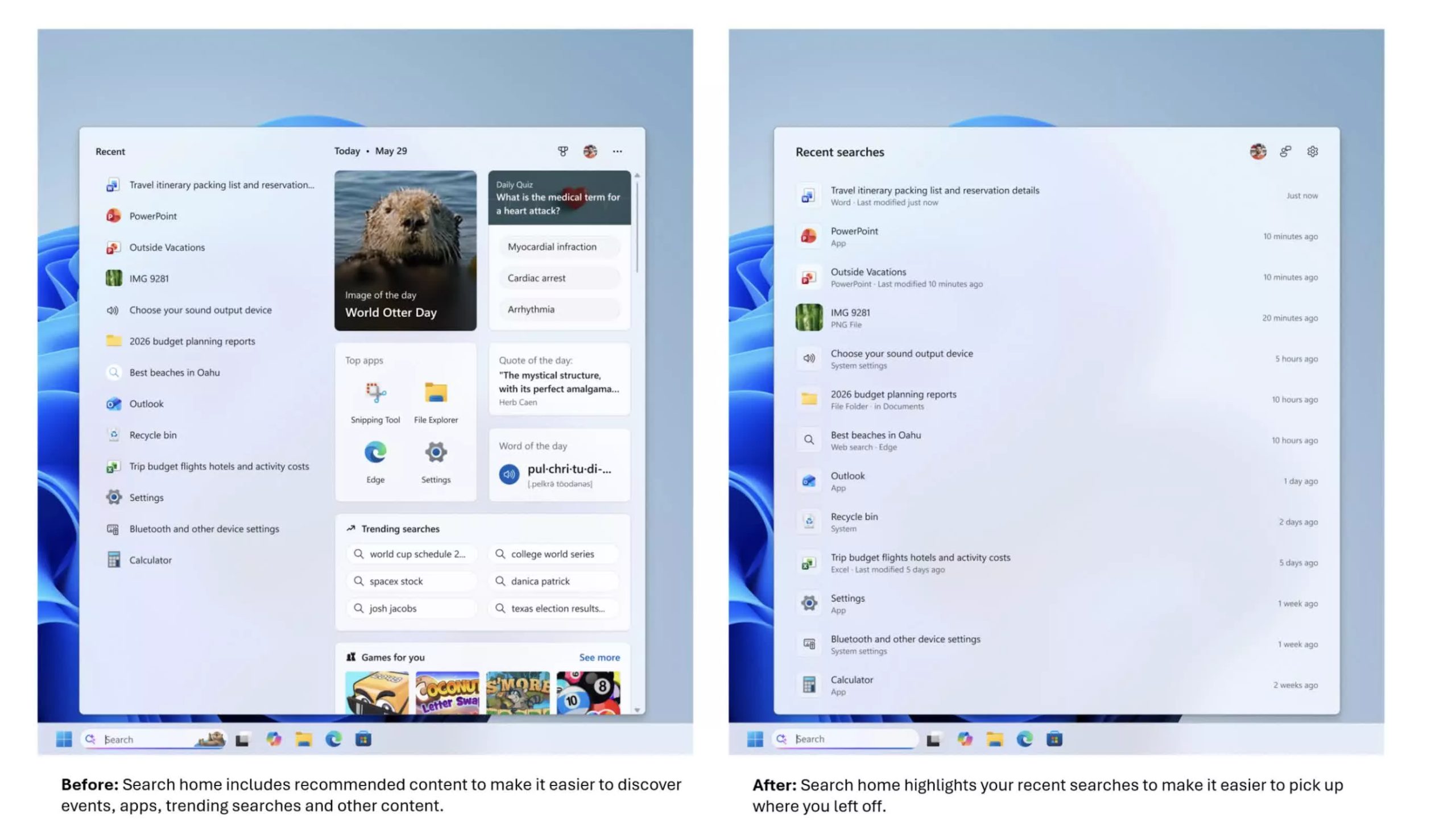
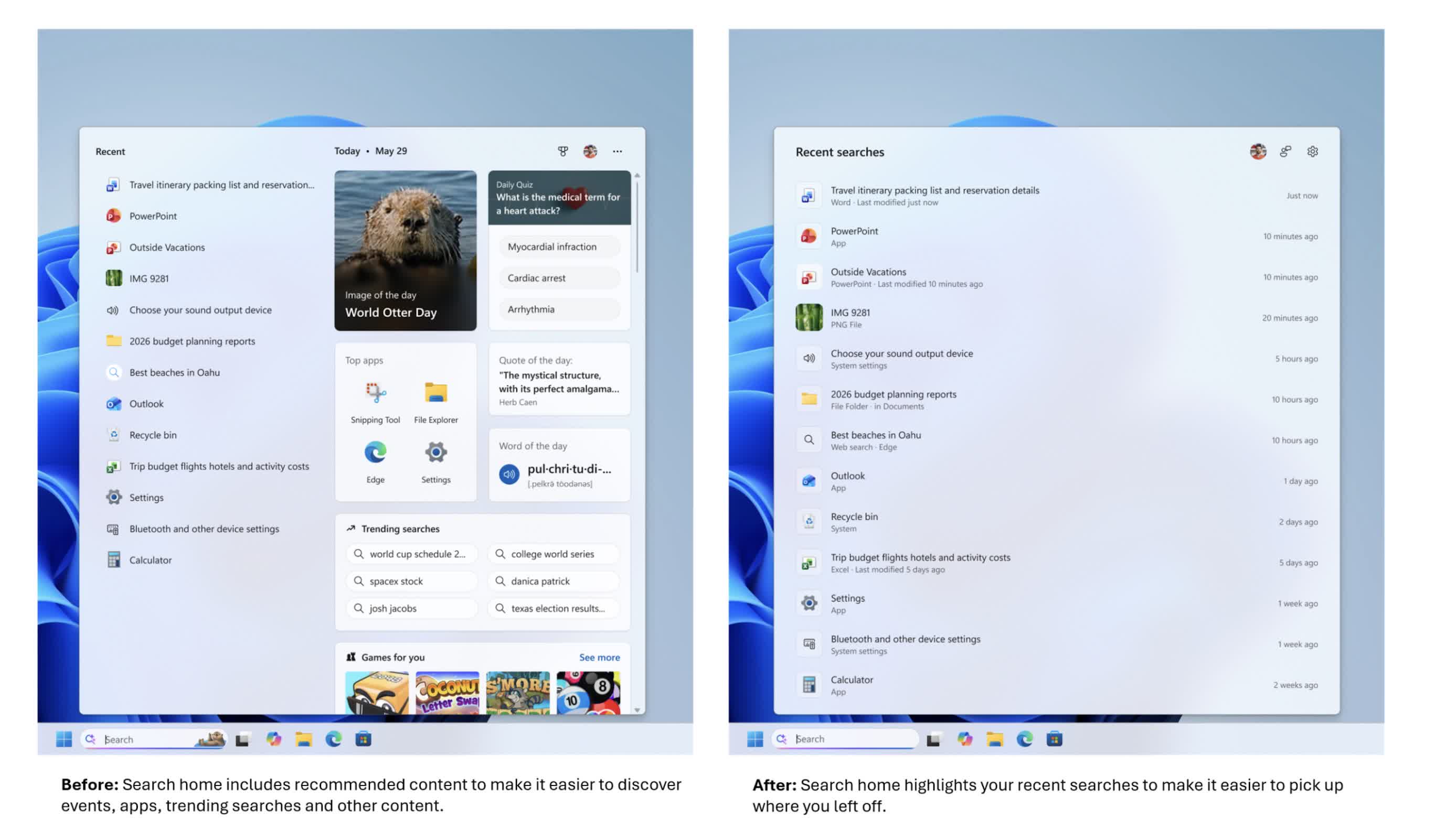
The change appears first on the search home screen. Instead of the old layout – with recently used apps on the left and tiles on the right asking “What day is it today?” or offering features such as “Daily quiz,” “Word of the day,” “Search trends,” and “Recommended games” – the new view is much cleaner.
The home screen now focuses on recent searches and local content rather than making the search box feel like a news or entertainment hub. For people who use search as a starting point, this shift is likely the first thing they will notice.
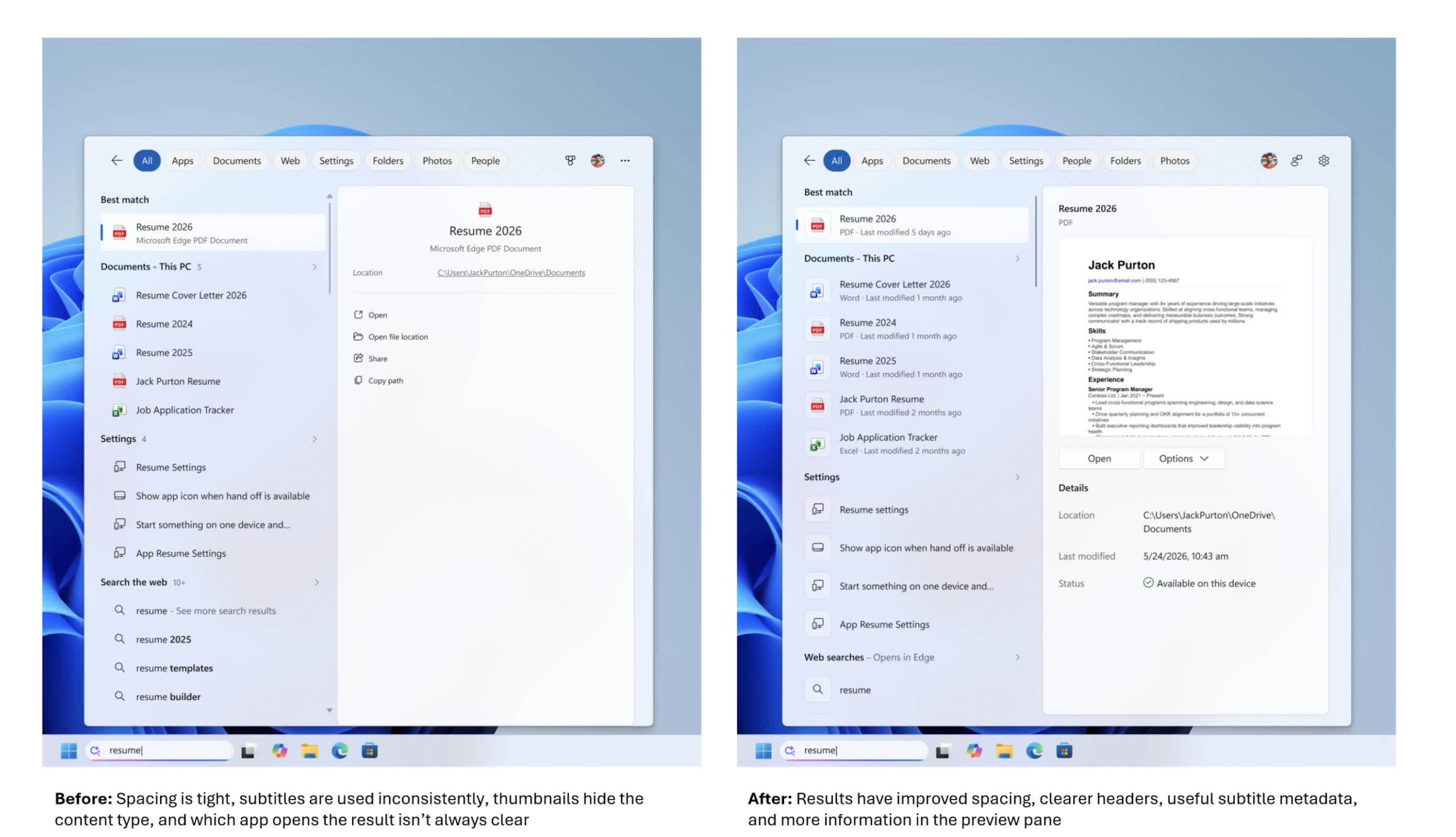
Beneath the simpler UI, Microsoft is putting more emphasis on helping users understand what they are about to click on. Search results now more clearly identify whether an item is an app, a setting, a file, a web result, or a Microsoft Store suggestion.
Advertisement
That sounds basic, but the search box has become a primary launch point for opening apps, finding files, changing settings, and getting quick answers from the web. Making the source and type of each result clearer is intended to help users choose the right option more easily.
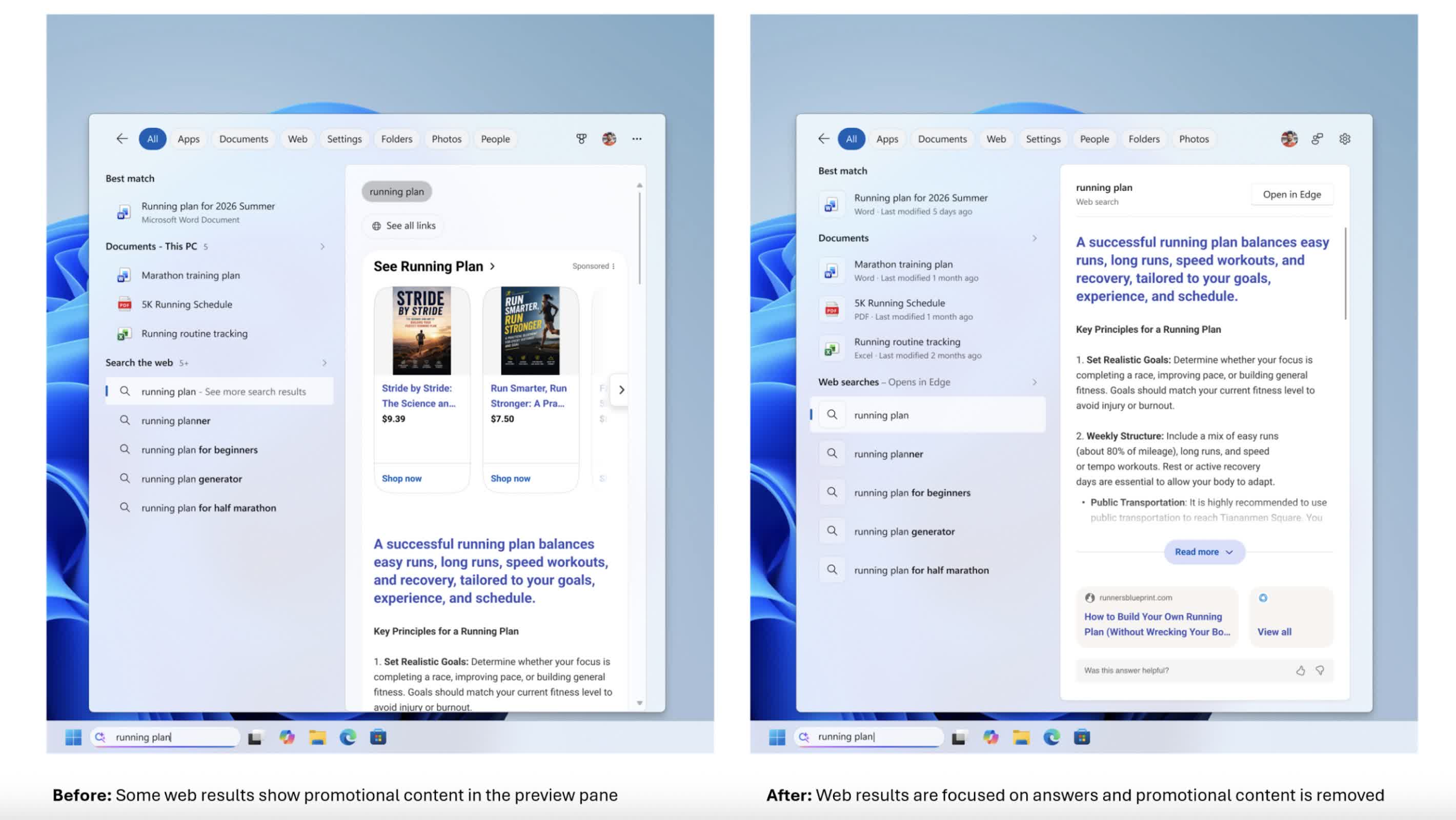
The company is also removing promotional content from web results. In earlier versions of Windows 11, web results displayed in the search box could begin with product-related suggestions and other promotional material.
In the new experience, the focus is squarely on the answer itself. Web results are presented more directly, without layers of promotional content appearing above them. For users who rely on the search box to quickly find information, the change makes it feel less like an advertising space and more like a straightforward tool.
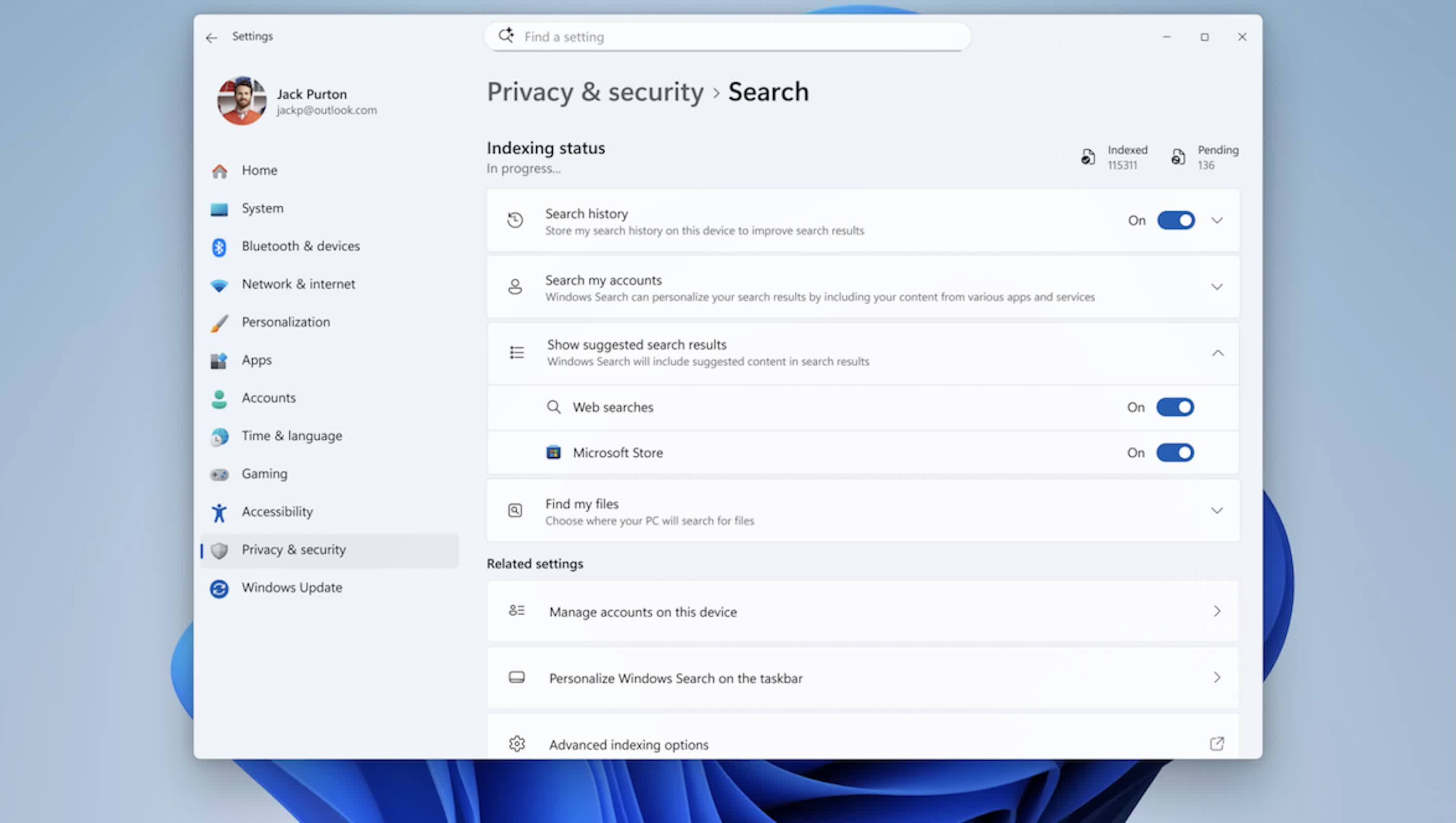
Another notable change is the level of control users have over how much online content appears in search results. A new setting under Settings > Privacy & Security > Search allows users to choose whether web and Microsoft Store suggestions appear alongside local results.
Advertisement
If that option is turned off, the search box behaves more like a local launcher and file finder rather than mixing in web and Store suggestions. The option is simple, but it acknowledges that not everyone wants online suggestions in a workflow focused primarily on opening content that is already stored on the machine.
Behind the scenes, Microsoft has adjusted how it ranks results to better support this local-first approach. Apps, settings, and files are now more likely to appear ahead of web and Store items when they are a strong match for a query.
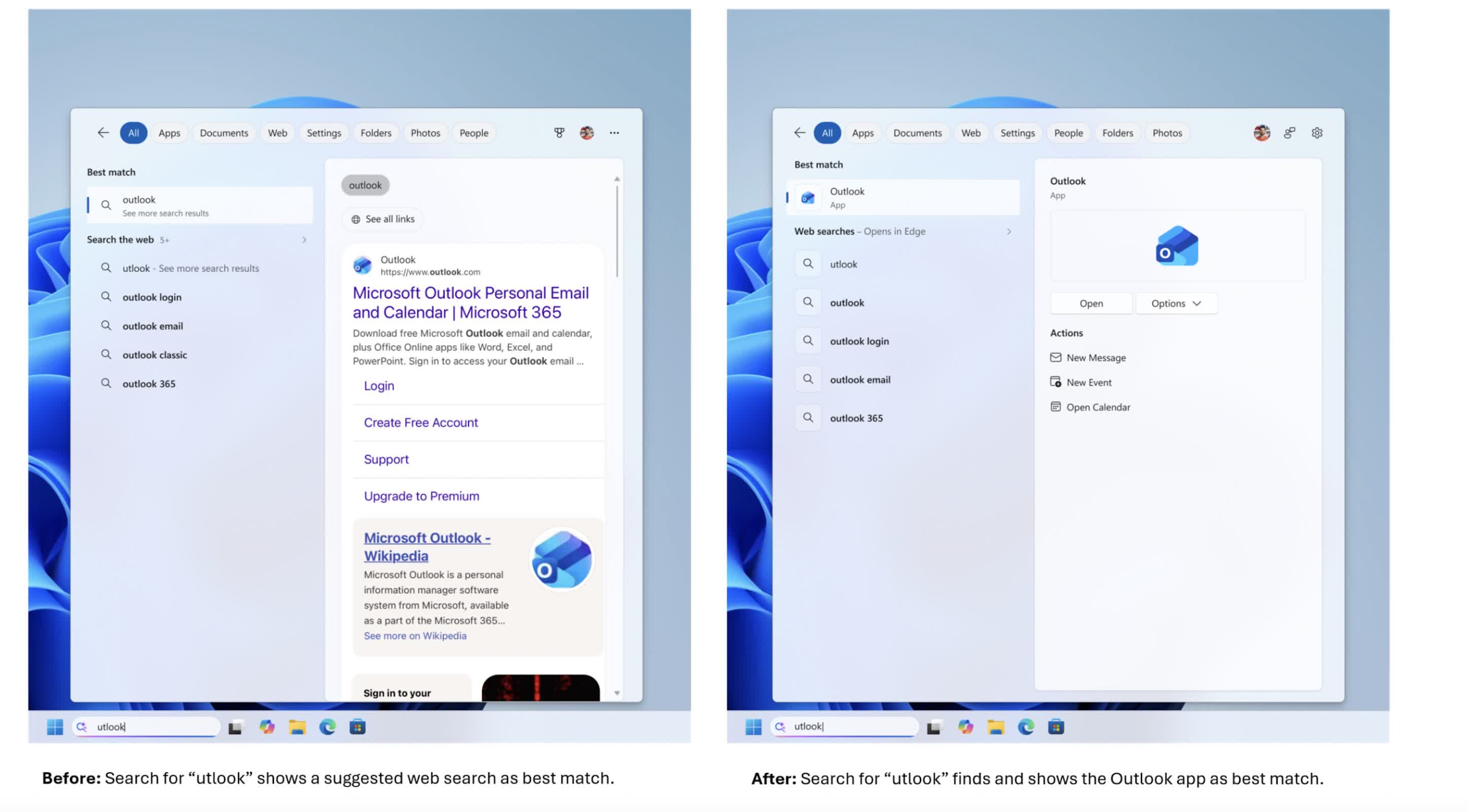
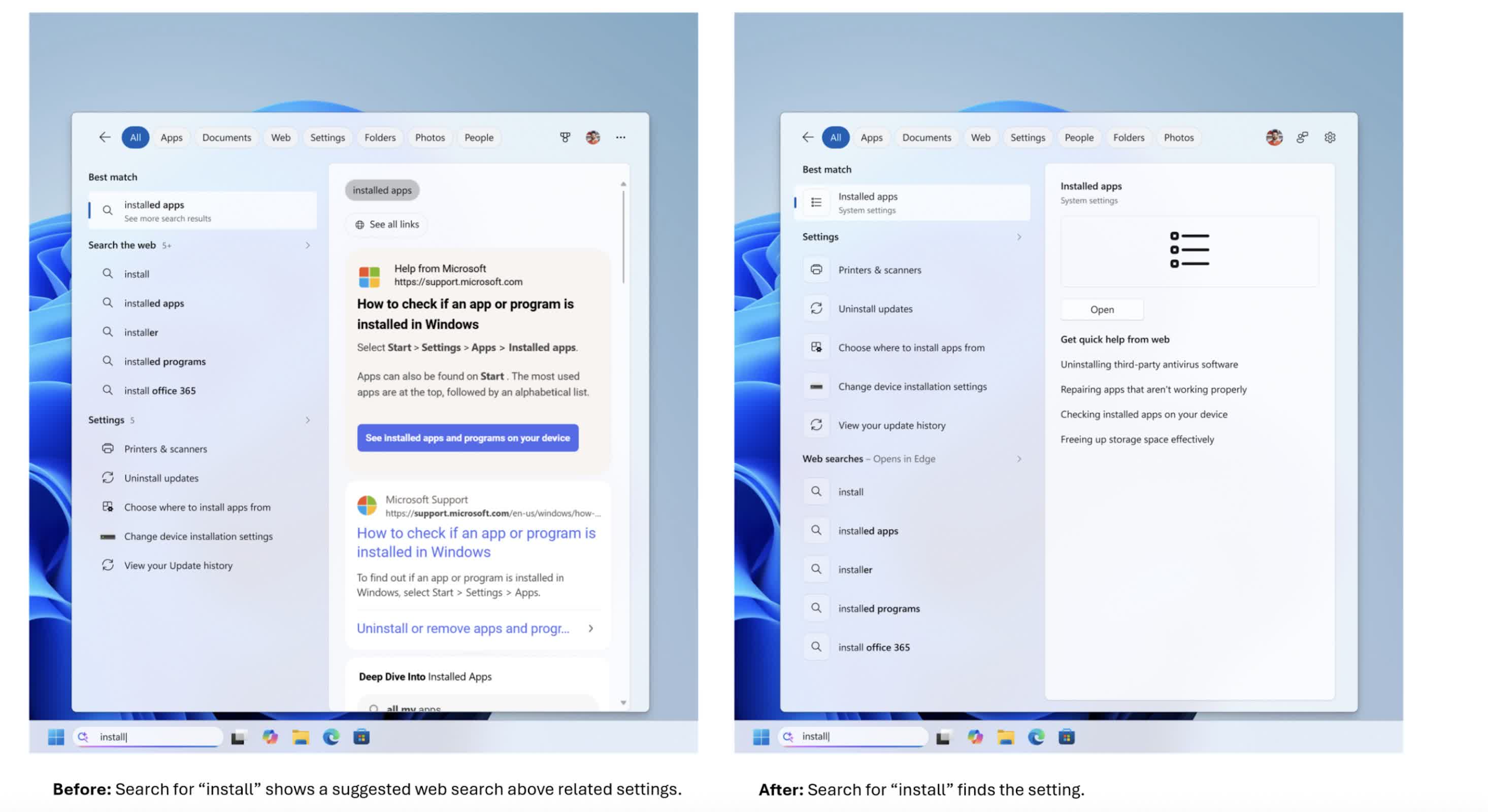
Core system objects, such as This PC and Recycle Bin, now appear more reliably instead of getting lost among tiles and other content. The search engine is also more forgiving of app names, handling typos, extra letters, and partial queries – so something like “utlook” can still find Outlook.
File search has been improved as well. The updated search box can handle very short queries, including two-character strings, which is useful for users working with short codes or brief file names.
Advertisement
Microsoft has also improved how cloud and connected files are surfaced, bringing them into view when they appear to be a better match than local content. The goal is to help users move more quickly from entering a search term to opening the document, download, or folder they intended to find, whether it is stored on the device or in online storage.
Settings search is getting attention as well. The company has made an initial round of changes to how settings results are ranked, aiming to surface more relevant controls higher in the list.
More tuning is planned as Microsoft collects data and feedback from the Experimental channel, meaning this part of the experience is likely to evolve over time. The company is also working on improving reliability by reducing crashes and search-related loading issues, with additional work still underway.
As with many recent Windows changes, the rollout will be gradual. The new search box is being distributed through Microsoft’s Controlled Feature Rollout system, so even users in the Experimental channel may not see it immediately.
Advertisement
Some users may receive the update after a reboot, while others may need to enable it through feature flags. Broader availability will follow as Microsoft refines the feature based on performance data and user feedback. For users who have been asking for a faster, cleaner, and more predictable search experience, this redesign arriving in 2026 represents a significant shift in how Microsoft approaches one of Windows’ most visible features.





















































You must be logged in to post a comment Login