It’s easy to think of online console gaming as an invention of the 2000s. Microsoft made waves when Xbox Live dropped in 2002, with Nintendo and Sony scrambling to catch up with their own offerings that were neither as sleek or well-integrated.
However, if you were around a decade earlier, you might have experienced online console gaming much closer to the dawn of the Internet era. As far back as 1990, you could jump online with your Sega Mega Drive. But what did an online console feel like in the dial-up era?
Mega
The Sega Mega Drive was launched in Japan in October 1988. The company was in a tough battle with Nintendo for gaming dominance, and the new 16-bit console was intended to best its rival’s offerings across the board. With a forward-looking attitude, Sega quickly developed an online offering for the console, which went under a few different names. It was known as Mega Net, or alternatively, the Sega Net Work System.
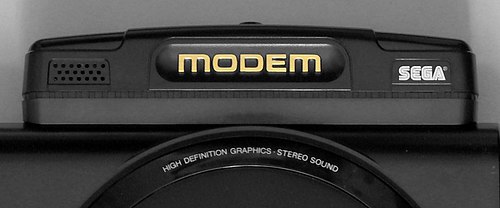
The Mega Modem plugged into the back of the Model 1 Mega Drive. With data rates maxing out at 1,200 bps, it was somewhat limited in what it could offer. Credit: boffy_b, CC BY-SA 3.0
The system hit the market on November 3 1990, exclusively for the Japanese market, with Sega talking up a future launch in the US under the “Tele-Genesis” name. The initial Mega Net kit cost ¥12,800, which included the Mega Modem accessory—a simple 1,200 bps dial-up modem which plugged into the “EXT” DE-9 port on the back of the Model 1 Mega Drive. Access to Mega Net service came at a cost of ¥800 a month. Users got a copy of Nikkan Sports Pro Baseball VAN, which provided live updates and statistics on baseball matches when connected to the service.
The Mega Net pack also included the “Game Library” cartridge. This allowed users to dial up to Mega Net and play a variety of downloadable games. These titles had to be incredibly compact, usually under 128 KB. This was both because of the glacially slow 1,200 bps modem, and because the Mega Drive had no real storage capability to speak of. 42 games were released on the system, and titles would take about 5 to 8 minutes to download. The vast majority were single player experiences. However, two games – Tel-Tel Stadium and Tel-Tel Mahjong – featured online play via Mega Net. Perhaps unsurprisingly, both games were turn-based—a practical necessity given the limited speeds and latency achievable with the slow Mega Modem. A handful of games from Mega Net would later see cartridge releases of their own.
Advertisement
Users could also engage in multiplayer gaming with certain cartridge-based titles. However, this was not using a server-based online system. Instead, this merely consisted of point-to-point dial-up play between two consoles equipped with the Mega Modem.
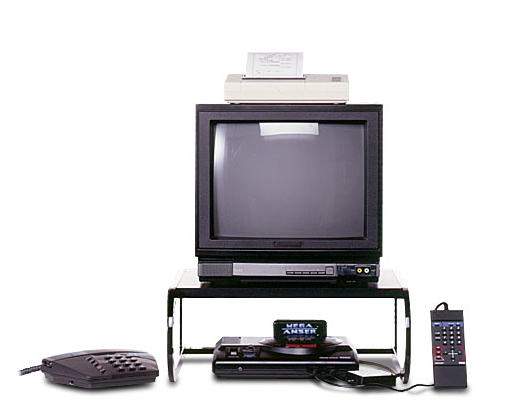
The Mega Anser kit allowed you to manage your banking or life insurance from the comfort of your living room. The optional thermal printer could be used to print statements or receipts. Credit: Sega
Mega Net wasn’t just limited to gaming, however. Sega explored more utilitarian uses for the Mega Drive with the release of Mega Anser. This came as a package that included the Mega Modem, the Mega Anser software, and a numeric keypad controller called the Ten Key Pad. There was also an optional printer that plugged into one of the controller ports. The most notable use of the Mega Anser was for online banking. Depending on your bank, you could manage your funds with the Naisu-kun Mini,Osaka Ginkou no Home Banking Service My Line, or Sumisei Home Tanmatsu.
Unfortunately, the technology wasn’t quite there in 1990 to support a fully-vibrant online gaming service. By 1992, Sega realised there wasn’t a large market for Mega Net and Mega Anser services, and the hardware started turning up in bargain bins for drastically reduced prices. By 1993, Sega had released a remodelled Mega Drive which eliminated the EXT port required for the Mega Modem, making it clear that there was no interest in taking the service any further.
You could use the Mega Net system to access live baseball scores and statistics, though one wonders if it might not have been easier to just watch a televised match instead. Credit: Sega
The end of Mega Net in Japan was swift, but the name would live once more. That time came in 1995, when a similar service saw a last gasp release in Brazil, of all places. Supported by local distributor Tectoy, it ran using a unique modem accessory that plugged into the cartridge slot. The range of services on offer was quite different—users could access emails, fax messages, and read an electronic magazine called Revista Eletrônica. The system was designed to be used with the Sega Mouse for a more computer-like interface experience, and prices started at R$5 a month for access to the service. The service was, in many ways, completely unrelated to the original Sega effort, but was inspired by it and wore similar branding.
Brazil’s Mega Net was more modern and had additional ways for users to interact with each other.
Advertisement
Sega’s early experiment with online console gaming was not a grand success. It failed to attract a huge user base or offer any ground-breaking features. However, it did give the company a base to work from when it came to getting later consoles online, like the Saturn and Dreamcast that arrived years later. Ultimately, Sega would largely be out of the console market by the time online gaming really took off in that world, but you can’t fault the former Japanese titan for trying to get in early.
If you have the space in a spare room, having your own fitness equipment at home can help. Smart home gym equipment can replace dumbbells and other machines because they’re meant to be an all-in-one machine. I’ve tested many popular smart home gyms on the market, so I know what the experience is like and what to consider when buying one.
Why we like it: The NordicTrack X24 is one of NordicTrack’s newest treadmills, and it offers a max 40% incline. This high incline lets you enjoy a variety of workouts, including hiking. If you want to walk or run at a decline, it also has a minus 6% max option.
Advertisement
Jump to details
Pros
Versatile for walking, hiking and running
Connects to third-party apps
Compatible heart rate monitors and Bluetooth headphones
Cons
Costs extra to access iFIT Pro membership ($40 per month)
Requires ample room because of its size
May not be in everyone’s budget at more than $3,000
Why we like it: The Cross Training Bike Plus is the newest version of the Peloton Bike. Peloton made some upgrades, such as an extra-cushioned seat and an HD touchscreen that now rotates 360 degrees, so you can work out from anywhere on the floor. The 23.8-inch full HD touchscreen also includes a camera, which gives you access to Peloton’s AI-powered feature, Peloton IQ.
Jump to details
Pros
Peloton stays true to its brand design and function
Peloton IQ could benefit some members who want more guidance
The screen swivels 360 degrees, making it ideal to workout anywhere on the floor
Cons
Expensive and trade-in discount if you own a Peloton bike and want to upgrade it
Some members may expect more from Peloton IQ and be let down by the experience
All-Access Membership increased from $45 to $50
What we like about it: The Tonal 2 is the second version of Tonal, a strength training smart home gym that became popular in the fitness community, along with endorsements by athletes such as LeBron James and Serena Williams. It resembles a cable machine combined with a touchscreen TV and is intended to replace your dumbbells, barbells and weight plates while saving space in your home. It has 13 sensors to track your form and technique, while the smart handles and bar accessories (an optional, additional $495) have a gyroscope motion sensor that keeps track of your reps.
Jump to details
Advertisement
Pros
It is a space-saving, wall-installed machine
It’s quiet, which works well if you don’t want to disrupt the neighbors
It functions like a personal trainer
You aren’t limited to just using it for the classes and you can do your own customized workout
Cons
Your walls have to meet the requirements to install Tonal
The price is high for a machine ($4,295) that doesn’t include the cost of its own custom accessories or required professional installation
FITNESS DEALS OF THE WEEK
Deals are selected by the CNET Group commerce team, and may be unrelated to this article.
With years of experience testing fitness equipment, I’ve narrowed down the best machines based on cost and size and included memberships and overall performance. Below are the best smart home gyms to install in your home this year.
Latest updates
Aug. 1, 2025: We updated this list to reflect equipment that is still available and removed discontinued products. We updated Tonal to Tonal 2 and removed the NordicTrack Commercial 14.9 elliptical because it has been discontinued.
Advertisement
April 2, 2026: We updated the list to replace the NordicTrack Commercial 2450 with the NordicTrack X24. We added the Cross Training Peloton Bike Plus. The Tempo Studio has been discontinued and removed from the list.
What is the best overall smart home gym?
Our roundup includes the best pieces of equipment across various categories: mirrors, bikes, rowing machines, treadmills and the like. These aren’t comparable and there is no winner, but every product listed is the best in its category based on my expertise and rigorous testing.
Buying advice for smart home gyms
A lot of people set improving their overall health as a New Year’s resolution, and building a home gym is a smart way to approach this goal. It makes it easier to fit training into your schedule and stick to your commitment, because consistency will get you the best results. And if you choose to buy smart home gym equipment, you can make this process a lot of fun by accessing different training routines and virtual classes.
With that said, it’s never a bad idea to also compare and see whether an actual gym membership would make more sense. If you’ve found yourself to be self-motivated, have the extra space and don’t mind the added effort of buying and selling equipment, buying smart home gym equipment for your setup will make sense and should see some good use. But if you’ve found yourself feeling better training amongst people and don’t have the space to spare, joining an actual gym will have a more meaningful impact on your goals. Take these factors into account as you shop to improve your health.
Advertisement
Best smart home gyms for 2026
Pros
Versatile for walking, hiking and running
Connects to third-party apps
Compatible heart rate monitors and Bluetooth headphones
Cons
Costs extra to access iFIT Pro membership ($40 per month)
Requires ample room because of its size
May not be in everyone’s budget at more than $3,000
Why we like it: The NordicTrack X24 is one of NordicTrack’s newest treadmills, and it offers a max 40% incline. This high incline lets you enjoy a variety of workouts, including hiking. If you want to walk or run at a decline, it also has a minus 6% max option.
NordicTrack’s trademark SmartAdjust feature automatically adjusts your incline and speed. This function activates during an iFIT workout since the speed and incline are adjusted automatically based on the instructor’s cues. Considering the commercial size of this treadmill, you can enjoy it whether you walk, run or jog.
Advertisement
The 24-inch touchscreen is big enough that you can view an iFIT class (through NordicTrack’s workout app) clearly or your favorite Netflix show, as long as you have the iFIT Pro membership ($40 per month). If you’re an iFIT member, you also have access to iFIT’s AI Coach, which functions as a personal assistant and schedules your workouts.
Who it’s best for: This treadmill is best for the serious runner or those who enjoy hiking. The steep 40% incline and other treadmill features are beneficial whether you’re training for a race with various inclines or you enjoy a challenge when walking. You can also connect to third-party streaming apps, such as Netflix and Prime Video, to keep you entertained during your workout.
Who shouldn’t get it: This treadmill is large because it’s commercial-sized. Therefore, if you opt to buy it, make sure you have plenty of room to keep it. I had just enough space to test it in my home, but I would still recommend making sure you have more than enough space around it. This is important if you plan to do the iFIT classes and need to pivot the screen for your floor workouts.
I didn’t love the design on the speed and incline buttons because they’re flush with the treadmill and sometimes required me to press them multiple times to adjust these features. This isn’t helpful when you’re sweaty mid-workout and trying to adjust your speed quickly.
Advertisement
Pros
Advertisement
Peloton stays true to its brand design and function
Peloton IQ could benefit some members who want more guidance
The screen swivels 360 degrees, making it ideal to workout anywhere on the floor
Cons
Expensive and trade-in discount if you own a Peloton bike and want to upgrade it
Some members may expect more from Peloton IQ and be let down by the experience
All-Access Membership increased from $45 to $50
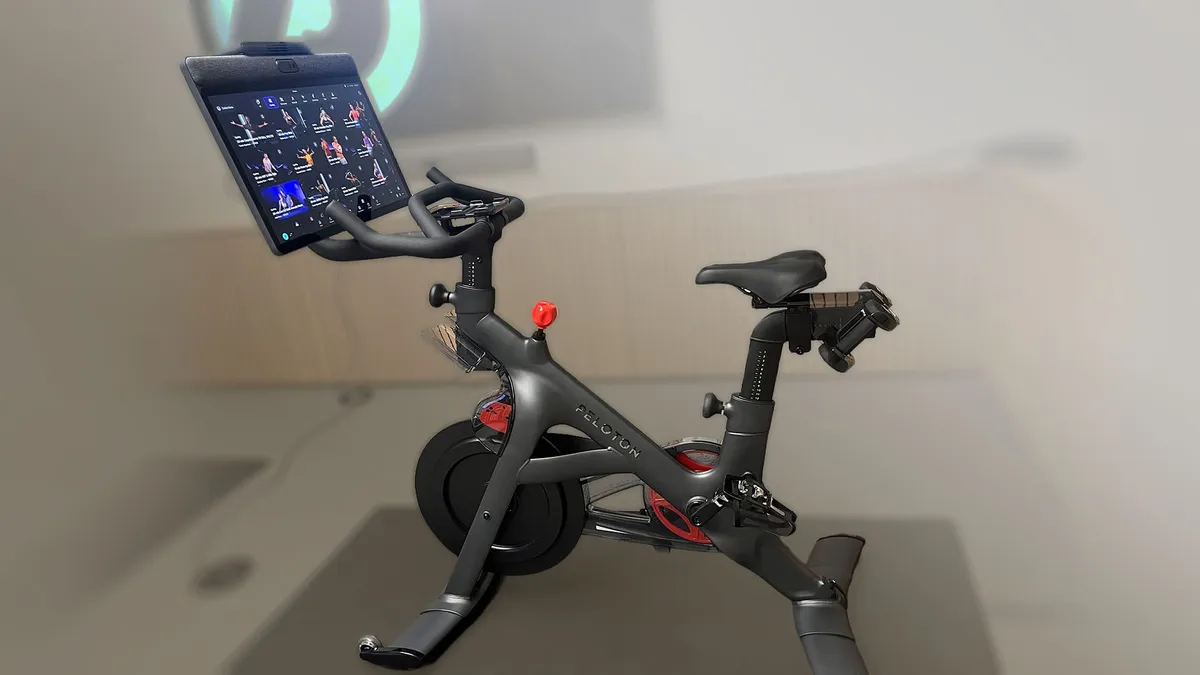
Why we like it: The Cross Training Bike Plus is the newest version of the Peloton Bike. Peloton made some upgrades, such as an extra-cushioned seat and an HD touchscreen that now rotates 360 degrees, so you can work out from anywhere on the floor. The 23.8-inch full HD touchscreen also includes a camera, which gives you access to Peloton’s AI-powered feature, Peloton IQ.
Peloton IQ is Peloton’s personal trainer experience during strength training sessions, counting reps, identifying the weights you’re lifting and checking your exercise form. The camera captures your body in frame during your workout, allowing you to use this feature.
Who it’s best for: The Cross Training Peloton Bike Plus is best for new Peloton fans who enjoy cycling and group fitness classes. If you like the idea of having an AI coach, you’ll like the Peloton IQ feature. Plus, having the bike makes it multi-functional for other workouts besides cycling.
Who should not get it: If you already own the original version of the Peloton Bike or Bike Plus, you won’t get a trade-in deal for the upgraded version. That means you’ll spend $2,695 to upgrade a bike you already own just to get the camera function. I also thought Peloton IQ could use some improvements. Until some changes are made, it may not be worth replacing your old bike for a new one.
Advertisement
If you purchase the Cross Training Peloton Bike, you can still take advantage of some of the Peloton IQ features without the camera. The all-access membership also went up in price (originally $45, now $50) — regardless of whether you own one of the new machines.
Pros
Advertisement
It is a space-saving, wall-installed machine
It’s quiet, which works well if you don’t want to disrupt the neighbors
It functions like a personal trainer
You aren’t limited to just using it for the classes and you can do your own customized workout
Cons
Your walls have to meet the requirements to install Tonal
The price is high for a machine ($4,295) that doesn’t include the cost of its own custom accessories or required professional installation
What we like about it: The Tonal 2 is the second version of Tonal, a strength training smart home gym that became popular in the fitness community, along with endorsements by athletes such as LeBron James and Serena Williams. It resembles a cable machine combined with a touchscreen TV and is intended to replace your dumbbells, barbells and weight plates while saving space in your home. It has 13 sensors to track your form and technique, while the smart handles and bar accessories (an optional, additional $495) have a gyroscope motion sensor that keeps track of your reps.
The latest version of Tonal also includes a smart view, which allows you to view yourself as you do your workout and has an Aero feature, which allows you to use it for cardio or HIIT classes. Tonal 2 uses up to 250 pounds of total resistance and calibrates your weights for different exercises based on your initial fitness assessment. Before you start a workout, Tonal can also tell which muscle groups are fatigued on the day of your workout and make sure to work around them.
Tonal offers thousands of on-demand and live workouts for beginners to advanced athletes. It even has five dynamic weight modes that make your workout harder and function like a personal trainer. If you don’t want to take a class, you can use the Tonal on its own and customize your own workout while still receiving the same feedback you would in class. You can also connect your Amazon Music or Apple Music account and listen to your own music during your workout.
Who it’s best for: Tonal 2 is best for the serious weightlifter or someone who is into strength training, but wants more guidance during their workouts. They’ll appreciate the 250 pounds of total resistance and especially being able to view themselves as they do their workout. It is a big investment at $4,295, so it’s best for the exerciser who plans on being committed to using it.
Advertisement
Who should avoid it: I would avoid buying the Tonal 2 if you know you aren’t going to be consistent with your strength training workouts. I also wouldn’t recommend it if you don’t have the space for it or the budget. The original Tonal was cheaper, and I didn’t find the upgrades to be worth the big price jump this time around. It also requires 7 feet of wall space and floor space. If the next iteration has more unique features and functions, then I might say the price point is worth it.
How we test smart home gym equipment Each smart home gym is tested differently based on its category since no two are alike. We narrowed down the best smart home gyms based on each of their respective categories. These include treadmills, ellipticals and mirror gyms, all of which have been tested by various CNET editors over the years.
Budget: Smart home gyms tend to be expensive and can easily cost a minimum of $1,000. Therefore it’s an investment you want to make sure is going to be worth it for your home and exercise preferences. Consider how much you’re willing to spend and what’s included in that price.
Advertisement
Space: Many smart home gyms are relatively large pieces of equipment. Before purchasing one, make sure you have enough room to set it up and move around it. For example, if you’re purchasing a machine such as a treadmill, it’s ideal to look for one that folds for easier storage. Whereas if you are purchasing a smart fitness mirror you’ll want to make sure that wherever you mount it there’s still room to exercise in front of it.
Versatility: Smart home gyms usually offer more than one function. If you’re buying a smart home gym, make sure it also offers a variety of classes so you can build a well-rounded workout. If you want personal training, make sure the smart home gym offers it as an option.
Membership: Since smart home gyms typically replace a gym membership, you’ll want to make sure that the membership provided will allow multiple user profiles so your whole family can use it.
Tempo Studio: We previously named the Tempo Studio the best smart home gym for strength training with free weight, but it has since been discontinued. Instead, you can opt for the Tempo Move or Core (the smaller version of the Studio).
Advertisement
Since the types of smart home gyms that exist vary across the board, there aren’t best practices that apply to all of the ones on this list. Instead, there are some key things to keep in mind–particularly for treadmills, ellipticals and rowing machines.
Best treadmill practices: Make sure to get clearance from your doctor first if you are pregnant, have been sick or recovering from an injury or surgery. Your treadmill workout should consist of a five to 10-minute warm-up, pace yourself and don’t run too fast too soon, avoid holding on to the handrails and keep your arms by your side, but use them so you’re a more efficient runner. Focus on running tall and light and relaxed to avoid any unnecessary tension.
Best rowing machine practices: Learn the importance of the setup which is broken up into four parts known as the catch, drive, finish and recovery. If you’re really interested in getting into rowing, it’s recommended to learn the right technique from an expert.
Best elliptical practices: Make sure to stand tall, keep your core engaged, and avoid slouching. Hold onto the handles and keep your feet flat and sturdy on the pedals when you pedal forward.
Advertisement
This depends on what you’re looking for in a smart fitness mirror. Most offer a variety of classes that are updated regularly but have a different purpose. Some focus on perfecting the artificial intelligence aspect of it to give you form feedback, while others prefer to concentrate on personal training or high-quality group fitness classes. The smart fitness mirror you choose will also depend on your preference, budget and space availability.
Owning a smart home gym can make it easier for you to stay active because you have a full gym at home.You can also share the experience with other family members looking to get fit.
Your smart home gym or smart fitness mirror will come with instructions on how to maintain and care for it. Some recommend only using microfiber or cleaning cloths to keep it clean and dust-free. Never use cleaning products that have not been approved by the manufacturer.
Neat Acoustics will preview its new Vito Classic loudspeaker at HIGH END Vienna 2026, giving the British brand’s latest and most ambitious Classic range model its first public outing. For a company that has been building compact, musically focused loudspeakers in northern England for more than three decades, the Vito Classic feels like a reminder that Neat has flown under the radar in North America for far too long. Much like Cyrus Audio, Graham Slee, and the late Glenn Croft’s wonderfully stubborn corner of British hi-fi, Neat has never needed flashing lights or luxury pricing to make its point.
I still remember hearing a pair of Neat loudspeakers years ago at a Toronto dealer, paired with a mix of Naim and Exposure gear. They were quick, spacious, and far bigger sounding than their footprint suggested. For anyone living with real-world space limits, especially in an apartment where refrigerator-sized loudspeakers are a non-starter unless eviction is the goal, Neat made a lot of sense. I should have bought them. File that one under “audio regrets, British division.”
Slim Cabinet, Big Neat Energy
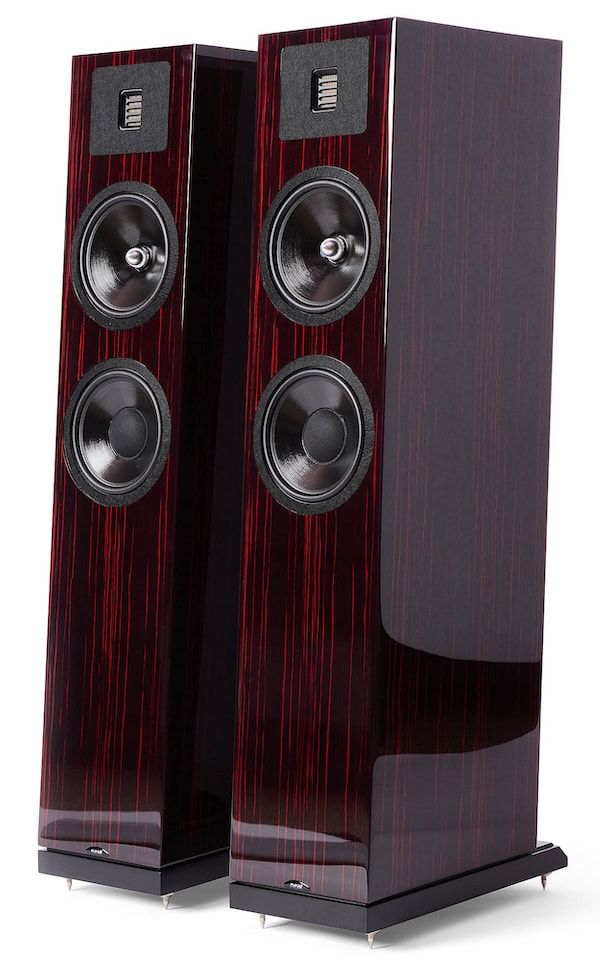
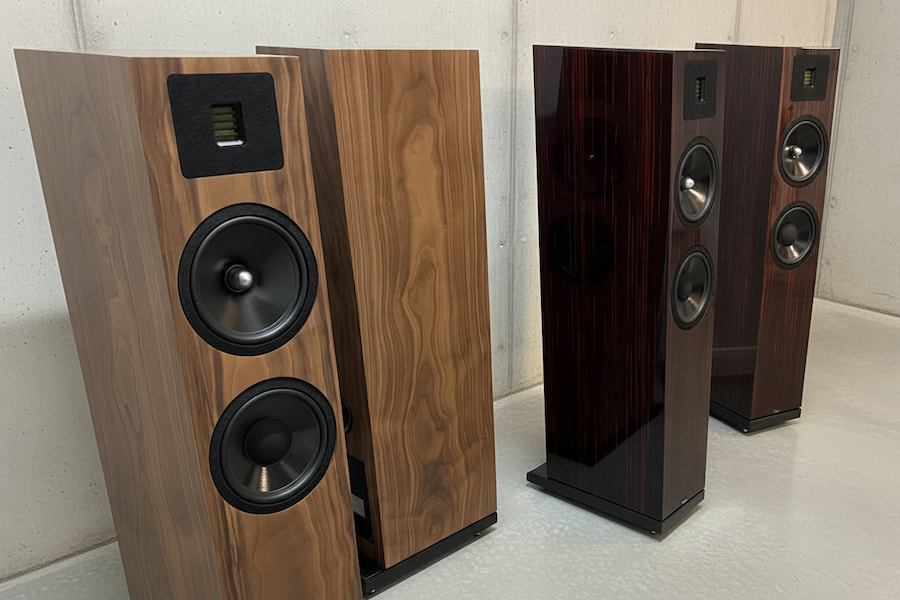
The new Vito Classic sits at the top of the Classic range and follows that same thinking: a slim 2.5-way floorstanding loudspeaker built around an AMT tweeter, dual bass drivers, a claimed 22Hz to 22kHz frequency response, 6-ohm nominal impedance, and a recommended amplifier range of 25 to 200 watts. At 90 x 19 x 30 cm, it is not trying to dominate the room. It is trying to disappear into one, which has always been part of Neat’s appeal.
That matters because Neat has built much of its reputation on speakers that sound bigger, faster, and more alive than their dimensions suggest. The original Iota, Iota Alpha, Iota II, and Momentum models all leaned into compact cabinets, strong timing, surprising bass output, and an energetic presentation without turning the treble into dental work.
I really enjoyed the Iota Alpha for its open treble and tight bass from a tiny floorstanding cabinet, while the Iota II came across as agile, punchy, energetic, and capable of surprising scale from a very small enclosure. The newer Momentum J-S continued that pattern with an AMT tweeter, deep bass for a standmount, and a clean, articulate presentation.
Advertisement
A lively top end has long been part of the Neat recipe. Not bright. Not etched. Not the kind of thing that makes cymbals sound like someone dropped cutlery down a stairwell. But dull? That word rarely gets anywhere near a Neat loudspeaker, and the Vito Classic does not appear eager to change that. The Vito Classic appears to follow that same path: compact footprint, real bass ambition, and enough top-end life to keep things moving along with some presence.
The Bottom Line
The Neat Vito Classic looks like the company’s most ambitious Classic range loudspeaker yet, but the appeal is not just that it sits at the top of the lineup. What makes it interesting is the combination of a slim 90 cm floorstanding cabinet, AMT tweeter, dual bass drivers, claimed 22Hz bass extension, and Neat’s familiar preference for tuning by ear first and measurement second. That approach has defined the brand for decades, and the Vito Classic appears to be aimed at listeners who want scale, speed, and energy without surrendering half the room.
First customer deliveries are expected in September 2026, but official U.S. pricing has not been announced. It will not be cheap. Based on its position above the Classic Mystique and the reported U.K. pricing around £4,995 per pair, it is hard to imagine the Vito Classic landing under $5,000 USD once import costs, distribution, and dealer margins enter the chat. Nobody should pretend otherwise until Neat or its U.S. distributor confirms the number.
Amplifier matching should be part of the conversation. Based on personal experience with Neat speakers and direct conversations around what works well with them, the usual British suspects make a lot of sense: Naim Uniti models, Exposure integrated amplifiers and power amps, Cyrus Audio, Rega, Roksan, and Quad’s new 3 integrated amplifier. The WiiM Ultra also belongs in the discussion as a flexible streaming front end, especially for systems where budget needs to stay attached to reality.
The Vito Classic is not for someone chasing giant cabinets, luxury jewelry finishes, or audio furniture that announces itself from across the street. It is for listeners who want a compact British floorstander with real bass ambition, a lively but not bright top end, and enough musical momentum to make smaller and medium-sized rooms feel far larger than they are. Neat has been quietly doing this for a long time. The Vito Classic looks like the company finally asking more people to notice.
The C8 Corvette is an incredible machine. The Z06 model is one of the fastest production cars from the United States to take on the Nürburgring, currently sitting in 39th place with a time of 7:07.30. Even the base model shouldn’t be glossed over thanks to its mid-engine V8 powertrain and exceptional handling. If you’re looking to take your C8 Corvette Stingray to the track, you should be considering the Z51 performance package.
The Z51 package is $5,000, so it doesn’t come cheap. Especially when the C8 Corvette Stingray is already over $72,000 to start (plus a $2,495 destination fee). But if you’re looking for the best track performance from your Stingray, the Z51 could be a must-have, offering better handling and higher speeds while keeping the car cool and efficient.
Advertisement
What makes the Z51 performance package $5,000
The Z51 package may be expensive, but it comes with plenty of performance-boosting upgrades that could very well pay off if you love pushing yourself on the track. If you want to keep up with the Miatas and 911s on those turns, the Z51 offers firmer suspension and passive dampers for more body control on tough corners. The Z51 has a shorter final-drive ratio for better acceleration, bringing the base model’s 4.89:1 ratio to 5.17. A new front and rear splitter offer improved aerodynamics. For better grip, you’ll also get Michelin Pilot Sport 4S ZP summer tires in place of the base model’s all-seasons.
Advertisement
Since you’ll be driving faster on the track, the engine will be working harder — and getting hotter. The Z51 package adds a third radiator in the driver’s-side air intake for increased cooling capacity. In addition, you’ll get a transmission cooler and additional built-in air funneling to the front and rear brakes. Speaking of, the Z51 has larger rotors than the base model, with the front increasing to 13.6 inches and the back to 13.8 inches. This will ensure you can stop efficiently while driving at higher speeds.
We use thermocouples linked to computer software to measure internal grill temperatures.
Brian Bennett/CNET
Our testing process varies by grill type, but most models go through three core challenges: a high-heat test like searing steaks or grilling burgers, a medium indirect-heat cook like a whole chicken over an hour, and a low-and-slow session with a full rack of ribs. Across more than 30 grills tested, we’ve refined this into a reliable routine.
Throughout each cook, we track total cooking time, internal grill temperatures, and the temperature inside multiple cuts of meat simultaneously. That data tells us what a grill’s own thermometer might not — where hot spots hide, how evenly heat actually distributes, and whether the readings you’re seeing on the dial match what’s happening on the grates
Advertisement
High heat test: Cooking 5.3-ounce burger patties until they reach 145 F internally.
Indirect heat test: Cooking a 5.5-pound chicken off the flames to 160 F.
Low and slow: Cooking a rack of pork ribs at 225 for 3 hours and taste testing.
Temperature consistency
James Bricknell/CNET
We use the InfiRay P2 Pro to test how fast the grills heat up and if the heat is even. It only works as the grills heat up because the top temperature is too high, but it gives us a good idea of how well each grill spreads the needed heat. The InfiRay P@ allows us to take temperature readings at multiple points across the heating area to obtain a more accurate average. We also use it to see if there is any major heat loss from other areas of the grill that may indicate poor-quality construction.
We also use a stopwatch to determine how quickly the temperature drops over a one-minute interval when opening the lid. It’s an especially helpful test for smokers, where you may need to check the meat but don’t want to compromise the cooking time. We always suggest using a meat thermometer to check the internal temperature of any food you are smoking, rather than opening the lid, as they almost all lose around 100 degrees per minute.
Taste testing
Delicious food is delicious
James Bricknell / CNET
There’s also a fair amount of (read: so much) taste testing, lively debate, and voting among our editors and families, in addition to the data we gather about grilling temperatures and cooking times. You might think it would be more fun than work to eat delicious food while discussing the merits of a grill, and you’d be right.
Advertisement
We don’t just taste test the three specific products in our temperature tests, as that wouldn’t give us a good spread. We choose products that people love to grill, including vegetables like corn, asparagus, and mushrooms, and meats like chicken legs, wings and steaks. When we can, we cook on multiple grills at once and keep a note on which products come from where. Then ask our (lucky) testers which they like the most. This is the least objective of the tests, but it is helpful in a real-world way. If the food just doesn’t taste good, then that grill likely isn’t doing a good job.
You can grill flaky fish or make a diner-style breakfast on Ninja’s FlexFlame gas grill and griddle.
David Watsky/CNET
If you’re interested in any particular method of testing, we have a dedicated how we test page, plus our recommendations for cooking with kamado grills, portable grills and charcoal grills ready for your perusal. Happy grilling.
A morning walk through East Lawn Cemetery in Ithaca, New York uncovered an immense colony of some 5.5 million subterranean bees. The discovery, which a Cornell University research team published in April in the journal Apidologie, documents one of the largest aggregations of these insects ever recorded in the world. The population, belonging to the species Andrena regularis, occupies an area of about 1.25 acres and is crucial for pollination of the region’s orchards, demonstrating that historic cemeteries can prove unsuspected refuges for urban biodiversity.
The Genesis of the Discovery
It all began in the spring of 2022, when Rachel Fordyce, then a laboratory technician in Cornell University’s entomology department, noticed an anomalous presence of insects during her usual walk to work. After collecting some specimens, she showed them to Bryan Danforth, an entomologist at the same university. Analysis revealed that they were Andrena regularis, commonly called the mining or miner bee. Unlike honey bees, this wild species has a solitary lifestyle and nests by digging tunnels in the ground. Historical records indicate that the insect has been present in the cemetery, established in 1878, since at least the early 1900s.
The Census
To calculate the size of the colony, scientists placed 10 traps placed in the cemetery between late March and mid-May 2023. These small net curtains cover less than one square meter of soil and channel insects coming out of the ground to a glass container. In total, more than 3,000 insects belonging to 16 different species were sampled, including bees, beetles, and flies, with an overwhelming prevalence of Andrena regularis. Extrapolating from the average density found in the traps, the researchers estimated a total population of between 3 and 8 million, with an average value of 5.5 million—the equivalent of more than 200 domestic bee hives.
The research yielded previously unpublished data on the biology of this little-studied insect. The traps revealed that males emerge from the ground a few days earlier than females during the first warm days of April, a strategy that maximizes mating opportunities. Subsequently, females dig nests and lay eggs in cells filled with pollen and nectar. The species has the distinction of wintering at the adult stage underground, which allows it to become active very early in the spring, in perfect synchrony with the flowering of apple trees in the nearby Cornell University orchards. Monitoring also revealed the presence of complex ecological dynamics, such as parasitism by bees of the Nomada imbricata species, which lay their eggs in the nests of the host species at the expense of the original larvae.
Advertisement
A Heritage to Conserve
The discovery highlights the need to protect the nesting sites of wild bees, 75 percent of which are solitary species living underground. Places such as old city cemeteries offer ideal conditions: sandy soils that are easy to dig, no pesticides, and an environment that is not subject to the profound alterations typical of intensive agriculture or housing development. To prevent populations of this magnitude from being accidentally destroyed by concrete pours or road work, the study’s authors have launched a global citizen science initiative. The project invites citizens to report the presence of underground bee aggregations in order to survey and protect these vital pollinators before habitat fragmentation jeopardizes their survival.
This story originally appeared on WIRED Italia and has been translated from Italian.
A research team found “extensive changes” on brain scans of 13 young women taking
GLP-1 drugs, reports the Washington Post:
Within only a few months, the brain connections in the salience network, which helps target attention, had multiplied… [“We didn’t expect to see this effect, and we really don’t know what it means,” said an assistant professor assisting the research.] Ozempic and other GLP-1 drugs were initially understood as a metabolism breakthrough: medicines that act like hormones to control hunger, blood sugar and weight. But as researchers probe deeper into how the drugs work, early evidence suggests that GLP-1s may also be reshaping parts of the brain.
Tens of millions of people are now taking the medications worldwide, turning what began as an obesity and diabetes treatment into what could be modern medicine’s largest unplanned neuroscience experiments… Long before Oprah Winfrey and social media influencers helped popularize GLP-1 drugs, physician-scientist Lorenzo Leggio was studying them as a possible addiction treatment… Several major studies examining GLP-1 drugs on nicotine dependence, opioid- and cocaine-use disorders, gambling addiction and binge eating are also underway. “It’s very exciting times, but we don’t fully understand how it works,” Leggio said…
As evidence has grown that inflammation, metabolism and mental health may be far more connected than scientists once believed, researchers have become intrigued by patients who say GLP-1 drugs appear to ease anxiety, compulsive thinking and emotional distress. Daniel Drucker, a University of Toronto researcher and GLP-1 drug pioneer who receives funding from several drugmakers, said researchers are investigating the medications across a variety of psychiatric and neurological conditions, though none are approved for them. “We have so many anecdotal reports: They were treated for blood sugar and then they felt much happier. Or they took one dose of the drug and their brain fog cleared,” he said. The article suggests social media complaints “raise deeper questions about what, exactly, these drugs are changing.
Advertisement
“If GLP-1s alter the brain systems involved in reward, craving and motivation, researchers wonder, where is the line between quieting a person’s destructive impulses and reshaping personality itself?”
Along with layer lines, FDM printers are notorious for being neither air- nor water-tight due to the countless very small gaps between the layers. This is very unfortunate if you are trying to FDM print something that should keep water either inside or outside. Although a variety of potential solutions exist, it’s hard to easily compare them. Correspondingly [Half-Baked-Research] decided that the best approach here was to just try everything and pit them against each other.
These solutions include various coatings either in- or outside the part, as well as the foam solution that he tried previously joined by a number of community-suggested alternatives that should not get waterlogged. To properly test them, the water pressure at a depth of about 10 meters would be good enough, but rather than find a really deep swimming pool or try his luck at nearby bodies of water, compressed air was used to ramp up the pressure of a what is basically a big bucket of water.
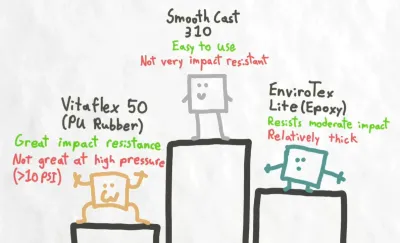
For the pressure chamber a Vevor vacuum chamber was modified to contain the 1 bar (103 kPa) of pressure, which was a fair bit of work and required a CNCed metal top plate. Among the printed and treated samples were also a couple of wild cards: a PETG cube with a TPU printed cover, a PU molded part and PETG with thicker walls.
Advertisement
Along with the long soak, percussive testing was also performed to see how it’d affect the water intrusion resistance. After all that, there were three winners: internal epoxy coating and two types of internal PU coating, though epoxy held up the best after repeated abuse. PU rubber also got a thumbs-up if you don’t need as high a pressure resistance but are more concerned with resisting physical abuse.
In 2026, the smart glasses conversation is mostly dominated by a handful of names: Meta, Samsung, and Google. There are other companies that already have products in the market, but they might not have thought about competition from this PC and laptop brand that has suddenly entered the market.
I’m talking about Acer. The company has quietly dropped two pairs of glasses ahead of Computex 2026, and neither of them looks like an experiment.
Acer
What can Acer’s wired AR headset do?
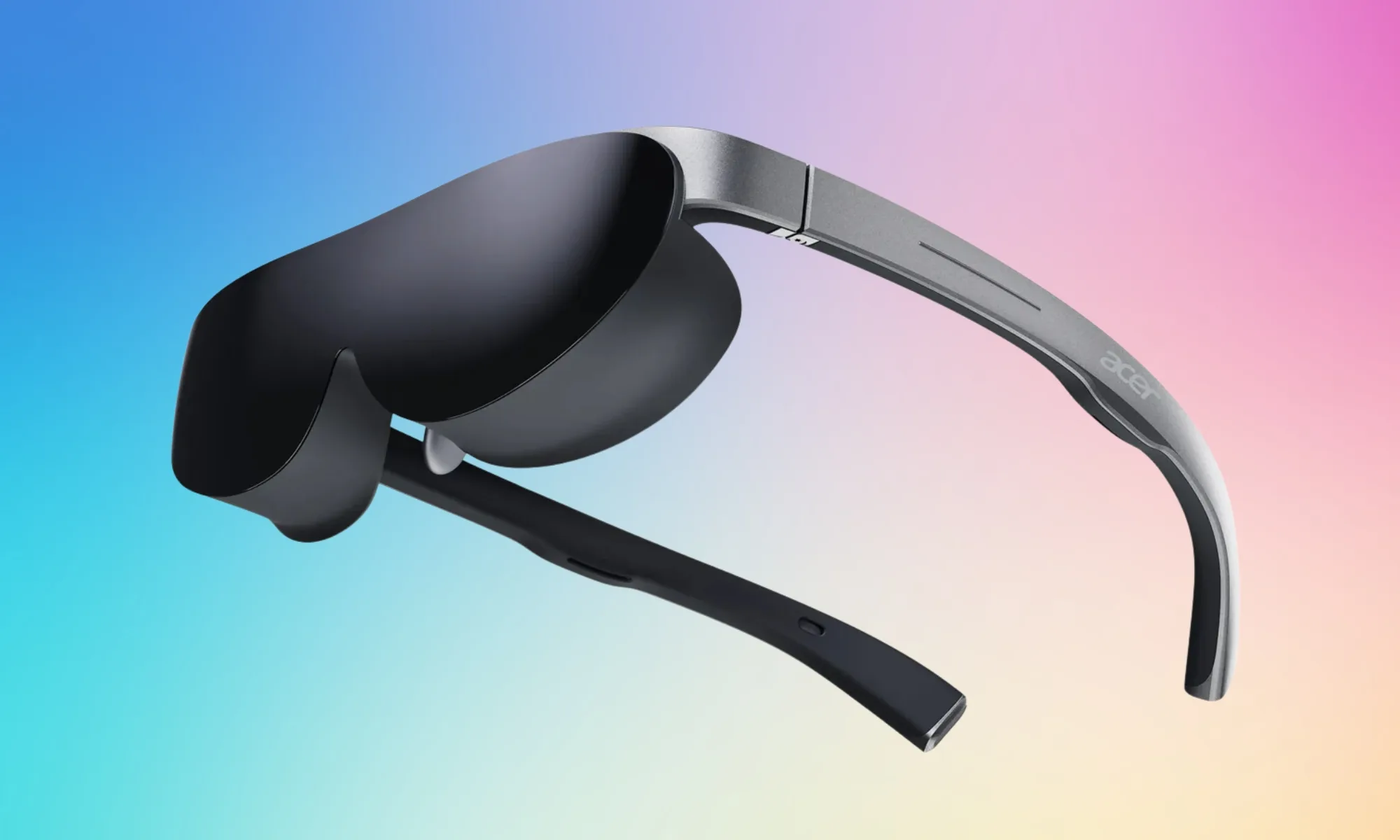
Out of the two smart glasses, the AR Vision GR0 is the more immersive one.
It connects to your phone, laptop, or tablet via a wired connection, and then projects dual micro OLED displays (one per eye) at 1920 x 1080 resolution in 2D or 3840 x 1080 in 3D, simulating a 172-inch screen viewed from roughly 20 feet away.
At just 69 grams, it is quite light for a wired AR device. You can also get it with the optional detachable light shield and myopia magnetic lens support, which make it more practical than most glasses in this category.
Advertisement
The device is compatible with Android, iOS, and Windows and doesn’t come with a platform lock-in. You can purchase the AR Vision GR0 in North America at $499.99.
Acer
The company also has a Meta Ray-Ban competitor
The Acer GI0 AI Glasses are slightly different. They’re closer to Meta’s Ray-Ban smart glasses than to an AR headset.
They offer wireless connectivity, connect with your phone via Bluetooth and Wi-Fi, and feature Google Gemini as the AI assistant of choice.
Features include a 12MP camera for first-person photo and video capture, real-time AI translation, live captions, and voice recording, which, yet again, makes them similar to the Meta Ray-Ban smart glasses.
All the data is stored on the device’s 32GB onboard storage. These glasses are compatible with Android and iOS via the Acer AspireSync companion app. At 46 grams for the frames alone, these are light enough for daily usage. You can get the smart glasses for $299.99 in North America.
Spotted by hardware leaker momomo_us on Amazon UK, both drives use the familiar 2.5-inch, 7mm-thick format, making them suitable for a wider range of PCs and laptops. The Sandisk 320 is the mainstream model, with capacities from 250GB to 2TB and sequential speeds of up to 545 MB/s read and… Read Entire Article Source link
We spend hours testing every product or service we review, so you can be sure you’re buying the best. Find out more about how we test.
Logitech G Pro X2 Superstrike: Two-minute review
(Image credit: Future)
I should probably preface this review by saying that I’ve long been a fan of Logitech‘s mice, having used a G502 Lightspeed Wireless as my daily driver for more than five years. In fact, I love it so much that when mine finally gave up the ghost back in 2024, I literally just bought another identical model.
If you’re familiar with my work, you might suspect a slight degree of bias in this review – and I’m sure that the coveted five-star rating above won’t assuage those suspicions.
Advertisement
But honestly? I wasn’t expecting much from the Logitech G Pro X2 Superstrike. The design is pretty simple, just a near-symmetrical chassis with two thumb buttons and a basic scroll wheel, plus a mildly futuristic aesthetic that you’ll either find appealing or obnoxious. I’ve seen a hundred mice like this before, I thought upon unboxing it for the first time.
Latest Videos From
That was before I knew about HITS. The ‘haptic inductive trigger system’ is the main selling point of the Pro X2 Superstrike, and it’s really something special: user-tunable actuation for the two main mouse buttons, with rapid trigger reset points to minimize latency. In other words, you can personally tweak the tactility of these clickers to exactly how you want them to feel, and it’s frankly awesome. It’s reminiscent of the satisfying feedback of hall effect buttons, and the mechanics behind it are similar as well, but I’ll get into that later on in this review.
HITS aside (but really, these buttons absolutely rock), the Logitech G Pro X2 Superstrike is just a staggeringly competent piece of hardware design. The rounded, symmetrical shape is very comfortable in the hand, and the total package weight of just 61g combined with smooth-gliding UHMWPE feet makes it feel great to use even on lower sensitivities. But with a 44,000 DPI sensor and 8K polling rate mode, it’s well-equipped for fans of twitchy online shooters.
I’m just gonna say it: this is straight up one of the best gaming mice money can buy right now. Speaking of money…
Advertisement
Logitech G Pro X2 Superstrike: Price & availability
How much does it cost? $179.99 / £159.99 / AU$299.95
When is it available? Available now
Where can you get it? Available globally
Yeah, this hurts a little. Clocking in at $179.99 / £159.99 / AU$299.95, there’s no avoiding the fact that a lot of PC gamers will be priced out of enjoying the perfect clicks of the Logitech G Pro X2 Superstrike.
Sign up for breaking news, reviews, opinion, top tech deals, and more.
It’s similarly priced to the Razer Deathadder V4 Pro, which we featured in our list of the best mice, and is a comparable premium esports-focused mouse with a simple, lightweight design – though it uses optical switches instead, which are durable and responsive but a lot noisier.
However – and it’s not often that I say this – I do actually think this is a product that manages to fully justify its price tag. The Superstrike is something entirely new, but even aside from that, it’s simply an excellent product in almost every way.
Advertisement
Logitech G Pro X2 Superstrike: Design
Simple but comfortable design
Robust build quality
No left-handed version
Image 1 of 4
(Image credit: Future)
(Image credit: Future)
(Image credit: Future)
(Image credit: Future)
I suspect that the ultra-modern design of the Logitech G Pro X2 Superstrike will be a turn-off for some potential buyers, but I like it. No rainbow RGB here, just a lone LED indicating your DPI preset. Stamping the product name all over the device makes it feel like something out of a utilitarian corporate dystopia – a vibe I’m fine with for my hardware aesthetic, though I’d rather steer clear from a societal standpoint.
Aesthetics aside, the chassis design isn’t anything particularly earth-shattering, but you don’t mess with a proven winner. The shape is essentially the same as Logitech G’s previous Pro X Superlight 2, a symmetrical design with a gentle curve across it that fits comfortably in the palm. I’ve got pretty big hands, so I asked my (smaller-handed) partner to give it a try, and he reported that it felt very comfortable to use as well. I might say that the shape is somewhat better suited to claw- and fingertip-style grips, but as a palm-grip user, I found it comfortable even during extended gaming sessions.
(Image credit: Future)
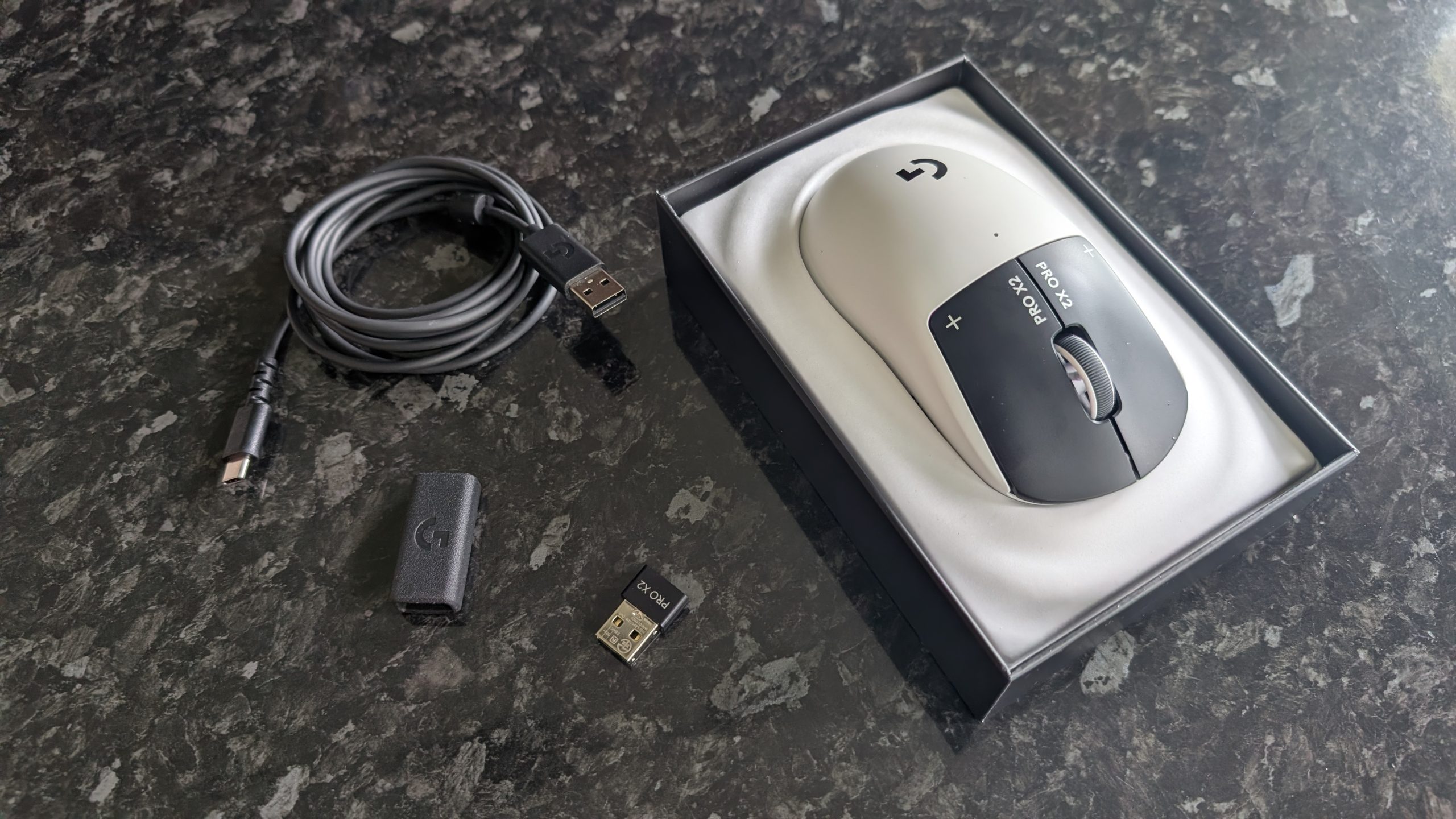
Despite weighing barely more than 60 grams, the Pro X2 Superstrike doesn’t feel flimsy in the slightest. The whole thing feels well-constructed, with a physical power switch and magnetic cover on the underside that conceals a slot to store the USB dongle. The feet are UHMWPE, tough and low-friction, and a small cutout at the front of the mouse houses the USB-C port for charging or wired use.
The main buttons have a weighty, tactile feel to them, while the scroll wheel offers firm rotation and a quiet but robust click. The side buttons are a bit softer, but still have a decent level of physical feedback and are well-spaced – I often like to map actions to these thumb buttons in shooters, and I didn’t experience any misclicks. The mouse is very slightly front-heavy, presumably due to the HITS switch assembly underneath the two main buttons, and while I didn’t have any issues with this, users who regularly lift their mouse clear of the mat may find that it requires a bit of getting used to.
Advertisement
The sensor is the Logitech G HERO 2 sensor, found in a wide range of the brand’s premium gaming mice. It supports up to 44,000 DPI with up to 88G acceleration registration, and I can attest from using other mice with the same sensor that it’s very reliable. For those seeking the absolute best low-latency performance, the box includes an adapter for you to connect the dongle to the power cable and place it directly on your desk, but it worked fine just plugged into the back of my PC, too.
The matte plastic shell does a good job of repelling fingerprint smudges (even from my sweaty hands during a heatwave that hit the UK while I was reviewing the Pro X2 Superstrike), and the casing is generally sturdy. It feels like a product that was built to last. Honestly, my only criticism here is the lack of a left-handed model; I’m a southpaw myself, and while I’ve adapted to using a mouse with my right hand, the same can’t be said of every left-hander out there.
Logitech G Pro X2 Superstrike: Performance
HITS switches are truly phenomenal
Fast and smooth movement is great for shooters
Logitech G Hub software works well
(Image credit: Future)
Alright, let me talk about these switches properly for a moment. The way HITS works is essentially the same principle as hall effect keyboard switches, using metal plates and copper coils carrying an electromagnetic current with an analog sensor that precisely measures the click input.
Advertisement
Now, this means that you get incredibly fast input response, on par with the optical switches that are becoming more popular in gaming mice, but the real takeaway here is the adjustable actuation. Because you’re not pressing a physical switch but rather moving a bit of metal up and down, you can use Logitech’s G Hub software to manually adjust the actuation point. If you want hair-trigger actuation, it’s yours. Prefer only firm, deep clicks to register? It can do that too, and everything in between.
The HITS design also allows you to adjust the trigger reset points (put simply, how soon the button can register another input when you start to lift your finger after clicking), and with no physical switch involved, the Pro X2 Superstrike allows for ultra-rapid-fire inputs. If you’re using a semi-automatic gun, the only limit on fire rate is whatever the game itself imposes.
(Image credit: Future)
Without an actual switch to click underneath these buttons, there’s no tactile feedback. In fact, when I first received the Pro X2 Superstrike and clicked the buttons before turning it on, I was immediately worried that it would feel horrible to use. That’s where the ‘haptic’ part of ‘haptic inductive trigger system’ comes in: when you click, the button releases a tiny vibration that mimics the click input of a traditional mouse. It sounds silly, but it genuinely works – and like the actuation and trigger resets, you can adjust this too, or even turn it off if you’re so inclined. But I wouldn’t – it’s really quite good once you get used to it.
The best part? They’re ridiculously quiet. If you’re noise-sensitive or you’re a late-night gamer like me, a near-silent mouse is a genuine boon. In fact, Logitech, if you’re reading this: please make a G502 with HITS (and then send it directly to my home address). I adore the Superstrike, but I do miss my thumb rest for everyday work.
Advertisement
(Image credit: Future)
Alright, enough about the HITS. Overall, the Logitech G Pro X2 Superstrike feels excellent for gaming, gliding smoothly across my mouse mat and delivering precise, latency-free inputs thanks to the Logitech Lightspeed dongle.
The G Hub software gives you plenty of sliders to slide, letting you adjust the usual settings like sensitivity and polling rate, as well as create profiles for individual games depending on your preferences. The 8K polling mode is something of a gimmick that likely won’t make much of a difference to all but the sweatiest esports lovers, but it’s there if you want it (though it’s oddly not available in wired mode; you have to use the included dongle).
I stuck with the defaults for most of the games I tested, but I did make custom profiles for Valorant and Marathon to make the most of the super-reactive HERO 2 sensor. You can also map button input combos as macros, which was particularly useful for adjusting the DPI manually, as there’s no dedicated DPI button here.
(Image credit: Future)
Did it make me better at shooting? No, my aim is still aggressively mid, but I certainly felt better playing with the Pro X2 Superstrike. After tweaking the HITS actuation to accept feather-touch inputs with an equally low reset point and strong haptic feedback, plinking hostile players at range with a precision rifle in Marathon felt gratifying.
Advertisement
The battery life is also solid, with Logitech claiming 90 hours of use on a single charge. I found this held up; I charged the mouse to full after unboxing it, and it was still kicking after a week of work and gaming.
Should you buy the Logitech G Pro X2 Superstrike?
Swipe to scroll horizontally
Logitech G Pro X2 Superstrike: Scorecard
Value
The price is high, but you get one seriously premium-feeling mouse for your money.
Advertisement
4/5
Design
The Logitech G Pro X2 Superstrike is comfortable, durable, and wisely keeps the design minimalist to focus purely on performance and tactile experience.
5/5
Advertisement
Performance
The sensor performs well and the battery life is good, but the HITS switches are the star of the show; a revelation for gaming mice that I can’t wait to see appear in more mice from Logitech.
5/5
Average rating
Advertisement
Logitech has knocked it out of the park here. The Pro X2 Superstrike officially sets a new standard for mice, and deserves the highest praise.
4.84/5
Buy the Logitech G Pro X2 Superstrike if…
Advertisement
Don’t buy it if…
Logitech G Pro X2 Superstrike: Also consider
How I tested the Logitech G Pro X2 Superstrike
I traded out my usual Logitech G502 Lightspeed Wireless for the Pro X2 Superstrike for a total of eight days while putting together this review, and guess what… I’m still using it. Not for everyday work (I value a thumb rest too much for that), but it’s currently perched on the corner of my desk for whenever I load up Marathon or Warframe.
During my eight-day testing period, I used the Superstrike for both my regular day-to-day work for TechRadar (which, in mouse-specific terms, mostly involves a lot of clicking on links and highlighting text) and for everything I use my PC for during my off hours. This is mostly gaming, with a bit of mucking about in Discord and Scrivener for personal projects. Aside from the games I’ve already mentioned in this review, I also tested the Pro X2 Superstrike in Overwatch, Apex Legends, and Tiny Tina’s Wonderlands (yes, I know I’m late to that particular party – I’ll get around to Borderlands 4 eventually).
















































You must be logged in to post a comment Login