Welcome back to TechCrunch Mobility — your central hub for news and insights on the future of transportation. To get this in your inbox, sign up here for free — just click TechCrunch Mobility!
We are in the midst of one of my four favorite times of year — earnings season. And it’s not just that I like numbers. These required filings cut through a lot of the marketing noise presented by companies the rest of the year. They also help me assess the short- and long-term stakes the companies face.
Rivian’s fourth-quarter and full-year earnings did precisely that. My takeaway: Software, and specifically its technology joint venture with Volkswagen Group, was the company’s savior in 2025. It will also buoy the company into 2026 (another $2 billion is expected from VW Group) as Rivian launches its most important product to date: the lower-cost R2 SUV.
The company’s earnings also provided a progress report on its bid to lower the cost of goods sold per unit. The TL;DR is that the cogs per unit for its current portfolio is still high but dropping, meaning it’s losing less on each vehicle it sells. According to Rivian, the company’s automotive cogs per unit delivered was $100,900 in 2025, down from $110,400 in 2024.
Advertisement
The upcoming R2, which is supposed to be considerably cheaper (both in production cost and price tag) than its flagship R1T truck and R1S SUV, will be the next big test. We’ll get some insight into the results of that later this year.
The R2 is expected to go into production in the first half of the year (we’re hearing June), and based on its guidance for 2026, Rivian is confident it has the demand and the ability to ramp production. The company expects to deliver between 62,000 and 67,000 vehicles in 2026 — which could provide up to a 59% bump from last year. Rivian delivered 42,247 vehicles in 2025, which includes its two R1 consumer vehicles and the electric delivery van (EDV).
The market loved that guidance, btw. Rivian stock shot up 27% in the day after it reported earnings.
Techcrunch event
Advertisement
Boston, MA | June 23, 2026
A little bird
Image Credits:Bryce Durbin
Over the past 18 months, I’ve noticed a divergence in how Uber and Lyft are approaching AVs. Uber is locking up AV partnerships with every player it can. Lyft is trailing behind. Turns out, I am not alone in this observation.
Insiders have shared their puzzlement about why Lyft hasn’t been more aggressive on this front. They noted that Lyft is sitting on about $1.8 billion in cash, cash equivalents, and restricted cash, and recently announced a new $1 billion share repurchase program that represents about 15% of its market cap, per CNBC. That has some wondering why Lyft did not invest in parts of the AV value chain like Uber is doing versus buying shares back.
Advertisement
Meanwhile, these little birds also pointed to a few top executives who have departed over the past year. Aurélien Nolf left his position as VP of financial planning and analysis and investor relations to become CFO of Navan. Audrey Liu, who was an executive VP and head of rider and community safety, is now at Adobe. Ameena Gill, who was VP of safety and customer care just took a job at rival Uber.
Close followers of the mobility-crazed years, between 2015 and 2019, might recall how many lidar companies popped up during that time. Many of the dominant and buzziest ones have since shuttered, while some of the smallest players have hung on and expanded.
Take Ouster, for instance. I remember way back when Ouster had this tiny little booth in the jam-packed startups area (Eureka Park) at CES. Today, the company is much bigger — thanks to scale, its 2022 merger with rival Velodyne, and its acquisition of Sense Photonics in 2021. And it doesn’t appear to be finished.
The company most recently acquiredStereolabs, a company that makes vision-based perception systems for robotics and industrial applications, for a combination of $35 million and 1.8 million shares.
Advertisement
As TechCrunch senior reporter Sean O’Kane notes in his article, the deal is the latest in a march toward consolidation among perception sensor suppliers. (Just last month, MicroVision bought the lidar assets of the buzzy-but-now-bankrupt Luminar for $33 million.)
So why all the activity? It’s complicated, as they say. From my POV, the frenzy around “physical AI” has reignited interest and investment in sensor technologies, particularly cameras.
Other deals that got my attention …
Ever, the EV-only marketplace, raised $31 million in a Series A funding round led by Eclipse. Other backers include Ibex Investors, Lifeline Ventures, and JIMCO — the investment arm of the Saudi Arabian Jameel family (an early investor in Rivian).
Advertisement
Natilus, the San Diego-based startup developing blended-wing aircraft, raised $28 million in a Series A funding round led by Draper Associates. Other investors include Type One Ventures, The Veteran Fund, and Flexport, as well as new backers New Vista Capital, Soma Capital, Liquid 2 VC, VU Venture Partners, and Wave FX.
Notable reads and other tidbits
Image Credits:Bryce Durbin
Aurora shared in its Q4 and full-year earnings report that its self-driving trucks can now travel nonstop on a 1,000-mile route between Fort Worth and Phoenix — exceeding what a human driver can legally accomplish. The company shared a number of other tidbits, and financials, which you can read about here.
The U.S. Securities and Exchange Commissionclosed its investigation into Fisker last year, TechCrunch was able to learn, thanks to a Freedom of Information Act request.
Lyft has launched teen accounts, a product that allows minors as young as 13 to hail a ride without an adult in 200 U.S. cities, including Atlanta, Boston, Chicago, and New York.
A fresh batch of videos gives us the best look at how Rivian has changed the rear door manual release on its upcoming R2 SUV. This seemingly minor design detail has life-or-death stakes and comes as the EV industry, and particularly Tesla, is getting pressure to change concealed, electronic door handles.
Advertisement
The Trump administration officially repealed the EPA’s 2009 “endangerment finding,” which found that greenhouse gases such as carbon dioxide and methane were a threat to human health and welfare. This change would only affect tailpipe emissions for cars and trucks — if the EPA makes it through the lengthy process of repealing the law, which will certainly include numerous lawsuits aimed at stopping it.
Uber has locked in a couple dozen AV partnerships, and we’re starting to see the results of those deals. China’s Baidu and Uber plan to launch robotaxis in Dubai in the next month, starting with select locations within the Jumeirah area. Meanwhile, Chinese robotaxi company WeRide and Uber announced a “major expansion of their strategic partnership” to deploy at least 1,200 robotaxis across the Middle East through 2027, according to the companies. As part of this, WeRide and Uber have launched a robotaxi service in downtown Abu Dhabi.
Waymo pulled the human safety driver from its autonomous test vehicles in Nashville as the Alphabet-owned company moves closer to launching a robotaxi service in the city. Meanwhile, this tech-forward company is wrestling with the analog problem of ensuring the doors of its robotaxis are properly shut. Its solution? Pay DoorDash gig workers to shut Waymo robotaxi doors. Waymo tells us this is a pilot program in Atlanta to enhance its AV fleet efficiency.
One final Waymo item: The company is starting to roll out its sixth-generation “Waymo Driver,” which is integrated into the Zeekr RT (rebranded Ojai) and will eventually be in the Hyundai Ioniq 5. Waymo has started “fully autonomous operations” in the Ojai vehicle in San Francisco and Los Angeles and is giving access to employees. The public will have to wait for a bit.
Advertisement
One more thing …
Rivian has pitched its upcoming R2 SUV as a more affordable model. What does “more affordable” mean? The company has thrown around $45,000 and $50,000 as a base price. The company’s launch version of the R2, which will be a dual-mode and all-wheel-drive premium trim, will undoubtedly be more expensive. In our newsletter this week, we asked readers, “What’s your guess on the cost of the launch edition?”
A publicly accessible Amazon-hosted storage server allowed anyone with a web browser to access potentially hundreds of thousands of people’s personal data without needing a password. This included driver’s licenses, passports, and other personal information collected by the Duc App, a money-transfer service owned by Toronto-based Duales.
The Canadian fintech company said it resolved the data exposure on Tuesday after TechCrunch alerted its chief executive that one of the company’s cloud storage servers was publicly listing its contents, without a password.
The data was also stored unencrypted, meaning anyone with a link to the data was able to view it in full.
Anurag Sen, a security researcher at CyPeace who discovered the security lapse earlier in the week, contacted TechCrunch in an effort to notify the data’s owner. Sen said that anyone could view and download the data using their browser just by knowing the easy-to-guess web address of the storage server.
Advertisement
According to Sen, the Amazon-hosted storage server listed over 360,000 files containing government-issued documents and other information used by customers to verify their identity through “know your customer” checks. These files included user-uploaded selfies to prove their real-world likeness.
TechCrunch could not ascertain the precise number of exposed driver’s licenses and passports; however, several folders in the exposed bucket each contained tens of thousands of user-uploaded files, a sampling of which listed driver’s licenses, passports, and selfies.
Duales touts its app as a way for users to send money to other users, including overseas in Cuba and elsewhere. Its Android app listing on the Google Play app store shows more than 100,000 user downloads to date.
The files, which dated back to September 2020 and were being uploaded daily, also contained spreadsheets listing customer names, home addresses, and the dates, times, and details of their transactions.
Advertisement
When reached by email, Duales chief executive Henry Martinez González told TechCrunch that the data was stored on a “staging site,” referring to a website used primarily for testing, but did not explain why customers’ personal information was publicly accessible in the same database.
“All protections are in place,” Martinez said. “We are notifying the appropriate parties. We have not contracted any services from you.”
After TechCrunch emailed the company, the files on the storage server were made inaccessible, though a list of the server’s contents is still visible.
Martinez would not say if the company had the technical means, such as logs, to determine who or how many people accessed the data.
Advertisement
Duc App’s website appeared briefly down on Thursday, and displayed a “bad gateway” error.
It’s not clear how or for what reason Duales left its Amazon-hosted storage server publicly open to the internet. In recent years, Amazon has added security checks to prevent users from inadvertently exposing their data to the internet after a series of high-profileincidents where severalcorporategiants, including a U.S. spy agency, published sensitive data to the web due to misconfigurations.
When reached by TechCrunch as part of our outreach to contact the app’s owner, Canada’s privacy regulator said it was seeking more information from the company.
“The Office of the Privacy Commissioner of Canada has reached out to the company to obtain more information and determine next steps,” a spokesperson for the regulator told TechCrunch by email, declining to comment further.
Advertisement
Duc App is the latest app in a list of recent security lapses involving the exposure of other people’s sensitive identity data. This data exposure comes as apps and websites are increasingly requiring their users to upload their government-issued documents to verify who they say they are but without taking enough steps to secure the data that they collect.
‘This rootkit is highly persistent; a standard factory reset will not remove it’: “NoVoice” Android malware on Google Play infects 50 apps across 2.3 million devices, here’s what we know
McAfee uncovers NoVoice malware hidden in 50+ Google Play apps with 2.3 million downloads
Malware exploits old Android kernel and GPU flaws, persists even after factory reset
Injects code into apps like WhatsApp to hijack sessions; Google has removed apps but infected devices remain compromised
Millions of Android devices were infected with malware spying on their WhatsApp chats and that even a factory reset wouldn’t wipe, experts have warned.
Researchers at McAfee have published an in-depth report on NoVoice, a new Android malware variant found in more than 50 apps hosted on the Google Play store, downloaded more than 2.3 million times combined.
Usually, Google is quite good at preventing criminals from smuggling malware onto the platform, but every now and then, something makes it through.
Article continues below
Advertisement
Cloning WhatsApp sessions
This time around, it was a group of around 50 apps that worked as intended and did not require excessive permissions, such as Accessibility, which are the usual red flags. These apps were built in different categories, including utility apps, image galleries, and games.
Instead of tricking users into sharing broad permissions, the apps tried to leverage almost two dozen different vulnerabilities, including use-after-free kernel bugs and Mali GPU driver flaws, all of which were patched between 2016 and 2021.
Advertisement
That means that the attackers were going for older devices that their owners don’t update or otherwise maintain.
The malware would first collect device information from infected Androids, such as hardware details, kernel version, and Android version. After that, it would receive further instructions, including stage-two exploit strategy.
Sign up to the TechRadar Pro newsletter to get all the top news, opinion, features and guidance your business needs to succeed!
Two things stand out: the way it establishes persistence, and what it does afterwards. Among other things, the malware installs recovery scripts that replace the system crash handler and store fallback payloads on the system partition. That way, when a user does a factory reset, the malware still persists.
Advertisement
After establishing persistence, it injects malicious code into every app launched on the device. McAfee singled out WhatsApp, saying that the malware pulls sensitive data needed to replicate the victim’s session, thus allowing the attackers to clone the victim’s WhatsApp account on their own device.
Google says it has now removed all of the malicious apps, but until users do the same on their devices, they will remain compromised.
Nvidia has begun rolling out a beta feature that automatically compiles game shaders while a PC is idle. It won’t eliminate shader compilation the first time a game runs, but Ars Technica reports it could help reduce those repeated wait times. From the report: Nvidia’s new Auto Shader Compilation system promises to “reduc[e] the frequency of game runtime compilation after driver updates” for users running Nvidia’s GeForce Game Ready Driver 595.97 WHQL or later. When the feature is active and your machine is idle, the app will automatically start rebuilding DirectX drivers for your games so they’re all set to roll the next time they launch.
While the feature defaults to being turned off when the Nvidia App is first downloaded, users can activate it by going to the Graphics Tab > Global Settings > Shader Cache. There, they can set aside disk space for precompiled shaders and decide how many system resources the compilation process should use. App users can also manually force shader recompilation through the app rather than waiting for the machine to go idle.
Unfortunately, Nvidia warns that users will still have to generate shaders in-game after downloading a title for the first time. The Auto Shader Compiler system only generates the new shaders needed after subsequent driver updates following that first run of a new title.
Agustin Huerta discusses Anthropic’s new Code Review feature and the importance of AI governance.
As more and more organisations and professionals utilise technologies that make coding simpler, they potentially also introduce additional dangers, as the speed at which code can now be generated can lead to poor security practices and risky behaviours.
In March, US AI and research company Anthropic launched Code Review, a new feature designed to catch and eliminate bugs before they ever make it into a software’s codebase. A move Globant’s senior vice-president of digital innovation, Agustin Huerta explained is reflective of a “shift in software development workflows as AI tools increasingly begin to own more of the software development lifecycle”.
He told SiliconRepublic.com, “It uses multiple specialised agents to review code for risks and bugs, cross-check amongst one another and prioritise the most relevant issues for reviewers.”
Advertisement
But he noted, while this does help teams to better manage higher volumes of code, it doesn’t replace human reviewers and raises a few concerns of its own when it comes to long-term security and best practice.
Critical coding concerns?
“The concern isn’t that code can write and review itself, but that organisations may assume less oversight is needed,” said Huerta, who elaborated, saying that in reality the same principles that dictate and govern traditional software development remain equally as important when AI agents are involved, if not more so.
“The processes and workflow structures that once governed human coders should be adapted to govern agents, including workflow integration, human review, data readiness and observability. Teams need clear visibility into how code is generated, reviewed and promoted across environments, along with defined checkpoints to validate outputs.”
He said, though agents can carry out a number of tasks, for example assist with, recommend and even execute prompts within a set of defined guidelines, code quality and risk management should remain the responsibility of people who themselves follow a clear process.
Advertisement
He finds that nowadays, too many organisations are electing to delegate tasks, such as debugging and code writing to AI agents, rather than a real employee, amplifying the potential for risk, though it isn’t only AI hallucinations and errors sneaking past the automated workforce.
“A more significant concern is an overreliance and unchecked trust in agent autonomy. Overdependence on agent-driven work without the right checks and balances can create blind spots and amplify small issues into larger problems, such as system outages or security risks.
“For example, version control systems and code repositories are a way to maintain observability over human-written code, supported by structured review processes. When these workflows become automated without incorporating an additional layer of human oversight, organisations risk compounding mistakes and introducing larger structural issues that are harder to detect or resolve.”
He finds, while human involvement is irreplaceable, equally as important, across the development lifecycle, is organisational transparency. “Organisations need visibility into how agents are accessing data, how they’re reasoning and why tasks are deemed complete. This level of observability is key in managing human-agent workflows, identifying areas for growth and maintaining accountability.”
Advertisement
Moreover, when correctly implemented and supervised there are clear and significant benefits.
Enterprising AI
AI agents undoubtedly bring a new element to the workplace, for better or for worse, but there are tangible benefits, such as the ability to boost productivity, minimise laborious, data complex tasks, support developers in the coding process and identify the issues or patterns that are often overlooked by people.
Huerta said, “By taking on repetitive work that was previously handled by people, agents allow teams to focus on higher-value tasks and activities. These benefits are best realised when AI is used as an enhancement, not a replacement, for human judgment.
“The most successful models are a hybrid of human-agent teams, where the speed and scale of AI are combined with human oversight to refine and improve workflows, instead of just automating them.”
Advertisement
A key challenge going forward, he explained, will be in establishing balance between the adoption and implementation of AI agents and blending it seamlessly with responsible use. He said, as agents become more advanced and more capable, organisations risk losing sight of basic best practices in crucial areas such as those that govern software development.
“Leaders must continue to prioritise observability, governance and human-agent collaboration despite pressures to prove ROI from AI systems.”
Don’t miss out on the knowledge you need to succeed. Sign up for the Daily Brief, Silicon Republic’s digest of need-to-know sci-tech news.
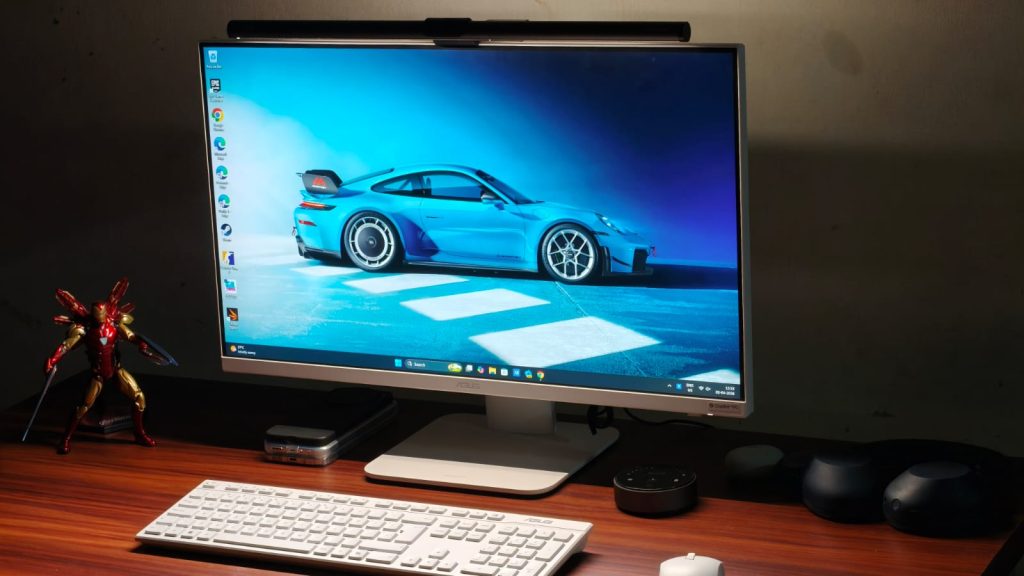
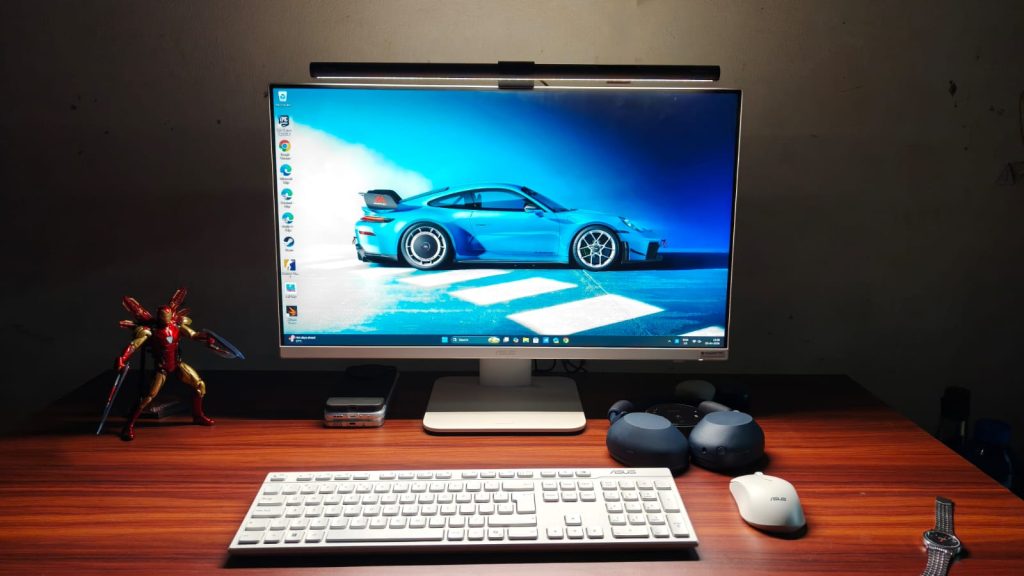
AiOs, or all-in-one computers, have been around for quite some time. And their promise is simple. They give you the big-screen experience of using a desktop, without the hassle of finding the right components and building a PC yourself. Despite me being a tech reviewer, AiOs have had me intrigued for a long time, since, spoiler alert, I cannot build a PC myself. It’s just intimidating, and the risk of ending up with something that doesn’t really work well for my workflow isn’t one I want to take. Asus is one of the few brands active in the AiO market, and their recently introduced VM670KA is the best of the bunch. That’s because it packs Ryzen AI 7 350, 16GB of RAM, and a 27-inch Full HD touchscreen display.
All this at a price of ₹1,12,990 sounds like a pretty sweet deal, especially considering the current world situation, which is plagued by sky-high RAM prices (blame your AI companions, please). But is it though? I called Asus and arranged to have the VM670KA AiO in for review. To do it justice, I swapped my MacBook and used the AiO as my primary WFH machine for over two weeks. Here’s how it stacked up.
Asus VM670KA Review
Hisan Kidwai
Advertisement
Summary
With the Asus VM670KA, you get a big-screen desktop to work or study on without fiddling with a separate PC. The display is plenty decent, albeit a little less pixel-dense than I’d like. The speakers are super, and the performance can handle everyone’s workdays and even some light gaming/video editing. Not to mention the beautiful white design that makes the AiO look sweet.
Advertisement
Design & Hardware
My job as a tech reviewer is to work from home, meaning all I do every day is stare at my MacBook’s screen. It never really occurred to me that a 13-inch screen might be too small. However, the minute I configured the VM670, it struck me how much I was missing out. Everything was spaced out to perfection, which put less strain on my eyes. Coming back to the design, I think Asus has done an excellent job. It’s a sober yet sophisticated AiO that looks premium without being too loud. I do love the white color. Asus has shaved off 25% of the thickness compared to the VM670’s predecessor, and the bottom bezel is now narrower. All this translates to a sleeker setup that can rival any modern monitor.
The AiO comes with a stand that attaches easily with a single screw. The stand is made from metal, and it’s pretty sturdy since I’ve accidentally bumped into the table a few times. While there are no height-adjusting settings, you can tilt the screen up or down, which came in handy when I wanted to work standing up. The only gripe I have with the design is the retractable camera. Sure, it’s a great tool to protect one’s privacy by hiding away the webcam, but it also takes away the ability to mount any monitor lightbar. I’m a fan of those, so it was an annoyance. That said, the webcam quality was solid in artificial lighting.
Unlike modern laptops, the VM670 is full of useful ports. The backside houses three USB 3.2 Gen 1 Type A ports, a USB 3.2 Gen 1 Type-C port, a LAN, a DC-in (for power), an HDMI-in for making the AiO a secondary display for your laptop, and an HDMI-out to connect to external monitors. There’s more, as underneath the belly, there’s one more USB 2.0 port for connecting the keyboard and mouse, an HDMI mode switcher, a Kensington Lock, and a headphone/microphone jack.
Keyboard & Mouse
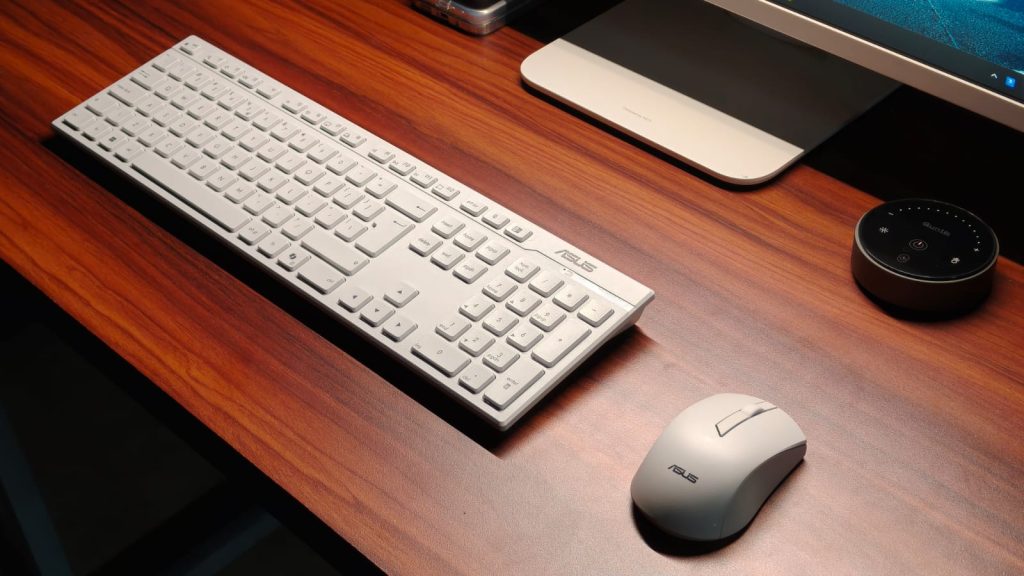
To help you get running quickly, Asus bundles a mouse and keyboard with the VM670, and both connect via a 2.5GHz dongle stored inside the mouse. While I wouldn’t describe the keyboard as groundbreaking, it’s not bad either. There’s ample travel, and there’s some feedback when they are pressed. It’s just that the keys aren’t as sharp as the ones on my MacBook. You can sometimes feel that mushiness, but it’s not a big con, and I did get used to the keyboard quickly, without losing much of my typing speed.
The mouse, on the other hand, is plenty good. I had no problem with its tracking, even when playing some games, for that matter. The grips felt comfortable in my hand, and my wrists, which are super prone to fatigue, did not ache after long periods of use. Beyond that, the clicks were accurate, and the latency wasn’t noticeable to my eyes.
Display & Speakers
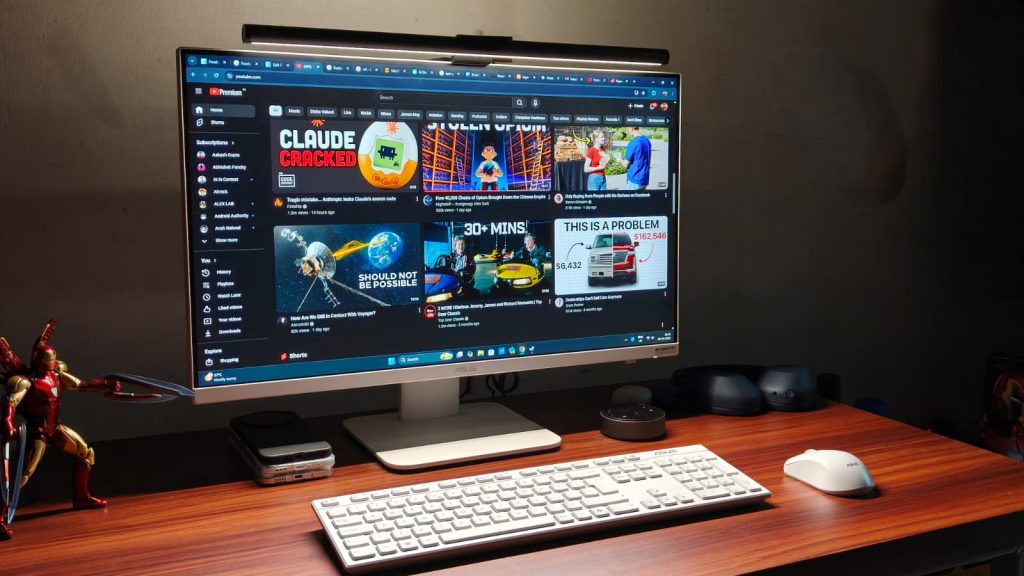
The Asus VM670KA features a 27-inch FHD IPS display with a 93% screen-to-body ratio and a 75Hz refresh rate. When I first got the AiO, I was worried that the 1080p resolution might not be enough for such a large display. Fortunately, I was proven wrong pretty quickly. From a normal viewing distance, I didn’t notice much pixelation when typing this review on the device. Still, I’d have loved to see a 1440p panel at this price. On the flip side, Asus has taken care of the color accuracy, with 100% coverage of the sRGB color space.
I recently caught up to the Breaking Bad hypetrain and decided to watch the season 3 finale on the VM670, and it was a very enjoyable experience. Colors looked super nice, the motion was smooth, and there wasn’t any glare from the light behind me since the display is matte-coated. The Dolby Atmos stereo speakers deserve the same praise as they can easily fill an entire room with powerful sound, without sounding harsh at higher volumes. The bass is decent, and the dialogue remains legible.
Advertisement
As mentioned earlier, the VM670KA has one more trick up its sleeve, and that’s a touchscreen. You might be wondering — what’s the point of a touchscreen on a desktop? The answer to that is children. An AiO makes perfect sense for parents to get for their children who might have online classes or need to work on a project. A touchscreen is a handy tool for that, and makes navigation much simpler.
Performance
Performance is what makes or breaks the experience with AiOs or any desktop, for that matter. If it can’t handle everyday work, then it’s of no use. At the beating heart of the Asus VM670KA sits the AMD Ryzen AI 7 350 processor, with 8 cores and 16 threads, rated for a maximum frequency of 5 GHz. Graphics is handled by the integrated Radeon 860M, and there’s 16GB of LPDDR5x RAM and 1TB M.2 NVMe PCIe 4.0 SSD.
All of this results in strong everyday performance. The VM670 doesn’t struggle with typical workloads at all. Run 30 Chrome tabs at once? Watch HDR videos on YouTube or quickly switch from a game to an eBook before your parents notice. Not a problem. Never once did I notice a stutter in these tasks, and if your work mainly involves the browser, as mine does, then the performance is more than good enough.
I’m no video editor, but as this is a review, I decided to try my hand at it. The experience? Not bad at all. For those who mainly edit reels in 1080p or even 4K, the VM670 packs a punch. The timeline played smoothly, and render times weren’t too high.
While benchmarks don’t tell the full story of performance, they do paint a picture of a device’s performance ceiling. The VM670 scored 2,833 in Geekbench’s single-core and 10,254 in the multi-core test. Then I moved away from stressing the CPU to stressing the GPU, where the Radeon 860M scored 22,042 in the Geekbench test. For context, this performance is similar to that of the Intel Core i7-13620H processor found in the Asus ExpertBook P1.
Advertisement
Can you game?
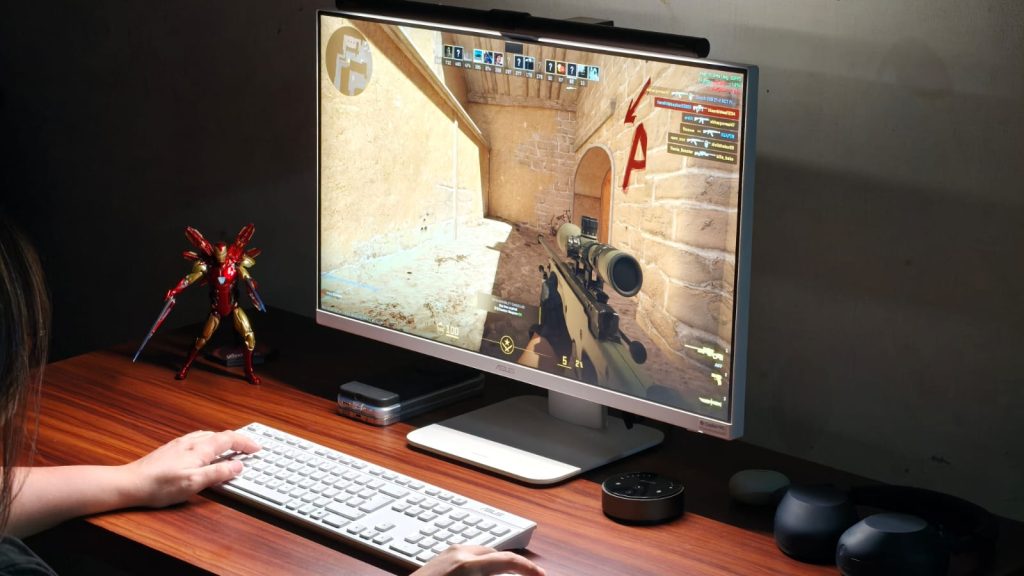
Given the decent performance and appeal towards children, gaming may be on your radar as well. And I will set the expectations straight. You won’t be able to play AAA titles like Cyberpunk 2077 without dropping the quality to PS3 levels on the Asus VM670KA. If that’s a priority for you, the Strix or ROG line would serve you better.
That said, if you play light titles like Counter-Strike 2, Valorant, Fall Guys, or even F1 2025, then the AiO could be handy. I played all four and got over 60 fps in both Counter-Strike 2 and Valorant at medium settings. Fall Guys hit 60 FPS pretty easily, too, and F1 clocked about 45 FPS in medium settings. GTA V also runs, but the frame rates are limited to about 35-40.
Verdict
At ₹1,12,990, the Asus VM670KA isn’t cheap. But what it promises isn’t something anyone else can do. For the money, you get a big-screen desktop to work or study on without fiddling with a separate PC. The display is plenty decent, albeit a little less pixel-dense than I’d like. The speakers are super, and the performance can handle everyone’s workdays and even some light gaming/video editing. Not to mention the beautiful white design that makes the VM670KA look sweet.
A new quantum algorithm ran a 15-step nonlinear fluid simulation around a solid obstacle on real quantum hardware, the most physically complex publicly documented demonstration of its kind. The technique reduces qubit requirements and circuit depth, bringing industrial CFD applications closer to feasibility.
Finnish simulation company Quanscient and quantum middleware developer Haiqu have demonstrated what they describe as the most physically complex quantum computational fluid dynamics simulation run to date on real hardware.
The two companies ran a 15-step nonlinear fluid simulation around a solid obstacle, fluid flowing around a shape, the kind of problem relevant to aircraft wing design or vehicle aerodynamics, on IBM’s Heron R3 quantum computer, using a new algorithm they developed together called the One-Step Simplified Lattice Boltzmann Method (OSSLBM).
Computational fluid dynamics, or CFD, is one of the most resource-intensive branches of engineering simulation. Modelling how fluids behave around complex shapes requires enormous classical computing power, and the demands grow non-linearly as simulations become more detailed.
Advertisement
Quantum computing has long been theorised as a potential path to simulations beyond classical limits, but turning that potential into practice has been constrained by the sheer number of qubits and the circuit depth, the length of the quantum computation, required to run even moderately complex scenarios without the calculation being overwhelmed by errors.
The OSSLBM algorithm addresses this directly. Built on the quantum Lattice Boltzmann Method (QLBM), an established approach to mapping classical fluid equations onto quantum computation, the new framework reduces the computational overhead of each step, allowing a longer multi-step simulation to stay within what current quantum hardware can reliably execute.
Haiqu’s middleware layer was central to this: it reduced circuit depth, developed new algorithmic subroutines, and applied targeted error-reduction techniques that allowed the system to complete a workflow that would otherwise have been out of reach for today’s devices.
The significance of the result lies in the obstacle. Previous quantum CFD demonstrations have largely focused on simpler linear scenarios, fluid behaviour without the complications of interacting with a solid boundary.
Advertisement
Modelling how a fluid moves around an object is a prerequisite for any industrially meaningful application. Professor Oleksandr Kyriienko, Chair in Quantum Technologies at the University of Sheffield, described the work as “an interesting and timely contribution to quantum CFD,” adding that more research of this kind is needed to reach industrially relevant quantum solutions.
Quanscient and Haiqu have been collaborating on quantum CFD since at least 2024, when they were finalists in the Airbus and BMW Quantum Mobility Challenge, and have previously demonstrated work on IonQ hardware via Amazon Braket. Industrial applications remain years away; the current work is a research milestone establishing that the approach is feasible on current hardware at this level of complexity.
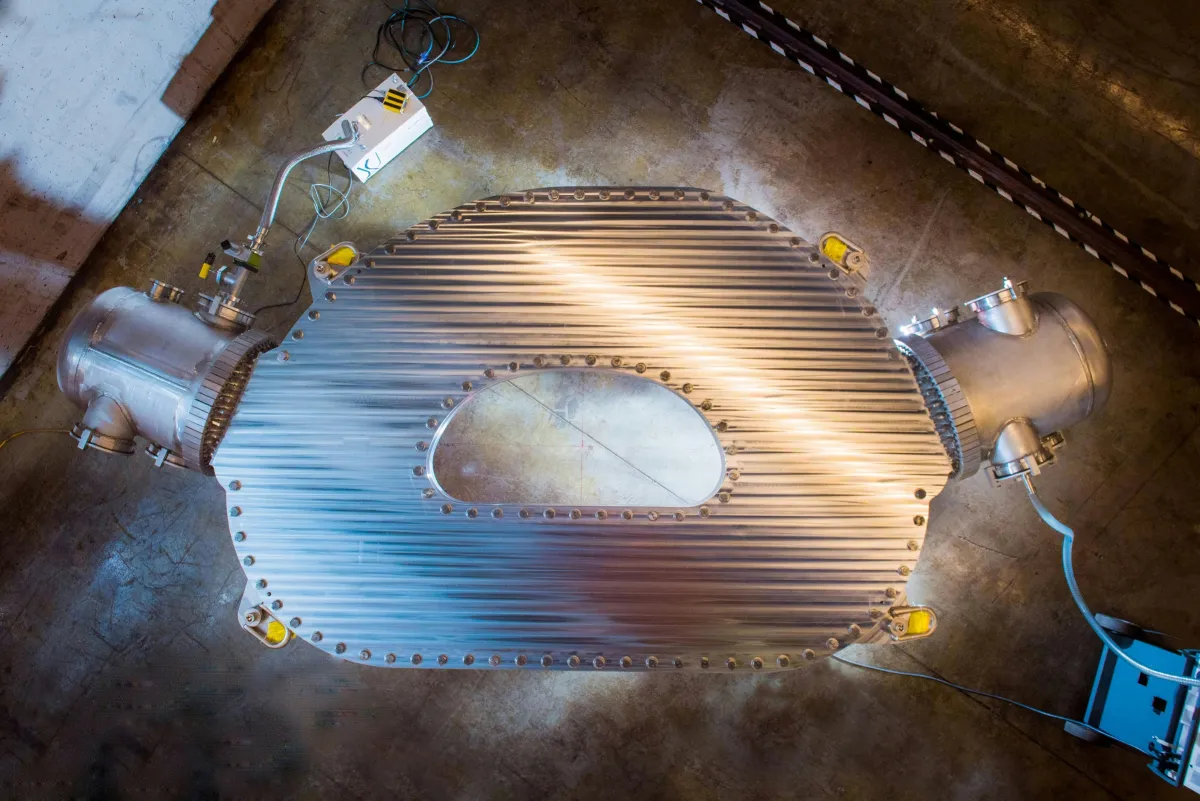
Commonwealth Fusion Systems said on Thursday it would sell high-temperature superconducting magnets to Realta Fusion, the second in a string of deals that suggests the company will lean heavily on its magnet technology in the coming years to bring in much-needed revenue.
“It’s the largest deal of this kind to date for CFS,” Rick Needham, the company’s COO, told reporters on a call.
Commonwealth Fusion Systems, or CFS, previously sold magnets to the WHAM experiment at the University of Wisconsin, which fusion startup Realta collaborates closely with. The physics behind WHAM underpins Realta’s approach to fusion power, which is known as a magnetic mirror reactor.
In a magnetic mirror, plasma is confined into a shape that resembles two 2-liter soda bottles connected at the base. On each end, powerful magnets punch the plasma and force it back toward the center. Weaker magnets encircle the middle of the bottle shape.
Advertisement
To make a more powerful reactor, Khosla-backed Realta would only need to expand the middle section, and because those magnets are less powerful, they’re cheaper. Per kilowatt-hour costs should fall as Realta’s reactors increase in size.
CFS is pursuing another form of magnetic confinement fusion called a tokamak. In a tokamak, D-shaped magnets cast powerful fields to keep plasma circulating in a doughnut-like shape inside. Over the years, the company has refined its magnets in pursuit of putting electrons on the grid from Arc, its future commercial-scale reactor that’s slated to be built in Virginia.
Both CFS’s and Realta’s existence stems from the magnets themselves. CFS was founded in 2018 after scientists at MIT realized that a new class of commercially available high-temperature superconductors could underpin a viable tokamak design. Realta was founded a few years later when physicists at the University of Wisconsin “saw that there was a new technology, a game changer that would enable us to go back to the [magnetic] mirror and avail of those engineering advantages that the concept has,” co-founder and CEO Kieran Furlong said.
Techcrunch event
Advertisement
San Francisco, CA | October 13-15, 2026
In addition to the Realta and WHAM deals, CFS has also licensed its high-temperature superconducting magnet technology to Type One Fusion, which is working on a third type of reactor design known as a stellarator. While the latter deal doesn’t include CFS building actual magnets for the company, it could lead to that one day, Christine Dunn, CFS’s head of external communications, told TechCrunch.
Advertisement
The deals will help CFS pay off its investment in magnet manufacturing. The startup spent seven years and hundreds of millions of dollars building a factory capable of producing high-temperature superconducting tape designed to fusion-power specifications. So far, that material has gone toward building Sparc, the company’s demonstration reactor, which won’t turn on until later this year. There will be a gap until work begins in earnest on its commercial-scale power plant Arc. These deals keep the factory running in between.
“With Spark now 70% complete, it was excellent timing to start supporting Realta with our magnet manufacturing,” Needham said.
Because Realta and Type One are pursuing different reactor designs, CFS apparently doesn’t view them as directly competitive at the moment. In the marketplace, Realta and CFS are even further apart, with the former focusing initially on industrial applications that need large amounts of heat.
To date, CFS has raised nearly $3 billion — a large chunk of all venture dollars raised by fusion startups. That’s put the company in an enviable position, giving it the means to build key facilities like its magnet factory before competitors can. The startup pitches these deals as a service to the broader fusion industry, making available technologies that would cost many millions to replicate. That’s certainly true, but it also gives it access to even more venture investment, even if it’s in a roundabout way.
United Airlines is updating its iOS and Android mobile apps with several new features, including estimated security wait times to give travelers a better idea of when they should arrive at the airport. The move comes as the ongoing partial government shutdown has left TSA checkpoints understaffed.
In the “Travel” section of the United mobile app, travelers can now view security wait times for the airline’s U.S. hub airports in Chicago, Denver, Houston, Los Angeles, New York/Newark, San Francisco, and Washington D.C. Users will see estimated wait times for specific lanes, including standard security and TSA PreCheck, throughout terminals serving United customers.
“We appreciate the work and professionalism of our TSA agents, and while most began receiving back pay earlier this week, the U.S. Department of Homeland Security shutdown continues and people want to stay informed about expected security wait times at our airports,” Jason Birnbaum, United’s chief information officer, said in a press release. “Our customers rely on our mobile app for all their travel needs, and this new feature lets them know what to expect and better plan their trip.”
The app is also rolling out updates designed for passengers with connecting flights. Travelers will now receive personalized, turn-by-turn directions to their next gate, complete with estimated walking times, real-time status updates, and tips for longer layovers. It will also provide a “heads up” if United can hold a plane for passengers with tight connections.
Advertisement
The app will offer automatic rebooking assistance as well. Instead of waiting in line to speak with an agent or manually searching for alternatives, United’s self-service tools will automatically present travelers with rebooking options, along with baggage tracking details and meal and hotel vouchers if they’re eligible for them, in cases where a flight is delayed or canceled.
The app has also integrated Apple’s “Share Item Location” feature for AirTag, allowing travelers who use an AirTag or other Find My network accessory to share their item’s location with United’s customer service team in the event that their baggage is lost.
Users will also receive text updates featuring real-time radar maps to inform them on how severe weather in one region of the country can affect flights in another.
Tesla spent more than a year touting that “more affordable” cars were on the way, and they finally arrived last October, with stripped-down versions of the Model Y and Model 3 starting at $39,990 and $36,990, respectively. But the new vehicles are not moving the needle much for Tesla’s overall sales, first-quarter figures show.
Tesla said Thursday that it delivered 358,023 EVs globally in the first three months of the year, below analysts’ expectations of of around 368,000. The company also produced far more than it sold, with the final tally built coming in at 408,386.
This means Tesla only delivered about 6% more cars in the first quarter of this year than it did in Q1 2025, which was the company’s worst quarter in years. The first quarter 2025 figures were also affected by the company shutting down production lines for a few weeks to switch some equipment, meaning Q1 2026 figures likely aren’t much of a real improvement.
The sales figures are striking for a company that once promised to grow EV sales 50% every year. And the poor first quarter means Tesla now risks seeing its overall sales decline for a third year in a row — at a time when its profits are also tanking.
Advertisement
Tesla is not the only company struggling to grow EV sales, especially in the United States. Legacy automakers have backed away from — and in some cases, outright canceled — once-grand plans and ambitions for new EVs. Newcomers have struggled, too. Rivian announced Thursday morning that it shipped just over 10,000 vehicles in the first quarter, more or less the same figure it seems to report every quarter.
Rivian does have a new model waiting in the wings, as it is about to start shipping its cheaper R2 SUV, which should boost sales. The company is banking on the R2 being hugely successful out of the gate, despite the fact that the cheapest version of it won’t arrive until late 2027.
Tesla doesn’t have a new, mass-market vehicle ready to go. The company had been working on a much lower-cost EV that was expected to be priced around $25,000. But CEO Elon Musk killed the project in favor of going all-in on the “CyberCab.” In place of that $25,000 car, Musk instead had Tesla develop the stripped-down Model Y and Model 3.
Techcrunch event
Advertisement
San Francisco, CA | October 13-15, 2026
The only truly new model Tesla has released over the last few years is the Cybertruck. While that outsells most other all-electric trucks, it’s been a complete flop in the face of Tesla’s — and Musk’s — expectations for the steel-clad EV. In the first quarter of this year, Tesla only sold 16,130 “other models,” which includes the Cybertruck and the now-retired Model S and Model X.






















































You must be logged in to post a comment Login