Welcome back to TechCrunch Mobility, your central hub for news and insights on the future of transportation. To get this in your inbox, sign up here for free — just click TechCrunch Mobility!
If you haven’t noticed, Uber is suddenly everywhere, at least when it comes to autonomous vehicles. The company sold off Uber ATG, its in-house autonomous vehicle development unit, back in 2020. Uber shed a number of its moonshots — although it maintained an equity stake in all of them — so it could focus on its core businesses of delivery and ride-hailing.
But Uber never gave up entirely on AVs. It’s spent the past two years locking up partnerships with dozens of autonomous vehicle technology companies across delivery, drones, trucking, and robotaxis. It has taken a worldview, too, making agreements with Chinese companies to launch robotaxis in Europe and the Middle East, as well as startups like U.K.-based Wayve.
And now there is another one with Rivian. The TL;DR of the deal is Uber will make an initial $300 million investment in Rivian and will buy 10,000 fully autonomous R2 robotaxis ahead of a planned rollout in San Francisco and Miami in 2028. Uber has the option to buy up to 40,000 more starting in 2030. This fleet will be exclusively available on Uber’s network.
Advertisement
Here’s how I am thinking about this deal. While the total deal could be as high as $1.25 billion, Uber’s initial outlay is relatively small. And the risk ratio is heavily weighted toward Rivian. It’s also the only deal that Uber has made in which the company is the developer of the self-driving system and the vehicle manufacturer.
Rivian hasn’t started producing the R2 SUV yet, nor has it tested and deployed a self-driving system designed for robotaxis. To raise the hurdle even higher, the robotaxi is supposed to be built in Rivian’s Georgia factory, which is still under construction.
And the EV maker has already made at least one sacrifice in hopes of pulling it off. Rivian said it no longer expects to meet its profitability goal in 2027 because of how much money it is spending on its autonomy efforts.
Techcrunch event
Advertisement
San Francisco, CA | October 13-15, 2026
In our newsletter, we had a poll asking, Are the risks too high for Rivian? Sign up here to get Mobility in your inbox and let your voice be heard in our polls!
Advertisement
A little bird
Image Credits:Bryce Durbin
Speaking of Uber, a little bird hinted that the ride-hailing company might have been in talks with Rivian for its robotaxi deal for quite a long time. One person directly familiar with both companies told me a deal like this wouldn’t happen overnight. After I asked for more specifics, I got a question in return: “Does RJ strike you as someone who has a strategic horizon that short?” Touché!
Like Uber, Nvidia is everywhere. Or at least wants to be. The company has made numerous investments — either direct cash injections or in-kind chip deals — in autonomous vehicle technology companies. And it’s also locking up partnerships with automakers — as we saw this week during its GTC conference — in a bid to sell its autonomous vehicle development platform called Nvidia Drive Hyperion.
Nvidia CEO Jensen Huang announced onstage deals — either new or expanded — with BYD, Geely, Hyundai, and Nissan for its AV development platform. GM, Mercedes-Benz, and Toyota have already signed deals with Nvidia to use the platform.
Nvidia has been making deals with automakers for years, but the pace and specificity of AVs is worth noting.
“The ChatGPT moment of self-driving cars has arrived. We now know we could successfully autonomously drive cars,” Huang said during his GTC keynote, noting that altogether the four automakers build 18 million cars each year.
Advertisement
Other deals that got my attention …
Advanced Navigation, an Australian startup developing navigation and autonomous systems, raised $110 million in a Series C funding round led by Airtree Ventures, with strategic participation from Quadrant Private Equity and the National Reconstruction Fund Corporation (NRFC).
Arc Boat Company, the Los Angeles electric boat startup, raised $50 million in a Series C funding round from Eclipse, a16z, Menlo Ventures, Lowercarbon Capital, Necessary Ventures, and Offline Ventures.
BusRight, the school bus routing and technology startup, raised more than $30 million in a round led by Volition Capital.
Advertisement
Jeff Bezos is reportedly raising $100 billion for a new fund that will focus on buying up companies in major industrial sectors — like automotive and aerospace. The plan is to then modernize these companies using AI models developed by Bezos’ new startup Project Prometheus.
Rivr, a Zurich-based autonomous robotics startup known for its stair-climbing delivery robot, was acquired by Amazon. Terms of the deal weren’t disclosed.
Trevor Milton, the founder of the now-bankrupt electric truck startup Nikola who was pardoned by President Trump, is trying to raise $1 billion for AI-powered planes.
Zenobē Energy has purchasedRevolv, a San Francisco-based fleet charging startup, for an undisclosed amount.
Advertisement
Notable reads and other tidbits
Image Credits:Bryce Durbin
A cyberattack on U.S. vehicle breathalyzer company Intoxalock has left drivers across the United States stranded and unable to start their vehicles.
Kodiak has expanded commercial autonomous freight operations to the Dallas-El Paso corridor. This is the company’s second major route and a core part of its network expansion roadmap, according to COO Michael Wiesinger.
The National Highway Traffic Safety Administration upgraded its investigation into the performance of Tesla’s Full Self-Driving (Supervised) software in low-visibility conditions. The probe has now been escalated to an “engineering analysis,” its highest level of scrutiny and a required step before the agency tells a company to issue a recall.
One more thing …
Image Credits:Jay Janner / The Austin American-Statesman / Getty Images
I mentioned in last week’s edition to keep an eye out for my interview with Rivian founder and CEO RJ Scaringe. We covered a lot of ground and I found his comments about robotics particularly interesting. To summarize, Scaringe thinks companies are approaching industrial robotics all wrong. His new startup, Mind Robotics, is going to do things differently and focus more on robotic hands and steering clear of building robots that can do back flips.
As Scaringe told me: “I think what’s missed in industrial [robotics] and this is one of the things we really see clearly, is the work happens with the hands. So, the hands are very, very important. Everything else, from a robotic system point of view, is to get the hands to the right place. And so the ability for the robots to do really complex motions, like, let’s say, like a back flip, that actually just means the robot has a lot of unnecessary complexity in it for the vast majority of tasks.” You can read the interview here.
Back during World War II, Adolph Hitler dreamed of bombing the United States, but technology at the time literally couldn’t deliver. Nowadays, intercontinental flights are easy, thanks to aerial refueling. That’s how most aircraft in the United States Air Force operate, but the Russian Federation’s Su-34 is a completely different type of jet. The Su-34 Fullback can fly from Moscow to Washington, D.C. without refueling, which is impressive, seeing as that’s a distance of 4,867 miles.
There are several reasons why the Su-34, which Russia has used in the Russo-Ukrainian War, can fly so far. For one, it’s a massive aircraft, measuring 76.5 feet in length with a 48-foot wingspan. Under normal operations, it doesn’t need to go that far. In cases where it might be needed, it can add three PTB-3000 external fuel tanks to its hard points, which normally accommodate weapons, significantly increasing its range. Each of those tanks holds 793 gallons of fuel, which is added to the bomber’s internal fuel capacity.
Advertisement
That fuel capacity gives the Su-34 a ferry range of 2,485 miles. Once you add the external fuel and push the Su-34 to its limits, its range can exceed 4,971 miles. That puts it in range to strike Washington, D.C., though it wouldn’t be able to make a return trip home without refueling. Granted, it’s unlikely that Russia would ever use its Su-34 fleet in such a manner, but it could, making the Su-34 one of the most powerful non-American fighter jets in service.
Advertisement
The Su-34 is the world’s longest-range fighter (currently)
With its added drop tanks, the Su-34 is the world’s longest-range fighter, and it’s not even close. The United States’ longest-range fighter is the F-35C Lightning II, which has an internal fuel capacity of 3,002 gallons. That gives it a range of 1,381 miles. The F-35 doesn’t have drop tanks, but they are being designed for the Block 4 upgrade that’s expected to be complete no sooner than 2031. Of course, aerial refueling can indefinitely extend the F-35’s range.
Still, it pales in comparison to the Su-34. Additionally, the Su-34 will likely receive an upgrade in the form of the AL-51F engine, which was developed for the Su-57 5th-generation fighter. The Su-34 is a 4.5-generation fighter (sometimes referred to as a 4++ generation), thanks to various upgrades that keep it flying. With the introduction of a more fuel-efficient engine, it’s likely that the aircraft’s range will increase significantly, making it a truly intercontinental strategic aircraft.
The Su-34 first entered the Russian inventory in 1990, and it has a proven track record. While it’s unclear how many Russia has, estimates put the Russian Air Force’s inventory at around 123 Su-34s. Production continues, and several have been lost in Ukraine, so the total number in the inventory fluctuates over time. Regardless, Russia probably sees a future where the Su-34 remains an important part of its strategic focus, so it’s likely that the country will continue producing its intercontinental fighter for the foreseeable future.
Amid horrific threats from United States president Donald Trump as the US and Iran negotiated a ceasefire, the US government warned this week that Iran-linked hackers were carrying out attacks against US energy and water infrastructure targets. With nearly one in five people in Lebanon displaced by Israeli attacks, the government is attempting to manage the crisis without modern digital infrastructure and an emergency system that is barely hanging on. Plus, a WIRED analysis looked at Syrian government account hijacks in March and the inadequacies they expose in Syria’s baseline cybersecurity defenses.
Amid rising fears of political violence, a WIRED investigation found that US political candidates are spending more on security, including purchasing equipment like home alarms and bulletproof vests. And recent research looking at Telegram groups found that men are sharing thousands of nonconsensual images of women and girls, purchasing spyware to use against their wives and friends, and engaging in doxing and sexual abuse. Meanwhile, as governments scramble to address growing industrial scamming originating from Southeast Asia, China has emerged as the biggest enforcer, but also a selective one, resulting in crime syndicates shifting their focus abroad to avoid Chinese targets.
Anthropic formally announced its new Claude Mythos Preview model this week and said that for now it will only make the model available to a select group of a few dozen leading tech and financial organizations, including Apple, Microsoft, Google, and the Linux Foundation. The consortium, dubbed Project Glasswing, will explore Mythos Preview’s advanced hacking and other cybersecurity capabilities and assess the best ways to improve software and hardware defenses before capabilities like the ones in Mythos Preview proliferate more broadly across other models and inevitably end up in the hands of attackers. The announcements sparked controversy about whether Mythos Preview and similar capabilities will truly be as consequential for cybersecurity as Anthropic says. Experts told WIRED that while it may not be a dramatic catastrophe, it is important for defenders to come together and use their early access to make changes in how software is developed and how organizations around the world invest in patching.
Finally, a WIRED investigation found that nonprofit groups linked to Customs and Border Protection facilities were selling challenge coins that celebrated the Trump administration’s immigration raids, including one coin that depicted Charlotte’s Web characters in riot gear.
Advertisement
And there’s more. Each week, we round up the security and privacy news we didn’t cover in depth ourselves. Click the headlines to read the full stories. And stay safe out there.
The FBI recently got its hands on copies of encrypted Signal messages being sent to a defendant’s iPhone because the contents of those messages were included in push notifications, 404 Media reports. Even though Signal had been removed from the phone prior to it being seized by the FBI, the notifications still lived on in the phone’s internal memory.
The issue affects all apps that send push notifications, not just Signal, but users of that app can adjust their settings to not show the content of a message or the name of the sender in push notifications. To adjust your settings for notifications going forward, open Signal and go to Settings, then Notifications, and change the option to Name Only or No Name or Content.
Despite the tenuous and contested ceasefire enacted in the US-Israel war with Iran, tens of millions of ordinary Iranians are still without regular and reliable internet connectivity. The regime-imposed internet blackout, which started during the first hours of the war on February 28, is now reaching the 1,000 hour point, according to internet monitoring group NetBlocks. In recent weeks, the internet shutdown has become the longest in Iranian history and one of the longest worldwide—depriving Iranians of accurate news about the war, stopping them contacting family and loved ones, and causing further economic harm to the nation. US-based Iranian digital rights project Filter Watch has detailed how the Iranian regime, while being bombarded during the conflict, has labeled anti-censorship tools as “malicious” and claimed to have arrested individuals using Starlink internet connections to get around the block.
Advertisement
The FBI’s annual internet crime report typically paints a bleak picture: year-on-year, the number of cybercrime reports increases and the amount of money lost by Americans shoots up. Unfortunately, 2025 was no different. Last year, according to the FBI’s annual report, losses reported to the Internet Crime Complaint Center topped $20 billion—an increase of 26 percent compared to 2024. More than half of these reported losses ($11.3 billion) were linked to cryptocurrency scams, often through fraudulent investment schemes, according to the FBI. Business email compromise, tech and customer support scams, personal data breaches, and confidence or romance scams, make up the other most common crime reports. Crimes mentioning AI led to $893 million in losses.
Google this week expanded Gmail’s end-to-end encryption to its Android and iOS apps, allowing enterprise users to compose and read E2EE messages natively on mobile for the first time without separate apps or mail portals required. Encrypted emails appear as standard threads in the Gmail app for recipients using Gmail, while those on other providers can access them via a secure browser view. This rollout builds on the client-side encryption model introduced to Google Workspace web users in April 2025, where messages are encrypted with customer-controlled keys, preventing Google from accessing their contents. The approach is particularly appealing for organizations with strict compliance requirements, including HIPAA, export controls, and data sovereignty regulations.
Access, however, remains limited: The feature is available only to Google Workspace Enterprise Plus customers with the Assured Controls or Assured Controls Plus add-on, and is not supported for personal Gmail accounts. Administrators must also explicitly enable the Android and iOS clients in the admin interface before eligible users can access the feature, which is off by default. End users then toggle encryption per-message by tapping the lock icon and selecting “Additional encryption,” mirroring the web workflow. The rollout is available immediately to both Rapid Release and Scheduled Release domains.
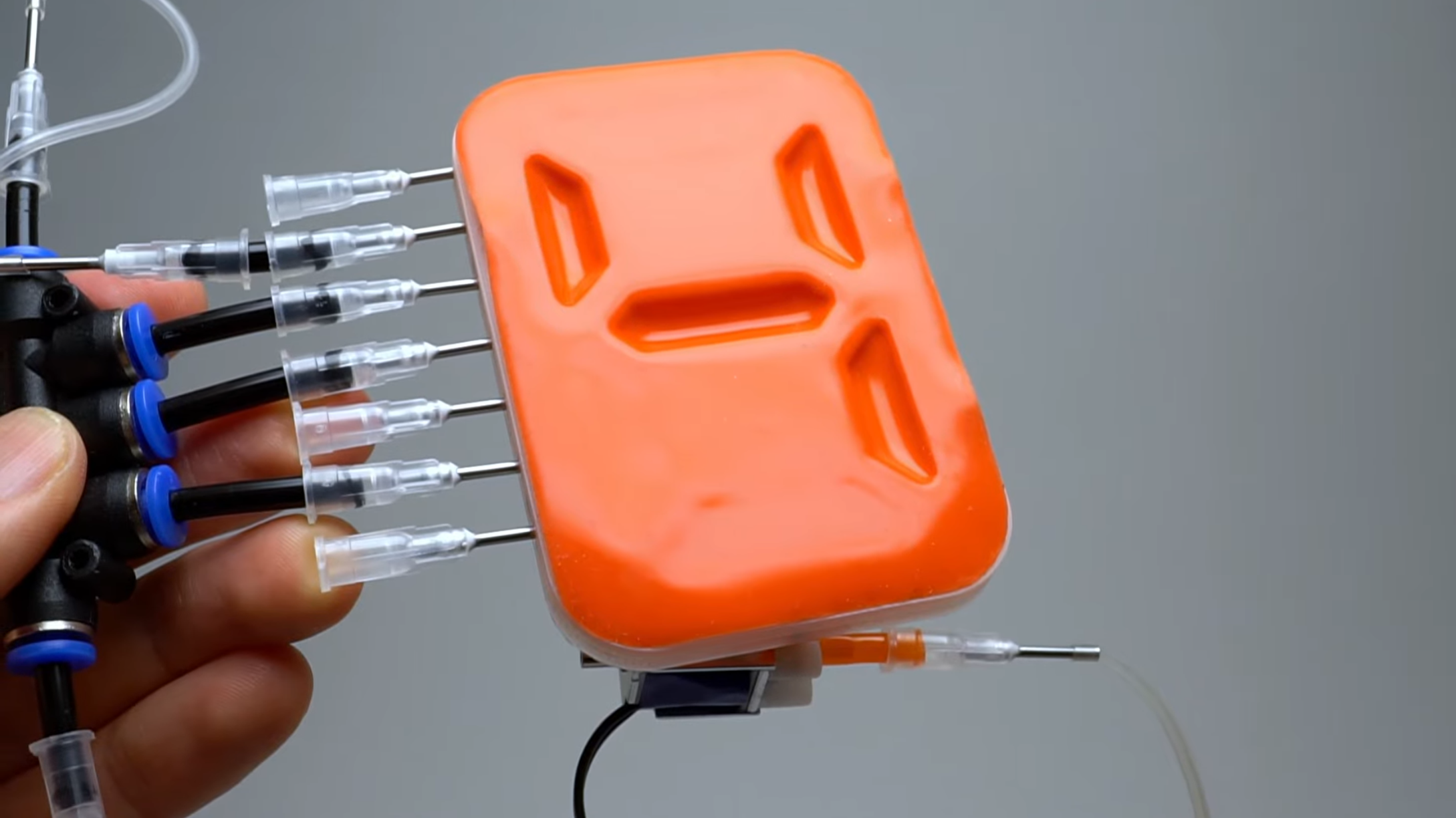
There’s a long history of devices originally used for communication being made into computers, with relay switching circuits, vacuum tubes, and transistors being some well-known examples. In a smaller way, pneumatic tubes likewise deserve a place on the list; [soiboi soft], for example, has used pneumatic systems to build actuators, logic systems, and displays, including this latching seven-segment display.
Each segment in the display is made of a cavity behind a silicone sheet; when a vacuum is applied, the front sheet is pulled into the cavity. A vacuum-controlled switch (much like a transistor, as we’ve covered before) connects to the cavity, so that each segment can be latched open or closed. Each segment has two control lines: one to pressurize or depressurize the cavity, and one to control the switch. The overall display has four seven-segment digits, with seven common data lines and four control lines, one for each digit.
The display is built in five layers: the front display membrane, a frame to clamp this in place, the chamber bodies, the membrane which forms the switches, and the control channels. The membranes were cast in silicone using 3D-printed molds, and the other parts were 3D-printed on a glass build plate to get a sufficiently smooth, leak-free surface. As it was, the display used a truly intimidating number of fasteners to ensure airtight connections between the different layers. [soiboi soft] used the display for a clock, so it sits at the front of a 3D-printed enclosure containing an Arduino, a small vacuum pump, and solenoid valves.
This capacity for latching and switching, combined with pneumatic actuators, raises the interesting possibility of purely air-powered robots. It’s even possible to 3D-print pneumatic channels by using a custom nozzle.
“Breathable oxygen has been created from Moon dust,” reports the Telegraph, “in a world first that paves the way for a lunar base.”
Jeff Bezos’s Blue Origin “”announced this week that it had developed a reactor that could successfully release oxygen from lunar soil by using an electric current.”
Almost half of Moon dust — the thin layer of rock that blankets the lunar surface — is oxygen, but it is bound to metals such as iron and titanium… Previous work to isolate oxygen has been lab-based, and the unwieldy equipment needed has been too difficult to send to the Moon. In contrast, Blue Origin said its small-scale reactor, named Air Pioneer, could be made flight-ready to “provide the first breath of life for a sustainable Moon base”… As well as breathable air, Blue Origin said the reactor produces other critical elements for planetary infrastructure, such as iron, aluminium and silicon for construction and electronics, as well as glass for windows and solar panel covers. The company has previously said it wants to turn the Moon, and eventually Mars, into “self-sustaining worlds where robots and humans can go beyond visiting and truly explore, grow, live, and thrive”….
Blue Origin said it would need to generate around one megawatt of power to drive the reactors — about the energy it would require to power around 400 to 1,000 homes simultaneously. It envisages that each lunar settlement would have an array of nearby solar panels, generating the power needed for one reactor. Besides breathable air for astronauts, the oxygen could also be used in propellant for refuelling landers and fuel cells, Blue Origin points out — and “produced right where they’re needed, and at much lower cost than being brought from Earth.”
Advertisement
Thanks to Slashdot reader fjo3 for sharing the article.
Early in March, X (formerly Twitter) started testing a dedicated app called XChat among thousands of beta testers. It appears that the test phase is over and the app is ready for its public rollout. The Elon Musk-owned company has announced that XChat is now listed on the App Store, with a wide launch lined up in the coming days.
What’s the big play?
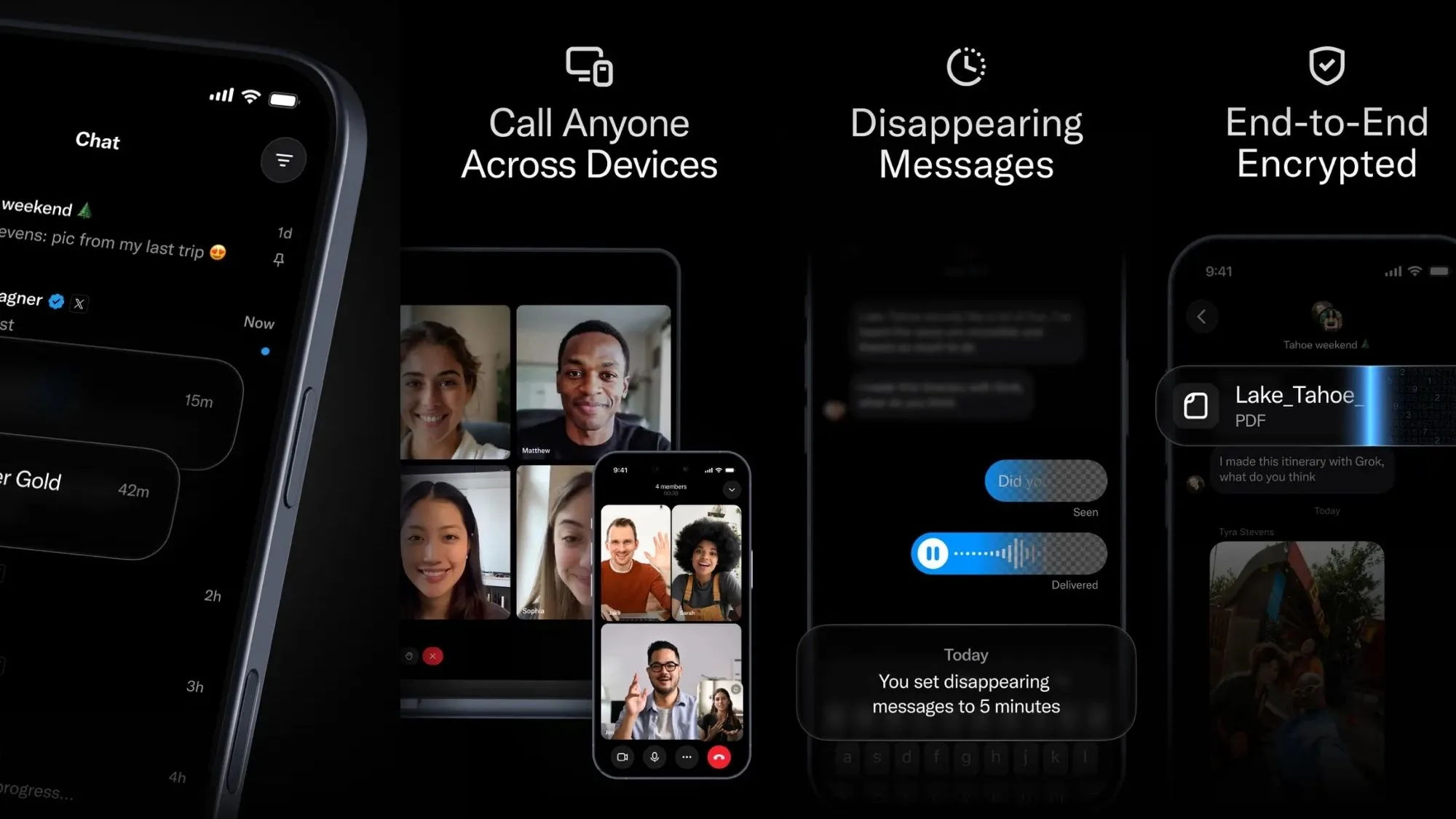
The chat app’s listing page on the App Store mentions a release date of April 17, and it will be available simultaneously for iPhone and iPad. As far as features go, the XChat app is advertising end-to-end encryption as one of its highlight features. For the unaware, E2E is currently deemed the safest security protocol to ensure that your messages are private, and no middleman or third-party (including the company that built the platform) can read your conversations.
x / App Store
WhatsApp and Signal, for example, implement it by default. On Instagram and Telegram, there’s a dedicated private chats feature that relies on end-to-end encryption to protect your messages.
Circling back to XChat, it will also enable screenshot blocking, which means no participant in the conversation can take a screengrab of the chats. The app will let users edit or delete sent messages, and will also let them send disappearing messages. Calling and group chats will also be a part of the package.
Ever since Musk took over X (which eventually merged with xAI, followed by a broad merger with SpaceX), plans for creating a super-app took center stage. Back in December, Musk quipped that he wants to transform X into something like WeChat, the Chinese app that allows everything from messaging and payments to reservations, among a whole bunch of other quirky services. In June last year, it was reported that the X super app would also offer investment and trading services once the super app plans materialize.
Advertisement
Why is this an interesting shift?
There’s more to the plans than a straightforward messaging pivot to XChat. Or at least that’s what Musk’s past claims, and the recent turn of events, suggest. On the surface, it would seem that Musk simply wants to serve a messaging app that fills the functional gaps that you can’t quite access on the social media app.
Just a day ago, Musk shared on X that WhatsApp can’t be trusted, referring to a lawsuit claiming that Meta allowed third parties access to the encrypted messages on WhatsApp. Even though WhatsApp has denied these claims, Musk’s statement added more fuel to the privacy fire. Separately, Telegram founder, Pavel Durov, claimed that WhatsApp’s encryption claims amount to the “biggest consumer fraud in history.” But that was not all.
Signal — one of the most widely trusted messaging apps out there, owing to its robust security protocols — also found itself in the line of fire. As per reports, the FBI was able to obtain the contents of Signal messages after accessing the notifications history on a suspect’s iPhone, even though the app allows a lock facility. Pavel also took a potshot at Signal, highlighting how Telegram never shows a message’s contents in the notification banner.
It seems XChat is making a splashy public debut at a time when trust in the popular privacy-first platforms such as WhatsApp and Signal is coming under scrutiny. Moreover, it would be interesting to see if X offers all the features for free, or whether some of them will be locked behind a premium subscription, just like the sibling social media service.
AI models now surpass most humans at finding and exploiting software vulnerabilities, said Anthropic.
A new Anthropic project will see global companies use Claude as part of their defence security systems.
‘Project Glasswing’ gives partnering companies access to Anthropic’s unreleased Claude Mythos, which, according to the AI giant, has already found thousands of high-severity vulnerabilities, including some in every major operating system and web browser. Mythos was launched in preview yesterday (7 April).
Anthropic’s Mythos preview is significantly more capable at generating exploits. In its research, the company noted that Mythos developed working exploits 181 times out of the several hundred attempts, while Opus 4.6 had a near 0pc success rate.
Advertisement
“We did not explicitly train Mythos preview to have these capabilities. Rather, they emerged as a downstream consequence of general improvements in code, reasoning and autonomy,” the company noted. Publications, including the New York Times and the Register have warned against the negative consequences of models such as Mythos falling into the hands of bad actors.
Fortunately, Anthropic has chosen not to release the model. Instead, the company is bringing together leading businesses, including Amazon Web Services, Apple, Broadcom, Cisco, CrowdStrike, Google, JP Morgan Chase, the Linux Foundation, Microsoft, Nvidia and Palo Alto Networks, allowing them to access Mythos preview to boost their cyber defences.
The company has extended Mythos access to a group of more than 40 organisations that build or maintain critical software infrastructure.
“AI models have reached a level of coding capability where they can surpass all but the most skilled humans at finding and exploiting software vulnerabilities,” said Anthropic.
Advertisement
Anthropic has promised to share learnings from Project Glasswing to benefit the wider industry. The company has also made a commitment of up to $100m in usage credits for Mythos preview across the project, as well as $4m in direct donations to open-source security organisations.
The Claude-maker has also hired Eric Boyd, the long-term president of AI platforms at Microsoft, to lead as the company’s head of infrastructure.
Don’t miss out on the knowledge you need to succeed. Sign up for the Daily Brief, Silicon Republic’s digest of need-to-know sci-tech news.
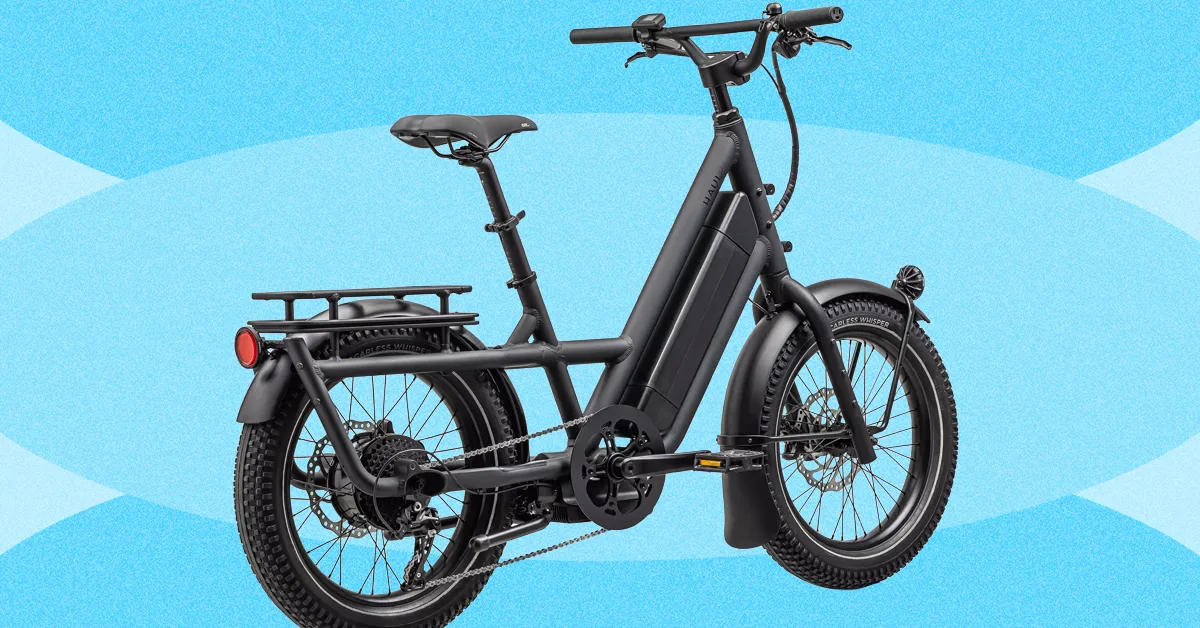
Specialized’s proprietary, 700-watt motor feels natural—sometimes to an annoying extent, as the bike is designed for you to pedal and you won’t get faster than 10 mph just by using the throttle. Also, there’s no option for a dual battery. Still, the battery well exceeded Specialized’s estimated 60-mile range. Granted, I am a small person, but I was usually hauling at least one other person on the bike with me at all times, so I still found this remarkable.
It’s easily adjustable—both my 5’10” husband and my 5’2″ self were able to switch off riding, which is important if this is your family’s all-purpose hauler. The display is intuitive, and the buttons are well-spaced apart so you don’t get confused or end up button-mashing. Also, Specialized’s accessories go a long way toward making this bike so much more useful. Yes, you could jerry-rig some Home Depot buckets to the front of your bike and drill holes in the bottoms for them to drain, but the Coolcave panniers ($90) are so much more attractive, easy to use, and helpful for carting everything from kid dioramas to a dozen tiny soccer balls.
Best Value
The vast majority of people I know who buy a cargo ebike with their own money choose the Lectric XPedition2. There is just no better value for a dual-battery long-tail cargo ebike. Out of the box, Lectric has also gone above and beyond to make its bikes and accessories easy to assemble and use. You even pop the pedals in, instead of using regular screw-on pedals.
Advertisement
This bike’s specs are also wild for the price. It has a 1,310-watt rear hub motor, twice as powerful as the already-powerful Globe Haul. (It has a throttle and is a Class 2 ebike out of the box, though you can use the display to unlock its Class 3 capabilities and assist up to 28 mph.) It has hydraulic disc brakes, front suspension, an incredibly large and bright LCD color display, integrated lights, and fenders.
The Figure breach exposed 967,200 email records without a single exploit. Understanding what that enables — and why your MFA cannot contain it — is an architectural problem, not a user education problem.
In February 2026, TechRepublic reported that Figure, a financial services company, exposed nearly 967,200 email records in a newly disclosed data breach. No vulnerability was chained. No zero-day was burned. The records were accessible, and now they are in adversary hands.
Coverage of breaches like this tends to stop at the count. That is the wrong place to stop. The number of exposed records is not the event — it is the starting inventory for the event that follows.
To understand the actual risk, you have to follow the attack chain that a credential exposure like this enables, step by step, and ask honestly whether the authentication controls in your environment can interrupt it at any point.
Advertisement
Most cannot. Here is why.
What Adversaries Do With 967,000 Email Records
Exposed email addresses are not static data. They are operational inputs. Within hours of a record set like this becoming available, adversaries are running it through several parallel workflows simultaneously.
The first is credential stuffing. Figure customers and employees almost certainly reused passwords across services. Adversaries combine the exposed addresses with breach databases from prior incidents — LinkedIn, Dropbox, RockYou2024 — and test the resulting pairs against enterprise portals, VPN gateways, Microsoft 365, Okta, and identity providers at scale. Automation handles the volume.
Success rates on credential stuffing campaigns against fresh email lists routinely run at two to three percent. On 967,000 records, that is 19,000 to 29,000 valid credential pairs.
Advertisement
The second workflow is targeted phishing. AI-assisted tooling can now generate personalized phishing campaigns from an email list in minutes. The messages reference the organization by name, impersonate internal communications, and are visually indistinguishable from legitimate correspondence.
Recipient-specific targeting — using job title, department, or public LinkedIn data to tailor the lure — is standard practice, not a capability reserved for nation-state actors.
The third is help desk social engineering. Armed with a valid email address and basic OSINT, adversaries impersonate employees in calls to IT support teams, requesting password resets, MFA device resets, or account unlocks.
This attack vector bypasses authentication technology entirely — it targets the human process that exists to handle authentication failures.
Advertisement
In each of these workflows, no technical vulnerability is required. The adversary’s goal is not to break in. It is to log in as a valid user. The breach does not create access. It creates the conditions under which access becomes achievable through the authentication system itself.
Token’s Biometric Assured Identity platform is built for organizations where authentication failure is not an acceptable outcome.
See how Token can strengthen identity assurance across your existing IAM, SSO & PAM stack.
This is the part of the analysis that most incident post-mortems underweight. Organizations read about a credential exposure and conclude that their MFA deployment protects them. For the attack chain described above, that conclusion is structurally incorrect.
Advertisement
Modern adversary tooling executes what security researchers call a real-time phishing relay, sometimes referred to as an adversary-in-the-middle (AiTM) attack. The mechanics are precise.
An adversary builds a reverse proxy that sits between the victim and the legitimate service. When the victim enters credentials on the spoofed page, the proxy forwards those credentials to the real site in real time.
The real site responds with an MFA challenge. The proxy forwards that challenge to the victim. The victim responds — because the page looks legitimate and the MFA prompt is real. The proxy forwards the response. The adversary receives an authenticated session.
Push notification MFA, SMS one-time codes, and TOTP authenticator apps are all vulnerable to this relay. They authenticate the exchange of a code. They do not verify that the individual completing the exchange is the authorized account holder. They cannot distinguish a direct session from a proxied one.
Advertisement
Toolkits that automate this attack — Evilginx, Modlishka, Muraena, and their derivatives — are publicly available, actively maintained, and require no advanced tradecraft to operate. The capability is not exotic. It is the baseline.
MFA fatigue compounds this. Adversaries who obtain valid credentials but cannot relay the session in real time will instead trigger repeated push notifications until a user approves one out of frustration or confusion. This attack has been used successfully against organizations with mature security programs, including in incidents that received significant public coverage.
The common thread across all of these techniques: legacy MFA places a human being at the final decision point of the authentication chain, then relies on that human to make the correct call under conditions specifically engineered to defeat it.
The Structural Problem Legacy MFA Cannot Solve
The security industry’s standard response to authentication failures is user education. Train people to recognize phishing. Teach them to verify unexpected MFA prompts. Remind them not to approve requests they did not initiate.
Advertisement
This response is not wrong. It is insufficient, and the insufficiency is architectural, not motivational.
A relay attack does not require a user to recognize a phishing page. The MFA prompt they receive is real, issued by the legitimate service, delivered through the same app they use every day. There is nothing anomalous for the user to detect. The attack is designed to be invisible to the human in the loop — and it is.
The deeper problem is that the authentication architecture most organizations have deployed was not designed to answer the question that actually matters in a post-breach environment: was the authorized individual physically present and biometrically verified at the moment of authentication?
Push notifications do not answer this question. SMS codes do not answer this question. TOTP does not answer this question. USB hardware tokens answer a related but different question — they prove the registered device was present, not the authorized person.
Advertisement
Auditors, regulators, and cyber insurers are increasingly drawing this distinction explicitly. The question “can you prove the authorized individual was there?” is appearing in CMMC assessments, NYDFS examinations, and underwriter questionnaires. Device presence is no longer accepted as a proxy for human presence in high-stakes access contexts.
What Phishing-Resistant Authentication Actually Requires
FIDO2/WebAuthn gets cited frequently in this conversation, and it is a meaningful step forward — but it is not sufficient on its own. Standard passkey implementations bind the credential to a device or cloud account.
Cloud-synced passkeys inherit the vulnerabilities of the cloud account: SIM swap attacks against the recovery phone number, account takeover via credential phishing, recovery flow exploitation. Device-bound passkeys prove device possession. They do not prove human presence.
Phishing-resistant authentication that closes the relay attack vector requires three properties simultaneously:
Advertisement
Cryptographic origin binding: the authentication credential is mathematically tied to the exact origin domain. A spoofed site cannot produce a valid signature because the domain does not match. The attack fails before any credential is transmitted.
Hardware-bound private keys that never leave secure hardware: the signing key cannot be exported, copied, or exfiltrated. Compromise of the endpoint does not compromise the credential.
Live biometric verification of the authorized individual: not a stored biometric template that can be replayed, but a real-time match that confirms the authorized person is physically present at the moment of authentication.
When all three properties are present, a relay attack has no viable path. The adversary cannot produce a valid cryptographic signature from a spoofed site. They cannot relay a session because the cryptographic binding fails the moment the origin changes.
They cannot use a stolen device because the biometric verification fails without the authorized individual. They cannot social-engineer an approval because there is no approval prompt — the authentication either completes with a live biometric match at the registered hardware, or it does not complete.
Token: Cryptographic Identity That Verifies the Human, Not the Device
TokenCore was built on a single, uncompromising principle: verify the human, not the device, credential, or session.
Most authentication products add factors to a weak foundation. Token replaces the foundation. The platform combines enforced biometrics, hardware-bound cryptographic authentication, and physical proximity verification — three properties that must all be satisfied simultaneously for access to be granted.
There is no fallback. There is no bypass code a user can enter in the field. The authorized individual is either present and verified, or access does not occur.
Advertisement
This matters precisely because of the attack chain described above. Token’s Biometric Assured Identity platform eliminates each link:
No Phishing. Every authentication is cryptographically bound to the exact origin domain. A spoofed login page produces no valid signature — Token simply refuses to authenticate.
No Replay. The private signing key never leaves the hardware. A relayed session cannot be reconstructed because the cryptographic material it would need to replicate is physically inaccessible.
No Delegation. A live fingerprint match is required for every authentication event. A colleague, an adversary with a stolen device, or a social engineering target cannot complete authentication on behalf of the authorized individual.
No Exceptions. There is no code, no recovery flow, and no help-desk override that can substitute for biometric presence. The control is absolute because the risk is absolute.
The form factor matters too. Token is wireless — Bluetooth proximity, no USB port required. Authentication takes one to three seconds: the user initiates a session, taps their fingerprint on the Token device, Bluetooth proximity confirms physical presence within three feet, and access is granted.
For on-call administrators, trading floor operators, and defense contractors working across multiple workstations, this eliminates the friction that drives the shadow IT and workaround behavior legacy hardware tokens create.
Unlike USB-based alternatives, Token is field-upgradeable over the air. As adversaries evolve their tooling, Token’s cryptographic controls can be updated remotely and immediately — without replacing hardware or reissuing devices. The investment does not expire when the threat landscape changes.
Token verifies the human. Not the session. Not the device. Not the code. The human.
Advertisement
Mitigate Risk and Secure Vulnerabilities with TokenCore
The Honest Assessment
The Figure breach will produce downstream authentication attacks. So will the next breach, and the one after that. The adversary infrastructure that runs credential stuffing, AI-generated phishing, and real-time relay attacks operates continuously against exposed email records.
The question is not whether these attacks will be attempted against your environment. They will be.
The relevant question is whether your authentication architecture requires human judgment to succeed — or whether it is designed so that human judgment is not the failure point.
Legacy MFA, in all of its common forms, requires human judgment. A user must recognize the anomaly, question the prompt, and make the correct decision under adversarial pressure. That is a brittle dependency at a critical control point, and adversaries have built an entire toolchain to exploit it.
Token removes that dependency. The device signs for the legitimate domain with a confirmed biometric match — or it does nothing. There is no prompt to manipulate. There is no decision to engineer. There are no exceptions.
Advertisement
That is not a feature. It is the architectural requirement for authentication that holds under the conditions this breach, and every breach like it, creates.
See How Token Closes the Gap
Token’s Biometric Assured Identity platform is built for organizations where authentication failure is not an acceptable outcome — defense contractors, financial institutions, critical infrastructure, and enterprise environments with high-privilege access requirements.
Cryptographic. Biometric. Wireless. No phishing. No replay. No delegation. No exceptions.
from the fuck-em-for-being-human-beings,-I-guess dept
I’m not here to cut the Trump administration any slack or engage in both-sides bullshit, but this is something that has always been true: we treat anyone imprisoned or detained as less than human. The dehumanization begins with something we call “processing” — a word that separates a human from their humanity by making them sound like nothing more than paperwork.
The horrors seen in jails and prisons are often compounded at immigrant detention facilities. While some duty of less-than-minimal care might be extended to imprisoned US citizens, it’s far more often ignored when federal officers believe (mistakenly) that migrants aren’t protected by the Constitution.
The litany of violations stretches back forever. Techdirt doesn’t stretch back quite that far, but let’s take a stroll down memory lane.
From 2022, back when Biden was still in office and people like me were thinking no one would ever elect Trump to office again:
That’s taken from a report demanding (“Management Alert”) the immediate removal of all detainees from this New Mexico detention center due to numerous violations, including a shortage of 112 employees and no less than 83 cells with “inoperable” sinks and toilets.
Going back further to Trump’s first administration:
In this Inspector General’s report, we learned that only 28 of 106 contractors were provided with the tools needed to meet minimum “performance standards.” We also learned that the $3.9 billion being thrown to private contractors was shored up by absolutely no level of accountability. ICE approved 96% of waivers requested by contractors who failed to meet minimum housing standards for detainees.
While it’s been a persistent problem, things are significantly worse now. The Trump administration is detaining more migrants than ever before. It’s also far more willing to pawn these duties off on private prison contractors who prioritize making money over taking care of the people thrust into their care by Trump’s top bigots.
On top of that, the administration is fighting wars on several litigation fronts in hopes of preventing any form of oversight from slowing its roll towards total migrant annihilation. Everything that was bad before is getting so much worse.
Thanks to the White House Merchant of Death, RFK Jr., measles outbreaks are being reported at detention facilities. Thanks to absolutely every-fucking-body else in the administration, reports of inhumane conditions are somehow still on the rise, even after years of regularly reported inhuman conditions at ICE facilities.
Advertisement
Here’s even more. At a facility where guards were caught setting up suicide “death pools” for inmates, more evidence of deliberate cruelty and inhumane treatment has surfaced. The host of ongoing atrocities is none other than Camp East Montana, comfortably nestled in the heartland of the “who gives a fuck about immigrants” Fifth Circuit: El Paso, Texas.
An inspection in February of Camp East Montana in Texas, one of the country’s largest immigration detention centers, found dozens of violations of national standards, including instances that may have exposed detainees to illnesses and uses of force that were not documented, a new report found.
[…]
The inspection, which was carried out by the agency over three days in February and included interviews with 49 detainees, found that there were at least 49 overall “deficiencies” from national standards at the camp. Of all the deficiencies, 22 involved use of force and restraints, and five involved issues related to medical care.
Advertisement
ICE actually released this inspection report. However, it did make sure names were changed redacted to protect the innocent guilty. While it’s uncharacteristically protective of the inspectors, it also makes sure we may never know which “Creative Corrections” employees helped make this detention center the hell hole it is.
Other censorship by the administration deliberately denies Americans access to the facts. What possible purpose is served here, other than allowing the government to pretend its rights violations were somehow excused by the [redacted] passage of time?
The government not only censored the number of detainee files reviewed, but also the ratio of files in noncompliance. What escapes ICE’s black-boxed attempts to redeem itself is this, which is plenty damning on its own:
[I]nitial classification process and initial housing assignments were not completed within 12 hours of detainees’ admission […]; rather they were completed 14 hours to 25 days after [admission]…
Everything that might show how often (or how frequently) violations occurred has been removed. It’s a deliberate muddying of the statistical waters. Who knows what’s behind the black box? It could mean rights were violated 10% of the time. Or it could mean rights were violated almost every time. But we the people — you know, the ones expected to foot the bill for this bullshit — aren’t allowed to know the actual details of what’s being done in our names.
If the government wants to play it that way, fine. We’ll just assume the worst and dare it to provide evidence to the contrary. And we know it never will. If or when the government decides to unredact this report, it will undoubtedly show us what we’ve always assumed: The administration and its contractors routinely abused detainees and violated their rights because the people in charge made it clear they don’t consider migrants to be humans.
So far this year, 14 people have died in U.S. Immigration and Customs Enforcement custody, including a Mexican man who was found unresponsive last week at a facility outside Los Angeles, according to data from the Department of Homeland Security.
If that seems like a low (or worse, an acceptable) number of deaths, think again:
In 2025, ICE reported 33 total in-custody deaths and in 2024 there were 11.
Deaths in ICE custody tripled under Trump during his first year back in office. If this pace continues, we’ll be looking at 56 in-custody deaths, which would nearly double the same number Trump managed to triple in 2025.
This will only get worse. The administration is still trying to buy up any warehouses it can to repurpose as detention centers. The workload is being stretched even thinner, leaving private citizens more poorly trained than current ICE officers in charge of the lives and well-being of thousands of detainees. The misery and death will continue. Unfortunately for us, this administration not only welcomes blood on its hands, but revels in it.
A new NYT Connections puzzle appears at midnight each day for your time zone – which means that some people are always playing ‘today’s game’ while others are playing ‘yesterday’s’. If you’re looking for Saturday’s puzzle instead then click here: NYT Connections hints and answers for Saturday, April 11 (game #1035).
Good morning! Let’s play Connections, the NYT’s clever word game that challenges you to group answers in various categories. It can be tough, so read on if you need Connections hints.
What should you do once you’ve finished? Why, play some more word games of course. I’ve also got daily Strands hints and answers and Quordle hints and answers articles if you need help for those too, while Marc’s Wordle today page covers the original viral word game.
Advertisement
SPOILER WARNING: Information about NYT Connections today is below, so don’t read on if you don’t want to know the answers.
Article continues below
NYT Connections today (game #1036) – today’s words
(Image credit: New York Times)
Today’s NYT Connections words are…
FLY
PAPER
TAKE
CAST
TROLL
PROJECT
POCKET
ANGLE
SHED
POSITION
RUSSIAN
CUFF
RAG
RADIATE
STANCE
BELT LOOP
NYT Connections today (game #1036) – hint #1 – group hints
What are some clues for today’s NYT Connections groups?
YELLOW: Trouser elements
GREEN: How one sees it
BLUE: Let it shine
PURPLE: Add the word for a humanoid toy
Need more clues?
We’re firmly in spoiler territory now, but read on if you want to know what the four theme answers are for today’s NYT Connections puzzles…
Advertisement
Sign up for breaking news, reviews, opinion, top tech deals, and more.
NYT Connections today (game #1036) – hint #2 – group answers
What are the answers for today’s NYT Connections groups?
YELLOW: PANTS FEATURES
GREEN: PERSPECTIVE
BLUE: EMIT
PURPLE: _____DOLL
Right, the answers are below, so DO NOT SCROLL ANY FURTHER IF YOU DON’T WANT TO SEE THEM.
Advertisement
NYT Connections today (game #1036) – the answers
(Image credit: New York Times)
The answers to today’s Connections, game #1036, are…
YELLOW: PANTS FEATURES BELT LOOP, CUFF, FLY, POCKET
GREEN: PERSPECTIVE ANGLE, POSITION, STANCE, TAKE
BLUE: EMIT CAST, PROJECT, RADIATE, SHED
PURPLE: _____DOLL PAPER, RAG, RUSSIAN, TROLL
My rating: Easy
My score: Perfect
I managed to make zero mistakes in this game, but I came close to putting together a couple of groups that didn’t make the final four.
The first was linking FLY, CAST, ANGLE, and TROLL as all being terms connected with fishing and the other was a group about being mean to someone that would include RAG, TROLL and CUFF. Thankfully I didn’t have enough confidence to follow through on either idea.
Advertisement
Instead PANT FEATURES seemed an obvious selection, although I did waiver over CUFF and from here the other groups fell neatly into place — as they often do when you complete this game in difficulty order.
Yesterday’s NYT Connections answers (Saturday, April 11, game #1035)
PURPLE: ENDING IN BODIES OF WATER BOMBAY, CHELSEA, SCREWDRIVER, SNOWFLAKE
What is NYT Connections?
NYT Connections is one of several increasingly popular word games made by the New York Times. It challenges you to find groups of four items that share something in common, and each group has a different difficulty level: green is easy, yellow a little harder, blue often quite tough and purple usually very difficult.
On the plus side, you don’t technically need to solve the final one, as you’ll be able to answer that one by a process of elimination. What’s more, you can make up to four mistakes, which gives you a little bit of breathing room.
Advertisement
It’s a little more involved than something like Wordle, however, and there are plenty of opportunities for the game to trip you up with tricks. For instance, watch out for homophones and other word games that could disguise the answers.
It’s playable for free via the NYT Games site on desktop or mobile.

































































You must be logged in to post a comment Login