

Join Mikko Hyppönen and security leaders from the NFL, CHANEL, and Atlassian for a two-hour digital summit on what AI-speed attacks change, what defenders should stop doing, and how to validate, decide, fix, and re-validate at machine speed.
Tech
The Sonos Ace Ultra Headphone Linking feature is kinda magic

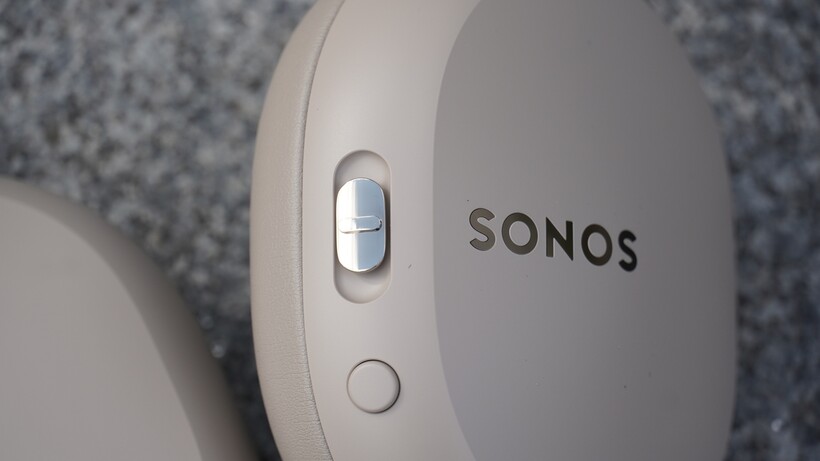
Sonos’ Ace Ultra headphones have arrived, the review of them is up, and I think they’re pretty terrific. They’re an improvement over the original Ace, and debatably, the headphones Sonos should have launched out of the gate.
But who gets things right the first time? Sonos went back to the board, and rather than re-do the headphones, it seems they decided to improve in areas where it was needed most, but also not mess with things that were working the first time around.
So now the Ace Ultra are a much more of an all-rounder, a better conceived and convincing pair of wireless headphones that are competitive against the best the market has to offer. Before the headphones were announced, when rumours were swirling around what it was going to be, I felt that Sonos needed to lean into more of its identity – it needed to embrace what makes Sonos, Sonos.
The one area all reviewers thought the headphones came up short was in the connectivity department; they didn’t realise the potential of the Sonos ecosystem. With the Headphone Linking feature, that potential has now been realised, and it’s a pretty impressive piece of technology that differentiates Sonos from the competition and becomes a unique selling point of the Ace Ultra.
It’s kinda magic
During IFA 26, Sonos set up an area to preview the products ahead of the announcement, and I was invited along to listen to presentations and demos of the Sonos Ace Ultra as well as the Beam Ultra. As you may know, with the introduction of the Sonos27 AI platform, Sonos has laid out its future, and the potential for customisation and personalisation within the system is large.
But the feature I think we all wanted to see was Headphone Linking, and it might seem a nebulous feature at first. After all, who would care that much about swapping music from a speaker to a headphone?
You could just call up the app on your device and do it yourself, but if there’s one advantage (or two) that AI can bring, it’s automation and efficiency. If I want to do something, I don’t want multiple steps to go through – keeping it simple means less confusion and most likely less frustration. I want ease of use and accessibility, not having to eventually go online and search for a solution to what I’m not doing right.

With the Headphone Linking, that’s what you get. A simple means of extracting music from one place to another, and it can work very well. I’ve played music on one speaker, cast it to the headphones, walked to another room and then directed the music to a speaker in that room. It’s pretty simple thanks to a press of the Content Key button.
The versatility of the system that I can start playing music on a speaker or a soundbar, and then if I feel like it, cast it to the headphones and vice versa for a session of private listening, and the flexibility it offers is a boon to those who want some time to themselves.
However, you may have noticed that I wrote it “can” work very well, but not always.
It’s still in Early Access
You opt into Headphone Linking; it’s not a feature that’s provided out of the box. It’s part of Sonos’ Early Access program, which should clue you into the thought that it’s still somewhat in Beta/Alpha stage rather than something for the public to fully enjoy without reservations.
I’ve found it to be slightly slow in recognising which speakers are close by and where to send the audio, but I did find it became quicker; the system seemed to understand what speakers were where and therefore was faster to recognise and send audio. But of course, it’s not perfect.

On other occasions, it’s been stumped by what it needs to do; the headphones don’t receive audio after multiple tries before suddenly working. Something I mentioned in my review is that if you have two speakers close by, it can send it to the speaker you didn’t intend to. I’ve walked into a room playing music, pressed the Content Key, only to accidentally receive the audio from the Beam Ultra. Whoops.
It’s also a Wi-Fi-enabled system, so don’t go thinking that if you’re wearing the headphones you can take audio from a speaker and merrily leave the house with your tunes playing in your head. I’ve tried walking into the garden and found that the signal extinguishes quickly because I’m on the Wi-Fi, and all of this is happening on the mesh network that Sonos creates.
There is potential

So while it’s not fully ready for its time in the spotlight, Headphone Linking provides an interesting perspective on what could come next. I’m not sure where it could lead – perhaps with Sonos Voice I can talk into the headphones and start a routine somewhere in the house if it’s all linked into a smart system, but certainly there is potential beneath all this interlinking of devices.
For now, we’ve got the TV/Audio Swap, which works really well, and the TrueCinema feature, which is surprisingly effective – there are times when I wonder whether sound is coming from the soundbar, the effect feels so spacious. The implementation of head tracking is also a nice feature, and these are features that other headphones have tried but haven’t put together as well as Sonos has.
With the Headphone Linking feature, Sonos has an ace up its sleeve. We’ll see how it plays its hand as the feature and Sonos ecosystem develops, but right now, the future looks very interesting.
Continue Reading
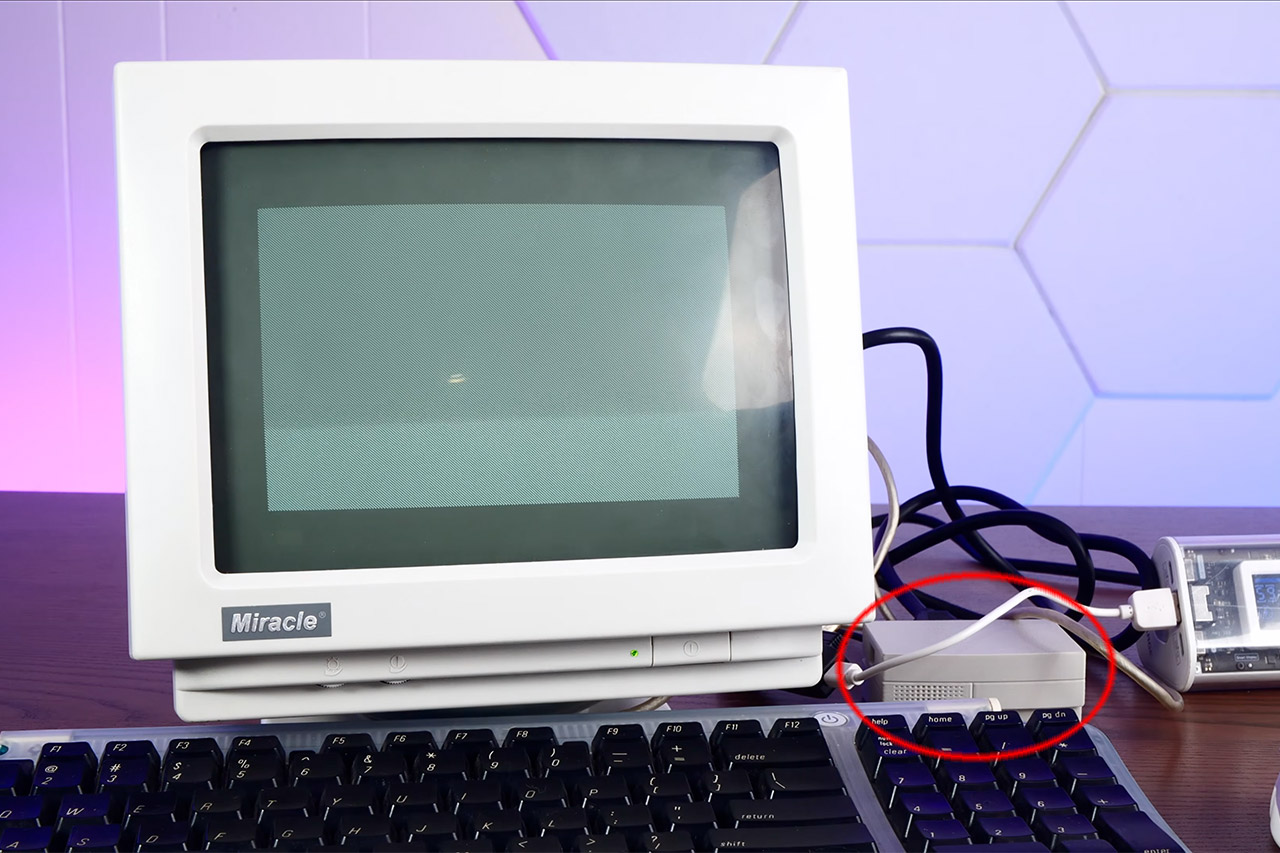
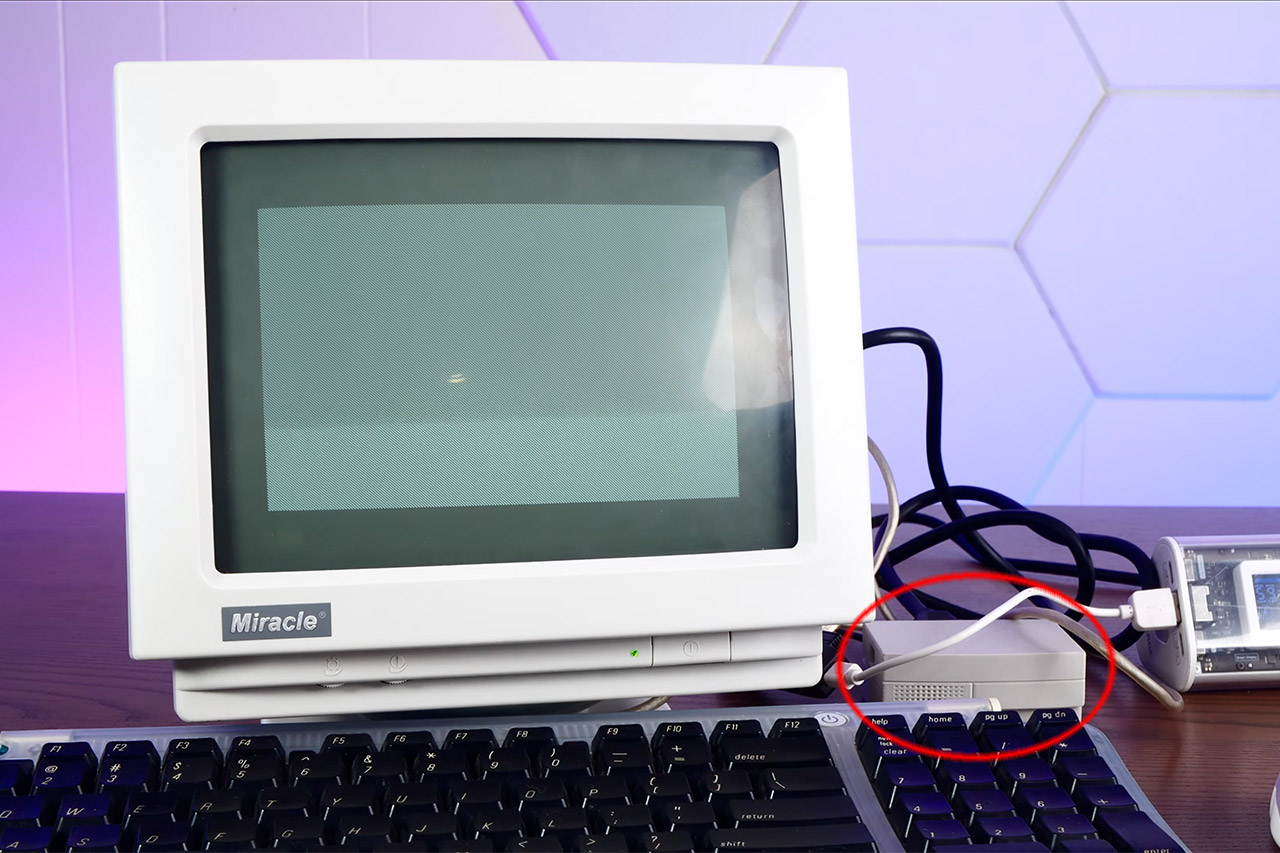
Action Retro just sat down with Pico Micro Mac v3, and the little board did the rare thing cheap retro kits keep promising. Power went in, a smiling Macintosh face appeared, and a real System desktop came up ready for a USB mouse. His video calls it a tiny 90s Macintosh. Software-wise it is closer to the 128K and Plus years. The charm is that the desktop is genuine, clickable, and running on a microcontroller you can cover with two fingers.
Matt Evans was the mastermind behind the emulator that makes this feat possible, and his pico-mac project, a Raspberry Pi Pico integrated with a 68000 Macintosh 128K, is a true marvel. It works by generating a one-bit VGA image using only a few resistors and the chip’s programmable I/O, which is then cranked up to 250 MHz, allowing you to play games like Missile Command without trouble. Ron from Ron’s Computer Videos then took this mess of wires and converted it into a board that you can really buy; Joe’s Computer Museum is selling the current v3 iteration for $20 to $25, either alone or with a Pico attached.

Apple 2026 Mac mini Desktop Computer M6 chip
- LITTLE DO-IT-ALL — Mac mini packs pure power into a small, five-by-five-inch desktop as the M6 chip delivers next-level AI capabilities. Mac mini…
- M6 CHIP — Everything you do on Mac mini feels more responsive with the M6 chip and its next-generation CPU. Fly through AI workflows with up to 4.8x…
- CONNECT IT ALL — Features three Thunderbolt 4 ports, an HDMI port, and a 2.5Gb Ethernet port in the back, and two USB-C ports and a headphone jack…
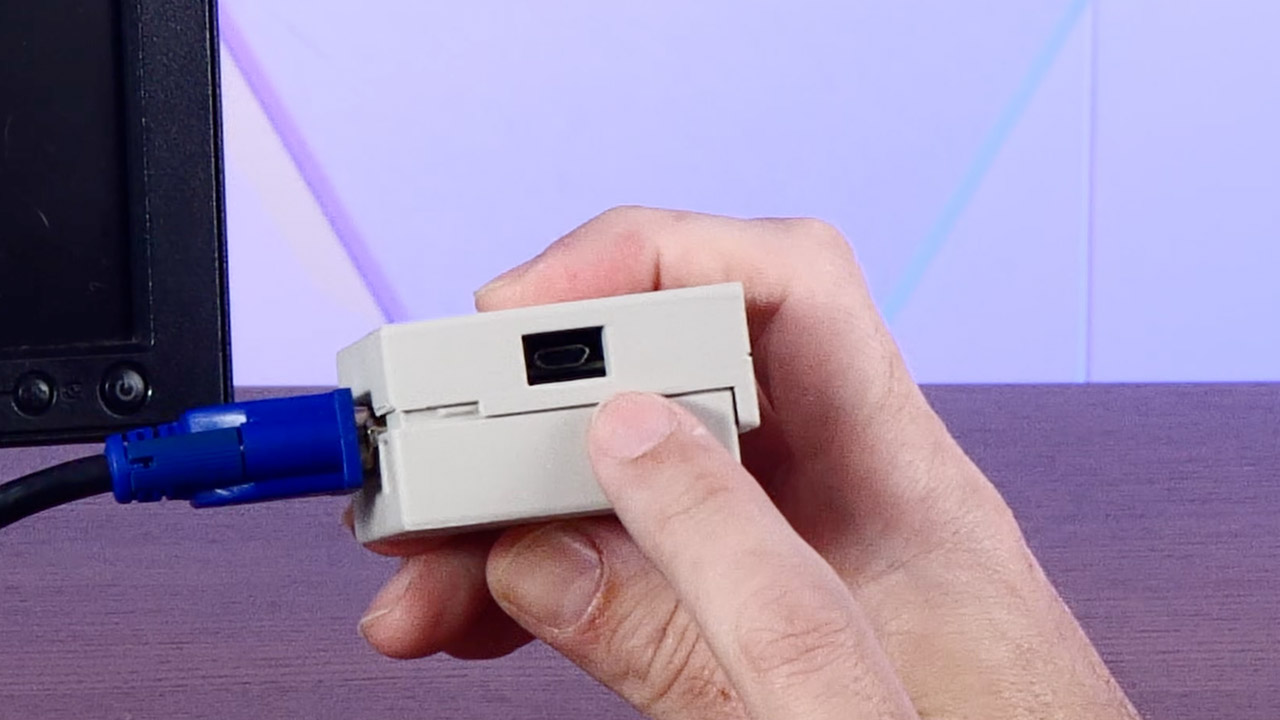
The older boards that came before this one required you to solder a separate microSD adapter onto a stack of pins, but the Version 3 has made life a lot easier by building the card slot right into the PCB and adding two rows of female headers, so you can simply press a Pico with pins already attached and it will work flawlessly. Simply press the boot button, slide a UF2 firmware file onto the Pico like a USB stick, and then drop Ron’s disk image onto a card, and you’re ready to go: VGA to any monitor that will accept it, keyboard and mouse via a micro USB OTG port. However, Action Retro discovered the hard way that some current keyboards with built-in hubs may be temperamental, so they switched to a simpler USB keyboard, which still worked.
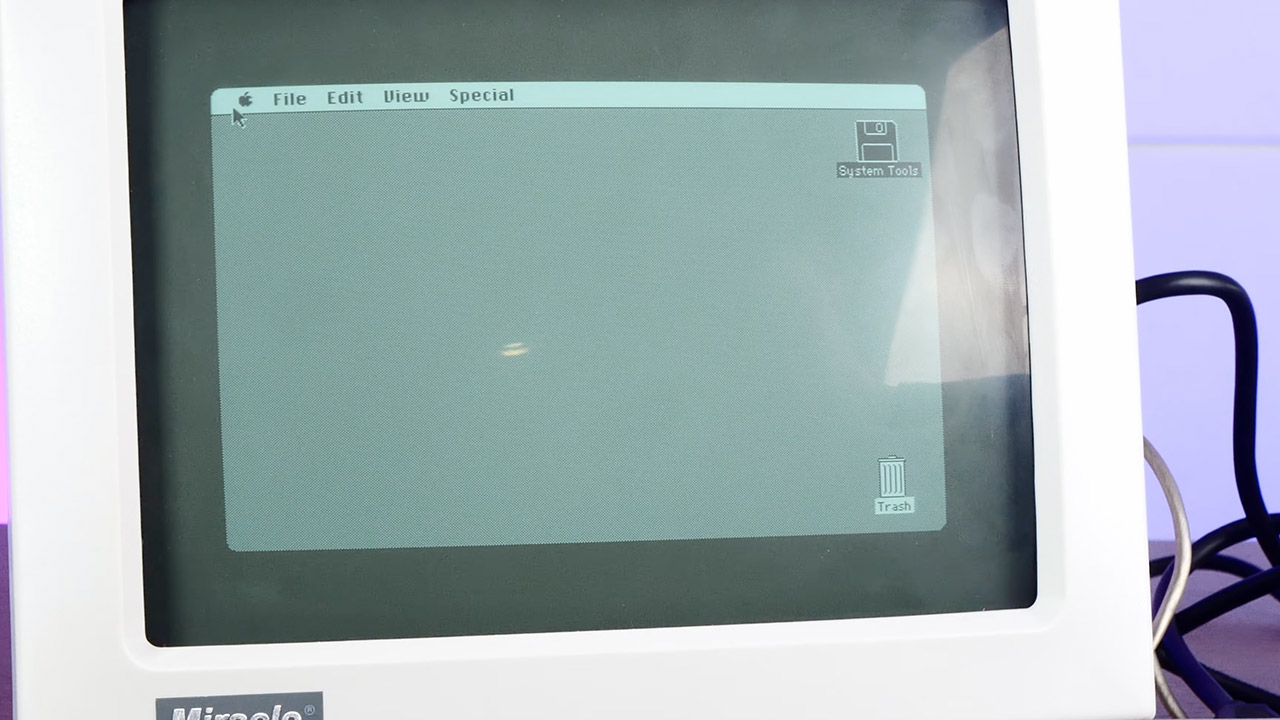
The default personality is a 128K Mac at 512 x 342, Apple’s original canvas from 1984. Other firmware builds extend the picture to 640 × 480 and increase memory to 208K, which is more RAM than the first Macintosh ever arrived with. Finally, you get to see the Finder, MacWrite, and MacPaint in their full grandeur. Previous videos of this project have shown Lode Runner, Bricks, and Missile Command in action. With Ron’s compressed disk image, you can really utilize the system for the evening and have it do something.
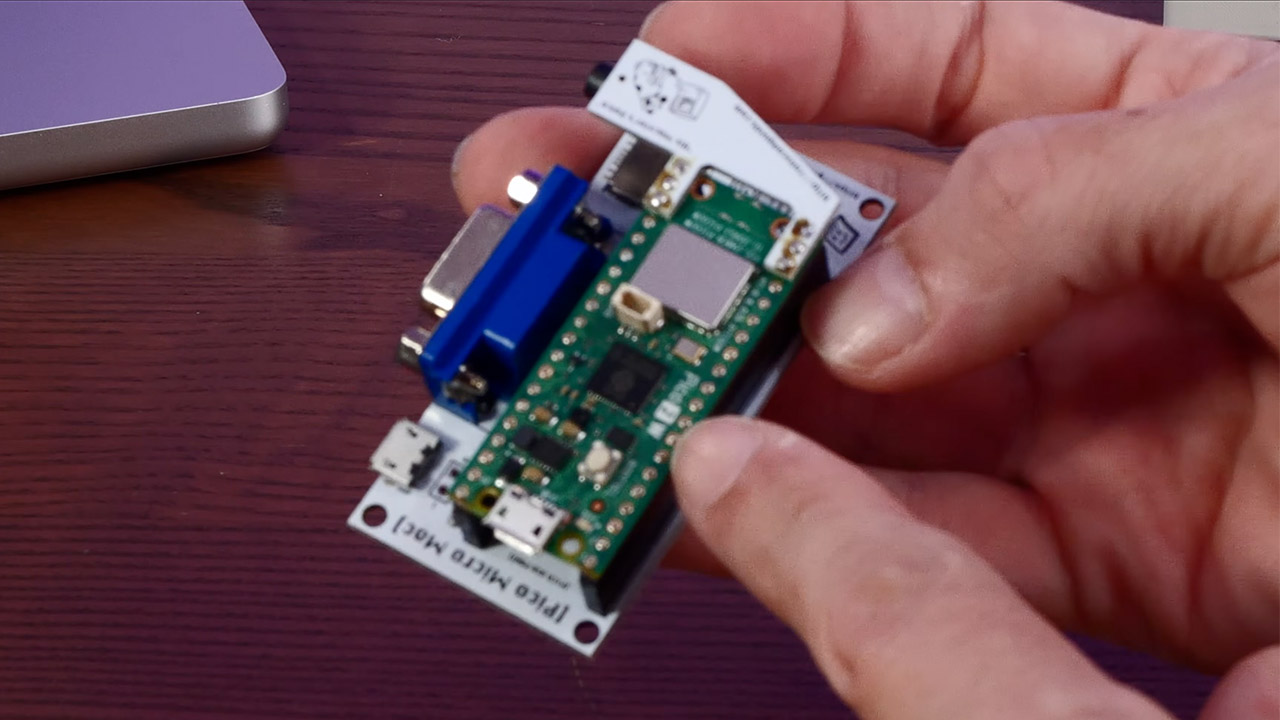
One thing is lacking from this small project: sound. At least it is with the stock VGA board. The startup beep and classic square-wave chirps are available as an optional Audio Refit. Other capabilities such as SCSI, AppleTalk, and a printer connector are missing, and if you don’t have a card, the flash drive is read-only, which means your MacPaint doodles will disappear as you turn off the power. Some software still whines for more memory than you have, which is understandable given that you are running 1984 program on a few dollars worth of silicon.
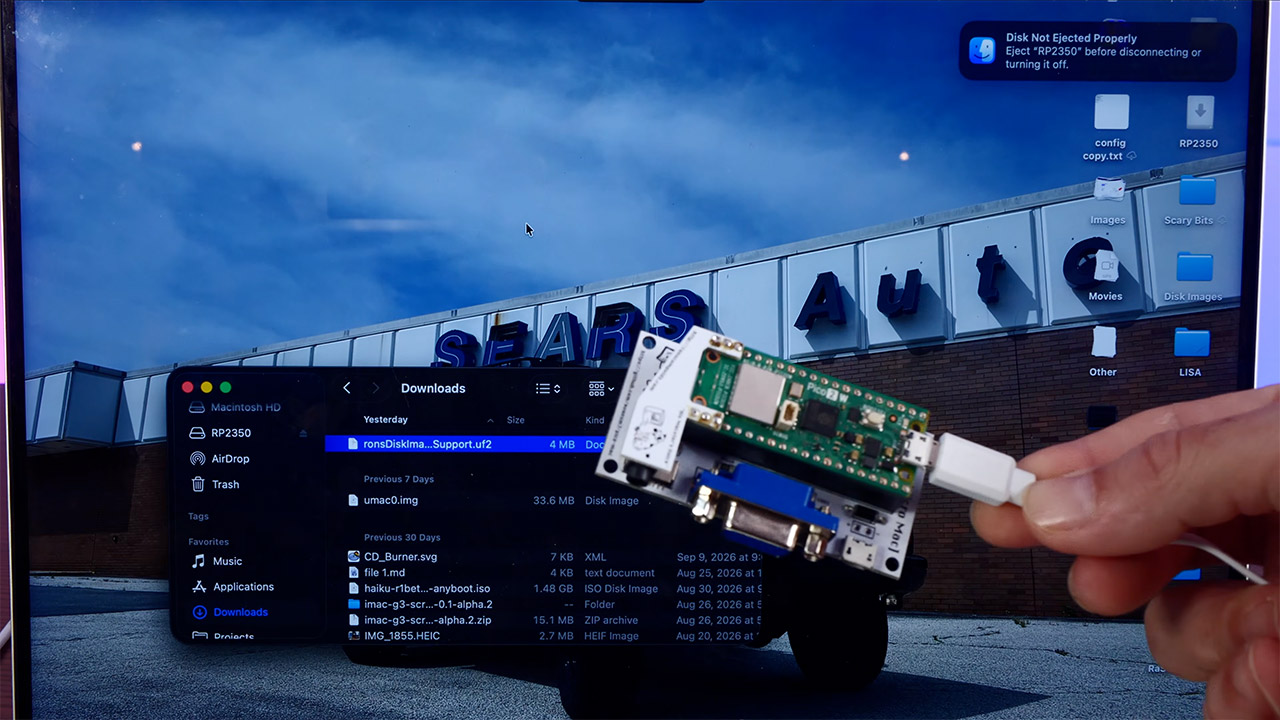
Joe’s shop also sells a 3D printed shell from GutBomb that makes the entire device resemble a tiny beige Mac from the early 1990s, which is why the film has a 90s vibe, despite the fact that the ROM is older. Power comes from a phone bank or any 5V micro USB brick, and a little black and white VGA monitor sits next to it. Sometimes the wire is heavier than the computer. Official kits typically target the original RP2040 Pico. Joe and Ron do not support the Raspberry Pi Pico 2 boards.
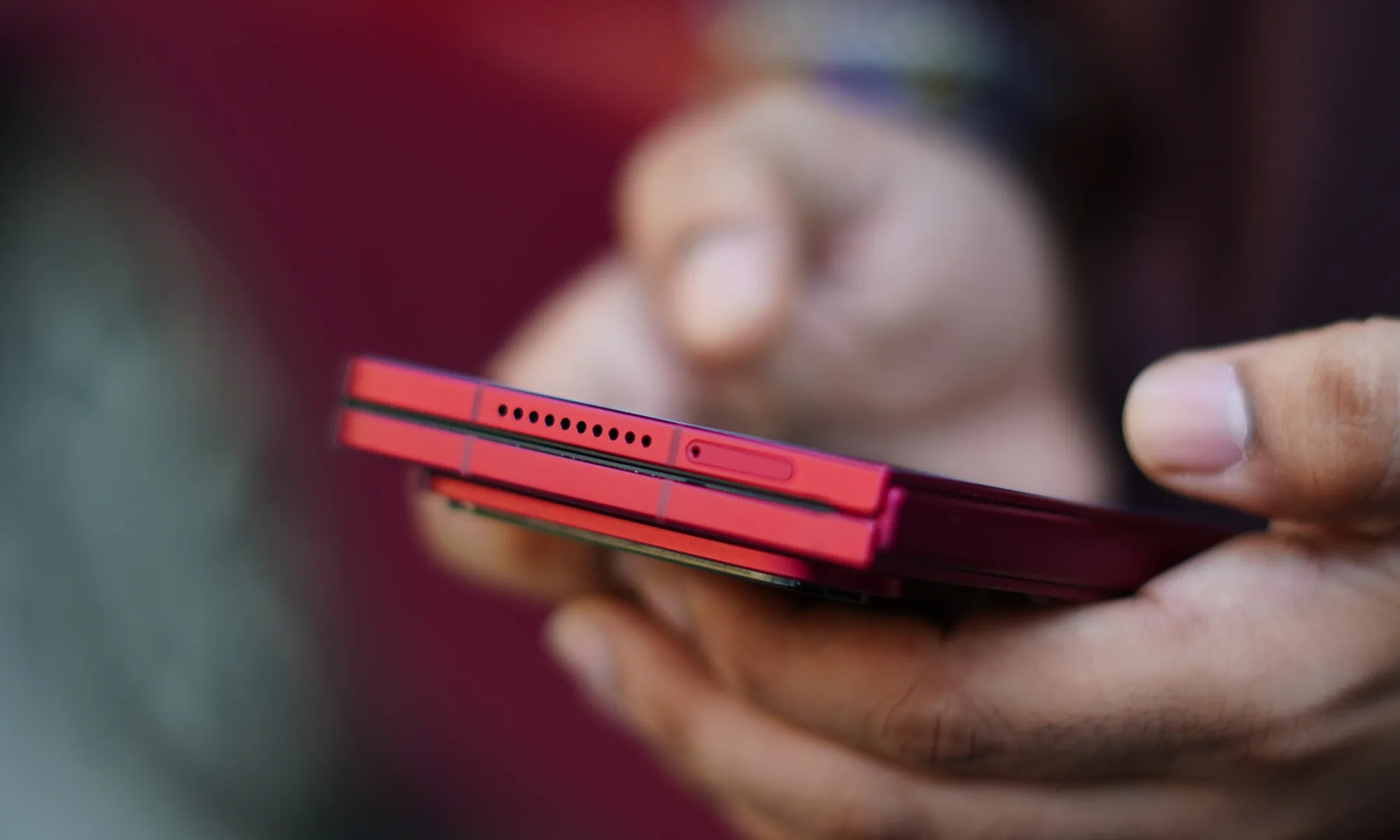
If I got a dollar for every time someone asked me if this was the new iPhone Duo, I would have a dollar. And the Xiaomi 18 Fold.
I have spent some time with the Xiaomi 18 Fold, and my first impression is pretty simple: this is one of those phones that makes more sense the longer you use it.
Foldables have come a long way, but many of them still feel like regular phones that happen to open into a small tablet. Yes, there are similar designs from other manufacturers like Huawei and Samsung, and most recently, Apple as well. The Xiaomi 18 Fold takes a slightly different approach. When I opened it, the first thing I noticed was not how big the screen was, but how naturally it was shaped for the things I actually wanted to do on it. The square-curved design seems unsymmetrical at first – but boy, it grows on you fast!
It is wide, surprisingly thin, and, despite being a foldable with a huge battery inside, does not feel like I am carrying a small tablet around in my pocket. And my editor specifically told me to keep this under 600 words. Someone’s going to be mad.
The design is slim, wide, and surprisingly feels super-premium
The Xiaomi 18 Fold has a fairly distinctive design. The version I spent time with had a red finish, and I really liked the contrast between the matte glass back and the slightly darker metal frame.
It has that premium feel I expect from a flagship, but without trying too hard to look futuristic. When folded, it feels solid in the hand, and when I opened it, the 5mm-thick body immediately stood out. Xiaomi has managed to keep the unfolded phone remarkably slim, considering everything packed inside it.
At 219 grams, it is obviously not a lightweight phone. But I never got the feeling that the weight was getting in the way. That becomes even more impressive when you remember that Xiaomi has managed to put a 6,000mAh battery inside this thing.

The red version I handled also has an interesting contrast between the frame and the rear panel. The metal sections are slightly darker, while the matte glass back is a lighter shade of red. It gives the phone some personality without making it look overly flashy.
Despite being a foldable, the phone does not feel excessively chunky. Xiaomi has also given it IP58/IP59 protection against dust and water, including resistance to high-pressure water jets and immersion in up to 1 metre of water for 30 minutes.
The hinge is also something I paid attention to because that is usually where foldables start feeling fragile. The 18 Fold feels reassuringly solid when opening and closing it.
And then there is the crease.
I could feel a slight indentation down the middle of the folding screen when running my finger across it, but visually, it was surprisingly difficult to notice. During my time with the phone, the crease was barely noticeable most of the time.
The 7.58-inch screen is the real attraction.
The biggest reason to buy the Xiaomi 18 Fold is obviously the inner display, and this is where the phone gets particularly interesting. It has a 7.58-inch LTPO AMOLED panel with a 2364 x 1672-pixel resolution, a 120Hz refresh rate and a claimed peak brightness of 4,000 nits. It also supports HDR10+, Dolby Vision and HDR Vivid.
But the numbers do not tell the whole story. The display has a 2:1 aspect ratio, which means the phone opens into a wide landscape-oriented screen. I found this particularly useful when watching videos. Instead of getting the more portrait-oriented tablet experience seen on some book-style foldables, the Xiaomi 18 Fold naturally gives you a landscape canvas. However, a tip: watching movies would need the good ol pinch and zoom because most of them run on 16:9 aspect ratios. Not the Justice League Zack Snyder Edition, though.

The outer display follows the same philosophy. It is a 5.38-inch LTPO AMOLED panel with a 1168 x 1712 resolution, 120Hz refresh rate, and up to 4,000 nits peak brightness. It also gets Xiaomi Dragon Crystal Glass 3 and support for HDR10+, Dolby Vision, and HDR Vivid.
The cover screen is wide enough to use comfortably with one hand. The curved section on the right does eat into a little of the usable screen area, but I did not find it particularly problematic during basic use. Typing also feels more natural than I expected because of the wider shape. No thanks to my fat fingers, though.
XRing O3 keeps everything moving
Powering the Xiaomi 18 Fold is Xiaomi’s XRing O3 chipset, built on a 3nm process. The chip has a 10-core CPU clocked at up to 4.35GHz and is paired with an Arm G2-Ultra NX MC16 GPU.
My unit felt fast during everyday use. Apps opened quickly, animations were smooth, and switching between multiple applications did not feel like something the phone had to think about.

The specifications list four storage configurations: 256GB with 12GB RAM, 512GB with 12GB RAM, 512GB with 16GB RAM, and 1TB with 16GB RAM. Storage is UFS 4.1, although there is no microSD card slot.
The phone runs Android 17 with Xiaomi’s HyperOS 4 interface. What I particularly liked was how well the performance matched the screen.
A powerful chip on a foldable is useful, but it becomes much more interesting when you have this much screen real estate to actually take advantage of it. Multitasking feels like something I would genuinely use here rather than something I would try once because the phone allows it.
Xiaomi has not forgotten the cameras
Foldables often make compromises with their cameras, but Xiaomi has gone in the opposite direction with the 18 Fold. No, I am not looking at you, Samsung.
There is a triple-camera setup on the back consisting of a 200-megapixel primary camera with an f/1.7 aperture, a 50-megapixel telephoto camera with 3.5x optical zoom and a 50-megapixel ultrawide camera. The main and telephoto cameras also get optical image stabilisation.
The main camera uses a 1/1.56-inch sensor, while Xiaomi has also included laser autofocus and a colour spectrum sensor. The cameras use Leica lenses and the system supports HDR and panorama modes.
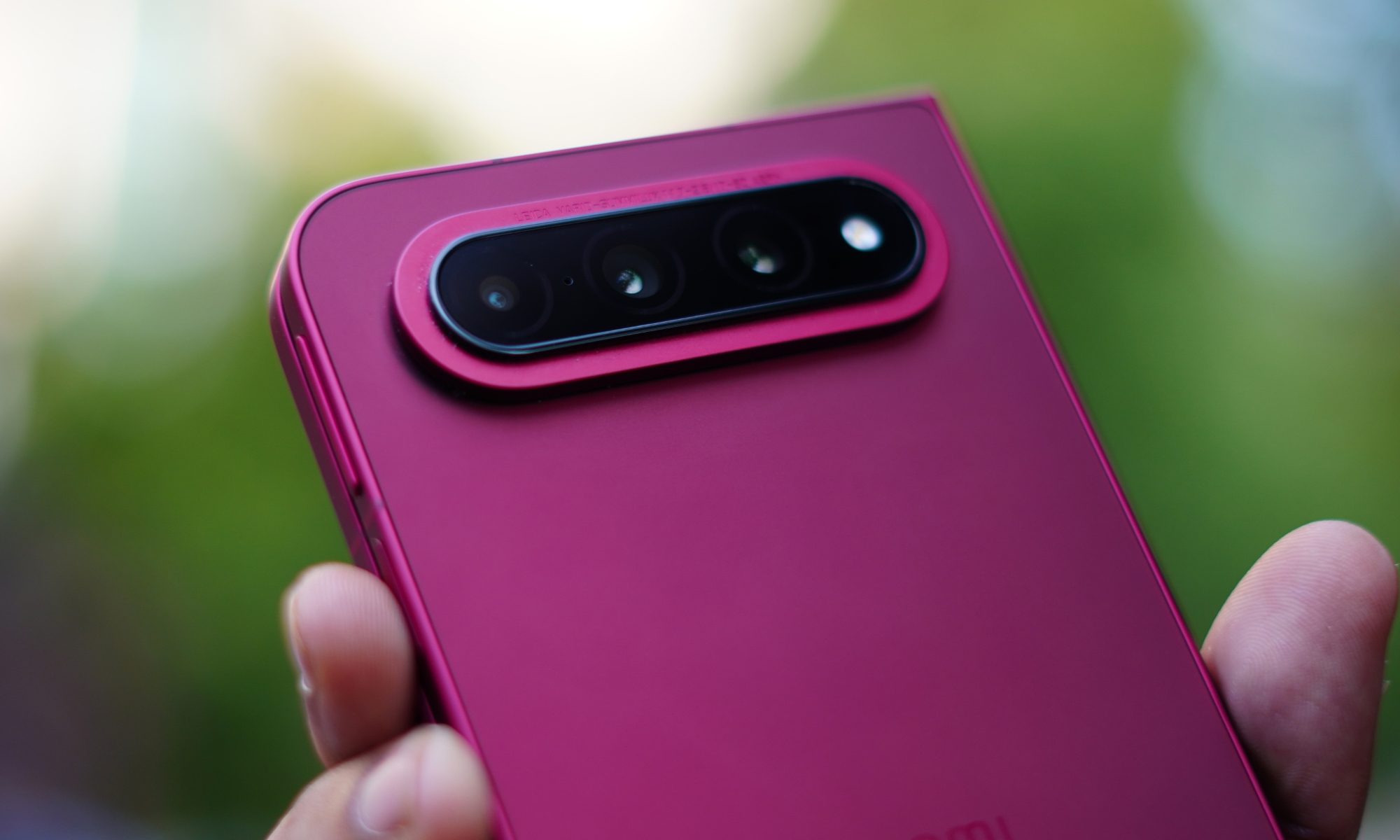
Video recording goes up to 8K at 24fps, while 4K recording is available at 30fps and 60fps with Dolby Vision. The phone can also record 1080p video at up to 960fps. There is also a 16-megapixel selfie camera on the inner display and another 16-megapixel camera on the cover screen. Both have an f/2.2 aperture and 21mm equivalent focal length.
That camera setup makes the 18 Fold feel more like a conventional flagship that happens to fold, rather than a foldable that happens to have cameras.
A 6,000mAh battery in a 5mm-thick foldable
The battery is another area where Xiaomi has gone big. The Xiaomi 18 Fold packs a 6,000mAh silicon-carbon battery. It supports 67W wired charging and 50W wireless charging, along with PD3.0 and 50W PPS support. Reverse wired charging is also supported. Again, for comparison, the Samsung S26 Ultra gets a 5000mAh battery. More so, the Fold 8 gets a 4800mAh battery.

Considering how thin the phone is when unfolded, fitting a 6,000mAh battery inside is impressive on paper. During my time with the device, the combination of the large battery and efficient 3nm chipset made the 18 Fold feel like a phone designed for heavy daily use rather than something that needs to be treated carefully to make it through the day. I usually find myself picking the 67W brick about one and a half days of usage.
It also gets stereo speakers with Dolby Atmos, while there is no 3.5mm headphone jack. The phone supports Wi-Fi 7, Bluetooth 6.0, and NFC, and Xiaomi has included NavIC alongside GPS, Galileo, GLONASS, BDS, and QZSS for positioning.
My first impression
After spending time with the Xiaomi 18 Fold, what stands out to me is that Xiaomi seems to have understood one of the biggest problems with current foldables: simply making the inner screen bigger does not automatically make it more useful.
The 18 Fold’s 2:1 inner display changes that experience. When I opened it, I immediately got a wide screen that felt natural for video playback, multitasking, and general tablet-style use. The 120Hz AMOLED panel, 4,000-nit peak brightness, and Dolby Vision support only add to that experience.

At the same time, it remains reasonably manageable when folded. The 219-gram weight is not particularly light for a conventional phone, but for a device with a 7.58-inch foldable screen and 6,000mAh battery, it does not feel unreasonable.
The cameras are also unusually serious for a foldable, with a 200MP main sensor, 50MP telephoto and 50MP ultrawide. The XRing O3 chip, up to 16GB RAM and UFS 4.1 storage complete what is essentially a flagship specification sheet.
There is, however, one big catch. A sad one.
The Xiaomi 18 Fold is currently a China-exclusive phone, which means buyers outside China may have to admire this one from a distance for now. But purely as a piece of hardware, my first impression is that Xiaomi built a passport foldable for the world but decided to make it available only in its home market, and that is a major regret.
The Xiaomi 18 Fold feels thin without feeling delicate, big without feeling unwieldy, and powerful without making a big show of it. Most importantly, the unusual wide format actually changes how I use the phone.
And after spending some time with it, I think that is exactly what a good foldable should do. It should not just give you a bigger screen. It should give you a reason to use that bigger screen.
Related coverage:
When it comes to getting your dishes clean, you have several reliable dishwasher brands to choose from that come in a variety of designs and types. Among available options, built-in dishwashers are a popular choice because they blend seamlessly with the space around them. They are also more visually appealing than a portable or countertop dishwasher. On the noise front, built-in dishwashers operate more quietly. Additionally, since they fit into an opening between cabinets, there is even less noise. But this doesn’t mean that built-in dishwashers don’t have any drawbacks. Actually, there are quite a few, and some can be a deal-breaker for many buyers.
One of the major drawbacks of built-in dishwashers is that they are typically more expensive, both in terms of upfront and installation costs. And the installation is trickier too, though it’s a one-time thing. Also, in smaller kitchens, they may take up valuable space, and because the setup is permanent, you can’t adjust the kitchen’s layout in the future without taking the dishwasher into account. More importantly, built-in dishwashers may not be suitable for renters because relocating them can be a challenge. Of course, none of this means that you shouldn’t go with a built-in dishwasher. The design has several distinct benefits, particularly for those who want a more permanent setup. But it’s still important that you understand the downsides before making a commitment.
Higher upfront costs
Among the many drawbacks of built-in dishwashers, the higher upfront costs are the most significant for the average buyer. You are essentially paying more for an appliance when a cheaper alternative may still meet your needs. Built-in and freestanding dishwashers operate pretty much the same way and use the same basic process to wash your dishes. The design is one of the main differences, and it can also increase the cost.
With built-in dishwashers, you have to find a size that perfectly fits the available cabinet space, which means you have fewer options to choose from compared to portable dishwashers. Alternatively, you can design the kitchen’s layout to align with the dishwasher, but that too is an additional expense. The cost will be even higher if a lot of modifications need to be made. Keep in mind that you are spending this extra money on a neater design and quieter operation. So, if that’s something you prioritize, it makes sense to spend a little extra upfront, given that dishwashers typically have a lifespan of 10 years.
Requires precise installation
Installing a built-in dishwasher isn’t as simple as sliding the appliance into the available space in your kitchen cabinet. There’s a lot more to do, and that’s why you will generally need a professional to install it. This increases the cost compared to a freestanding dishwasher. You will need a dedicated water supply for the inlet, a drain to discharge wastewater, and an electrical connection to power the dishwasher.
If these are not close by, this may further complicate the installation and increase the overall cost. There’s also a benefit to this. With a permanent installation, you can use the sink even when the dishwasher is running. With portable and countertop dishwasher models that connect directly to the faucet, this isn’t possible while they’re running.
The installation itself needs to be precise, with enough clearance for the dishwasher’s door to open and close smoothly. At the same time, the dishwasher should fit perfectly within the opening. You are paying more money for a neater appearance, so you wouldn’t want the result to look untidy or out of place.
Takes up permanent space
One of the biggest advantages of integrated and built-in dishwashers also turns out to be one of their most significant drawbacks: permanent installation. Despite the aesthetic appeal and added convenience, you can’t easily move them around the house or even within the kitchen itself. Once the dishwasher is installed, it stays put. That’s the way it’s designed: to integrate with your kitchen. This can be a problem since it’s not a tiny kitchen appliance that can be moved around at your convenience. Losing out on a cabinet-sized space can be a big sacrifice in smaller kitchens. With the dishwasher in place, you’ll have less storage space.
Even if you do manage to find another space for the dishwasher, you can’t ignore the existing connections for water, drainage, and electricity. They may not align with your plans for the old space. So, before you buy a built-in dishwasher, make sure to plan the layout, identify any possible problems, and only then proceed with the installation. Once the dishwasher is up and running, moving it around won’t be as easy.
Similarly, if you frequently switch apartments or will relocate in the near future, a built-in dishwasher may not be the best choice. It’s a permanent setup, and moving it from one place to another can be a hassle. Apart from that, the new home must have a suitably sized space for your dishwasher model. Otherwise, you will have to spend money on modifications.
More difficult to replace
A dishwasher is one of those household appliances that can last for years, often around 10 years or sometimes even more. So, when installing one, it’s natural to overlook how the replacement process will work out. But that’s something worth considering, especially with integrated and built-in dishwashers. When the time comes for you to shop for a new one, you will have fewer options, as the replacement needs to fit the existing space and meet the installation requirements. You can always make the necessary adjustments later, but, as you might expect, this increases the overall cost.
You should consider these drawbacks before making the final decision. This doesn’t mean you shouldn’t choose a built-in dishwasher, but it’s important to understand the downsides and the problems you might face in the future. This will help you better plan your kitchen’s layout, avoid common mistakes people make when buying and installing appliances, and pick a dishwasher model that meets your requirements.


A former U.S. Army soldier has been sentenced to 70 months in prison for hacking and extorting at least 10 U.S. technology and telecommunications companies between April 2023 and December 2024.
21-year-old Cameron John Wagenius (also known online as ‘kiberphant0m’ and ‘cyb3rph4nt0m’ ) was arrested in Texas in December 2024.
He pleaded guilty in February 2025 to hacking AT&T and Verizon after being charged on two counts of unlawfully transferring confidential phone records, and in July 2025 to multiple counts of aggravated identity theft, conspiracy to commit wire fraud, and extortion related to computer fraud.
According to court documents, while on active duty with the U.S. Army, Wagenius and his accomplices stole login credentials for the victim’s networks using the SSH Brute hacking tool he helped develop. They also used Telegram to transfer stolen credentials and plan their attacks.
“After data was stolen, Wagenius and his conspirators extorted the victim organizations both privately and in public forums. The extortion attempts included threats to post the stolen data on cybercrime forums such as BreachForums and XSS.is,” the Justice Department said.
“In other instances, conspirators offered to sell stolen data for thousands of dollars via posts on these forums. They successfully sold at least some of this stolen data and also used stolen data to perpetuate other frauds, including SIM-swapping. In total, Wagenius and his co-conspirators attempted to extort at least $1 million from victim data owners.”
In addition to the 70-month prison sentence, Wagenius was ordered to pay $294,978 in restitution for hacking into telecom companies’ databases, accessing sensitive customer records, and extorting the companies under threat of releasing stolen data unless they paid ransoms.
Two of his accomplices, Connor Riley Moucka (a.ka. “Waifu” and “Judische”) and John Erin Binns (aka “irdev” and “j_irdev1337”), were accused in November 2024 of breaching and stealing terabytes of data from more than 165 organizations using the services of Snowflake cloud storage company and demanding ransom payments to delete the stolen information and not leak it online.
Moucka was arrested on October 30, 2024, in Canada at the request of the United States and pleaded guilty to his role in the Snowflake hacking campaign in August 2026.
Data breaches linked to Snowflake attacks affected hundreds of millions of people, customers of AT&T, Ticketmaster, Santander, Los Angeles Unified, QuoteWizard/LendingTree, Pure Storage, Advance Auto Parts, and Neiman Marcus.
After these incidents led to massive data breaches, Snowflake announced it would enforce multi-factor authentication (MFA) and require customers to choose passwords at least 14 characters long.


VistaPrint specializes in custom physical and digital marketing products for small businesses, such as brochures and promotional products, along with personal products like invitations, T-shirts, business cards, and posters to meet your print and online personalization needs. Fortunately, you don’t have to pay an arm and a leg to shop for these trending products, thanks to our selection of deals for both new and returning customers.

Print memories you can hang on the wall, stash in your wallet, or just hold in your hand.
Use Top VistaPrint Promo Codes for up to 20% Off
We have a VistaPrint coupon to help you save big on personalized gifts for yourself or your loved ones. Right now, new customers get 20% off their first order of $100 or more with the VistaPrint promo code WIRED20 at checkout. Once you’ve personalized whatever you want—from greeting cards to full-size canvas prints and pillows—enter the code at checkout to save big on your purchase.
Get 25% Off with Vistaprint Promo Code for Drinkware
Custom drinkware makes a thoughtful gift for parents, alumni, or weddings. It’s also a great way to personalize your drinkware by showcasing your favorite sports team or child. Currently, you can enjoy a 25% discount on drinkware with the Vistaprint promo code SAVEVP, valid through November 8. Shop early this year and take advantage of this exclusive discount—cheers!
15% Off All VistaPrint Orders
One of the easiest ways to save at VistaPrint is to sign up for their email newsletter. Once you sign up, you’ll receive a VistaPrint promo code for 15% off your first purchase. Along with the VistaPrint discount code, you’ll also receive special offers, news about product launches and services, and new design alerts.
Use Vistaprint Business and Get 20% Off
Launching a new small business is one of the toughest, most daunting tasks a person can take on. Running a new business requires meticulous attention to detail, from big-picture items to the smallest tasks. Vistaprint wants to soften the blow a bit by offering 20% off your first order of necessary tools and products with the Vistaprint promo code NEW20. Vistaprint offers valuable tools like a business name generator to spark ideas, AI-generated help with logos, and support for visibility on Yelp. Be sure to check out Vistaprint’s tools to help launch your business, and use this Vistaprint promo code for an extra 20% off—when you’re launching a new business, every cent saved counts.
Discover More Verified VistaPrint Coupons and Discounts
There are other VistaPrint promos, such as $10 off purchases of $100 or more, $20 off $150 or more, and $50 off $250 or more. In addition to using one of our handpicked VistaPrint voucher codes, you can get 15% off your next order when you sign up for texts. VistaPrint also offers premium memberships that renew annually and are ideal for small businesses and frequent users. Members get up to 40% off products, 30% off Deposit photo subscriptions, unbranded products and packaging, and global discounts. Best of all, you can try these services free for 30 days. Be sure to check out our VistaPrint promo codes and discounts page to see the rotating discounts available.
Discover the Latest Vistaprint Postcards With Up to 30% Off
Forget the old holiday or business card and upgrade to contemporary times with Vistaprint postcards. They offer a wide range of styles to fit your business, ideas, and budget. They have a huge range of styles and sizes, from coupons to mailers, in various price points, with classic designs to contemporary styles.
Redeem Your VistaPrint Promo Code in a Few Easy Steps
Whether you’re looking for the best deal on custom VistaPrint business cards for your small business or ordering custom t-shirts for your family reunion, it’s simple to apply a coupon to your next VistaPrint order. All you have to do is copy the code and paste it in the designated field at checkout. Be sure to also look out for other trending VistaPrint deals that don’t require a code to redeem your savings on your purchase. For limited-time promotions, just add the promo item to your cart to instantly save.
Find Everything You Need With VistaPrint Custom Items
VistaPrint has been with me through the years—for thank-you cards, holiday gifts, mugs with my friends’ faces, calendars to make myself a centerfold, family photo books, wedding invitations, and subsequent divorce-party invites. What can I say? I live a charmed life—and VistaPrint has been there through it all. It has been my go-to for personalized products for the past decade, offering good prices on all my oddball creations. So stock up and discover discounts on a selection of marketing must-haves like vinyl banners, business cards, posters, custom mugs, and more. Go ahead, check it out. You know you’ve always wanted to eat off a plate or sleep on a pillow with your loved one’s face on it.
Customize Your Vistaprint Wedding Invitations This Month
Vistaprint makes it easier (and cheaper) than ever to get big printing jobs done, with the ability to personalize as much as you want. You can save big on Vistaprint wedding invitations, with 100 starting at just $90 (half off!); Letterpress Wedding Invitations, with 80 starting at $260 (25% off); and Wedding Party Invitations, with 100 starting at just $90 (50% off). Be sure to check out their expansive, customizable line of wedding invitations to see if they’re the right fit for you.
50% Off Invitations & Announcements at Vistaprint
Wedding expenses add up quickly, so Vistaprint is offering up to half off invitations and announcements, and up to 25% off celebration day-of products with the Vistaprint promo code GET50 (through December 31). This means massive savings on stationery, invites, announcements, and party supplies—huge savings on the small things that add up.

A new India-based AI Research Lab is looking at how AI can support workers as the technology continues to change jobs and labor markets. The Institute for Human Flourishing (IHF), founded by Ravi Venkatesan and led by CEO Urvashi Aneja, launched in New York on September 23 during the high-level week of the United Nations General Assembly. It will begin by studying how AI can raise incomes, expand workers’ control, and create new opportunities in India, then take its findings to other parts of the Global South. The Rockefeller Foundation, Schmidt Philanthropies, and the Government of India back the initiative.
Why IHF Is Starting With India
IHF will begin its work in India because its large, diverse workforce will allow it to study AI’s influence. Around 90 percent of the Indian workforce is informal, including farmers, craftspeople, and micro enterprises. This means AI could help those workers improve efficiency and create new opportunities by learning how to apply it effectively. However, changes in the labor market also threaten entry-level IT and BPO positions. These roles have traditionally helped workers move into the middle class in India and other countries.
Automation is also pressuring growth models that rely on relatively cheap labor. IHF believes the bigger challenge is how AI reaches workers and small businesses. Changes in how people organize work and share information will also affect its impact. Institutions will play a role in deciding who benefits from these changes. Venkatesan believes India can demonstrate how AI can support wider economic opportunities. IHF plans to connect evidence, real-world work and policy to explore this approach.
IHF’s Labs and Programs Will Study AI’s Impact on Workers
IHF plans to create three initiatives to study how AI affects workers and jobs. The Livelihoods Lab will test human-AI collaboration with workers and organizations in real-world settings. Participants will help design these projects, while IHF will publish every finding as an open public good. The AI and Jobs Observatory will track workers’ experiences as AI changes different types of jobs.
It will also develop an Index of Human Flourishing that looks beyond income. The index will measure factors such as agency, dignity, capability, and economic security. The Policy and Narrative program will turn these findings into evidence-based policy advocacy. It will also connect a Global South advisory network around shared priorities. Together, these programs will help IHF find practical ways for workers and smaller businesses to benefit from AI.
Tech
Rainbow Six Tactics game director says Ubisoft moved away from the ‘smoke and mirrors’ experience and Mario + Rabbids helped it understand ‘the metrics of tactics’

- Rainbow Six Tactics game director Martial Potron says Mario + Rabbids helped the team understand “the metrics of tactics”
- He says it borrowed the “DNA” of the series, and it was a different experience from working on Ghost Recon
- Potron adds that he had to change his developer habits when working on
- Rainbow Six Tactics
Rainbow Six Tactics game director Martial Potron has said the development team borrowed the “DNA” of the studio’s turn-based game series, Mario + Rabbids, for tactical level design inspiration.
“Mario + Rabbids helped us shape some parts,” Potron told TechRadar Gaming in a recent interview about the upcoming Siege spin-off. “The team, especially the level design team that came from Mario + Rabbids, really helped us to understand the metrics of tactics.”
The game director explained that, instead of keeping in line with the series’ first-person style, the team chose a turn-based tactics genre because it felt that Rainbow Six’s DNA is already “tactical.”
Latest Videos FromTechRadar
Speaking more on inspiration, Potron explained that some of the “core rules” for him as someone who worked on Ghost Recon are to design an experience that players would expect; “smoke and mirrors,” as he puts it, in terms of lethality or enemy behaviors to “make the experience cinematographic,” but the turn-based tactics genre is different.
“In tactical, everything is very precise,” he said. “It’s pure. It’s like chess. So we had to change a bit of our mindset to adjust to this philosophy.”
Poltron continued: “This is a bit of a paradigm shift for us in terms of habits. It’s 15 years of my habits that I need to shift.”
Rainbow Six Tactics launches in 2027 for PC, PS5, Xbox Series X, and Xbox Series S.

Follow TechRadar on Google News and add us as a preferred source to get our expert news, reviews, and opinion in your feeds. Make sure to click the Follow button!

The best gaming consoles
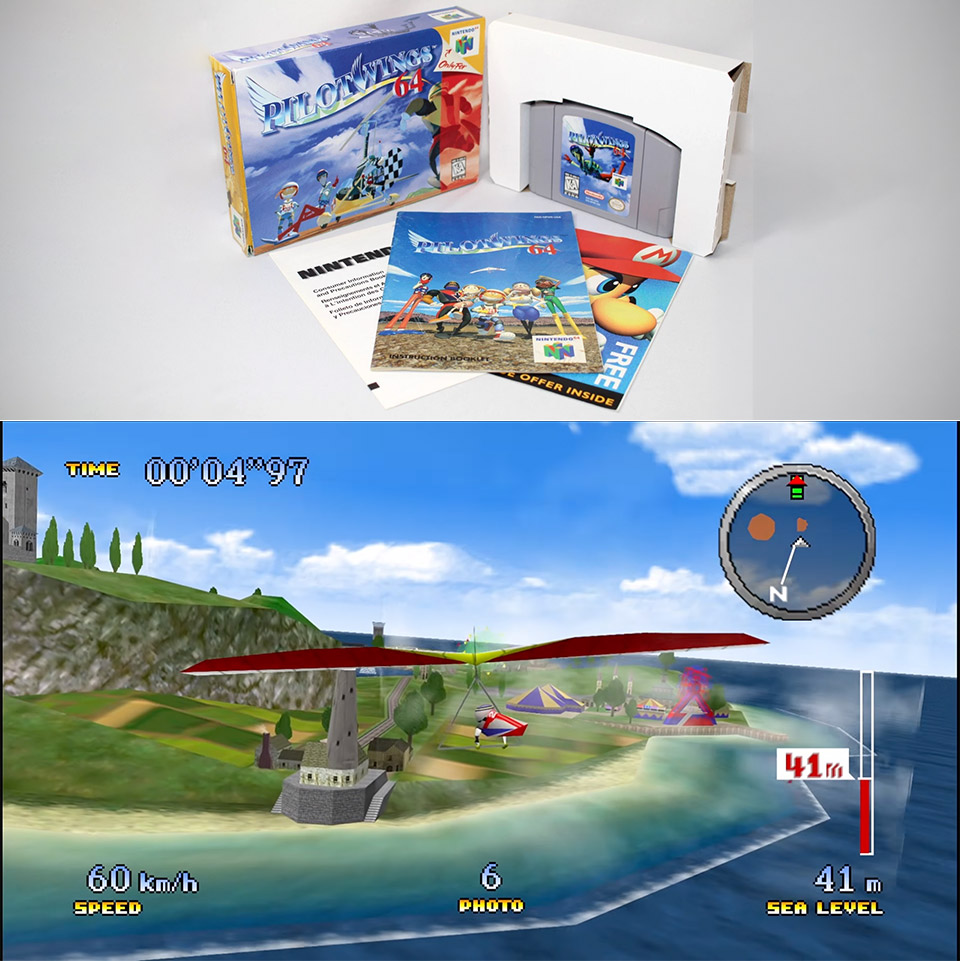
Nintendo 64 owners spent 1996 lining up hang gliders over Little States and hoping the analog stick would forgive a late flare. Nearly thirty years later, Pilotwings 64 Recompiled puts that same flight school on Windows and Linux as a native program you launch like any other PC game.
Static recompilation is the method that enables this project. Two crucial tools, N64Recomp and N64ModernRuntime, handle the heavy lifting, transforming the original machine code from the N64 into a PC executable that runs on your computer, with RT64 handling the graphics. This is all built on Garrett Smith’s remarkable decompilation work, which finally reached a full code match in April 2026, providing all subsequent builders with a very handy guide to what each and every part of the game code is doing. You can see how all the vehicles, menus, save screens, and so on fit together, and then, in mid-September 2026, an independent developer took that work and turned it into a playable game on Windows and Linux, with the first release being 0.1.0, followed by the 0.1.1 hotfix, and Claude has been assisting with patches, tools, documentation, and even the art.

When you launch the game, the first thing you notice is the widescreen mode. The view fills your current monitor, and all of the interface elements are neatly arranged at the screen’s edges. The old black border that used to cut off the image has been removed, and matrix interpolation now kicks in, providing silky smooth animation that matches your display’s refresh rate, even with all of the camera cuts and fast motions. You no longer have to go through those long, long menu stalls that used to take up to 6 seconds, because they now simply snap from one screen to another.

The launcher includes all of the settings you need to customize the graphics, sound, and even mods. You can use either a keyboard or a controller, so don’t worry about the fact that the original N64 pad doesn’t work well on modern desks. Every vehicle and bonus level are included, as are the game results panels and save system. There is some footage that showcases some of the important improvements, such as rocket belt hovers that now respond to minute throttle adjustments, gyrocopter runs that are readable even at high refresh rates, and ring courses that are no longer cut off by the old 4:3 window.
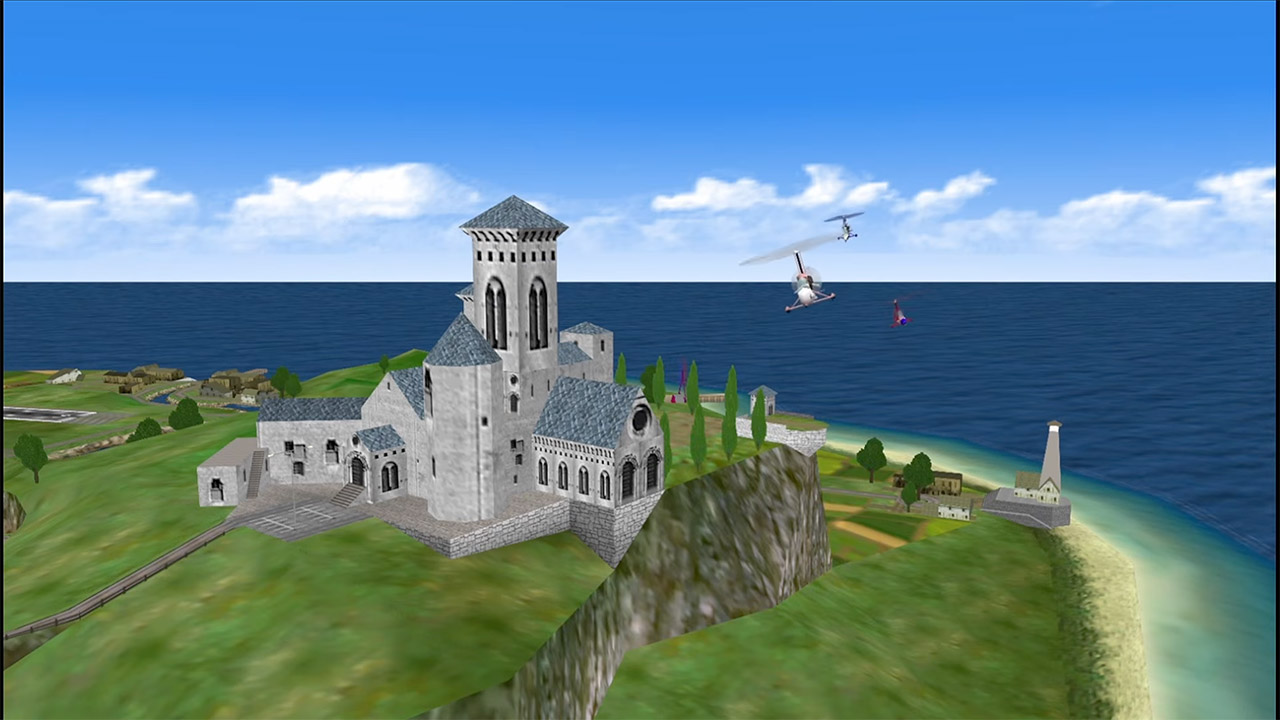
The cartridge data itself is not included since you must first locate a USA dump of Pilotwings 64 with a specific SHA-1 code and refer the launcher to it. The project is MIT licensed, and the runtime is GPL-3.0, so everything works out well. On the other side, running the Linux version requires a Vulkan driver, and macOS is not supported. There are a few things that don’t work as well as they could, such as the quick camera motions, which can get slightly out of sync at low frame rates because the camera is right inside every object’s math. Changing the aspect ratio when viewing the photo album simply blanks out the pages until you close and reopen it, though the 0.1.1 hotfix resolved a problem in which the photos were drawing twice as large as their spaces. Then there’s the interpolation on a true 120 Hz display, which still need some time to perfect, and the Linux packages were, ironically, produced on WSL2.
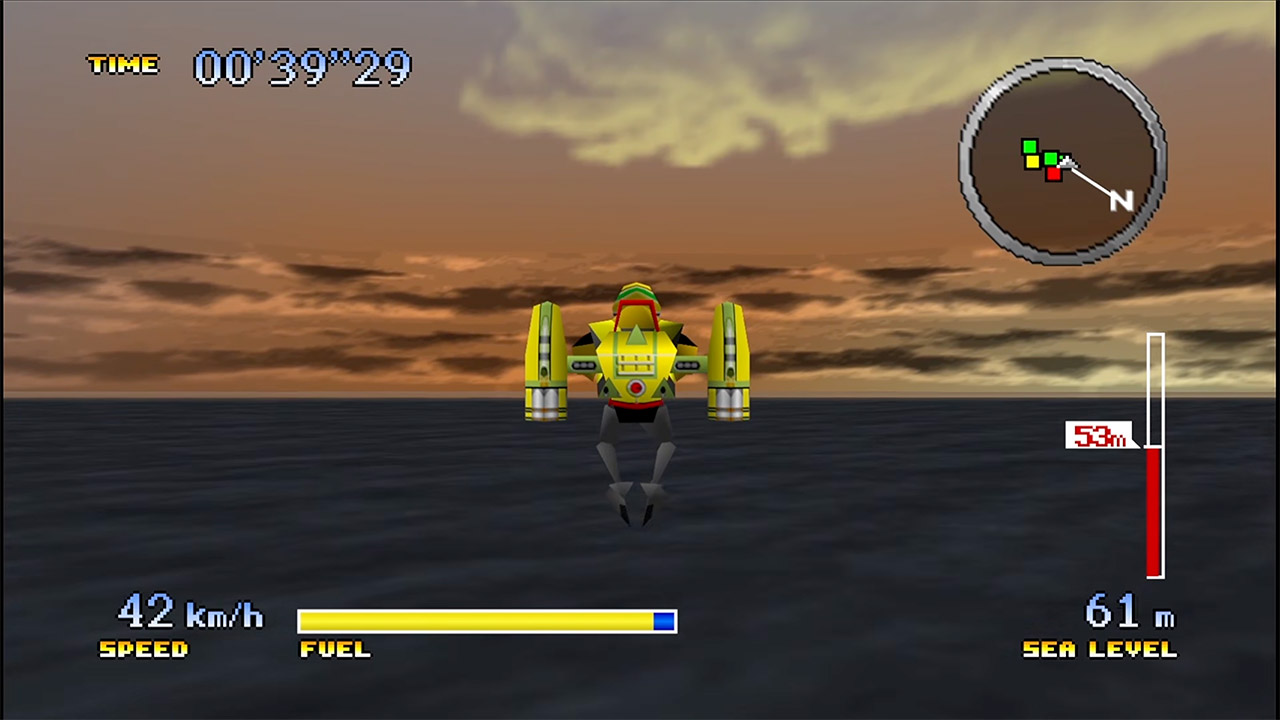
For anyone who spent their childhood playing on that old cartridge, the draw is immediate. Hang glider approaches, rocket belt landings, and gyrocopter passes look fantastic on a modern widescreen, yet the old game continues to function properly. The builds can be found on GitHub under danielgomesvieira2000/pilotwings-64-recomp. Simply download your own USA dump, select a controller setup that feels right, and take another trip around Little States.
[Source]


The Cybersecurity and Infrastructure Security Agency (CISA) has ordered U.S. government agencies over the weekend to secure their systems against attacks exploiting two critical Citrix NetScaler vulnerabilities.
Citrix released security updates to address the flaws (tracked as CVE-2026-88771 and CVE-2026-88772) days after national cybersecurity agencies, IT suppliers, and security teams began privately contacting Citrix customers and advising them to shut down their NetScaler appliances.
For instance, the Dutch National Cyber Security Center (NCSC-NL) reportedly warned organizations in the Netherlands about two critical NetScaler zero-days without CVE IDs that allowed threat actors to place shellcode directly into memory.
On Sunday, Citrix confirmed active exploitation of the two vulnerabilities in zero-day attacks and urged customers to patch their systems immediately.
Both flaws allow unauthenticated attackers to gain remote code execution on vulnerable NetScaler appliances. The first affects all NetScaler ADC and NetScaler Gateway deployments with default configurations, while the second requires DTLS to be enabled (Citrix noted that DTLS is toggled on by default on VPN virtual servers).
“Exploitation of CVE-2026-88771 and CVE-2026-88772 on unmitigated NetScaler deployments has been observed. Citrix strongly urges affected customers to install the relevant updated versions as soon as possible,” the company warned in a Sunday blog post that has a ‘noindex’ meta tag which tells search engines not to index the page.
“These vulnerabilities vary by deployment configuration and enabled features, and include issues that could allow remote code execution, denial of service, HTTP request smuggling, policy bypass, and TCP initial sequence number prediction under specific conditions.”
Citrix has also shared what it describes as “generic Indicators of Compromise” through NetScaler Console to help security teams identify NetScaler deployments that may have already been compromised. However, it also warned that these IoCs “might be of limited forensic value and might fail to identify actual compromises” and advised customers “to retain the services of experienced forensic investigators.”
Currently, threat watchdog Shadowserver tracks over 23,000 IP addresses with NetScaler fingerprints exposed on the Internet (including nearly 22,000 NetScaler ADC appliances and just over 1,500 Gateway instances). However, there is no information on how many are honeypots, have already been patched, or have vulnerable configurations.

On Sunday, CISA also added CVE-2026-88771 and CVE-2026-88772 to its Known Exploited Vulnerabilities (KEV) Catalog and ordered Federal Civilian Executive Branch (FCEB) agencies to secure all vulnerable Citrix appliances by September 30, as mandated by Binding Operational Directive (BOD) 26-04.
“Given the potential consequences of successful exploitation and the fact that malicious actors are exploiting at least some of these vulnerabilities, CISA urges users and administrators to review Citrix’s advisories,” the cybersecurity agency warned.
“If possible, users are encouraged to check for indication of compromise prior to patching. Citrix has made indicators of compromise available through NetScaler Console and published additional guidance. Should your organization suspect compromise, it is important to preserve forensic evidence prior to applying updates, as updates may result in loss of forensic visibility.”
These two flaws are just the latest of several other Citrix vulnerabilities that attackers have exploited in the wild since the start of the year.
In March, Citrix urged admins to patch two other NetScaler flaws (CVE-2026-3055 and CVE-2026-4368) days before threat actors began abusing them in attacks. More recently, in early September, attackers began exploiting a NetScaler authentication bypass (CVE-2026-19490) patched in mid-August.
Since November 2021, CISA has flagged 26 actively exploited Citrix vulnerabilities, including six abused by ransomware gangs.
Join Mikko Hyppönen and security leaders from the NFL, CHANEL, and Atlassian for a two-hour digital summit on what AI-speed attacks change, what defenders should stop doing, and how to validate, decide, fix, and re-validate at machine speed.
Why you can trust TechRadar
We spend hours testing every product or service we review, so you can be sure you’re buying the best. Find out more about how we test.
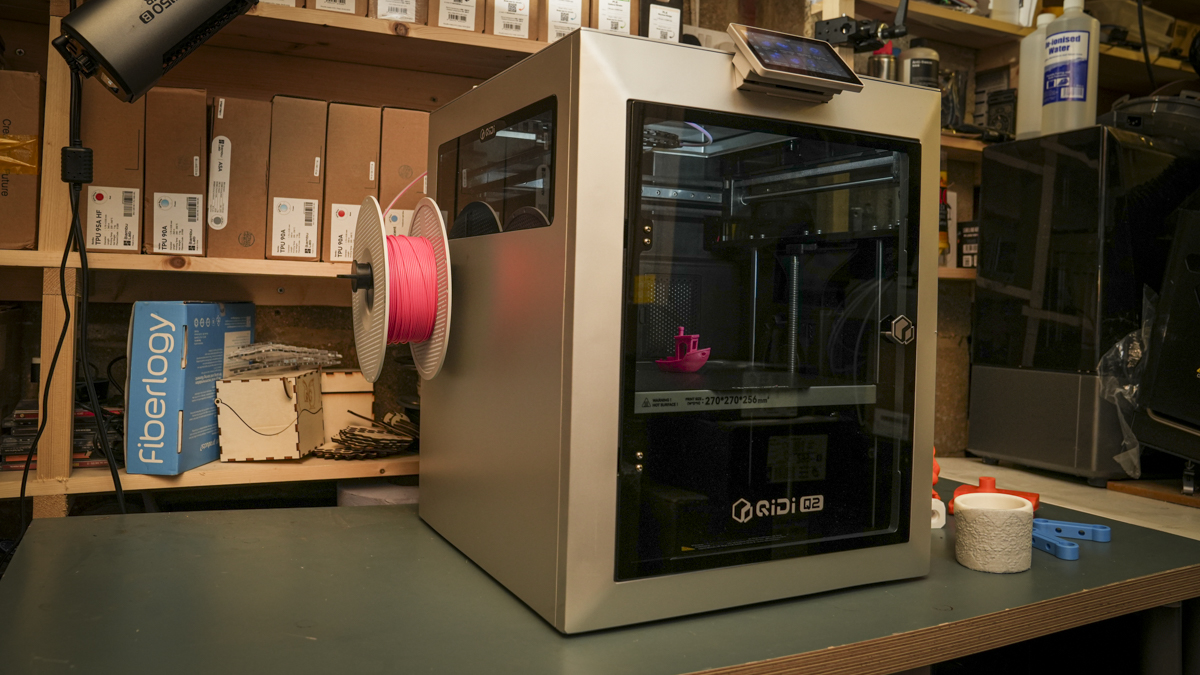
Removing the Qidi Q2 from the box, I was instantly pleased to see that this new machine reflected everything that I have liked about the Qidi Plus4 machine that I looked at a couple of years ago. However, this is a smaller version with a footprint that is better suited to smaller workshops and studios.
Once again, it’s easy to write off these machines. Qidi , while in the business for as long as many of the big-name brands, just isn’t as well-known, and their machines just don’t have that spark of innovation that we see from the likes of Prusa Research, Bambu Lab, Creality, Elegoo or AnyCubic; however, above all, bar possibly Prusa, Qidi have reliability.
It’s been a busy few months, and the Q2 review has been a long time coming. It’s essentially been sitting, printing for 6 months without issue or fuss: switch on, print, whichever material I need for any given job, usually PLA but ASA, ABS and PETG-CF, same reliability, same print quality.
Latest Videos FromTechRadar
The main issue is that when a machine starts to blend in, just works as part of the workshop and now classroom you don’t tend to think of it as anything other than having always been there, and that really sums up the Qidi , while it may not have the cutting edge features, what it does have is absolute refinement and reliability.
As I have found in both a business and an educational environment, reliability is far more important than any headline speed figures, multitool changers, or other cutting-edge features when all you need to do is print.
QIDI Q2 3D Printer: Design

Positioning the 402 x 438 x 494mm frame of the Qidi Q2 onto the workbench was something of a relief; the past three printers and laser engravers have all recently gone for scale, so to have something smaller and quite as neat and robust as the Q2 to move around is a welcome break. While it is smaller, it still offers a decent print area of 270x270x256; this will enable you to print most objects you’ll need for prototyping, although cosplay props and helmets will require the models to be split and produced in parts.
One of the key points for me was that the Q2 comes in at 18.1kg, so while that is still quite weighty, it’s not up to the backbreaking weight of many of the other new machines, which in smaller workshops means that it’s easy to move and store when needed.
The construction is all good and solid, and with the CoreXY mechanics and the full-metal frame it all feels a little more robust than some of the other printers that I have tested recently. I also like the fact that it, which has been product-designed, is more in line with workshop machinery, so slips into that environment neatly.
In the print workroom, which is where the Qidi machines tend to end up, the Q2 has sat alongside the larger Plus4 handling the smaller props prints and artworks that we’re required for the run-up to summer. The quality, speed and ultimately reliability have made this, alongside the other Qidi machine, a valuable addition.
All the features that are essential for education, especially, are here, with the fully enclosed construction which keeps students’ fingers away from the heated internal chamber and, more importantly, the hot end.

The interface is also extremely straightforward, with the 4.3-inch touchscreen making it easy to navigate. What I liked was that the calibration is automatic, so once the machine is set, you can just leave it.
The auto bed levelling with the standard dual-sided textured PEI build plate meant that there were few, if any, misprints, and once prints cool, they’re easy to remove.
When it comes to the build, the Qidi has been designed as a solid and reliable part of the studio, and a printer that blends in rather than standing out and demanding constant attention.
QIDI Q2 3D Printer: Features

Taking a look at the Q2’s features, while impressive, it positions this fully enclosed printer at entry level these days, which, compared with printers just a couple of years ago, shows just how far the technology has progressed.
The fully enclosed design gives the machine its premium look and feel and houses the CoreXY motion system using heavier-weight 1.5GT belts, with linear guide rail used rather than rods on the X-axis and dual independent lead-screw motors controlling the Z-axis. These are all features that ensured Bambu Lab’s position when they launched, and now even in this entry-level machine they’re a standard.
Toolhead speed is 600mm/s, fast but not unusual at this level, with acceleration of up to 20,000mm/s². Compared with the old Cartesian machines, this is impressive, but with many machines now reaching 1000mm/s, it puts this machine’s print speeds at a reliable and steady pace.
The machine is shipped with QidiSlicer, which, as with most slicers these days, is a derivative of Prusa Slicer, although here it has been heavily adapted to enable ease of use. What I liked through the test is that the default profiles are solid and well tested. If you’re new to 3D printing, then it’s just a case of selecting your filament type and the software then the machine sorts the rest. Through this test, I stuck to these default profiles, and the consistency with the QIDI and other manufacturer filaments was superb.
The print volume is 270 x 270 x 256mm, which is a decent size, with most standard 3D printers offering around the 250 x 250 x 250 mm volume. The platform itself is an aluminium-substrate heated bed topped by a removable dual-sided textured PEI plate with a bed temperature that can reach 120°C.
The standard hotend nozzle impressively reaches a temperature of 370°C, meaning that out of the box the bimetal 0.4mm nozzle is equipped to deal with engineering materials. As one feature point that really highlights the direction of the QIDI 3D printers, it uses a direct-drive extrusion system with hardened-steel gears, again built for durability and maximum filament support.
As I mentioned, the 0.4mm bimetal nozzle is fitted as standard; however, if you want to swap it out for something else, then there are 0.2, 0.6 and 0.8mm alternatives available. While you can print with abrasive materials as I did through the test, there is a Tungsten Carbide nozzle available which will last far longer.
The material compatibility list is extensive, with the usual PLA, PETG and TPU, and support for ABS, ASA, PA and PC. The BiMetal nozzle will also print carbon- and glass-fibre reinforced polymers, although this is where I would invest the additional £60/$60 for the Tungsten Carbide hotend.
The Q2 is a fully enclosed machine with active PTC chamber heating system that can push the internal temperature up to 65°C; this is ideal for materials such as ABS, ASA and engineering polymers. The heat around the print enables better control over warping and other print problems for these more advanced material types.
There are several points around the engineering materials that are worth knowing before you start using them on this printer. While it can print with them out of the box, if you’re going to be using carbon-fibre or nylon on a regular basis, I would invest in a filament dryer and that hardened hotend.
Looking at a few of the features that have been introduced that actually make this machine an interesting option for small studios and education are additions such as the G3 pre-filter, H12 HEPA filter and coconut-shell activated-carbon filter. These essentially take out some of the fumes and smaller particles that some of the more advanced materials can make.
The Q2 uses hands-free automatic levelling with a load-cell sensor integrated directly into the hotend. The nozzle itself can therefore be used during the levelling process, removing the need for a separate offset probe.
Specs
Print Technology: Fused Deposition Modelling (FDM), CoreXY
Build Area: 270 x 270 x 256mm
Minimum Layer Resolution: Dependent on nozzle/profile
Maximum Layer Resolution: Dependent on nozzle/profile
Dimensions: 402 x 438 x 494mm
Weight: 18.1kg
Bed: Aluminium heated bed, up to 120°C
Print Surface: Dual-sided textured PEI plate
Software: QIDI Studio; compatible with third-party slicers including OrcaSlicer and PrusaSlicer
Materials: PLA, ABS, ASA, PETG, TPU, PA, PC and carbon/glass-fibre reinforced polymers
Print Speed: Up to 600mm/s; acceleration up to 20,000mm/s²
In everyday use, the important point is that calibration is straightforward and, once complete, I’ve found little reason to start making manual fine adjustments.
That’s exactly what I want from a machine being used in education.
The purpose of the printer is to make things. If you’re continually adjusting the printer itself, something has gone wrong with that relationship.
Other advanced features include the 1080p resolution camera that enables you to monitor prints and create time-lapse sequences; this camera is now AI-enhanced, so it will spot defects automatically.
More standard features, including WiFi across a 2.4GHz connection, Ethernet and USB, are all available, and the 4.3-inch, 480 x 272 touchscreen enables you to easily switch through settings.
QIDI Q2 3D Printer: Performance

After having the relative complexity of the multi-filament machines over the last year, it’s actually quite nice to go back to the simplicity of a single filament. There is the option to go multifilament, but in this review I’m just looking at the base machine, and as the first few prints finished, I was instantly impressed by the quality of the PLA prints.
As I ran through the stock models that had been provided and then the additional test prints, the quality and speed were consistent. This is a mid-speed printer, and while it’s not as fast as some of the machines I’ve looked at recently, at this price the speed and quality are well balanced.
What is apparent is that, consistently and unusually due to the volume of printers and engravers that have been coming through the workshop, this machine has been printing consistently for six months without issue. This is part of the reason that I’ve delayed the review: firstly, waiting for the Qidi Box, and secondly, it just became a part of the workshop that was in constant use.
This reliability has been seen with the other QIDI printers that I’ve used, with the Plus4 now having been run for almost two years in the college; it’s the one printer of many that has consistently worked and meets the safety requirements.

Checking the quality of the prints and the first layer after the auto calibration is always slow and precise, and at no point have I had to make any adjustments to that initial calibration height.
The prints also hold firm during printing, and if printing multiple prints across the heated bed, they all stick firmly through the process, releasing easily when the platform cools.
What was also apparent was that after a six-week break at the college, where the machine has sat mostly unused, all it took to get it back into action was to power it on. A quick bench test, and the machine was printing perfectly.
Taking a look at the benchmark tests, the results were impressive.
QIDI Q2 3D Printer: Print quality
Dimensional accuracy – score of 4
Target 25 = X: 24.90mm / 0.10mm Error | Y: 24.87mm / 0.13mm Error
Target 20 = X: 19.88mm / 0.12mm Error | Y: 19.80mm / 0.20mm Error
Target 15 = X: 14.90mm / 0.10mm Error | Y: 14.93mm / 0.07mm Error
Target 10 = X: 9.89mm / 0.11mm Error | Y: 9.78mm / 0.22mm Error
Target 5 = X: 4.88mm / 0.12mm Error | Y: 4.89mm / 0.11mm Error
X Error Average = 0.11
Y Error Average = 0.146
X&Y Error Average = 0.128
Fine Flow Control – score of 5
Fine Negative Features – score of 5
Overhangs – score of 5
Bridging – score of 5
XY resonance – score of 2.5
Z-axis alignment – score of 2.5
Adding up the totals gives a final score of 29 out of 30.
QIDI Q2 3D Printer: Final verdict

The review of this 3D printer has stretched over a far longer period than most, with the machine being set up and used for the last six months. While the pricing places this at the entry level, the build quality and reliability make it clear that this machine strikes a careful balance.
It gives you a standard out-of-the-box machine that is a reliable tool in the workshop, and if you work in education or have a small business or design studio, then that is exactly what it provides.
The Q2, used as a single-filament machine as I have looked at it in this review, offers a solid, no-fuss approach and huge support for a good range of materials. Key features include the CoreXY design, cooling system, filter and fully enclosed design that enable everyone from a complete beginner through to professionals to have a machine that will be reliable and easy to use.
The Qidi software is again well thought out, and the stripped-down approach again makes it an ideal option for those who are new to 3D printing; the machine connection and the slicing workflow are all well thought through.
This might not be a machine that shouts. out with the latest features and cutting-edge additions, but instead it refines this style of machine perfectly. If you want more, then there are the other hotend options, and there’s the QIDI box for multifilament printing.
Essentially if you need a no fuss, solid and reliable 3D printer then the Qidi Q2 is a great option, while there is the multifilament option at present as a single filament machine it’s a great price and close to perfect for what it is.
Should You Buy the Qidi Q2 3D printer?
Swipe to scroll horizontally
| Row 0 – Cell 0 | Row 0 – Cell 1 | Row 0 – Cell 2 |
|
Value: |
Excellent value with a fully enclosed design and robust build that should last for years |
4.5 |
|
Design: |
Relatively compact design, with expansion options and built-in filters |
4.5 |
|
Features: |
Heated chamber, filtration and multi-material expansion future-proof the machine |
4.5 |
|
Performance: |
Six months of reliable printing highlighted just how refined this machine is |
5 |
|
Total: |
Compact, capable and exceptionally reliable all make this a great choice for education. |
4.5 |
See what I rate as the best 3D printers you can buy based on my workshop tests

Tech2 minutes ago
Action Retro Boots a Working Macintosh on the Pico Micro Mac v3

Politics3 minutes ago
The House | Unison’s Andrea Egan: I’m Not Rejoining Labour Until The Party Inspires Me

Sports4 minutes ago
How to Watch Cardinals vs. 49ers: TV Channel, Live Stream, Time





-

 Fashion3 days ago
Weekend Open Thread: J.McLaughlin – Corporette.com
-

 Crypto World5 days ago
Goldman Sachs and Deutsche Bank Agree: The S&P 500 Rally Isn't Over
-

 Fashion4 days ago
8 iPhone Accessories That Add Personality
-

 Tech9 hours ago
OpenAI is preparing “o,” an always-on ChatGPT assistant that could handle email
-

 Entertainment5 days ago
These 17 Fall Amazon Dresses Seriously Look Like Anthropologie
-

 Tech5 days ago
Reolink’s solar 4K security camera falls to its lowest price in months
-

 Crypto World5 days ago
This Bearish Netflix Stock Trade Can Cash In On Video Streaming Giant’s Woes
-

 Crypto World6 days ago
Trump-Xi Polymarket Odds for Handshake Hit 50%
-

 Tech7 days ago
Google’s $899 Googlebook is a bet that you’ll buy a new laptop for Gemini
-

 Crypto World4 days ago
Crude Oil Prices Pressured by Diplomatic Hopes in the Middle East
-
 Business5 days ago
Oil Price Today (September 23): Crude oil below $100 on hopes of US-Iran talks. What did Trump say?
-

 Crypto World4 days ago
Bitcoin price tests $83,600 Supertrend support after $87K rejection
-

 Crypto World4 days ago
Bitcoin Threatens Sub-$84,000 Breakdown as Long Liquidations Spike
-

 Crypto World5 days ago
BitGo says Bitcoin absorbed Fed hike, CLARITY failure
-

 Crypto World6 days ago
Meta Jumps 11% As Muse Shines and Investors Show an Appetite for Advancing AI
-

 Crypto World5 days ago
Did Jim Cramer Just Give GameStop Stock the Kiss of Death When He Said the Turnaround Is Working?
-

 Crypto World6 days ago
Trump, Xi Meet on S&P 500's Best Day Since Early August: Will Markets Stay Bullish?
-
 Tech5 days ago
UiPath’s Dines says AI needs a manual and launches Cartographer to write it
-

 Tech7 days ago
Amazon blocks Meta’s Muse AI assistant in new standoff over agentic shopping
-

 Crypto World7 days ago
Strategy Adds 950 BTC for $76M, Funds $174M STRC Buyback
You must be logged in to post a comment Login