Switching phones is always a gamble. You expect something new, something exciting – maybe even something better. And to be fair, the Galaxy S26 Ultra delivers on that promise in many ways. It is one of the most technically impressive smartphones available today, packing a 6.85-inch 2K LTPO AMOLED display with a 120Hz refresh rate, peak brightness reaching up to 2,600 nits, and Qualcomm’s Snapdragon 8 Elite Gen 5 chip, which offers roughly a 10–15% performance boost over its predecessor.
But after spending time with it, I found myself in a strange position. The more I appreciated what Samsung had built, the more I started missing my iPhone 17 Pro.
The Privacy Display has got some real trade-offs
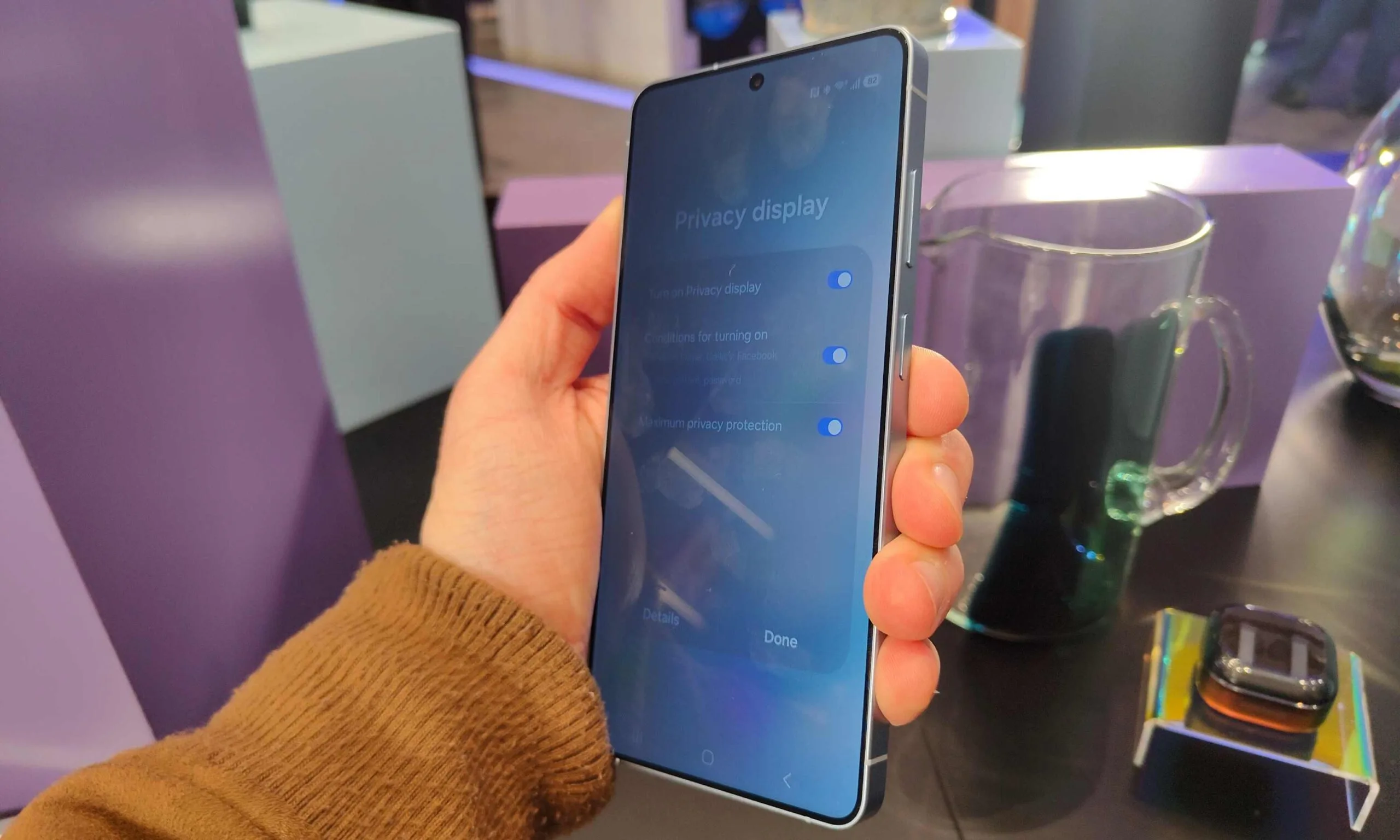
The standout feature this year is easily Samsung’s Privacy Display. It uses pixel-level light control to restrict viewing angles, effectively making your screen unreadable from the sides. In theory, it’s brilliant. In practice, it’s genuinely useful – especially in public spaces like flights or metros where shoulder surfing is a real concern.
Samsung deserves credit here because this isn’t just software trickery. It’s hardware-driven innovation, and that’s increasingly rare in modern smartphones.
Advertisement
The Samsung Galaxy S26 Ultra, angled for its Privacy Display.Tom Bedford / Digital Trends
But the moment you turn it on, the compromises become clear. The display dims noticeably, color accuracy takes a slight hit, and the overall viewing experience feels constrained. This is particularly noticeable because the S26 Ultra’s panel is otherwise one of the brightest and most vibrant in the industry.
And that’s when the contrast hits you.
Apple doesn’t offer a privacy display. But it also doesn’t introduce features that degrade the core experience. The iPhone approach is slower, more conservative – but also more refined. You don’t get experimental features, but you also don’t deal with their trade-offs.
Camera improvements that don’t change the outcome
On paper, the S26 Ultra’s camera system sounds upgraded. The main sensor now features a wider f/1.4 aperture, while the telephoto sits at f/2.9, theoretically improving low-light performance. The phone retains its triple 50MP setup, including a periscope zoom lens.
In isolation, the results are excellent. Photos are sharp, bright, and social-media ready.
Advertisement
iPhone 17 ProUnsplash
But compared to the S25 Ultra, the differences are minimal. In most real-world scenarios, you would struggle to tell which phone took which shot unless you were actively looking for it. Even benchmark comparisons and side-by-side tests suggest that the improvement is incremental rather than transformative.
Tom Bedford / Digital Trends
Meanwhile, the iPhone continues to excel in areas that matter day to day – video consistency, color accuracy, and optimization for apps like Instagram and Snapchat. Apple’s computational photography may not always push boundaries, but it delivers predictability.
Samsung is innovating. Apple is refining. And more often than not, refinement wins in daily use.
Performance and AI: Powerful, but overwhelming
There is no denying the raw power of the S26 Ultra. The Snapdragon 8 Elite Gen 5 delivers top-tier performance, and the device handles everything – from gaming to multitasking – effortlessly. But the real focus this year is AI.
Samsung has packed the phone with features: AI image editing, generative fill, object insertion, writing assistants, real-time translation, and contextual suggestions through tools like Now Brief or Now Nudge. These features are technically impressive, but they come with limitations. AI-generated images often output at lower resolutions – which doesn’t match the phone’s native display. Editing images can reduce quality by up to 20–30%, making them less practical for long-term use.
Digital Trends
More importantly, many of these tools feel optional rather than essential. They are features you try, not features you rely on.
And over time, that starts to feel exhausting.
Advertisement
The iPhone, by comparison, takes a different approach. It integrates AI more quietly, focusing on tasks that improve existing workflows rather than introducing entirely new ones. It does less – but it does it more consistently.
The irony of it all
The S26 Ultra didn’t make me dislike Android. It reminded me why I liked iOS.
Because while Samsung is experimenting with bold features – privacy displays, AI tools, camera tweaks – Apple is focusing on stability, consistency, and polish. And that difference becomes more noticeable the longer you use both. The features you admire aren’t always the ones you miss.
My final take
The Galaxy S26 Ultra is an exceptional device. It is powerful, innovative, and packed with features that push the boundaries of what a smartphone can do. But using it didn’t feel like an upgrade in my daily life. It felt like stepping into a different philosophy. And sometimes, that’s enough to make you realize that what you value isn’t innovation for its own sake – but how seamlessly everything fits together.
Advertisement
And in that regard, I found myself missing my iPhone 17 Pro more than I expected.
Apple is preparing to overhaul Siri at WWDC 2026 in ways that go well beyond a simple feature update, and we’ve just had our first look at the redesigned UI.
Bloomberg’s Mark Gurman has published an early preview of the company’s redesign of the iPhone’s interface, placing its Gemini-powered AI agent at the centre of everyday use.
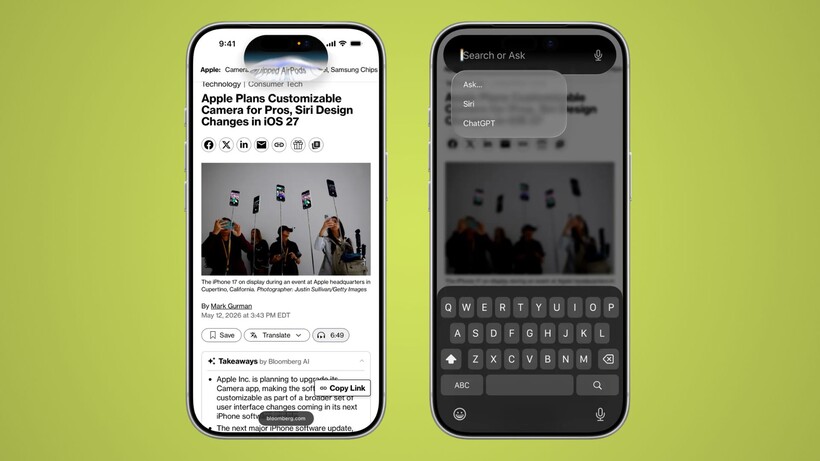
The redesign moves Siri into the iPhone’s Dynamic Island, where it will remain accessible via voice, the power button, or a new downward swipe from the top centre of the screen that opens a “Search or Ask” interface drawing on elements from iOS 26‘s existing Search experience.
That interface brings together familiar features like Siri Suggestions alongside new functionality, with Gurman reporting it will support app launches, text messages, calendar appointments, note searches, and more, with results surfacing in a rich text card that expands directly from the Dynamic Island.
Advertisement
Image Credit (Bloomberg)
Advertisement
Swiping further down opens a full chatbot-style conversation view inside a dedicated Siri app, which Apple intends to position as a direct competitor to ChatGPT and Claude, supporting text and voice input alongside photo and document uploads and persistent conversation history.
Interface and camera changes
To accommodate Siri’s new prominence, Apple is moving Notification Centre access to a pull-down from the top left of the screen, a small but consequential shift that reflects how central the assistant has become to the iPhone’s navigation logic.
Image Credit (Bloomberg)
Camera and Photos also see significant changes, with a new mode set to replace Visual Intelligence by combining Google reverse image search with third-party AI analysis, while the Photos app gains Reframe and Extend tools that use AI to alter image perspective or generate content beyond a photo’s existing frame.
Underpinning all of it is a Siri that can search the web and draw on-screen context and personal data to complete tasks, with Gurman noting the assistant will be able to cross-reference a user’s calendar availability before scheduling anything.
All of that remains subject to change, however, with Gurman noting Apple tests multiple designs internally and the final version shown at WWDC on 9 June could differ from what Bloomberg has illustrated, with a release expected as early as September.
The European Commission has announced its second fine ever against an international company for violating the Digital Services Act. Temu, the controversial Chinese online marketplace for low-cost products, was found to have played a role in the sale of illegal goods that could have harmed consumers in the European Union. Read Entire Article Source link
AI is everywhere now, or at least that is what the industry keeps telling us. It is in browsers, search engines, image editors, office suites, developer tools, Windows, phones, and soon enough, probably your toaster. But there is a difference between AI being available and AI becoming part of your… Read Entire Article Source link
The AI movie Dreams of Violets is the creation of Ash Koosha and his brother Pooya. As for the direction, writing, and production of this movie, the two brothers created the film as part of their production company Fountain 0. At the time of its production, Ash was in London, and the movie took about three months to make, with a production budget of just $2,000.
Yes, everything had been created using AI; at first, Ash recorded some temporary voices for the characters before taking various methods to translate text into an animation sequence. Kling AI had the responsibility of translating still images into video footage with the help of Claude. The twin brothers also used their own technology at Fountain 0 to keep the characters consistent throughout scenes as well as to make camera movements look natural.
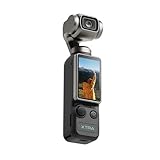
Cinematic-Style Footage – Experience the power of Xtra Muse’s 1-inch CMOS sensor, capable of recording breathtaking 4K resolution videos at 120fps…
Ultra-Steady Shooting – No more shaky videos! Xtra Muse’s advanced 3-axis gimbal camera stabilizer ensures exceptional smoothness. Enjoy smooth…
Effortless Framing – Enjoy Xtra Muse’s expansive 2-inch touch screen, and switch between horizontal and vertical shooting effortlessly.
The story is set in Tehran in January 2026. It is based on actual reports, images, and accounts from persons who observed the protests, which were greeted with violent force by the authorities and resulted in major bloodshed. The film tells the narrative of five strangers who find themselves in the same dead-end alley before dawn, trapped between forces closing in on them. A soldier stumbles across them, while a child named Amir watches over them from a window in his wheelchair.
Advertisement
According to Ash Koosha, it was a very personal project for him, because he and his brother had to flee from Iran in 2009, but nowadays the news becomes really important because it’s very hard to receive trustworthy reports while you have no communications and everything around is unknown to you. The movie itself is rather a fiction based on reality, because Ash wanted to concentrate on the human aspect of the matter, and not on the chaos itself.
The Tribeca Festival elected to include Dreams of Violets in their main schedule, and it will screen in New York on June 10th as part of a run that begins June 3rd and ends June 14th. Festival co-founder Jane Rosenthal was amazed by how they were able to blend new technology with the strength of the tales being told, and she believes it’s an excellent example of how technology is being used to deliver stories that we really need to hear right now. [Source]
I used to say that all my best days started with waking up in a sleeping bag. Waking up in a sleeping bag usually means you’re out there somewhere, doing something interesting. In the past couple of years, though, I’ve found myself waking up out there to wonderful days spent doing interesting things, but without a sleeping bag in sight. Instead, I’m sleeping in what thru-hikers and ultralight redditors call a quilt.
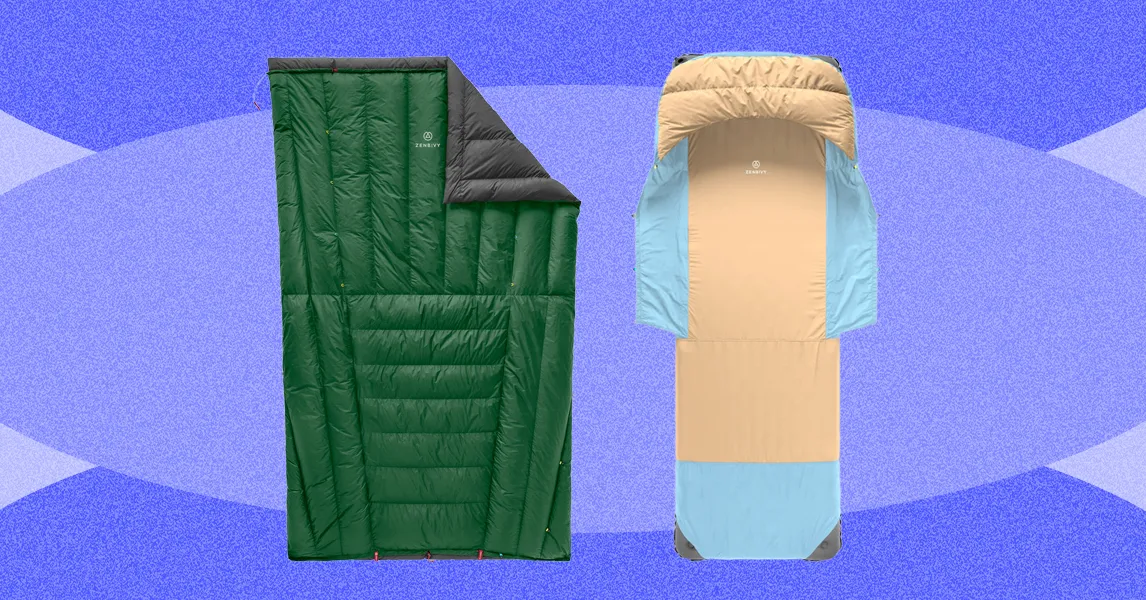
This is not a quilt like the one your grandmother gave you. Backpacking quilts are made of nylon and filled with down like a traditional sleeping bag. The difference is that they lay over you like, well, a quilt, rather than wrapping all the way around you like a sleeping bag. The benefit is twofold: A quilt is lighter, meaning less weight to carry in your pack, and, as an added bonus, I sleep better than I ever have in the backcountry.
Mummified
Let’s face it, there’s a reason backpackers have nicknamed sleeping bags “mummy bags.” They’re constricting at the best of times, suffocating at the worst. I don’t know about you, but for me, there’s nothing about a mummy that I want to emulate, not even when I’m sleeping. I was, therefore, as well primed as anyone to jump on the quilt bandwagon when it really began to take off a few years ago. And yet, I didn’t. Perhaps it was something like Stockholm Syndrome; I’d finally accepted the mummy thing and was, honestly, a little nervous to give up my sleeping bag for a quilt. But then I did, and I’m never coming back. Or mostly never coming back.
But first, what’s the difference between a sleeping bag and a quilt? As briefly noted above, the quilt goes on top of you, rather than all around you like a sleeping bag. Consider the burrito vs. the taco. In this case, the sleeping bag/quilt is the tortilla and you are the filling. Would you rather be wrapped up like a burrito? Sleeping bag. Prefer the obviously superior experience of the taco, with its warm, soft tortilla lying on top of you? You’re (potentially) a quilt person.
Advertisement
The science here is that when you lie down in your traditional sleeping bag, the weight of your body forces most of the down fill off to the sides. The down left under you is so compacted you’re not getting any real insulation from it anyway—so why carry that extra nylon and down around? Enter the quilt. Quilts get rid of the bottom layer of useless nylon and down, and lay over you like the quilt on your bed at home. Quilts typically weigh less than sleeping bags and pack down smaller, making them very popular with backpackers trying to reduce weight and save space.
While I think the weight savings make quilts a great choice for anyone looking to carry a lighter load, how much you love a quilt over a sleeping bag will depend somewhat on how you sleep. If you’re a taco person, and the thought of having a sleeping bag wrapped up like burrito gives you the sweats just thinking it, the quilt is your happy, happy future. Or, if you like to curl up in a ball, move around a lot at night, are a side sleeper, or want to share covers with your tent mate, then again, the quilt is for you.
If you rarely move around at night, sleeping somewhat like a mummy, then you might not mind a traditional sleeping bag and wouldn’t share my enthusiasm for the quilt.
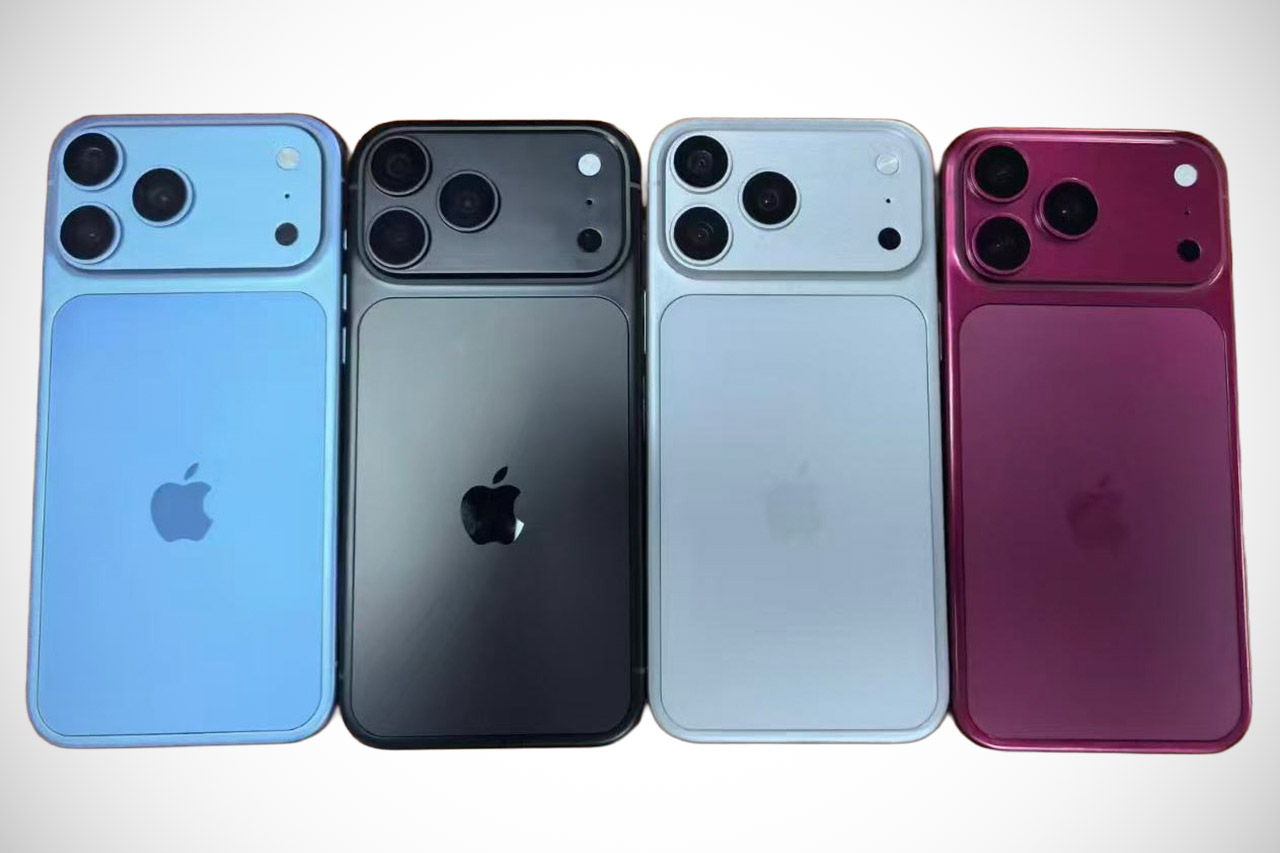
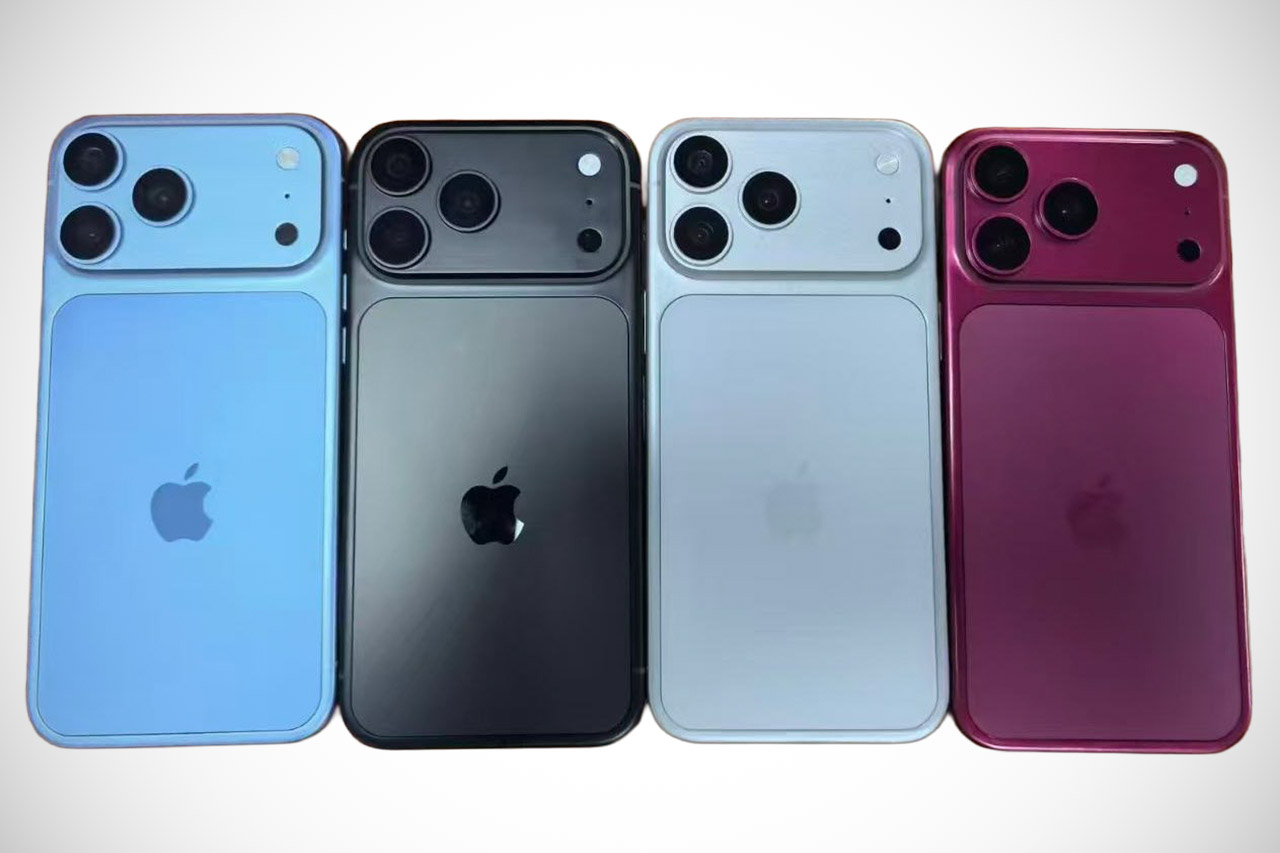
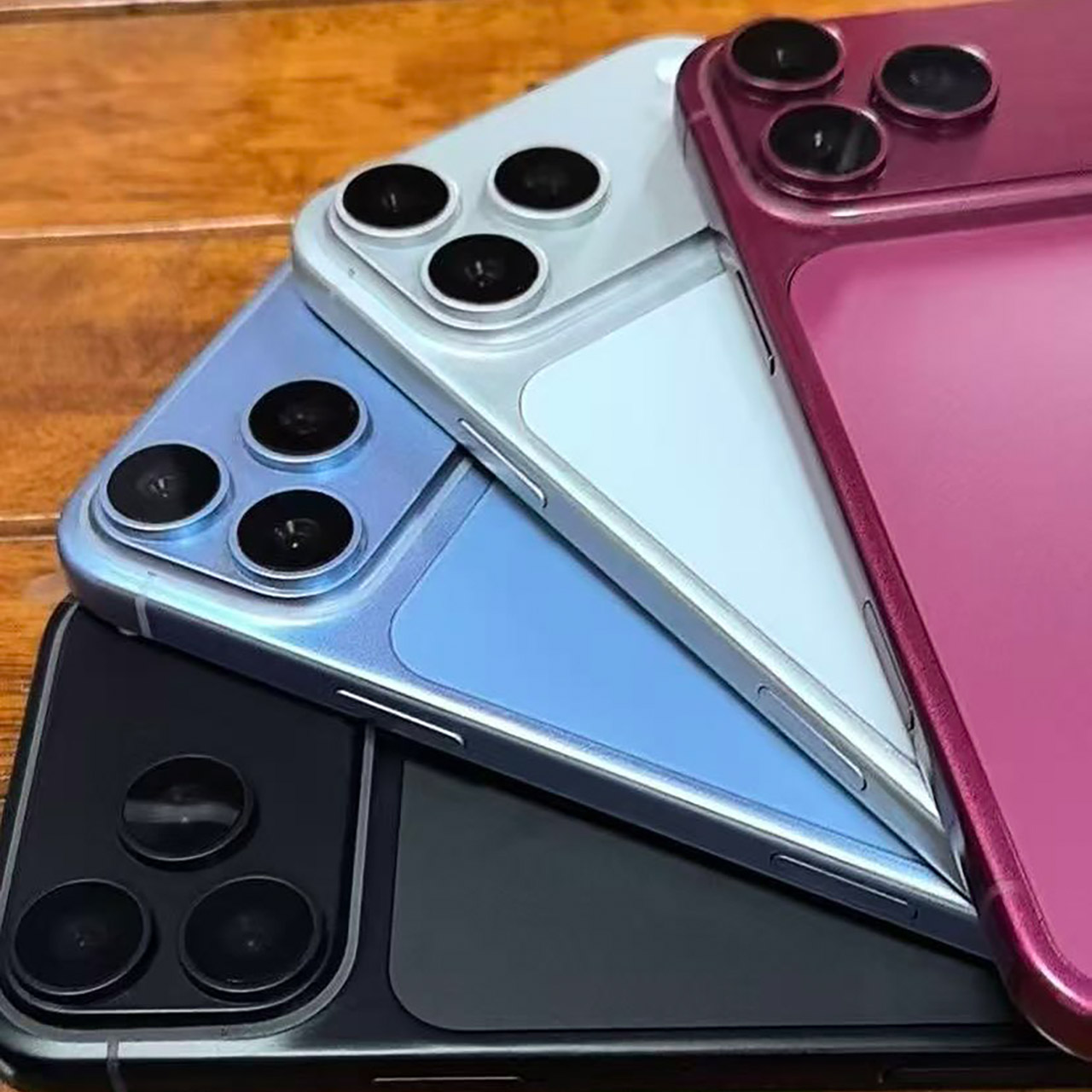
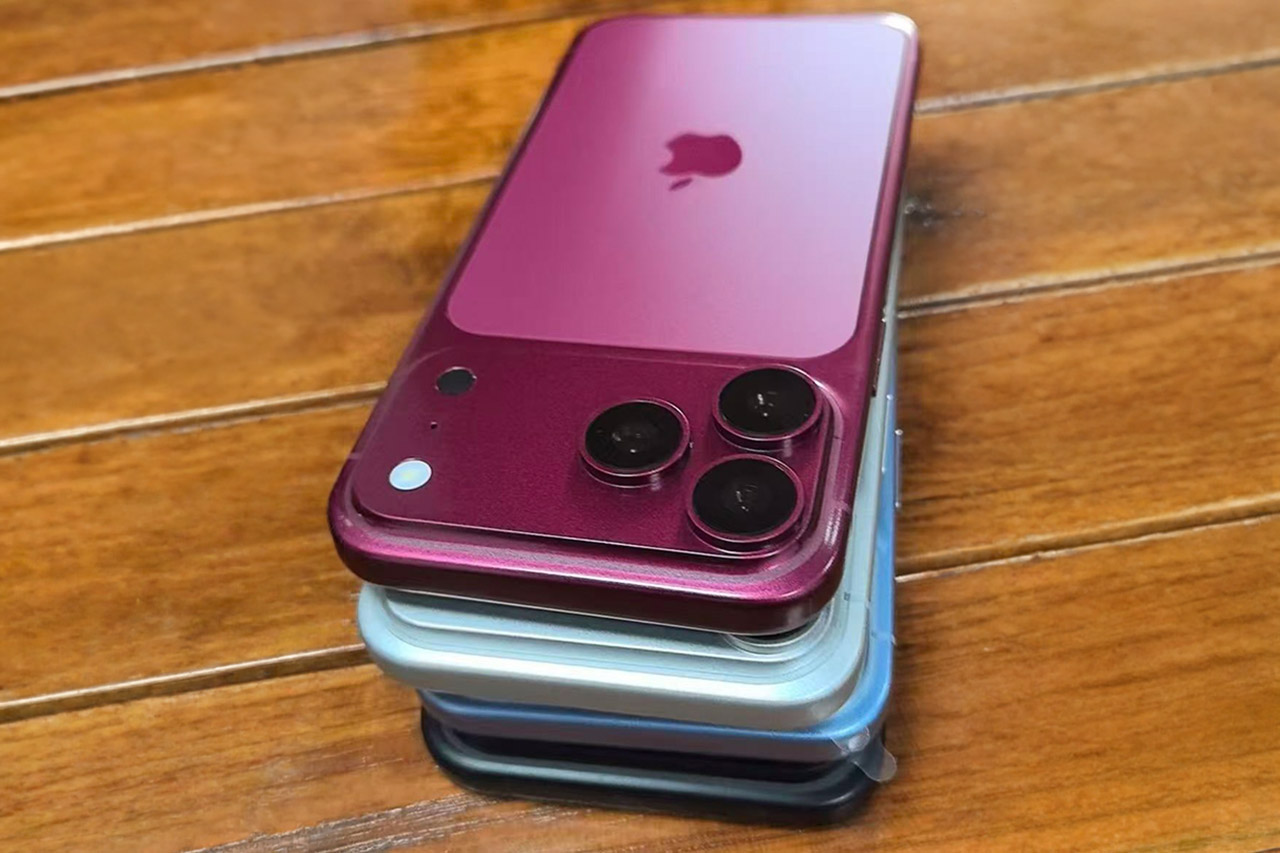
Photo credit: Sonny Dickson Images shared this week by longtime leaker Sonny Dickson give the first clear look at the finishes Apple appears ready to offer on the iPhone 18 Pro. Four dummy units sit side by side, each finished in a different shade and built to the same overall shape as last year’s Pro model. Four color choices stand out clearly in the shared photos.
Dark Cherry appears to be a deep, rich color with an almost wine-like depth that can shift to a purple-tinged hue depending on how the light hits it. Light Blue gives off a gentler, more airy vibe, similar to the misty hue of the former base model Sierra Blue finishes or the more traditional era finishes. Silver is back in a very straightforward metal finish, while Dark Gray steps up as the new black option, with its dark finish sitting very close to the deep blue from the iPhone 17 Pro and the classic Black Titanium look from the iPhone 16 Pro days, as anyone who has missed the black option in recent years should be very happy to hear it is back.
Lightweight Wearable Design – Weighing just 54g, this body camera mounts easily to a cap or headband. Capture hands-free POV shots while staying…
Vivid Clarity & Fluid Motion – The 1/1.3″ sensor and 4K/60fps [1] capture rich, smooth footage. Use this vlogging camera on dim forest trails or…
Uninterrupted Storytelling – Extending total runtime to 220 minutes [2] with the Vision Dock, this small action camera covers long hikes or rides…
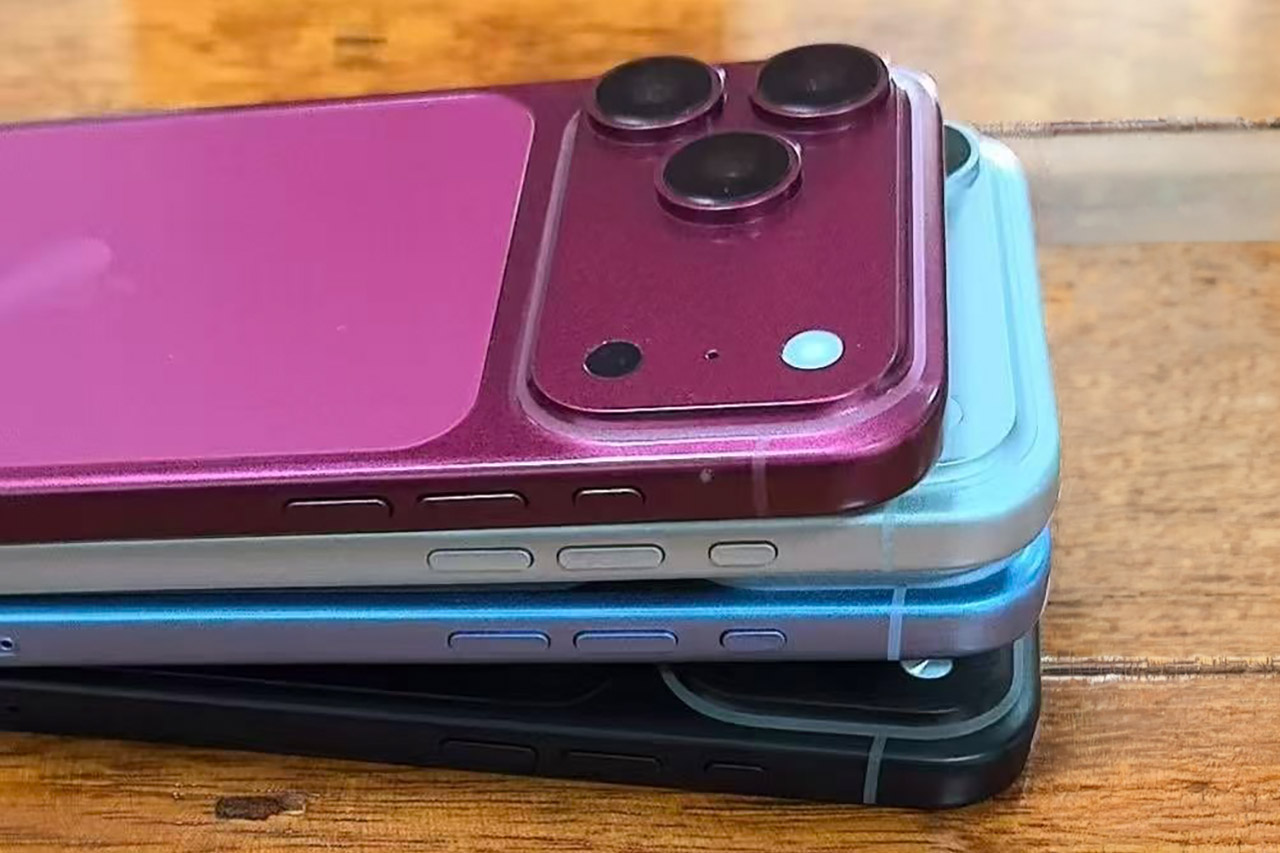
Taking a closer look at the camera area reveals some subtle changes. The rectangular glass strip beneath the primary camera bar has been tweaked to match the surrounding metal frame much better than previously, and it now rests somewhat higher on the body. These improvements are minimal, but they are quite helpful to case manufacturers since they provide them with the exact measurements they need to get started right away. The remainder of the fake units are based on the same layout as the 17 Pro, and it’s nice to see that button placement, port locations, and proportions are all accurate.
As is customary, dummy units like these exist primarily for accessory makers to test their designs and ensure fit and finish before receiving real production units. History suggests that Apple’s color options are occasionally trimmed shortly before they hit shops, so one of these hues (Dark Cherry, Light Blue, or the original black) may yet be removed before the phones arrive in the autumn.
The iPhone 17 Pro was available in Cosmic Orange, Deep Blue, and Silver, but the new version replaces the deep blue with Dark Cherry and Light Blue, as well as the new Black. These early versions already provide a solid indication of what to expect, allowing case makers to finalize their designs and purchasers to determine which one will best suit them months before the official release. With a September launch date now seeming certain, we have a better sense of what colors to expect, although we wouldn’t be surprised if the Ultra, is released before the big day.
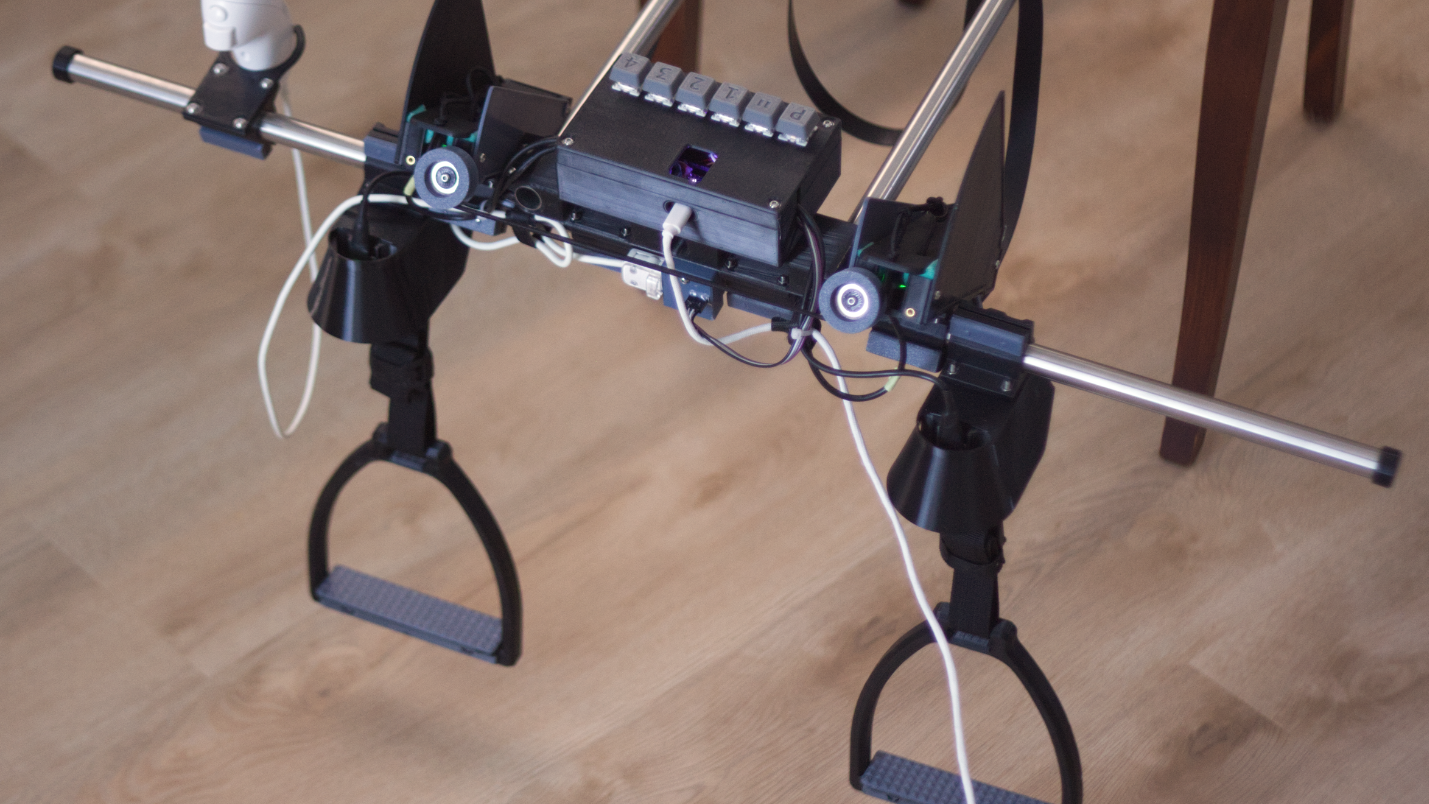
Many simulator-style games have their own dedicated controllers, from racing sims with pedals, steering wheels, and shifters to flight sims which have their own joysticks and sometimes entire cockpits. But for how prevalent riding horses is in a wide array of video games from Red Dead Redemption to Zelda to The Witcher we’re not sure we’ve ever seen a controller built specifically for riding virtual horses, at least not until [Squalius] built this horse riding controller.
[Squalius] has been working through a few prototypes of his OpenRidingController and has a fairly complete riding setup now, complete with reins and stirrups for controlling one’s in-game companions. The reins are attached to infrared distance sensors which can send analog signals to the game for controlling steering, and are attached to each other through an elastic band to provide a more realistic feeling when both are pulled to ask the horse to stop. The stirrups can be pulled to tell the horse to move at various speeds, and although a horse doesn’t need to be commanded to jump in real life, this controller provides a method for jumping an in-game horse as well.
Although we’ve mentioned a few games famous for using horses already, [Squalius] also added a handheld joystick to enable his controller to be used in less-conventional games like Minecraft where the player can use a mod to add a horse, and has also used his controller to play DOOM as well. As its name suggests it’s also open source and the code for it is all available on the project’s GitHub page. It’s a type of controller we didn’t realize we were missing until now, and perhaps we would have expected to see one before something like a controller meant for a virtual trombone.
IOI’s Hitman roots are clear from the very beginning of First Light, but they become even more apparent once you reach the end of spy school. First you have to infiltrate a crowded night club to track down a suspect, which hearkens back to a handful of classic Hitman levels. The game’s scale becomes truly apparent in the second mission, where you’re looking for a former MI:6 agent in a boutique hotel (which also happens to be holding a chess tournament). The hotel itself is massive, immaculately designed and filled with dozens of guests and attendees, many of which are involved in scripted routines or conversations. This one portion of First Light’s clockwork pocket universe feels more alive than many soulless open world games.
It’s not quite an immersive sim like the Dishonored games, but in true Hitman fashion, you can accomplish your objectives in multiple ways. Just don’t expect to go in guns blazing. In most scenarios, First Light‘s “License to Kill” feature prohibits you from firing on enemies unless they pull their guns first. It’s really just a reminder that you’re not playing a cold-blooded assassin, and it encourages you to spend your time stealthily moving around environments and taking down enemies silently.
The game is thankfully more forgiving than Hitman if you blow your cover, where doing so could alert the entire map and force you to re-load a save. If an enemy spots Bond, you can just beat them down or slam them into nearby surfaces. Things get more complicated if multiple enemies see you, but you can still proceed with your mission once you take care of them.
While First Light remains relatively grounded most of the time, it wouldn’t be a Bond game without a few elaborate set pieces. You’ll find yourself parkouring through London skylines (a nod to Casino Royale’s opening), having fist fights where you’re crashing through multiple floors and plowing through cars in a garbage truck. There are also a handful of shootouts where you’ll have to mow down dozens of enemies, which offer visceral thrills but also quickly feel repetitive.
Advertisement
IOI has clearly spent more time thinking about stealth than large-scale action, and it’s sometimes tough to tell where you need to go when 20 people are shooting at you. I replayed the first major shootout, which took place in an airport, around 10 times before I found a survivable pathway. (For the easily frustrated, you can also reduce your difficulty level on the fly.)
Perhaps it was just a result of flying through the game for this review, but it was hard to ignore pacing issues throughout First Light. As the action and nefarious conspiracy escalates, the game gets bogged down by extended stealth sequences, fetch quests and half-hearted boss fights. They don’t ruin First Light’s overall experience, but it definitely feels like it could use some narrative tightening.
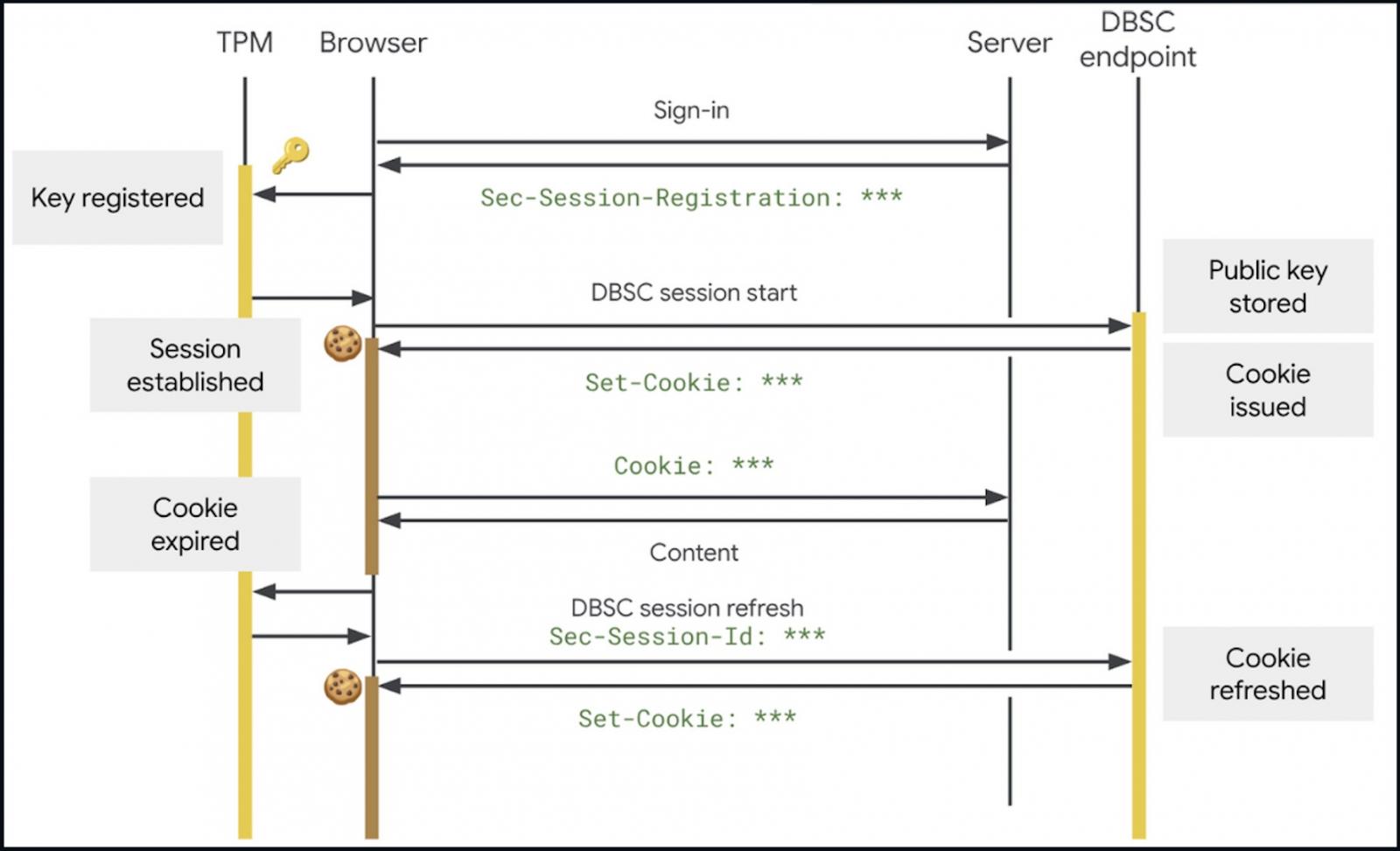
Google says the Chrome Device Bound Session Credentials (DBSC) security feature is now generally available and is rolling out to all users to prevent account takeovers.
Available in beta since April, DBSC was first announced in 2024 as a way to cryptographically bind session cookies to a specific device, preventing hackers from using such stolen cookies to bypass multi-factor authentication (MFA) and hijack users’ accounts.
DBSC works by cryptographically linking user sessions to the hardware, such as their computer’s security chip (e.g., the Trusted Platform Module (TPM) on Windows and the Secure Enclave on macOS).
Since the unique public/private keys used to encrypt and decrypt sensitive data are generated by the security chip, they cannot be stolen, preventing attackers from using stolen session cookies.
Advertisement
“DBSC fundamentally changes the web’s capability to defend against this threat by shifting the paradigm from reactive detection to proactive prevention, ensuring that successfully exfiltrated cookies cannot be used to access users’ accounts,” Google said in April.
“DBSC strengthens account security after users are logged in and helps bind a session cookie — small files used by websites to remember user information — to the device a user authenticated from. Even if malware was present on the user’s device, DBSC reduces the risk of session theft and makes it meaningfully more difficult for malicious actors to exploit stolen session cookies,” it added this week.
How DBSC works (Google)
The feature is now rolling out to all Google Workspace customers, Workspace Individual subscribers, and users with personal Google accounts.
Google added that it will be enabled by default for all Google Workspace customers upon rollout and that administrators cannot disable it.
In the past, threat actors have abused the undocumented Google OAuth “MultiLogin” API endpoint to generate new authentication cookies after stolen ones expired.
Advertisement
The Lumma and Rhadamanthys information-stealing malware operations have also claimed that they could restore expired Google authentication cookies stolen in attacks to gain access to infected users’ Google accounts.
At the time, Google advised customers to remove malware from their devices and recommended enabling Chrome’s Enhanced Safe Browsing security mode to defend against phishing and malware attacks.
However, the new Chrome Device Bound Session Credentials (DBSC) security feature should effectively block malicious actors from abusing such stolen cookies, as they will not have access to the cryptographic keys required to use them.
Automated pentesting tools deliver real value, but they were built to answer one question: can an attacker move through the network? They were not built to test whether your controls block threats, your detection rules fire, or your cloud configs hold.
This guide covers the 6 surfaces you actually need to validate.
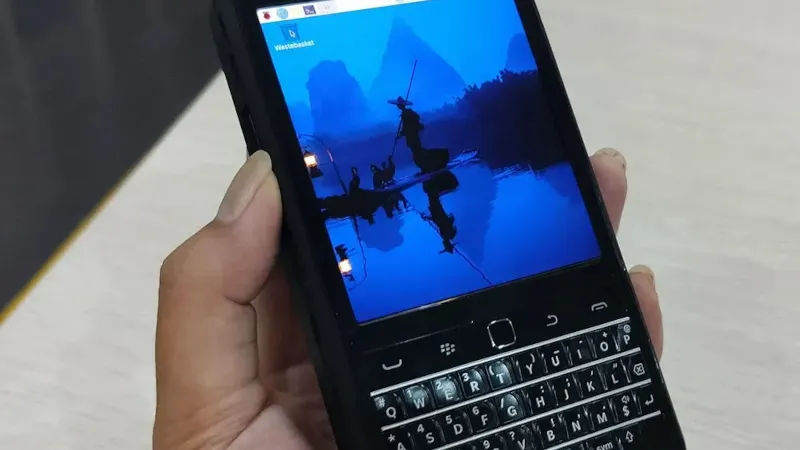
Ever since the first Linux capable single-board computers came out, there have been projects turning them into handhelds. The Raspberry Pi Zero and in particular the Compute Modules are ideally suited to this. While there are more common projects that find their way into our feed we’ve certainly seen a few of them in our time, enough now that a new one has to be special to really catch our eye. Which brings us to the PiBrick from [Ahmad Amarullah], which sets the bar pretty high.
The device is a Compute Module 5 smartphone sized computer with a 3.92″ OLED touch display and the ubiquitous BlackBerry-derived keyboard. It’s drawn together with a PCB that holds all components and peripherals, and this and the 5000 mAH battery fit in a 3D printed shell that gives it the form factor of a chunky smartphone. You can see it at the link above, and also find it in a GitHub repository.
Handheld computers always represent something of a compromise as they can only ever offer relatively small screens and keyboards. But they live or die on their versatility and robustness, both of which this one has in spades. We like it, a lot.












































You must be logged in to post a comment Login