When taking macro photographs, you often need just a tiny bit of controlled motion — so little that it’s tough to pull off by hand. To address this, [Salveo] designed a small open-source macro photography slider featuring an anti-backlash handle.
Macro photography gives you an extremely shallow field of view, sometimes under 1 mm of depth, in which subjects stay in focus. To combat this, it’s common to capture multiple images while sliding the camera forward or backward, then combine them for a much larger depth of field than a single shot provides. [Salveo]’s slider gives fine control over this focus-stacking process, with the knob even marked to show every 1 mm of linear travel.
The slider is built around a 150 mm linear rail, though it could easily be lengthened or shortened to suit your needs. A T8 leadscrew, paired with anti-backlash nuts, translates the knob’s rotation into smooth linear motion. The knob itself uses a custom-designed anti-backlash mechanism to ensure the slider works cleanly in either direction.
Advertisement
You can grab all the 3D-printable files as well as the full bill of materials from the project page. Be sure to check out [Salveo]’s build video below. Thanks [Tim L.] for sending in this awesome open-source slider. Be sure to check out some of the other macro photography projects we’ve covered, too.
Scammers are sending fake “Notice of Default” traffic violation text messages impersonating state courts across the U.S., pressuring recipients to scan a QR code that leads to a phishing site demanding a $6.99 payment while stealing personal and financial information.
This new campaign started a few weeks ago, with someone sharing a text targeting New York residents with BleepingComputer, and many other people reporting similar texts online for other states, including California, North Carolina, Illinois, Virginia, Texas, Connecticut, and New Jersey.
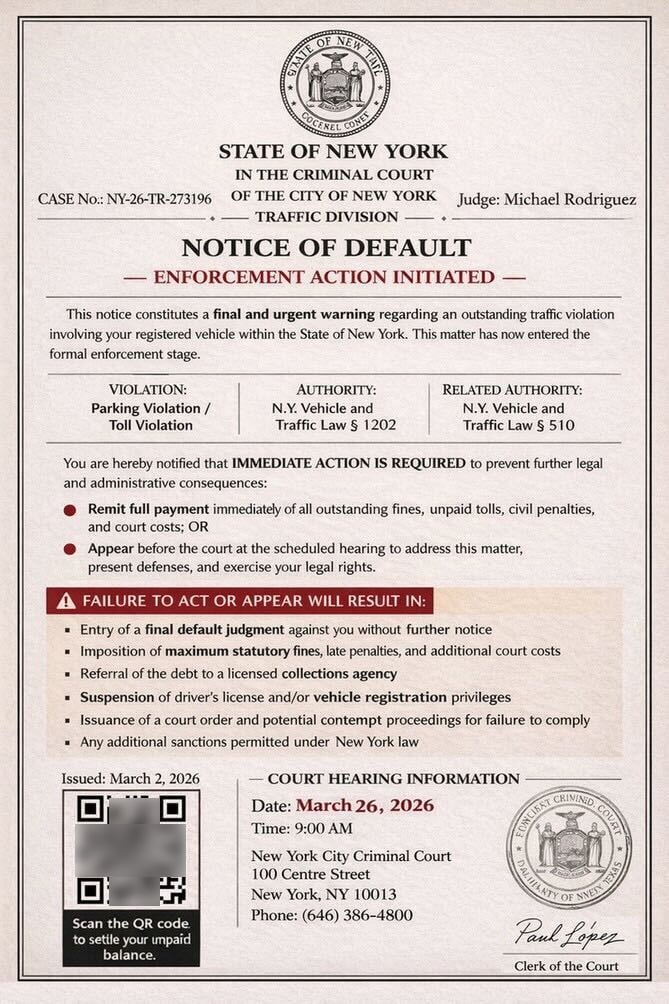
Unlike the previous campaign, which included a text message and links to phishing sites, this new variation instead includes an image of an alleged court notice with an embedded QR code.
Advertisement
“This notice constitutes a final and urgent warning regarding an outstanding traffic violation involving your registered vehicle within the State of New York,” reads the fake court notice.
“This matter has now entered the formal enforcement stage.”
Fake court notice about traffic violations Source: BleepingComputer
The text message shared with BleepingComputer claims to be from the “Criminal Court of the City of New York”, stating that there is an unpaid parking or toll violation that must be paid immediately or the person must appear in court. Included are instructions to scan a QR code to settle the unpaid balances.
Scanning the QR code brings the targeted person to an intermediary site that first prompts you to solve a captcha to prove you are human. The QR codes and CAPTCHA are used to make it harder for automated security software and researchers to analyze the phishing campaign.
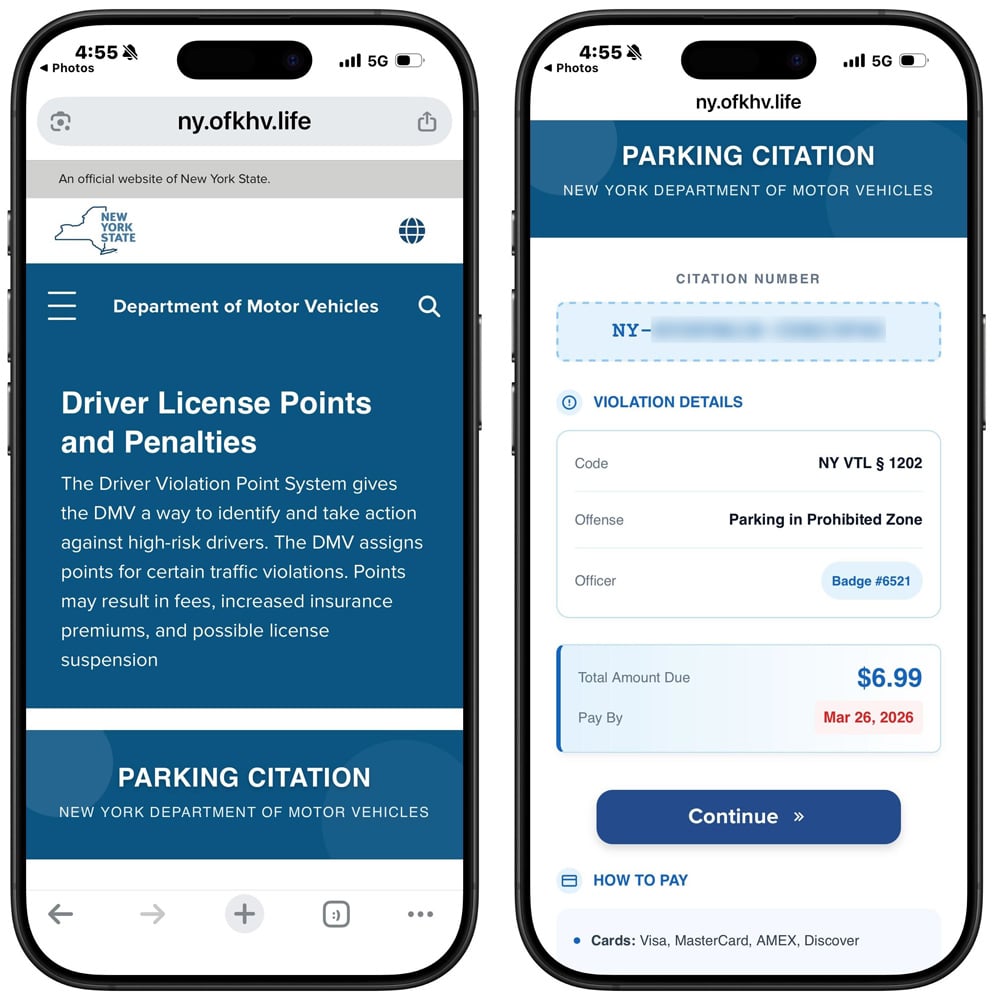
Solving the CAPTCHA redirects you to another phishing site that impersonates the state’s DMV or another agency, claiming there is an unpaid toll or parking ticket. In all examples seen by BleepingComputer, this outstanding balance is $6.99.
Advertisement
For example, phishing sites that impersonate the New York DMV use the hostname “ny.gov-skd[.]org” or “ny.ofkhv[.]life”.
Fake NY Department of Motor Vehicles phishing site Source: BleepingComputer
Clicking continue will take you to a page where you can enter your personal and credit card information to pay the alleged charge.
This form is used to steal your data, including your name, address, phone number, email address, and, eventually, your credit card information.
This information can then be used for a wide variety of malicious activities, including follow-on phishing attacks, financial fraud, identity theft, and the sale of your data to other threat actors.
As a general rule, if you receive a text from an unknown phone number or email address requesting payment of a bill, ignore it.
Advertisement
State agencies have repeatedly stated in response to these scams that they do not use text messages requesting personal information or payment information.
Automated pentesting proves the path exists. BAS proves whether your controls stop it. Most teams run one without the other.
This whitepaper maps six validation surfaces, shows where coverage ends, and provides practitioners with three diagnostic questions for any tool evaluation.
We got to share in a rare moment of collective awe this week as four astronauts blasted off toward the moon, beginning a 10-day journey that will take them farther from Earth than any humans have traveled in the last 50 years. It’ll still be a little while before they reach their destination — the Orion spacecraft is expected to loop around the moon on Monday — but they’ve already seen some pretty incredible stuff on the way there. Here’s the latest on the Artemis II mission, and other interesting science stories from this week.
Artemis II crosses the halfway point
After years of planning, NASA astronauts Reid Wiseman, Victor Glover and Christina Koch, along with Canadian Space Agency (CSA) astronaut Jeremy Hansen, are finally on their way to the moon for the Artemis II mission. This test flight is a crucial step in NASA’s plans to send humans to the surface of the moon again for the first time since Apollo 17, and the high-stakes launch went off without a hitch on Wednesday.
The Artemis II crew is now more than halfway to the moon, according to NASA. When Orion reaches the moon on April 6, the astronauts will have a six-hour window of opportunity to observe the partially lit lunar far side, which can’t be seen from Earth. If you’re curious about where exactly the astronauts are at any given moment, you can track the mission by visiting NASA’s Artemis Real-Time Orbit website. And, if you just want to see what space looks like from Orion, here’s a livestream from outside the capsule. The moon is now in view!
The crew did experience some technical difficulties after leaving the ground, though all were resolved fairly quickly. Early Thursday morning, Wiseman contacted mission control to troubleshoot some issues with a Surface Pro he was attempting to use, noting, “I have two Microsoft Outlooks and neither one of those are working.” Relatable. The Artemis II crew was also greeted by a malfunctioning toilet not long into the flight, and astronaut Koch had to work with the ground team to figure out a fix — which they thankfully were able to do. In a livestream later, the astronaut joked that she is now a space plumber.
Advertisement
Small issues aside, the Artemis II mission is off to a pretty amazing start. The Orion spacecraft completed its translunar injection burn on Thursday, officially taking it out of Earth orbit and putting it on its way to the moon. Commander Wiseman shared some pictures of the view from Orion’s windows afterward, and they are breathtaking. In one unbelievably crisp shot of Earth, you can even see two auroras. And there’s plenty more observations to come.
Students discover a nearly pristine ancient star
Using data from the Sloan Digital Sky Survey (SDSS), a group of undergraduate students at the University of Chicago has discovered what’s thought to be one of the oldest stars ever observed. Their analysis indicates that the star, called SDSSJ0715-7334, was born in the nearby Large Magellanic Cloud billions of years ago before eventually making its way to the Milky Way.
Vedant Chandra and the SDSS collaboration Background ESA/Gaia image, A. Moitinho, A. F. Silva, M. Barros, C. Barata, University of Lisbon; H. Savietto, Fork Research
The star was one of 77 that the students selected for closer observation after poring through the SDSS data in their “Field Course in Astrophysics” class, which is led by Professor Alex Ji, the deputy Project Scientist for SDSS-V. SDSS-V is an ongoing all-sky survey that’s mapping the Milky Way. After creating their list, they set out to observe the stars during a field trip to Carnegie Science’s Las Campanas Observatory in Chile, and honed in on SDSSJ0715-7334 on day two. The team found it’s made mostly of hydrogen and helium, with very little carbon and iron. In the paper published in the journalNature Astronomy, the researchers note that this composition could be the product of a primordial supernova.
“This ancient immigrant gives us an unprecedented look at conditions in the early universe,” said Ji in a statement. Ji added, “The star has so little carbon that it suggests an early sprinkling of cosmic dust is responsible for making it. This formation pathway has only been seen once before.”
Advertisement
Before you go, be sure to check these stories out too:
Shipping containers are a necessary component of nearly every cargo vessel that crosses the Atlantic. But while they’re built to hold a wide variety of goods, supplies, and a lot more, some people also use them for personal storage. If you’re one of these people and you’re thinking about converting a shipping container into a garage, there are some things you should know beforehand.
Shipping containers are durable and weather resistant, so you won’t have to worry about your vehicle. But a container is only about eight feet wide, which is a problem for bigger cars. Containers are customizable, so you can add doors, windows, and even insulation. But if you use one as-is, you’ll have to contend with a lack of ventilation due to its airtight construction. Plus, you’ll have to deal with temperature swings, because it heats up in the summer and cools down in the winter.
Shipping containers can be pricey, and once your start to modify it, costs only go up from there. However, they can be cheaper than building a garage from the ground up, and since they’re portable, you can move it later on if you need to. Additionally, once you get it in place, depending on what your plan is, you can have it ready in no time. Of course, unless you can haul it and set it up yourself, you’ll likely have to pay even more to a service to do it for you.
Advertisement
Understanding the laws regarding shipping container use
DS Tkachuk/Shutterstock
While there are pros and cons to using a shipping container as a garage, there are some legalities you should know as well. First off, whether or not you’re allowed to even use a container, is determined by your local zoning laws. These laws control how property can be used, as it may even be illegal to build a shed on your property without a permit. So you may need one before converting, or even placing, a container on your land.
But even if you pass the zoning requirements in your area, you may not be able to move forward. That’s because you may still need to get approval from local building departments in your area. These departments can use building codes to review your container to ensure it’s structurally solid, and it’s placed on a strong foundation. Then there’s how the container is classified, and whether or not it meets your local government’s requirements to be used as a garage. Finally, if you get all the paperwork in order and have the green light to move ahead, check with your homeowner’s association. They may have guidelines in place that can actually override what’s allowed by local law.
Advertisement
If you hit a roadblock, it’s not a good idea to go around the system. Setting up a container without proper approval can lead to fines. You may be ordered to stop work, or you may be forced to remove the container altogether.
We may receive a commission on purchases made from links.
A smart motion sensor typically detects the presence or movement of a person, while a smart switch is most often used to turn lights on or off. These devices are already useful just as they were designed, but did you know that you can actually program them to let you accomplish other useful things?
With a little creativity, you can use a smart sensor to warn you if you’re forgetting something, to catch if something goes wrong before it becomes a major problem, or to just generally make your life easier. Most of the features also do not require complex programming — you can either install the smart sensor directly where needed, or, at worst, add a timer via your preferred home app and keep notifications on.
Advertisement
Let’s look at a few handy uses for smart sensors that you probably haven’t considered yet. You might be surprised what these things can accomplish with a little bit of ingenuity.
Advertisement
Warn you if you left a door or window open
Contact sensors are pretty simple smart devices, as their primary purpose is to warn you when the two pieces are not in contact. These are most commonly used for doors and windows — you can program them to send a notification on your phone when you leave your house, and you left a window or door open. There are also several creative uses for contact sensors, including automatically turning on lights and running a home routine.
Though these sensors are typically attached to doors and windows, that does not mean they’re limited to those used for access. If you often second-guess yourself about whether you’ve properly closed your fridge door, especially when you’re on vacation for a couple of days, attaching a contact sensor to it will help you avoid that problem. You can then set the sensor to warn you if the door is open for too long. If you still need to check, just open your phone and check the device’s status.
You can also install the sensor inside a cupboard or cabinet if you’re guarding stuff. For example, if you keep chocolates in your pantry and don’t want your kids raiding your sweets without your knowledge, you can set the sensor to warn you when the cupboard door opens, allowing you to check your smart security camera to see who’s the culprit.
Advertisement
Get notifications for mail or packages
Smart mailbox alarms exist to ensure you don’t miss letters or packages that might’ve arrived when you were asleep or weren’t home. After all, we rarely receive snail mail these days, but the letters that do come in are quite important, like a jury duty summons or your tax return check. These sensors work similarly to a motion sensor in that they detect movement in your inbox.
Because of this, you do not need to purchase a smart mailbox alarm — if you already have an extra motion sensor at home, you can install it in your mailbox and set it to alert you if it detects movement. However, this might not work for larger packages that won’t fit in your mailbox. So, if you want to get alerted when an Amazon package arrives at your doorstep, consider getting a Ring camera.
Advertisement
This smart doorbell camera can tell you when someone’s at your door, but you can also program it to notify you if it detects movement on your porch. This means it can double as a security camera while simultaneously notifying you if someone leaves a package at your doorstep.
Advertisement
Control the exhaust fan bathroom automatically
zhu difeng/Shutterstock
Smart switches are often used for remotely turning on devices using voice commands. But because you can control them with an app, you can make them do a lot of other clever things beyond switching on or off on your command. One thing you can do is program your bathroom exhaust fan to work automatically based on which light you turn on.
The biggest problem some people encounter with bathroom exhaust fans is that they do not work optimally. Most exhaust fans turn on when you switch on the bathroom lights — this is a problem for some people, as it can cause a cold draft while they’re showering. And when you switch off the light after showering, it also turns off the exhaust, leaving excess moisture stuck inside your bathroom.
If you use a smart switch to control the lights and the exhaust fan in your bathroom, you can program it so that you don’t have to think about the exhaust fan. For example, you can set the exhaust fan to automatically turn on when you switch on the light for your toilet area to keep the area fresh. But for your shower, you can instead command the exhaust fan switch to turn on minutes after you turn off the light. That way, you don’t get chilly while you’re bathing, while the exhaust fan will still ensure that moisture is exhausted after you leave the restroom.
Advertisement
Avoid extensive water damage by catching leaks early
Andrew Angelov/Shutterstock
You might think that a water leak sensor is an unnecessary smart device for your home, especially if you live in a newly constructed dwelling. But if you live in an older home or experience freezing winters in your area, this might be a prudent investment. That’s because a leak sensor will warn you if you have a problem with your plumbing before it becomes a major issue, making it one of the smart gadget upgrades you can install in your bathroom or kitchen.
As the name suggests, these devices alert you when they detect a water leak. That way, you can immediately shut off your taps before the water spreads all over your floor. Since these smart devices send a notification to your phone, you also get warned wherever you are in the world as long as you’re online.
This is crucial if you’re away for an extended period. That way, you can immediately inform a trusted person to turn off the taps in your home and avoid coming home to extensive (and expensive) water damage.
Advertisement
Toggle perimeter and safety lights as necessary
Smart switches can be programmed to automatically turn on and off your perimeter and safety lights based on sunrise and sunset times. However, this only takes into account the position of the sun and does not consider meteorological effects. So, if you want to ensure that your lights turn on when the skies get too dark, you can install a smart light sensor.
With a smart light sensor installed, you can then use it to command all the lights around your home to switch on when it gets too dark — whether through the setting of the sun or because of a snowstorm — and turn off when there’s enough light to save on electricity costs. You can even use it to automatically adjust the dimmable lights in your home, ensuring a consistent brightness level throughout the day and night.
Advertisement
You can also pair a smart light sensor with a smart motion detector to specific areas in your home. That way, you can program lights in common areas, like your hallway or garden, to turn on only when someone is in the area and it’s dark. You can also use it to automatically lower or raise smart blinds to help keep the temperature in your home under control or to maximize natural light.
Charming Kitten relies on deception rather than exploiting technical software vulnerabilities
Fake identities build trust before phishing attacks compromise sensitive user credentials
Operations extend across Apple and Microsoft platforms, affecting diverse users globally
Iran-linked cyber operations are drawing renewed attention for relying less on advanced code and more on human manipulation to gain access to sensitive systems.
At the centre of this activity is Charming Kitten, a group associated with Iran’s security apparatus which has spent years targeting officials, researchers, and corporate employees.
Instead of exploiting technical vulnerabilities, operatives frequently impersonate trusted contacts, using carefully crafted messages to trick victims into revealing credentials or installing malicious software.
Article continues below
Advertisement
Cold War tactics and social engineering
These tactics echo intelligence strategies more commonly associated with Cold War espionage, where access and trust often proved more effective than technical superiority.
Fake online identities — including personas built around attractive or credible profiles — are used to establish relationships before launching phishing attacks.
Advertisement
This approach has enabled the group to operate across platforms used by both Apple and Microsoft ecosystems, exposing both Mac and Windows users to compromise.
Alongside external deception campaigns, investigators have raised concerns about insider threats linked to individuals embedded within major technology firms.
Sign up to the TechRadar Pro newsletter to get all the top news, opinion, features and guidance your business needs to succeed!
A high-profile case involving members of the Ghandali family centres on allegations of trade secret theft from companies including Google.
Advertisement
Prosecutors claim that sensitive data related to processor security and cryptography was extracted over time and transferred outside the United States.
Ex-counterintelligence officials describe the method as a “slow, deliberate extraction” carried out by actors with training or external direction.
Rather than relying on digital exfiltration tools, some of the alleged activity involved photographing computer screens — a low-technology method designed to avoid detection by cybersecurity systems.
Advertisement
“The most damaging breaches often originate from within,” one expert noted, adding that trusted access can bypass even advanced defenses.
Analysts argue that these operations reflect a wider intelligence framework that combines cyber activity, human networks, and surveillance capabilities.
Former officials state that Iran has developed a layered approach that includes recruitment, online intelligence gathering, and procurement channels.
One source described Iran as “the third most sophisticated adversary,” adding that its activities were underestimated for years compared with those of larger rivals.
Advertisement
The same networks have also been linked to monitoring dissidents abroad, indicating that operations are not limited to economic or military objectives.
This dual focus — external competition and internal control — complicates assessments of intent and scale.
Cases such as that of Monica Witt, who allegedly provided intelligence to Iran after defecting, reinforce concerns about insider cooperation.
Staying safe from phishing and espionage requires a layered approach to digital security. Users should verify identities before sharing credentials or sensitive information.
Advertisement
Strong, unique passwords combined with multi-factor authentication help limit account compromise.
Also, installing reliable antivirus software protects against known threats, while maintaining an active firewallprevents unauthorized access.
In addition, trusted malware removal tools can detect and eliminate suspicious activity before it spreads.
AI skeptics aren’t the only ones warning users not to unthinkingly trust models’ outputs — that’s what the AI companies say themselves in their terms of service.
“Copilot is for entertainment purposes only,” the company warned. “It can make mistakes, and it may not work as intended. Don’t rely on Copilot for important advice. Use Copilot at your own risk.”
A Microsoft spokesperson told PCMag that the company will be updating what they described as “legacy language.”
Advertisement
“As the product has evolved, that language is no longer reflective of how Copilot is used today and will be altered with our next update,” the spokesperson said.
Tom’s Hardware noted that Microsoft isn’t the only company using this kind of disclaimer for AI. For example, both OpenAI and xAI caution users that they should not rely on their output as “the truth” (to quote xAI) or as “a sole service of truth or factual information” (OpenAI).
No one wants the tunes buffering when they have friends round for a barbecue or a stuttering podcast as they try to finish yard work. While the average router might fill your home with Wi-Fi, it doesn’t always extend to the patio or deck, much less the end of your backyard. But you can get great Wi-Fi coverage in your outdoor spaces, and I will show you the best options.
Before you think about spending any money, try adjusting or moving your wireless router. Routers send out Wi-Fi signals in a rough circle, so I always recommend placing your router in the center of your home. Moving it slightly closer to your backyard or wherever you want to extend Wi-Fi is the simplest option. Ensure it’s positioned high and in the open. You may need a longer Ethernet cable. If your router has adjustable antennas, I also strongly recommend moving them and testing the signal strength in your problem spot (this can make a surprising difference).
If you have a mesh system, try moving one of the nodes to the back windowsill of your home to extend Wi-Fi into the backyard. If you’re able, running an Ethernet cable between your main router and the node nearest your outside space for wired backhaul can also extend range and speed significantly. If you have an outbuilding, you could even consider running an armored Ethernet cable from your main router to a mesh node or access point out there.
Use Your Smartphone as a Hot Spot
If you get a decent cellular network signal on your phone in your garden and you have plenty of data, it might be worth using your phone as a hot spot, which enables other devices to piggyback on your mobile network connection. We have a full guide on how to use your smartphone as a hot spot, but it’s very easy to do. Here’s the quick version:
Advertisement
On an iPhone: Open Settings, Personal Hotspot, toggle on Allow Others to Join, and set a Wi-Fi Password.
On an Android: Open Settings, Network and Internet (or Connections on a Samsung phone), choose Hotspot and tethering, toggle Wi-Fi hotspot on, and pick a name and password.
The problem with this is that it will use up your data allowance, tie up your phone, and drain your battery fast. But it’s a good solution in a pinch.
Upgrade Your Setup
If the two options above don’t fix your Wi-Fi woes, it might be time to upgrade your hardware. We have guides to the best routers, best mesh systems, and best Wi-Fi extenders. If you’re currently using an old or ISP-provided router, simply snagging a new one could make a big difference to your range. Most routers have a rough estimate of the square-footage range, but the construction of your home and other factors will impact it.
Switching from a single router to a mesh system is a better upgrade if you need to extend that Wi-Fi coverage. I’m not keen on Wi-Fi extenders, but they can sometimes be the most cost-effective way to get Wi-Fi to a single trouble spot. If you recently upgraded or already have a mesh, there are still other options.
Get an Outdoor Router
Advertisement
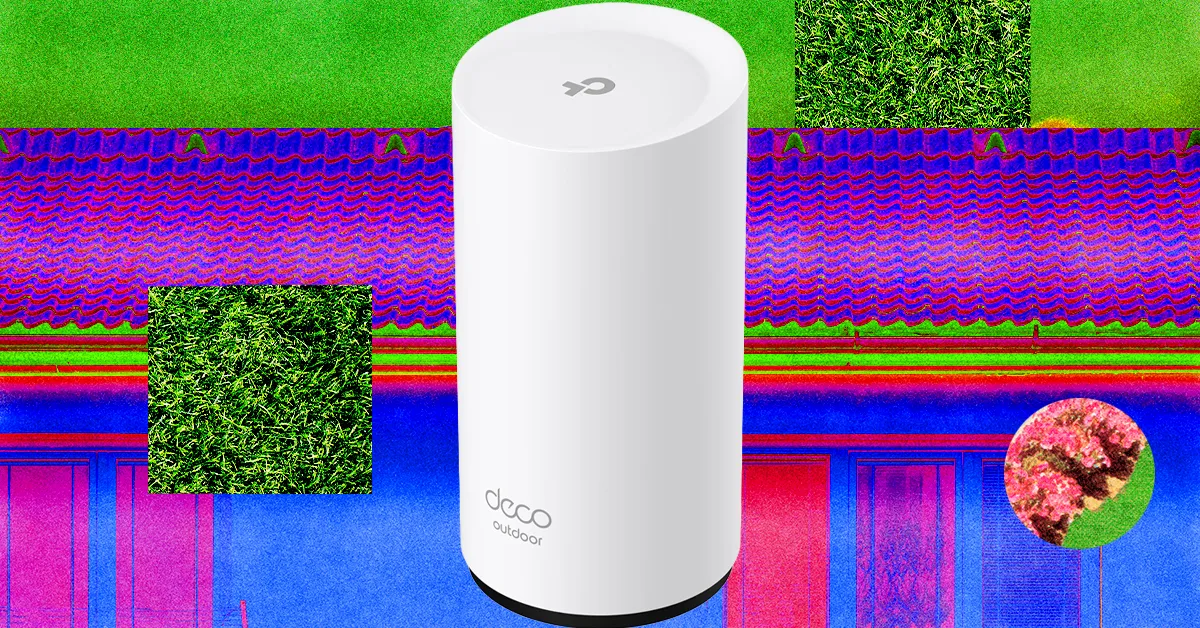
Folks with a mesh system can often add an outdoor router or node easily. Outdoor routers are weatherproof and generally have an IP rating determining what kind of weather they can withstand. They often come with fixings to mount on an exterior wall, fence, or pole, but you must consider how to run a power cable to an outlet. The right outdoor router for you depends entirely on your mesh system.
Get caught up on the latest technology and startup news from the past week. Here are the most popular stories on GeekWire for the week of March 29, 2026.
Rec Room, the Seattle-based social gaming platform once valued at $3.5 billion, is shutting down on June 1, ending a decade-long run for one of the city’s most prominent startup unicorns. … Read More
In her debut column for GeekWire, longtime Microsoft watcher Mary Jo Foley digs into the recent wave of reorgs, hiring freezes, and leadership shakeups in Redmond, and asks whether it’s business as usual or something bigger. … Read More
Amazon has purchased 1,300 acres in Boardman, Ore., for a potential $12 billion “exascale” data center campus capable of housing up to 20 buildings, the Oregonian reports. … Read More
Snap has acquired select assets from Rec Room Inc., with some employees joining the Spectacles hardware subsidiary, as the Seattle-based social gaming company shuts down its platform on June 1. … Read More
The latest edition of commercial real estate firm JLL’s Innovation Geographies report reveals that while Seattle is outpacing traditional hubs like New York and London in talent migration, a shortage of “investment-grade” real estate is creating a bottleneck for the city’s next era of tech expansion. … Read More
All 11 U.S. aircraft carriers employ what is called a “Five-Mile Rule,” which is rarely broken. The rule is a 5 nautical mile (5.75-mile) exclusion zone established around aircraft carriers, and its purpose is essentially force protection. Aircraft carriers are huge machines that can be dangerous to get close to, as colliding with one will always end in the carrier’s favor. Additionally, the constant need for flight operations ensures the safety of both the pilots and crew. Essentially, a five-mile buffer serves to further protect the carrier from threats.
It’s almost unfathomable how large carriers like the Lincoln are, as it displaces over 100,000 tons of seawater. When moving, it can’t turn or stop on a dime, as its inertia is considerable. Getting too close means that a collision can be unavoidable, so the exclusion zone’s purpose is essentially all about safety. While you might see pictures showing tight formations with the Lincoln among the vessels that comprise its Carrier Strike Group, that’s not normal during combat and flight operations, as breaking the Five-Mile Rule is a big naval no-no … until it isn’t.
Advertisement
Violating the exclusion zone isn’t common, but it happens. Think of it more as a rule that’s allowed to be broken than an unwavering law because there are conditions that warrant its violation. Typically, an emergency, where someone falls overboard, an unforeseen issue that arises during combat or flight operation, or any emergent situation might compel an aircraft carrier’s captain to chuck the exclusion zone into the drink and move the carrier or another ship closer than normal. Everyone onboard is trained for these situations, but it’s nonetheless dangerous since exclusion zones are there for good reasons.
Advertisement
The Five-Mile Rule and why it’s necessary
First and foremost, all U.S. aircraft carriers have a five-mile rule, and it’s all for the same reason. In 2000, the USS Cole (DDG-67) was attacked by a small vessel, causing widespread damage to its hull while killing 17 sailors and wounding almost 40 additional personnel. Since then, the U.S. Navy has been wary of small vessels, and a five-mile buffer ensures that none can get close to the carrier, as the Cole bombing proved the danger that explosive-laden craft could pose in potentially sinking an aircraft carrier. Another reason is flight operations, which is dangerous in and of itself.
The danger is elevated when an approaching aircraft has problems with onboard weapon systems or fuel. This can endanger surrounding ships, so the buffer offers added protection. Also for flight operations, the carrier must turn into the wind, requiring a large turn radius, making it imperative that its surrounding waters are devoid of any vessels. Air operations also require a bubble of airspace for recovering aircraft low on fuel, which the exclusion zone provides. The rule is only violated when combat action requires it, but under normal conditions, breaking the buffer can be hazardous.
Another aspect of carrier operations results in high-powered radar and electronic warfare radio signals. These can disrupt communications and electronics, especially with commercial, civilian vessels. Keeping them away limits potential damage to their navigation and communications equipment. The carrier is further protected by a series of submarines, cruisers, and guided-missile destroyer escorts, ensuring that no vessels stray too close. This ensures that everyone on or around an aircraft carrier like the Lincoln remains safe and secure.
Are you using your Apple Watch to its full potential? Whether you’ve owned an Apple Watch for years, answering texts and counting steps with the small device on your wrist, or you’re new to wearing a smart watch, it’s likely that there’s a trove of hidden features and tools that you’ve never used.
Apple currently sells three versions of its popular watch: the Series 11, the SE 3, and the Ultra 3. Each version offers different features, display sizes, and battery life, but no matter which version you own, there are hidden tools that you aren’t utilizing.
It’s common knowledge that you can answer texts and phone calls, tap to pay, and track your daily exercise routine, but all models of Apple Watch offer much more. Before you get too involved in picking a fun watch face and comfortable or stylish band, take the time to learn about all the functions your watch offers. After all, it’s a big investment, especially if you opted for the high-end Ultra 3. Here are some Apple Watch features that may have flown under your radar.
Advertisement
Sleep apnea detection
PeopleImages/Shutterstock
If you or a loved one snores loudly or wakes up after hours of sleep still feeling tired, you may be showing symptoms of sleep apnea, a disorder that causes pauses in your breathing while you’re asleep. It affects about 30 million Americans, and the risk increases as you age. Untreated sleep apnea can lead to other issues with your health, such as high blood pressure and cardiac rhythm disturbances. If you suspect you have sleep apnea, you should make an appointment with a health care provider, but while you wait to be seen by a doctor, your Apple Watch can help look for breathing disturbances.
The Sleep Apnea Notifications feature is available on Apple Watch Series 9 or later, Apple Watch Ultra 2, or Apple Watch SE 3. Your phone must be updated to the latest version of iOS, and you must also turn on the Sleep Tracker feature, found in the Health app on your phone. Then, wear your watch when you sleep for a minimum of 10 nights over a 30-day period, and the data will be analyzed every 30 days.
Advertisement
To turn on sleep apnea notifications, open the Health app on your iPhone, tap Search, then tap Respiratory, and set up Sleep Apnea Notifications. If you receive a notification, you can export the report as a PDF to share with your health care provider.
Advertisement
Mute notifications with gestures
DenPhotos/Shutterstock
You’re in an important meeting, or mid-way through the first act of Hamilton, when you suddenly realize you forgot to silence notifications on your Apple Watch. The situation dictates stealth — you don’t want to interrupt your boss or draw attention to yourself in a dark theatre. Luckily, Apple offers several options that will allow you to quickly mute the notifications on your watch.
If you only remember that notifications are active because you receive an alert, such as an incoming phone call or text, you can quickly mute your that alert by covering your watch display with your hand for at least three seconds. You’ll feel a tap to notify you that you’ve successfully muted the notification. This option is typically on by default, but you can check by going to the Settings app on your watch and tapping Gestures.
You can also mute calls and dismiss notifications simply by quickly turning your wrist over and back again. Apple dubbed this the wrist flick gesture, and it’s supported on the SE 3, Series 9, Ultra 2, and later models. Again, this feature is turned on by default, and you can access it on the Settings app under Gestures.
Advertisement
Live Listen
Seremin/Getty Images
If you’re hard of hearing, you have a loved one that is struggling with their hearing, or you’re simply struggling to hear clearly in an especially noisy situation, you can turn an Apple Watch into an accessibility aid using Live Listen. This feature uses the microphone on your iPhone to stream sound to your AirPods or MFi hearing devices. When paired with your Apple Watch, a transcription of the conversation also appears on your watch’s screen in real time.
You must use headphones or a hearing device with this feature, and Live Captions is not available in all languages or regions. Apple also warns that the accuracy of the captions may vary, so you should not rely on the transcription in an emergency situation. Live Listen is available with watchOS 26, which requires an Apple Watch Series 6 or SE 2 or later. It’s available on all models of the Apple Watch Ultra.
If you want to keep Live Listen easily accessible, add it to your watch’s Control Center. Once you’ve done that, simply place your phone near the source you want to listen to, such as a speaker or a lecturer. Open the Control Center on your watch and tap the Hearing Controls button. Scroll down to Live Listen, then you can start a session, or rewind a current session, view the live transcription, and stop the session.
Advertisement
Music recognition
DenPhotos/Shutterstock
We’ve all been there: you’re enjoying coffee at a cafe or watching a movie with friends and you hear a catchy tune that you simply love. You don’t know the name or the artist, and the song is fleeting – once it’s over, you may wait months to hear it again! In the days before smart phones, you’d have to describe the song to a friend or family member, hoping someone would recognize it from your clumsy humming. Eventually, music recognition apps like Shazam appeared on the scene, but you’d have to get your phone out and get the app going before the song ended.
If you own an Apple Watch, you no longer have to hum for friends or even get your phone out of your pocket. Apple now owns Shazam and has built music recognition directly into your watch, with no additional app necessary. Simply open Music Recognition on your watch by tapping the icon (a blue circle with a white, S-shaped logo) and tap again to initiate listening. Once it identifies the song, your watch will display both the title and artist. You can then see the song in Apple Music, add it to your library or playlist, and even see additional details about the song, such as the album and release date, all without pulling out your phone. If you forget to take note of a song that you heard days or weeks earlier, open the Music Recognition app on your watch and scroll down to see a history of identified songs. This capability is available on all watches running watchOS26.
Advertisement
Live translation
Song_about_summer/Shutterstock
Only about 23% of Americans are bilingual, or able to speak more than one language. Though much of the world speaks English, this can still be a challenge, especially when we travel — only about 360 million out of more than eight billion people speak English as their first language. If you frequently travel internationally, you may want to consider investing in an Apple Watch rather than relying on a translation app on your phone.
Apple’s live translation app allows users to translate both text and voice into a long list of supported languages. You can also download new languages so you can use them without an internet connection. Offline translation is available on the Apple Watch SE 3, Series 9 and newer, and Ultra 2 and newer models.
To use live translation, first open the Translate app on your Apple watch. Tap the language you want to translate your text or speech into. If you require verbal translation, tap the microphone button and say a phrase. Your watch will translate as you type or speak and translation will appear on your watch display. To play the audio translation, tap the play button. To automatically hear translations, tap More, then Play Translations. If it’s a common phrase that you’ll likely repeat throughout your day, you can save the translation as a favorite for easy access in the future. If a word has several meanings, your Apple Watch allows you to select the one you want, and you can also select feminine or masculine translations for words.

























































You must be logged in to post a comment Login