from the everything-is-about-to-get-much-dumber dept
Ideally, I think it makes sense to open up the U.S. market to Chinese goods (AI, EVs, robots), but have functional and well-funded regulators that policy all labor, competition, environmental, privacy, and consumer rights abuses. But big companies don’t much like that because it would boost competition and accountability, eroding quarterly revenues.
So instead we get protectionism. Or in the case of the Trump administration, protectionism run by a bunch of corrupt, incompetent clowns who gutted most of our federal regulators, then saddled them with an elaborate new policy ask that’s impossible to implement, even if the admin were competent.
Which it isn’t.
If you want a good idea of what Trump protectionism looks like in practice, I recommend this Verge piece about the Trump effort to ban Chinese drones. Spoiler: it’s not going well, and it’s trivial to trick the administration and bypass the ban without doing much, resulting in U.S. consumers losing access to lower-cost popular goods (DJI was the most popular and successful drone maker by far) under the pretense this is helping Americans and rekindling U.S. domestic electronics manufacturing.
Advertisement
Having unsuccessfully “blocked” Chinese drones (read: caused a bunch of annoying and pointless chaos), the Trump administration is dramatically expanding its protectionist campaign to include everything from cheap Chinese power converters (necessary for the world’s migration away from fossil fuels), to low-cost Chinese vacuum robots:
“While the government did include “humanoid robots” and “quadrupeds” among the bots it wants to ban, the ban is far broader than that. It covers almost any new software-controlled robot that travels over the ground, weighs more than 4.4 pounds (including any dock), can perceive its environment, and has wireless connectivity.
By that definition, the FCC is banning future robot lawnmowers, sidewalk delivery robots, and the robots that crate around packages at your local Amazon warehouse, too.”
Great stuff. Surely this will be competently enforced by… (checks notes)… Brendan fucking Carr.
Like his bumbling and unpopular boss, Brendan Carr has always made a gigantic stink about China. If you recall, he was one of the biggest proponents of a “ban on TikTok,” which he claimed was necessary to protect national security and stop propaganda. The solution to that problem was to steal the company and offload it to Trump’s billionaire friends so they could spread propaganda and abuse privacy.
Advertisement
The stupidity, xenophobia, and corruption on display with the Trump “TikTok ban” is going to be adapted for AI, and the next six to twelve months of U.S. tech policy will be dumber and more chaotic than ever. Especially as the biggest U.S. AI companies — swimming in debt, facing a data center glut bubble, and a long way from profitability — look to the government to protect them from all manner of competition (foreign, on device, open source, whatever).
This may come as a surprise to you, but Trump incorporated doesn’t actually care about protecting U.S. consumers from Roomba privacy abuses, propaganda, or national security abuses. If they did, they wouldn’t be supporting Trumpism. If they did, they’d regulate data brokers and pass a modern internet privacy law that applied to every company and executive doing business in the U.S.
Being mindlessly and personally transactional, the Trump administration is also keen to erect additional troll and tribute systems if companies want to continue doing business in the U.S. The money will go to his business interests and allies, but in a bid to appeal to nationalists, it’s going to all be layered under the pretense that this is all going to magically shift robotic manufacturing back to the U.S:
Advertisement
“But again, the government isn’t asking these companies any questions about security — not one — to get the waiver that lets them through. The FCC only wants to know where they’re designed and made and assembled and tested and influenced, and get a specific commitment to start manufacturing them in the US instead.”
But they’re not going to be competent enough to make any of this happen, even if shifting the entirety of low-cost electronics manufacturing back to the U.S. was a thing you could actually accomplish. A key part of the problem is that, as we saw from Trump’s dream of having U.S.-made smartphones, the folks in charge of this effort have a child-like understanding of how everything works. And everybody else — like massive swaths of the business community, academia, and the press — are too feckless to stand up to the corrupt stupidity in any meaningful way.
The Trump administration has also gone out of its way to ensure our federal regulators no longer have the resources or legal autonomy to function. Then they’re saddling them with this massive new layer of protectionism they’d be incapable of enforcing even if they wanted to. They’re not even bright enough to understand that even base protectionism is out of their reach.
This is just racist, crony capitalism by corrupt and incompetent zealots, and it’s going to cause irreparable harm to consumer prices, product quality, product availability, hobbies, science, the shift to renewables, and everything else over the next two to three years. All propped up by a lazy press, self-serving domestic monopolists, and a whole lot of bullshit about privacy and national security by the kind of people who are a direct and obvious threat to both.
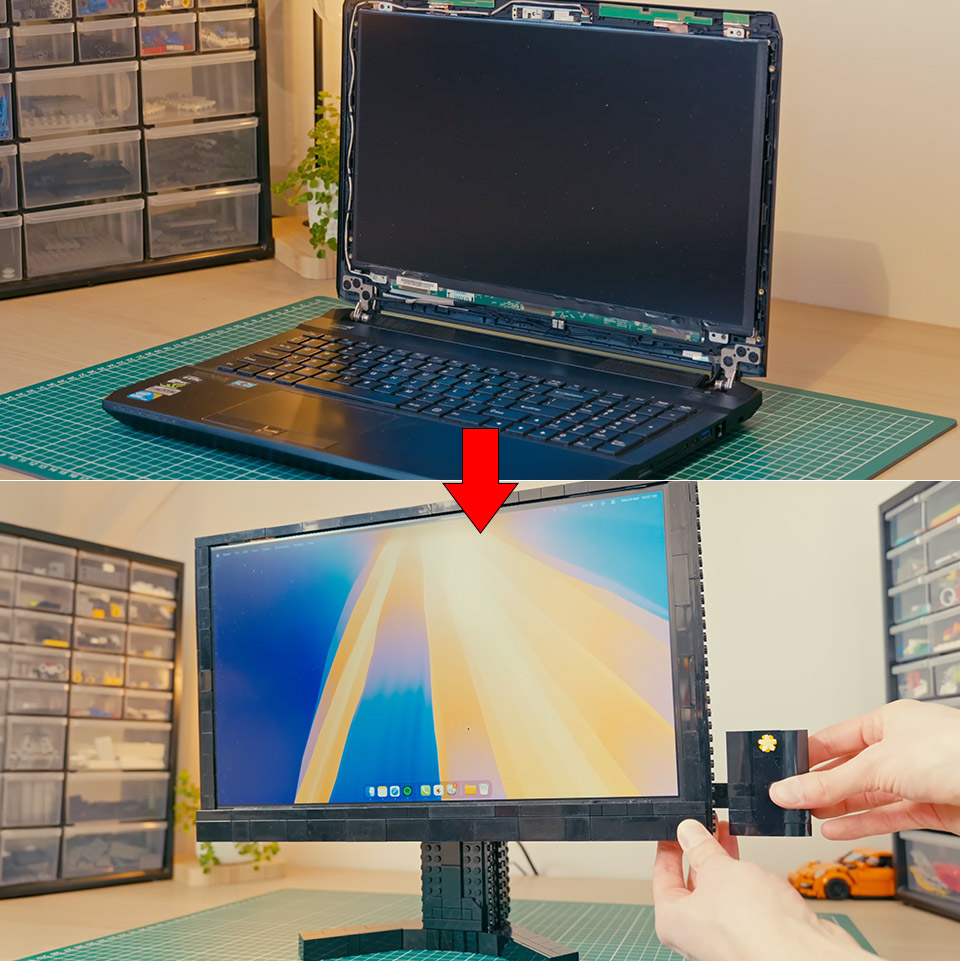
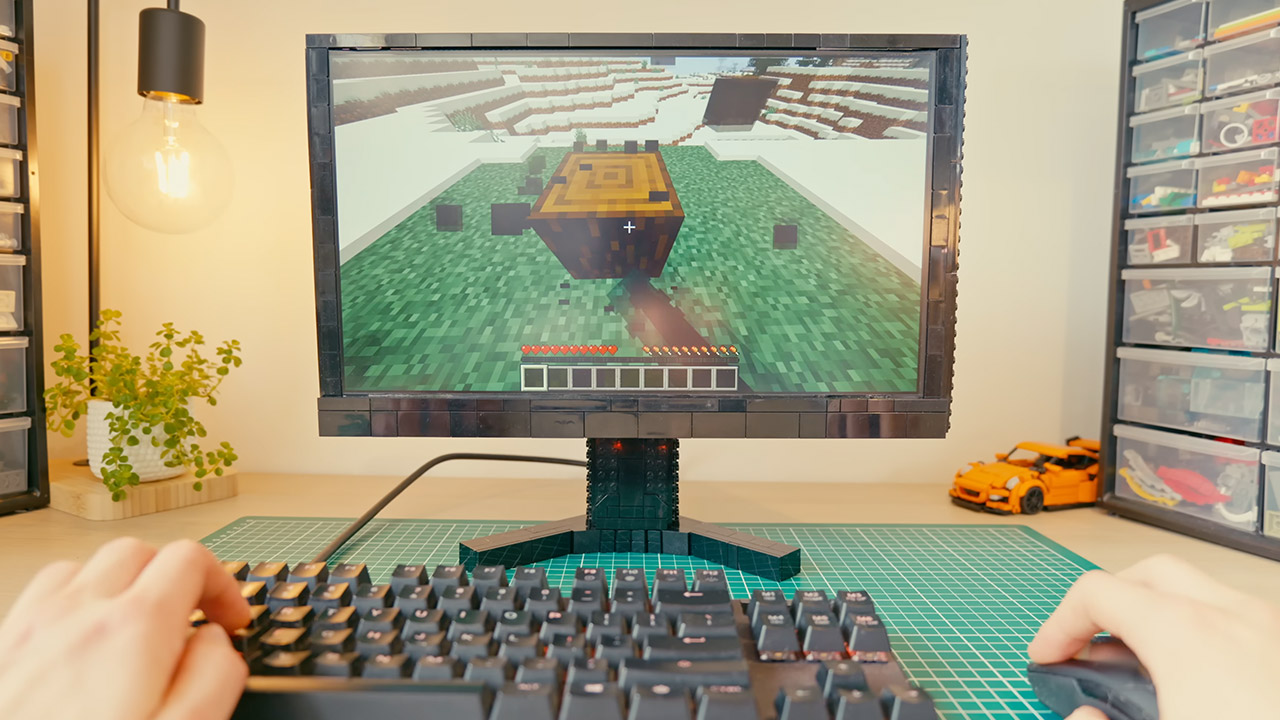
An old laptop that had served for more than six years suddenly shut down mid-game and refused to power on again. Its owner, the LEGO builder known as Koenkun Bricks, recovered the hard drives without trouble and found them intact. Rather than scrap the machine, he decided the screen still had a future as a second monitor for his desk. The plan was simple on paper: free the LCD panel, give it a proper controller so it could accept a standard HDMI signal, and enclose everything in LEGO so the whole unit could tilt, rise, and spin as needed.
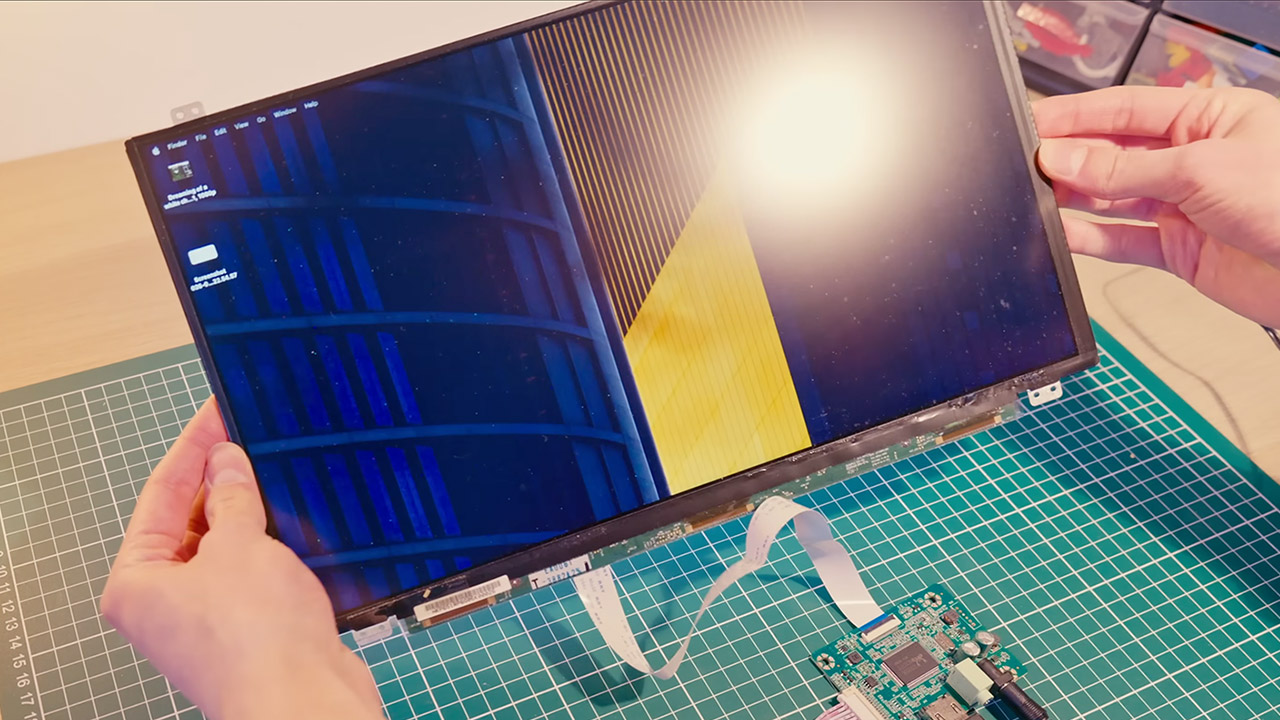
Opening the laptop proved to be a much bigger hassle than expected. There were no good service manuals available for that model, and Koenkun had never taken electronics apart before, so he was in unfamiliar ground. That being stated, he proceeded with caution, slowly detaching the display from the hinges, cables, and metal frame until it sat free on the workbench. Of course, a controller board was required to translate the laptop’s internal display signal into a format that a standard computer could understand. Now, after looking all over for a board that exactly matched the panel’s model number but running into long shipping delays, the builder ended up adding a universal one to his shopping basket, which costs roughly €20 or $20. When he had everything connected in and turned on, the screen lit up right immediately.
BUILT FOR COLLEGE. AND BEYOND — MacBook Air with the M5 chip packs blazing speed and powerful AI capabilities into an incredibly portable design…
TEAR THROUGH TOUGH ASSIGNMENTS — With its faster CPU and unified memory, the M5 chip delivers even more performance and fluidity across apps, making…
MAKE QUICK WORK OF YOUR TO-DO LIST — Apple Intelligence helps you write, express yourself, and get things done effortlessly — whether it’s for…
Moving white dots began to drift over the display, which the builder eventually traced back to the universal board itself. Ideally, a model-specific controller would have resolved those issues, but even the general unit demonstrated that the panel was alive and functional. The next step was to figure out how to mount that panel inside a LEGO frame, which was another issue waiting to be solved. After attempting to match the factory screw holes to LEGO bars and discovering the holes were too small, the builder took a new look at the problem. The existing plastic bezels around the panel would suffice if he could discover a way to press a LEGO structure against them from the outside. He tried a few basic frames, but they were all a catastrophe because one was too wide, another had gaps along the borders, and a third felt too shaky. L-shaped panel components ultimately provided him with the appropriate balance of strength and a clean, gap-free edge, though he had to go back through some older versions and disassemble the entire thing to get enough of them.
Now, each of the four sides of the laptop bezel measured slightly differently in thickness. So, to compensate, he piled tile after tile until everything was in order, and then he had some of those triangular tiles with the corners cut out nestle up into the L-panels so everything would sit flush. Beams and additional panels formed a top border, leaving spaces for the circuit boards that protruded, and the bottom edge gained some depth so those boards and the controller could sit without stressing them. Green brackets were used to hold specific pieces of metal in place, and he even incorporated a few Technic beams into the LEGO structure where the future stand would be attached.
With the basic shell securely fastened, the controller board finally had a place to call home. The frame had to be disassembled once more, so in went the bricks with studs on their sides, which will hold metal standoffs that keep the board firmly in place. Technic bushings in bright yellow do the job of locking everything into place, and a simple little cover on top keeps dust out. The smaller button board, however, told a different story. He was confident it would fit onto LEGO bars, but no such luck. Some smart usage of antenna pieces kept it solid in the end, but they needed to be reinforced so they didn’t flex and shift when you pressed the buttons. Meanwhile, a little portion of the bottom bezel was replaced with a flat screen to allow for the HDMI and power cables to depart without being tangled.
Even though the display was complete, he still need a stand that could rotate, adjust height, and remain steady throughout normal operation. A V-shaped base was roughly the start, with some LEGO tires put along the bottom borders to keep everything from sliding all over the desk. However, finding a heavy-duty turntable in the parts bin proved impossible, so he devised an other solution. In the center of it all, a large central gear serves as the mechanism’s true anchor. Then there are the smaller gears, which are mounted on friction pins all around to assist distribute the weight and keep things smooth and easy to spin. He tried an early version that only relied on a single axle, and it felt a little shaky, but with the multi-gear arrangement, everything worked out fine.
This cuts the monthly cost from $69.99 to $34.99 (or from $91.99 to $45.99 in Canada) on an annual plan billed monthly. And the subscription comes with more than 20 industry-leading creative apps, alongside 4,000 monthly generative AI credits for premium features such as Text to Video.
Subscribers also gain unlimited access to standard AI tools like Generative Fill, Adobe Fonts, Adobe Stock assets, tutorials, collaboration tools through Frame.io, and integrated AI models from Adobe, Google, OpenAI, and others. The promotion for new subscribers ends August 10.
Advertisement
Today’s top Adobe Creative Cloud Pro deal
Why this is a great deal
Although there are many other creative tools available, Adobe continues to lead the way for professionals, and Creative Cloud Pro remains the easiest way to access its entire ecosystem.
The Pro subscription includes more than 20 applications, from industry staples like Photoshop, Illustrator, Premiere Pro, and Acrobat Pro to specialist tools such as After Effects, Audition, Lightroom, and InDesign, all designed to work seamlessly together.
Advertisement
Beyond the apps themselves, Creative Cloud Pro includes Adobe Firefly, 4,000 monthly generative AI credits for premium features such as Text to Video, unlimited access to standard AI tools like Generative Fill, plus Adobe Fonts, Adobe Stock assets, tutorials, and collaboration features through Frame.io.
At 50% off, this is one of Adobe’s best ever offers for new subscribers in the US and Canada.
As co-founder Grace Li tells it, her company started a few weeks before graduation in 2025, with a handful of college friends trying to make their AI game engine work. The models could make functional games, but none of the games were fun — which raised the interesting question, how can you tell if a game will be fun?
There was no substitute for human judgment, they decided, and soon they were brainstorming ways to get honest human feedback at scale. The result became Design Arena, an AI tool now used by 5.3 million people around the world. As it turned out, there were lots of AI companies looking for scalable user feedback — and many of them were willing to pay for it.
“It was the missing bottleneck for a lot of these models to make improvements in the design space,” Li says. “About a week later, we closed our first major deal with a frontier lab, and the rest is kind of history.”
On Monday, the company behind Design Arena — dubbed Intelligence — announced a $7.9 million seed round led by Index Ventures with participation from Conviction (Sarah Guo and Mike Vernal), A*, Valkyrie, and others.
Advertisement
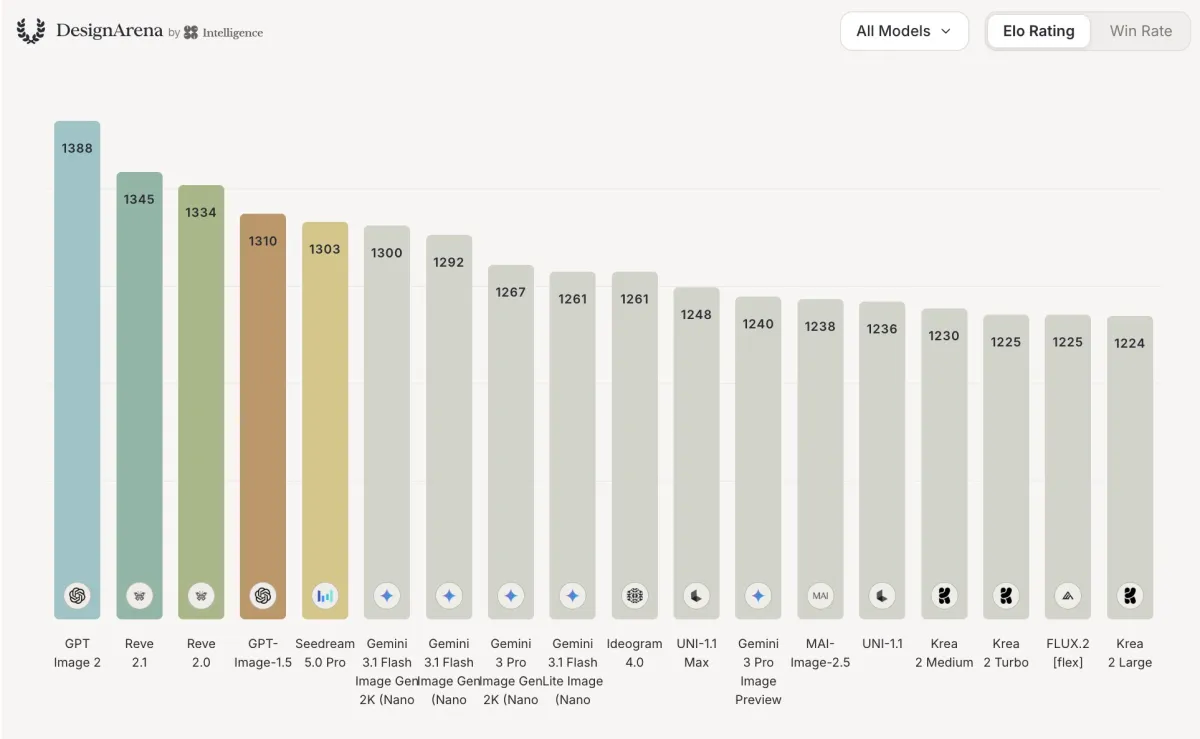
For non-enterprise users, using Design Arena is a lot like using a sophisticated model router. There’s a ChatGPT-style window for prompts, with separate dropdowns for websites, images, and a dozen other visual formats. Once you put in the request, format, and style, you’ll be presented with a series of “A vs. B” choices until you’ve ranked the handful of outputs from best to worst.
It’s a useful service, but the real value of the platform comes from the enterprise side, where participating models can treat it as a source of endless instant feedback for their media-generating models. The users tend to be indifferent to which models they’re ranking — as Li puts it, they just want the best output they can get — so their rankings can give critical input to what users really want.
For frontier labs, that’s a service worth paying for, Li says, adding the site is currently generating $60 million in ARR, solidifying its position as a key source of human-led evaluation data for the AI industry.
Crucially, users have to log in to get their output, so Intelligence can also track how those tastes change across different continents and over time. (Li notes that web dashboards in Asia tend to have a more maximalist design style.) These measures are an important complement to automated benchmarks, which can operate at a greater scale but are often subject to being gamed or otherwise manipulated, as the Hugging Face breach demonstrated in dramatic fashion last week.
Advertisement
That’s not to say that crowdsourced human feedback will be an automatic winning market. Less than a year after launching, Yupp shuttered its doors earlier this year after raising $33 million from a16z crypto’s Chris Dixon. It too nabbed some frontier models as customers and had, it said, over 1.3 million users, but still couldn’t build a sustainable long-term business.
Even so, other startups based on human evaluation seem to be thriving. LM Arena, which takes a similar approach to text-based responses, raised $150 million in a Series A in January, just four months after formally launching its paid product.
When you purchase through links in our articles, we may earn a small commission. This doesn’t affect our editorial independence.
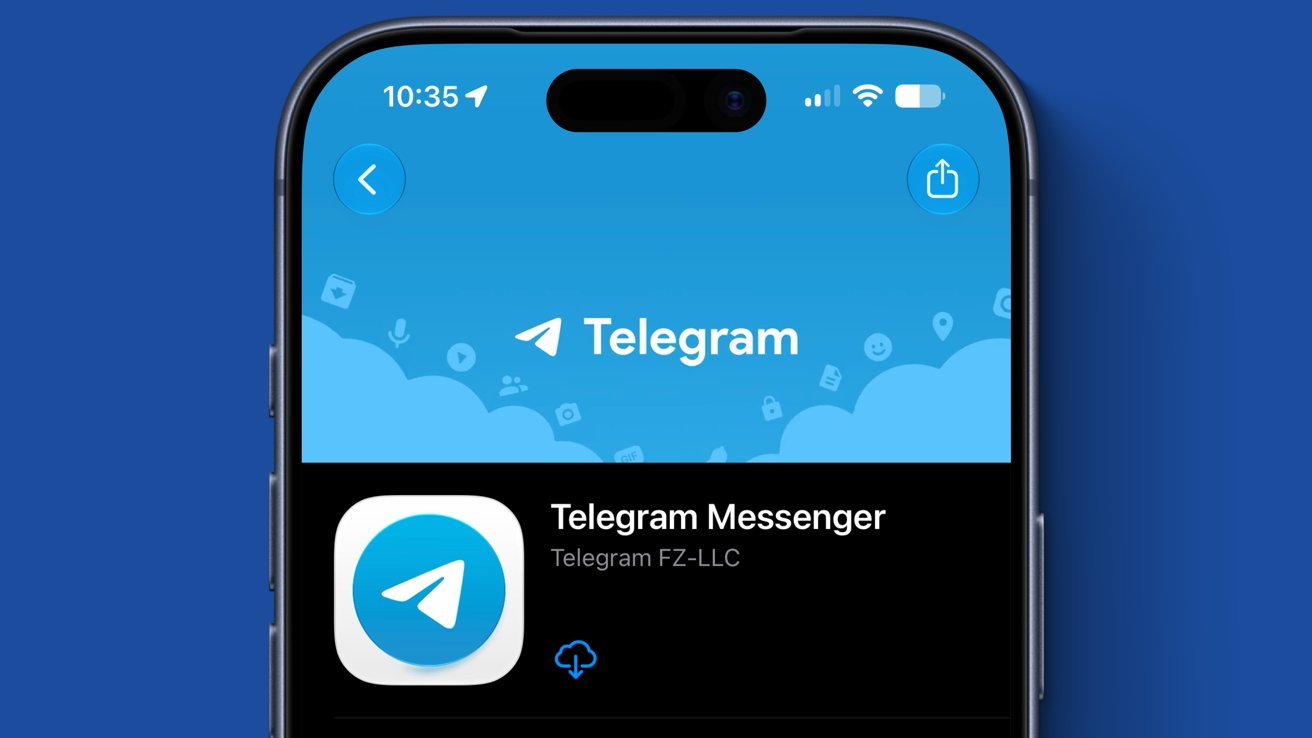
Telegram was removed from the App Store briefly Monday after CSAM was posted by a user. The app was restored after the content was removed.
Telegram is known widely as a secure alternative to Messenger, WhatsApp, and iMessage. Its cross-platform availability and options for end-to-end encryption have made it attractive to privacy and security-conscious users.
Reports began showing up across social media of Telegram disappearing from the Apple App Store around 9:30 p.m. EST on Monday night. Users searching the App Store or opening a direct link to the app showed that it was no longer available.
Apple shared a statement with AppleInsider regarding the removal:
Advertisement
We briefly removed Telegram from the App Store after our review found content that violates our strict guidelines prohibiting child sexual abuse material. The app was subsequently restored after the developer promptly removed the content and banned the user who posted it.
The app was likely pulled suddenly to ensure it couldn’t be downloaded by new users while the content was being removed. Apple has a history of taking fast action blocking app downloads when CSAM is discovered on the platform with only one notable exception.
When users were actively generating sexualized images of minors on the social media app X, it remained active throughout. It isn’t clear why swift action was taken with Telegram versus X.
Users that had Telegram already installed were not affected by the app’s removal. Telegram was restored to the App Store at around 10:10 p.m EST.
Updated August 4, 1:50 a.m EST: added Apple’s statement on why Telegram was removed.
Artificial intelligence (AI) is reshaping the scale and complexity of data center infrastructure.
Traditional data center facilities were designed around relatively steady CPU workloads and predictable growth in power demand, allowing developers to secure energy supply alongside growing demand, cooling systems based on known and mature technology and infrastructure capacity with a reasonable degree of certainty.
AI workloads, however, demand far more power with greater energy density.
Advertisement
Latest Videos FromTechRadar
Gireesh Nair
Senior Director of Power Networks at Worley.
Advertisement
Electricity consumption from data centers has grown at 12% per year over the last five years and expected demand growth, particularly in AI training data centers, is set to drive a substantial increase in power demand.
Meeting this demand, while maintaining efficiency, is pushing developers toward gigawatt-scale data centers and with the timeframe for delivering these facilities rapidly compressing, the ability to deliver new infrastructure efficiently is increasingly critical.
In addition, as the scale of these developments grows, so does the complexity of delivering them. Grid interconnections can delay timelines by years, equipment supply chains are stretched, and projects must meet stringent reliability targets while navigating regulatory, environmental and community requirements that vary by region and country.
Advertisement
For owners and developers, the challenge is no longer simply constructing another data center building. The next generation of AI data centers requires a fully integrated approach across power, cooling, transmission, water, digital systems and long-term operations. Success depends on designing these facilities as resilient, flexible and energy-optimized industrial campuses.
Sign up to the TechRadar Pro newsletter to get all the top news, opinion, features and guidance your business needs to succeed!
Balancing site trade-offs to unlock faster delivery
Site selection is one of the clearest expressions of this dynamic where teams are typically assessing a series of imperfect options, each with its own advantages and constraints. For example, one site may offer lower cost land but lack the existing infrastructure required to support large scale development, while another may provide access to grid power but at a significantly higher cost or with timelines that delay delivery.
Advertisement
In practice, few locations offer everything required, and selecting a site becomes an exercise in understanding what should be prioritized, what can be mitigated, and what must be accepted.
Factors like water availability, land constraints, fiber connectivity, permitting timelines and social license to operate are all deeply important to success. Developers must consider how to optimize within these constraints. Where grid power is unavailable or delayed, for example, off grid or hybrid energy solutions may be introduced.
While these approaches can accelerate delivery, they also bring different capital requirements, financing structures, and operational considerations that must be carefully weighed.
Advertisement
Combining power solutions can accelerate bringing capacity online more efficiently
As AI workloads drive unprecedented levels of demand, power strategies also require a reassessment against expected scale timelines. Grid supply does offer lower long-term energy costs, stability and resilience advantages eventually but hinges on capacity constraints, and extended interconnection timelines.
In contrast, behind the meter generation, such as gas turbines or reciprocating engines, can be deployed more quickly and provide greater operational control. This, however, comes with higher upfront capital requirements, higher operational costs, fuel dependencies and more complex permitting considerations.
As speed-to-market is a key competitive driver, many large-scale developments are willing to pay a premium for off-grid or hybrid architectures, including battery storage and integration of renewables where accessible.
Advertisement
These systems are coordinated through microgrid controls, allowing operators to manage load variability, maintain resilience through islanding, and optimize overall system performance. The final configuration is shaped by how factors such as time to market, grid availability, resilience, and overall cost evolve.
Rethinking cooling can support high-density AI and optimize when energy is used
With this increase in power demands comes a corresponding increase in heat generation. The physics and economics of air cooling are struggling to keep pace with the thermal loads generated by AI workloads, forcing a shift toward alternative solutions.
One solution is liquid cooling, which is gaining traction as a more effective way to manage higher heat loads. Transferring heat more efficiently, it enables facilities to operate at the densities required by AI infrastructure. However, it does also introduce new dependencies, particularly around liquid cooling solutions and the infrastructure required to support it.
Advertisement
At the same time, taking a broader view of cooling opens up new opportunities. Cooling systems can be integrated with wider power infrastructure, excess heat can be connected to industrial processes that can utilize it and waste heat from data centers can be repurposed for applications such as district heating, which is already quite common in the Nordics.
Approaching cooling in this way allows developers to design systems that make better use of energy and create additional value through heat reuse and integration with surrounding infrastructure.
Additionally, thermal energy storage gives AI data centers the ability to shift cooling demand away from peak periods by producing chilled water when electricity is cheaper or more available and using it later when loads are highest.
This creates valuable demand response capability, allowing the facility to reduce its grid draw during periods of system stress, lower demand charges and support utility programs without impacting data center operations. In combination with batteries and advanced controls, thermal storage can help stabilize both the data center and the surrounding grid.
Advertisement
Early efforts on permitting can identify the fastest development route and avoid delays
Permitting and regulatory considerations sit alongside these technical decisions, shaping what is possible and how quickly projects can move forward. Requirements vary by region, country and project type, but in all cases, they influence how projects must be designed from the outset.
For example, grid connected developments may be constrained by connection approvals and capacity limits, while sites incorporating on-site generation may require air quality or emissions permits that influence technology choices. Land use restrictions, environmental approvals and community considerations can further shape site layout, development timelines and even overall project viability.
Addressing these requirements early, and in parallel with technical and commercial decision making, is therefore as important as those other factors. When permitting is treated as part of the initial planning process, it allows projects to be structured in a way that is both deliverable and aligned with regulatory expectations from the beginning.
Advertisement
This, in turn, reinforces the need for a coordinated approach across the full range of stakeholders involved. Energy providers, technology companies, developers, regulators and local communities each play a role in shaping outcomes, and the interaction between them becomes a critical factor in how effectively projects can progress.
Having the right expertise in place to connect these elements enables developers to navigate this complexity more effectively, ensuring that decisions made early on are aligned across disciplines. This early alignment helps create a more integrated delivery pathway, reducing friction between project phases and supporting smoother progression from planning through to construction and execution.
Turning AI demand into operational capacity at the speed and scale the market requires
The importance of this becomes clearer when looking at how these challenges play out in practice. In Texas, for example, early engineering work on a gigawatt scale AI training data center helped define the infrastructure strategy for one of the largest behind the meter energy systems supporting AI workloads.
Advertisement
The project includes 5 GW of gas generation capacity, up to 1.25 GW of solar PV, utility scale battery storage and a microgrid supporting 20 buildings totaling 10 million square feet, each designed for around 250 MW of power demand.
Projects of this scale reflect the sheer pace and ambition of AI demand, but ultimately, success comes down to how effectively that demand is translated into deliverable infrastructure. That means making early decisions that can withstand real world constraints, from power availability and permitting through to long term operational performance.
Bringing these elements together into a coherent strategy, and aligning the stakeholders needed to deliver it, is what will enable projects to move at the speed and scale the market now requires.
This article was produced as part of TechRadar Pro Perspectives, our channel to feature the best and brightest minds in the technology industry today.
The views expressed here are those of the author and are not necessarily those of TechRadarPro or Future plc. If you are interested in contributing find out more here: https://www.techradar.com/pro/perspectives-how-to-submit
There’s a lot to love about AirTags, but there are also compelling alternatives worth considering.
Hapabapa/Getty Images
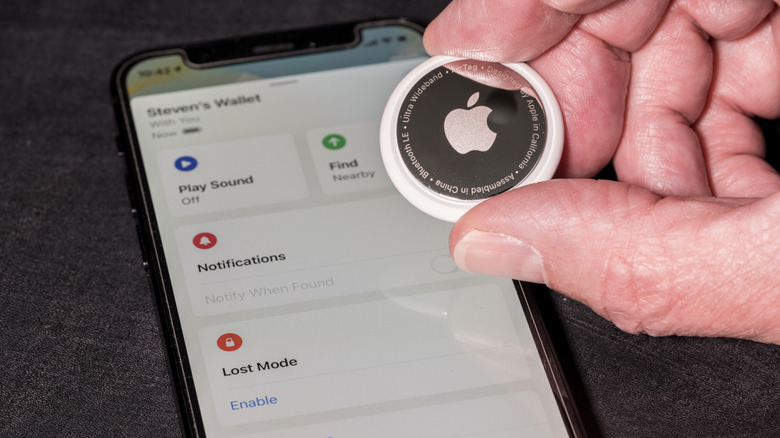
Apple AirTags are more handy than you think. With the design and functionality finally being refreshed for the first time in early 2026, the tiny, coin-sized item trackers provide even more value through upgrades like more powerful Precision Finding, longer Bluetooth range and a louder speaker for when you want to “ring” one from your phone to locate an AirTagged item. But there are things you should consider before using one.
While they are convenient, affordable, offer great battery life and have various security measures, there are limitations. Plus, you will find alternatives from competitors like Tile by Life360 or Chipolo that are really compelling. But some of the upsides may convince you that AirTags are the best for your needs.
Advertisement
The pros of using Apple AirTags
Ink Drop/Shutterstock
Apple AirTags are great companions to Apple devices. In fact, they can only pair with Apple products, but keeping within the Apple ecosystem means it’s a breeze to set up an AirTag. When you unpackage one, it can instantly connect to your iPhone and integrates seamlessly within the Apple Find My app. Once set up in a holder, you can attach it to all sorts of products, like your keys, purse or backpack, gym bag; even slot one into your luggage or eyeglasses case. While they aren’t meant to track people or pets, many users have placed them in a child’s school backpack or attached one to a pet’s collar as an affordable peace-of-mind option. Since they’re dust- and water-resistant, you can take them just about anywhere and don’t have to worry if they get wet in the rain or knocked about in the sand on the beach. Even hide them somewhere in your car to track its location, or at least the general area of the vehicle, if it’s stolen. Since the thief wouldn’t be alerted of the AirTag for about 24 hours, this may give you time to figure out where it is and contact authorities with the information.
With Precision Finding, you can locate a misplaced item with great accuracy, perfect if your keys fell beneath the couch cushions, for example, or you left your wallet in the jacket you tossed in the hamper. They are shareable with up to five family members as well, so everyone can keep tabs on valuables like your child’s backpack or the family house keys. With the ultra-loud speaker (even louder with the newer model), you can locate a nearby missing item by following a loud beeping noise. If the AirTag is left behind in another location, like at the airport, office or coffee shop, the Find My network means other iPhone, iPad and Mac users can help reunite you with your lost item. A secure Bluetooth signal advises someone nearby with an Apple device that an AirTag (and the item it’s attached to) is within range, and they can do their good samaritan thing.
Plenty of settings options enhance the experience. You can send a notification when someone detects your device and provide your contact information so the item can be safely returned. You can also set an AirTag to send a notification immediately when an item is out of range, like if you walked away from the car but left your purse behind. Privacy is integrated into the device, too, which has anti-stalking features to prevent people from trying to track you with hidden AirTags. Finally, while you do have to replace the battery, it lasts for about a year and uses an affordable and widely available coin-cell “watch” battery. All around, there are really compelling reasons to use Apple AirTags.
Advertisement
The cons of using Apple AirTags
Backyardproduction/Getty Images
While Apple AirTags are great, they aren’t perfect. Our list of the best Bluetooth trackers includes models that support both Apple’s Find My and Google’s Find Hub networks and hail from third-party brands like Chipolo and Hyper. Some of these employ different form factors, like the Chipolo Card that looks like a credit card and is easy to slot into a wallet, something you can’t comfortably do with an AirTag given its thicker and round form factor. There are also models like the Tile by Life360 Sticker you can easily and securely affix to the underside of a skateboard or inside of your glasses case.
Unless you buy a bundle, you need to pay for a holder for the AirTag separately. And while its battery lasts a long time, you can’t recharge it. This isn’t a big deal since coin cell batteries are easily found in corner stores and bigger shops and aren’t expensive. Still, it’s something to consider.
The AirTag’s Bluetooth range for finding has been improved, but for items nearby, it can only reach about 30-100 feet. Compare that to other models like the Chipolo Pop, which has triple the range at up to 300 feet, or the Pebblebee Clip 5, with an impressive Bluetooth range extending up to 500 feet. Both of these trackers work with both iOS and Android, though not at the same time. But it affords a choice you don’t get with an AirTag.
Advertisement
To AirTag or not to AirTag
Backyardproduction/Getty Images
Apple AirTag gives you the most seamless experience, but only with iPhone and other Apple devices. It fits nicely within the ecosystem, employs a simple and effective design with an easily replaceable and long-lasting battery, and the latest version has improved features. Precision Finding using ultra-wideband, for example, is so useful for playing scavenger hunt with your lost keys somewhere in the house, or for finding where you left your eyeglasses case in the building.
But the market has gotten competitive with plenty of third-party options that add value, including longer range and compatibility with both Apple’s Find My and the Android Find Hub (note that you can only connect to one or the other network at a time). There are also trackers that may fit better in your location of choice. So, Apple AirTags aren’t the only game in town. And while pricing is competitive, you’ll still want a protective holder to go with it since there’s no integrated key ring, which adds to the cost. Since it’s round and too thick to slot into a wallet, not to mention easy to lose without a holder, it isn’t as practical as some other designs either.
There’s no denying the power of the Apple Find My network. But Apple AirTags aren’t the only item trackers that use it. While relatively affordable, you might prefer the form factor, longer range and additional features of other third-party brands. There are plenty of reasons to get an Apple AirTag, but just as many to consider alternatives, too.
Apple’s wearables weren’t impacted by these price hikes, which is good news for anyone looking to upgrade to a watchOS 27-compatible device (as there will only be a select few left) or if you’re keen to get a swanky new watch to track your workouts.
Our Apple Watch Series 11 review called it “the most capable and best-looking” mainline Apple Watch yet, thanks to its larger battery capacity and brighter, more power-efficient and more scratch-resistant Always-On Retina LTPO3 OLED display compared to its predecessor.
Apple rates both the 42mm and 46mm models’ battery life at 24 hours of typical use and up to 38 hours in Low Power Mode, with battery capacity up 9% and 11%, respectively. Our reviewer found the claim checks out, with tests getting a full day and a half of battery life with light use, but the Low Power Mode makes it go even longer.
Health tracking is more comprehensive with the Series 11, adding blood-pressure monitoring to the usual arrhythmic heart-rate alerts, ECG, wrist temperature, respiratory rate and cycle tracking. Hearing health and Sleep Score are other notable additions, but these are also available on the cheaper SE 3 and have been rolled out to older models too.
Admittedly, the Apple Watch Series 11 won’t be much of an upgrade over the Series 10 because of the very similar hardware (and watchOS 27 compatibility), but upgrading from the Series 8 or older models, or even the Watch SE and SE 2, will see a significant performance jump and a longer support period.
Advertisement
And at this price, you don’t even need to wait till Black Friday as we don’t see it getting much cheaper than this in a few months’ time.
Whether you play games, create videos, or perform daily tasks on your computer, having up-to-date NVIDIA drivers is essential. NVIDIA drivers enable your graphics card to work effectively with Windows and programs installed on it. Upgrading your driver will improve performance, solve existing problems, make it more compatible with recently developed software, and offer new features. The most convenient method for upgrading your driver is to use the NVIDIA app, where you can install an updated driver in a few clicks.
Update NVIDIA Drivers Using the NVIDIA App
You can update your NVIDIA graphics drivers quickly through the NVIDIA app. If you don’t have the app, install it first. During installation, choose GeForce Game Ready Drivers for the best gaming experience or NVIDIA Studio Drivers for creative tasks like video editing and 3D design. Steps to update NVIDIA drivers:
In the NVIDIA app, there are two different kinds of drivers to choose from: Game Ready Drivers and Studio Drivers. If you play games often, then you should go with the Game Ready Driver. They include optimizations for games and compatibility with newly released titles. However, if you use creative tools such as Adobe Premiere Pro, Blender, and DaVinci Resolve, you should consider using the Studio Drivers, as they suit your purpose.
The NVIDIA app can automatically download new driver updates as soon as they become available. While the download happens in the background, you must still open the app and install the update yourself. To use this feature, go to Settings in the NVIDIA app and enable Automatically download drivers and let me choose when to install. Once enabled, new drivers download in the background, making future updates faster and more convenient.
How to Go Back to an Older NVIDIA Driver
If a new driver update causes any performance or compatibility problems, you can go back to the old driver. The NVIDIA software maintains a list of previously used drivers in the section called Previously Installed on the Drivers tab. Just click the three dots next to your chosen driver and select Reinstall.
Advertisement
In addition to the driver update tool, NVIDIA has several other helpful tools. One of them is an automatic optimization of game settings to improve their performance. It also supports NVIDIA ShadowPlay, which lets you record gameplay and take screenshots or video recordings. You can also check the Drivers page for updates on new games, driver releases, and NVIDIA features.
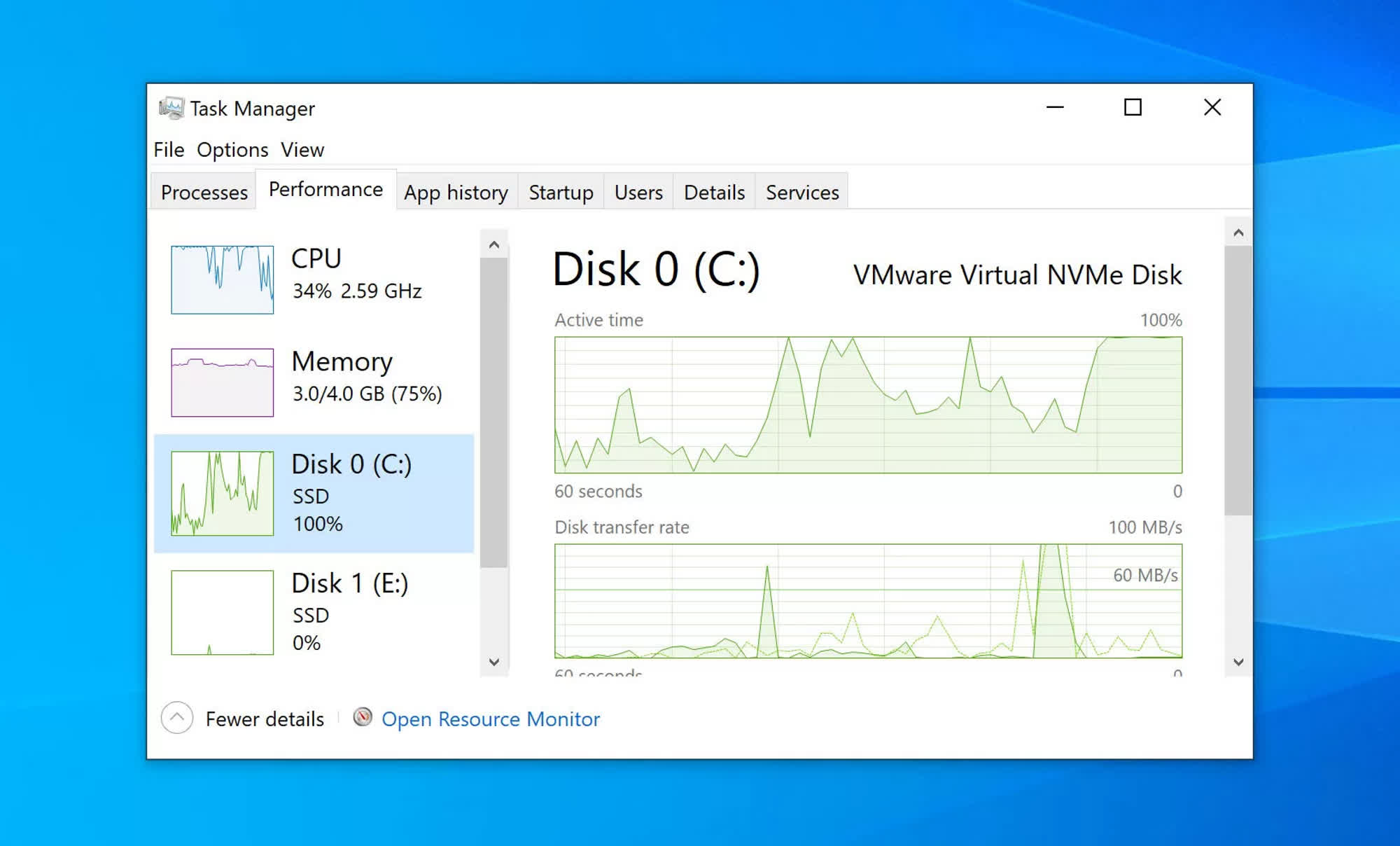
In a nutshell: David W. Plummer is the original developer of Task Manager, one of Windows’ most popular built-in tools for monitoring and managing system resources. Now, the programmer wants to “reimagine” his original project, adapting the same concept for computer platforms beyond Windows.
David Plummer is working on a new Task Manager tool and is bringing it to macOS first. Simply named Task Manager OG (TMOG), the program is designed to offer a “serious” system console to people working on GUI-based operating systems. Furthermore, TMOG focuses specifically on code efficiency, depth of information, and the kind of performance that only native applications can offer.
Plummer created Windows Task Manager during his tenure at Microsoft, coding the tool in his spare time before Windows NT lead developer Dave Cutler decided to integrate it into the platform. The new TMOG project appears to provide a similar experience to the original program, although it could represent a massive upgrade for macOS users compared with the platform’s bare-bones Activity Monitor tool.
Plummer highlights how his tool is both powerful and easy to read, providing a quick view of how the operating system is using the CPU, GPU, and other hardware components. Beyond processor frequency, thermal values, and resource allocation, TMOG can also provide a deeper look at what each logical CPU core is doing, how a process branches out, and more.
The former Microsoft programmer claims to be obsessed with speed and code efficiency, so much so that he recently “rebuilt” Windows Notepad as an extremely small, bare-bones clone called TinyRetroPad.
Unlike Microsoft’s approach to Windows 11, Plummer chose native APIs to create TMOG. The macOS version is built with Swift and AppKit, while the Windows release will be a pure Win32 application targeting the x86-64 architecture.
The TMOG beta is already available for macOS users, and the first Windows beta should arrive soon. Plummer says the tool will be free, although he could eventually create a “Pro” version with additional features that have yet to be announced for paying customers.
Projects such as TMOG highlight the continued interest in high-quality, power-user software, especially for monitoring the state and behavior of a PC’s operating system. Most Windows users generally rely on Task Manager to get a closer look at the OS.
Advertisement
Plummer is a controversial figure within the Windows software ecosystem. The programmer worked at Microsoft from 1993 to 2003 before eventually starting his own company, SoftwareOnline. The Washington State Attorney General later sued SoftwareOnline over products it alleged were scamware, including “Registry Cleaner” and “InternetShield.” The lawsuit was eventually closed after Plummer’s company agreed to pay $150,000 in civil penalties and $40,000 in legal fees.






























































You must be logged in to post a comment Login