U.S. battery startups hit a rough patch when the One Big Beautiful Bill eliminated battery and EV incentives, undercutting a chunk of future demand. But recently, they’ve found a lifeline in the defense world, helping to power everything from drones and torpedoes to infantry radios and fighter jets.
The Trump administration, despite its open disdain for EVs, acknowledges that batteries are an inescapable part of modern life. And like many things in Washington these days, it’s leaning on national security as justification for its recent decisions.
The latest comes from the Department of Energy, which announced Thursday that it is awarding $500 million in grants to bolster the battery supply chain in the United States. The program aims to “reduce reliance on foreign sources, bolster national security, and advance American energy dominance.” Much of the money went to startups.
Defense applications of lithium-ion batteries are “absolutely playing out in discussions,” a spokesperson for Coreshell, a battery materials startup, told TechCrunch. The company recently brought on ADS Ventures as an investor; the strategic VC’s parent company, ADS, is a defense supplier, and it’s working with another supplier of autonomous systems. Coreshell received a $50 million award from the DOE to expand manufacturing for its metallurgical silicon anode material.
Advertisement
Other startups received significant grants, too.
Lilac Solutions, which extracts lithium from brines, landed $100 million to build a processing facility on Utah’s Great Salt Lake to produce 5,000 metric tons of lithium carbonate annually by 2028. Lithium carbonate is a key precursor used in battery production.
Nth Cycle told TechCrunch that it received $100 million to build a facility that will refine black mass from recycled lithium-ion batteries, producing lithium and nickel compounds that can be used to make new batteries.
“We’re seeing clear demand drivers from the defense sector.” Megan O’Connor, co-founder and CEO of Nth Cycle, told TechCrunch. “But there’s still that in the automotive space as well.”
Advertisement
That dynamic is unlikely to change. Though EVs have been dealt a setback, automakers are still rolling out new models and expecting years of growth, albeit further out than expected.
Defense will continue to be a significant player. Exact numbers are unsurprisingly hard to come by, but even in 2021, the U.S. Defense Logistics Agency was buying $200 million worth of batteries annually. But that’s dwarfed by the automotive industry. This year, the automotive industry is expected to spend nearly $18 billion on battery manufacturing in the U.S. alone, according to Mordor Intelligence.
As battery companies undoubtedly know — and the Trump administration appears to tacitly acknowledge — the future is electric, but the timing is anything but settled.
In the meantime, soldiers and drones still need lightweight and capable batteries from U.S. sources. A few years ago, those batteries could have come from domestic factories that sprung up in the wake of the Inflation Reduction Act. But after the One Big Beautiful Bill gutted battery battery production incentives, the Pentagon may have had to start looking for alternatives. These new DOE grants might amount to an admission that efforts to kill the American EV industry went a bit too far.
Advertisement
When you purchase through links in our articles, we may earn a small commission. This doesn’t affect our editorial independence.
A supply-chain attack targeting Android-based car head units is using a legitimate device-update app to spread malware that enlists compromised devices in a proxy botnet or uses them for ad fraud.
Kaspersky researchers analyzed the malware and attributed the operation to the MoYu group, a threat actor previously associated with the BadBox malware botnet.
The researchers note that this is the first documented case of a malware infection chain specifically created for the targeted car head unit.
MoYu’s operation targets systems from DoFun, a Chinese automotive software and hardware provider owned by Shenzhen Driving Control Technology Co., Ltd.
DoFun is an automotive software, cloud services, and hardware provider that sells generic Android-based head units, which act as the command center for a car’s infotainment, navigation, and settings systems.
Advertisement
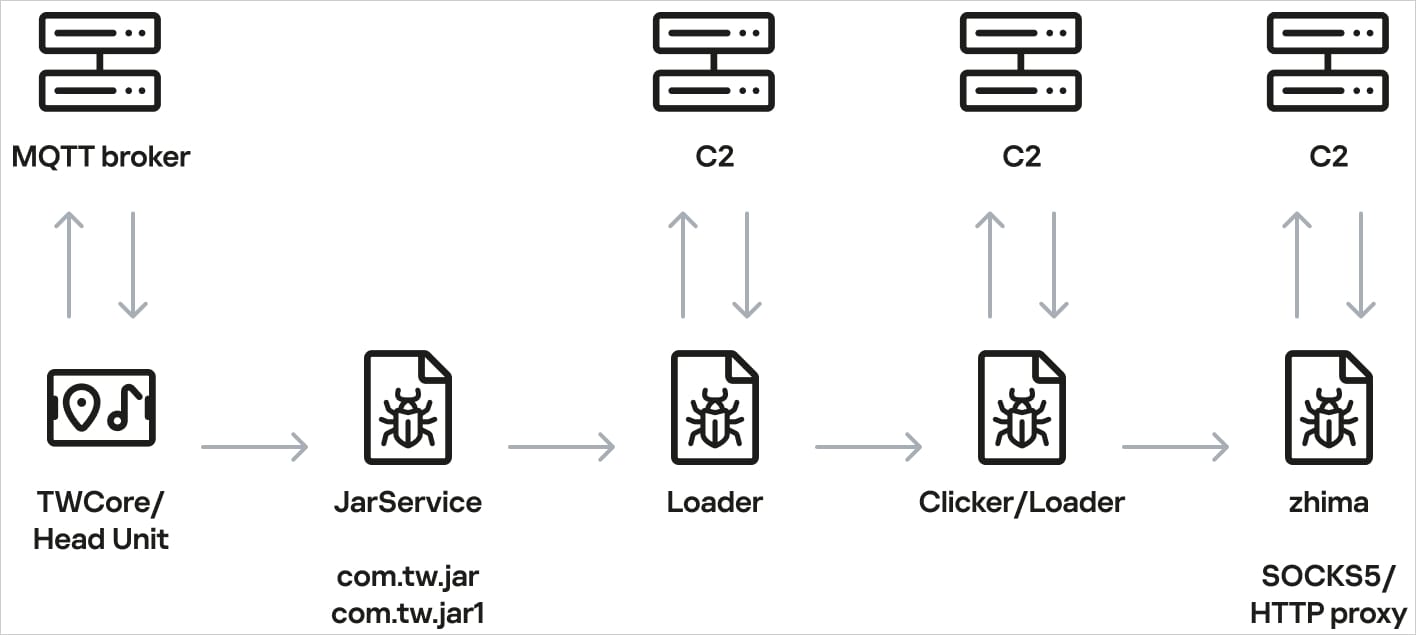
In June, Kaspersky researchers found a rogue APK file being downloaded from a legitimate DoFun system app, TWCore, which receives instructions through an MQTT server hosted at cardoor[.]cn.
The unknown app has no interface and is a piece of malware called JarService. When launched, the malware decrypts and executes a second-stage loader that establishes communication with a command-and-control (C2) server and downloads another encrypted payload.
The final payload periodically reports device information such as the model, display resolution, Wi-Fi SSID, and MAC address, and retrieves commands from the attackers.
The malware supports the following nine commands:
Advertisement
return – Retrieves a specified value from Android’s SharedPreferences storage
copy – Copies stored or downloaded content to the device clipboard
http – Sends HTTP GET or POST requests and can save part of the response
web – Opens a URL in a WebView and executes supplied JavaScript
loadlib – Not fully implemented when Kaspersky published the report
loadlib2 – Downloads and executes arbitrary code or additional modules
loadlib3 – Not fully implemented when Kaspersky published the report
deeplink – Opens a specified resource in the browser
traceroute – Checks whether specified hosts are reachable using ICMP ping
Kaspersky says the malware does not interfere with driving or critical vehicle control systems, and appears designed for advertising fraud and turning internet-connected car head units into residential proxy nodes for monetization purposes.
The head unit infection scheme Source: Kaspersky
Researchers discovered that the operator primarily loaded a reverse-proxy module named ‘zhima,’ which turns the head unit into a proxy botnet node, and also made web requests for click-fraud activity.
Kaspersky says it notified DoFun of its findings, and the Chinese firm replied that it resolved the problem.
BleepingComputer has contacted both companies with questions about the initial compromise vector, and we will update the article with the information once received.
Overall prevention scores can hide what happens after initial access. Once attackers are using valid credentials, prevention drops sharply.
The Blue Report 2026 measures defenses technique by technique across 338 million simulations run in customer production environments.
In this week’s roundup of the latest news in online speech, content moderation and internet regulation, Mike is joined by Chris Messina, inventor of the #hashtag in social media, who has worked on internet and social media efforts for decades. Together they discuss:
Our fun links this week include Berd, the open source anthropomorphic agent management tool from Jack Dorsey and Block, and Dopamine Shop, Fake Eats, and other places to shop without shopping.
Make sure you don’t buy a model that’s incompatible with your games.
Paul Stringer/Shutterstock
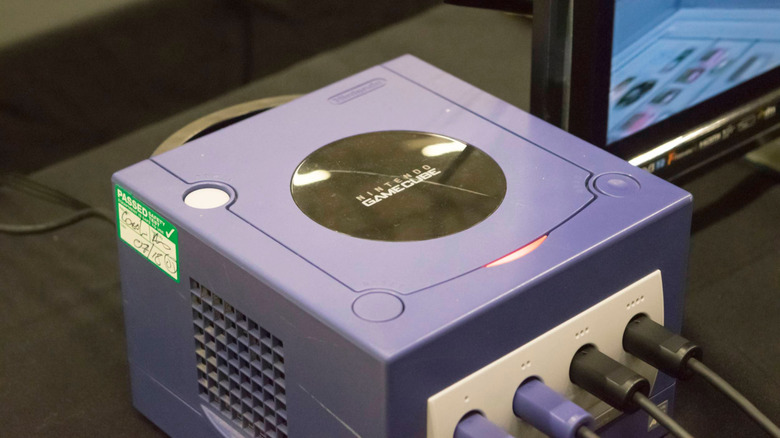
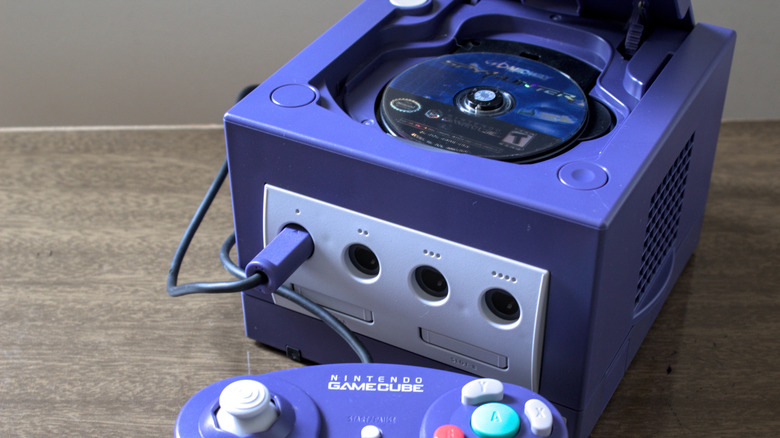
Buying a GameCube is one of the few official ways to experience the console’s library for the first time or relive your childhood favorites. And while the ‘Cube has fewer hurdles to using it today than many of its ancestors have, it’s not necessarily as simple as plugging and playing. If you’re not careful with the model you buy, you could end up not being able to play any games.
This isn’t the only problem with using a console that’s a quarter-century old and was discontinued in 2007. Of course, there’s always the general risk of hardware failure over time, leading to discs not reading or internal batteries dying. But you might not know a small revision to the console removed a feature that’s more relevant today than it was when the system was new.
The GameCube is region-locked, which means that a given console will only play games that were made for its market. If you buy an American GameCube, it won’t play Japanese games.
There are three major regions the console was built for: North America (NTSC-U), Japan (NTSC-J), and Europe/Oceania (PAL). These NTSC and PAL terms come from older analog TV standards matching the power grids used in each area. The differences are why retro European games run at 50 or 25FPS, instead of the 60 or 30FPS familiar to North Americans.
Region locking was a common limitation in the ’90s and 2000s. Earlier Nintendo consoles like the NES and SNES were also limited by region, along with the PlayStation and Dreamcast. The practice wasn’t as frequent on handhelds, since the built-in screens bypassed the analog TV problems.
Advertisement
Thankfully, today’s consoles don’t have this drawback. The Nintendo Switch 2, PS5, and Xbox Series are all region-free, letting you play physical games from anywhere. However, there are still some regional restrictions. You can only use the digital store for the country your account is associated with, and you have to use a payment method from that location. DLC is also typically region-locked, so you can’t buy a European expansion for an American game.
Why does region locking exist?
LIAL/Shutterstock
While it’s not good for you as a player, companies had their own reasons to impose region locks (aside from the historical analog display problem where they were physically incompatible). Decades ago, it wasn’t as common for games to release globally at the same time, so these blocks stopped people from importing new games early. Different regions have various ratings boards, so localized releases need to be rated accordingly and potentially modified.
It also allows each region’s branch (like Nintendo of America) to set appropriate prices for their markets. This is still the case today with Steam; it’s against the platform’s terms of service to change your location so you can buy cheaper games using another country’s currency.
Advertisement
You must therefore be careful of not only what console you buy, but also which games you get. Even if you found a cheap Japanese GameCube, you wouldn’t be able to play English-localized games on it. And you can’t try Japan-exclusive games on your American GameCube, either. While it’s possible to mod your system to remove region locking, doing so is complicated, so it’s better to buy the correct one from the start.
Thankfully, it’s not difficult to tell them apart in most cases. American GCN games have the familiar ESRB letter rating, while system-exclusive titles have a flat Only For label at the top-left. European games often have “PAL” on the box, while the Only For label is rounded when present. Plus, their spines have a green triangle at the bottom and the GameCube logo at the top. Japanese boxes are smaller and obviously feature that language.
For the console, Japanese models have (JPN) next to their model number on the bottom, along with Japanese text. American models have (USA) after the model number, with PAL consoles having (EUR). Be sure to double-check photos if buying online.
Advertisement
Another hurdle: digital output
Achmad Wahyudi/Getty Images
If you have an old TV to use with the GameCube, you’re all set. Your modern TV might need an adapter to work with the system, though. Many of today’s TVs lack composite inputs, so you’ll either need a composite-to-HDMI adapter or a cable that connects the GameCube’s output port to HDMI.
While the GameCube never got a major revision like the many “slim” rereleases we see, Nintendo did release a slightly tweaked model in early 2004. This has one major difference: newer units lack the digital output port seen on the original. Dropping that made the console cheaper to produce, especially since few people used this output back then.
That port’s original purpose was to enable 480p output via component cables, which is sharper than the normal 480i display of the system. Nowadays, third parties take advantage of this port to enable HDMI output from the GameCube. For the best picture quality, it’s best to buy a DOL-001 system that has the Digital AV Out port on the back. If you decide not to bother with an actual console, some of the hits, like Super Mario Sunshine, are available on the Switch 2’s Nintendo Classics library.
It’s back-to-school season, which means there are plenty of great deals to be had on everything tech related. But you don’t have to be going to school or college to get in on the action — in fact, there all sorts of ways to score a discount, whatever your situation.
Here, we’ve put together some of the best ways you can get free or heavily discounted software, whether or not you’re a student. Read on and you’ll see there are many ways to score a brilliant bargain that might take you by surprise.
Education discounts
(Image credit: Apple)
Many companies know that students tend to be strapped for cash, and they therefore try to tempt educational customers to make a purchase by steeply discounting the price — or waiving it altogether.
Advertisement
Latest Videos FromTechRadar
For example, you can snag free access to Microsoft 365 apps if you’re a student, while educational institutions get the same deal. This is limited to web-based versions of the apps, but it’s a good way to net yourself a solid set of free office apps with absolutely no cost involved.
If you’d rather have the desktop apps, students can get a 50% discount on Microsoft 365 with a valid education email address. You can also get one year of Microsoft 365 for free when you buy a qualifying PC desktop or laptop. Microsoft also throws in a year of Xbox Game Pass Ultimate and an Xbox Wireless Controller for free.
Advertisement
Looking further afield, Amazon Prime offers discounted rates and sometimes markets extended free trials to students and young adults, while other apps and services with student discounts include Adobe Creative Cloud, Apple Music, Evernote, Headspace, Spotify and more.
So many companies run student discounts that if there’s an app you’re interested in, it’s always worth investigating whether your student status will get you money off.
Sign up for breaking news, reviews, opinion, top tech deals, and more.
Advertisement
Check your employer or job description
(Image credit: Unsplash / Jason Goodman)
Deals don’t end the moment you enter the workforce. In fact, some of the best money-off opportunities are reserved for those in full-time employment. The catch is that they often depend on the type of work you do, but there are still plenty of deals to be had.
If you want to look after your logins, you can get free access to both 1Password and Proton Pass if you’re a journalist. Proton’s entire suite of apps — including a VPN, office apps, encrypted cloud storage and an email service — are free for journalists, in fact. Similarly, VPN provider Windscribe offers cost-free access if you’re a reporter or if you work for a charity.
Microsoft gives a wide range of discounts to nonprofits, including on office apps, security software, AI tools, and more. The Google for Nonprofits program offers also free and discounted access to Google services for NGOs.
Advertisement
Even if you don’t work in these sectors, you could still be in line for money off. Plenty of companies have partnerships with prominent app developers and get discounts on their software, so be sure to ask your employer if they run a scheme like this.
You don’t always have to look far for free or cheap apps — they’re often bundled with your device’s operating system. Microsoft, Google and Apple all have free password managers, for instance. Apple’s is a standalone app while Microsoft’s and Google’s live in the Edge and Chrome web browsers, respectively, meaning they work cross-platform and can be used on competing operating systems.
Advertisement
While these password managers are excellent for managing your accounts, they might lack more advanced features compared to third-party options. Be sure to check if they do everything you need before picking one up.
There are other ways your operating system can help you out. Take Apple’s macOS, which comes with a range of top-class office apps, including Pages, Numbers and Keynote. Google, too, has its own series of very capable office apps that are based in the cloud.
If you use different devices that run on different operating systems — for example, you have a Windows PC but also an iPhone — make sure you check whether the apps that come with one operating system can be used on another. If not, you might need to find an alternative app that runs well cross-platform so that you can access your files on any device.
Advertisement
Totally free apps
(Image credit: Blackmagic Design)
Despite all these ways to get money off your favorite software, you shouldn’t overlook the fact that there are some excellent free apps out there that are and always have been toll-free. Sometimes, the best way to get free software is to simply take the free option.
Video editor DaVinci Resolve is used by professionals in the movie industry, yet offers a totally free version that is incredibly capable. LibreOffice is a solid Microsoft Office alternative that requires no payment and can go toe-to-toe with Microsoft’s best. VLC can play almost any video format under the sun without ever asking for your cash. And there are many more out there.
Just be aware that many free apps are limited in some way compared to paid-for alternatives. A frequent practice is to lock more advanced features or higher limits behind a paywall, meaning you get a somewhat stunted experience if you don’t pay. Or you might get a free trial of a premium app that times out after a certain number of days or weeks.
There are other considerations. Be careful when using free apps that handle sensitive data. Some (but not all) free VPNs have been found to steal user data, for example, which undermines their privacy claims.
Advertisement
But that doesn’t mean you should forget about free software entirely. As apps like DaVinci Resolve and LibreOffice show, paying is not a requirement to getting a great app on your device.
Watching Netflix in 4K on a TV is usually as simple as having a compatible set and subscribing to the right plan. However, when it comes to web browsers, there are a number of requirements you need to meet in order to stream movies and shows at the highest available resolution.
The most obvious thing is that you need to subscribe to Netflix’s Premium tier, since 4K isn’t included in the Standard or ad-supported plans. Although previously you had to use Microsoft Edge or the native Windows app, Netflix now also supports Google Chrome — at least for PC users. Mac folks are required to use Safari. Also, even if you pay for the most expensive plan, it will only make a difference if you have the right display.
Advertisement
Hardware and software requirements for watching Netflix in 4K on Chrome
Most monitors have a resolution of 1080p or 1440p, which means they won’t take full advantage of 4K streaming. Assuming the display meets the resolution requirements, getting Netflix’s 4K content to play smoothly in Chrome also comes down to HDCP 2.2 support, which is a digital copy protection protocol that prevents unauthorized copying of 4K video. This requirement applies not only to the monitor you’re using, but also to your computer’s video output. If you’re connecting your PC to an external 4K monitor or a TV, both the display itself and the specific port on your graphics card must support HDCP 2.2.
Also, your operating system must support the HEVC codec. While systems like macOS already come with native HEVC support, Windows users may need to purchase and install the HEVC Video Extensions package from the Microsoft Store to ensure they can watch 4K videos from Netflix on their PC using Chrome. Netflix has been gradually switching from HEVC to the more efficient AV1 codec, but support for HEVC remains a key requirement for 4K streaming on the platform.
With HEVC and HDCP 2.2 supported, the next step is to check your computer’s hardware. According to Netflix, 4K content requires an Nvidia GeForce 1050 GPU or newer, or an AMD Radeon RX 400 GPU or newer. As for the CPU, your computer needs a 7th-generation Intel Core CPU or newer, or an AMD Ryzen CPU. Make sure your computer is also running the latest software and drivers. For PC users, Windows 11 is required.
Advertisement
Streaming on Chromebooks and final checks
Filipe Espósito/Netflix/Engadget
If you’re using a Chromebook Plus or a Chromebox, the requirements are slightly different, yet still just as strict. You still need a Premium plan and a 4K monitor compatible with HDCP 2.2, and your device must be running Chrome OS76 or later with Google Chrome installed.
If you have met all the hardware requirements and still suspect Netflix is downgrading your picture quality, you can check your actual streaming resolution by pressing Ctrl+Alt+Shift+D on your keyboard while a video is playing. This brings up a diagnostic overlay that displays your current bitrate and resolution, allowing you to see if you are actually getting the 4K stream you are paying for. If the resolution is lower than 3840 × 2160, the video is not 4K.
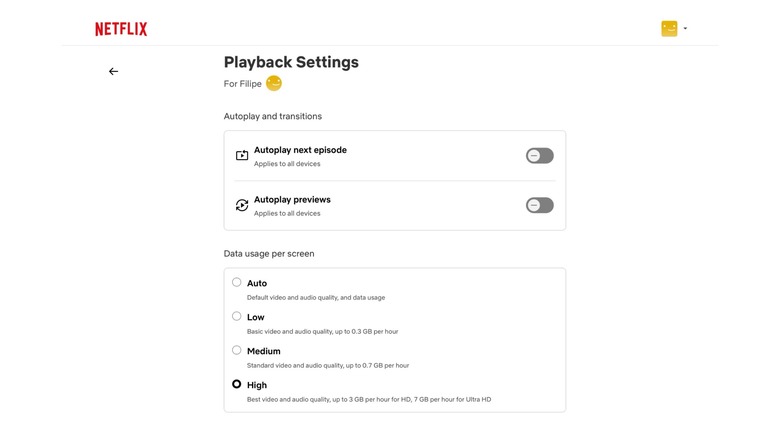
In that case, it’s also worth checking your Netflix playback settings to see if the Ultra HD option is enabled. To do this, click your profile picture on the Netflix page and select Account. Click Manage Profiles and select your profile. Go to Playback Settings and change Data Usage to High/Best Video. Keep in mind that having a fast internet connection is also essential for 4K streaming. Now you should finally be able to watch your favorite Netflix movies and shows in 4K resolution.
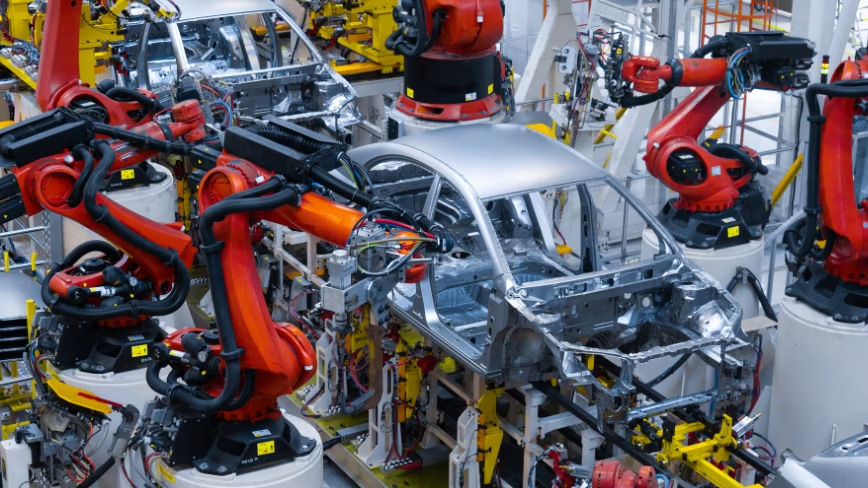
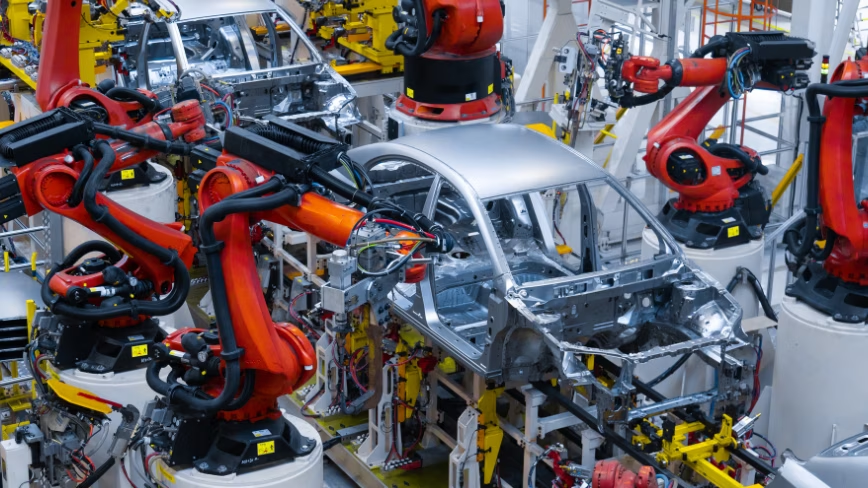
Chinese carmakers say printed circuit boards and multilayer ceramic capacitors are 20% to 30% short globally, with prices more than tripling over the past year because of AI data centre demand. Automotive memory prices rose about 180% in three months.
The AI boom has reached the cheapest components in a car. Chinese carmakers report a global shortage of 20% to 30% in printed circuit boards and multilayer ceramic capacitors, with prices more than tripling over the past year.
These are not exotic parts. A ceramic capacitor costs a fraction of a cent, and a modern car with driver assistance uses thousands of them.
The disruption is physical rather than financial. Geely’s Dai Yong says a lack of boards and capacitors stops assemblies running smoothly and interrupts production, which is a different problem from paying more.
Advertisement
The demand pulling them away is data centres. Industry officials expect at least a year before global supply can be built up to meet what AI infrastructure and carmakers now want simultaneously.
Memory is the larger half of the same squeeze. Automotive-grade memory rose roughly 180% in three months, with Samsung, SK hynix and Micron directing more than 80% of advanced-node capacity to AI servers, in the shortage that pushed Pixel prices up.
Cars are also asking for far more of it. A basic level two driver assistance system needs about 8GB, while urban navigate-on-autopilot features can require more than 300GB.
Buyers are paying already. More than ten Chinese electric vehicle makers have raised prices or cut discounts by 2,000 to 6,000 yuan, BYD has increased what it charges for driver assistance, and General Motors has warned about cost increases.
Advertisement
This is the same shortage that has been working through consumer hardware all year. It ended the $599 Mac Mini and pushed Microsoft to shrink Windows for machines with 8GB of memory.
European carmakers buy from the same suppliers and have no separate queue. Volkswagen, Stellantis and BMW are exposed to identical capacitor, board and memory pricing, in a market where electric car prices have already stopped falling.
The policy point is uncomfortable. Europe directed its semiconductor money towards leading-edge fabs, while the parts actually holding up production lines are passive components and automotive memory that no industrial strategy treated as strategic.
The cheapest thing in the vehicle now sets what it costs. That is a supply chain lesson the industry has learned twice in five years, and it has not yet changed what anyone stockpiles.
Your irresponsibility is someone else’s opportunity
Amazon founder Jeff Bezos is known for saying, “Your margin is my opportunity.”
Substitute “irresponsibility” for “margin,” and you have a formulation that applies to AI-driven software development.
Advertisement
AI models or coding agents make mistakes, and many of the people using them multiply those errors by asking their AI helper to build software without the knowledge necessary to build actual proper software.
The resulting vibe-coded apps have created a new growth industry – AI slop sanitation. Witness Slopfix, “a team of three senior engineers who refactor vibecoded codebases back to maintainability.”
Konstantin Klyagin, the Lisbon, Portugal-based founder of contract software biz Redwerk and QAwerk, a quality assurance consultancy, told The Register that a growing number of clients are asking for help to fix vibe-coded apps.
Klyagin said he’s been developing software for the past two decades, and with the adoption of generative AI, customers have been seeking help with their vibe-coded applications.
Advertisement
“Back in November,” he said, “we posted on our website that we do vibe code cleanup. And for us, it’s not just reducing the amount of lines of code but also making sure the product is production ready and can serve actual customers, because I don’t think that volume [lines of code] is a fair criterion to consider. Less [code] volume doesn’t necessarily mean more successful software.”
On the surface, Klyagin said, vibe-coded apps tend to look good. But what’s important to understand is how the business logic is implemented and how the app handles arbitrary user behavior.
“It’s not just how it was coded and what it was supposed to do in the best case scenario, but also how validation works, if there are security problems,” he explained.
A common issue, Klyagin said, is code duplication. In an app his company reviewed for a New York-based client, he said, there were duplicate payment paths. So a price mentioned on the front page of the app differed from the number presented during the onboarding flow, he said.
Advertisement
Then there was a problem with the permission handling. “So you could go straight to the sign up page and to the payment page, skipping the creation of the profile,” he said.
Then there were problems with the forms, which were insufficiently accessible for screen readers. And the test coverage was incomplete.
Technically oriented company founders who create apps, Klyagin said, tend not to need vibe-coding cleanup services. But those who lack software development experience don’t know how to set up the proper architecture and practices for building a maintainable app.
“It’s up to you to set certain restrictions and steer [the AI model] in the right direction towards better software architecture and also infrastructure,” he explained.
Advertisement
Before vibe coding became a thing, Klyagin said, clients asked for code reviews and refactoring, which he described as an integral part of the software development life cycle. Or they might ask for a code review when planning to acquire an application.
Now that people commonly use Claude Code and Codex – although he hasn’t yet seen codebases built with open-weight models – there’s a lot more QA and bug fixing.
Klyagin said his company has been managing the extra work with the help of AI.
“AI makes everyone faster,” he said. “We and our customers are now able to ship more code and more features. Some do it with more discipline and some with less discipline.
Advertisement
“So what we do, we just explain discipline to founders and to enterprises that adopt gen AI for coding. Because you know this discipline is not going anywhere. You still need to specify what you’re building and you still need to test it.” ®
Outer Biosciences has come out of stealth after four years, keeping surgically discarded human skin alive for up to a month and feeding the results into an AI model that predicts useful compounds. It has raised about $23mn and employs 19 people.
A company in Massachusetts has spent four years keeping human skin alive outside the body. Outer Biosciences says it can hold surgically discarded tissue viable for up to a month, and it has been running experiments on it the whole time without telling anyone.
The point of the tissue is to teach a model. An AI system predicts which untested chemicals should affect a particular skin function, the living tissue tests the prediction, and the result goes back into the model whether it was right or wrong.
The pace changed when that loop closed. Early work using scientific literature produced a couple of leads in about 18 months, while the company now says it generates a candidate roughly every six weeks.
Advertisement
The material comes from surgery, mostly cosmetic. Outer sources it through biobanks and brokers operating under institutional review board oversight and documented donor consent, with identifiers stripped before it arrives, and says it pays fees on a cost recovery basis rather than buying tissue.
The technical claim is about time rather than novelty. Living tissue is usually usable for days, which is enough for acute toxicity and not much else, while collagen remodelling, pigmentation change and barrier repair take weeks to happen.
Outer says a month-old sample still resembles a day-one sample without being identical to it. That is a carefully hedged claim and the company makes it carefully.
The commercial route avoids medicine entirely. The company is finding cosmetic ingredients rather than drugs, so there is no regulatory approval to seek, only a standardised industry name and safety testing under OECD guidelines that member countries accept from one another.
Advertisement
That last detail is where Europe enters. The EU banned animal testing for cosmetics more than a decade ago, which made validated alternative methods a requirement rather than an ethical preference.
Brussels has since gone considerably further. The Commission adopted a roadmap on 1 June to phase out animal testing in chemical safety assessment, with more than 30 recommendations, in a market where AI biology is moving faster than the validation systems around it.
Europe wrote the demand and America is building the supply. Outer is not alone in trying, with Vivodyne raising close to $80mn for lab-grown human tissue and a field of organ-on-chip companies chasing the same preclinical market.
What Outer claims as its moat is unfashionably physical. There is no biology internet to scrape, its data exists nowhere else, and it runs its models on its own machines because it does not want that data in the cloud, which is a different bet from the one most AI companies are making.
According to a post from chief product officer Hari Srinivasan, “over a million people” have clicked on LinkedIn’s new “Seems like AI slop” button, which launched after one analysis found 41% of the platform’s longform posts were fully AI-generated. The Verge reports: In Thursday’s post, Srinivasan said that users are overall “now experiencing 40% less views on what we classify as AI slop from just a few weeks ago.” LinkedIn is also adding a new message that will tell users who make a post if “Some members told us this post seems like AI.” “We approached this assuming good intent; I know I’m increasingly conscious on how to not sound like AI & the goal is to provide helpful feedback,” Srinivasan said.
A movie can be both “Filmed for IMAX” and shot with IMAX cameras, which is why the two labels are easy to confuse.
Aaronp/bauer-griffin/Getty Images
“Shot with IMAX” and “Filmed for IMAX” sound like two ways of saying the same thing. They aren’t, although IMAX’s own branding makes the difference less obvious than the names suggest. The simplest way to think about it is that shooting with IMAX film cameras describes the camera used to capture the movie, while “Filmed for IMAX” describes a broader production process built around an IMAX presentation.
A “Filmed for IMAX” movie can be shot digitally, as Dune was, but IMAX also includes productions using its own film cameras. Christopher Nolan’s The Odyssey shows the overlap: it was shot entirely with IMAX film cameras and is also officially part of the “Filmed for IMAX” program.
Advertisement
Shot with IMAX means using IMAX film cameras
Grusho Anna/Shutterstock
IMAX’s own marketing generally uses the more specific phrase “Shot with IMAX Film Cameras” rather than “Shot with/in IMAX.” In this case, the description is literal: filmmakers captured at least some of the movie using IMAX’s large-format film cameras.
IMAX film cameras use a 15-perf 65mm format. The 65mm film runs horizontally through the camera, with each frame spanning 15 perforations across the film. That creates the large, tall 1.43:1 image associated with IMAX film, meaning the image is about 1.43 times as wide as it’s tall. The camera film is 65mm, while theatrical release prints are 70mm, which is why those screenings are advertised as IMAX 70mm.
A movie doesn’t necessarily have to use IMAX cameras for the whole movie to receive the label. Oppenheimer, for example, was shot partly with IMAX film cameras, with those sequences expanding into the taller IMAX image in compatible theaters. The Odyssey goes further: IMAX says it is the first feature shot entirely with IMAX film cameras, helped by a newly-engineered camera enclosure that made synchronized dialogue scenes practical at that scale.
That makes The Odyssey a clear example of what people usually mean when they say a movie was “shot in IMAX”: every frame was captured with an IMAX film camera. Seeing it projected from an IMAX 70mm print, however, requires one of the select theaters equipped for that format.
Advertisement
Filmed for IMAX is a broader production program
Rneaw/Getty Images
IMAX’s “Filmed for IMAX” program begins in pre-production, when filmmakers choose either IMAX film cameras or IMAX-certified digital cameras. During production, they shoot with IMAX’s taller 1.90:1 or 1.43:1 aspect ratios in mind, while IMAX’s post-production team later works with them to optimize the movie for its theaters.
In 2020, IMAX launched a certification program for digital cinema cameras from manufacturers including ARRI, Panavision, RED and Sony. These aren’t cameras built by IMAX, but digital cinema cameras approved for use in the “Filmed for IMAX” workflow.
Dune shows how the digital side of the program works. Denis Villeneuve did not shoot the 2021 film on IMAX film cameras. It was captured using IMAX-certified digital cameras, but composed for IMAX presentation. In select theaters, parts of Dune expanded to 1.43:1, showing more of the image above and below than the wider theatrical presentation.
Advertisement
Other “Filmed for IMAX” releases show how much the presentation can vary. F1: The Movie was shot with IMAX-certified digital cameras and presented entirely in the 1.90:1 aspect ratio. Mission: Impossible: The Final Reckoning also used certified cameras, but only certain sequences expanded to 1.90:1 for over 45 minutes. In other words, “Filmed for IMAX” does not guarantee how much of the film will fill the taller screen.
The label alone doesn’t tell you which screening is better
ZikG/Shutterstock
A movie being shot with IMAX film cameras doesn’t automatically make every IMAX screening the better choice. The format used to capture the movie is only part of what determines the experience in the theater.
What matters next is how the movie is presented at that particular location. Not every IMAX theater can show the full 1.43:1 image. IMAX 70mm theaters can project that taller frame from film, while some IMAX with Laser auditoriums can also support 1.43:1. Other IMAX presentations may use the wider 1.90:1 presentation instead.
Advertisement
That means two theaters showing the same “Filmed for IMAX” movie can offer noticeably different presentations. A movie may contain 1.43:1 footage, for example, but you won’t necessarily see the full frame unless the auditorium is equipped to display it.
So if a movie has an expanded IMAX presentation, check the individual screening rather than relying on the badge alone. The bottom line is that you should look for IMAX 70mm or confirmation that the IMAX with Laser auditorium supports 1.43:1 before buying your ticket.


































































You must be logged in to post a comment Login