An anonymous reader quotes a report from The Guardian: The US Food and Drug Administration has rejected a legal petition demanding it set limits on toxic Pfas “forever chemicals” in food, marking another setback for public health advocates’ push to limit exposures to the dangerous compounds. The agency is refusing to set limits despite a growing body of science and the Environmental Protection Agency (EPA) finding food is the biggest source of Pfas exposure. Testing has found the levels of Pfas in single servings of some contaminated foods to be equivalent to drinking many glasses of contaminated water.
While regulators have focused on reining in Pfas in water, the chemicals are widely used throughout the food system, and there was hope that the agency under Robert F Kennedy Jr would take the threat more seriously. Kennedy leads the “make America healthy again” (Maha) movement, of which eliminating toxic chemicals from food is a cornerstone. […] The November 2023 petition called on the FDA to check for up to 30 Pfas compounds in a range of produce, fish, eggs, milk and bread. The agency did not respond within the six-month timeframe required by law, but TEJTF scaled back its petition in 2025 to ask the agency to set advisory thresholds for PFOA and Pfos, two of the most common and dangerous Pfas compounds, in seafood and milk.
Recent FDA testing found 70% of seafood samples contain the chemicals, while independent milk testing found it in 12% of 50 samples, including extremely high levels in Whole Foods and Kirkland Signature brands. The FDA rejected the revised petition, stating it plans to take action on setting standards for Pfas, and there is “insufficient evidence to support [TEJTF’s] request.” The agency said it plans to set less non-binding “action levels” that do not require contaminated food to be removed from shelves. “Tolerance levels,” or limits, make it illegal to sell food contaminated beyond a set threshold.
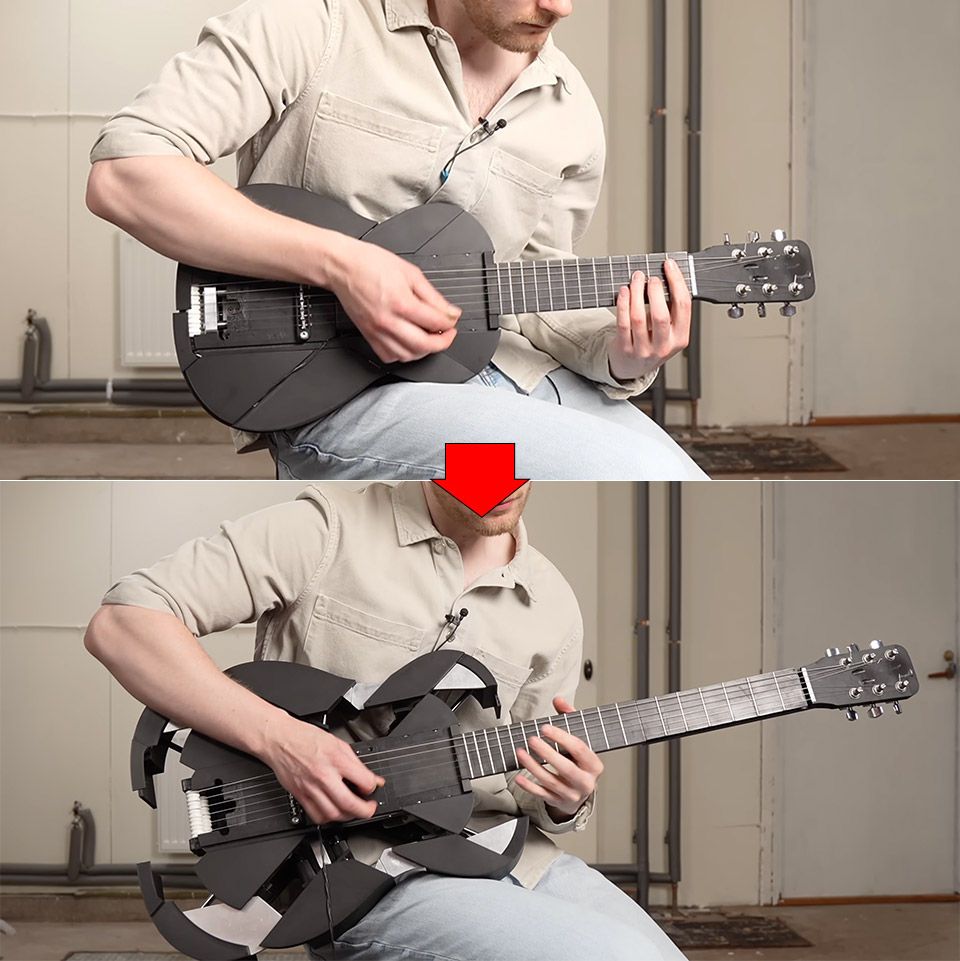
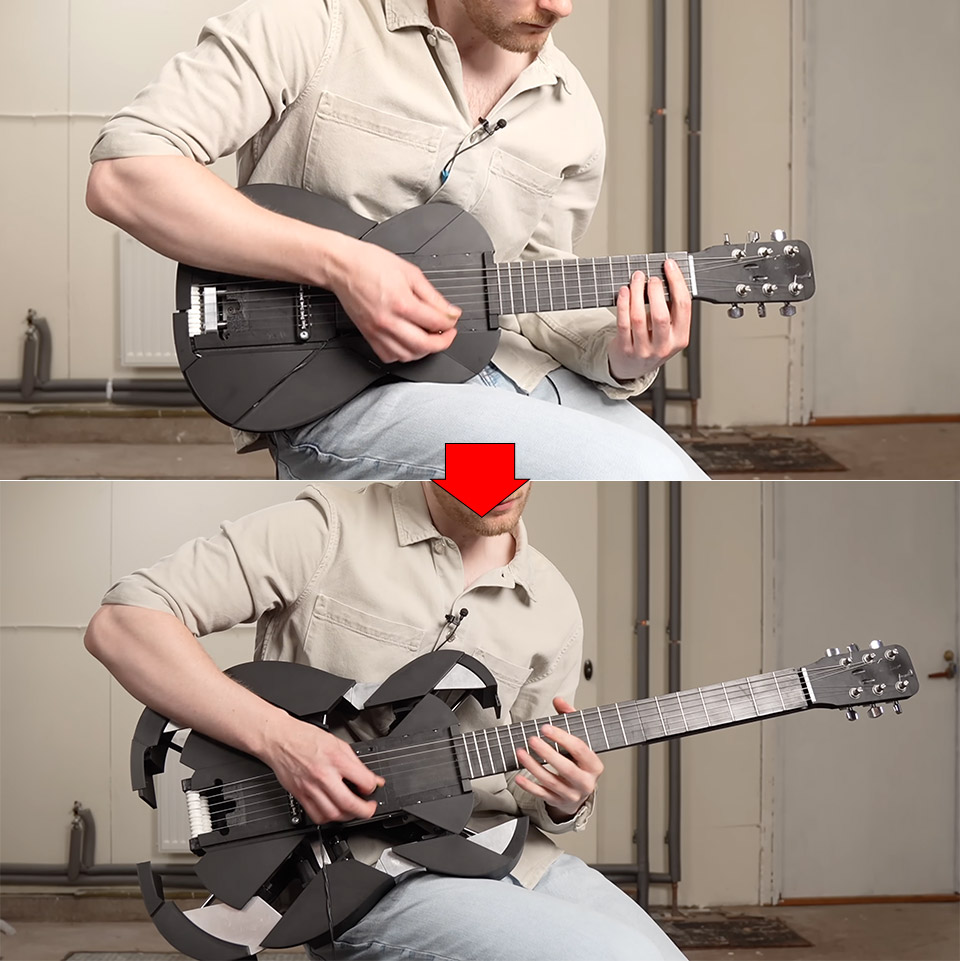
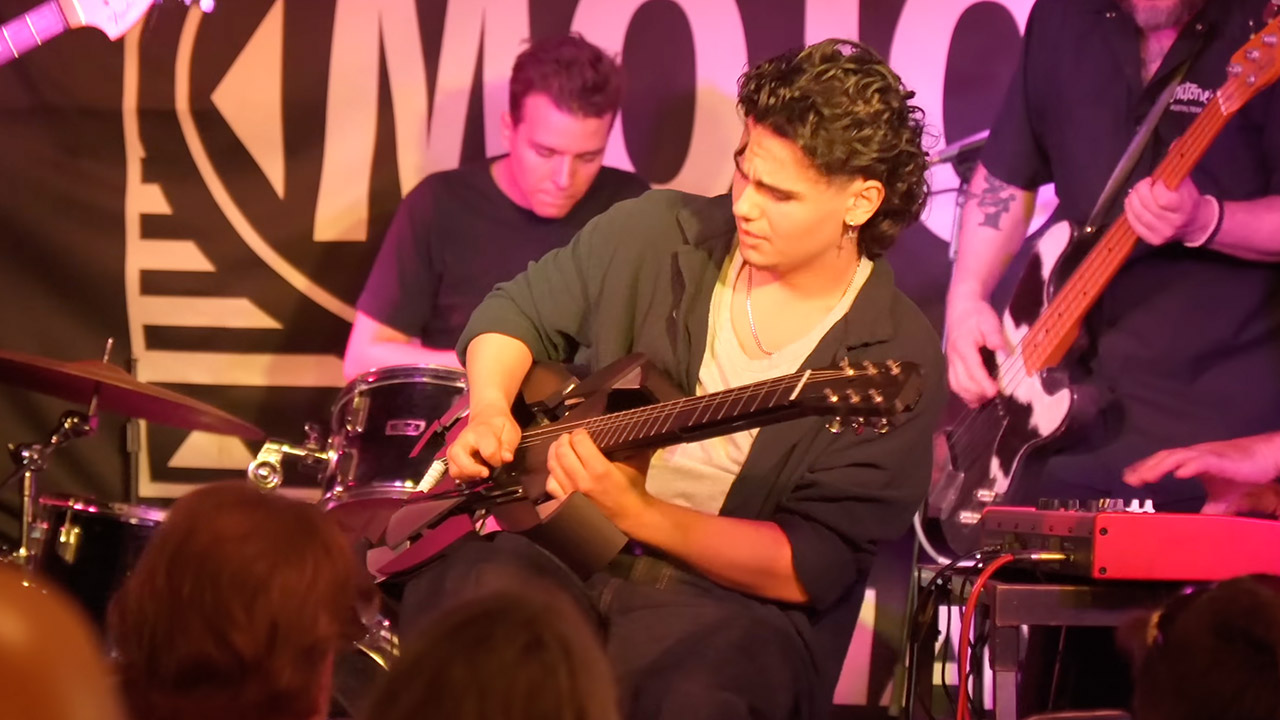
Swedish maker Mattias Krantz has spent years turning ordinary instruments into strange new ones. His latest project starts as a compact electric ukulele that fits in a backpack. One firm pull on the neck and the whole thing stretches, expands, and becomes a full-size guitar while the music is still going.
Krantz set out to address what he saw as the ukulele’s most serious shortcoming. People could easily pick it up and carry it around, yet despite its portability, it remained a curiosity. His response was straightforward: create one that can transform into a guitar in the middle of a song, eliminating the need for the musician to stop and pick up another instrument.
ROCK YOUR CREATIVITY – Embrace the 2 sides of your favorite pop star’s music with the LEGO Editions Olivia Rodrigo’s Dual Guitar…
SUPERSTAR SYMBOLS – Discover 3D decorations that represent the singer’s career and passions, including a purple butterfly, a love heart, new star…
OLIVIA RODRIGO MINIFIGURES – Open the electric side of the guitar model to reveal 2 detailed Olivia Rodrigo minifigures, each with their own mini…
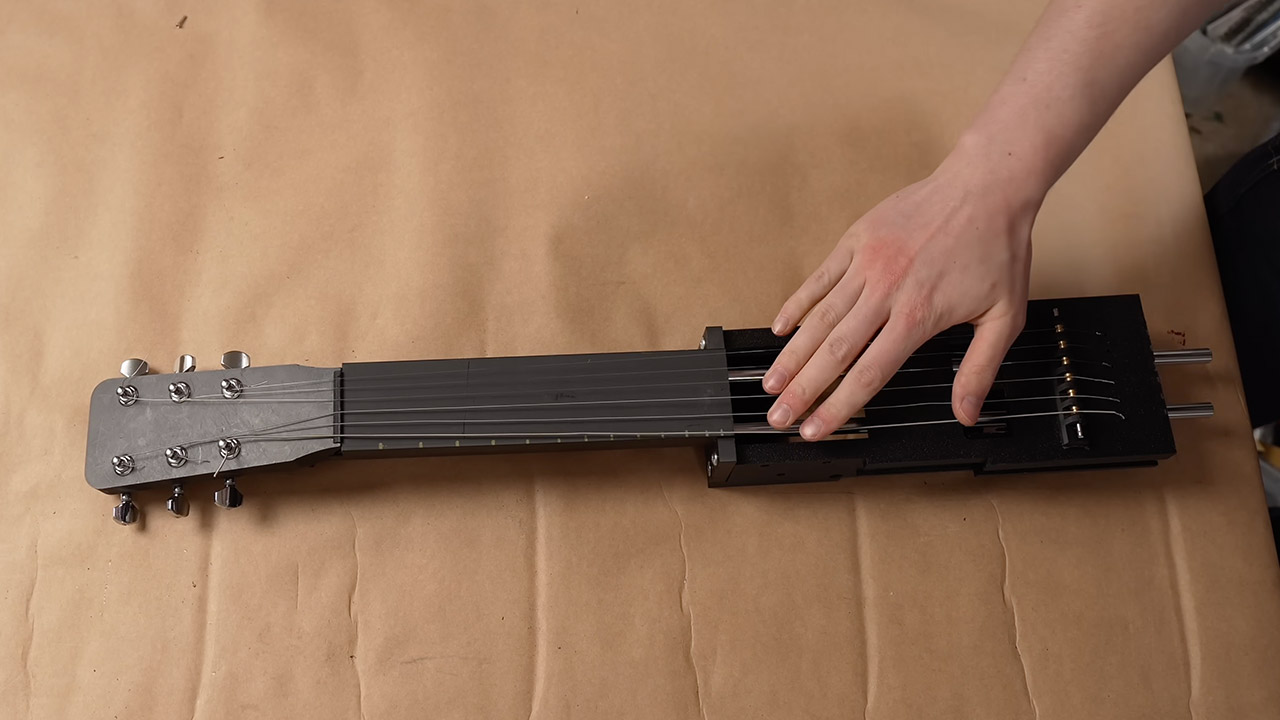
The first significant challenge was the neck. Ukuleles don’t have the same length neck as guitars. Early attempts to crumple it up so that it could fold resulted with half of the object hanging out, which was not particularly handy for playing. Krantz preferred that the excess length just disappear when needed, rather than sticking out uncomfortably. He eventually went with a telescopic design. As the neck stretches, the fretboard components rise up and lock into place directly on top of one another. Adam Damato (his coworker on this project) suggested adding a steel rod to ensure that the pieces snap into position when it’s time to play and don’t simply bend in two with the slightest touch. After several failed prototypes, he finally had a neck that felt solid and familiar under his left hand.
He then had to deal with the strings, which could not be stretched or compressed because they were made of metal. Attaching them when the object is short will retain it in that shape indefinitely. Attach ’em when it’s lengthy, and they’ll simply slink away as the thing collapses. Rubber bands produced a faint, muffled sound. A fishing reel design that allowed extra length to feed out worked in theory, but in fact, the rope stretched or snapped, putting the tune entirely out of sync whenever the size of the object changed. They ended up with strings that were twice as long as normal. They just wrap around some internal rollers when the device lowers, and then pay out well as it extends back up. The tension remains steady, while the tuning is stable.
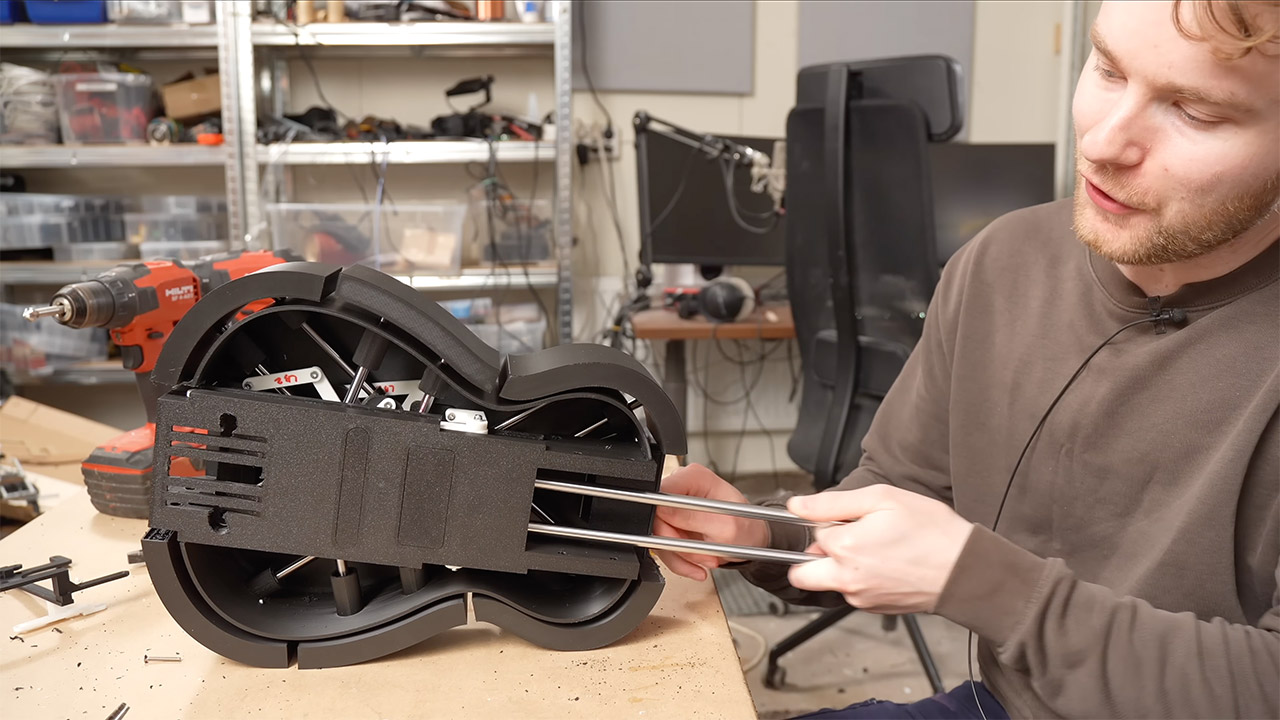
The ukulele body also had to grow up a little, as ukuleles are small, whereas guitars are much larger and have a different shape. It wasn’t just about enlarging the body; different components had to cover many distances and angles at the same time, which was a nightmare. The earlier plastic versions tended to jam. They eventually converted to metal and changed the hub, and six movable panels opened and closed beautifully. They added some decorative plates so that when it grows into a full guitar, it will resemble one.
The finished device is small enough to fit in a backpack, so Krantz would take it out on the street and play it in its compact state. Most people would pass by and handle it as if it were any other ukulele, until he yanks out the neck. The change takes just seconds. Suddenly, the same person who was playing ukulele is rocking out on a full-fledged guitar. A musician even played a few performances with a full band after that, and as soon as the body locks into position, the song continues uninterrupted. [Source]
The cotton and wool layers are GOTS-certified organic, while the Dunlop latex carries the GOLS certification. The finished product does not have any certifications beyond Greenguard Gold, but the material is undyed, which is great for anyone bothered by industrial dyes. As with most of these organic options, the Coyuchi is made without chemicals, foam, or glues, and comes with a 100-night trial, which means you can get a full refund if it doesn’t work for you.
Coyuchi’s Natural REM organic mattress is made to order in the United States. The company offers a 100-night trial, up to an 180-day return policy (there is a restocking fee of $150 if you go over the 100-night trial), and a 25-year warranty.
Coyuchi Natural REM ranges from $1,400 for a twin to $2,400 for a California king.
The Best Kids Organic Mattress
Advertisement
Courtesy of My Green Mattress
Courtesy of My Green Mattress
My Green Mattress
Kiwi Children’s (Twin)
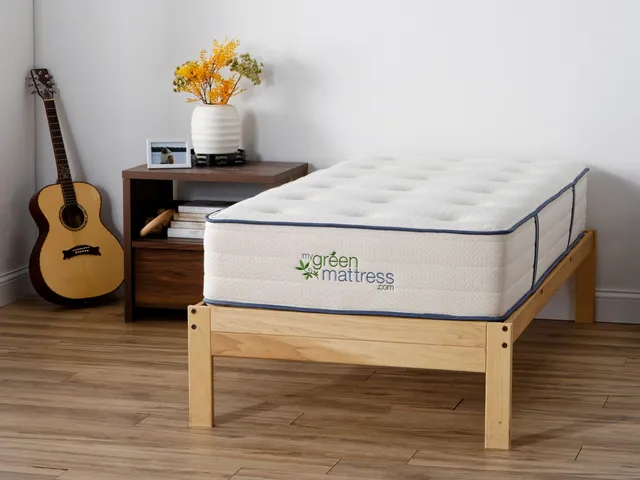
Beds for my kids are what started me down the organic mattress road. I care a lot more about what they’re sleeping on than what I’m sleeping on. Still, as much as I love the Avocado Green mattress, it’s not cheap. For my kids, I bought the more affordable Kiwi Mattress by My Green Mattress. The Kiwi is similar to our top pick Avocado. It’s a hybrid model with pocketed springs and natural materials: certified organic cotton, wool, and latex. It’s also something of a rarity; organic twin mattresses are somewhat difficult to find.
One nice twist that makes the Kiwi appealing for kids is the two-sided option. It costs a little more upfront, but being able to flip it over extends its life, which is handy if your kids think beds are actually trampolines in disguise. The Kiwi is definitely a firmer style, but I think it’s comfortable, and my children loved it when they were younger.
Advertisement
As with our top pick Avocado, My Green Mattress’s Kiwi uses GOTS Certified cotton, GOLS Certified latex, and has both GreenGuard Gold certification and MadeSafe certification.
Six twentysomethings in East London have built what they say is the anti-San Francisco hacker house. The goal is a “holistic improvement in life,” rather than “12 weeks, Demo Day is coming,” Rowan Aldean, 26, explained.
Intrigued, I spent an afternoon visiting the house, meeting its residents, and doing a vibe check. I arrived after Aldean escorted me through the clean sidewalks of a new East London development to where the six-story building stood facing the water.
The house is called the London Island Founder House — or “Lift House” — and Aldean and his wife, Zahraa, 22, an upcoming pharmaceutical research PhD candidate, have lived there since May, just a few months after it officially launched in March. Aldean sold his previous company last year for millions, he said, and now runs an “applied AI” startup that helps companies learn how to deploy agents.
Like all hacker houses, Lift House is part startup workspace, part co-living space. The house is named after both its lift — that is, its elevator — and its mission to uplift tech founders, Aldean said. It’s one of the very few co-living hacker houses to exist in London (compared to San Francisco, where dozens — if not hundreds — are scattered around the city at any given time).
Advertisement
Lift House is a bet that U.K. founders can build successful companies without mimicking the over-the-top hustle culture of Silicon Valley.
Founders have described stories of San Francisco hacker houses illegally running in warehouses, throwing full-on galas, or setting up in a tent or espousing punishing, 72-hour sprints typical of the “996” work culture.
“I don’t expect the performative and over-the-top events will be a thing here,” Aldean said, and pointed to one of London’s most successful AI companies, DeepMind. “They’ve won Nobel prizes and built frontier innovation without any song and dance.”
Instead, Lift House is part of a trend called “Londonmaxxing,” in which founders attempt to optimize everything the London tech scene offers. The London ecosystem feels less showy and less startup bro-y than San Francisco, but its founders share similar ambitions: success, wealth, and market domination.
Advertisement
London AI startups have raised $12 billion so far in 2026, out of $14.7 billion raised by all London startups, according to Dealroom. Six companies have raised more than $500 million: Wayve, Superintelligence, ElevenLabs, Recursive, Ineffable Intelligence, and Isomorphic Labs, the latter three of which were founded by DeepMind alumni.
The excitement from AI has boosted the morale of the U.K. tech scene, inspiring a new generation of founders, like those in the Lift House, to take big swings.
LIFT TourImage Credits:TechCrunch
Journaling vs. demo day
The timeline for living on Lift House is flexible — some people have stayed for a month; others intend to stay for at least six months. They buy their own groceries, Aldean said, although they often cook together and share ingredients. Cleaning is split among the group. Everyone declined to share information about the rent they pay.
The residents of Lift House aim for a balanced approach toward ambition, each one of them tells me — an almost unheard-of idea by San Francisco startup standards.
On Sundays, the group will journal together, a practice introduced by David Amor, 28, who runs a brain coaching and training company, helping founders and business leaders understand more about their brain and how it can help optimize business performance. The idea of journaling is to help everyone track how much time they spent in nature that week, how well they ate, and how much they moved their bodies.
“I’m eating healthier, working out more, and sleeping more,” Luke, 27, who runs an AI-marketing company, said about living in the house. “I always make sure to have lunch now, which is something that is simple, but I wasn’t doing before I lived here.” (Luke asked that his last name be withheld.)
Tuesdays evenings are for volleyball, where the founders play on the house team in a local league.
Advertisement
After dinner on other evenings, Wan Ying L, 25, who just left an AI startup and is working on a new idea, might play the piano in the living room. Sometimes the group plays Catan or visits art exhibitions together.
Presence Plumb, 25, is a tech strategist. She likes to host rooftop dinner parties, serving dishes that reflect the different nationalities in the house — from Iraqi to Spanish — while invited founders, researchers, investors, and operators chat about tech trends and investments.
“It’s a bit calmer, balanced, authentic in a way,” she said of people in the London ecosystem. “They don’t want too much of that only startup tech bro vibe. They want a bit of balance.”
Each founder follows their own schedules for a typical workday. Amor, for example, is up by 8 a.m. and gives himself exactly 30 seconds after waking up before jumping into his morning work. “I have a clear objective of ‘this is what I want to do in the first half of the day, when there’s no distractions.’” After his morning work routine, he takes a cold shower, “because it increases your dopamine by 250% and that gives me that motivation, that spark,” he said.
Advertisement
Wan playing the pianoImage Credits:TechCrunch
Luke, meanwhile, is up at around 8:30. His co-founder, Varun, 27 (who asked that his last name be withheld), typically travels to the Lift House to co-work, and the duo starts work at around 9 a.m. with a team call.
Aldean rarely wakes before 10 a.m. unless something big is happening, like a “crazy angel [investor] call,” he said.
When asked what makes this house uniquely British rather than a wellness-focused Silicon Valley founder house, Aldean joked: “Well, we drink tea together like Brits, and in SF folks just drink filtered coffee.”
More seriously, he spoke of how British founders face a different kind of pressure than those in the U.S. They must navigate a cultural aversion to risk, an inclination toward humility, and a shame associated with failure. Instead of forgoing sleep for hustle and grind, they deal with what they call the “tall poppy syndrome,” when the media builds one up only to ruthlessly tear them down should they become too successful, investors and founders say. It makes some founders in the ecosystem wary of displaying too many wins.
Still, Luke said London is a strong choice for an early-stage founder: There’s a good network, ample early capital opportunities, and an option for a life outside of tech. In many ways, it is much more like New York culturally for founders than in San Francisco.
“London is so diverse that if you look properly enough, you’ll always find something fun to get involved with,” Amor added, “whether that’s a founder-run club, wellness events, [or going] to jazz nights.”
Luke and Varun write marketing terms on the whiteboard. They stand for top of funnel (TOFU), middle of funnel (MOFU), and bottom of funnel (BOFU).Image Credits:TechCrunch
Luke and Varun largely avoided venture capital funding by taking advantage of the U.K. government’s SEIS/EIS, which is supposed to help attract more angel investments into local startups. “There’s people who will pay basically the same rate of tax if they give us the money versus if they pay income tax,” Luke explained as another reason he liked starting out in London.
Aldean also feels the London ecosystem is less cutthroat than the Valley. He recalls his days living in a hacker house in the Bay — everyone’s desk had to face the wall, and it was heads-down, product-building. He felt the ecosystem, at times, was too willing to gossip, which is apparently done quite differently in the U.K.
Advertisement
“There’s nothing like ‘oh my god did you hear that the CTO just, like, did this,’” Aldean said. “It’s like you’re always worried,” he said, that someone would spread negative stories, especially if it benefited them.
Aldean also thinks London startups, more than Silicon Valley ones, sell into slow-moving large corporations rather than to each other, meaning one could build without having to kiss up or posture to get their peers to like them.
To the selling point, Varun and Luke mentioned another difference between the U.S. and U.K. ecosystem. “It’s a relatively fleeting market,” Varun said of the U.S. “You get quick wins. Here, it’s hard to close a customer, but if they close, they stay with you longer.”
Coming to America
Eventually, though, the road for many U.K. startups goes straight to the U.S.
Advertisement
In the U.K., founders have access to affordable top talent from universities like Oxbridge and a time zone that makes it easier to work with the rest of Europe, the Middle East, Asia, and parts of North America. In the U.S., however, they have access to the world’s largest economy and, most importantly, a lot of investors willing to write large checks, from pre-seed to growth stages.
“It’s almost like a factory line in a way,” Varun said. “You start here, and then you expand there or vice versa.”
American investors are also playing a role in luring British talent away from the country. I told the Lift House residents about one startup founder who said a top investor wouldn’t even back the company unless she relocated to the U.S. She ended up doing so, though decided to keep her family based in the U.K. to raise her children.
“We had an investor in Miami who said the same thing,” Luke said of an investor trying to get him and Varun to move to the U.S. “It’s quite a common practice.” He and Varun have already begun their U.S. expansion, and despite loving London, the duo hasn’t ruled out moving to the U.S. to be closer to their customers.
Advertisement
David, who has a brain coaching startup, is the one who introduced journaling into the household. Image Credits:TechCrunch
That’s the tension bubbling beneath not just the U.K.’s tech ecosystem but most of Europe’s. “I work with a lot of people trying to support the European ecosystem more,” Plumb said.
Yet, founders “talk about London; everyone is bullish on the country until they get the opportunity to leave,” Aldean added.
The Lift House lease has about a year left, and there is sentiment in the house to keep it going for as long as they can. After all, there aren’t too many in London, though the city sees many short-term gatherings, like the Solana Hacker House meet-up series. Some of the more public co-living hacker houses are part of a global chain, like the San Francisco-based network The Residency, which expanded into London last year, and BaseJump, which is announcing a London version of its hacker house program soon.
In 2024, two founders tried the opposite version of the Lift House called “The London Founder House,” which Sifted covered under the headline “The people here don’t want work-life balance.” That home is noted as London’s first-ever hacker house, and though it wound down last year, it left an influence through its concept, events, and connected players around the ecosystem. To even be considered for the London Founder House, one had to have raised at least half a million dollars.
For Lift House, prospective residents need to show a hobby outside their companies and an interest in fitness. It’s the same pitch many in the Londonmaxxing ecosystem are using to keep people from leaving: That here one can have it all.
Advertisement
“The culture is to build something that lasts,” Aldean said, “not necessarily burn out chasing a flash.”
When you purchase through links in our articles, we may earn a small commission. This doesn’t affect our editorial independence.
There are times when a physical connection works better. Here’s how to set it up.
Will Shanklin for Engadget
When you think of using a smartphone as a mobile hotspot, the wireless version is probably what comes to mind. But there’s also USB tethering, which lets you share your phone’s cellular connection with a computer over a cable. Here’s how it works, what it’s good for and how to set it up.
Advertisement
Why USB tethering?
For most people, a wireless hotspot is still the easiest way to get a laptop online when you’re away from regular Wi-Fi. It’s more flexible, supporting multiple simultaneous connections. And unlike the USB kind, you’re free to move your phone away from the computer.
But there are some cases where USB tethering could make sense. A wired connection can be more stable, which is handy for crowded places like convention centers or airports. It also means you aren’t broadcasting a visible network in public. As a bonus, your phone might charge while it’s connected.
Advertisement
How to set up USB tethering
Screenshot by Will Shanklin (Samsung)
Before we dive in, note that there’s one big catch: Android phones can’t tether via USB to a Mac. (You can still use a Wi-Fi hotspot instead.) Otherwise, USB tethering works with other phone-to-computer setups, including Android to Windows and iPhone to Mac or Windows.
If you’re tethering from an iPhone to Windows, you may need to install the Apple Devices app or iTunes for Windows from the Microsoft Store.
On Android:
Connect your phone to a Windows PC using a USB cable.
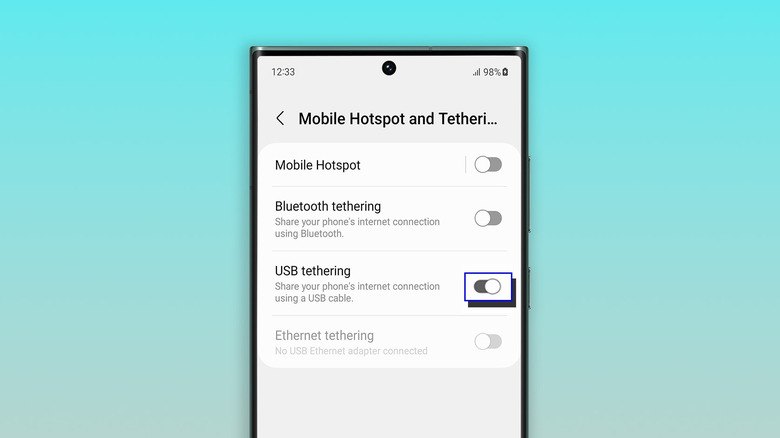
On your phone, navigate to Settings > Network & internet > Hotspot & tethering. (On some devices, it’s under Settings > Connections > Hotspot & tethering.) You can also swipe down to open Quick Settings, then press and hold Hotspot to jump to the tethering menu.
Toggle on USB tethering. If the option is grayed out, make sure you’re using a data-capable USB cable and not a charge-only one.
On iPhone:
Plug your iPhone into a computer using a USB cable.
You may see authentication prompts. If your iPhone asks whether to trust the computer, tap Trust and enter your passcode. If you’re connecting to a Mac and see an “Allow accessory to connect” prompt on your computer, click Allow.
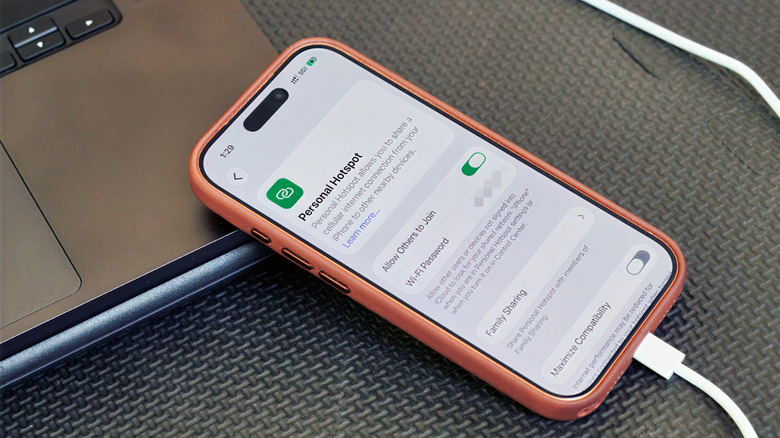
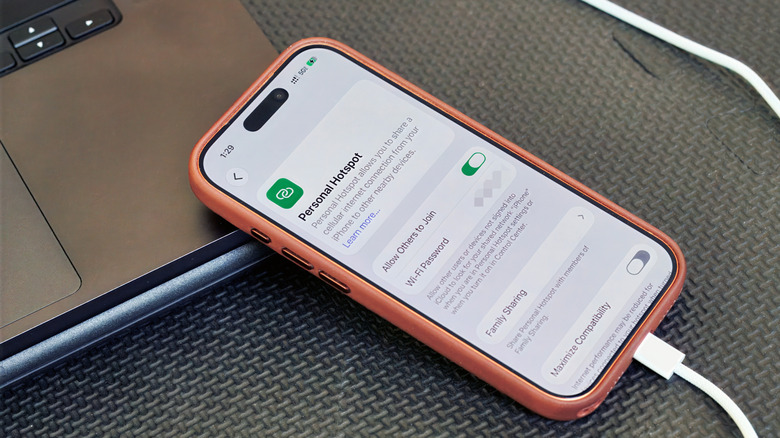
On your iPhone, go to Settings > Personal Hotspot. (If you’ve never used a hotspot before, you may need to start under Settings > Cellular > Set up Personal Hotspot.)
Turn on Allow Others to Join.
A few things to keep in mind
USB tethering usually makes more sense for one device than as a full hotspot replacement. So, for example, if you’re trying to get both your laptop and tablet online at the same time, a Wi-Fi hotspot is the solution.
Keep in mind that laptops can burn through data with background tasks like updates and cloud syncing. Your carrier may also limit hotspot use, charge extra for it, count it against a separate data allowance or not support it at all. So it’s worth checking your plan before tethering over USB or Wi-Fi.
Advertisement
And while a wired connection can be more stable than a wireless hotspot, it’s still relying on your phone’s cellular signal. Spotty service will still mean spotty internet, no matter how you connect.
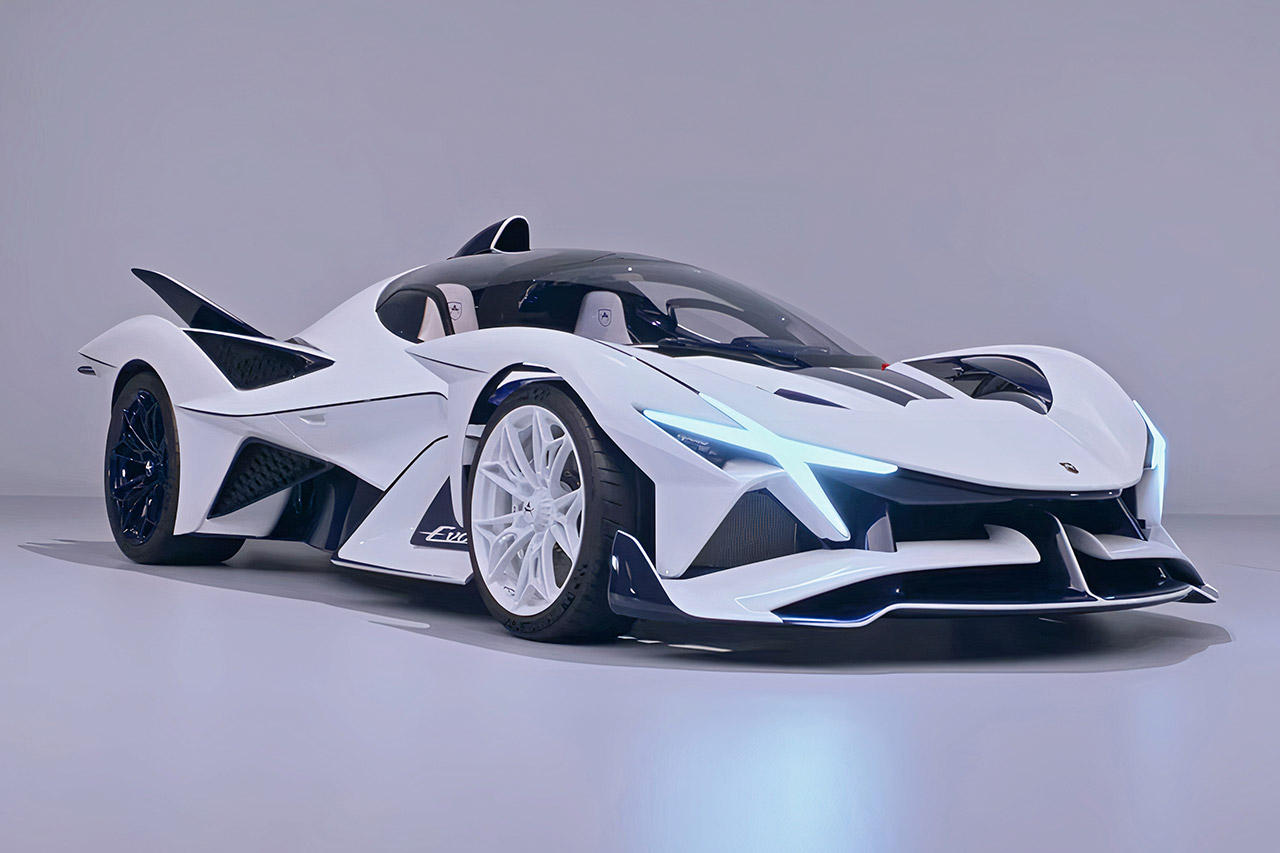
Apollo Automobil rolled its first finished production car onto the Goodwood Festival of Speed grounds in July 2026, and the machine looked ready to rewrite the rules of what a track hypercar can be. Named Caribbean Dragon, this is unit one of just ten Apollo EVOs that will ever leave the German workshop. Twenty years after the original Gumpert Apollo began deliveries, the brand has returned with something sharper, lighter, and more uncompromising than before.
Caribbean Dragon has an incredible 75+ carbon-fiber panels that are all expertly crafted. You see, the paint job alone is a huge operation, with eight coats done by hand that took over 1000 hours. When the sun hits the pearlescent white coat, a diamond dust flake forms, resulting in a little light show. All of this color contrast has a big impact, with the ocean blue of the carbon accents and tinted blue finishes grabbing attention, much like bright sand meets deep water. Apollo CEO Niko Konta believes the name was inspired by comparing the brilliant white and deep blue colors. Forged wheels continue the concept, with white in the front and blue at the back, while blue brake calipers round out the look.
A hypercar toy for kids ages 10 and up – This LEGO Technic Koenigsegg Jesko Absolut Grey Hypercar car building toy set for kids features authentic…
Build the features of this sport car toy – Builders explore lots of engineering concepts as they assemble the articulated V8 engine and the…
Realistic door design – The model features a dihedral synchro-helix door system, which allows the doors to rotate 90 degrees while moving outwards…
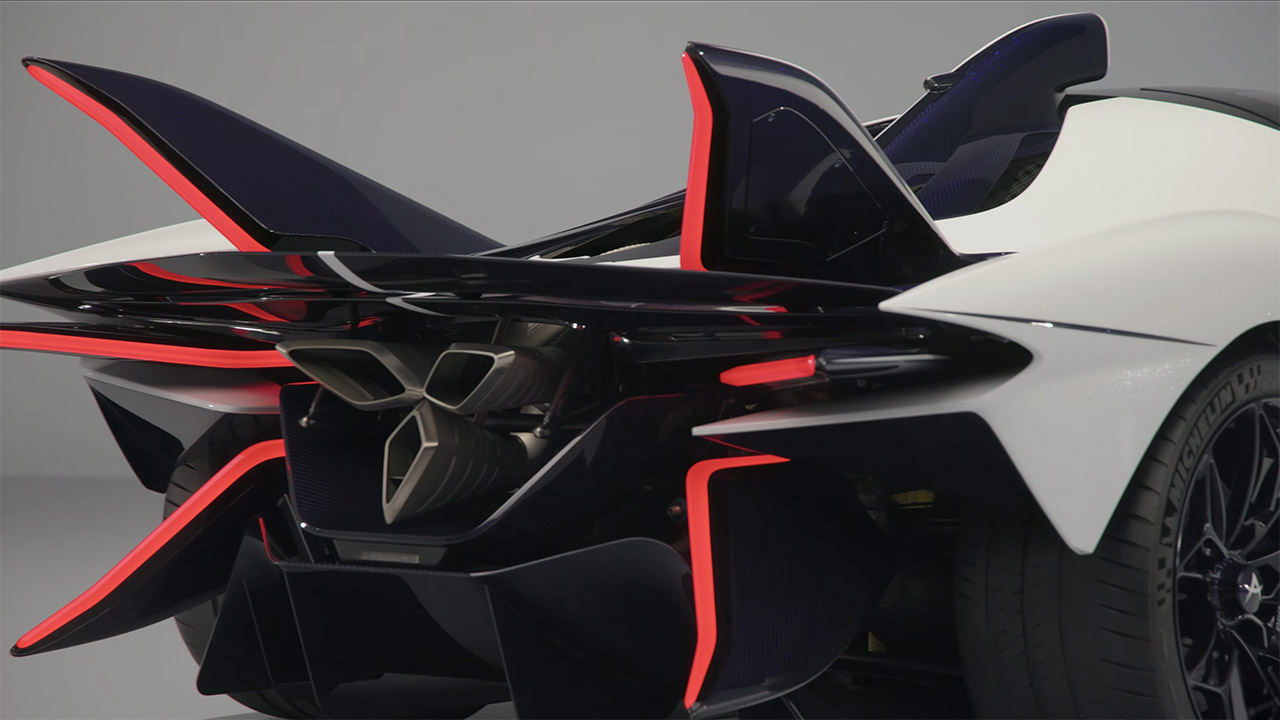
Underneath the elegant bodywork is a full carbon-fiber monocoque weighing a whopping 165 kg, 15% stiffer and 10% lighter than the Apollo IE. The front and rear carbon subframes, as well as the specific crash components that comprise the chassis, are likewise the subject of extensive engineering. Overall, the dry weight is a lean 1300 kilograms. With adaptive aero generating 1350 kilos of downforce, this car has a bit more grunt than its own mass. The aggressive geometric form, X-shaped front LED lights, and vertical W-shaped rear lamps indicate that the bodywork is going for impact, yet each surface is actually engineered to push air around rather than just look showy.
Advertisement
Inside the beast is a naturally aspirated 6.3-liter V12 from Ferrari’s F140 family, but it has been completely modified by HWA AG. With 800 metric horsepower and 765 nm of torque, it can reach 8500 rpm using only its own strength. That’s right, no turbo, no electrics, just good old-fashioned power delivered directly to the back wheels via a strong 6-speed sequential gearbox with paddle shifters. According to official numbers, it takes 2.7 seconds to accelerate from 0 to 100 km/h and has a top speed of 335 km/h, which is impressive for a monster. Carbon-ceramic brakes and Michelin Pilot Sport Cup 2 tyres absorb speed as needed.
The Dragon Skin exhaust system, as Apollo refers to it, is easily visible. It is essentially a one-piece 3D-printed titanium rod, made from a single block of natural titanium, with no welding necessary. It took 123 hours to print alone, as there’s a lot of titanium. The design is also really neat; it’s sturdy, lightweight, can withstand severe temperatures, and fits snugly into the car’s aero package. After a few heat cycles, the titanium develops a gorgeous blue tinge, like to a badge of honor.
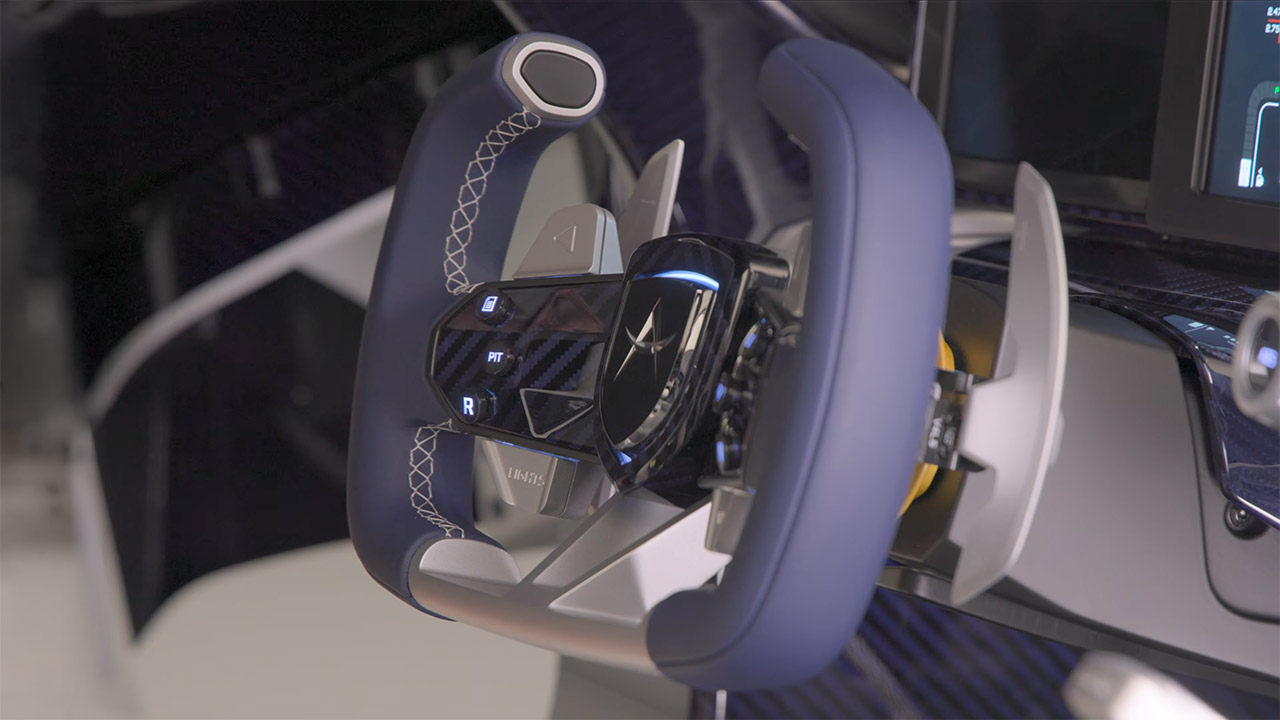
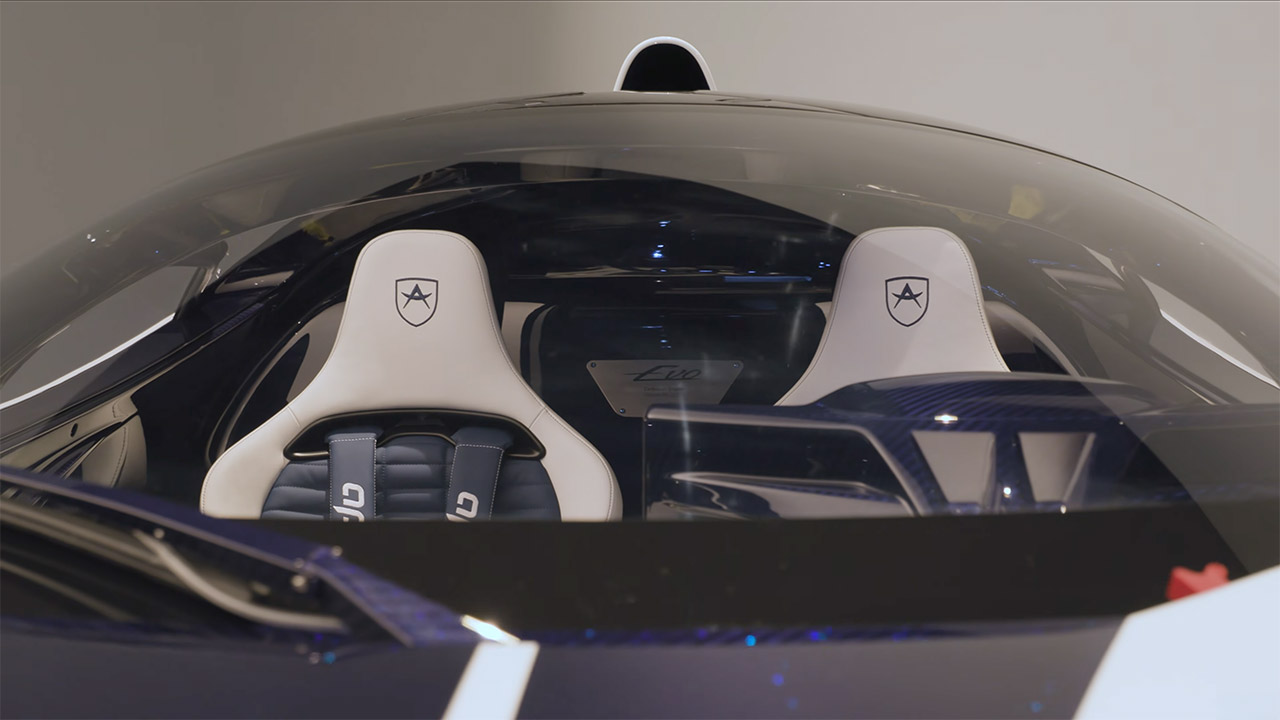
Inside the cabin, Brose created the 3D-printed aluminum framework that connects everything, as it is these precise structural pieces that hold the controls together. All of the switchgear, pedals, and other hardware are similarly manufactured in a tidy reinforced framework, reducing weight while still allowing for some fairly complicated designs that standard machining cannot match. This car’s seats are one-of-a-kind, made of bright white and ocean blue leather with blue stitching, and the Apollo emblem is embroidered directly onto each headrest. The cushion patterns are hand-trimmed and look rather special. The steering wheel is solid machined aluminum blended with blue carbon fibre and ocean blue suede, and it’s a stunning piece of craftsmanship. The dashboard is a blend of high-tech digital displays and traditional gauges, with some classic racing-style tell tales to add flair.
Apollo created the EVO with track days in mind, not road excursions. There will be ten automobiles in total, and each one will be hand-built using the Forged software, meaning no two will be alike. Remember that the base model costs a stunning 3 million euros before taxes. The first car was handed over to its new owner at Goodwood, signaling the commencement of deliveries and commemorating the company’s 20th anniversary. Around 70-80% of the car is completely new compared to the IE, as the suspension geometry has been altered, safety measures have been strengthened up to match current LMDH norms, and the entire upper body has been re-engineered from the ground up.
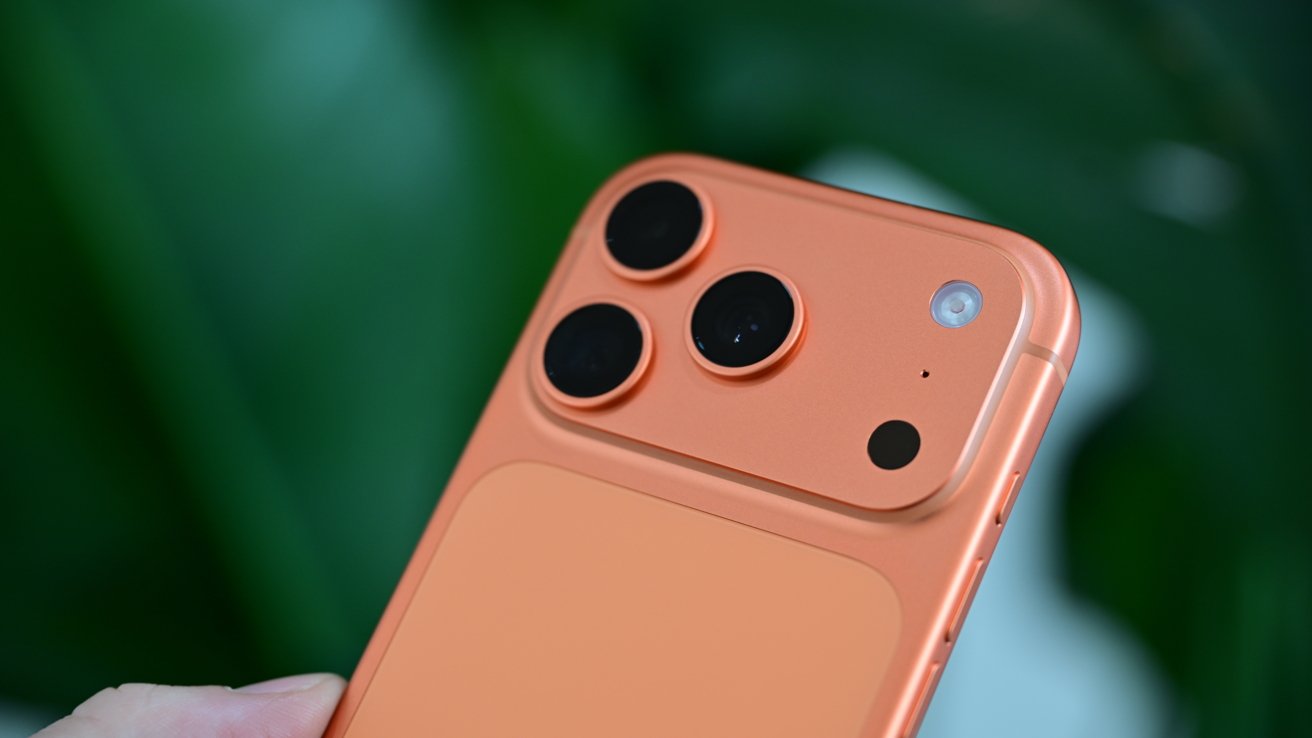
A Canadian artist dropped her iPhone 17 Pro from a plane at 3,600 feet, then found it sitting face-up and virtually untouched in a canola field. Here’s why this is more common than you’d think.
Heather Cline, a mixed-media artist from Saskatchewan, Canada, routinely takes to the skies with her husband, David, in their small plane. The goal is to gain inspiration for her artwork, which often depicts the Canadian landscape from aerial perspectives.
Recently, during an outing above Regina, Heather decided to use her new iPhone 17 Pro to help gather inspiration for a new project. Her husband wasn’t so sure about her choice.
“I had ordered a grip for it that would make it feel more like a traditional camera but it hadn’t come yet,” Heather says in a video posted to CBC’s Instagram account. “And it was a great day for flying.”
Advertisement
Heather settled on wearing a lanyard-style case around her neck. Unfortunately, while attempting to take the perfect shot, she inadvertently passed her phone through an airstream, which sucked it out of its case and out of the plane from more than 3,600 feet.
Thinking quickly, David prompted Heather to look for the device with Find My. The pair got a rough idea of where the phone landed and decided to track it down once they landed.
Sure enough, Heather was reunited with her iPhone. And even better: it had miraculously survived the fall and was found unscathed in a canola field.
“I go up, and I think it’s gonna be buried in the dirt, smashed, crazy,” Heather recalls. “I literally look down, the phone’s sitting there, face-up, just up against few strands of canola. And it’s like, pristine.”
Advertisement
Heather ends the video by laughing and saying that she’ll not be making the same mistake twice and plans on making sure her iPhone is secure before she takes to the skies again.
“Maybe we’ll cable tie it to my hand,” she jokes.
“Not a bad idea,” Dave chimes in.
Free falling
While it might seem improbable that an iPhone could survive a fall from a plane, it’s actually not that far-fetched. It’s not even the first time we’ve heard this story.
Advertisement
Flat objects, like an iPhone, typically stabilize to fall “flat” fairly quickly during particularly long falls. Not only does this slow the phone down dramatically, it also puts it in the most ideal positioning for impact.
If you’ve ever dropped your phone from a short distance, you’ll know it can be devastating. That destruction is due, in part, because it usually doesn’t fall flat. Edge impacts, especially those on the corners, are far more devastating.
There isn’t enough time for the phone to rotate to flat, so all of the force from the fall can be delivered to a corner or edge. Less area of impact, means all that force is delivered to a small area, very quickly.
So, if you’re wondering why Heather’s iPhone survived a 3,600-foot drop into a crop, and yours broke from four feet onto carpet or concrete, you can blame the physics of aerodynamics and complex impact physics for that.
Advertisement
We’re not going to write 5000 words on this. Not today, at least, so let’s make it simple.
After some discussions we’ve had with the US National Institute of Standards and Technology, some case manufacturers, and Apple over the years, we know that a phone reaches maximum velocity that is notably lower than terminal velocity of a spherical object falling, after about a 335-foot fall.
A six-foot iPhone fall impacts the surface it hits at about half the speed of that 335-foot fall. And, since it hasn’t time had to flatten out on the short fall, a corner or edge impact is far likelier.
Also, the landing surface matters. Concrete stops the phone instantly, causing an immediate energy transfer. Grass or dirt cushions the blow by extending the stopping time, which drastically lowers the peak impact force.
Advertisement
In the case of airplane drops, it seems that more often than not, the fallen iPhones land on fields or grass, rather than a building, sidewalk, or road. And, they nearly always land on the front or back of the phone, rather than a corner, spreading the force of the fall over a larger surface.
All this contributes to why an iPhone can improbably survive a fall from 3,600 feet. Even if it wasn’t in a case.
It still takes a massive engineering effort to crash-proof an iPhone, and we don’t want to dismiss that. But there are reasons why iPhones can fall from a great distance and survive, while not surviving a short fall.
ISBNdb ships up to a million books anonymously to AI labs
Pre-2022 books are prized because chatbots never touched their text
Spine-cutting scanners destroy originals to speed up digitization for training
AI companies are increasingly turning to printed books published before 2022 as preferred training material because those works predate the widespread use of AI-generated content.
Large-scale scanning operations reportedly involve cutting book spines, separating pages, and destroying physical copies to create digital datasets for large language models.
The practice has attracted growing criticism because some books entering these pipelines are reportedly extremely rare, raising concerns about irreversible cultural losses.
Latest Videos FromTechRadar
Advertisement
Pre-2022 books become valuable AI training material
Reports by 404 Media found data broker ISBNdb supplies physical books in bulk to AI developers seeking human-written material unaffected by modern chatbot output.
The company argues books published before 2022 offer cleaner datasets because they cannot contain text generated by contemporary large language models.
They are often considered “dense, edited, authoritative,” in contrast to internet content increasingly filled with machine-generated material of uncertain quality.
The approach also attempts to avoid so-called model collapse, in which AI systems gradually lose quality after repeatedly training on synthetic content generated by earlier models.
Sign up to the TechRadar Pro newsletter to get all the top news, opinion, features and guidance your business needs to succeed!
ISBNdb additionally argues that older printed works avoid deliberate data-poisoning techniques authors increasingly use to disrupt AI training through carefully modified documents.
Advertisement
However, there are reports that many of these books are scanned using high-speed equipment.
This equipment requires workers to remove the spine before feeding individual pages through automated imaging machines.
That process reportedly destroys the original volume, making rapid digitisation considerably cheaper than slower preservation methods designed to keep books physically intact.
Advertisement
Secrecy and legal rulings fuel preservation concerns
ISBNdb openly acknowledges reputational concerns surrounding the practice while offering strict non-disclosure agreements that keep customer identities confidential throughout commercial engagements.
Its website reportedly states, “‘AI company destroys two million books’ is not a headline that generates sympathy,” while suggesting clients describe the process as digital preservation.
Such a level of destruction is an order of magnitude bigger than the loss of the Library of Alexandria. Yet, it is unfolding with none of the outrage that history reserves for burned libraries.
Advertisement
Booksellers interviewed by 404 Media said some volumes entering these scanning programmes have very few surviving copies after enduring wars, fires, and centuries of handling.
Critics argue that unlike websites or widely available modern publications, exceptionally scarce historical works cannot simply be reproduced after their physical copies disappear forever.
A recent United States court ruling involving Anthropic found that scanning legally purchased books for AI training constituted fair use under specific circumstances.
Part of that reasoning held that destroying each printed copy during scanning meant one legal copy effectively replaced another rather than creating multiple copies.
Advertisement
In response to a critic (@Hedgie) of this method on X, Elon Musk said, “I’ve asked the SpaceXAI team to preserve any rare books in a library and scan them the hard way,” suggesting an alternative approach.
If significant awareness is not created, this quiet erasure of irreplaceable books risks becoming the defining act of cultural loss for this era, remembered only after it can no longer be undone.
For more than four decades, the U.S. Navy’s Ticonderoga-class guided missile cruisers have served as some of the fleet’s most capable surface combatants. Designed around the powerful Aegis Combat System, they have played a central role in protecting aircraft carriers, defending against enemy aircraft and missiles, and coordinating complex naval operations around the globe. However, after years of service, the Navy has begun retiring the aging class, with more ships scheduled to leave service over the remainder of the decade.
The challenge is that the Navy has no direct replacement waiting in the wings. Unlike previous generations of warships that were succeeded by clearly defined new classes, the retirement of the Ticonderoga-class vessel leaves a capability gap the service is still working to address. While several options are being considered including relying more on destroyers, no single platform is expected to immediately assume every mission currently performed by these cruisers. That uncertainty has made the future of the Navy’s large surface combatant fleet one of the most closely watched questions in modern naval planning.
Advertisement
Why the Ticonderoga fleet is disappearing
The Navy originally built 27 Ticonderoga-class cruisers beginning in 1983 at a cost of roughly $1 billion each. Over time, however, age has taken its toll. 20 of these ships have already been decommissioned while the remaining seven vessels are expected to retire by 2030 as maintenance costs continue to rise and the ships become increasingly expensive to modernize. Although several cruisers have received temporary service-life extensions, Navy officials have made clear that the class is approaching the end of its operational life.
Advertisement
That doesn’t mean the Ticonderoga-class cruiser has become ineffective. On the contrary, they remain among the Navy’s most capable air-defense platforms. The problem is that keeping 40-year-old warships mission-ready has become increasingly difficult and costly, particularly as newer technologies continue to emerge. Earlier efforts to modernize portions of the fleet ultimately proved unable to keep every cruiser in service. As a result, retirement has become less about combat capability and more about balancing readiness, maintenance demands, and long-term fleet modernization.
Advertisement
What could replace the Ticonderoga-class?
For now, the Navy’s most practical solution is not another cruiser at all. Instead, many of the Ticonderoga’s responsibilities are expected to transition to the latest Flight III Arleigh Burke-class ships such as the USS Ted Stevens sporting the DDG (guided missile destroyer) classification. Equipped with the advanced SPY-6 radar and the latest version of the Aegis Combat System, these new destroyers can assume many of the fleet air-defense and command responsibilities traditionally handled by the retiring cruisers. While they cannot replicate every capability of the Ticonderoga class, they provide the Navy with an effective bridge while longer-term plans continue to develop.
Looking further ahead, the Navy expects its future DDG(X) program to eventually become the next generation of large surface combatants. However, that program remains years away, with the first ships not expected until the early 2030s. Until then, the Navy finds itself in the unusual position of retiring one of its most successful classes of warships without a direct one-for-one successor ready to take its place. Upgraded destroyers may help fill much of the gap, but exactly what ultimately replaces the Ticonderoga-class remains an open question — one that will shape the future of the U.S. surface fleet for years to come.
Ordinary glass stops electricity cold. It lets light through and blocks current completely. That combination works fine for windows and phone screens, yet it leaves the material useless as any kind of switch. A thin coating of indium tin oxide changes the rules. The layer is only 10 to 300 nanometers thick, nearly invisible, and still conductive enough to carry current from one edge of a small pane to the other.
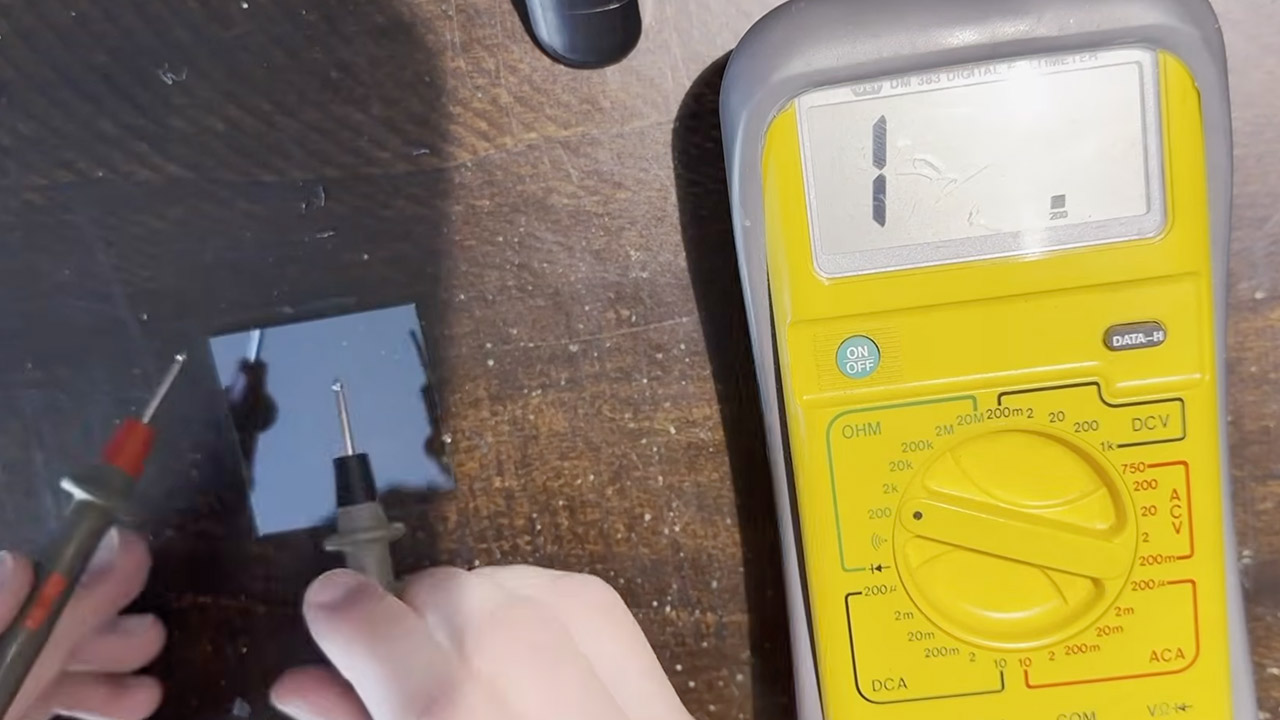
Sokol ordered a pack of this coated glass for another project and decided to use a couple of the sheets as buttons. He took his multimeter to test the coating and was thrilled to see that it performed as predicted. One side of each sheet measured around 20 ohms, but the uncoated side remained nice and open, as you would expect from plain glass. The conductive coating is only applied to one side of the glass, so bear this in mind when using it.
Flip Into Play – Flip down, ready to play. Take a call or reply to a message mid-game—just flip it open without unplugging. The hinge is rated for…
Vertical Mobile Gaming – Designed around portrait play, FlipPad brings a classic handheld feel to your phone. Perfect for retro games and…
USB-C Plug and Play – Built-in USB-C connection makes setup simple and direct. Plug in and start playing instantly. The USB-C port is rated for over…
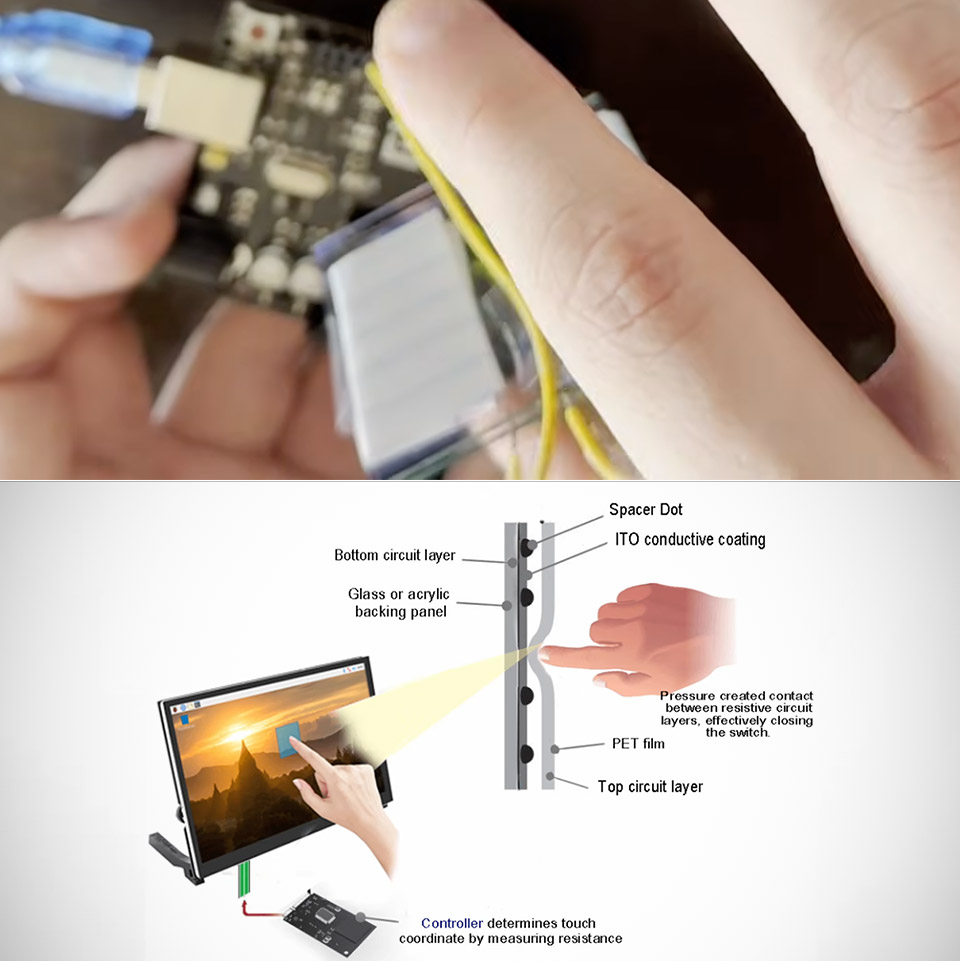
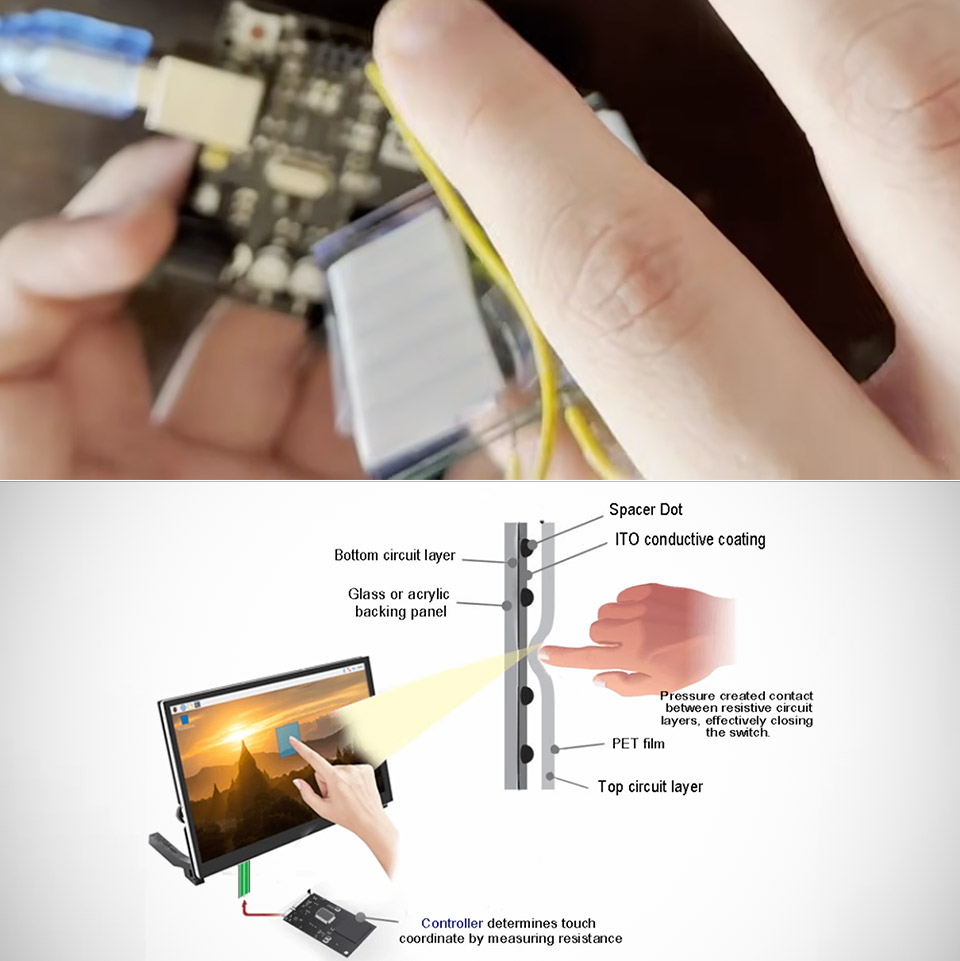
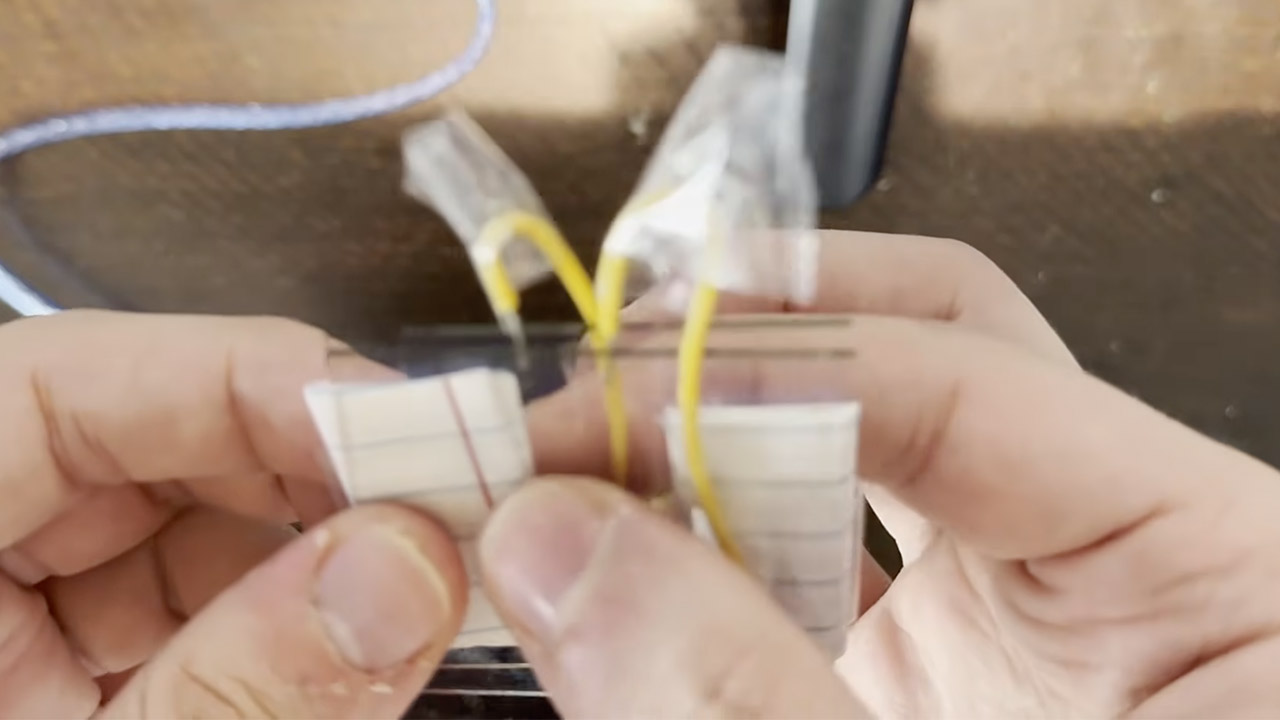
The button is made up of two of these panes, with their coated sides facing each other and a thin sheet of paper between them as a spacer. One pane is grounded, while the other is connected to an Arduino pin equipped with a pull-up resistor that keeps the pin at 5 volts even when the circuit is open. As long as the two conductive layers are apart, the pin reads high and the built-in LED remains dark; however, press down on the stack, and the glass flexes just enough for the coatings to make contact. Then current begins to flow, the pin drops to zero, and the LED illuminates immediately.
That’s the entire system, so no fancy sensors or drivers, just the old ITO film. The paper spacer keeps the surfaces from touching until you exert pressure, at which point the glass springs back and breaks contact when you let go. The whole thing is a little rudimentary and rough around the edges, but it does the job.
The same two sheets can do more than simply turn on and off. You can use the same concept to create a resistive touchscreen by applying a voltage gradient to one of the coatings, with half at 5 volts and half at zero. When the other coating makes contact, it detects the voltage where it touches and transmits it to an analog pin, which is where you receive your readout indicating where the push occurred. You can add another gradient to the opposite layer, resulting in two-dimensional placement. Sokol points out that a more polished version of this would require copper tape for consistent edges, external resistors for stable gradients, and larger glass, but the core concept is already present in the simple button. [Source]
I’ve been a fan of PSB Speakers since I first auditioned the brand’s M4U 2 headphones back in 2013. Over its 50-plus years of operation, the Canadian outfit has consistently shown a knack for squeezing big sound into small packages. Never was that more apparent than in 2023’s Alpha iQ, a surprisingly versatile pair of powered bookshelves that pull more dynamism and musical expression out of a four-inch woofer and micro-tweeter than they have any right to.
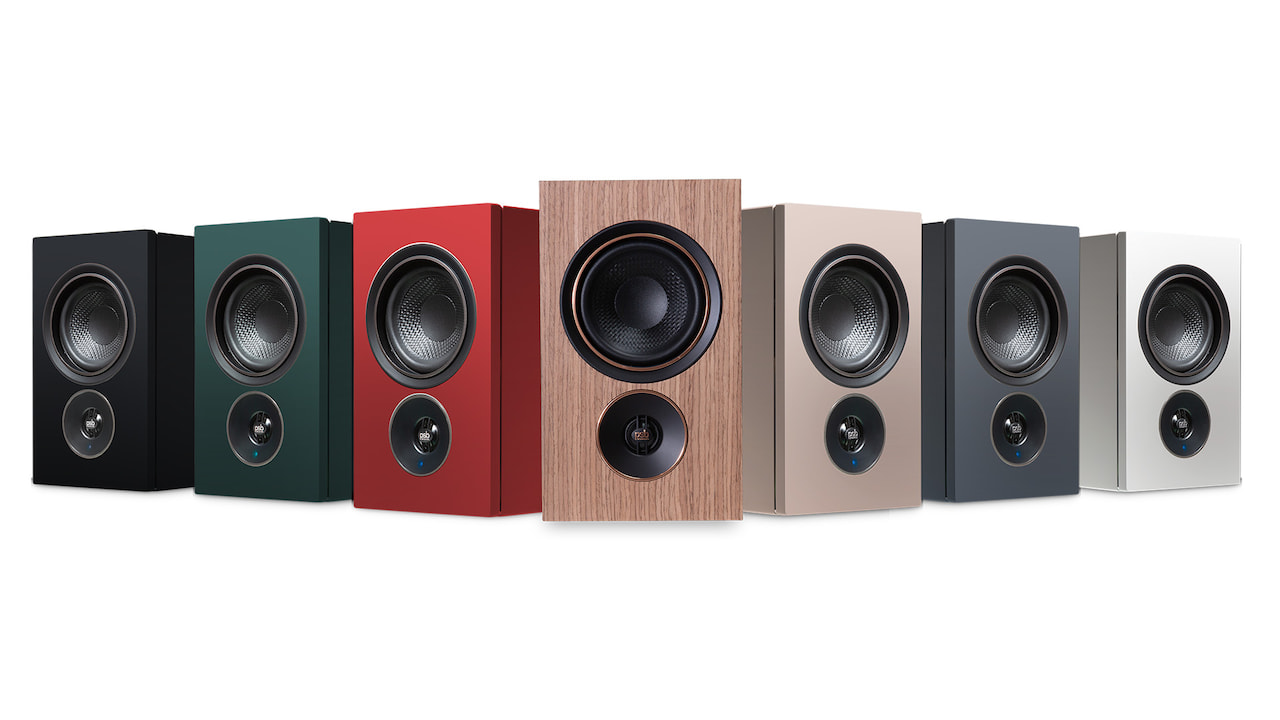
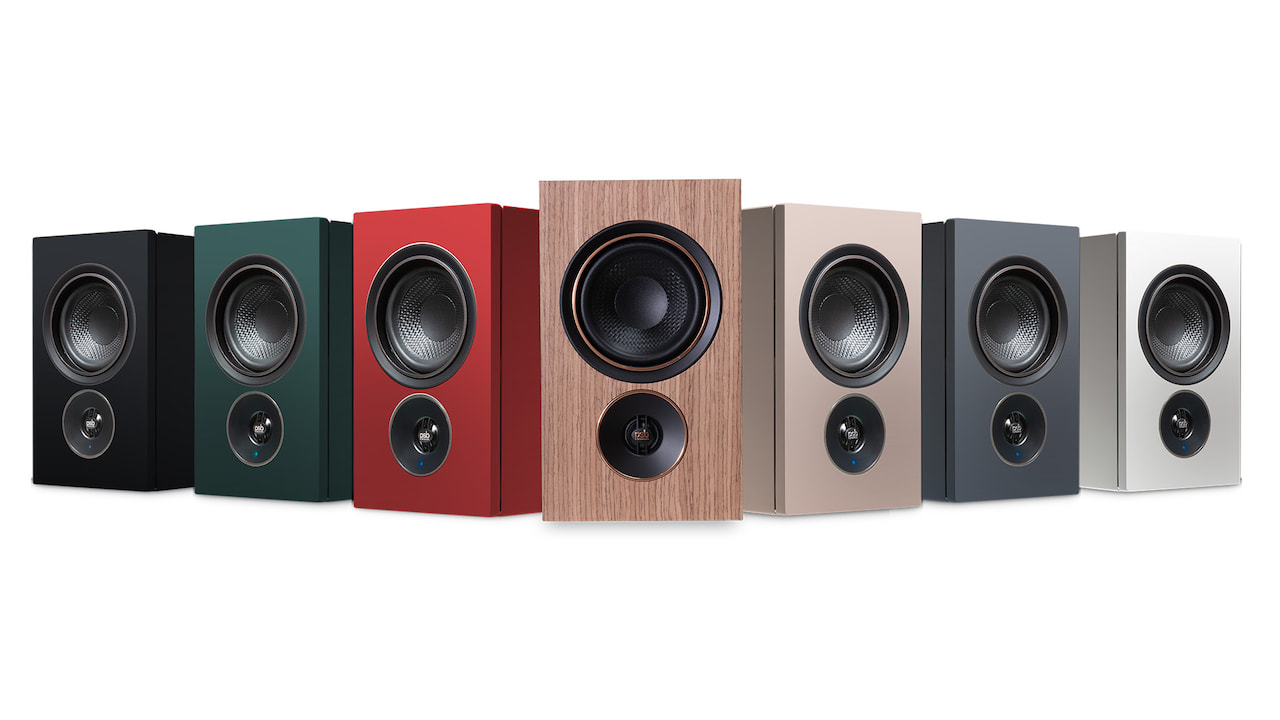
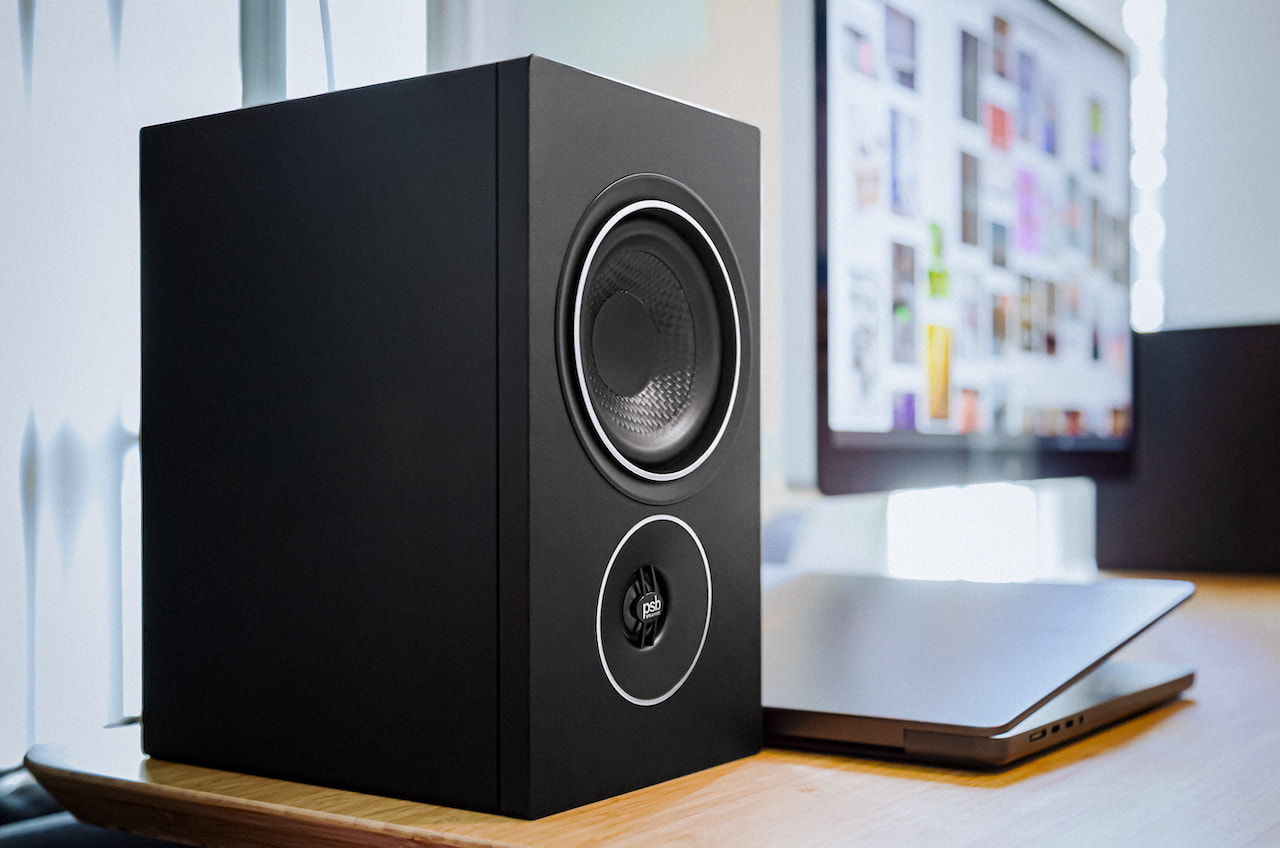
The follow-up iQ1 and iQ2 stand firmly on the Alpha’s shoulders, offering similarly potent musicality and connectivity packed into miniature cabinets, with a woofer-tweeter stack swap that always throws my brain for a loop. The new pairs also share the Alpha’s flair for stylish minimalism, especially the pricier iQ2, which adds upgrades such as a wireless connection between the speakers and a more refined veneer in colors like Ember Red and Sandstone Beige.
PSB Speakers iQ2 Colors
While the iQ’s hardware is all PSB, daily operation relies heavily on BluOS’s powerful software, which handles virtually all controls and audio settings, provides access to more than 20 streaming services, and even supports multiroom audio with rock-solid stability. Unfortunately, I can’t say the same for the iQ2’s HDMI eARC TV connection, which proved doggedly inconsistent throughout my review. The iQ2 worked great for other use cases, but without a stable way to connect seamlessly to a TV in today’s market, the package falls well short of its promise.
Related Reviews:
Setup: Long Haul Connection
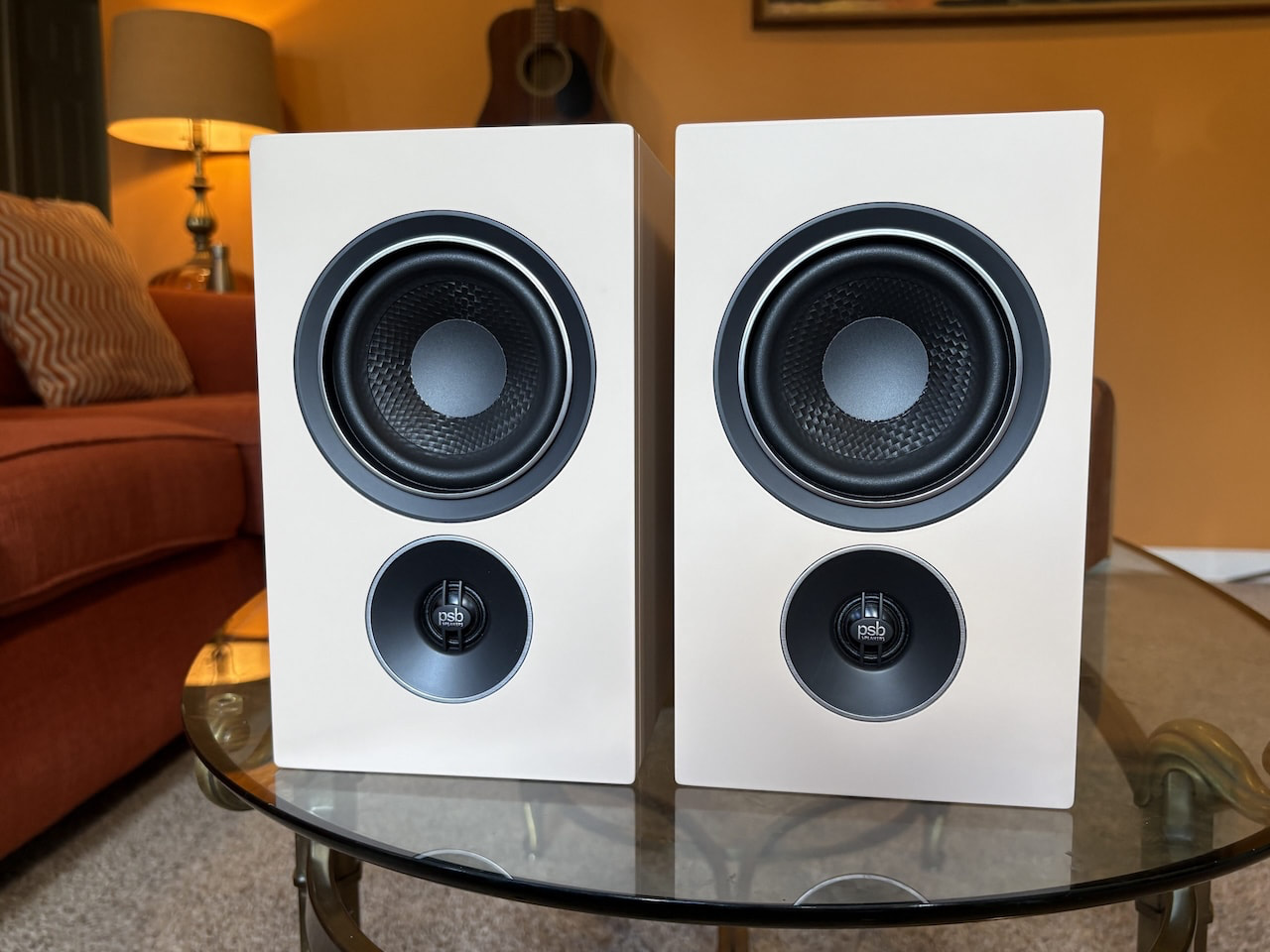
PSB Speakers iQ2 (front)
Setting up the iQ2 isn’t a major hassle for tech-savvy users, but it’s not the push-button start you’ll get from multi-room setups like Sonos, recent app issues notwithstanding. PSB’s quick guide lays out a three-step process that includes simply plugging in the speakers and downloading the BluOS app for Wi-Fi setup, but the online manual hints that Ethernet is the best option where available. As if that were an omen, the iQ2 balked at my network’s 5 GHz Wi-Fi band during an AirPlay connection, leading to multiple stallouts.
Swapping to my split-off 2.4 GHz band fixed the issue, prompting an update and a paint-drying 20 minutes or so of total connection time between the speakers. The process included blasting surprisingly loud music from the primary speaker, which houses the connection hub, to designate it as the right or left channel, but I appreciate the ability to swap the orientation as needed. Users with particularly troublesome rooms should note that the iQ2 doesn’t offer dedicated calibration.
Advertisement
Controls and Usability: HDMI Issues
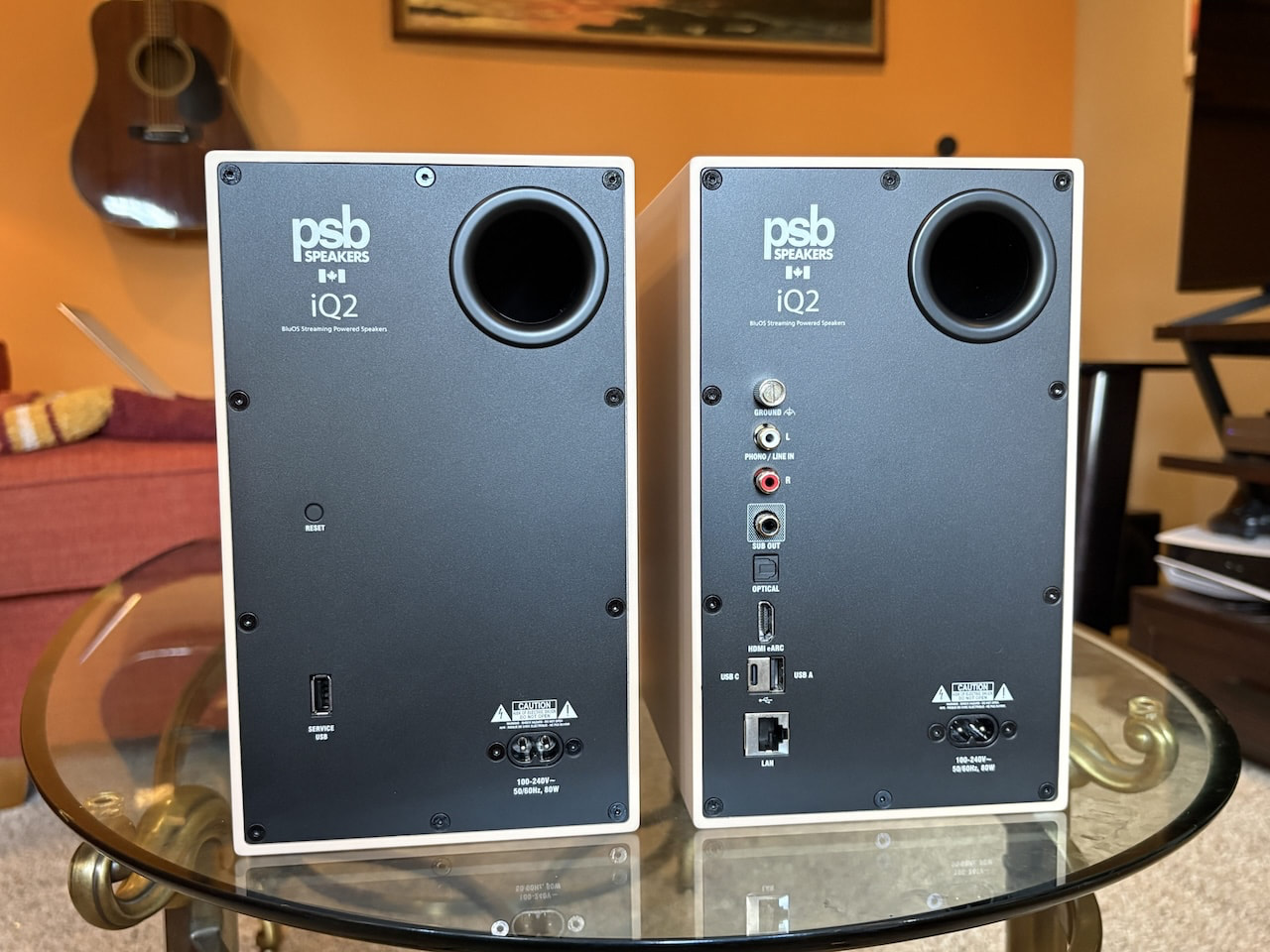
PSB Speakers iQ2 (rear)
There’s also a learning curve for those new to BluOS, or even those like me who’ve been away for a few years. For example, going into the Players tab to find the iQ2’s settings unlocks basic playback controls and options like adding a subwoofer, but there’s no way to select an input. For that, you’ll need to consult the Music tab, which includes all physical inputs, input settings such as allowing the speakers to switch automatically when a signal is detected, and access to BluOS’s 20-plus streaming services and internet radio.
It feels overengineered for a pair of speakers, but that’s because the BluOS ecosystem is designed to let you group the iQ2 with more than 60 other compatible players throughout your home from brands like NAD, DALI, and Bluesound. The app is stable and thoughtful, with features such as haptic volume control, but I wish PSB included a physical remote for quicker access to inputs and other settings. Call me old-fashioned. You do get a few controls on top of the primary speaker, including play/pause, volume, and two programmable presets.
Controls aside, the iQ2’s hardware troubles were the real frustration. HDMI eARC is designed to provide a seamless, high-resolution connection between your TV and speakers, but the iQ2’s implementation was a mess. I experienced audio cutouts across multiple TVs, including instances where the TV recognized the speakers as a source but played no sound. PSB Speakers’ PR team told me this is a known issue and pointed to a firmware fix, but it didn’t work for my review pair.
Design & Features: Elegant Minimalism
PSB Speakers iQ2
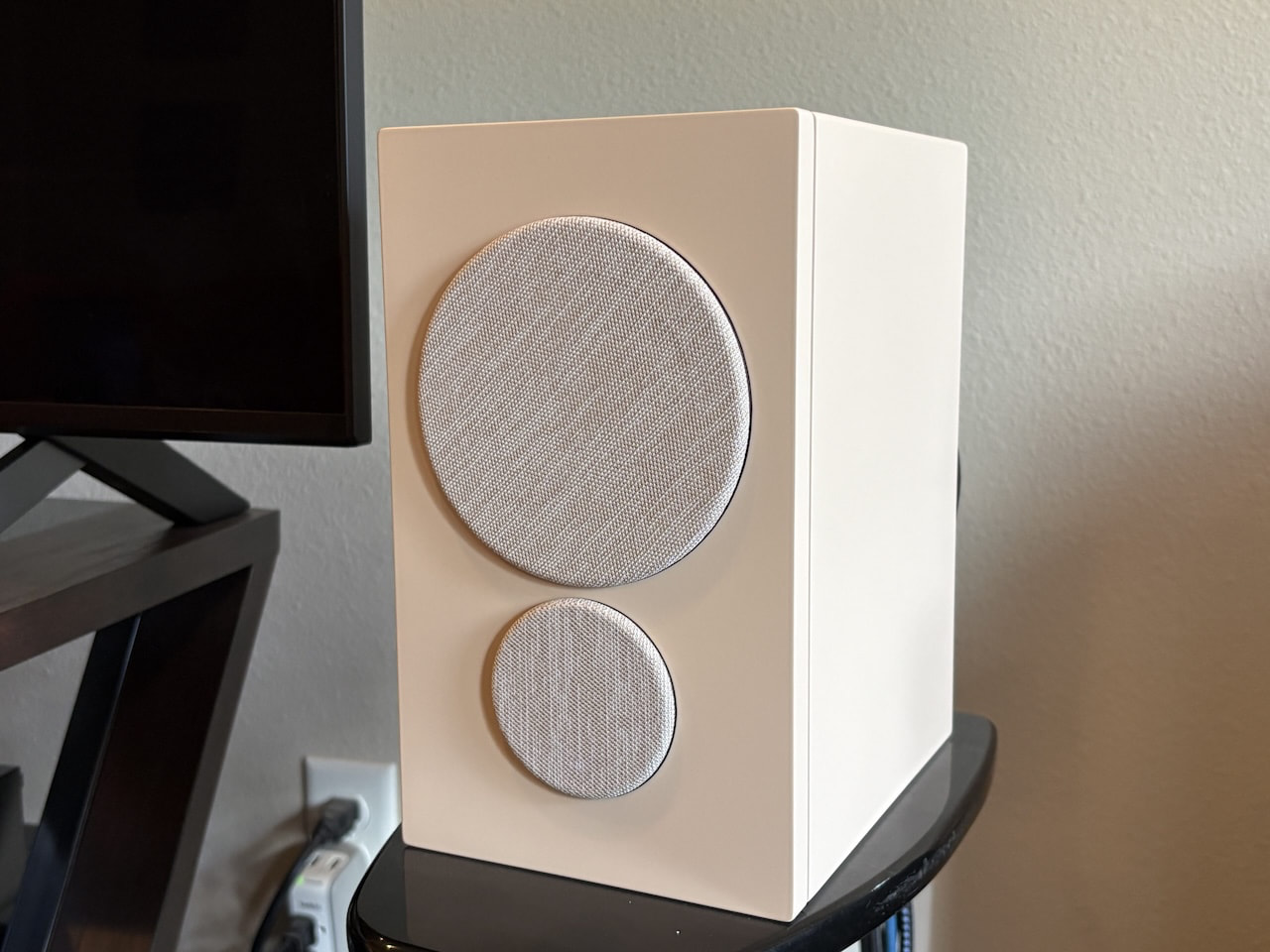
The iQ2 make a great first impression, especially in the Sandstone color I reviewed, looking both stylish and understated. The cabinets feel well built, and their fingerprint-resistant veneers ensure that the refined aesthetic holds up. There’s solid heft to the compact cubes, though at under 10 inches tall, they looked almost comically small against the 75-inch Micro RGB TV I first paired them with, especially with their little magnetic hats that serve as acoustic grilles.
That said, the iQ2’s wireless connection means they can easily adapt to larger screen sizes, and there’s nothing comical about their 270 watts of Class D amplification. That works out to 90 watts for each speaker’s four-inch polypropylene mid-bass driver and 45 watts for each 0.75-inch aluminum-dome tweeter. PSB claims a frequency response of 65 Hz to 20 kHz, and the speakers dive toward that lower number with more authority than their size suggests.
A column of inputs on the back of the Primary speaker includes HDMI eARC, optical, USB-C playback, USB-A for external drives, a dual line-in/MM phono RCA input adjustable in the app, Ethernet, and a subwoofer output.
Advertisement
Advertisement. Scroll to continue reading.
Streaming support includes Spotify Connect, TIDAL Connect, Qobuz Connect, and Apple AirPlay 2. You’ll find many more options in the BluOS app, including Deezer, Napster, and iHeartRadio, to name a few, but not Apple Music. Other streaming options include access to internet radio stations, local network files at up to 24-bit/192 kHz, and Bluetooth with aptX Adaptive.
Listening: Mighty Minis
PSB Speakers iQ2
I started testing the iQ2 via lossless Spotify Connect and was quickly reminded why PSB holds a special place in my mind’s cluttered library of audio brands. A bit like Canadians themselves, the iQ2 are unassuming at first, but digging deeper reveals an effective mix of confidence and depth. Their sound signature is clean, smooth, and effortlessly natural, with accurate stereo imaging and more bass than you’d expect from micro speakers.
With the iQ2 playing in the background as my pre-toddler arrived home from daycare, I was constantly distracted by their penchant for drawing out instrumental timbres, from satiny brass and woodwinds to gritty electric guitars and poppy percussion. They do a good job of leaning into different genres, with enough finesse to give each instrument its own space, from the dual vocals in Too Short’s “Money in the Ghetto” to the cacophonous horns in The Beatles’ “Good Morning.”
The warm midrange can make more laid-back mixes sound a little flat, but its keener topside adds some excitement to higher-register instruments and effects without feeling sharp or brittle. The sweet yet pointed treble makes easy work of speedy transients like the reverberating synths in Sweet Spirit’s “Baby When I Close My Eyes,” fluttering the effect back and forth across the stereo image with a deft touch that stands out more readily than in options like SVS’s Prime Wireless Pro.
Advertisement
Bass is firm and well-rounded, if not particularly revelatory, until you remember the size of the drivers, which outflex just about any four-inch woofers I’ve encountered, including options like U-Turn’s more rugged-sounding Ethos speakers. Even some larger 5.25-inch drivers provide less mid-bass punch. It’s enough groove to be tantalizing, but if you’re after raw emotional power, you’ll need a subwoofer. As usual, my SVS 3000 Micro was a great pairing, firming up the lowest frequencies with richer musicality and some sledgehammer punch while opening more space in the upper registers.
Turning to vinyl with my Orbit Theory turntable, the speakers showed off solid detail and dynamics on my go-to albums, such as Brubeck’s Take Five. Paul Desmond’s buzzy sax in “Blue Rondo” was rendered with keen precision, pulling out most of his breathy overtones. Joe Morello’s stick work had an expressive touch in moments such as his multitone tom play during the title song’s drum solo. I was less impressed when moving to the iQ2’s internal MM phono stage, which was both quieter and less precise than the Theory’s internal preamp, though that seems to be a common issue with powered speakers in this class. You can often do better with an external preamp.
Moving to TV and films, when the HDMI eARC port was working, the iQ2 proved more than up to the task of providing exciting sound effects at the sides of the stereo image and clear dialogue at the center, elevating the subtle diction in well-mixed productions like House of the Dragon. Again, the speakers brought a natural liveliness to effects such as stone hallways and bridges, crackling fires, and the woody creak of the show’s many oversized doors.
PSB Speakers iQ1
The Bottom Line
On paper, the PSB iQ models, especially the iQ1, provide a ton of value. You’ll spend a lot more to get the pricier iQ2’s wireless connection and fancier cabinets, but both models offer impressive connectivity and features matched by surprisingly good performance, especially in smaller rooms.
Advertisement
If not for the HDMI eARC issues I encountered, either pair would be a top pick for those after a compact system with connectivity to spare, not to mention the ability to group it with other systems in the BluOS family. As it stands, I can’t recommend the iQ1 or iQ2 until PSB Speakers can ensure simple, reliable connections for all your components.
For those seeking alternatives to the cheaper iQ1, I recommend SVS’s steadfast Prime Wireless Pro, which offers well-rounded sound and great connectivity in sleek, piano-gloss cabinets. If your budget is more in line with the iQ2, KEF’s LSX II provides similarly stylish design and colorways, along with even better sound performance. Neither pair offers multiroom capabilities, however, so if that’s important, you may need to look elsewhere or wait for PSB to provide a real fix.
Pros:
Smooth and natural tonal balance
Good instrumental separation
Powerful bass for their size
Stylish, well-built cabinets in multiple colors
Loads of connectivity options
BluOS multi-room audio support
Cons
Setup and basic control could be simpler
HDMI eARC cutouts are a mess
Upgraded cabinets and wireless connection are pricey


























































You must be logged in to post a comment Login