Flashlights used to be relatively simple devices that featured simple on and off switches, a fixed brightness setting, and few other features. Like virtually everything else in the world, technological advances have made flashlights smarter and more effective than ever before. USB rechargeable batteries and upgrades in brightness capabilities have helped brands like our favorite, Fenix, bring new levels of versatility to the flashlight market. Meanwhile, the ability to focus light more directly remains an important feature for many users.
That last advancement isn’t entirely new when it comes to flashlights, of course, as manufacturers have long built that feature into different styles of torches. As the name implies, focusing flashlights do indeed feature the ability to adjust the width and focus of the device’s beam. In essence, it allows users to cast light on specific items and areas in the dark when the need is there. The beam can also easily be adjusted to cast a wider light when you want to illuminate a larger area.
As you can imagine, a focusing feature can be as important as brightness in emergency scenarios, as it allows you to highlight a specific point in the dark. This can help you know exactly what lies ahead if you need to be out and about. The same may be true in a dimly lit basement or crawlspace, or if you’re camping off-grid and need to venture away from the tent in the middle of the night to, well, you know.
Advertisement
How to focus the light on your flashlight
As noted, the addition of a focusing feature is hardly the result of a recent technological breakthrough. In fact, the design behind the feature is pretty simple in principle and requires little more than the addition of an internal lens or reflector in the flashlight’s headlamp. That feature can then change the focus of the torch based on how far or how close it is to the light source itself.
Advertisement
The question then becomes how users can move the lens or reflector when the need to focus or unfocus the beam of the flashlight arises. Lights from the market’s top manufactures tend to feature two different styles of flashlights with focusing abilities. The first style allows users to change focus by simply sliding the headlamp of the flashlight forward or backwards on the shaft. The further away from the light the head is, the narrower the beam will be. The principle is the same with the second style of focusing flashlight, though these move the head forward and backward by way of a twisting motion.
There are no major advantages to one style or the other for focusing flashlights, though a push and pull model may be easier for some to adjust with one hand. Versatility aside, there may be a couple of drawbacks to consider with either model, in that the o-rings used in many focusing flashlights can wear out over time, making them less effective at protecting them from dust and moisture. Likewise, the need for moving parts may make focusing flashlights less durable than their fixed head counterparts.
When the Buchardt Audio E50 arrived in 2024, it quickly established itself as one of the Danish manufacturer’s most ambitious passive bookshelf/standmount loudspeakers, combining premium drivers, careful cabinet construction, and the neutral, controlled presentation that has become central to Buchardt’s identity.
For 2026, Buchardt Audio is expanding the E Series with the new E50-S, but this is not an E50 replacement or a straightforward upgrade. Instead, the E50-S takes the core engineering and design philosophy of the E50 in a different direction, with changes intended to make the speaker a better fit for listeners whose systems, rooms, or tonal preferences may not have aligned with the original model.
That makes the E50-S more interesting than another routine product refresh. Buchardt is effectively offering two interpretations of the same high-end passive speaker platform, giving buyers a choice based on how they actually listen rather than simply declaring the newest version the better one.
The E50-S
The E50-S retains the core DNA of the E50, but Buchardt has been careful not to position it as an upgrade. Instead, it offers a different approach, with changes intended to broaden the E Series’ appeal and make it better suited to a wider range of systems, rooms, and listening preferences.
Advertisement
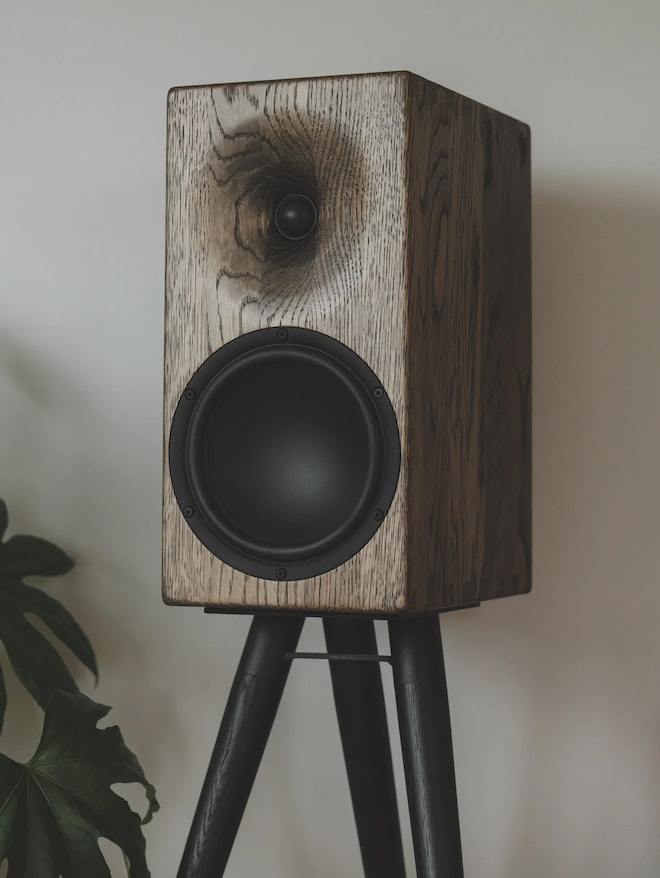
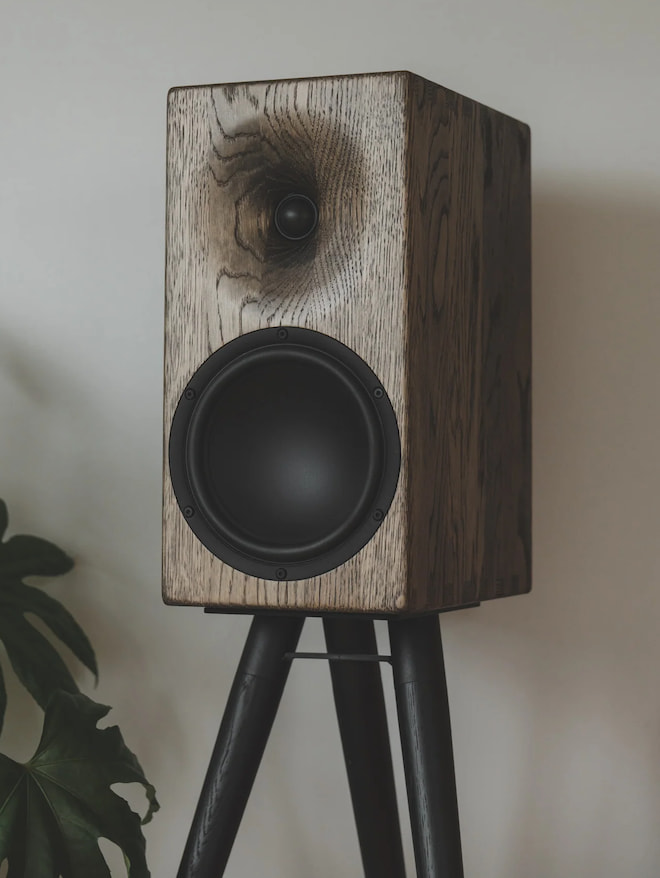
Buchardt E50-S stand-mount speaker in rounded charcoal finish
What’s New
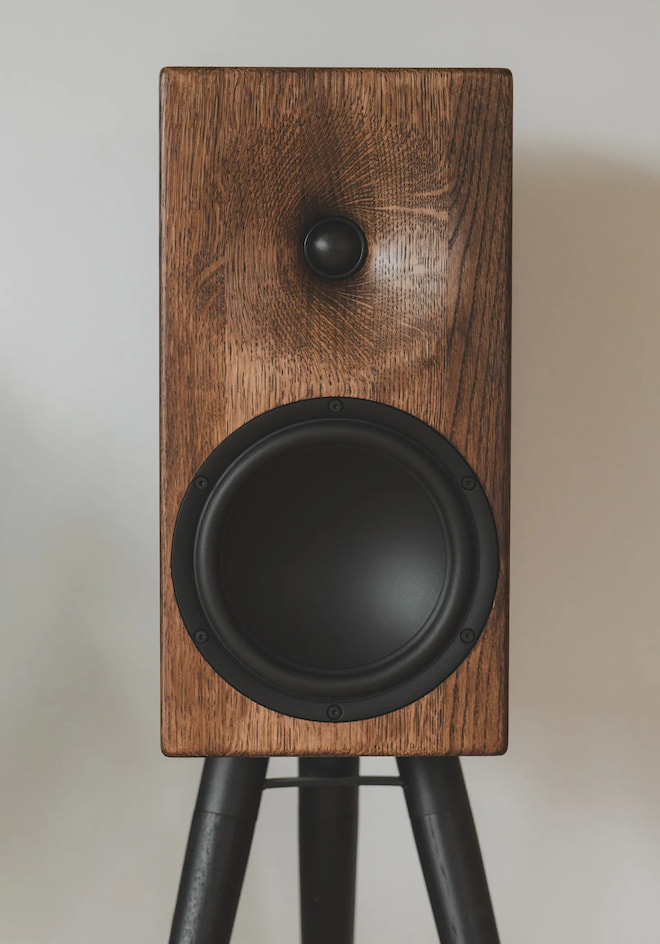
The E50-S (the “S” stands for sensitivity) is slightly larger than the original E50. Its width has been increased by 1 cm (0.4 inches) to accommodate a larger woofer. The new driver is a custom-made 7.5-inch Satori woofer that uses the well-regarded TeXtreme cone material, manufactured by Oxeon AB in Sweden.
In addition to the larger woofer, the E50-S employs a slightly different tweeter and a unique resistor-free crossover.
Another highlight is a custom-designed waveguide tailored specifically to the E50-S cabinet, tweeter, and woofer. Rather than casting the waveguide in aluminum, as Buchardt does with some of its other speakers, the E50-S waveguide is CNC-machined directly into the 28 mm solid-wood front baffle, combining craftsmanship with acoustic precision.
Sonic Differences
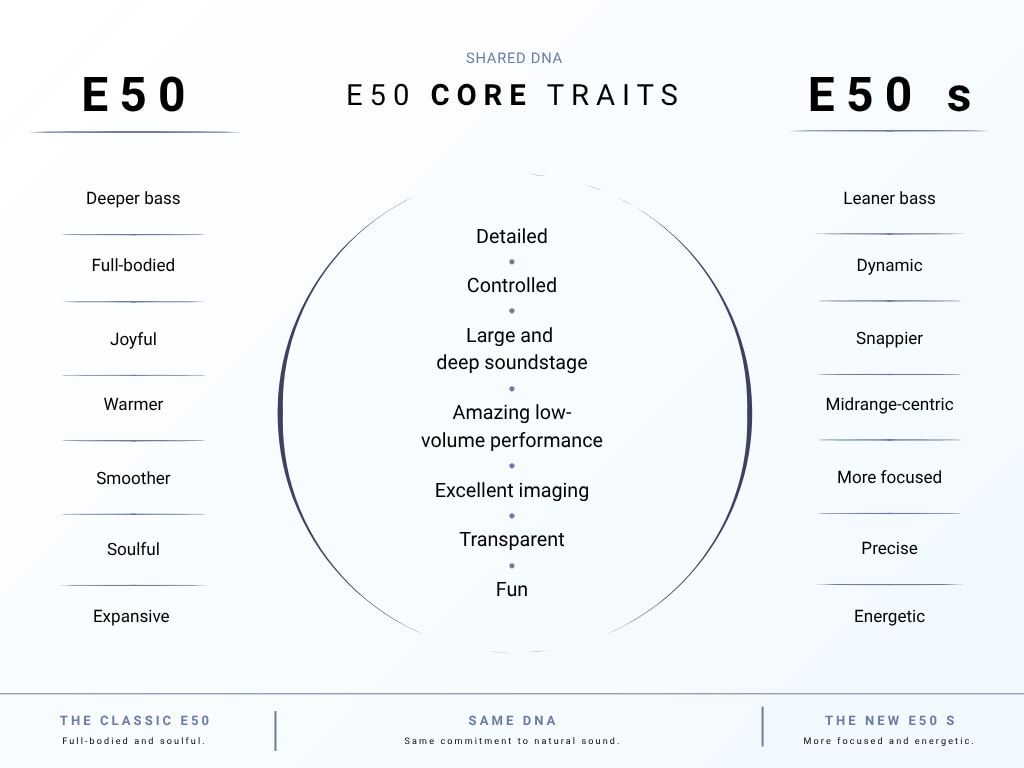
Despite the larger woofer, the E50-S delivers slightly less overall bass output, placing greater emphasis on the midrange. Buchardt says this gives vocals greater presence and creates a more textured presentation, allowing the midrange to occupy a more prominent position in the mix.
The high frequencies remain airy and highly detailed, but are tuned to sound smooth and non-fatiguing. Because treble performance has been one of the most praised aspects of the original E50, Buchardt has retained much of the same overall high-frequency character with the E50-S.
Buchardt also describes the E50-S soundstage as more detailed, clear, and engaging than that of the E50. The presentation is more forward, with greater perceived air around instruments and a stronger emphasis on bringing vocals closer to the listener.
Advertisement
Compared with the E50, the E50-S is intended to sound more energetic, holographic, and responsive, with greater apparent detail and more precise imaging without becoming analytical or cold. The original E50, by comparison, offers a more relaxed and laid-back presentation, with what Buchardt describes as an easygoing “paper-cone” tonal character.
Advertisement. Scroll to continue reading.
No loudspeaker excels in every area, and speaker design inevitably involves choosing which characteristics to prioritize. That is ultimately why the E50 and E50-S can exist side by side rather than one simply replacing the other.
Buchardt E50-S Loudspeaker (rear)
Who is the E50-S For?
Buchardt has indicated that the E50-S is intended for listeners who have heard or already own the E50 but want something slightly less bass-heavy in a similar size and form factor. That could make it a better fit for smaller rooms, setups where the speakers need to be positioned closer to walls, environments where excessive bass can become problematic, or listeners who simply prefer greater emphasis on midrange detail and clarity.
Another reason to choose the E50-S over the E50 is amplifier compatibility. Buchardt says the E50-S can be driven by amplifiers starting at just 15 watts, including lower-powered tube designs, while still producing respectable output levels. The E50 is considerably more demanding and is recommended for use with amplifiers rated between 60 and 200 watts.
Advertisement
The E50 offers the more linear frequency response of the two, although neither follows quite the same tuning approach as the Buchardt S400 Series.
Tuned by Ear
The E Series is designed using objective engineering principles, but the final voicing is ultimately done by ear. Both the E50 and E50-S incorporate a variation of the BBC dip, although it is more pronounced on the E50-S, which also has a slightly lighter bass response. According to Buchardt, this modified tuning is intended to make both speakers easy to listen to over extended periods without becoming fatiguing.
Interestingly, Buchardt has deliberately chosen not to publish performance measurements for the E50-S, despite having done so for the original E50. The company argues that measurements can “color” a listener’s expectations before they have actually heard the speaker.
Buchardt says that during development and A/B testing of the E50-S against its other models, the listening impressions of its team did not always correlate with what the measurements suggested they should be hearing. That experience appears to have reinforced the company’s decision to emphasize listening over published graphs when presenting the E50-S.
Advertisement
As Buchardt Audio puts it rather directly: “Just trust us: if you want a frequency-linear speaker, the E50-S is not what you are looking for!”Buchardt Audio E50
Small room: 15 watts Medium room: 45 watts Large room: 100+ watts All into 4 ohms
Measurements (HWD)
395 x 190 x 284 mm 15.5” x 7.5” x 11.1”
395 x 200 x 284 mm 15.5” x 7.9” x 11.1”
Weight
8.6 kg each (19 lbs)
9 kg each
Speaker grilles
Included
Black grilles included
Warranty
10 years
10 years
Cabinet
19 & 28mm (front baffle) solid european wood
19 & 28mm (front baffle) solid european wood with internal bracing
The Bottom Line
Buchardt Audio has spent more than a decade building its reputation around compact loudspeakers that combine thoughtful engineering with a direct-to-consumer business model, and the E50-S is a good example of why the company has developed such a loyal following. Instead of replacing the E50 with something supposedly “better,” Buchardt has created a genuine alternative with a larger 7.5-inch Satori/TeXtreme woofer, higher sensitivity, a resistor-free crossover, CNC-machined waveguide, and deliberately different voicing.
The E50-S makes the most sense for listeners who value midrange presence, vocal clarity, imaging, and a more forward presentation over maximum bass weight or strict frequency linearity. Its ability to work with amplifiers starting at around 15 watts also makes it a more practical option for lower-powered tube and Class A designs. The original E50 remains the better choice for listeners who prefer greater bass output, a more relaxed presentation, and a more linear overall response.
Neither model is inexpensive, but Buchardt is competing in a category where compact passive loudspeakers can quickly climb well beyond $5,000 per pair. The Radiant Acoustics CLARITY Series is one obvious alternative in a similar price range, while the $7,000-per-pair Dynaudio Legend would normally merit consideration as well. For U.S. buyers, however, Dynaudio’s decision to exit the North American market in fall 2026 makes the Legend a much less straightforward comparison going forward.
What makes the E50-S interesting is that Buchardt has resisted the temptation to declare it the new flagship and make the E50 obsolete. These are two different interpretations of the same basic idea. Your room, amplifier, and listening preferences should decide which one makes more sense.
Advertisement
Advertisement. Scroll to continue reading.
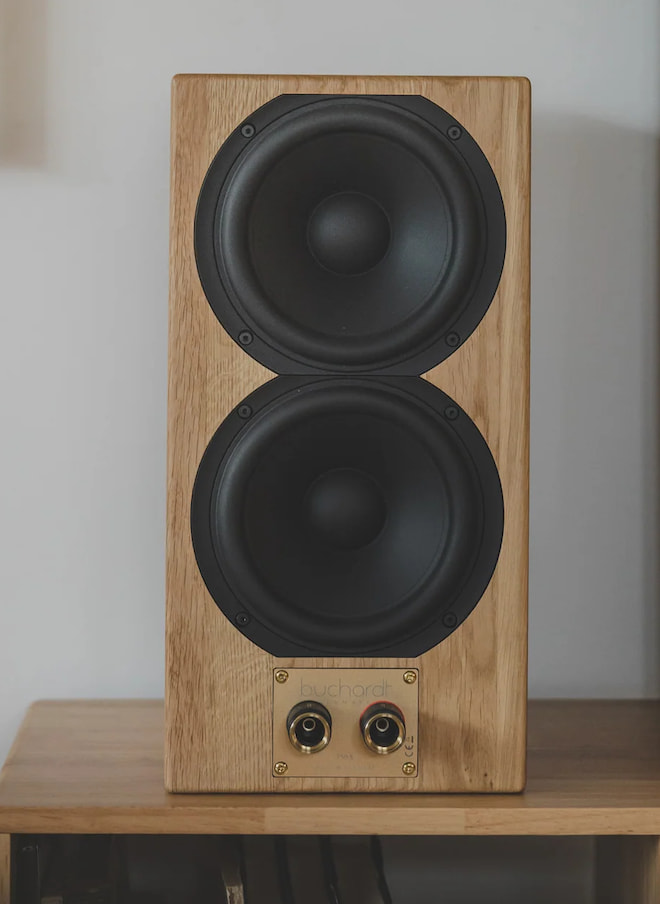
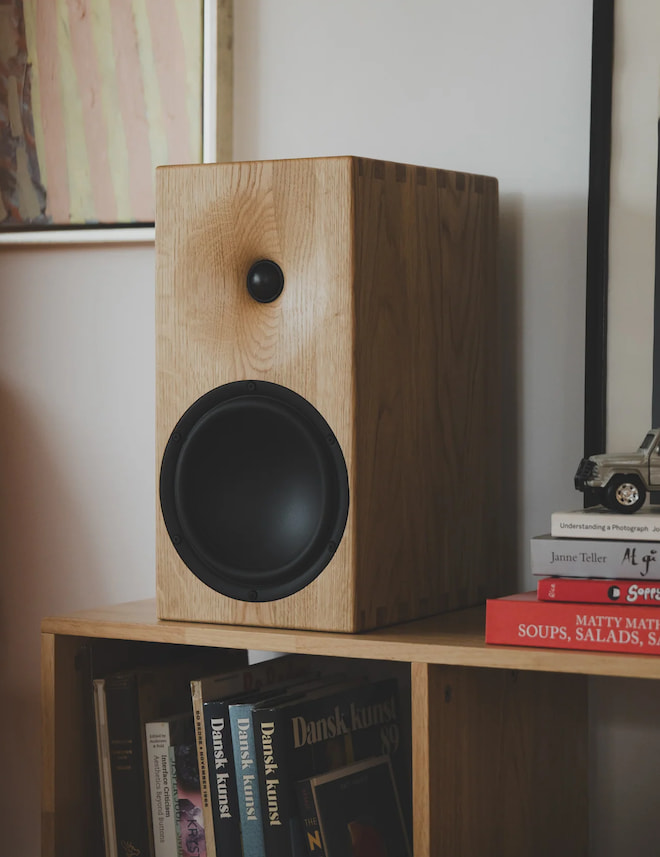
Buchardt E50-S Loudspeaker in natural oak.
Price & Availability
The E50-S Passive Bookshelf/Standmount Speaker is priced at €4,100 per pair and is available directly from Buchardt Audio (contact Buchardt Audio for U.S. pricing). Just as its E50 predecessor, the E50-S is made and assembled in Denmark from in-house and European-sourced parts.
To dig really deep into the Buchardt E50-S story and technologies, refer to the official E50-S product page linked above.
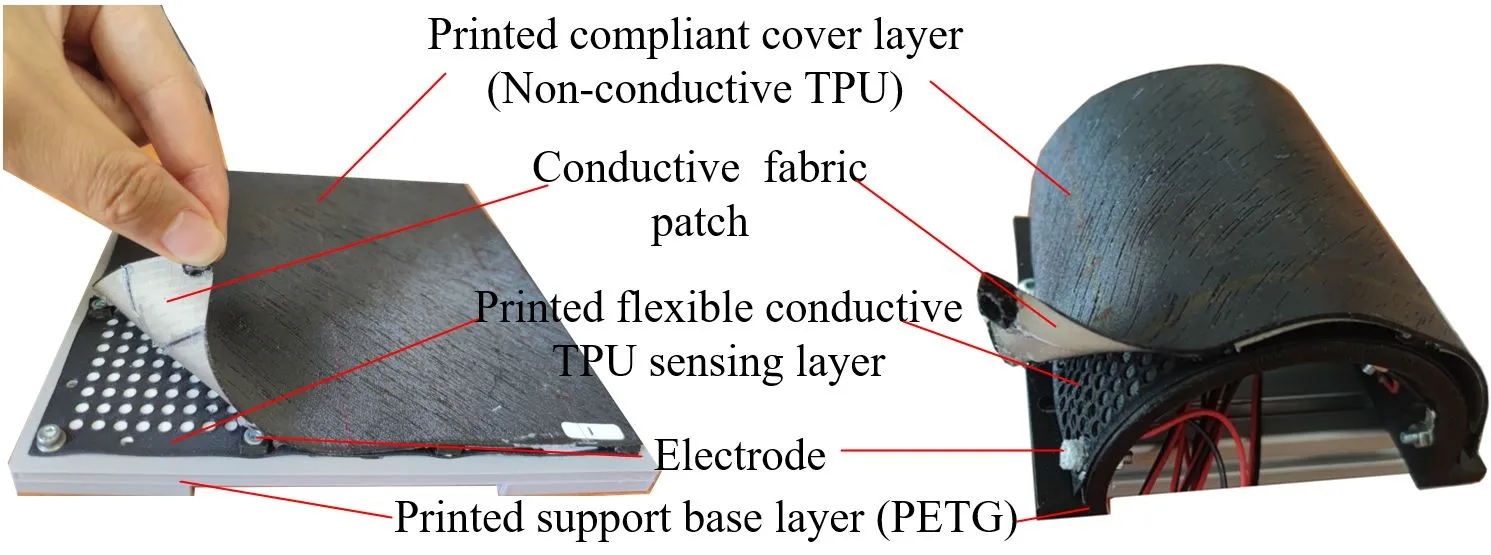
Schematic diagram of the touch-sensitive skin. (Credit: Haofeng Chen et al., ArXiv, 2026)
Hypoesthesia, more commonly referred to as numbness, is one of the more distressing ailments that can affect us humans, primarily because it reminds us of just how much we rely on our sensation of touch in daily life. From experiencing the world around us, handling objects, noticing when you just bumped into that side table again and the comforting hug of a fellow human being, touch is perhaps the most important of our senses.
In that regard the recently published research by [Haofeng Chen] et al. on giving robots a skin that can experience touch seems rather important as it would give especially humanoid robots a more natural way to interact with their environment, using feedback from touch.
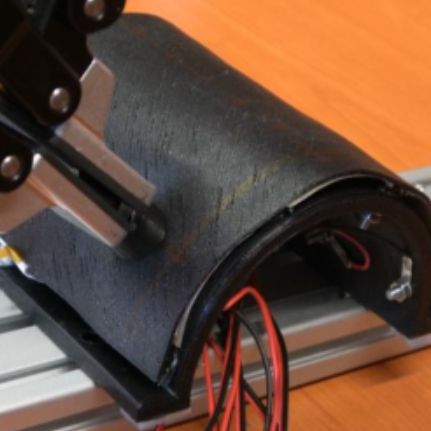
Poking the artificial skin. (Credit: Chen et al., arXiv, 2026)
One of the essential parts of biological skin is that it is teeming with sensors, at a density level that provides excellent resolution as required, down to sensing e.g. small surface imperfections with one’s finger tips. Replicating this with an artificial skin for robotics has always been a problem, due to the wiring and/or reliability nightmare this poses with typical approaches. Instead of focusing on many individual sensors, [Chen] et al. focused on effectively creating the equivalent of a resistive touch screen in skin format.
The basic principle underlying the demonstrated artificial skin is electrical impedance tomography (EIT), which uses surface electrodes to form a tomographic image based on measures electrical resistivity. Core here is the flexible TPU layer with electrodes and the conductive fabric patches attached to the top TPU cover layer. The electrodes continuously measure the resistivity, with disturbances from those patches due to touch events on the cover layer altering these values. From this EIT can be used to reconstruct the location and strength of the touch event.
The results from the created prototypes were promising, with only 16 electrodes sufficing to create a fairly accurate pressure map. Hardware-wise this makes it thus quite uncomplicated, with the characterization of the TPU porosity and such along with the EIT algorithm (provided in the paper) probably being the biggest hurdles for hobbyist recreations.
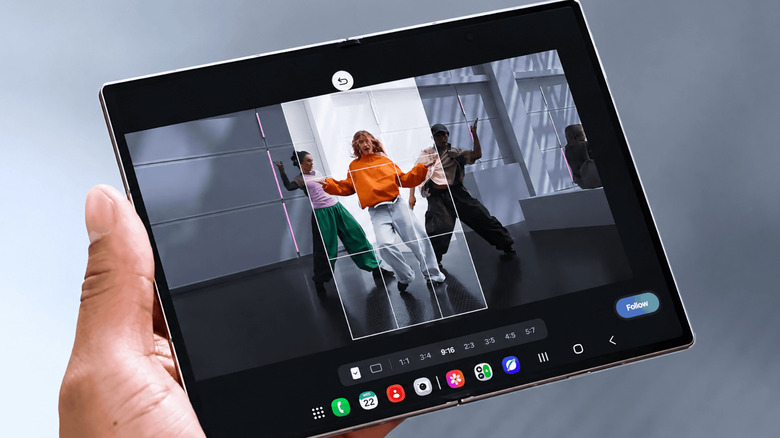
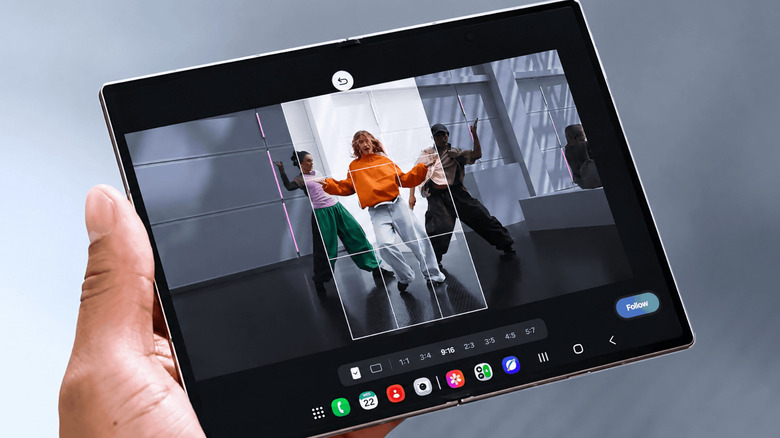
My FanCam works after you record, turning a wider group video into a tighter tracking shot around one person.
Samsung
Samsung’s My FanCam is built for videos where several people are moving through the frame. Instead of trying to keep one person centered while you’re recording, you can capture the wider scene and choose your subject afterward. Galaxy AI then reframes the existing footage around that person in an aspect ratio you select.
Samsung introduced the feature on the Galaxy Z Fold8 lineup. Because My FanCam works on a video you’ve already recorded, there’s nothing special you need to turn on before shooting.
Advertisement
How to use My FanCam in Samsung Gallery
Samsung
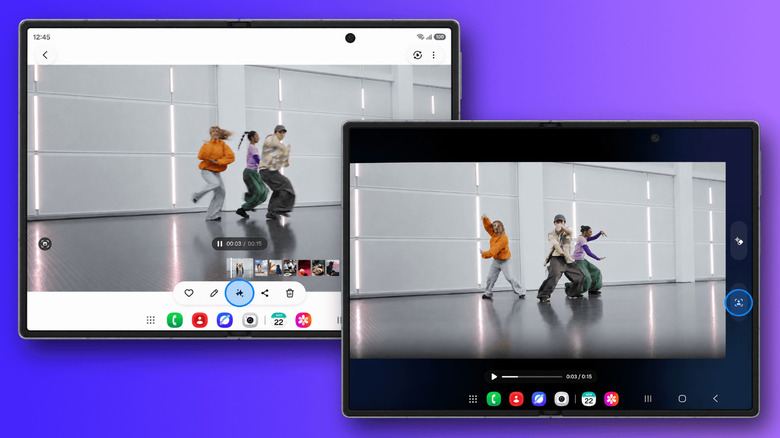
My FanCam lives in Samsung’s Gallery editing tools. On a supported device, start with a video that contains the person you want Galaxy AI to follow.
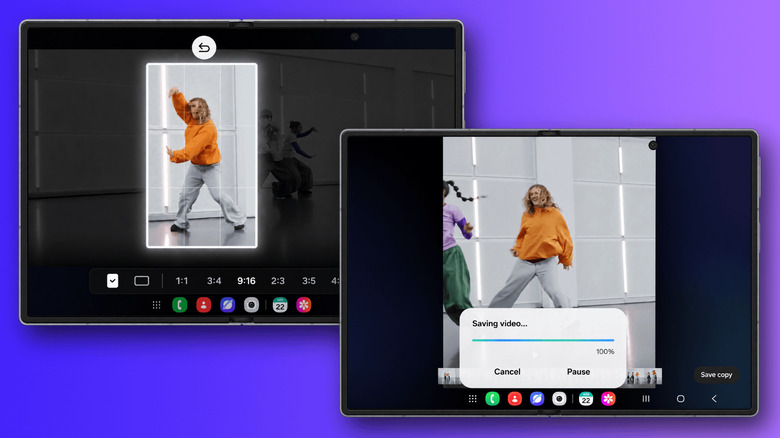
Open Gallery and select the video you want to edit. Then, tap the Galaxy AI icon and select My FanCam. Wait for Galaxy AI to identify the people in the video and select the person you want to follow. Next, choose an aspect ratio for the new clip. Finally, tap Follow to create the reframed video.
The aspect-ratio choice is useful if you already know where the finished clip is going. A vertical crop makes more sense for platforms built around portrait video, while a wider frame may work better if you want to keep more of the original scene visible. My FanCam handles the tracking either way, so you can make that decision after you’ve recorded the footage.
Advertisement
Shoot a wider frame if you plan to use My FanCam
Samsung
My FanCam differs from Samsung’s Auto framing feature in one important way. Auto framing adjusts the composition while you’re recording, while My FanCam does its work afterward. That gives you more freedom to capture the whole scene first, but it also means the feature can only reframe footage that made it into the original recording.
Imagine recording a school performance, a soccer game or a group dance. Rather than constantly moving the phone to keep one person centered, you can keep more of the scene visible and decide who you want to focus on when you edit the clip later.
It helps to think of My FanCam as moving a smaller frame around inside the video you already recorded. If you’re filming several people, keeping the shot reasonably wide gives Galaxy AI more room to reposition that crop as your chosen person moves from one side of the scene to the other. If you start with a very tight shot, there’s simply less surrounding image available for My FanCam to use.
The same limitation applies when your subject moves outside the original frame. My FanCam reframes what the camera captured, but it can’t recover parts of a scene that were never recorded. Samsung also says the feature won’t work when it can’t find a subject to track, and it doesn’t guarantee tracking accuracy. So for something unpredictable, such as a sports game or a group performance, keeping the person you care about comfortably within the wider shot gives the feature a better starting point.
Advertisement
Which Samsung phones support My FanCam?
Jimmy Gunawan/Shutterstock
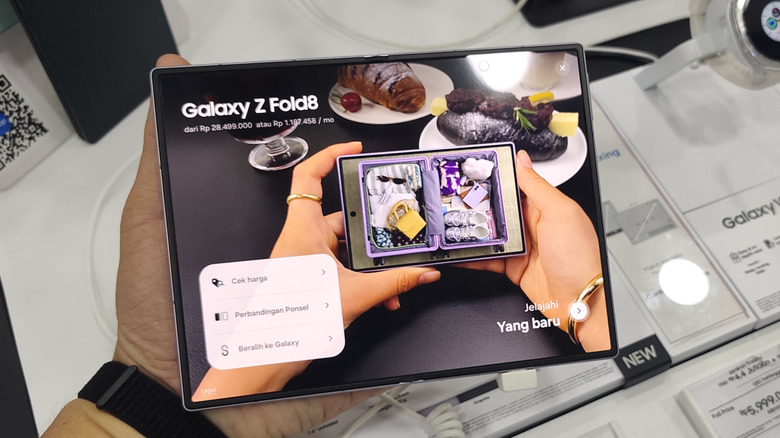
Samsung currently demonstrates My FanCam on the Galaxy Z Fold8 and Galaxy Z Fold8 Ultra. Both phones launched with One UI 9, which is where Samsung lists My FanCam among its new Galaxy AI features.
One UI 9 isn’t limited to those two phones. Samsung first rolled it out to the Galaxy Z Fold8 Ultra, Galaxy Z Fold8 and Galaxy Z Flip8, with more Galaxy devices set to follow. My FanCam is a little less straightforward, though, since Samsung says individual AI features can vary by device, language and region. So even if your phone gets One UI 9, My FanCam may not come along with it.
Upscaling software is getting better all the time, but there are still some caveats to be aware of.
Simpson33/Getty Images
The shift from analogue film to digital video happened quickly. Before you knew it, tape-based video recorders had been replaced with digital video cameras and, later still, smartphones. 4K is now the gold standard for video creation, with 1080p left as its lower-quality sibling.
Despite widespread 4K adoption, there’s still plenty of video being created in 1080p. And that’s not to mention content made in the past, from home videos to old movies, available in standard definition or even lower. That can lead you to thinking about converting video to 4K, giving it a boost to make it look as sharp on a modern 4K OLED display as something you’d shoot today. Converting a video to 4K is possible, but it’s a process with a lot of steps and points to consider first.
Advertisement
Converting a video to 4K means creating millions of new pixels
Klenger/Getty Images
When we talk about 4K and 1080p, or ultra-high and high definition, we’re talking about the amount of pixels contained within each video frame. For ultra-high definition video content, which is what most people usually mean by 4K, that means a resolution of 3,840 x 2,160 pixels, versus 1,920 x 1,080 pixels for 1080p high definition video. Standard definition video, meanwhile, sits at either 480 or 576 vertical lines depending on your region; width can vary depending on how the content was originally filmed. You can also find cinematic 4K resolutions, so-called ‘true 4K’ or DCI 4K, with a resolution of 4,096 x 2,160.
You can upscale any output file to 4K — 4K is just the frame size. To move from 1080p to 4K, you’re going to need three additional pixels on-screen for every original pixel that was recorded, so four times overall. Managing that without losing any quality is the issue. That is almost impossible and simply changing the resolution won’t reveal a hidden version with extra clarity or sharpness, either.
Traditional upscaling software uses interpolation to manage this, scaling up each frame and figuring out what it should look like. How accurate upscaling software can be is the main question. It has to estimate what the pixels should look like, but it can’t recover the real detail if it wasn’t recorded in the first place.
Often, this means that sizing up will make the footage look softer. The “guess-timation” used to add extra pixels often makes it look smooth as a result. Sharpening can help around the edges, but it’s a Goldilocks dilemma: too much, or not enough, can ruin it. The same is true for noise reduction, which can make the final footage look unnatural.
Advertisement
Professional 4K restorations often return to high-quality original source files
Microgen/Getty Images
If you’re a professional looking to convert a video to 4K, you’re going to want to work from the best source data available to you: the original source files. The better that source data is, the better quality a job you’ll be able to achieve.
The HD restoration of Star Trek: The Next Generation proves how tricky this can be if you want to get the process right. That upgrade, commissioned by CBS in 2011, used the show’s original 35mm film negatives, which were described as having a quality equivalent to a 20 megapixel resolution, to remaster all seven seasons of the show from their original broadcast quality to 1080p for Blu-ray release. 25,000 reels of original film stock were used, with visual effects and CGI upgrades to help the process. It took over three years to complete and reportedly cost the studio over $12 million, according to one of its producers.
Ironically enough, the analog film to digital video conversion here makes this type of job easier. If you’re working with an older digital master file with a set resolution, you’re stuck with a fixed number of pixels to work from. The original negatives used in the Star Trek upgrade capture far more detail that wouldn’t have made it into the original television broadcasts.
Advertisement
Unfortunately, when the best source files are already low resolution, you’re not able to work from the real data. All of the missing pixels that are created are guesses. The best result is that this will look pretty convincing, but it won’t be 100 percent true to form.
Home upscaling uses interpolation or AI to fill in the gaps
Bombermoon/Getty Images
Unlike CBS, you’re unlikely to have $12 million to convert your videos to 4K. Home users converting video to 4K will instead have to choose between traditional interpolation or newer AI-based tools. Both methods will create the additional pixels needed to fill out an enlarged 4K frame, but not in the same way.
4K upscalers using interpolation rely on good, old-fashioned math. It takes a pixel from a single frame and looks at the color and brightness of the pixels around it. From there, it’ll try to calculate how the pixels surrounding it will look. At a basic level, it might achieve this by sheer duplication, but more advanced algorithms will focus on trying to preserve edges and avoid jagged lines. The end result is pretty predictable, but one problem is softness. Interpolation can’t magically recreate genuine detail or textures, making it seem slightly fake. Your TV might be able to do this automatically too, with varying degrees of success.
Advertisement
Luckily, AI upscaling looks to solve that problem. These models are trained on examples of low and high-resolution images that allow it to identify how common features should look on your screen. Instead of estimating each pixel, the AI is predicting what a sharper image will look like.
The result can be sharper and more convincing but, like interpolation, it won’t be an exact match for the real world. AI upscalers can also introduce unusual artifacts that interpolation doesn’t. AI models are constantly improving, however, so the quality and consistency you’ll see today might seem antiquated in just a few years’ time.
If you’re working with older video, you may also need to think about interlacing, where video frames were split into two halves by odd and even horizontal lines, with each line refreshing each time the screen refreshes. Modern displays don’t use interlacing, but older broadcasts meant for CRT-like screens would. Converting these kinds of videos will require you to de-interlace before upscaling, although how well you’ll be able to upscale a 480i NTSC video to 4K in a way that maintains a watchable video quality is questionable.
Upscaling tools often feature plenty of configuration to help you get the result you want, whether it’s using AI or interpolation. If a single pass through doesn’t get you the result you’re looking for, you can tweak the settings to have another go (as long as you’ve got the disk space).
Advertisement
Upscaling a 1080p video to 4K doesn’t automatically improve it
Kateryna Onyshchuk/Getty Images
You can’t just whack a 1080p video into an upscaler and expect a perfect 4K video at the end. You can achieve it in the technical sense, by increasing the size of the video frame, but getting the video to scale up without losing quality is difficult. It may take several attempts to get the result to match up to your expectations.
It’s easier to achieve if you’ve got good source material to work from, and the smaller the leap in resolution, the better. Upscaling from 1440p to 4K, for instance, won’t require as many ‘fake’ pixels as 1080p to 4K, or worse, 480p to 4K. 4K upscaling software can only guess what the missing pieces, those extra pixels, should look like. AI is making the process easier, and potentially better, but a like-for-like match isn’t guaranteed.
Resolution isn’t the only factor at play here, though. To save on disk space, video files can be compressed with a lower bitrate, meaning the amount of data saved for each second of video is lower. Upscaling to 4K won’t undo that, and you can’t just lose common compression artifacts like blocks or banding if you’re working from a low bitrate file. It all comes down to the source, and if that’s good enough, upscaling becomes a whole lot easier to handle.
The SEC is investigating the near-collapse of AI-focused hedge fund Situational Awareness, sending subpoenas to major Wall Street banks for details about the fund’s trades, borrowing, and communications with lenders. The fund, founded by former OpenAI researcher Leopold Aschenbrenner, managed over $30 billion and borrowed tens of billions more before leveraged bets unraveled, forcing it to sell most of its stock portfolio to Citadel at a discount. The New York Times reports: The subpoenas asked for details on the timing of Situational Awareness’s trades and for its communications with lenders about the money it was borrowing, also known as “leverage,” two of those people said. The subpoenas additionally warned the banks to preserve any information regarding the San Francisco hedge fund. The S.E.C. oversees financial markets with an eye toward protecting small investors, and has brought civil cases regularly against investment firms that produced large losses. Any investigation into Situational Awareness would be at its earliest stages, and it’s no guarantee that it would lead to fines or other punishment. The hedge fund has not been accused of wrongdoing.
[…] Situational Awareness had a fast rise and an even quicker retreat. Founded just two years ago by Leopold Aschenbrenner, a former researcher at OpenAI, it rode the A.I. boom to soaring investment returns. To achieve those results, however, the fund relied on heavy borrowing, as well as complicated and expensive financial instruments that magnify gains — and losses. The latter piled up quickly last month when the stock prices of publicly traded, high-flying A.I. companies dipped. At the same time, shares in more traditional technology companies — which the hedge fund had been betting against — rose, compounding the problem. Situational Awareness was forced into a fire sale. It wound up selling most of its stock portfolio to a rival, Citadel, at a discount.
The players are the controller in the play spaces at Immersive Gamebox. (Immersive Gamebox Photo)
Immersive Gamebox, a global interactive group gaming company, is coming to the Seattle region with its first Pacific Northwest location opening this week at Westfield Southcenter mall.
Designed for groups of two to six players, the venue uses projection mapping, touch-sensitive walls, 3D motion tracking, and spatial audio to create controller-free, immersive gaming environments.
Players use their bodies and movements to interact directly with the room to play titles based on major media franchises, including Netflix’s “Squid Game,” “Batman,” “Angry Birds,” and “Floor Is Lava.”
A grand opening celebration on Friday starts at 10 a.m. and includes a 2 p.m. ribbon cutting and giveaways. Bookings are currently open online, with limited availability for opening weekend.
Advertisement
The Tukwila location marks a strategic shift for the UK-founded company, which operates roughly 20 company-owned venues across the U.S. and more than 35 worldwide. The Southcenter space is its first step into U.S. franchising, partnering with local operators to scale the experiential tech concept across North America.
Founded in 2018 by Tough Mudder co-founder Will Dean, London-based Immersive Gamebox (formerly Electric Gamebox) was acquired and recapitalized by Harlan Capital Partners in early 2025. The company uses proprietary, patented LiDAR tracking tech in its “smart rooms” and counts Index Ventures among its early venture backers.
Pricing varies by game and time. An hour of “Squid Game” for one adult costs $31.99. Thirty minutes of “Floor Is Lava” for a child ages 3 to 11 is $23.99.
Immersive Gamebox will be open Monday through Saturday from 10 a.m. to 9 p.m. and Sunday from 11 a.m. to 7 p.m.
I’ve tested about a hundred laptops in my time as a reviewer. Seeing brands cram more powerful hardware into a small machine is always fun. Desktops, on the other hand, are a little different. My last experience with desktops was using one inside the computer lab at school. Sure, gamers still love building desktops, but getting all the components together and then trying to piece the puzzle together has never made me see the appeal. Given the huge increase in RAM prices in 2026, however, desktops make more sense than ever. You can configure them how you like and upgrade them later without replacing the entire machine.
If you’re in the market for a desktop for home use but don’t want the hassle of building it yourself, pre-built desktops are the way to go. And Asus has just released its new V500 SFF (V501SV) in India. You get Intel’s Core 5 210H processor, along with expandable 8GB of DDR5 RAM and a 512GB M.2 SSD. At ₹71,990, all of that could make it a decent option for home users and students alike. But should you buy? To answer that question, I’ve been using the V501MV for about two weeks and have made it my home computer.
ASUS V500 SFF (V501MV) Review
Hisan Kidwai
Advertisement
Summary
The Asus V500 SFF (V501MV) is a competent home desktop solution for parents and students alike. You don’t have to deal with the headache of assembling everything yourself, and you’re getting a capable machine without going too far up the price ladder. The design is unassuming, but I actually like the way it looks on a desk. You get a standard keyboard and mouse combo, and there are plenty of ports. Performance isn’t class-leading, especially with just 8GB of RAM, but it’s still good enough to handle all everyday tasks and some photo/video editing on the side.
Advertisement
Design & Hardware
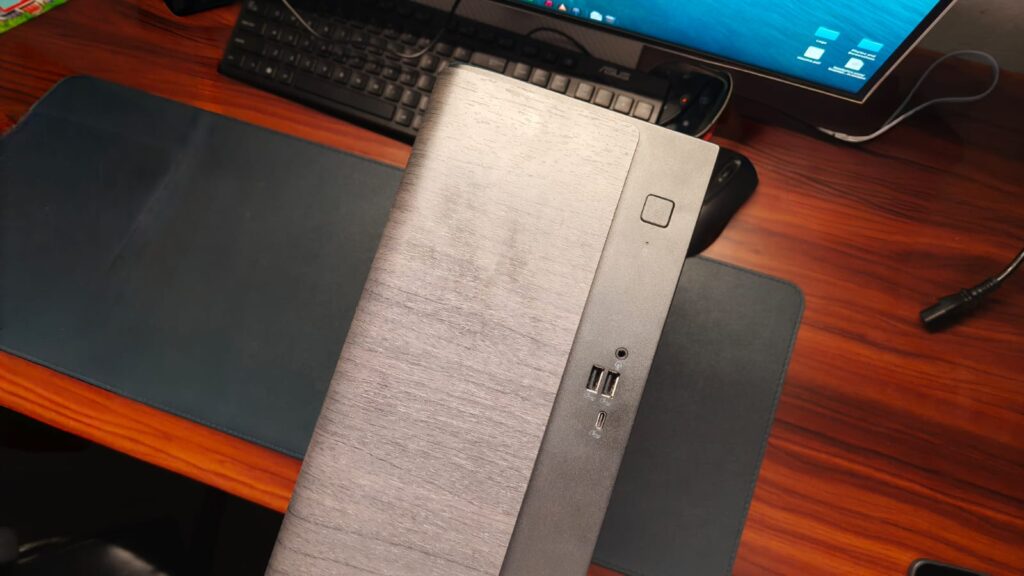
Usually, when reviewing a laptop, there’s a lot to talk about when it comes to design and hardware. But with desktops, there isn’t much. These towers will generally sit beneath your desk, so design isn’t much of a concern. Still, Asus has given it some sweet details. On the front, you get a wood-like panel in a dark brown finish that adds a sophisticated feel. You can also get the V501 in white to match your interiors, and it replaces the wood with a grey mesh. Whichever you go for, the desktop won’t look out of place in most homes. As for the dimensions, the V501 is 12.15 inches tall and 11.59 inches wide. I wouldn’t call it small. It’s more of a medium-sized desktop and did fit well on top of my desk against a 27-inch monitor.
At a time when almost every laptop is removing ports, desktops are the last saving grace. With the V501, you get two USB 3.2 Gen 1 Type-A ports, one USB 3.2 Gen 1 Type-C port, and a headphone jack, all on the front. At the back, there’s RJ45 Gigabit Ethernet, one HDMI 1.4, one DisplayPort 1.4, four USB 2.0 Type-A ports, and 7.1-channel audio. This should be plenty for most accessories, since I had no problems connecting everything I needed. Beyond that, there’s also a Wi-Fi 6 card and Bluetooth 5.4 support. I do have one problem with this port selection, though. That’s the lack of Thunderbolt ports, which limits your options for high-speed peripherals and external storage.
Keyboard & Mouse
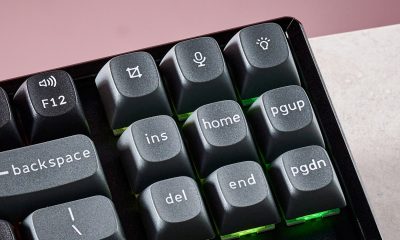
Asus bundles a keyboard and mouse combo in the box to get you started. And that’s about all the praise I can give it. Don’t get me wrong, you can use the included keyboard for work, but it’s not my favorite thing. The keys have decent feedback, but are a little too noisy for my liking. They are also not that tactile, and the build quality is scratchy plastic. I’d recommend getting another decent keyboard for most office work.
The mouse, on the other hand, is okay to use. It’s wired, so latency isn’t an issue, and the tracking was pretty accurate in my experience. The buttons are also decent, and the scroll wheel was good for navigating long web pages and documents. The build quality is the same as the keyboard, but that wasn’t a big problem at all.
Performance
At the heart of the Asus V501 sits Intel’s Core 5 210H processor, which includes eight cores that can boost up to 4.8 GHz. It’s paired with 8GB of DDR5 RAM and a 512GB M.2 PCIe Gen 4 SSD, both of which are expandable. As expected, the everyday performance of the V500 is pretty good. For home use, that is, browsing the web, making presentations, and watching videos, it handled everything perfectly, without any slowdowns or hitches. I was out of the country for a while, so the desktop was my sister’s primary work machine. She’s a student and said the V500 was great for filling out college applications, researching new topics, taking notes, and so on.
Since this is a machine aimed at students, I also installed a few IDEs to test the programming performance. The Asus V501 handled a large Python project in VS Code without any noticeable slowdowns. It can also be used to edit some photos and light videos, but the lack of a dedicated GPU makes editing 4K videos a distant dream. Since this is a review, I also ran a series of benchmarks to test the V500’s raw performance. On Geekbench, it scored 2214 points in the single-core test and 9496 in the multi-core test. In 3DMark TimeSpy, the device reached about 1,150 points. This level of performance should be enough for most household tasks for years to come.
As far as gaming is concerned, you need to set your expectations. The V501 is not a gaming desktop. You don’t get a dedicated GPU, which limits the games you can play. However, it can run esports titles such as Rocket League, Valorant, and CS:GO. I got roughly 60 FPS in Rocket League at medium settings. Valorant delivered a similar experience, regularly hovering around 60 FPS, with 1% lows of around 50 FPS.
Advertisement
Verdict
At ₹71,990 for the unit I tested, the Asus V500 SFF (V501MV) is a competent home desktop solution for parents and students alike. You don’t have to deal with the headache of assembling everything yourself, and you’re getting a capable machine without going too far up the price ladder. The design is unassuming, but I actually like the way it looks on a desk. You get a standard keyboard and mouse combo, and there are plenty of ports. Performance isn’t class-leading, especially with just 8GB of RAM, but it’s still good enough to handle all everyday tasks and some photo/video editing on the side.
Situational Awareness, the AI focused hedge fund that was Wall Street’s fleeting obsession, is having a very bad month.
The company, led by twentysomething OpenAI alum Leopold Aschenbrenner, went all-in on a variety of AI investments and, for a period, enjoyed phenomenal growth. Then, at the end of July, a downturn in AI stocks erased billions of dollars in value at the firm. Now, federal regulators are reportedly probing the company as well.
The New York Times reports that the Securities and Exchange Commission has been subpoenaing banks that did business with the hedge fund. The subpoenas focus on the banks that supervised the fund’s trading and that channeled funding to support it, the outlet says.
The government reportedly warned the banks to “preserve any information” about the hedge fund, though it noted that Situational Awareness has not been accused of any wrongdoing.
Advertisement
Situational Awareness did not respond to TechCrunch’s request for comment but told the Times that scrutiny of high-profile funds is to be expected, and that it would “cooperate to the fullest extent with any regulatory request.”
The company, which very publicly hitched its wagon to AI’s star, may serve as a cautionary tale about the industry’s supposedly unstoppable trajectory.
The FDA has reported multi-state salmonella bacteria outbreaks tied to jalapeños, granola, dog food, alfalfa sprouts (also featuring E. coli), and something most people probably have in their refrigerator at this very minute: eggs.
Though the eggs being recalled are only from one supplier, Midwest Poultry Services, they were sold under five brand names, including two distributed by one of the country’s largest grocery chains: Kroger and Simple Truth. While this July recall only concerned Kroger stores in Texas, why wait for the next one?
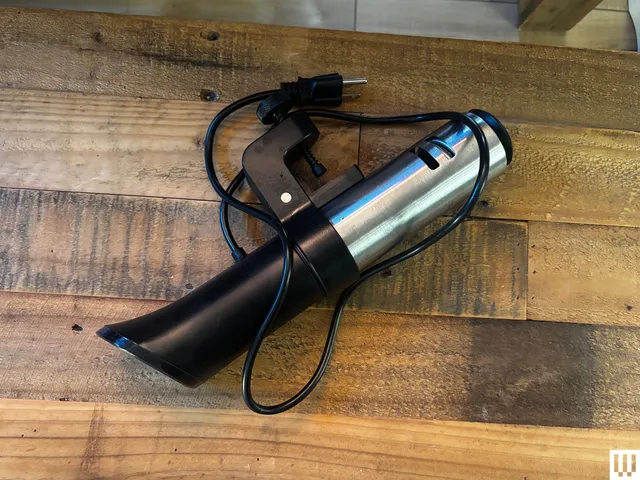
With the advice of two infectious disease experts, I tested what may be the easiest, most universally applicable way to ensure the eggs in your refrigerator are salmonella-free and safe to use—even in raw or near-raw preparations like Hollandaise and pasta carbonara. All it requires is an immersion circulator, a pot of water, and about an hour and a half of your day.
Advertisement
Anova
Sous Vide Precision Cooker 3.0 (1100 Watts)
Are All Eggs at Risk?
Salmonella, which can cause fever and severe diarrhea, is not a new problem for eggs.
In fact, “eggs remain the single food commodity most associated with outbreak illnesses,” says Alan Bulbin, director of infectious disease at Catholic Health’s St. Francis Hospital and Heart Center in Roslyn, New York.
Chickens and other poultry commonly carry Salmonella enteritidis, the bacterium most commonly responsible for salmonellosis in people, which can be transferred to the shell from contact with droppings or even deposited inside the egg itself from an infected chicken’s ovaries.
Advertisement
It’s difficult to tell just by looking if a chicken has salmonella, which is easily transmitted by rodents or wild birds. In fact, at one point, the USDA estimated that 1 out of every 20,000 eggs was thought to be contaminated with salmonella. That means out of the 67 billion eggs produced in the US each year, 3 million eggs could conceivably have dangerous bacteria in or on them. The USDA enacted a 72-page egg safety requirement in 2009 in hopes of eradicating contamination, but clearly, it hasn’t happened.
It’s good practice to always keep your eggs refrigerated at 42 degrees Fahrenheit or less and wash your hands before and after handling. It’s also worth noting that cooking eggs kills salmonella bacteria. As long as your eggs are “cooked thoroughly, with a firm yolk and white,” according to Bulbin, salmonella shouldn’t be a concern.
The Raw Truth
But what if you (like me) have kids who cook for themselves, who you know for a fact will never wash their hands after handling eggs? And more commonly, what if you’re not fully cooking the eggs? Many recipes, from mayonnaise and aiolis to eggnog and royal icing for cookies, call for eggs that will be consumed uncooked. How can you make sure they’re safe to use?
Photograph: Lisa Abelar
While in-shell eggs aren’t pasteurized, all liquid eggs are—the kind in the carton. However, these are just egg whites, not yolks, which means they won’t work for many of the above recipes.
Advertisement
If you want to be certain a whole, raw shell egg is free of bacteria, the only way to ensure this is to pasteurize it, which means heating the egg for a long period of time at 130 to 140 degrees Fahrenheit, but not cooking it. Because this is tricky, the vast majority of eggs sold in the US are not pasteurized—if they are, you’ll know it, as they’re more expensive and the carton will indicate as much.
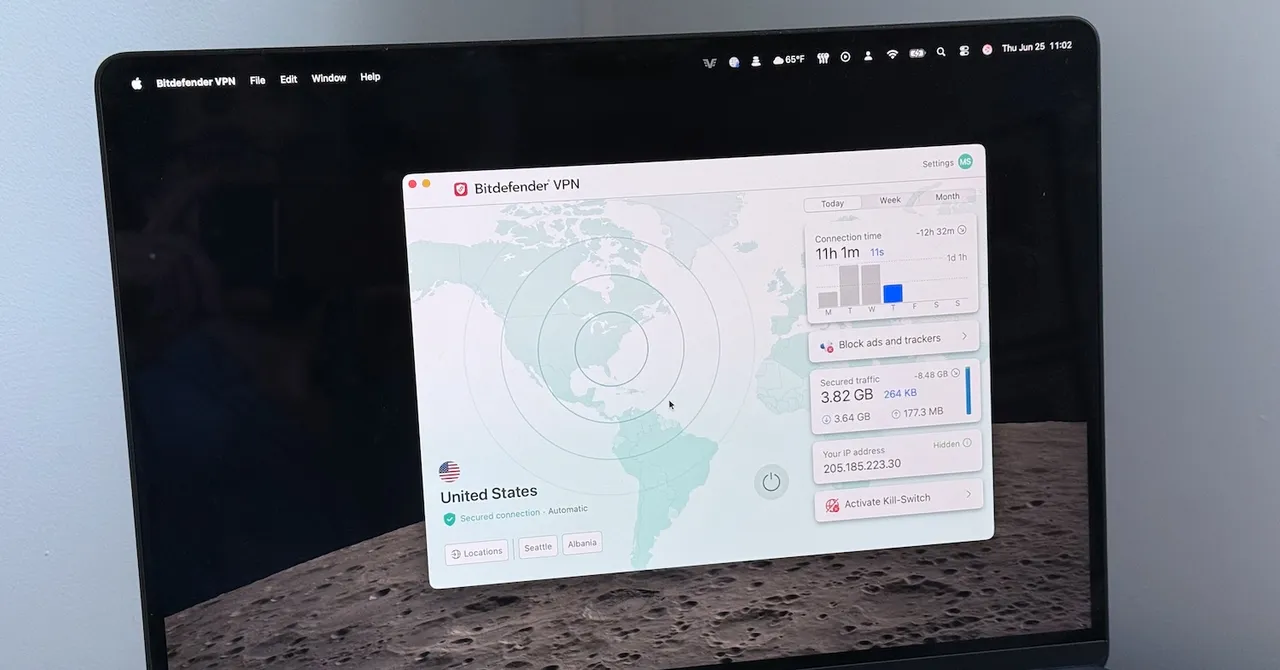
Bitdefender VPN was reliable in my time using it, as well. I didn’t experience any connection drop-outs or periods of unusually slow performance.
These are solid results, though not the best. For example, I saw slightly better speeds (up to 540 Mbps, the same as when not connected to the VPN) while using IVPN with the WireGuard protocol enabled, for example.
Still, Bitdefender is plenty fast, very reliable, and I can’t say I found the gap in performance noticeable outside of in particular testing. I expect that most people will find the data rates provided by Bitdefender VPN to be more than adequate.
Privacy Promises and Compromises
Unlike Mullvad, a privacy-pilled alternative that positions itself as a tool against mass surveillance, Bitdefender VPN focuses more on avoiding geo-restrictions, ads, cookies, tracking, and Wi-Fi sniffing. There’s nothing wrong with that approach, but if you want a service that puts the P in VPN, you should look elsewhere.
Advertisement
Bitdefender’s VPN is provided through a partnership with IPVanish. IPVanish provides the infrastructure, while Bitdefender provides the client software, branding, customer service, and so on. It’s worth mentioning, as IPVanish took a reputation hit back in 2018 when it handed user logs to the US Department of Homeland Security. This occurred in 2016 and happened despite having a no-logs policy.
However, IPVanish ownership has exchanged hands several times since then, and it’s now owned by media company Ziff Davis. IPVanish has undergone a number of successful independent, no-log audits, the most recent of which occurred in 2025. IPVanish also publishes a transparency report showing the volume of requests it has received from law enforcement and the data it has provided in response.
That’s good news, but wrinkles remain. IPVanish is a US company, and US law is pretty strict when it comes to law enforcement demands for data. IPVanish can’t provide what it doesn’t log, but privacy nerds often prefer VPN companies in less draconian jurisdictions.
It’s also unclear how Bitdefender’s service interact with IPVanish’s no-logs policy. Bitdefender obviously retains at least some information about the user, because a Bitdefender account is required to use the VPN, and users have to pay with a credit card. Bitdefender has some customer service information about its no-log policy, but the specific wording means this could be referring to the IPVanish audit.
Advertisement
Whether any of this matters depends on what privacy means to you. If you want an extra layer of network security to ward against trackers and prevent issues on compromised Wi-Fi connections, then Bitdefender VPN will do the job. However, Bitdefender VPN isn’t going to meet your needs if you’re worried about nation-state tracking or want to move across the web in near secrecy.
Conclusion
Bitdefender’s VPN is an easy-to-use service that works best for people with basic expectations for what a VPN should offer. It provides typical features and delivers solid network performance at a competitive price. It’s not the ultimate VPN for privacy and it’s lacking a few features some people will want, like Linux support and a static IP option.
Pricing might push you toward Bitdefender VPN—at least for the first year. The introductory offer of $35 for a year of service is an outstanding value. Just remember to check pricing again before it’s time to renew, as Bitdefender’s pricing after the first year is less enticing.





























































You must be logged in to post a comment Login