Connect with us

Tech

White Supremacists Spin DOJ’s SPLC Indictment To Legitimize Extremism & Expand Recruitment

Published

on

from the smoothing-the-extremism-pipeline dept

This article is republished from The Conversation under a Creative Commons license. Read the original article.

In April 2026, a federal grand jury returned indictments charging the Southern Poverty Law Center with wire fraud, bank fraud and conspiracy to commit money laundering.

The indictment alleges the SPLC, a nonprofit legal advocacy group, secretly funneled more than US$3 million in donated funds to people associated with violent extremist groups, including the Ku Klux Klan and Aryan Nations.

Prosecutors allege that the SPLC secretly paid members of those groups to act as confidential informants without telling donors. Eight informants received the money between 2014 and 2023, according to U.S. Attorney General Todd Blanche.

Advertisement

The SPLC has denied the charges and seeks their dismissal, with lawyers for the group adding that the charges constitute “vindictive prosecution.” The SPLC’s interim president, Bryan Fair, has stated that the informant program “saved lives” and reflected decades of dangerous civil rights work.

Critics of the prosecution at Lawfare, a media site focused on the U.S. legal system, argued that the indictment is among “the most cynical criminal cases ever brought by the Department of Justice.” They noted that the SPLC had no legal duty to disclose the confidential nature of its informant program to donors.

Within hours of the Justice Department’s indictment, I found that white supremacist influencers on Telegram, Gab and other social platforms were celebrating the arraignment. They portrayed the charges as proof that journalists and civil rights groups documenting extremist movements could no longer be trusted.

The indictment became a rallying point to discredit not only the SPLC but the wider body of research on hate groups and political extremism. I believe that these narratives will be used to help justify increasingly radical and, in some cases, violent responses.

Advertisement

Ideological ammunition

Some conservative advocacy groups and right-wing media outlets – including Moms for Liberty and the Daily Signal – immediately stripped the indictment of its legal context. In online posts, they recast it as established proof that the SPLC had been deliberately creating extremist activity rather than investigating it.

A screenshot of internet search results.
Telegram search results show multiple white nationalist channels discussing the SPLC indictment in April 2026. Art Jipson

A Telegram search I conducted on May 6 identified 22 posts mentioning the SPLC across at least six white nationalist channels. Most appeared within 72 hours of the indictment. The posts did not engage in sustained discussion. They repeated a small set of claims.

The Super Sincere Alpha GOONMAXXING Aryan Sigma Patriot channel wrote: “The SPLC is a hate group.”

Other channels cited the indictment as proof that the SPLC had been paying sources to manufacture the very extremism it claimed to fight. In the White Lives Matter Official Telegram channel, users were urged to “become an activist for your race” while referencing the SPLC as an opposing force.

The similarity across channels and social media is notable. The same framing appeared repeatedly within a short time window. This suggests rapid circulation of a shared narrative across networks rather than independent commentary.

Advertisement

The neo-Nazi, neo-fascist layer

Comments on the Southern Poverty Law Center indictment by members of the Commander George Lincoln Rockwell channel – named for the founder of the American Nazi Party – demonstrate how antisemitic conspiracy theories work, not as explicit rhetoric but as a broader narrative.

A screenshot of internet search results.
The Commander George Lincoln Rockwell channel on Telegram. Art Jipson

Internet discussions portrayed the SPLC as a politically motivated or illegitimate actor. Posts in Patriot Front Updates, for example, circulated allegations of fraud and money laundering while criticizing the SPLC and its efforts to identify and challenge white nationalist activity.

I found that this criticism of the SPLC also became connected to a broader antisemitic conspiracy narrative – one that portrays the organization as operating on behalf of purported Jewish interests rather than simply as an advocacy organization with political and ideological commitments.

These narratives circulated alongside the “great replacement theory,” which falsely claims that shadowy elites are encouraging immigration and demographic change to replace the white population and diminish its political and cultural influence. It’s a conspiracy theory that the SPLC and others have documented as central to contemporary white nationalism.

In this logic, the indictment is not an isolated fraud case – it is evidence that a coordinated network of institutions has been systematically suppressing white identity.

Advertisement

Victimhood as recruitment

Scholars of white nationalism have long identified victimhood narratives as central to that movement’s appeal. By portraying white people as under attack or unfairly displaced, these narratives transform social change into a story of persecution and provide a powerful justification for political mobilization.

My research on white nationalism shows how contemporary extremist movements rely less on formal membership and more on decentralized digital spaces. It is there that narratives, grievances and identities are continuously reinforced.

In these environments, major news events like the SPLC indictment become opportunities.

Why this pattern repeats

Extremist movements have long used mainstream controversies as recruitment opportunities.

Advertisement

Participants often interpret external events through narratives of threat, injustice and persecution. In doing so, they transform moments of controversy into evidence that their worldview is correct.

In the 1990s, for instance, the deadly standoffs between federal officers and the Branch Davidians religious sect near Waco, Texas, and survivalist Randy Weaver in Ruby Ridge, Idaho, became foundational persecution narratives for militia and Christian Identity movements. These groups saw the sieges as proof that the federal government was hunting gun owners and religious dissenters.

In online extremist communities, these events can become powerful tools for reinforcing group identity and attracting individuals who are searching for explanations or belonging.

With a real-world legal event like the SPLC indictment, extremists can point to government action as evidence that their worldview is being validated. The result is a narrative that appears responsive to current events, even when the connection is shallow or distorted.

Advertisement

Redirected domestic terrorism policy

Legal scholars have noted that the Justice Department indictment fits within the Trump administration’s broader pattern of redirecting domestic terrorism policy away from white supremacist groups.

The Trump White House’s 2026 Counterterrorism Strategy does not mention violent far-right groups as a domestic terrorism threat at all.

That context matters for understanding how the SPLC case landed in extremist spaces: not as an isolated fraud allegation but as institutional permission. The indictment has become a symbol before the evidence has been weighed.

In today’s fragmented digital media environment, symbols travel faster than facts, especially when they confirm what a radicalized audience already wants to believe. I believe the real danger is not that white supremacists believe the SPLC is guilty. It is that the controversy, whatever its legal outcome, has already done its work.

Advertisement

Art Jipson is Associate Professor of Sociology, University of Dayton

Filed Under: advocacy, extremism, fascism, hate groups, white supremacists

Companies: splc

Source link

Advertisement
Continue Reading
Click to comment

You must be logged in to post a comment Login

Leave a Reply

Tech

Crowdsourcing An Investigation Into Coil Whine

Published

on

If you’ve heard the high-pitched whine or buzz from an electronic device when a current-carrying inductor is vibrating, you’ll know how unpleasant it can be. It’s common in all kinds of equipment, but it’s become a particular annoyance of late in hardware like PC power supplies, GPUs, and cooling pumps. There is plenty of hearsay on the web about which parts whine and which don’t, and [Lowell Wood] wants to get to the bottom of it. 

To track the issue, [Lowell] has put together the Coil Whine Database. It accepts user reports on hardware, regarding the level at which coil whine is present. A score of 0 is given to a part that is inaudible in a quiet room, with higher scores representing higher sound levels. A part scored at 2 is audible working at a desk with the computer under load; a part scored at 4 is audible even when the machine or device is at idle.

For now, the database is largely empty—[Lowell] has just opened submissions, adding a report on their own ROG Astral RTX 5080 card for good measure. If you want to submit a report on a unit, either silent or noisy, that’s simple enough—just fill in the coil whine report form. Over time, submissions will hopefully grow, and it will be easier to get a good idea of what equipment whines and what is likely to operate silently out of the box.

The database aims to present a guide to what parts whine, and how much, noting that any given population of devices tends to vary. To that end, any given device won’t be reported on publicly until it receives at least 5 reports. To counter bias, reports of silent parts will be weighted higher, since it’s unlikely that people happy with their quiet hardware will be rushing to research this issue or report it to a database. Relevant files to the project are available on GitHub for the curious.

Advertisement

This database could be a great boon to the brigade of PC builders out there who like their machines to be as silent as possible. If that sort of thing appeals to you, it’s probably time you started researching passive cooling as well…

Source link

Advertisement
Continue Reading

Tech

Fixing a Broken Amprobe AT-7000 Reveals How a $2,700 Cable Tracer Died in a Drawer and Came Back

Published

on

Amprobe AT-7000 Cable Tracer Fix
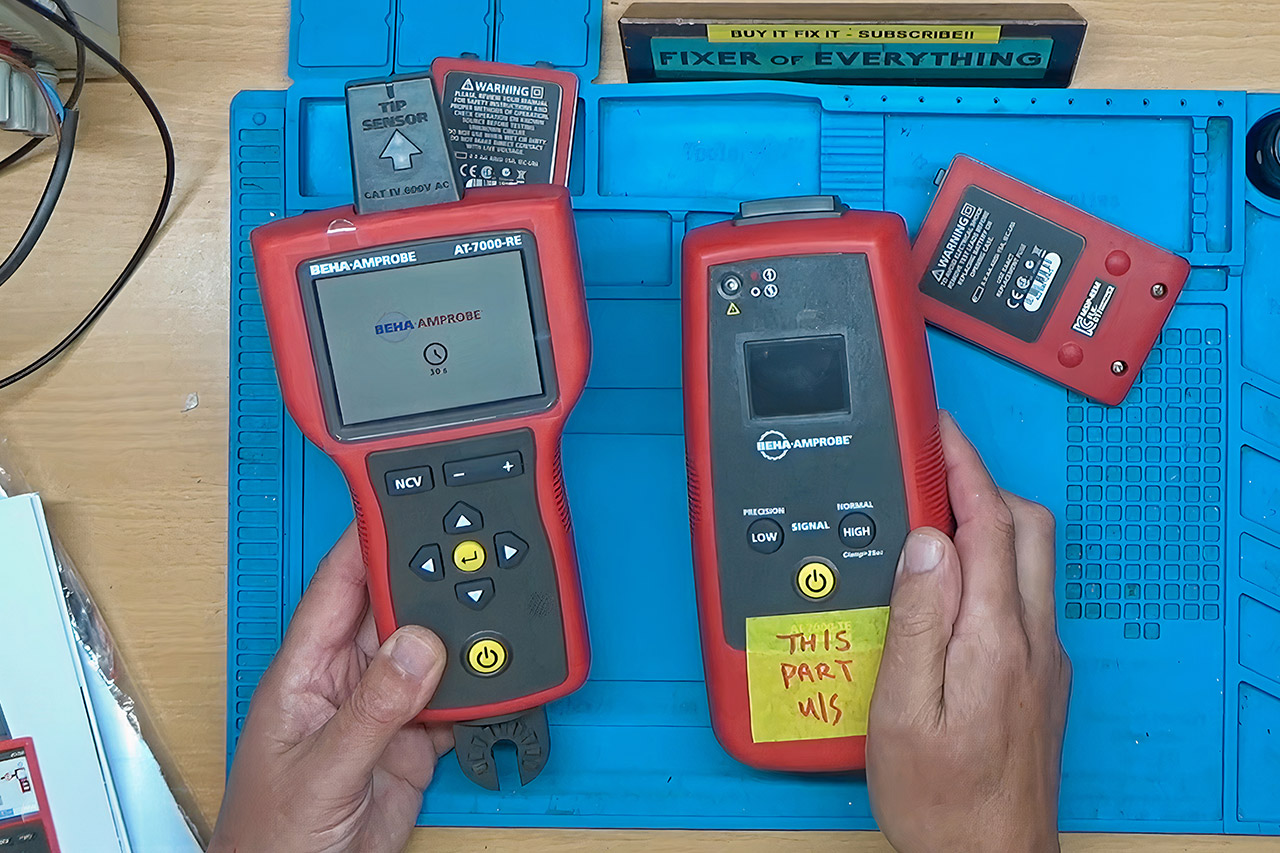
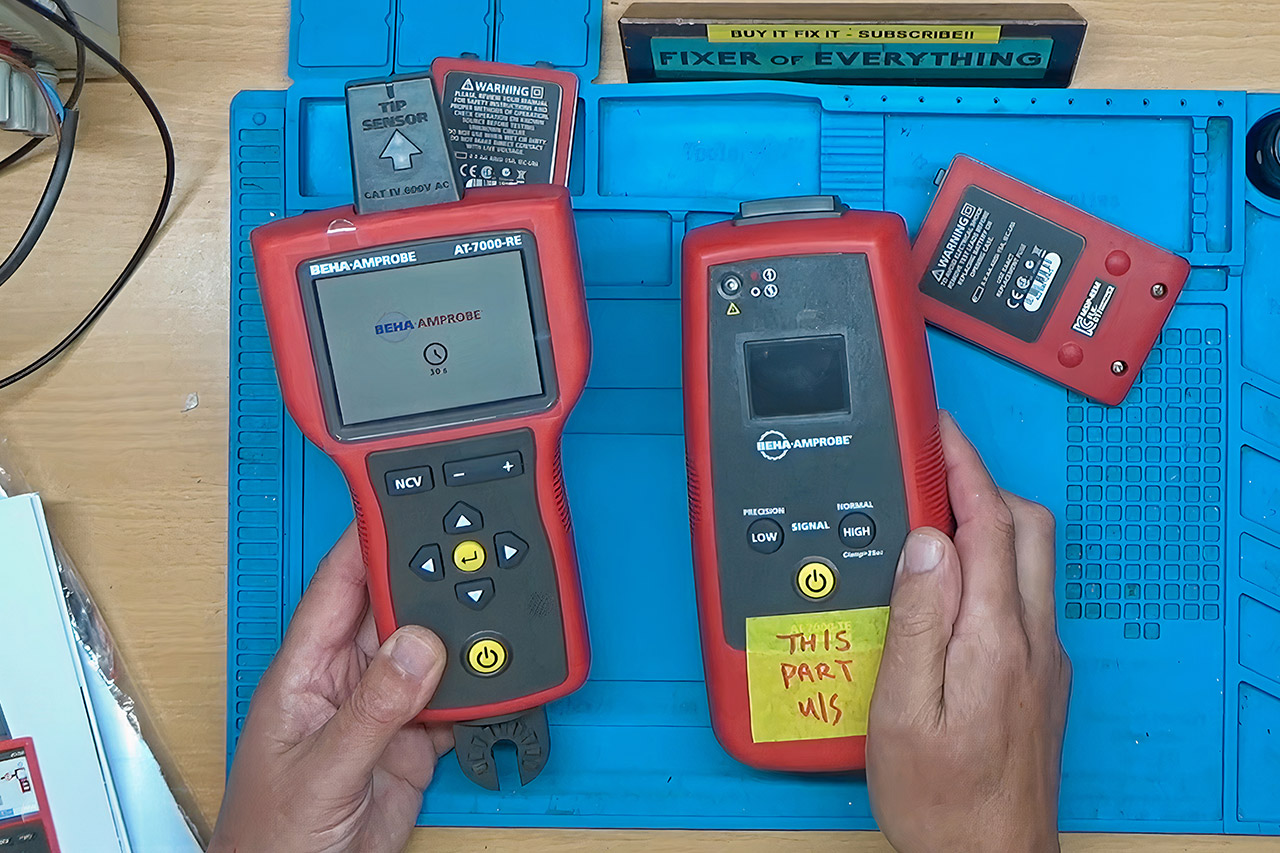
Most people have never held an Amprobe AT-7000-EUR, and even fewer would guess a cable tracer can cost about $2,700. Electricians use this kit when a cable disappears into drywall, a ceiling, a floor, or a crowded panel and a cheap tone probe is not enough. One half of the kit is a transmitter you clip onto a circuit. That box injects a tracing signal, 6.25 kHz on live wires or 32.768 kHz on dead ones, in high, low, or clamp mode. The other half is a receiver with a color screen, a tip sensor, and a Smart Sensor array that shows where the wire runs and which way it is going, often to about two inches, and can pick the correct breaker instead of a handful of false hits.


Tom bought the pair for work at roughly £2000 ($2700). After months of sitting in storage, the transmitter simply went dark for no apparent reason. The transmitter went dead, which means the batteries, buttons, and display did not even twitch. However, the receiver opted to reactivate, which is at least some aid in locating the problem. Fluke’s service team quoted £70 for an initial quote and another £600 to even try a repair. When the fees were factored in, it was off to the “YouTube Heroes for Hire” op Buy it Fix it.

Sale


DJI Mic Mini (2 TX + 1 RX + Charging Case), Ultralight, Detail-Rich Audio
  • Small but Mighty – The DJI Mic Mini lavalier microphone transmitter is small and ultralight, weighing only 10 g, [1] making it comfortable to wear…
  • Detail-Rich Sound – Mic Mini wireless microphones delivers high-quality audio. A 400m max transmission range [2] ensures stable recording, even in…
  • Extended Battery, More Recording Time – Mic Mini wireless lavalier microphone with Charging Case offers up to 48 hours of battery life, [3] ideal for…

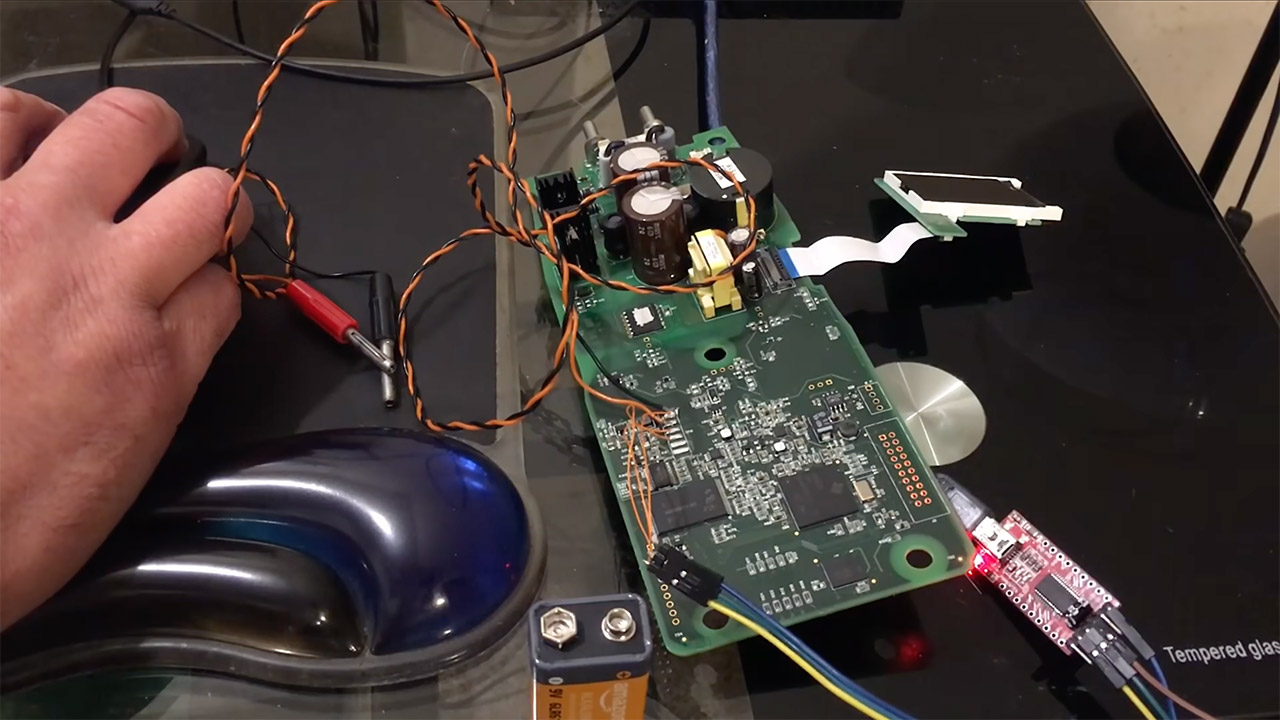
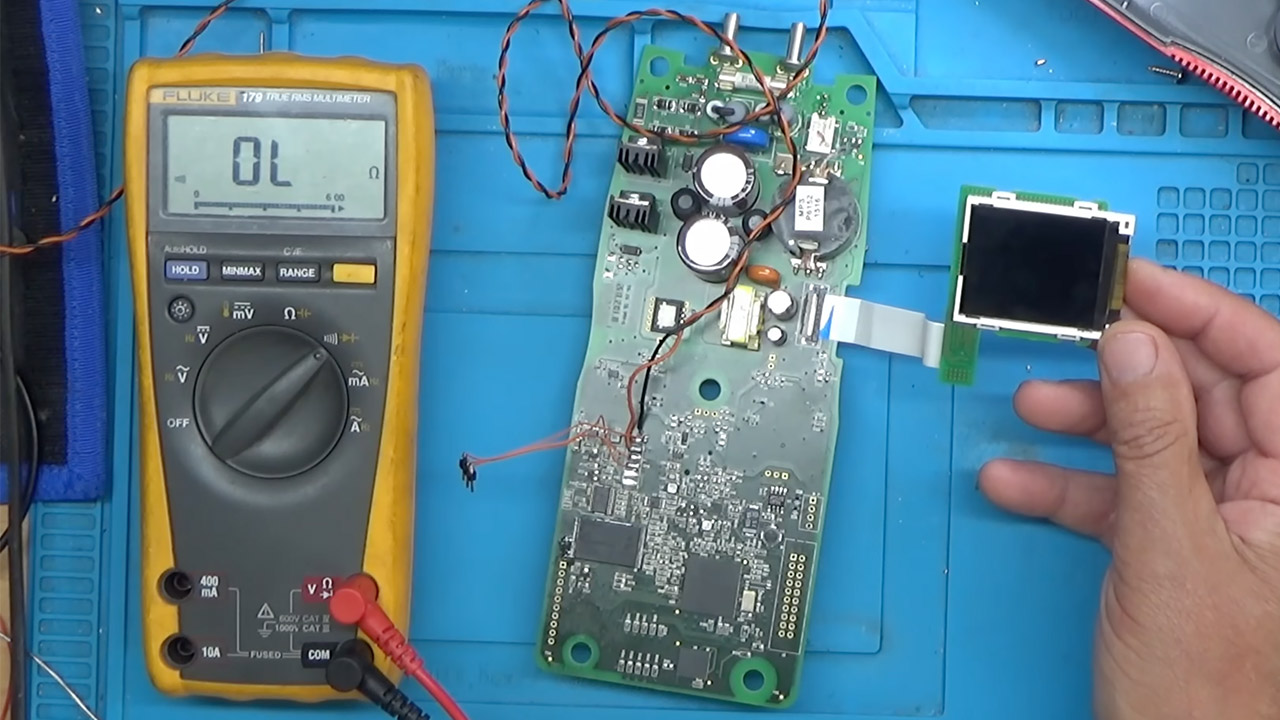
Five small screws later, the transmitter board was on the bench. A 10.2 volt bench supply showed the normal voltages popping up: 5V, 3.3V, and 1.2V, all present and accurate. A thermal camera scanned for hotspots but found nothing unusual. An oscilloscope showed a clear 23.9989 MHz clock signal from the 24 MHz crystal as well. Even the backlight seemed to work well after the ribbon was reseated. So it appeared that the hardware issue was not with the power supply.

Advertisement

Amprobe AT-7000 Cable Tracer Fix
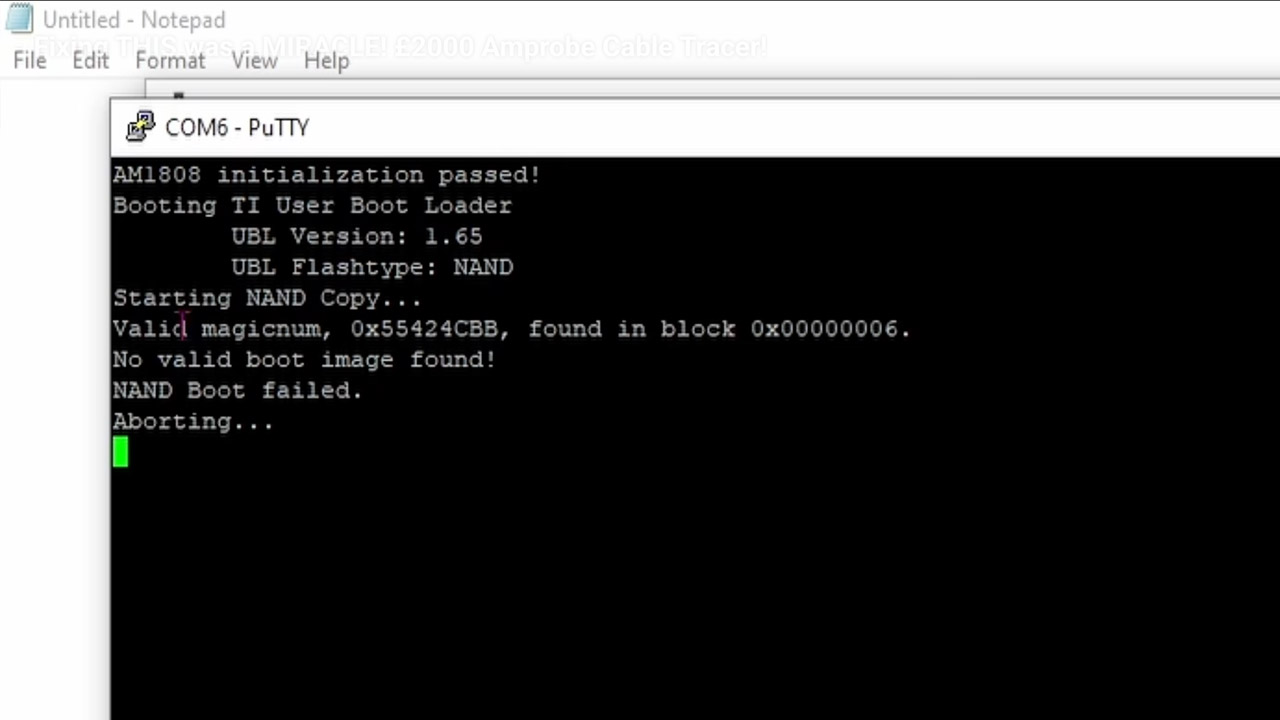
Only after connecting the serial pins to a computer at a baud rate of 115200 did the true tale become obvious. Boot logs appeared before abruptly terminating with a NAND boot failure. Both machines run some ancient Linux 2.6 firmware from a 128 MB NAND chip housed within a TSOP-48 box. At startup, the system on a chip reads that chip, checks the boot image, and refuses to continue if it discovers a problem. This is exactly what the dead transmitter was doing.

Amprobe AT-7000 Cable Tracer Fix
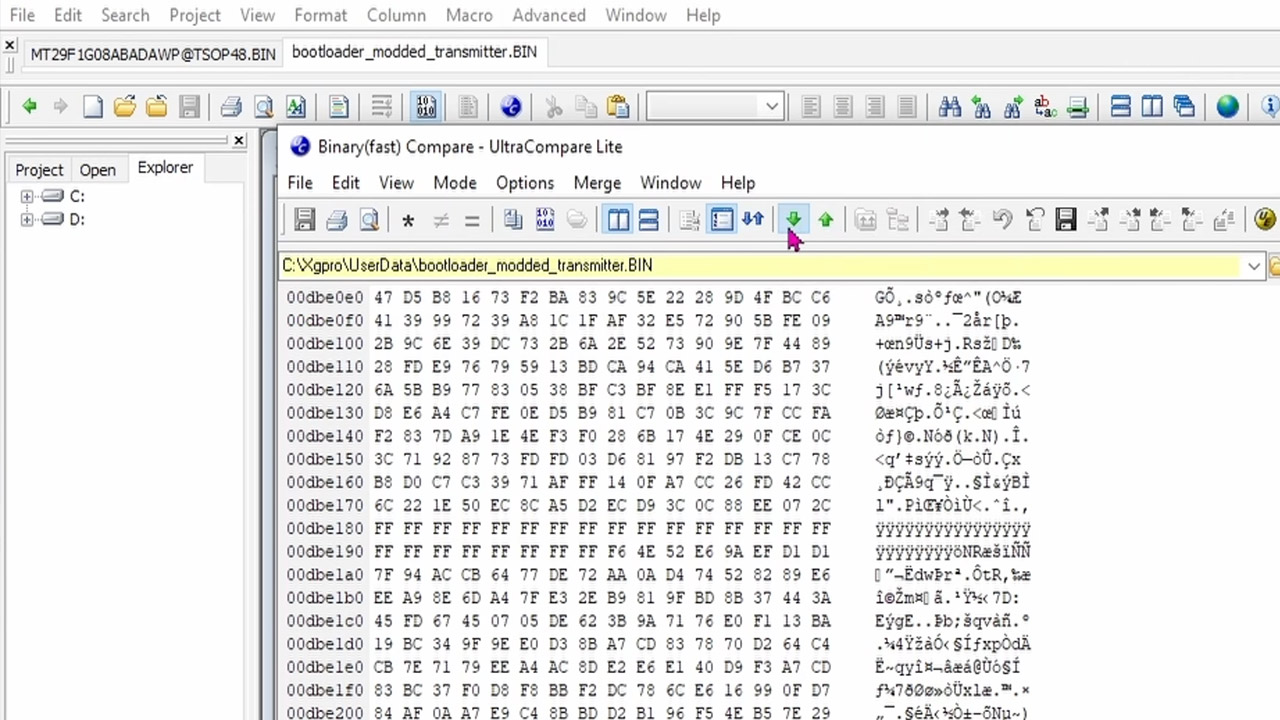
After blowing hot air into the NAND chip, a programmer read it. We could see the data was there, but a hex view looked like a nightmare, with a large empty patch and random bit flips. In the erroneous areas, E1 was where E should be, O where 01 should be, and C9 where C1 should be, among other things. A wild goose hunt through Google’s Gemini chatbot took up half of the day in theory on how ECC works, and I didn’t get anywhere or get the unit up and running, but the smart play was simpler.

Amprobe AT-7000 Cable Tracer Fix
The receiver was also ripped apart, and it had the same CPU, RAM, and, most critically, flash IC. So some wires were attached to the serial header, and a fast run of U-Boot with the programmer’s bit-flip settings adjusted slightly resulted in a clean NAND image. The next thing he knew, he had the files side by side, and it was obvious what had gone wrong: only a few cells in the transmitter’s bootloader had faded out after years of inactivity. Using a hex editor, clone the sound healthy bootloader bytes from the receiver into the rotten transmitter bootloader, creating a hybrid image that was then written back into the original chip.

Amprobe AT-7000 Cable Tracer Fix
That got him all the way there, and the resoldering should have done the work, but one weak solder joint on the flash pin meant it wouldn’t boot up. After a brief fix up, the transmitter rebooted into its normal Linux 2.6 interface. So a live test was performed, and when the receiver approached the transmitter on the cable, the signal climbed up as it should. The kit was back up and running for daily operations. Those leaky NAND cells are still in there, so a fresh flash IC is the lasting insurance policy. A professional tracer that official service priced like a small appliance came back because two identical boards shared a bootloader, and a handful of forgotten bits were put back where they belonged.
[Source]

Source link

Continue Reading

Tech

Nvidia’s DLSS 5 goes live with NBA 2K27 on September 3, and it looks a lot more convincing

Published

on

NVIDIA is getting ready to unleash DLSS 5, its latest attempt to push real-time game graphics closer to photorealism. The company says the new 3D-guided neural rendering technology will be available from September 3 at 9 p.m. PT, with NBA 2K27 becoming its first game to support it across RTX 50-series GPUs, laptops and GeForce NOW. 

I got a look at DLSS 5 running in NBA 2K27 and the Zorah demo at Gamescom, and I’ll admit: it is considerably more impressive in motion than the initial announcement might suggest.

DLSS 5 isn’t taking the artist out of the equation

When NVIDIA first showed DLSS 5, one of the immediate concerns was that AI-generated visuals could end up overriding the artistic choices made by game developers. Having seen the technology in action, that’s not really what is happening here.

DLSS 5 analyzes the rendered frame along with information such as color and motion vectors, using its neural model to understand characters, objects, materials, lighting and their relationships within a scene. More importantly, developers remain in control of how much of that processing actually happens. 

That control goes surprisingly deep. Developers can use automatic or manual masking and adjust the intensity of structural details such as contact shadows, reflections and ambient occlusion, as well as broader lighting and color response. They can also apply those controls globally or to individual objects. In other words, DLSS 5 isn’t simply telling a game, “Here, let me make this prettier.” Artists can decide what gets the AI treatment and how aggressive it should be. 

And this is where the technology gets particularly interesting. In the demos I saw, DLSS 5 could distinguish different elements within a scene and treat them independently. A character, their clothing, surrounding objects and the background can effectively become separate pieces that developers can control. The result is a much more convincing interaction between lighting, materials and surfaces.

NVIDIA also emphasizes that the better the input, the better the output. That makes sense: DLSS 5 isn’t conjuring an entire game out of thin air. It is using the information already produced by the game to enhance the final image. 

From two RTX 5090s to an RTX 5060 laptop

Perhaps the biggest surprise for me wasn’t even the visual quality. It was the hardware running it. When DLSS 5 was initially shown, the technology required two RTX 5090 GPUs. At Gamescom, however, I saw the technology running on a laptop equipped with an RTX 5060. That’s a pretty wild reduction in hardware requirements for something that is still producing remarkably convincing results.

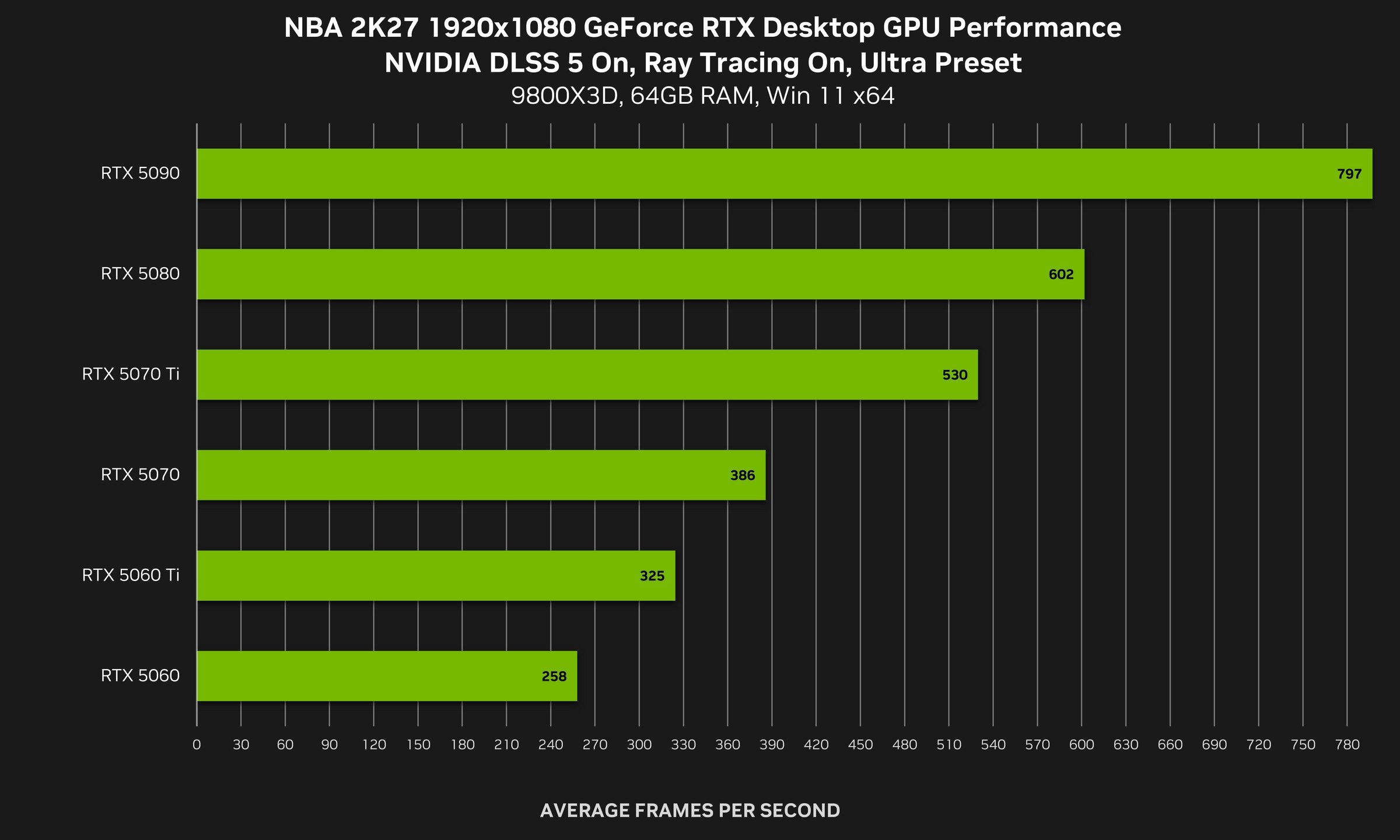
There is a performance trade-off depending on the quality settings, but the visual improvement is hard to ignore. NVIDIA’s own NBA 2K27 figures show DLSS 5 running alongside ray tracing and DLSS Multi Frame Generation, with an RTX 5060 reaching 258 fps at 1080p High settings, while an RTX 5090 reaches 370 fps at 4K Ultra using Performance mode.  

Advertisement

And that is probably the part I’m most excited to test properly. DLSS 5 isn’t just another checkbox in NVIDIA’s increasingly enormous graphics-settings menu. From what I’ve seen, it can fundamentally change how lighting, materials and characters appear on screen while still giving developers considerable control over the final image.

NBA 2K27 gets first dibs on September 3. Based on what I saw at Gamescom, I’m very curious to see whether DLSS 5 can consistently deliver that same “wait, that’s actually rendered in real time?” feeling once it leaves the carefully prepared demo environment.

Source link

Advertisement
Continue Reading

Tech

Jensen Huang says AGI doesn’t really matter, and he may be right for the wrong reason

Published

on

Skynet has missed another appointment. Depending on which Terminator timeline you prefer, the murderous artificial intelligence should have become self-aware in 1997, 2004, 2011, 2017, or perhaps last Tuesday. Each date has passed without a nuclear exchange. The machines have mostly occupied themselves by flattering users, mangling fingers in photos, and confidently inventing facts for gullible people to believe.

That has not stopped Silicon Valley from treating artificial general intelligence as both an imminent miracle and an approaching monster. AGI supposedly marks the moment a machine can match human intelligence across a broad range of tasks, though nobody can agree on which tasks, which humans, or what counts as intelligence.

Source link

Continue Reading

Tech

Amazon seller sends $1,400 RTX 5080 customer a cheap “gift” and fake instructions claiming the GPU is still coming

Published

on

Facepalm: Graphics card scams on Amazon are far from new, but one customer has encountered what appears to be a new method of trying to trick victims – one that some people could fall for. It involves sending a cheap “present” to the buyer and a promise that the GPU is on its way. The scammer also sends a pamphlet that supposedly explains the process and includes a fake Amazon email to cancel the order.

Reddit user BransonArsen wrote that they bought an MSI Gaming RTX 5080 16G SUPRIM Liquid SOC edition from Amazon for nearly $1,400. They later explained that the seller was a third party with a Chinese name, which even they admit was a warning sign. The lower-case “msi” in the product description is a bit of a giveaway, too.

Those suspicions proved warranted when a delivery arrived at BransonArsen’s door a few days later. While we’ve seen many GPU scams involving something other than the graphics card being sent in the original packaging, including putty, rice, and older cards in diguise, it wasn’t even an RTX 5080 box that turned up.

Advertisement

What arrived at the door was a plain Amazon box, inside of which was a cheap but correctly packaged vacuum mug.

Rather than just sending something totally different, this was all part of the scam. The box also included a pamphlet claiming the mug was a “complimentary gift.” The graphics card would be arriving separately, in about seven working days, because Amazon “collects orders and places a bulk order with this seller every Monday,” making the delivery longer but helping keep the price lower – this particular card is usually $2,000.

The leaflet, which appears to contain AI-generated images, adds that if the buyer wants a tracking number or has any questions, they can email the definitely-not-fake [email protected] customer service address. It also advises anyone wishing to cancel their order and receive a full refund to contact this address – but don’t worry, they can keep the mug.

Unfortunately, that mug might end up costing $1,400. It seems the idea here is for the victim to repeatedly email the fake address while the scammers keep stringing them along until the return window expires, leaving them with a very expensive piece of crap as a reminder to be wary of suspicious Amazon sellers.

Advertisement

Source link

Continue Reading

Tech

Meta removes fraud app ads in India, after being asked twice

Published

on

Meta removed dozens of advertisements for apps that presented themselves as pornography but actually functioned as banking malware, after the Indian government issued an advisory.

Reuters then found at least 39 more of the ads still running and reported on Monday that Meta removed those as well after being asked about them.

The sequence is what makes the story notable. A government warning led to some of the advertisements being removed, while a reporter’s email prompted Meta to take down the rest.

Advertising makes this different from ordinary malware distribution. An app listed in a store still has to be discovered and installed by a user, whereas a paid advertisement is actively delivered to people selected by an advertising system because they are considered likely to engage with it.

Advertisement

The apps themselves were capable of accessing information on users’ phones, capturing one-time passwords and banking PINs, and transferring money from accounts without the owner’s knowledge.

Pornography is also an effective lure for this type of malware for reasons that have little to do with the technology itself. Someone who installs an app they would rather keep private may be less likely to report it immediately, particularly if they are embarrassed about how they encountered it.

One-time passwords create another vulnerability because they are now part of the security process used by many banking services.

Malware that can read those codes directly from a device can undermine the second factor that is supposed to protect an account if a password has already been compromised.

Advertisement

Meta did not respond to Reuters’ questions. The company removed the flagged advertisements without commenting on the findings, following a pattern that has become familiar in cases involving problematic advertising on its platforms.

India has good reason to be concerned about the issue. The country recorded close to $2.4 billion in losses from cyber fraud during 2025, while mobile banking has become the main way many people access financial services, particularly among newer account holders.

India is also Meta’s largest market by users, making gaps in its advertising enforcement more significant than they might be elsewhere. Hundreds of millions of accounts are potentially exposed to whatever the platform’s advertising review systems manage to identify and whatever they miss.

The advertising system is what turns this into a platform problem rather than simply a criminal one.

Advertisement

These apps were not being distributed through obscure forums or private networks; they were being promoted through a paid advertising system that Meta operates, moderates, and ultimately makes money from.

Internal projections reported last year also put the issue in financial terms. Meta estimated that scam and banned-goods advertising could account for roughly 10% of its 2024 revenue, or about $16 billion.

That figure changes the context around every subsequent enforcement announcement. Removing an advertisement after someone flags it is part of the cost of operating the platform, while the advertisement itself generated revenue for the same company responsible for deciding whether it should be there.

The regulatory response is now moving in a similar direction across several major markets, although governments are using different tools. India has relied on advisories and direct requests to the company, European authorities are pursuing fines, and US plaintiffs have been taking their claims to court.

Advertisement

India has been escalating its scrutiny for months. It has summoned Meta over Instagram advertising promoting child sexual abuse material and separately ordered the company to remove those advertisements.

European regulators have been raising similar concerns through different mechanisms. Poland has asked the European Commission to fine Meta €250 million over scam advertising, while banks in the UK have said that a large majority of the payment fraud they encounter originates on Meta’s platforms.

Meta has been developing countermeasures at the same time, including new scam-detection systems across WhatsApp, Messenger and Facebook.

The same company operates both the advertising auction and the systems intended to detect abusive content within it, which makes repeated failures harder to separate from the incentives built into the platform.

Advertisement

The common issue across these cases is less about whether Meta intends to distribute scams and more about how reliably it detects them. Nobody is suggesting that Meta wants banking malware in its advertising system.

The criticism is that the system continues to accept those advertisements, while government agencies, banks, and journalists sometimes identify them before Meta does.

Scale is a legitimate part of the explanation. Millions of advertisements enter Meta’s systems every day, and no moderation process can be expected to identify every fraudulent campaign immediately.

That does not, however, explain why the additional 39 advertisements remained active after the company had already received a government warning about the same type of threat.

Advertisement

The 39 advertisements Reuters found were still running after the government advisory had been issued.

They were removed after a journalist contacted Meta about them, leaving a fairly straightforward question about the effectiveness of the platform’s own detection systems: how much harmful advertising is being caught internally, and how much is being discovered by everyone else?

Source link

Advertisement
Continue Reading

Tech

Dyson’s CameraJet Is A $500 Three-In-One Toothbrush That Scans Your Maw

Published

on

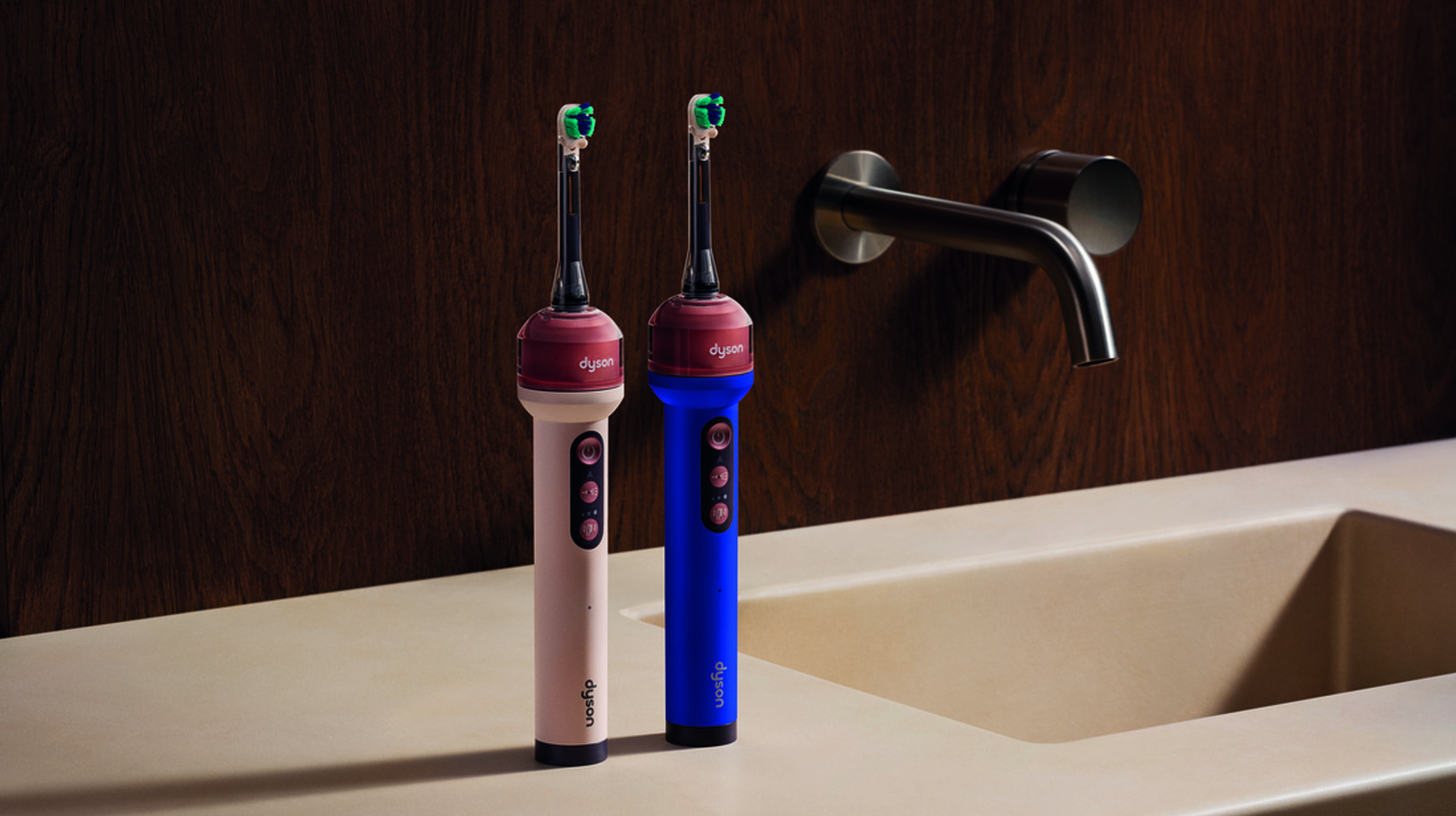
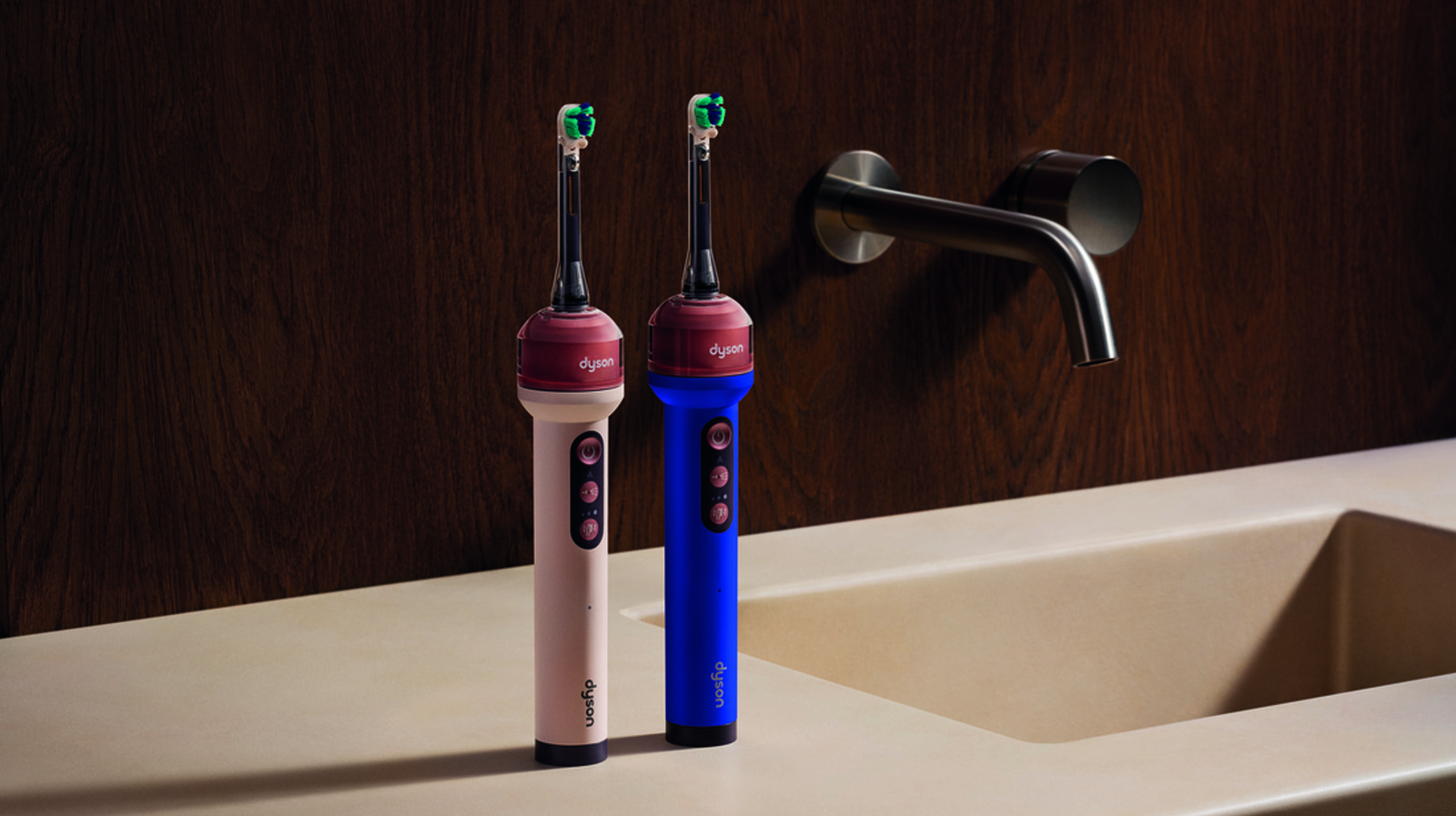
The Dyson CameraJet has what the company calls a “100k pixel macro lens camera” mounted right under the head of the brush. That’s 0.1 megapixels in more typical camera terminology, which may seem like a very small number, but it’s certainly supplemented by some algorithmic effort. More specifically, 16 million lines of code and “a machine learning system trained on 470,000 dental images collected during development” are behind the computer vision targeting here.

Basically, all that computing has taught the CameraJet how to identify the gaps between your teeth. When you brush and the system sees a gap, it will shoot a jet of fluid in a conical shape that helps to floss while you brush. To prevent liquid from accumulating in your mouth as you move along, these bursts of mouthrinse are fired in tiny amounts. The capacity of the water tank that surrounds the neck of the brush is just 12.5ml (0.42 fluid ounces), which is just about two and a half teaspoons.

According to Dyson, the CameraJet’s “Gap Optical Targeting” system analyzes “28 live images per second to identify and target gaps between teeth in real time” and “within 100ms of the camera seeing a gap, the device detects and jets the gap.”

That camera isn’t just there to tell the toothbrush where to shoot fluid. You can use the companion MyDyson app to get a better view of your mouth, especially the back of your teeth. The live-viewing feature is only available during live viewing or auto-jetting, and Dyson says no images are recorded or stored on the product or in the cloud. You can also use the app to get tips, guides and personalized feedback on how to brush better, with details on where you’re already good and what areas you might be falling back on. The app also offers settings so you can tweak brushing intensity and various jetting modes. 

Advertisement

In addition to the camera, the company said it uses an “anti-gravity tank with a diaphragm pump and pressure chamber that adapt during use to deliver controlled jets in any orientation.” That means no matter how you hold your toothbrush, the CameraJet should be able to pump water to your mouth, even if you’re somehow upside down and pointing awkwardly at the back of your teeth.

Dyson also stresses the importance of the shape of its water stream. Instead of a simple needle-shaped jet like many other water flossers, Dyson said its “fluid dynamicists spent years optimizing the profile of the jet to remove plaque more effectively.” As a Singaporean, I feel inclined to mention that the company developed “its own proxy plaque through a five-year collaboration with the National University of Singapore’s Faculty of Dentistry” as part of its engineering process. 

The result of all that work is a cone-shaped spray of fluid that Dyson says offers wider coverage to sweep and remove plaque while being propelled “at a lower pressure to be gentler on gums and enamel.”

As for what fluids to fill the tank with, you can choose your favorite clear mouth rinse that’s SLS-free to prevent foaming. Dyson is also making its own non-foaming toothpaste and a low-foaming mouthrinse to be used with the CameraJet, so the camera can see clearly without foam blocking its view.

Advertisement

Source link

Continue Reading

Tech

iPhone 18 Pro Max vs iPhone 18 Pro: All Key Differences So Far

Published

on

Apple is expected to launch the iPhone 18 Pro and iPhone 18 Pro Max on September 9. Both models are likely to share several flagship features and upgrades. However, recent leaks suggest that Apple could reserve some hardware changes for the Pro Max. The camera may be the biggest difference between the two models, with the larger phone tipped to get new features. Apple has not officially confirmed these details yet.

iPhone 18 Pro Max Could Get a Variable Aperture Camera

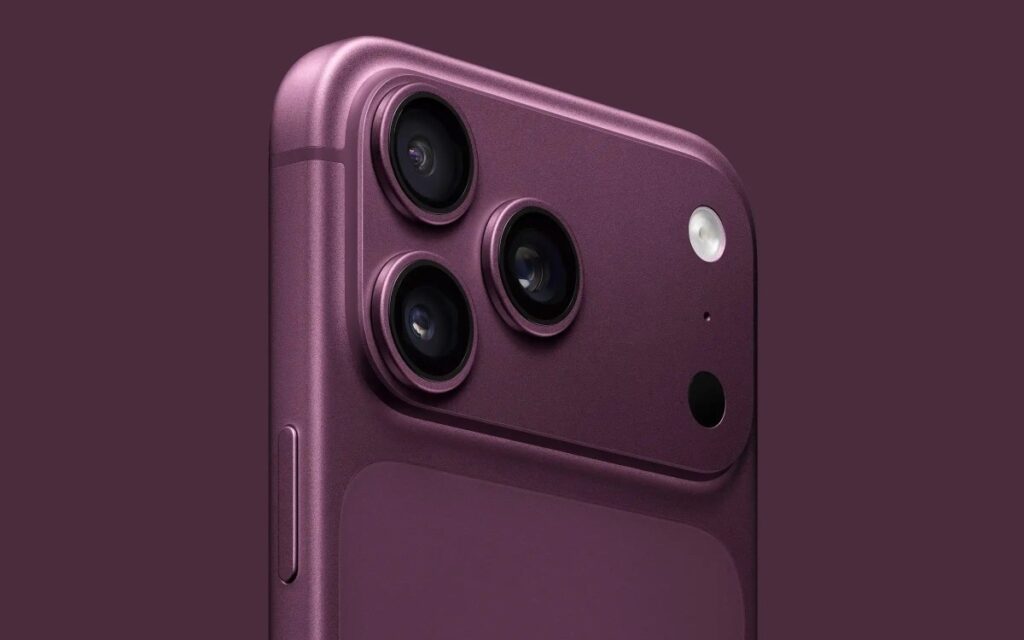
Closeup of the camera on the iPhone 18 Pro

The camera could be the biggest difference between the iPhone 18 Pro Max and iPhone 18 Pro. According to MacRumors, the Pro Max will introduce a variable-aperture camera to the iPhone. Previous Pro models have used fixed apertures on their primary cameras. The new system would be able to adjust the lens aperture to determine how much light enters. A larger aperture would help when taking photos in low-light situations and allow more light to enter the phone’s camera. A smaller aperture would ensure good depth control and background blur.

The Pro Max could get another camera advantage with up to 6x optical zoom. Apple may pair this feature with a more advanced telephoto camera. Optical zoom lets users capture distant subjects with less digital cropping. This can help maintain better detail when shooting from a distance. It could also make the Pro Max more useful for portraits. The iPhone 18 Pro is expected to keep its current telephoto setup.

Bigger Battery May Make the Pro Max Thicker

The iPhone 18 Pro Max may offer a larger battery than the standard iPhone 18 Pro. However, the larger battery could make the phone slightly thicker. The regular iPhone 18 Pro model is expected to retain its sleek design. As a result, it may be a good choice for users who prefer one-handed operation of the phone.

Despite their differences, both phones will share some features. For instance, both phones would use Apple’s new A20 Pro chip. They may also feature a smaller Dynamic Island compared with current models. Apple could improve the Camera Control feature on both phones. Both models are also expected to support Apple Intelligence features. Premium displays and titanium frames could remain part of the Pro lineup.

Advertisement

Source link

Continue Reading

Tech

uGreen NASynch DXP 4800 Pro review: performance, cost

Published

on

At $679.99, the four-bay uGreen NASync DXP4800 Pro NAS is a capable mid-range NAS for creators and small teams in the Apple ecosystem, with an excellent value proposition.

uGreen has built out its NAS range quickly since entering the category. AppleInsider has covered uGreen NAS hardware before, including the DXP4800 GT.

The DXP4800 Pro sits above the GT and Plus in the four-bay lineup. It pairs a six-core Intel chip with generous memory headroom.

The pitch here is sustained performance for heavier work. Docker, virtual machines, and media processing are the target use cases.

Advertisement

uGreen NASync DXP4800 Pro review: Specifications

Advertisement

Advertisement

Advertisement

Advertisement

Advertisement

Product uGreen NASync DXP4800 Pro
Price $679.99 ($799.99 list)
CPU Intel Core i3-1315U (6 cores, 8 threads)
CPU design 2 performance cores, 4 efficiency cores
RAM (standard) 8GB DDR5
RAM slots 2 x SODIMM
Max RAM 96GB
System storage 128GB SSD
Drive bays 4 x SATA (up to 32TB each)
M.2 SSD slots 2 x M.2 NVMe
Max storage capacity 144TB (4 x 32TB SATA plus 2 x 8TB M.2)
RAID modes JBOD, Basic, RAID 0, 1, 5, 6, 10
Ethernet 1 x 10GbE, 1 x 2.5GbE
PCIe slot None
Thunderbolt None
Front ports 1 x USB-C, 1 x USB-A (both 10Gbps), SD 3.0
Rear ports 1 x USB-A 5Gbps, 2 x USB-A 2.0, HDMI 4K
Operating system UGOS Pro
Dimensions (inches) 10.1 x 7 x 7
Warranty 2 years

uGreen NASync DXP4800 Pro review: Design

The DXP4800 Pro shares the look of its siblings. It is a grey-black four-bay box with front-loading drive trays. Nobody’s going to mistake it for Apple design, but it also looks better than most in its class.

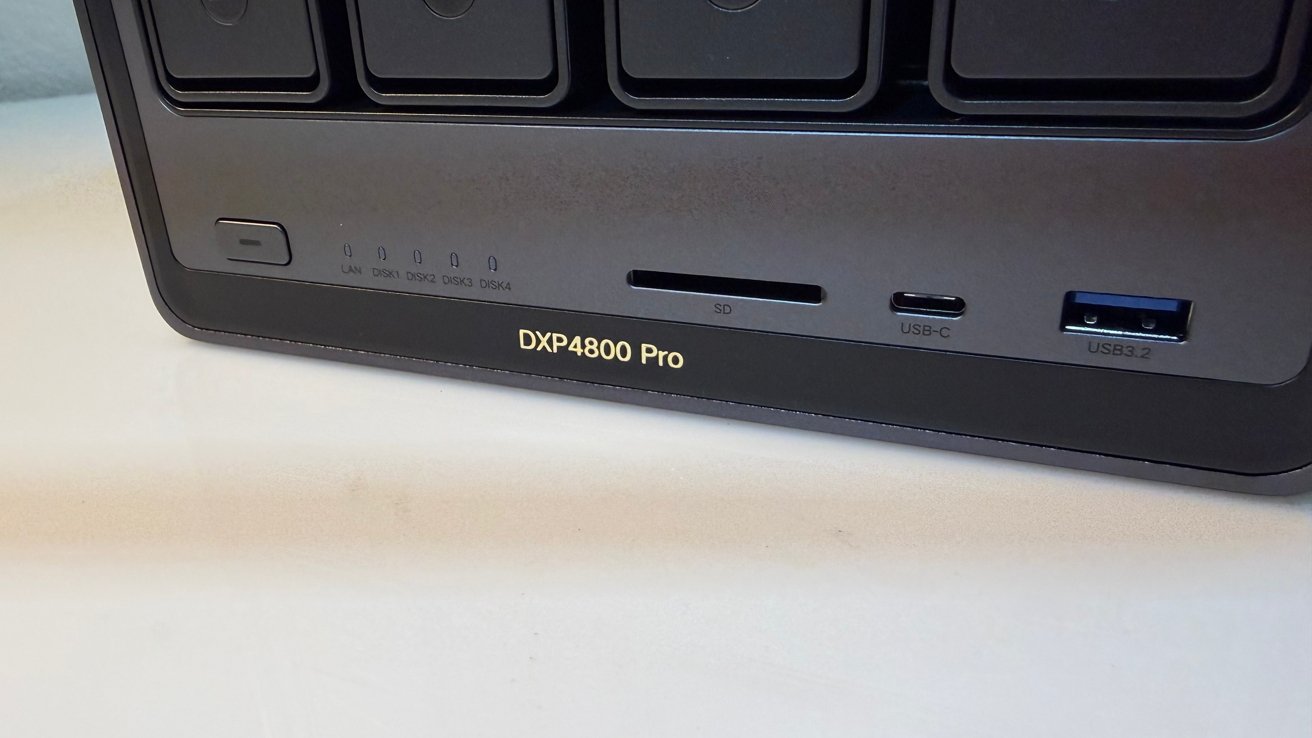
The front panel holds the power button and status LEDs. It also carries an SD card slot, a 10Gbps USB-C port, and a USB-A 10Gbps port.

Front panel of a DXP4800 Pro device showing status LEDs, power button, SD card slot, USB-C port, and blue USB-A port on a dark rectangular enclosure

uGreen NASync DXP4800 Pro review: Front ports

Those front ports make quick media imports easy. A photographer can pull card footage without reaching around the back, nor requiring a separate plug-in card reader.

Advertisement

There is not much else to say about the design. It’s probably going to be living in your network closet, rather than on your desk.

There are six lockable drive bays at the front, numbered from left to right. They retain uGreen’s normal design ethos with trays that are tool-free and hot-swappable. This remains a nice touch.

uGreen NASync DXP4800 Pro review: Storage

The four bays each take a SATA drive up to 32TB. That alone allows 128TB before any other storage is added.

Two M.2 NVMe slots supplement the main bays. Each takes up to an 8TB stick, adding 16TB more capacity, or caching for extra speed.

Advertisement

uGreen lists a total maximum of 144TB, which combines the spinning drives with the two NVMe sticks.

Open laptop underside showing exposed RAM slot with a single green memory module, removed access panel nearby, and a small screwdriver resting on the table beside it

uGreen NASync DXP4800 Pro review: A hatch hides the NVMe slots.

The NVMe slots also deliver a real speed benefit. Data stored on them is going to be noticeably quicker to access than any stored on the SATA bays.

RAID options span JBOD, Basic, and RAID 0, 1, 5, 6, and 10. That ranges from pure speed to strong redundancy, depending on your particular needs.

Advertisement
Close-up of a multi-bay network storage device, with drive bay 01 pulled out on a metal tray, and bays 02, 03, and 04 still closed in the enclosure

uGreen NASync DXP4800 Pro review: Drive bays.

We tested the unit with four 4TB Seagate Red drives provided by Ugreen. We also used four 24TB WD Red Pro, which retail for $1,059 each on Amazon.

SSDs used for testing included a pair of Samsung 990 Evo Plus drives, and a pair of Samsung SSD 9100 Pro 1TB drives. You don’t need to use drives this fast. Stick with PCI-E 3.0 drives if you have them, as they’re cheaper, and still provide more than enough speed.

uGreen NASync DXP4800 Pro review: Connectivity

Networking uses one 10GbE port and one 2.5GbE port. The 10GbE is the main one you’ll care about, due to the sheer amount of bandwidth available through one port.

Advertisement

Of course, that’s assuming you have a 10-gig Ethernet network available to you.

That single 10GbE port undercuts pricier rivals on value. Many competitors charge more for equivalent 10-gigabit networking.

Usually, the addition of the second network port gives a few benefits, but link aggregation isn’t really one. There’s not much point to it if you already have a 10-gigabit port available to you and sufficient network infrastructure.

A more useful reason for it is to treat the two ports as independent network connections. If you have sufficient networking know-how, you could limit connectivity through specific connections for some services, while leaving the other free for others, for example.

Advertisement

There is a catch common to all 10GbE gear, and that is infrastructure. While you could use a 10GbE-capable Mac to enjoy the massive bandwidth, that’s not immediately achievable for all.

Back panel of a network device showing a large cooling fan, HDMI port, USB ports, two Ethernet LAN ports, a reset button, and a round power connector on a white surface

uGreen NASync DXP4800 Pro review: Rear ports, including those two Ethernet connections.

You’re more likely to find benefits from upgrading the network infrastructure to a faster speed, if budget is available. Imagine ten gigabit-class network connections all accessing the NAS through the 10GbE port on a corporate network.

The rest of the rear ports handle expansion, video, and data ingestion. There are two USB-A 2.0 ports, one USB-A 5Gbps connection, and a 4K 60Hz HDMI output.

Advertisement

The HDMI port is handy if you want to use it as a playback device. But really, you’re gonna put Jellyfin or Plex on it and access your content over the network or the internet. It’s nice to have the feature, though.

While these ports are pretty good for this class of NAS, there are some omissions that could’ve been included here. First, there is no PCIe slot for further expansion.

The other missing bit is Thunderbolt 4 here, though there is USB-C at 10Gbps. There’s less of an incentive to have this NAS on your desk, since you don’t get to enjoy Thunderbolt’s serious amounts of bandwidth for file ingestion.

The upper-tier DXP6800 Pro adds both of those. Buyers who need an extra-fast network port or Thunderbolt should look there.

Advertisement

There are enough hard drive bays and SSDs in here, when packed, to saturate even a 10-gig network. You’re mostly going to be limited on speed by other traffic on your wired network.

Monitoring traffic, we saw no data sent elsewhere. Rumors circulated early that uGreen was somehow sending a user’s data to China, but let us debunk that claim again.

Your data is your data. Like with the other uGreen NAS units we’ve tested, it goes nowhere else than where you send it.

uGreen NASync DXP4800 Pro review: Processor and performance

The DXP4800 Pro runs an Intel Core i3-1315U. It is a six-core, eight-thread chip with two performance and four efficiency cores.

Advertisement

That is powerful for this class of device. It handles Docker, virtual machines, and transcoding without strain, so it should work really well for hosting network services.

The chip includes Intel Quick Sync for hardware transcoding. So, Plex and Jellyfin can run in Docker with accelerated 4K playback.

Memory is a real strength here. The 8GB of DDR5 included can expand to 96GB across two slots.

Of course, that depends on whether you can afford to make that upgrade in the current climate. This may be more feasible later in 2027.

Advertisement

Even so, that ceiling is higher than most rivals allow. Heavy Docker or virtual machine users have room to grow, if you can get the upgrades.

One caveat surfaced under load in testing. The unit drew around 140 watts when getting slammed with I/O and heavy processing.

The fan is also loud under load. It is audible enough to matter in a quiet room.

In our testing, we had a baseline of 38 DBa of ambient noise measured with a Kanomax model 4431 meter, with the test gear two meters away from the unit. Under absolute maximum load, I measured about 49 DBa in the same position.

Advertisement

How much this matters varies. If it’s in a rack downstairs from where you’re computing, it won’t matter. It might matter next to your television or on your desk near your computing station.

And if you’re not crushing it with load, you won’t see this at all.

Speaking of crushing it with load, the i3-1315u is a decent processor, but it won’t challenge your Apple Silicon for computing grunt.

Horizontal bar chart titled Geekbench Single-Core Benchmarks comparing UGreen NASync DXP4800 Pro, M4 Mac mini, and M1 Mac mini; scores: 1582, 3276, and 2187 respectively, with M4 Mac mini highest

Geekbench 7 single-core score comparison

Advertisement

The Core i3-1315U does reasonably well in Geekbench 7, with it scoring at 1,932 for the single-core results and 6,383 for multi-core.

To clarify, this is reasonably powerful for a consumer SOHO NAS, which doesn’t usually have deal with processing outside of serving files and limited other services. If you put it against Apple’s hardware, it’s not impressive, but that’s okay, it’s not supposed to be.

The M4 Mac mini can easily beat the DXP4800 Pro in single-core results, with its 3,276 result almost 70% better. On multi-core, the M4’s 15,356 is a 2.4-times improvement over the chip used in the NAS.

It’s a much closer race when you look at the M1 Mac mini. The single-core score of 2,187 gives the M1 a slimmer 13% lead, while the multi-core score of 8,588 is a closer but still significant 35% better.

Advertisement
Horizontal bar chart titled Geekbench Multi-Core Benchmarks comparing UGreen NASync DX4600 Pro, M4 Mac mini, and M1 Mac mini, highlighting the M4 Mac mini with the highest score around 15,300

Geekbench 7 multi-core score comparison

Yes, the DXP4800 Pro is powerful enough to do advanced NAS tasks, but it can be outpaced by Apple’s six-year-old compact desktop hardware.

That said, the DXP4800 Pro is still more than capable of handling itself, for what the target market will probably need to do on it.

uGreen NASync DXP4800 Pro review: Software and Apple features

The DXP4800 Pro runs UGOS Pro. The software has matured over several years and is easy to manage.

Advertisement

It’s a platform that has its own selection of apps, just like any other. Again, there are also AI capabilities shoehorned in for your images, with face and scene recognition and semantic search capabilities.

We still don’t recommend the AI features.

For Apple users, UGOS Pro supports Time Machine backups. Setup is not instant, but uGreen has a procedure to follow to get it done.

The bundled apps cover the usual NAS tasks. There are photo, media, and Docker tools built in.

Advertisement

The no-subscription angle is part of the value case. Local storage keeps photos and camera footage off cloud services.

One point of flexibility stands out. Anyone who dislikes UGOS Pro can install TrueNAS or Unraid instead.

That option suits the tinkerer and the privacy-minded. The hardware is not locked to uGreen’s own software.

The onboard software options are what you’d expect from a typical NAS. You have your private image album library system, your video storage and playback tools, and other productivity-centric items.

Advertisement

If you’re into downloading large files legitimately via BitTorrent, there’s a tool built in for just that, but you can install more if you want.

But, with all of this performance on tap, users may want to do more eventually. Thankfully, there’s the aforementioned Docker support, so you can install an array of different network services on the NAS.

uGreen NASync DXP4800 Pro review: Powerful four-bay NAS with a thirst

The DXP4800 Pro makes a clear pitch. An Intel Core i3, 96GB memory ceiling, and 10GbE suit creators avoiding cloud fees.

The processor and memory headroom are its best features. Both suit heavy Docker and virtual machine work, which should make any homelabber happy.

Advertisement
Black UGREEN cube-shaped electronic device on a white desk, front mesh panel with logo, multiple USB and audio ports along the bottom edge, slightly angled perspective

uGreen NASync DXP4800 Pro review: The rear has a magnetic fan filter.

The tradeoffs are power and noise. Around 140 watts under load and a loud fan are real costs to weigh. It’s nothing if you’re coming from a cheese-grater Mac Pro in either regard, but it’s all relative.

For Apple households, Time Machine support and macOS compatibility fit well. A 10GbE-capable Mac or switch unlocks the benefits of the extremely fast network ports. Or at the very least, the 2.5GbE port should encourage some more budget-friendly network upgrades.

uGreen NASync DXP4800 Pro Pros

  • Intel Core i3 with a 96GB memory ceiling
  • Dual 10GbE cheaper than many rivals
  • Real speed gain from the NVMe slots

uGreen NASync DXP4800 Pro Cons

  • Draws around 140 watts under load
  • No PCIe slot or Thunderbolt 4
  • Fan is loud under sustained load

Rating: 4 out of 5

This unit is in a great spot in uGreen’s lineup. There are very expensive units, with many bays and overkill processors, and there are smaller units with less processing power for less money.

In a world of expensive storage, two-bay will do. Four-bay allows for some expansion, and when you have some spare cash, throwing in some NMVe storage for caching will boost performance.

Advertisement

Add more RAM, offload some tasks to Docker, and it’s a great, upper-mid range add to your everyday computing grunt. And, its a great media server to boot.

Where to buy the uGreen NASync DXP4800 Pro

The uGreen NASync DXP4800 Pro is available from Amazon for $679.98. It’s also available directly from Ugreen for $679.99.

The drives will cost more. A lot more.

Advertisement

Source link

Continue Reading

Tech

How Apple could change under John Ternus’s leadership

Published

on

While Tim Cook‘s legacy and John Ternus’s effectiveness will be studied for years, right now Apple is making a change of CEO seem effortless. But never doubt that this will be a sea change for the company, eventually.

No question, John Ternus really became Apple’s CEO long before his official start date of September 1, 2026. It’s not as if Tim Cook went on gardening leave but this is not a job with a simple cutoff date.

Instead, it’s parallel running for a time, then it mixes from all Tim Cook to all John Ternus over at least many months. There is no possibility, for instance, that it was Tim Cook’s decision to lay off Apple Vision Pro staff.

Even if Cook had soured on the whole spatial computing lark, you do not make major decisions on the eve of handing over to a new CEO. But if you are that incoming CEO, you can make some changes before the contract dries because you know what you want to get started on.

Advertisement

Apple is spectacularly good at transitions

Normally when you think of Apple’s transitions, you actually don’t think about them. Motorola 68000 to PowerPC, PowerPC to Intel, Intel to Apple Silicon, it was all done so incredibly smoothly that each one seemed unremarkable and easy.

None of them were that at all, as they went to the heart of all of Apple’s devices and they were exceptionally difficult transitions. Microsoft hasn’t managed it once, despite trying, and Apple keeps on doing it.

The move from Cook to Ternus is potentially as big a transition. Certainly the one from Steve Jobs to Tim Cook was, although that is a transition that Apple arguably fumbled.

The transition from Steve Jobs (right) to Tim Cook was not done as well as the latest handover of CEOs - image credit: Apple

The transition from Steve Jobs (right) to Tim Cook was not done as well as the latest handover of CEOs – image credit: Apple

Advertisement

Compared to this latest handover, Apple didn’t seem to be ready. Shareholders asked where the succession plan was and customers saw Steve Jobs looking ill.

Apple of course had a succession plan but that only became known when Jobs resigned and Cook was appointed at his recommendation. But then the comparisons between the two men never really stopped, and they were never once in Cook’s favor.

Even by 2019 when Cook had been CEO for eight years, suddenly it was revealed that Jobs had admitted to concerns about him. Jobs had said that Cook just wasn’t a “product person.”

Compare that to this new handover and also to the styles of Jobs and Cook. There is absolutely no chance whatsoever that Tim Cook will criticize John Ternus because Cook always focus at what will look good and bad for Apple overall.

Advertisement

Although compare the difference between how Jobs and Cook approached retirement. Jobs left because of ill health where Cook is just stepping down, but neither of them were upfront about the change.

Jobs may have not admitted to retirement plans because he didn’t want to go. Then Cook wouldn’t admit it early because a change of CEO has a big impact on a firm’s stock market price, and Cook knows about timing and about managing expectations.

Smiling man with gray hair and glasses stands on a stage, hands clasped, in front of a large screen displaying various app icons and a favorites toolbar

Tim Cook did always look as if he really enjoyed his job – image credit: Apple.

Even so, Cook made an unnecessarily odd statement about retirement near the end. For some reason he chose to deny having ever said anything about leaving, when it’s a matter of record that he did.

Advertisement

Announcements

The announcement that Tim Cook was to become CEO was overshadowed by how the announcement was really that Steve Jobs was leaving. It was one of those surprises that you somehow expected, but it was still a jolt.

Whereas it is true that the particular day that the news broke that John Ternus was to take over, that was a surprise, but not in the same way. This one was a surprise only because of the timing, and only because no one predicted the day it would happen to be announced.

What wasn’t remotely a surprise to anyone was who Cook’s successor was to be. There had been plenty of speculation that included just about all of the Apple senior staff, although not head of personnel Deirdre O’Brien. Including Ternus, Apple has had eight CEOs and none were women.

There was also speculation over the odd rogue outsider, such as “father of the iPod,” Tony Fadell. But surely nobody lost a bet because it was Ternus who got the job.

Advertisement
Man speaking outdoors in front of a modern circular office building, with three large translucent male faces floating in the sky behind him, suggesting a technology company presentation scene

Background L-R: Craig Federighi, Greg Joswiak, John Ternus. Foreground: Tim Cook. Some of the many names who various people predicted would replace Cook. Images credit: Apple.

That was not an accident. Whatever process Apple went through internally, externally it has always had its ways of letting things be known. It does this all the time with products, helping the word get out when something is about to be launched, or whether it won’t be.

There’s little doubt, for instance, that the iPhone Ultra will finally be launched because if it were delayed, Apple would have made sure that the news got out somehow. Apple is very good at controlling the story it wants to be told.

Apple isn’t doomed

Also before Ternus was announced, there was a lot of press coverage about how Apple could survive the loss of Tim Cook. That was despite so much press coverage having previously said Apple couldn’t survive the loss of Steve Jobs, but then business analysis has always been subject to a bit of clickbait.

Advertisement

When Ternus was announced, there were no proclamations of disaster, no commentary that Apple is doomed. There were proclamations by people who said they knew precisely how Ternus was going to revolutionize Apple, and other people who know for certain that he won’t rock the boat.

Man in dark T-shirt stands smiling with hands clasped in front of a modern glass Apple Store at night, bright Apple logo glowing behind him, reflecting on polished plaza floor

John Ternus – image credit: Apple.

Ternus knows best what he will do and Cook knows second best, but actually not even they can really be sure. No job is quite how you expect until you get it.

No plan survives contact with the enemy, or the customers, or the shareholders, or more recently also politicians. Apple’s CEO position is now part technology leader, part politician, part logistics expertise, and more.
Advertisement

Whatever Ternus pitched in his interview, he will be trying to implement it all in a world that cannot be under his control. Cook couldn’t have predicted COVID, Cook couldn’t have imagined Trump, and Ternus cannot know how the global chip shortage will pan out.

So what Ternus wants to do and what he will get to do are inevitably two different things, though hopefully with a lot of overlap.

Which way Ternus could go

We will not know for years just what route Ternus plans to take Apple down, and he won’t know for years whether he’s got the company to there or not. But very broadly, there are two potential routes that have both been predicted by reports of dubious accuracy.

One is that Ternus, if not exactly going crazy, will immediately be a radical departure from Cook because he very definitely is a product person. This translates to him spending time with the company’s design teams, which seems likely.

Advertisement

But his being a product person does not translate to him being able to lead Apple toward a next device as staggeringly successful as the iPhone.

The other route is that Apple continues on pretty much precisely as it would have done under Tim Cook. That’s based on the unfortunate fact that people tend to hire people who are like themselves.

It’s usually just one manager hiring one worker, but it scales. This is why corporations like Apple, Microsoft, and Google, can have distinctly different personalities.

Open pink laptop on a desk displaying a news website, with a larger monitor, external keyboard, and various office accessories in the background

The MacBook Neo was reportedly John Ternus’s idea.

Advertisement

First you hire someone with a similar background and interests to you, then eventually it tends to be that it’s mostly people like you who are drawn to your firm. The pool of job applicants trends to a limited type of person, unless you take active steps to seek out others.

That’s one of the many reasons that Apple’s refusing to dismantle its DEI programs is laudable. Ternus is not wildly different from Cook himself, but he leads a company that is less blinkered than it could be.

So Apple has tremendous resources in people as well as money. And they are now under John Ternus’s control.

What will probably happen

There will of course continue to be updates and new products from Apple. The company has multiple years of devices planned and underway.

Advertisement

It does look as if that won’t include an significant update to the Apple Vision Pro in the near future. There are some technologies even Apple has to wait for, so while the company is shifting its focus away now, it will probably return.

That might be especially so since Ternus played such a large part in developing the existing Apple Vision Pro.

Something else he reportedly more than led, though, was the MacBook Neo. It’s said that this lower-cost device may have been his idea, and certainly that he championed it.

Its success, far greater than Apple expected, will have come too late to be what won him the CEO role. But if it had gone badly, it might have been a different story.

Advertisement

As it is, Apple has demonstrated — to itself as much as to everyone else — that it is capable of making high-quality devices at lower than usual costs. It’s not going to abandon the higher profit margins of most of its range, but this has opened up new markets and new audiences.

It was also clever. Let’s not forget that the MacBook Neo was a clever idea.

Anyone can say that Apple should make cheaper laptops, and possibly everyone has. But it took seeing how to turn binned iPhone chips into usable Mac processors.

It took a product person with an engineer’s eye to just see that possibility, and then act on it. Whether that was John Ternus himself or one of his team, we should surely see more of this kind of thinking.

Advertisement

That type of thinking will become visible as new products launch under Ternus’s aegis. Other moves such as where Apple ultimately comes out over AI, will be a little harder to assess, but still possible.

What we may never know is all that Ternus must do now about keeping Apple thinking of the long game. Cook was criticized for not being Steve Jobs, then he was criticized for letting Apple fall behind on AI, but all the way through he refused to react to headlines and instead committed to the kind of long term plans that both distinguish Apple, and make it prosper.

Back in 2011 when Cook was taking over, the then-Apple board member Al Gore revealed how Steve Jobs had seen succession. “[He] used to talk about initially about how after Walt Disney died, the company always got in trouble about asking ‘what would Walt do in this situation,’ said Gore. “And he made it very clear ‘I don’t want that.’”

“He made it clear to Tim Cook and everyone else ‘Don’t ask what Steve would have done,’” continued Gore. “‘Follow your own voice.’”
Advertisement

Tim Cook often referred to Jobs as his mentor so he will of course know of this opinion and he doubtlessly benefited from not asking what Steve Jobs would have done. It’s going to be interesting, though, to see if he can resist telling Ternus what to do when he’s just in the next office at Apple Park.

Source link

Advertisement
Continue Reading

Trending

Copyright © 2025