The European Union wants Google to allow any AI company to use its services, and the company hates the idea. Apple agrees with Google.
Apple doesn’t seem to be listened to by the European Union when it complains about its own experiences trying to work within the Digital Markets Act (DMA). But since the EU has asked for responses to its proposals for Google to open up to rival AI firms, Apple has tried again.
“The DMs [draft measures] raise urgent and serious concerns,” said Apple in a submission to the EU, as seen byReuters.
For instance, Apple is expressly concerned about the idea that any AI firm could in theory send emails or order food via Android, without Google’s or perhaps the user’s knowledge.
Advertisement
“If confirmed, they would create profound risks for user privacy, security, and safety as well as device integrity and performance,” continued Apple.
Apple doubtlessly has its own platforms in mind when it is now objecting to rival firms having full access to Android. But it also makes the point that the EU has specified AI firms in its proposals, and Apple points out how poor and error-strewn AI apps are.
“These risks are especially acute in the context of rapidly evolving AI systems whose capabilities, behaviours, and threat vectors remain unpredictable,” said Apple, “as we are now seeing time and again.”
Anyone can submit their opinion to the EU when there is an open call like this, and everyone who does is really looking to protect their own interests. So Apple is clearly concerned that it, too, may be forced to allow the same rival access in iOS.
Advertisement
However, Apple does also have the experience of what it has previously claimed to be “hundreds of thousands of engineering hours” in complying with the DMA. And as part of its new submission, questioned the EU’s technological expertise.
“The EC is redesigning an OS… it is substituting judgments made by Google’s engineers for its own judgment based on less than three months of work,” said Apple. “It is all the more dangerous given the only value that can be discerned from the [draft measures] guiding this work appears to be open and unfettered access.”
Separately, in May 2026, the EU concluded that its DMA has made a positive impact, thereby ignoring Apple’s lobbying for it to be revised.
What happens next
It’s not clear when Apple submitted its filing to the EU, but it was during the consultation period that ran from April 27, 2026, to May 13, 2026.
Advertisement
The European Commission states that it will “carefully assess” submissions from both Google and what it calls interested parties. It does say that there may be adjustments made to the proposed measures because of the submissions.
However, it also mandates that its final decision “must be adopted within six months” of the opening of the specification proceedings. In this case, that means July 27, 2026.
Linux distros are rolling out patches for a new high-severity kernel privilege escalation vulnerability that allows attackers to run malicious code as root.
Known as Fragnasia and tracked as CVE-2026-46300, this security flaw stems from a logic bug in the Linux XFRM ESP-in-TCP subsystem that can enable unprivileged local attackers to gain root privileges by writing arbitrary bytes to the kernel page cache of read-only files.
Zellic’s head of assurance, William Bowling, who discovered this new universal local privilege escalation flaw, also shared a proof-of-concept (PoC) exploit that achieves a memory-write primitive in the kernel that is used to corrupt the page cache memory of the /usr/bin/su binary to get a shell with root privileges on vulnerable systems.
Bowling said this flaw belongs to the Dirty Frag vulnerability class, which was disclosed last week, and affects all Linux kernels released before May 13, 2026. Just as Fragnasia, Dirty Frag has a publicly available PoC exploit that local attackers can use to gain root privileges on major Linux distributions.
Advertisement
However, Dirty Frag works by chaining two separate kernel flaws, the xfrm-ESP Page-Cache Write vulnerability (CVE-2026-43284) and a RxRPC Page-Cache Write security issue (CVE-2026-43500), to achieve privilege escalation by modifying protected system files in memory.
“Fragnesia is a member of the Dirty Frag vulnerability class. This is a separate bug in the ESP/XFRM from dirtyfrag which has received its own patch. However, it is in the same surface and the mitigation is the same as for dirtyfrag,” Bowling said.
“It abuses a logic bug in the Linux XFRM ESP-in-TCP subsystem to achieve arbitrary byte writes into the kernel page cache of read-only files, without requiring any race condition.”
To secure systems against attacks, Linux users are advised to apply kernel updates for their environment as soon as possible.
Those who can’t immediately patch their devices should use the same mitigation used for Dirty Frag commands to remove vulnerable kernel modules (however, it’s important to note that this will break AFS distributed network file systems and IPsec VPNs):
Fragnasia’s disclosure comes as Linux distros are still rolling out patches for “Copy Fail,” another privilege escalation vulnerability now actively exploited in the wild.
“This type of vulnerability is a frequent attack vector for malicious cyber actors and poses significant risks to the federal enterprise,” the U.S. cybersecurity agency warned. “Apply mitigations per vendor instructions, follow applicable BOD 22-01 guidance for cloud services, or discontinue use of the product if mitigations are unavailable.”
In April, Linux distros patched another root-privilege escalation vulnerability (dubbed Pack2TheRoot) in the PackageKit daemon that had gone unnoticed for a decade.
AI chained four zero-days into one exploit that bypassed both renderer and OS sandboxes. A wave of new exploits is coming.
At the Autonomous Validation Summit (May 12 & 14), see how autonomous, context-rich validation finds what’s exploitable, proves controls hold, and closes the remediation loop.
EV battery charging technology has always had to find the right balance between charging speed and battery longevity. If the charging speed is too fast, it wears down the battery. If the charging is too slow, nobody is happy.
Researchers Meng Yuan from Victoria University of Wellington and Changfu Zou from Chalmers University of Technology in Sweden may have cracked this long-standing problem using an AI technique called deep reinforcement learning, and the results are pretty encouraging.
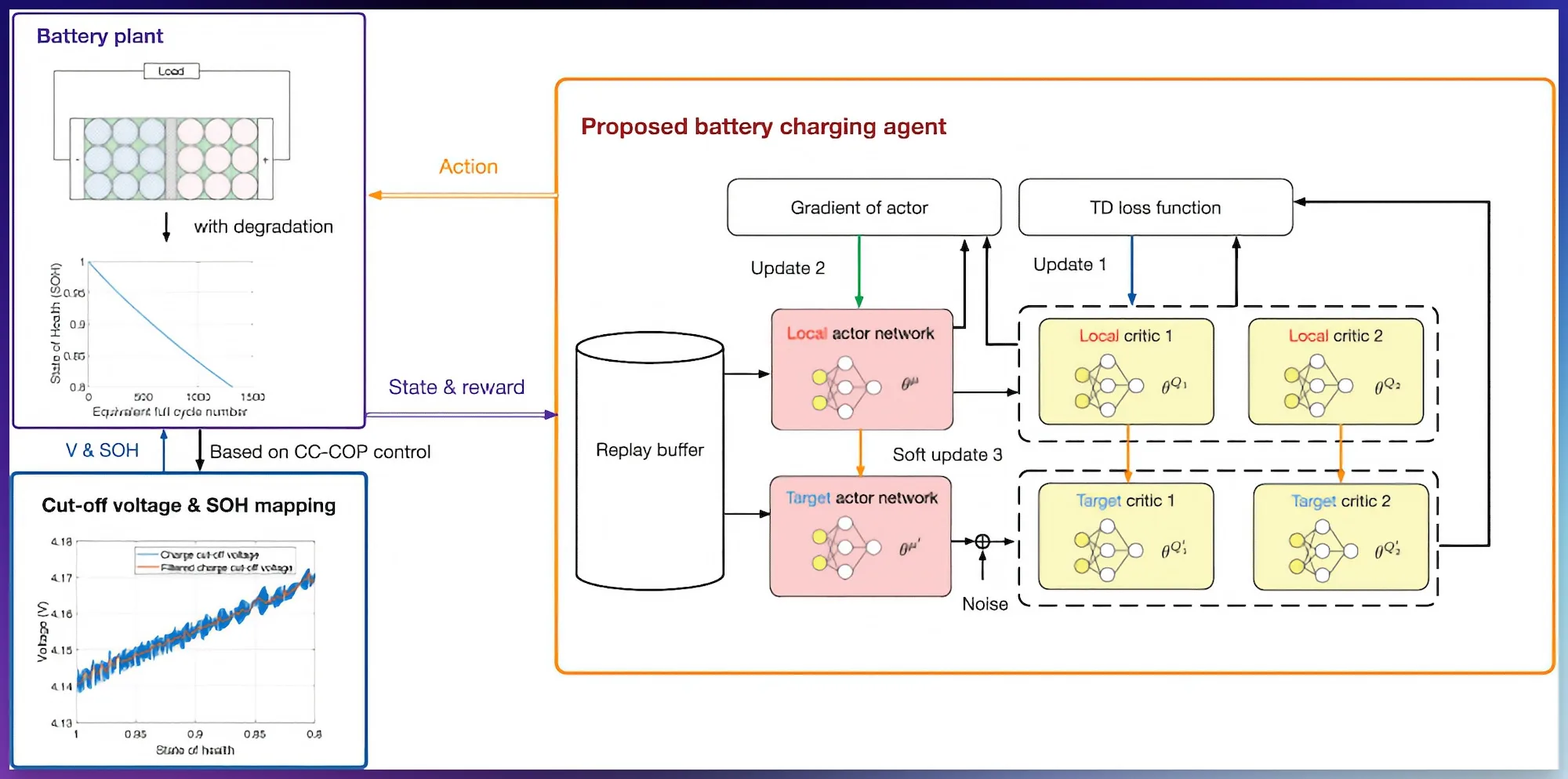
Their study, published in IEEE Transactions on Transportation Electrification, introduces a new AI charging system that learns to charge a battery quickly while actively protecting its long-term health.
What’s different about this new AI-based charging system?
The system uses a machine learning method called TD3, which is a fancy way of saying the AI learns by trial and error across thousands of simulated charging sessions. What makes it different is that it adapts its charging strategy based on how degraded the battery already is.
Advertisement
IEEE Xplore
Most traditional chargers use a fixed routine. They start with full power and taper off as the battery reaches its capacity. The problem is that this routine doesn’t care whether the battery is brand new or has been through hundreds of charge cycles.
The new AI-based charging strategy sidesteps this by learning a relationship between the battery’s health and the maximum safe charging voltage, then using that information to make smarter decisions in real time.
Does the battery last longer?
In simulations using a real-world battery model, the proposed method extended battery life by nearly 23% over standard charging methods, reaching 703 equivalent full cycles compared to just 572 with conventional charging. Charging time also remained competitive at around 24 minutes for an 80% charge.
BYD
The team trained the entire system on a consumer-grade desktop with an Intel i5 processor and an NVIDIA RTX 3060 GPU. As the researchers note, this “demonstrates that the proposed framework can be effectively trained on widely available hardware without needing access to specialized high-performance computing clusters.”
It is still early days, and the method needs testing outside of simulations. But if it holds up, smarter charging could quietly become one of the biggest upgrades your next EV gets.
Honor’s 2026 mid-range series is made up of two handsets, the Honor 600 and the pricier Honor 600 Pro, but how do they differ?
Is it a guarantee that the Honor 600 Pro is the better option? Or is the Honor 600 well-rounded enough to suit most needs?
To help you decide between the two smartphones, we’ve compared our hands-on experience with both below. Keep reading to see what really separates the two Androids and see which one is likely to suit you best.
Both the Honor 600 and Honor 600 Pro are available to buy now. As its name suggests, the Honor 600 Pro is the pricier of the two with an official RRP of £899 for the 512GB handset.
Advertisement
SQUIRREL_PLAYLIST_10208520
In comparison, the Honor 600 is more of an affordable option and has a starting RRP of £549.99. At the time of writing, you can even nab the Honor 600 with a healthy £150 discount too.
200MP 1/1.4-inch main sensor, f/1.9, CIPA 6.5, 12MP ultrawide, f/2.2, 50MP telephoto with 3.5x optical zoom and f/2.8
Front Camera
50MP selfie camera
50MP selfie camera
Video Recording
Yes
Yes
IP rating
IP69K
IP69K
Battery
6400 mAh
6400 mAh
Wireless charging
–
Yes
Fast Charging
Yes
Yes
Size (Dimensions)
74.7 x 7.8 x 156 MM
74.7 x 7.8 x 156 MM
Weight
190 G
195 G
Operating System
MagicOS10 (Android 16)
MagicOS10 (Android 16)
Release Date
2026
2025
First Reviewed Date
27/04/2026
05/05/2026
Resolution
1264 x 2728
1264 x 2728
HDR
Yes
Yes
Refresh Rate
120 Hz
120 Hz
Ports
USB-C, SIM card
USB-C
Chipset
Qualcomm Snapdragon 7 Gen 4
Qualcomm Snapdragon 8 Elite
RAM
8GB
12GB
Colours
Black, Golden White
Black, Golden White, Orange
Design
Both come in a choice between White, Black or Orange
Both sport IP68, IP69 and IP69K ratings
The two bezels are less than 1mm thick
There aren’t many design differences between the Honor 600 and Honor 600 Pro, as both have 6.57-inch displays, an impressively thin 0.98mm bezel and come with a plethora of IP ratings. In addition, both are fitted with a rectangular camera shelf that spans the width of the phone’s rear which is reminiscent of the iPhone 17 Pro’s own.
Advertisement
Speaking of which, we probably should address the fact Honor’s 600 series seems to borrow the vibrant (and divisive) orange hue of the iPhone 17 Pro. However, it also comes in more standard black or white shades too.
Otherwise, both handsets are also fitted with a brushed aluminium frame that gives each device a more premium feel. This is especially welcome for the Honor 600, considering it’s much cheaper than the Pro.
Advertisement
Winner: Tie
Screen
Honor 600 Pro benefits from an LTPO-enabled 120Hz refresh rate
Both have 6.57-inch AMOLED panels
The biggest difference between the Honor 600 and Honor 600 Pro is with each phone’s respective LTPO technology. Although the Honor 600 does sport a 120Hz refresh rate, it isn’t LTPO-enabled which means the variable refresh rate isn’t quite as smooth. In comparison, the Honor 600 Pro boasts an LTPO-enabled 120Hz refresh rate.
Advertisement
Otherwise, both handsets are equipped with a 6.57-inch 1264×2728 AMOLED panel while also benefiting from the impressively thin surrounding bezel too.
Winner: Honor 600 Pro
Advertisement
Camera
Honor 600 Pro has a dedicated telephoto lens
Both are fitted with 200MP main lenses, though the Honor 600 Pro’s boast CIPA 6.5 image stabilisation
AI-assisted image repair is present, which can look slightly too smooth
While the Honor 600 and 600 Pro have seen many similarities so far, their respective camera set-ups are slightly different, with the latter sporting a total of three rear cameras instead of just two.
The Honor 600 is equipped with a main 200MP 1/1.4-inch sensor and CIPA 6.0 image stabilisation, alongside a 12MP ultrawide. Although the 600 Pro also has a 200MP main lens, it benefits from CIPA 6.5 image stabilisation instead alongside the same 12MP ultrawide as the Honor 600.
Advertisement
Image captured on Honor 600. Image Credit (Trusted Reviews)
The biggest difference is the Pro’s inclusion of a 50MP telephoto lens that’s fitted with a 3.5x optical range. This omission for the Honor 600 is apparent when you try and zoom beyond the 4x range, as you’ll notice AI-assisted image repair which looks pretty noticeable.
Image captured on Honor 600 Pro. Image Credit (Trusted Reviews)
Either way, both 200MP main lenses are the star of each handset’s show, with plenty of detail and a solid performance across all lighting conditions too. We did note that colours had a slightly saturated look by default, however this can be changed via the phone’s settings.
Winner: Honor 600 Pro
Performance
Honor 600 Pro sports 2025’s flagship Snapdragon 8 Elite chip
Honor has included a Game Mode and vapor chamber cooling in both handsets
Otherwise, both the Honor 600 and 600 Pro feel speedy in everyday use
Advertisement
Another key difference between the Honor 600 and Honor 600 Pro is with their chipsets, with the Pro sporting Qualcomm’s 2025 Snapdragon 8 Elite flagship. Naturally, this means the phone achieves similar benchmark scores to 2025 flagships such as the Samsung Galaxy S25 Ultra and Honor Magic 7 Pro.
Advertisement
Honor 600 Pro. Image Credit (Trusted Reviews)
Instead, the Honor 600 houses Snapdragon 7 Gen 4, a mid-range chip that launched back in 2025. While it certainly can’t compete with the Honor 600 Pro, generally the handset performs well in everyday use. It even does an admirable job at keeping things cool during prolonged and intensive use, thanks to its onboard vapour chamber cooling. However, heavier gaming will reveal the handset’s limitations.
Winner: Honor 600 Pro
Software
MagicOS 10 powers both handsets
Both promise six years of security and software updates
Alongside many AI tools, the headline feature is Honor’s Image to Video 2.0
Both the Honor 600 and 600 Pro run on Honor’s MagicOS 10 which borrows from Apple’s Liquid Glass design. That’s not necessarily a bad thing, as the design feels smart and fluid to use in everyday circumstances.
Advertisement
Both are also equipped with a dedicated AI button which can bring up Google’s useful Circle to Search function or Honor’s AI Memories. However, the headline AI-powered feature within both the Honor 600 and 600 Pro is undoubtedly Image to Video 2.0, which allows you to turn a photo into an AI-generated video.
Honor 600. Image Credit (Trusted Reviews)
While it’s definitely not the reason to opt for either Honor handset, it’s a novel tool that can be fun to play around with.
Otherwise, Honor promises that the Honor 600 and 600 Pro will see up to six years of software and Android updates. That’s just shy of Samsung and Google’s seven year promise, but is still a pretty generous offering overall.
Advertisement
Winner: Tie
Battery
Same 6400mAh batteries which provide around six-hours of screen time
Honor 600 Pro supports 80W wired and 50W wireless charging
Honor 600 doesn’t have any wireless charging support
Advertisement
Both handsets are fitted with hefty 6400mAh batteries, which we found resulted in around six hours of screen time that involved plenty of multitasking between apps, streaming and taking the odd photo.
While both support 80W wired charging, it’s only the Pro model that offers 50W wireless charging which is a shame.
Winner: Honor 600 Pro
Advertisement
Verdict
With a year-old flagship chip, wireless charging support and a dedicated telephoto lens, the Honor 600 Pro is undoubtedly a brilliant well-rounded option that’ll suit most Android users. However, with the same starting price as the Galaxy S26, it’s perhaps not the best option for those seeking a mid-range Android.
In comparison, with a £549 price tag, the Honor 600 is a much more affordable option. Sure, its chipset isn’t flagship and it lacks a telephoto lens, it does borrow many features from its pricier Pro sibling. With that in mind, those seeking a true mid-ranger might be better suited to the Honor 600 Pro.
Human IT managers thought they were being nice to the boss, but were assisting a threat actor
PWNED Welcome once again to PWNED, the column where we help you prepare for security success by studying others’ embarrassing failures. Today’s terrible tale involves individuals trying to do right by a company executive by letting their guard down, never a smart move.
Have a story about someone leaving a gaping hole in their network? Share it with us at pwned@sitpub.com. Anonymity is available upon request.
Advertisement
Our sad story comes from Brandon Dixon, who currently serves as CTO and co-founder of AI security firm Ent. In a prior life, however, Dixon was a penetration tester for hire and he saw some things that made all my remaining hairs stand on end just hearing about them.
During one pentesting assignment, Dixon tried to find out how easy it would be to steal someone’s account using social engineering. The answer: barely an inconvenience.
Dixon telephoned IT security and pretended that he was the head of security who had lost his password. When they asked him challenge questions, he said he had forgotten the answers to those also.
Then he gave them the password he wanted to use over the phone and they did a reset for him. After that, he was able to get into the network and do whatever he wanted there.
Advertisement
There’s so much that’s obviously wrong here that it’s hard to know where to begin with our lesson-taking. The IT support agents should not have taken Dixon’s word that he was the security manager, especially after he failed challenge questions, and should have denied his request to reset the password. They were probably thinking “this guy is an executive and we don’t want to piss him off” rather than “we have procedures that everyone must follow.”
The other problem here is that the IT department entered Dixon’s suggested password for him over the phone. First of all, the IT department should have sent a password reset to the real employee’s email or phone number. Second of all, it’s piss-poor security for anyone to know a user’s password other than the user themselves. And I say this as someone who used to work for a company where, if you had a problem, the IT support people would ask for your password via chat.
Dixon also shared another story about social engineering from a time when he consulted for a pharmaceutical company. Members of the competition would call sales and marketing reps, pretend they were coworkers, and then extract information about upcoming drugs. This would allow competitors to know what was coming and how to respond to it.
To help solve the problem, Dixon instituted a system where real employees had to give a secret password at the beginning of a conversation.
Advertisement
“I built a system called ‘Chal-Resp,’ short for ‘challenge-response,’ that generated work pairings so a user could validate they were speaking with an actual employee,” he told The Register. “The caller would need to say the word and the end-user would need to respond with the proper challenge; only employees had access.”
What both of Dixon’s stories have in common is the proof that humans are eager to please and be helpful. But suspicion is the whole root of infosec, so it behooves us all to be a little less helpful to strangers in the workplace. ®
Most home security cameras demand either a complicated installation, a recurring subscription, or a battery you are replacing every few weeks, and the cheaper ones tend to ask for all three at once.
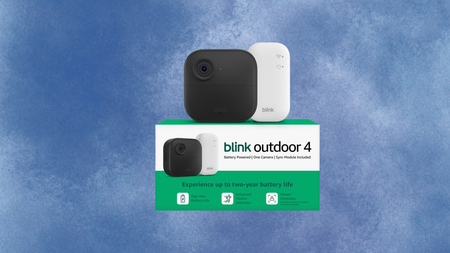
This is a fourth-generation wireless security camera that sets up in minutes, requires no drilling or hardwiring, and runs on two included AA Energizer lithium batteries for up to two years before you need to think about power again.
Advertisement
Video comes through at 1080p HD with a 143-degree diagonal field of view, infrared night vision for low-light coverage, and two-way audio so you can speak directly to whoever is at your door or in your garden from the Blink app on your phone.
The dual-zone enhanced motion detection lets you define exactly which areas of the frame trigger an alert, which cuts down on false notifications from passing cars or shifting shadows rather than actual movement that matters.
Advertisement
Person detection is also available, using embedded computer vision to distinguish a person from an animal or object, though this feature requires an optional Blink Subscription Plan sold separately and is not included in the base price.
Cloud video storage follows the same model, with a 30-day free trial included and a paid subscription needed to keep footage beyond that period, while local backup is possible via a Sync Module XR and MicroSD card, both of which are sold separately.
The included Sync Module Core acts as the system hub, supporting up to ten Blink devices and extending battery life across the camera range, meaning the Blink Outdoor 4 can grow into a wider whole-home setup over time.
Alexa compatibility allows you to pull up a live view, arm or disarm the camera, and set routines using any compatible Amazon device, which makes it a natural fit for households already inside the Amazon ecosystem.
This deal is very much ideal for anyone who wants capable outdoor coverage without a professional installation or a long-term commitment, and $36 saved at today’s price makes it a straightforward decision.
Sealy is a mattress brand that is tried and true for many people, given that it has been around since 1881. That’s a lot of time to refine your product. Sealy has kept pace with the times by offering modern variations like memory foam and hybrid mattresses while also maintaining a strong lineup of traditional innerspring beds.
For example, the Cocoon Chill by Sealy is one of our favorite cooling mattresses that passed our week of testing with flying colors. While I’ve only been in the mattress industry for five years (a blip compared to Sealy’s timeline), I’m the resident sleep writer, reviewer, and certified sleep science coach here at WIRED. These are beds to keep an eye on, especially when they go on sale. Without further ado, here are some Sealy promo codes for this very case.
But if Sealy isn’t the only brand you’re contemplating, you can find our top-tested picks on our best mattresses list, plus the best bedsheets to go with them.
Save $200 on an Ease Power Base With This Sealy Coupon
Sealy doesn’t just make mattresses, and their coupons aren’t just for mattresses—you can also score deals on products like bed frames. The Sealy Ease Power Base allows you to modify the angle of the head and foot of the bed, along with adjustable leg heights to best match your stature. If you plan on getting one to accompany your new Sealy Elite mattress, use Sealy promo code on this page to knock $200 off your bed and Ease power base purchase.
Advertisement
Take $100 Off a Posturepedic Spring Mattress With This Coupon Code
Sealy’s Posturepedic Spring mattress isn’t messing around when it comes to lumbar support. Sealy’s PrecisionFit coils are also working hard within this bed, with firmer coils in the center of the bed right where your spine needs it most—keep that in mind if you have back pain. Gel memory foam layers to keep tension off your pressure points and lower back.
Grab Two Adjustable Support Pillows for $69
Your head and shoulders need as much support as your knees and toes, which is why you’re looking for the best pillow out there and a good deal. Sealy’s got a good thing going with its adjustable pillows, which have the same pressure-relieving memory foam that works to contour around your head. No Sealy promo code needed for this one, because you can bundle to save $29 with a purchase of two pillows.
Get Savings on the Best Mattresses With Sealy
Sealy beds are everywhere. And there’s a reason this mattress is so popular, as they have tons of different models for every type of sleeper. Be sure to check out their complete lineup, including some of their most popular mattresses: the Sealy Posturepedic Hybrid Mattress, the entire Posturepedic Elite Collection, which helps to cradle and support the whole body, and the Cocoon Chill Mattress, ever-popular with hot sleepers who need a cooling mattress.
Sleep on It (Literally) With Sealy’s 90-Night Trial and 10-Year Warranty
Sealy offers you 90 nights and 10 years to back up your new mattress purchase, which is the industry standard. Your body needs at least 30 days to get used to the new bed, and 60 nights beyond that initial timeframe helps you be extra sure it’s the one for you. Ten years is generally how long you can expect a mattress to last, so this is another way of Sealy standing by the durability of its product, whether you plan on buying online or in-store.
Samsung’s Galaxy Book6 Ultra is the latest attempt to take the thin-and-light workstation crown away from Apple’s MacBook Pro. There is a clear winner.
M5 Max 16-inch MacBook Pro [left], Samsung Galaxy Book6 Ultra [right]
The premium notebook market is highly competitive, and Apple has been a big part of that particular industry for decades. The MacBook Pro is synonymous with the concept, being an aluminum-clad slab of portable computing for power users on the go. Many have tried to emulate Apple’s aesthetic, and with some success, too. Even rival companies like Samsung have gone down a similar route with their premium notebooks. Continue Reading on AppleInsider | Discuss on our Forums
Amazon wants 80% of its developers to be using AI every single week
The company is even tracking AI token usage via internal leaderboards
Unwilling workers are using AI where it’s not necessary just to inflate figures
Some Amazon employees are reportedly using the company’s internal agentic AI platform, MeshClaw, to automate unnecessary or trivial parts of their work simply to boost internal AI usage metrics.
This comes as company workers are being pressured from above to use more AI – Amazon wants four in five of its developers to be using the tech weekly, and has since started tracking AI token consumption on internal leaderboards.
With workers adoption still relatively slow, many have turned to behavior described as ‘tokenmaxxing’ to artificially inflate their AI usage metrics, the Financial Timeshas reported.
Latest Videos From
Advertisement
Amazon workers are pretending to use AI more than they are
MeshClaw is one of the company’s internal systems designed to support the adoption of AI, allowing employees to create their own AI agents to navigate software, coding, emails and other regular workflows.
But workers are now said to be optimizing their usage to maximize token counts rather than useful outcomes, ultimately leading to unnecessary AI calls that are increasing Amazon’s compute costs without delivering true ROI.
And it’s not just Amazon looking to drive AI adoption internally, with Meta, Microsoft and other companies also reportedly gamifying uptake with internal leaderboards.
However, a recent study by engineering analytics firm Jellyfish (via Business Insider) reveals that, while the heaviest AI users consumed around 10x more tokens than average, they only achieved a 2x increase in productivity.
Advertisement
Sign up to the TechRadar Pro newsletter to get all the top news, opinion, features and guidance your business needs to succeed!
Conversely, Nvidia CEO Jensen Huang said in an interview with the All-In Podcast he would be “deeply alarmed” if workers like software engineers or AI researchers didn’t use half their annual salary’s worth of AI tokens annually – that’s $250,000 in tokens for a $500,000 worker.
We may receive a commission on purchases made from links.
Folks looking to upgrade their day-to-day lives with smart technology have no particular shortage of options, with most of the major tech companies offering devices to manage almost any scenario you can fathom. But in the smart assistant game, it really comes down to a few major players in Apple’s Siri, Google’s Gemini (and its former iteration, Google Assistant), and, of course, Amazon’s very own Alexa.
Those AI assistants no doubt play a big role in the lives of most folks in the modern world. However, Alexa may own a slight advantage over the competition when it comes to hardware due solely to its ties to Amazon, which happens to be the largest e-commerce outlet in existence by a pretty wide margin. To that end, most of the major manufacturers of tech now make devices that are compatible with Alexa.
Advertisement
Amazon, naturally, also makes an entire line of smart devices that are Alexa enabled and ready to make your life a little easier whether you’re at home or out and about for the day. For this particular list, we’re focusing on that set of smart devices. Similarly, we are keeping to options which can be purchased directly through Amazon, as it sometimes must make sense to buy directly from the source. In any case, if you are looking for Alexa ready devices for your home and beyond, here’s a look at a few of the cheapest you can currently buy through Amazon.
Advertisement
Smart Display: Echo Show 5 – $89.99
Many of Amazon’s Alexa enabled devices are, of course, designed to provide some level of service to users by allowing them to control compatible devices through a single digital point of origin. Some of those devices are, however, are also geared towards providing users with entertainment options, and one of the more popular Alexa devices in that list is the SlashGear-approved Amazon Echo Show 5.
If you’re interested in the entertainment enabled device to your Alexa array, you can add an Echo Show 5 for a typical retail price of $89.99. It should be noted that the sticker price may be even lower on occasions when Amazon is running a sale. For that price, you get an Alexa device that is equipped with a 5.5-inch screen that can indeed be used to stream news programs and your favorite shows from Amazon and any number of streamers. The device can also be used to stream music from your favorite artists, with Amazon claiming dramatic upgrades in the audio setup over previous generations.
On top of that, you can connect the device to doorbell cameras like those from Ring, which is, of course, owned by Amazon. The Echo Show 5 can also be used for video calls if you like, and even possesses some smart home hub capabilities that can help you control smart lights, smart thermostats and your home security system. It can also serve as a digital frame for your favorite photographs.
Advertisement
Smart Speaker: Echo Pop – $39.99
If you don’t need an Alexa device equipped with all that video capability, and just want a little something that can help you kick out the jams in your kitchen, office or bedroom, Amazon’s Echo Pop may be just the stripped back speaker you need. It is also one of the cheaper Alexa enabled devices that Amazon makes, with the online retailer selling it for just $39.99 these days.
Don’t let the term “stripped back” put you off of this little speaker, as it is as well-designed and developed as any of Amazon’s Alexa devices. Though it may be small in stature, it’s also built to provide some solid punch on the audio front, with Amazon claiming it’ll easily fill any average sized room with big sound. It’ll do so directly through Alexa or through a mobile device connected via Bluetooth if you prefer to blast a playlist from your favorite streamer.
Advertisement
Its Alexa capabilities also extend to the control of certain smart devices like lights and plugs via voice commands. Like many other Alexa devices, the Echo Pop can also answer any number of questions, and is fitted with the now common light bar that lets you know when the AI assistant is engaged and when it’s not. According to Amazon, the device is pretty eco-friendly too, with its fabric covering made of 100% post consumer recycled yarn, and its casing being manufactured from 80% recycled aluminum. For the record, it’s also equipped to run the new Alexa+ program.
Advertisement
Smart Car Companion: Echo Auto – $54.99
Amazon does make a few devices that allow you to take Alexa with you. Its Echo Buds wireless earbuds would likely have been the accessory listed here if they hadn’t been listed as “currently unavailable” through Amazon for some time now. Even as some might think Alexa shouldn’t have a place in a moving car, the Echo Auto accessory is designed to put the AI assistant there for any vehicle owner who does.
No, the Echo Auto does not put Alexa at the wheel of our vehicle. Rather, this device is designed to provide more hands-free functionality to drivers on the road. The microphone equipped device — it’s actually got 5-mics built in to ensure you are heard over in-cabin noise – is designed to mount anywhere in your vehicle, and is powered/connected to it via USB connection. Once it’s up and running, you’ve basically got a mobile Alexa device that can perform many of the same functions as the one in your living room, and will do so by way of simple voice commands.
That list includes playing music, podcasts or radio broadcasts, sending text messages and making phone calls. You can also connect the device to your Alexa enabled home hub and use it to engage smart locks on your home, turn lights on and off inside, and even adjust the thermostat while away. Echo Auto may seem like overkill to some, but at $54.99, many may be willing to give it a go.
Advertisement
Smart Alarm Clock: Echo Spot – $79.99
In the context of smart home upgrades, alarm clocks are one place where technology has largely failed us, because, well, even as necessary as they are, they are still just infuriatingly loud and limited in personalization. We’re not here to make any claims that Amazon has fixed the long-running alarm clock conundrum. Nonetheless, the Echo Spot Alarm Clock feels like a solid enough step in the right direction if you’re looking for a new one.
The first version of the Spot was, of course, discontinued a couple of years back. The re-imagined Spot is basically a modified version of the Echo Dot, with Amazon flattening the face of that high-tech orb and replacing it with a flat surface that is half shiny digital display and half speaker. That display is customizable to each user’s needs, but is also designed to prominently feature the time, the date and the temperature. Perhaps more importantly, the device allows users to tailor their wake-up routine to their specific desires, making it easier than ever to rise and shine on your own terms.
Advertisement
Yes, like most Alexa tech, the Echo Spot is also equipped to play music, audiobooks, and podcasts at your request, and provide a myriad of other voice-activated functions. It can also connect to your home hub and aid actions like dimming lights, and can even use motion detection to tweak the thermostat in your home. At $79.99, it’s also a pretty affordable option for such a major alarm clock upgrade.
Advertisement
Smart Home Hub: Echo Hub 8 – $179.99
In the smart home tech market, the home hub is essentially one device to rule them all sort of option. By that standard, “cheap” is sort of a relative term, as the hub offers such a wide range of functionality. Still, there are plenty of budget-friendly smart home hub options on the market, with Amazon’s Alexa enabled Echo Hub 8 — which can be purchased for well under $200 — ranking among them.
For the record, Echo Hub 8 typically sells for $179.99, and yes, the device is indeed compatible with Amazon’s upgraded Alexa+ AI assistant. That means it can be used to run thousands of other compatible devices and seriously streamline your smart home setup. Fronting an 8-inch touch screen, the wall-mountable Echo Hub can be plugged into a standard outlet or hard-wired for a cleaner on-wall look. It’s also easy to set up via the voice command, “Alexa, discover my devices.”
As for what that hub will discover, you can count pretty much any Alexa smart device on that list, as well as a myriad of others, with the easy-to-use Echo Hub able to operate lighting and smart plugs in every room in the house. It can also adjust the thermostat, operate any connected speaker systems, show feeds from doorbell and other security cameras, and provide easy-access control over home security systems. You can even connect it to your smartphone through the Alexa App so you can check the status of all of those smart devices and setting while you’re out.
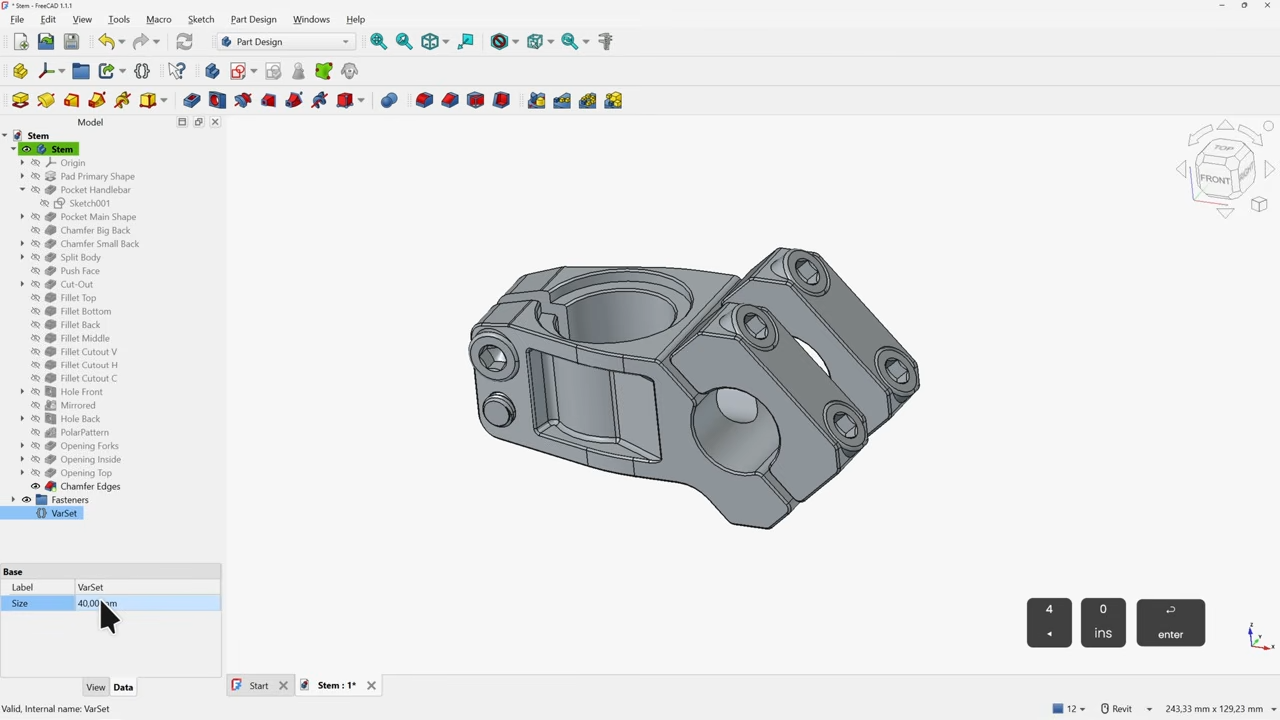
If you’ve been interested in FreeCAD but haven’t known where to start, here’s a wonderful video tutorial for FreeCAD 1.1 by [Deltahedra] aimed squarely at how to model a 3D part from scratch while also following best engineering practices for part design. It focuses on a concise and meaningful workflow that respects your time and doesn’t make assumptions about skill level. It even starts by taking a few moments to explain how to navigate the interface, a courtesy many will appreciate.
FreeCAD can do quite a lot, so a tutorial that focuses on a specific yet broadly-applicable task with a clear context is a great way to narrow the scope into something manageable, and be comprehensive without getting bogged down in minutiae. [Deltahedra] does this by exclusively using the part design workbench, demonstrating what to do to make a part step-by-step, and showing common mistakes that can happen and how to fix them if they occur. Beyond that, it’s left up to the curious hacker to delve for themselves into what else FreeCAD has to offer.
Since 1.1 is (at this writing) the latest stable release, one can also be confident that the tutorial will match the user interface and features one sees on their own screen. After all, it can be frustrating to attempt to follow a tutorial only to find out things are a few versions behind and nothing is where one expects it to be.
Advertisement
Best practices aren’t just fussy rules about how to do things, and [Deltahedra] demonstrates this by showing how certain procedures just plain make more sense when designing shapes. Our own Arya Voronova has also shared best practices for FreeCAD, so check that out for some added perspective. You’ll be wielding FreeCAD in confidence and comfort in no time.



























































You must be logged in to post a comment Login