

Tech
Will Big Tech Layoffs Bring a Culture Shift to Anxiety and Job Insecurity?


Tech industry layoffs may be worse at large tech companies than the rest of the IT industry. The New York Times argues those layoffs have now shifted the culture at Big Tech companies, after interviewing more than two dozen of their workers. “Cooperation and collegiality are on the wane; chumminess between employees and managers has cooled as mutual suspicion pervades their relationships; and a throbbing economic anxiety infects almost every conversation.
“Perhaps no site on the internet reflects this transformation more vividly than Blind, where users can post in private channels restricted to employees of a single company, or public channels visible to anyone…”
Since 2022, large tech companies have collectively laid off more than 150,000 workers, unraveling what many tech workers once perceived as a guarantee of affluence and employability. The threat of being replaced by artificial intelligence has loomed over those who remain. This year alone, Amazon has indicated that it is laying off more than 15,000 workers, Block 4,000, Meta 8,000 and Oracle an estimated 30,000… By most measures, the sentiments that Blind tracks have taken a turn for the worse. During the nearly four years before tech companies began major layoffs in the fall of 2022, Meta and Microsoft employees posted about career success — topics like how to maximize their salary or win promotions — more than four times as often as they posted about job insecurity, according to Blind. Since then, the ratios have lurched in the opposite direction: Meta and Microsoft employees have posted about job insecurity roughly 1.5 times as often as they post about success…
The shift has had practical effects. A Meta employee said in an interview that some workers on her team now used less vacation time and that, in a break with custom, people frequently checked on their projects while on vacation. They increasingly worry about getting a poor performance review or losing their job if they aren’t constantly available. The employee, who declined to be identified for fear of retribution, said she and many of her colleagues frequently checked Blind because it could be comforting to see how many other Meta workers shared their anxieties. Employees at several companies said in interviews that their morale was further undermined by the feeling that the layoffs were abrupt and arbitrary, and executed with little empathy.
Several tech workers said it was the scarcity of information about possible layoffs that raised their cortisol levels and made it difficult to focus on their jobs. They often fill the vacuum by turning to Blind, which, in addition to posts by workers, features a “tech layoff tracker” that lists both layoff rumors and those it has confirmed. “I was on Blind five days a week,” said Faith Wilkins El, a software engineer who was laid off from Oracle in late March, after more than four years at the company. Wilkins El, who is part of the Oracle Workers Collective, a group seeking better severance agreements with the company, said navigating Blind was sometimes stressful because it was hard to know what was true or false. (Blind says it has a security team to weed out bad actors, like those who may try to register under fake email addresses.) Still, she found it more helpful than not because the layoffs came as less of a shock after she spent time on the site. “I was trying to get prepared mentally,” she said.
Blind is capitalizing on the increased interest with new products. It plans to unveil a service called Blind AI, which will allow employers to simulate their workers’ reactions to certain changes, like a stricter in-office mandate. And it is close to releasing a feature to alert users that layoffs are imminent.


“I’m just not a good writer.”
It’s a phrase teachers hear too often, usually at the exact moment a writing task is assigned. For many students, the leap from understanding a concept to putting it on paper feels like an impossible hurdle. Writing is often treated as a final “reveal” of learning at the end of a unit — potentially a high-pressure task that can feel overwhelming for students who haven’t been given a clear roadmap.
Educators are increasingly recognizing that to help students succeed, they have to move beyond simply assigning writing and start explicitly teaching it.
Dr. Barrie Olson
Vice President, Reading Curriculum & Instruction, Curriculum Associates
To explore how to make this shift, EdSurge caught up with Dr. Barrie Olson, vice president of reading curriculum and instruction at Curriculum Associates. Drawing on her experience as a literacy designer and former college professor, Olson discusses why students struggle with the demands of writing and how a “backward design” approach can transform writing instruction in the classroom.
EdSurge: We’ve seen a major shift toward research-based, explicit reading instruction over the past decade. Is writing on a similar trajectory? What does strong instruction look like in practice?
Olson: The research base around writing is clear: Students become stronger writers when instruction is explicit, structured and grounded in knowledge-building content. So when we think about strong writing instruction, it is not about assigning more essays; it’s really about directly teaching the craft of writing.
We have to clarify the final product to bring that necessary focus and coherence to instruction. Each lesson across a unit should move students incrementally closer to that final writing task.
What are the most common reasons students struggle with writing, and what do those challenges look like in real classrooms?
It’s important to remember that writing is one of the most cognitively demanding things that students do in a classroom. Writing asks students to generate ideas, organize those ideas, select evidence, construct sentences and monitor conventions — all at the same time. For many students, that cognitive load can feel overwhelming.
I think a lot of writing struggles stem from gaps in foundational writing skills. So students may not have had enough structured practice to organize their thinking, or they may struggle to express ideas orally, which, if you think about it, is just going to make it that much harder for them to then get it down on paper.
For teachers looking to strengthen writing instruction, what first step makes the biggest difference?
Writing is one of the most cognitively demanding things that students do in a classroom.— Dr. Barrie Olson
The most powerful starting point is backward design. It starts not with “What is the teacher doing with the student?” but with the teacher asking, “What do I want students to be able to produce at the end of this unit? Is it a literary analysis? Is it an evidence-based argument? Is it an explanatory essay? And then what kind of thinking do I want to see from my students?” Once that endpoint is clear, teachers can plan a coherent sequence of lessons that build the necessary skills step by step.
Writing prompts play a central role in instruction. What makes a writing prompt truly effective for students?
What I always tell people is that the quality of student writing is determined by the quality of the prompt. Are we giving them the information they need to be successful at this task? We see people who want to use shorter prompts or less complex ones. They think it’s easier when, in fact, vague prompts increase the cognitive load for students because they are left guessing.
Clear prompts make instruction and assessment stronger because they can be aligned with explicit teaching. A well-designed prompt might feel hard, but it sets these students up for success because it is transparent about expectations. Any writing prompt should require students to return to the text, to quote, analyze and explain, which reinforces close reading skills while strengthening writing.
Even with strong prompts, writing can feel overwhelming. How can teachers scaffold tasks without oversimplifying?
When we talk about scaffolding writing, the key is chunking complexity. It is also starting much earlier than most people realize. Work doesn’t begin the day that students are told, “Hey, start your essay.” It begins on the first day of the unit. The key is not lowering the bar. The scaffolds and progression make rigorous writing achievable for all students.
The most powerful starting point is backward design. It starts not with “What is the teacher doing with the student?” but with the teacher asking, “What do I want students to be able to produce at the end of this unit?”— Olson
These scaffolds not only help students get where they need to be and give them a clear sense of purpose, but they also send a really important message: Learning involves collecting information, layering it onto what we already know and then communicating what we’ve learned.
Why is it important to teach reading and writing together, and how can teachers integrate them in daily instruction?
Reading and writing are reciprocal processes. When students analyze a text’s structure, an author’s argument or use of evidence, they’re building a blueprint for their own writing. Teaching reading and writing together makes literacy instruction more efficient and impactful because writing becomes a tool for thinking. It’s a cycle: Stronger reading leads to stronger writing, and stronger writing helps students defend their thinking and deepen comprehension.
I want to walk into a classroom that’s loud because kids are so excited about what they’re learning that they can’t keep it in. Writing gives them a way to leave a permanent record of their thinking.
This article was sponsored by Curriculum Associates and produced by the Solutions Studio team.
YouTube officially announced that its in-app video sharing and messaging feature is now rolling out to the US, UK, Brazil, and Singapore, bringing the total number of supported countries to 40.
The feature is available to users aged 18 and older who are logged into a YouTube channel. The rollout is gradual, so it may not appear in your app immediately.
How to DM on YouTube?

Once the feature is enabled for you, a messaging icon appears in the top right corner of the app. You can also share any video or Short directly from the Share button while watching.
The catch is that starting a conversation is not as simple as searching for someone. You have to send an invite link first, and that link must go out through a third-party app like WhatsApp, iMessage, or SMS. The other person then accepts the invite and gets added to your YouTube contacts. This extra step is designed to prevent spam and unwanted messages.
Once connected, you can send text messages freely, react to content in real time, unsend messages by long-pressing them, delete entire conversations, and block or report contacts if needed. The only media you can share inside the chat is YouTube content, including videos, livestreams, and Shorts. No images, GIFs, or files allowed.
Why is YouTube bringing messaging back now?

YouTube had a direct messaging feature in 2017, but it was quietly killed off in 2019. Now, it’s back once again in a much bigger way.
The feature has already been available in over 30 European countries since March 2026. YouTube says the positive response from countries where the feature was already live drove the decision to expand. Recently, the platform also added three new podcast features, but they are only for Premium subscribers.
There was a time when smartphones rarely crossed the 5-inch mark. As the years have passed, though, screen sizes on smartphones have grown, with many devices now soaring past 6.5 inches. While there are still a handful of great compact phones, most mainstream devices are now designed around bigger screens that are generally better suited for content consumption and gaming.
Big smartphones also often pack in larger batteries, more powerful internals, and ample space for cooling. If you’re in the market for one, the good news is that you won’t have to look very hard. We’ve compiled a list of our favorite giant-screened smartphones you can buy in 2026. Since most devices — across different price points — sport screen sizes of 6.5 inches or more, we’re considering premium phones with displays measuring around 6.9 inches to be truly gigantic.
It’s worth noting that while foldables like the Galaxy Z Fold 7 technically unfold into tablet-sized displays, we’ve limited our picks to traditional candybar-style smartphones. This way, you still get to experience the perks of a larger screen without having to deal with the compromises that come with foldable smartphones.
OnePlus 15
OnePlus might not be a household name in the U.S., but it enjoys a very loyal user base owing to its mantra of producing flagship-level hardware at comparatively affordable price points. The company’s flagship for 2026 is the OnePlus 15 — a $900 offering that rivals the likes of the iPhone 17 Pro and Galaxy S26 Ultra in terms of performance. It also happens to sport a generous 6.78-inch LTPO AMOLED display, with thin, uniform bezels all around and a tiny notch to house the front-facing camera.
If you’re looking to maximize screen real estate for movies you’re watching or games you’re playing, the OnePlus 15 provides an excellent experience. The display’s hallmark feature this year is its ability to hit 165Hz in supported games. Being backed by the Snapdragon 8 Elite Gen 5 SoC, the OnePlus 15 is probably one of the most powerful smartphones you can buy currently that makes good use of its internals.
The display also supports HDR10+ and Dolby Vision and gets plenty bright outdoors with a peak brightness of 1,800 nits. Furthermore, OxygenOS remains one of the smoothest ways to experience Android. In our review of the OnePlus 15, we were particularly impressed with its 7,300 mAh silicon carbon battery, which lasted much longer than a single day in our test. The bundled 80W (or 120W in certain regions) SuperVOOC fast charger is simply the cherry on top.
Google Pixel 10 Pro XL
At 6.8 inches, the Pixel 10 Pro XL by Google certainly lives up to its name. While Pixel smartphones aren’t necessarily known for their outright performance or endurance, they are a great option for those looking to enjoy Android in its purest form. Priced at $1,200, the Pixel 10 Pro XL features an LTPO OLED display that can hit refresh rates up to 120Hz. Google calls it a Super Actua display, which is just a fancy way of saying it can get really bright outdoors, with the display capable of up to 3,300 nits of peak brightness.
The bezels aren’t as slim as other flagships, but they’re uniform and are accompanied by a small enough notch for the front-facing camera. If you’re eyeing a Pixel, you’re likely doing it for the software experience and camera performance, both of which, as we’ve discussed in our review of the Pixel 10 Pro XL, are still among the best in the industry. Google promises up to seven years of major operating system updates, which include frequent Pixel Drops that introduce exciting new features.
Apple iPhone 17 Pro Max
Apple went from releasing one or two smartphones a year to maintaining an entire fleet of iPhones — from the affordable iPhone 17e to the design-focused iPhone Air. The top-of-the-line iPhone 17 Pro Max is the most powerful smartphone the company sells, and it also happens to be the largest. It sports a mammoth 6.9-inch Super Retina XDR OLED display with a peak brightness of 3,000 nits. There’s support for HDR10 and Dolby Vision, and since this is a ProMotion panel, you get a 120Hz refresh rate, too.
Surprisingly, even with a much bigger notch that houses the Face ID scanner in addition to the front-facing camera, the iPhone 17 Pro Max boasts a higher screen-to-body ratio compared to the Pixel 10 Pro XL, thanks to its ultra-slim uniform bezels. The notch does get in the way when viewing widescreen movies, but human eyes are remarkably good at tuning it out in a few minutes. Besides, the Dynamic Island housed in that notch offers some genuinely useful ways to interact with Live Activities on the iPhone.
Pricing starts at $1,200, which gets you Apple’s most powerful smartphone chip, the A19 Pro. Aside from its screen and performance, our review of the iPhone 17 Pro Max also found that its triple-camera setup is great at capturing natural-looking photos and that the phone’s large battery lasts all day. Apple is also great with OS updates, with the iOS 27 update scheduled for fall 2026 promising performance and stability improvements and an updated version of Siri.
Samsung Galaxy S26 Ultra
If you’re in the market for a high-octane Android phone with reliable cameras, the Galaxy S26 Ultra is difficult to beat. It’s powered by the Snapdragon 8 Elite Gen 5 chip and houses a quad-camera setup on the rear, including a 200-megapixel primary lens, two telephoto lenses, and an ultrawide sensor. Also impossible to ignore on every Galaxy S Ultra flagship is the display. This time, you get a giant 6.9-inch 120Hz AMOLED panel with a peak brightness of 2,600 nits. The display has slim bezels and a tiny hole-punch cutout for the front-facing camera.
The Galaxy S26 Ultra also offers an anti-reflective coating, which helps reduce glare when using it under harsh lighting. We’ve reviewed previous generations of the Galaxy S Ultra before, and although the changes have been pretty incremental since, it continues to offer some of the best multimedia experiences you can get on a smartphone.
Samsung’s flagship also has something that every other mainstream smartphone, irrespective of screen size, lacks — a built-in stylus. The S Pen is a great way to make the most of the Galaxy S26 Ultra’s massive display for taking notes, doodling, or simply editing images with greater precision. On top of that, Samsung’s Galaxy AI features continue to grow, and the manufacturer promises up to seven years of OS updates as well. Pricing starts at $1,300, making it as expensive as it is big.

A common complaint about the rise of commercial AI services is that they are power-hungry and thus damage the environment. If this concerns you then [Squeezlabs] has the solution, in the form of an AI powered by a handcrank.
The guts of the system is a Raspberry Pi 5 running llama.cpp and appropriate speech conversions, but it and the Large Language Model (LLM) side are not the most interesting part of this system. The power comes from a hand crank charger of the type you’ll see for sale on the likes of AliExpress, designed for USB charging. That in itself is not enough to power the Pi though, as upticks in the processing can cause brownouts that crash the machine. Thus there’s a custom-made capacitor board to take up the strain, and even with that the handle resistance varies significantly depending on the computing load.
We can see that this is not the ideal way to experience an LLM, but maybe that’s not the point. It does however point towards a future in which the power demands of processing decrease and less effort is required. Meanwhile, this is by no means the first hand cranked project we’ve seen.
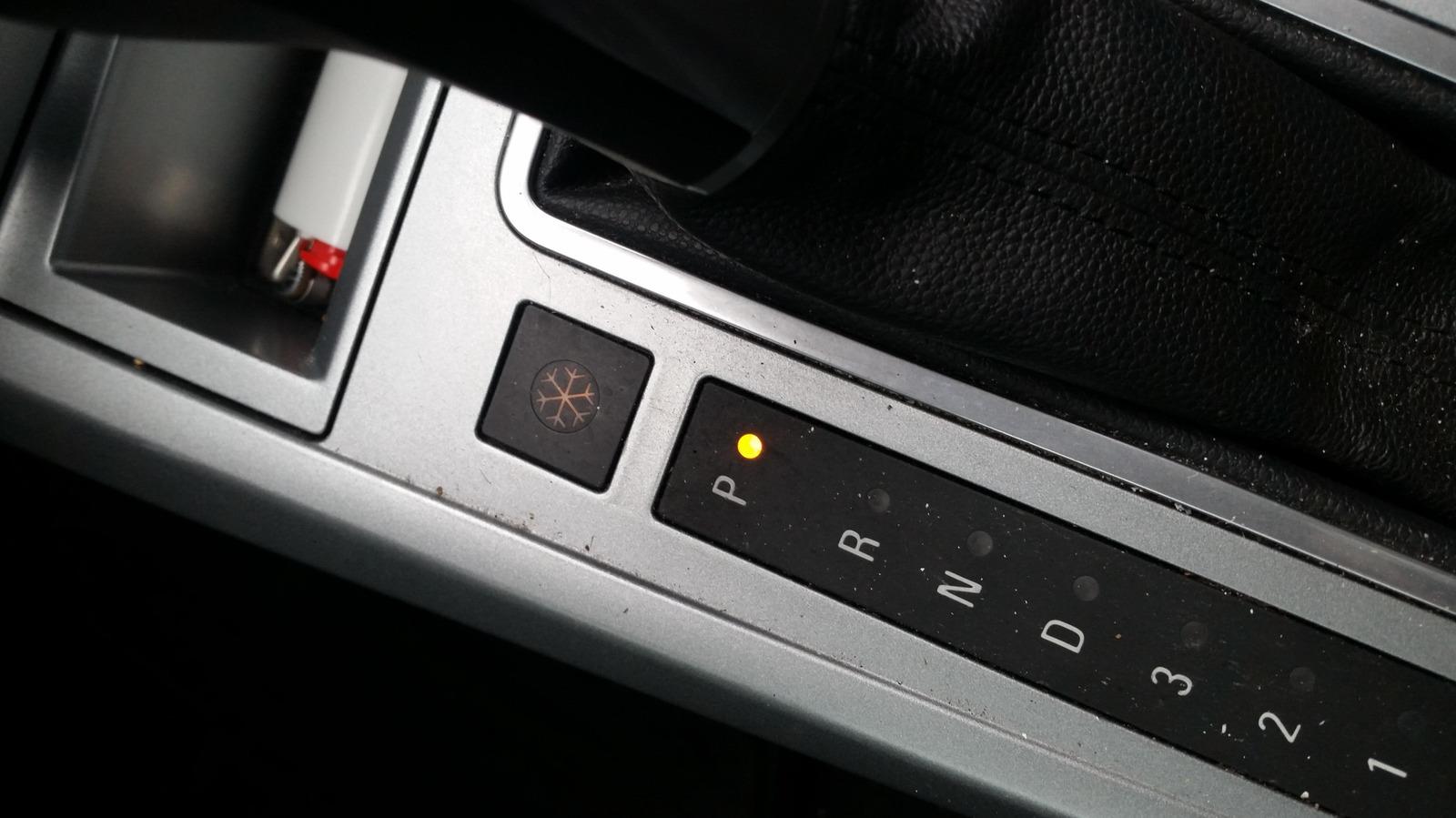
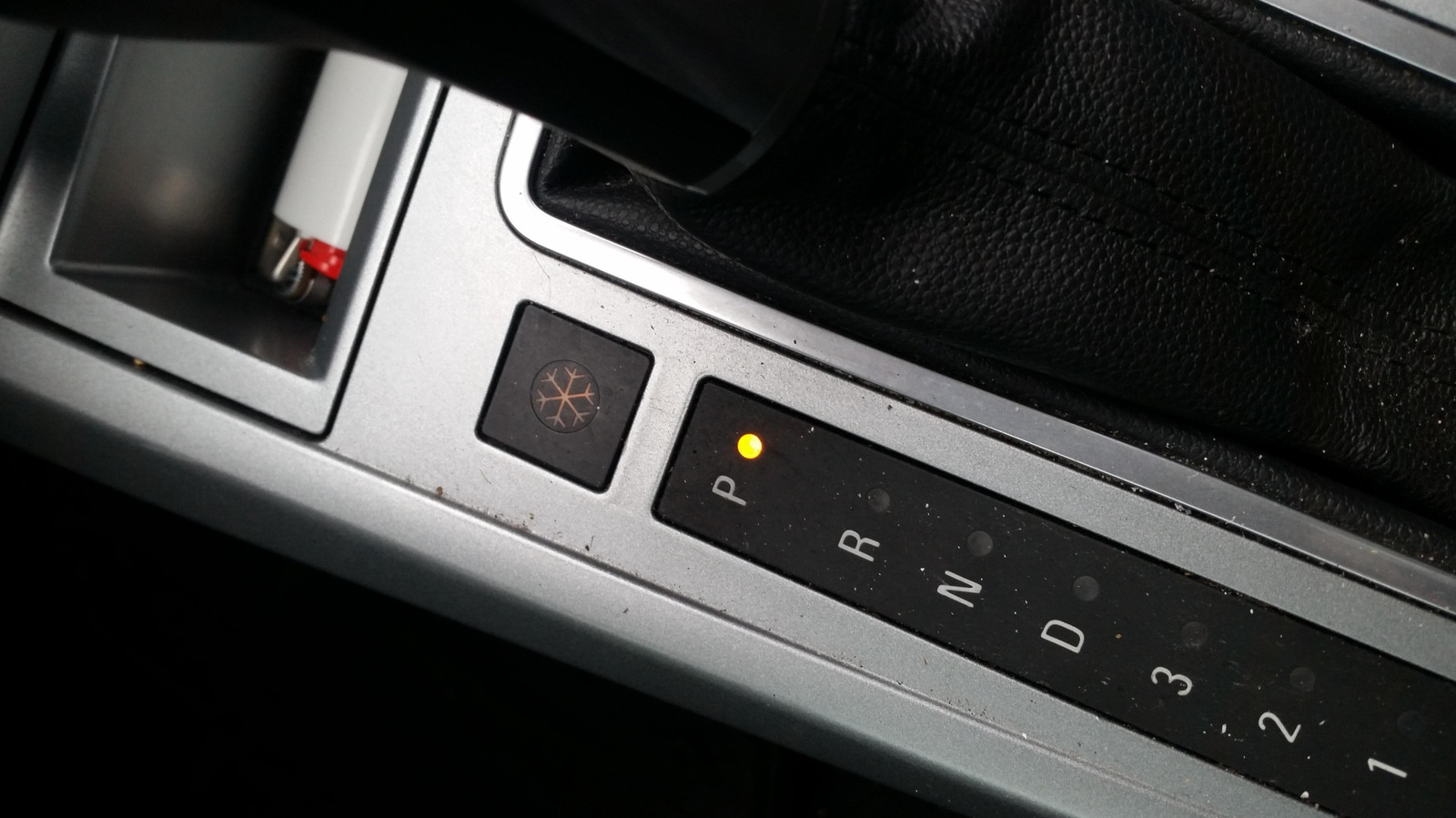
Depending on the car you have and the region it’s sold in, you may have spotted a little snowflake button sitting somewhere near your gear shift. You might be wondering what it does, and even more so if you’ve also got another snowflake button in your car, sitting near the climate controls. The short answer is that it turns on a dedicated Snow Mode, a driver setting that tunes your car for snowy and slippery conditions.
In that kind of weather, it’s very easy for your wheels to spin too quickly and lose traction, so to make up for that, Snow Mode makes your car slower to react when your foot lands on the accelerator. At the same time, the transmission changes its habits, shifting into higher gears earlier than normal – so early, in fact, that it sometimes pulls away in second gear rather than first. Even the traction control, which you should never turn off, gets jumpier and steps in sooner, especially when it senses a wheel losing grip. In Hyundai’s version (available on the Tucson, Venue, and Santa Fe), the wheel spin is checked every fiftieth of a second, and if one tire starts to slide, it quietly shuffles torque over to the others, helping keep you pointed where you actually meant to go.
Snow mode comes in various flavors
Of course, plenty of other brands offer the mode besides Hyundai. On Toyota and Lexus, you actually get proper buttons. Hop into a Highlander, for instance, and you’ll see a Snow button right on the center console, sometimes badged ECT Snow. Lexus uses a near-identical button or switch. Subaru runs its own take too, only it badges the whole thing X-Mode instead of Snow. It’s actually mostly older cars that slap the snowflake symbol on the button, though, like the Saturn Astra.
On most other brands, the snow mode is tucked in alongside their other drive modes. Hyundai routes it through Drive Mode Select, while Ford spins it onto a rotary dial, where it’s sometimes called Slippery Mode. Then there’s Land Rover, which folds it into a combined Grass, Gravel and Snow setting. The mode may be badged differently as well, like Winter or a plain W. On newer models, you may not get any physical button or dial at all and might have to dig through the touchscreen menus to find it. However it’s presented, it basically works the same way across companies, mostly softening the throttle and reining in wheelspin.
When to use snow mode
As for when to use it, the rule of thumb is pretty simple. It’s meant to be flipped on the moment the road turns nasty, whether that’s fresh snow, packed ice, or freezing rain. It also helps when you’re crawling up a slick hill. And some folks even use it in mud, if there’s no dedicated mode for that, since the same low-grip logic applies. The setting is usually pretty flexible too, and you don’t necessarily have to be parked to switch it on. Volkswagen, for one, lets you jump into Snow Mode mid-drive.
As for the other side of things, the mode doesn’t do anything that’d make it unsafe under normal conditions. Still, running it then is pointless since it dulls your acceleration and quietly eats into your fuel economy, so it’s best to flip it off once the pavement is dry. Just keep in mind that it isn’t magic. All it really does is make your car a bit less excitable so it doesn’t get away from you. It won’t save bald tires or rescue you off a sheet of ice. For those more extreme cases, you’d be better off fitting your tires with some of the best tire chains.
Earlier this year, FIFA named YouTube a preferred partner for experiencing the World Cup 2026. On Wednesday, the next step in this partnership was announced, with the inaugural YouTube FIFA Creator Cup. It’s an exhibition match that’ll feature popular content creators from the platform, as well as athletes and celebrities. It’ll take place in New York City on July 12, ahead of the FIFA World Cup Final.
The Creator Cup is the latest step in FIFA’s moves to broaden soccer’s appeal through creator-involved content, potentially reaching the platform’s digital audience. The creators, athletes and celebrities competing in the match will be announced closer to the date.
Being a FIFA preferred partner means YouTube will, for the first time ever, broadcast unique World Cup-themed coverage — including the ability for viewers to stream the first 10 minutes of each game live on approved creators’ channels.
The roster of approved creators includes: Anwar Jibawi, Ara y Fer, Ashley Alexander, Celine Dept, Courtreezy, Deestroying, Haley Kalil, Horchata Soto, Howieazy, Jeenie Weenie, Jenny Hoyos, Jesser, Kelly Wakasa, Kika Kim, KYLECTRIX, Kwak Yoongy, Max the Meat Guy, Neagle, Noor Stars, The Sidemen, Sonrixs, TokaiOnAirRYO, Viniblogger and Zhong.
According to the platform, these creators have collectively amassed more than 350 million subscribers, all specializing in different content niches from sports analysis to food features, social challenges and travel videos. This means you’ll have an array of options to choose from for unique programming featuring your favorite YouTube personalities, all while still getting your World Cup fix.
A YouTube spokesperson didn’t immediately respond to our request for further comment.

Algorithms. Beauty filters. Endless scrolling.
The case over “social media addiction” against Meta and Google in a California courtroom ultimately came down to these elements, legal experts say, and what a jury found was negligence on social media companies’ part when designing apps where tweens and teens would come to spend roughly one-fifth of their day.
Joseph McNally, former federal prosecutor and director of Emerging Torts and Litigation at McNicholas & McNicholas in California, says jurors agreed with the novel legal argument that Meta and Google were negligent in their design of Instagram and YouTube, respectively, contributing to the mental health problems of the plaintiff. Parent companies of Snapchat and TikTok settled with the plaintiffs before the trial.
McNally and other experts tell EdSurge the verdict will affect thousands of similar cases and influence how tech companies roll out their features — and that the legal tussle over where liability falls when it comes to youth mental health isn’t over yet. With the social media giants vowing to appeal, the case could end up before the U.S. Supreme Court.
Email Evidence
The impact left by the presentation of internal company emails was undeniable, McNally says. Internal Meta communications showed that employees raised alarms about the potential harm to teen girls posed by a beauty filter. Documents also showed they knew that users much younger than 13 — the minimum age required for sign up — were on their platforms, he adds.
“They looked the other way because — the plaintiffs argued — they had a long-term benefit, long-term value of hooking those users early,” McNally says. “I think that the emails painted a picture of a company whose own employees were raising concerns about features in the product, and the plaintiff effectively used those emails to show that they knew about the risk of the product.”
“Addictive” Design
If Meta and Google had settled, the court wouldn’t have had cause to grapple with the legal question of whether social media companies can be held liable for harm caused by their design. But from the defense’s perspective, tech companies had been solidly protected by Section 230 in the past, explains Princess Uchekwe, corporate attorney and founder of The Chief Counsel in New York. That’s the part of the 1996 Communications Decency Act that shields websites and online platforms from being sued over content posted by users.
Just one day before the California verdict, a New Mexico jury found Meta liable in a $375 million consumer protection lawsuit over its failure to protect children from social media harm on its platforms.
“What the lawyers for the plaintiffs were arguing is, essentially, it’s not the content that we have a problem with,” Uchekwe says, “It’s the fact that when people use your platform, you have implemented certain features that make it almost impossible for people to leave. You can scroll into the bottomless pit of hell on Instagram, and nothing ever tells you, ‘Maybe you should pause.’”
NEWSLETTERS
STAY AHEAD IN EDUCATION.
Sign up for EdSurge newsletters for timely news, insights and analysis.
The Appeal of an Appeal
The $6 million in damages is a drop in the bucket for the two social media giants, but McNally says there are potential benefits to appealing the ruling anyway. There are thousands more consumer lawsuits against social media companies around the country, with school districts joining as plaintiffs.
One is that an appellate court might find that the long-time protections that social media companies have relied on should have come into play. The verdict barreled through the defenses raised by Section 230, which protects platforms from claims of harm caused by third-party content. It’s a policy that makes a free and open internet possible.
“[Section] 230 has resulted in the dismissal of hundreds of lawsuits over the years where they would’ve otherwise faced hundreds of millions of dollars in liability,” McNally says. “An appeal [based on] Section 230, which is a federal statute, could make its way up to the Supreme Court, who would have the final word on the scope. [If the] court of appeals remanded it back to the trial court and said, ‘Look, Section 230 applies,’ it would essentially bar these claims [of harm caused by the design].”
Uchekwe says failure to win an appeal could be “almost devastating” for tech companies due to the sheer amount of damages they could have to pay across thousands of similar lawsuits, along with the cost of restructuring how their apps function. That could mean rethinking features like targeted algorithms, the ability to endlessly scroll and notifications that draw users back into the app.
“Not only social media companies,” Uchekwe says, “all tech companies that have implemented things like that, especially if they have children as a base, are going to have to start reconsidering.”
First Amendment Question
There’s also a First Amendment case to be made, McNally adds. Some legal experts, including UC Berkeley law professor Erwin Chemerinsky, argue that the “addictive” algorithms that came under fire during the trial are protected free speech. If that argument succeeds on appeal, it could stop the legal cases arguing product liability in their tracks.
“If the Supreme Court overturned it based on Section 230 and the First Amendment, it’s unlikely there’s going to be a new trial. It would likely be dismissed,” McNally says. “I won’t say that with certainty, but the prospects of dismissal would be pretty good for the defendants.”
Ripple Effect
McNally says the fact that a jury ruled Meta and Google’s app features were “unreasonably unsafe for its users” creates challenges for them in the swaths of similar lawsuits they’re facing. Plaintiffs in those cases still must prove a direct link between the social media companies and the harm they’re alleging.
“I think it’s going to result in some cases probably moving closer to settlement, but in all those cases, I think that the defendants are going to be looking closely at the causation issue,” McNally says. “There’s probably other cases out there where the evidence of causation is not as strong, and those cases may be harder for a plaintiff to get across the finish line.”
Uchekwe predicts that if the verdict sticks, tech companies — especially those with users who are under 18 — will be forced to retool their app features to encourage users to spend less time on their platforms. That could hurt the companies’ ad revenue and their ability to gather data on users.
“Undoing some of those things may decrease their bottom line, but I’m not sure it will do it to the extent that it’s detrimental to their revenue,” Uchekwe says. “If you weigh the benefits of putting these safeguards in for children versus your revenue, I never think that your profit should come at the expense of a generation of people.”
Nadia Tamez-Robledo (@nadiatamezr) is a reporter covering K-12 education for EdSurge with focuses on student and teacher mental health and changing demographics. You can reach her at nadia [at] edsurge [dot] com.

William Shakespeare wrote “The Tragedy of Hamlet, Prince of Denmark” (which, for obvious reasons, is typically referred to as just “Hamlet”) somewhere around 1600. And for centuries, the age-old philosophical question was, “To be, or not to be?” Had ol’ Willy been born in modern times, though, that question might instead have been, “To Costco, or to Sam’s Club?” Because if we’re being honest, that’s a far more important question, as it directly impacts our wallets on a near-every-day basis.
Most of us who visit these big-box stores are looking for a way to save money. When we leave pushing two carts full of stuff we didn’t know we needed in the first place, though, did we really save anything at all? Consumerist anxieties aside, believe it or not, both stores opened in 1983 and began the Costco versus Sam’s Club rivalry we still have today. They’re almost like a modern-day Hatfields and McCoy, but the preferred weapon of choice is bucks over bullets.
Technically, Sam’s Club (founded by Walmart’s Sam Walton) struck first, flinging open the doors to its first members-only store in Midwest City, Oklahoma, in April of 1983. Costco opened its first store in Seattle, Washington, just a few months later, in September of that same year. While both started in the same year, the story of these two economic juggernauts (and their rivalry isn’t that clean and simple.
Price Club, Costco, and Sam’s Club rattled sabers

A store called Price Club opened in 1976 in what had once been an airplane hangar on Morena Boulevard in San Diego, California. Founded by Sol Price and his son, Robert, it’s considered the world’s first membership warehouse club, and initially catered only to business customers in need of supplies and wholesale items. Jim Sinegal was the executive vice president of merchandising, distribution, and marketing for this lone warehouse store, which took off and thrived for several years.
In April 1983, Walmart’s Sam Walton launched his competing chain, Sam’s Club. Then, Jim Sinegal, taking what he had learned from Price Club, teamed up with Jeffrey Brotman to open the first Costco in September of the same year — and the big box store war truly began. A decade later, Sam’s Club was the dominant leader, raking in $14.7 billion annually at its roughly 400 stores. Second, with 94 stores, was Price Club, while Costco’s 103 stores placed it in third.
Realizing they wouldn’t be able to win the war by maintaining that status quo, Price Club merged with Costco in 1993, with the new enterprise relaunching as PriceCostco. The new company quickly generated $16 billion annually from 206 stores, edging out Sam’s Club, and eventually renamed itself Costco in 1997. Today, Sam’s Club and Costco are locked in a seemingly never-ending battle, with the two companies vying to offer the better deal on tires, televisions, and other goods to customers.
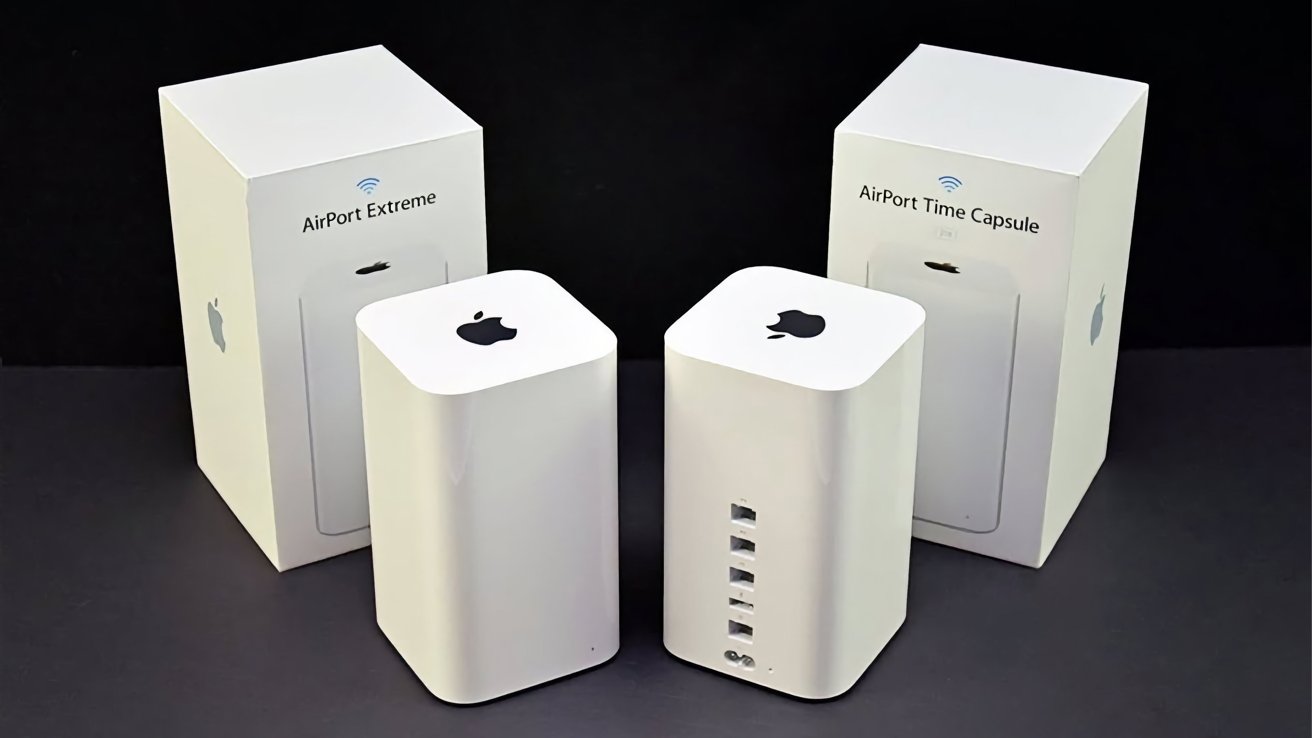
Apple has terminated support for AFP in macOS 27, effectively killing off the Time Capsule. However, affected owners might be able to revive their hardware.
A long-discontinued network storage device, Time Capsules gave Mac users a way to back up over a home network using Time Machine. While the hardware hasn’t been available for quite a few years, support continued up to macOS 26.
However, as warned in macOS Sequoia 15, support for the Apple Filing Protocol, AFP, was being deprecated and removed in a future macOS release. That turned out to be macOS 27, thanks to a notice in macOS 26 warning about the end of support for AirPort Disk and other Time Capsule disks.
This is an issue that affects Time Capsule specifically, as it relies on AFP for its connectivity. While Time Capsule does include support for SMBv1 (Server Message Block), it was only supported in macOS 26 as a deprecated measure.
From macOS 27 onwards, Time Machine will require hardware using SMBv2 or SMBv3. This will mean it will work with modern NAS devices, but not Time Capsules.
Life finds a way
While Time Capsules in their normal state won’t work for Time Machine, there are efforts to try and add the required functionality to the hardware.
A GitHub project we wrote about in April, titled TimeCapsuleSMB, aims to update the outdated SMB layer with a newer one, while keeping Apple’s firmware untouched. This way, Apple’s file sharing stays enabled, so your internal disk, or connected USB ones, keep auto-mounting and working on the forthcoming macOS 27.
Really, it’s a modern Samba build to manage file sharing that’s loaded onto the Time Capsule. It runs Samba 4.24.3 server, advertises itself with Bonjour, and accepts authenticated SMB3 connections.
At that point, assuming the project ever works, you can connect to the server using a normal SMB URL, and then use it for Time Machine backups.
When we first wrote about the project, there were concerns that it was more a proof-of-concept than a full project. However, at the time of publication, there have been many commits to the project, including some that are just hours old.
According to the project’s requirements, you need to use a Mac running macOS 14 or later, or a Linux device on the same local network as the Time Capsule. You also need the password for the Time Capsule, as well as Homebrew, Python 3.9 or later, and smbclient installed locally.
The instructions to install it are quite complex, which puts the project out of reach of the typical user. However, near the top is a “Quick Start” option that relies on just five commands, streamlining the process.
As it stands, Time Machine users have few choices in how they maintain their backups. They could look for an external drive or invest in a NAS, as the most obvious, if expensive, solutions.
But, with a project like TimeCapsuleSMB, there’s a chance of reviving an underappreciated part of Apple’s former product line.


SECURITY
The CEO thought this was the best way to deal with some email issues
PWNED Welcome, once again, to PWNED, the weekly screed where we highlight those who did not do the deed of securing their systems. If someone left their passwords or their access exposed, we will be writing about them here.
Have a story about someone leaving a gaping hole in their network? Share it with us at pwned@sitpub.com. Anonymity is available upon request.
This week’s terrifying tale of poor security hygiene comes courtesy of Luke Irwin, CEO and principal consultant at Aegis Cybersecurity. He’s been in the industry for more than a quarter of a century and he knows where the bits are buried.
At one point, Irwin consulted for a company that was a large national facility services organization, a 2,000-employee firm that provided cleaning, security guards, industrial abseiling (cleaning the facade), and other things that other large businesses need to keep their physical plants running smoothly.
The CEO had one very peculiar idea about how to keep his own house in order: he wanted to have access to every one of his employees’ login credentials.
The chief executive had an Excel spreadsheet sitting right on his desktop with a complete list of all the employee usernames and passwords. Let that sink in for a second. One person had all the keys to the castle in a single, easily accessible file.
In any decent security setup, no one in the company has access to anyone else’s password. Even the head of the IT department should not know another employee’s password. I say this as someone who used to work for a company where the IT department would ask you to DM them your password if you had computer problems.
But this company’s CEO wanted the usernames and passwords for reasons I’m sure any of his employees would appreciate: so he could go into their email accounts! He had an experience where one colleague had sent secret information to the entire company via email and he had spent the evening logging into every single account and deleting the message before anyone could see it.
Just in case other messages were sent in error in the future, the CEO wanted the ability to log into all the relevant accounts and delete them himself. Perhaps for the same reason, he would not allow MFA (multi-factor authentication), because that would have kept him out of people’s inboxes. He was adamant even though the company had been the victim of a ransomware incident previously.
“Despite repeated advice, he held that position for around four months, until we were able to demonstrate that the IT team could remove messages centrally using fairly simple administrative commands, without needing everyone’s password,” Irwin said.
Even after getting rid of the Excel sheet of shame, the boss still refused to turn on MFA and the company subsequently suffered two data breaches involving sensitive client data.
Unfortunately, this company wasn’t the only one that Irwin worked with where the management had something against MFA. Another client, this one in the medical sector, was opposed to multi-factor authentication because it “made things just a little too hard” for the external consultants they were using to access their systems.
During the time that Irwin worked with that company, they got lucky and no one breached them. But since then, he’s seen signs that their data was available on the dark web. No word on whether they ever switched MFA on.
There’s plenty to learn from Irwin’s two clients, but it’s all pretty obvious. First, don’t let anyone, even administrators or CEOs, have other people’s passwords. If someone has to get into another person’s email account, have IT use administrative access. Second, always enable MFA, preferably MFA with passkeys. ®

Schwab Targets Mid-2027 Crypto Spot Trading and Custody for the $5.2T Advisor Channel

Manchester United recruitment change means one thing matters most for transfer targets

How Teachers Make Writing Achievable Without Lowering Standards

HarrisX Poll Found 52% of Registered Voters Support the CLARITY Act

BloFin War of Whales 2026 Grand Prix opens registration for $5M trading championship

Blockchain.com files with SEC for U.S. IPO

Late night Btc trade #crypto #bitcoin #cryptocurrency #bitcointrading #trading #tradesetup

She Came Here To Fight Me | Financial Audit

Breaking News Inflation Rises Faster! #shorts #money #finance #breakingnews #economy #inflation
-

 Fashion6 days ago
Weekend Open Thread: Evereve – Corporette.com
-
 Crypto World6 days ago
Jensen Huang Approves Samsung, SK Hynix, and Micron for NVIDIA (NVDA) HBM4 Memory Supply
-
 Entertainment4 days ago
The Best Mystery Series of All Time Is Surging on Streaming 30 Years After It Ended
-

 Crypto World3 days ago
Anatomy of the June crypto crash: Fed, Iran, Saylor
-

 NewsBeat3 days ago
Alexander Zverev wins the French Open to finally earn a 1st Grand Slam title
-

 Tech5 days ago
Suspicious Polyfill login prompts pop up on Toshiba, Muji websites
-
 Crypto World5 days ago
Senator Cynthia Lummis Calls CLARITY Act the Most Consequential Financial Legislation of This Generation
-
 Tech4 days ago
Microsoft unveils seven homegrown AI models in new bid for ‘long term self-sufficiency’
-

 Tech6 days ago
Microsoft launches MXC, an OS-level sandbox for AI agents, with OpenAI and Nvidia already on board
-

 Business6 days ago
(VIDEO) Justin Bieber Delivers Surprise Happy Birthday Serenade to Diners at Los Angeles Mexican Restaurant
-
 Business4 days ago
The Pain Points Taking a Fragile Tech Rally Down a Notch
-
 Crypto World3 days ago
Eli Lilly (LLY) Stock Surges 4% Following Breakthrough Sleep Apnea Trial Results
-
 Business3 days ago
High Stakes for Wembanyama as New York Pushes for 3-0 Lead
-

 Tech5 days ago
Von der Leyen’s AI envoy pick draws conflict-of-interest fire
-
Crypto World6 days ago
LBank Surpasses 25 Million Users Worldwide as AFA Partnership Continues to Drive Global Growth
-

 Tech5 days ago
Hackers now exploit SolarWinds Serv-U flaw to crash servers
-
 Tech6 days ago
Meta steals a tactic from Tesla and builds data centers in tents
-

 Crypto World4 days ago
Trump’s AI Ownership Plan Could Benefit Anthropic at OpenAI’s Expense
-
 Sports2 days ago
Bangladesh beat Australia after 20 years in ODIs, register only their second win over six-time world champions | Cricket News
-
 NewsBeat4 days ago
Alexander Zverev conquers demons and outlasts Flavio Cobolli to win French Open for first major title
You must be logged in to post a comment Login