
Security teams log 54% of successful attacks and alert on just 14%. The rest move through your environment unseen.
The Picus whitepaper shows how breach and attack simulation tests your SIEM and EDR rules so threats stop slipping by detection.



Don’t get hit with the Apple tax.
Apple’s App Store is quietly a major source of the company’s revenue. Every time an iPhone user subscribes to a service through Apple’s billing platform, the Cupertino giant skims up to 30 percent off the top of each recurring charge. The practice has been so brazen that a court ruled Apple must allow third-party billing to be offered, then, last year, the same court found the company in contempt for violating that ruling when it charged developers a comparable fee to implement their own billing tools.
But app developers had already adjusted to Apple’s fee skimming long before the court case was decided. Rather than eat a 15-30 percent loss on subscription revenues, many developers simply offset those costs by charging customers more when they subscribe through the App Store. A service that might be $10 when you subscribe on the company’s website becomes $13 when you subscribe on the App Store. It’s a phenomenon that’s become known as the “Apple tax.”
YouTube Premium is a prime example. We’ve noted that some users can swap existing music subscriptions for YouTube Premium, but it’s a different story when subscribing through the App Store. Indeed, when we look at pricing for YouTube Premium, we can see Google charging an Apple Tax. When subscribed to through the YouTube website, the monthly subscription cost for an individual is $16. However, head to the App Store, and the price tag increases to $21 a month. That’s $5 leaving your wallet each month for no reason other than helping Google to cover Apple’s tolls, making it much harder to get your money’s worth from YouTube Premium.
Some people prefer to bill their subscriptions through Apple’s App Store because of how predatory first-party billing can be. Once you give some companies your credit card information, it can be nearly impossible to get them out of your pocket. After digging around in settings menus to find the “cancel subscription” button, which appears deliberately hidden like Waldo, you’re made to go through three confirmation screens, presented with a special, one-time-only discount offer, and then made to fill out a survey explaining why you want to cancel. And that’s if you’re lucky. Some subscriptions from smaller outfits will make you send an email, or you might resort to replacing your credit card in order to stop the subscription from being charged.
There may be situations where paying an Apple tax on your subscriptions is worth a few extra dollars for the peace of mind that comes with the ability to cancel them in just a few taps on your smartphone. Apple would love to keep collecting its fees from your subscription, but the company also wants you to enjoy using your iPhone and is therefore not as straightforwardly incentivized to act like a gremlin with your credit card.
Even so, it’s worth saving money where you can. Thankfully, YouTube Premium makes it reasonably easy to cut off a subscription on its own billing platform. Canceling is a relatively straightforward process, and Google won’t give you much guff about your decision to stop giving it money. If you’re currently overpaying for YouTube Premium through the App Store, or if you’ve been considering signing up for the service, you’re better off doing so away from the tax collector at Apple’s walled garden gates.
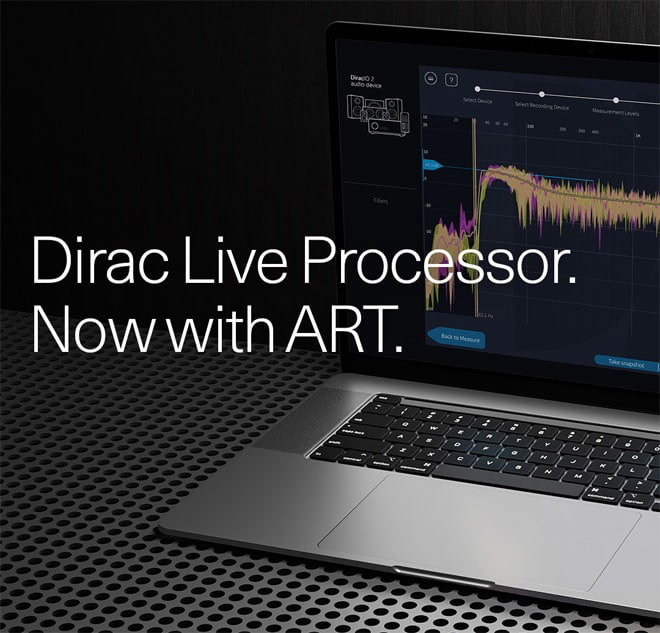
Dirac has renamed its PC and Mac-based Dirac Live Room Correction Suite as the Dirac Live Processor, expanding the software platform to include Dirac Live Active Room Treatment (ART). The change gives enthusiasts, home-theater owners, and audio professionals a computer-based route into Dirac’s full room-optimization ecosystem, including Dirac Live Room Correction, Bass Control, and ART, without replacing their existing source hardware.
That does not mean every networked audio system suddenly becomes ART-capable. The Dirac Live Processor can serve as the software hub for compatible playback systems with the appropriate licenses, and a properly measured speaker configuration. For listeners already using a PC or Mac at the center of a serious audio system, however, it creates a far more flexible path to Dirac’s most advanced low-frequency and room-acoustics tools.
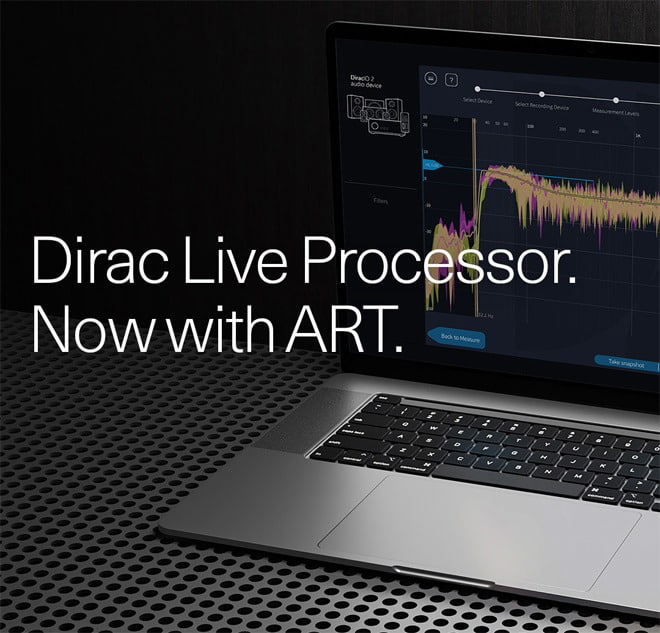
The Dirac Live Processor is a virtual audio processor for PC and Mac that applies room correction to audio before it reaches the sound system. It gives listeners a way to measure and optimize room and system performance using software and the computer they already own, including with audio systems where Dirac Live is not built in.
With continued support for VST, VST3, AAX, and AU plug-in formats, the Dirac Live Processor can also be used with compatible DAWs (digital audio workstations) and media players as part of an existing computer-based playback setup, including studio systems.
The Dirac Live Processor incorporates Dirac Live Room Correction, Dirac Live Bass Control, and Dirac Live Active Room Treatment. Together, these technologies establish the Dirac Live Processor as Dirac’s PC and Mac platform, giving listeners a single place to access its full suite of room-acoustics tools.
“Active Room Treatment is the most advanced room acoustics work we’ve done, and Dirac Live Processor is how we bring it to PCs and Macs,” said Nilo Casimiro Ericsson, Product Manager for Dirac Live. “Starting today, anyone can install it on their PC or Mac and hear the difference Dirac Live Active Room Treatment can make in their own sound system, in their own room.”
Dirac Live Room Correction analyzes how a room and speaker setup affect the interaction between sound and space, then applies corrections intended to improve timing, phase alignment, frequency response, imaging, and tonal balance.
Dirac Live Bass Control optimizes low-frequency performance across speakers and subwoofers, aiming to deliver smoother, more consistent bass throughout the listening space.

With the addition of Active Room Treatment, the Dirac Live Processor supports Dirac’s complete approach to room acoustics management. Active Room Treatment builds on Dirac Live Room Correction by using the full speaker array as a coordinated acoustic system, actively helping control room resonances and sound decay to deliver a cleaner, more controlled soundstage with greater clarity, detail, and focus.
Over the past 12 months, Dirac has expanded access to Dirac Live Active Room Treatment through a growing range of home-audio collaborations and integrations with brands including AudioControl, Denon, Marantz, miniDSP, Monoprice, and StormAudio.
The Dirac Live Processor extends that access to PC and Mac users who want a software-based approach to room-acoustics optimization, without requiring their AVR, preamplifier, or other system component to have Dirac technology built in. Setup begins by connecting a measurement microphone to the computer. The software then guides users through the room-measurement process, analyzes room and system behavior, and creates filters tailored to the listening environment.
“With Active Room Treatment now available, Dirac Live Processor becomes a powerful way to experience our most advanced room acoustics technology in any system,” continued Casimiro Ericsson.
Pro Tip: To use the Dirac Live Processor with an AVR or related component, the device and the PC or Mac running the software must be connected to the same network.
Dirac Live Processor Quick Start Guide
Dirac Live ART has quickly emerged as one of the more sophisticated room-acoustics solutions available to home-theater and two-channel listeners. With its addition to the newly renamed Dirac Live Processor, PC and Mac users can now access Dirac Live Room Correction, Dirac Live Bass Control, and Dirac Live Active Room Treatment from a single software platform.
There is no free lunch in acoustics, unfortunately. Unlike the basic room-correction systems bundled into many AVRs, Dirac Live Processor features require separate user licenses, with pricing dependent on the level of correction and bass-management capability required.
The Dirac Live Processor is aimed at serious computer-audio users, home-theater owners who may not have Dirac-compatible hardware (however, network connectivity is required), and studio or enthusiast listeners willing to measure their rooms rather than simply hope the sofa is in the right place.
When properly implemented, Room Correction, Bass Control, and ART can improve bass consistency, imaging, tonal balance, and overall clarity. Casual listeners may struggle to justify the added cost and setup, but for anyone trying to extract the full potential from a good loudspeaker system in a less-than-perfect room, it is a meaningful and potentially transformative tool.
Active Room Treatment is available on the Dirac Live Processor starting June 30, 2026. Existing users of Dirac Live Room Correction Suite will automatically be transitioned to Dirac Live Processor together with their current licenses and settings. Licenses can be purchased with an optional 14-day free trial at www.dirac.com.
Pro Tip: Dirac has a dedicated landing page for Dirac Live Processor licenses. During the launch period, this will be the main place to buy ART/DLP on the site. Going forward, Dirac Live Processor will be added to Dirac’s main device list when selecting a license, so that it shows up as an alternative alongside compatible hardware devices.
It’s been a long road for WhyQ.
In 2016, the company was built around a straightforward idea: make hawker food more accessible to busy office workers in the CBD. After years of pivots, a pandemic-era detour into residential deliveries, and the hard lessons that came with it, the Singapore startup has appeared to have found a model that works—B2B corporate dining.
And the numbers are starting to show it.
WhyQ co-founders Varun Saraf and Rishabh Singhvi shared that the company hit baseline profitability in Singapore in Q2 2025 and has stayed there. They added that the business has maintained an annualised revenue run rate of about S$5 million through Q1 2026.
For a company that was burning through cash during its pandemic-era consumer delivery phase—dispatching individual riders for meals worth S$10 to S$15 with no economies of scale—that’s a meaningful turnaround.
“The more we scaled, the more we burned,” COO Singhvi said in a previous interview with Tech in Asia. The pivot to B2B, he shared, “solved our entire unit economics puzzle.”

WhyQ now operates exclusively as a B2B platform. Gone is the sprawling consumer app that once partnered with over 2,200 hawker stalls across 35 hawker centres.
In its place is a leaner corporate dining operation: just slightly over one-fourth the number of partners at 500 merchant partners, but with long-term contracts that give the business predictable, recurring revenue.
The biggest lesson [we] learned was trying to compete in the volatile consumer delivery market, where revenue simply lacks long-term predictability.
About 20% of orders still come from hawker partners, with the remaining 80% driven by curated restaurant brands. Meal prices range from S$8 to S$25 per head.
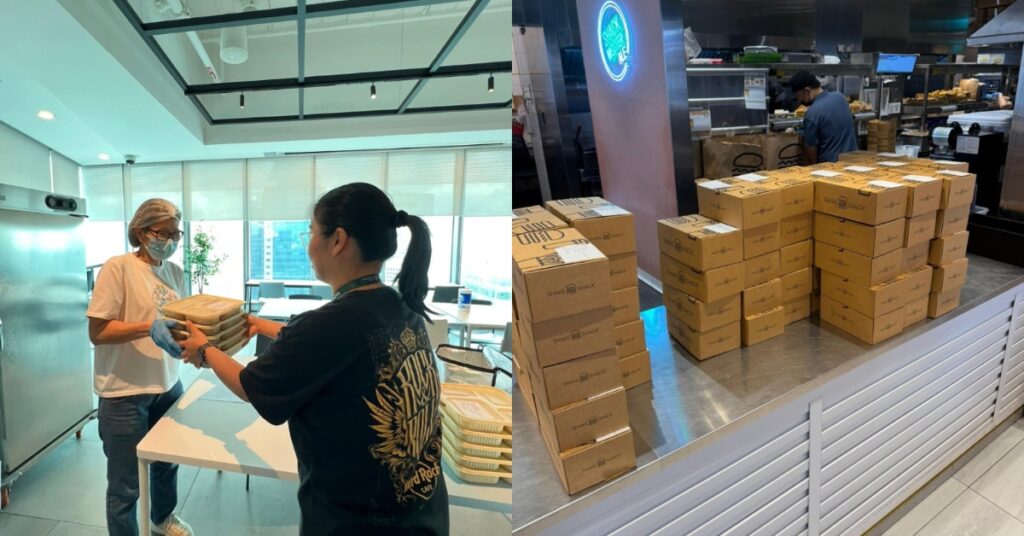
The company has also moved away from the third-party gig logistics that caused so many of its consumer-era headaches. WhyQ now runs its own dedicated delivery fleet, whose riders are trained to conduct quality checks at the kitchen and handle meal setup directly at client offices.
“HR doesn’t have to lift a finger,” Saraf said.

Today, WhyQ delivers more than 2,500 meals daily to corporate clients.
What makes it even more appealing to corporate clients is that WhyQ white-labels its ordering portals so they look like the client’s own internal platform. It also handles everything from daily lunches to pantry snacks, event catering, and live food stations.
The company claims 100% client retention among its corporate accounts.
Merchant partners are also benefiting from the predictability. Gyoza San’s founder Wilman Ng said the corporate order program has consistently boosted their monthly revenue by 15 to 20%. KinBaba Thai reported a similar 15% revenue lift since joining WhyQ’s network.

Assuming the B2B foundation holds, WhyQ’s next move is WhyQ Intelligence, an AI-powered nutrition and wellness tool currently in pilot, with a commercial launch targeted for Q3 2026.
The idea is to let employees track nutritional macros, set dietary targets, and chat with an AI assistant for menu recommendations—all tied to their company’s curated meal options. For HR teams, it connects meal participation data with attendance trends and employee engagement metrics.
Saraf frames it as both a client retention play and a new data layer: understanding what employees actually want to eat, which keeps menus fresh and deepens WhyQ’s grip on the accounts it already has.
The company is targeting a 70 to 80% engagement rate among employees at client companies in the tool’s first year.
Down the line, WhyQ Intelligence could potentially be spun out as a standalone product sold to companies managing their own food programs. That’s a longer runway, but it signals the founders are thinking beyond logistics.
WhyQ is targeting 50% year-on-year revenue growth, driven largely by expanding within existing accounts. One enterprise client is reportedly adding 120 daily meals in Jun 2026 and another 250 in Oct.

Beyond Singapore, the founders see Hong Kong and Sydney as their next potential markets, pointing to similar competition for talent and existing enterprise customers with offices in both cities. Rather than expanding speculatively, WhyQ says it will only enter a new market after securing a profitable anchor contract.
It also plans to acquire local merchant networks where possible instead of building operations from scratch.
That said, overseas expansion isn’t new territory for the startup.
WhyQ previously operated in Malaysia, where it offered two free digital tools: WhyQ EBiz, an app that helped merchants manage their businesses online, and WhyQ Kira Kira, a digital bookkeeping app. The company has since exited the market.
We chose to exit that market because we feel we are still just scratching the surface of the Singapore market and have a long way to go here.
That opportunity remains significant.
Over the next three to five years, the founders plan to deepen their reach into industrial and commercial food deserts like Tuas and Jurong, areas where workers have historically had limited access to quality, convenient food options.
Years of pivots, a pandemic, and painful lessons have reshaped WhyQ into a business focused less on growth for growth’s sake and more on sustainable economics.
Whether that formula holds remains to be seen. But for now, the startup appears to have found something it spent nearly a decade searching for: a business model that actually works.
Also Read: This 52 Y/O kopi business roasts 1,000kg of coffee every month & is winning over younger drinkers
Featured Image Credit: WhyQ
The Samsung R95H is one of many TVs to arrive in 2026 that use RGB backlighting to create images. Similar to the Sony Bravia 7 II, along with new models from Hisense, TCL, and LG, these replace the standard white or blue mini-LED modules in an LCD TV’s backlight array with micro-sized red, green and blue LEDs that can be independently controlled. The main benefit to RGB backlighting is expanded BT.2020 color space coverage, though there are other advantages, such as minimized backlight blooming and improved off-axis picture uniformity.
Samsung calls its take on the tech Micro RGB, and the Samsung R95H is its flagship Micro RGB model for 2026. Back in April, I had an opportunity to do hands-on testing of a pre-release 65-inch R95H at Samsung’s New Jersey headquarters, but the company later sent us a 65-inch production version so we could do a complete review.
The Samsung R95H is the top model in the company’s Micro RGB TV lineup, sitting above the Samsung R85H series. For 2026, Samsung also offers new Neo QLED models that use a standard mini-LED backlight, and its 2025 flagship Samsung QN90F Mini LED series carries over as well. Samsung R95H series TVs are available in 65, 75, and 85-inch screen sizes. Launch prices were $3,199.99, $4,499.99, and $6,499.99, respectively, though they have since dropped to $2,999.99, $4,299.99 and $5,999.99 (all MSRP; check retailers for current pricing).
Along with RGB backlighting, R95H series TVs include a Glare Free screen similar to the one found in the company’s 2025 flagship mini-LED and OLED models and the new Samsung S95H OLED TV. This provides a light-diffusing matte finish that’s very effective in eliminating screen reflections even when viewing in bright rooms with multiple lighting sources.
Samsung’s Micro RGB AI Engine Pro processor uses AI to upconvert standard HD video to 4K resolution with enhanced color and expanded dynamic range. It also handles the backlight’s local dimming to improve contrast and black levels and reduce artifacts such as haloing and blooming. AI Motion Enhancer Pro works to eliminate motion blur in sports and movies with fast action, and there’s an AI Customization Mode that can intelligently optimize picture settings based on the type of content you’re viewing.
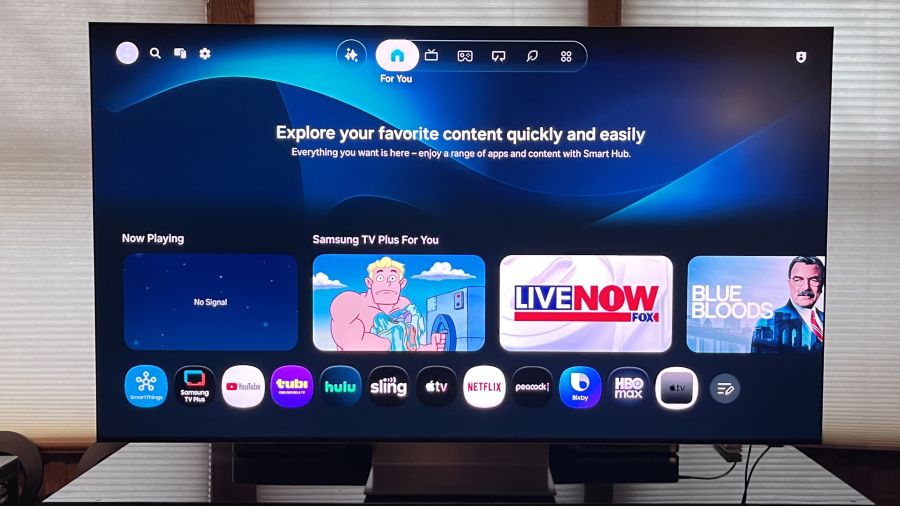
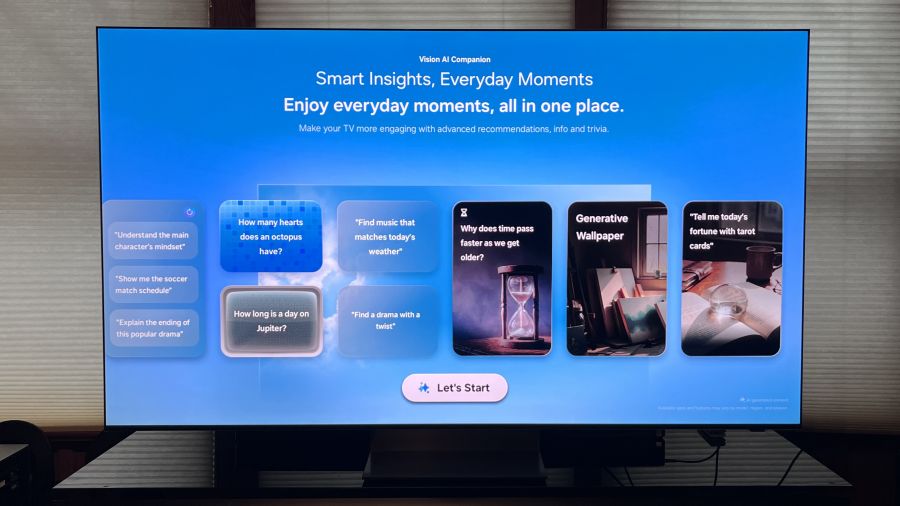
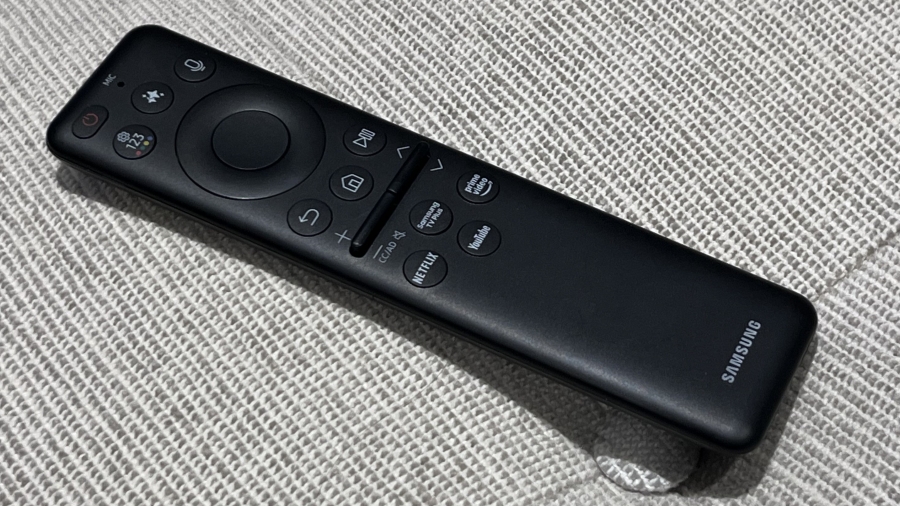
AI also gets top billing in Samsung’s updated Tizen Smart TV interface, which repositions tabs from the side to the top of the screen. The new layout is cleaner and more-user friendly, and it features a Vision AI Companion tab that lets you explore all manner of topics via Copilot or Perplexity using either the TV’s built-in far-field mic, or the one located in the TV’s Solar Cell Bluetooth remote control. The compact remote is small and only provides a limited number of controls, with the design reflecting Samsung’s emphasis on the Tizen interface, and voice commands in particular, for controlling most functions.
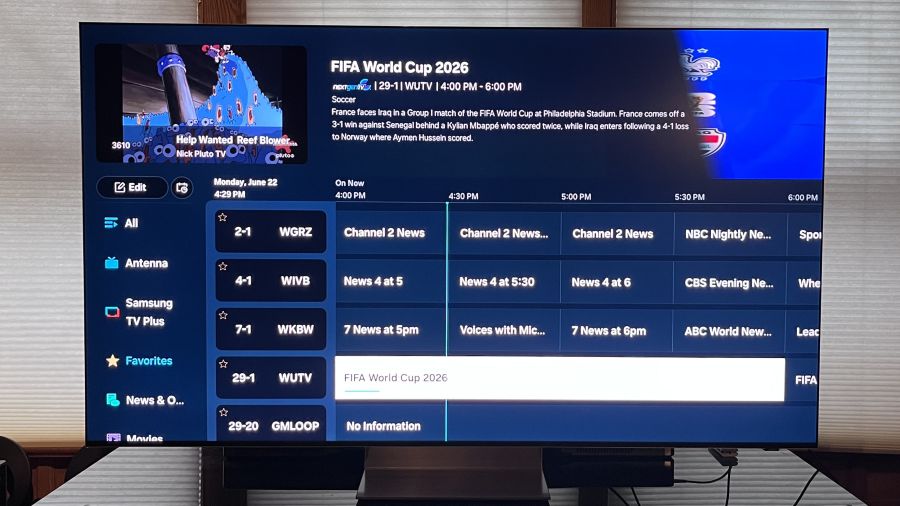
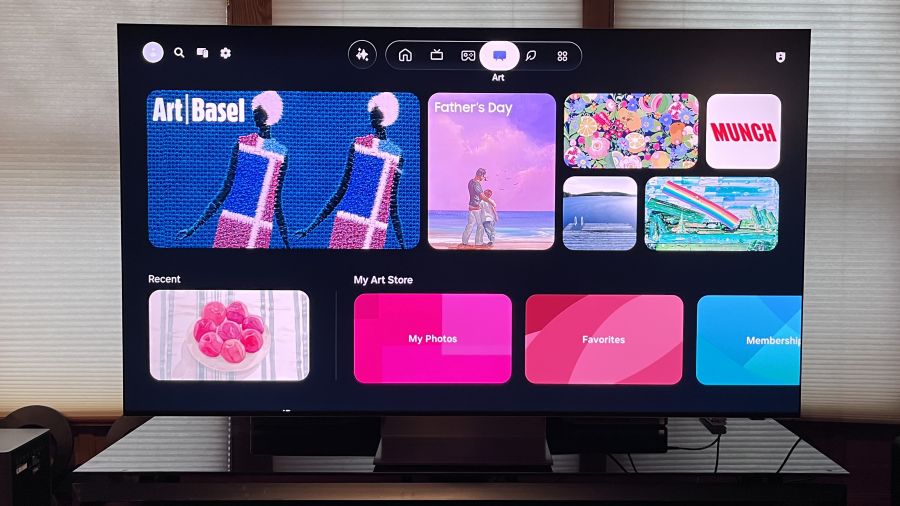
Other Tizen features include Generative Wallpaper for creating custom screensavers using AI, and access to the subscription-based Samsung Art Store that was previously limited to the company’s The Frame lifestyle TVs. Selecting the Live tab at the top of the screen presents an option to view a time-based grid guide for browsing Samsung TV Plus free streaming channels, and there’s also an option to display only local broadcast channels pulled in via a connected antenna. Unlike competitor LG, Samsung still includes an ATSC 3.0 (Next Gen TV) tuner on its flagship TVs (including the R95H) so you can tune in both ATSC 1.0 and ATSC 3.0 local OTA stations for free.
Gaming features on the R95H series include 4K/165Hz support, Freesync Premium Pro and HDR10+ gaming. Samsung’s Gaming Hub portal features Xbox, NVIDIA, GeForce Now, Luna, Blacknut, Antstream, Boosteroid and other cloud-based gaming apps, and it now also features personalized recommendations.
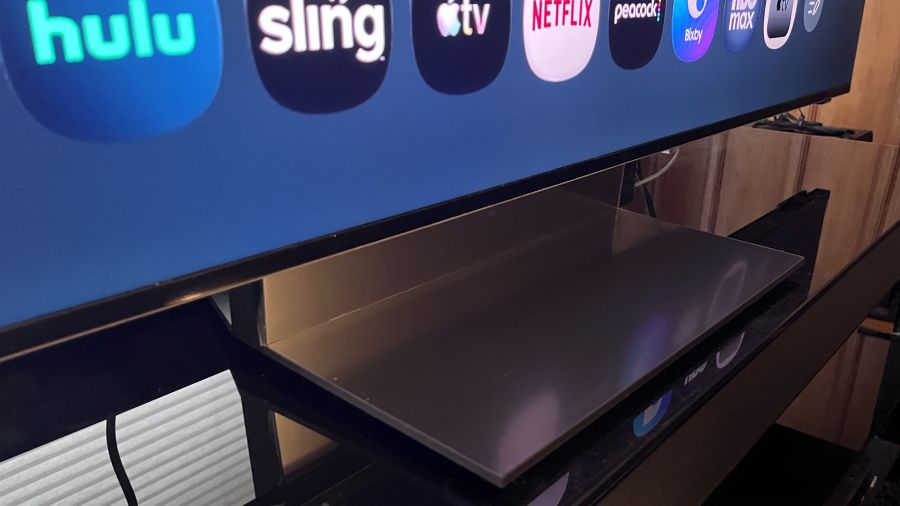
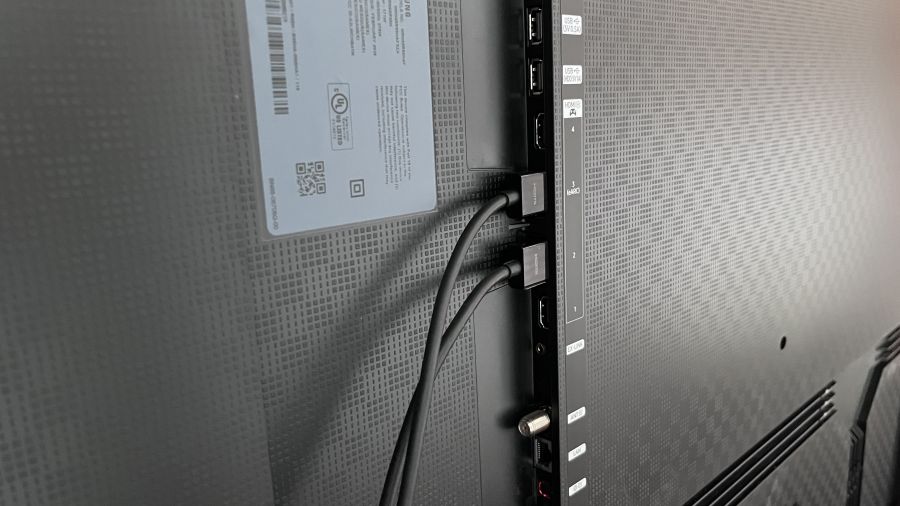
R95H series TVs feature a Space Graphite-colored Infinity Air stand that, combined with the four-side Bezel-less screen, gives the display a floating effect. Connections located on a side-mounted panel on the rear include four HDMI 2.1 ports, an optical digital audio output and an antenna input for the TV’s ATSC 3.0 tuner. Additionally, there are two USB type-A, Ethernet and Ex-Link (RS-232C) ports. The R95H is also Wireless One Connect Ready, which gives you the option for a wireless 165Hz connection using Samsung’s Wireless One Connect Box (not included).
On the audio front, a 4.2.2-channel speaker array powered by 70 Watts of on-board amplification delivers Dolby Atmos audio, Object Tracking Sound+ delivers precise positioning of sound effects to match the onscreen action and a Q-Symphony feature combines the TV’s speaker output with that of a compatible Samsung soundbar (if you’re into that). A new feature, Active Voice Amplifier Pro, taps the AI capabilities of the TV’s Micro RGB AI Engine Pro processor to identify voices in movie and TV soundtracks and amplifies them to enhance dialogue clarity.
I used Portrait Display’s Calman Color Calibration software to run a basic set of measurements on the Samsung R95H. Aside from disabling the TV’s Brightness Optimization (located in the Power & Energy Saving menu) auto brightness feature, measurements were made using the default Filmmaker Mode and Standard picture presets.
Peak HDR brightness measured on a white 10% window pattern in Filmmaker Mode was 2,039 nits and 642 nits on a 100% (fullscreen) white pattern. In Standard mode, the results on the same tests were 1,908 nits and 790 nits, respectively.
To give some perspective on those results, when I measured the Sony Bravia 7 II True RGB TV, peak HDR brightness was 1,800 nits for 10% and 701 nits (fullscreen). In Standard mode, the Sony results were 1,554 nits on a 10% pattern and 626 nits for fullscreen. Bottom line: Samsung’s flagship RGB TV has higher peak HDR brightness than the Sony (which, at $2,599 list for the 65-inch model, is a bit less expensive option than the Samsung).

In SDR (standard dynamic range) tests, the Samsung R95H measured 235 nits on a 10% pattern and 145 nits on a fullscreen pattern in Filmmaker Mode. In Standard mode, the results were 726 nits for 10% and 583 nits for fullscreen. Those Standard mode results are excellent, and they indicate that the R95H will be a great TV for daytime sports viewing.
For color measurements, the Samsung R95H’s color gamut coverage in Filmmaker Mode measured 93.3% for BT.2020 and 147.9% for DCI-P3 – both excellent results. Once again for comparison’s sake, the Sony BRAVIA 7 II’s BT.2020 color gamut coverage in Cinema Mode measured 88.5%.
In other measurements, the Samsung R95H’s Delta-E (the margin of error between the test pattern source and what’s displayed on-screen) in Filmmaker Mode averaged 6.2 for grayscale and 3.0 for color. That grayscale result is slightly higher than the 3.0 Delta-E considered to be the threshold for what’s indistinguishable from perfect to the human eye, though I was able to reduce it to 1.4 through calibration using the Samsung’s 2-point white balance adjustment. (A 20-point white balance adjustment is also available.)
The Samsung’s input lag, which I measured using a Bodnar 4K input lag meter with Game mode enabled, was 10.7ms. That’s a slightly higher level than previous Samsung TVs I’ve tested, though still it’s low compared to many other TVs.
As usual, I started out my subjective evaluation using the Spears & Munsil Ultra HD Benchmark disc played on an Oppo UDP-103 4K Blu-ray player. The disc’s dots pattern, which is used to test off-axis performance, revealed color and contrast to be impressively uniform when viewed at off-center seats. The starfield test clips showed the TV’s local dimming to be effective at all levels (there is no off setting for local dimming on the Samsung, so it is always active). I was surprised to see that the TV’s brightness uniformity was less impressive than its off-axis uniformity when viewing fullscreen gray patterns at various brightness levels, but that didn’t turn out to be an issue when viewing regular TV shows and movies.
Watching the disc’s demonstration reel, images of nature showed excellent contrast and rich color, and the picture was impressively clean and noise-free. There was also very minimal backlight blooming visible on the high-contrast images of animals and objects against a black background, and micro-contrast in the nighttime cityscapes was as good as I’ve seen on a non-OLED TV.
Watched on 4K Blu-ray, a scene from the James Bond film No Time to Die where 007 walks across a rocky hillside cemetery showed minimal judder and motion blur as the camera tracked his motion – not surprising given the combination of Samsung’s typically excellent motion processing and the TV’s high 165Hz refresh rate.
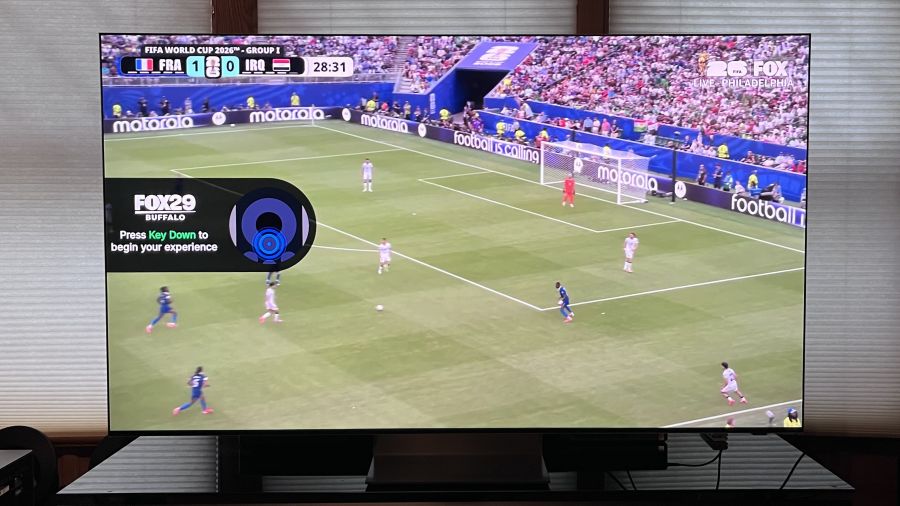
The R95H’s impressive motion handling was also evident when I watched a Canada versus South Africa World Cup Soccer match broadcast via my local FOX TV network. The first half got off to a lively start, with both teams quickly turning over plays, and the Samsung Micro RGB rendered the ball as a consistently solid-looking circle as it traversed the field. New Samsung TVs for 2026 feature an AI Soccer Mode designed to specifically optimize the picture for soccer games, but I found that it made colors look neon-level bright and garish when active. The Standard picture mode looked better to me for sports, though it also made the faces of some players look overly pink. For sports, I ultimately settled on the Movie preset, which delivered a sufficiently bright picture with accurate-looking color.
With the more muted Movie preset active, the yellow and green uniforms of the South Africa team players still looked eye-catchingly vivid, and so did the red jerseys of the Canada team fans that seemed to constitute the bulk of the game’s audience. Importantly, the TV’s Glare Free screen was effective enough that turning on my room’s overhead lights didn’t impact picture quality at all while watching, and that extended to movies, which retained contrast and black detail during bright room viewing.
Stanley Kubrick’s 2001: A Space Odyssey is a movie that strongly benefitted from the 4K/HDR treatment it received when the 4K Blu-ray version was released back in 2018. Watching the “The Blue Danube” sequence where the space shuttle docks at the space station, the deep blacks of space and pinpoint lights of stars displayed powerful contrast on the Samsung R95H, and there was plenty of detail visible in the shots of earth and closeups of the space ships. Even more impressive knowing that this movie came out over a year before we landed on the moon and all of these effects of space and earth were done the old-fashioned way, with practical effects.

Curious to see how the TV’s Auto HDR Remastering Pro feature would handle HDR upconversion, I switched that feature on and off while watching my regular Blu-ray disc version of 2001. While Samsung’s upconversion definitely made the picture brighter, with more powerful contrast, it also blew out highlight detail and made colors look oversaturated. It would have been helpful to have some type of control to vary the level of HDR remastering applied, but that feature sadly provides only on and off settings.
I would be remiss if I didn’t comment on how the R95H handled Season 3, episode 1, Salt and Sea, Fire and Blood, of the returning House of the Dragon on HBO Max. I found that the picture looked too dark in Filmmaker Mode, but switching to Movie mode and boosting the Shadow Detail slider a few notches in the Expert Settings menu went a long way to improve things. Roughly half of the episode is a protracted naval battle and, post-adjustment, the 4K/HDR picture looked considerably more immersive and 3D-like.

At its discounted $2,999.99 price, the 65-inch Samsung R95H is still expensive for a TV, even one with an advanced RGB backlight. But the R95H offers a number of advantages over its competition, and when you take those into account, it could easily sway your favor to this Samsung Micro RGB model when shopping for a new TV.
The most obvious advantage is Samsung’s extended color space coverage. At 93.3% for BT.2020, that’s about as good as new TVs get, and it easily exceeds that of flagship OLED TVs on the market, Samsung’s S95H included. The R95H is also impressively bright for both HDR and SDR viewing, and its Glare Free screen makes it a strong option for viewing in bright rooms.
Samsung’s Tizen is superior to most other smart TV platforms, including Google TV, in my opinion, even if you don’t bother to take advantage of its powerful new AI features or the category-leading Samsung Art Store. The R95H is also an exceptional gaming TV, with 4K/165Hz support across its four HDMI 2.1 ports and Samsung’s Gaming Hub portal for cloud-based gaming.
Where the R95H could be considered to fall short is its lack of support for the forthcoming Dolby Vision 2 format, but then again, Samsung never supported Dolby Vision HDR in the first place, choosing the open HDR10+ dynamic HDR standard instead. The bottom line is that the Samsung R95H is an excellent overall TV with a fantastic picture and great features – it easily lives up to the RGB hype.
★★★★★★★★★★ Picture Quality
★★★★★★★★★★ Design
★★★★★★★★★★ Usability
★★★★★★★★★★ Sound Quality
★★★★★★★★★★ Features
★★★★★★★★★★ Value

Amazon Web Services is committing $1bn to embed its own engineers inside customer companies. It is the first cloud giant to copy a playbook that Palantir built and that OpenAI and Anthropic have since adopted.
Amazon Web Services said on June 30, 2026 that it would pour $1bn into a new Forward Deployed Engineering unit. The team’s job is to help customers build and run artificial intelligence systems.
Francessca Vasquez, the company’s vice-president of frontier AI engineering and services, set out the plan in an interview with CNBC. Her pitch came down to one word: speed.
A forward-deployed engineer, or FDE, is a technical specialist who works from inside a client’s business rather than from the vendor’s own offices. Palantir coined the term more than a decade ago. The idea has since spread to software firms that want faster adoption of their tools, and it now sits at the centre of the race to sell enterprise AI.
The new unit will start with what AWS calls “thousands” of engineers. It will send them out in small pods, each with five or six people, embedded inside a single customer at a time. Those engineers will also work alongside AI agents, the software tools that can carry out tasks on their own.

The 💜 of EU tech
The latest rumblings from the EU tech scene, a story from our wise ol’ founder Boris, and some questionable AI art. It’s free, every week, in your inbox. Sign up now!
The pods are meant to move fast. AWS said in a blog post that its engineers would sit with a customer’s business, engineering, and security teams, then hand back a self-sufficient team within weeks.
“The currency that the customers are always talking about right now is speed,” Vasquez said. She added that the model suits firms chasing quick returns for their executives and stakeholders.
Vasquez framed the launch as a step change rather than a brand-new skill. “We’ve had capabilities over the years, but structurally this is like getting everybody together in one business unit with a common rubric of deployment,” she said. “It’s the first time we’re doing it in that way.”
AWS is late to a party its own partners started. In May 2026, Anthropic set up an AI services company with Blackstone, Hellman & Friedman, and Goldman Sachs to help mid-sized firms roll out its Claude models. Days later, OpenAI launched its deployment company with TPG, Advent International, Bain Capital, and Brookfield, among others.
Those rivals built their deployment arms as joint ventures, leaning on outside investors and consulting partners. AWS is taking a different route. It is funding the unit from its own balance sheet, with no partner firms attached. Google has made its own move too, with a $750mn partner fund aimed at agentic AI deployments.
Amazon has spent billions of dollars backing both Anthropic and OpenAI. It has also been clear about competing with them directly in places. An AWS spokesperson said the company still expected to work with the FDE arms of both labs, and promised more detail on its partner programmes soon. AWS has separately agreed to sell OpenAI’s models after Microsoft’s exclusivity lapsed.
The logic is about adoption, not headcount for its own sake. Companies have bought plenty of AI tools. Many have struggled to turn them into working systems. By placing engineers inside the customer, AWS hopes to close that gap and tie clients deeper into its cloud.
The move also shows how AWS plans to defend its lead. Amazon is the biggest cloud provider by revenue, and it is the first hyperscaler to commit to an FDE unit at this scale. The bet is that hands-on help, not just cheaper compute, will decide who wins enterprise AI. Amazon has also pushed customers toward cheaper AI options as model costs climb.
Not everyone will read the spend as a sure thing. Investors have grown wary of the huge sums flowing into AI, and they keep asking when the returns will land. A $1bn unit staffed by costly engineers adds to that bill. AWS is betting the outlay pays for itself in stickier, larger cloud contracts. The proof will sit in next year’s numbers, not in the launch.
There is a hiring story here as well. AWS wants thousands of engineers for the unit at a time when AI is eating into entry-level work. The roles it is creating are senior, client-facing, and hard to automate. That is a notable contrast with the junior jobs the same technology is removing.
AWS named several early adopters. They include the Allen Institute, the National Basketball Association, the National Football League, and Ricoh. Vasquez said the next wave would come from heavily regulated industries that hold large, varied datasets. Those are the firms with the most to gain from faster deployment, and the most to lose from getting AI wrong.
For now, the move sharpens a question hanging over the whole sector. Businesses have spent heavily on AI and seen patchy results. Whoever turns that spending into working systems fastest will pull ahead. AWS has just bet $1bn that the answer is people, sent to sit at the customer’s desk.


Database management work will soon be mostly automated by AI agents, just like coding, according to the CEO of Cockroach Labs, the company behind the distributed database of the same name.
Spencer Kimball told The Register that the proliferation of databases demanded by the explosion of AI agents in coding and business functions will mean that managing them in a largely manual way is out of the question.
“Nobody’s going to do manual work on a database, just like almost nobody’s doing manual coding anymore,” he said. “A lot of people don’t even know what’s within their code base anymore, like they only know the designs, specifications and guarantees. They’re still verifying the software, but in the end they’re just not down at the level of code, because it doesn’t make sense. It’s like nobody programs in Assembly,” he said.
Kimball is among the tech CEOs with the commensurate background in software engineering to make such statements. He helped build Google’s Colossus distributed file storage system and, as a computer science student at UC Berkely, developed FOSS image editor GIMP, which continues to this day.
In the time since, he has seen shifts in the level of abstraction before. “These cycles happen all the time. It’s pretty easy to see what’s coming next, because ultimately agents beyond coding are going to be increasingly complementing and supplementing human-driven workloads. They’re going to use tools, tools are using APIs, and APIs are talking to operational databases, every single one. If you think about the implications of this massive scale-up of traffic, it means that operational databases are going to get busier, and a lot busier. We’re talking about exponential scale-up,” he said.
Cockroach Labs is not the only database company to see the level of AI agent demand on the enterprise as an opportunity. It’s where many vendors are positioning themselves. For example, vector database vendor Pinecone’s idea is that by compiling a knowledge base of an organization’s data structure and content, its technology can avoid burning through tokens back and forth between the data and AI agents. Tiger Data, the company behind TimescaleDB, has built Ghost, a technology designed specifically for developers working with AI agents, charging by compute, rather than by database.
Cockroach Labs, whose customers include OpenAI, CoreWeave, Booking.com, and Cisco, is pitching the idea of an Agentic Database Cloud to address this demand. Among the elements will be elastic compute and storage separation, unified estate management, database virtualization and agentic operations. It expects to announce a product around this idea later this year.
Nonetheless, in database estates, Kimball expects AI agents to act in an advisory role to avoid disruptions to operations. “You can imagine, the enterprise isn’t eager to turn over the keys to production to an agent. These agents are a second pair of eyes,” he said.
To this end, Cockroach has been building its own agents to improve its operations and how it manages databases.
Kimball said it had built AI agents in a layered approach, giving agents sub tasks to perform and then allowing agents to manage those agents, and other agents that verify the approach taken.
“There’s all kinds of hand-offs, there’s agents that help with migrations, agents that help with slow queries, agents that can diagnose problems with clusters, because they’ve been given the institutional knowledge. For example, our entire Zendesk history for the last two years — every customer ticket, every issue, the resolutions — has been digested and cross-indexed. The agents we’re building are the engineering of the prompts, the handoffs and the quality control,” he said.
The “thinking” is done by foundation models, he said. “We have some open-source ones we use that are very, very fast and inexpensive. Those do more… prosaic and mundane tasks that you do a lot of, quickly.”
Kimball said Cockroach also uses proprietary models including OpenAI gpt-oss and Claude Opus.
“We’re trying to provide a replacement for a lot of human labor. We provide corporate ‘Artificial General Intelligence’ for database roles, that once you used to have to hire humans for, but you simply cannot do that at 10x the scale, much less 100x the scale. You have to find that way to get these agents to do extremely useful work, very consistently, at a level that is as good or increasingly better than humans. Frankly, there are things the agents can do that are so grungy you couldn’t hire a human to do it, such as constantly looking through log files, and investigating threads. It’s just too boring,” Kimball said.
As such, Cockroach expects to be able to increase the scope of its products and the number of customers it serves, but only modestly increase its workforce.
“You can do different things right now with your resources. You can try to scale the human teams, or you can figure out how to make the human teams more efficient, and that’s what we’re doing internally. Fundamentally, this is what we’re going to do for our customers, because if you anchor yourself to what’s possible today, then you might say, ‘Oh, the AI is not completely ready,’ but like the speed at which these things are changing makes it all but inevitable at some point in the near future,” he said.
Whether Cockroach’s vision will become reality or not, the database market will have to respond to AI in the enterprise, spending on which shows no sign of letting up. Nonetheless, if agents need databases, and databases need agents to manage them, maybe it’s going to be turtles all the way down. ®


American insurance giant Aflac has disclosed a new data breach after attackers breached its Japan subsidiary’s systems and stole personal and bank account information.
Aflac (short for American Family Life Assurance Company) is a Fortune 500 company and the largest supplemental insurance provider in the United States, serving millions of customers in the U.S. and Japan.
In a filing with the U.S. Securities and Exchange Commission (SEC) on Monday, the company revealed that threat actors gained access to Aflac Japan’s systems earlier this month.

“On June 30, 2026, Aflac Life Insurance Japan Ltd. (“Aflac Japan”), a wholly owned subsidiary of Aflac Incorporated, a Georgia corporation (the “Company”), issued a press release announcing that, on June 25, 2026, Aflac Japan discovered an unauthorized third-party had unlawfully accessed certain of Aflac Japan’s systems between June 15, 2026 and June 25, 2026,” the insurance company said.
“Upon identifying the unlawful access, Aflac Japan promptly took steps designed to contain the incident and prevent further intrusion, including suspending certain systems. Notwithstanding the suspension of certain systems, Aflac Japan continues to serve its policyholders as it responds to this incident.”
Aflac is now investigating the incident with the help of external cybersecurity experts and has revealed that the threat actors have gained access to some sensitive information stored on the affected systems.
The company has alerted Japanese authorities to the incident and will notify affected individuals of the data breach.
“Although the investigation remains ongoing, Aflac Japan has determined that certain impacted files contain policy and coverage details, personal information, and bank account information. Aflac Japan has notified the Japan Financial Services Agency and other relevant authorities, and intends to provide appropriate notifications to individuals affected by this incident.
“This incident is limited to systems in Japan, the Company’s systems related to its U.S. business were not accessed by the unauthorized third-party. At this time, the full scope and potential ultimate impact on the Company are not known.”
An Aflac spokesperson was not immediately available for comment when contacted by BleepingComputer earlier today.
One year ago, Aflac disclosed another data breach amid a broader campaign targeting insurance companies across the United States, saying that the attackers may have gained access to documents containing sensitive information about customers, beneficiaries, employees, agents, and other individuals.
While Aflac didn’t attribute last year’s breach to a specific threat group, the incident had all the signs of a Scattered Spider attack.
Scattered Spider (also tracked as 0ktapus, UNC3944, Scatter Swine, Starfraud, and Muddled Libra) was also behind breaches at Erie Insurance and Philadelphia Insurance Companies (PHLY), part of the same wave of attacks.
They’ve also previously partnered with other ransomware operations, such as Qilin, RansomHub, and DragonForce, and their list of victims includes MGM Resorts, DoorDash, Caesars, MailChimp, Twilio, Coinbase, Riot Games, and Reddit.

Security teams log 54% of successful attacks and alert on just 14%. The rest move through your environment unseen.
The Picus whitepaper shows how breach and attack simulation tests your SIEM and EDR rules so threats stop slipping by detection.


A malicious extension in the Chrome Web Store is masquerading as the Perplexity AI answer engine, intercepting search traffic and collecting browsing information.
Called “Search for perplexity ai,” the extension routed search queries and real-time suggestions through its infrastructure before redirecting users to the legitimate search services.
Microsoft Threat Intelligence researchers said that the extension did not steal credentials or other sensitive information but its permissions would easily allow it if the operator decided to extend the scope of the data theft.
Perplexity AI is a research assistant that searches the web and synthesizes the information in a direct, conversational response instead of showing a list of links for the user to access to find their answer.
Perplexity AI is available on the web, on mobile (Android and iOS), and as a desktop app, and its official Chrome extension is named “Perplexity – AI Search.”
The fake extension that Microsoft spotted uses similar branding and the domain “perplexity-ai[.]online,” instead of the legitimate perplexity.ai.

Once installed, it changes the browser’s search settings to replace the default search provider and to pass all address-bar queries through the attacker’s infrastructure.
“The extension overrides browser search settings through chrome_settings_overrides to replace the browser default search provider as well as intercept and redirect all queries in a Chromium browser’s Omnibox to an intermediary infrastructure not associated with the official vendor domain,” explains Microsoft.
This level of data collection is not accidental, based on the logging code Microsoft found on the extension’s server, which indicates intentional design.
The extension also requests Chrome permissions that allow redirections, URL rewriting, and monitoring when rules execute.
“The extension requests powerful DNR permissions that enable traffic redirection, URL rewriting, and selective request filtering, which aren’t consistent with expected AI assistant behavior,” the researchers mention.
Even though Microsoft found no evidence that the extension targeted credentials, its confirmed data collection routines still allowed for extensive profiling, creating potential avenues for exploitation.
Those who installed the extension with the ID “flkebkiofojicogddingbdmcmkpbplcd” should remove it from their browser and rotate their critical account passwords out of an abundance of caution.
Security teams log 54% of successful attacks and alert on just 14%. The rest move through your environment unseen.
The Picus whitepaper shows how breach and attack simulation tests your SIEM and EDR rules so threats stop slipping by detection.
WhatsApp is a cross-platform messaging service that uses the same internet data plan you use for email and web browsing, there is no cost to message and stay in touch with your friends. In addition to basic messaging WhatsApp users can create groups, send each other unlimited images, video and audio media messages.
If you are into trying new features you can also download the latest WhatsApp Beta version for Android.
No, WhatsApp cannot read your messages because it uses end-to-end encryption, meaning only you and the recipient can access the content of your chats. However, WhatsApp does collect metadata such as your phone number, device info, and usage patterns.
Yes, WhatsApp is free to use. There are no subscription fees for messaging, voice calls, or video calls. You only need an internet connection (Wi-Fi or mobile data) to use the app. Your mobile carrier may charge for data usage if you’re not on Wi-Fi.
WhatsApp Web and the desktop app require an initial connection to your phone for setup. After linking, they can function independently for a limited time. However, for full functionality and to maintain end-to-end encryption, periodic reconnection with your phone is necessary.
WhatsApp supports text formatting using specific characters:
About new privacy policy
We’ve heard from so many people how much confusion there is around our recent update. There’s been a lot of misinformation causing concern and we want to help everyone understand our principles and the facts.
WhatsApp was built on a simple idea: what you share with your friends and family stays between you. This means we will always protect your personal conversations with end-to-end encryption, so that neither WhatsApp nor Facebook can see these private messages. It’s why we don’t keep logs of who everyone’s messaging or calling. We also can’t see your shared location and we don’t share your contacts with Facebook.
With these updates, none of that is changing. Instead, the update includes new options people will have to message a business on WhatsApp, and provides further transparency about how we collect and use data. While not everyone shops with a business on WhatsApp today, we think that more people will choose to do so in the future and it’s important people are aware of these services. This update does not expand our ability to share data with Facebook.
We’re now moving back the date on which people will be asked to review and accept the terms. No one will have their account suspended or deleted on February 8. We’re also going to do a lot more to clear up the misinformation around how privacy and security works on WhatsApp. We’ll then go to people gradually to review the policy at their own pace before new business options are available on May 15.
WhatsApp helped bring end-to-end encryption to people across the world and we are committed to defending this security technology now and in the future. Thank you to everyone who has reached out to us and to so many who have helped spread facts and stop rumors. We will continue to put everything we have into making WhatsApp the best way to communicate privately.
New Feature Roundup: Free up space, multiple accounts, cross-platform transfer and more
Over time, our chats become a record of the moments that matter: conversations with family, laughs with friends, the photos and videos we couldn’t stop sharing. To help you make the most of all of it, we’re rolling out new ways to make WhatsApp even easier to use – whether you’re staying organized, juggling work and personal, or getting more out of every chat.
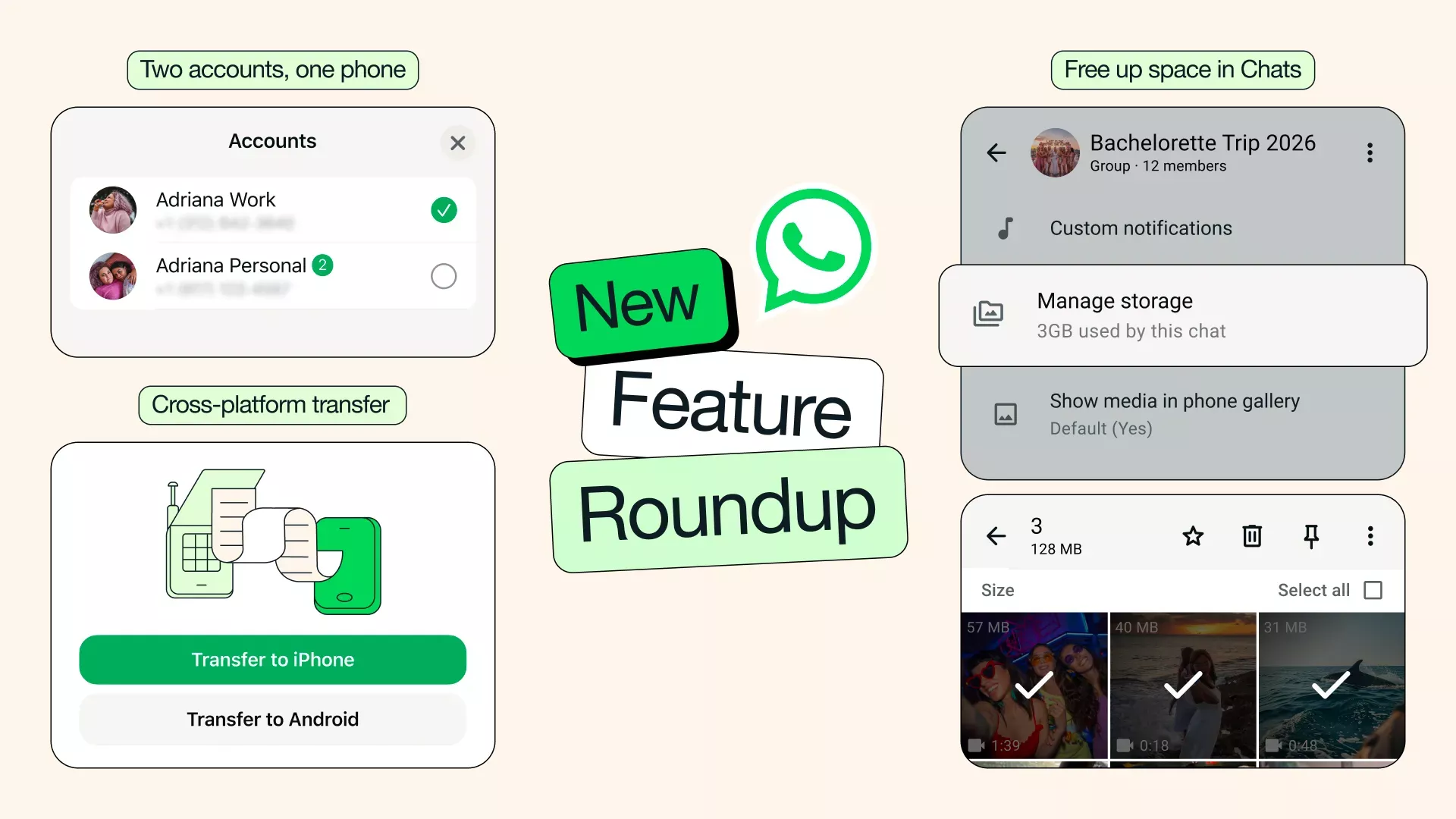
Free up space, keep what matters: As your chats fill up, so can the clutter. Now you can find and delete large files directly within any chat, so you can clear what you don’t need without wiping your entire conversation. Simply tap the chat name and select Manage Storage. You can also choose to clear just media files when clearing a chat – keeping your chat history intact.
Cross-platform chat transfer made easy: Our chat transfer feature now supports moving your chat history from iOS to Android, in addition to within the same platform. Changing phones shouldn’t be complicated. Now, with just a couple taps, your conversations, photos, and videos easily come with you.
Two accounts, one phone – now on iOS: You can now have two WhatsApp accounts logged in at the same time on iOS – just like on Android. No more carrying two phones to keep work and personal separate. You’ll always know which account you’re in because your profile picture will now be visible in the bottom tab.
Stickers that match your mood: Stickers can bring bigger, bolder expressions to your chats – and now WhatsApp will make it easier to use them by suggesting them as you type emojis. With just a tap, you can swap an emoji for a sticker that captures exactly how you’re feeling.
Photo touch-ups with Meta AI: You can now use Meta AI to touch up photos directly in your chat before sending, making it easy to remove something distracting, swap in a new background, or apply a fun style. Meta AI features may not be available to all users.
AI Writing Help is even more useful: Writing Help can now draft a suggested response based on your conversation, so you can get your message just right – all while keeping your chats completely private.
WhatsApp’s Latest Privacy Protection: Strict Account Settings
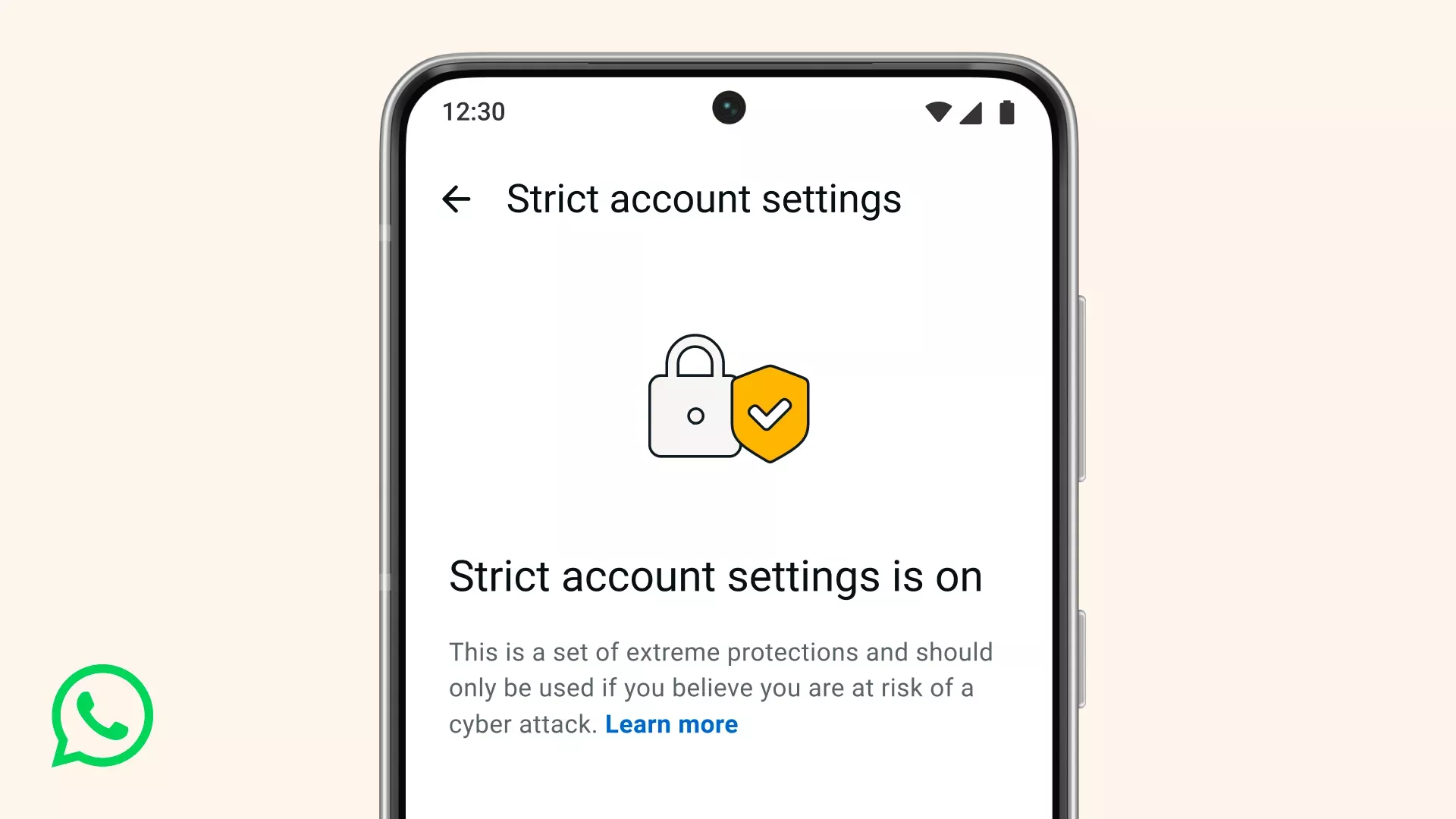
At WhatsApp, we think you should be able to have a private conversation online, just like you would in-person. We will always defend that right to privacy for everyone, starting with default end-to-end encryption. But we also know that a few of our users – like journalists or public-facing figures – may need extreme safeguards against rare and highly-sophisticated cyber attacks.
That’s why today we’re announcing a new, lockdown-style feature called Strict Account Settings.
If you turn this on, certain account settings will lock to the most restrictive settings, and it will limit how your WhatsApp works in some ways, like blocking attachments and media from people not in your contacts. You can enable Strict Account Settings – which is rolling out gradually over the coming weeks – by going to Settings > Privacy > Advanced.
Strict Account Settings is one of many ways we’re working to protect you from the most sophisticated of cyber threats. We’ve also rolled out a programming language called Rust behind the scenes to help keep your photos, videos, and messages safe from things like spyware, so you can share and chat with confidence. To go deeper in the tech, click here.
Level Up Your WhatsApp Group Chats With New Member Tags, Text Stickers, and More
It’s a new year and a great time for some upgrades to your group chats. Group chats on WhatsApp make it easier to stay connected with the people in your life no matter what device they own – whether it’s sharing New Year’s resolutions, preparing for that special celebration you have coming up, or planning to win your football league.
Today, we’re introducing new features that make staying connected and expressing yourself in group chats even better.
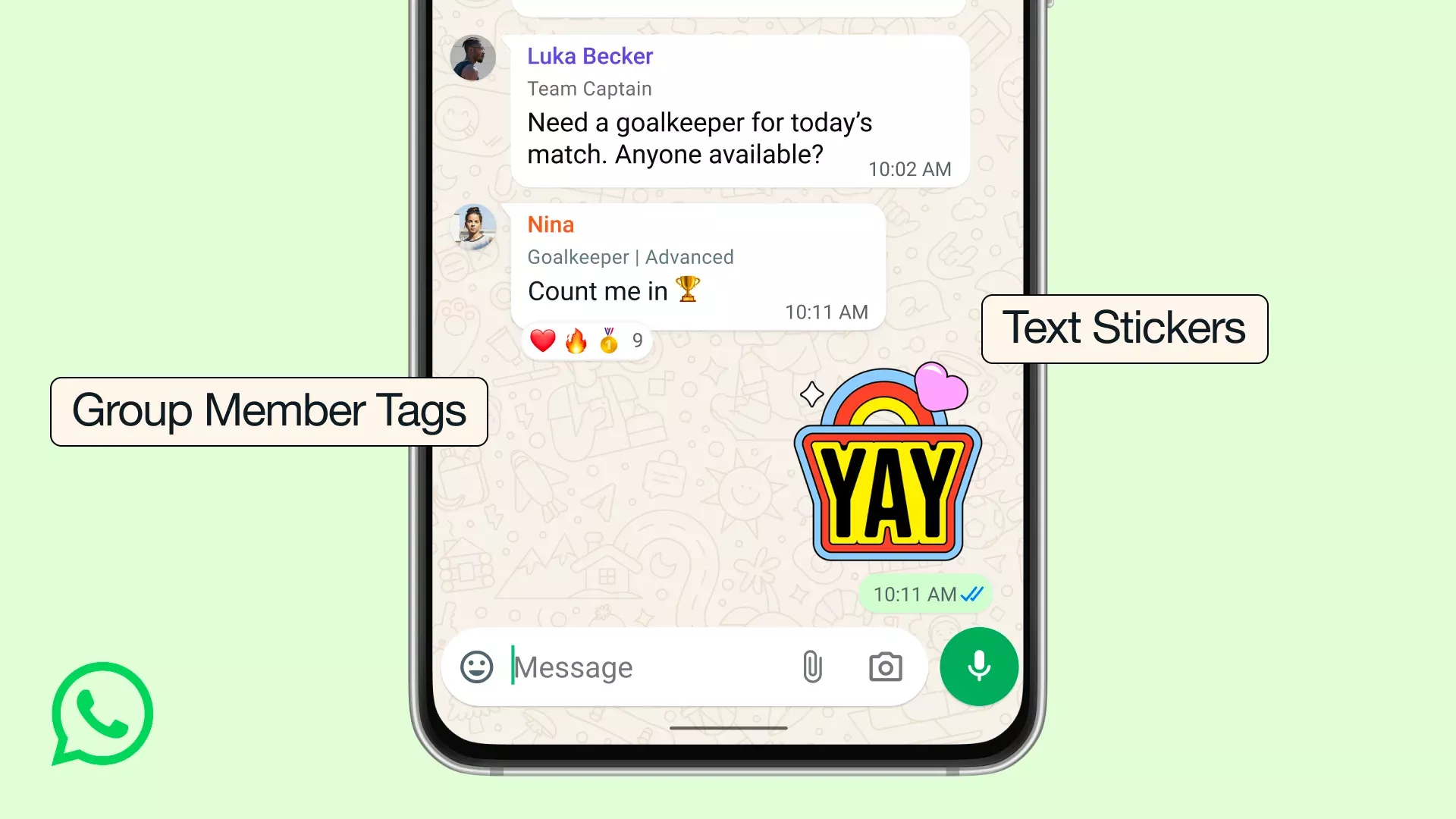
Member tags: We all wear different hats and sometimes you want to give that more context in a group chat. Now you can give yourself a tag that tells the group what your role is, and can be customized for each group you’re in. So you can be “Anna’s Dad” in one group, and “Goalkeeper” in another.
Text stickers: For the messages you want to really stand out, you can now turn any word into a sticker by typing your text into Sticker Search. You can also add newly created stickers directly to your sticker packs instead of having to send them in a chat first.
Event reminders: Now when you create and send an event in your group chat you can set custom early reminders for your invitees. This helps everyone remember to commute to the party you’re hosting or hop on the call at the right time, depending on the event type.
These new updates join a bunch of great features we’ve launched over the years to bring groups closer together – like sharing large files up to 2GB, HD media, screen sharing, voice chats, and more. We believe WhatsApp offers the best group chat experience, and we’re committed to making it even better.
Get the Tone of Your Message Right with Private Writing Help
Sometimes you know what you want to say, but just need a little help with how to say it.
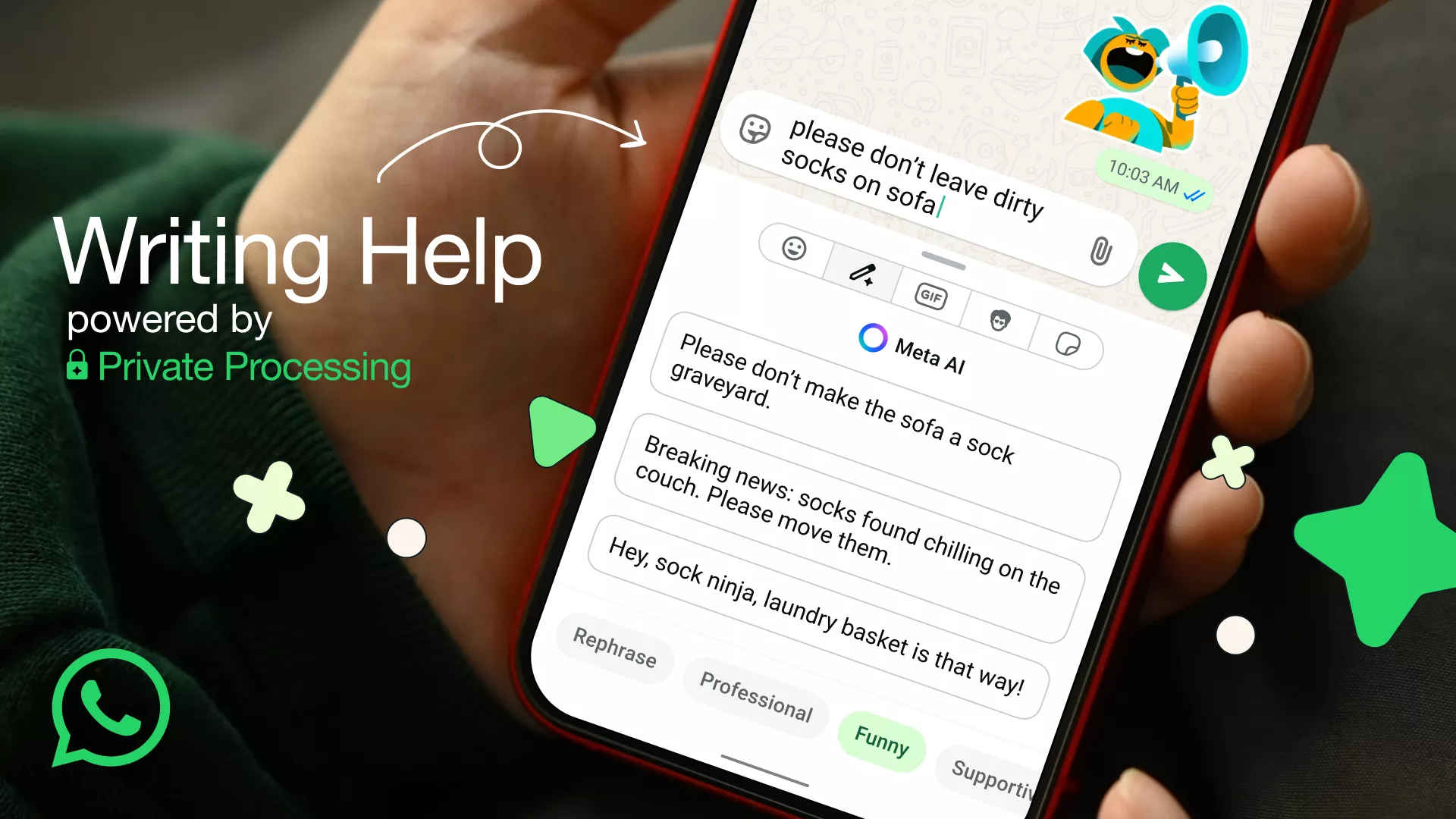
That’s why today we’re introducing Writing Help. It’s our latest AI feature powered by Private Processing that keeps your messages completely private. You can review the suggestions from AI in various styles such as professional, funny, or supportive that you can select or continue editing to deliver that perfect message.
To use Writing Help, just start drafting your message in a 1:1 or group chat, and tap the new pencil icon.
Is this really private?
Yes. Writing Help is built on top of Private Processing technology, which allows you to leverage Meta AI to generate a response without Meta or WhatsApp ever reading your message or the suggested re-writes.
For those interested in learning more about the technical details behind Private Processing, we invite you to read our engineering blog and technical white paper that explains how this and other features we’re building work. From the start, we worked with our peers in the security community to stress-test and validate the architecture of Private Processing to help us continue to harden it. Today, independent researchers at NCC Group and Trail of Bits published their audit reports on the steps we’ve taken to evolve this privacy-preserving technology.
As always, we believe that you should be in control of your experience on WhatsApp. That’s why using Private Processing features like Writing Help and Message Summaries are optional and are off by default.
Writing Help is rolling out in the English language, starting with the United States and several other countries. We hope to bring it to other languages and countries later this year.
Catch up on conversations with Private Message Summaries
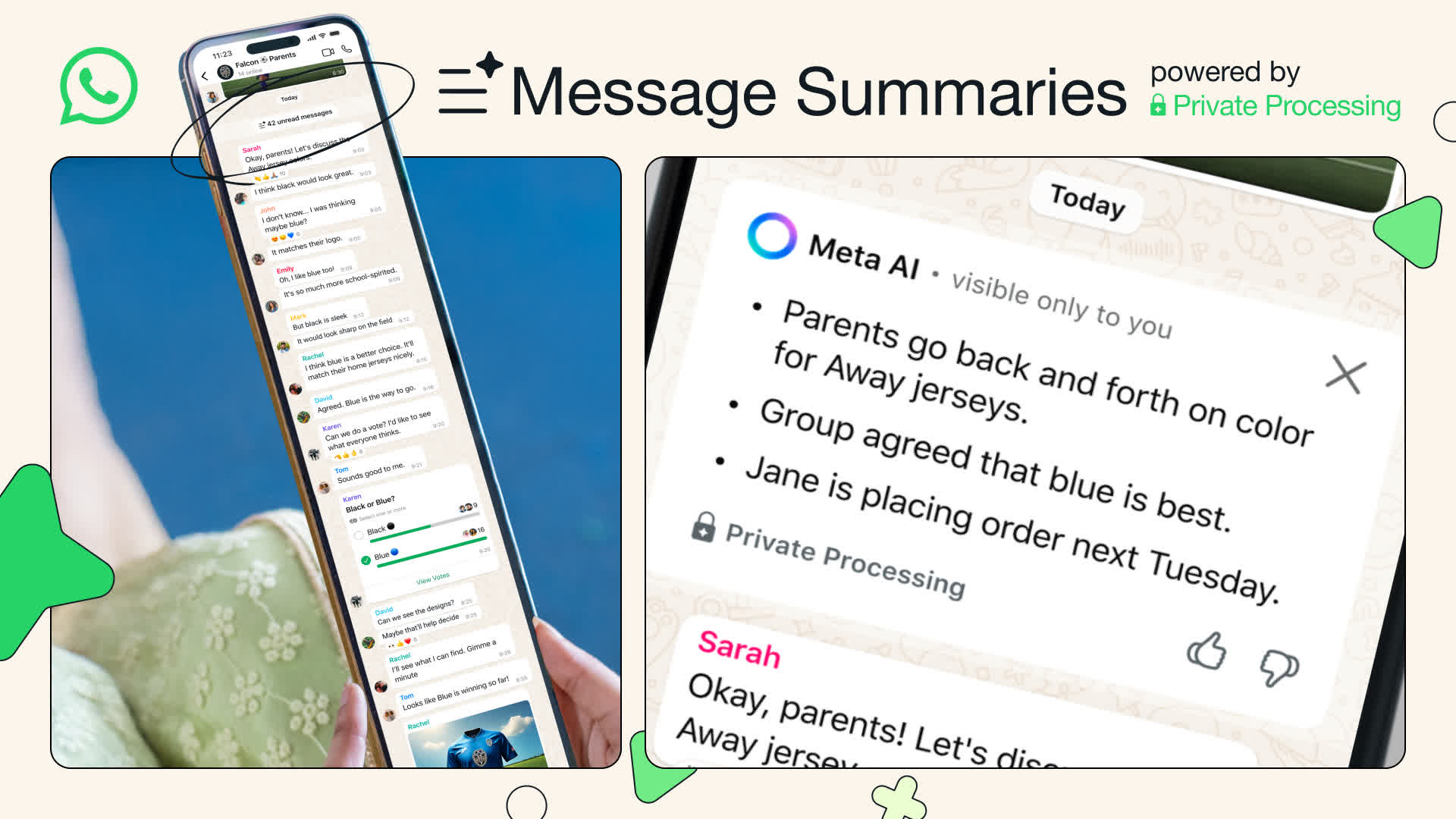
We’ve all been there – rushing between meetings, catching up after a flight without Wi-Fi, or simply having too many chats to catch up on. Sometimes, you just need to quickly catch up on your messages. That’s why we’re excited to introduce Message Summaries, a new option that uses Meta AI to privately and quickly summarize unread messages in a chat, so you can get an idea of what is happening, before reading the details in your unread messages.
How it works
Message Summaries uses Private Processing technology, which allows Meta AI to generate a response without Meta or WhatsApp ever seeing your messages or the private summaries. No one else in the chat can see that you summarized unread messages either. This means your privacy is protected at all times. For those interested in learning more about the technical details behind Private Processing, we invite you to read our engineering blog and technical whitepaper.
You’re in control
At WhatsApp, we believe that you should always be in control of your experience. That’s why using Private Processing features like Message Summaries is optional and they are off by default. You can choose whether or not to use them, and can use Advanced Chat Privacy to select which chats can be shared for AI features.
Message Summaries is rolling out in the English language to people in the United States and we hope to bring it to other languages and countries later this year.
Helping you Find More Channels and Businesses on WhatsApp
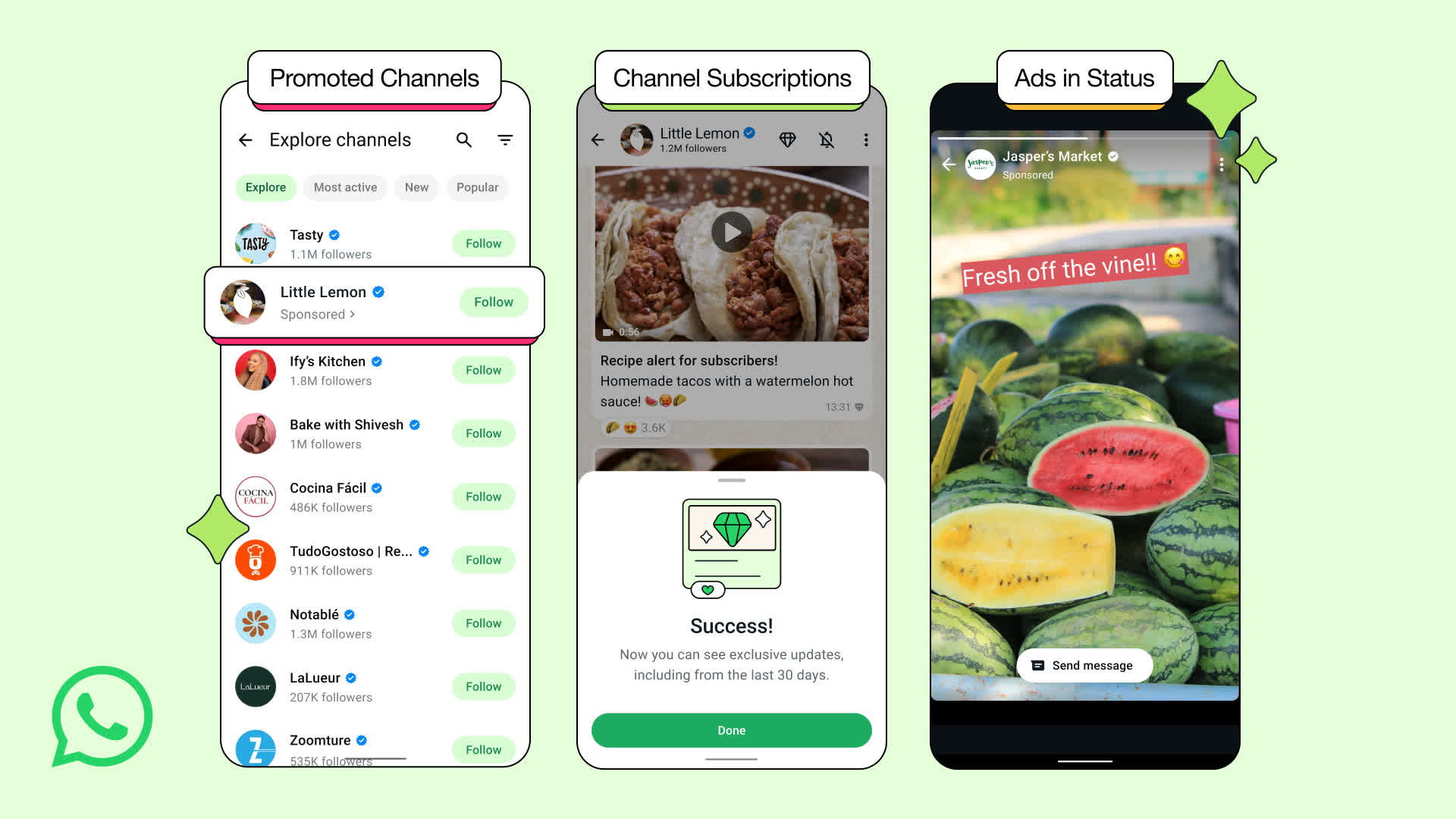
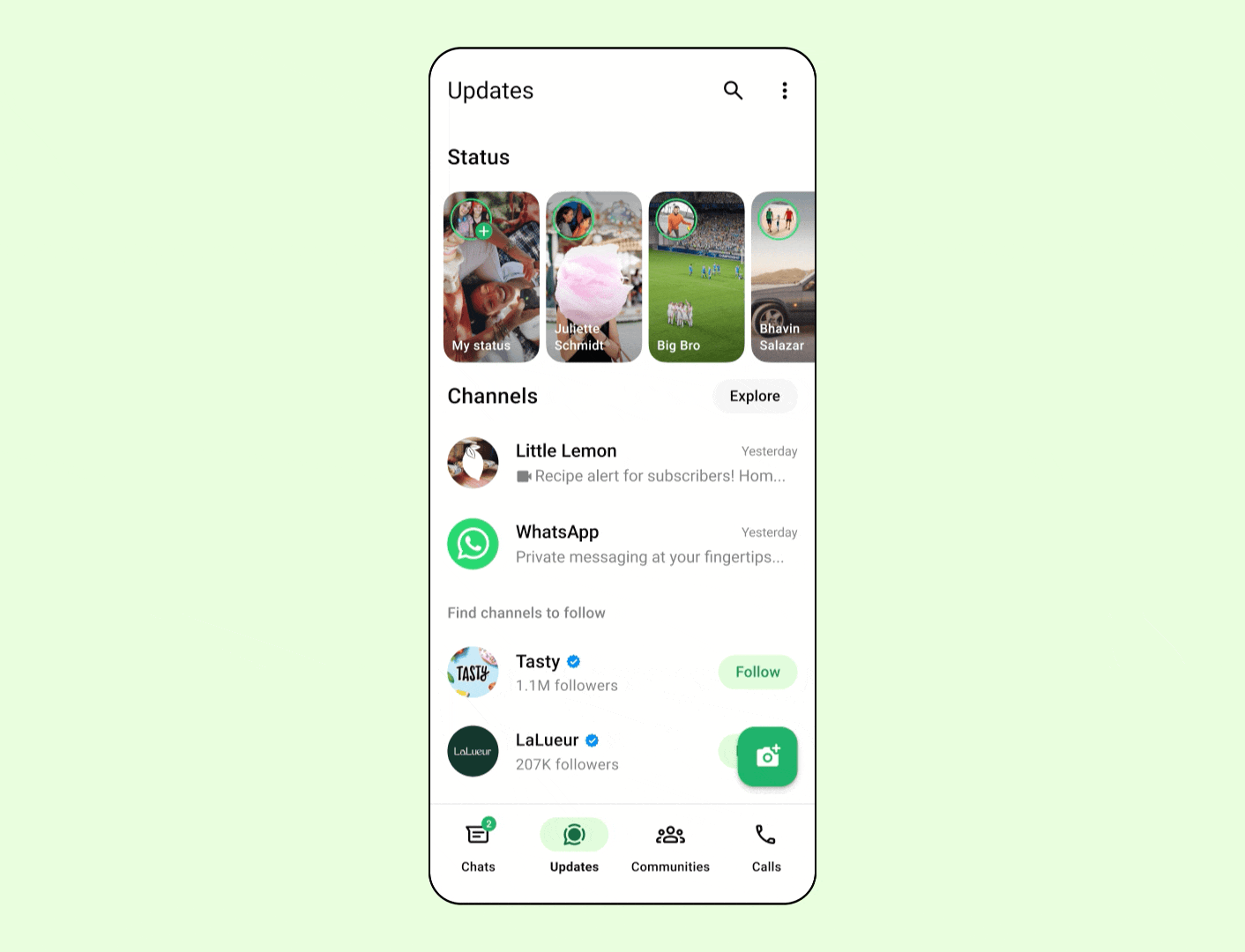
Today we’re introducing some new features for our Updates tab, which is home to both Channels and Status. We’ve worked over the last two years to make this tab the place for you to discover something new on WhatsApp and it’s now used by 1.5 billion people a day. We’re encouraged by the enthusiasm and also want to help admins, organizations, and businesses grow on WhatsApp.
We’re going to do this in three ways:
These new features will appear only on the Updates tab, away from your personal chats. This means if you only use WhatsApp to chat with friends and loved ones there is no change to your experience at all.
Ads built with privacy in mind
Like everything we do at WhatsApp, we’ve built these features in the most private way possible. Your personal messages, calls, and statuses remain end-to-end encrypted, meaning no one (not even us) can see or hear them.
To show ads in Status or Channels you might care about, we’ll use limited info like your country or city, language, the Channels you’re following, and how you interact with the ads you see. For people that have chosen to add WhatsApp to Accounts Center, we’ll also use your ad preferences and info from across your Meta accounts.
We will never sell or share your phone number to advertisers. Your personal messages, calls and groups you are in will not be used to determine the ads you may see.
We’ve been talking about our plans to build a business that does not interrupt your personal chats for years and we believe the Updates tab is the right place for these new features to work. For businesses and Channel admins looking to get started, more information about how to do so is here.
Voice Chat on WhatsApp: Audio Hangouts for groups of all sizes
Whether it’s a nail-biting football game, a dramatic season finale or sharing some big news, sometimes you need to talk it out with those available at that moment. That’s why we’re bringing voice chat to groups of all sizes so you can connect live over audio whenever, without having to leave your group chat or switch to a call, that people in your group can hop into whenever they want.
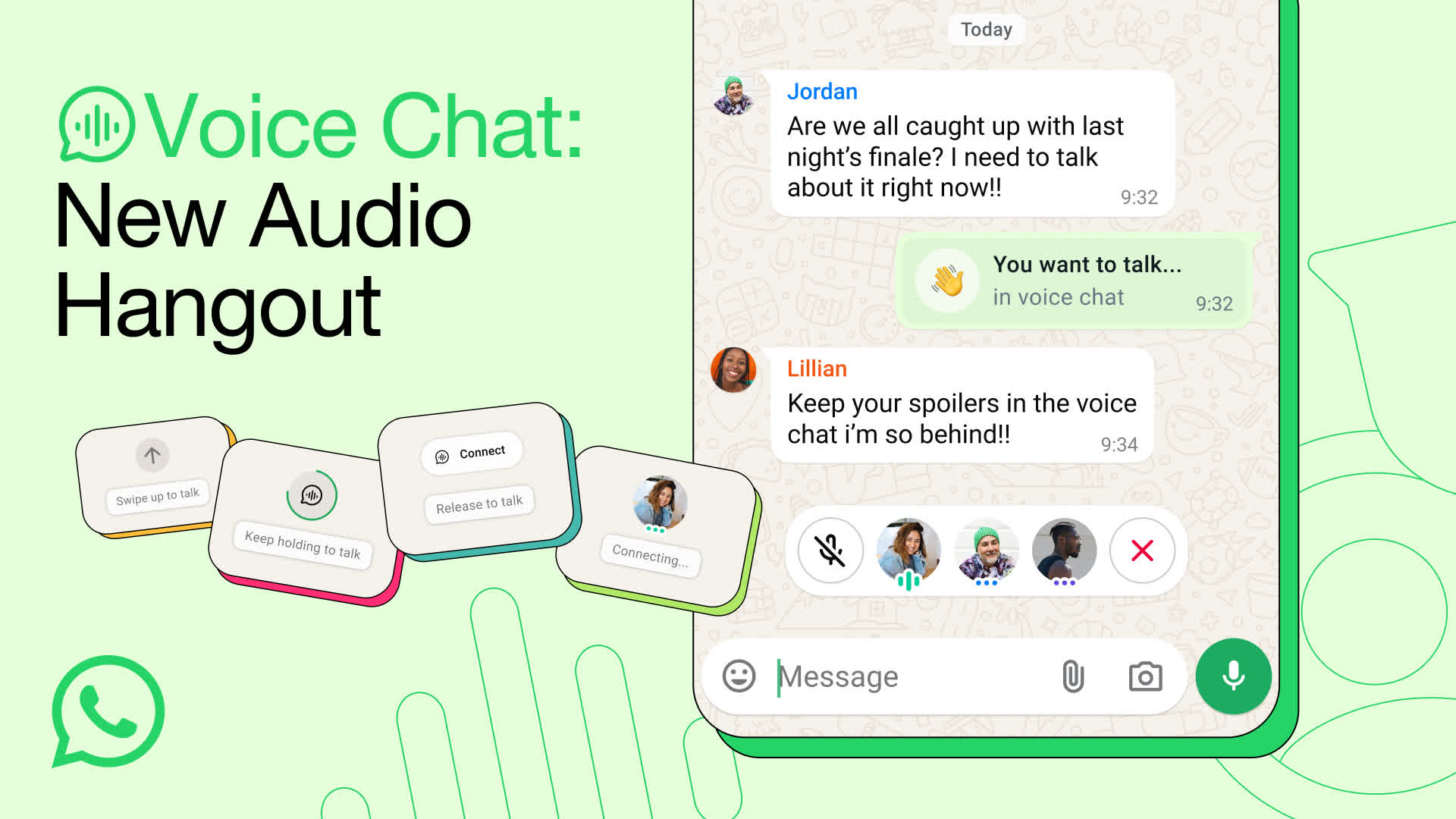
Previously available only for large groups, now anyone in your group can start a voice chat by going to the bottom of your chat, swiping up and holding for a few seconds. Starting a voice chat doesn’t notify or ring anyone, so that people can join and leave the hangout whenever. The voice chat stays pinned to the bottom of your chat so you can easily access call controls, while new members can join when they want and see who else has already.
As always, WhatsApp protects your voice chats alongside your personal calls and messages with end-to-end encryption by default.
Introducing Advanced Chat Privacy: Enhanced Protection for Your Most Sensitive Conversations
The foundation of privacy on WhatsApp is that your personal messages and calls are protected by end-to-end encryption so that only the sender and recipient can see, listen to or share them. From there, we’ve built multiple layers of privacy, like disappearing messages and chat lock, that take privacy one step further.
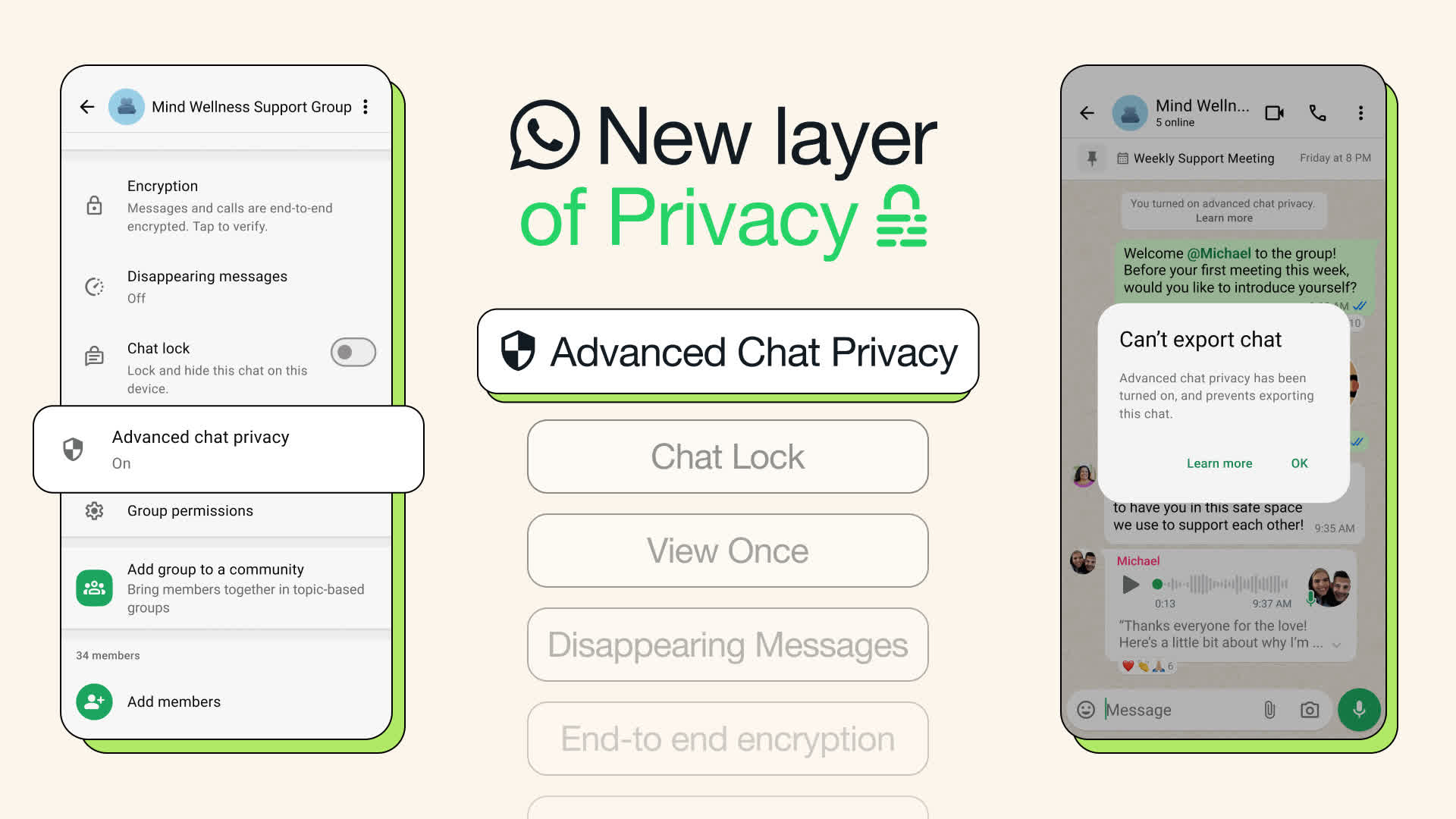
Today we’re introducing our latest layer for privacy called “Advanced Chat Privacy.” This new setting available in both chats and groups helps prevent others from taking content outside of WhatsApp for when you may want extra privacy.
When the setting is on, you can block others from exporting chats, auto-downloading media to their phone, and using messages for AI features. That way everyone in the chat has greater confidence that no one can take what is being said outside the chat.
WhatsApp groups are increasingly an extension of our real world networks, some of which are far closer than others. We think this feature is best used when talking with groups where you may not know everyone closely but are nevertheless sensitive in nature, like talking about health challenges in a support group or organizing your community about something important to you.
You can turn this on by tapping the chat name, then tapping on Advanced Chat Privacy. This is the first version of this feature and we’re planning to add more to it so that it will eventually include even more protections.
This new setting is rolling out to everyone on the latest version of WhatsApp.
Turn Up the Volume: Add Music to Your WhatsApp Status
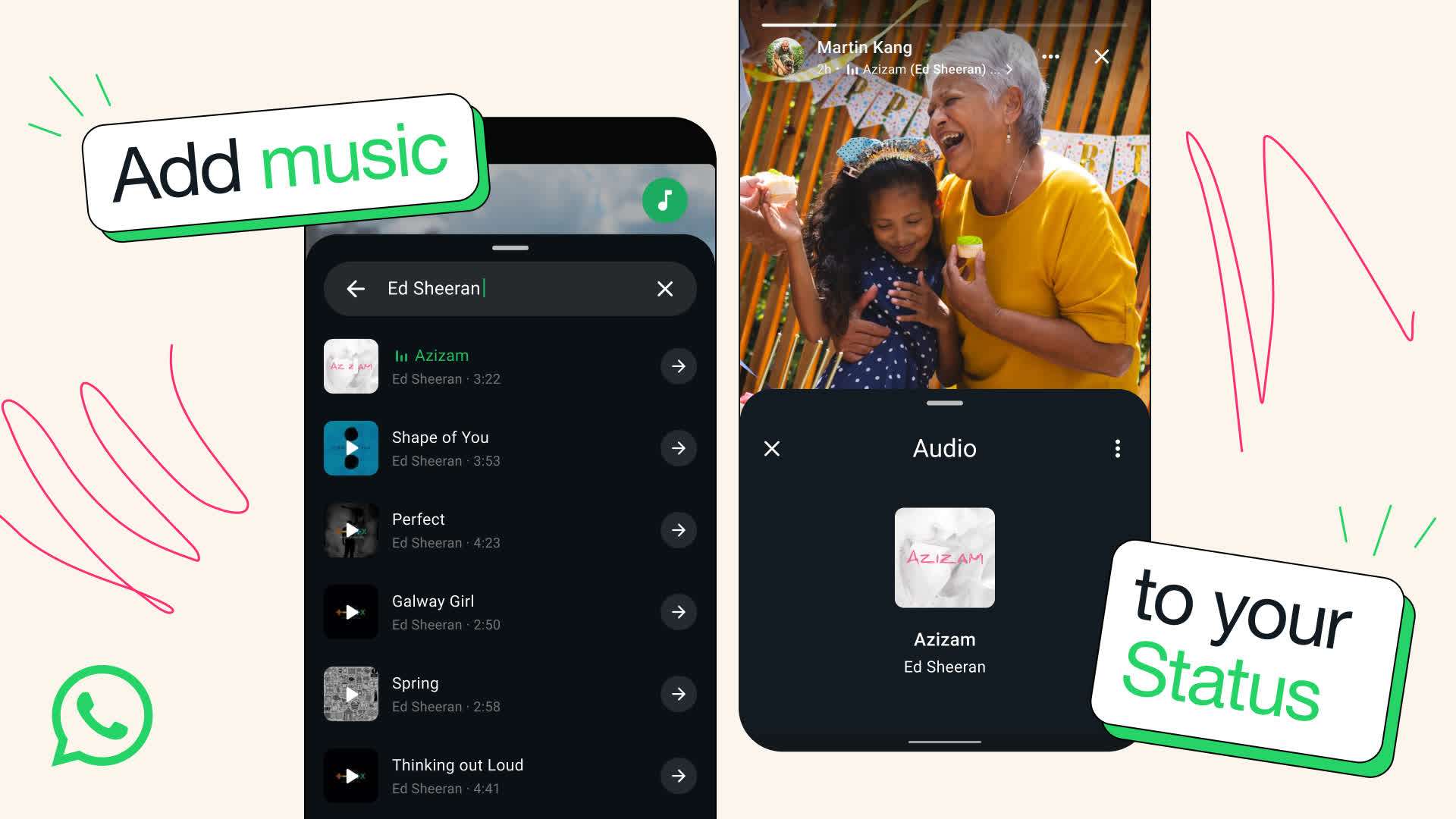
WhatsApp Status has always been a way to share life’s moments with friends and family – but what’s a moment without the perfect soundtrack? Now, you can do exactly that by adding music to your Status updates.
When creating a Status, you’ll now see a music note icon at the top of your screen. Tap it, and you’ll unlock a library of songs to pick from – whether it’s today’s top hits, something new, or the earworm that’s stuck in your head. Choose the exact part of the song that fits your moment – up to 15 seconds for a photo and up to 60 seconds for a video.
Our library has millions of songs to choose from. Your Status is end-to-end encrypted so WhatsApp can’t see what you share, and we don’t know which songs you add to your Status.
We’re rolling this out globally and expanding over the next few weeks. Get ready to drop the beat, one update at a time.
Introducing Voice Message Transcripts
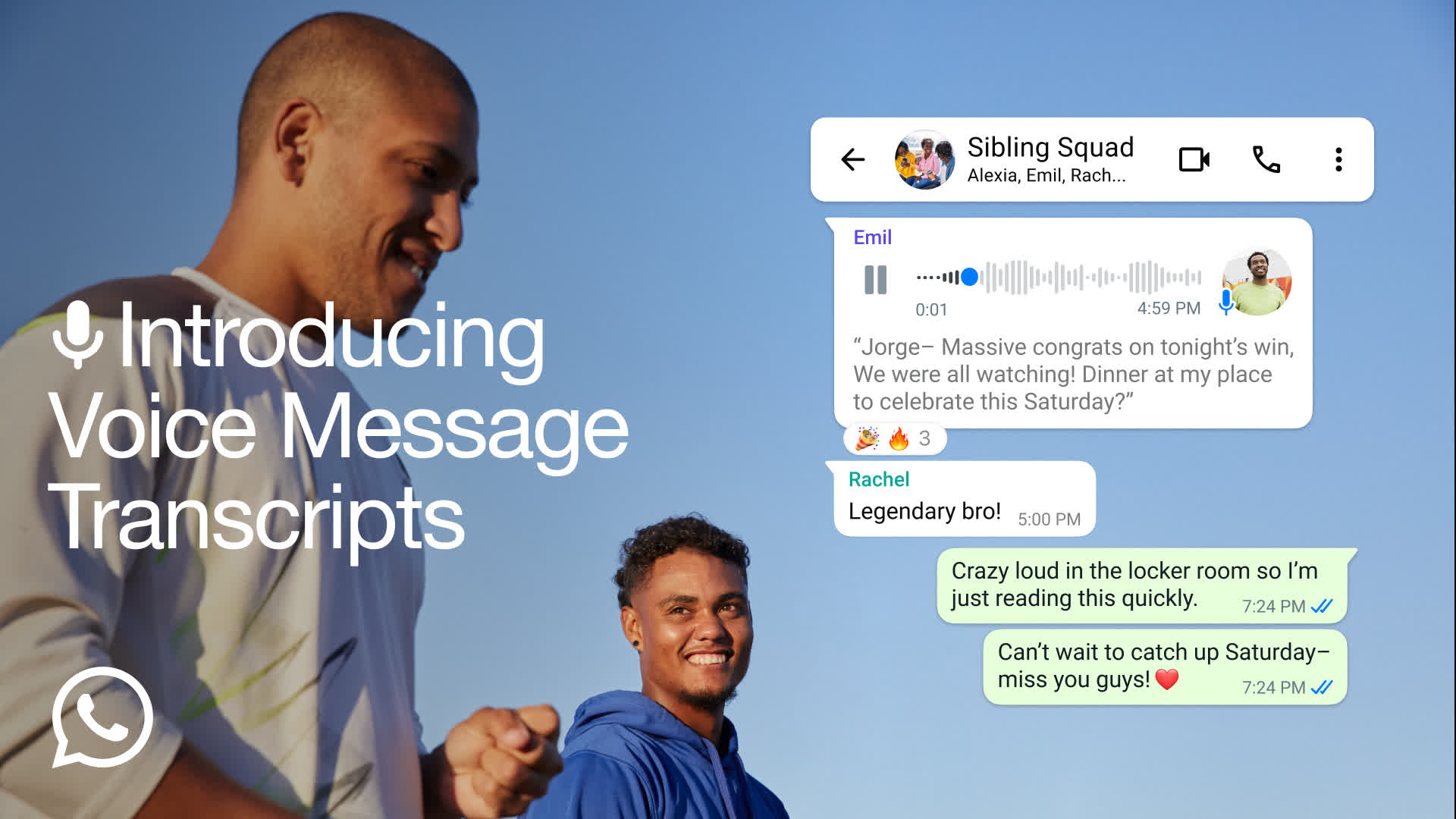
Sending a voice message makes connecting with friends and family even more personal. There’s something special about hearing your loved one’s voice even when you’re far away. Though sometimes, you’re on the move, in a loud place, or you receive a long voice message that you just can’t stop and listen.
For those moments we’re excited to introduce voice message transcripts. Voice messages can be transcribed into text to help you keep up with conversations no matter what you’re doing.
Transcripts are generated on your device so that no one else, not even WhatsApp, can hear or read your personal messages.
To get started, go to Settings > Chats > Voice message transcripts to easily turn transcriptions on or off and select your transcript language. You can transcribe a voice message by long pressing on the message and tapping on ‘transcribe’. We’re excited to build on this experience and make it even better and more seamless.
Transcripts are rolling out globally over the coming weeks with a few select languages to start though we plan to add more over the coming months. You can learn more about how they work and which languages are currently supported by clicking here.
Making it Easier to Add and Manage Contacts
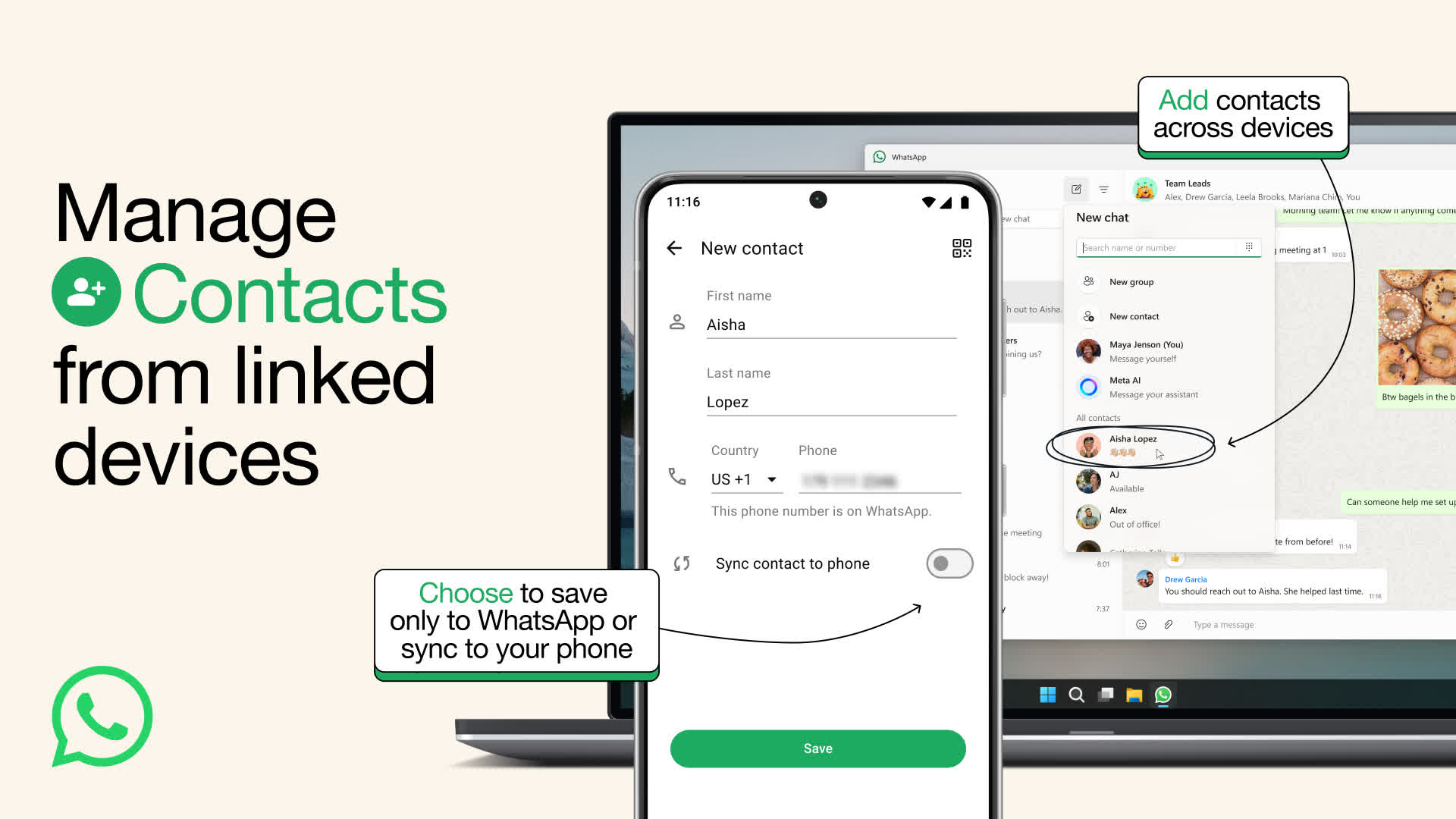
What’s more important than sending a message? It’s the person you’re sending it to, of course. Today we’re making it easier to privately add and manage your contacts on WhatsApp, from any device you may be using.
Until now, the only place you were able to add contacts was from your mobile device, by either typing in a phone number or scanning a QR code. Soon, you’ll be able to add and manage contacts from the comfort of your keyboard on WhatsApp Web and Windows – and eventually other linked devices.
We’re also introducing a new choice to save a contact exclusively to WhatsApp. These WhatsApp contacts are ideal for when you are sharing your phone with others or if you want to separate personal and business contacts when managing more than one WhatsApp account on your phone.
Contacts you save to WhatsApp will be restored in case you ever lose your phone or change devices.
These updates will also make it possible to eventually manage and save contacts by usernames. Usernames on WhatsApp will add an extra degree of privacy so that you don’t need to share your phone number when messaging someone. Today’s just one crucial step to making that reality possible and we’ll have more to share when it’s ready.
Meta AI on WhatsApp – Now Multilingual, More Creative and Smarter
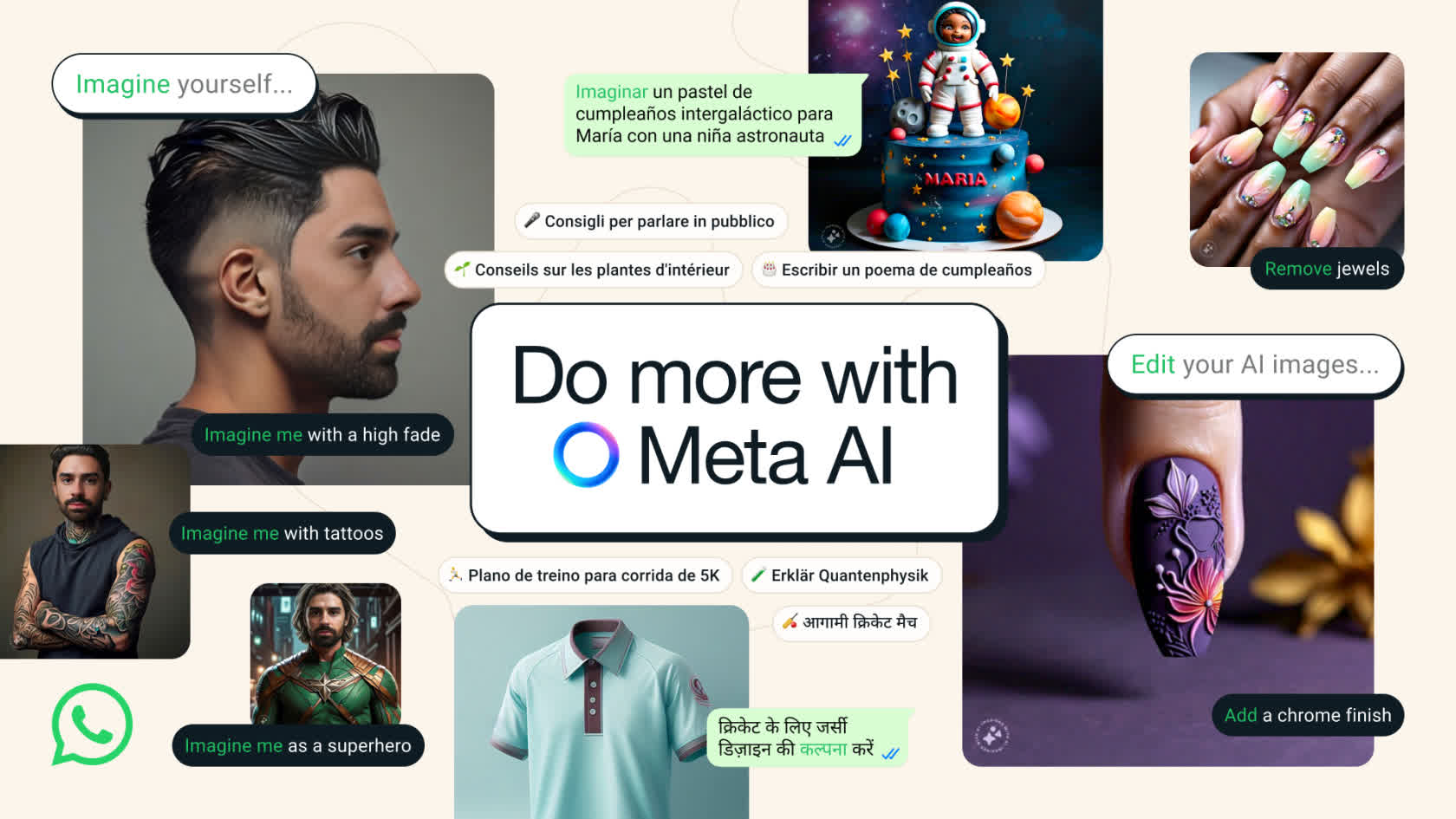
As Meta AI continues to improve with new useful features and languages, we’re excited to bring this helpful and creative assistant to more countries starting today.
Continued International Expansion
Meta AI can help you with answers, ideas and inspiration. It’s now available in 22 countries, with the newest additions rolling out now including Argentina, Chile, Colombia, Ecuador, Mexico, Peru and Cameroon in several new languages including French, German, Hindi, Italian, Portuguese and Spanish with more to come.
Imagine Edit
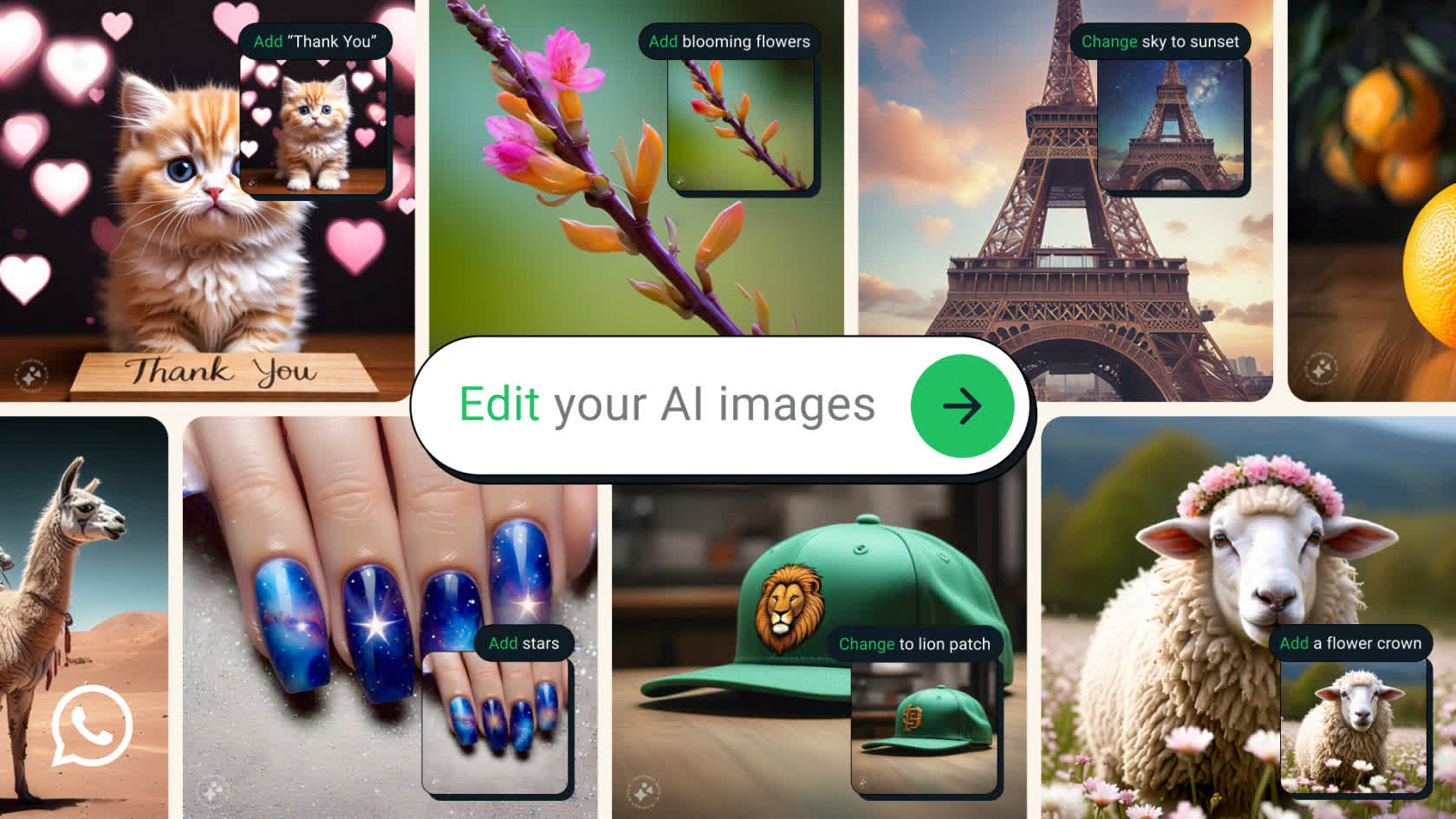
We are also making it easier to create your ideal image with Meta AI by making it possible to easily change and edit an image, including adding or removing objects within it. To start, type “imagine” to describe your image and then respond to what Meta AI provides by asking it to add, subtract, or animate the image to your liking. Imagine Edit is available in English at first, with more languages coming soon.
Imagine Yourself
If you’ve ever wondered what you might look like as a superhero, or wanted to try out different hair or outfits – you can now imagine yourself doing just about anything. Simply type “Imagine me” in chats with Meta AI to get started. After a quick set up, you’ll be able to add a prompt like “Imagine me in a retro pink and green ski outfit” and Meta AI will generate an image of you in that personalized scene. You can reset or delete your setup photos at any time. This is available in beta in the U.S. for now, with more languages and countries coming soon.

We are excited to continue to share new capabilities and advancements from Meta AI with more and more people on WhatsApp. As always, your personal messages and calls remain end-to-end encrypted, meaning not even WhatsApp or Meta can see or listen to them. The team is working on improving responses to Meta AI rapidly and introduces improvements every two weeks. We would love to hear from you, and see how Meta AI has helped you be more creative and expressive. Tag us on Threads and share what you’ve imagined.
Choose your favorites on WhatsApp
Focusing on your favorites just got a lot easier on WhatsApp. Starting today, you can quickly find the people and groups that matter most at the top of your calls tab and as a filter for your chats.
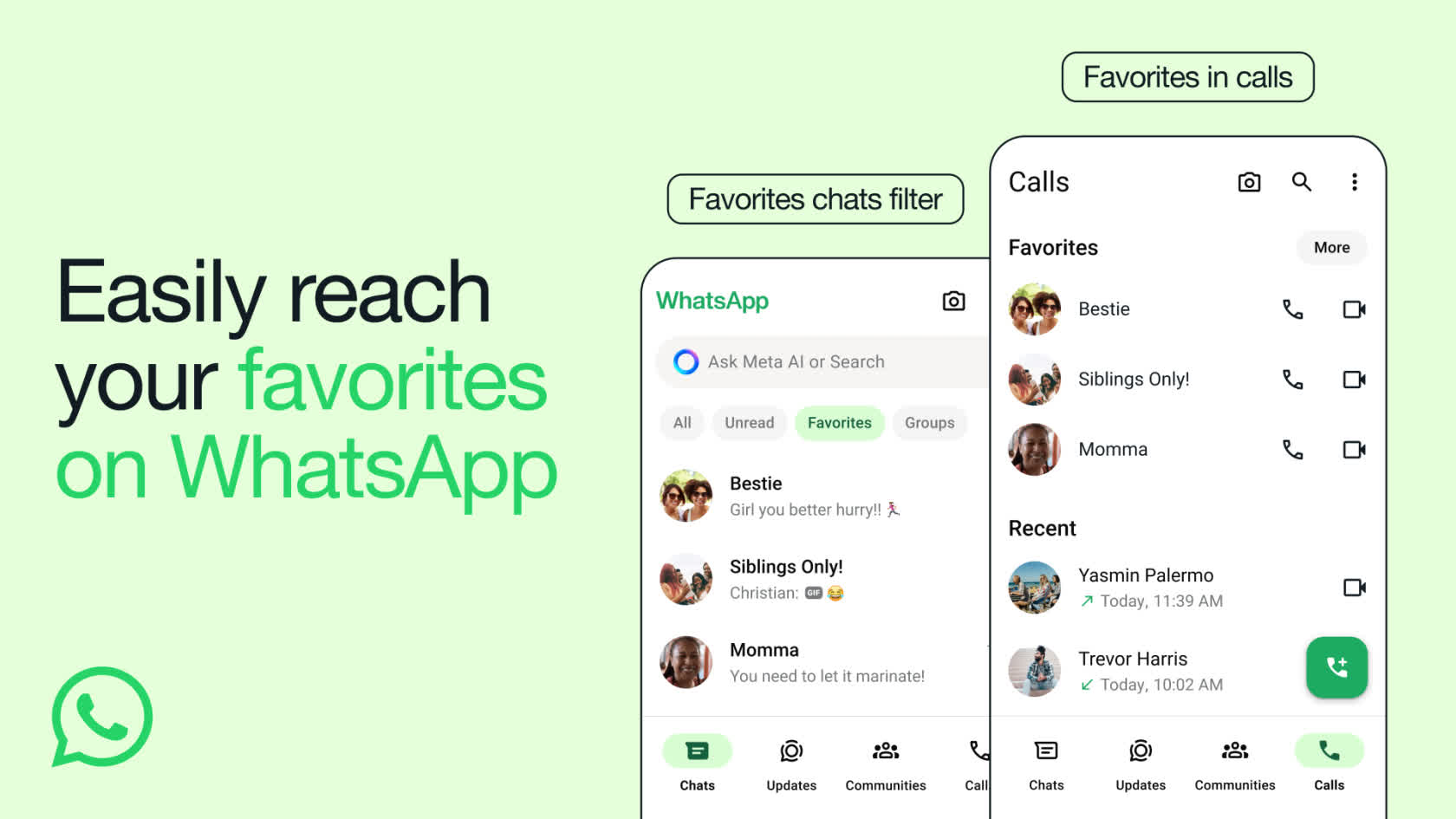
Whether it’s your family group chat or your best friend, your ‘favorites’ will be the same across your chats and calls, so you can speed dial them from your calls tab too.
To add to your ‘favorites’:
We’re rolling out to users today, and will be available to everyone in the coming weeks.
Better calling across desktop and mobile
Since we brought Calling to WhatsApp back in 2015, we’ve continued to improve it with the introduction of group calls, video calls, and multi-platform support.
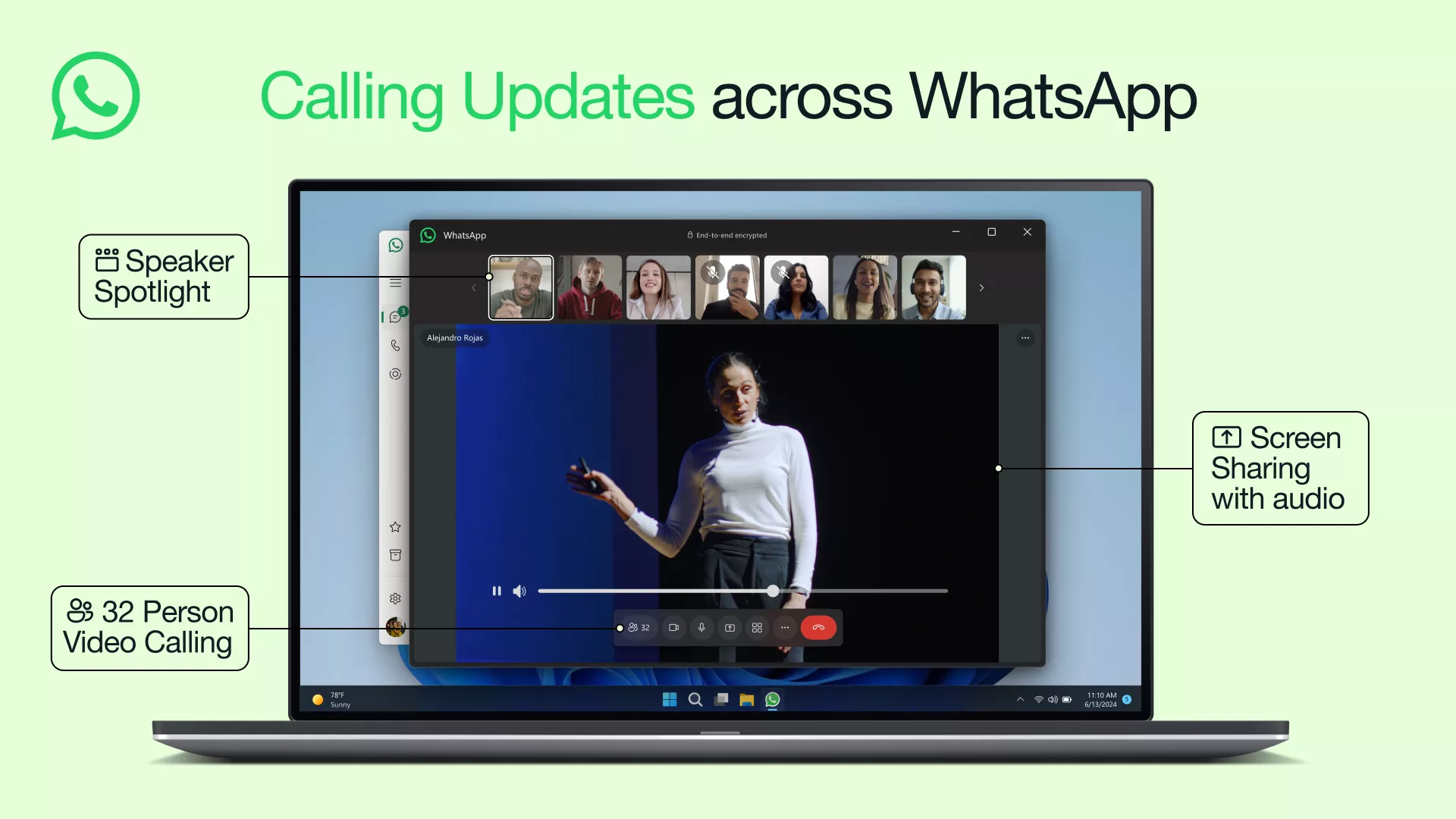
Today we have several updates that will make calls across your devices even bigger and better, rolling out over the next few weeks:
We also remain relentlessly focused on audio and video quality, for clearer calls no matter where you are. We recently launched MLow codec which improves call reliability. Calls made on mobile devices benefit from improved noise and echo cancellation, making it easier to have calls in noisy environments, and video calls have higher resolution for those with faster connections. Audio is crisper overall, even if you have poor network connectivity or are using an older device. You can read more about the MLow codec and listen to the difference in audio quality here.
We’ll continue making improvements to calling on WhatsApp so you can make the best quality, private calls wherever you are in the world.
Previous Release Notes:
Voice messages just got more private
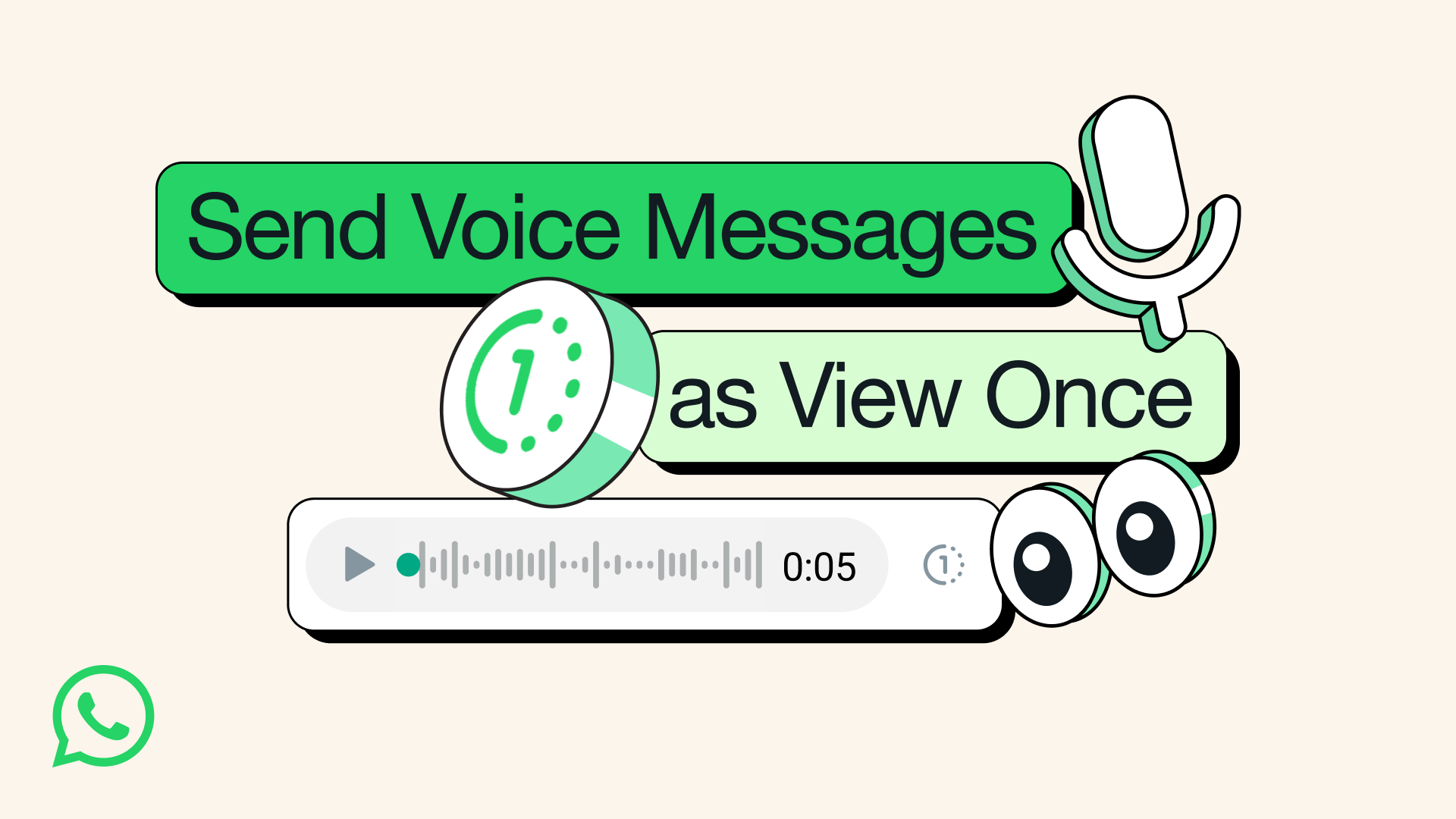
We introduced View Once for photos and videos back in 2021 to add another layer of privacy to your messages. Today, we’re excited to announce you can now send a voice message that will disappear once listened to.
For reading out your credit card details to a friend, or when you’re planning a surprise, you can now also share sensitive information over voice message with added peace of mind. For consistency with View Once photos and videos, View Once voice messages are clearly marked with the “one-time” icon and can only be played one time.
As with all your personal messages, WhatsApp protects your voice messages with end-to-end encryption by default, and View Once is just another example of our continued privacy innovation.
View Once voice messages are rolling out globally over the coming days, and we look forward to your feedback. See more information on how they work here.
Multiple Accounts Coming to WhatsApp
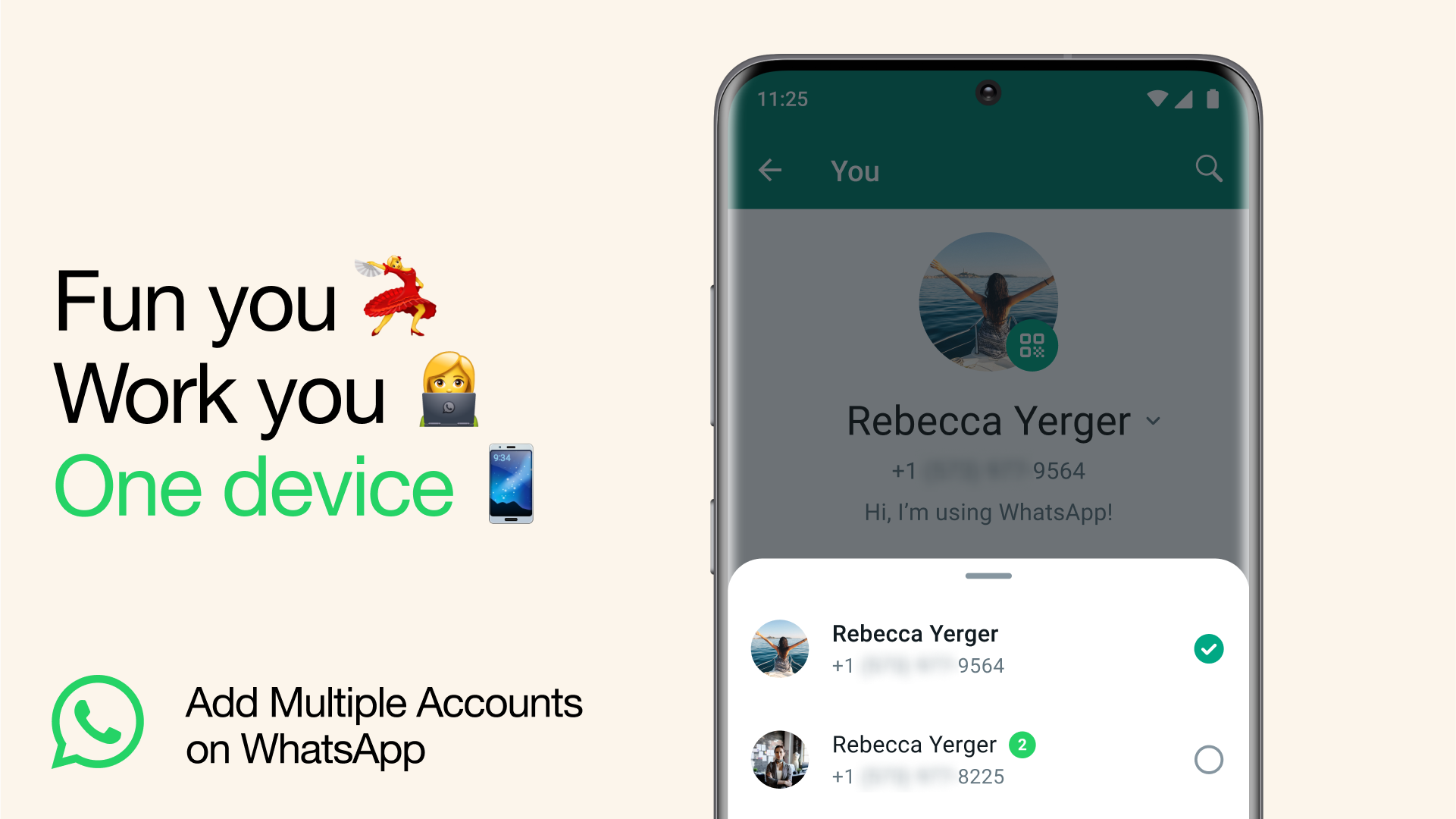
What’s better than having a WhatsApp account? Well, of course it’s having two.
Today, we’re introducing the ability to have two WhatsApp accounts on Android logged in at the same time. Helpful for switching between accounts – such as your work and personal – now you no longer need to log out each time, carry two phones or worry about messaging from the wrong place.
To set up a second account, you will need a second phone number and SIM card, or a phone that accepts multi-SIM or eSIM. Simply open your WhatsApp settings, click on the arrow next to your name, and click “Add account”. You can control your privacy and notification settings on each account.
As a reminder, only use the official WhatsApp and don’t download imitations or fake versions as a way of getting more accounts on your phone. Your messages are only secure and private when using the official WhatsApp.
How to lock chats in WhatsApp
On Android and iPhone, you can turn on the chat lock feature to password protect your most personal chats. In order to read or send messages, you’ll need to unlock your chats using device authentication, such as your phone passcode, Face ID or fingerprint. These chats will be kept separate from your other chats in a Locked chats folder.
Turn on chat lock
You can turn chat lock off or on within the chat’s info for each chat you want to lock. If you don’t have your device authentication set up yet, such as your phone passcode, fingerprint or Face ID, you’ll be prompted to set it up before locking a chat.
How to turn on chat lock:
View your locked chats
You can view your locked chats in the Locked chats folder.
How to view your locked chats:
Turn off chat lock
You can turn off chat lock in the chat’s info.
How to turn off chat lock:
How to edit messages in WhatsApp
You can edit any message up to 15 minutes after sending, and it’ll update for everyone in the chat. Edited messages will have the word “edited” next to the timestamp.

If you aren’t on the latest version of WhatsApp you’ll see, “This message was edited for everyone in this chat on the latest version of WhatsApp.” Update your app to see edited messages.
Note:
You can edit any message up to 15 minutes after sending, and it’ll update for everyone in the chat. Edited messages will have the word “edited” next to the timestamp.
If you aren’t on the latest version of WhatsApp you’ll see, “This message was edited for everyone in this chat on the latest version of WhatsApp.” Update your app to see edited messages.
Note:
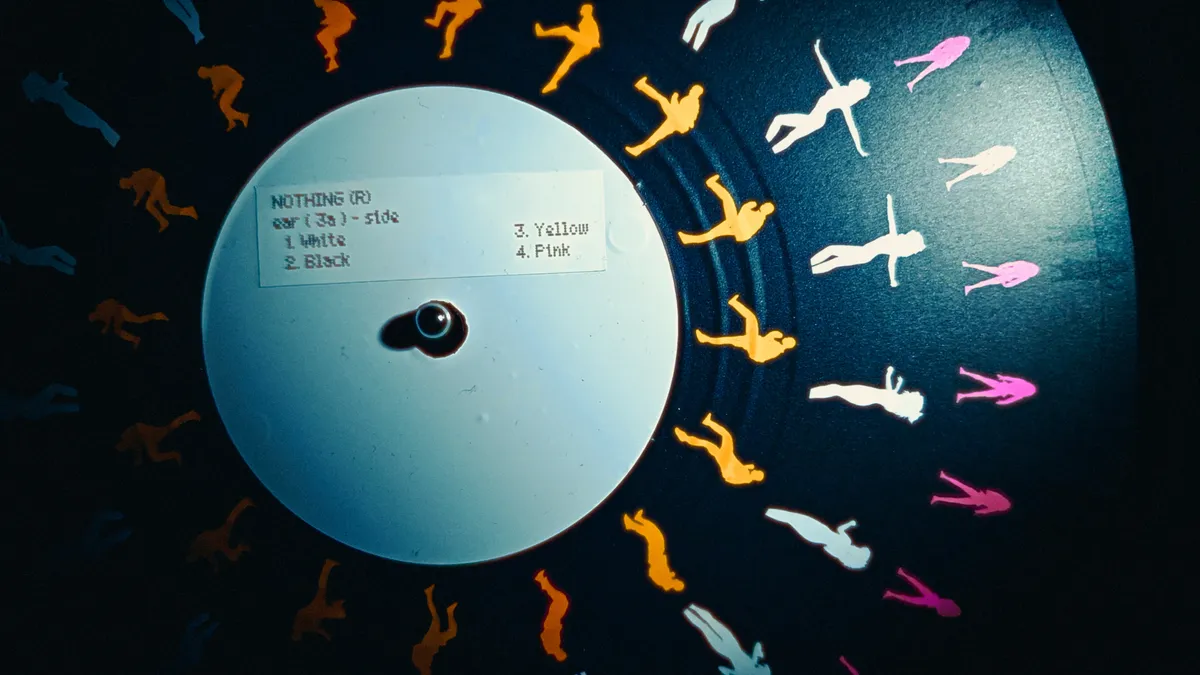
British tech company Nothing is gearing up to launch the next two devices in its ever-expanding product portfolio on July 7. In the phone category, Nothing is set to launch the Phone 4B, the successor to the Phone 4A, which it just announced in March. Meanwhile in audio, its newest offering will be the Ear 3A — likely its next pair of in-ear headphones, building on the success of the Ear 3.
Nothing teased the Phone 4B launch last week, then confirmed over the weekend that the phone was on its way, and gave us a series of pictures and a bunch of details to whet our appetites for the upcoming launch. The company’s phone strategy is very much focused on only releasing one major flagship phone every other year, but delivering a range of budget and mid-range alternatives in the interim.
The upcoming Phone 4B, pictured in blue, has a unibody design that Nothing says is both strong and smooth. The Glyph Bar, which was also on the Phone 4A, will now flash with live updates, and the phone will come with a slimmed-down version of its predecessor’s transparent bump.
The Nothing Ear 3A launch is also scheduled for July 7.
On Tuesday, Nothing said it will also launch the Ear 3A on the same day as the Phone 4B. In a teaser image, the company listed four colors — white, black, yellow and pink — presumably letting us know the shades it’s chosen for the upcoming buds.
Nothing has always had a distinct design language that differentiates from its comparatively bland competitors in the Android phone market, which since the company’s inception has been defined by its transparency. But throughout 2026, we’ve seen the company increasingly experiment with color — particularly blue, pink and yellow.
Nothing’s Chief Brand Officer Charlie Smith told me back in March at Mobile World Congress that the company’s embrace of color is an important part of its culture of “rebellious creativity.” “If we want to make technology fun,” Smith said, “we can’t do that by things just being gray, black and white.”
The Phone 4A’s pale pink hue was one of CNET Editor at Large Andrew Lanxon’s favorite things about the phone when he reviewed it back in May. “It’s a fun color that doesn’t take itself too seriously — and that’s refreshing,” he said. “Would I like to see the next model go eye-meltingly magenta? Absolutely.”
On its Ear 3A teaser post, the company has included some brighter tones, but the blue Phone 4B looks very similar in color to the blue iteration of the Phone 4A. Bolder tones for the headphones would make sense, especially given that the launch tag line on Nothing’s website describes them as “your new party pill.”
With July 7 just one week away, we don’t have long to wait to find out exactly what that means.

The NOISFERATU is an open source generative textural sound synthesizer, or as creator [Robert Heel] puts it, “a sound designer’s dream and audiophile’s worst nightmare”.
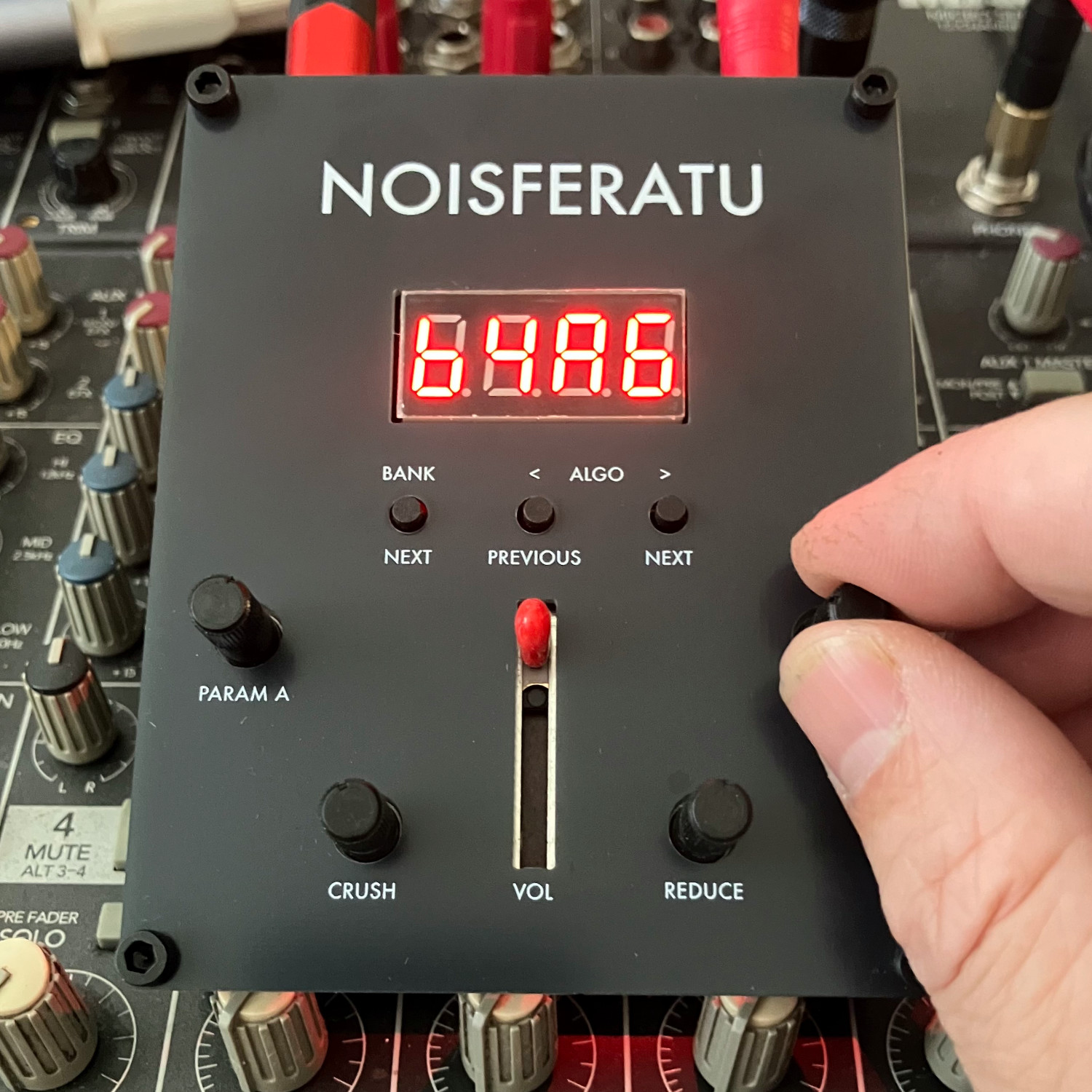 NOISEFERATU offers 45 different sound algorithms grouped into five banks produce a dazzling range of evolving soundscapes and patterns that resist repetition or settling, each influenced and shaped — the word controlled does not quite apply — by a volume slider and a few hardware knobs.
So what does it actually sound like? Check out the video embedded below to give it a listen, it’s pretty trippy.
Hardware-wise NOISEFERATU is centered around the Seeed Studio XIAO SAMD21 microcontroller, takes power over USB-C, and has a headphone jack for sound output. We love the artwork on the dual-sided front panel, too.
DIY synthesizers based on logic chips have a long and proud history, and seeing the different directions people can go by incorporating microcontrollers is always a delight.
If NOISEFERATU’s experimental sound and noise sounds up your alley, the design files and code on GitHub have everything one should need to build one. Kits are for sale direct from the designer, as well.




Two goals and an assist by sheer aura: Cristiano Ronaldo just entered the World Cup chat


Weekend Open Thread: Staud – Corporette.com


The House | Manchesterism won’t survive the painful trade-offs unless it gets citizens on board

Strategy authorizes up to $1.25B in Bitcoin sales under new capital plan


Potential 2028er World Cup attendee leaderboard


Asia stock markets slide as tech shares slump


MAJOR BITCOIN & MARKET UPDATE!!!! (MUST WATCH ASAP!!!)


A Look At A Gaggle Of Transputer Boards


Securitize Wraps Roubini's SEC-Registered ETF as Dubai VARA Digital Security
Bitcoin (BTC) Dips Below $62K, Ethereum (ETH) Plunges 6% Daily: Market Watch

Dell (DELL) Shares Tumble Over 5% Following Analyst Downgrade to Hold

Coinbase, Circle Deepen Crypto Stock Losses Despite Resilient S&P 500
Entergy settles forward sale agreements, raises $672 million in cash proceeds


Kraken's xStocks Opens Bending Spoons IPO Registration to EEA Retail


FIH Pro League: India defeat Pakistan 7-1, register biggest win of campaign | Other Sports News


Australia treasurer says alleged access of prime minister’s bank data ’incredibly concerning’


Bitcoin Sparks $600M Hourly Liquidations With $65,000 Set To Become Resistance


Bluekit phishing kit adopts browser-in-the-middle for login theft

Russian hackers now target Signal backup recovery keys
Hyperliquid Named on Singapore MAS Investor Alert Register


You must be logged in to post a comment Login